Cambridge A Level Applied Information and Communication Technology 9713 — 2008 Oct/Nov Paper 2 · Variant 1
9713/21/O/N/08 · 120 marks · ≈135 min
The question paper and its mark scheme, free to read here and free to download. This is Cambridge’s own paper, exactly as it was sat.
Question paper5 pages
Mark scheme14 pages
Answers below. Sit the paper first if you are practising.
Paper as text
Question paper, page 1
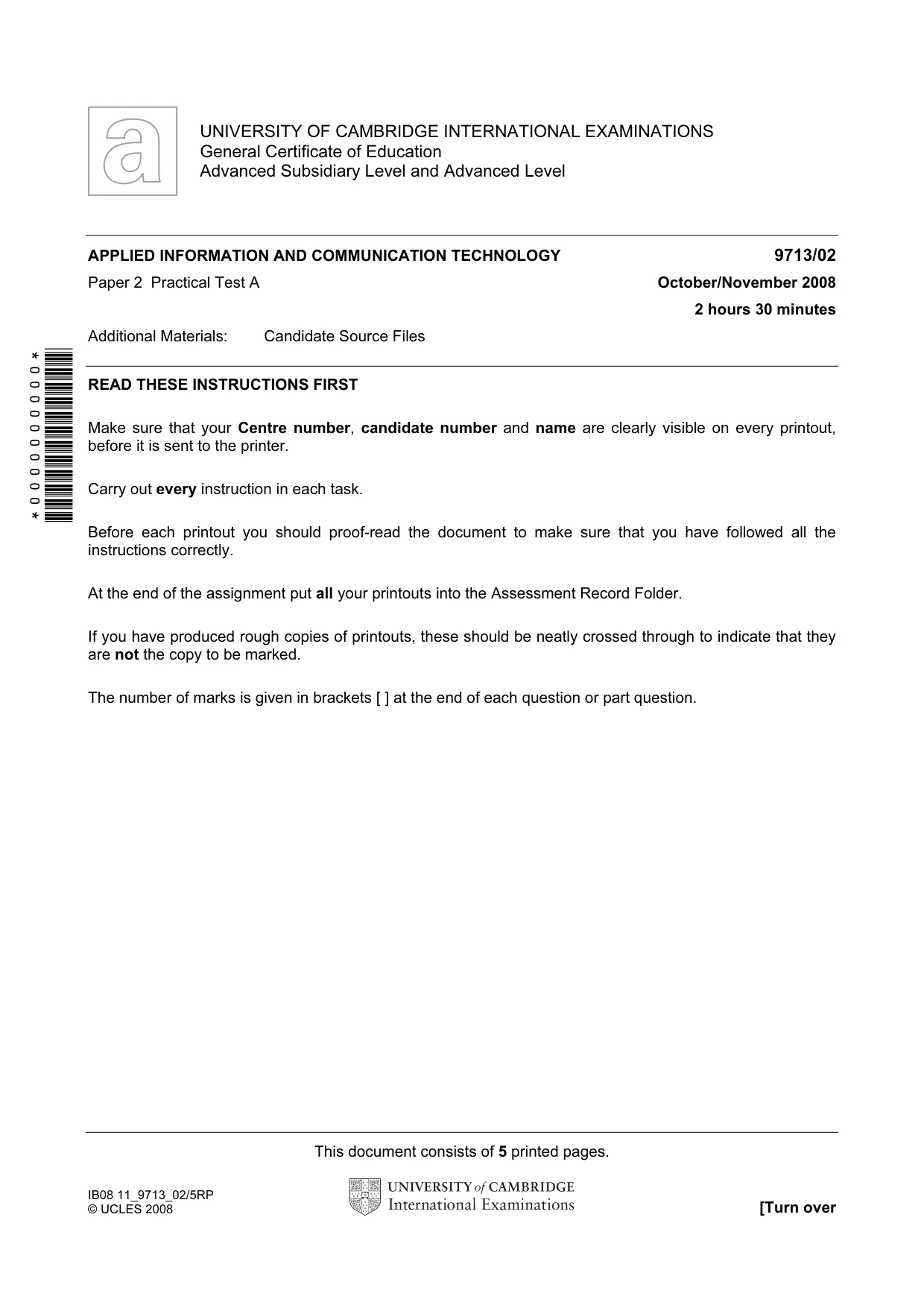
This document consists of 5 printed pages. IB08 11_9713_02/5RP © UCLES 2008 [Turn over *0000000000* UNIVERSITY OF CAMBRIDGE INTERNATIONAL EXAMINATIONS General Certificate of Education Advanced Subsidiary Level and Advanced Level APPLIED INFORMATION AND COMMUNICATION TECHNOLOGY 9713/02 Paper 2 Practical Test A October/November 2008 2 hours 30 minutes Additional Materials: Candidate Source Files READ THESE INSTRUCTIONS FIRST Make sure that your Centre number, candidate number and name are clearly visible on every printout, before it is sent to the printer. Carry out every instruction in each task. Before each printout you should proof-read the document to make sure that you have followed all the instructions correctly. At the end of the assignment put all your printouts into the Assessment Record Folder. If you have produced rough copies of printouts, these should be neatly crossed through to indicate that they are not the copy to be marked. The number of marks is given in brackets [ ] at the end of each question or part question.
Question paper, page 2
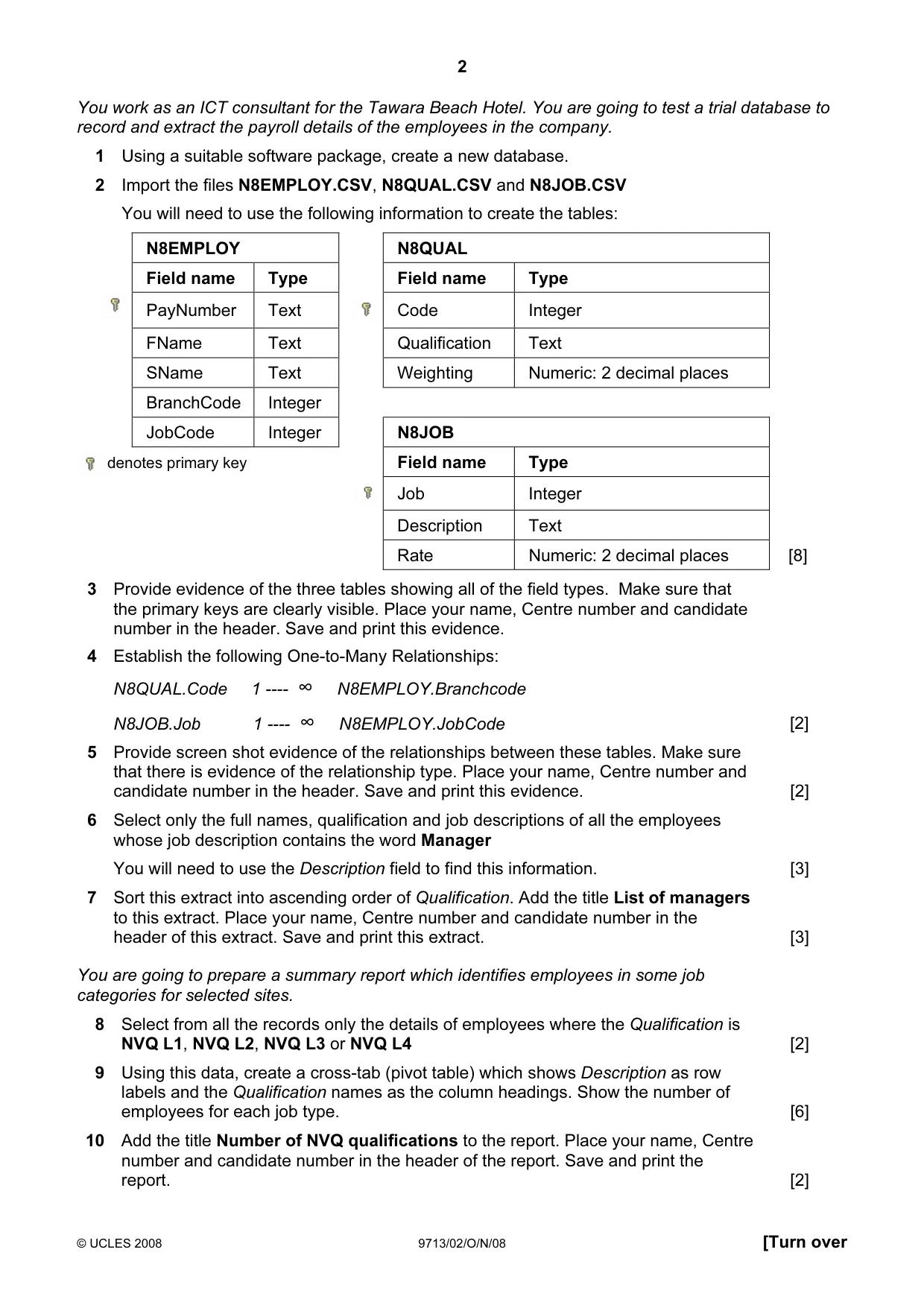
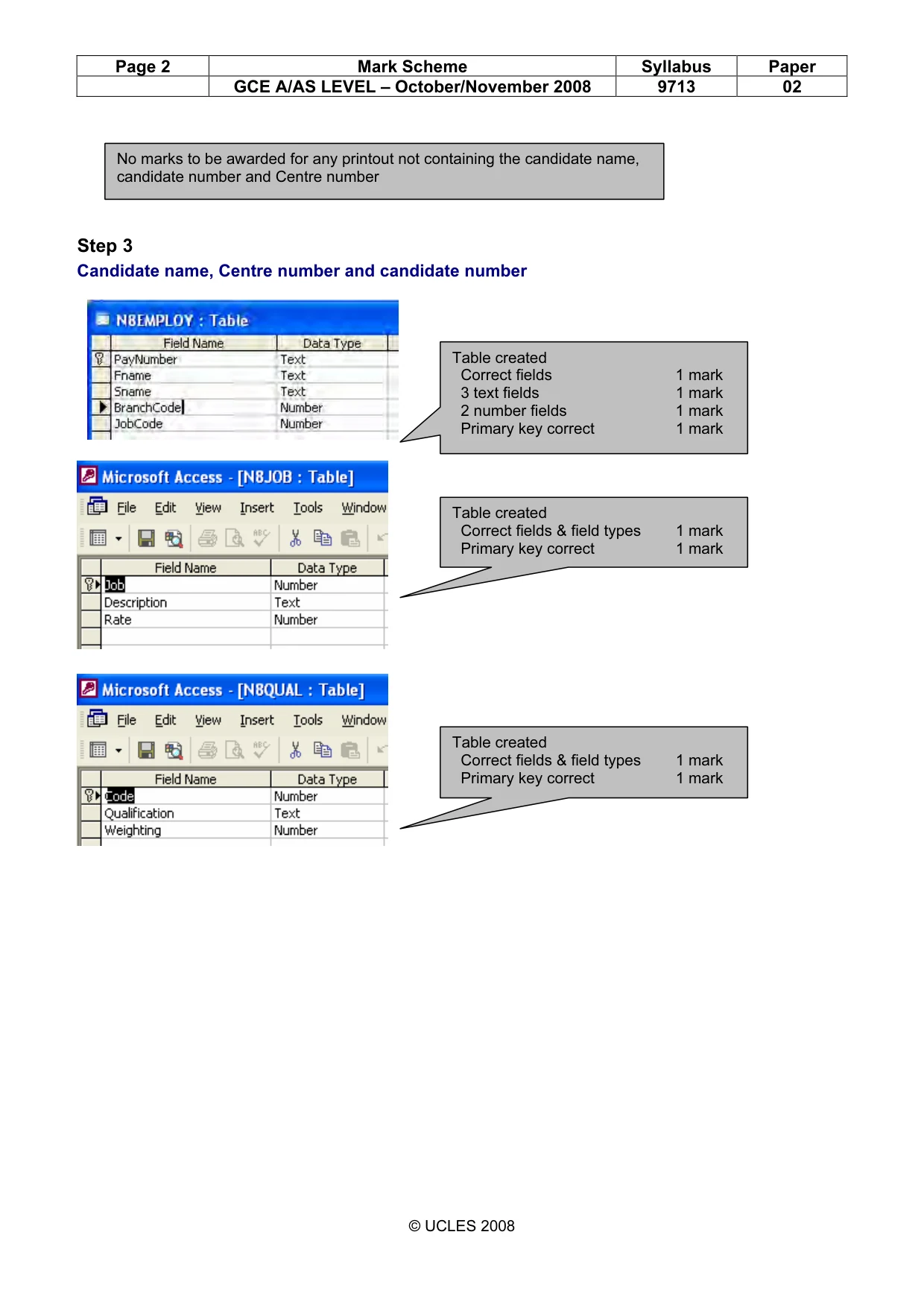
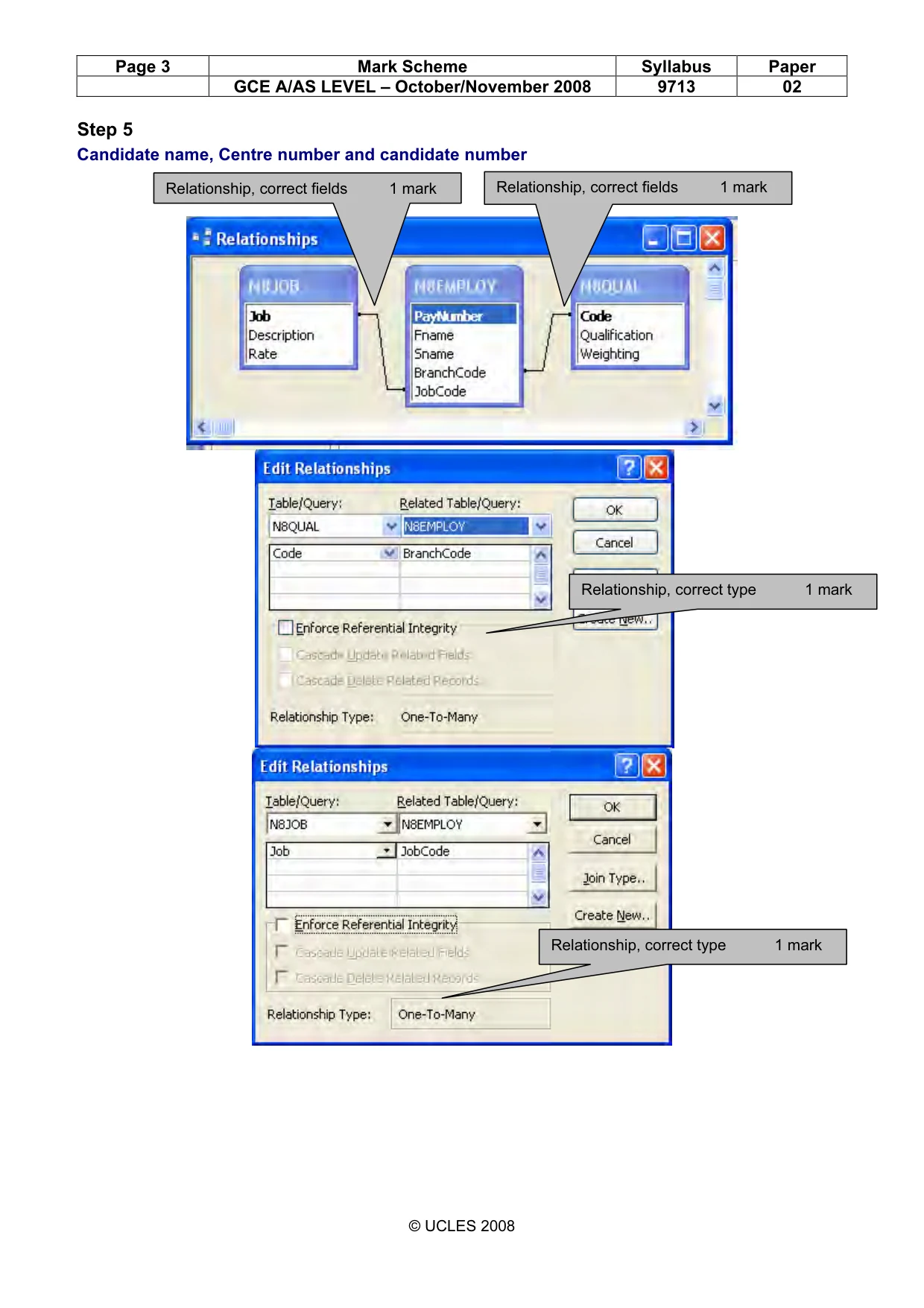
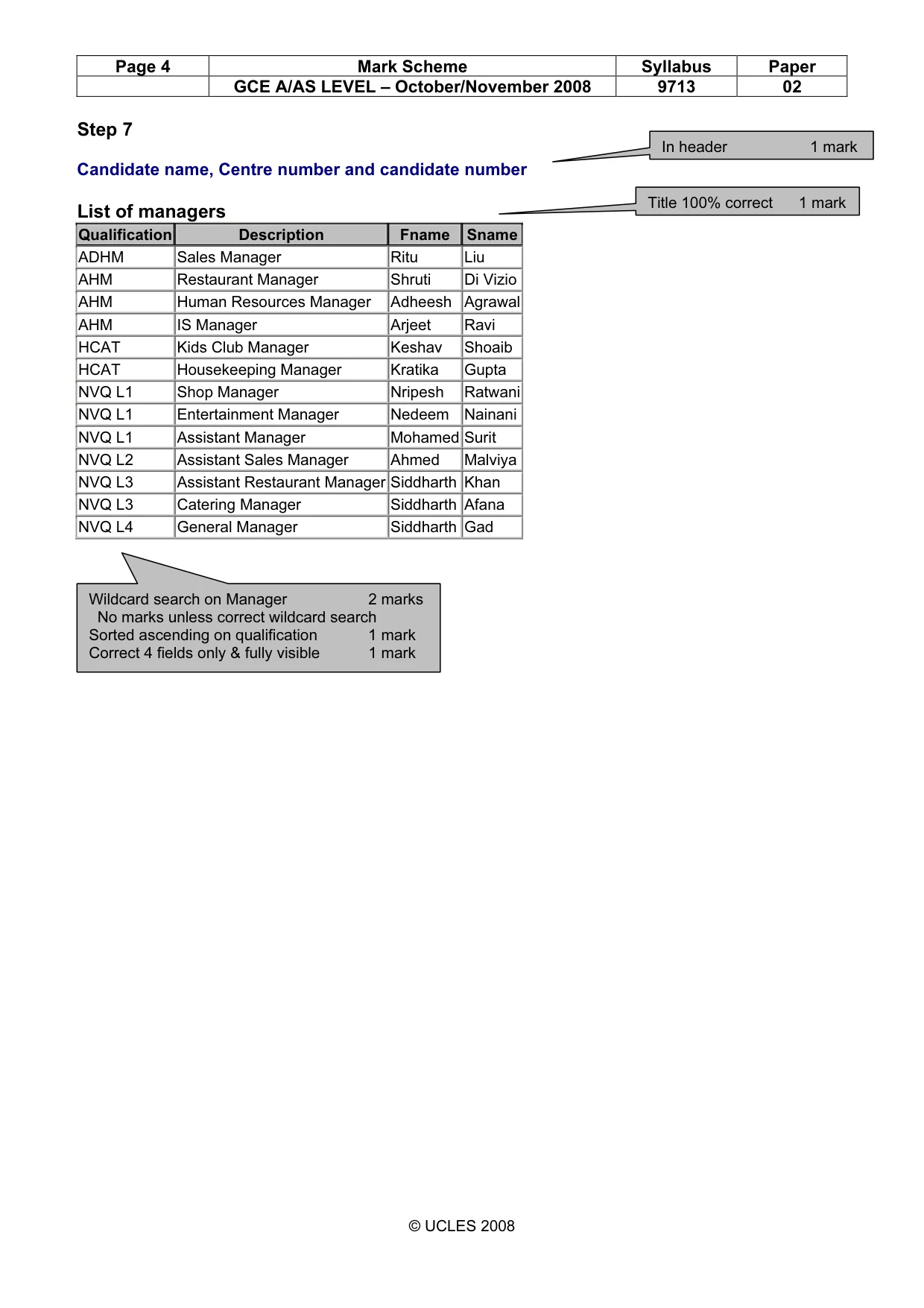
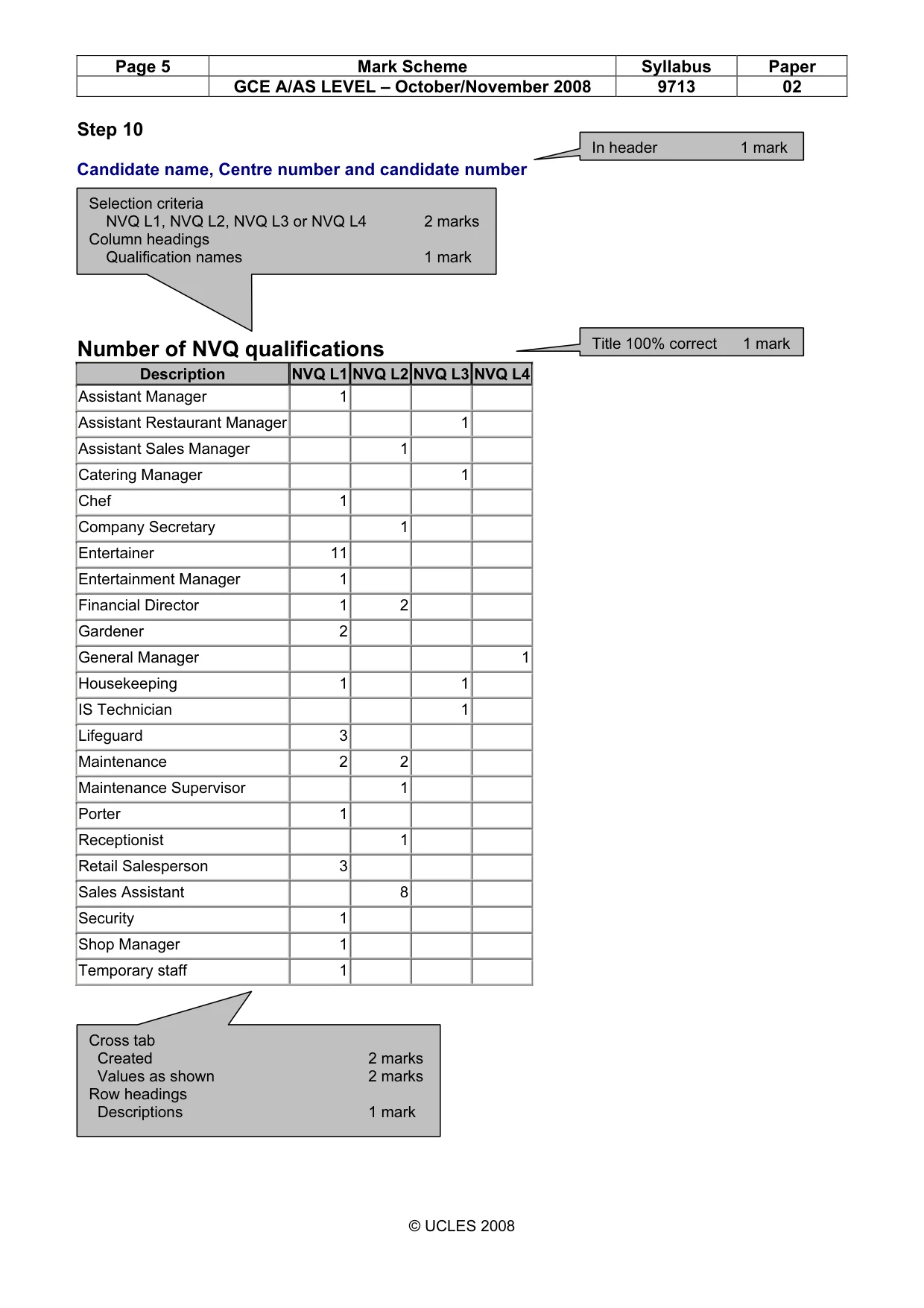
2 © UCLES 2008 9713/02/O/N/08 [Turn over You work as an ICT consultant for the Tawara Beach Hotel. You are going to test a trial database to record and extract the payroll details of the employees in the company. 1 Using a suitable software package, create a new database. 2 Import the files N8EMPLOY.CSV, N8QUAL.CSV and N8JOB.CSV You will need to use the following information to create the tables: N8EMPLOY N8QUAL Field name Type Field name Type PayNumber Text Code Integer FName Text Qualification Text SName Text Weighting Numeric: 2 decimal places BranchCode Integer JobCode Integer N8JOB Field name Type denotes primary key Job Integer Description Text Rate Numeric: 2 decimal places [8] 3 Provide evidence of the three tables showing all of the field types. Make sure that the primary keys are clearly visible. Place your name, Centre number and candidate number in the header. Save and print this evidence. 4 Establish the following One-to-Many Relationships: N8QUAL.Code 1 ---- ∞ N8EMPLOY.Branchcode N8JOB.Job 1 ---- ∞ N8EMPLOY.JobCode [2] 5 Provide screen shot evidence of the relationships between these tables. Make sure that there is evidence of the relationship type. Place your name, Centre number and candidate number in the header. Save and print this evidence. [2] 6 Select only the full names, qualification and job descriptions of all the employees whose job description contains the word Manager You will need to use the Description field to find this information. [3] 7 Sort this extract into ascending order of Qualification. Add the title List of managers to this extract. Place your name, Centre number and candidate number in the header of this extract. Save and print this extract. [3] You are going to prepare a summary report which identifies employees in some job categories for selected sites. 8 Select from all the records only the details of employees where the Qualification is NVQ L1, NVQ L2, NVQ L3 or NVQ L4 [2] 9 Using this data, create a cross-tab (pivot table) which shows Description as row labels and the Qualification names as the column headings. Show the number of employees for each job type. [6] 10 Add the title Number of NVQ qualifications to the report. Place your name, Centre number and candidate number in the header of the report. Save and print the report. [2]
Question paper, page 3
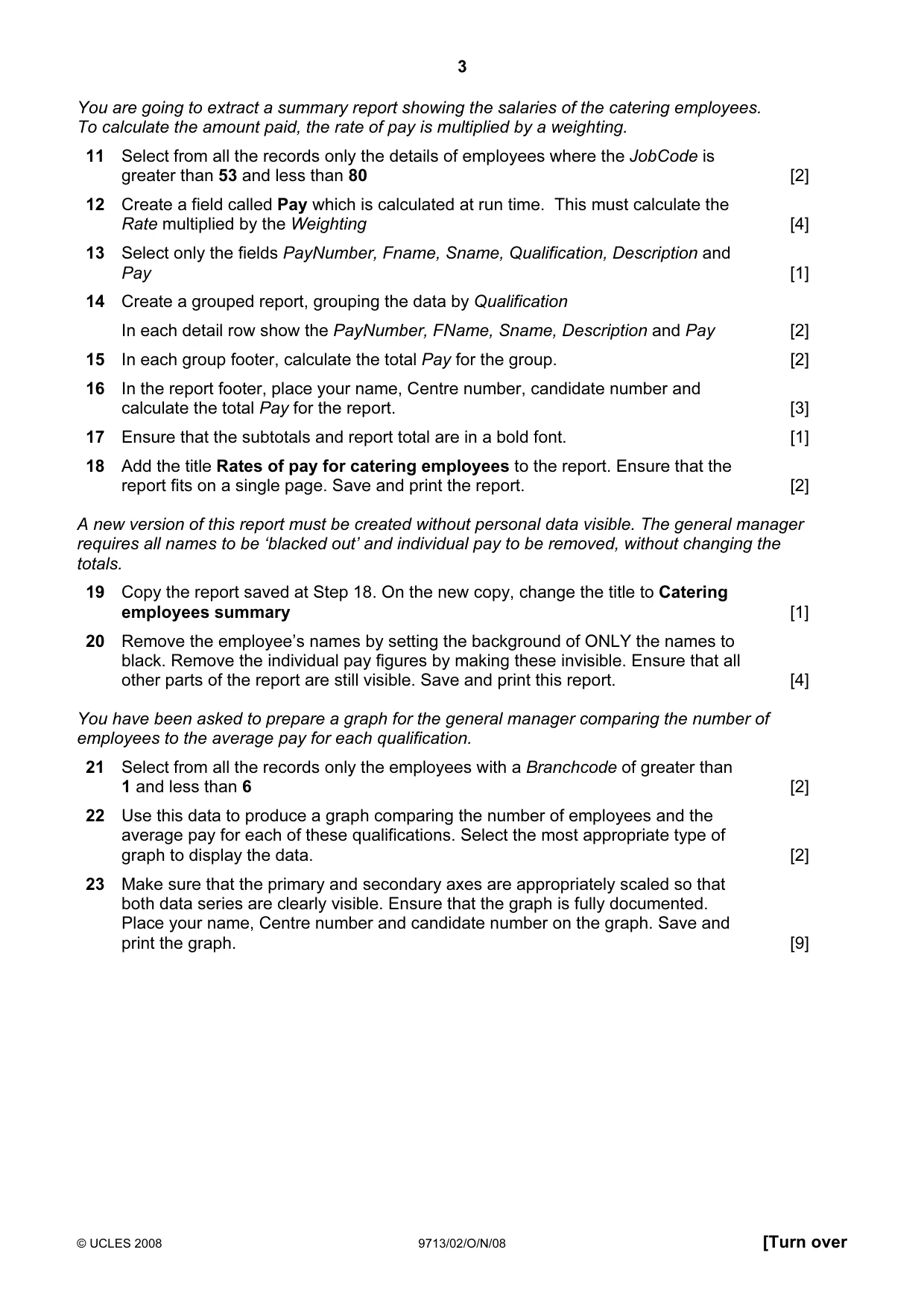
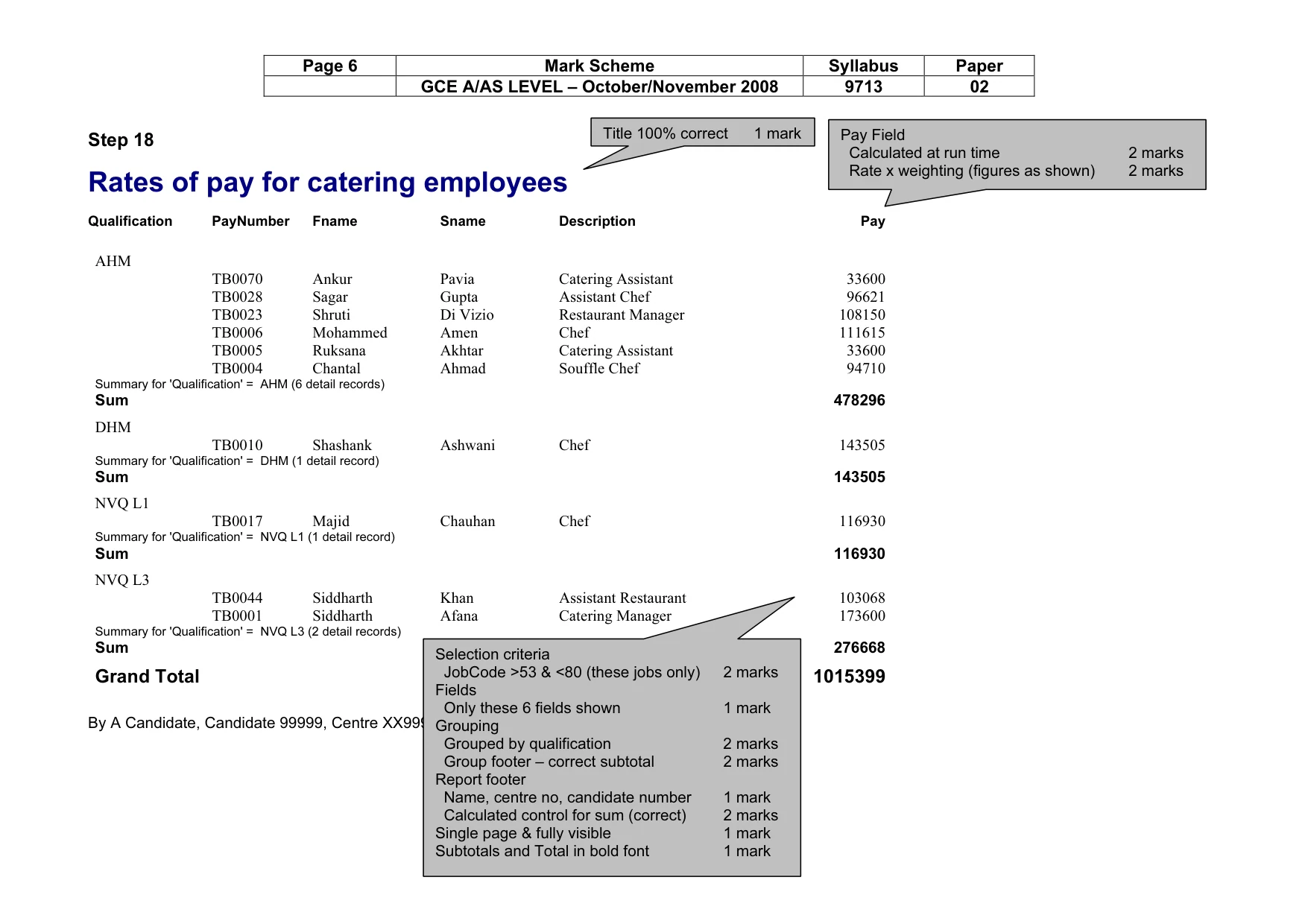
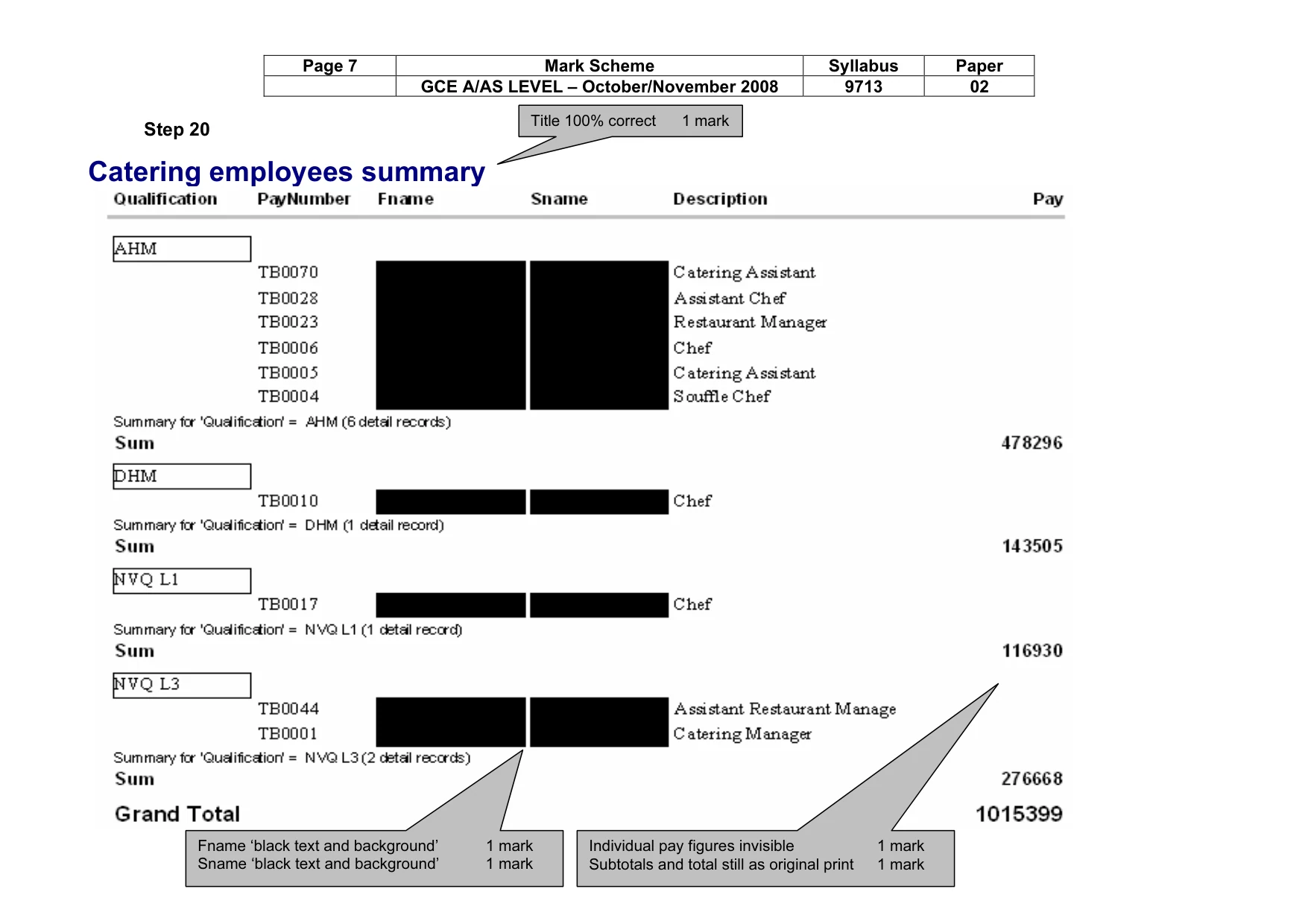
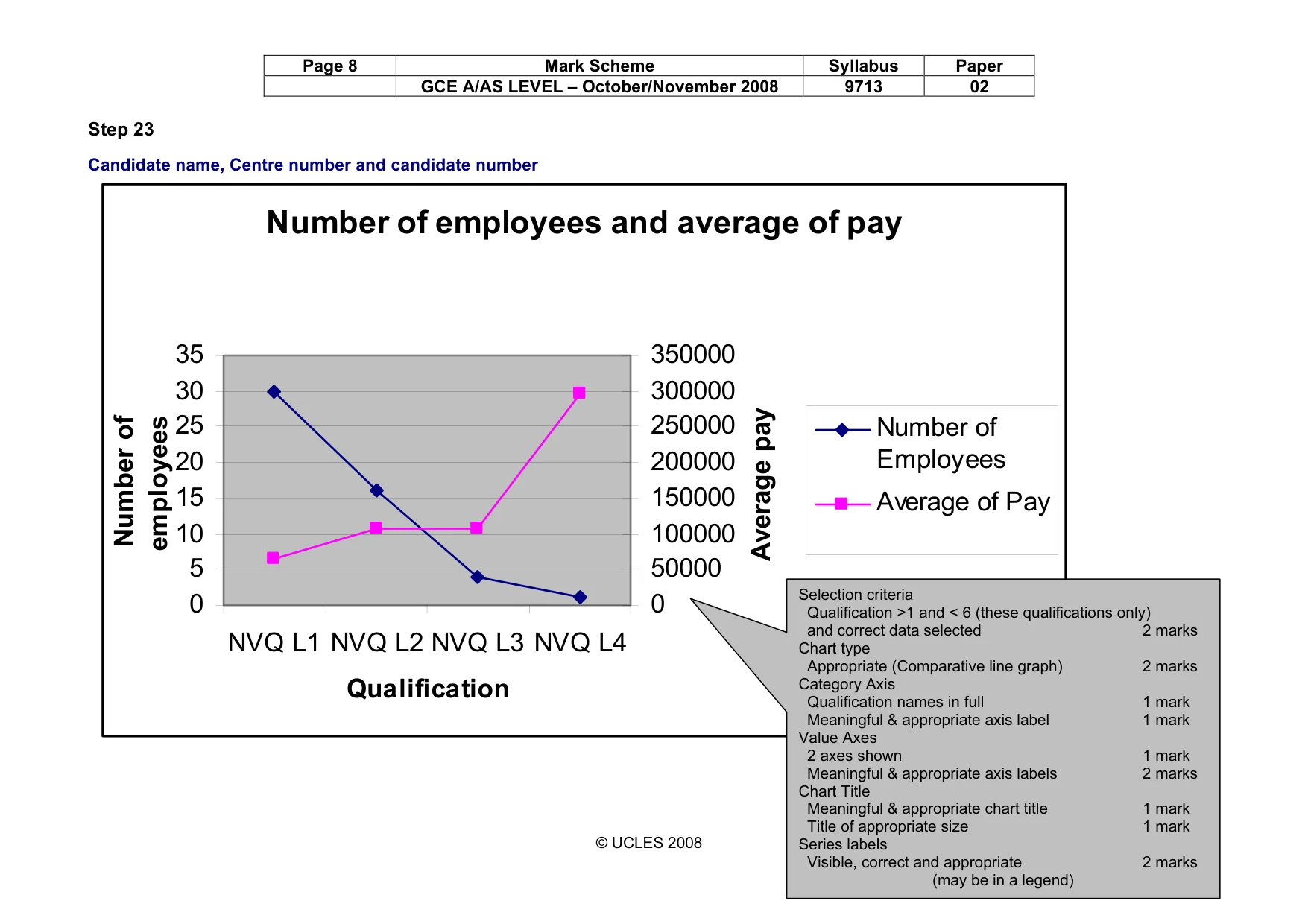
3 © UCLES 2008 9713/02/O/N/08 [Turn over You are going to extract a summary report showing the salaries of the catering employees. To calculate the amount paid, the rate of pay is multiplied by a weighting. 11 Select from all the records only the details of employees where the JobCode is greater than 53 and less than 80 [2] 12 Create a field called Pay which is calculated at run time. This must calculate the Rate multiplied by the Weighting [4] 13 Select only the fields PayNumber, Fname, Sname, Qualification, Description and Pay [1] 14 Create a grouped report, grouping the data by Qualification In each detail row show the PayNumber, FName, Sname, Description and Pay [2] 15 In each group footer, calculate the total Pay for the group. [2] 16 In the report footer, place your name, Centre number, candidate number and calculate the total Pay for the report. [3] 17 Ensure that the subtotals and report total are in a bold font. [1] 18 Add the title Rates of pay for catering employees to the report. Ensure that the report fits on a single page. Save and print the report. [2] A new version of this report must be created without personal data visible. The general manager requires all names to be ‘blacked out’ and individual pay to be removed, without changing the totals. 19 Copy the report saved at Step 18. On the new copy, change the title to Catering employees summary [1] 20 Remove the employee’s names by setting the background of ONLY the names to black. Remove the individual pay figures by making these invisible. Ensure that all other parts of the report are still visible. Save and print this report. [4] You have been asked to prepare a graph for the general manager comparing the number of employees to the average pay for each qualification. 21 Select from all the records only the employees with a Branchcode of greater than 1 and less than 6 [2] 22 Use this data to produce a graph comparing the number of employees and the average pay for each of these qualifications. Select the most appropriate type of graph to display the data. [2] 23 Make sure that the primary and secondary axes are appropriately scaled so that both data series are clearly visible. Ensure that the graph is fully documented. Place your name, Centre number and candidate number on the graph. Save and print the graph. [9]
Question paper, page 4
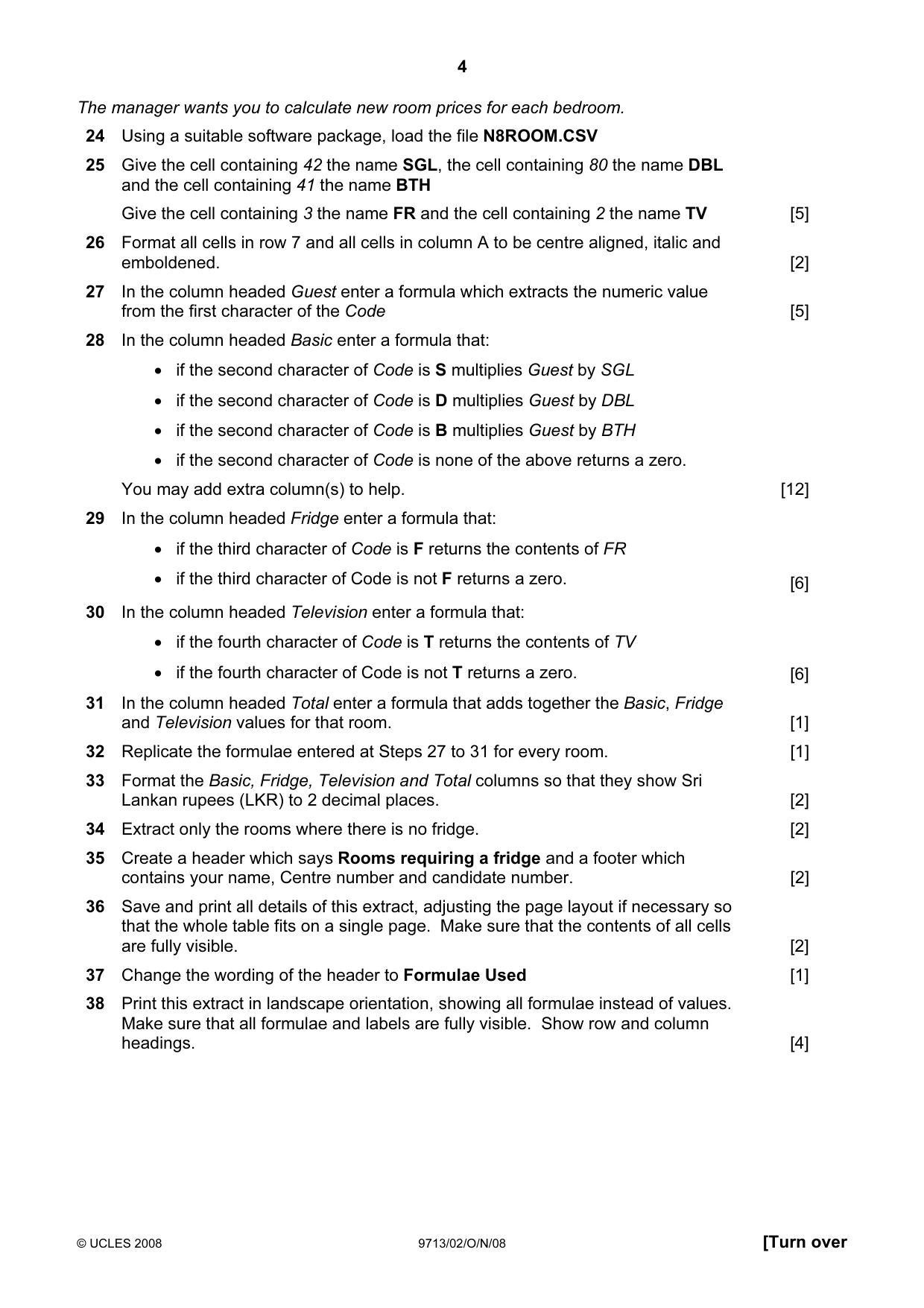
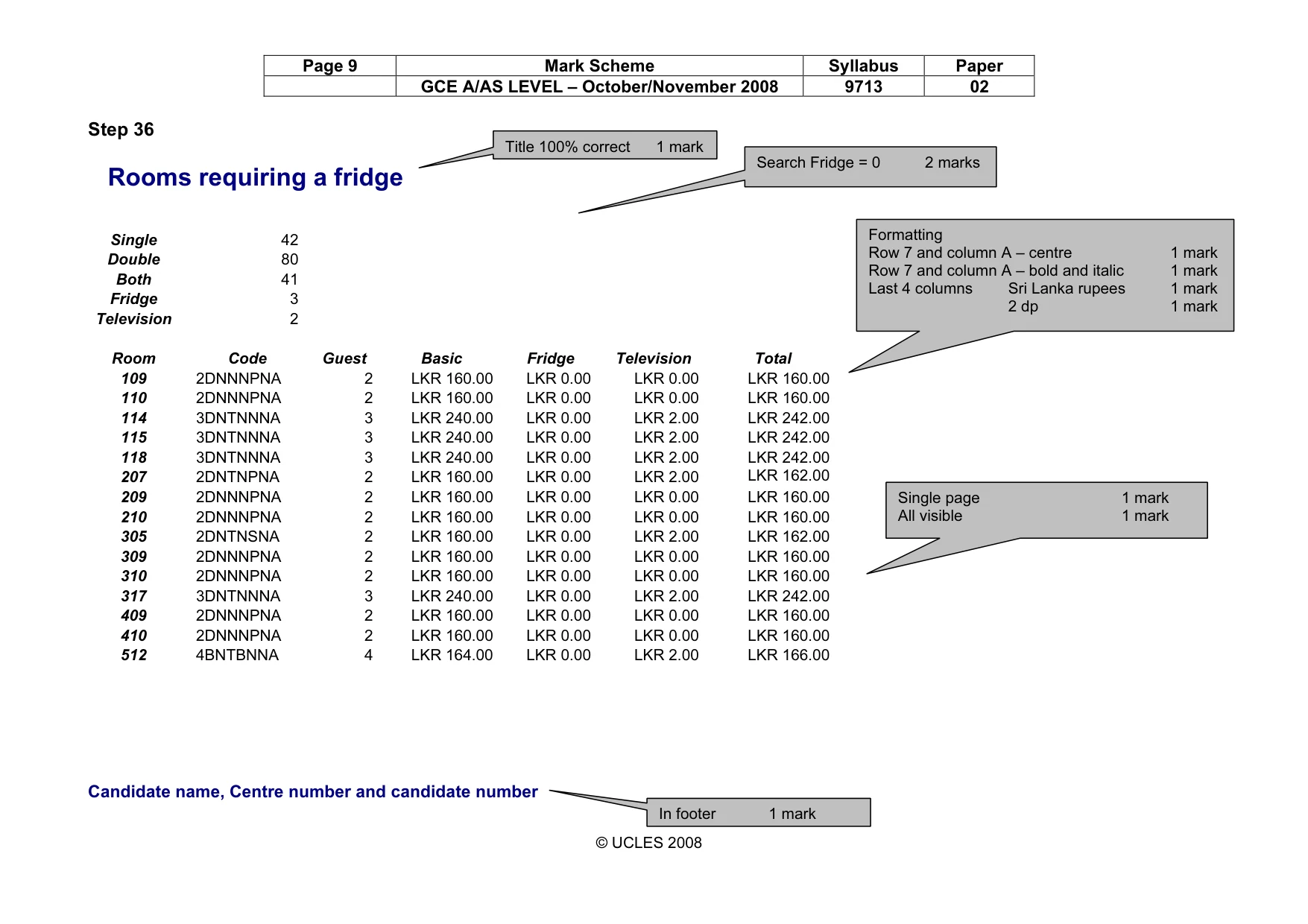
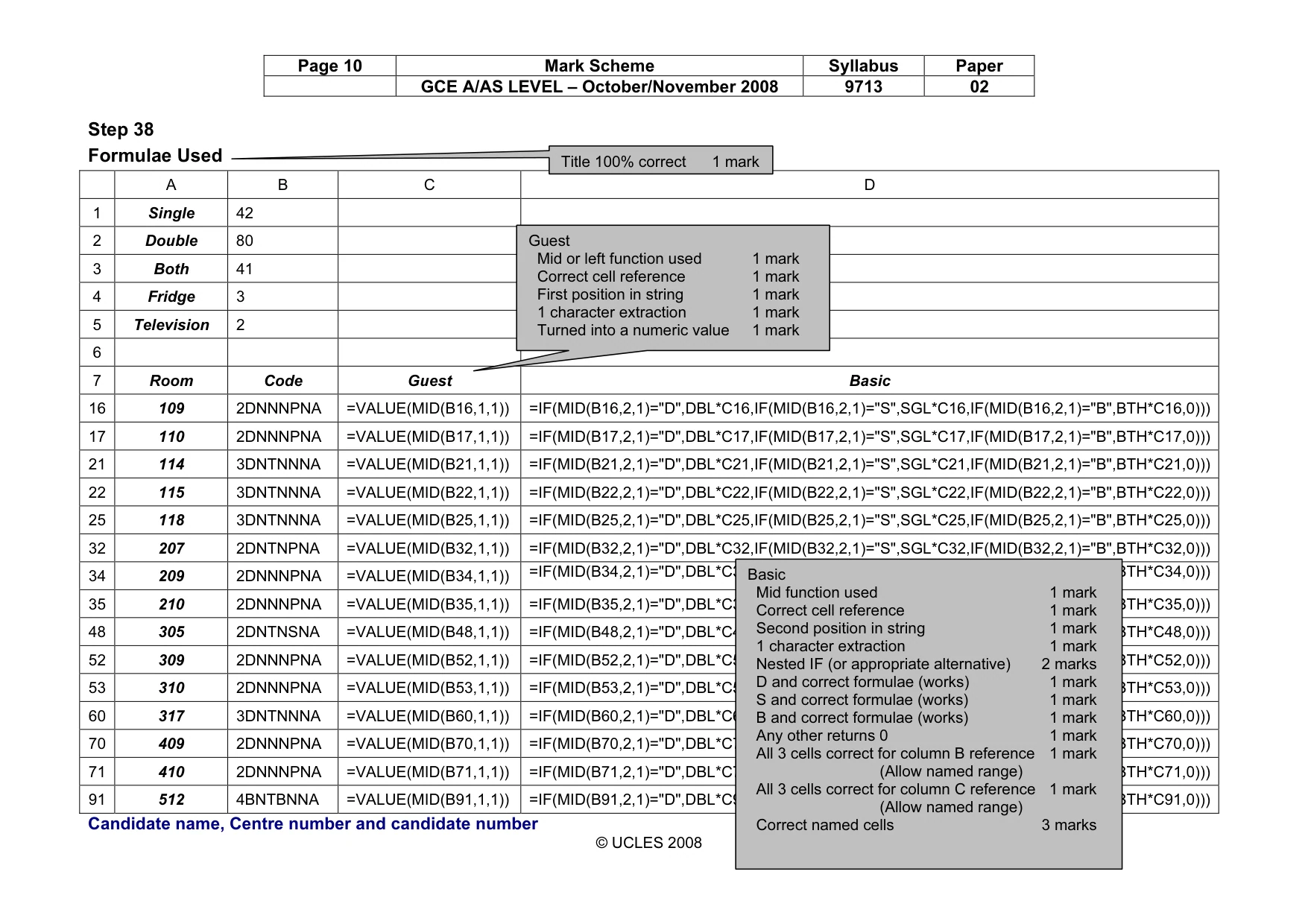
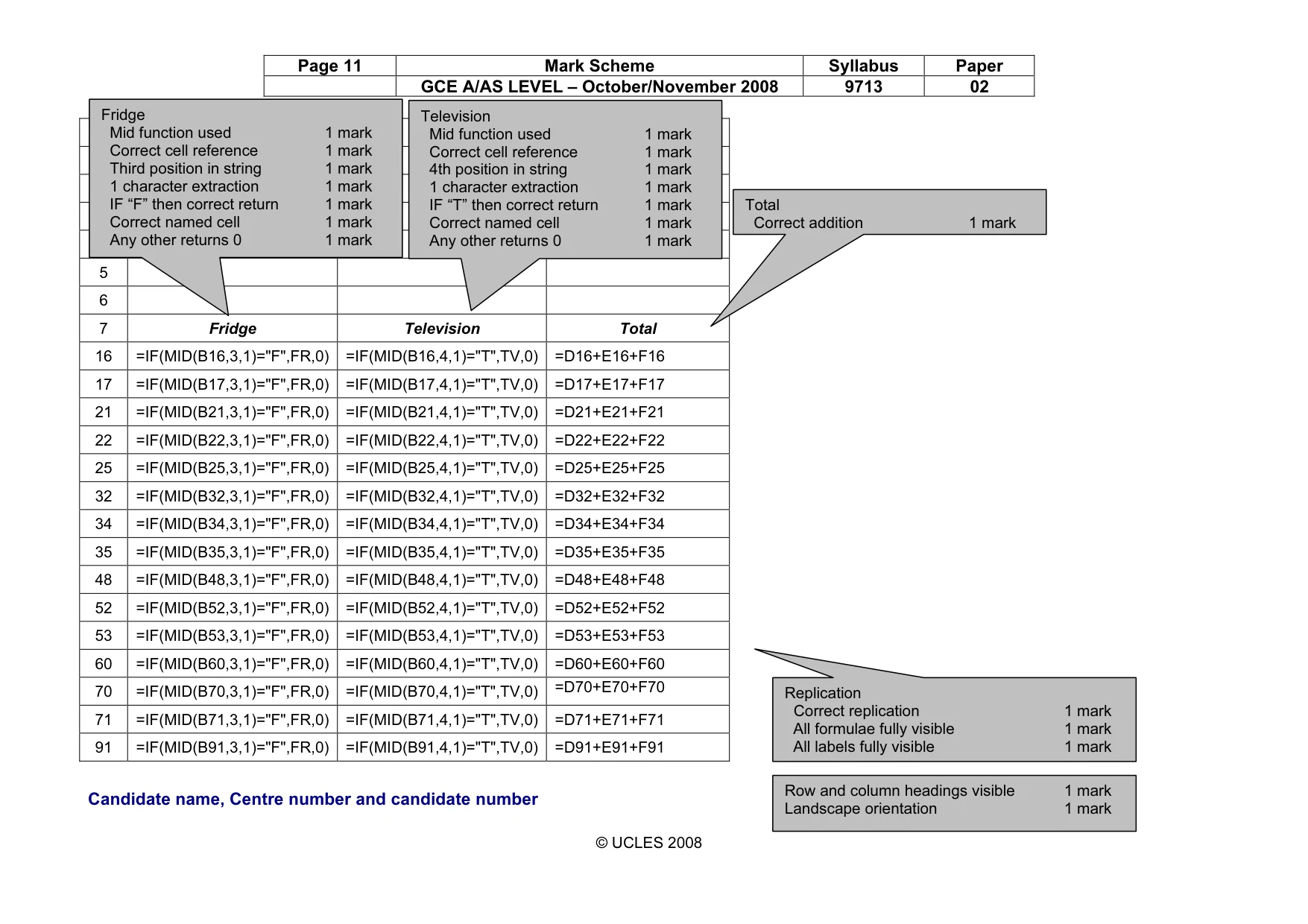
4 © UCLES 2008 9713/02/O/N/08 [Turn over The manager wants you to calculate new room prices for each bedroom. 24 Using a suitable software package, load the file N8ROOM.CSV 25 Give the cell containing 42 the name SGL, the cell containing 80 the name DBL and the cell containing 41 the name BTH Give the cell containing 3 the name FR and the cell containing 2 the name TV [5] 26 Format all cells in row 7 and all cells in column A to be centre aligned, italic and emboldened. [2] 27 In the column headed Guest enter a formula which extracts the numeric value from the first character of the Code [5] 28 In the column headed Basic enter a formula that: • if the second character of Code is S multiplies Guest by SGL • if the second character of Code is D multiplies Guest by DBL • if the second character of Code is B multiplies Guest by BTH • if the second character of Code is none of the above returns a zero. You may add extra column(s) to help. [12] 29 In the column headed Fridge enter a formula that: • if the third character of Code is F returns the contents of FR • if the third character of Code is not F returns a zero. [6] 30 In the column headed Television enter a formula that: • if the fourth character of Code is T returns the contents of TV • if the fourth character of Code is not T returns a zero. [6] 31 In the column headed Total enter a formula that adds together the Basic, Fridge and Television values for that room. [1] 32 Replicate the formulae entered at Steps 27 to 31 for every room. [1] 33 Format the Basic, Fridge, Television and Total columns so that they show Sri Lankan rupees (LKR) to 2 decimal places. [2] 34 Extract only the rooms where there is no fridge. [2] 35 Create a header which says Rooms requiring a fridge and a footer which contains your name, Centre number and candidate number. [2] 36 Save and print all details of this extract, adjusting the page layout if necessary so that the whole table fits on a single page. Make sure that the contents of all cells are fully visible. [2] 37 Change the wording of the header to Formulae Used [1] 38 Print this extract in landscape orientation, showing all formulae instead of values. Make sure that all formulae and labels are fully visible. Show row and column headings. [4]
Question paper, page 5
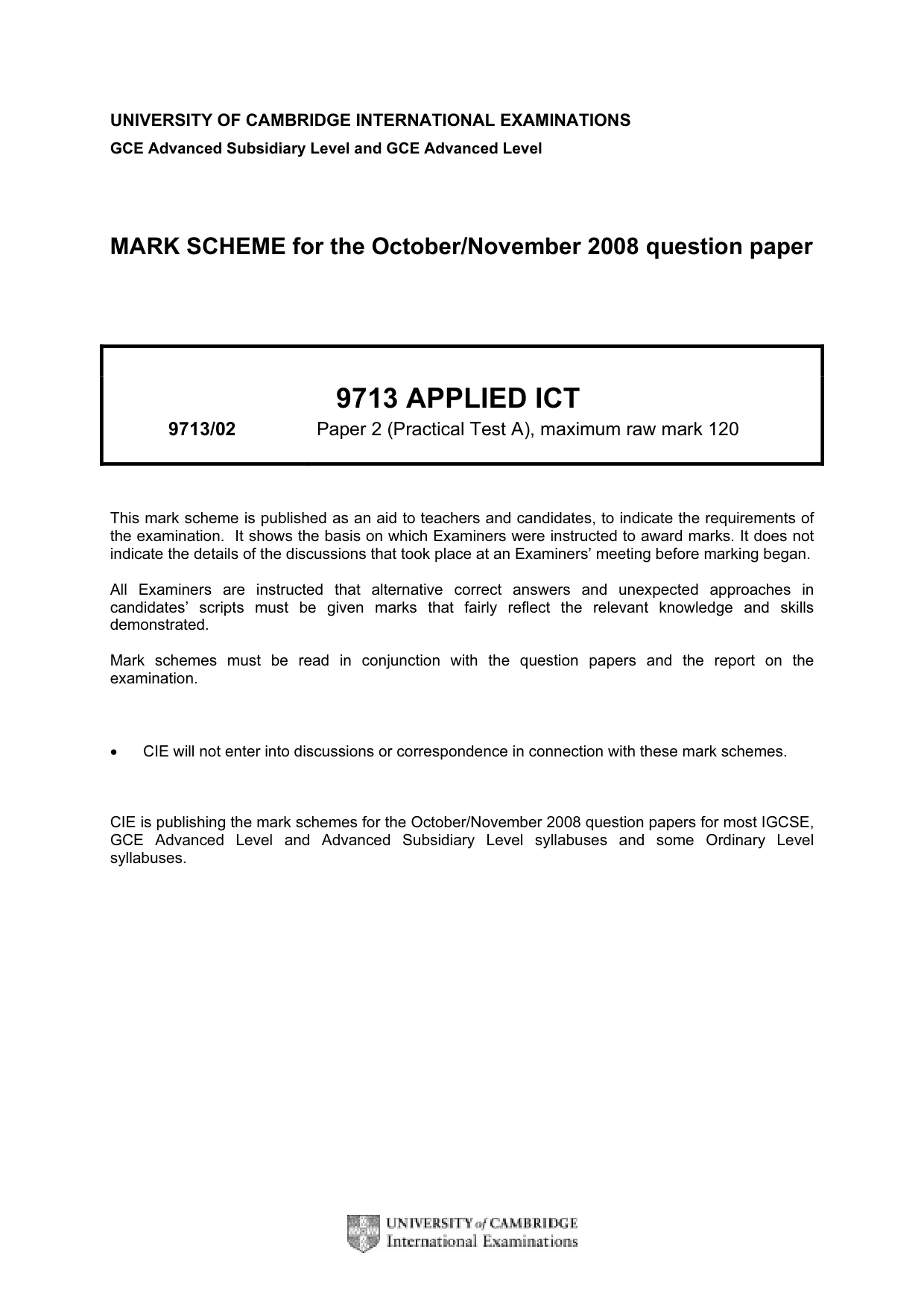
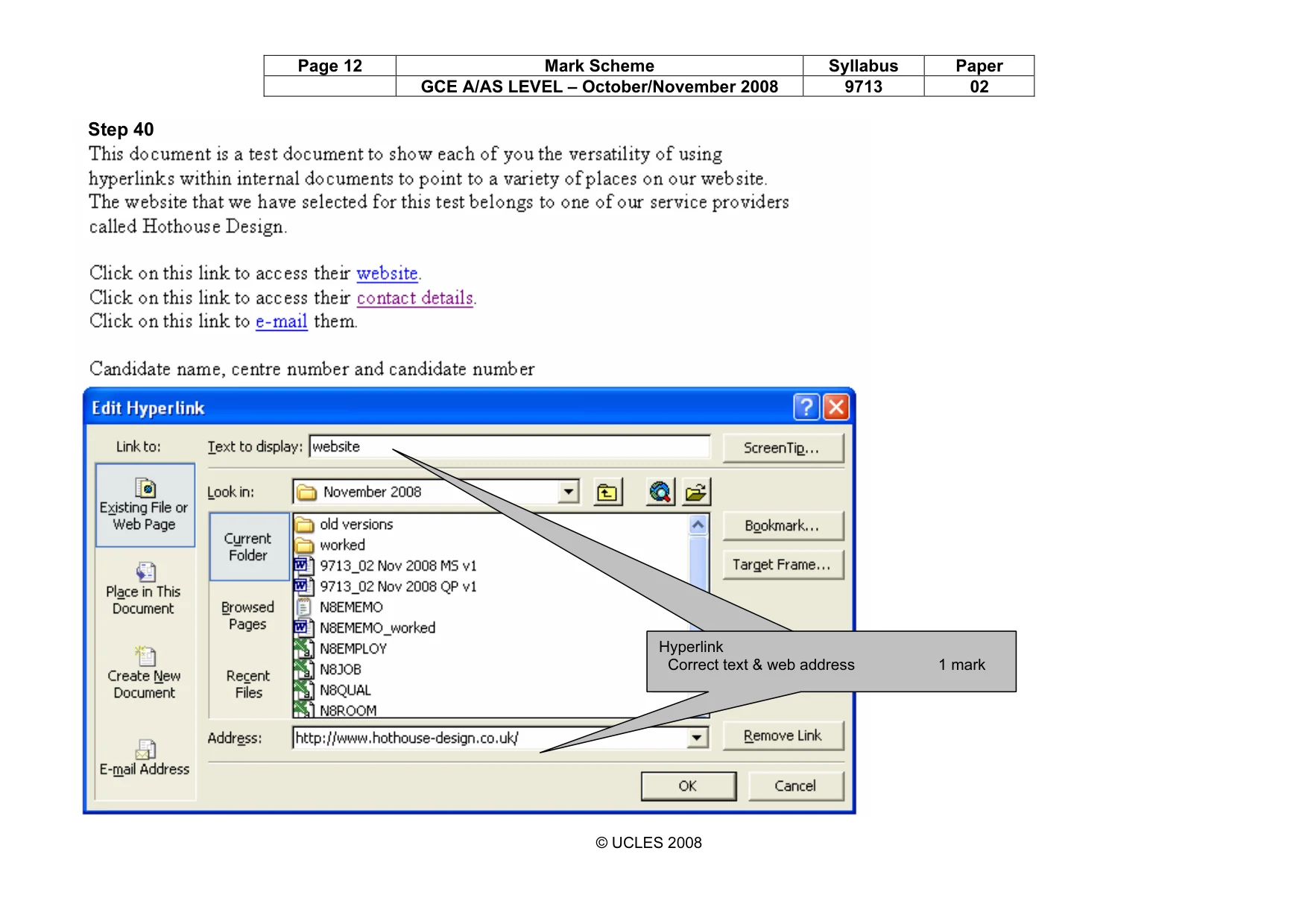
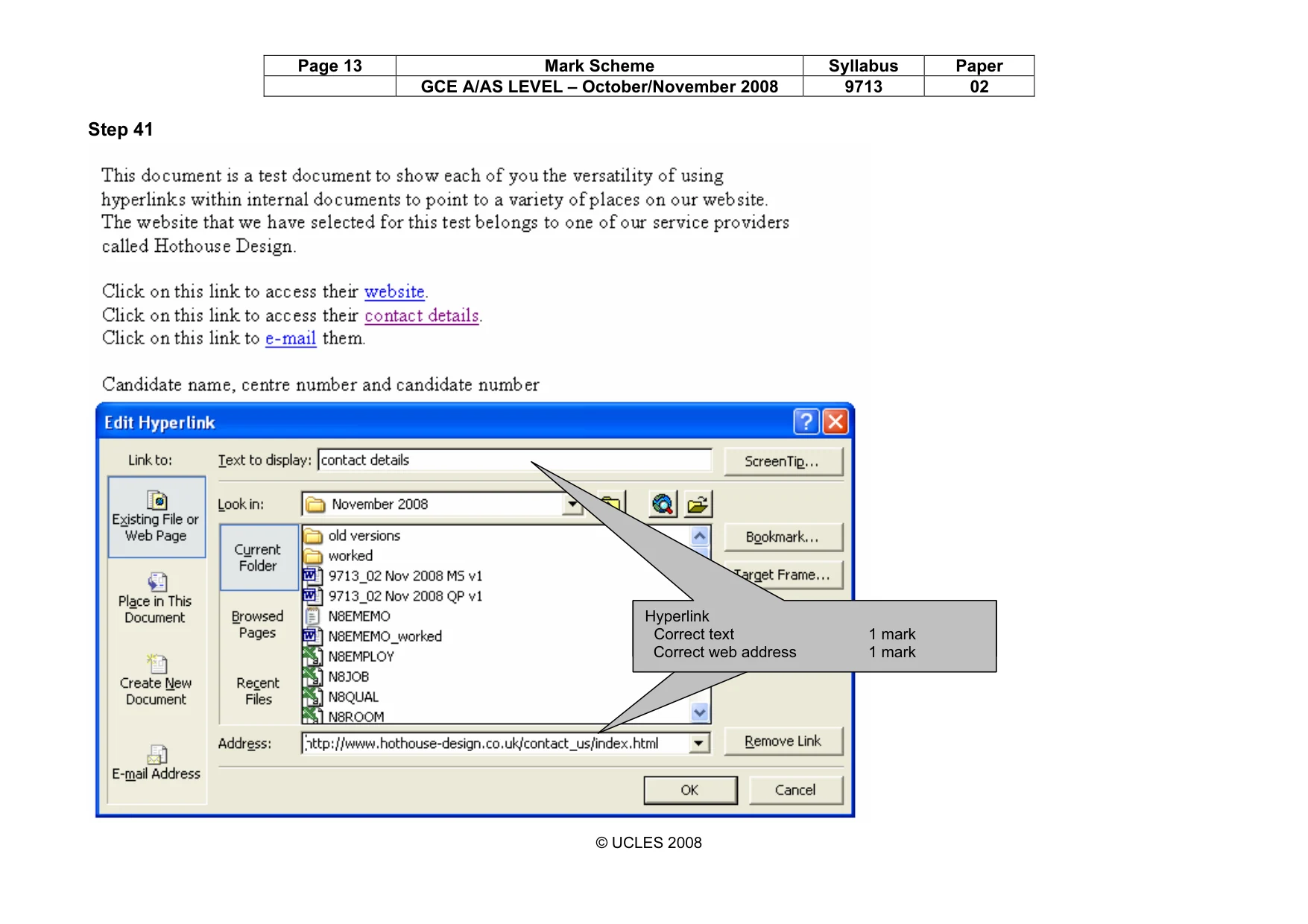
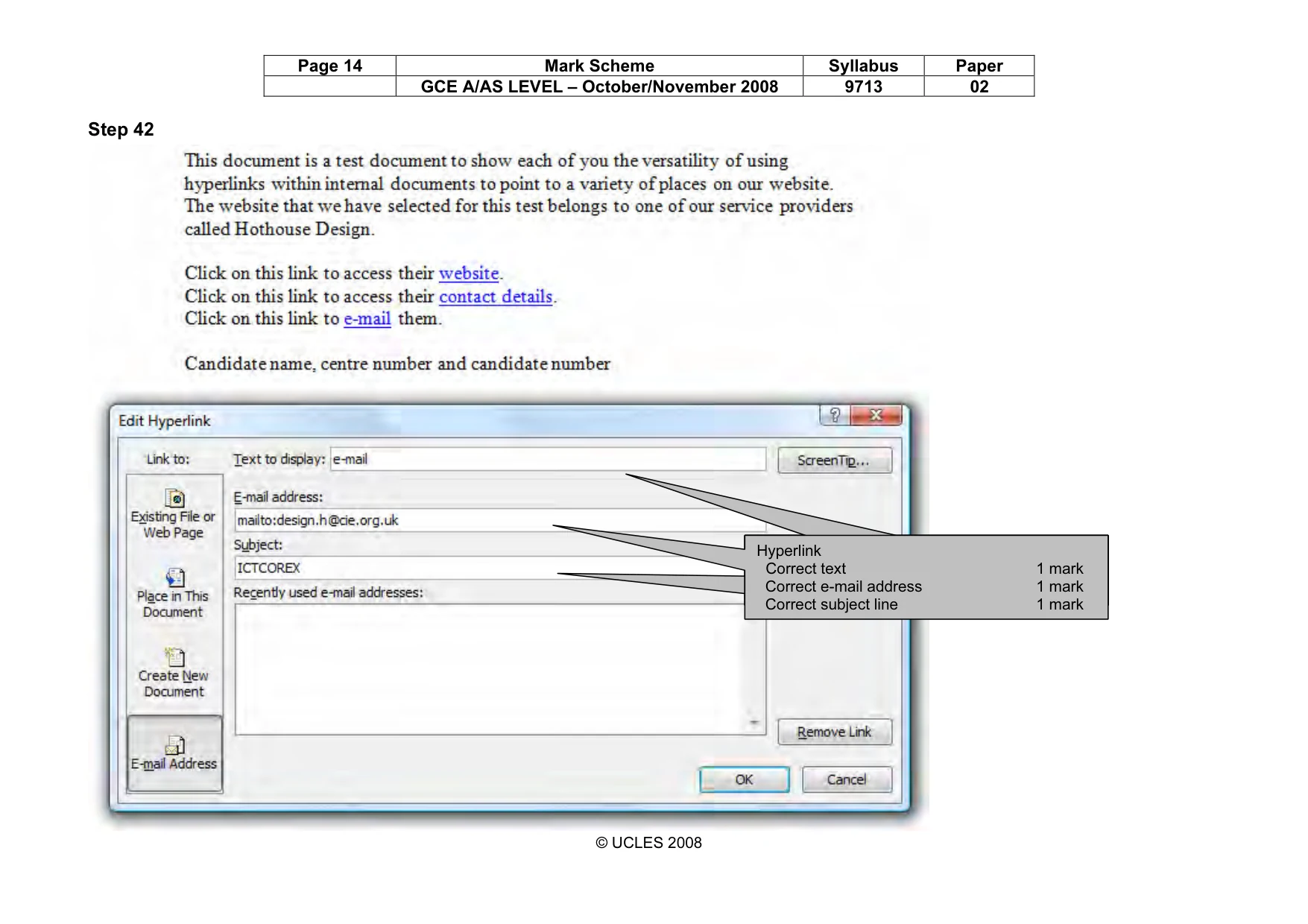
5 Permission to reproduce items where third-party owned material protected by copyright is included has been sought and cleared where possible. Every reasonable effort has been made by the publisher (UCLES) to trace copyright holders, but if any items requiring clearance have unwittingly been included, the publisher will be pleased to make amends at the earliest possible opportunity. University of Cambridge International Examinations is part of the Cambridge Assessment Group. Cambridge Assessment is the brand name of University of Cambridge Local Examinations Syndicate (UCLES), which is itself a department of the University of Cambridge. 9713/02/O/N/08 The manager wants to create hyperlinks from internal documents to link to various websites and to allow e-mail messages to be sent. To do this he has asked you to prepare a test document to show the board of directors. 39 Using a word processing package, load the file N8EMEMO.TXT Add your name, Centre number and candidate number to this document. 40 Create a hyperlink within this document to link the word website to the URL www.hothouse-design.co.uk Print evidence showing the creation of this hyperlink. Make sure that your name, Centre number and candidate number are visible. [2] 41 Create a hyperlink within this document to link the words contact details to the URL www.hothouse-design.co.uk/contact_us/index.html Print evidence showing the creation of this hyperlink. Make sure that your name, Centre number and candidate number are visible. [1] 42 Create a hyperlink within this document to link the word e-mail with an e-mail to the mailbox at design.h@cie.org.uk Set the default subject line to ICTCOREX Print evidence showing the creation of this hyperlink. Make sure that your name, Centre number and candidate number are visible. [3]
Mark scheme, page 1
UNIVERSITY OF CAMBRIDGE INTERNATIONAL EXAMINATIONS GCE Advanced Subsidiary Level and GCE Advanced Level MARK SCHEME for the October/November 2008 question paper 9713 APPLIED ICT 9713/02 Paper 2 (Practical Test A), maximum raw mark 120 This mark scheme is published as an aid to teachers and candidates, to indicate the requirements of the examination. It shows the basis on which Examiners were instructed to award marks. It does not indicate the details of the discussions that took place at an Examiners’ meeting before marking began. All Examiners are instructed that alternative correct answers and unexpected approaches in candidates’ scripts must be given marks that fairly reflect the relevant knowledge and skills demonstrated. Mark schemes must be read in conjunction with the question papers and the report on the examination. • CIE will not enter into discussions or correspondence in connection with these mark schemes. CIE is publishing the mark schemes for the October/November 2008 question papers for most IGCSE, GCE Advanced Level and Advanced Subsidiary Level syllabuses and some Ordinary Level syllabuses.
Mark scheme, page 2
Page 2 Mark Scheme Syllabus Paper GCE A/AS LEVEL – October/November 2008 9713 02 © UCLES 2008 Step 3 Candidate name, Centre number and candidate number No marks to be awarded for any printout not containing the candidate name, candidate number and Centre number Table created Correct fields 1 mark 3 text fields 1 mark 2 number fields 1 mark Primary key correct 1 mark Table created Correct fields & field types 1 mark Primary key correct 1 mark Table created Correct fields & field types 1 mark Primary key correct 1 mark
Mark scheme, page 3
Page 3 Mark Scheme Syllabus Paper GCE A/AS LEVEL – October/November 2008 9713 02 © UCLES 2008 Step 5 Candidate name, Centre number and candidate number Relationship, correct fields 1 mark Relationship, correct fields 1 mark Relationship, correct type 1 mark Relationship, correct type 1 mark
Mark scheme, page 4
Page 4 Mark Scheme Syllabus Paper GCE A/AS LEVEL – October/November 2008 9713 02 © UCLES 2008 Step 7 Candidate name, Centre number and candidate number List of managers Qualification Description Fname Sname ADHM Sales Manager Ritu Liu AHM Restaurant Manager Shruti Di Vizio AHM Human Resources Manager Adheesh Agrawal AHM IS Manager Arjeet Ravi HCAT Kids Club Manager Keshav Shoaib HCAT Housekeeping Manager Kratika Gupta NVQ L1 Shop Manager Nripesh Ratwani NVQ L1 Entertainment Manager Nedeem Nainani NVQ L1 Assistant Manager Mohamed Surit NVQ L2 Assistant Sales Manager Ahmed Malviya NVQ L3 Assistant Restaurant Manager Siddharth Khan NVQ L3 Catering Manager Siddharth Afana NVQ L4 General Manager Siddharth Gad In header 1 mark Title 100% correct 1 mark Wildcard search on Manager 2 marks No marks unless correct wildcard search Sorted ascending on qualification 1 mark Correct 4 fields only & fully visible 1 mark
Mark scheme, page 5
Page 5 Mark Scheme Syllabus Paper GCE A/AS LEVEL – October/November 2008 9713 02 © UCLES 2008 Step 10 Candidate name, Centre number and candidate number Number of NVQ qualifications Description NVQ L1 NVQ L2 NVQ L3 NVQ L4 Assistant Manager 1 Assistant Restaurant Manager 1 Assistant Sales Manager 1 Catering Manager 1 Chef 1 Company Secretary 1 Entertainer 11 Entertainment Manager 1 Financial Director 1 2 Gardener 2 General Manager 1 Housekeeping 1 1 IS Technician 1 Lifeguard 3 Maintenance 2 2 Maintenance Supervisor 1 Porter 1 Receptionist 1 Retail Salesperson 3 Sales Assistant 8 Security 1 Shop Manager 1 Temporary staff 1 Selection criteria NVQ L1, NVQ L2, NVQ L3 or NVQ L4 2 marks Column headings Qualification names 1 mark Cross tab Created 2 marks Values as shown 2 marks Row headings Descriptions 1 mark Title 100% correct 1 mark In header 1 mark
Mark scheme, page 6
Page 6 Mark Scheme Syllabus Paper GCE A/AS LEVEL – October/November 2008 9713 02 © UCLES 2008 Step 18 Rates of pay for catering employees Qualification PayNumber Fname Sname Description Pay AHM TB0070 Ankur Pavia Catering Assistant 33600 TB0028 Sagar Gupta Assistant Chef 96621 TB0023 Shruti Di Vizio Restaurant Manager 108150 TB0006 Mohammed Amen Chef 111615 TB0005 Ruksana Akhtar Catering Assistant 33600 TB0004 Chantal Ahmad Souffle Chef 94710 Summary for 'Qualification' = AHM (6 detail records) Sum 478296 DHM TB0010 Shashank Ashwani Chef 143505 Summary for 'Qualification' = DHM (1 detail record) Sum 143505 NVQ L1 TB0017 Majid Chauhan Chef 116930 Summary for 'Qualification' = NVQ L1 (1 detail record) Sum 116930 NVQ L3 TB0044 Siddharth Khan Assistant Restaurant 103068 TB0001 Siddharth Afana Catering Manager 173600 Summary for 'Qualification' = NVQ L3 (2 detail records) Sum 276668 Grand Total 1015399 By A Candidate, Candidate 99999, Centre XX999. Selection criteria JobCode >53 & <80 (these jobs only) 2 marks Fields Only these 6 fields shown 1 mark Grouping Grouped by qualification 2 marks Group footer – correct subtotal 2 marks Report footer Name, centre no, candidate number 1 mark Calculated control for sum (correct) 2 marks Single page & fully visible 1 mark Subtotals and Total in bold font 1 mark Pay Field Calculated at run time 2 marks Rate x weighting (figures as shown) 2 marks Title 100% correct 1 mark
Mark scheme, page 7
Page 7 Mark Scheme Syllabus Paper GCE A/AS LEVEL – October/November 2008 9713 02 © UCLES 2008 Step 20 Catering employees summary Title 100% correct 1 mark Fname ‘black text and background’ 1 mark Sname ‘black text and background’ 1 mark Individual pay figures invisible 1 mark Subtotals and total still as original print 1 mark
Mark scheme, page 8
Page 8 Mark Scheme Syllabus Paper GCE A/AS LEVEL – October/November 2008 9713 02 © UCLES 2008 Step 23 Candidate name, Centre number and candidate number Number of employees and average of pay 0 5 10 15 20 25 30 35 NVQ L1 NVQ L2 NVQ L3 NVQ L4 Qualification Number of employees 0 50000 100000 150000 200000 250000 300000 350000 Average pay Number of Employees Average of Pay Selection criteria Qualification >1 and < 6 (these qualifications only) and correct data selected 2 marks Chart type Appropriate (Comparative line graph) 2 marks Category Axis Qualification names in full 1 mark Meaningful & appropriate axis label 1 mark Value Axes 2 axes shown 1 mark Meaningful & appropriate axis labels 2 marks Chart Title Meaningful & appropriate chart title 1 mark Title of appropriate size 1 mark Series labels Visible, correct and appropriate 2 marks (may be in a legend)
Mark scheme, page 9
Page 9 Mark Scheme Syllabus Paper GCE A/AS LEVEL – October/November 2008 9713 02 © UCLES 2008 Step 36 Rooms requiring a fridge Single 42 Double 80 Both 41 Fridge 3 Television 2 Room Code Guest Basic Fridge Television Total 109 2DNNNPNA 2 LKR 160.00 LKR 0.00 LKR 0.00 LKR 160.00 110 2DNNNPNA 2 LKR 160.00 LKR 0.00 LKR 0.00 LKR 160.00 114 3DNTNNNA 3 LKR 240.00 LKR 0.00 LKR 2.00 LKR 242.00 115 3DNTNNNA 3 LKR 240.00 LKR 0.00 LKR 2.00 LKR 242.00 118 3DNTNNNA 3 LKR 240.00 LKR 0.00 LKR 2.00 LKR 242.00 207 2DNTNPNA 2 LKR 160.00 LKR 0.00 LKR 2.00 LKR 162.00 209 2DNNNPNA 2 LKR 160.00 LKR 0.00 LKR 0.00 LKR 160.00 210 2DNNNPNA 2 LKR 160.00 LKR 0.00 LKR 0.00 LKR 160.00 305 2DNTNSNA 2 LKR 160.00 LKR 0.00 LKR 2.00 LKR 162.00 309 2DNNNPNA 2 LKR 160.00 LKR 0.00 LKR 0.00 LKR 160.00 310 2DNNNPNA 2 LKR 160.00 LKR 0.00 LKR 0.00 LKR 160.00 317 3DNTNNNA 3 LKR 240.00 LKR 0.00 LKR 2.00 LKR 242.00 409 2DNNNPNA 2 LKR 160.00 LKR 0.00 LKR 0.00 LKR 160.00 410 2DNNNPNA 2 LKR 160.00 LKR 0.00 LKR 0.00 LKR 160.00 512 4BNTBNNA 4 LKR 164.00 LKR 0.00 LKR 2.00 LKR 166.00 Candidate name, Centre number and candidate number Formatting Row 7 and column A – centre 1 mark Row 7 and column A – bold and italic 1 mark Last 4 columns Sri Lanka rupees 1 mark 2 dp 1 mark Search Fridge = 0 2 marks Title 100% correct 1 mark Single page 1 mark All visible 1 mark In footer 1 mark
Mark scheme, page 10
Page 10 Mark Scheme Syllabus Paper GCE A/AS LEVEL – October/November 2008 9713 02 © UCLES 2008 Step 38 Formulae Used A B C D 1 Single 42 2 Double 80 3 Both 41 4 Fridge 3 5 Television 2 6 7 Room Code Guest Basic 16 109 2DNNNPNA =VALUE(MID(B16,1,1)) =IF(MID(B16,2,1)="D",DBL*C16,IF(MID(B16,2,1)="S",SGL*C16,IF(MID(B16,2,1)="B",BTH*C16,0))) 17 110 2DNNNPNA =VALUE(MID(B17,1,1)) =IF(MID(B17,2,1)="D",DBL*C17,IF(MID(B17,2,1)="S",SGL*C17,IF(MID(B17,2,1)="B",BTH*C17,0))) 21 114 3DNTNNNA =VALUE(MID(B21,1,1)) =IF(MID(B21,2,1)="D",DBL*C21,IF(MID(B21,2,1)="S",SGL*C21,IF(MID(B21,2,1)="B",BTH*C21,0))) 22 115 3DNTNNNA =VALUE(MID(B22,1,1)) =IF(MID(B22,2,1)="D",DBL*C22,IF(MID(B22,2,1)="S",SGL*C22,IF(MID(B22,2,1)="B",BTH*C22,0))) 25 118 3DNTNNNA =VALUE(MID(B25,1,1)) =IF(MID(B25,2,1)="D",DBL*C25,IF(MID(B25,2,1)="S",SGL*C25,IF(MID(B25,2,1)="B",BTH*C25,0))) 32 207 2DNTNPNA =VALUE(MID(B32,1,1)) =IF(MID(B32,2,1)="D",DBL*C32,IF(MID(B32,2,1)="S",SGL*C32,IF(MID(B32,2,1)="B",BTH*C32,0))) 34 209 2DNNNPNA =VALUE(MID(B34,1,1)) =IF(MID(B34,2,1)="D",DBL*C34,IF(MID(B34,2,1)="S",SGL*C34,IF(MID(B34,2,1)="B",BTH*C34,0))) 35 210 2DNNNPNA =VALUE(MID(B35,1,1)) =IF(MID(B35,2,1)="D",DBL*C35,IF(MID(B35,2,1)="S",SGL*C35,IF(MID(B35,2,1)="B",BTH*C35,0))) 48 305 2DNTNSNA =VALUE(MID(B48,1,1)) =IF(MID(B48,2,1)="D",DBL*C48,IF(MID(B48,2,1)="S",SGL*C48,IF(MID(B48,2,1)="B",BTH*C48,0))) 52 309 2DNNNPNA =VALUE(MID(B52,1,1)) =IF(MID(B52,2,1)="D",DBL*C52,IF(MID(B52,2,1)="S",SGL*C52,IF(MID(B52,2,1)="B",BTH*C52,0))) 53 310 2DNNNPNA =VALUE(MID(B53,1,1)) =IF(MID(B53,2,1)="D",DBL*C53,IF(MID(B53,2,1)="S",SGL*C53,IF(MID(B53,2,1)="B",BTH*C53,0))) 60 317 3DNTNNNA =VALUE(MID(B60,1,1)) =IF(MID(B60,2,1)="D",DBL*C60,IF(MID(B60,2,1)="S",SGL*C60,IF(MID(B60,2,1)="B",BTH*C60,0))) 70 409 2DNNNPNA =VALUE(MID(B70,1,1)) =IF(MID(B70,2,1)="D",DBL*C70,IF(MID(B70,2,1)="S",SGL*C70,IF(MID(B70,2,1)="B",BTH*C70,0))) 71 410 2DNNNPNA =VALUE(MID(B71,1,1)) =IF(MID(B71,2,1)="D",DBL*C71,IF(MID(B71,2,1)="S",SGL*C71,IF(MID(B71,2,1)="B",BTH*C71,0))) 91 512 4BNTBNNA =VALUE(MID(B91,1,1)) =IF(MID(B91,2,1)="D",DBL*C91,IF(MID(B91,2,1)="S",SGL*C91,IF(MID(B91,2,1)="B",BTH*C91,0))) Candidate name, Centre number and candidate number Guest Mid or left function used 1 mark Correct cell reference 1 mark First position in string 1 mark 1 character extraction 1 mark Turned into a numeric value 1 mark Basic Mid function used 1 mark Correct cell reference 1 mark Second position in string 1 mark 1 character extraction 1 mark Nested IF (or appropriate alternative) 2 marks D and correct formulae (works) 1 mark S and correct formulae (works) 1 mark B and correct formulae (works) 1 mark Any other returns 0 1 mark All 3 cells correct for column B reference 1 mark (Allow named range) All 3 cells correct for column C reference 1 mark (Allow named range) Correct named cells 3 marks Title 100% correct 1 mark
Mark scheme, page 11
Page 11 Mark Scheme Syllabus Paper GCE A/AS LEVEL – October/November 2008 9713 02 © UCLES 2008 E F G 1 2 3 4 5 6 7 Fridge Television Total 16 =IF(MID(B16,3,1)="F",FR,0) =IF(MID(B16,4,1)="T",TV,0) =D16+E16+F16 17 =IF(MID(B17,3,1)="F",FR,0) =IF(MID(B17,4,1)="T",TV,0) =D17+E17+F17 21 =IF(MID(B21,3,1)="F",FR,0) =IF(MID(B21,4,1)="T",TV,0) =D21+E21+F21 22 =IF(MID(B22,3,1)="F",FR,0) =IF(MID(B22,4,1)="T",TV,0) =D22+E22+F22 25 =IF(MID(B25,3,1)="F",FR,0) =IF(MID(B25,4,1)="T",TV,0) =D25+E25+F25 32 =IF(MID(B32,3,1)="F",FR,0) =IF(MID(B32,4,1)="T",TV,0) =D32+E32+F32 34 =IF(MID(B34,3,1)="F",FR,0) =IF(MID(B34,4,1)="T",TV,0) =D34+E34+F34 35 =IF(MID(B35,3,1)="F",FR,0) =IF(MID(B35,4,1)="T",TV,0) =D35+E35+F35 48 =IF(MID(B48,3,1)="F",FR,0) =IF(MID(B48,4,1)="T",TV,0) =D48+E48+F48 52 =IF(MID(B52,3,1)="F",FR,0) =IF(MID(B52,4,1)="T",TV,0) =D52+E52+F52 53 =IF(MID(B53,3,1)="F",FR,0) =IF(MID(B53,4,1)="T",TV,0) =D53+E53+F53 60 =IF(MID(B60,3,1)="F",FR,0) =IF(MID(B60,4,1)="T",TV,0) =D60+E60+F60 70 =IF(MID(B70,3,1)="F",FR,0) =IF(MID(B70,4,1)="T",TV,0) =D70+E70+F70 71 =IF(MID(B71,3,1)="F",FR,0) =IF(MID(B71,4,1)="T",TV,0) =D71+E71+F71 91 =IF(MID(B91,3,1)="F",FR,0) =IF(MID(B91,4,1)="T",TV,0) =D91+E91+F91 Candidate name, Centre number and candidate number Total Correct addition 1 mark Replication Correct replication 1 mark All formulae fully visible 1 mark All labels fully visible 1 mark Row and column headings visible 1 mark Landscape orientation 1 mark Fridge Mid function used 1 mark Correct cell reference 1 mark Third position in string 1 mark 1 character extraction 1 mark IF “F” then correct return 1 mark Correct named cell 1 mark Any other returns 0 1 mark Television Mid function used 1 mark Correct cell reference 1 mark 4th position in string 1 mark 1 character extraction 1 mark IF “T” then correct return 1 mark Correct named cell 1 mark Any other returns 0 1 mark
Mark scheme, page 12
Page 12 Mark Scheme Syllabus Paper GCE A/AS LEVEL – October/November 2008 9713 02 © UCLES 2008 Step 40 Hyperlink Correct text & web address 1 mark Hyperlink Correct text & web address 1 mark
Mark scheme, page 13
Page 13 Mark Scheme Syllabus Paper GCE A/AS LEVEL – October/November 2008 9713 02 © UCLES 2008 Step 41 Hyperlink Correct text 1 mark Correct web address 1 mark Hyperlink Correct text 1 mark Correct web address 1 mark
Mark scheme, page 14
Page 14 Mark Scheme Syllabus Paper GCE A/AS LEVEL – October/November 2008 9713 02 © UCLES 2008 Step 42 Hyperlink Correct text 1 mark Correct web address 1 mark Hyperlink Correct text 1 mark Correct web address 1 mark Hyperlink Correct text 1 mark Correct e-mail address 1 mark Correct subject line 1 mark
What you needed in this session
Cambridge’s own grade thresholds for 2008 Oct/Nov, Paper 2 · Variant 1. A higher threshold means an easier paper — the bar moves with how the cohort did.