Cambridge A Level Applied Information and Communication Technology 9713 — 2008 May/June Paper 2 · Variant 1
9713/21/M/J/08 · 120 marks · ≈135 min
The question paper and its mark scheme, free to read here and free to download. This is Cambridge’s own paper, exactly as it was sat.
Question paper4 pages
Mark scheme9 pages
Answers below. Sit the paper first if you are practising.
Paper as text
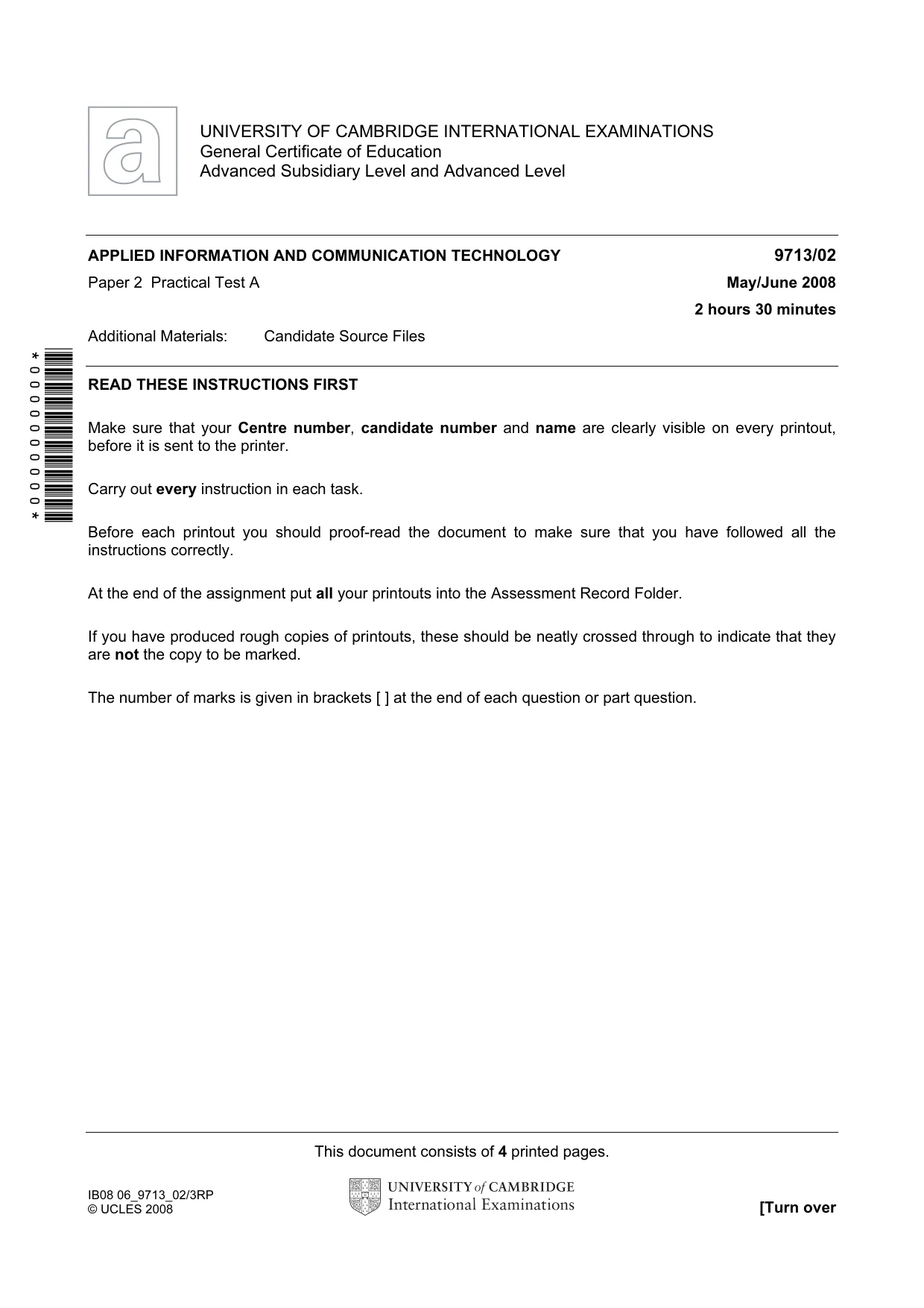
Question paper, page 1
This document consists of 4 printed pages. IB08 06_9713_02/3RP © UCLES 2008 [Turn over *0000000000* UNIVERSITY OF CAMBRIDGE INTERNATIONAL EXAMINATIONS General Certificate of Education Advanced Subsidiary Level and Advanced Level APPLIED INFORMATION AND COMMUNICATION TECHNOLOGY 9713/02 Paper 2 Practical Test A May/June 2008 2 hours 30 minutes Additional Materials: Candidate Source Files READ THESE INSTRUCTIONS FIRST Make sure that your Centre number, candidate number and name are clearly visible on every printout, before it is sent to the printer. Carry out every instruction in each task. Before each printout you should proof-read the document to make sure that you have followed all the instructions correctly. At the end of the assignment put all your printouts into the Assessment Record Folder. If you have produced rough copies of printouts, these should be neatly crossed through to indicate that they are not the copy to be marked. The number of marks is given in brackets [ ] at the end of each question or part question.
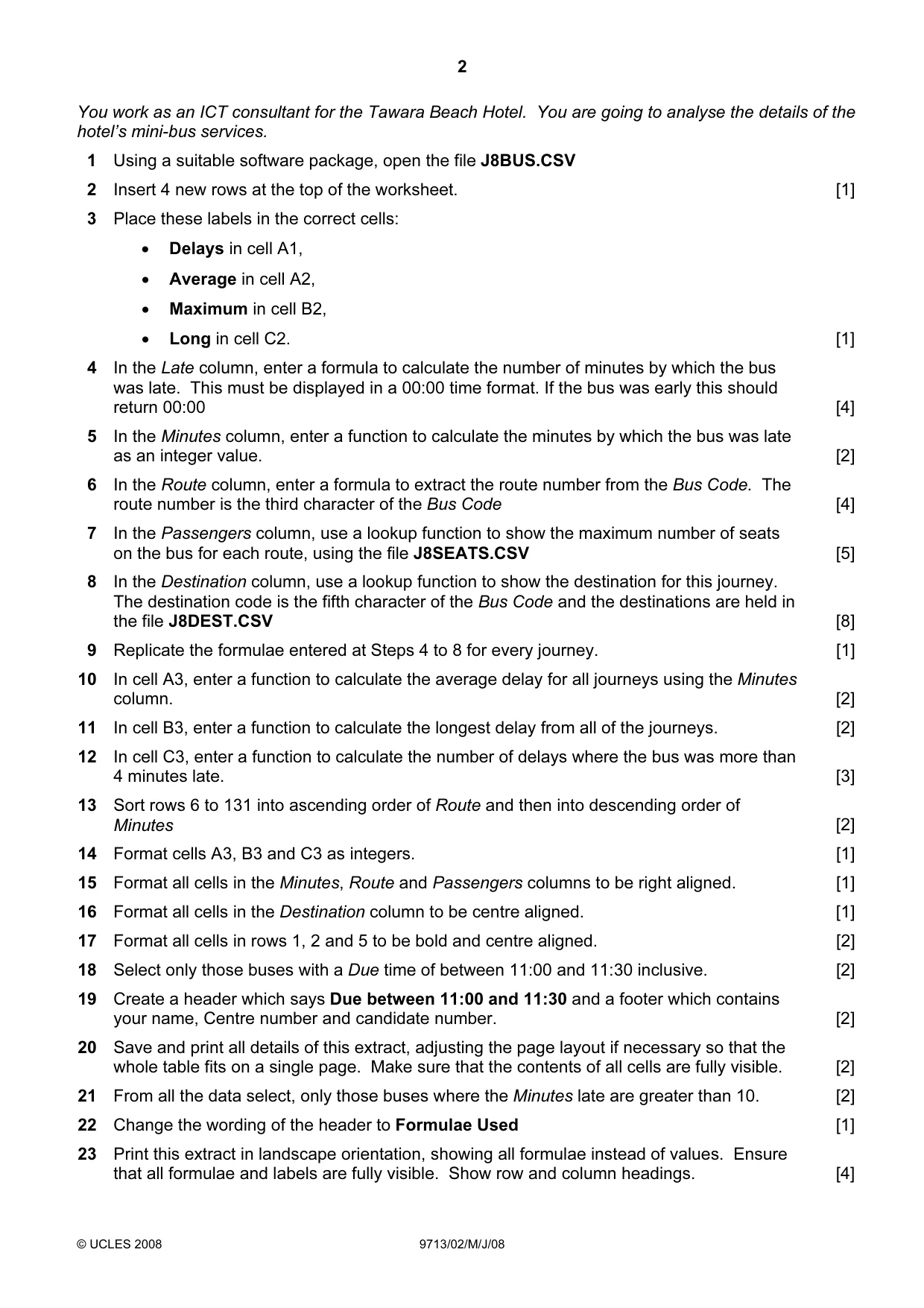
Question paper, page 2
2 © UCLES 2008 9713/02/M/J/08 You work as an ICT consultant for the Tawara Beach Hotel. You are going to analyse the details of the hotel’s mini-bus services. 1 Using a suitable software package, open the file J8BUS.CSV 2 Insert 4 new rows at the top of the worksheet. [1] 3 Place these labels in the correct cells: • Delays in cell A1, • Average in cell A2, • Maximum in cell B2, • Long in cell C2. [1] 4 In the Late column, enter a formula to calculate the number of minutes by which the bus was late. This must be displayed in a 00:00 time format. If the bus was early this should return 00:00 [4] 5 In the Minutes column, enter a function to calculate the minutes by which the bus was late as an integer value. [2] 6 In the Route column, enter a formula to extract the route number from the Bus Code. The route number is the third character of the Bus Code [4] 7 In the Passengers column, use a lookup function to show the maximum number of seats on the bus for each route, using the file J8SEATS.CSV [5] 8 In the Destination column, use a lookup function to show the destination for this journey. The destination code is the fifth character of the Bus Code and the destinations are held in the file J8DEST.CSV [8] 9 Replicate the formulae entered at Steps 4 to 8 for every journey. [1] 10 In cell A3, enter a function to calculate the average delay for all journeys using the Minutes column. [2] 11 In cell B3, enter a function to calculate the longest delay from all of the journeys. [2] 12 In cell C3, enter a function to calculate the number of delays where the bus was more than 4 minutes late. [3] 13 Sort rows 6 to 131 into ascending order of Route and then into descending order of Minutes [2] 14 Format cells A3, B3 and C3 as integers. [1] 15 Format all cells in the Minutes, Route and Passengers columns to be right aligned. [1] 16 Format all cells in the Destination column to be centre aligned. [1] 17 Format all cells in rows 1, 2 and 5 to be bold and centre aligned. [2] 18 Select only those buses with a Due time of between 11:00 and 11:30 inclusive. [2] 19 Create a header which says Due between 11:00 and 11:30 and a footer which contains your name, Centre number and candidate number. [2] 20 Save and print all details of this extract, adjusting the page layout if necessary so that the whole table fits on a single page. Make sure that the contents of all cells are fully visible. [2] 21 From all the data select, only those buses where the Minutes late are greater than 10. [2] 22 Change the wording of the header to Formulae Used [1] 23 Print this extract in landscape orientation, showing all formulae instead of values. Ensure that all formulae and labels are fully visible. Show row and column headings. [4]
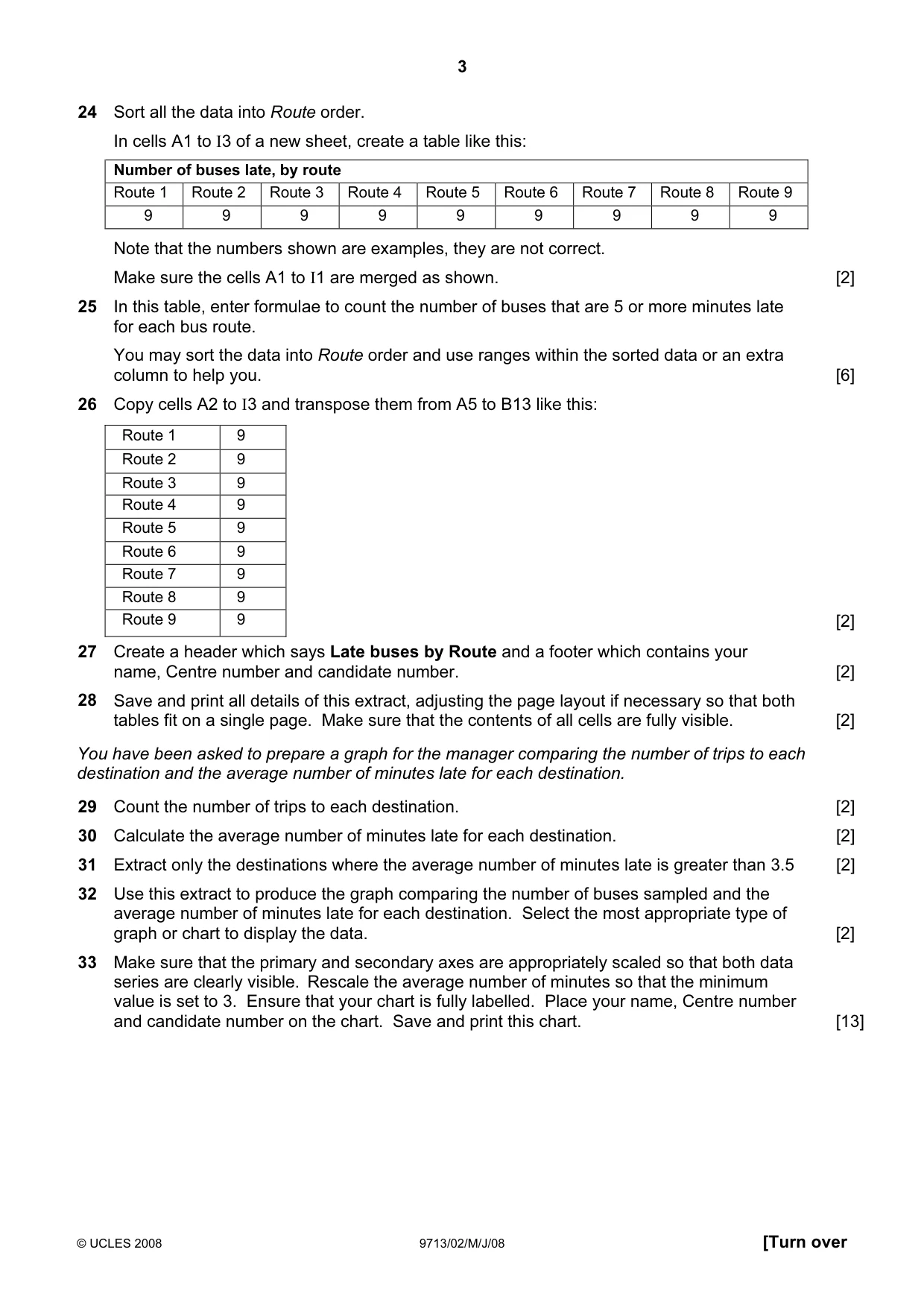
Question paper, page 3
3 © UCLES 2008 9713/02/M/J/08 [Turn over Sort all the data into Route order. In cells A1 to I3 of a new sheet, create a table like this: Number of buses late, by route Route 1 Route 2 Route 3 Route 4 Route 5 Route 6 Route 7 Route 8 Route 9 24 9 9 9 9 9 9 9 9 9 Note that the numbers shown are examples, they are not correct. Make sure the cells A1 to I1 are merged as shown. [2] 25 In this table, enter formulae to count the number of buses that are 5 or more minutes late for each bus route. You may sort the data into Route order and use ranges within the sorted data or an extra column to help you. [6] 26 Copy cells A2 to I3 and transpose them from A5 to B13 like this: Route 1 9 Route 2 9 Route 3 9 Route 4 9 Route 5 9 Route 6 9 Route 7 9 Route 8 9 Route 9 9 [2] 27 Create a header which says Late buses by Route and a footer which contains your name, Centre number and candidate number. [2] 28 Save and print all details of this extract, adjusting the page layout if necessary so that both tables fit on a single page. Make sure that the contents of all cells are fully visible. [2] You have been asked to prepare a graph for the manager comparing the number of trips to each destination and the average number of minutes late for each destination. 29 Count the number of trips to each destination. [2] 30 Calculate the average number of minutes late for each destination. [2] 31 Extract only the destinations where the average number of minutes late is greater than 3.5 [2] 32 Use this extract to produce the graph comparing the number of buses sampled and the average number of minutes late for each destination. Select the most appropriate type of graph or chart to display the data. [2] 33 Make sure that the primary and secondary axes are appropriately scaled so that both data series are clearly visible. Rescale the average number of minutes so that the minimum value is set to 3. Ensure that your chart is fully labelled. Place your name, Centre number and candidate number on the chart. Save and print this chart. [13]
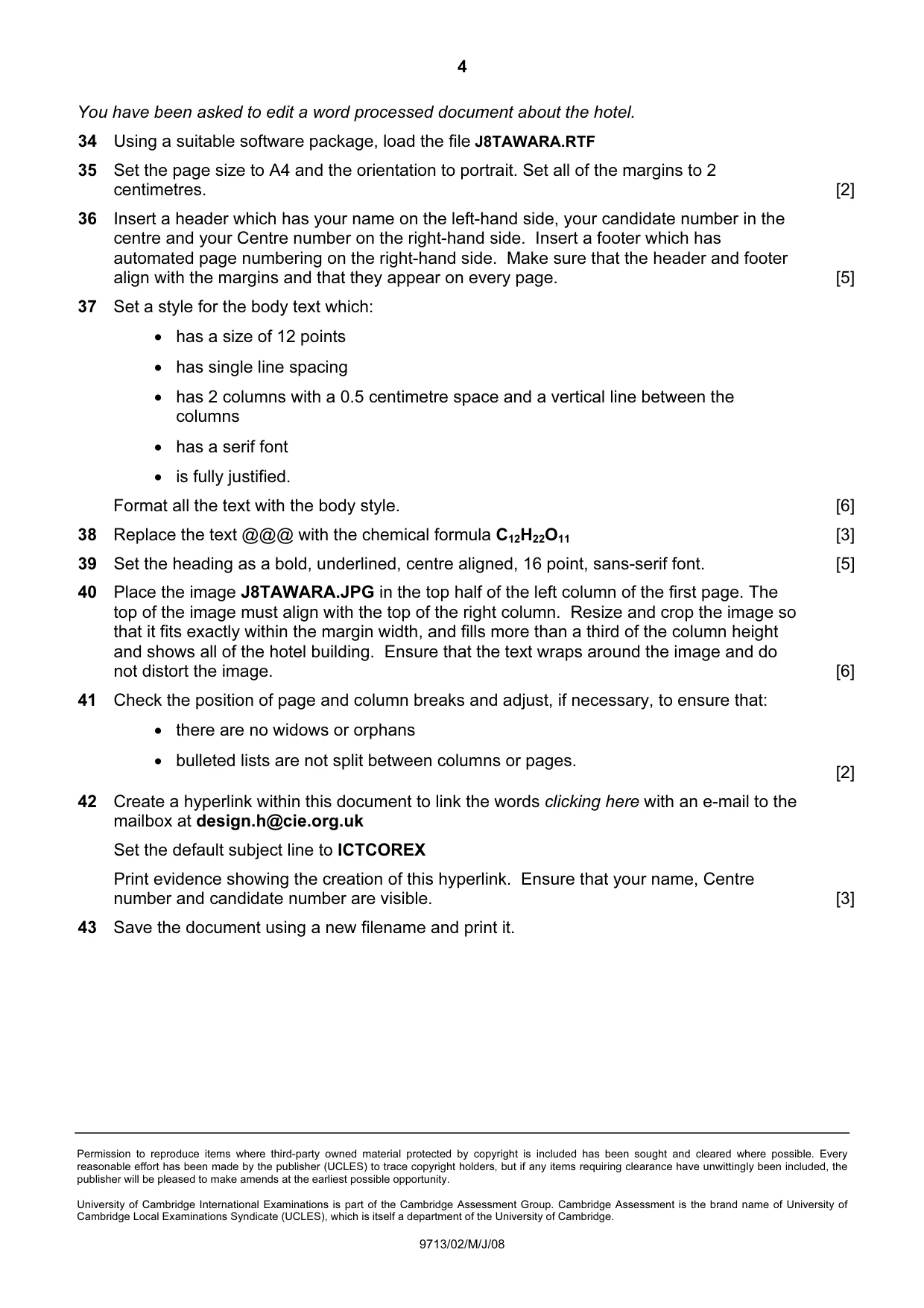
Question paper, page 4
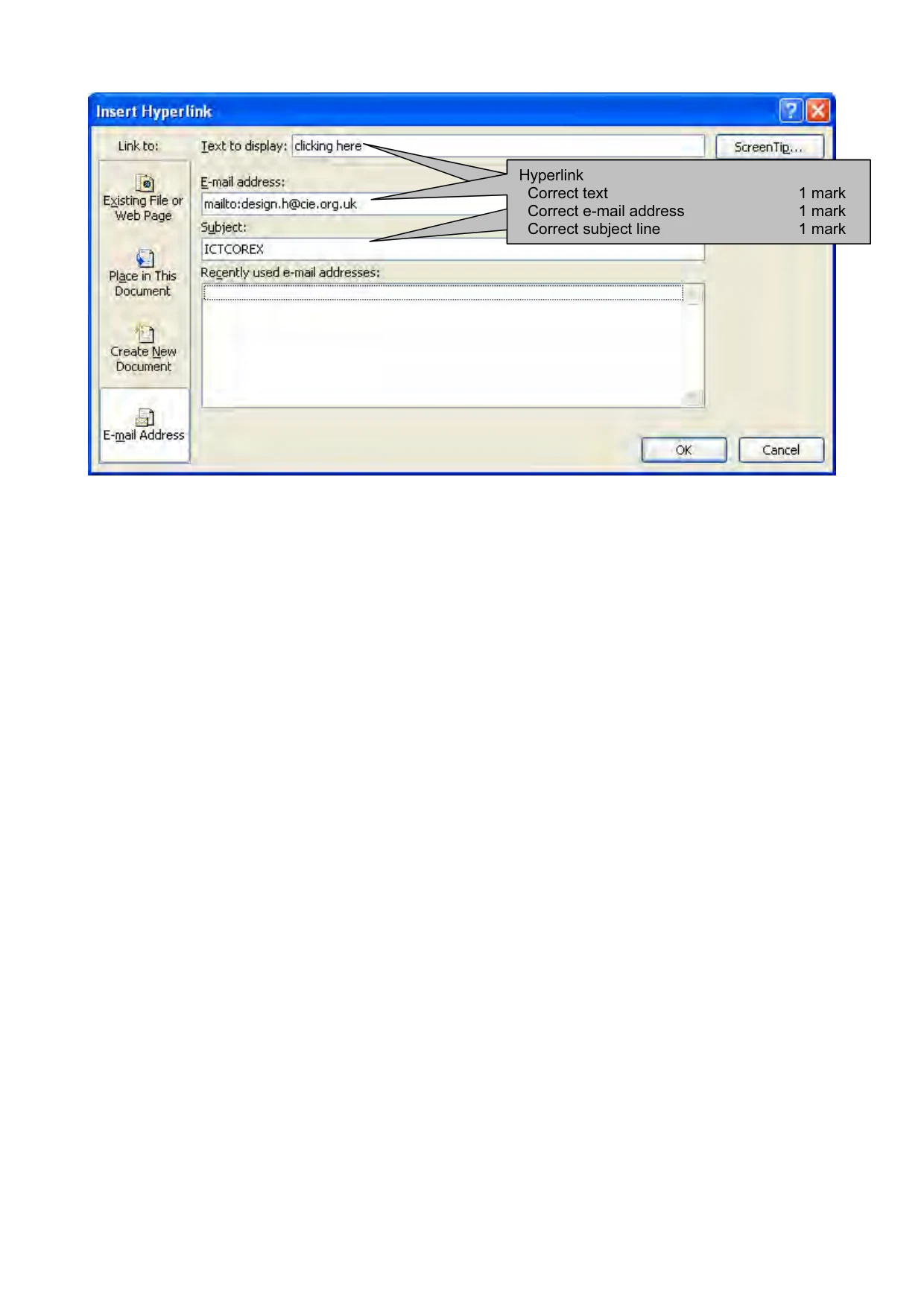
4 Permission to reproduce items where third-party owned material protected by copyright is included has been sought and cleared where possible. Every reasonable effort has been made by the publisher (UCLES) to trace copyright holders, but if any items requiring clearance have unwittingly been included, the publisher will be pleased to make amends at the earliest possible opportunity. University of Cambridge International Examinations is part of the Cambridge Assessment Group. Cambridge Assessment is the brand name of University of Cambridge Local Examinations Syndicate (UCLES), which is itself a department of the University of Cambridge. 9713/02/M/J/08 You have been asked to edit a word processed document about the hotel. 34 Using a suitable software package, load the file J8TAWARA.RTF 35 Set the page size to A4 and the orientation to portrait. Set all of the margins to 2 centimetres. [2] 36 Insert a header which has your name on the left-hand side, your candidate number in the centre and your Centre number on the right-hand side. Insert a footer which has automated page numbering on the right-hand side. Make sure that the header and footer align with the margins and that they appear on every page. [5] 37 Set a style for the body text which: • has a size of 12 points • has single line spacing • has 2 columns with a 0.5 centimetre space and a vertical line between the columns • has a serif font • is fully justified. Format all the text with the body style. [6] 38 Replace the text @@@ with the chemical formula C12H22O11 [3] 39 Set the heading as a bold, underlined, centre aligned, 16 point, sans-serif font. [5] 40 Place the image J8TAWARA.JPG in the top half of the left column of the first page. The top of the image must align with the top of the right column. Resize and crop the image so that it fits exactly within the margin width, and fills more than a third of the column height and shows all of the hotel building. Ensure that the text wraps around the image and do not distort the image. [6] 41 Check the position of page and column breaks and adjust, if necessary, to ensure that: • there are no widows or orphans • bulleted lists are not split between columns or pages. [2] 42 Create a hyperlink within this document to link the words clicking here with an e-mail to the mailbox at design.h@cie.org.uk Set the default subject line to ICTCOREX Print evidence showing the creation of this hyperlink. Ensure that your name, Centre number and candidate number are visible. [3] 43 Save the document using a new filename and print it.
Mark scheme, page 1
UNIVERSITY OF CAMBRIDGE INTERNATIONAL EXAMINATIONS GCE Advanced Subsidiary Level and GCE Advanced Level MARK SCHEME for the May/June 2008 question paper 9713 APPLIED INFORMATION AND COMMUNICATION TECHNOLOGY 9713/02 Paper 2 (Practical Test A), maximum raw mark 120 This mark scheme is published as an aid to teachers and candidates, to indicate the requirements of the examination. It shows the basis on which Examiners were instructed to award marks. It does not indicate the details of the discussions that took place at an Examiners’ meeting before marking began. All Examiners are instructed that alternative correct answers and unexpected approaches in candidates’ scripts must be given marks that fairly reflect the relevant knowledge and skills demonstrated. Mark schemes must be read in conjunction with the question papers and the report on the examination. • CIE will not enter into discussions or correspondence in connection with these mark schemes. CIE is publishing the mark schemes for the May/June 2008 question papers for most IGCSE, GCE Advanced Level and Advanced Subsidiary Level syllabuses and some Ordinary Level syllabuses.
Mark scheme, page 2
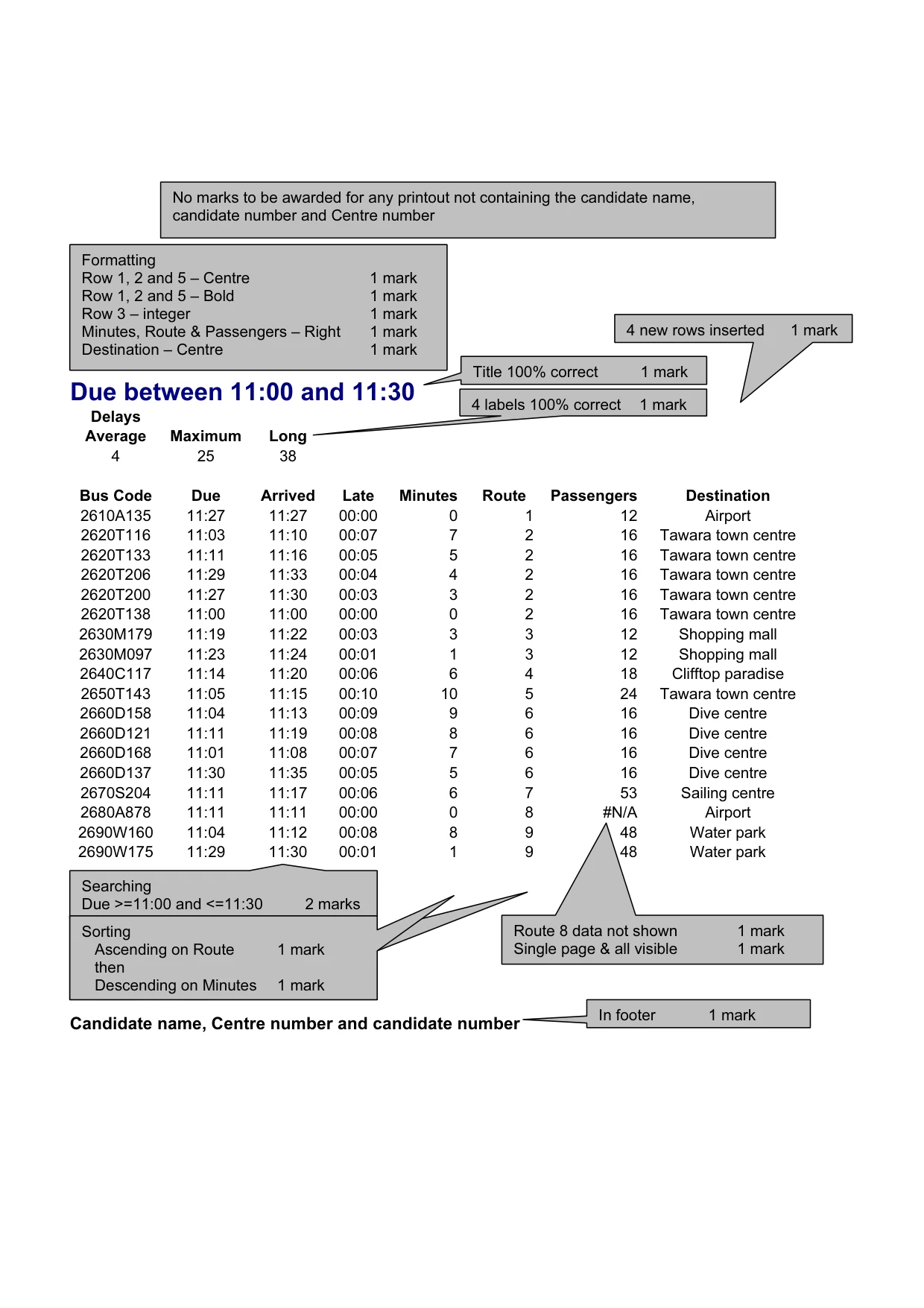
Due between 11:00 and 11:30 Delays Average Maximum Long 4 25 38 Bus Code Due Arrived Late Minutes Route Passengers Destination 2610A135 11:27 11:27 00:00 0 1 12 Airport 2620T116 11:03 11:10 00:07 7 2 16 Tawara town centre 2620T133 11:11 11:16 00:05 5 2 16 Tawara town centre 2620T206 11:29 11:33 00:04 4 2 16 Tawara town centre 2620T200 11:27 11:30 00:03 3 2 16 Tawara town centre 2620T138 11:00 11:00 00:00 0 2 16 Tawara town centre 2630M179 11:19 11:22 00:03 3 3 12 Shopping mall 2630M097 11:23 11:24 00:01 1 3 12 Shopping mall 2640C117 11:14 11:20 00:06 6 4 18 Clifftop paradise 2650T143 11:05 11:15 00:10 10 5 24 Tawara town centre 2660D158 11:04 11:13 00:09 9 6 16 Dive centre 2660D121 11:11 11:19 00:08 8 6 16 Dive centre 2660D168 11:01 11:08 00:07 7 6 16 Dive centre 2660D137 11:30 11:35 00:05 5 6 16 Dive centre 2670S204 11:11 11:17 00:06 6 7 53 Sailing centre 2680A878 11:11 11:11 00:00 0 8 #N/A Airport 2690W160 11:04 11:12 00:08 8 9 48 Water park 2690W175 11:29 11:30 00:01 1 9 48 Water park Candidate name, Centre number and candidate number No marks to be awarded for any printout not containing the candidate name, candidate number and Centre number Searching Due >=11:00 and <=11:30 2 marks Route 8 data not shown 1 mark Single page & all visible 1 mark Formatting Row 1, 2 and 5 – Centre 1 mark Row 1, 2 and 5 – Bold 1 mark Row 3 – integer 1 mark Minutes, Route & Passengers – Right 1 mark Destination – Centre 1 mark Title 100% correct 1 mark In footer 1 mark Sorting Ascending on Route 1 mark then Descending on Minutes 1 mark 4 new rows inserted 1 mark 4 labels 100% correct 1 mark Sorting Ascending on Route 1 mark then Descending on Minutes 1 mark
Mark scheme, page 3
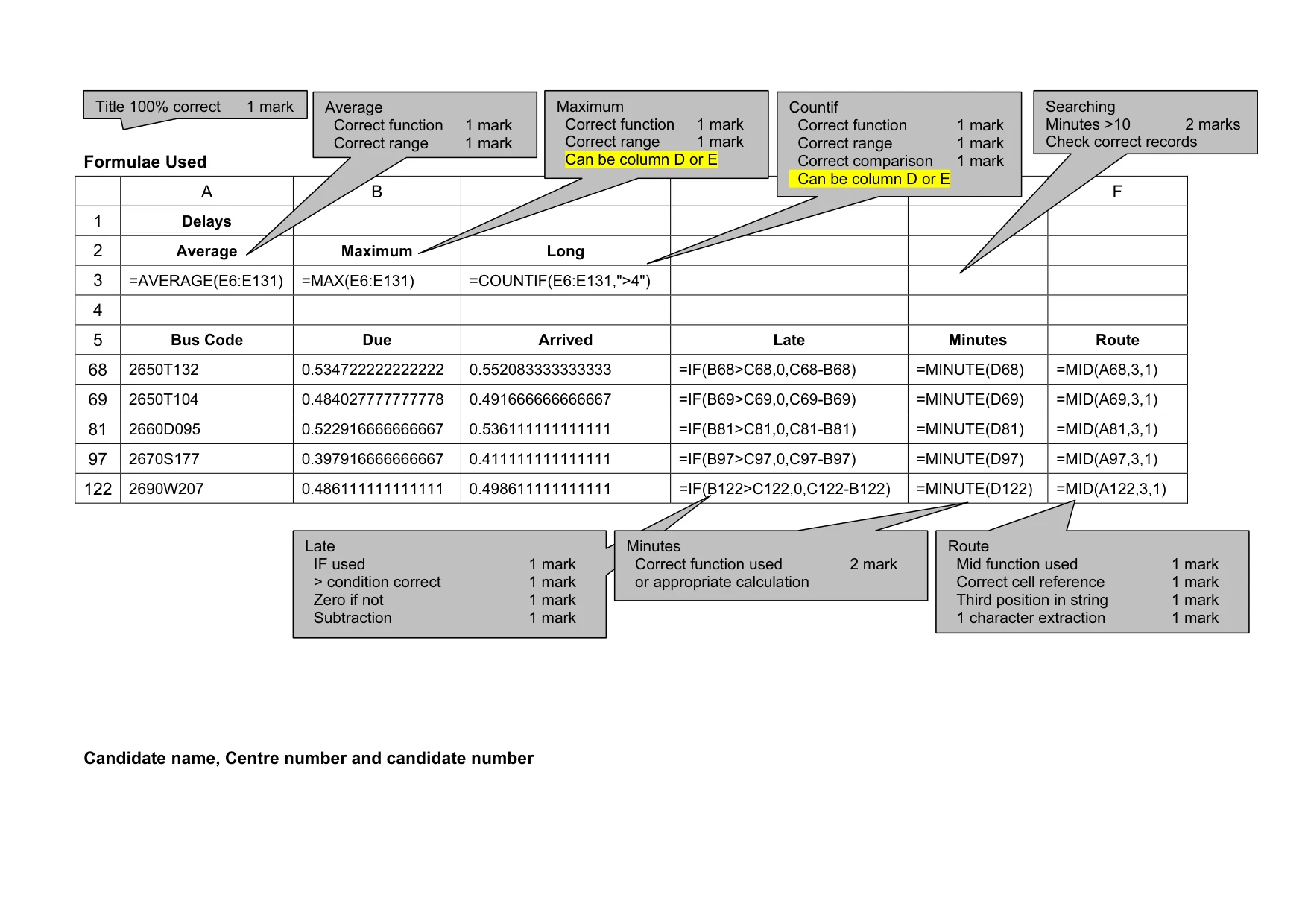
Formulae Used A B C D E F 1 Delays 2 Average Maximum Long 3 =AVERAGE(E6:E131) =MAX(E6:E131) =COUNTIF(E6:E131,">4") 4 5 Bus Code Due Arrived Late Minutes Route 68 2650T132 0.534722222222222 0.552083333333333 =IF(B68>C68,0,C68-B68) =MINUTE(D68) =MID(A68,3,1) 69 2650T104 0.484027777777778 0.491666666666667 =IF(B69>C69,0,C69-B69) =MINUTE(D69) =MID(A69,3,1) 81 2660D095 0.522916666666667 0.536111111111111 =IF(B81>C81,0,C81-B81) =MINUTE(D81) =MID(A81,3,1) 97 2670S177 0.397916666666667 0.411111111111111 =IF(B97>C97,0,C97-B97) =MINUTE(D97) =MID(A97,3,1) 122 2690W207 0.486111111111111 0.498611111111111 =IF(B122>C122,0,C122-B122) =MINUTE(D122) =MID(A122,3,1) Candidate name, Centre number and candidate number Title 100% correct 1 mark Average Correct function 1 mark Correct range 1 mark Maximum Correct function 1 mark Correct range 1 mark Can be column D or E Countif Correct function 1 mark Correct range 1 mark Correct comparison 1 mark Can be column D or E Searching Minutes >10 2 marks Check correct records Late IF used 1 mark > condition correct 1 mark Zero if not 1 mark Subtraction 1 mark Minutes Correct function used 2 mark or appropriate calculation Route Mid function used 1 mark Correct cell reference 1 mark Third position in string 1 mark 1 character extraction 1 mark
Mark scheme, page 4
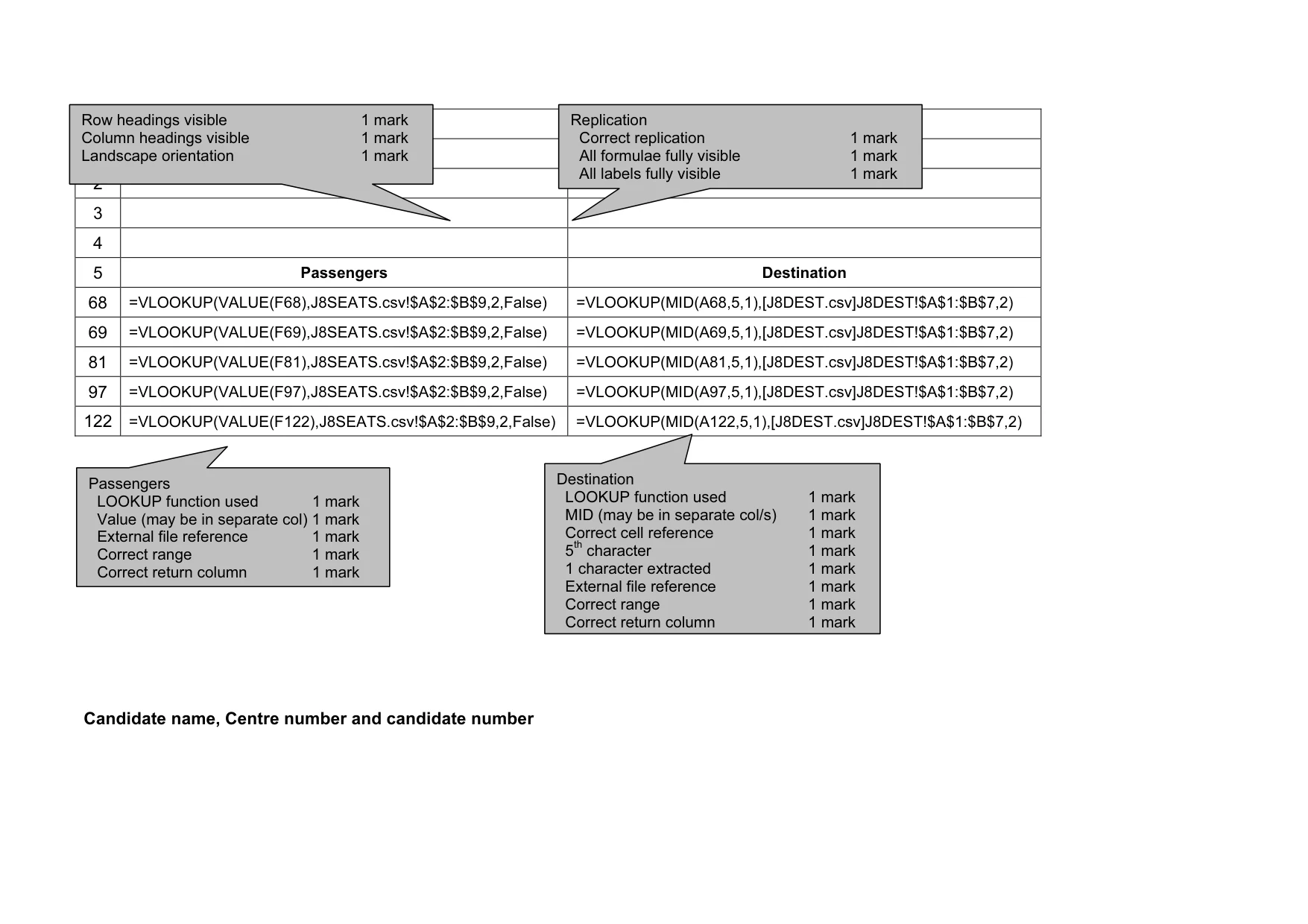
G H 1 2 3 4 5 Passengers Destination 68 =VLOOKUP(VALUE(F68),J8SEATS.csv!$A$2:$B$9,2,False) =VLOOKUP(MID(A68,5,1),[J8DEST.csv]J8DEST!$A$1:$B$7,2) 69 =VLOOKUP(VALUE(F69),J8SEATS.csv!$A$2:$B$9,2,False) =VLOOKUP(MID(A69,5,1),[J8DEST.csv]J8DEST!$A$1:$B$7,2) 81 =VLOOKUP(VALUE(F81),J8SEATS.csv!$A$2:$B$9,2,False) =VLOOKUP(MID(A81,5,1),[J8DEST.csv]J8DEST!$A$1:$B$7,2) 97 =VLOOKUP(VALUE(F97),J8SEATS.csv!$A$2:$B$9,2,False) =VLOOKUP(MID(A97,5,1),[J8DEST.csv]J8DEST!$A$1:$B$7,2) 122 =VLOOKUP(VALUE(F122),J8SEATS.csv!$A$2:$B$9,2,False) =VLOOKUP(MID(A122,5,1),[J8DEST.csv]J8DEST!$A$1:$B$7,2) Candidate name, Centre number and candidate number Replication Correct replication 1 mark All formulae fully visible 1 mark All labels fully visible 1 mark Row headings visible 1 mark Column headings visible 1 mark Landscape orientation 1 mark Passengers LOOKUP function used 1 mark Value (may be in separate col) 1 mark External file reference 1 mark Correct range 1 mark Correct return column 1 mark Destination LOOKUP function used 1 mark MID (may be in separate col/s) 1 mark Correct cell reference 1 mark 5th character 1 mark 1 character extracted 1 mark External file reference 1 mark Correct range 1 mark Correct return column 1 mark
Mark scheme, page 5
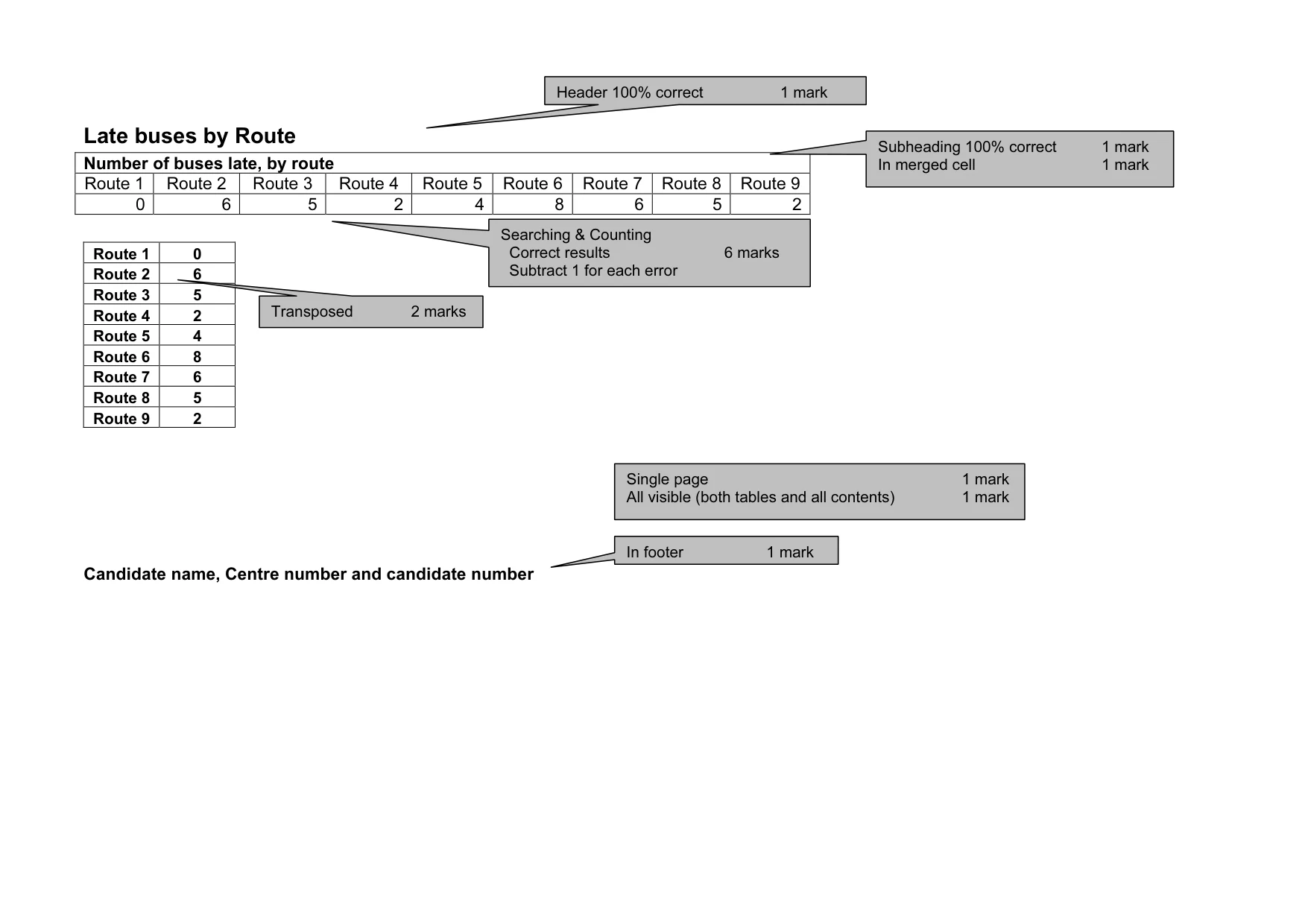
Late buses by Route Number of buses late, by route Route 1 Route 2 Route 3 Route 4 Route 5 Route 6 Route 7 Route 8 Route 9 0 6 5 2 4 8 6 5 2 Route 1 0 Route 2 6 Route 3 5 Route 4 2 Route 5 4 Route 6 8 Route 7 6 Route 8 5 Route 9 2 Candidate name, Centre number and candidate number Searching & Counting Correct results 6 marks Subtract 1 for each error In footer 1 mark Header 100% correct 1 mark Transposed 2 marks Single page 1 mark All visible (both tables and all contents) 1 mark Subheading 100% correct 1 mark In merged cell 1 mark
Mark scheme, page 6
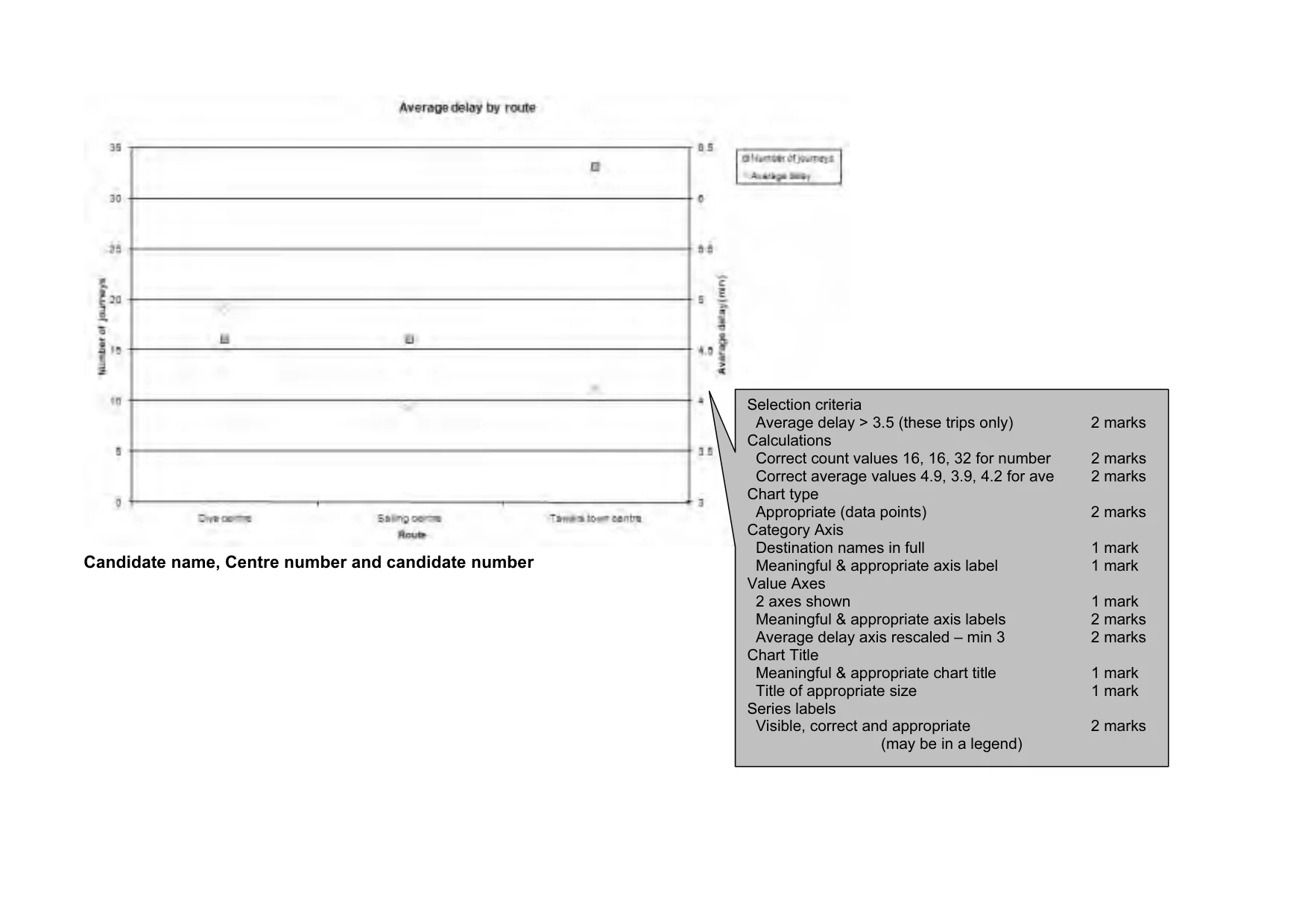
Candidate name, Centre number and candidate number Selection criteria Average delay > 3.5 (these trips only) 2 marks Calculations Correct count values 16, 16, 32 for number 2 marks Correct average values 4.9, 3.9, 4.2 for ave 2 marks Chart type Appropriate (data points) 2 marks Category Axis Destination names in full 1 mark Meaningful & appropriate axis label 1 mark Value Axes 2 axes shown 1 mark Meaningful & appropriate axis labels 2 marks Average delay axis rescaled – min 3 2 marks Chart Title Meaningful & appropriate chart title 1 mark Title of appropriate size 1 mark Series labels Visible, correct and appropriate 2 marks (may be in a legend)
Mark scheme, page 7
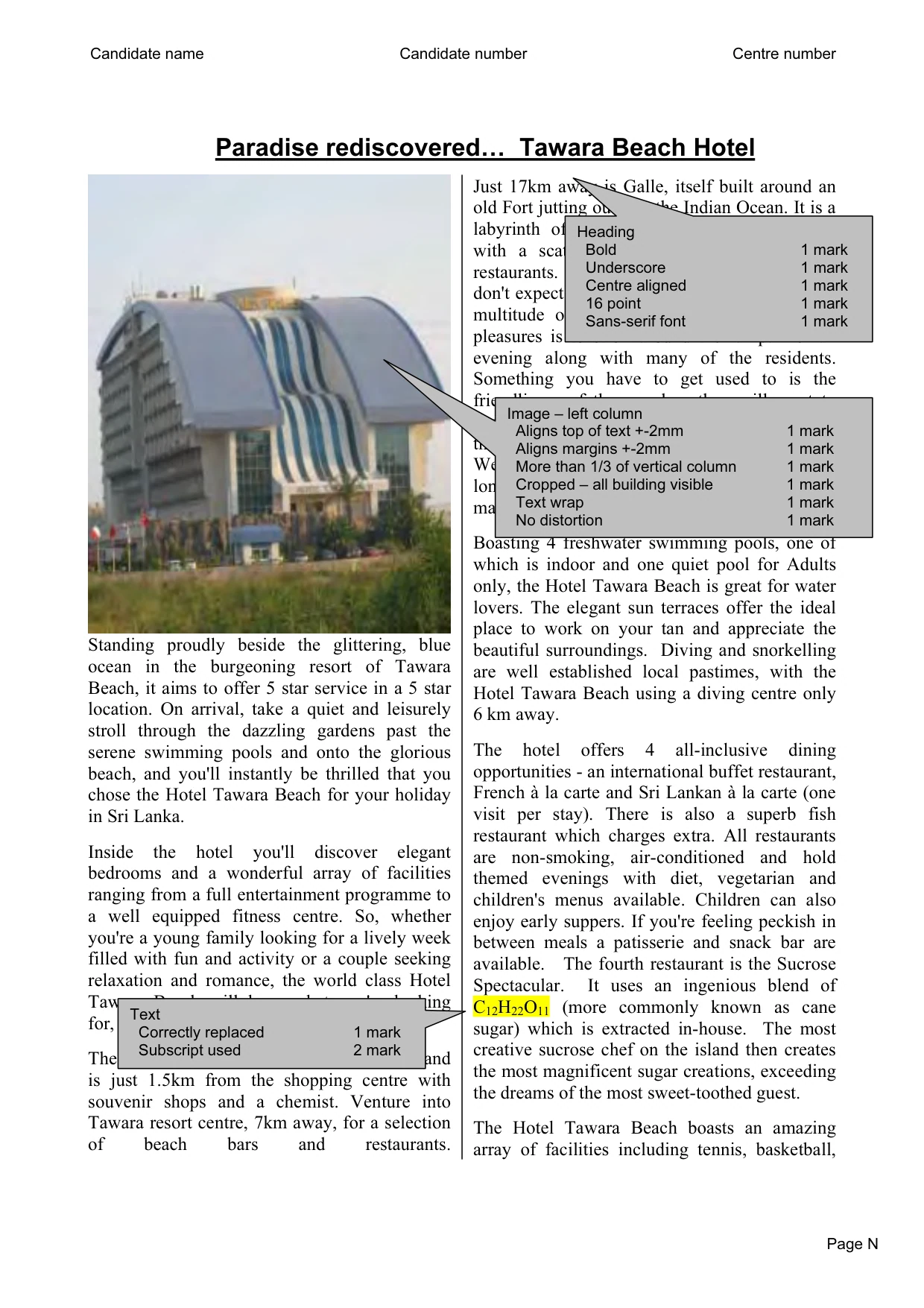
Candidate name Candidate number Centre number Page N Paradise rediscovered… Tawara Beach Hotel Standing proudly beside the glittering, blue ocean in the burgeoning resort of Tawara Beach, it aims to offer 5 star service in a 5 star location. On arrival, take a quiet and leisurely stroll through the dazzling gardens past the serene swimming pools and onto the glorious beach, and you'll instantly be thrilled that you chose the Hotel Tawara Beach for your holiday in Sri Lanka. Inside the hotel you'll discover elegant bedrooms and a wonderful array of facilities ranging from a full entertainment programme to a well equipped fitness centre. So, whether you're a young family looking for a lively week filled with fun and activity or a couple seeking relaxation and romance, the world class Hotel Tawara Beach will have what you're looking for, and more. The hotel lies directly on the golden beach and is just 1.5km from the shopping centre with souvenir shops and a chemist. Venture into Tawara resort centre, 7km away, for a selection of beach bars and restaurants. Just 17km away is Galle, itself built around an old Fort jutting out into the Indian Ocean. It is a labyrinth of streets and is mainly residential with a scattering of shops, cafes, bars and restaurants. It is starting to be developed but don't expect a European style walled city with a multitude of tourist shops. One of the great pleasures is to stroll around the rampart of an evening along with many of the residents. Something you have to get used to is the friendliness of the people - they will want to chat to you (usually about cricket) and at first this can seem off putting for us shy, reserved Westerners, but enjoy it - it probably won't be long before they learn to hassle rather than just make your acquaintance. Boasting 4 freshwater swimming pools, one of which is indoor and one quiet pool for Adults only, the Hotel Tawara Beach is great for water lovers. The elegant sun terraces offer the ideal place to work on your tan and appreciate the beautiful surroundings. Diving and snorkelling are well established local pastimes, with the Hotel Tawara Beach using a diving centre only 6 km away. The hotel offers 4 all-inclusive dining opportunities - an international buffet restaurant, French à la carte and Sri Lankan à la carte (one visit per stay). There is also a superb fish restaurant which charges extra. All restaurants are non-smoking, air-conditioned and hold themed evenings with diet, vegetarian and children's menus available. Children can also enjoy early suppers. If you're feeling peckish in between meals a patisserie and snack bar are available. The fourth restaurant is the Sucrose Spectacular. It uses an ingenious blend of C12H22O11 (more commonly known as cane sugar) which is extracted in-house. The most creative sucrose chef on the island then creates the most magnificent sugar creations, exceeding the dreams of the most sweet-toothed guest. The Hotel Tawara Beach boasts an amazing array of facilities including tennis, basketball, Text Correctly replaced 1 mark Subscript used 2 mark Heading Bold 1 mark Underscore 1 mark Centre aligned 1 mark 16 point 1 mark Sans-serif font 1 mark Image – left column Aligns top of text +-2mm 1 mark Aligns margins +-2mm 1 mark More than 1/3 of vertical column 1 mark Cropped – all building visible 1 mark Text wrap 1 mark No distortion 1 mark
Mark scheme, page 8
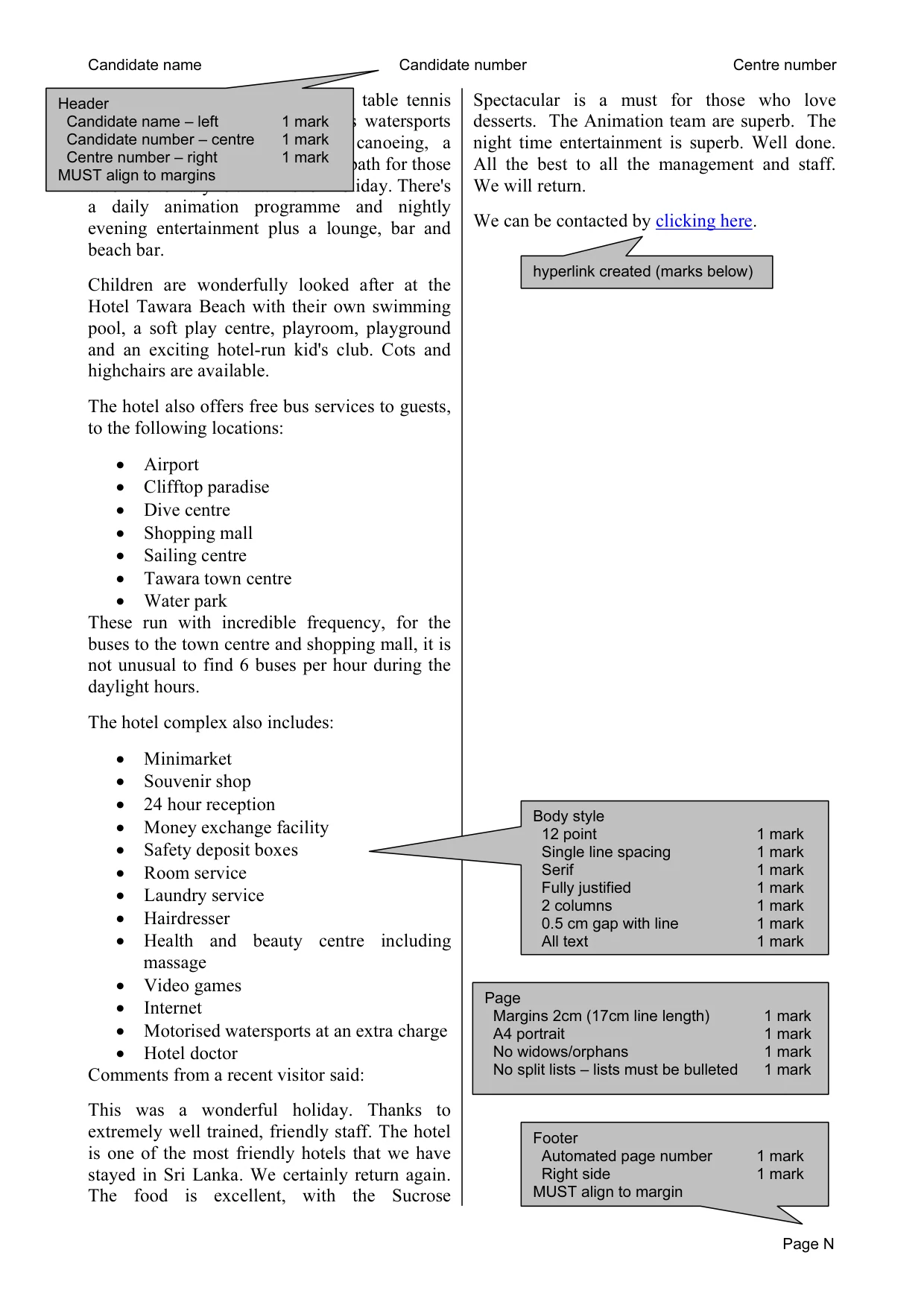
Candidate name Candidate number Centre number Page N volleyball, mini football, billiards, table tennis and a fitness centre. It also offers watersports including surfing, pedalos and canoeing, a Turkish bath, sauna and whirlpool bath for those who like to truly relax whilst on holiday. There's a daily animation programme and nightly evening entertainment plus a lounge, bar and beach bar. Children are wonderfully looked after at the Hotel Tawara Beach with their own swimming pool, a soft play centre, playroom, playground and an exciting hotel-run kid's club. Cots and highchairs are available. The hotel also offers free bus services to guests, to the following locations: • Airport • Clifftop paradise • Dive centre • Shopping mall • Sailing centre • Tawara town centre • Water park These run with incredible frequency, for the buses to the town centre and shopping mall, it is not unusual to find 6 buses per hour during the daylight hours. The hotel complex also includes: • Minimarket • Souvenir shop • 24 hour reception • Money exchange facility • Safety deposit boxes • Room service • Laundry service • Hairdresser • Health and beauty centre including massage • Video games • Internet • Motorised watersports at an extra charge • Hotel doctor Comments from a recent visitor said: This was a wonderful holiday. Thanks to extremely well trained, friendly staff. The hotel is one of the most friendly hotels that we have stayed in Sri Lanka. We certainly return again. The food is excellent, with the Sucrose Spectacular is a must for those who love desserts. The Animation team are superb. The night time entertainment is superb. Well done. All the best to all the management and staff. We will return. We can be contacted by clicking here. hyperlink created (marks below) Footer Automated page number 1 mark Right side 1 mark MUST align to margin Header Candidate name – left 1 mark Candidate number – centre 1 mark Centre number – right 1 mark MUST align to margins Page Margins 2cm (17cm line length) 1 mark A4 portrait 1 mark No widows/orphans 1 mark No split lists – lists must be bulleted 1 mark Body style 12 point 1 mark Single line spacing 1 mark Serif 1 mark Fully justified 1 mark 2 columns 1 mark 0.5 cm gap with line 1 mark All text 1 mark
Mark scheme, page 9
Hyperlink Correct text 1 mark Correct e-mail address 1 mark Correct subject line 1 mark Hyperlink Correct text 1 mark Correct e-mail address 1 mark Correct subject line 1 mark Hyperlink Correct text 1 mark Correct e-mail address 1 mark Correct subject line 1 mark
What you needed in this session
Cambridge’s own grade thresholds for 2008 May/June, Paper 2 · Variant 1. A higher threshold means an easier paper — the bar moves with how the cohort did.