Cambridge A Level Information Technology (from 2017) 9626 — 2025 Oct/Nov Paper 4 · Variant 0
9626/40/O/N/25 · 90 marks · 150 min
The question paper and its mark scheme, free to read here and free to download. This is Cambridge’s own paper, exactly as it was sat.
Question paper8 pages
Mark scheme
No mark scheme is in the library for this paper.
Paper as text
Question paper, page 1
This document has 8 pages. [Turn over Cambridge International AS & A Level * 2 7 1 6 9 1 9 3 0 0 * DC (CJ/SG) 370619/6 © UCLES 2025 INFORMATION TECHNOLOGY 9626/04 Paper 4 Advanced Practical October/November 2025 2 hours 30 minutes You will need: Candidate source files (listed on page 2) INSTRUCTIONS ● Carry out every instruction in each task. ● Save your work using the file names given in the task as and when instructed. ● You must not have access to either the internet or any email system during this examination. ● You must save your work in the correct file format as stated in the tasks. If work is saved in an incorrect file format, you will not receive marks for that task. INFORMATION ● The total mark for this paper is 90. ● The number of marks for each question or part question is shown in brackets [ ].
Question paper, page 2
2 9626/04/O/N/25 © UCLES 2025 You have been supplied with the following source files: BookingsArrayTask.html WeatherData.csv Create a folder called Examination. You must save all your work in this folder. Copy these files into this folder. Do not delete the source files when submitting your work. Do not tidy the folder by deleting files created at any stage of attempting the tasks. You must use the most efficient methods to solve each task. All work produced must be of a professional standard and contain your candidate details.
Question paper, page 3
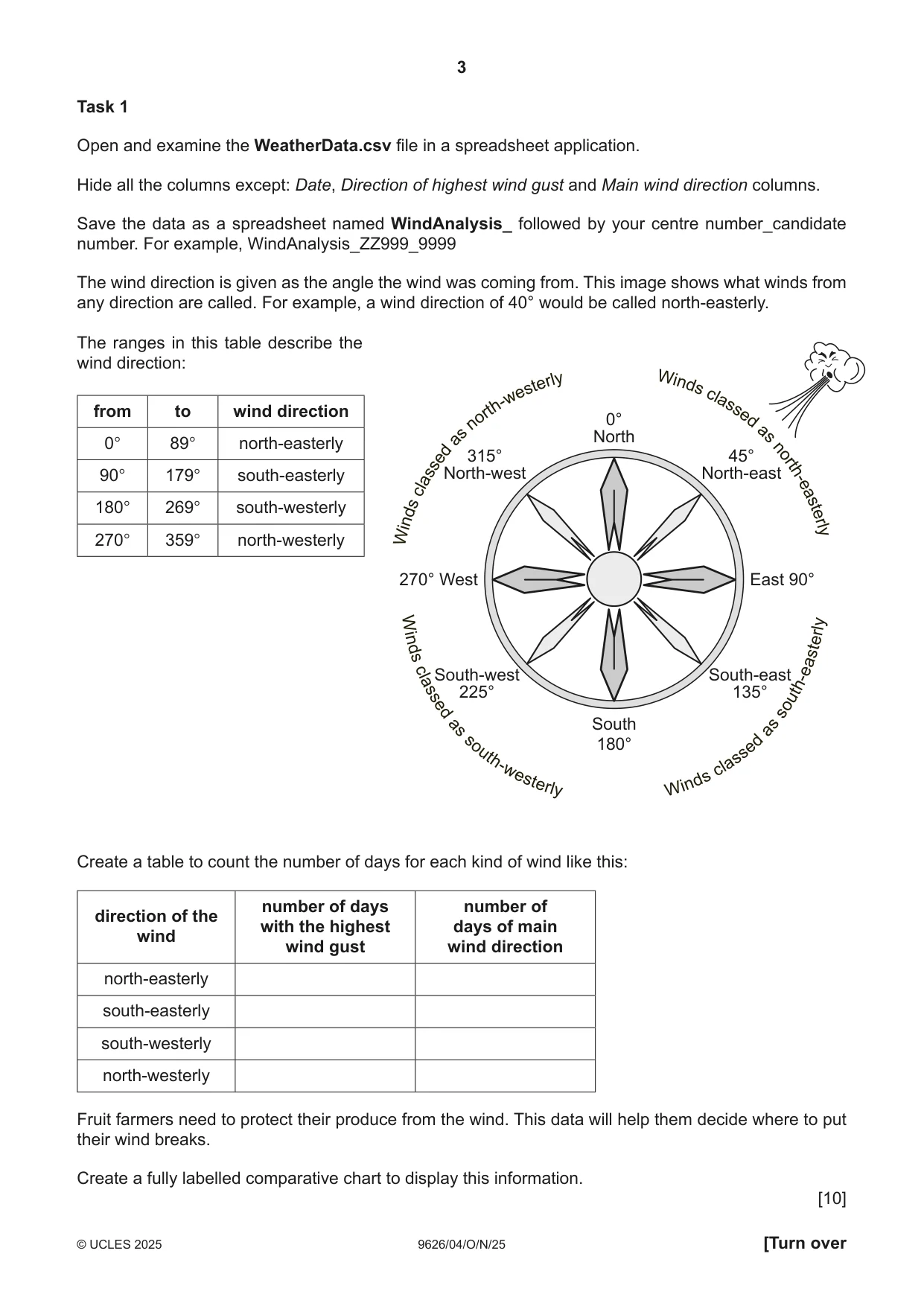
3 9626/04/O/N/25 © UCLES 2025 [Turn over Task 1 Open and examine the WeatherData.csv file in a spreadsheet application. Hide all the columns except: Date, Direction of highest wind gust and Main wind direction columns. Save the data as a spreadsheet named WindAnalysis_ followed by your centre number_candidate number. For example, WindAnalysis_ZZ999_9999 The wind direction is given as the angle the wind was coming from. This image shows what winds from any direction are called. For example, a wind direction of 40° would be called north-easterly. The ranges in this table describe the wind direction: from to wind direction 0° 89° north-easterly 90° 179° south-easterly 180° 269° south-westerly 270° 359° north-westerly Create a table to count the number of days for each kind of wind like this: direction of the wind number of days with the highest wind gust number of days of main wind direction north-easterly south-easterly south-westerly north-westerly Fruit farmers need to protect their produce from the wind. This data will help them decide where to put their wind breaks. Create a fully labelled comparative chart to display this information. [10] W in ds c la ss ed a s no rt h- ea st er ly W in ds c la ss ed a s no rt h- w es te rl y W in ds c la ss e d as s o ut h- w es te rl y W in ds c la ss e d as s o ut h- e as te rl y W in ds c la ss ed a s no rt h- ea st er ly W in ds c la ss ed a s no rt h- w es te rl y W in ds c la ss e d as s o ut h- w es te rl y W in ds c la ss e d as s o ut h- e as te rl y 0° North 45° North-east 315° North-west South-west 225° South-east 135° 270° West East 90° South 180°
Question paper, page 4
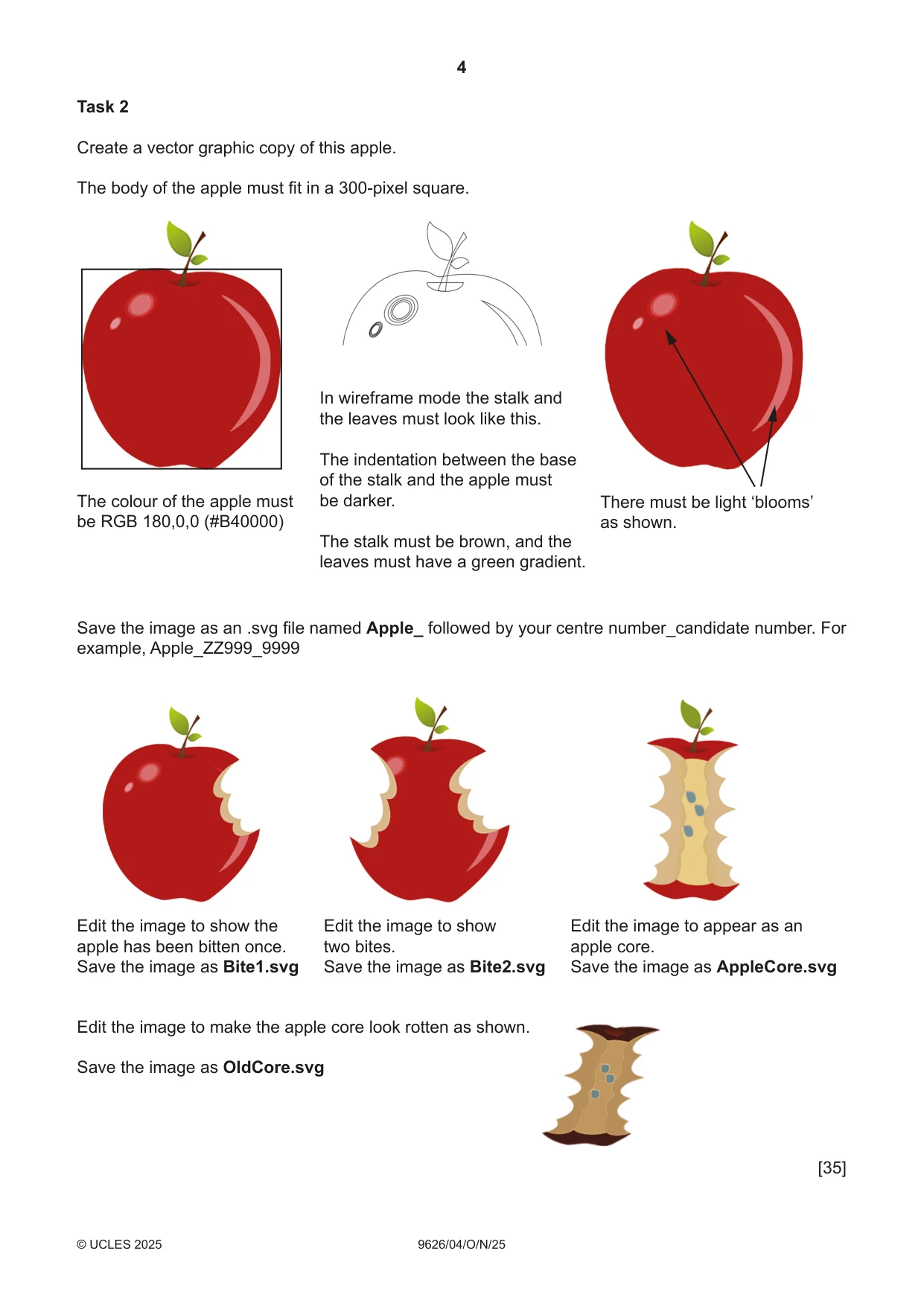
4 9626/04/ O/N/25 © UCLES 2025 Task 2 Create a vector graphic copy of this apple. The body of the apple must fit in a 300-pixel square. The colour of the apple must be RGB 180,0,0 (#B40000) There must be light ‘blooms’ as shown. In wireframe mode the stalk and the leaves must look like this. The indentation between the base of the stalk and the apple must be darker. The stalk must be brown, and the leaves must have a green gradient. Save the image as an .svg file named Apple_ followed by your centre number_candidate number. For example, Apple_ZZ999_9999 Edit the image to show the apple has been bitten once. Save the image as Bite1.svg Edit the image to show two bites. Save the image as Bite2.svg Edit the image to appear as an apple core. Save the image as AppleCore.svg Edit the image to make the apple core look rotten as shown. Save the image as OldCore.svg [35]
Question paper, page 5
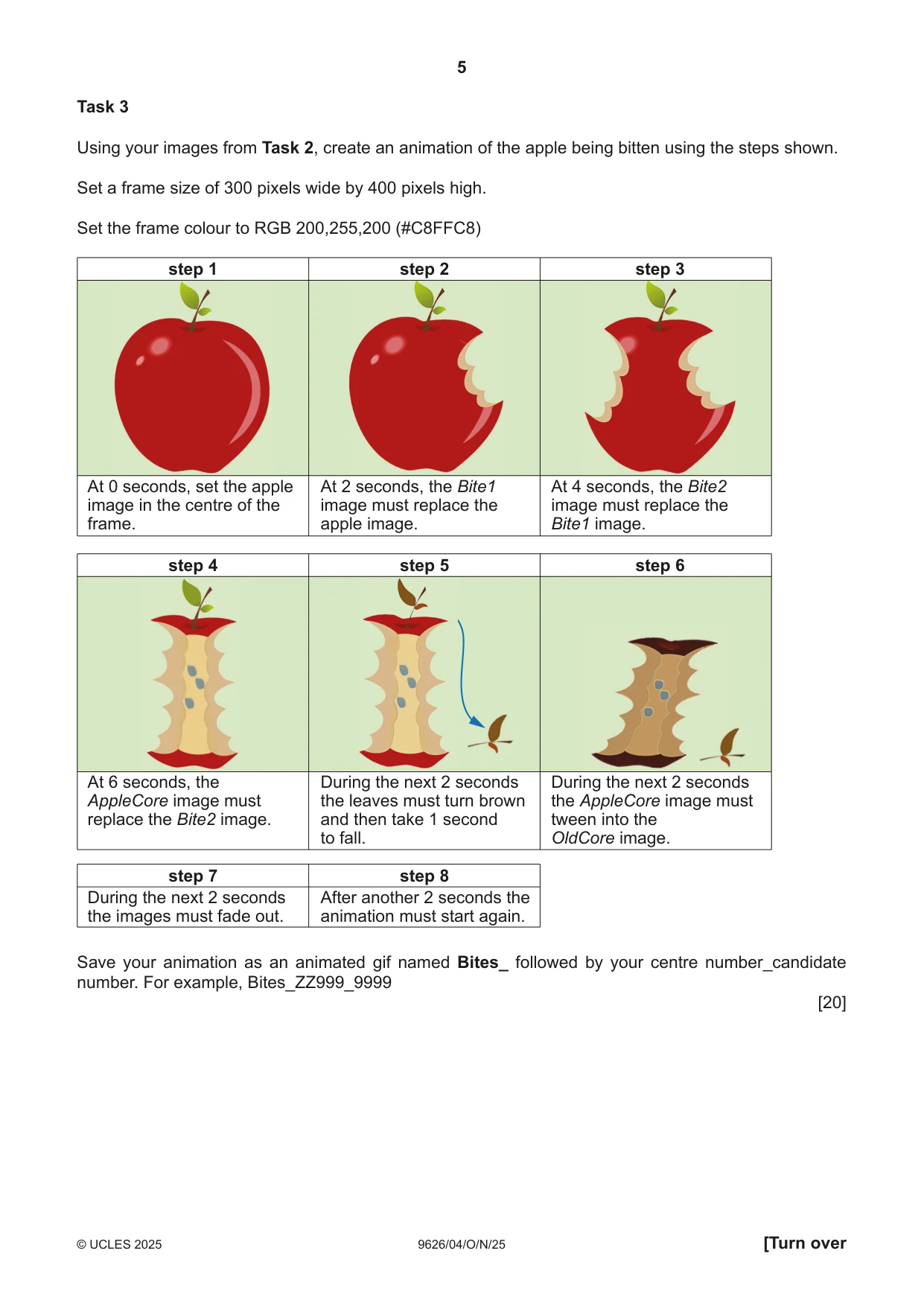
5 9626/04/O/N/25 © UCLES 2025 [Turn over Task 3 Using your images from Task 2, create an animation of the apple being bitten using the steps shown. Set a frame size of 300 pixels wide by 400 pixels high. Set the frame colour to RGB 200,255,200 (#C8FFC8) step 1 step 2 step 3 At 0 seconds, set the apple image in the centre of the frame. At 2 seconds, the Bite1 image must replace the apple image. At 4 seconds, the Bite2 image must replace the Bite1 image. step 4 step 5 step 7 step 8 step 6 At 6 seconds, the AppleCore image must replace the Bite2 image. During the next 2 seconds the images must fade out. After another 2 seconds the animation must start again. During the next 2 seconds the leaves must turn brown and then take 1 second to fall. During the next 2 seconds the AppleCore image must tween into the OldCore image. Save your animation as an animated gif named Bites_ followed by your centre number_candidate number. For example, Bites_ZZ999_9999 [20]
Question paper, page 6
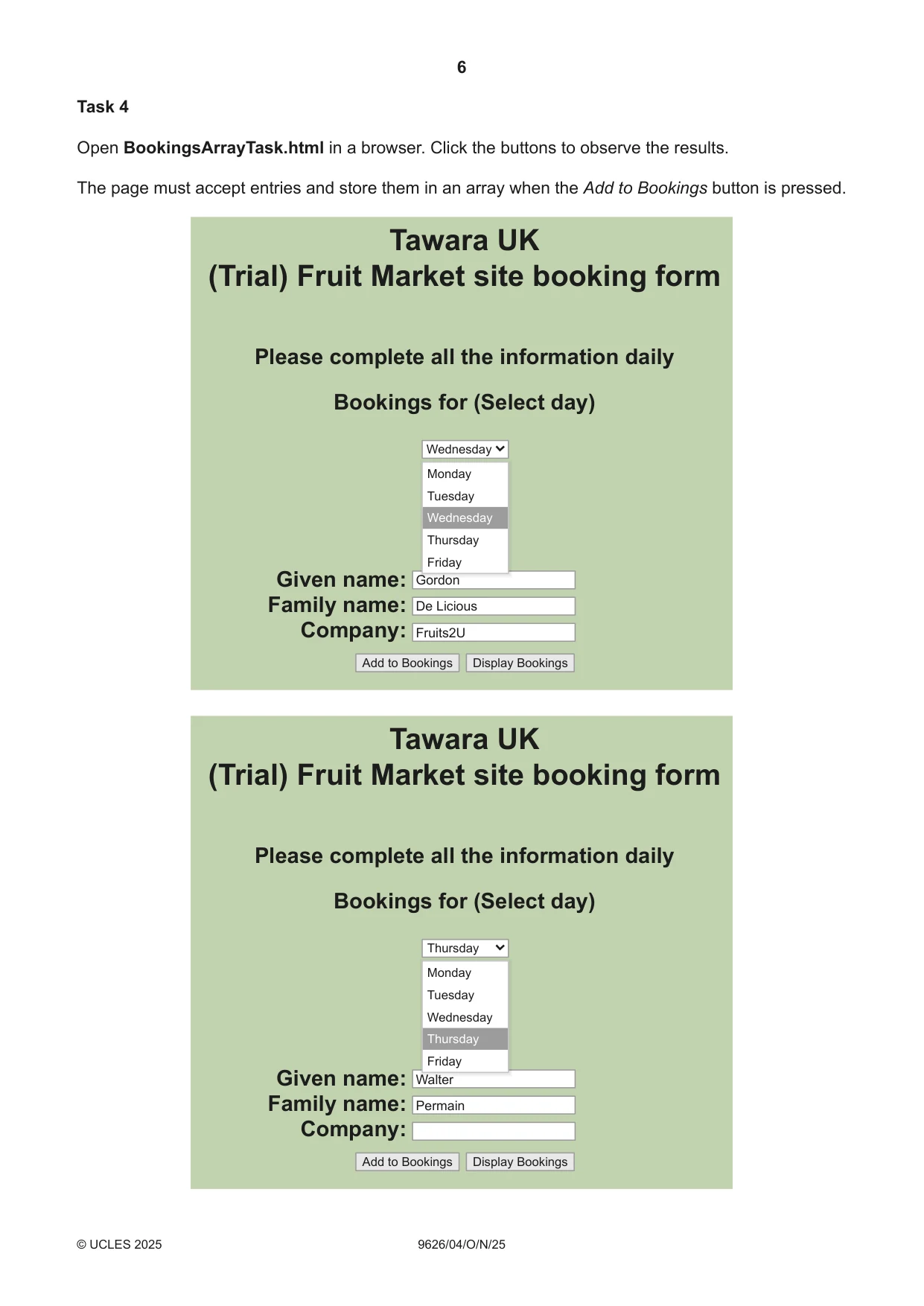
6 9626/04/ O/N/25 © UCLES 2025 Task 4 Open BookingsArrayTask.html in a browser. Click the buttons to observe the results. The page must accept entries and store them in an array when the Add to Bookings button is pressed. Tawara UK (Trial) Fruit Market site booking form Please complete all the information daily Bookings for (Select day) Given name: Family name: Company: Walter Thursday Add to Bookings Display Bookings Permain Tawara UK (Trial) Fruit Market site booking form Please complete all the information daily Bookings for (Select day) Given name: Family name: Company: Gordon Wednesday Add to Bookings Display Bookings De Licious Fruits2U Walter W lt W lt W lt W lt W lt W lt W lt W lt W lt W lt W lt W lt W lt W lt W lt W lt W lt W l Monday Tuesday Wednesday Thursday Friday Gordon G d G d G d G d G d G d G d G d G d G d G d G d G d G d G d G d G d G d G Monday Tuesday Wednesday Thursday Friday
Question paper, page 7
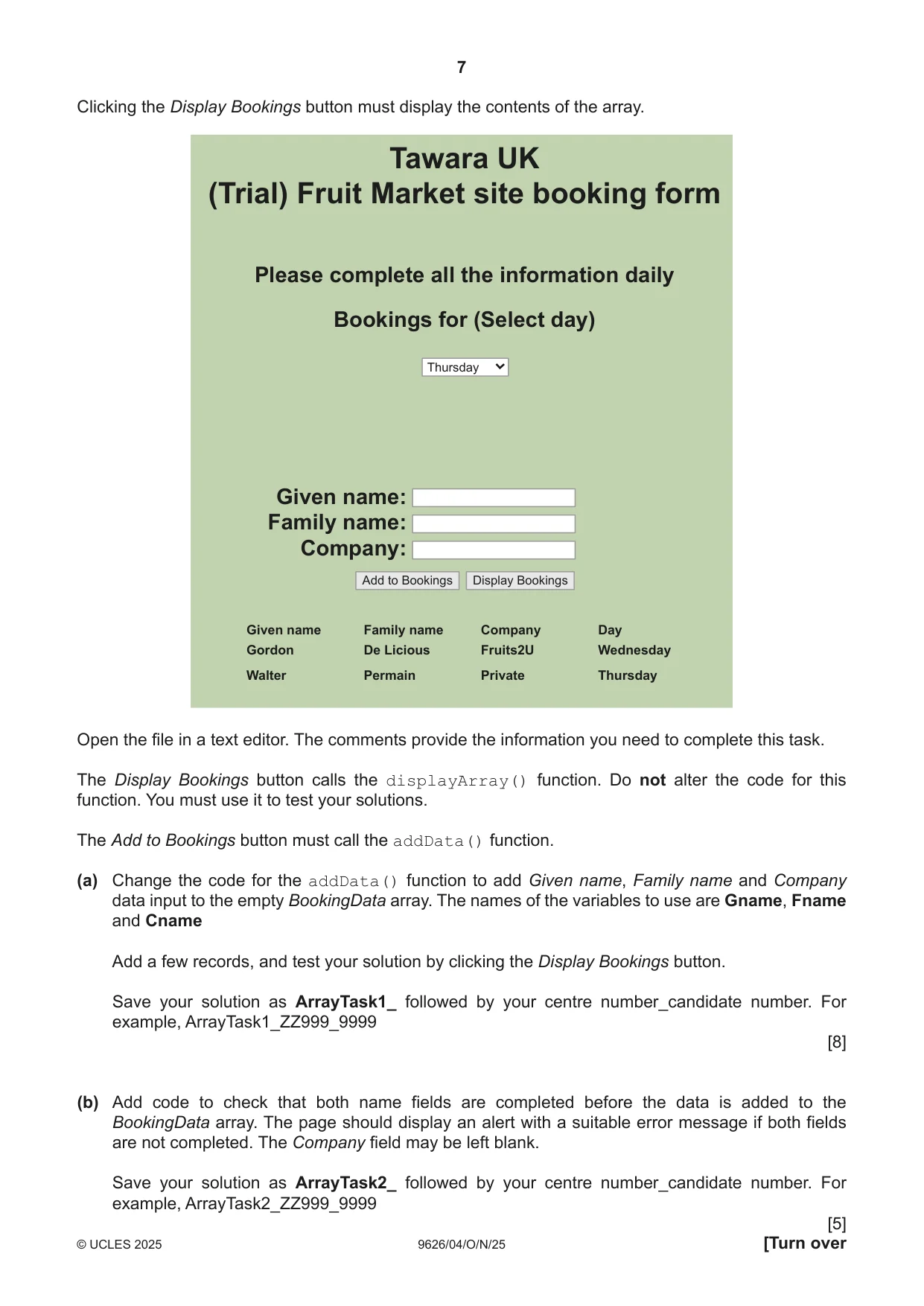
7 9626/04/O/N/25 © UCLES 2025 [Turn over Clicking the Display Bookings button must display the contents of the array. Tawara UK (Trial) Fruit Market site booking form Please complete all the information daily Bookings for (Select day) Given name: Family name: Company: Given name Gordon Walter Family name De Licious Permain Company Fruits2U Private Day Wednesday Thursday Thursday Add to Bookings Display Bookings Open the file in a text editor. The comments provide the information you need to complete this task. The Display Bookings button calls the displayArray() function. Do not alter the code for this function. You must use it to test your solutions. The Add to Bookings button must call the addData() function. (a) Change the code for the addData() function to add Given name, Family name and Company data input to the empty BookingData array. The names of the variables to use are Gname, Fname and Cname Add a few records, and test your solution by clicking the Display Bookings button. Save your solution as ArrayTask1_ followed by your centre number_candidate number. For example, ArrayTask1_ZZ999_9999 [8] (b) Add code to check that both name fields are completed before the data is added to the BookingData array. The page should display an alert with a suitable error message if both fields are not completed. The Company field may be left blank. Save your solution as ArrayTask2_ followed by your centre number_candidate number. For example, ArrayTask2_ZZ999_9999 [5]
Question paper, page 8
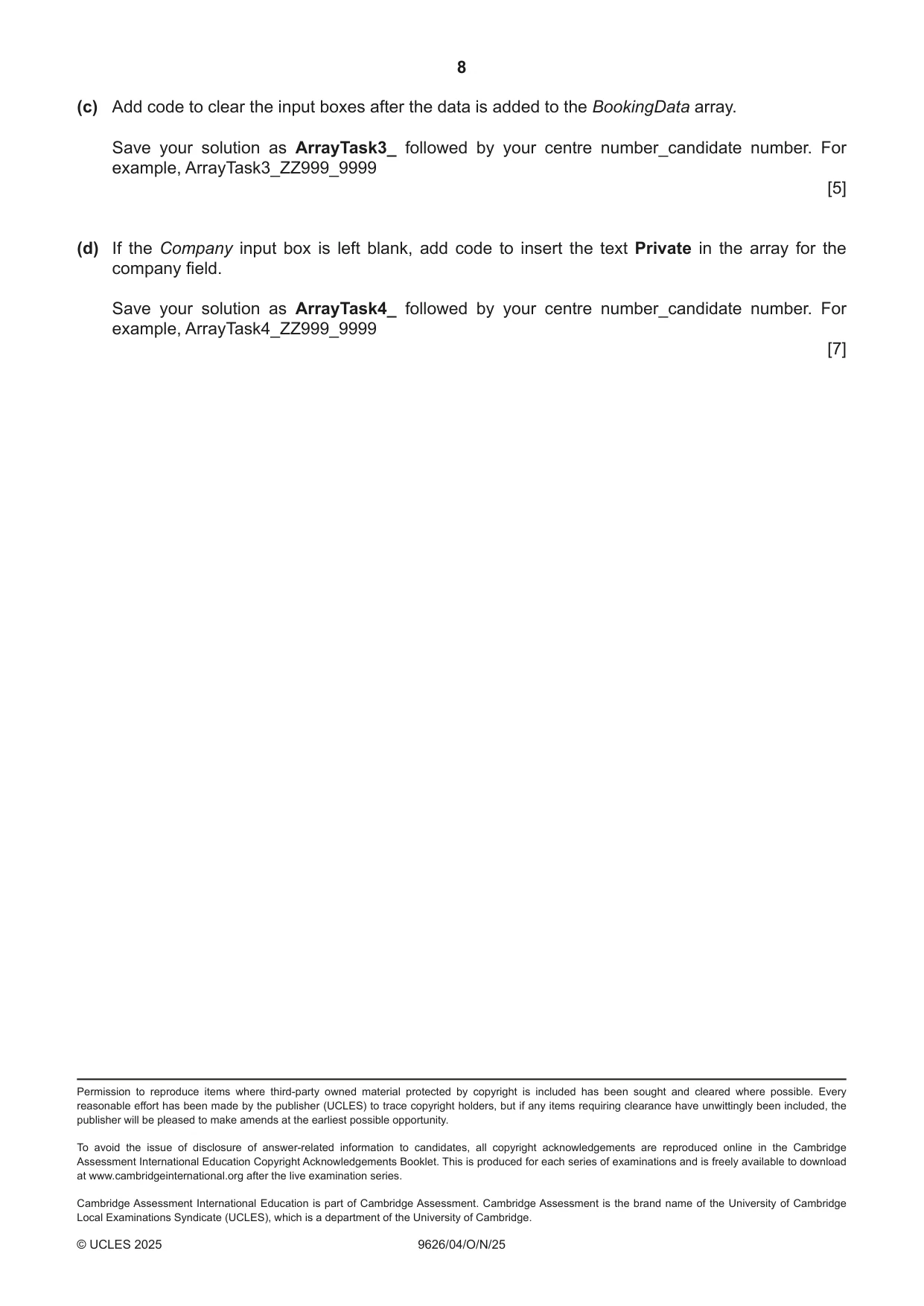
8 9626/04/O/N/25 © UCLES 2025 Permission to reproduce items where third-party owned material protected by copyright is included has been sought and cleared where possible. Every reasonable effort has been made by the publisher (UCLES) to trace copyright holders, but if any items requiring clearance have unwittingly been included, the publisher will be pleased to make amends at the earliest possible opportunity. To avoid the issue of disclosure of answer-related information to candidates, all copyright acknowledgements are reproduced online in the Cambridge Assessment International Education Copyright Acknowledgements Booklet. This is produced for each series of examinations and is freely available to download at www.cambridgeinternational.org after the live examination series. Cambridge Assessment International Education is part of Cambridge Assessment. Cambridge Assessment is the brand name of the University of Cambridge Local Examinations Syndicate (UCLES), which is a department of the University of Cambridge. (c) Add code to clear the input boxes after the data is added to the BookingData array. Save your solution as ArrayTask3_ followed by your centre number_candidate number. For example, ArrayTask3_ZZ999_9999 [5] (d) If the Company input box is left blank, add code to insert the text Private in the array for the company field. Save your solution as ArrayTask4_ followed by your centre number_candidate number. For example, ArrayTask4_ZZ999_9999 [7]
What you needed in this session
Cambridge’s own grade thresholds for 2025 Oct/Nov, Paper 4 · Variant 0. A higher threshold means an easier paper — the bar moves with how the cohort did.