Cambridge A Level Information Technology (from 2017) 9626 — 2024 Feb/March Paper 4 · Variant 0
9626/40/F/M/24 · 90 marks · ≈101 min
The question paper and its mark scheme, free to read here and free to download. This is Cambridge’s own paper, exactly as it was sat.
Question paper12 pages

Mark scheme
No mark scheme is in the library for this paper.
Paper as text
Question paper, page 1
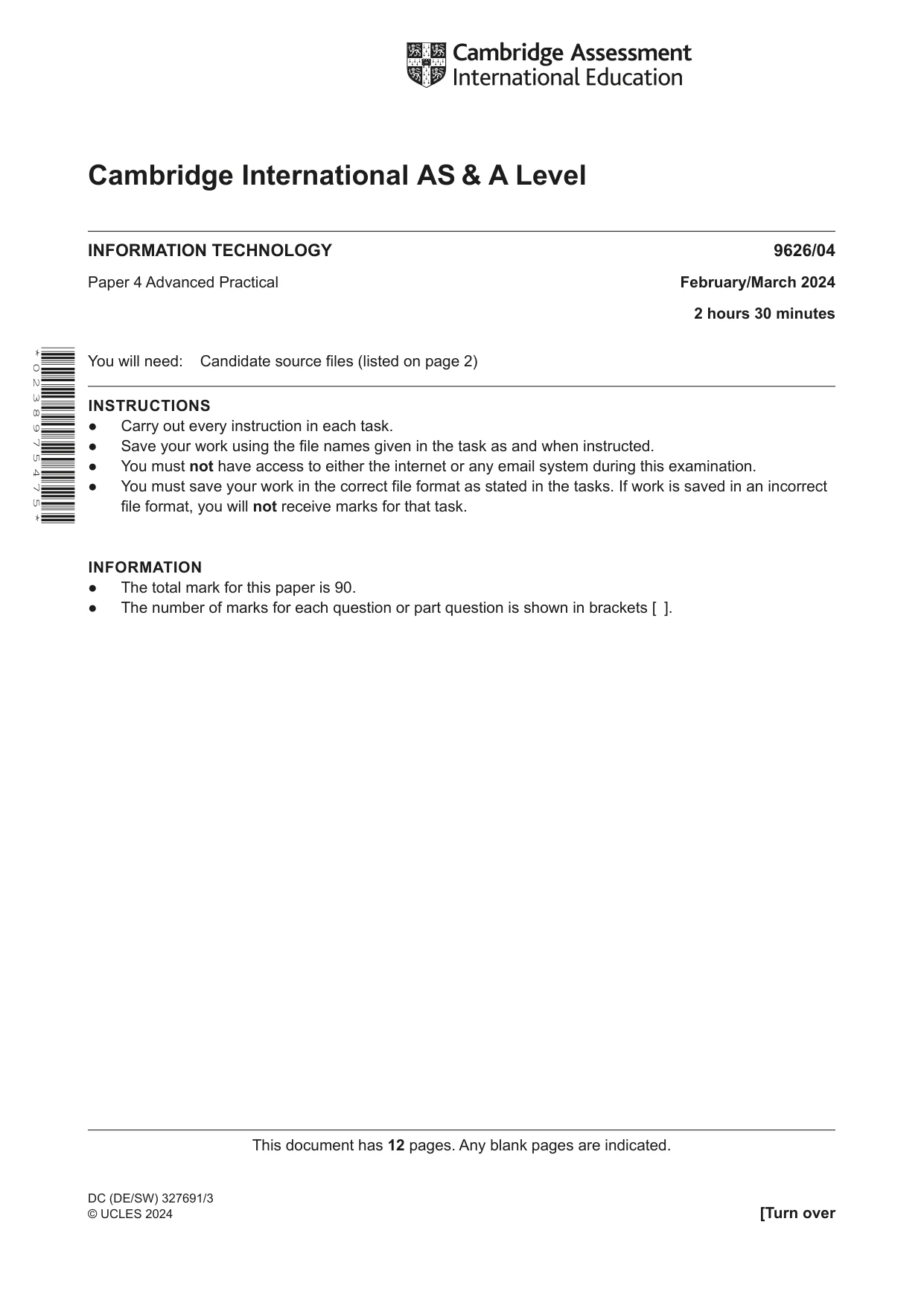
This document has 12 pages. Any blank pages are indicated. [Turn over * 0 2 3 8 9 7 5 4 7 5 * Cambridge International AS & A Level INFORMATION TECHNOLOGY 9626/04 Paper 4 Advanced Practical February/March 2024 2 hours 30 minutes You will need: Candidate source files (listed on page 2) INSTRUCTIONS ● Carry out every instruction in each task. ● Save your work using the file names given in the task as and when instructed. ● You must not have access to either the internet or any email system during this examination. ● You must save your work in the correct file format as stated in the tasks. If work is saved in an incorrect file format, you will not receive marks for that task. INFORMATION ● The total mark for this paper is 90. ● The number of marks for each question or part question is shown in brackets [ ]. DC (DE/SW) 327691/3 © UCLES 2024
Question paper, page 2
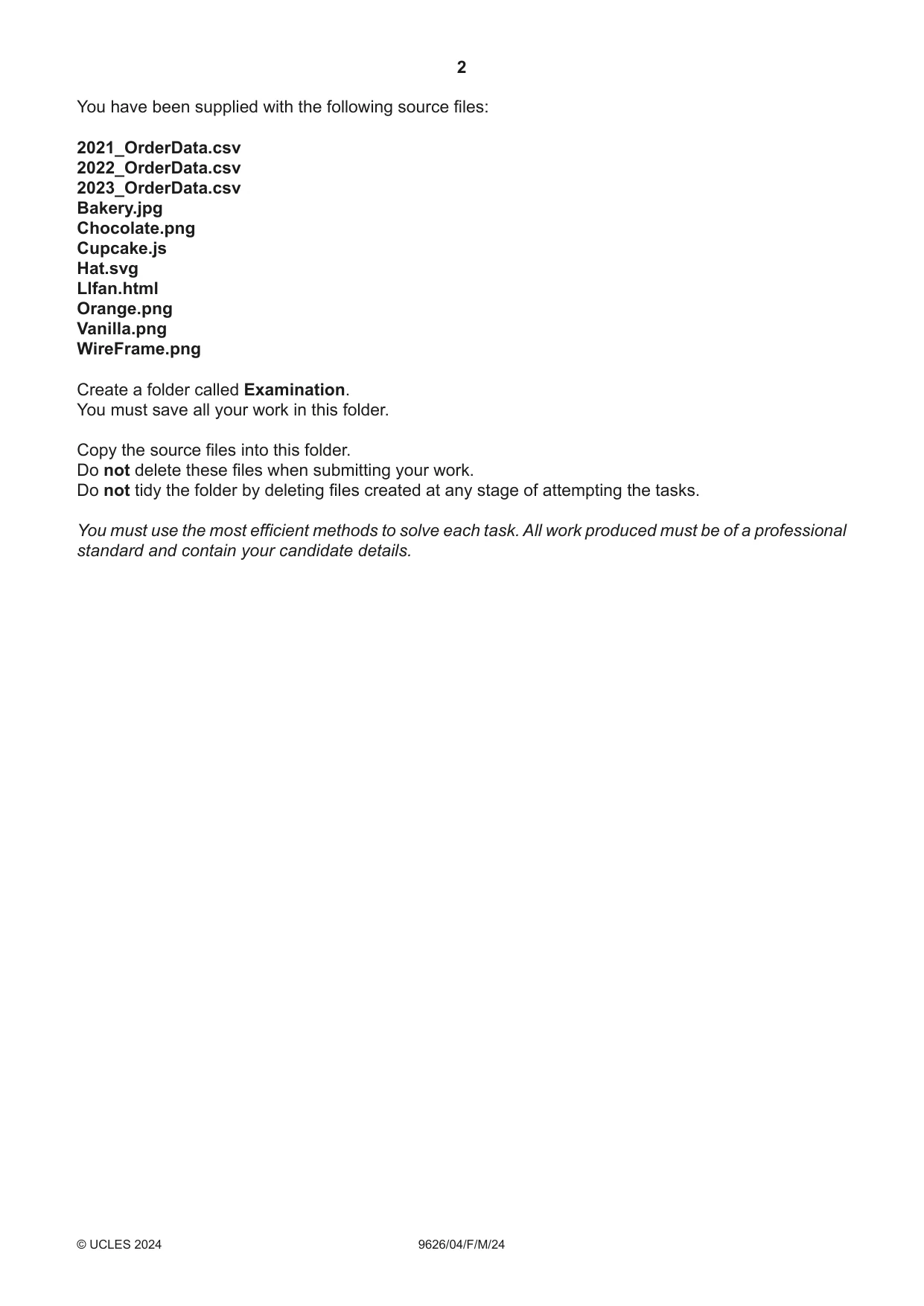
2 9626/04/F/M/24 © UCLES 2024 You have been supplied with the following source files: 2021_OrderData.csv 2022_OrderData.csv 2023_OrderData.csv Bakery.jpg Chocolate.png Cupcake.js Hat.svg Llfan.html Orange.png Vanilla.png WireFrame.png Create a folder called Examination. You must save all your work in this folder. Copy the source files into this folder. Do not delete these files when submitting your work. Do not tidy the folder by deleting files created at any stage of attempting the tasks. You must use the most efficient methods to solve each task. All work produced must be of a professional standard and contain your candidate details.
Question paper, page 3
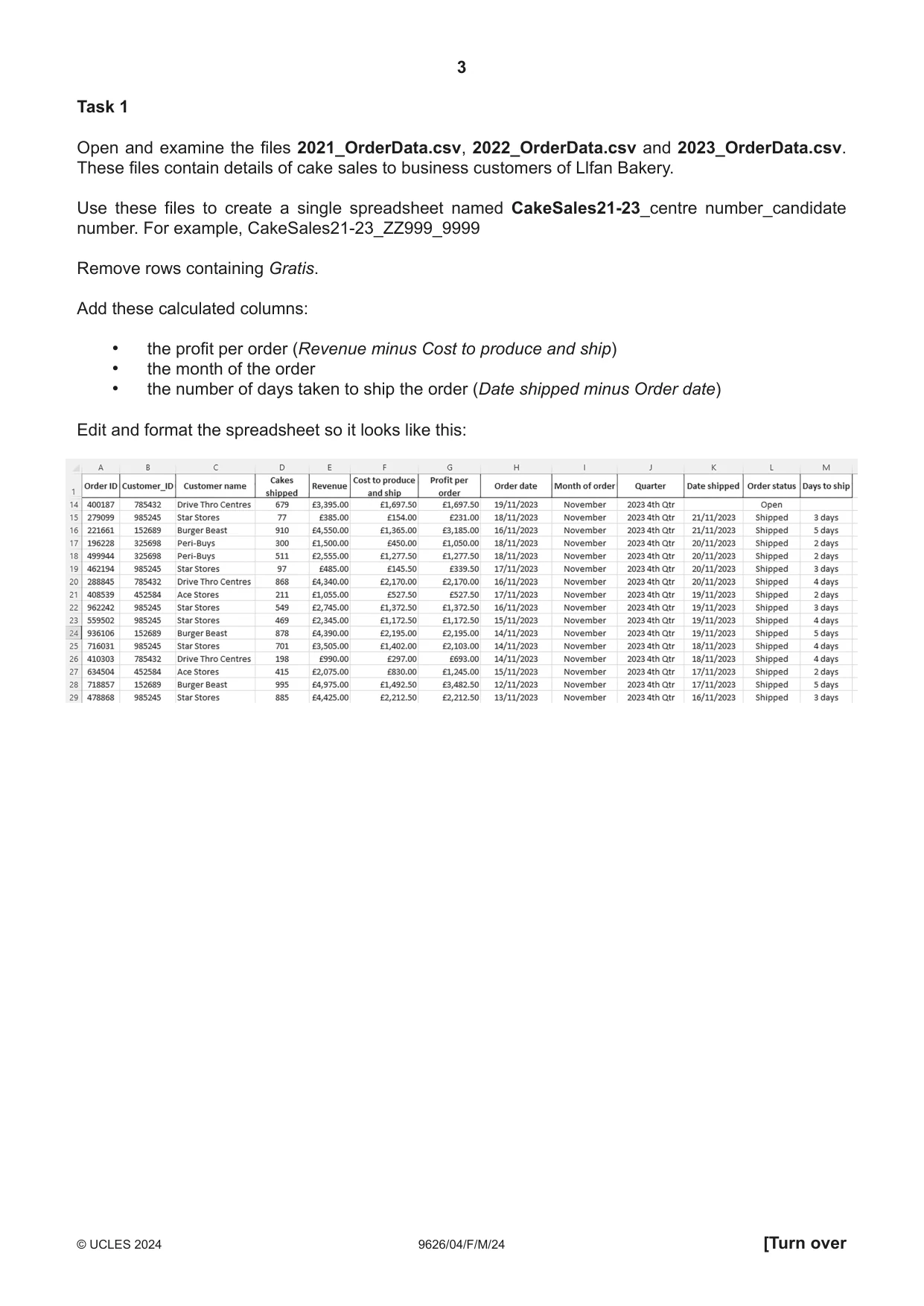
3 9626/04/F/M/24 © UCLES 2024 [Turn over Task 1 Open and examine the files 2021_OrderData.csv, 2022_OrderData.csv and 2023_OrderData.csv. These files contain details of cake sales to business customers of Llfan Bakery. Use these files to create a single spreadsheet named CakeSales21-23_centre number_candidate number. For example, CakeSales21-23_ZZ999_9999 Remove rows containing Gratis. Add these calculated columns: • the profit per order (Revenue minus Cost to produce and ship) • the month of the order • the number of days taken to ship the order (Date shipped minus Order date) Edit and format the spreadsheet so it looks like this:
Question paper, page 4
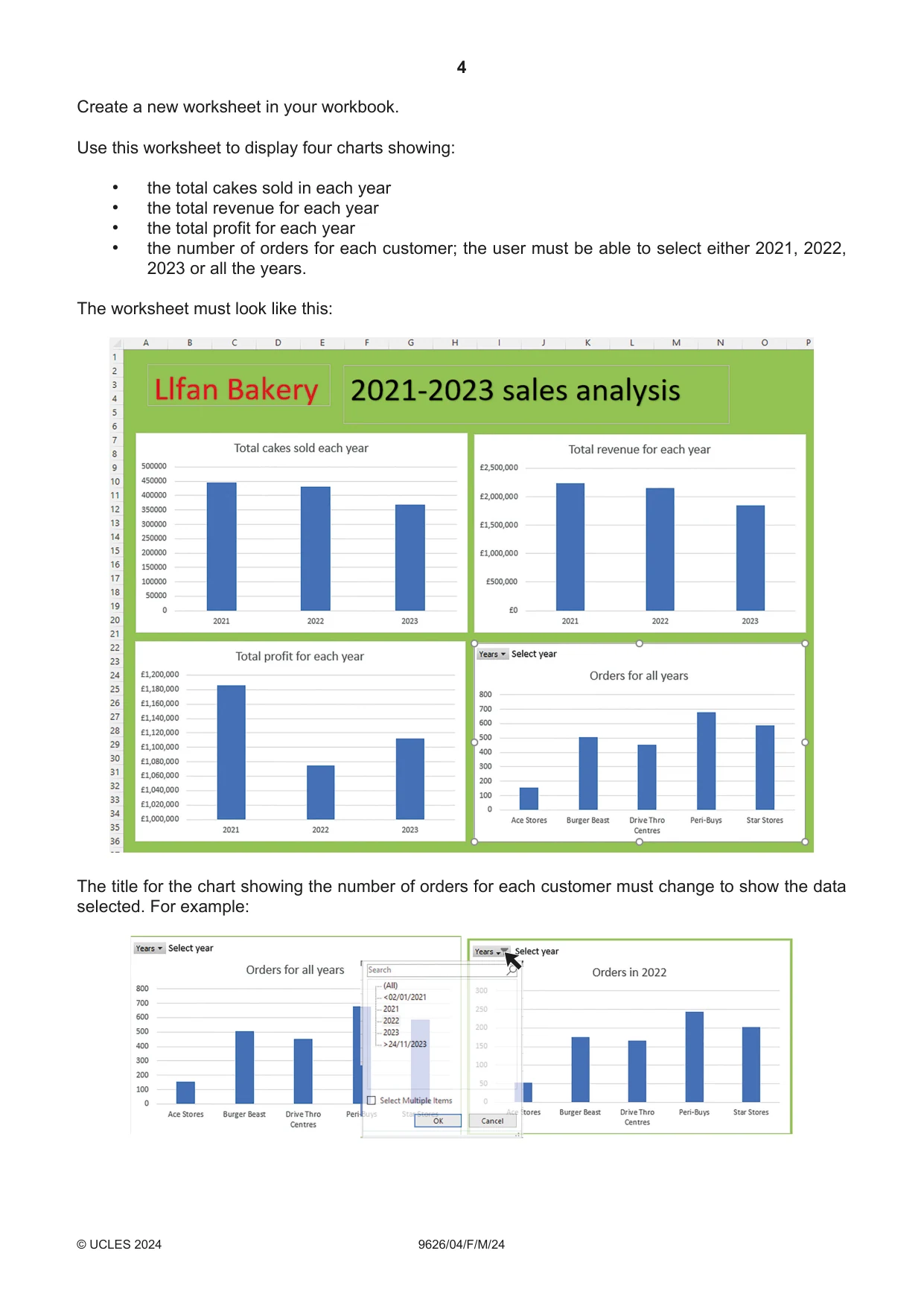
4 9626/04/ F/M/24 © UCLES 2024 Create a new worksheet in your workbook. Use this worksheet to display four charts showing: • the total cakes sold in each year • the total revenue for each year • the total profit for each year • the number of orders for each customer; the user must be able to select either 2021, 2022, 2023 or all the years. The worksheet must look like this: The title for the chart showing the number of orders for each customer must change to show the data selected. For example:
Question paper, page 5
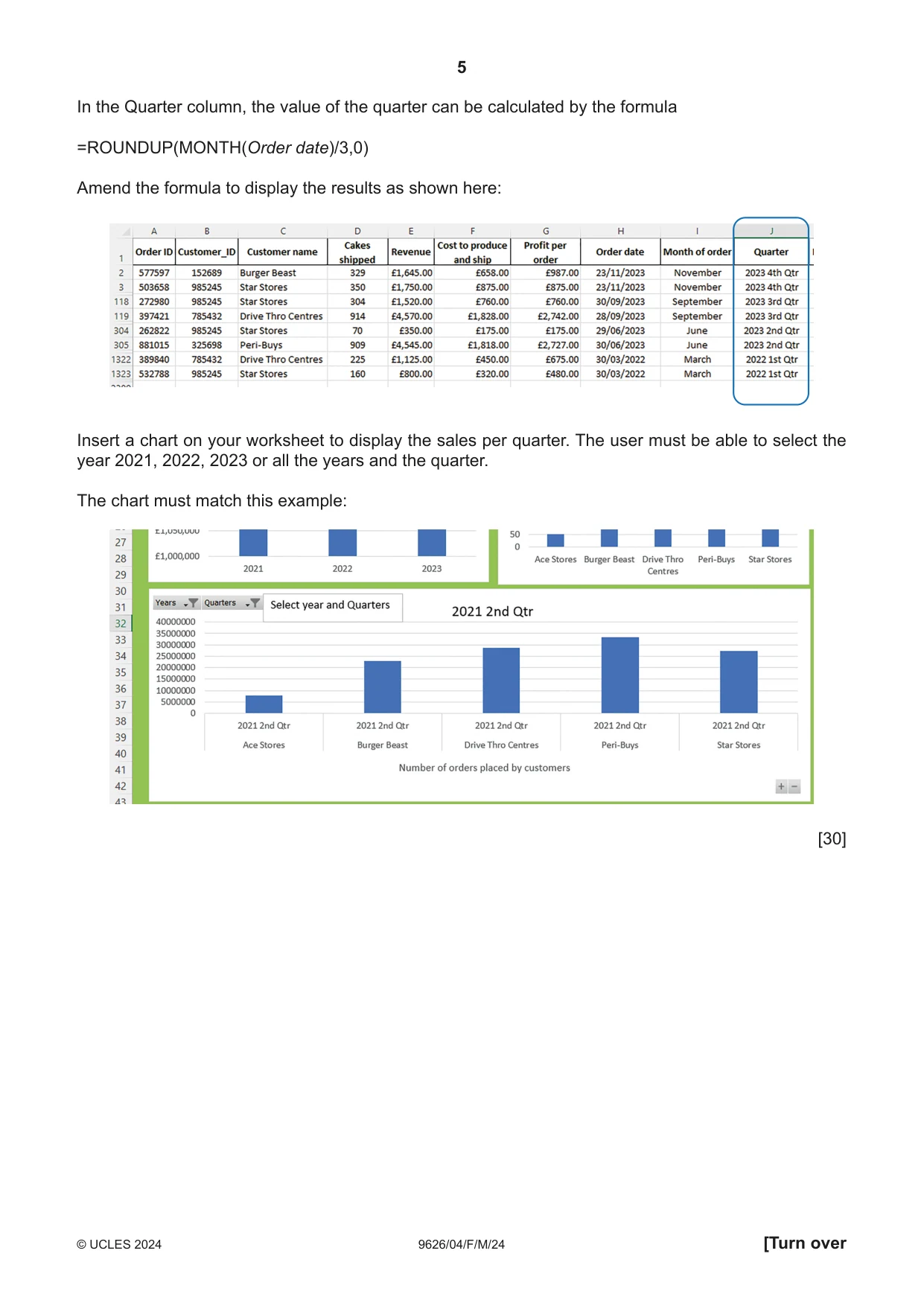
5 9626/04/F/M/24 © UCLES 2024 [Turn over In the Quarter column, the value of the quarter can be calculated by the formula =ROUNDUP(MONTH(Order date)/3,0) Amend the formula to display the results as shown here: Insert a chart on your worksheet to display the sales per quarter. The user must be able to select the year 2021, 2022, 2023 or all the years and the quarter. The chart must match this example: [30]
Question paper, page 6
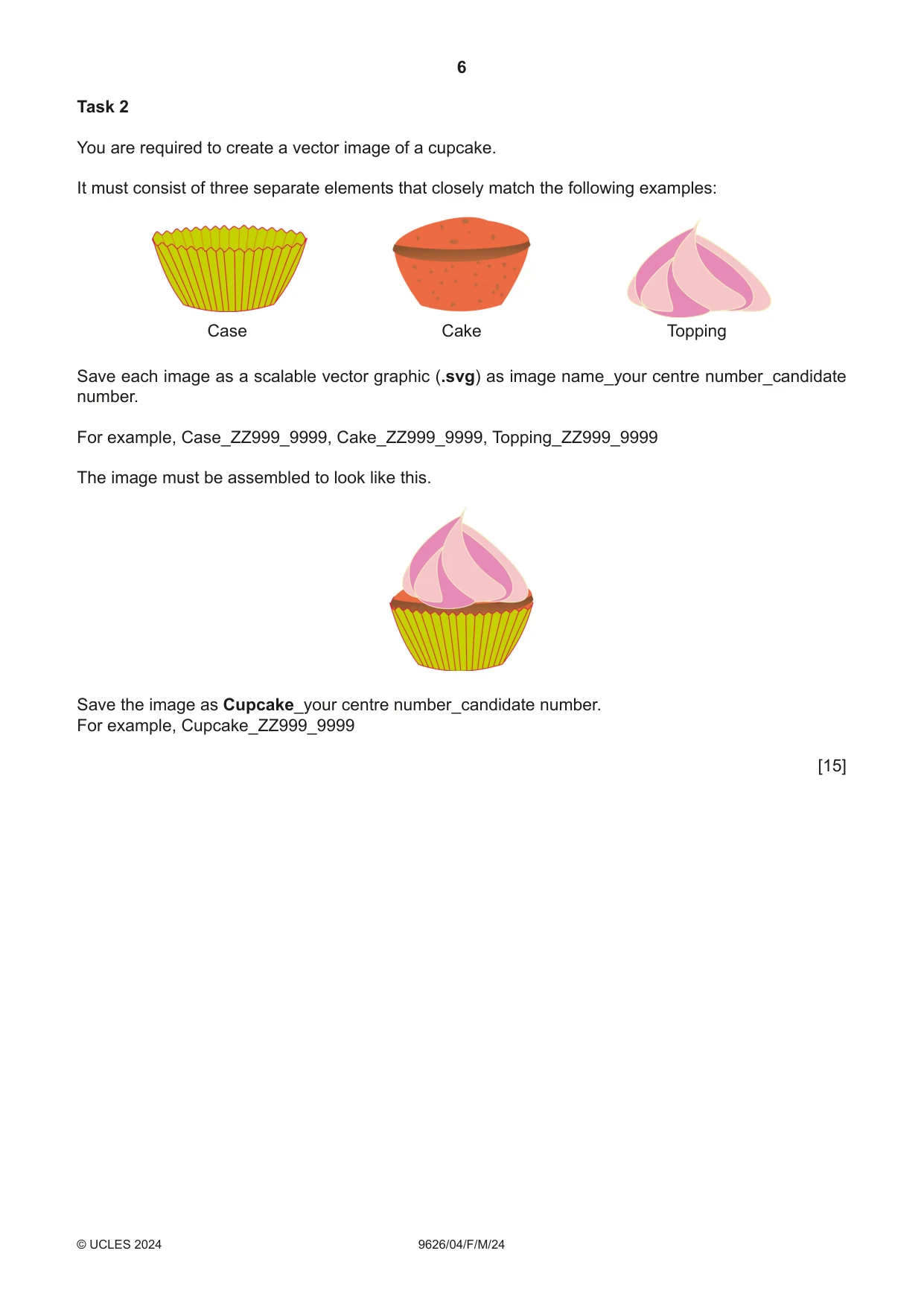
6 9626/04/F/M/24 © UCLES 2024 Task 2 You are required to create a vector image of a cupcake. It must consist of three separate elements that closely match the following examples: Case Cake Topping Save each image as a scalable vector graphic (.svg) as image name_your centre number_candidate number. For example, Case_ZZ999_9999, Cake_ZZ999_9999, Topping_ZZ999_9999 The image must be assembled to look like this. Save the image as Cupcake_your centre number_candidate number. For example, Cupcake_ZZ999_9999 [15]
Question paper, page 7
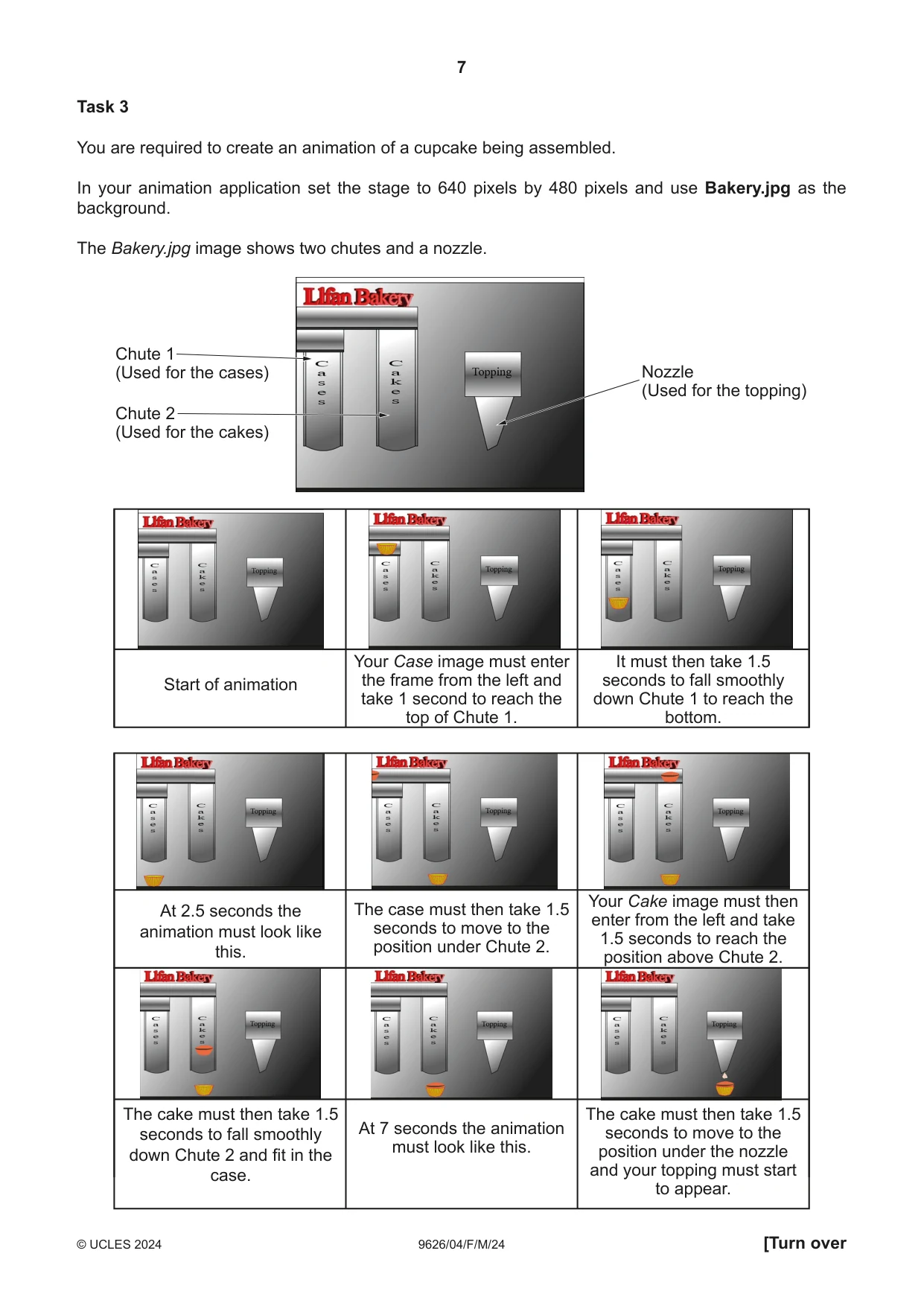
7 9626/04/F/M/24 © UCLES 2024 [Turn over Task 3 You are required to create an animation of a cupcake being assembled. In your animation application set the stage to 640 pixels by 480 pixels and use Bakery.jpg as the background. The Bakery.jpg image shows two chutes and a nozzle. Start of animation Your Case image must enter the frame from the left and take 1 second to reach the top of Chute 1. It must then take 1.5 seconds to fall smoothly down Chute 1 to reach the bottom. At 2.5 seconds the animation must look like this. The case must then take 1.5 seconds to move to the position under Chute 2. Your Cake image must then enter from the left and take 1.5 seconds to reach the position above Chute 2. The cake must then take 1.5 seconds to fall smoothly down Chute 2 and fit in the case. At 7 seconds the animation must look like this. The cake must then take 1.5 seconds to move to the position under the nozzle and your topping must start to appear. Nozzle (Used for the topping) Chute 1 (Used for the cases) Chute 2 (Used for the cakes)
Question paper, page 8
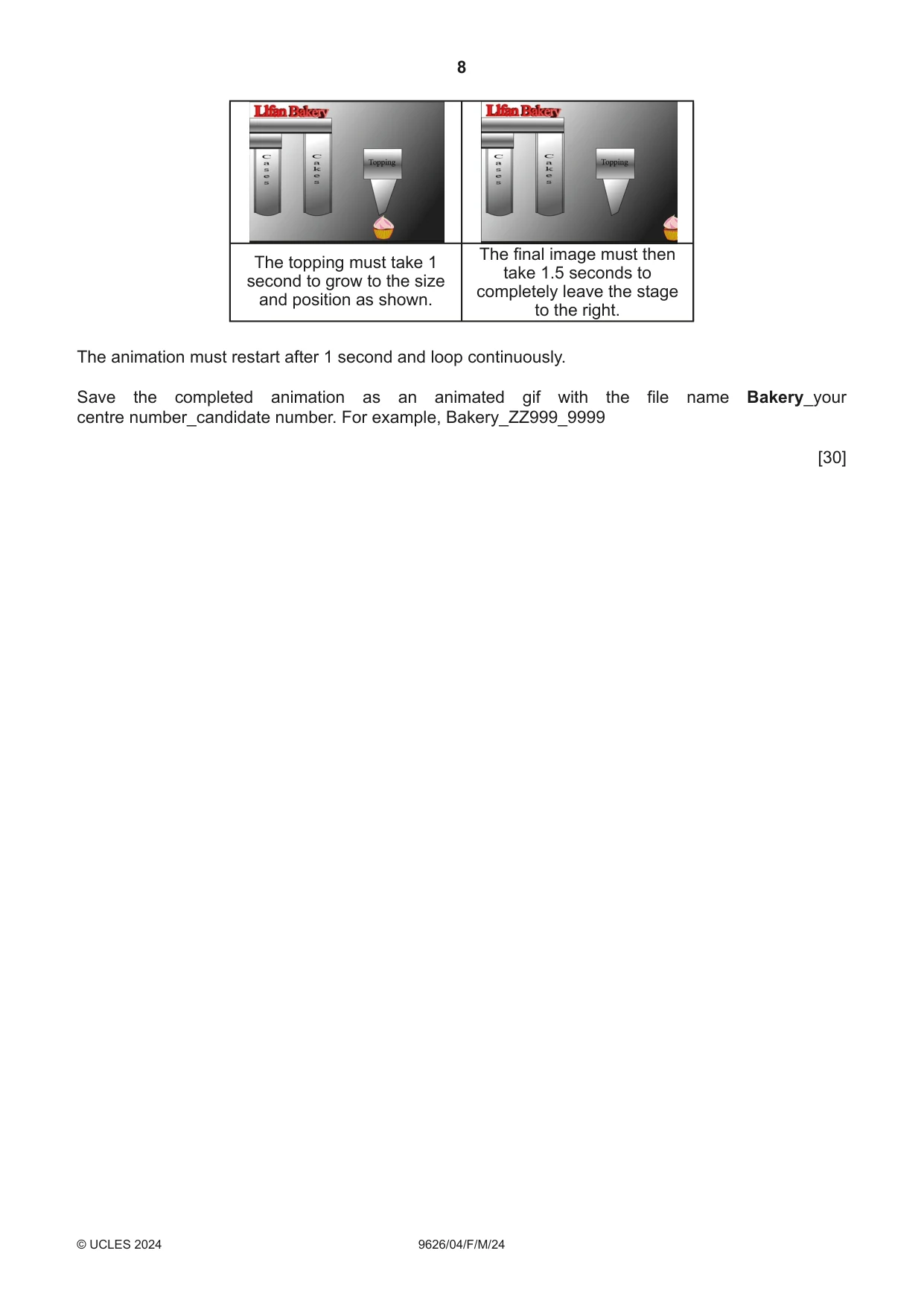
8 9626/04/F/M/24 © UCLES 2024 The topping must take 1 second to grow to the size and position as shown. The final image must then take 1.5 seconds to completely leave the stage to the right. The animation must restart after 1 second and loop continuously. Save the completed animation as an animated gif with the file name Bakery_your centre number_candidate number. For example, Bakery_ZZ999_9999 [30]
Question paper, page 9
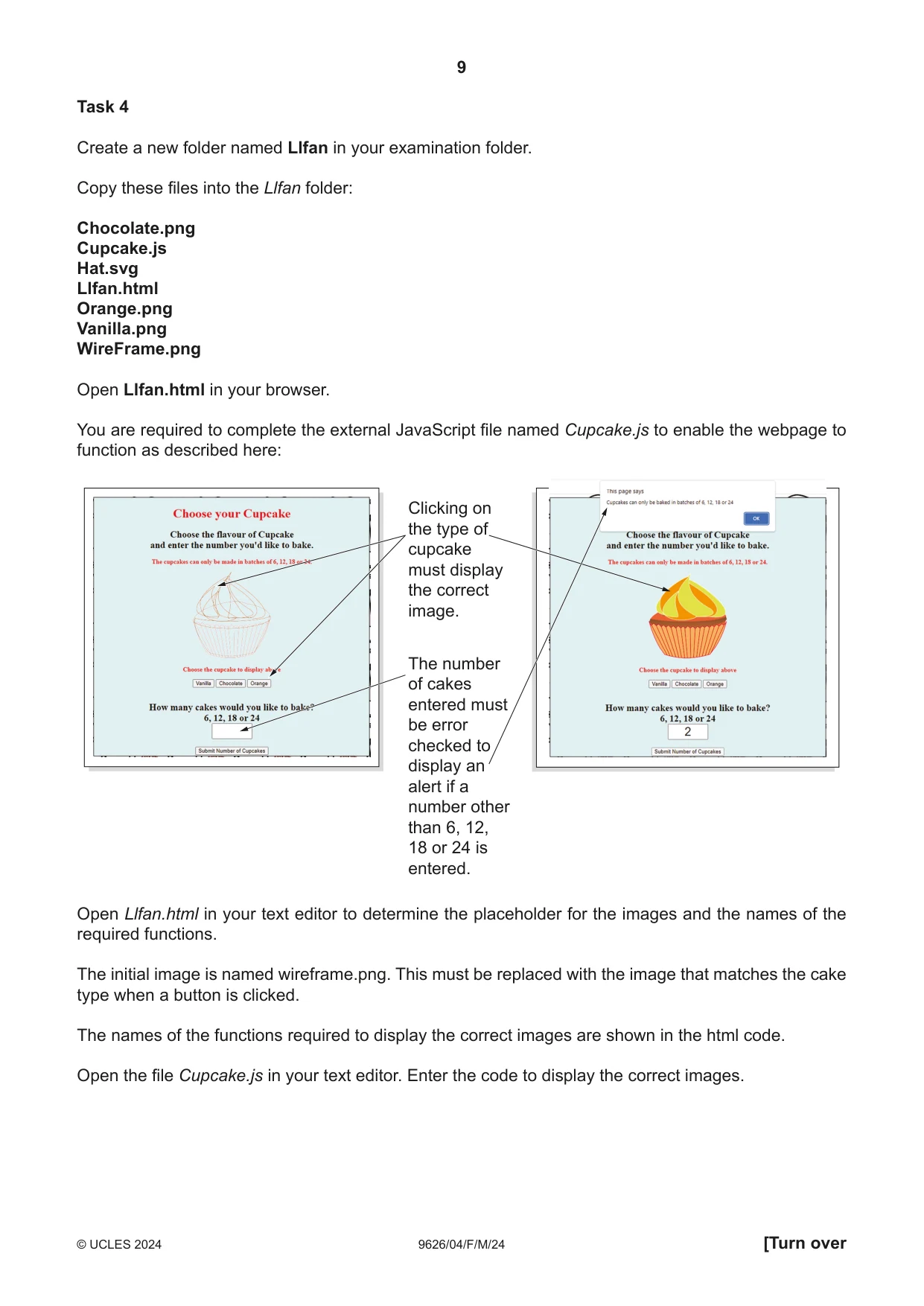
9 9626/04/ F/M/24 © UCLES 2024 [Turn over Task 4 Create a new folder named Llfan in your examination folder. Copy these files into the Llfan folder: Chocolate.png Cupcake.js Hat.svg Llfan.html Orange.png Vanilla.png WireFrame.png Open Llfan.html in your browser. You are required to complete the external JavaScript file named Cupcake.js to enable the webpage to function as described here: Clicking on the type of cupcake must display the correct image. The number of cakes entered must be error checked to display an alert if a number other than 6, 12, 18 or 24 is entered. Open Llfan.html in your text editor to determine the placeholder for the images and the names of the required functions. The initial image is named wireframe.png. This must be replaced with the image that matches the cake type when a button is clicked. The names of the functions required to display the correct images are shown in the html code. Open the file Cupcake.js in your text editor. Enter the code to display the correct images.
Question paper, page 10
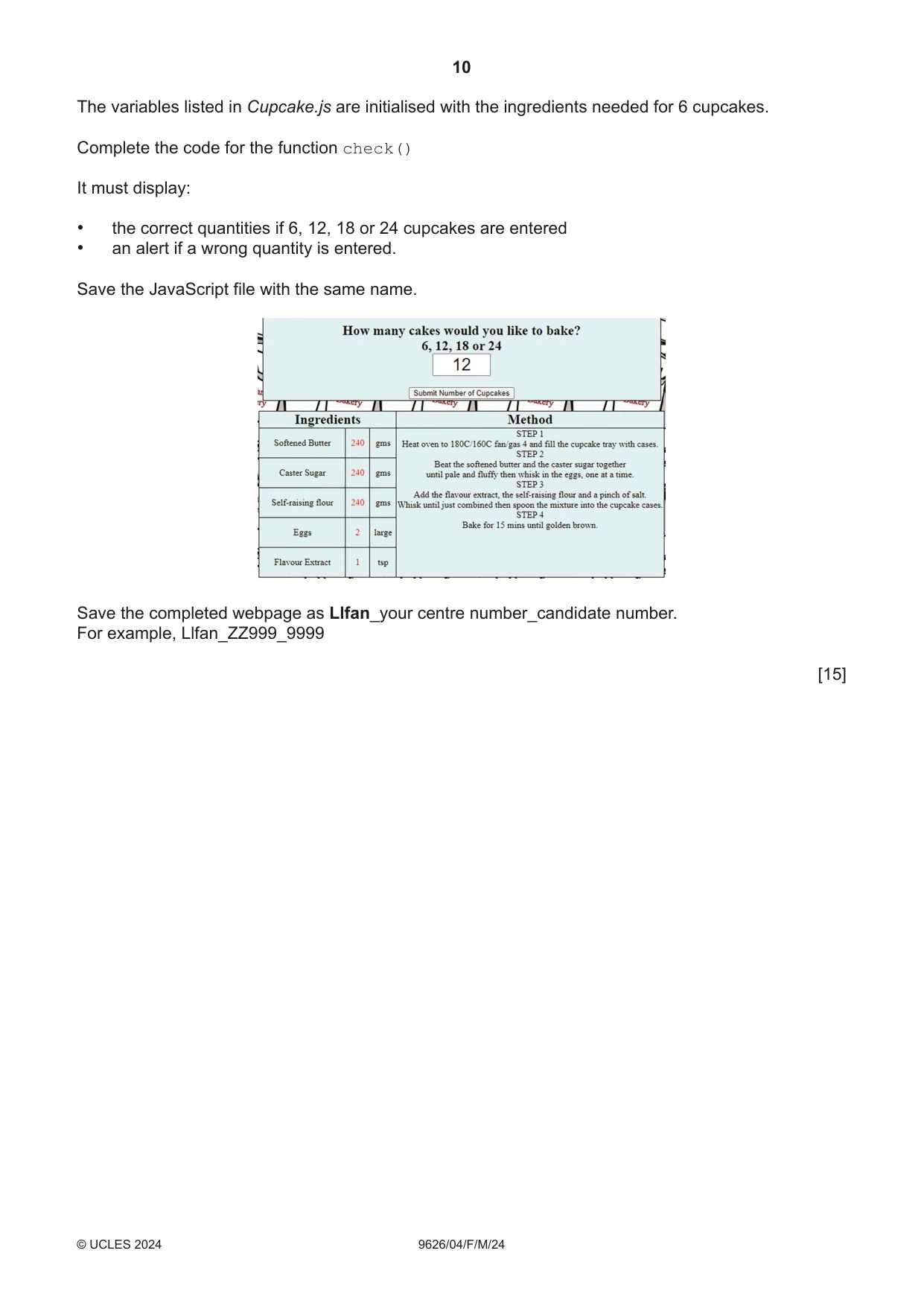
10 9626/04/F/M/24 © UCLES 2024 The variables listed in Cupcake.js are initialised with the ingredients needed for 6 cupcakes. Complete the code for the function check() It must display: • the correct quantities if 6, 12, 18 or 24 cupcakes are entered • an alert if a wrong quantity is entered. Save the JavaScript file with the same name. Save the completed webpage as Llfan_your centre number_candidate number. For example, Llfan_ZZ999_9999 [15]
Question paper, page 11
11 9626/04/F/M/24 © UCLES 2024 BLANK PAGE
Question paper, page 12
12 9626/04/F/M/24 © UCLES 2024 Permission to reproduce items where third-party owned material protected by copyright is included has been sought and cleared where possible. Every reasonable effort has been made by the publisher (UCLES) to trace copyright holders, but if any items requiring clearance have unwittingly been included, the publisher will be pleased to make amends at the earliest possible opportunity. To avoid the issue of disclosure of answer-related information to candidates, all copyright acknowledgements are reproduced online in the Cambridge Assessment International Education Copyright Acknowledgements Booklet. This is produced for each series of examinations and is freely available to download at www.cambridgeinternational.org after the live examination series. Cambridge Assessment International Education is part of Cambridge Assessment. Cambridge Assessment is the brand name of the University of Cambridge Local Examinations Syndicate (UCLES), which is a department of the University of Cambridge. BLANK PAGE
What you needed in this session
Cambridge’s own grade thresholds for 2024 Feb/March, Paper 4 · Variant 0. A higher threshold means an easier paper — the bar moves with how the cohort did.