Cambridge A Level Information Technology (from 2017) 9626 — 2024 May/June Paper 4 · Variant 0
9626/40/M/J/24 · 90 marks · ≈101 min
The question paper and its mark scheme, free to read here and free to download. This is Cambridge’s own paper, exactly as it was sat.
Question paper12 pages


Mark scheme
No mark scheme is in the library for this paper.
Paper as text
Question paper, page 1
This document has 12 pages. Any blank pages are indicated. [Turn over * 5 4 2 9 8 8 8 3 0 9 * Cambridge International AS & A Level INFORMATION TECHNOLOGY 9626/04 Paper 4 Advanced Practical May/June 2024 2 hours 30 minutes You will need: Candidate source files (listed on page 2) INSTRUCTIONS ● Carry out every instruction in each task. ● Save your work using the file names given in the task as and when instructed. ● You must not have access to either the internet or any email system during this examination. ● You must save your work in the correct file format as stated in the tasks. If work is saved in an incorrect file format, you will not receive marks for that task. INFORMATION ● The total mark for this paper is 90. ● The number of marks for each question or part question is shown in brackets [ ]. DC (DE/CT) 327122/4 © UCLES 2024
Question paper, page 2
2 9626/04/M/J/24 © UCLES 2024 You have been supplied with the following source files: BankDetails.rtf CakeBase.png CakeSalesData.xls DocHeader.png MMergeTemplate.rtf Create a folder called Examination. You must save all your work in this folder. Copy these files into this folder. Do not delete the source files when submitting your work. Do not tidy the folder by deleting files created at any stage of attempting the tasks. You must use the most efficient methods to solve each task. All work produced must be of a professional standard and contain your candidate details.
Question paper, page 3
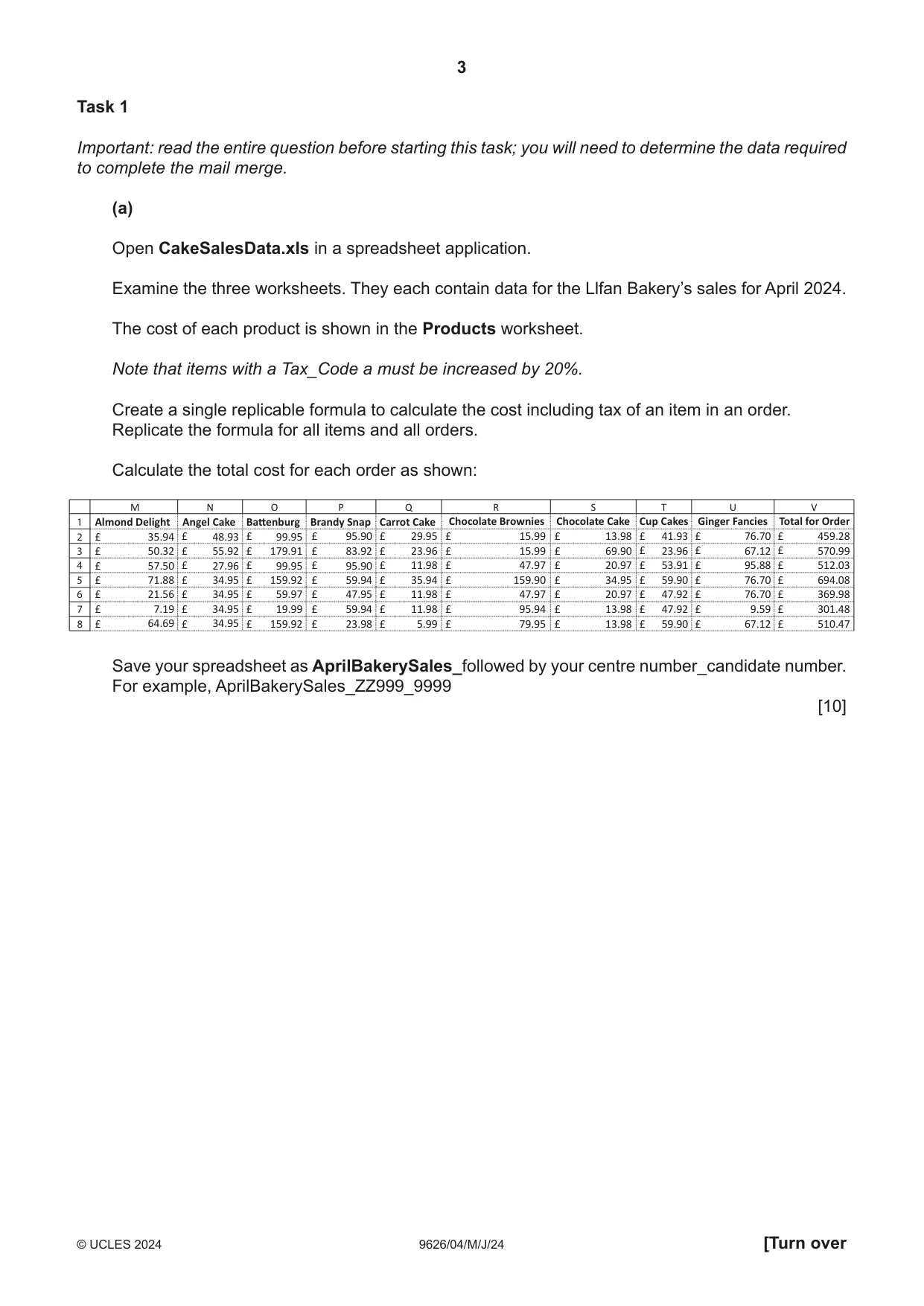
3 9626/04/M/J/24 © UCLES 2024 [Turn over Task 1 Important: read the entire question before starting this task; you will need to determine the data required to complete the mail merge. (a) Open CakeSalesData.xls in a spreadsheet application. Examine the three worksheets. They each contain data for the Llfan Bakery’s sales for April 2024. The cost of each product is shown in the Products worksheet. Note that items with a Tax_Code a must be increased by 20%. Create a single replicable formula to calculate the cost including tax of an item in an order. Replicate the formula for all items and all orders. Calculate the total cost for each order as shown: M N O P Q R S T U V Almond Delight 35.94 £ 50.32 £ 57.50 £ 71.88 £ 21.56 £ 7.19 £ 64.69 48.93 55.92 27.96 34.95 34.95 34.95 34.95 99.95 179.91 99.95 159.92 59.97 19.99 159.92 95.90 83.92 95.90 59.94 47.95 59.94 23.98 29.95 23.96 11.98 35.94 11.98 11.98 5.99 15.99 15.99 47.97 159.90 47.97 95.94 79.95 13.98 69.90 20.97 34.95 20.97 13.98 13.98 41.93 23.96 53.91 59.90 47.92 47.92 59.90 76.70 67.12 95.88 76.70 76.70 9.59 67.12 459.28 570.99 512.03 694.08 369.98 301.48 510.47 £ £ £ £ £ £ £ £ £ £ £ £ £ £ £ £ £ £ £ £ £ £ £ £ £ £ £ £ £ £ £ £ £ £ £ £ £ £ £ £ £ £ £ £ £ £ £ £ £ £ £ £ £ £ £ £ £ £ £ £ £ £ £ £ Angel Cake Battenburg Brandy Snap Carrot Cake Chocolate Brownies Chocolate Cake Cup Cakes Ginger Fancies Total for Order 1 2 3 4 5 7 8 6 Save your spreadsheet as AprilBakerySales_followed by your centre number_candidate number. For example, AprilBakerySales_ZZ999_9999 [10]
Question paper, page 4
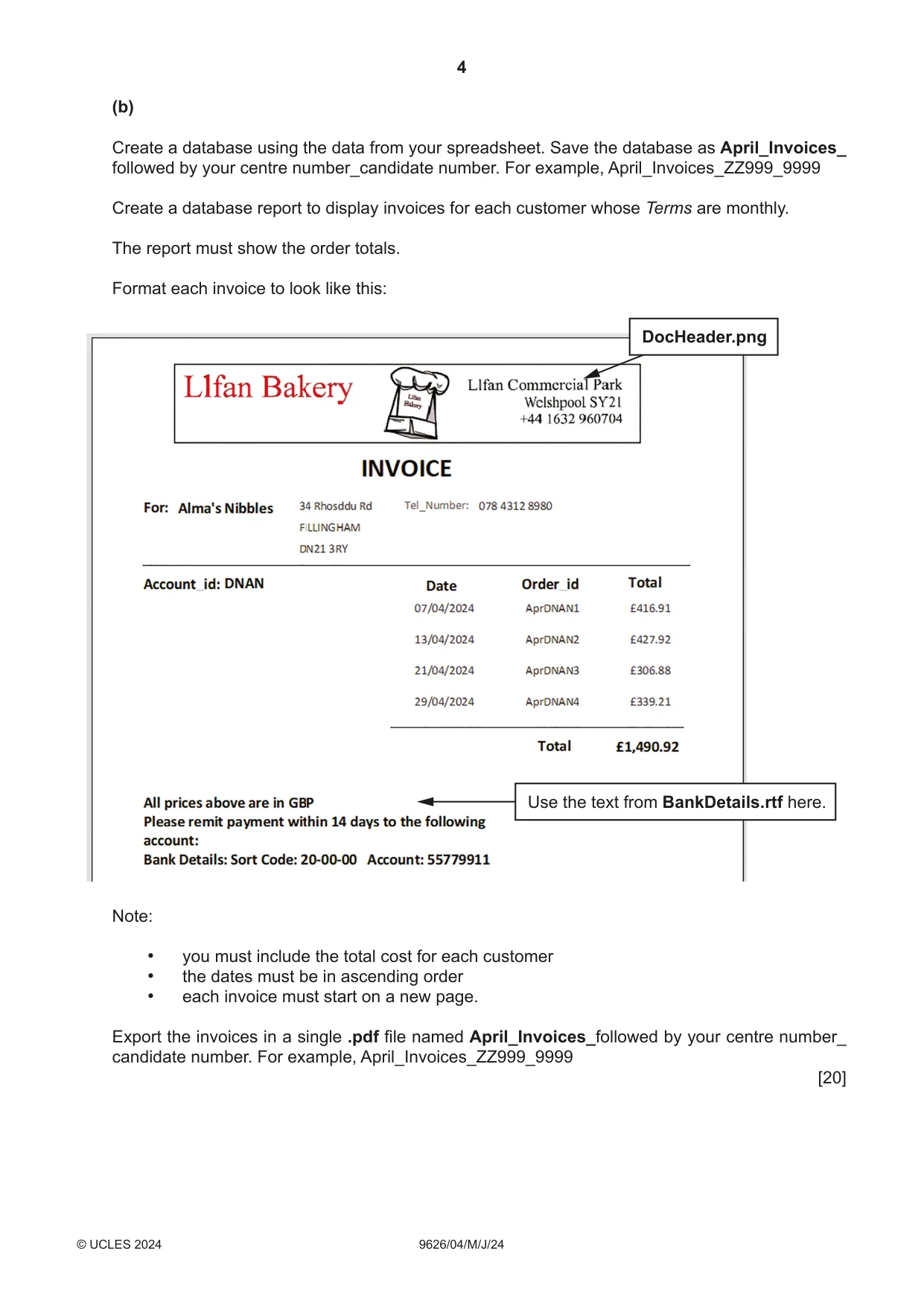
4 9626/04/ M/J/24 © UCLES 2024 (b) Create a database using the data from your spreadsheet. Save the database as April_Invoices_ followed by your centre number_candidate number. For example, April_Invoices_ZZ999_9999 Create a database report to display invoices for each customer whose Terms are monthly. The report must show the order totals. Format each invoice to look like this: DocHeader.png Use the text from BankDetails.rtf here. Note: • you must include the total cost for each customer • the dates must be in ascending order • each invoice must start on a new page. Export the invoices in a single .pdf file named April_Invoices_followed by your centre number_ candidate number. For example, April_Invoices_ZZ999_9999 [20]
Question paper, page 5
5 9626/04/M/J/24 © UCLES 2024 [Turn over Please turn over.
Question paper, page 6
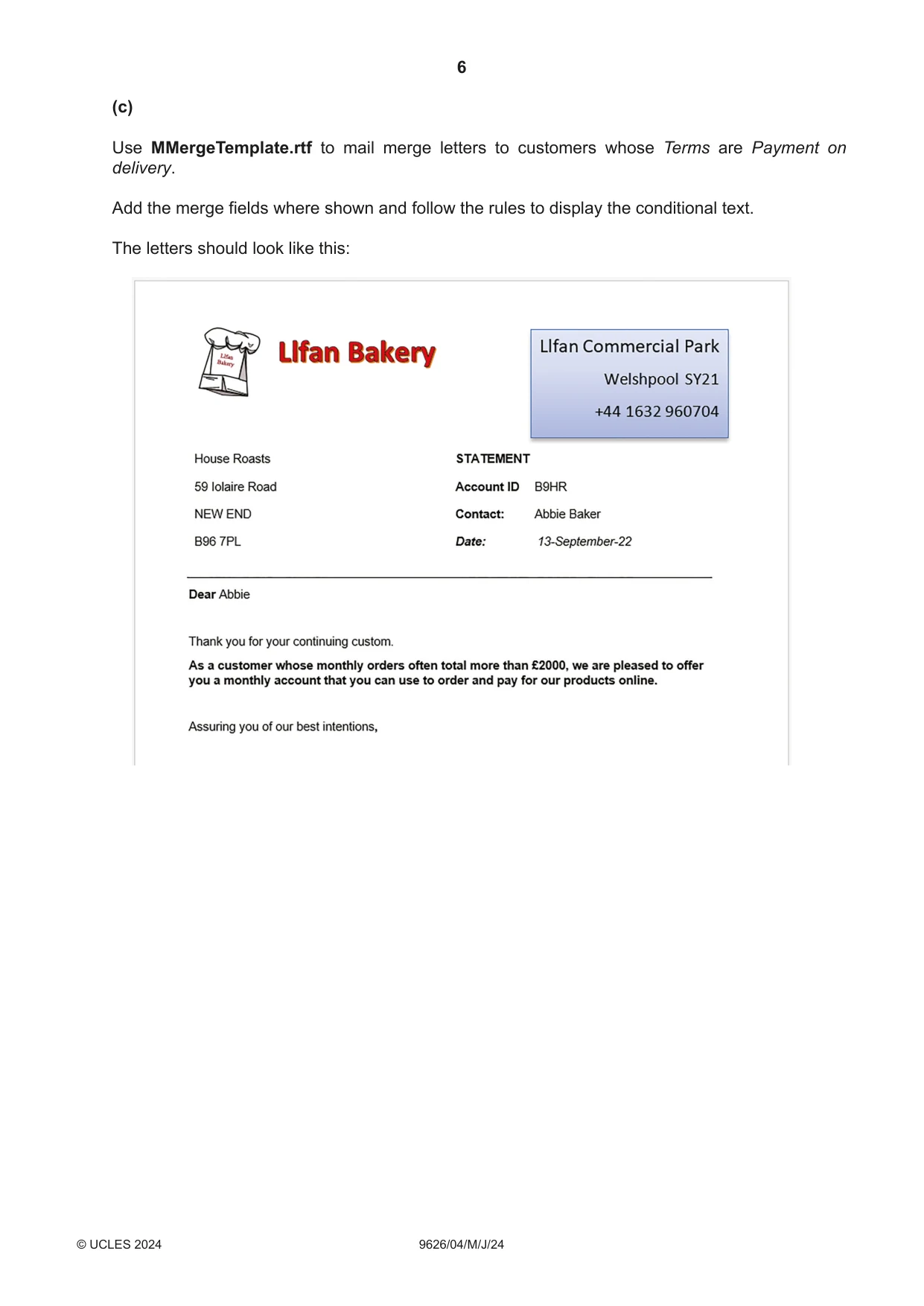
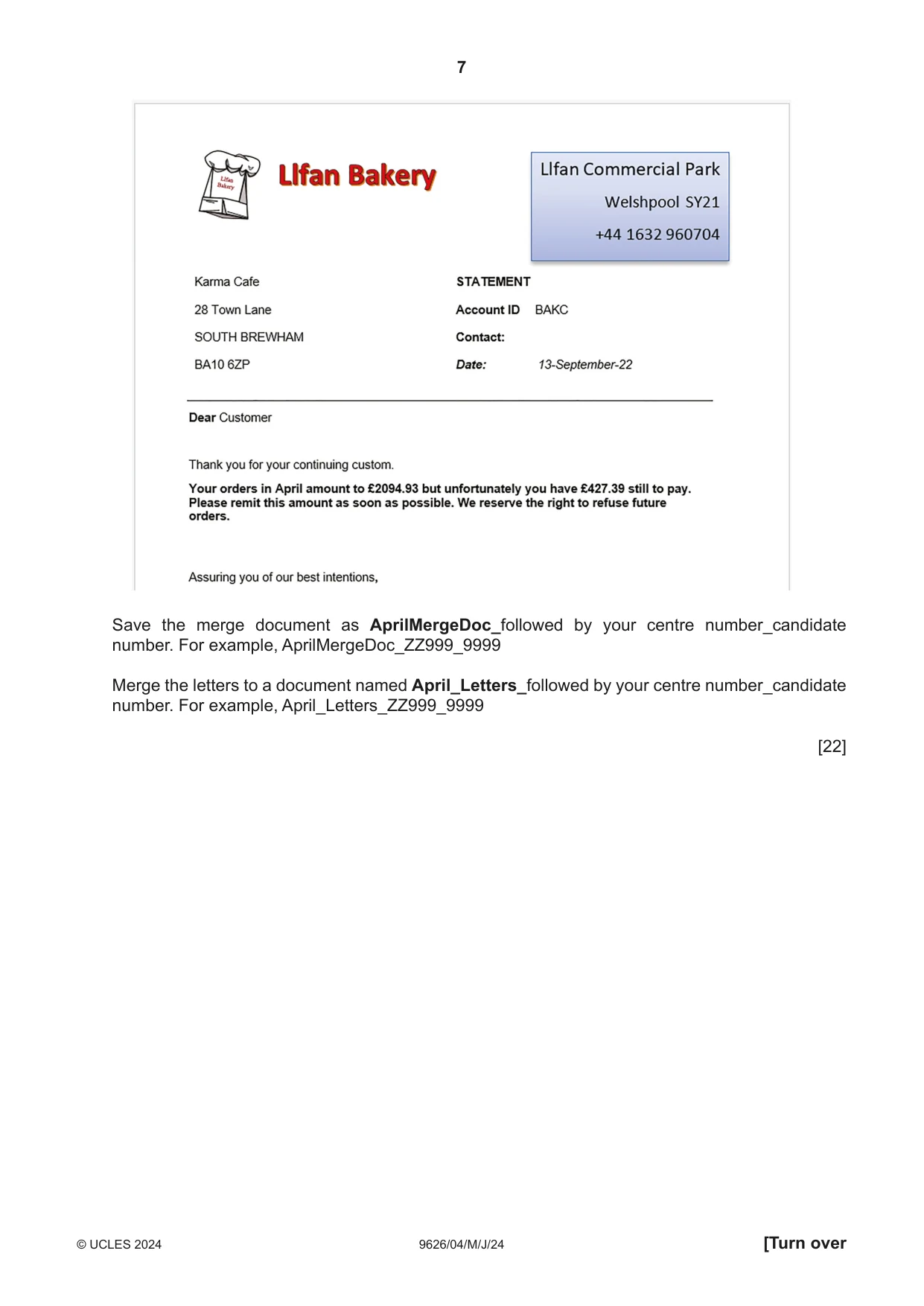
6 9626/04/M/J/24 © UCLES 2024 (c) Use MMergeTemplate.rtf to mail merge letters to customers whose Terms are Payment on delivery. Add the merge fields where shown and follow the rules to display the conditional text. The letters should look like this:
Question paper, page 7
7 9626/04/M/J/24 © UCLES 2024 [Turn over Save the merge document as AprilMergeDoc_followed by your centre number_candidate number. For example, AprilMergeDoc_ZZ999_9999 Merge the letters to a document named April_Letters_followed by your centre number_candidate number. For example, April_Letters_ZZ999_9999 [22]
Question paper, page 8
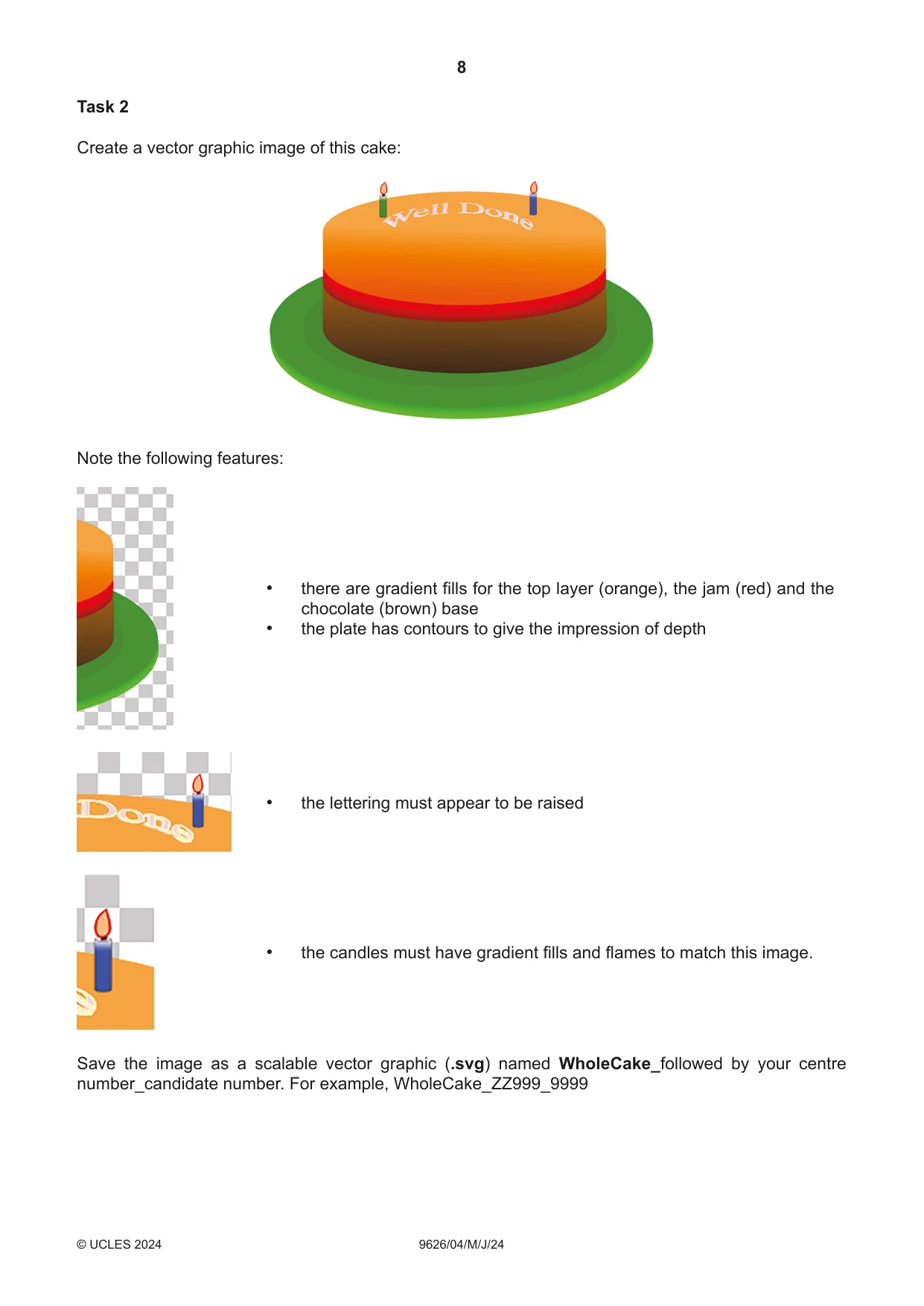
8 9626/04/M/J/24 © UCLES 2024 Task 2 Create a vector graphic image of this cake: Note the following features: • there are gradient fills for the top layer (orange), the jam (red) and the chocolate (brown) base • the plate has contours to give the impression of depth • the lettering must appear to be raised • the candles must have gradient fills and flames to match this image. Save the image as a scalable vector graphic (.svg) named WholeCake_followed by your centre number_candidate number. For example, WholeCake_ZZ999_9999
Question paper, page 9
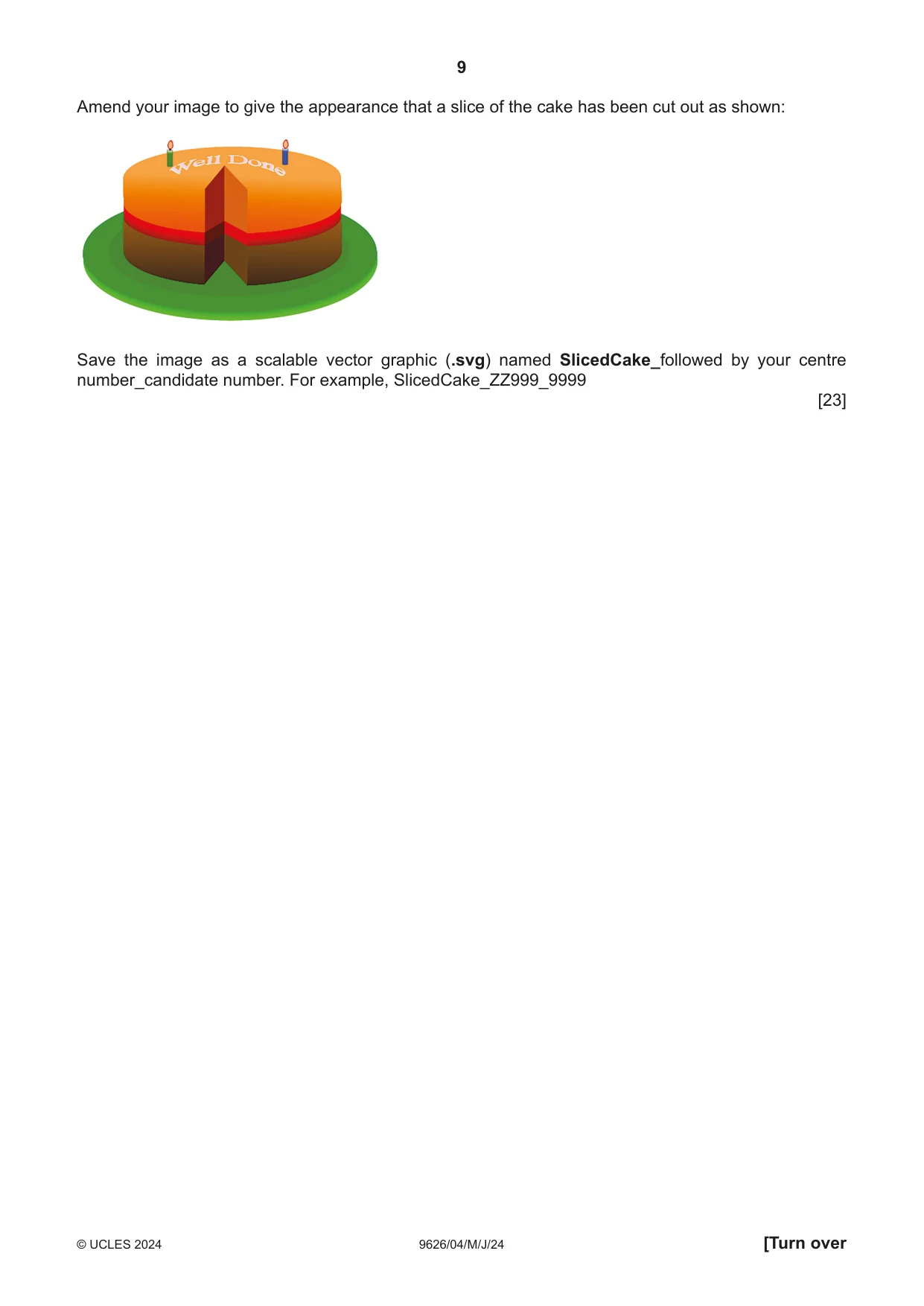
9 9626/04/M/J/24 © UCLES 2024 Amend your image to give the appearance that a slice of the cake has been cut out as shown: Save the image as a scalable vector graphic (.svg) named SlicedCake_followed by your centre number_candidate number. For example, SlicedCake_ZZ999_9999 [23] [Turn over
Question paper, page 10
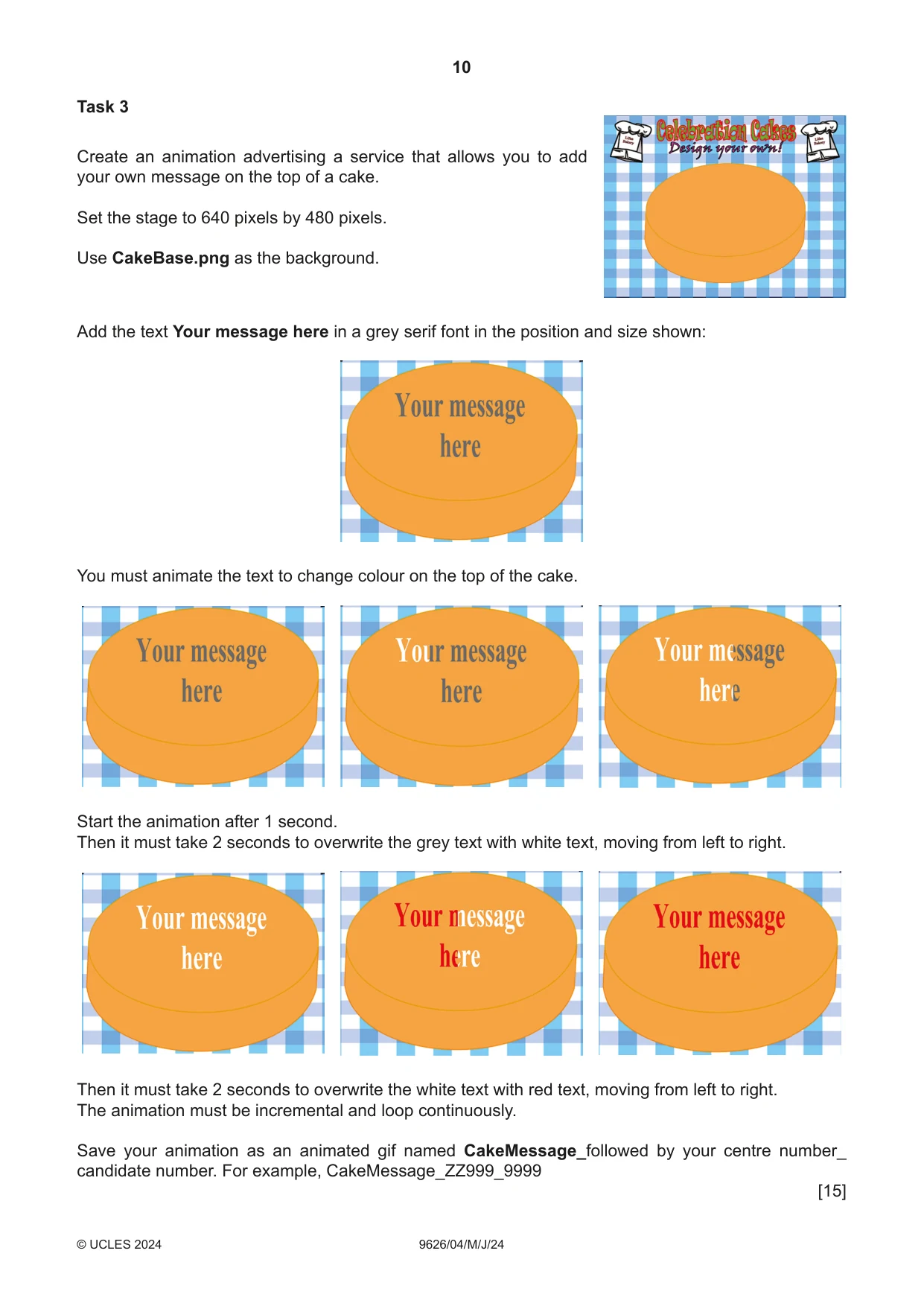
10 9626/04/ M/J/24 © UCLES 2024 Task 3 Create an animation advertising a service that allows you to add your own message on the top of a cake. Set the stage to 640 pixels by 480 pixels. Use CakeBase.png as the background. Add the text Your message here in a grey serif font in the position and size shown: You must animate the text to change colour on the top of the cake. Start the animation after 1 second. Then it must take 2 seconds to overwrite the grey text with white text, moving from left to right. Then it must take 2 seconds to overwrite the white text with red text, moving from left to right. The animation must be incremental and loop continuously. Save your animation as an animated gif named CakeMessage_followed by your centre number_ candidate number. For example, CakeMessage_ZZ999_9999 [15]
Question paper, page 11
11 9626/04/M/J/24 © UCLES 2024 BLANK PAGE
Question paper, page 12
12 9626/04/M/J/24 © UCLES 2024 Permission to reproduce items where third-party owned material protected by copyright is included has been sought and cleared where possible. Every reasonable effort has been made by the publisher (UCLES) to trace copyright holders, but if any items requiring clearance have unwittingly been included, the publisher will be pleased to make amends at the earliest possible opportunity. To avoid the issue of disclosure of answer-related information to candidates, all copyright acknowledgements are reproduced online in the Cambridge Assessment International Education Copyright Acknowledgements Booklet. This is produced for each series of examinations and is freely available to download at www.cambridgeinternational.org after the live examination series. Cambridge Assessment International Education is part of Cambridge Assessment. Cambridge Assessment is the brand name of the University of Cambridge Local Examinations Syndicate (UCLES), which is a department of the University of Cambridge. BLANK PAGE
What you needed in this session
Cambridge’s own grade thresholds for 2024 May/June, Paper 4 · Variant 0. A higher threshold means an easier paper — the bar moves with how the cohort did.