Cambridge A Level Information Technology (from 2017) 9626 — 2023 Oct/Nov Paper 4 · Variant 0
9626/40/O/N/23 · 90 marks · ≈101 min
The question paper and its mark scheme, free to read here and free to download. This is Cambridge’s own paper, exactly as it was sat.
Question paper8 pages
Mark scheme
No mark scheme is in the library for this paper.
Paper as text
Question paper, page 1
This document has 8 pages. [Turn over Cambridge International AS & A Level INFORMATION TECHNOLOGY 9626/04 Paper 4 Advanced Practical October/November 2023 2 hours 30 minutes You will need: Candidate source files (listed on page 2) INSTRUCTIONS ● Carry out every instruction in each task. ● Save your work using the file names given in the task as and when instructed. ● You must not have access to the internet or any email system during this examination. ● You must save your work in the correct file format as stated in the tasks. If work is saved in an incorrect file format, you will not receive marks for that task. INFORMATION ● The total mark for this paper is 90. ● The number of marks for each question or part question is shown in brackets [ ]. * 2 1 4 8 5 4 5 9 5 4 * DC (LK/CB) 315813/2 © UCLES 2023
Question paper, page 2
2 9626/04/O/N/23 © UCLES 2023 You have been supplied with the following source files. Castle.jpg F2uF.ods F2uF.rtf HarbourView.jpg Ocean.jpg TH.js TreeHeight.html Trig.png Create a folder called Examination. You must save all your work in this folder. Copy the source files into this folder. Do not delete these files when submitting your work. You must use the most efficient methods to solve each task. All work produced must be of a professional standard and contain your candidate details.
Question paper, page 3
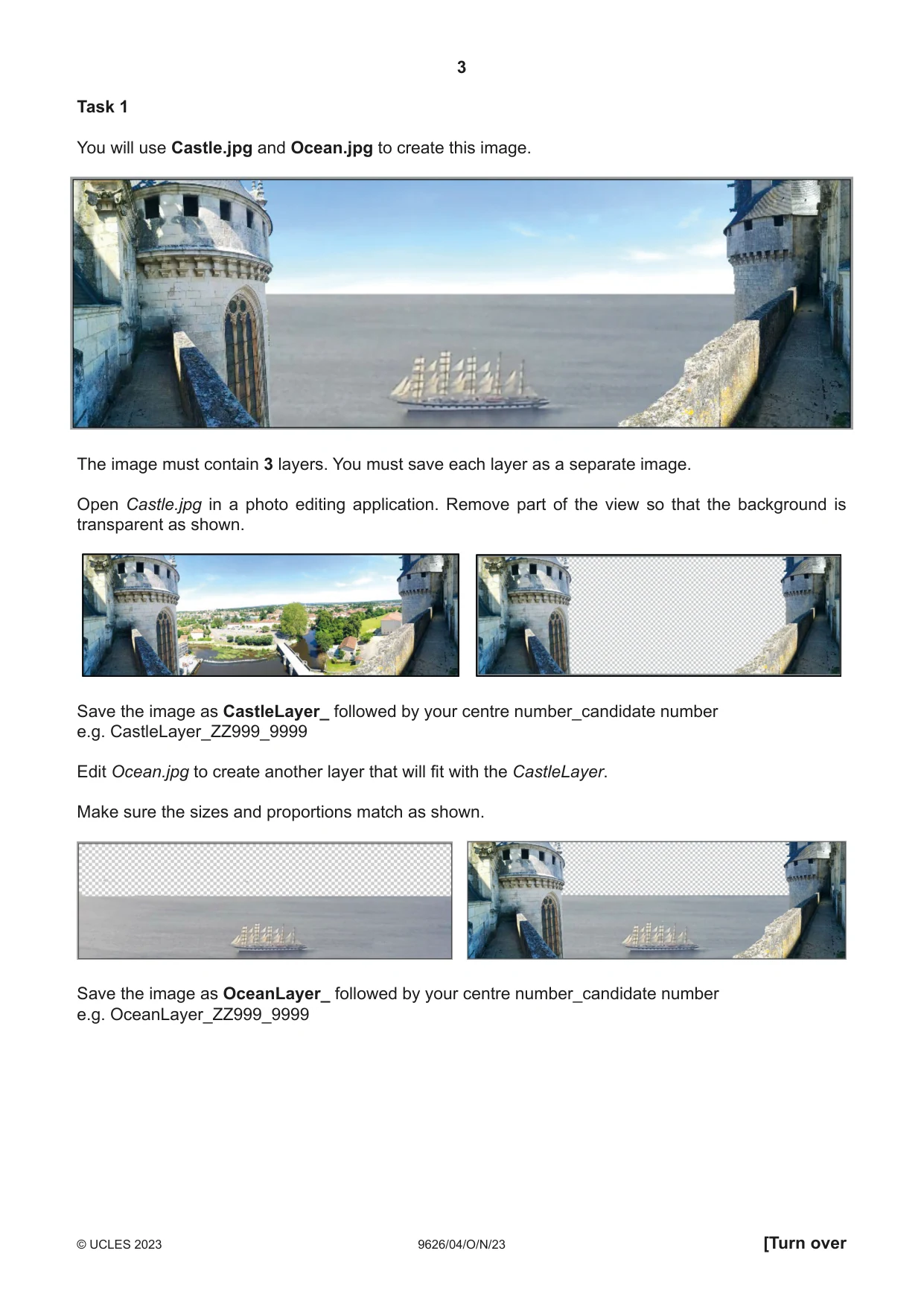
3 9626/04/O/N/23 © UCLES 2023 [Turn over Task 1 You will use Castle.jpg and Ocean.jpg to create this image. The image must contain 3 layers. You must save each layer as a separate image. Open Castle.jpg in a photo editing application. Remove part of the view so that the background is transparent as shown. Save the image as CastleLayer_ followed by your centre number_candidate number e.g. CastleLayer_ZZ999_9999 Edit Ocean.jpg to create another layer that will fit with the CastleLayer. Make sure the sizes and proportions match as shown. Save the image as OceanLayer_ followed by your centre number_candidate number e.g. OceanLayer_ZZ999_9999
Question paper, page 4
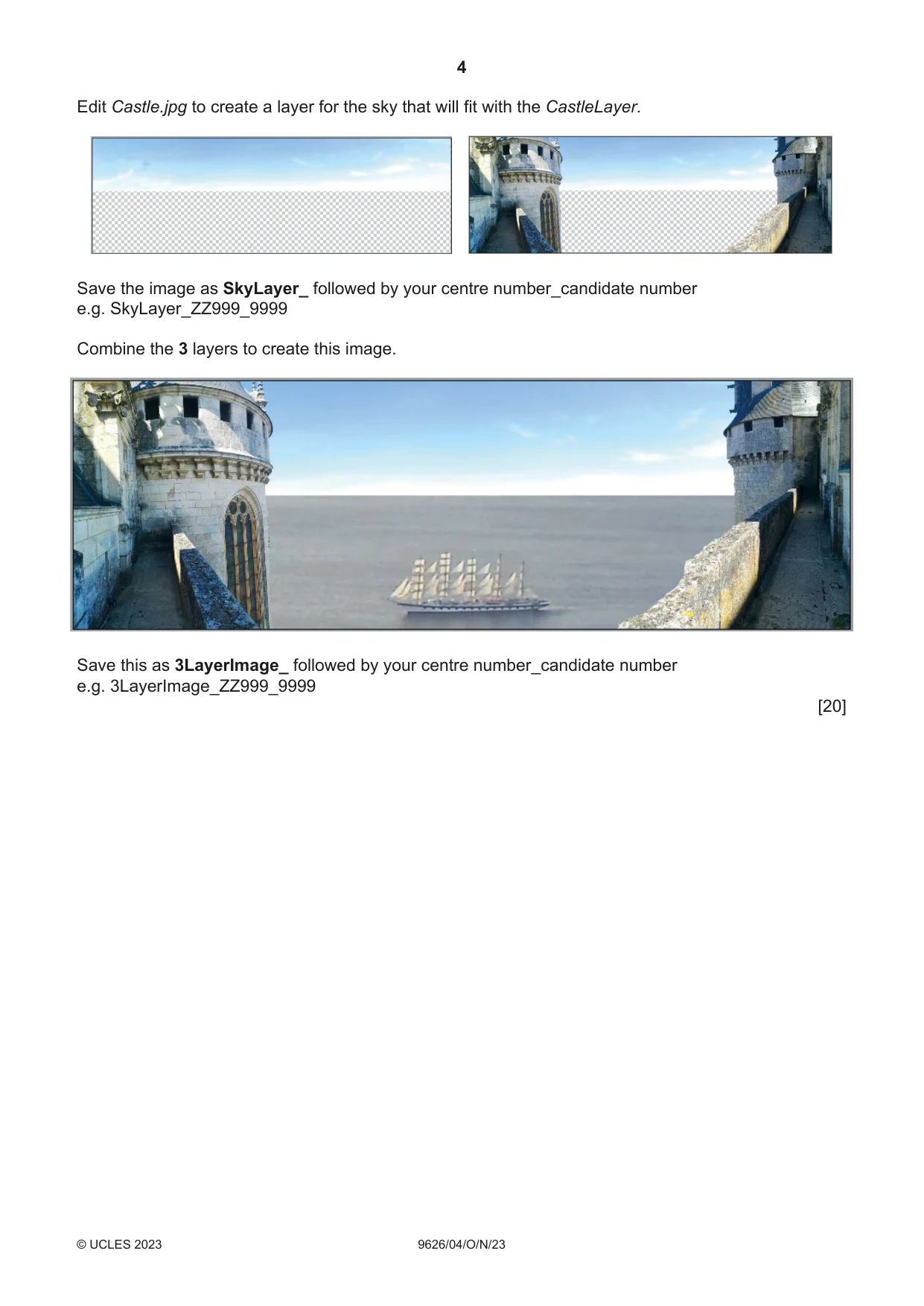
4 9626/04/O/N/23 © UCLES 2023 Edit Castle.jpg to create a layer for the sky that will fit with the CastleLayer. Save the image as SkyLayer_ followed by your centre number_candidate number e.g. SkyLayer_ZZ999_9999 Combine the 3 layers to create this image. Save this as 3LayerImage_ followed by your centre number_candidate number e.g. 3LayerImage_ZZ999_9999 [20]
Question paper, page 5
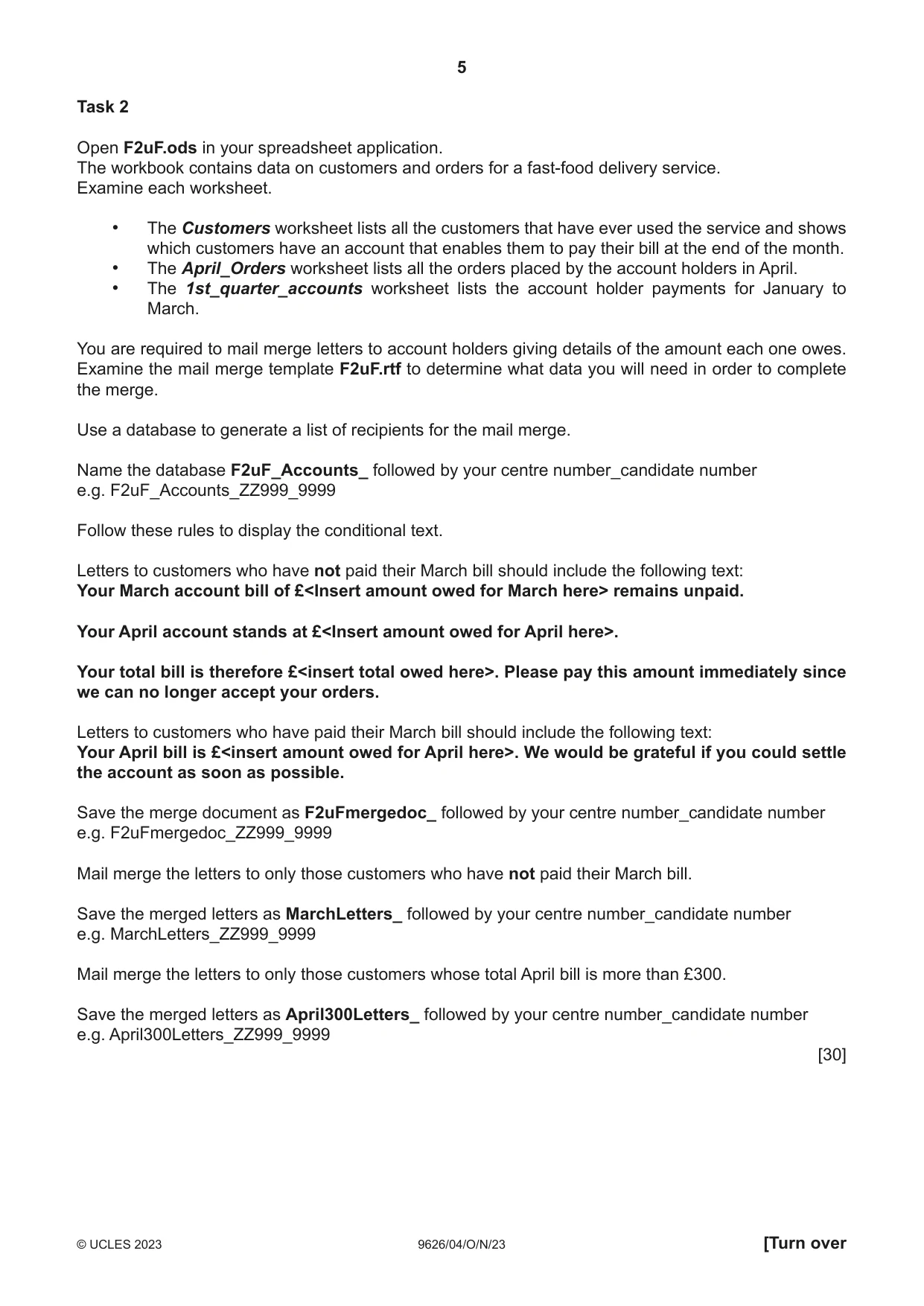
5 9626/04/O/N/23 © UCLES 2023 [Turn over Task 2 Open F2uF.ods in your spreadsheet application. The workbook contains data on customers and orders for a fast-food delivery service. Examine each worksheet. • The Customers worksheet lists all the customers that have ever used the service and shows which customers have an account that enables them to pay their bill at the end of the month. • The April_Orders worksheet lists all the orders placed by the account holders in April. • The 1st_quarter_accounts worksheet lists the account holder payments for January to March. You are required to mail merge letters to account holders giving details of the amount each one owes. Examine the mail merge template F2uF.rtf to determine what data you will need in order to complete the merge. Use a database to generate a list of recipients for the mail merge. Name the database F2uF_Accounts_ followed by your centre number_candidate number e.g. F2uF_Accounts_ZZ999_9999 Follow these rules to display the conditional text. Letters to customers who have not paid their March bill should include the following text: Your March account bill of £<Insert amount owed for March here> remains unpaid. Your April account stands at £<Insert amount owed for April here>. Your total bill is therefore £<insert total owed here>. Please pay this amount immediately since we can no longer accept your orders. Letters to customers who have paid their March bill should include the following text: Your April bill is £<insert amount owed for April here>. We would be grateful if you could settle the account as soon as possible. Save the merge document as F2uFmergedoc_ followed by your centre number_candidate number e.g. F2uFmergedoc_ZZ999_9999 Mail merge the letters to only those customers who have not paid their March bill. Save the merged letters as MarchLetters_ followed by your centre number_candidate number e.g. MarchLetters_ZZ999_9999 Mail merge the letters to only those customers whose total April bill is more than £300. Save the merged letters as April300Letters_ followed by your centre number_candidate number e.g. April300Letters_ZZ999_9999 [30]
Question paper, page 6
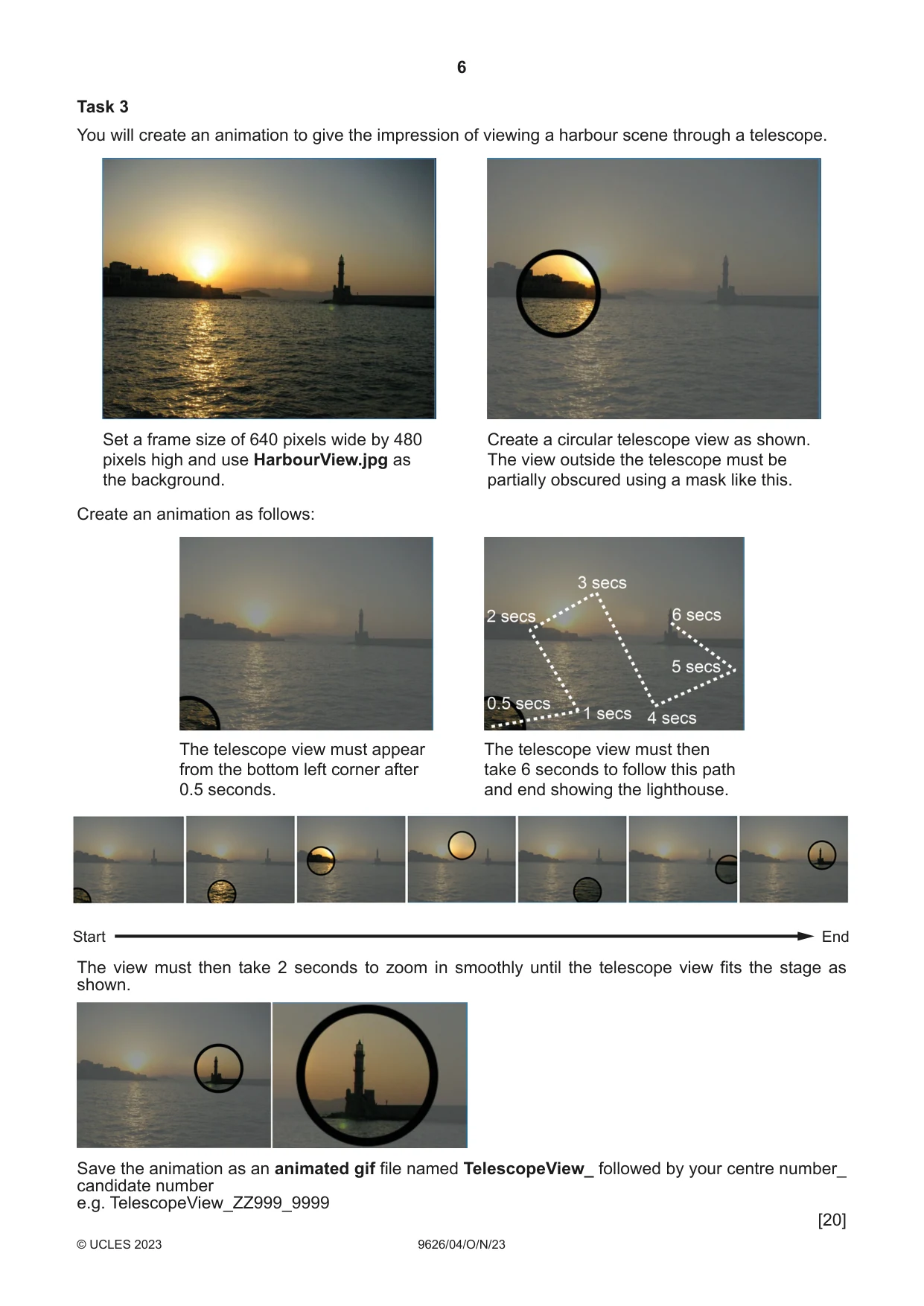
6 9626/04/ O/ N/23 © UCLES 2023 Task 3 You will create an animation to give the impression of viewing a harbour scene through a telescope. Set a frame size of 640 pixels wide by 480 pixels high and use HarbourView.jpg as the background. Create a circular telescope view as shown. The view outside the telescope must be partially obscured using a mask like this. Create an animation as follows: The telescope view must appear from the bottom left corner after 0.5 seconds. The telescope view must then take 6 seconds to follow this path and end showing the lighthouse. Start End The view must then take 2 seconds to zoom in smoothly until the telescope view fits the stage as shown. Save the animation as an animated gif file named TelescopeView_ followed by your centre number_ candidate number e.g. TelescopeView_ZZ999_9999 [20]
Question paper, page 7
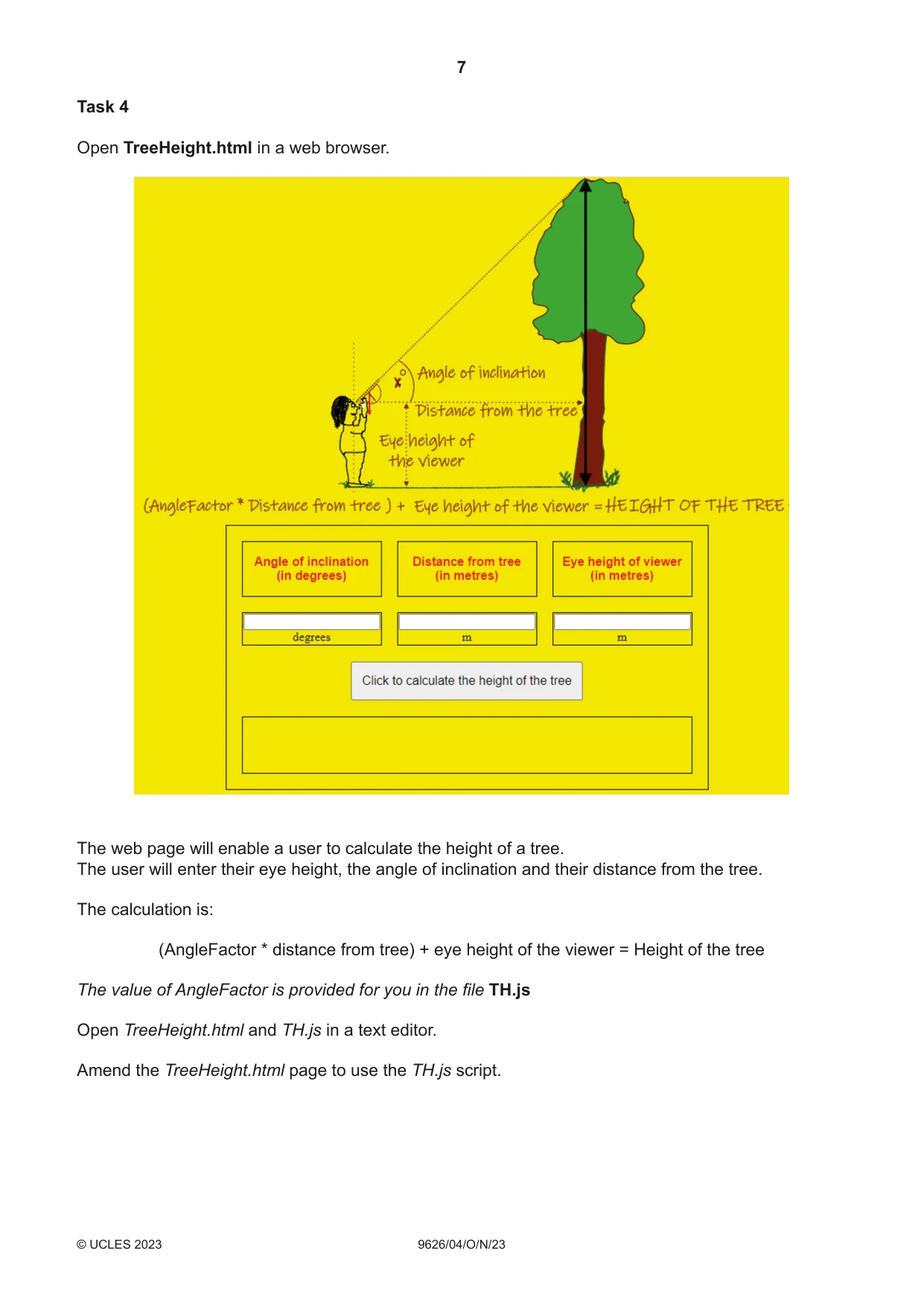
7 9626/04/O/N/23 © UCLES 2023 Task 4 Open TreeHeight.html in a web browser. The web page will enable a user to calculate the height of a tree. The user will enter their eye height, the angle of inclination and their distance from the tree. The calculation is: (AngleFactor * distance from tree) + eye height of the viewer = Height of the tree The value of AngleFactor is provided for you in the file TH.js Open TreeHeight.html and TH.js in a text editor. Amend the TreeHeight.html page to use the TH.js script.
Question paper, page 8
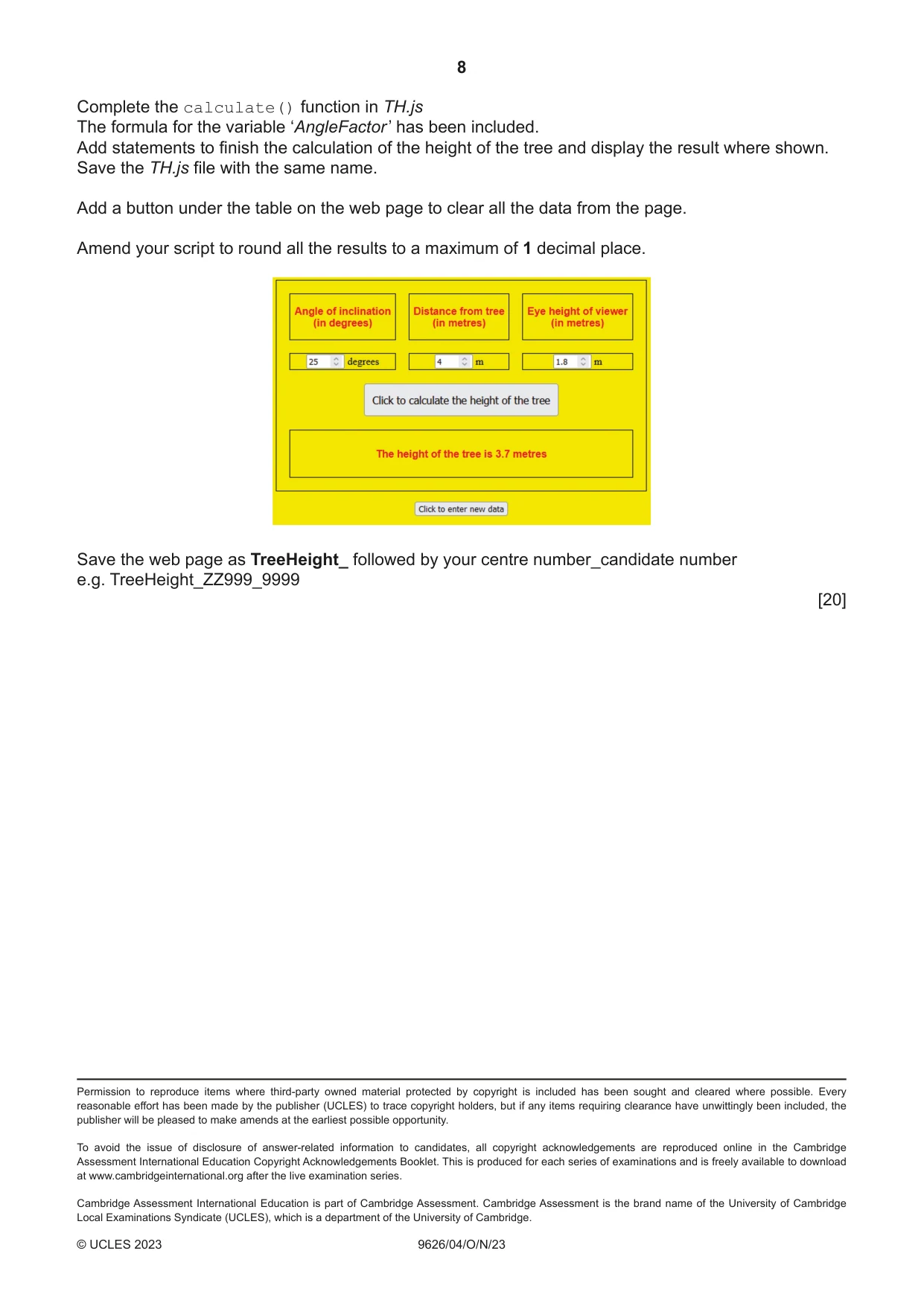
8 9626/04/O/N/23 © UCLES 2023 Permission to reproduce items where third-party owned material protected by copyright is included has been sought and cleared where possible. Every reasonable effort has been made by the publisher (UCLES) to trace copyright holders, but if any items requiring clearance have unwittingly been included, the publisher will be pleased to make amends at the earliest possible opportunity. To avoid the issue of disclosure of answer-related information to candidates, all copyright acknowledgements are reproduced online in the Cambridge Assessment International Education Copyright Acknowledgements Booklet. This is produced for each series of examinations and is freely available to download at www.cambridgeinternational.org after the live examination series. Cambridge Assessment International Education is part of Cambridge Assessment. Cambridge Assessment is the brand name of the University of Cambridge Local Examinations Syndicate (UCLES), which is a department of the University of Cambridge. Complete the calculate() function in TH.js The formula for the variable ‘AngleFactor ’ has been included. Add statements to finish the calculation of the height of the tree and display the result where shown. Save the TH.js file with the same name. Add a button under the table on the web page to clear all the data from the page. Amend your script to round all the results to a maximum of 1 decimal place. Save the web page as TreeHeight_ followed by your centre number_candidate number e.g. TreeHeight_ZZ999_9999 [20]
What you needed in this session
Cambridge’s own grade thresholds for 2023 Oct/Nov, Paper 4 · Variant 0. A higher threshold means an easier paper — the bar moves with how the cohort did.