Cambridge A Level Information Technology (from 2017) 9626 — 2023 May/June Paper 4 · Variant 0
9626/40/M/J/23 · 90 marks · ≈101 min
The question paper and its mark scheme, free to read here and free to download. This is Cambridge’s own paper, exactly as it was sat.
Question paper8 pages

Mark scheme
No mark scheme is in the library for this paper.
Paper as text
Question paper, page 1
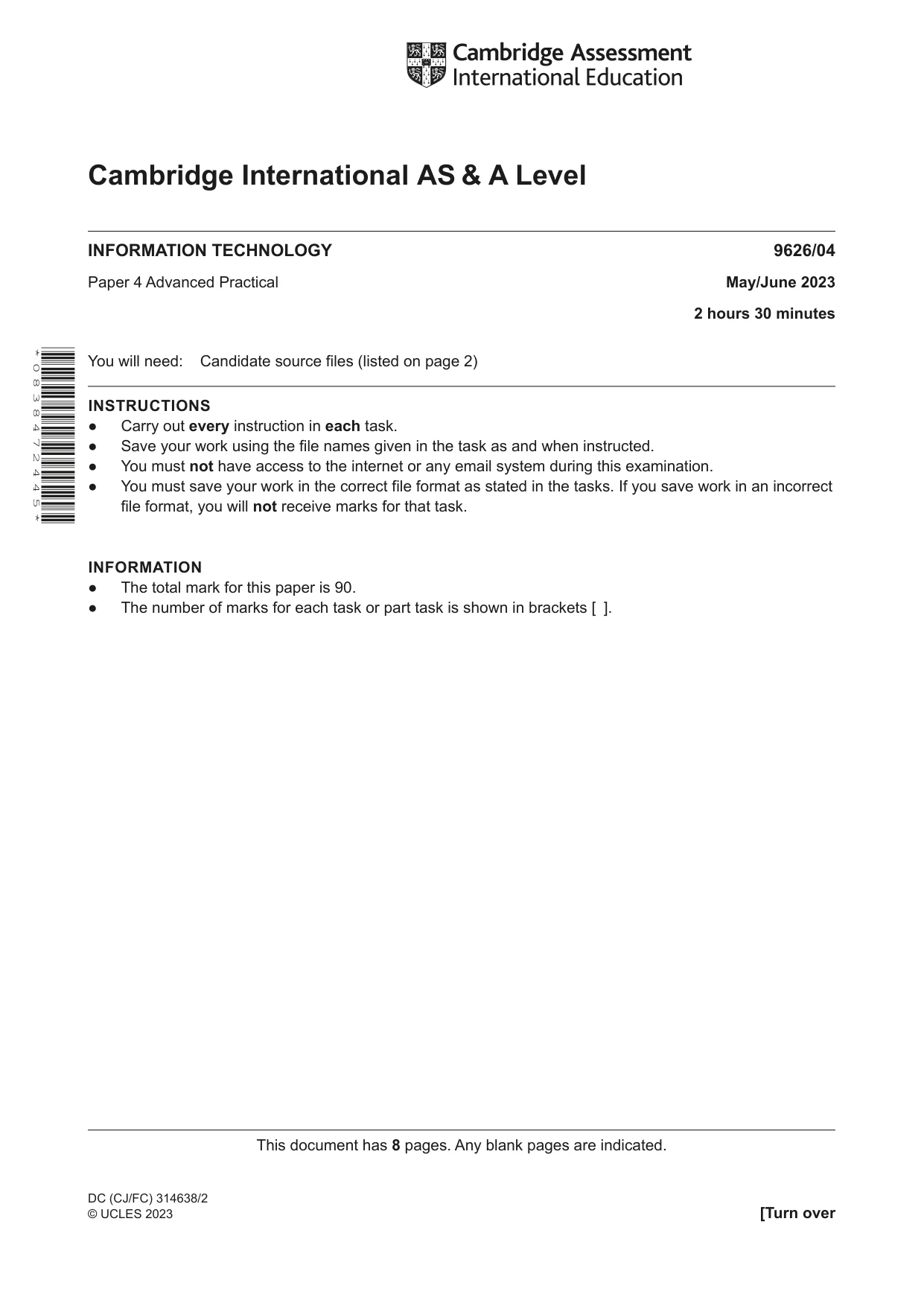
This document has 8 pages. Any blank pages are indicated. [Turn over Cambridge International AS & A Level INFORMATION TECHNOLOGY 9626/04 Paper 4 Advanced Practical May/June 2023 2 hours 30 minutes You will need: Candidate source files (listed on page 2) INSTRUCTIONS ● Carry out every instruction in each task. ● Save your work using the file names given in the task as and when instructed. ● You must not have access to the internet or any email system during this examination. ● You must save your work in the correct file format as stated in the tasks. If you save work in an incorrect file format, you will not receive marks for that task. INFORMATION ● The total mark for this paper is 90. ● The number of marks for each task or part task is shown in brackets [ ]. * 0 8 3 8 4 7 2 4 4 5 * DC (CJ/FC) 314638/2 © UCLES 2023
Question paper, page 2
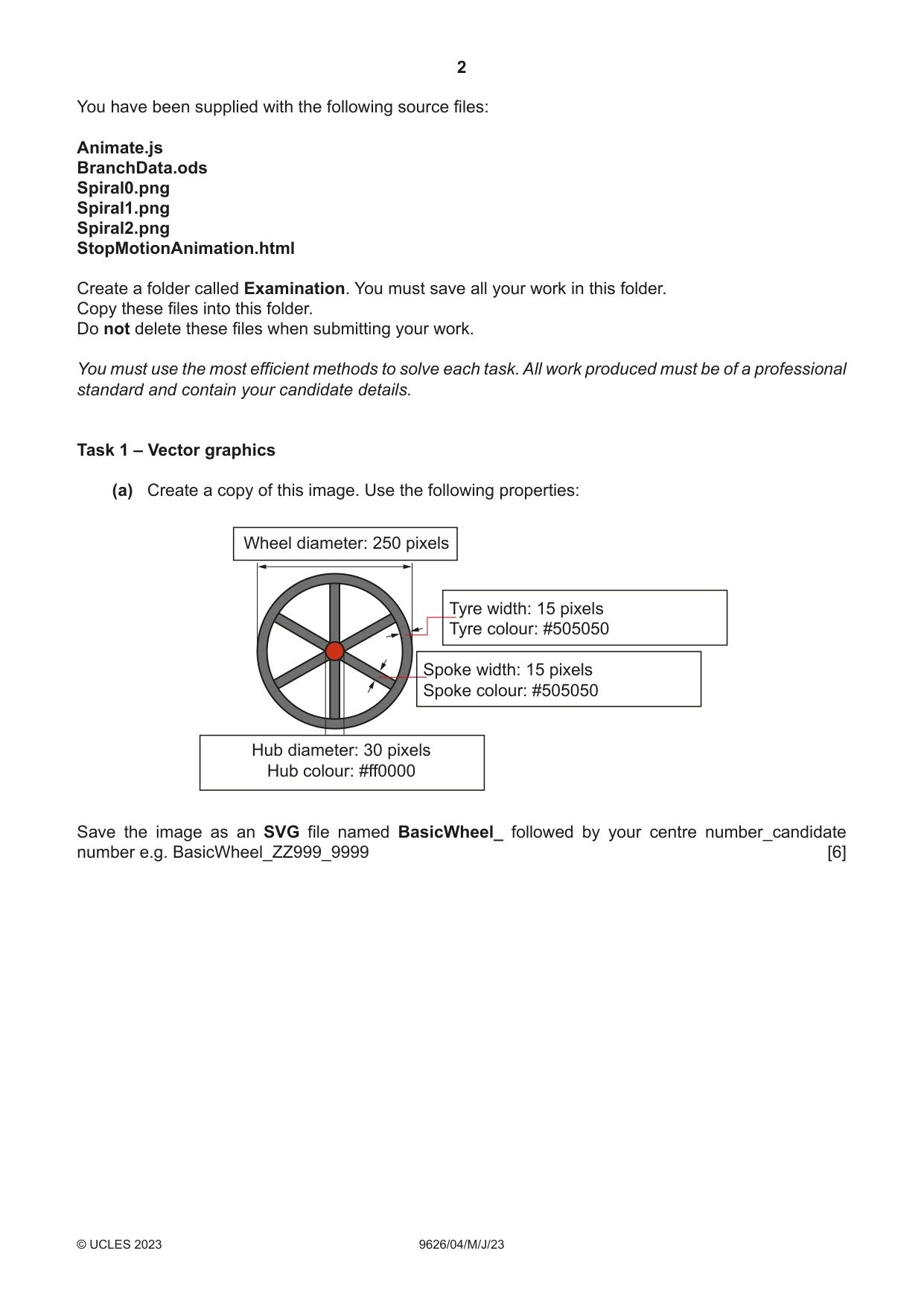
2 9626/04/M/J/23 © UCLES 2023 You have been supplied with the following source files: Animate.js BranchData.ods Spiral0.png Spiral1.png Spiral2.png StopMotionAnimation.html Create a folder called Examination. You must save all your work in this folder. Copy these files into this folder. Do not delete these files when submitting your work. You must use the most efficient methods to solve each task. All work produced must be of a professional standard and contain your candidate details. Task 1 – Vector graphics (a) Create a copy of this image. Use the following properties: Wheel diameter: 250 pixels Tyre width: 15 pixels Tyre colour: #505050 Spoke width: 15 pixels Spoke colour: #505050 Hub diameter: 30 pixels Hub colour: #ff0000 Save the image as an SVG file named BasicWheel_ followed by your centre number_candidate number e.g. BasicWheel_ZZ999_9999 [6]
Question paper, page 3
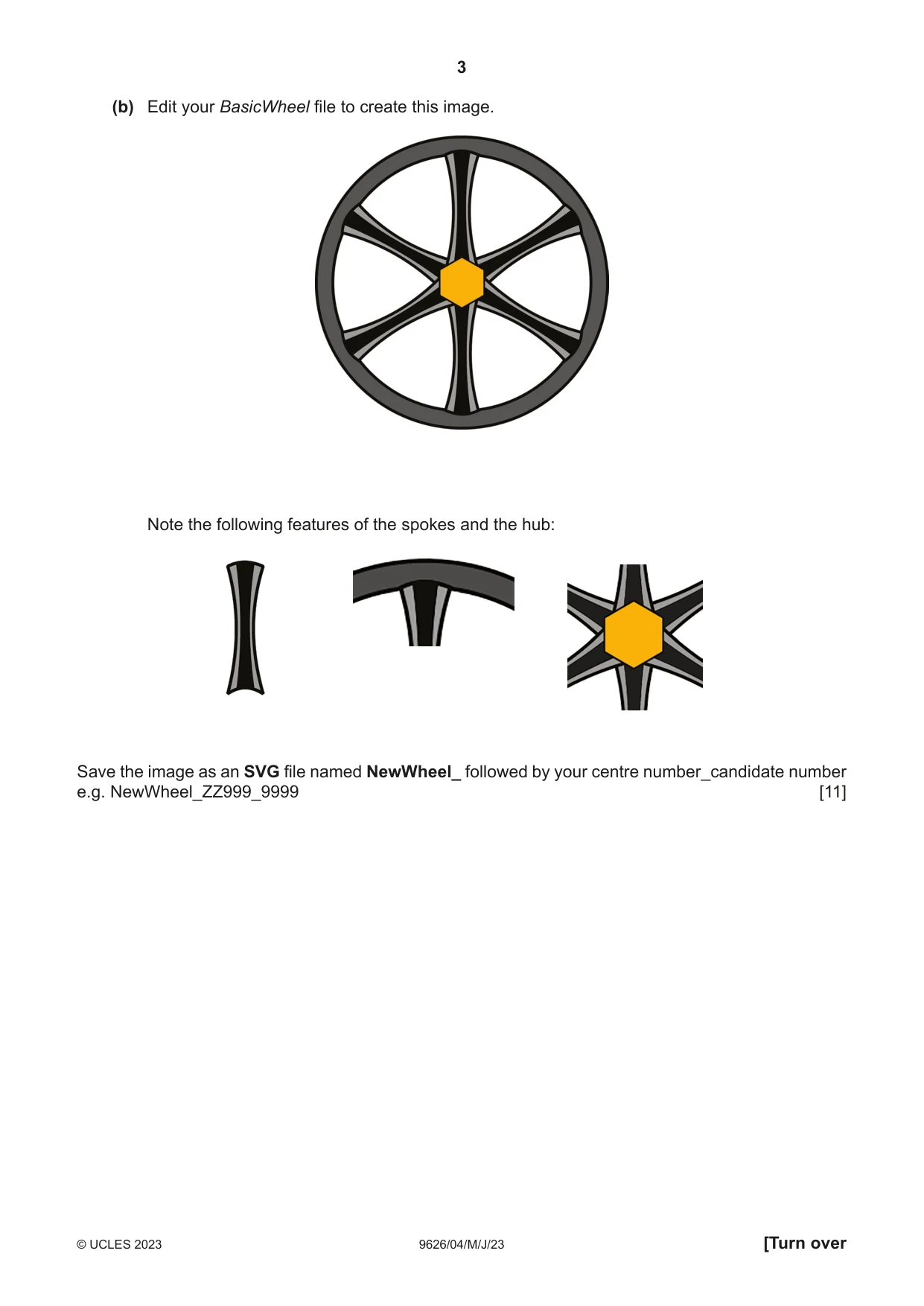
3 9626/04/M/J/23 © UCLES 2023 [Turn over (b) Edit your BasicWheel file to create this image. Note the following features of the spokes and the hub: Save the image as an SVG file named NewWheel_ followed by your centre number_candidate number e.g. NewWheel_ZZ999_9999 [11]
Question paper, page 4
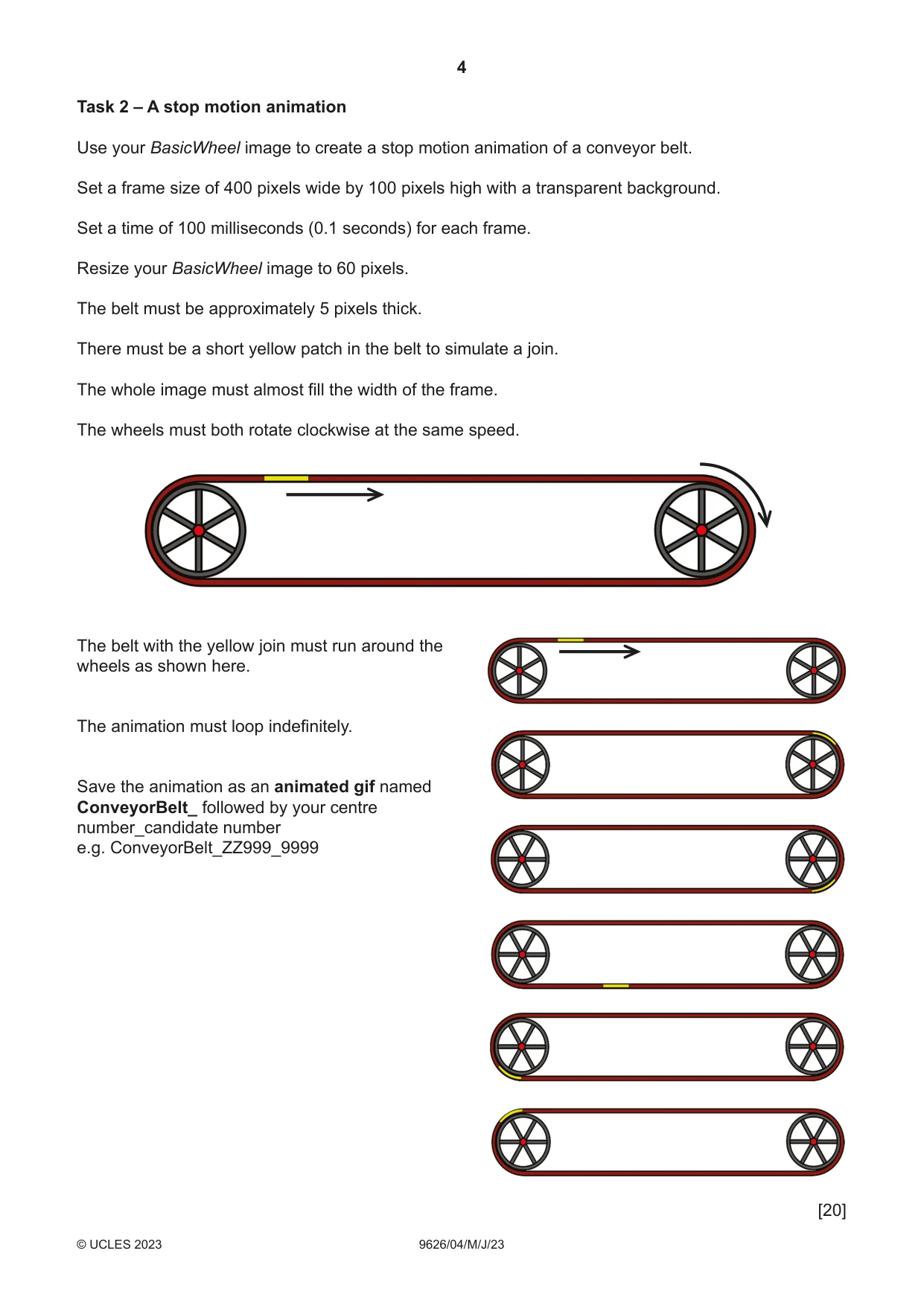
4 9626/04/M/J/23 © UCLES 2023 Task 2 – A stop motion animation Use your BasicWheel image to create a stop motion animation of a conveyor belt. Set a frame size of 400 pixels wide by 100 pixels high with a transparent background. Set a time of 100 milliseconds (0.1 seconds) for each frame. Resize your BasicWheel image to 60 pixels. The belt must be approximately 5 pixels thick. There must be a short yellow patch in the belt to simulate a join. The whole image must almost fill the width of the frame. The wheels must both rotate clockwise at the same speed. The belt with the yellow join must run around the wheels as shown here. The animation must loop indefinitely. Save the animation as an animated gif named ConveyorBelt_ followed by your centre number_candidate number e.g. ConveyorBelt_ZZ999_9999 [20]
Question paper, page 5
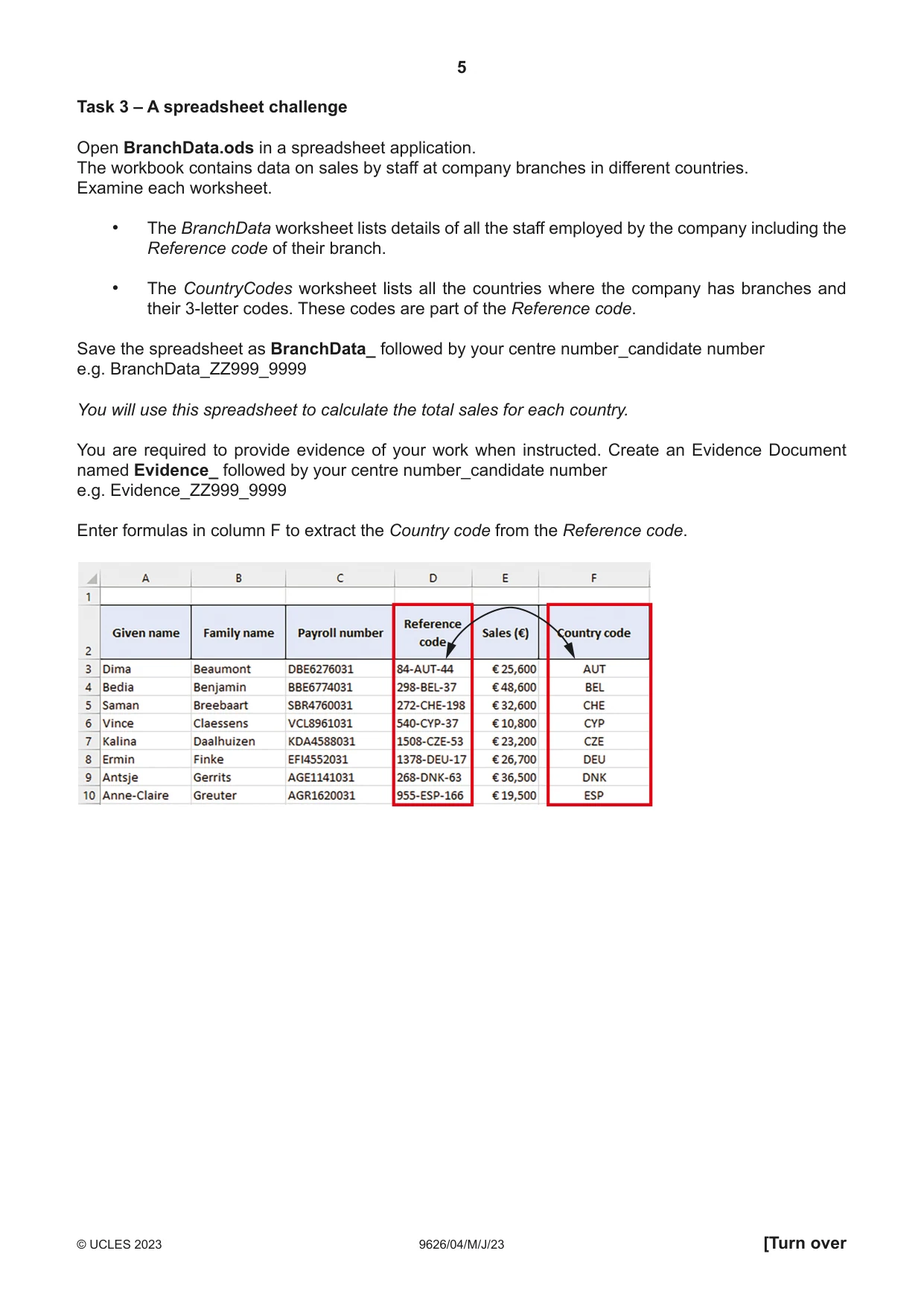
5 9626/04/M/J/23 © UCLES 2023 [Turn over Task 3 – A spreadsheet challenge Open BranchData.ods in a spreadsheet application. The workbook contains data on sales by staff at company branches in different countries. Examine each worksheet. • The BranchData worksheet lists details of all the staff employed by the company including the Reference code of their branch. • The CountryCodes worksheet lists all the countries where the company has branches and their 3-letter codes. These codes are part of the Reference code. Save the spreadsheet as BranchData_ followed by your centre number_candidate number e.g. BranchData_ZZ999_9999 You will use this spreadsheet to calculate the total sales for each country. You are required to provide evidence of your work when instructed. Create an Evidence Document named Evidence_ followed by your centre number_candidate number e.g. Evidence_ZZ999_9999 Enter formulas in column F to extract the Country code from the Reference code.
Question paper, page 6
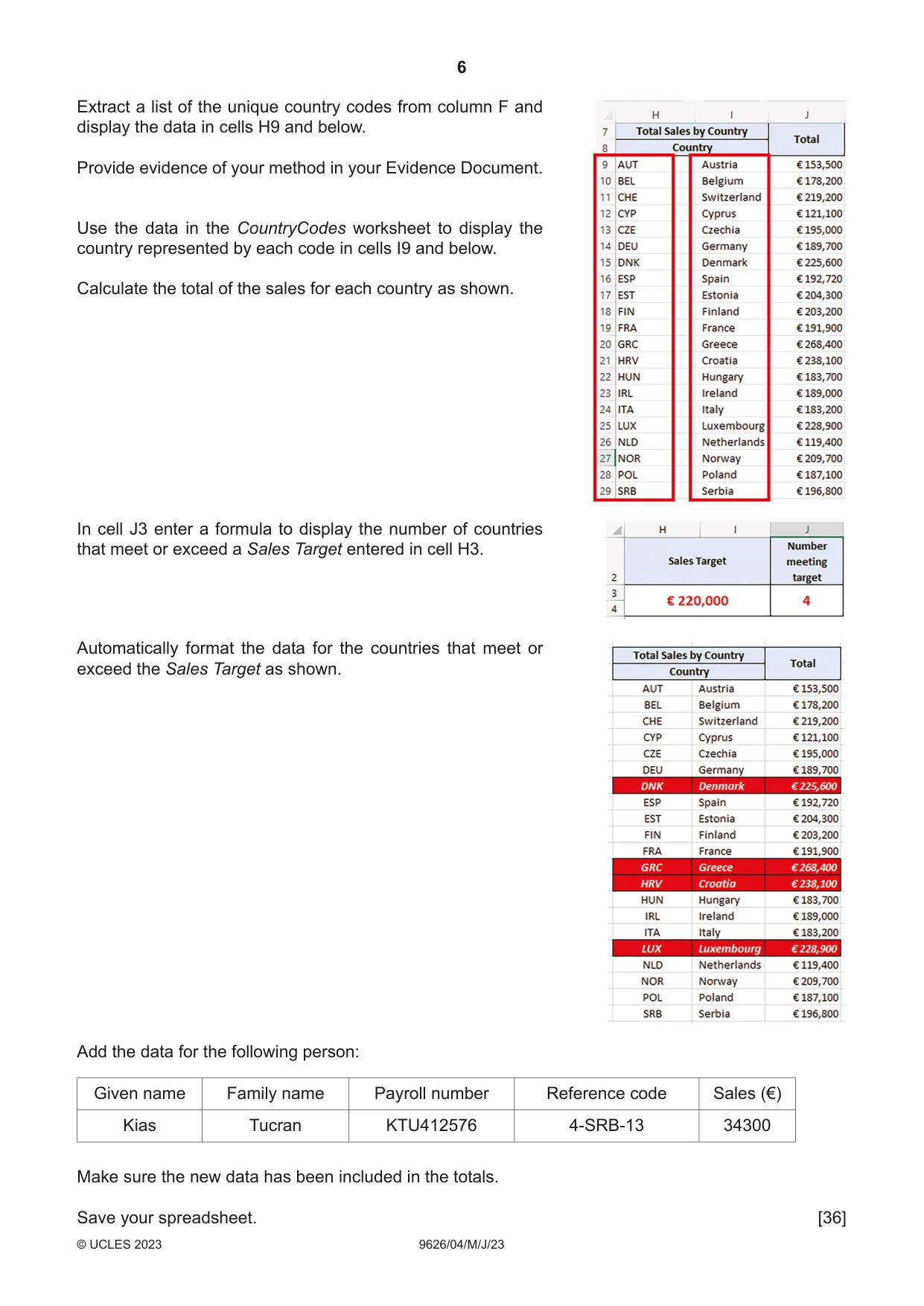
6 9626/04/M/J/23 © UCLES 2023 Extract a list of the unique country codes from column F and display the data in cells H9 and below. Provide evidence of your method in your Evidence Document. Use the data in the CountryCodes worksheet to display the country represented by each code in cells I9 and below. Calculate the total of the sales for each country as shown. In cell J3 enter a formula to display the number of countries that meet or exceed a Sales Target entered in cell H3. Automatically format the data for the countries that meet or exceed the Sales Target as shown. Add the data for the following person: Given name Family name Payroll number Reference code Sales (€) Kias Tucran KTU412576 4-SRB-13 34300 Make sure the new data has been included in the totals. Save your spreadsheet. [36]
Question paper, page 7
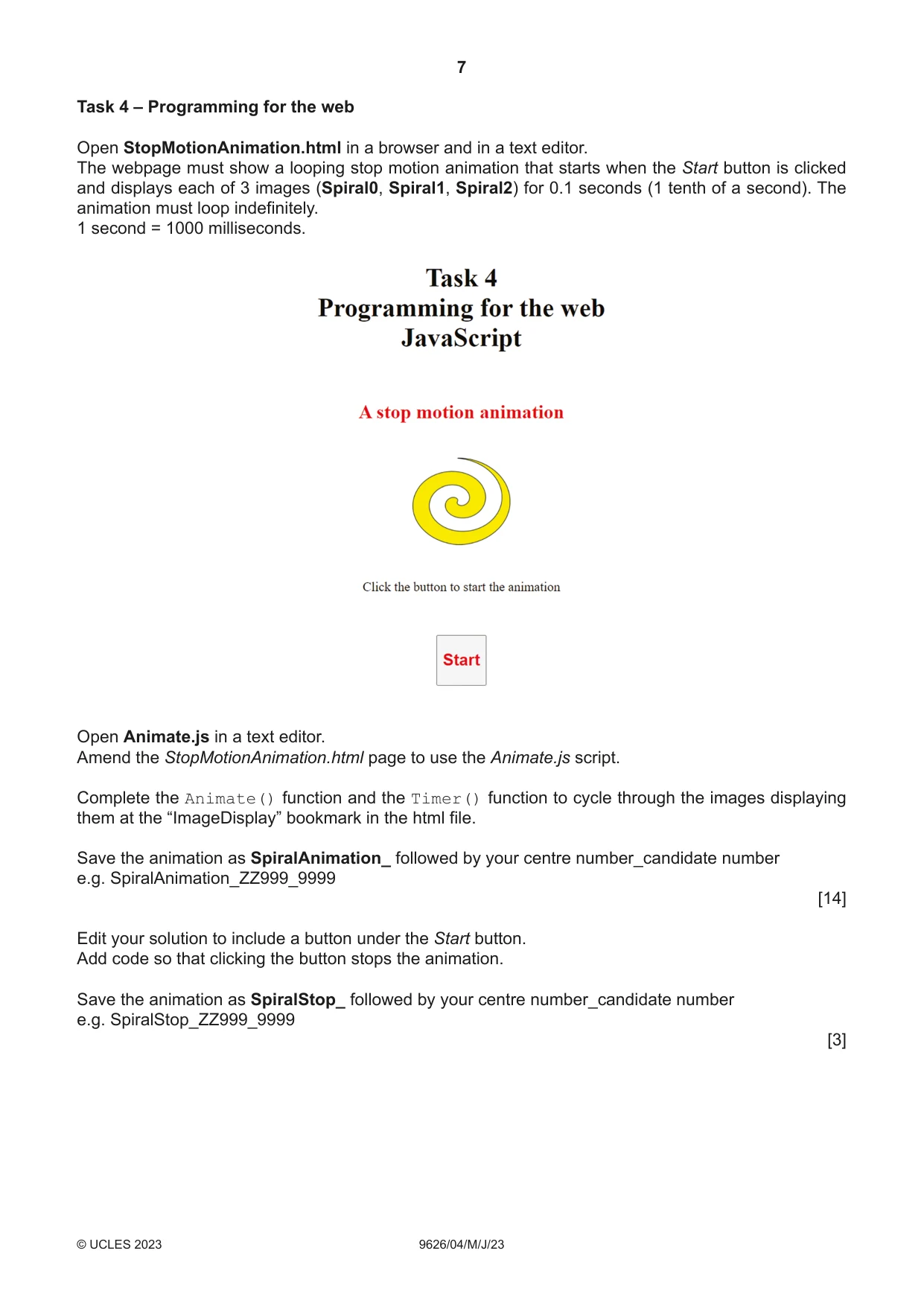
7 9626/04/M/J/23 © UCLES 2023 Task 4 – Programming for the web Open StopMotionAnimation.html in a browser and in a text editor. The webpage must show a looping stop motion animation that starts when the Start button is clicked and displays each of 3 images (Spiral0, Spiral1, Spiral2) for 0.1 seconds (1 tenth of a second). The animation must loop indefinitely. 1 second = 1000 milliseconds. Open Animate.js in a text editor. Amend the StopMotionAnimation.html page to use the Animate.js script. Complete the Animate() function and the Timer() function to cycle through the images displaying them at the “ImageDisplay” bookmark in the html file. Save the animation as SpiralAnimation_ followed by your centre number_candidate number e.g. SpiralAnimation_ZZ999_9999 [14] Edit your solution to include a button under the Start button. Add code so that clicking the button stops the animation. Save the animation as SpiralStop_ followed by your centre number_candidate number e.g. SpiralStop_ZZ999_9999 [3]
Question paper, page 8
8 9626/04/M/J/23 © UCLES 2023 Permission to reproduce items where third-party owned material protected by copyright is included has been sought and cleared where possible. Every reasonable effort has been made by the publisher (UCLES) to trace copyright holders, but if any items requiring clearance have unwittingly been included, the publisher will be pleased to make amends at the earliest possible opportunity. To avoid the issue of disclosure of answer-related information to candidates, all copyright acknowledgements are reproduced online in the Cambridge Assessment International Education Copyright Acknowledgements Booklet. This is produced for each series of examinations and is freely available to download at www.cambridgeinternational.org after the live examination series. Cambridge Assessment International Education is part of Cambridge Assessment. Cambridge Assessment is the brand name of the University of Cambridge Local Examinations Syndicate (UCLES), which is a department of the University of Cambridge. BLANK PAGE
What you needed in this session
Cambridge’s own grade thresholds for 2023 May/June, Paper 4 · Variant 0. A higher threshold means an easier paper — the bar moves with how the cohort did.