Cambridge A Level Information Technology (from 2017) 9626 — 2022 Oct/Nov Paper 4 · Variant 0
9626/40/O/N/22 · 90 marks · ≈101 min
The question paper and its mark scheme, free to read here and free to download. This is Cambridge’s own paper, exactly as it was sat.
Question paper8 pages

Mark scheme
No mark scheme is in the library for this paper.
Paper as text
Question paper, page 1
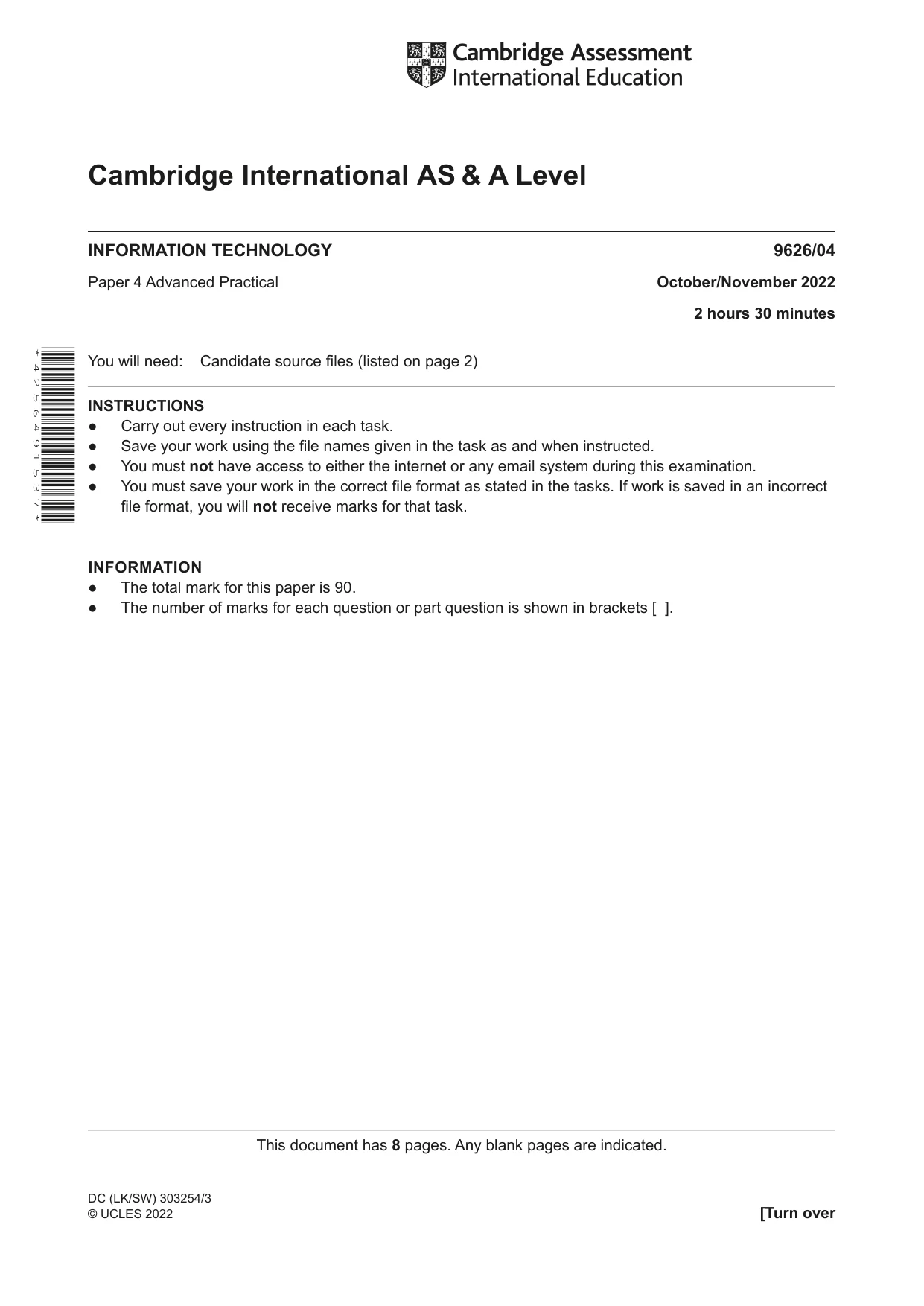
This document has 8 pages. Any blank pages are indicated. [Turn over Cambridge International AS & A Level DC (LK/SW) 303254/3 © UCLES 2022 INFORMATION TECHNOLOGY 9626/04 Paper 4 Advanced Practical October/November 2022 2 hours 30 minutes You will need: Candidate source files (listed on page 2) INSTRUCTIONS ● Carry out every instruction in each task. ● Save your work using the file names given in the task as and when instructed. ● You must not have access to either the internet or any email system during this examination. ● You must save your work in the correct file format as stated in the tasks. If work is saved in an incorrect file format, you will not receive marks for that task. INFORMATION ● The total mark for this paper is 90. ● The number of marks for each question or part question is shown in brackets [ ]. * 4 2 5 6 4 9 1 5 3 7 *
Question paper, page 2
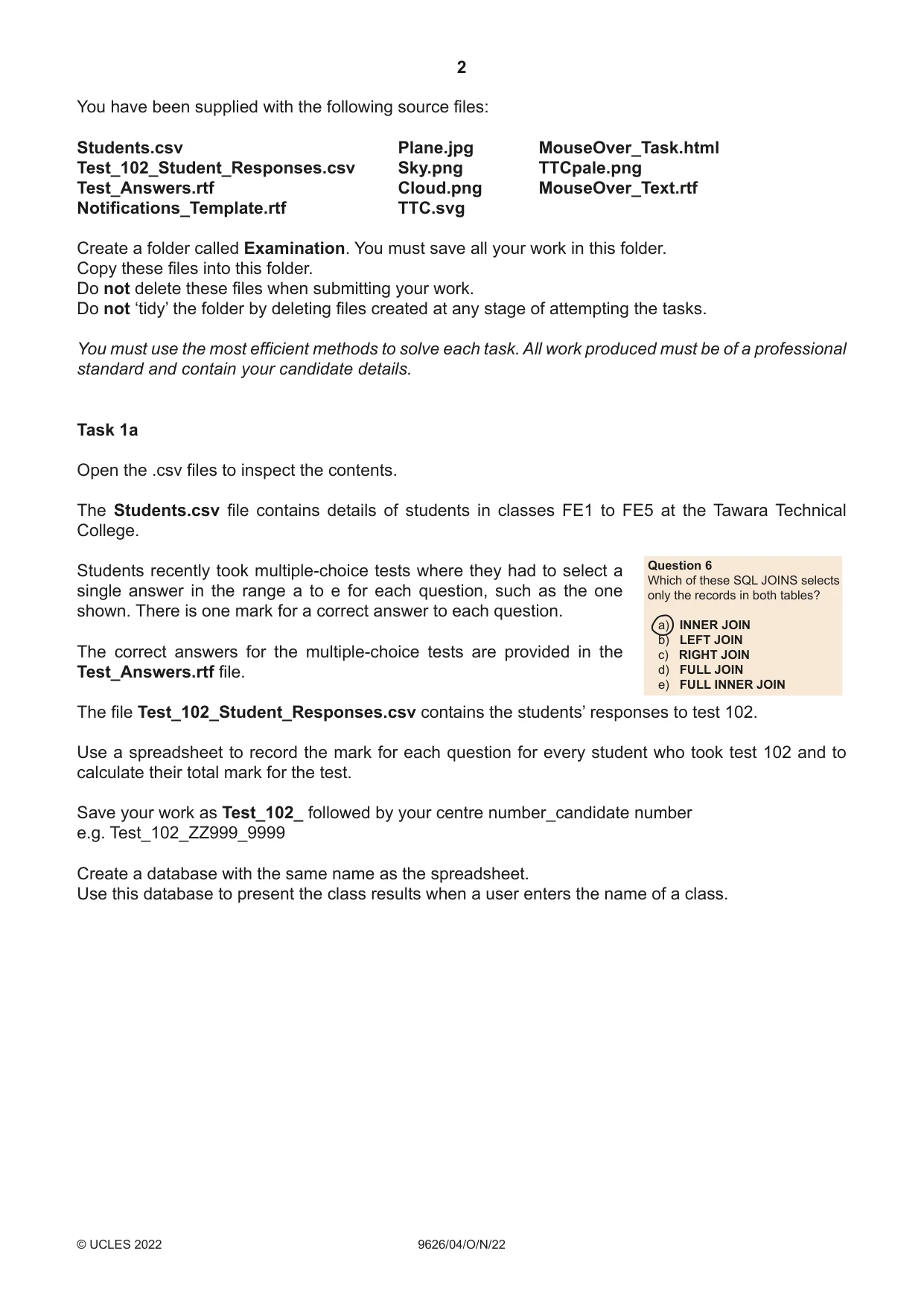
2 9626/04/O/N/22 © UCLES 2022 You have been supplied with the following source files: Students.csv Plane.jpg MouseOver_Task.html Test_102_Student_Responses.csv Sky.png TTCpale.png Test_Answers.rtf Cloud.png MouseOver_Text.rtf Notifications_Template.rtf TTC.svg Create a folder called Examination. You must save all your work in this folder. Copy these files into this folder. Do not delete these files when submitting your work. Do not ‘tidy’ the folder by deleting files created at any stage of attempting the tasks. You must use the most efficient methods to solve each task. All work produced must be of a professional standard and contain your candidate details. Task 1a Open the .csv files to inspect the contents. The Students.csv file contains details of students in classes FE1 to FE5 at the Tawara Technical College. Question 6 Which of these SQL JOINS selects only the records in both tables? a) INNER JOIN b) LEFT JOIN c) RIGHT JOIN d) FULL JOIN e) FULL INNER JOIN Students recently took multiple-choice tests where they had to select a single answer in the range a to e for each question, such as the one shown. There is one mark for a correct answer to each question. The correct answers for the multiple-choice tests are provided in the Test_Answers.rtf file. The file Test_102_Student_Responses.csv contains the students’ responses to test 102. Use a spreadsheet to record the mark for each question for every student who took test 102 and to calculate their total mark for the test. Save your work as Test_102_ followed by your centre number_candidate number e.g. Test_102_ZZ999_9999 Create a database with the same name as the spreadsheet. Use this database to present the class results when a user enters the name of a class.
Question paper, page 3
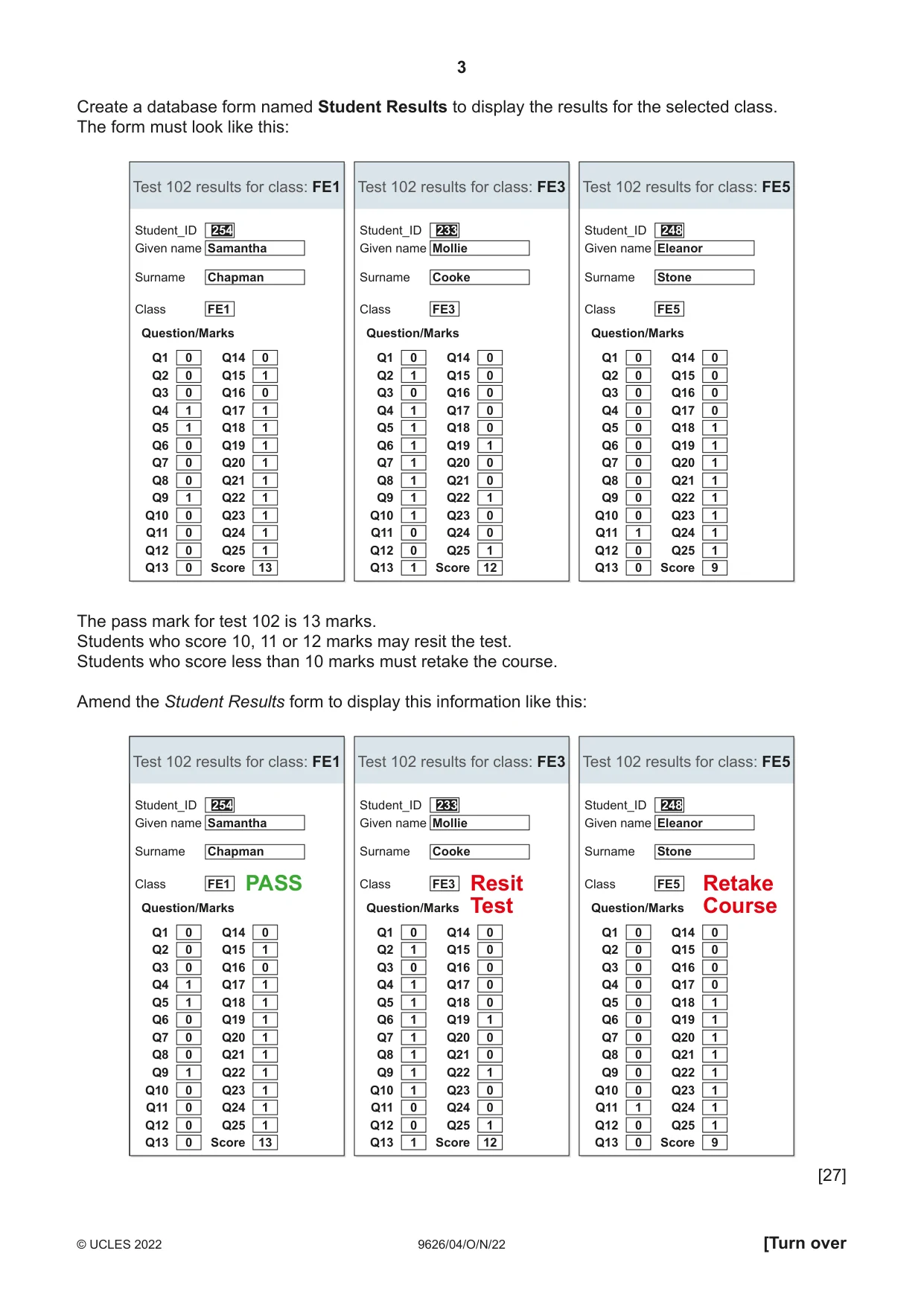
3 9626/04/O/N/22 © UCLES 2022 [Turn over Create a database form named Student Results to display the results for the selected class. The form must look like this: Student_ID Test 102 results for class: FE1 Given name Surname Class Question/Marks Q1 0 Samantha Chapman FE1 Q14 0 Q2 0 Q15 1 Q3 0 Q16 0 Q4 1 Q17 1 Q5 1 Q18 1 Q6 0 Q19 1 Q7 0 Q20 1 Q8 0 Q21 1 Q9 1 Q22 1 Q10 0 Q23 1 Q11 0 Q24 1 Q12 0 Q25 1 Q13 0 Score 13 254 Student_ID Test 102 results for class: FE3 Given name Surname Class Question/Marks Q1 0 Mollie Cooke FE3 Q14 0 Q2 1 Q15 0 Q3 0 Q16 0 Q4 1 Q17 0 Q5 1 Q18 0 Q6 1 Q19 1 Q7 1 Q20 0 Q8 1 Q21 0 Q9 1 Q22 1 Q10 1 Q23 0 Q11 0 Q24 0 Q12 0 Q25 1 Q13 1 Score 12 233 Student_ID Test 102 results for class: FE5 Given name Surname Class Question/Marks Q1 0 Eleanor Stone FE5 Q14 0 Q2 0 Q15 0 Q3 0 Q16 0 Q4 0 Q17 0 Q5 0 Q18 1 Q6 0 Q19 1 Q7 0 Q20 1 Q8 0 Q21 1 Q9 0 Q22 1 Q10 0 Q23 1 Q11 1 Q24 1 Q12 0 Q25 1 Q13 0 Score 9 248 The pass mark for test 102 is 13 marks. Students who score 10, 11 or 12 marks may resit the test. Students who score less than 10 marks must retake the course. Amend the Student Results form to display this information like this: Student_ID Test 102 results for class: FE1 Given name Surname Class Question/Marks Q1 0 Samantha Chapman FE1 Q14 0 Q2 0 Q15 1 Q3 0 Q16 0 Q4 1 Q17 1 Q5 1 Q18 1 Q6 0 Q19 1 Q7 0 Q20 1 Q8 0 Q21 1 Q9 1 Q22 1 Q10 0 Q23 1 Q11 0 Q24 1 Q12 0 Q25 1 Q13 0 Score 13 254 Student_ID Test 102 results for class: FE3 Given name Surname Class Question/Marks Q1 0 Mollie Cooke FE3 Q14 0 Q2 1 Q15 0 Q3 0 Q16 0 Q4 1 Q17 0 Q5 1 Q18 0 Q6 1 Q19 1 Q7 1 Q20 0 Q8 1 Q21 0 Q9 1 Q22 1 Q10 1 Q23 0 Q11 0 Q24 0 Q12 0 Q25 1 Q13 1 Score 12 233 Student_ID Test 102 results for class: FE5 Given name Surname Class Question/Marks Q1 0 Eleanor Stone FE5 Q14 0 Q2 0 Q15 0 Q3 0 Q16 0 Q4 0 Q17 0 Q5 0 Q18 1 Q6 0 Q19 1 Q7 0 Q20 1 Q8 0 Q21 1 Q9 0 Q22 1 Q10 0 Q23 1 Q11 1 Q24 1 Q12 0 Q25 1 Q13 0 Score 9 248 PASS Resit Test Retake Course [27]
Question paper, page 4
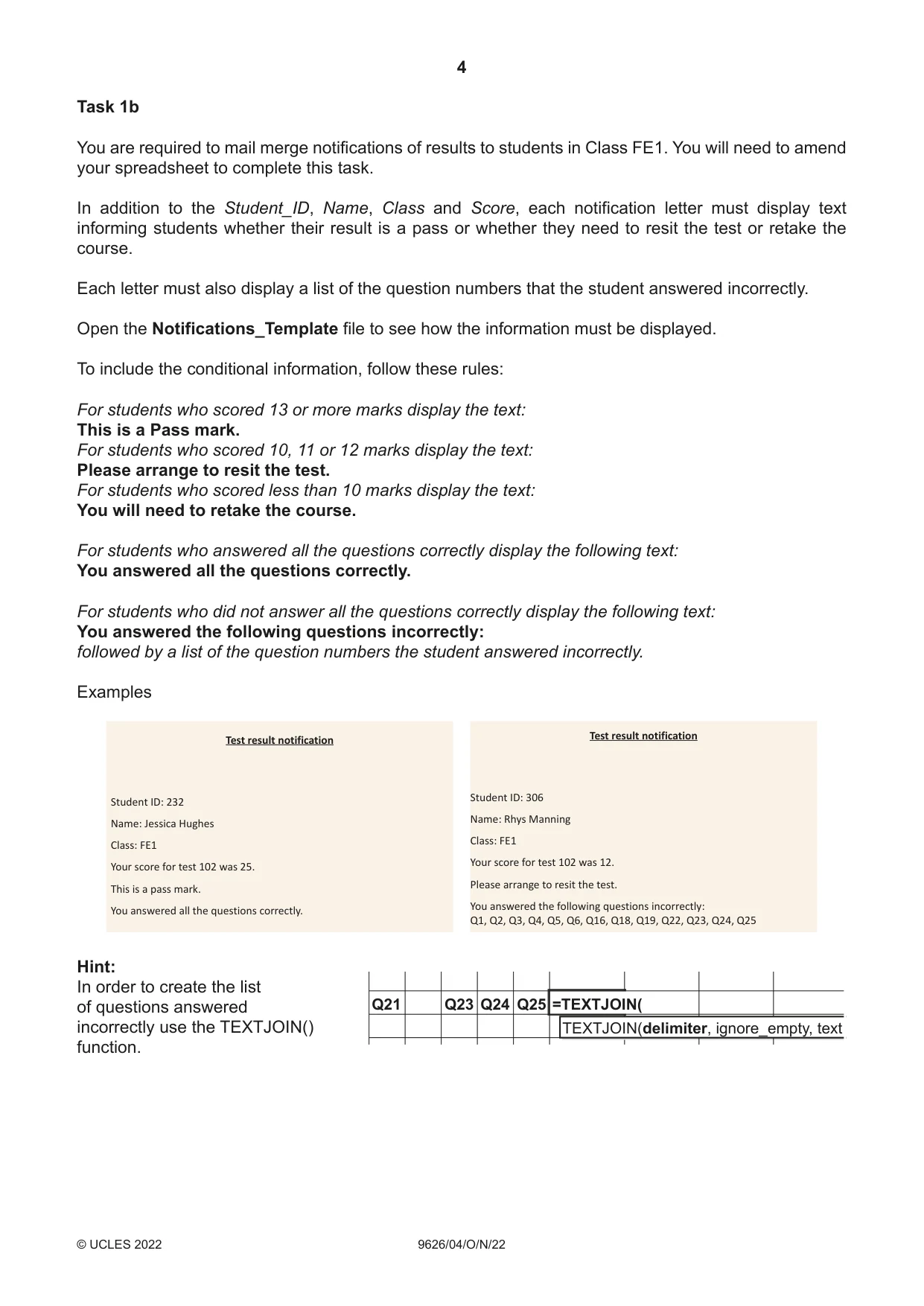
4 9626/04/O/N/22 © UCLES 2022 Task 1b You are required to mail merge notifications of results to students in Class FE1. You will need to amend your spreadsheet to complete this task. In addition to the Student_ID, Name, Class and Score, each notification letter must display text informing students whether their result is a pass or whether they need to resit the test or retake the course. Each letter must also display a list of the question numbers that the student answered incorrectly. Open the Notifications_Template file to see how the information must be displayed. To include the conditional information, follow these rules: For students who scored 13 or more marks display the text: This is a Pass mark. For students who scored 10, 11 or 12 marks display the text: Please arrange to resit the test. For students who scored less than 10 marks display the text: You will need to retake the course. For students who answered all the questions correctly display the following text: You answered all the questions correctly. For students who did not answer all the questions correctly display the following text: You answered the following questions incorrectly: followed by a list of the question numbers the student answered incorrectly. Examples Test result notification Student ID: 232 Name: Jessica Hughes Class: FE1 Your score for test 102 was 25. This is a pass mark. You answered all the questions correctly. Test result notification Student ID: 306 Name: Rhys Manning Class: FE1 Your score for test 102 was 12. Please arrange to resit the test. You answered the following questions incorrectly: Q1, Q2, Q3, Q4, Q5, Q6, Q16, Q18, Q19, Q22, Q23, Q24, Q25 Hint: Q21 Q23 Q24 Q25 =TEXTJOIN( TEXTJOIN(delimiter, ignore_empty, text In order to create the list of questions answered incorrectly use the TEXTJOIN() function.
Question paper, page 5
5 9626/04/ O/ N/22 © UCLES 2022 [Turn over Save the merge document as NotificationsMergeDoc_102_ followed by your centre number_ candidate number e.g. NotificationsMergeDoc_102_ZZ999_9999 Merge the letters in descending order of the student score. Save the merge letters as Notification_Letters_102_ followed by your centre number_candidate number e.g. Notification_Letters_102_ZZ999_9999 [28] Task 2 Create an accurate vector graphic copy of the aeroplane shown in the Plane.jpg image. The new aeroplane should be coloured pure yellow as shown. Add the designs to the body and the wings as shown. Save the image in .svg format as VPlane_ followed by your centre number_candidate number e.g. VPlane_ZZ999_9999 Add a ribbon streamer to the tail of the VPlane image as shown. Save the image in .svg format as VPlanePlus_ followed by your centre number_candidate number e.g. VPlanePlus_ZZ999_9999 [10]
Question paper, page 6
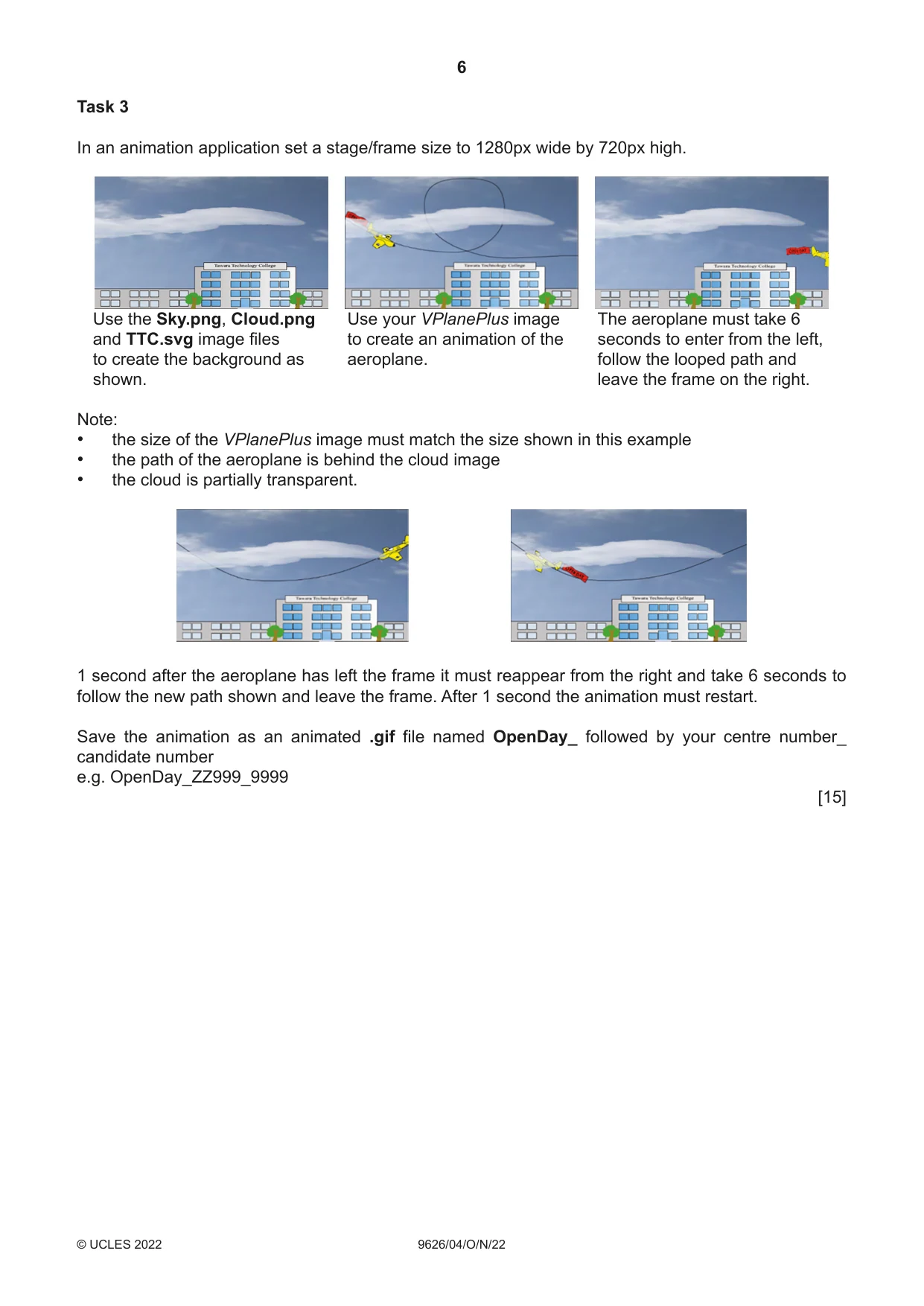
6 9626/04/O/N/22 © UCLES 2022 Task 3 In an animation application set a stage/frame size to 1280px wide by 720px high. Use the Sky.png, Cloud.png and TTC.svg image files to create the background as shown. Use your VPlanePlus image to create an animation of the aeroplane. The aeroplane must take 6 seconds to enter from the left, follow the looped path and leave the frame on the right. Note: • the size of the VPlanePlus image must match the size shown in this example • the path of the aeroplane is behind the cloud image • the cloud is partially transparent. 1 second after the aeroplane has left the frame it must reappear from the right and take 6 seconds to follow the new path shown and leave the frame. After 1 second the animation must restart. Save the animation as an animated .gif file named OpenDay_ followed by your centre number_ candidate number e.g. OpenDay_ZZ999_9999 [15]
Question paper, page 7
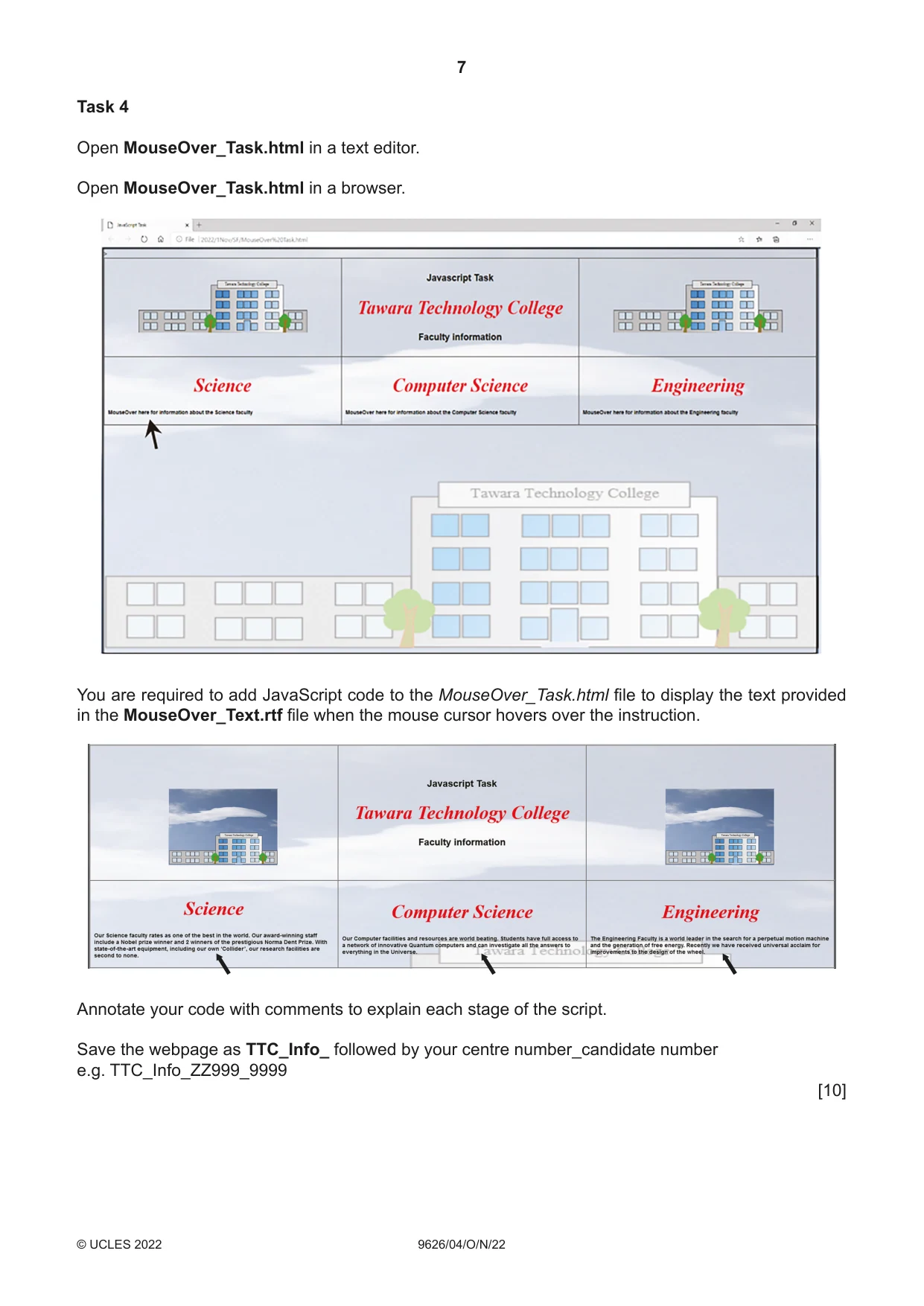
7 9626/04/O/N/22 © UCLES 2022 Task 4 Open MouseOver_Task.html in a text editor. Open MouseOver_Task.html in a browser. You are required to add JavaScript code to the MouseOver_Task.html file to display the text provided in the MouseOver_Text.rtf file when the mouse cursor hovers over the instruction. Annotate your code with comments to explain each stage of the script. Save the webpage as TTC_Info_ followed by your centre number_candidate number e.g. TTC_Info_ZZ999_9999 [10]
Question paper, page 8
8 9626/04/O/N/22 © UCLES 2022 Permission to reproduce items where third-party owned material protected by copyright is included has been sought and cleared where possible. Every reasonable effort has been made by the publisher (UCLES) to trace copyright holders, but if any items requiring clearance have unwittingly been included, the publisher will be pleased to make amends at the earliest possible opportunity. To avoid the issue of disclosure of answer-related information to candidates, all copyright acknowledgements are reproduced online in the Cambridge Assessment International Education Copyright Acknowledgements Booklet. This is produced for each series of examinations and is freely available to download at www.cambridgeinternational.org after the live examination series. Cambridge Assessment International Education is part of Cambridge Assessment. Cambridge Assessment is the brand name of the University of Cambridge Local Examinations Syndicate (UCLES), which is a department of the University of Cambridge. BLANK PAGE
What you needed in this session
Cambridge’s own grade thresholds for 2022 Oct/Nov, Paper 4 · Variant 0. A higher threshold means an easier paper — the bar moves with how the cohort did.