Cambridge A Level Information Technology (from 2017) 9626 — 2019 Oct/Nov Paper 4 · Variant 1
9626/41/O/N/19 · 110 marks · ≈124 min
The question paper and its mark scheme, free to read here and free to download. This is Cambridge’s own paper, exactly as it was sat.
Question paper8 pages

Mark scheme15 pages
Answers below. Sit the paper first if you are practising.
Paper as text
Question paper, page 1
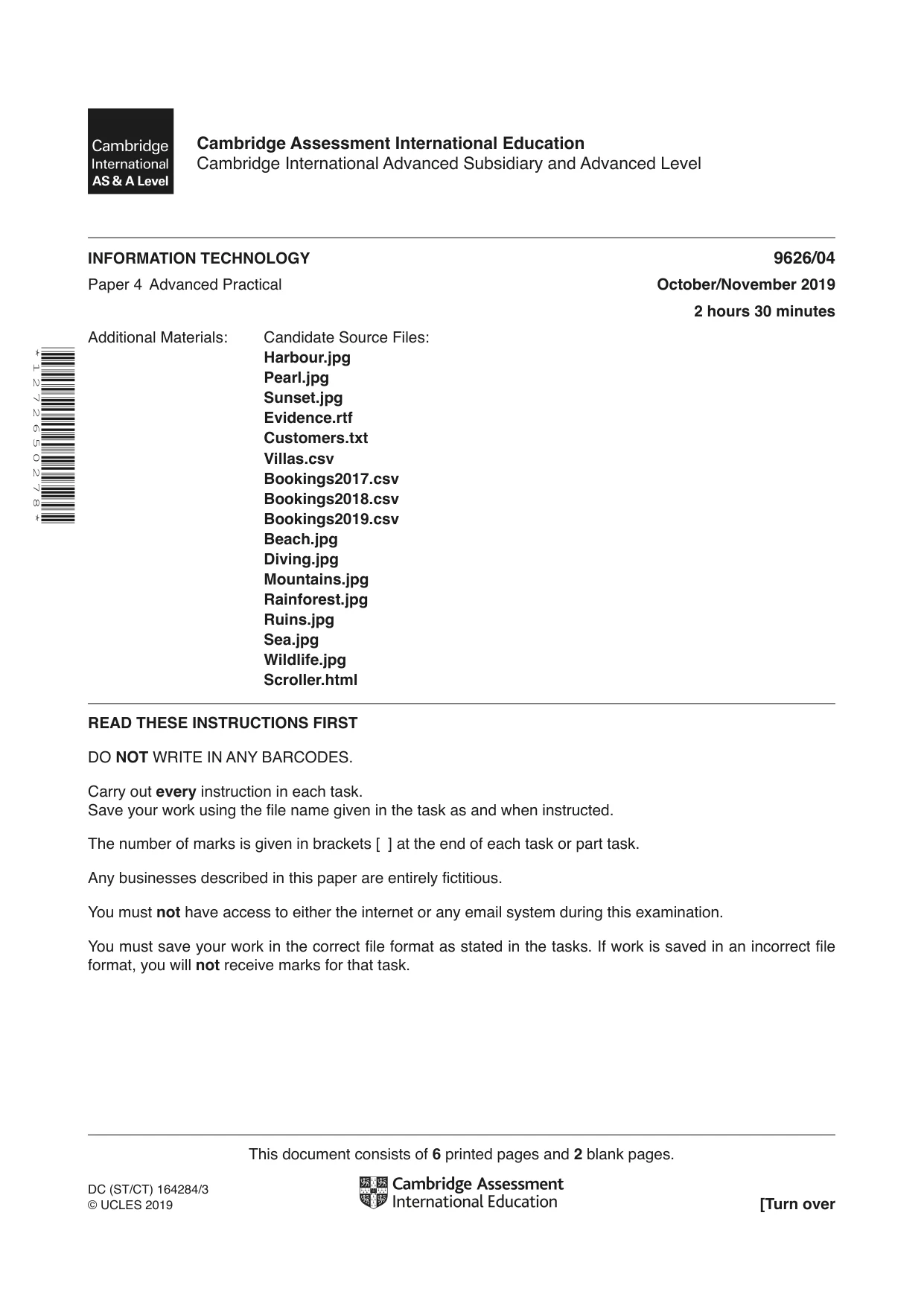
This document consists of 6 printed pages and 2 blank pages. DC (ST/CT) 164284/3 © UCLES 2019 [Turn over Cambridge Assessment International Education Cambridge International Advanced Subsidiary and Advanced Level * 1 2 7 2 6 5 0 2 7 8 * INFORMATION TECHNOLOGY 9626/04 Paper 4 Advanced Practical October/November 2019 2 hours 30 minutes Additional Materials: Candidate Source Files: Harbour.jpg Pearl.jpg Sunset.jpg Evidence.rtf Customers.txt Villas.csv Bookings2017.csv Bookings2018.csv Bookings2019.csv Beach.jpg Diving.jpg Mountains.jpg Rainforest.jpg Ruins.jpg Sea.jpg Wildlife.jpg Scroller.html READ THESE INSTRUCTIONS FIRST DO NOT WRITE IN ANY BARCODES. Carry out every instruction in each task. Save your work using the file name given in the task as and when instructed. The number of marks is given in brackets [ ] at the end of each task or part task. Any businesses described in this paper are entirely fictitious. You must not have access to either the internet or any email system during this examination. You must save your work in the correct file format as stated in the tasks. If work is saved in an incorrect file format, you will not receive marks for that task.
Question paper, page 2
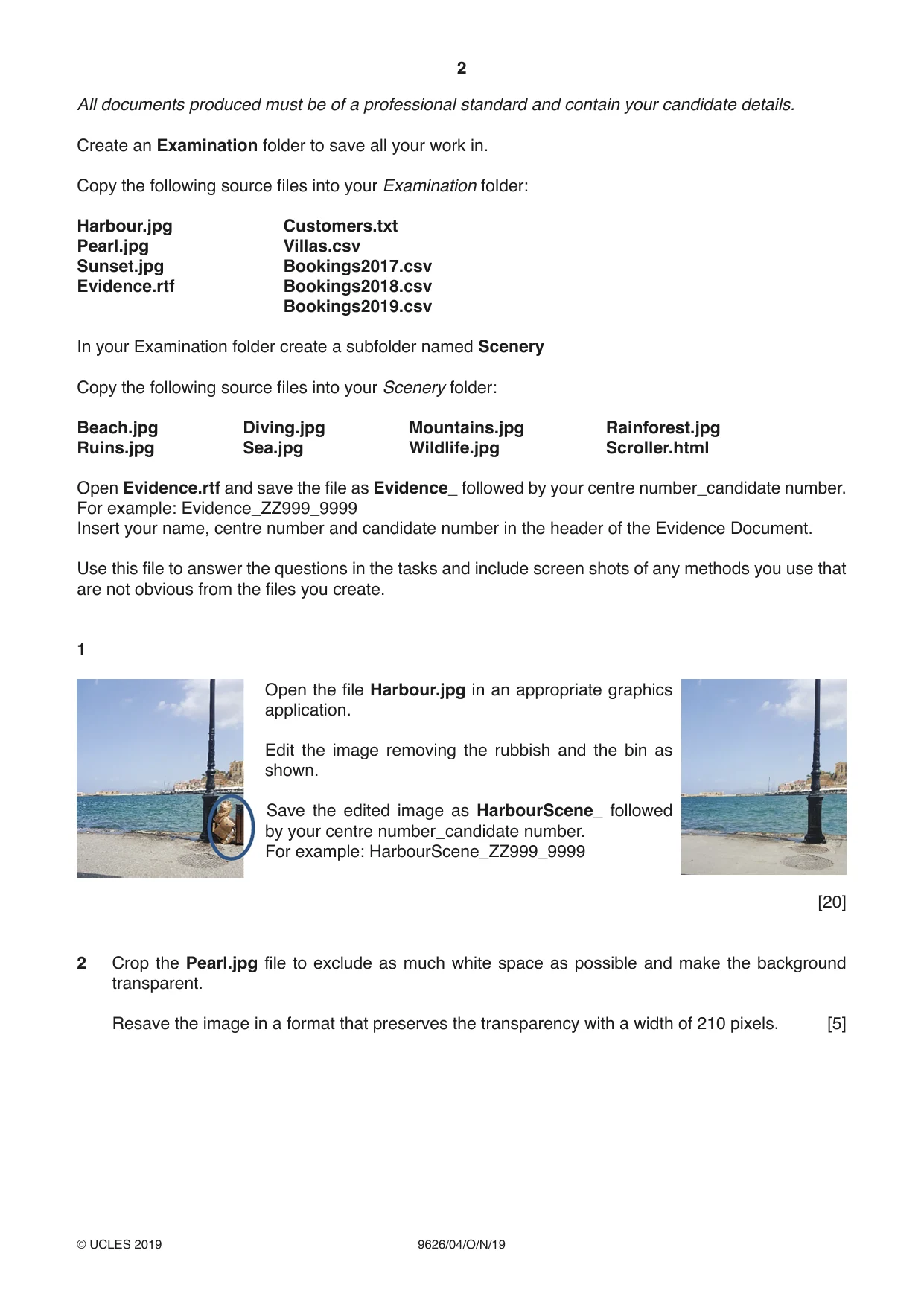
2 9626/04/O/N/19 © UCLES 2019 All documents produced must be of a professional standard and contain your candidate details. Create an Examination folder to save all your work in. Copy the following source files into your Examination folder: Harbour.jpg Customers.txt Pearl.jpg Villas.csv Sunset.jpg Bookings2017.csv Evidence.rtf Bookings2018.csv Bookings2019.csv In your Examination folder create a subfolder named Scenery Copy the following source files into your Scenery folder: Beach.jpg Diving.jpg Mountains.jpg Rainforest.jpg Ruins.jpg Sea.jpg Wildlife.jpg Scroller.html Open Evidence.rtf and save the file as Evidence_ followed by your centre number_candidate number. For example: Evidence_ZZ999_9999 Insert your name, centre number and candidate number in the header of the Evidence Document. Use this file to answer the questions in the tasks and include screen shots of any methods you use that are not obvious from the files you create. 1 Open the file Harbour.jpg in an appropriate graphics application. Edit the image removing the rubbish and the bin as shown. Save the edited image as HarbourScene_ followed by your centre number_candidate number. For example: HarbourScene_ZZ999_9999 [20] 2 Crop the Pearl.jpg file to exclude as much white space as possible and make the background transparent. Resave the image in a format that preserves the transparency with a width of 210 pixels. [5]
Question paper, page 3
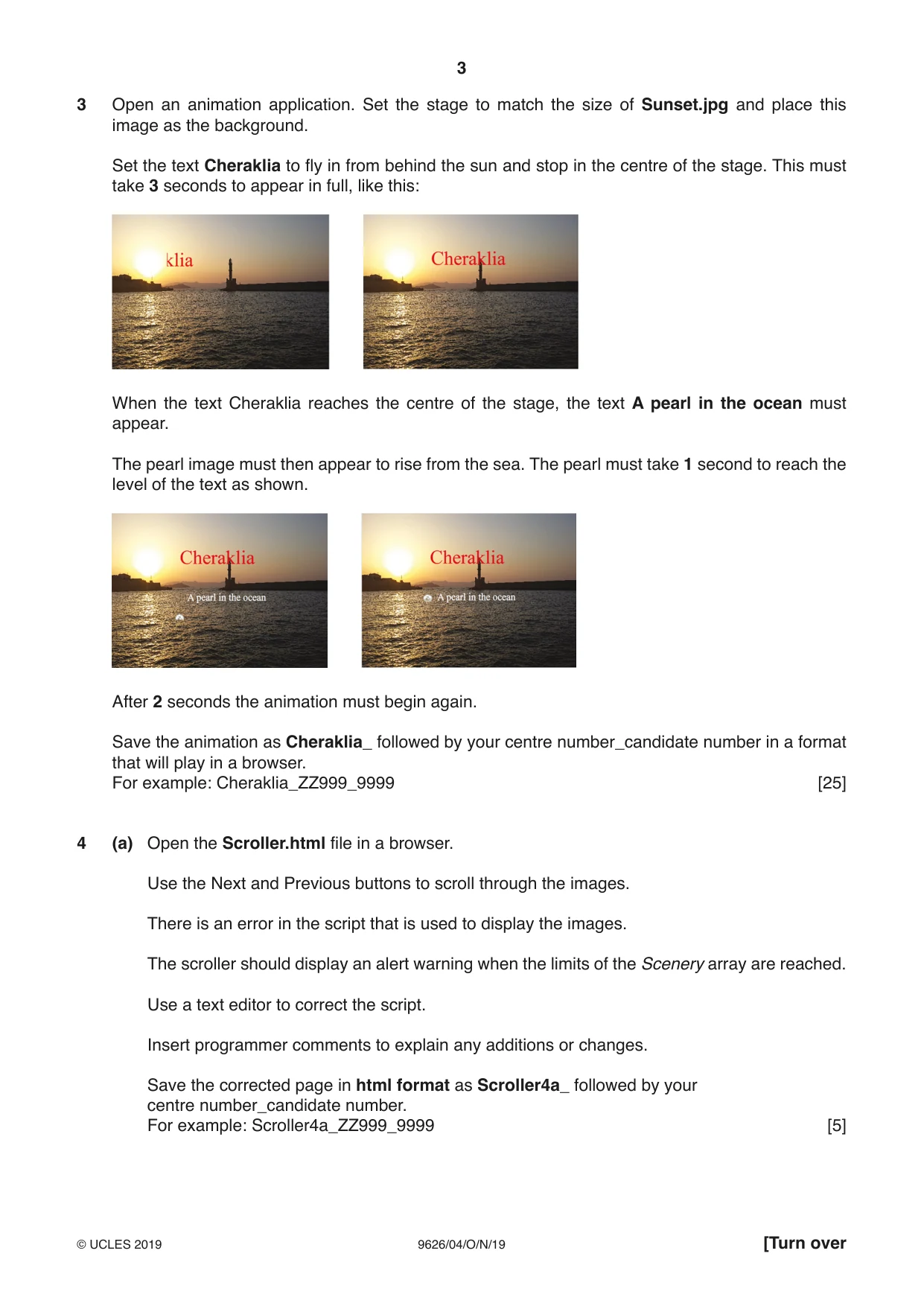
3 9626/04/O/N/19 © UCLES 2019 [Turn over 3 Open an animation application. Set the stage to match the size of Sunset.jpg and place this image as the background. Set the text Cheraklia to fly in from behind the sun and stop in the centre of the stage. This must take 3 seconds to appear in full, like this: When the text Cheraklia reaches the centre of the stage, the text A pearl in the ocean must appear. The pearl image must then appear to rise from the sea. The pearl must take 1 second to reach the level of the text as shown. After 2 seconds the animation must begin again. Save the animation as Cheraklia_ followed by your centre number_candidate number in a format that will play in a browser. For example: Cheraklia_ZZ999_9999 [25] 4 (a) Open the Scroller.html file in a browser. Use the Next and Previous buttons to scroll through the images. There is an error in the script that is used to display the images. The scroller should display an alert warning when the limits of the Scenery array are reached. Use a text editor to correct the script. Insert programmer comments to explain any additions or changes. Save the corrected page in html format as Scroller4a_ followed by your centre number_candidate number. For example: Scroller4a_ZZ999_9999 [5]
Question paper, page 4
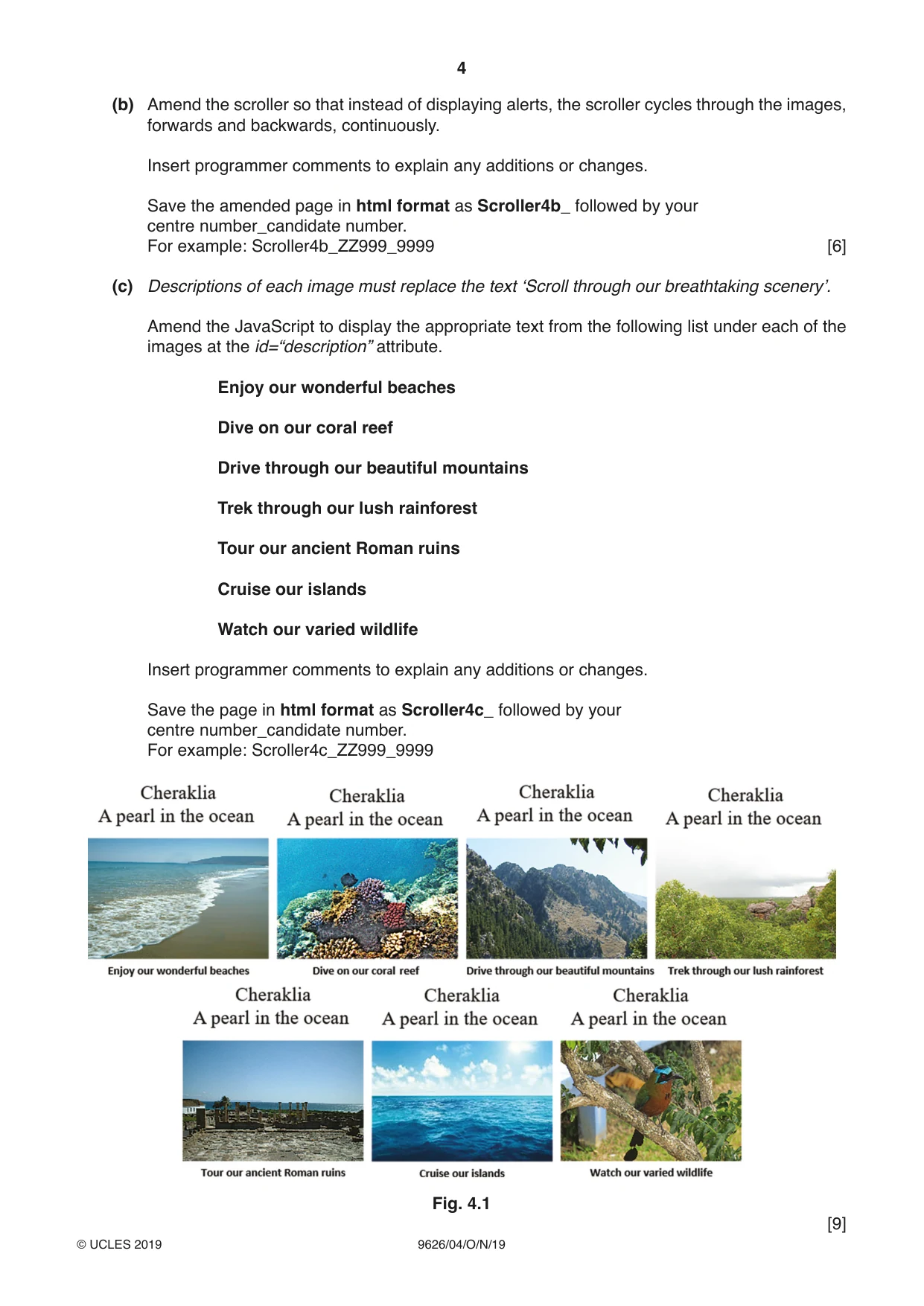
4 9626/04/O/N/19 © UCLES 2019 (b) Amend the scroller so that instead of displaying alerts, the scroller cycles through the images, forwards and backwards, continuously. Insert programmer comments to explain any additions or changes. Save the amended page in html format as Scroller4b_ followed by your centre number_candidate number. For example: Scroller4b_ZZ999_9999 [6] (c) Descriptions of each image must replace the text ‘Scroll through our breathtaking scenery’. Amend the JavaScript to display the appropriate text from the following list under each of the images at the id=“description” attribute. Enjoy our wonderful beaches Dive on our coral reef Drive through our beautiful mountains Trek through our lush rainforest Tour our ancient Roman ruins Cruise our islands Watch our varied wildlife Insert programmer comments to explain any additions or changes. Save the page in html format as Scroller4c_ followed by your centre number_candidate number. For example: Scroller4c_ZZ999_9999 Fig. 4.1 [9]
Question paper, page 5
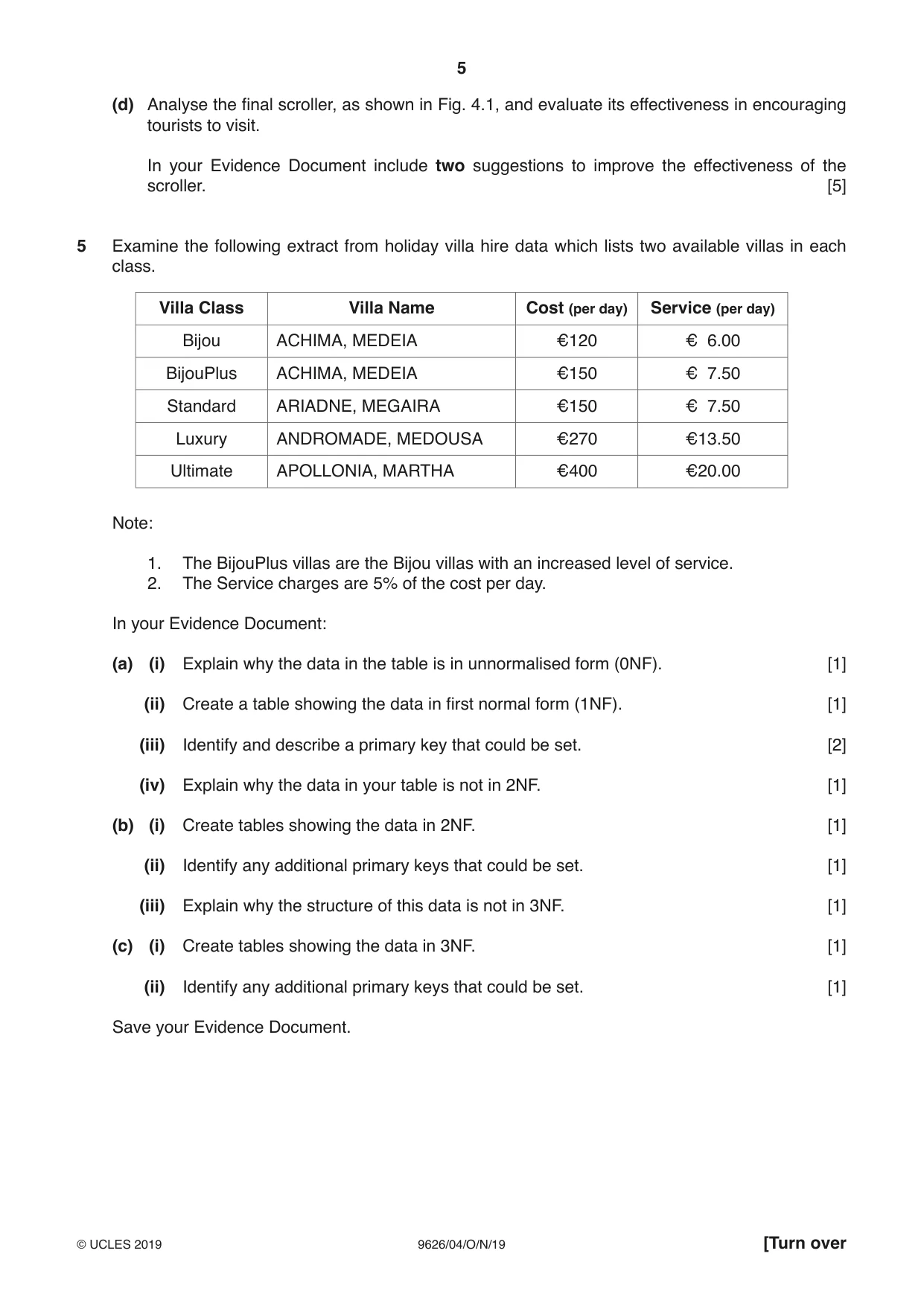
5 9626/04/O/N/19 © UCLES 2019 [Turn over (d) Analyse the final scroller, as shown in Fig. 4.1, and evaluate its effectiveness in encouraging tourists to visit. In your Evidence Document include two suggestions to improve the effectiveness of the scroller. [5] 5 Examine the following extract from holiday villa hire data which lists two available villas in each class. Villa Class Villa Name Cost (per day) Service (per day) Bijou ACHIMA, MEDEIA €120 € 6.00 BijouPlus ACHIMA, MEDEIA €150 € 7.50 Standard ARIADNE, MEGAIRA €150 € 7.50 Luxury ANDROMADE, MEDOUSA €270 €13.50 Ultimate APOLLONIA, MARTHA €400 €20.00 Note: 1. The BijouPlus villas are the Bijou villas with an increased level of service. 2. The Service charges are 5% of the cost per day. In your Evidence Document: (a) (i) Explain why the data in the table is in unnormalised form (0NF). [1] (ii) Create a table showing the data in first normal form (1NF). [1] (iii) Identify and describe a primary key that could be set. [2] (iv) Explain why the data in your table is not in 2NF. [1] (b) (i) Create tables showing the data in 2NF. [1] (ii) Identify any additional primary keys that could be set. [1] (iii) Explain why the structure of this data is not in 3NF. [1] (c) (i) Create tables showing the data in 3NF. [1] (ii) Identify any additional primary keys that could be set. [1] Save your Evidence Document.
Question paper, page 6
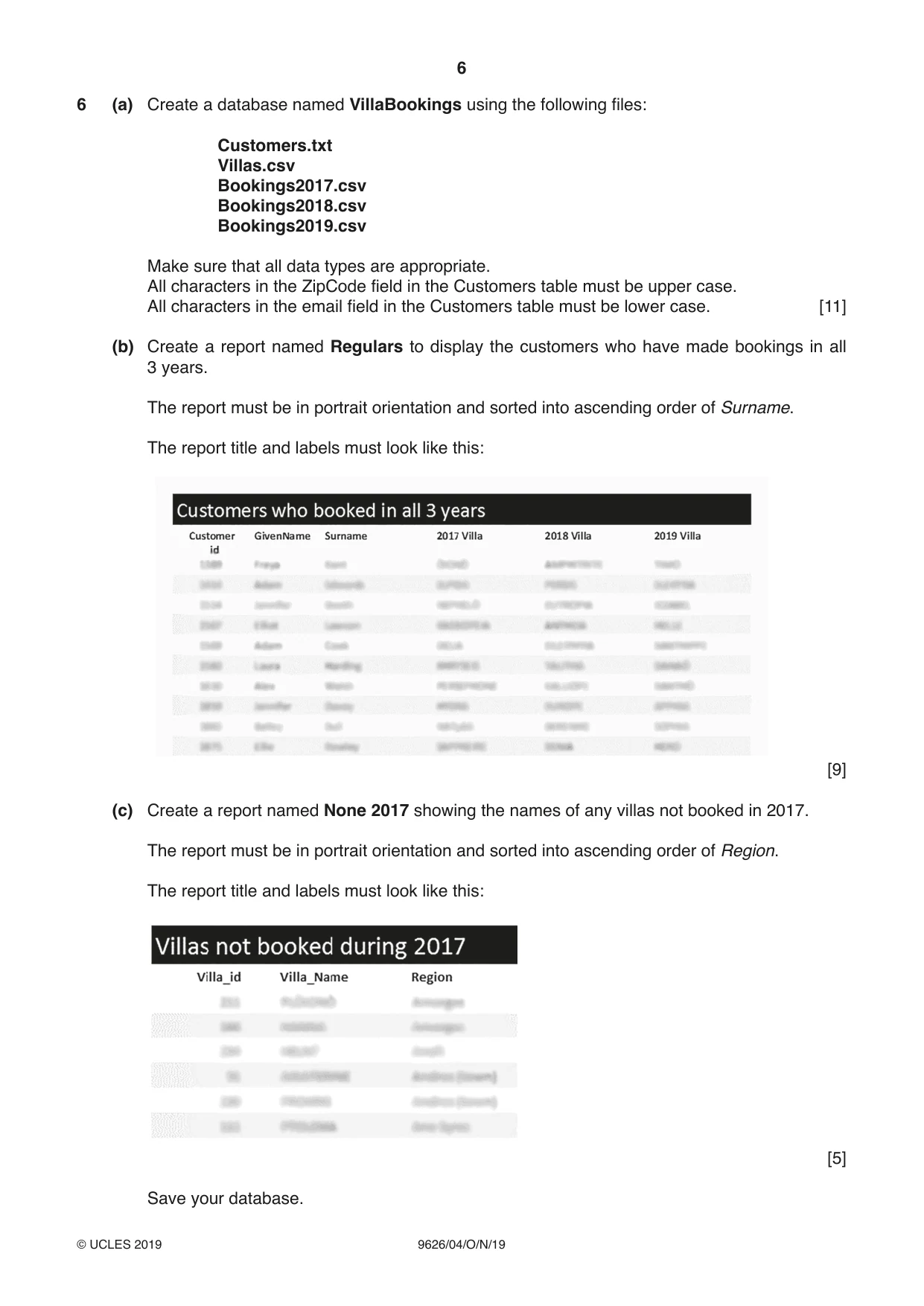
6 9626/04/O/N/19 © UCLES 2019 6 (a) Create a database named VillaBookings using the following files: Customers.txt Villas.csv Bookings2017.csv Bookings2018.csv Bookings2019.csv Make sure that all data types are appropriate. All characters in the ZipCode field in the Customers table must be upper case. All characters in the email field in the Customers table must be lower case. [11] (b) Create a report named Regulars to display the customers who have made bookings in all 3 years. The report must be in portrait orientation and sorted into ascending order of Surname. The report title and labels must look like this: [9] (c) Create a report named None 2017 showing the names of any villas not booked in 2017. The report must be in portrait orientation and sorted into ascending order of Region. The report title and labels must look like this: [5] Save your database.
Question paper, page 7
7 9626/04/O/N/19 © UCLES 2019 BLANK PAGE
Question paper, page 8
8 9626/04/O/N/19 © UCLES 2019 Permission to reproduce items where third-party owned material protected by copyright is included has been sought and cleared where possible. Every reasonable effort has been made by the publisher (UCLES) to trace copyright holders, but if any items requiring clearance have unwittingly been included, the publisher will be pleased to make amends at the earliest possible opportunity. To avoid the issue of disclosure of answer-related information to candidates, all copyright acknowledgements are reproduced online in the Cambridge Assessment International Education Copyright Acknowledgements Booklet. This is produced for each series of examinations and is freely available to download at www.cambridgeinternational.org after the live examination series. Cambridge Assessment International Education is part of the Cambridge Assessment Group. Cambridge Assessment is the brand name of the University of Cambridge Local Examinations Syndicate (UCLES), which itself is a department of the University of Cambridge. BLANK PAGE
Mark scheme, page 1
This document consists of 15 printed pages. © UCLES 2019 [Turn over Cambridge Assessment International Education Cambridge International Advanced Subsidiary and Advanced Level INFORMATION TECHNOLOGY 9626/04 Paper 4 Advanced Practical October/November 2019 MARK SCHEME Maximum Mark: 110 Published This mark scheme is published as an aid to teachers and candidates, to indicate the requirements of the examination. It shows the basis on which Examiners were instructed to award marks. It does not indicate the details of the discussions that took place at an Examiners’ meeting before marking began, which would have considered the acceptability of alternative answers. Mark schemes should be read in conjunction with the question paper and the Principal Examiner Report for Teachers. Cambridge International will not enter into discussions about these mark schemes. Cambridge International is publishing the mark schemes for the October/November 2019 series for most Cambridge IGCSE™, Cambridge International A and AS Level components and some Cambridge O Level components.
Mark scheme, page 2
9626/04 Cambridge International AS/A Level – Mark Scheme PUBLISHED October/November 2019 © UCLES 2019 Page 2 of 15 Generic Marking Principles These general marking principles must be applied by all examiners when marking candidate answers. They should be applied alongside the specific content of the mark scheme or generic level descriptors for a question. Each question paper and mark scheme will also comply with these marking principles. GENERIC MARKING PRINCIPLE 1: Marks must be awarded in line with: • the specific content of the mark scheme or the generic level descriptors for the question • the specific skills defined in the mark scheme or in the generic level descriptors for the question • the standard of response required by a candidate as exemplified by the standardisation scripts. GENERIC MARKING PRINCIPLE 2: Marks awarded are always whole marks (not half marks, or other fractions). GENERIC MARKING PRINCIPLE 3: Marks must be awarded positively: • marks are awarded for correct/valid answers, as defined in the mark scheme. However, credit is given for valid answers which go beyond the scope of the syllabus and mark scheme, referring to your Team Leader as appropriate • marks are awarded when candidates clearly demonstrate what they know and can do • marks are not deducted for errors • marks are not deducted for omissions • answers should only be judged on the quality of spelling, punctuation and grammar when these features are specifically assessed by the question as indicated by the mark scheme. The meaning, however, should be unambiguous. GENERIC MARKING PRINCIPLE 4: Rules must be applied consistently e.g. in situations where candidates have not followed instructions or in the application of generic level descriptors. GENERIC MARKING PRINCIPLE 5: Marks should be awarded using the full range of marks defined in the mark scheme for the question (however; the use of the full mark range may be limited according to the quality of the candidate responses seen). GENERIC MARKING PRINCIPLE 6: Marks awarded are based solely on the requirements as defined in the mark scheme. Marks should not be awarded with grade thresholds or grade descriptors in mind.
Mark scheme, page 3
9626/04 Cambridge International AS/A Level – Mark Scheme PUBLISHED October/November 2019 © UCLES 2019 Page 3 of 15 Task 1 (Some) rubbish replaced with sea 1 The bin is completely replaced by clear sea. 1 The sea appears continuous and no other elements or distortions are visible. 1 The far side of the harbour is intact and undistorted. 1 The path is continuous, no parts of the path are in the sea and there is no sea seen in gaps in the path. 1 The edge stones are in place, with no gaps. 1 The edge stones are single width and are in line with the rest of the path to the left of the post. 1 There is an attempt to repair the right side of the post, the edge is straight and clean. 1 There is an attempt to repair the top dotted ring, with the dots straight. 1 The top dotted ring pattern is continuous and matches the left side. 1 There is an attempt to repair the lower dotted ring, with the dots straight. 1 The lower dotted ring pattern is continuous and matches the left side. 1 The post is symmetrical. 1 The shadows are correct i.e. no shadow to the right of the post. 1 The right top of plinth is repaired and matches the left. 1 Right centre of plinth repair matches the left. 1 Right bottom of plinth repair matches the left. 1 Right base of post repair matches the left. 1 The right nut is shown. 1 The right nut is shown as clearly as the left nut. 1 [20]
Mark scheme, page 4
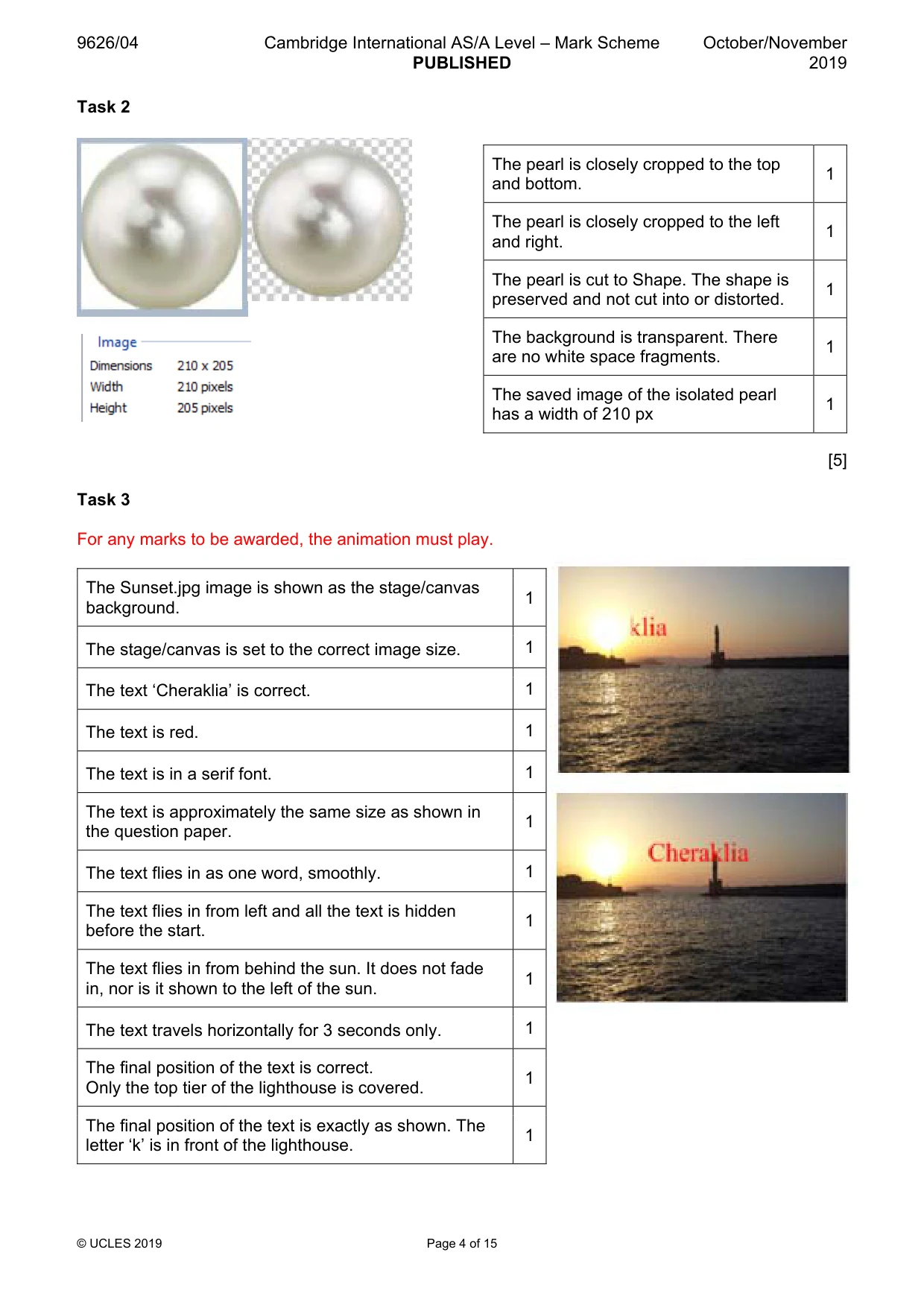
9626/04 Cambridge International AS/A Level – Mark Scheme PUBLISHED October/November 2019 © UCLES 2019 Page 4 of 15 Task 2 [5] Task 3 For any marks to be awarded, the animation must play. The Sunset.jpg image is shown as the stage/canvas background. 1 The stage/canvas is set to the correct image size. 1 The text ‘Cheraklia’ is correct. 1 The text is red. 1 The text is in a serif font. 1 The text is approximately the same size as shown in the question paper. 1 The text flies in as one word, smoothly. 1 The text flies in from left and all the text is hidden before the start. 1 The text flies in from behind the sun. It does not fade in, nor is it shown to the left of the sun. 1 The text travels horizontally for 3 seconds only. 1 The final position of the text is correct. Only the top tier of the lighthouse is covered. 1 The final position of the text is exactly as shown. The letter ‘k’ is in front of the lighthouse. 1 The pearl is closely cropped to the top and bottom. 1 The pearl is closely cropped to the left and right. 1 The pearl is cut to Shape. The shape is preserved and not cut into or distorted. 1 The background is transparent. There are no white space fragments. 1 The saved image of the isolated pearl has a width of 210 px 1
Mark scheme, page 5
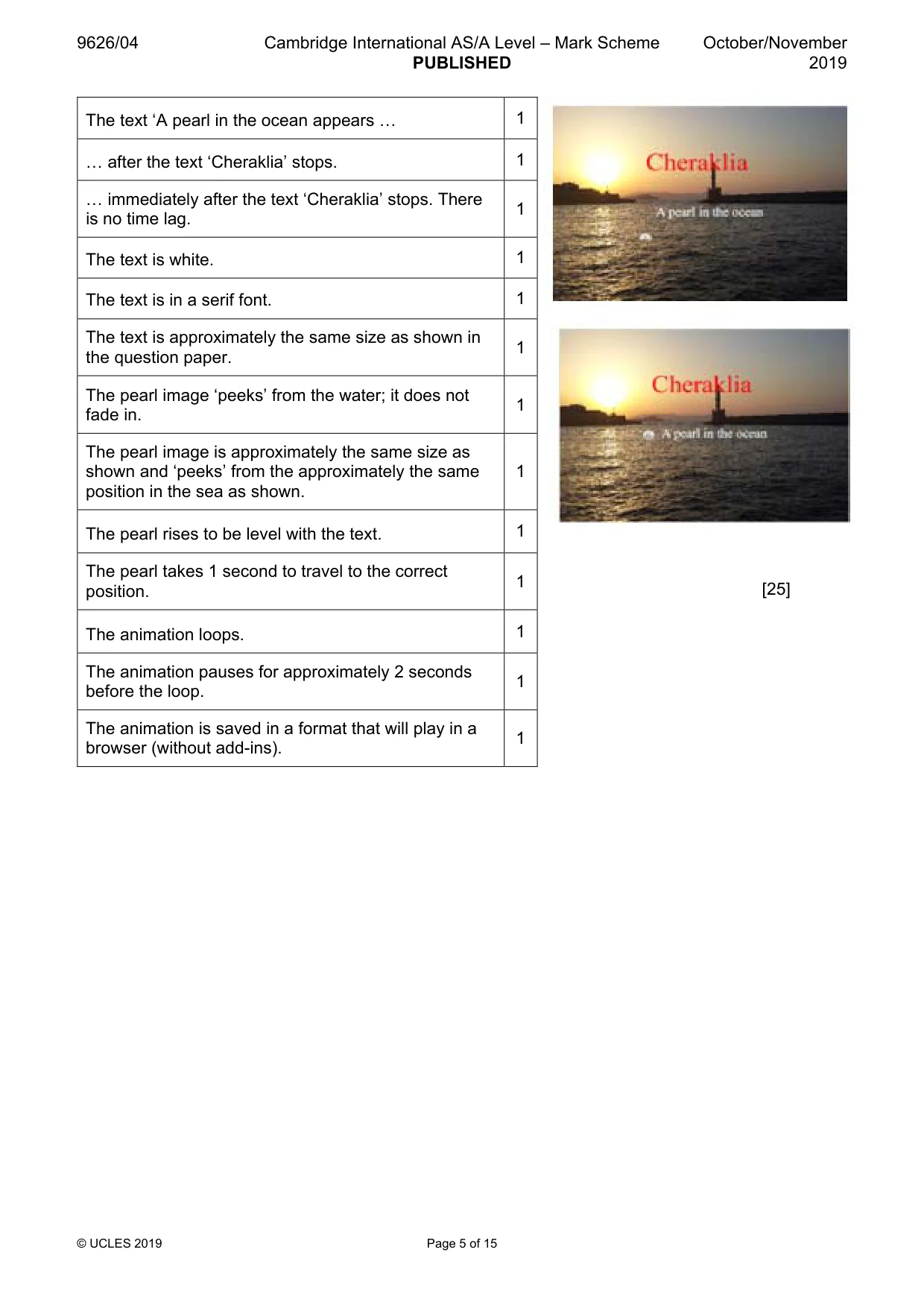
9626/04 Cambridge International AS/A Level – Mark Scheme PUBLISHED October/November 2019 © UCLES 2019 Page 5 of 15 The text ‘A pearl in the ocean appears « 1 « after the text ‘Cheraklia’ stops. 1 « immediately after the text ‘Cheraklia’ stops. There is no time lag. 1 The text is white. 1 The text is in a serif font. 1 The text is approximately the same size as shown in the question paper. 1 The pearl image ‘peeks’ from the water; it does not fade in. 1 The pearl image is approximately the same size as shown and ‘peeks’ from the approximately the same position in the sea as shown. 1 The pearl rises to be level with the text. 1 The pearl takes 1 second to travel to the correct position. 1 The animation loops. 1 The animation pauses for approximately 2 seconds before the loop. 1 The animation is saved in a format that will play in a browser (without add-ins). 1 [25]
Mark scheme, page 6
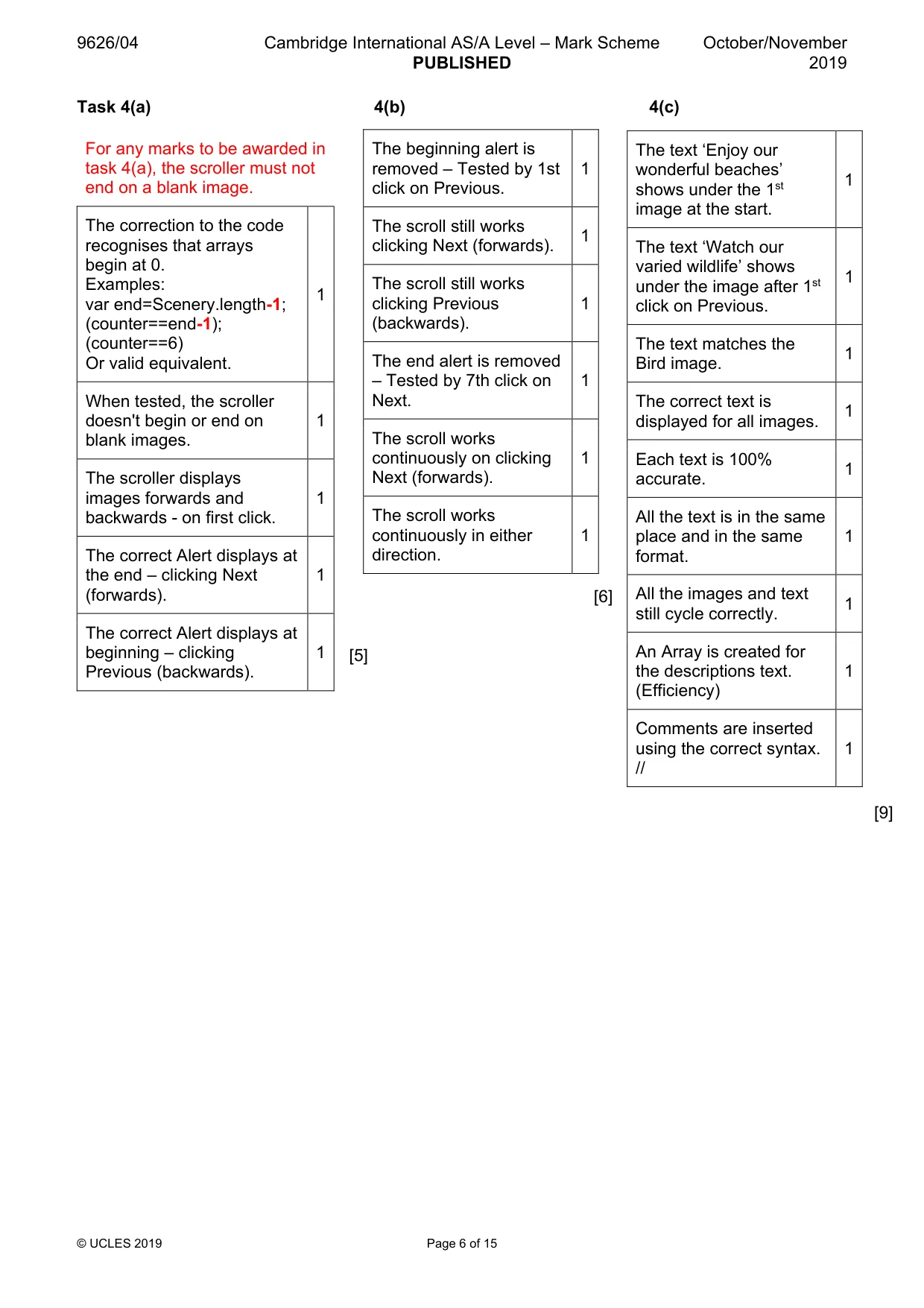
9626/04 Cambridge International AS/A Level – Mark Scheme PUBLISHED October/November 2019 © UCLES 2019 Page 6 of 15 Task 4(a) 4(b) 4(c) [6] [5] [9] For any marks to be awarded in task 4(a), the scroller must not end on a blank image. The correction to the code recognises that arrays begin at 0. Examples: var end=Scenery.length-1; (counter==end-1); (counter==6) Or valid equivalent. 1 When tested, the scroller doesn't begin or end on blank images. 1 The scroller displays images forwards and backwards - on first click. 1 The correct Alert displays at the end – clicking Next (forwards). 1 The correct Alert displays at beginning – clicking Previous (backwards). 1 The beginning alert is removed – Tested by 1st click on Previous. 1 The scroll still works clicking Next (forwards). 1 The scroll still works clicking Previous (backwards). 1 The end alert is removed – Tested by 7th click on Next. 1 The scroll works continuously on clicking Next (forwards). 1 The scroll works continuously in either direction. 1 The text ‘Enjoy our wonderful beaches’ shows under the 1st image at the start. 1 The text ‘Watch our varied wildlife’ shows under the image after 1st click on Previous. 1 The text matches the Bird image. 1 The correct text is displayed for all images. 1 Each text is 100% accurate. 1 All the text is in the same place and in the same format. 1 All the images and text still cycle correctly. 1 An Array is created for the descriptions text. (Efficiency) 1 Comments are inserted using the correct syntax. // 1
Mark scheme, page 7
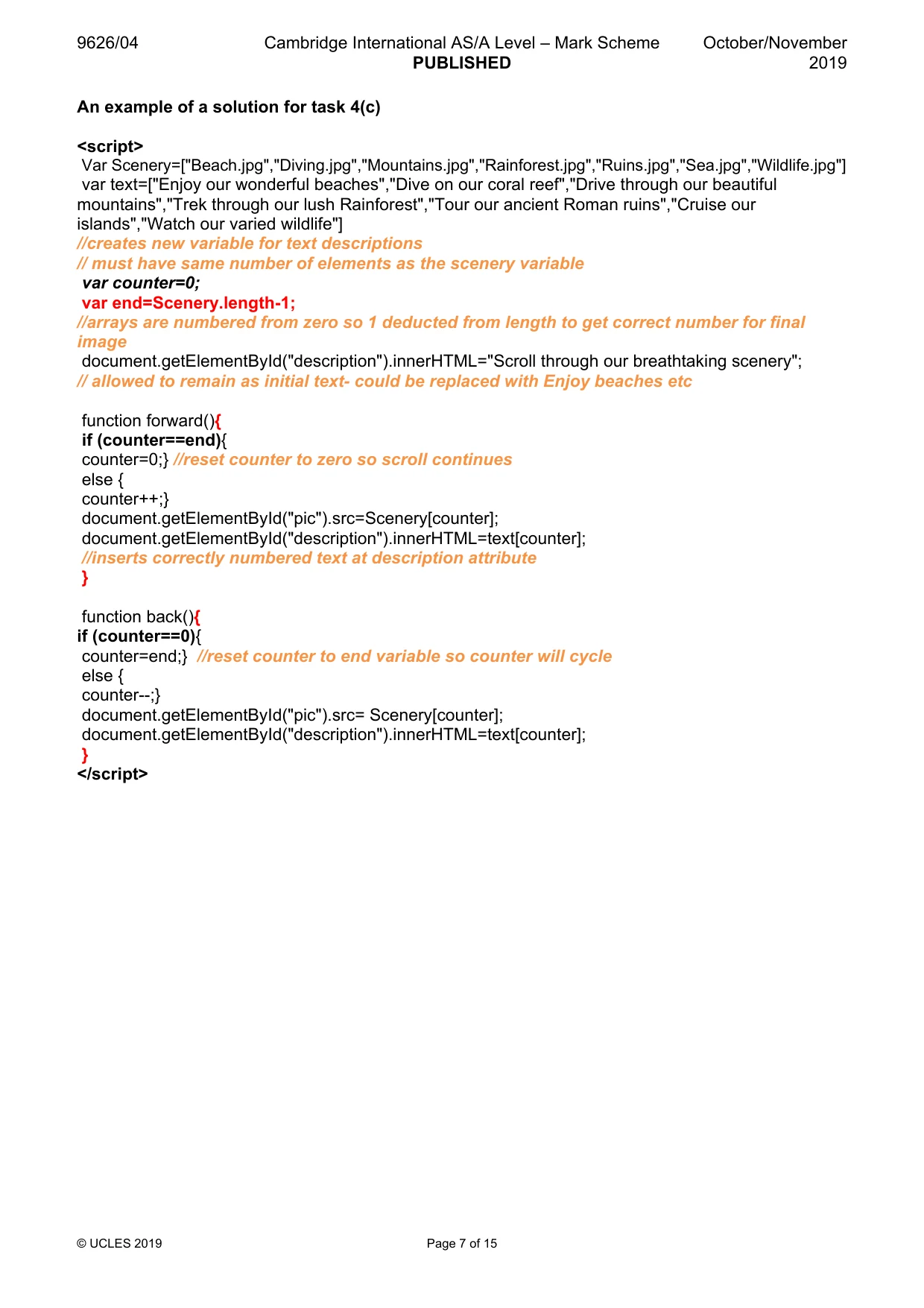
9626/04 Cambridge International AS/A Level – Mark Scheme PUBLISHED October/November 2019 © UCLES 2019 Page 7 of 15 An example of a solution for task 4(c) <script> Var Scenery=["Beach.jpg","Diving.jpg","Mountains.jpg","Rainforest.jpg","Ruins.jpg","Sea.jpg","Wildlife.jpg"] var text=["Enjoy our wonderful beaches","Dive on our coral reef","Drive through our beautiful mountains","Trek through our lush Rainforest","Tour our ancient Roman ruins","Cruise our islands","Watch our varied wildlife"] //creates new variable for text descriptions // must have same number of elements as the scenery variable var counter=0; var end=Scenery.length-1; //arrays are numbered from zero so 1 deducted from length to get correct number for final image document.getElementById("description").innerHTML="Scroll through our breathtaking scenery"; // allowed to remain as initial text- could be replaced with Enjoy beaches etc function forward(){ if (counter==end){ counter=0;} //reset counter to zero so scroll continues else { counter++;} document.getElementById("pic").src=Scenery[counter]; document.getElementById("description").innerHTML=text[counter]; //inserts correctly numbered text at description attribute } function back(){ if (counter==0){ counter=end;} //reset counter to end variable so counter will cycle else { counter--;} document.getElementById("pic").src= Scenery[counter]; document.getElementById("description").innerHTML=text[counter]; } </script>
Mark scheme, page 8
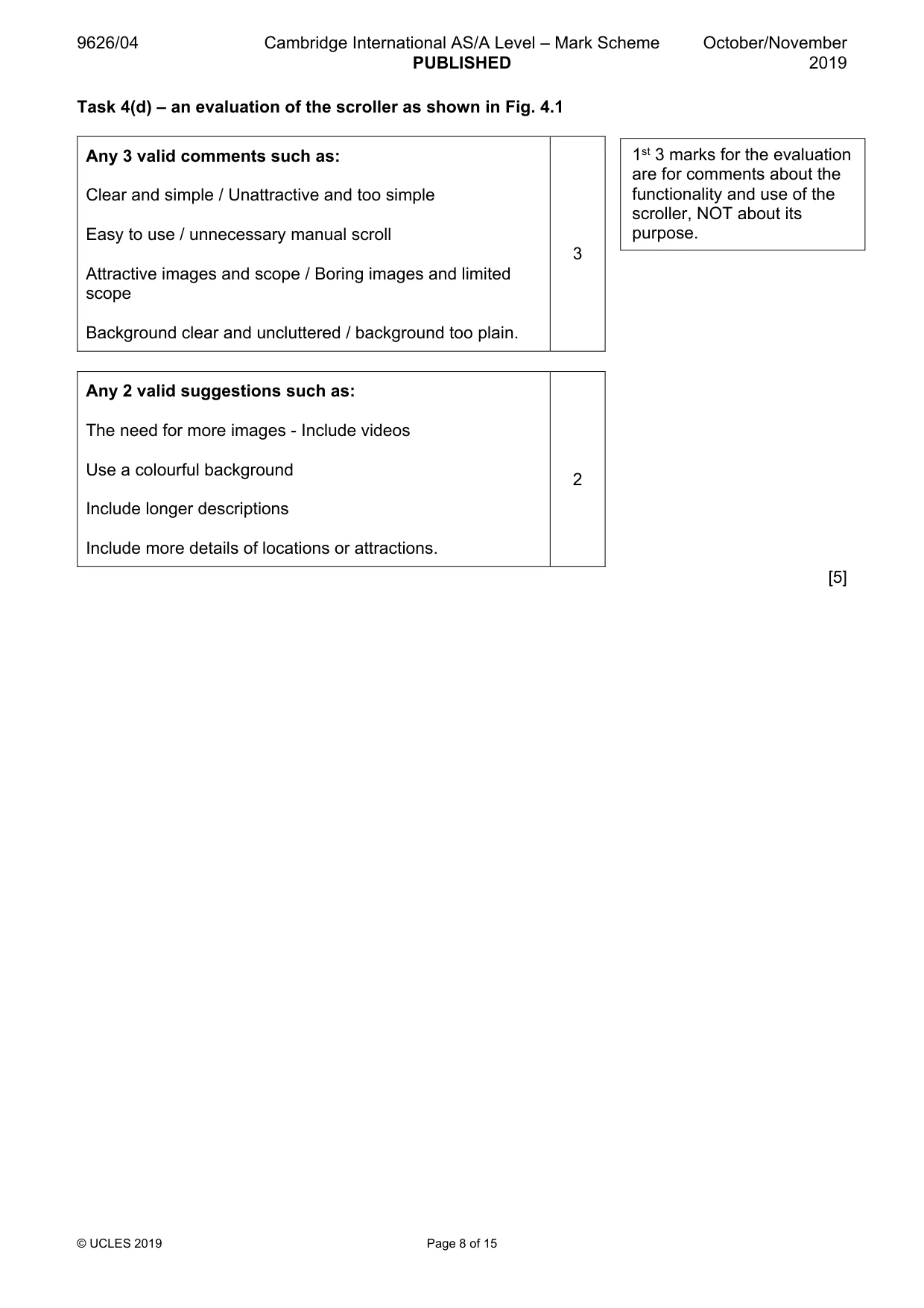
9626/04 Cambridge International AS/A Level – Mark Scheme PUBLISHED October/November 2019 © UCLES 2019 Page 8 of 15 Task 4(d) – an evaluation of the scroller as shown in Fig. 4.1 Any 3 valid comments such as: Clear and simple / Unattractive and too simple Easy to use / unnecessary manual scroll Attractive images and scope / Boring images and limited scope Background clear and uncluttered / background too plain. 3 Any 2 valid suggestions such as: The need for more images - Include videos Use a colourful background Include longer descriptions Include more details of locations or attractions. 2 [5] 1st 3 marks for the evaluation are for comments about the functionality and use of the scroller, NOT about its purpose.
Mark scheme, page 9
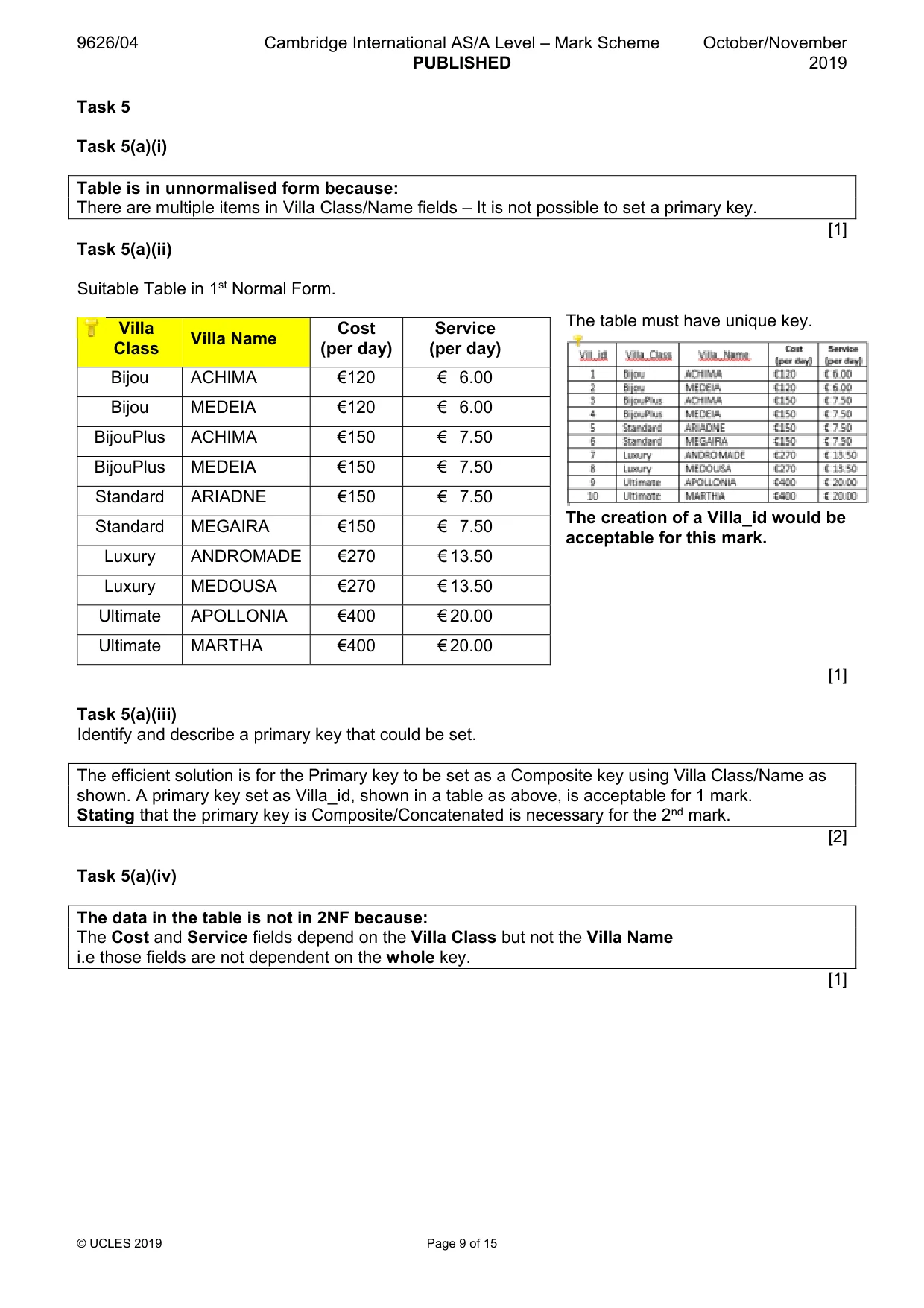
9626/04 Cambridge International AS/A Level – Mark Scheme PUBLISHED October/November 2019 © UCLES 2019 Page 9 of 15 Task 5 Task 5(a)(i) Table is in unnormalised form because: There are multiple items in Villa Class/Name fields – It is not possible to set a primary key. [1] Task 5(a)(ii) Suitable Table in 1st Normal Form. Villa Class Villa Name Cost (per day) Service (per day) Bijou ACHIMA €120 € 6.00 Bijou MEDEIA €120 € 6.00 BijouPlus ACHIMA €150 € 7.50 BijouPlus MEDEIA €150 € 7.50 Standard ARIADNE €150 € 7.50 Standard MEGAIRA €150 € 7.50 Luxury ANDROMADE €270 € 13.50 Luxury MEDOUSA €270 € 13.50 Ultimate APOLLONIA €400 € 20.00 Ultimate MARTHA €400 € 20.00 [1] Task 5(a)(iii) Identify and describe a primary key that could be set. The efficient solution is for the Primary key to be set as a Composite key using Villa Class/Name as shown. A primary key set as Villa_id, shown in a table as above, is acceptable for 1 mark. Stating that the primary key is Composite/Concatenated is necessary for the 2nd mark. [2] Task 5(a)(iv) The data in the table is not in 2NF because: The Cost and Service fields depend on the Villa Class but not the Villa Name i.e those fields are not dependent on the whole key. [1] The table must have unique key. The creation of a Villa_id would be acceptable for this mark.
Mark scheme, page 10
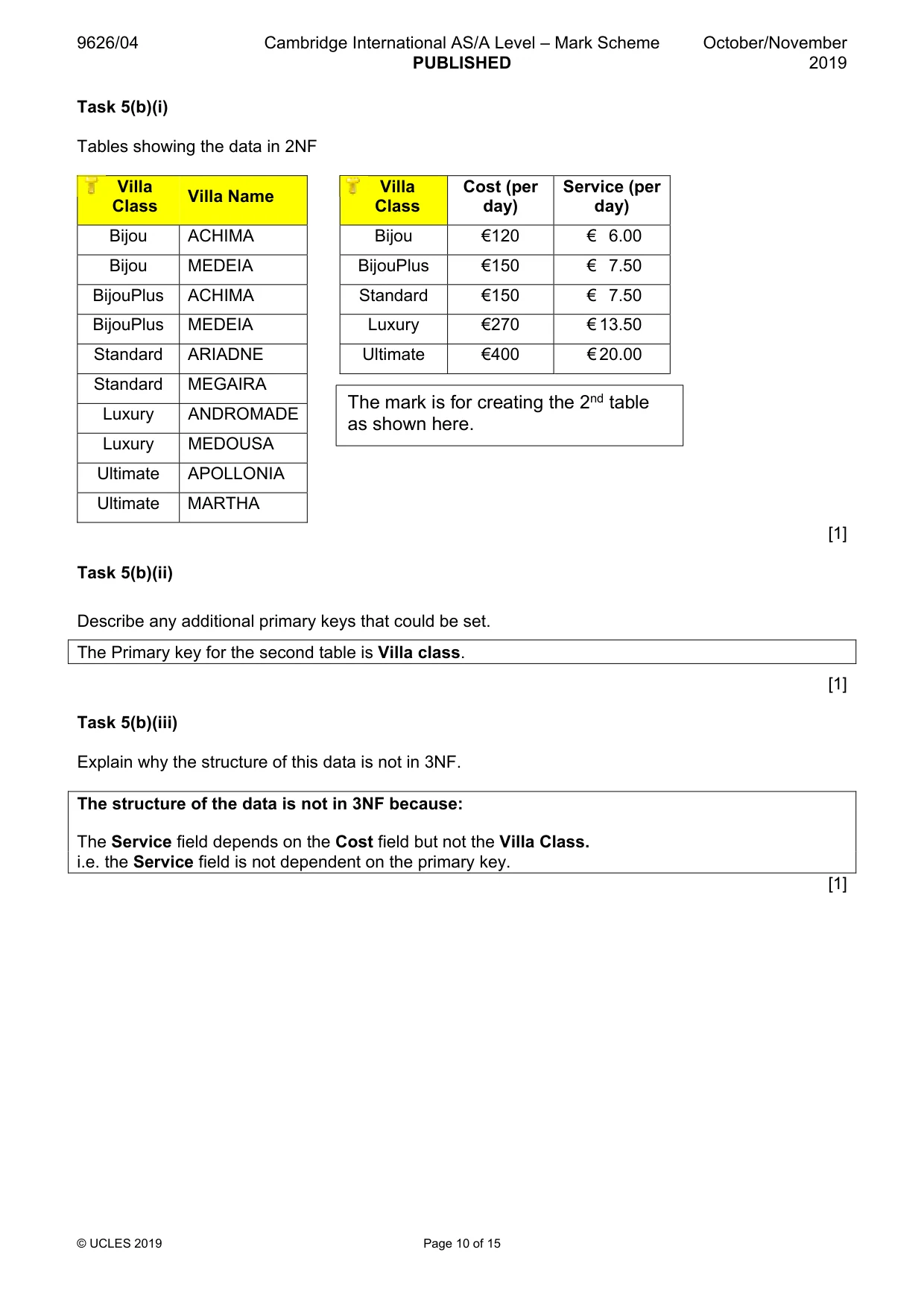
9626/04 Cambridge International AS/A Level – Mark Scheme PUBLISHED October/November 2019 © UCLES 2019 Page 10 of 15 Task 5(b)(i) Tables showing the data in 2NF Villa Class Villa Name Villa Class Cost (per day) Service (per day) Bijou ACHIMA Bijou €120 € 6.00 Bijou MEDEIA BijouPlus €150 € 7.50 BijouPlus ACHIMA Standard €150 € 7.50 BijouPlus MEDEIA Luxury €270 € 13.50 Standard ARIADNE Ultimate €400 € 20.00 Standard MEGAIRA Luxury ANDROMADE Luxury MEDOUSA Ultimate APOLLONIA Ultimate MARTHA [1] Task 5(b)(ii) Describe any additional primary keys that could be set. The Primary key for the second table is Villa class. [1] Task 5(b)(iii) Explain why the structure of this data is not in 3NF. The structure of the data is not in 3NF because: The Service field depends on the Cost field but not the Villa Class. i.e. the Service field is not dependent on the primary key. [1] The mark is for creating the 2nd table as shown here.
Mark scheme, page 11
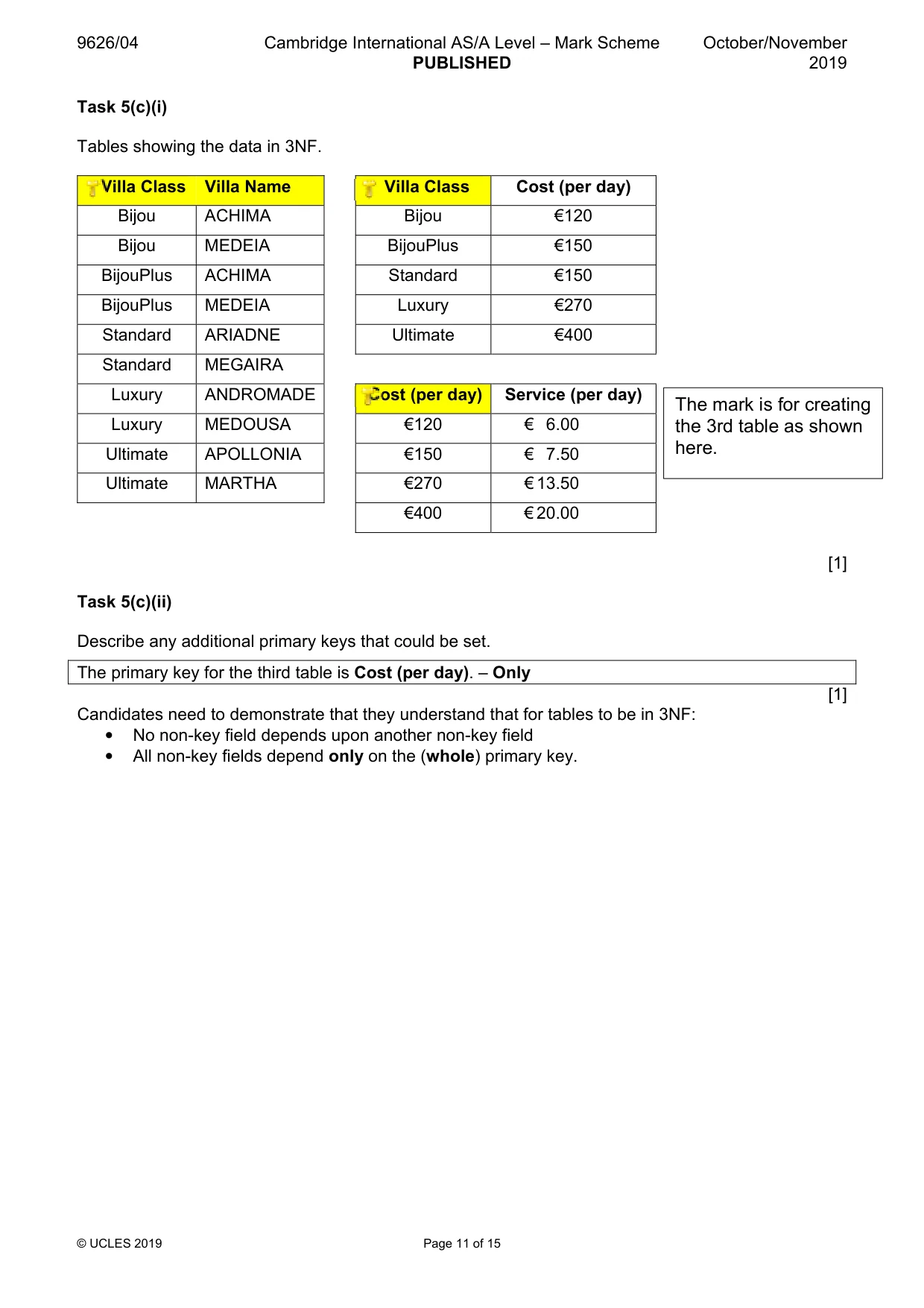
9626/04 Cambridge International AS/A Level – Mark Scheme PUBLISHED October/November 2019 © UCLES 2019 Page 11 of 15 Task 5(c)(i) Tables showing the data in 3NF. Villa Class Villa Name Villa Class Cost (per day) Bijou ACHIMA Bijou €120 Bijou MEDEIA BijouPlus €150 BijouPlus ACHIMA Standard €150 BijouPlus MEDEIA Luxury €270 Standard ARIADNE Ultimate €400 Standard MEGAIRA Luxury ANDROMADE Cost (per day) Service (per day) Luxury MEDOUSA €120 € 6.00 Ultimate APOLLONIA €150 € 7.50 Ultimate MARTHA €270 € 13.50 €400 € 20.00 [1] Task 5(c)(ii) Describe any additional primary keys that could be set. The primary key for the third table is Cost (per day). – Only [1] Candidates need to demonstrate that they understand that for tables to be in 3NF: • No non-key field depends upon another non-key field • All non-key fields depend only on the (whole) primary key. The mark is for creating the 3rd table as shown here.
Mark scheme, page 12
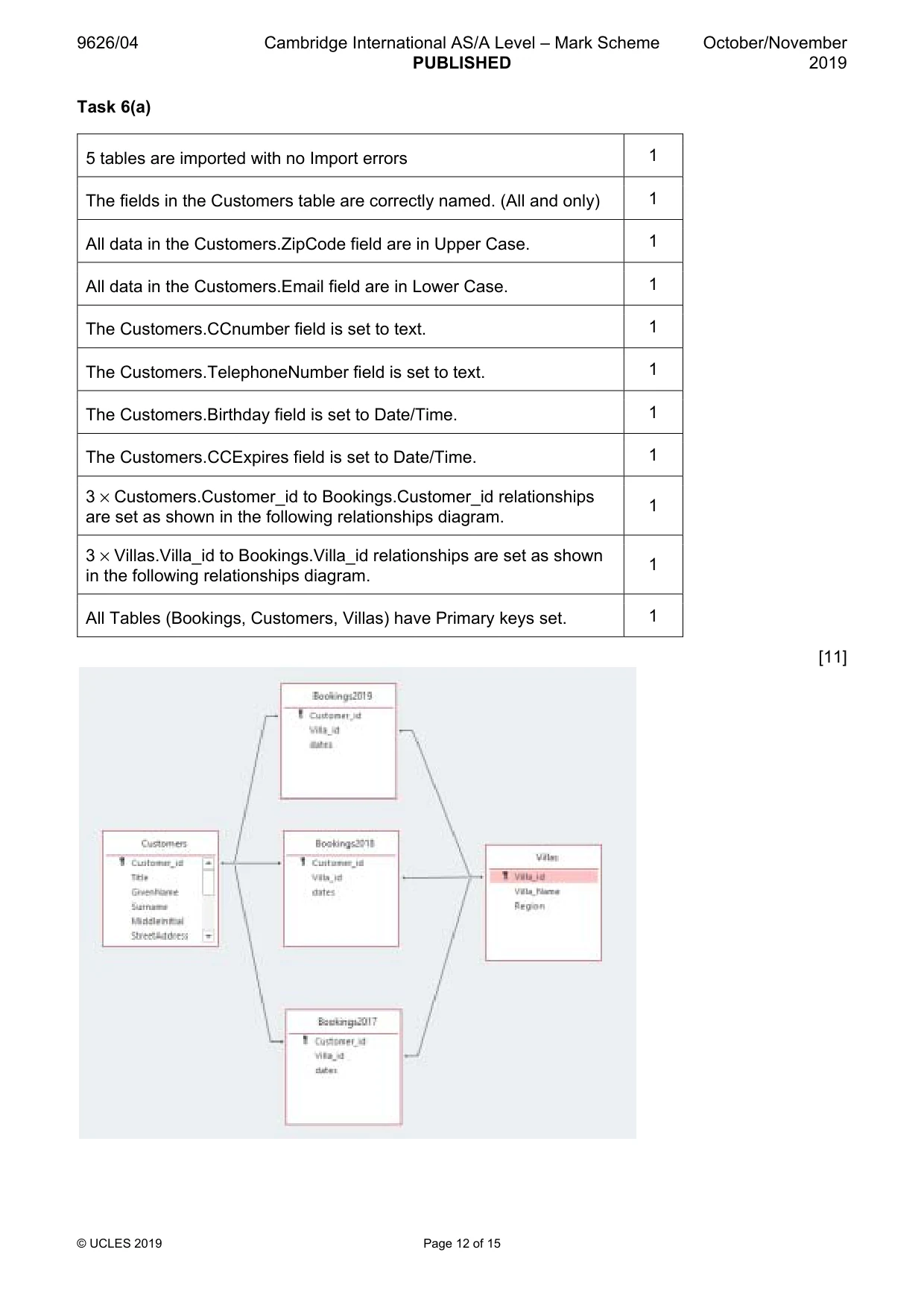
9626/04 Cambridge International AS/A Level – Mark Scheme PUBLISHED October/November 2019 © UCLES 2019 Page 12 of 15 Task 6(a) [11] 5 tables are imported with no Import errors 1 The fields in the Customers table are correctly named. (All and only) 1 All data in the Customers.ZipCode field are in Upper Case. 1 All data in the Customers.Email field are in Lower Case. 1 The Customers.CCnumber field is set to text. 1 The Customers.TelephoneNumber field is set to text. 1 The Customers.Birthday field is set to Date/Time. 1 The Customers.CCExpires field is set to Date/Time. 1 3 × Customers.Customer_id to Bookings.Customer_id relationships are set as shown in the following relationships diagram. 1 3 × Villas.Villa_id to Bookings.Villa_id relationships are set as shown in the following relationships diagram. 1 All Tables (Bookings, Customers, Villas) have Primary keys set. 1
Mark scheme, page 13
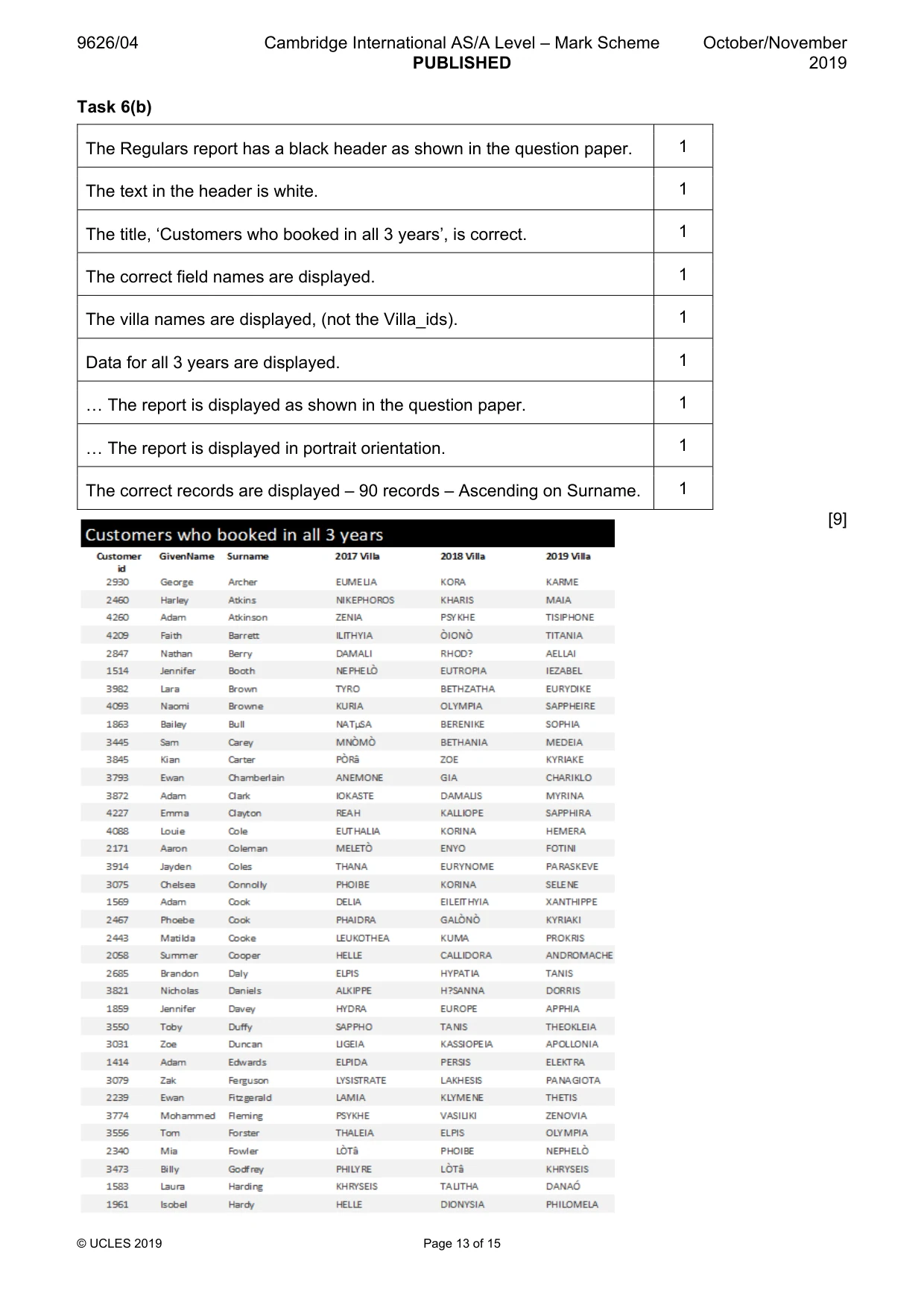
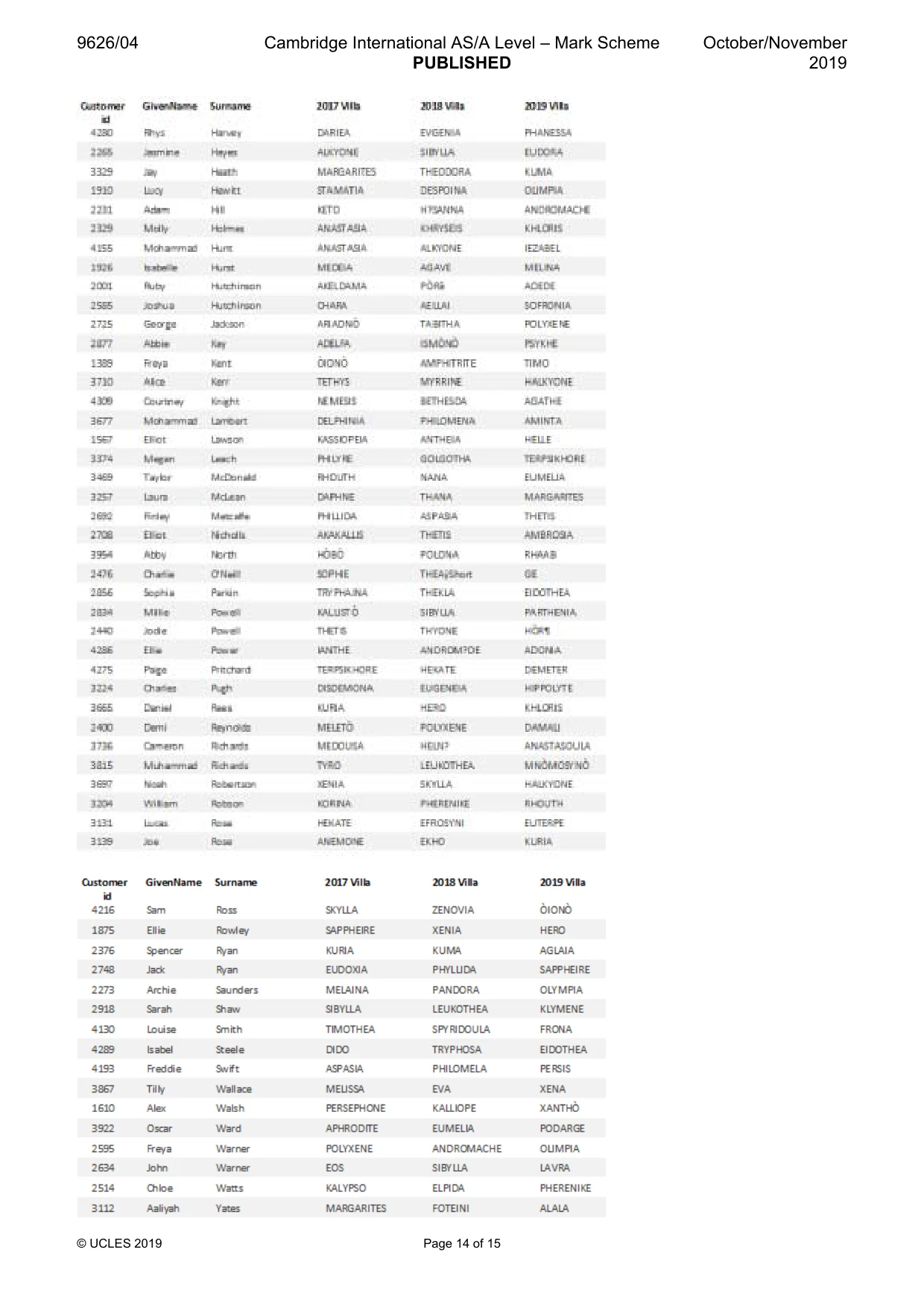
9626/04 Cambridge International AS/A Level – Mark Scheme PUBLISHED October/November 2019 © UCLES 2019 Page 13 of 15 Task 6(b) [9] The Regulars report has a black header as shown in the question paper. 1 The text in the header is white. 1 The title, ‘Customers who booked in all 3 years’, is correct. 1 The correct field names are displayed. 1 The villa names are displayed, (not the Villa_ids). 1 Data for all 3 years are displayed. 1 « The report is displayed as shown in the question paper. 1 « The report is displayed in portrait orientation. 1 The correct records are displayed – 90 records – Ascending on Surname. 1
Mark scheme, page 14
9626/04 Cambridge International AS/A Level – Mark Scheme PUBLISHED October/November 2019 © UCLES 2019 Page 14 of 15
Mark scheme, page 15
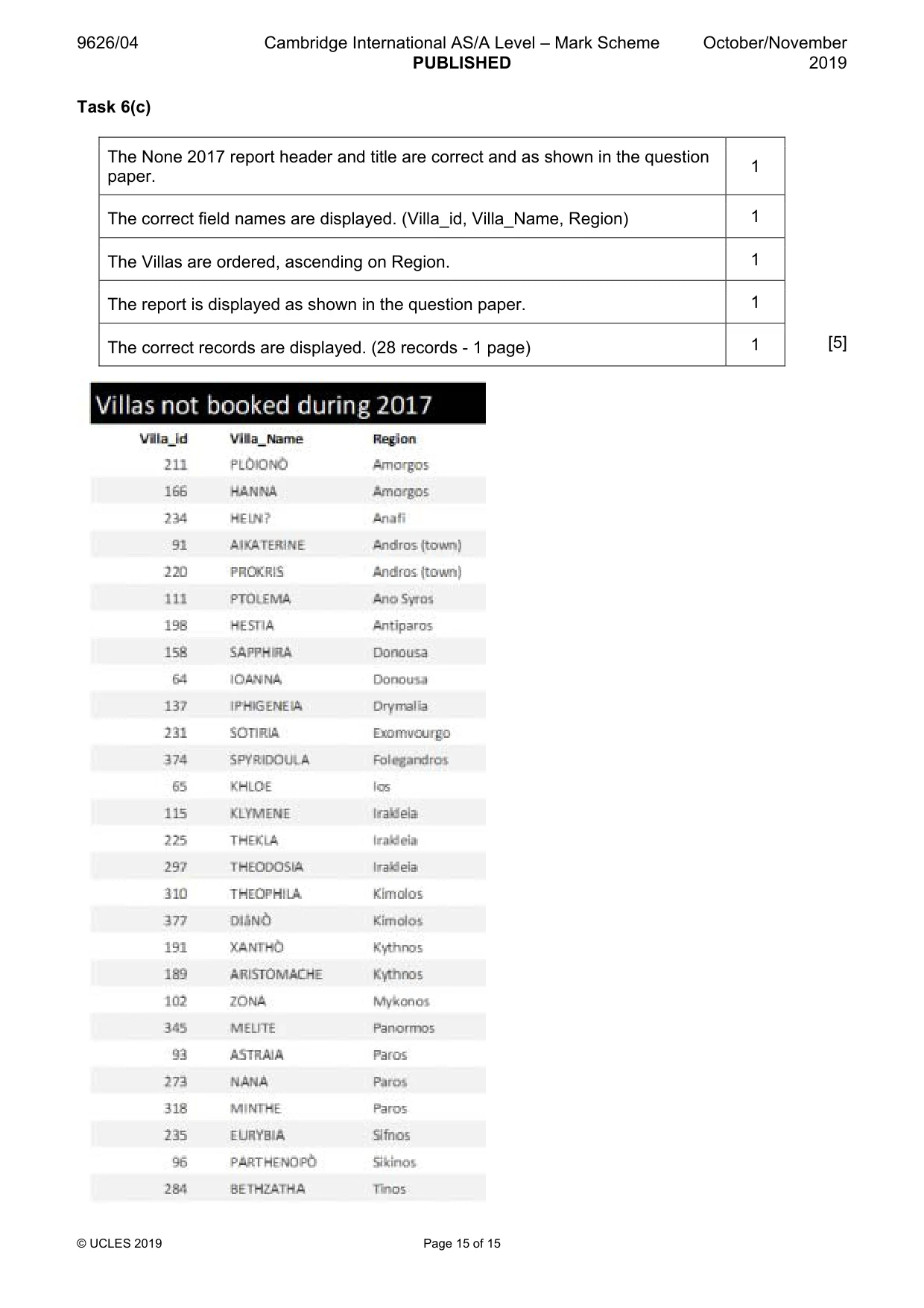
9626/04 Cambridge International AS/A Level – Mark Scheme PUBLISHED October/November 2019 © UCLES 2019 Page 15 of 15 Task 6(c) [5] The None 2017 report header and title are correct and as shown in the question paper. 1 The correct field names are displayed. (Villa_id, Villa_Name, Region) 1 The Villas are ordered, ascending on Region. 1 The report is displayed as shown in the question paper. 1 The correct records are displayed. (28 records - 1 page) 1
What you needed in this session
Cambridge’s own grade thresholds for 2019 Oct/Nov, Paper 4 · Variant 1. A higher threshold means an easier paper — the bar moves with how the cohort did.