Cambridge A Level Information Technology (from 2017) 9626 — 2019 May/June Paper 4 · Variant 1
9626/41/M/J/19 · 110 marks · ≈124 min
The question paper and its mark scheme, free to read here and free to download. This is Cambridge’s own paper, exactly as it was sat.
Question paper8 pages

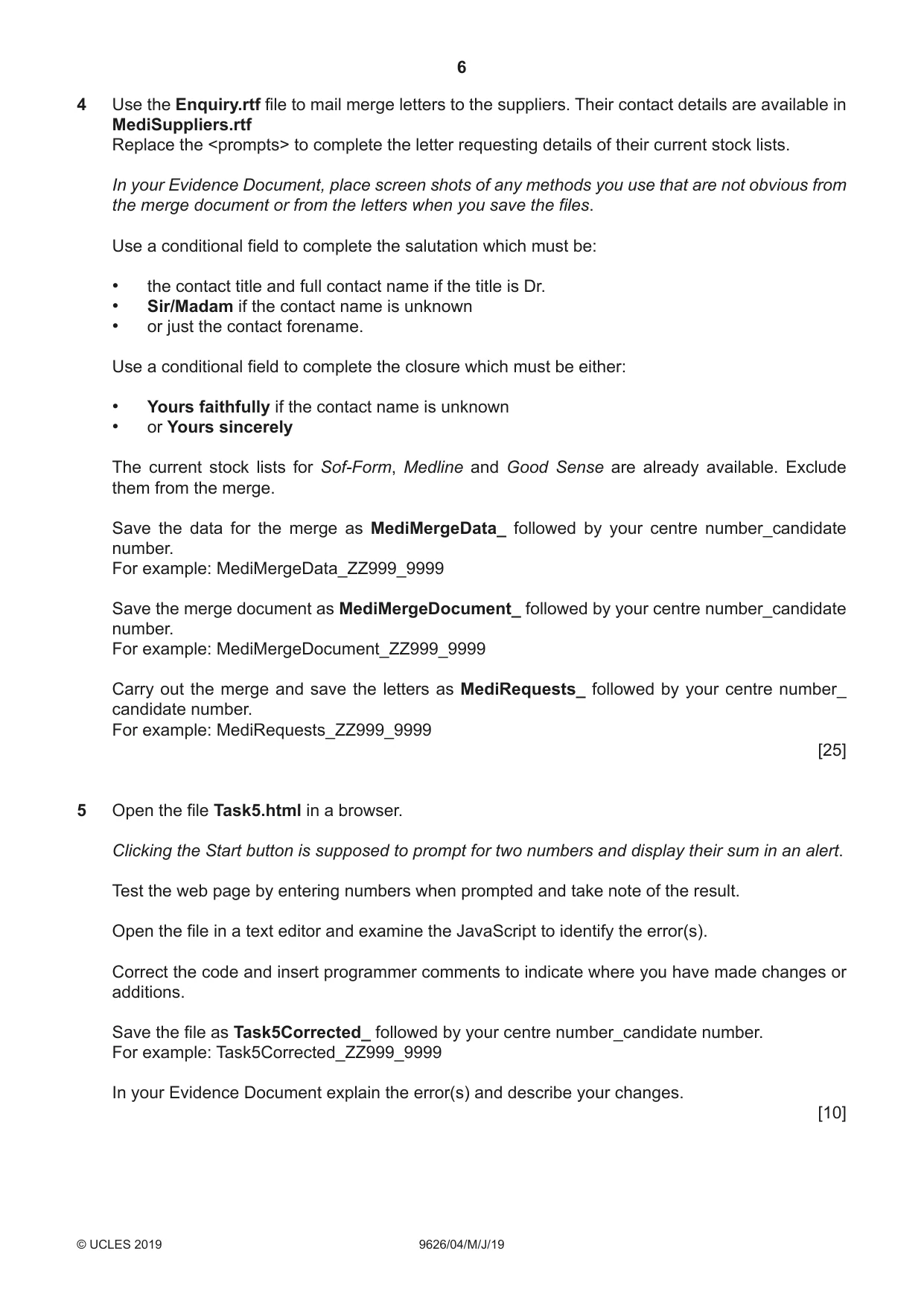

Mark scheme15 pages
Answers below. Sit the paper first if you are practising.
Paper as text
Question paper, page 1
This document consists of 7 printed pages and 1 blank page. DC (LT/TP) 164192/3 © UCLES 2019 [Turn over * 8 2 4 6 2 2 6 4 6 3 * Cambridge Assessment International Education Cambridge International Advanced Subsidiary and Advanced Level INFORMATION TECHNOLOGY 9626/04 Paper 4 Advanced Practical May/June 2019 2 hours 30 minutes Additional Materials: Candidate Source Files: Enquiry.rtf EvidenceDocument.rtf MediStock.ods MediStock.xlsx MediSuppliers.rtf MediSuppliesList.csv Task5.html Trace.png READ THESE INSTRUCTIONS FIRST DO NOT WRITE IN ANY BARCODES. Carry out every instruction in each task. Save your work using the file name given in the task as and when instructed. The number of marks is given in brackets [ ] at the end of each task or part task. Any businesses and web addresses described in this paper are entirely fictitious. You must not have access to either the internet or any email system during this examination. You must save your work in the correct file format as stated in the tasks. If work is saved in an incorrect file format, you will not receive marks for that task.
Question paper, page 2
2 9626/04/M/J/19 © UCLES 2019 All documents produced must be of a professional standard and contain your candidate details. Create a folder called Examination to save all your work. Copy the following files into your Examination folder: Enquiry.rtf EvidenceDocument.rtf MediStock.ods MediStock.xlsx MediSuppliers.rtf MediSuppliesList.csv Task5.html Trace.png
Question paper, page 3
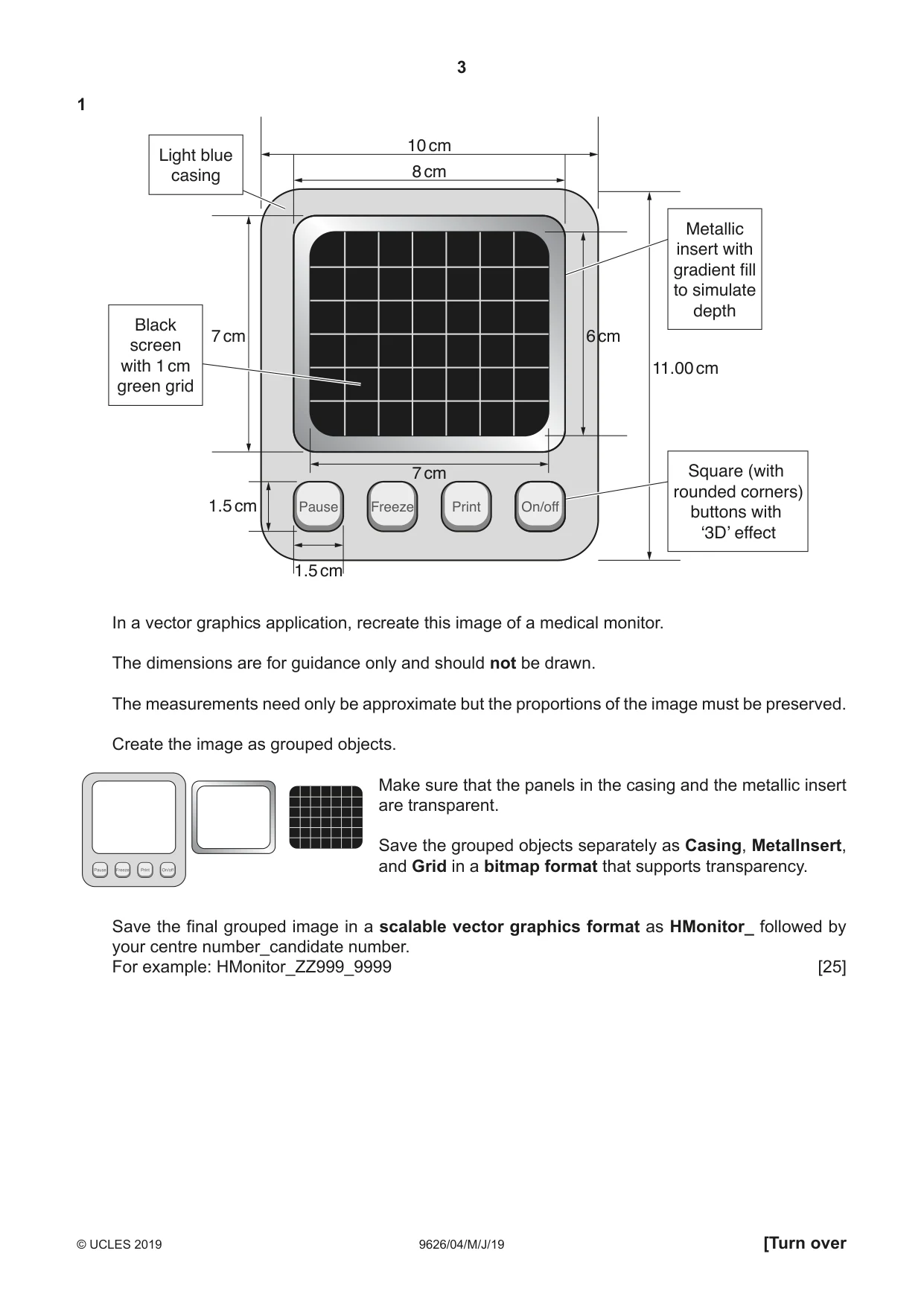
3 9626/04/M/J/19 © UCLES 2019 [Turn over 1 6 cm 11.00 cm 7 cm 7 cm 8 cm 10 cm Pause On/off Freeze Print 1.5 cm 1.5 cm Black screen with 1 cm green grid Square (with rounded corners) buttons with ‘3D’ effect Metallic insert with gradient fill to simulate depth Light blue casing In a vector graphics application, recreate this image of a medical monitor. The dimensions are for guidance only and should not be drawn. The measurements need only be approximate but the proportions of the image must be preserved. Create the image as grouped objects. Make sure that the panels in the casing and the metallic insert are transparent. Save the grouped objects separately as Casing, MetalInsert, and Grid in a bitmap format that supports transparency. Save the final grouped image in a scalable vector graphics format as HMonitor_ followed by your centre number_candidate number. For example: HMonitor_ZZ999_9999 [25]
Question paper, page 4
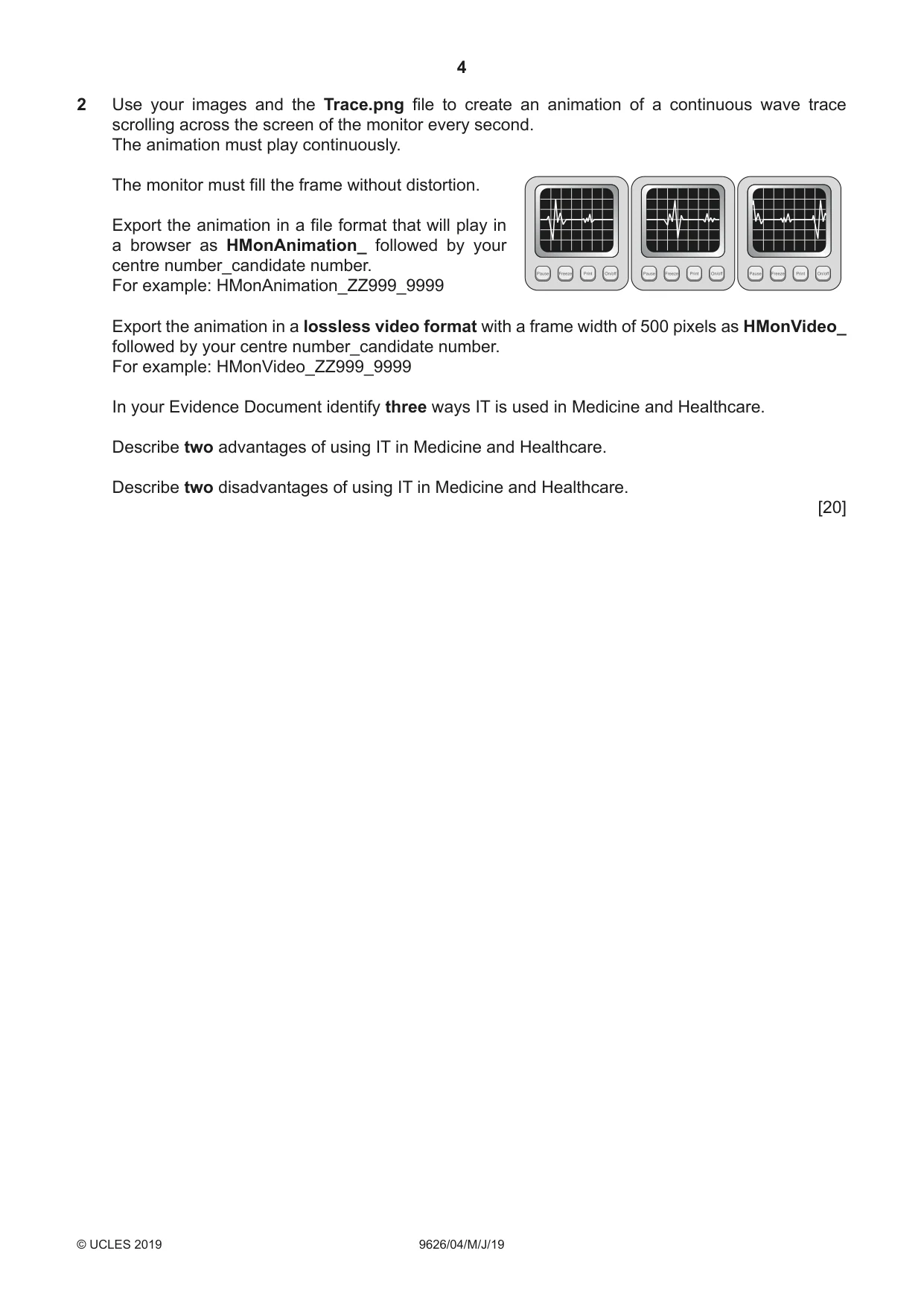
4 9626/04/M/J/19 © UCLES 2019 2 Use your images and the Trace.png file to create an animation of a continuous wave trace scrolling across the screen of the monitor every second. The animation must play continuously. The monitor must fill the frame without distortion. Export the animation in a file format that will play in a browser as HMonAnimation_ followed by your centre number_candidate number. For example: HMonAnimation_ZZ999_9999 Export the animation in a lossless video format with a frame width of 500 pixels as HMonVideo_ followed by your centre number_candidate number. For example: HMonVideo_ZZ999_9999 In your Evidence Document identify three ways IT is used in Medicine and Healthcare. Describe two advantages of using IT in Medicine and Healthcare. Describe two disadvantages of using IT in Medicine and Healthcare. [20]
Question paper, page 5
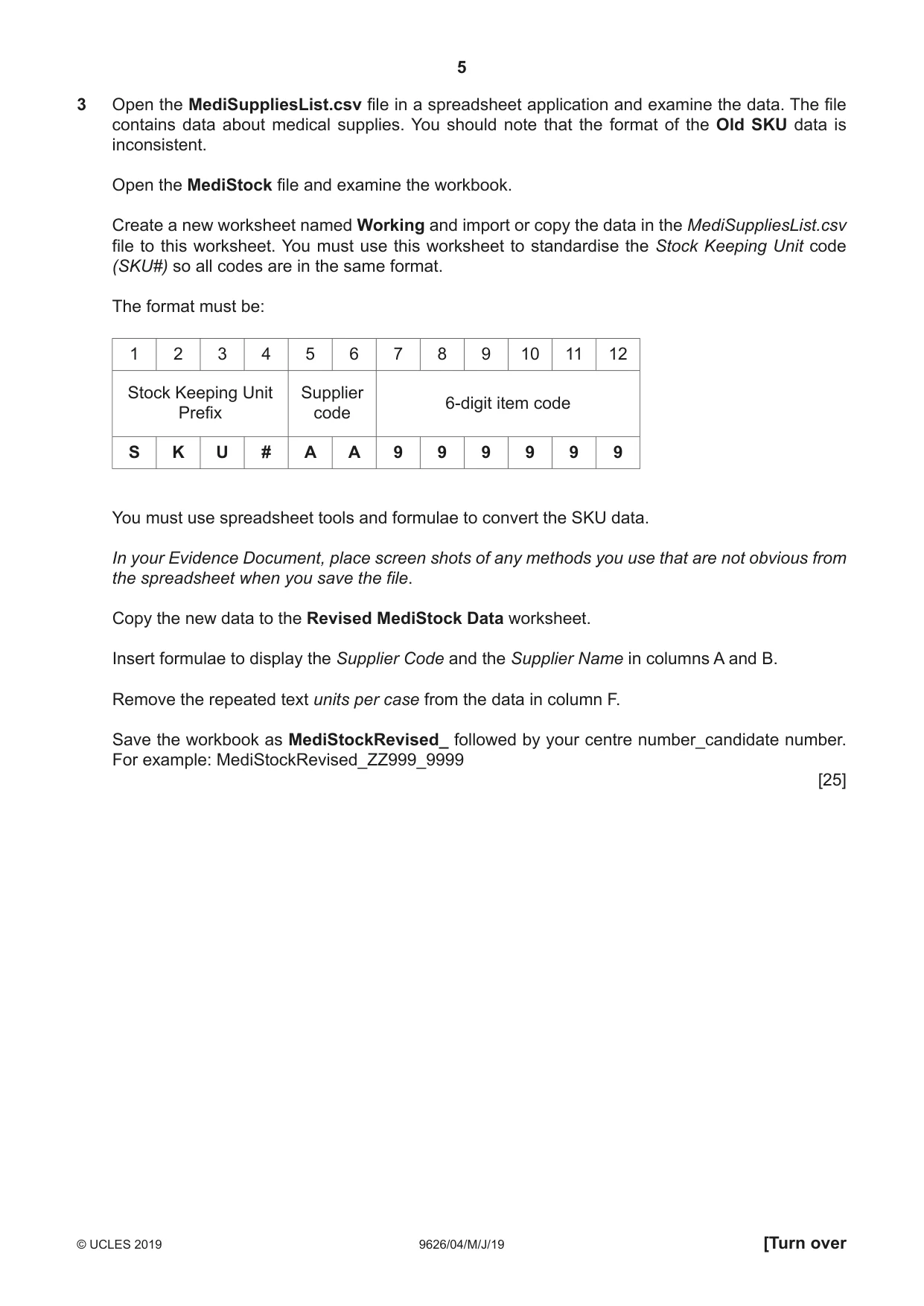
5 9626/04/M/J/19 © UCLES 2019 [Turn over 3 Open the MediSuppliesList.csv file in a spreadsheet application and examine the data. The file contains data about medical supplies. You should note that the format of the Old SKU data is inconsistent. Open the MediStock file and examine the workbook. Create a new worksheet named Working and import or copy the data in the MediSuppliesList.csv file to this worksheet. You must use this worksheet to standardise the Stock Keeping Unit code (SKU#) so all codes are in the same format. The format must be: 1 2 3 4 5 6 7 8 9 10 11 12 Stock Keeping Unit Prefix Supplier code 6-digit item code S K U # A A 9 9 9 9 9 9 You must use spreadsheet tools and formulae to convert the SKU data. In your Evidence Document, place screen shots of any methods you use that are not obvious from the spreadsheet when you save the file. Copy the new data to the Revised MediStock Data worksheet. Insert formulae to display the Supplier Code and the Supplier Name in columns A and B. Remove the repeated text units per case from the data in column F. Save the workbook as MediStockRevised_ followed by your centre number_candidate number. For example: MediStockRevised_ZZ999_9999 [25]
Question paper, page 6
6 9626/04/M/J/19 © UCLES 2019 4 Use the Enquiry.rtf file to mail merge letters to the suppliers. Their contact details are available in MediSuppliers.rtf Replace the <prompts> to complete the letter requesting details of their current stock lists. In your Evidence Document, place screen shots of any methods you use that are not obvious from the merge document or from the letters when you save the files. Use a conditional field to complete the salutation which must be: • the contact title and full contact name if the title is Dr. • Sir/Madam if the contact name is unknown • or just the contact forename. Use a conditional field to complete the closure which must be either: • Yours faithfully if the contact name is unknown • or Yours sincerely The current stock lists for Sof-Form, Medline and Good Sense are already available. Exclude them from the merge. Save the data for the merge as MediMergeData_ followed by your centre number_candidate number. For example: MediMergeData_ZZ999_9999 Save the merge document as MediMergeDocument_ followed by your centre number_candidate number. For example: MediMergeDocument_ZZ999_9999 Carry out the merge and save the letters as MediRequests_ followed by your centre number_ candidate number. For example: MediRequests_ZZ999_9999 [25] 5 Open the file Task5.html in a browser. Clicking the Start button is supposed to prompt for two numbers and display their sum in an alert. Test the web page by entering numbers when prompted and take note of the result. Open the file in a text editor and examine the JavaScript to identify the error(s). Correct the code and insert programmer comments to indicate where you have made changes or additions. Save the file as Task5Corrected_ followed by your centre number_candidate number. For example: Task5Corrected_ZZ999_9999 In your Evidence Document explain the error(s) and describe your changes. [10]
Question paper, page 7
7 9626/04/M/J/19 © UCLES 2019 6 Many companies are developing software solutions for smartphones to monitor older adults and to connect to carers and healthcare providers. The following is a statement from one of those companies: ‘With an aging population, the most effective way to keep patients healthy and healthcare costs down is to employ remote patient monitoring systems.’ In your Evidence Document, using no more than 200 words, analyse the possibilities for the use of smartphone apps in caring for the elderly. Evaluate the benefits of these developments and any problems there might be in the implementation. [5] 7 Save your Evidence Document.
Question paper, page 8
8 9626/04/M/J/19 © UCLES 2019 BLANK PAGE Permission to reproduce items where third-party owned material protected by copyright is included has been sought and cleared where possible. Every reasonable effort has been made by the publisher (UCLES) to trace copyright holders, but if any items requiring clearance have unwittingly been included, the publisher will be pleased to make amends at the earliest possible opportunity. To avoid the issue of disclosure of answer-related information to candidates, all copyright acknowledgements are reproduced online in the Cambridge Assessment International Education Copyright Acknowledgements Booklet. This is produced for each series of examinations and is freely available to download at www.cambridgeinternational.org after the live examination series. Cambridge Assessment International Education is part of the Cambridge Assessment Group. Cambridge Assessment is the brand name of the University of Cambridge Local Examinations Syndicate (UCLES), which itself is a department of the University of Cambridge.
Mark scheme, page 1
This document consists of 15 printed pages. © UCLES 2019 [Turn over Cambridge Assessment International Education Cambridge International Advanced Subsidiary and Advanced Level INFORMATION TECHNOLOGY 9626/04 Paper 4 Advanced Practical May/June 2019 MARK SCHEME Maximum Mark: 110 Published This mark scheme is published as an aid to teachers and candidates, to indicate the requirements of the examination. It shows the basis on which Examiners were instructed to award marks. It does not indicate the details of the discussions that took place at an Examiners’ meeting before marking began, which would have considered the acceptability of alternative answers. Mark schemes should be read in conjunction with the question paper and the Principal Examiner Report for Teachers. Cambridge International will not enter into discussions about these mark schemes. Cambridge International is publishing the mark schemes for the May/June 2019 series for most Cambridge IGCSE™, Cambridge International A and AS Level and Cambridge Pre-U components, and some Cambridge O Level components.
Mark scheme, page 2
9626/04 Cambridge International AS/A Level – Mark Scheme PUBLISHED May/June 2019 © UCLES 2019 Page 2 of 15 Generic Marking Principles These general marking principles must be applied by all examiners when marking candidate answers. They should be applied alongside the specific content of the mark scheme or generic level descriptors for a question. Each question paper and mark scheme will also comply with these marking principles. GENERIC MARKING PRINCIPLE 1: Marks must be awarded in line with: • the specific content of the mark scheme or the generic level descriptors for the question • the specific skills defined in the mark scheme or in the generic level descriptors for the question • the standard of response required by a candidate as exemplified by the standardisation scripts. GENERIC MARKING PRINCIPLE 2: Marks awarded are always whole marks (not half marks, or other fractions). GENERIC MARKING PRINCIPLE 3: Marks must be awarded positively: • marks are awarded for correct/valid answers, as defined in the mark scheme. However, credit is given for valid answers which go beyond the scope of the syllabus and mark scheme, referring to your Team Leader as appropriate • marks are awarded when candidates clearly demonstrate what they know and can do • marks are not deducted for errors • marks are not deducted for omissions • answers should only be judged on the quality of spelling, punctuation and grammar when these features are specifically assessed by the question as indicated by the mark scheme. The meaning, however, should be unambiguous. GENERIC MARKING PRINCIPLE 4: Rules must be applied consistently e.g. in situations where candidates have not followed instructions or in the application of generic level descriptors. GENERIC MARKING PRINCIPLE 5: Marks should be awarded using the full range of marks defined in the mark scheme for the question (however; the use of the full mark range may be limited according to the quality of the candidate responses seen). GENERIC MARKING PRINCIPLE 6: Marks awarded are based solely on the requirements as defined in the mark scheme. Marks should not be awarded with grade thresholds or grade descriptors in mind.
Mark scheme, page 3
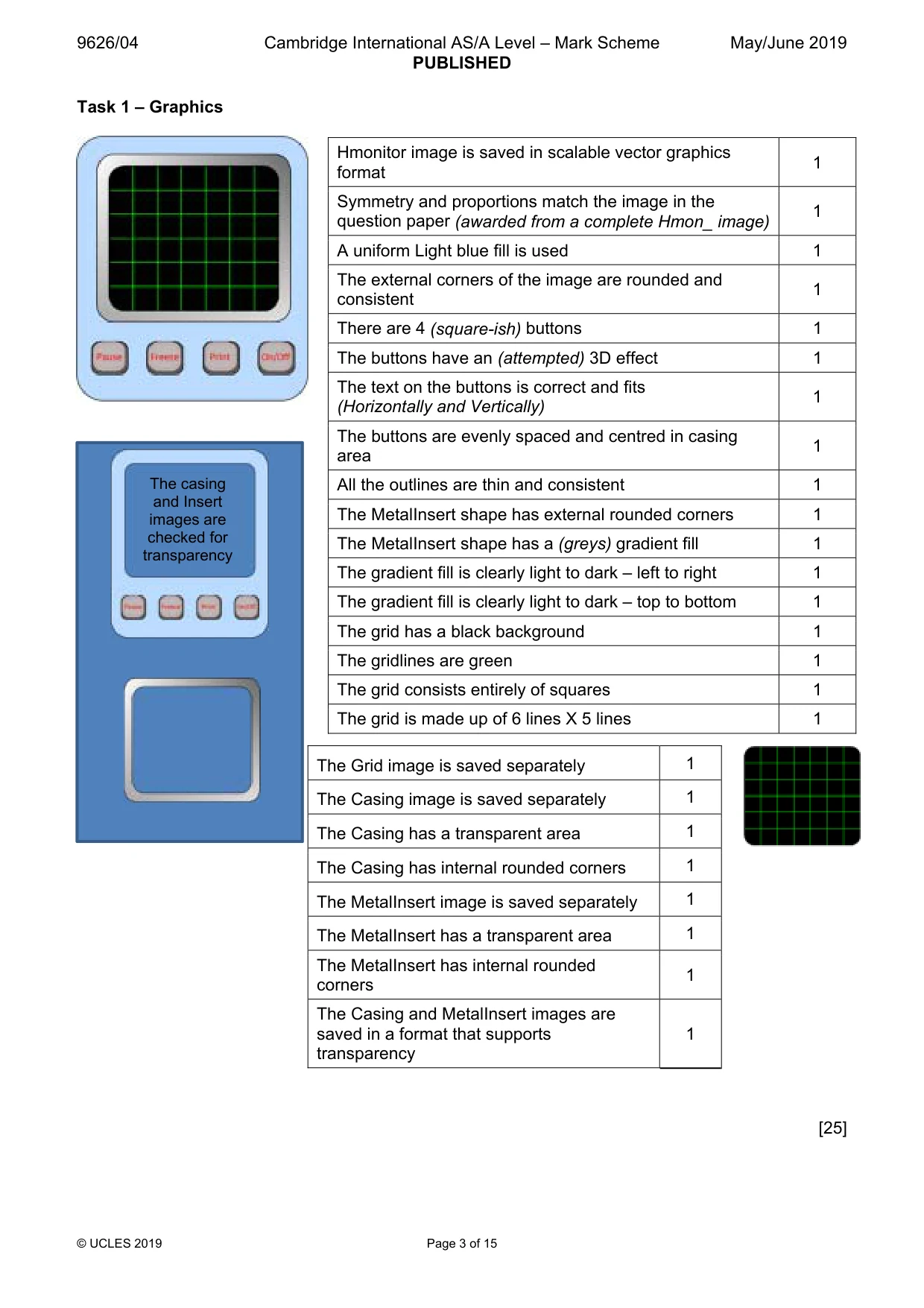
9626/04 Cambridge International AS/A Level – Mark Scheme PUBLISHED May/June 2019 © UCLES 2019 Page 3 of 15 Task 1 – Graphics [25] Hmonitor image is saved in scalable vector graphics format 1 Symmetry and proportions match the image in the question paper (awarded from a complete Hmon_ image) 1 A uniform Light blue fill is used 1 The external corners of the image are rounded and consistent 1 There are 4 (square-ish) buttons 1 The buttons have an (attempted) 3D effect 1 The text on the buttons is correct and fits (Horizontally and Vertically) 1 The buttons are evenly spaced and centred in casing area 1 All the outlines are thin and consistent 1 The MetalInsert shape has external rounded corners 1 The MetalInsert shape has a (greys) gradient fill 1 The gradient fill is clearly light to dark – left to right 1 The gradient fill is clearly light to dark – top to bottom 1 The grid has a black background 1 The gridlines are green 1 The grid consists entirely of squares 1 The grid is made up of 6 lines X 5 lines 1 The Grid image is saved separately 1 The Casing image is saved separately 1 The Casing has a transparent area 1 The Casing has internal rounded corners 1 The MetalInsert image is saved separately 1 The MetalInsert has a transparent area 1 The MetalInsert has internal rounded corners 1 The Casing and MetalInsert images are saved in a format that supports transparency 1 The casing and Insert images are checked for transparency
Mark scheme, page 4
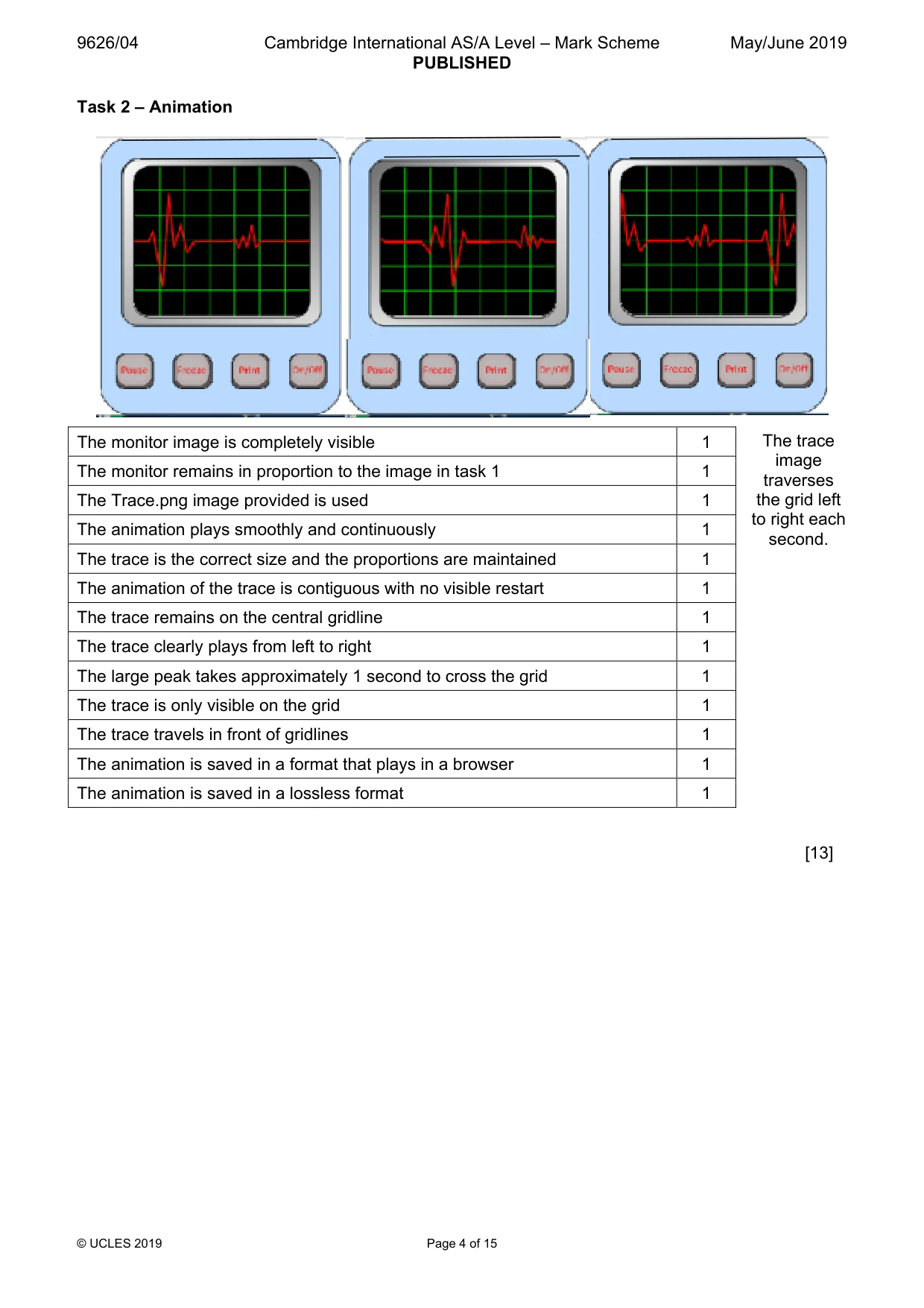
9626/04 Cambridge International AS/A Level – Mark Scheme PUBLISHED May/June 2019 © UCLES 2019 Page 4 of 15 Task 2 – Animation The trace image traverses the grid left to right each second. [13] The monitor image is completely visible 1 The monitor remains in proportion to the image in task 1 1 The Trace.png image provided is used 1 The animation plays smoothly and continuously 1 The trace is the correct size and the proportions are maintained 1 The animation of the trace is contiguous with no visible restart 1 The trace remains on the central gridline 1 The trace clearly plays from left to right 1 The large peak takes approximately 1 second to cross the grid 1 The trace is only visible on the grid 1 The trace travels in front of gridlines 1 The animation is saved in a format that plays in a browser 1 The animation is saved in a lossless format 1
Mark scheme, page 5
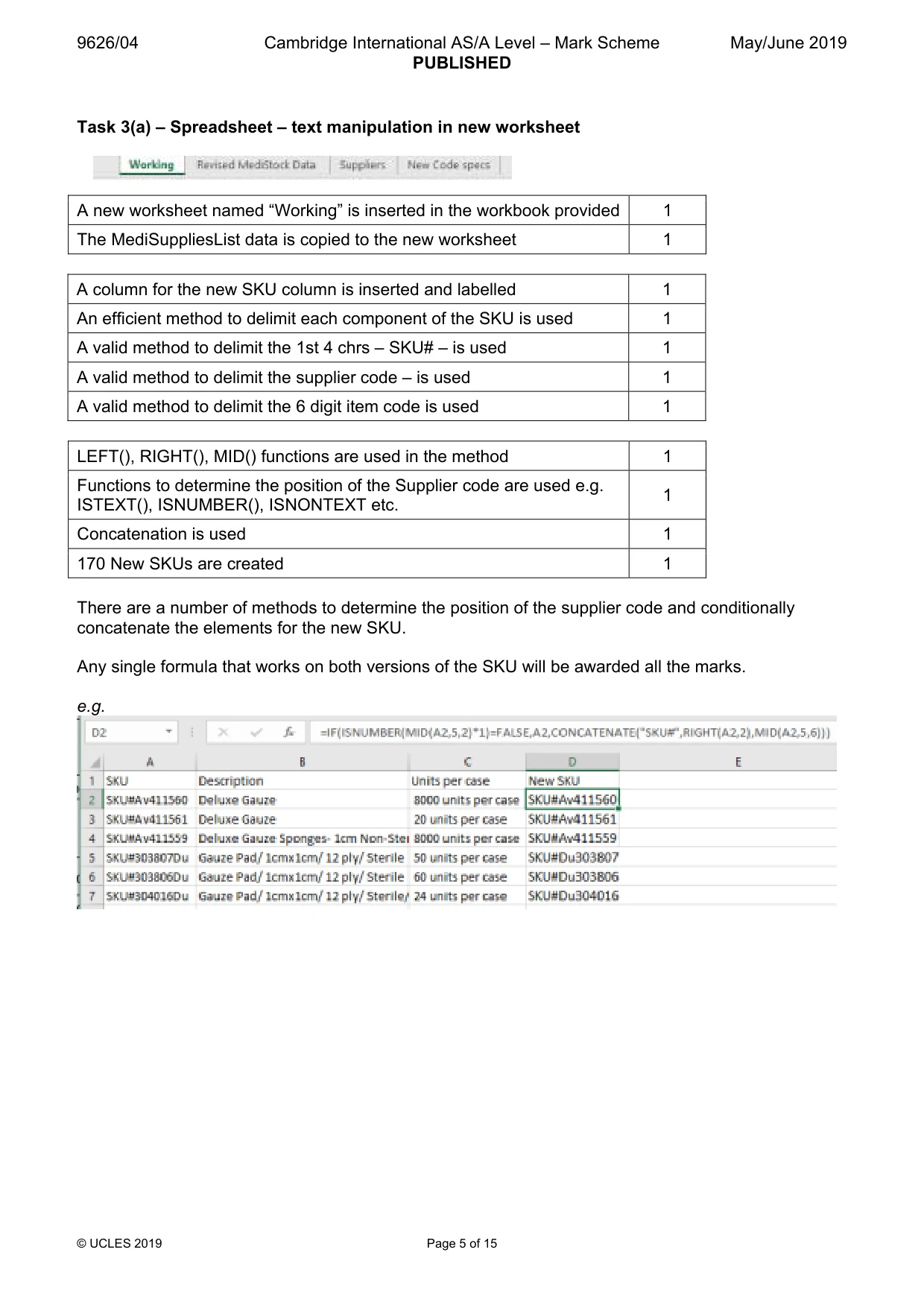
9626/04 Cambridge International AS/A Level – Mark Scheme PUBLISHED May/June 2019 © UCLES 2019 Page 5 of 15 Task 3(a) – Spreadsheet – text manipulation in new worksheet A new worksheet named “Working” is inserted in the workbook provided 1 The MediSuppliesList data is copied to the new worksheet 1 A column for the new SKU column is inserted and labelled 1 An efficient method to delimit each component of the SKU is used 1 A valid method to delimit the 1st 4 chrs – SKU# – is used 1 A valid method to delimit the supplier code – is used 1 A valid method to delimit the 6 digit item code is used 1 LEFT(), RIGHT(), MID() functions are used in the method 1 Functions to determine the position of the Supplier code are used e.g. ISTEXT(), ISNUMBER(), ISNONTEXT etc. 1 Concatenation is used 1 170 New SKUs are created 1 There are a number of methods to determine the position of the supplier code and conditionally concatenate the elements for the new SKU. Any single formula that works on both versions of the SKU will be awarded all the marks. e.g.
Mark scheme, page 6
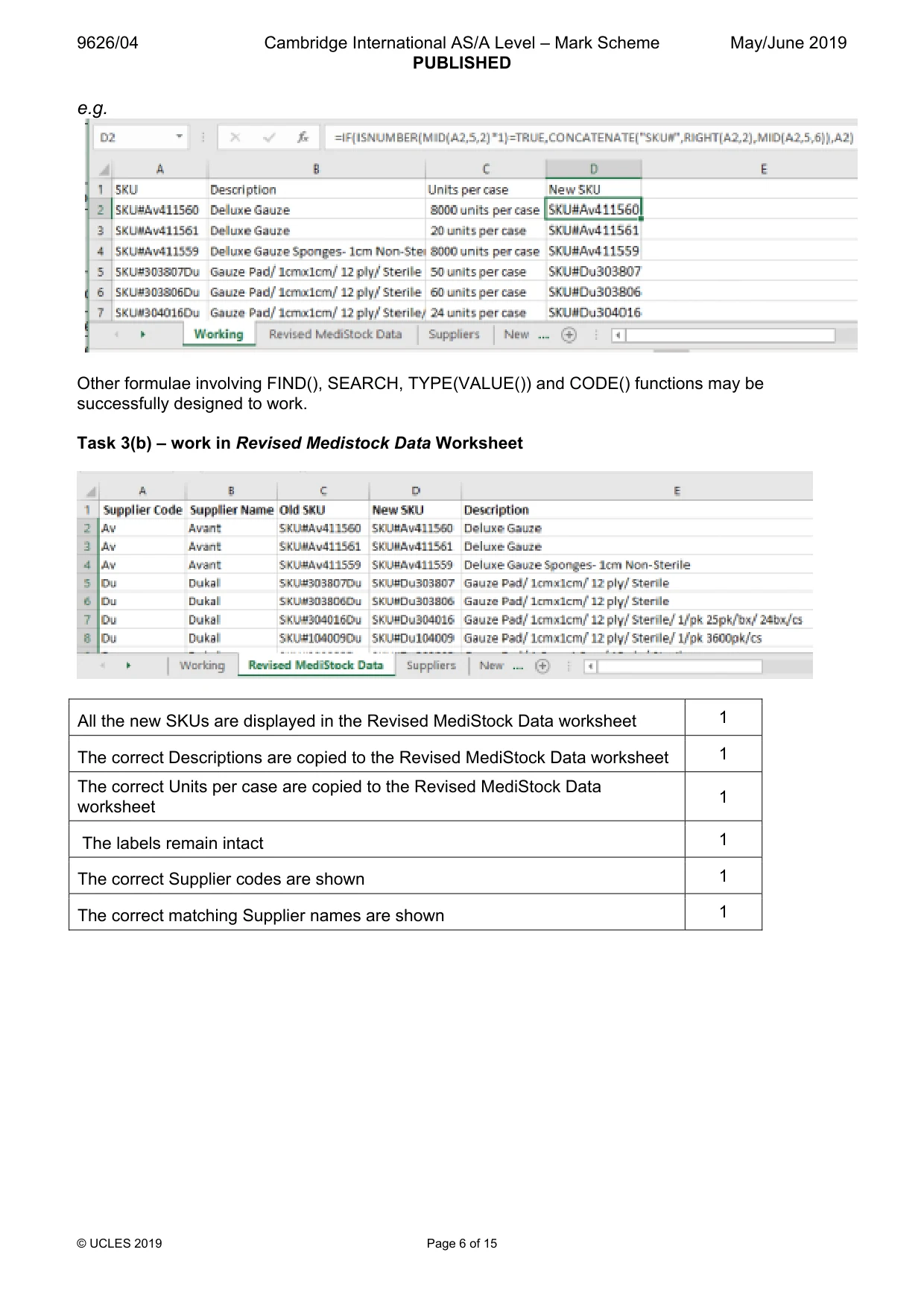
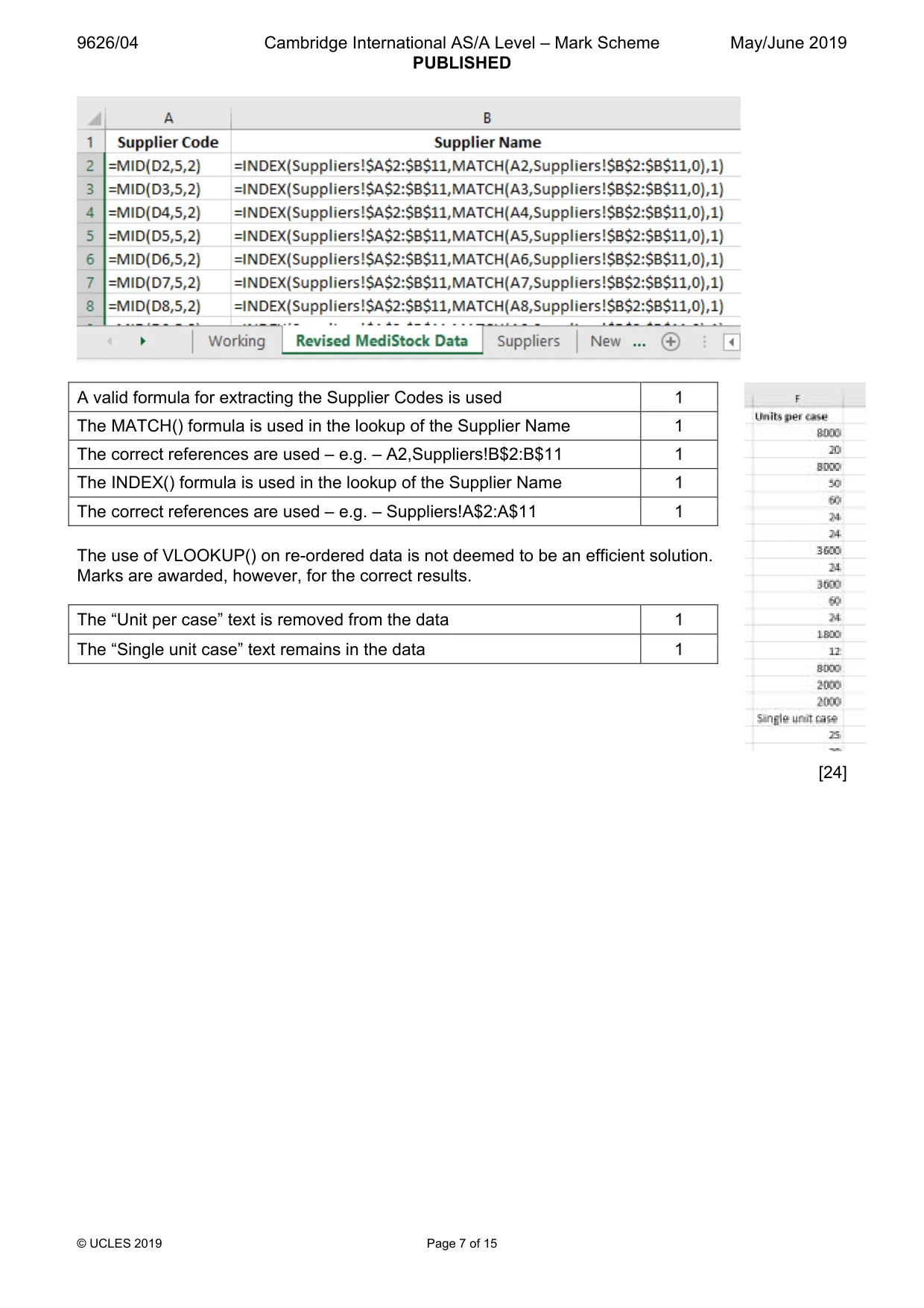
9626/04 Cambridge International AS/A Level – Mark Scheme PUBLISHED May/June 2019 © UCLES 2019 Page 6 of 15 e.g. Other formulae involving FIND(), SEARCH, TYPE(VALUE()) and CODE() functions may be successfully designed to work. Task 3(b) – work in Revised Medistock Data Worksheet All the new SKUs are displayed in the Revised MediStock Data worksheet 1 The correct Descriptions are copied to the Revised MediStock Data worksheet 1 The correct Units per case are copied to the Revised MediStock Data worksheet 1 The labels remain intact 1 The correct Supplier codes are shown 1 The correct matching Supplier names are shown 1
Mark scheme, page 7
9626/04 Cambridge International AS/A Level – Mark Scheme PUBLISHED May/June 2019 © UCLES 2019 Page 7 of 15 A valid formula for extracting the Supplier Codes is used 1 The MATCH() formula is used in the lookup of the Supplier Name 1 The correct references are used – e.g. – A2,Suppliers!B$2:B$11 1 The INDEX() formula is used in the lookup of the Supplier Name 1 The correct references are used – e.g. – Suppliers!A$2:A$11 1 The use of VLOOKUP() on re-ordered data is not deemed to be an efficient solution. Marks are awarded, however, for the correct results. The “Unit per case” text is removed from the data 1 The “Single unit case” text remains in the data 1 [24]
Mark scheme, page 8
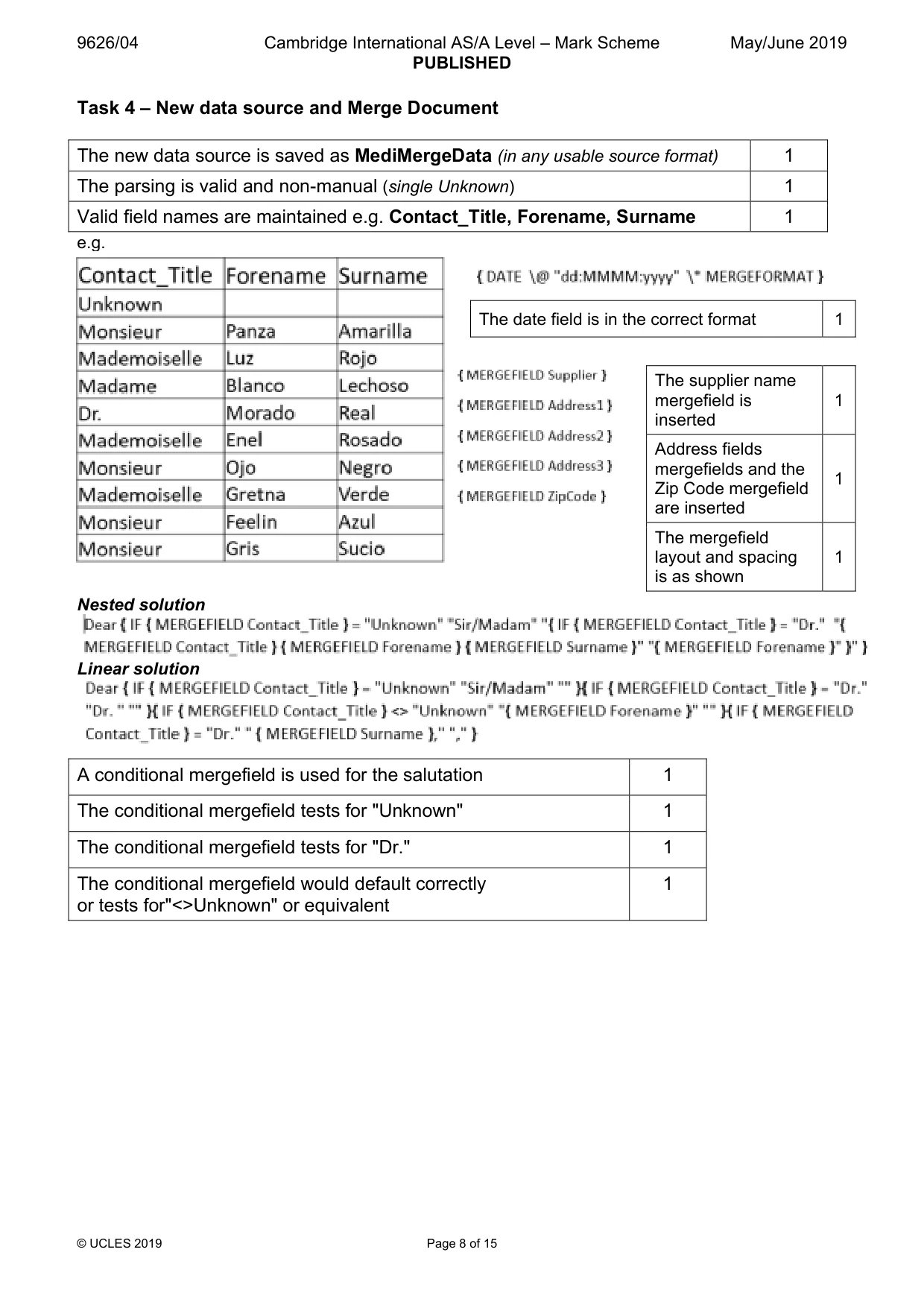
9626/04 Cambridge International AS/A Level – Mark Scheme PUBLISHED May/June 2019 © UCLES 2019 Page 8 of 15 Task 4 – New data source and Merge Document The new data source is saved as MediMergeData (in any usable source format) 1 The parsing is valid and non-manual (single Unknown) 1 Valid field names are maintained e.g. Contact_Title, Forename, Surname 1 e.g. Nested solution Linear solution A conditional mergefield is used for the salutation 1 The conditional mergefield tests for "Unknown" 1 The conditional mergefield tests for "Dr." 1 The conditional mergefield would default correctly or tests for"<>Unknown" or equivalent 1 The date field is in the correct format 1 The supplier name mergefield is inserted 1 Address fields mergefields and the Zip Code mergefield are inserted 1 The mergefield layout and spacing is as shown 1
Mark scheme, page 9
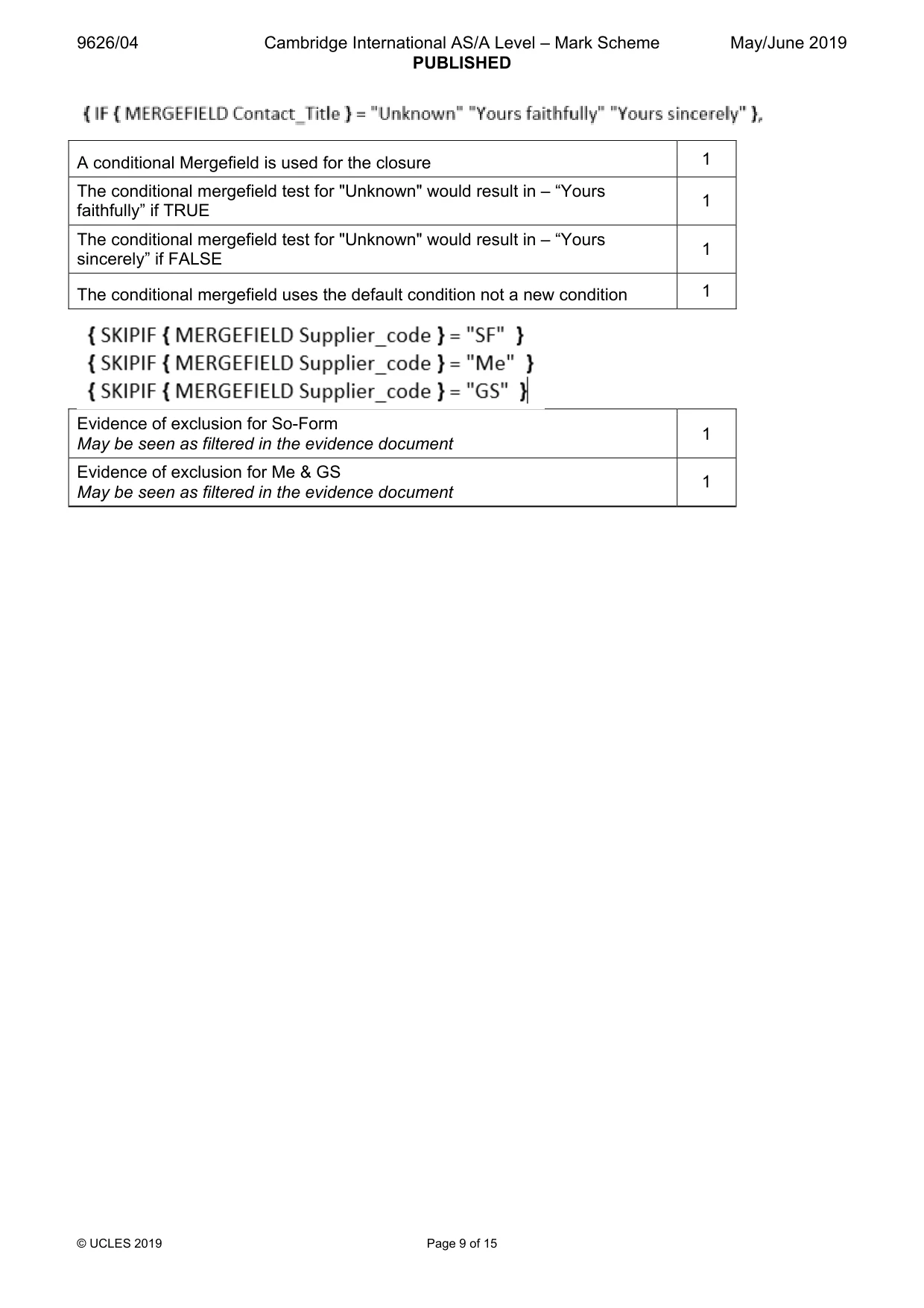
9626/04 Cambridge International AS/A Level – Mark Scheme PUBLISHED May/June 2019 © UCLES 2019 Page 9 of 15 A conditional Mergefield is used for the closure 1 The conditional mergefield test for "Unknown" would result in – “Yours faithfully” if TRUE 1 The conditional mergefield test for "Unknown" would result in – “Yours sincerely” if FALSE 1 The conditional mergefield uses the default condition not a new condition 1 Evidence of exclusion for So-Form May be seen as filtered in the evidence document 1 Evidence of exclusion for Me & GS May be seen as filtered in the evidence document 1
Mark scheme, page 10
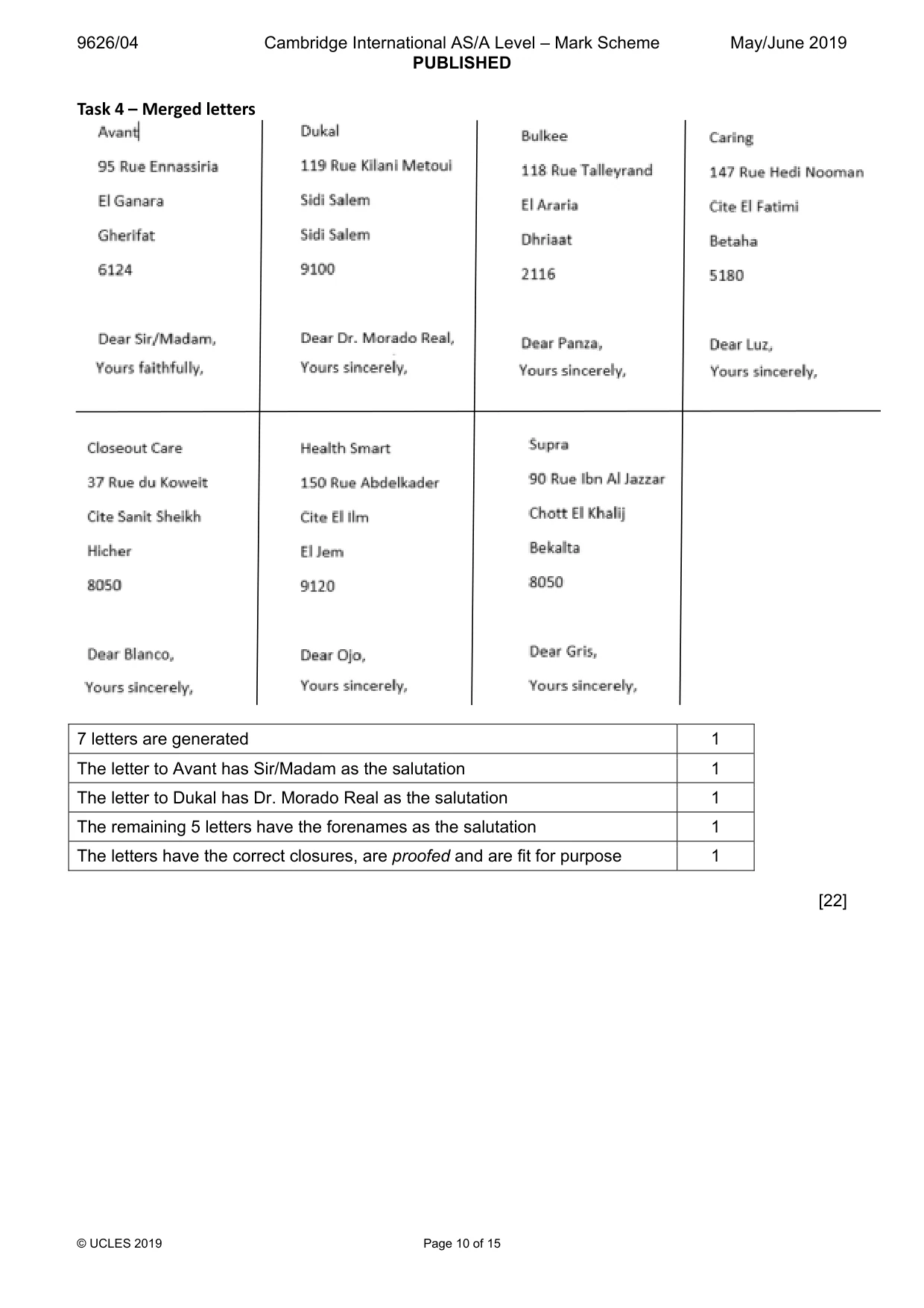
9626/04 Cambridge International AS/A Level – Mark Scheme PUBLISHED May/June 2019 © UCLES 2019 Page 10 of 15 Task 4 – Merged letters 7 letters are generated 1 The letter to Avant has Sir/Madam as the salutation 1 The letter to Dukal has Dr. Morado Real as the salutation 1 The remaining 5 letters have the forenames as the salutation 1 The letters have the correct closures, are proofed and are fit for purpose 1 [22]
Mark scheme, page 11
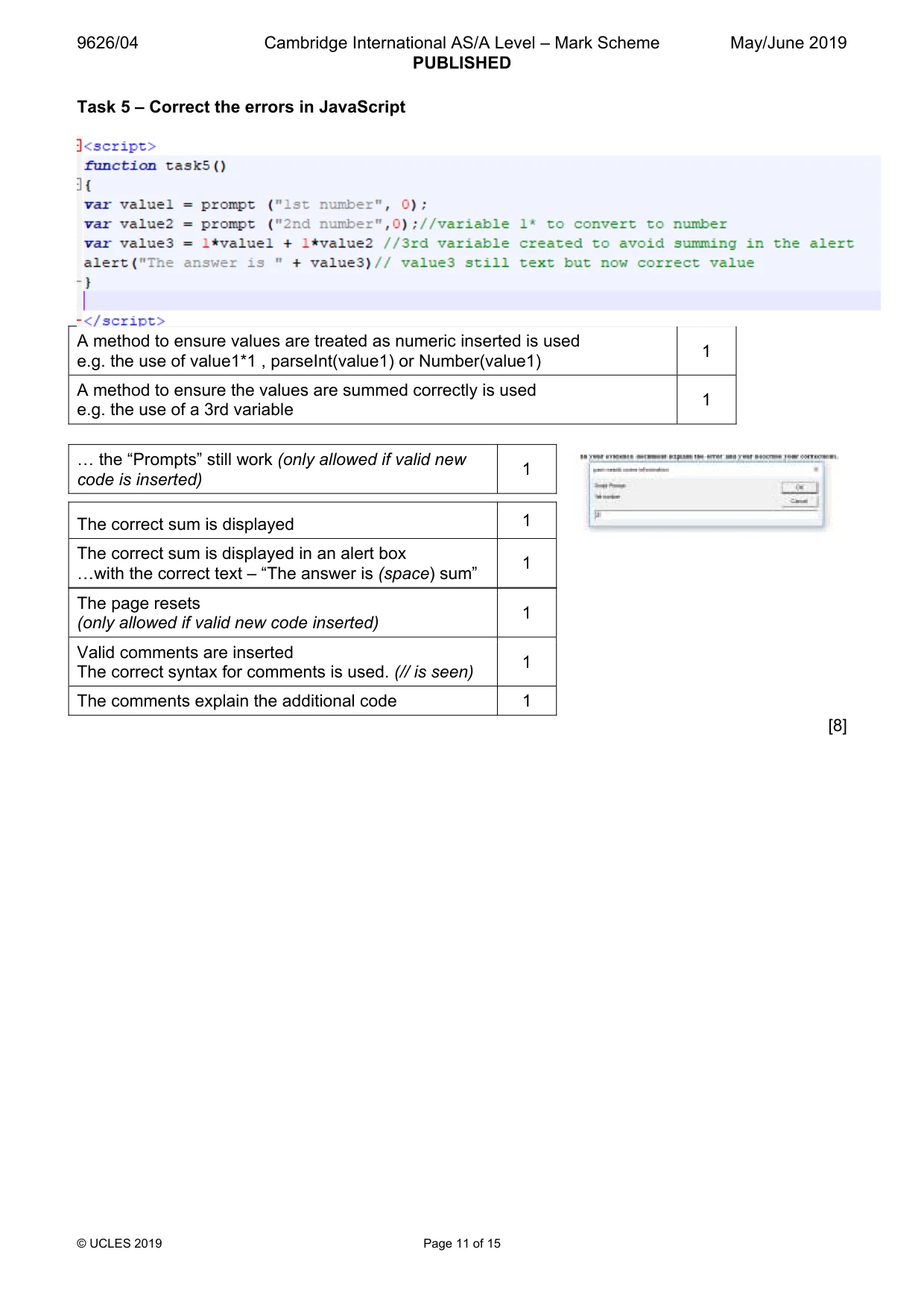
9626/04 Cambridge International AS/A Level – Mark Scheme PUBLISHED May/June 2019 © UCLES 2019 Page 11 of 15 Task 5 – Correct the errors in JavaScript A method to ensure values are treated as numeric inserted is used e.g. the use of value1*1 , parseInt(value1) or Number(value1) 1 A method to ensure the values are summed correctly is used e.g. the use of a 3rd variable 1 The page resets (only allowed if valid new code inserted) 1 Valid comments are inserted The correct syntax for comments is used. (// is seen) 1 The comments explain the additional code 1 [8] « the “Prompts” still work (only allowed if valid new code is inserted) 1 The correct sum is displayed 1 The correct sum is displayed in an alert box «with the correct text – “The answer is (space) sum” 1
Mark scheme, page 12
9626/04 Cambridge International AS/A Level – Mark Scheme PUBLISHED May/June 2019 © UCLES 2019 Page 12 of 15 Evidence document inclusions Task 2b – IT in Medicare Use 1 Use 2 Use 3 Any 3 from: Databases e.g. Patient records, scheduling appointments, patient monitoring equipment, body scanners, expert systems for diagnosis etc. Plus – any adequately described application including medical research, DNA sequencing, robotic surgery, prosthetics, Implants-pacemaker, communication systems, support for the disabled. If enough explanation. Valid use of IT in medicine 1 1 Valid use of IT in medicine 2 1 Valid use of IT in medicine 3 1 Advantage 1 Information available at different sites, legibility, records always up to date, efficient appts, 24/7 monitoring in hospital or at home etc. Speedy test results on-line. Plus – any adequately described advantage. Advantage 2 Disadvantage 1 System failures, confidentiality/privacy, expense, training, over dependence. Plus – any adequately described disadvantage. Disadvantage 2 Advantage of the use of IT in Medicare – 1 1 Advantage of the use of IT in Medicare – 2 1 Disadvantage of the use of IT in Medicare – 1 1 Disadvantage of the use of IT in Medicare – 2 1 Submissions must refer to an application of IT in Medicare. [7] Marks for references to databases are awarded only once in each Use or Advantage/Disadvantage category.
Mark scheme, page 13
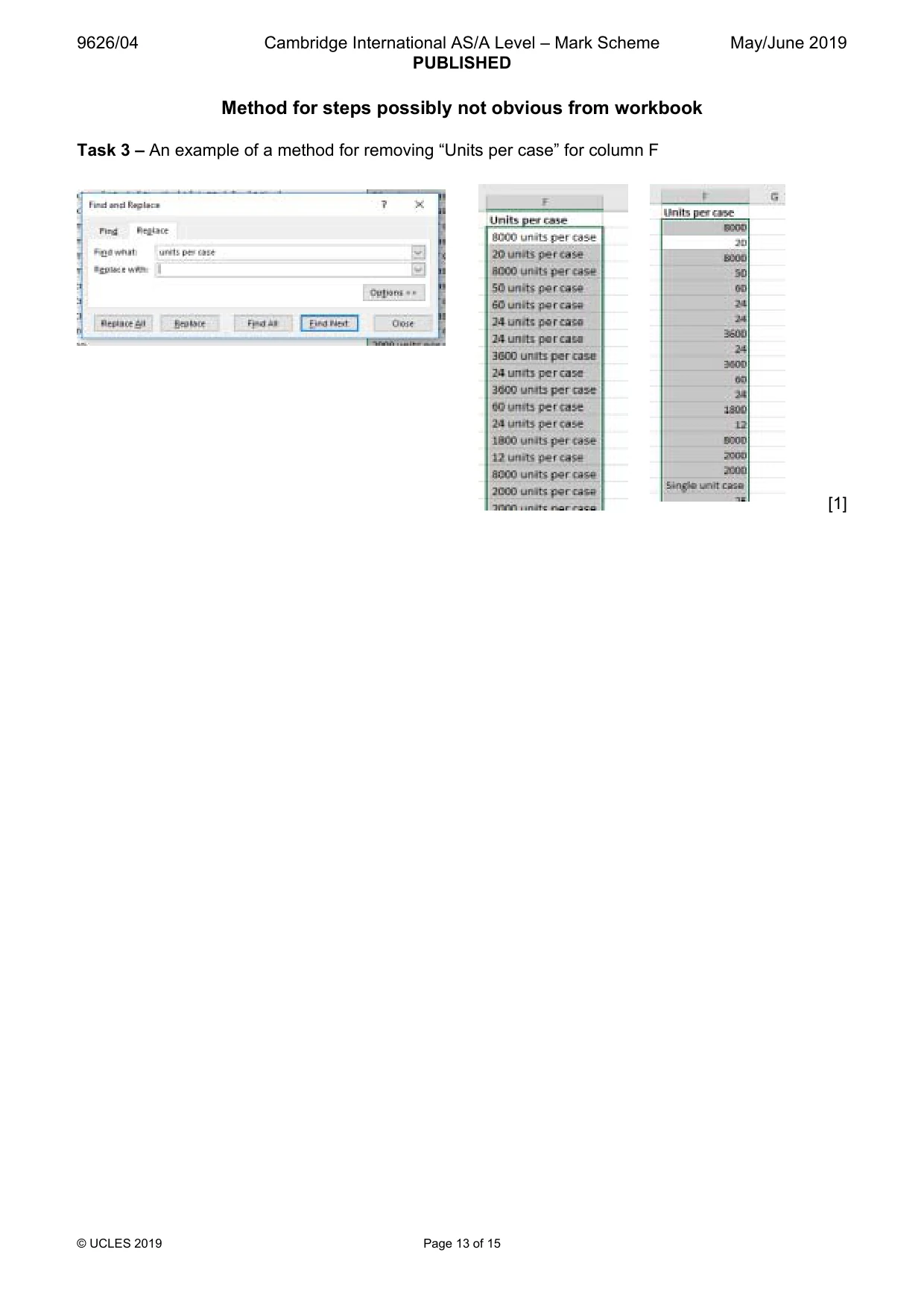
9626/04 Cambridge International AS/A Level – Mark Scheme PUBLISHED May/June 2019 © UCLES 2019 Page 13 of 15 Method for steps possibly not obvious from workbook Task 3 – An example of a method for removing “Units per case” for column F [1]
Mark scheme, page 14
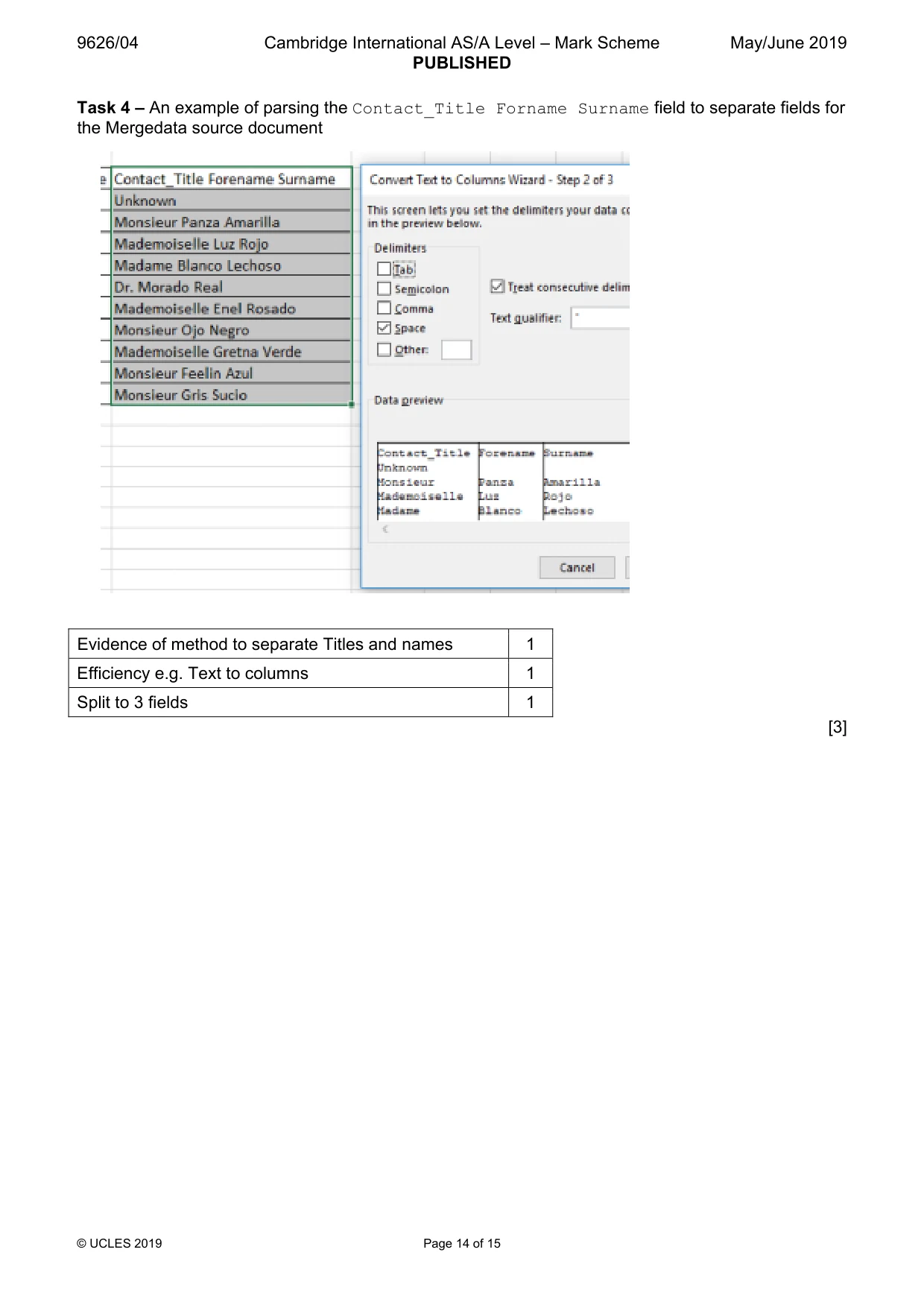
9626/04 Cambridge International AS/A Level – Mark Scheme PUBLISHED May/June 2019 © UCLES 2019 Page 14 of 15 Task 4 – An example of parsing the Contact_Title Forname Surname field to separate fields for the Mergedata source document Evidence of method to separate Titles and names 1 Efficiency e.g. Text to columns 1 Split to 3 fields 1 [3]
Mark scheme, page 15
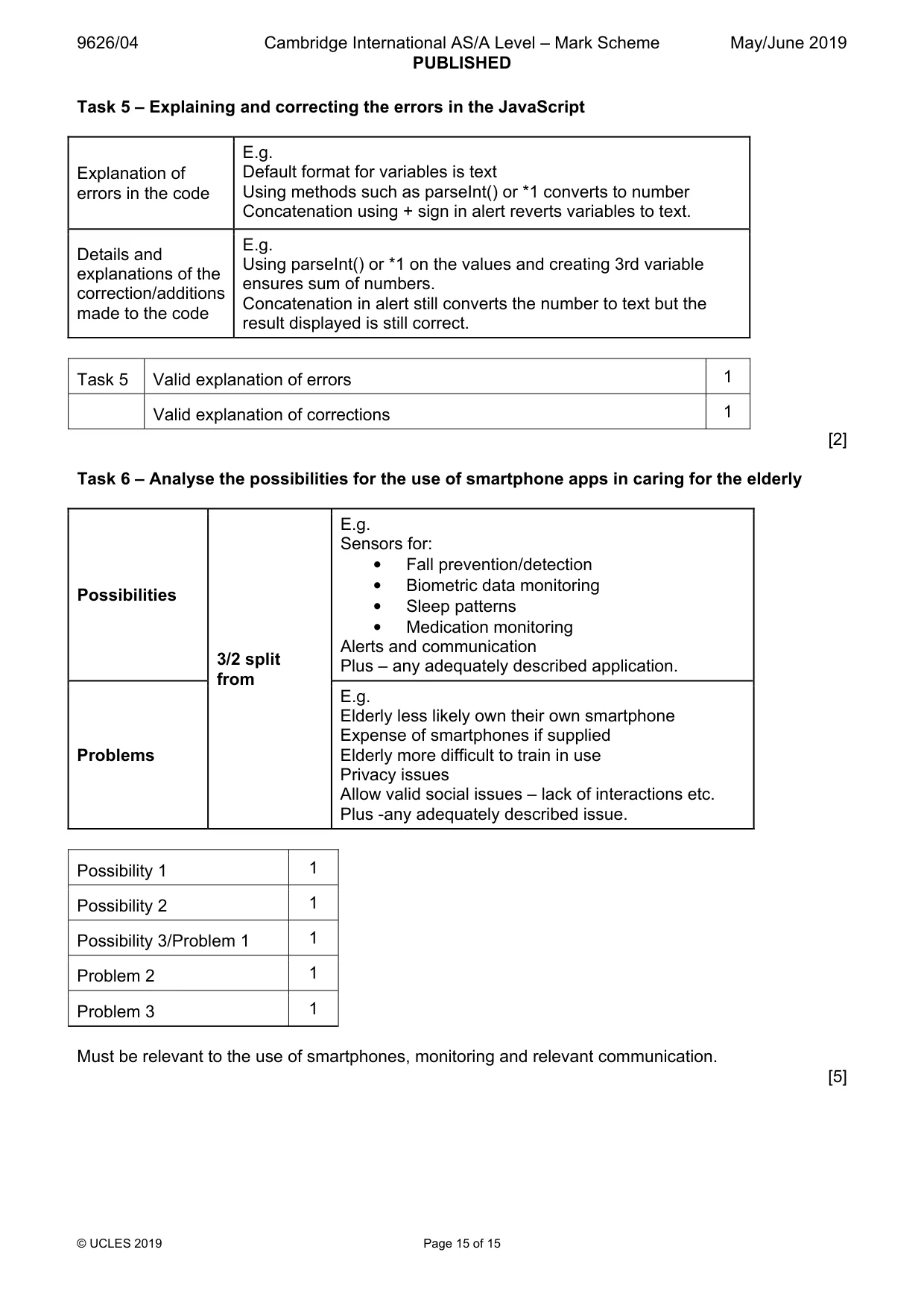
9626/04 Cambridge International AS/A Level – Mark Scheme PUBLISHED May/June 2019 © UCLES 2019 Page 15 of 15 Task 5 – Explaining and correcting the errors in the JavaScript Explanation of errors in the code E.g. Default format for variables is text Using methods such as parseInt() or *1 converts to number Concatenation using + sign in alert reverts variables to text. Details and explanations of the correction/additions made to the code E.g. Using parseInt() or *1 on the values and creating 3rd variable ensures sum of numbers. Concatenation in alert still converts the number to text but the result displayed is still correct. Task 5 Valid explanation of errors 1 Valid explanation of corrections 1 [2] Task 6 – Analyse the possibilities for the use of smartphone apps in caring for the elderly Possibilities 3/2 split from E.g. Sensors for: • Fall prevention/detection • Biometric data monitoring • Sleep patterns • Medication monitoring Alerts and communication Plus – any adequately described application. Problems E.g. Elderly less likely own their own smartphone Expense of smartphones if supplied Elderly more difficult to train in use Privacy issues Allow valid social issues – lack of interactions etc. Plus -any adequately described issue. Possibility 1 1 Possibility 2 1 Possibility 3/Problem 1 1 Problem 2 1 Problem 3 1 Must be relevant to the use of smartphones, monitoring and relevant communication. [5]
What you needed in this session
Cambridge’s own grade thresholds for 2019 May/June, Paper 4 · Variant 1. A higher threshold means an easier paper — the bar moves with how the cohort did.