Cambridge A Level Information Technology (from 2017) 9626 — 2017 May/June Paper 4 · Variant 1
9626/41/M/J/17 · 110 marks · ≈124 min
The question paper and its mark scheme, free to read here and free to download. This is Cambridge’s own paper, exactly as it was sat.
Question paper8 pages

Mark scheme11 pages
Answers below. Sit the paper first if you are practising.
Paper as text
Question paper, page 1
This document consists of 6 printed pages and 2 blank pages. DC (NH/AR) 135035/3 © UCLES 2017 [Turn over * 9 0 2 6 9 2 0 2 3 1 * INFORMATION TECHNOLOGY 9626/04 Paper 4 Advanced Practical May/June 2017 2 hours 30 minutes Additional Materials: Candidate Source Files READ THESE INSTRUCTIONS FIRST DO NOT WRITE IN ANY BARCODES. Carry out every instruction in each task. Save your work using the file name given in the task as and when instructed. The number of marks is given in brackets [ ] at the end of each task or part task. Any businesses described in this paper are entirely fictitious. You must not have access to either the internet or any email system during this examination. Cambridge International Examinations Cambridge International Advanced Subsidiary and Advanced Level
Question paper, page 2
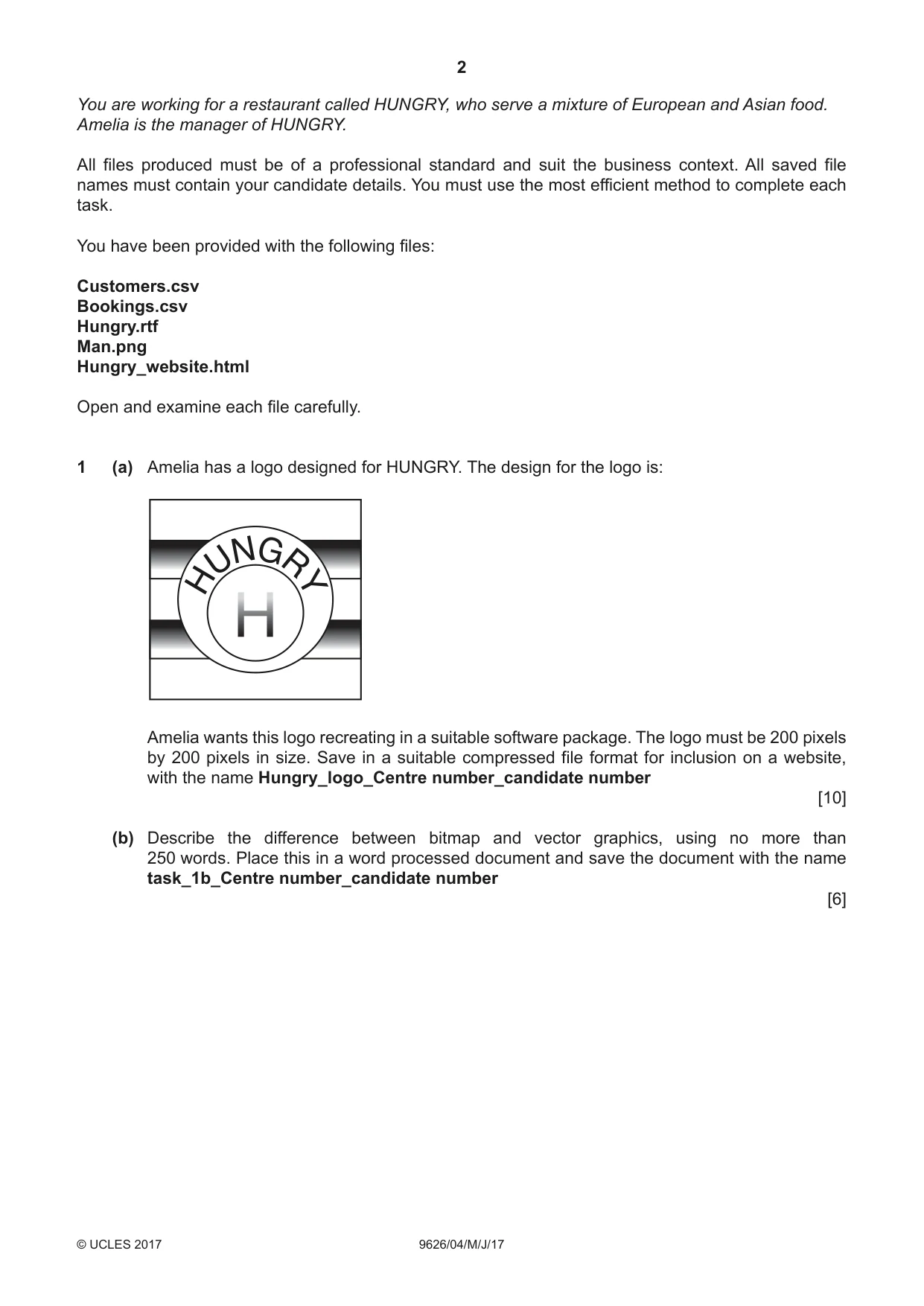
2 9626/04/M/J/17 © UCLES 2017 You are working for a restaurant called HUNGRY, who serve a mixture of European and Asian food. Amelia is the manager of HUNGRY. All files produced must be of a professional standard and suit the business context. All saved file names must contain your candidate details. You must use the most efficient method to complete each task. You have been provided with the following files: Customers.csv Bookings.csv Hungry.rtf Man.png Hungry_website.html Open and examine each file carefully. 1 (a) Amelia has a logo designed for HUNGRY. The design for the logo is: Amelia wants this logo recreating in a suitable software package. The logo must be 200 pixels by 200 pixels in size. Save in a suitable compressed file format for inclusion on a website, with the name Hungry_logo_Centre number_candidate number [10] (b) Describe the difference between bitmap and vector graphics, using no more than 250 words. Place this in a word processed document and save the document with the name task_1b_Centre number_candidate number [6]
Question paper, page 3
3 9626/04/M/J/17 © UCLES 2017 [Turn over 2 Amelia wants a short animation that she can use to advertise the restaurant. The animation must meet the following requirements: • The aspect ratio of the animation must be set to 512 by 288 pixels or 16:9. • At the start of the animation, the background must be pale blue. • After 2 seconds the text HUNGRY must appear a letter at a time. Once a letter appears it remains on the screen. The timing for each successive letter appearing must be 0.5 seconds. The text must be in a white, 48pt sans serif font. The text must then disappear. • The image Man.png must appear in bottom right corner of the frame at a suitable size. • A white rectangle must appear in the centre of the frame. The rectangle must be a suitable size to display a short sentence. • In the rectangle the text Our staff are warm and welcoming must be displayed for 3 seconds. The text must fade in and fade out. • In the rectangle the text Our food is delicious must be displayed for 3 seconds. The text must fade in and fade out. • The text in the rectangle must be in a black, 32pt sans serif font. • The rectangle and the image Man.png must disappear. • The logo created in task 1 must appear small in the centre of the frame. The logo must grow to fill most of the frame and rotate 360 degrees as it grows. The logo must then display for 2 seconds. • The animation must be set to loop. • All animations must be smooth. • The animation must be exported in a suitable format for displaying on a website. Create the animation in a suitable software package to meet Amelia’s requirements. Save the animation as Hungry_advert_Centre number_candidate number [20]
Question paper, page 4
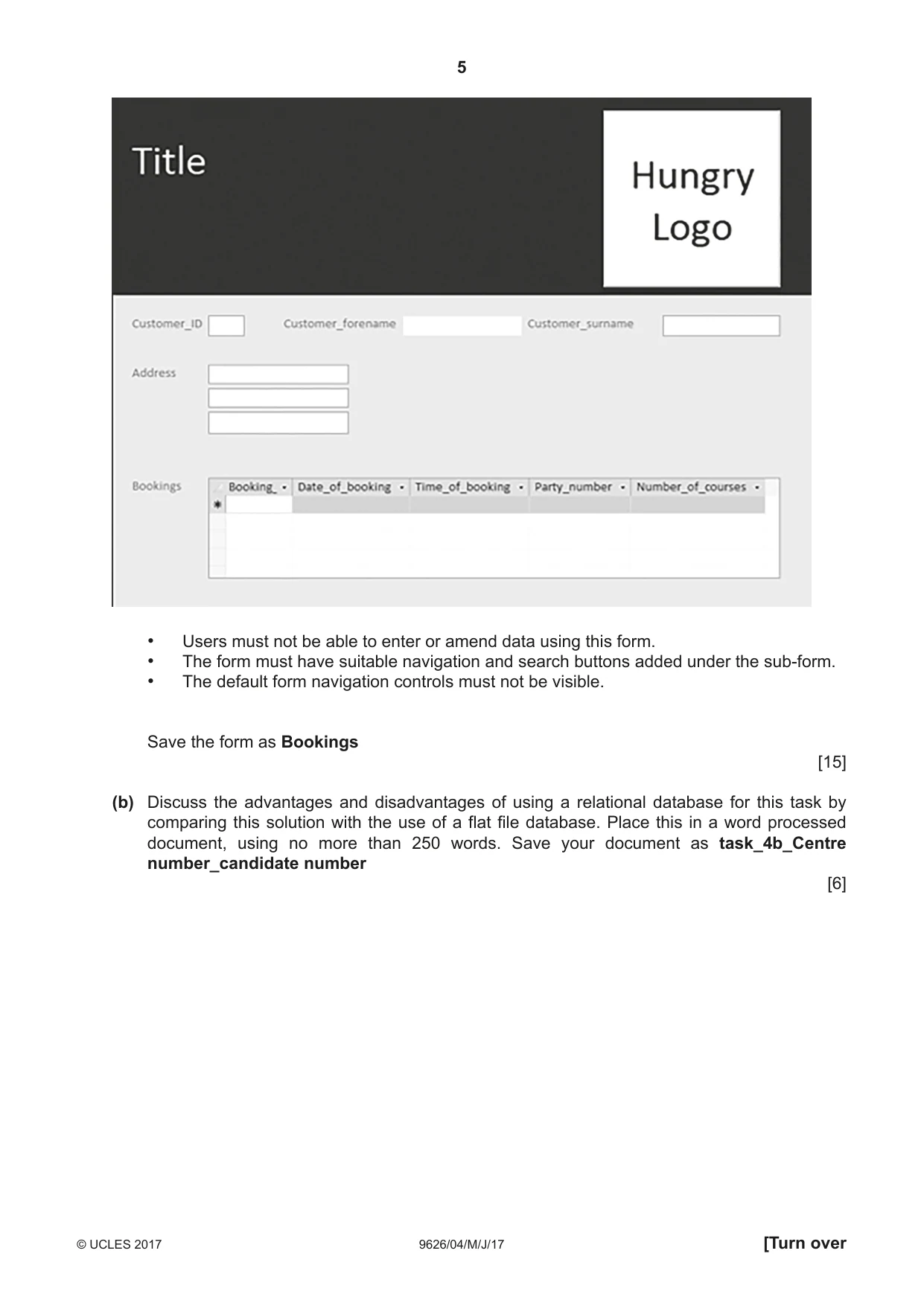
4 9626/04/M/J/17 © UCLES 2017 3 Amelia wants a database to view customer bookings at HUNGRY. Using the files Customers.csv and Bookings.csv create a relational database for Amelia. Suitable data types must be set for each field. Party_number should be set to only accept numbers between 1 and 10 (inclusive). A suitable error message must be displayed when a number outside the range is entered. Save your database as Hungry_Centre number_candidate number [7] 4 (a) Amelia wants a form to view details of customers and their bookings. The form must meet the following requirements: • The Hungry logo created in task 1 must be displayed at the top of the form on the right. • The top section of the form must have a black background. • The form must have a suitable title shown at the top of the form. • The title text must be in a white sans serif font. • The rest of the form must have a grey background. • All other text and data must be in a black sans serif font. • The form must display all the fields of a customer record. • Details of customer bookings must be shown in a sub-form. • The sub-form must display all the fields of a booking record except the Customer_ID. • The sub-form must be large enough to display up to 4 bookings with no horizontal scroll bar. • The sub-form must display the vertical scroll bar only when necessary. • All labels and fields must be aligned as shown on page 5 opposite.
Question paper, page 5
5 9626/04/M/J/17 © UCLES 2017 [Turn over • Users must not be able to enter or amend data using this form. • The form must have suitable navigation and search buttons added under the sub-form. • The default form navigation controls must not be visible. Save the form as Bookings [15] (b) Discuss the advantages and disadvantages of using a relational database for this task by comparing this solution with the use of a flat file database. Place this in a word processed document, using no more than 250 words. Save your document as task_4b_Centre number_candidate number [6]
Question paper, page 6
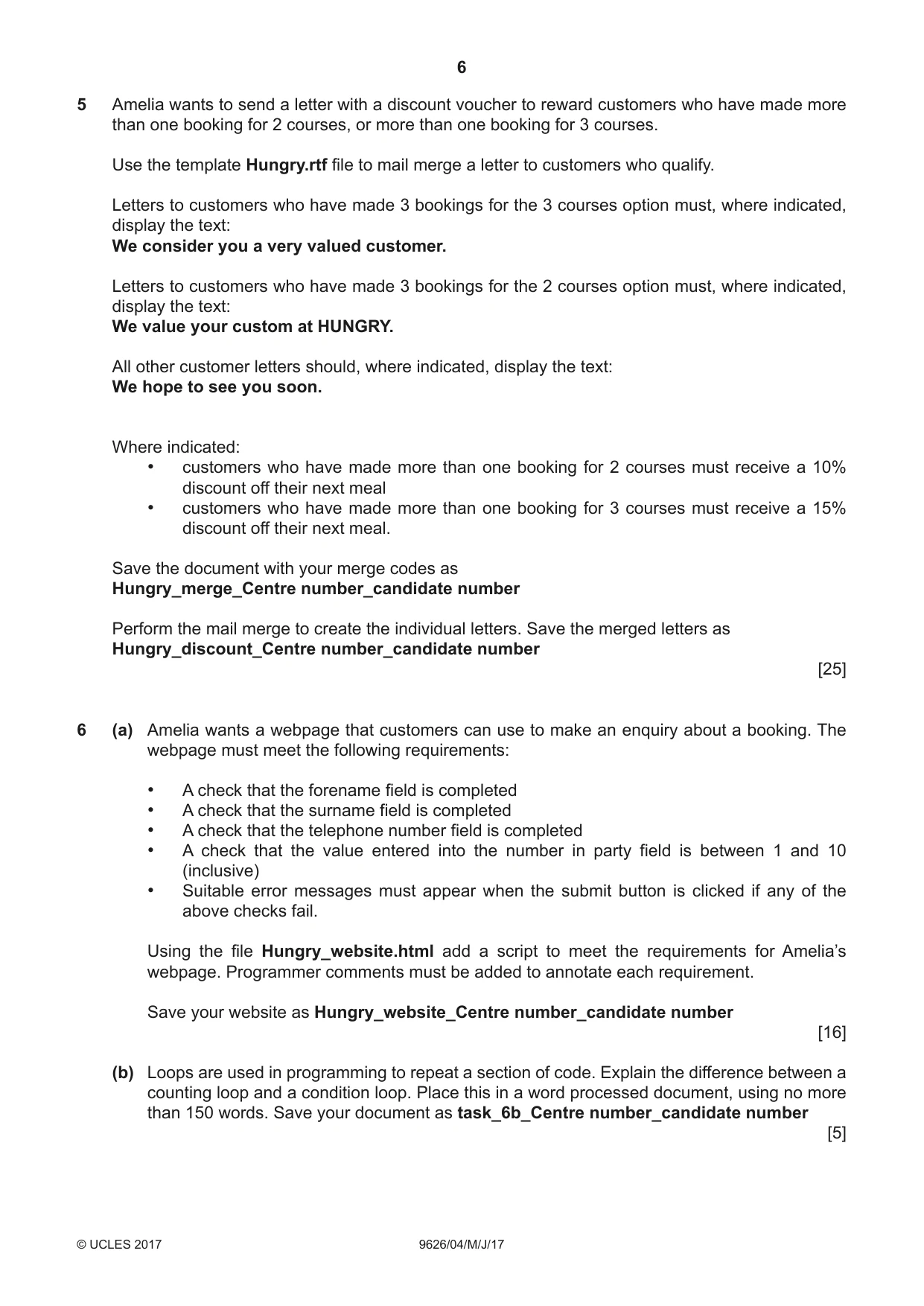
6 9626/04/M/J/17 © UCLES 2017 5 Amelia wants to send a letter with a discount voucher to reward customers who have made more than one booking for 2 courses, or more than one booking for 3 courses. Use the template Hungry.rtf file to mail merge a letter to customers who qualify. Letters to customers who have made 3 bookings for the 3 courses option must, where indicated, display the text: We consider you a very valued customer. Letters to customers who have made 3 bookings for the 2 courses option must, where indicated, display the text: We value your custom at HUNGRY. All other customer letters should, where indicated, display the text: We hope to see you soon. Where indicated: • customers who have made more than one booking for 2 courses must receive a 10% discount off their next meal • customers who have made more than one booking for 3 courses must receive a 15% discount off their next meal. Save the document with your merge codes as Hungry_merge_Centre number_candidate number Perform the mail merge to create the individual letters. Save the merged letters as Hungry_discount_Centre number_candidate number [25] 6 (a) Amelia wants a webpage that customers can use to make an enquiry about a booking. The webpage must meet the following requirements: • A check that the forename field is completed • A check that the surname field is completed • A check that the telephone number field is completed • A check that the value entered into the number in party field is between 1 and 10 (inclusive) • Suitable error messages must appear when the submit button is clicked if any of the above checks fail. Using the file Hungry_website.html add a script to meet the requirements for Amelia’s webpage. Programmer comments must be added to annotate each requirement. Save your website as Hungry_website_Centre number_candidate number [16] (b) Loops are used in programming to repeat a section of code. Explain the difference between a counting loop and a condition loop. Place this in a word processed document, using no more than 150 words. Save your document as task_6b_Centre number_candidate number [5]
Question paper, page 7
7 9626/04/M/J/17 © UCLES 2017 BLANK PAGE
Question paper, page 8
8 9626/04/M/J/17 © UCLES 2017 Permission to reproduce items where third-party owned material protected by copyright is included has been sought and cleared where possible. Every reasonable effort has been made by the publisher (UCLES) to trace copyright holders, but if any items requiring clearance have unwittingly been included, the publisher will be pleased to make amends at the earliest possible opportunity. To avoid the issue of disclosure of answer-related information to candidates, all copyright acknowledgements are reproduced online in the Cambridge International Examinations Copyright Acknowledgements Booklet. This is produced for each series of examinations and is freely available to download at www.cie.org.uk after the live examination series. Cambridge International Examinations is part of the Cambridge Assessment Group. Cambridge Assessment is the brand name of University of Cambridge Local Examinations Syndicate (UCLES), which is itself a department of the University of Cambridge. BLANK PAGE
Mark scheme, page 1
® IGCSE is a registered trademark. This document consists of 11 printed pages. © UCLES 2017 [Turn over Cambridge International Examinations Cambridge International Advanced Subsidiary and Advanced Level INFORMATION TECHNOLOGY 9626/04 Paper 4 Advanced Practical May/June 2017 MARK SCHEME Maximum Mark: 110 Published This mark scheme is published as an aid to teachers and candidates, to indicate the requirements of the examination. It shows the basis on which Examiners were instructed to award marks. It does not indicate the details of the discussions that took place at an Examiners’ meeting before marking began, which would have considered the acceptability of alternative answers. Mark schemes should be read in conjunction with the question paper and the Principal Examiner Report for Teachers. Cambridge will not enter into discussions about these mark schemes. Cambridge is publishing the mark schemes for the May/June 2017 series for most Cambridge IGCSE®, Cambridge International A and AS Level and Cambridge Pre-U components, and some Cambridge O Level components.
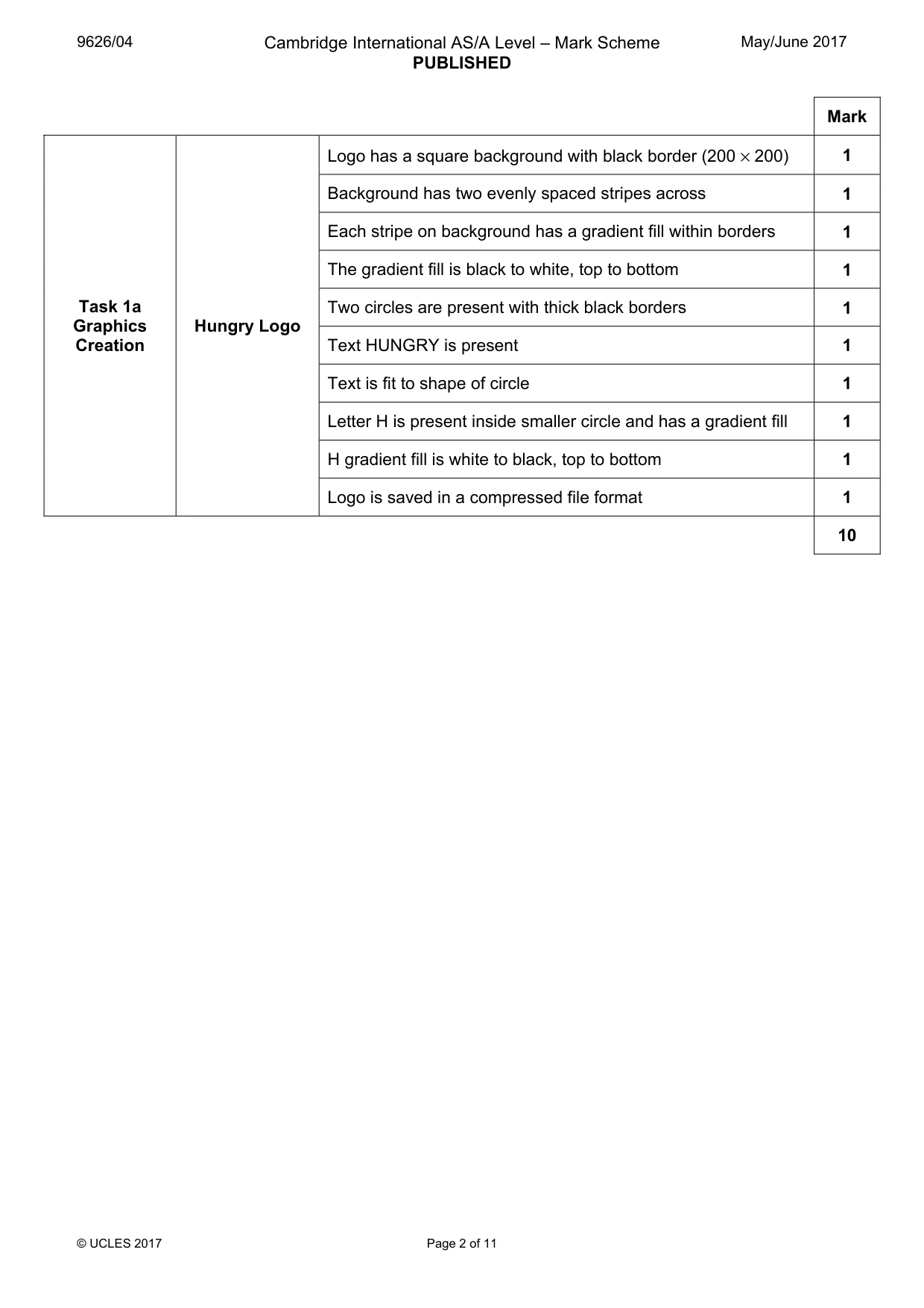
Mark scheme, page 2
9626/04 Cambridge International AS/A Level – Mark Scheme PUBLISHED May/June 2017 © UCLES 2017 Page 2 of 11 Mark Task 1a Graphics Creation Hungry Logo Logo has a square background with black border (200 × 200) 1 Background has two evenly spaced stripes across 1 Each stripe on background has a gradient fill within borders 1 The gradient fill is black to white, top to bottom 1 Two circles are present with thick black borders 1 Text HUNGRY is present 1 Text is fit to shape of circle 1 Letter H is present inside smaller circle and has a gradient fill 1 H gradient fill is white to black, top to bottom 1 Logo is saved in a compressed file format 1 10
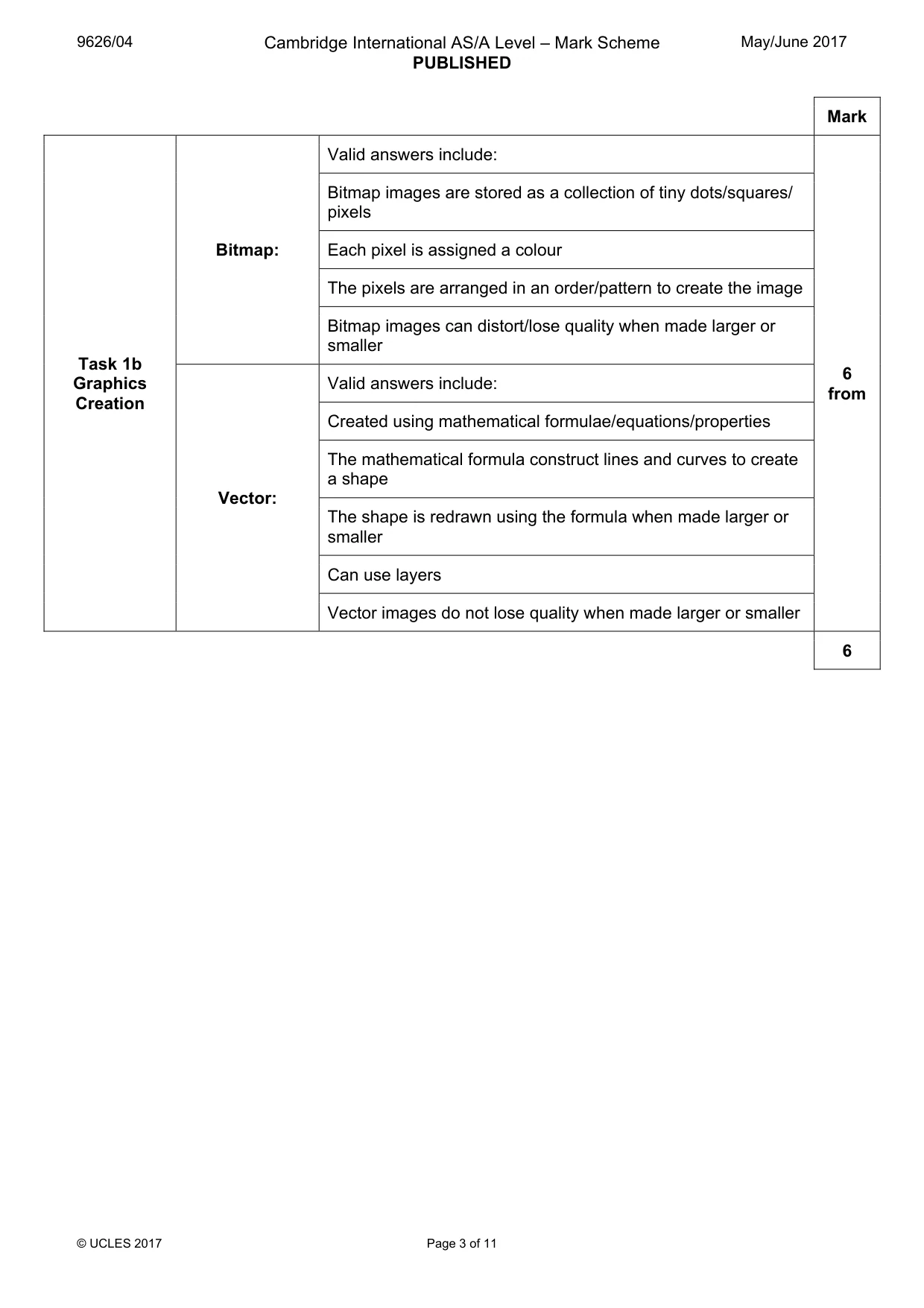
Mark scheme, page 3
9626/04 Cambridge International AS/A Level – Mark Scheme PUBLISHED May/June 2017 © UCLES 2017 Page 3 of 11 Mark Task 1b Graphics Creation Bitmap: Valid answers include: 6 from Bitmap images are stored as a collection of tiny dots/squares/ pixels Each pixel is assigned a colour The pixels are arranged in an order/pattern to create the image Bitmap images can distort/lose quality when made larger or smaller Vector: Valid answers include: Created using mathematical formulae/equations/properties The mathematical formula construct lines and curves to create a shape The shape is redrawn using the formula when made larger or smaller Can use layers Vector images do not lose quality when made larger or smaller 6
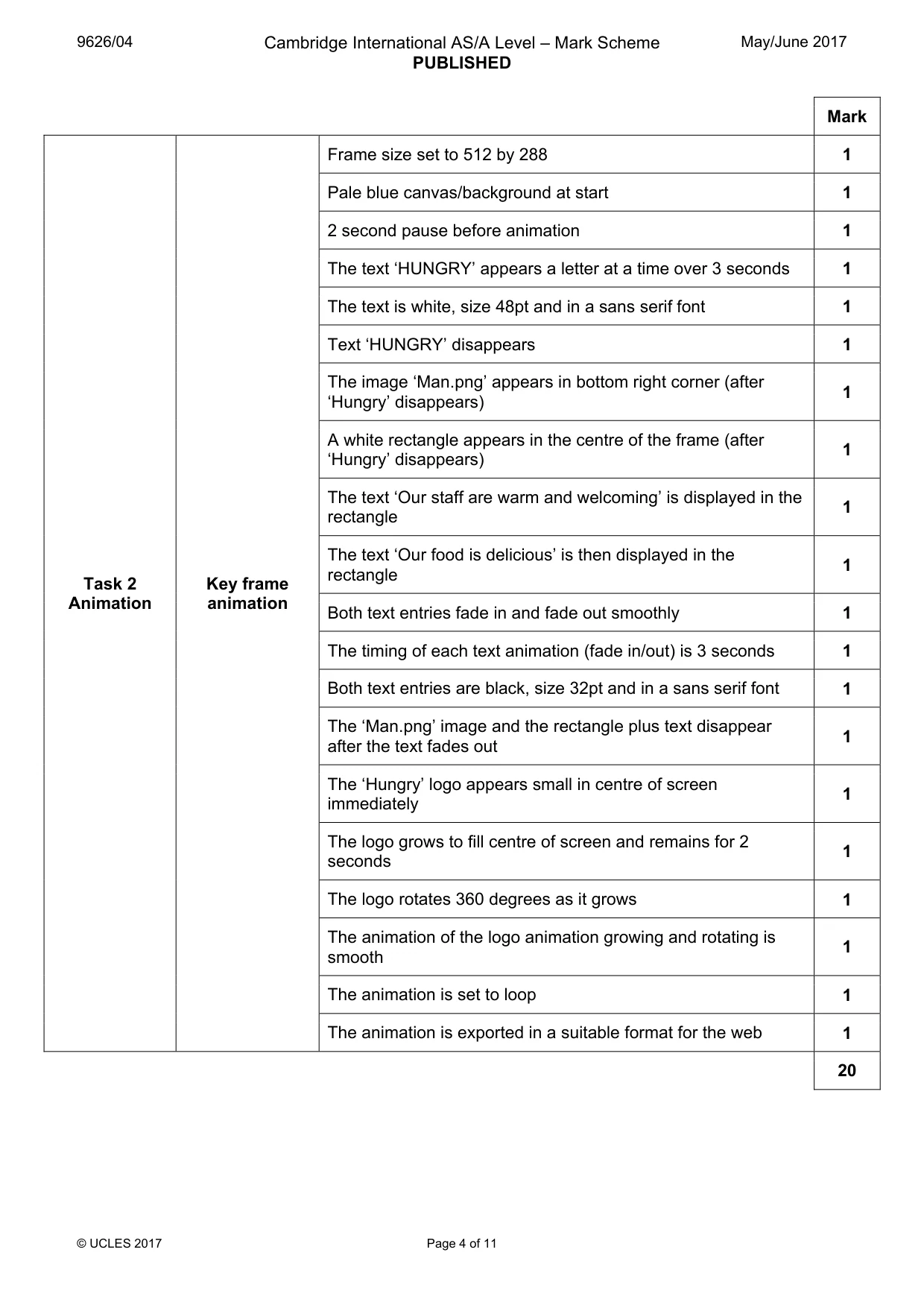
Mark scheme, page 4
9626/04 Cambridge International AS/A Level – Mark Scheme PUBLISHED May/June 2017 © UCLES 2017 Page 4 of 11 Mark Task 2 Animation Key frame animation Frame size set to 512 by 288 1 Pale blue canvas/background at start 1 2 second pause before animation 1 The text ‘HUNGRY’ appears a letter at a time over 3 seconds 1 The text is white, size 48pt and in a sans serif font 1 Text ‘HUNGRY’ disappears 1 The image ‘Man.png’ appears in bottom right corner (after ‘Hungry’ disappears) 1 A white rectangle appears in the centre of the frame (after ‘Hungry’ disappears) 1 The text ‘Our staff are warm and welcoming’ is displayed in the rectangle 1 The text ‘Our food is delicious’ is then displayed in the rectangle 1 Both text entries fade in and fade out smoothly 1 The timing of each text animation (fade in/out) is 3 seconds 1 Both text entries are black, size 32pt and in a sans serif font 1 The ‘Man.png’ image and the rectangle plus text disappear after the text fades out 1 The ‘Hungry’ logo appears small in centre of screen immediately 1 The logo grows to fill centre of screen and remains for 2 seconds 1 The logo rotates 360 degrees as it grows 1 The animation of the logo animation growing and rotating is smooth 1 The animation is set to loop 1 The animation is exported in a suitable format for the web 1 20
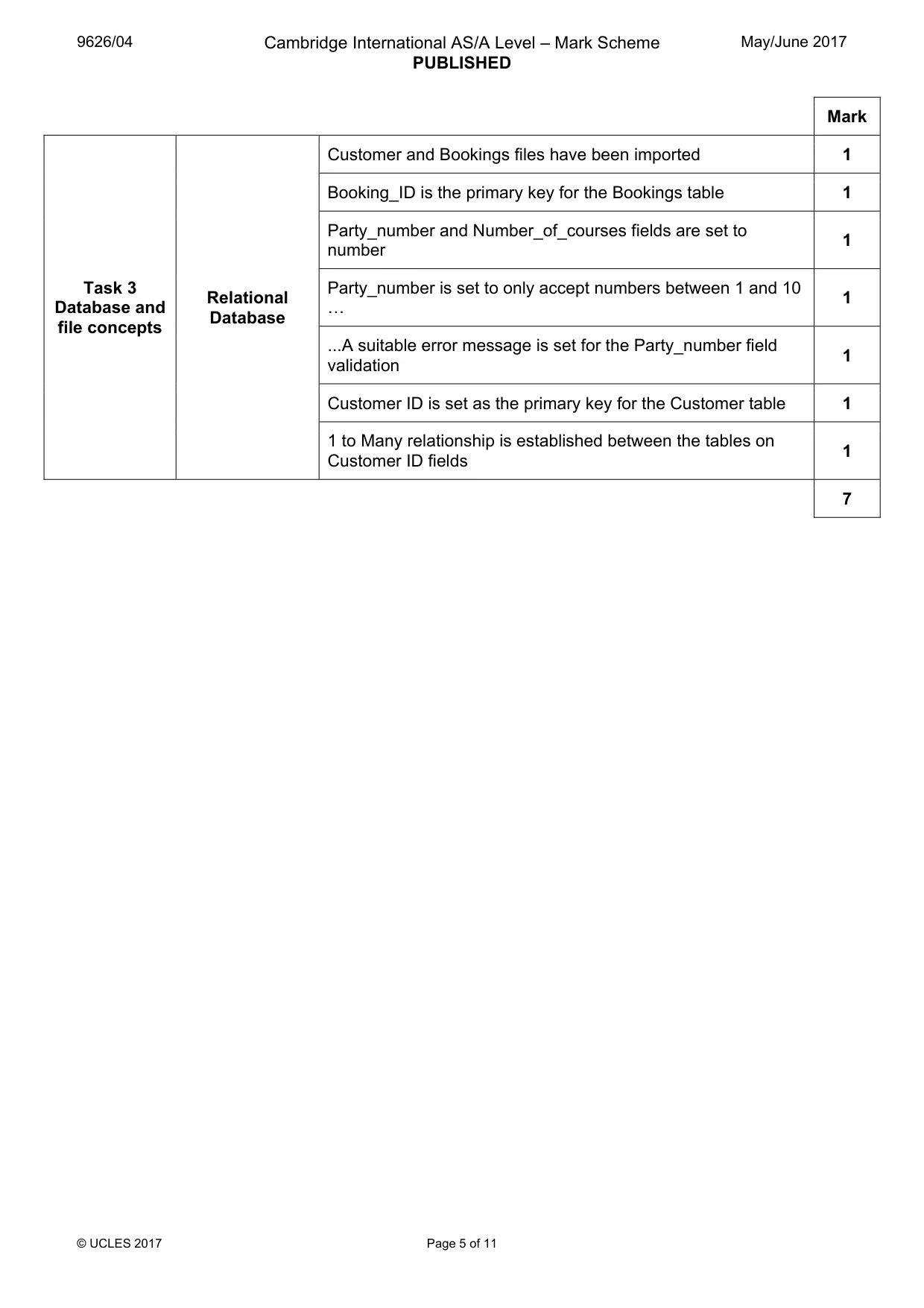
Mark scheme, page 5
9626/04 Cambridge International AS/A Level – Mark Scheme PUBLISHED May/June 2017 © UCLES 2017 Page 5 of 11 Mark Task 3 Database and file concepts Relational Database Customer and Bookings files have been imported 1 Booking_ID is the primary key for the Bookings table 1 Party_number and Number_of_courses fields are set to number 1 Party_number is set to only accept numbers between 1 and 10 « 1 ...A suitable error message is set for the Party_number field validation 1 Customer ID is set as the primary key for the Customer table 1 1 to Many relationship is established between the tables on Customer ID fields 1 7
Mark scheme, page 6
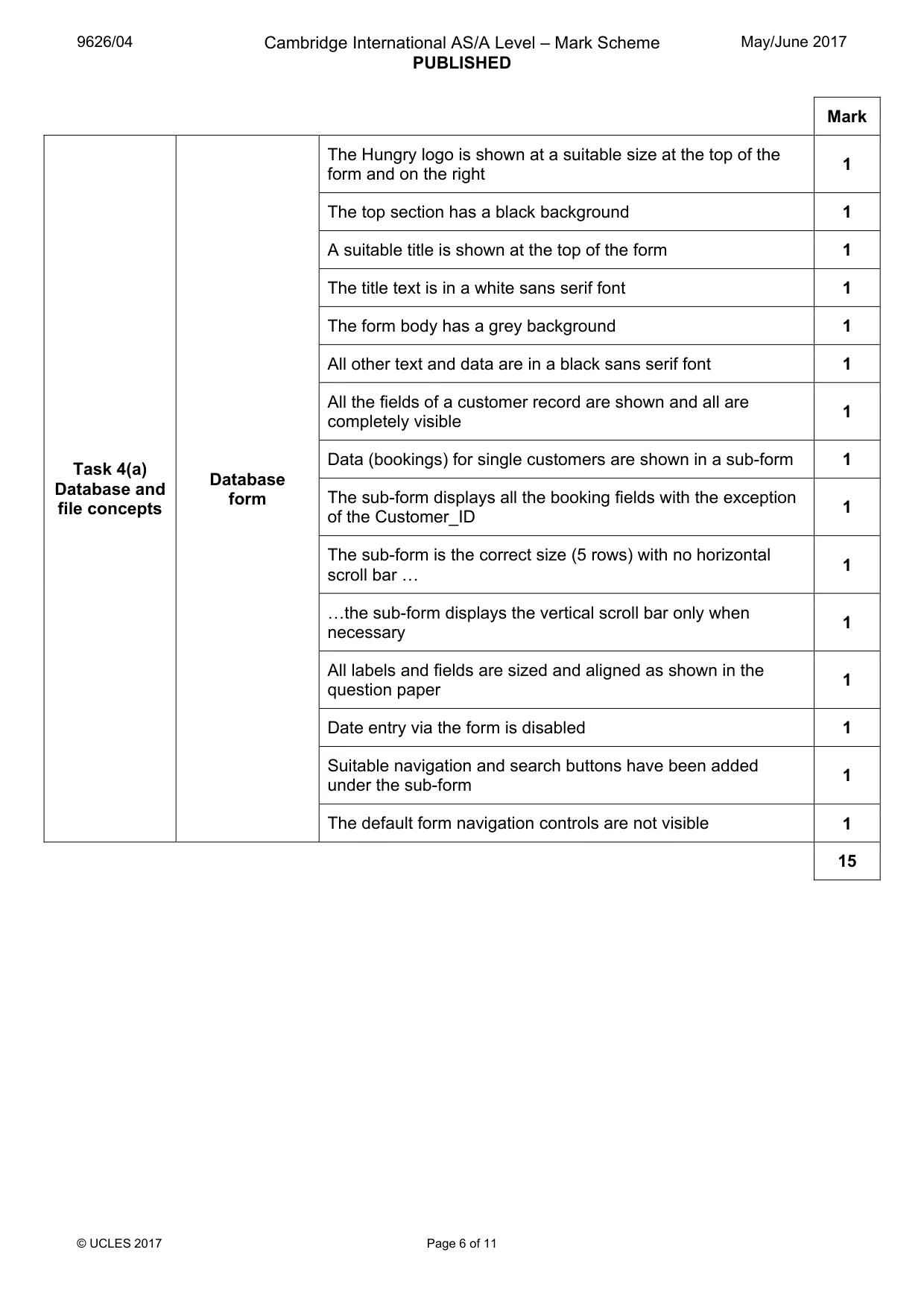
9626/04 Cambridge International AS/A Level – Mark Scheme PUBLISHED May/June 2017 © UCLES 2017 Page 6 of 11 Mark Task 4(a) Database and file concepts Database form The Hungry logo is shown at a suitable size at the top of the form and on the right 1 The top section has a black background 1 A suitable title is shown at the top of the form 1 The title text is in a white sans serif font 1 The form body has a grey background 1 All other text and data are in a black sans serif font 1 All the fields of a customer record are shown and all are completely visible 1 Data (bookings) for single customers are shown in a sub-form 1 The sub-form displays all the booking fields with the exception of the Customer_ID 1 The sub-form is the correct size (5 rows) with no horizontal scroll bar « 1 «the sub-form displays the vertical scroll bar only when necessary 1 All labels and fields are sized and aligned as shown in the question paper 1 Date entry via the form is disabled 1 Suitable navigation and search buttons have been added under the sub-form 1 The default form navigation controls are not visible 1 15
Mark scheme, page 7
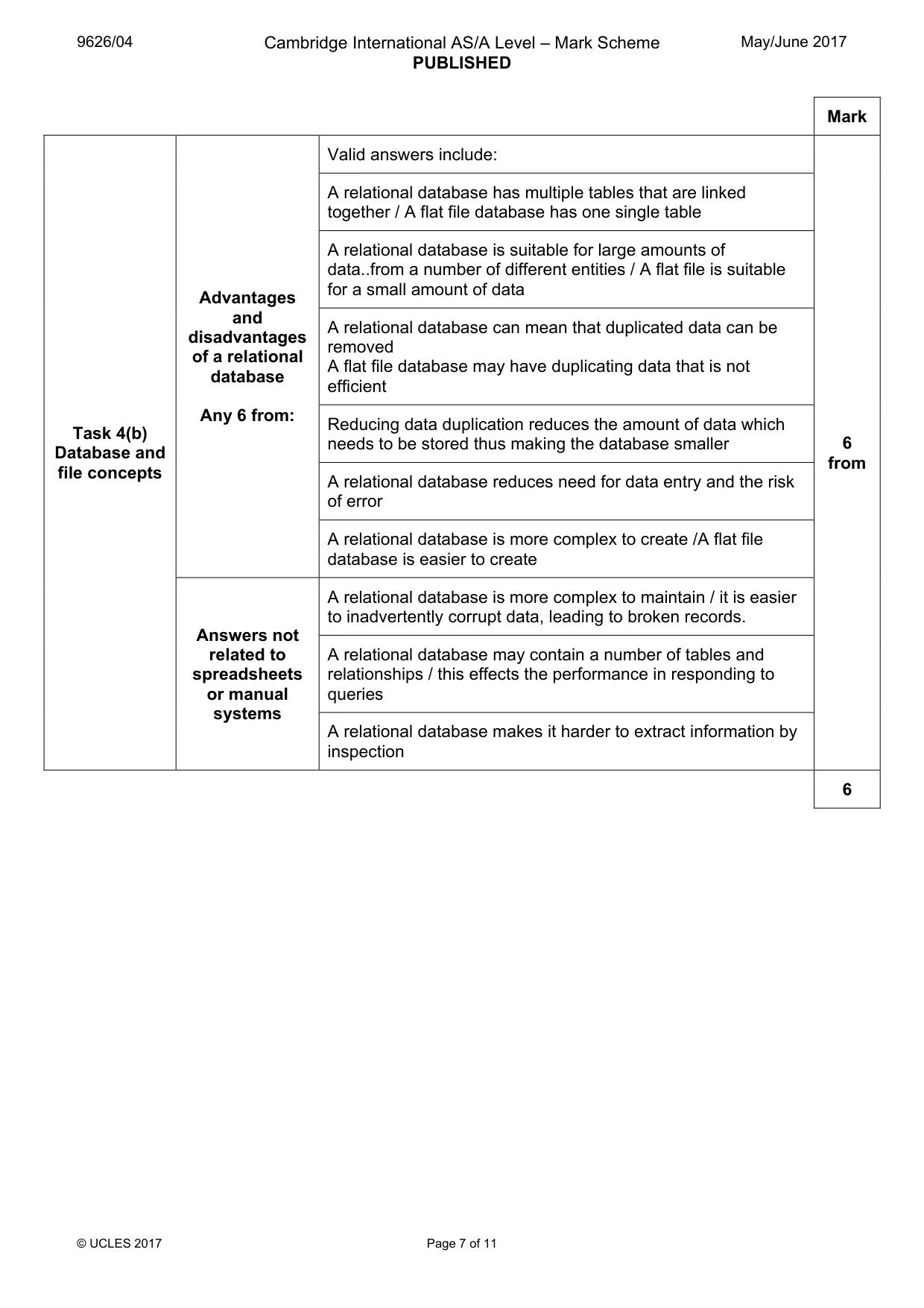
9626/04 Cambridge International AS/A Level – Mark Scheme PUBLISHED May/June 2017 © UCLES 2017 Page 7 of 11 Mark Task 4(b) Database and file concepts Advantages and disadvantages of a relational database Any 6 from: Valid answers include: 6 from A relational database has multiple tables that are linked together / A flat file database has one single table A relational database is suitable for large amounts of data..from a number of different entities / A flat file is suitable for a small amount of data A relational database can mean that duplicated data can be removed A flat file database may have duplicating data that is not efficient Reducing data duplication reduces the amount of data which needs to be stored thus making the database smaller A relational database reduces need for data entry and the risk of error A relational database is more complex to create /A flat file database is easier to create Answers not related to spreadsheets or manual systems A relational database is more complex to maintain / it is easier to inadvertently corrupt data, leading to broken records. A relational database may contain a number of tables and relationships / this effects the performance in responding to queries A relational database makes it harder to extract information by inspection 6
Mark scheme, page 8
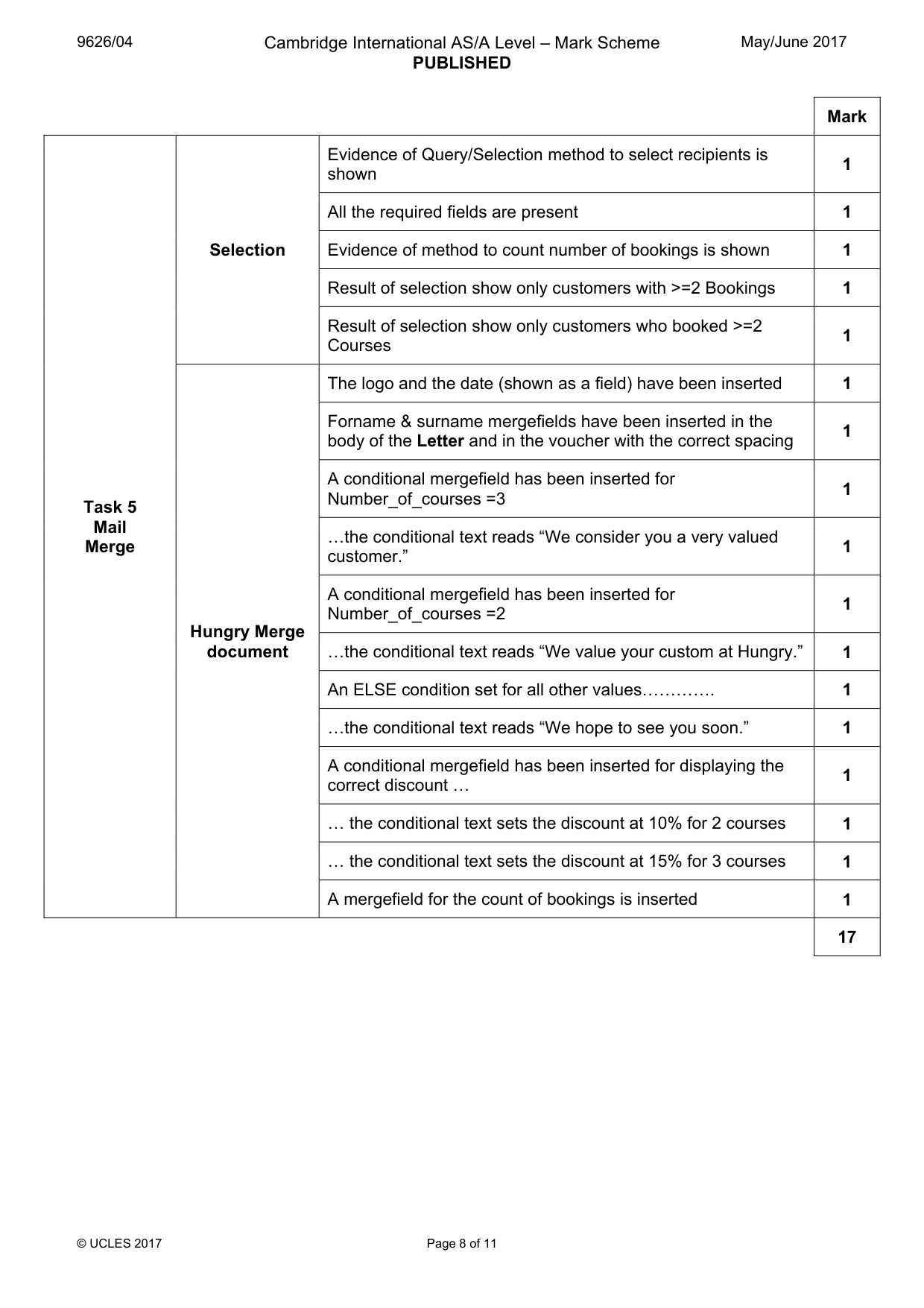
9626/04 Cambridge International AS/A Level – Mark Scheme PUBLISHED May/June 2017 © UCLES 2017 Page 8 of 11 Mark Task 5 Mail Merge Selection Evidence of Query/Selection method to select recipients is shown 1 All the required fields are present 1 Evidence of method to count number of bookings is shown 1 Result of selection show only customers with >=2 Bookings 1 Result of selection show only customers who booked >=2 Courses 1 Hungry Merge document The logo and the date (shown as a field) have been inserted 1 Forname & surname mergefields have been inserted in the body of the Letter and in the voucher with the correct spacing 1 A conditional mergefield has been inserted for Number_of_courses =3 1 «the conditional text reads “We consider you a very valued customer.” 1 A conditional mergefield has been inserted for Number_of_courses =2 1 «the conditional text reads “We value your custom at Hungry.” 1 An ELSE condition set for all other values««««. 1 «the conditional text reads “We hope to see you soon.” 1 A conditional mergefield has been inserted for displaying the correct discount « 1 « the conditional text sets the discount at 10% for 2 courses 1 « the conditional text sets the discount at 15% for 3 courses 1 A mergefield for the count of bookings is inserted 1 17
Mark scheme, page 9
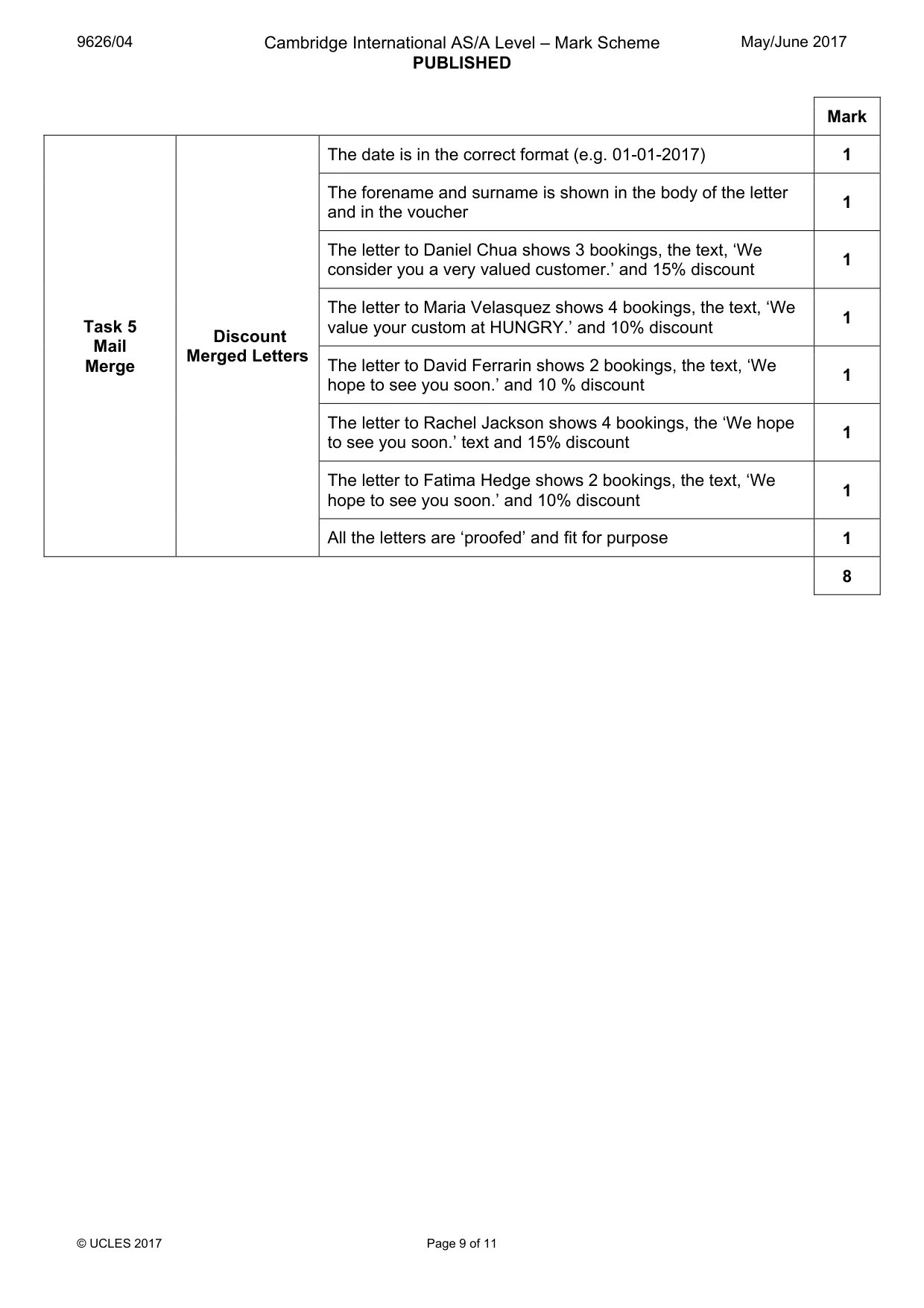
9626/04 Cambridge International AS/A Level – Mark Scheme PUBLISHED May/June 2017 © UCLES 2017 Page 9 of 11 Mark Task 5 Mail Merge Discount Merged Letters The date is in the correct format (e.g. 01-01-2017) 1 The forename and surname is shown in the body of the letter and in the voucher 1 The letter to Daniel Chua shows 3 bookings, the text, ‘We consider you a very valued customer.’ and 15% discount 1 The letter to Maria Velasquez shows 4 bookings, the text, ‘We value your custom at HUNGRY.’ and 10% discount 1 The letter to David Ferrarin shows 2 bookings, the text, ‘We hope to see you soon.’ and 10 % discount 1 The letter to Rachel Jackson shows 4 bookings, the ‘We hope to see you soon.’ text and 15% discount 1 The letter to Fatima Hedge shows 2 bookings, the text, ‘We hope to see you soon.’ and 10% discount 1 All the letters are ‘proofed’ and fit for purpose 1 8
Mark scheme, page 10
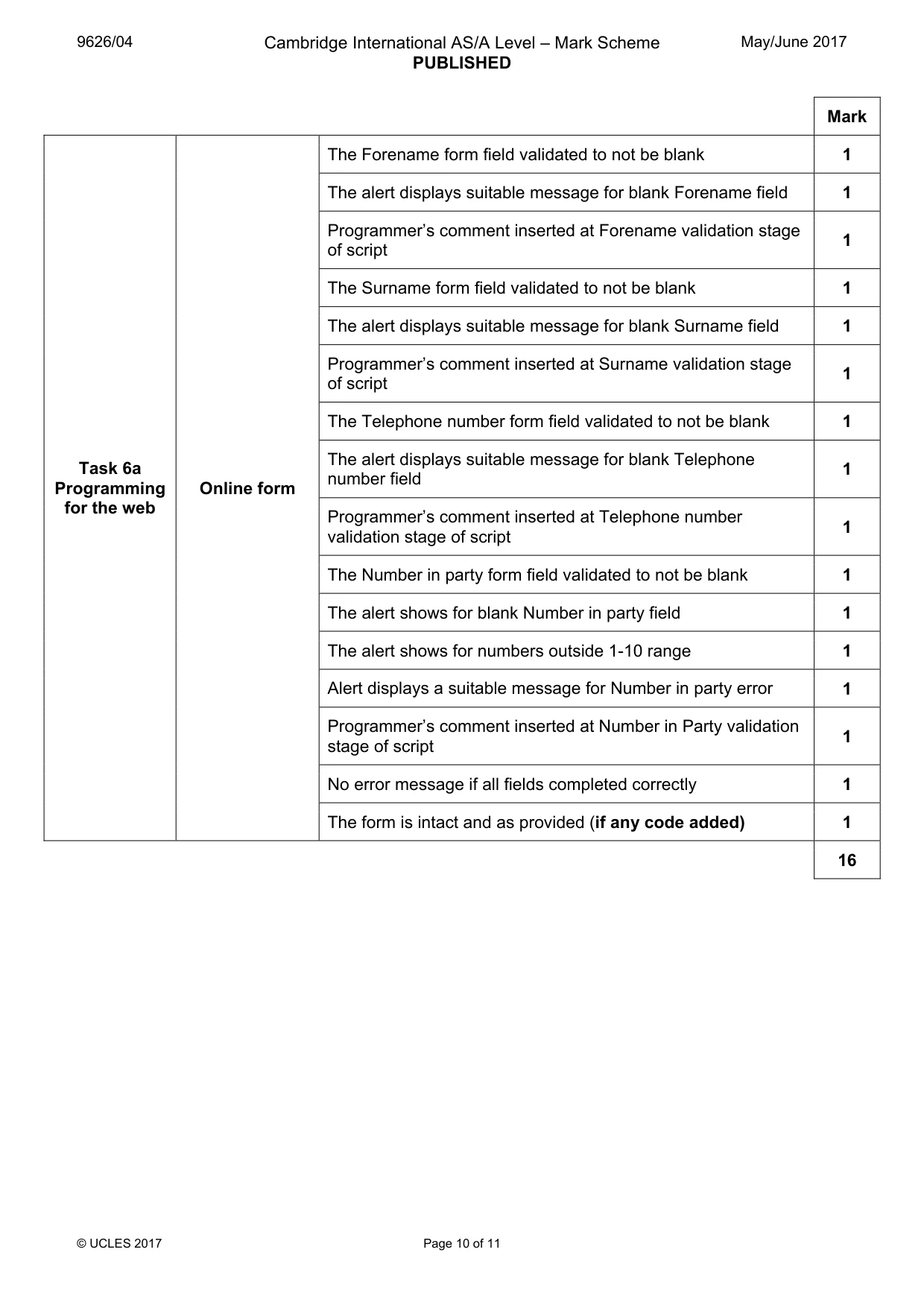
9626/04 Cambridge International AS/A Level – Mark Scheme PUBLISHED May/June 2017 © UCLES 2017 Page 10 of 11 Mark Task 6a Programming for the web Online form The Forename form field validated to not be blank 1 The alert displays suitable message for blank Forename field 1 Programmer’s comment inserted at Forename validation stage of script 1 The Surname form field validated to not be blank 1 The alert displays suitable message for blank Surname field 1 Programmer’s comment inserted at Surname validation stage of script 1 The Telephone number form field validated to not be blank 1 The alert displays suitable message for blank Telephone number field 1 Programmer’s comment inserted at Telephone number validation stage of script 1 The Number in party form field validated to not be blank 1 The alert shows for blank Number in party field 1 The alert shows for numbers outside 1-10 range 1 Alert displays a suitable message for Number in party error 1 Programmer’s comment inserted at Number in Party validation stage of script 1 No error message if all fields completed correctly 1 The form is intact and as provided (if any code added) 1 16
Mark scheme, page 11
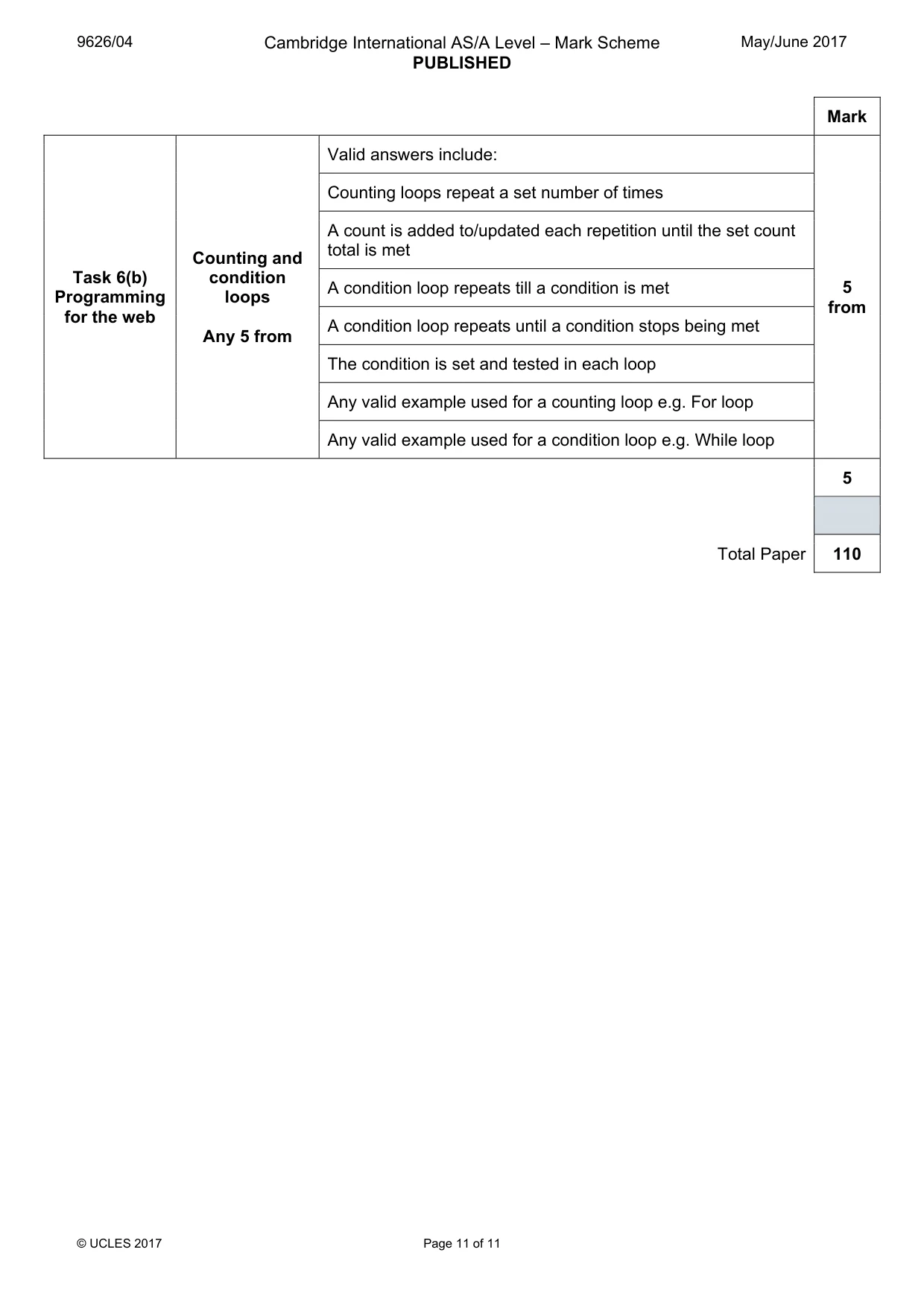
9626/04 Cambridge International AS/A Level – Mark Scheme PUBLISHED May/June 2017 © UCLES 2017 Page 11 of 11 Mark Task 6(b) Programming for the web Counting and condition loops Any 5 from Valid answers include: 5 from Counting loops repeat a set number of times A count is added to/updated each repetition until the set count total is met A condition loop repeats till a condition is met A condition loop repeats until a condition stops being met The condition is set and tested in each loop Any valid example used for a counting loop e.g. For loop Any valid example used for a condition loop e.g. While loop 5 Total Paper 110
What you needed in this session
Cambridge’s own grade thresholds for 2017 May/June, Paper 4 · Variant 1. A higher threshold means an easier paper — the bar moves with how the cohort did.