Cambridge A Level Information Technology (from 2017) 9626 — 2017 Oct/Nov Paper 4 · Variant 1
9626/41/O/N/17 · 110 marks · ≈124 min
The question paper and its mark scheme, free to read here and free to download. This is Cambridge’s own paper, exactly as it was sat.
Question paper8 pages

Mark scheme8 pages
Answers below. Sit the paper first if you are practising.
Paper as text
Question paper, page 1
* 1 0 9 2 0 1 0 5 1 0 * This document consists of 6 printed pages and 2 blank pages. DC (ST/SW) 135237/4 © UCLES 2017 [Turn over INFORMATION TECHNOLOGY 9626/04 Paper 4 Advanced Practical October/November 2017 2 hours 30 minutes Additional Materials: Candidate Source Files READ THESE INSTRUCTIONS FIRST DO NOT WRITE IN ANY BARCODES. Carry out every instruction in each task. Save your work using the file names given in the task as and when instructed. The number of marks is given in brackets [ ] at the end of each task or part task. Any businesses described in this paper are entirely fictitious. Cambridge International Examinations Cambridge International Advanced Subsidiary and Advanced Level
Question paper, page 2
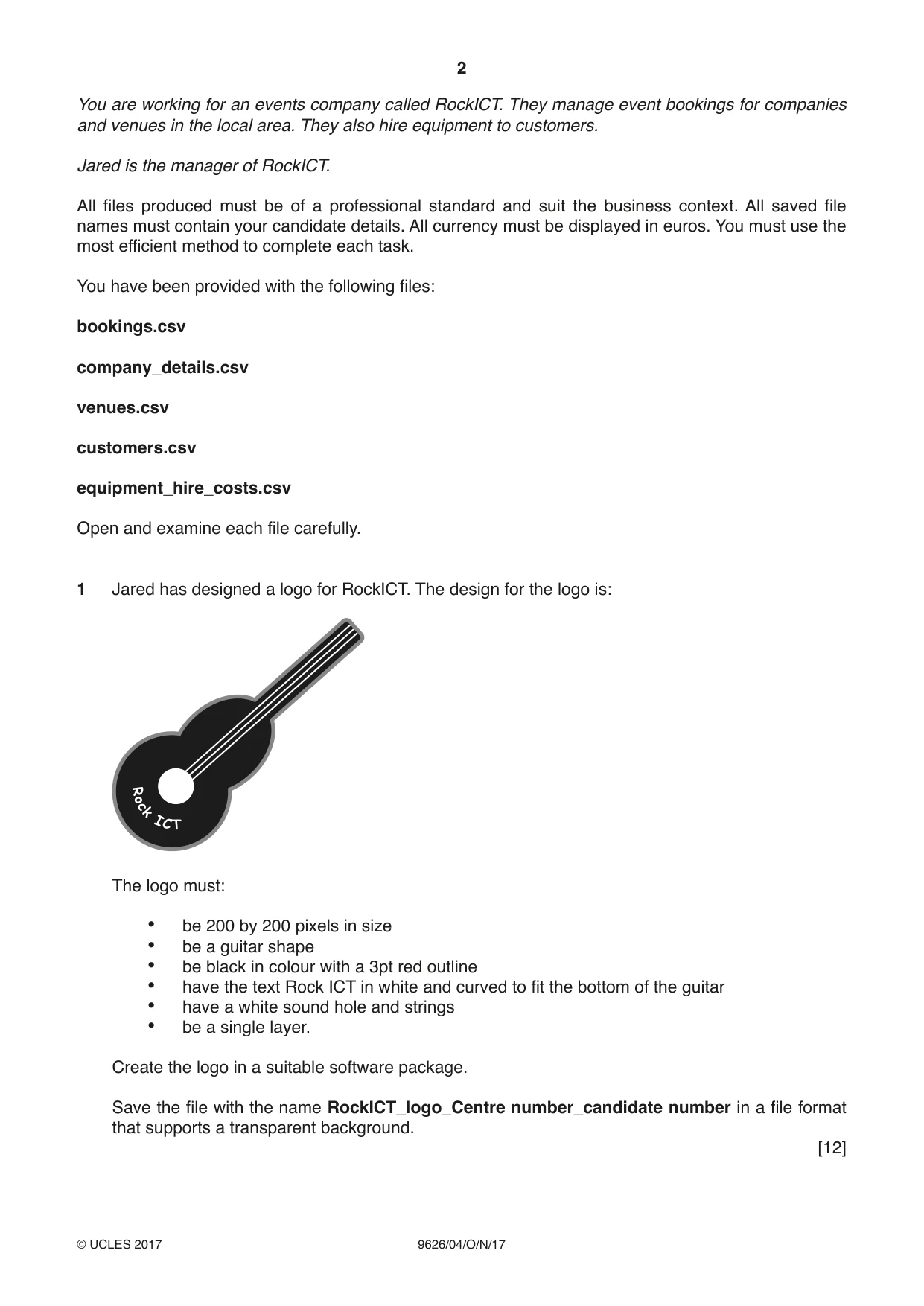
2 9626/04/O/N/17 © UCLES 2017 You are working for an events company called RockICT. They manage event bookings for companies and venues in the local area. They also hire equipment to customers. Jared is the manager of RockICT. All files produced must be of a professional standard and suit the business context. All saved file names must contain your candidate details. All currency must be displayed in euros. You must use the most efficient method to complete each task. You have been provided with the following files: bookings.csv company_details.csv venues.csv customers.csv equipment_hire_costs.csv Open and examine each file carefully. 1 Jared has designed a logo for RockICT. The design for the logo is: R o c k I C T The logo must: • be 200 by 200 pixels in size • be a guitar shape • be black in colour with a 3pt red outline • have the text Rock ICT in white and curved to fit the bottom of the guitar • have a white sound hole and strings • be a single layer. Create the logo in a suitable software package. Save the file with the name RockICT_logo_Centre number_candidate number in a file format that supports a transparent background. [12]
Question paper, page 3
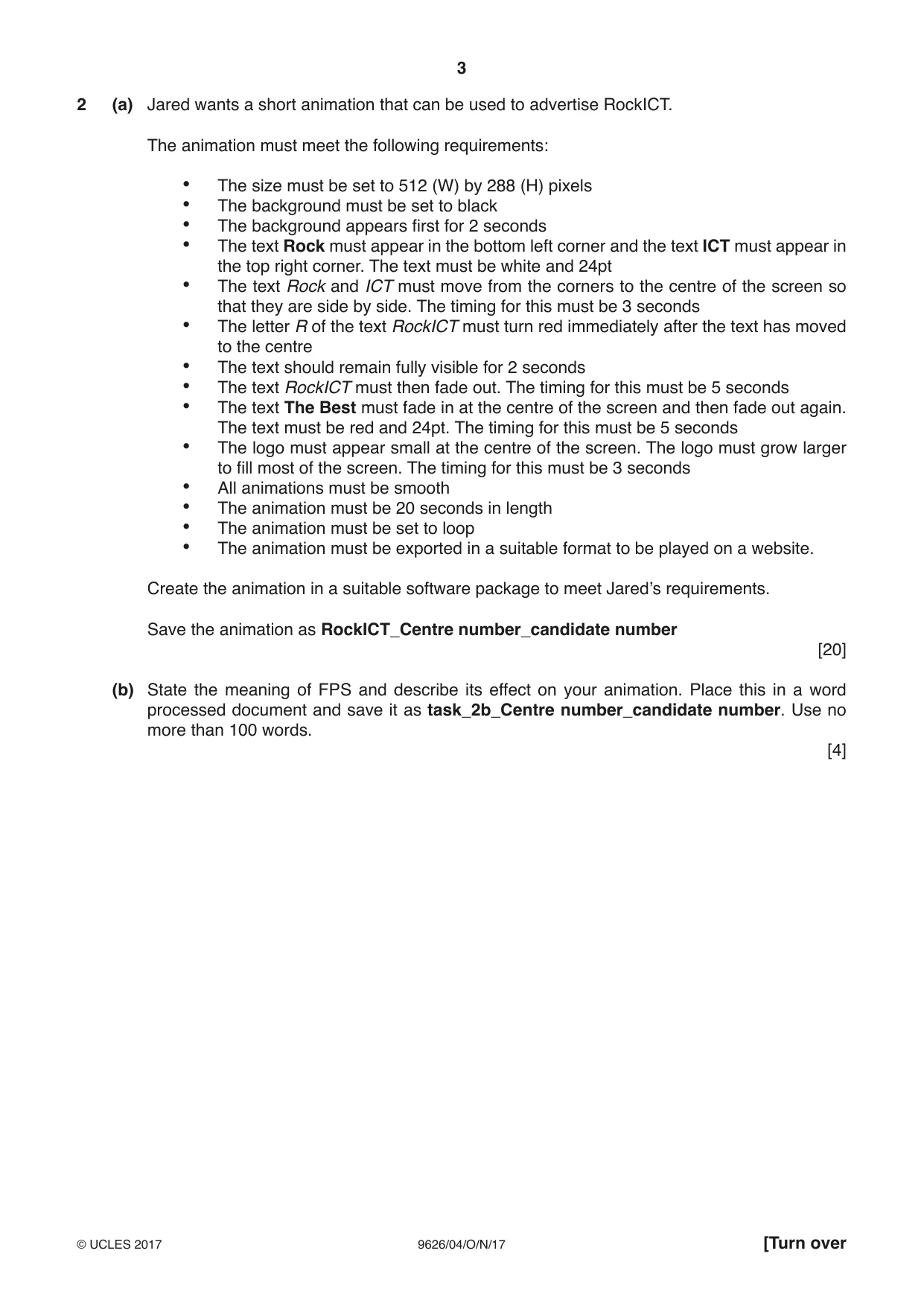
3 9626/04/O/N/17 © UCLES 2017 [Turn over 2 (a) Jared wants a short animation that can be used to advertise RockICT. The animation must meet the following requirements: • The size must be set to 512 (W) by 288 (H) pixels • The background must be set to black • The background appears first for 2 seconds • The text Rock must appear in the bottom left corner and the text ICT must appear in the top right corner. The text must be white and 24pt • The text Rock and ICT must move from the corners to the centre of the screen so that they are side by side. The timing for this must be 3 seconds • The letter R of the text RockICT must turn red immediately after the text has moved to the centre • The text should remain fully visible for 2 seconds • The text RockICT must then fade out. The timing for this must be 5 seconds • The text The Best must fade in at the centre of the screen and then fade out again. The text must be red and 24pt. The timing for this must be 5 seconds • The logo must appear small at the centre of the screen. The logo must grow larger to fill most of the screen. The timing for this must be 3 seconds • All animations must be smooth • The animation must be 20 seconds in length • The animation must be set to loop • The animation must be exported in a suitable format to be played on a website. Create the animation in a suitable software package to meet Jared’s requirements. Save the animation as RockICT_Centre number_candidate number [20] (b) State the meaning of FPS and describe its effect on your animation. Place this in a word processed document and save it as task_2b_Centre number_candidate number. Use no more than 100 words. [4]
Question paper, page 4
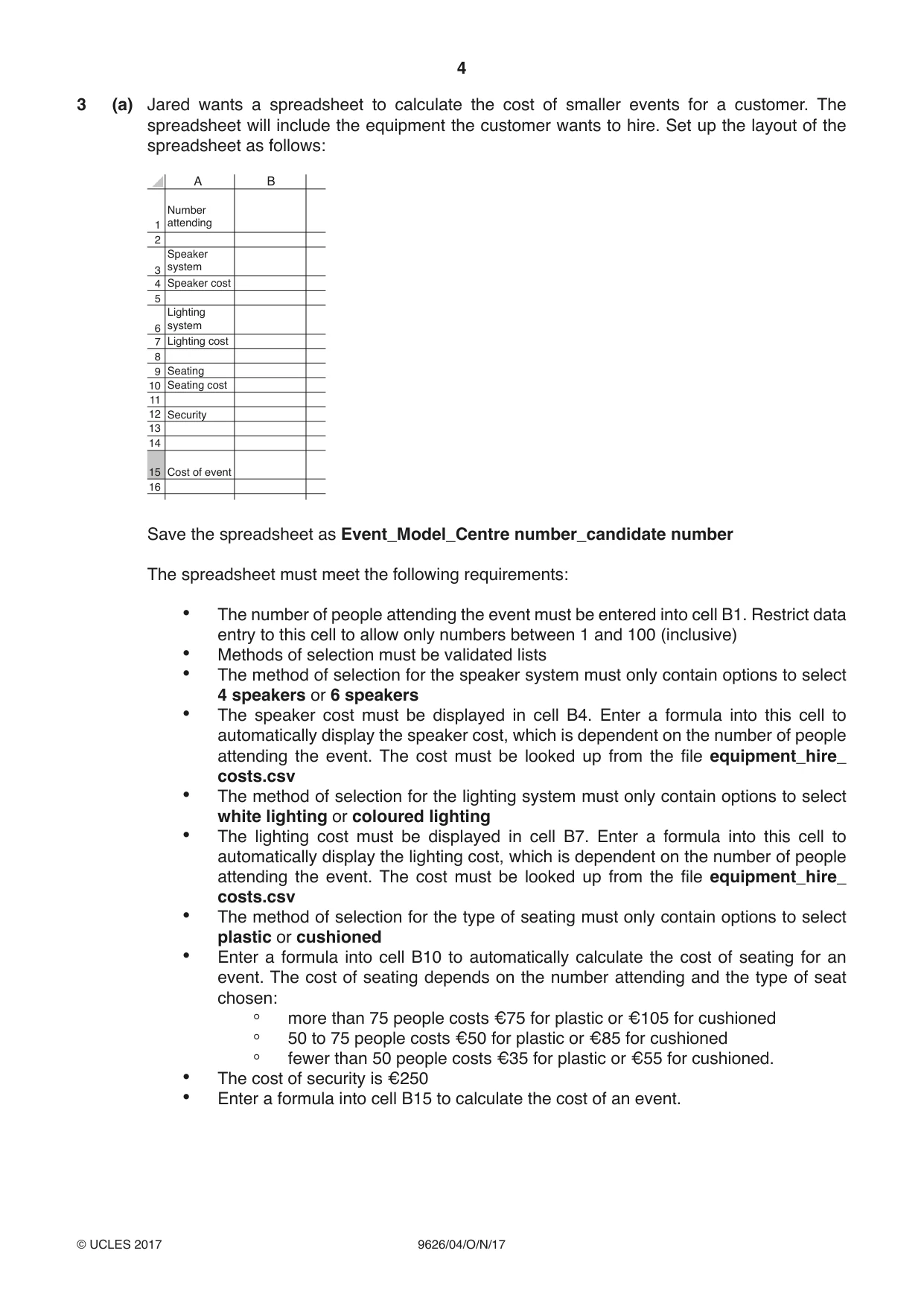
4 9626/04/O/N/17 © UCLES 2017 3 (a) Jared wants a spreadsheet to calculate the cost of smaller events for a customer. The spreadsheet will include the equipment the customer wants to hire. Set up the layout of the spreadsheet as follows: A Number attending 1 2 3 4 5 6 7 8 9 10 11 12 13 14 15 16 Speaker system Lighting system Lighting cost Seating Seating cost Security Cost of event Speaker cost B Save the spreadsheet as Event_Model_Centre number_candidate number The spreadsheet must meet the following requirements: • The number of people attending the event must be entered into cell B1. Restrict data entry to this cell to allow only numbers between 1 and 100 (inclusive) • Methods of selection must be validated lists • The method of selection for the speaker system must only contain options to select 4 speakers or 6 speakers • The speaker cost must be displayed in cell B4. Enter a formula into this cell to automatically display the speaker cost, which is dependent on the number of people attending the event. The cost must be looked up from the file equipment_hire_ costs.csv • The method of selection for the lighting system must only contain options to select white lighting or coloured lighting • The lighting cost must be displayed in cell B7. Enter a formula into this cell to automatically display the lighting cost, which is dependent on the number of people attending the event. The cost must be looked up from the file equipment_hire_ costs.csv • The method of selection for the type of seating must only contain options to select plastic or cushioned • Enter a formula into cell B10 to automatically calculate the cost of seating for an event. The cost of seating depends on the number attending and the type of seat chosen: ◦ more than 75 people costs €75 for plastic or €105 for cushioned ◦ 50 to 75 people costs €50 for plastic or €85 for cushioned ◦ fewer than 50 people costs €35 for plastic or €55 for cushioned. • The cost of security is €250 • Enter a formula into cell B15 to calculate the cost of an event.
Question paper, page 5
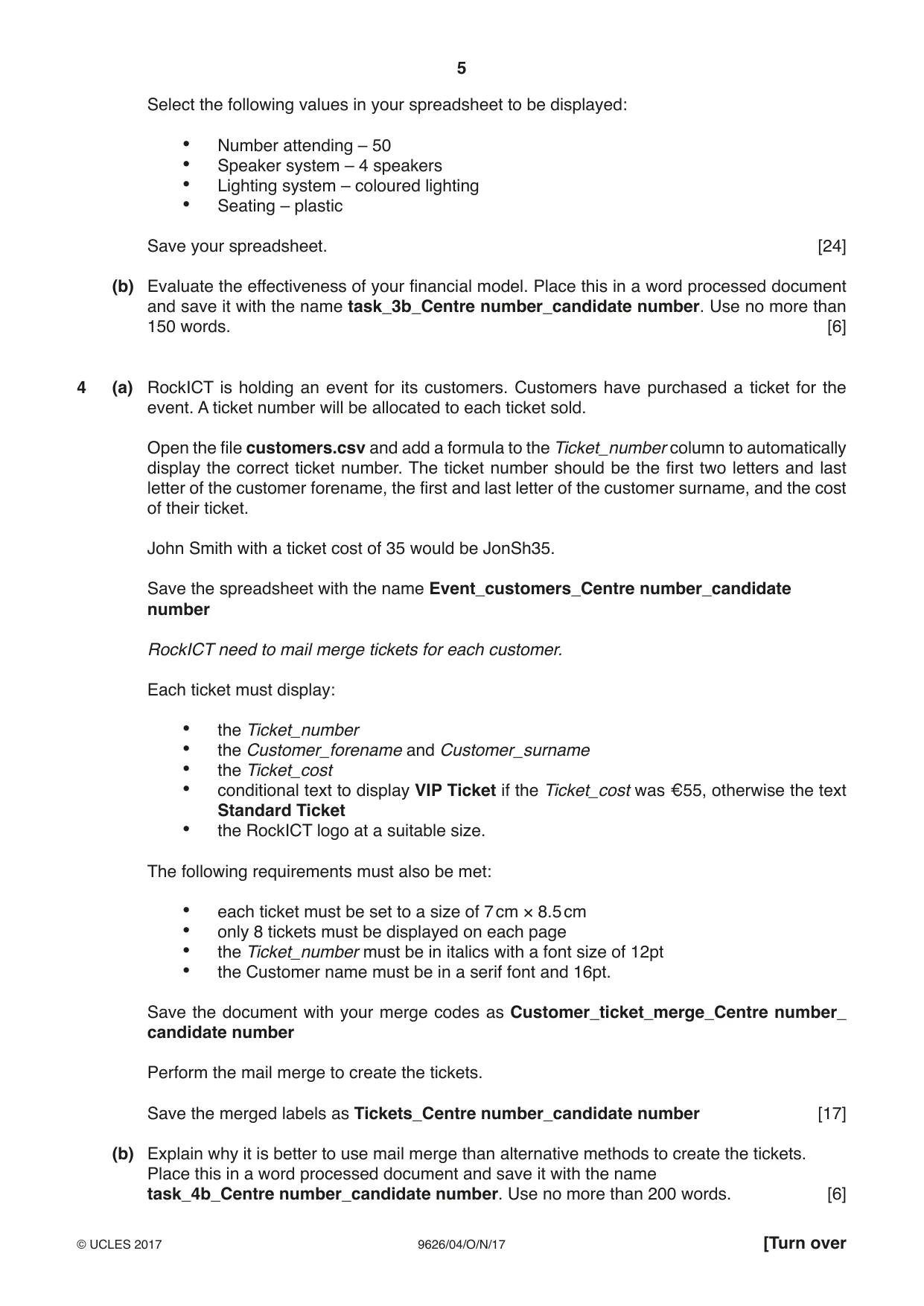
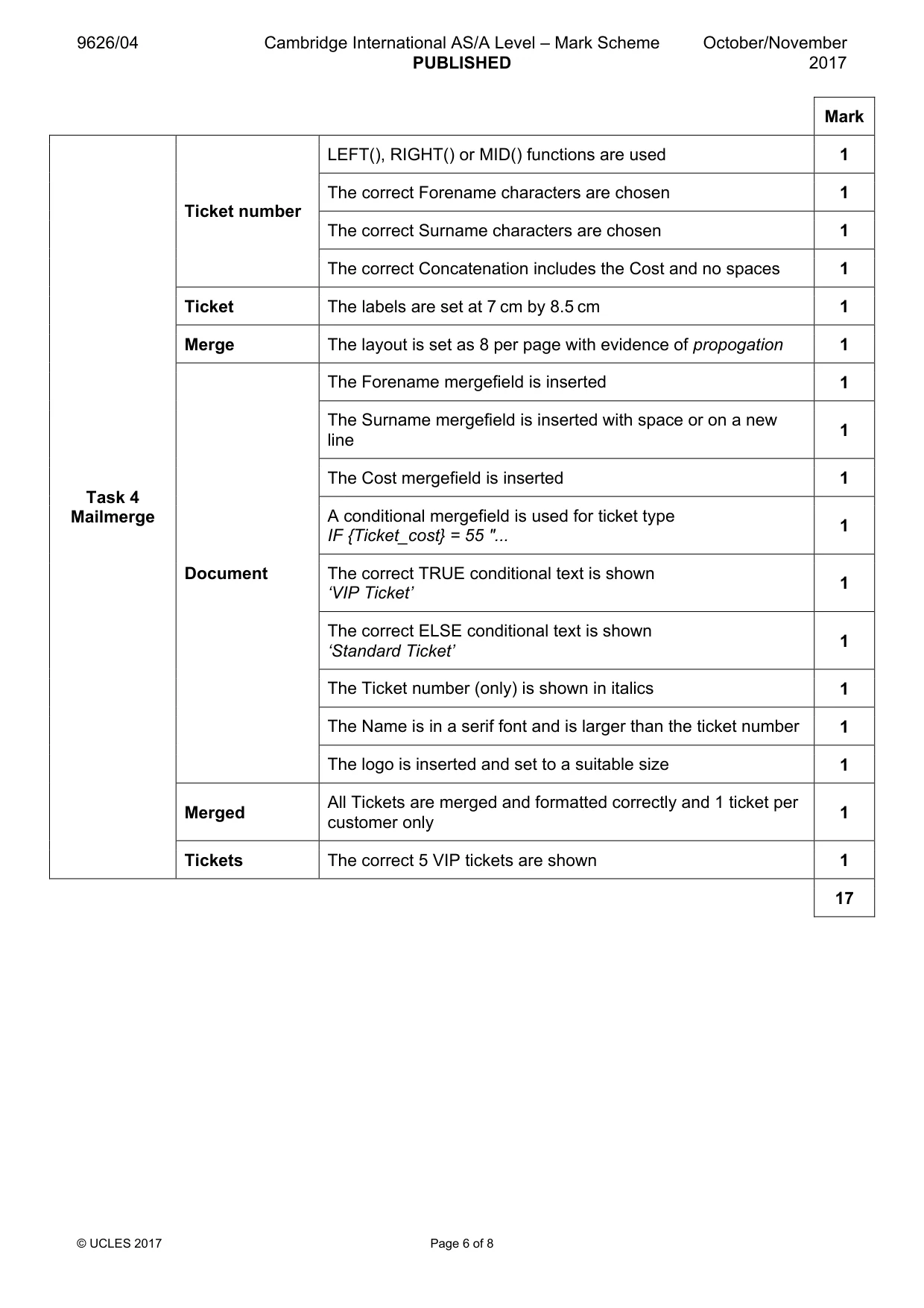
5 9626/04/O/N/17 © UCLES 2017 [Turn over Select the following values in your spreadsheet to be displayed: • Number attending – 50 • Speaker system – 4 speakers • Lighting system – coloured lighting • Seating – plastic Save your spreadsheet. [24] (b) Evaluate the effectiveness of your financial model. Place this in a word processed document and save it with the name task_3b_Centre number_candidate number. Use no more than 150 words. [6] 4 (a) RockICT is holding an event for its customers. Customers have purchased a ticket for the event. A ticket number will be allocated to each ticket sold. Open the file customers.csv and add a formula to the Ticket_number column to automatically display the correct ticket number. The ticket number should be the first two letters and last letter of the customer forename, the first and last letter of the customer surname, and the cost of their ticket. John Smith with a ticket cost of 35 would be JonSh35. Save the spreadsheet with the name Event_customers_Centre number_candidate number RockICT need to mail merge tickets for each customer. Each ticket must display: • the Ticket_number • the Customer_forename and Customer_surname • the Ticket_cost • conditional text to display VIP Ticket if the Ticket_cost was €55, otherwise the text Standard Ticket • the RockICT logo at a suitable size. The following requirements must also be met: • each ticket must be set to a size of 7 cm × 8.5 cm • only 8 tickets must be displayed on each page • the Ticket_number must be in italics with a font size of 12pt • the Customer name must be in a serif font and 16pt. Save the document with your merge codes as Customer_ticket_merge_Centre number_ candidate number Perform the mail merge to create the tickets. Save the merged labels as Tickets_Centre number_candidate number [17] (b) Explain why it is better to use mail merge than alternative methods to create the tickets. Place this in a word processed document and save it with the name task_4b_Centre number_candidate number. Use no more than 200 words. [6]
Question paper, page 6
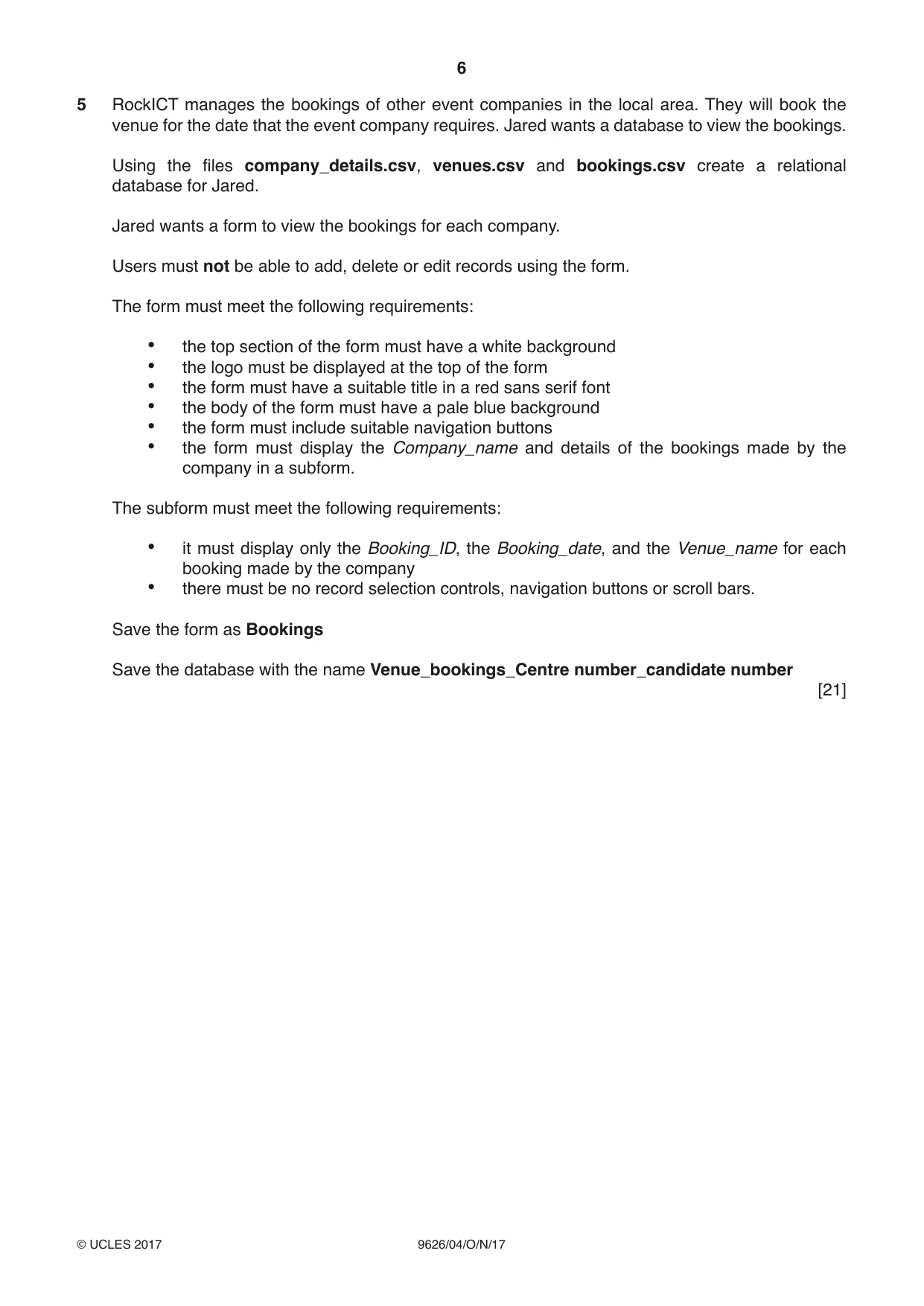
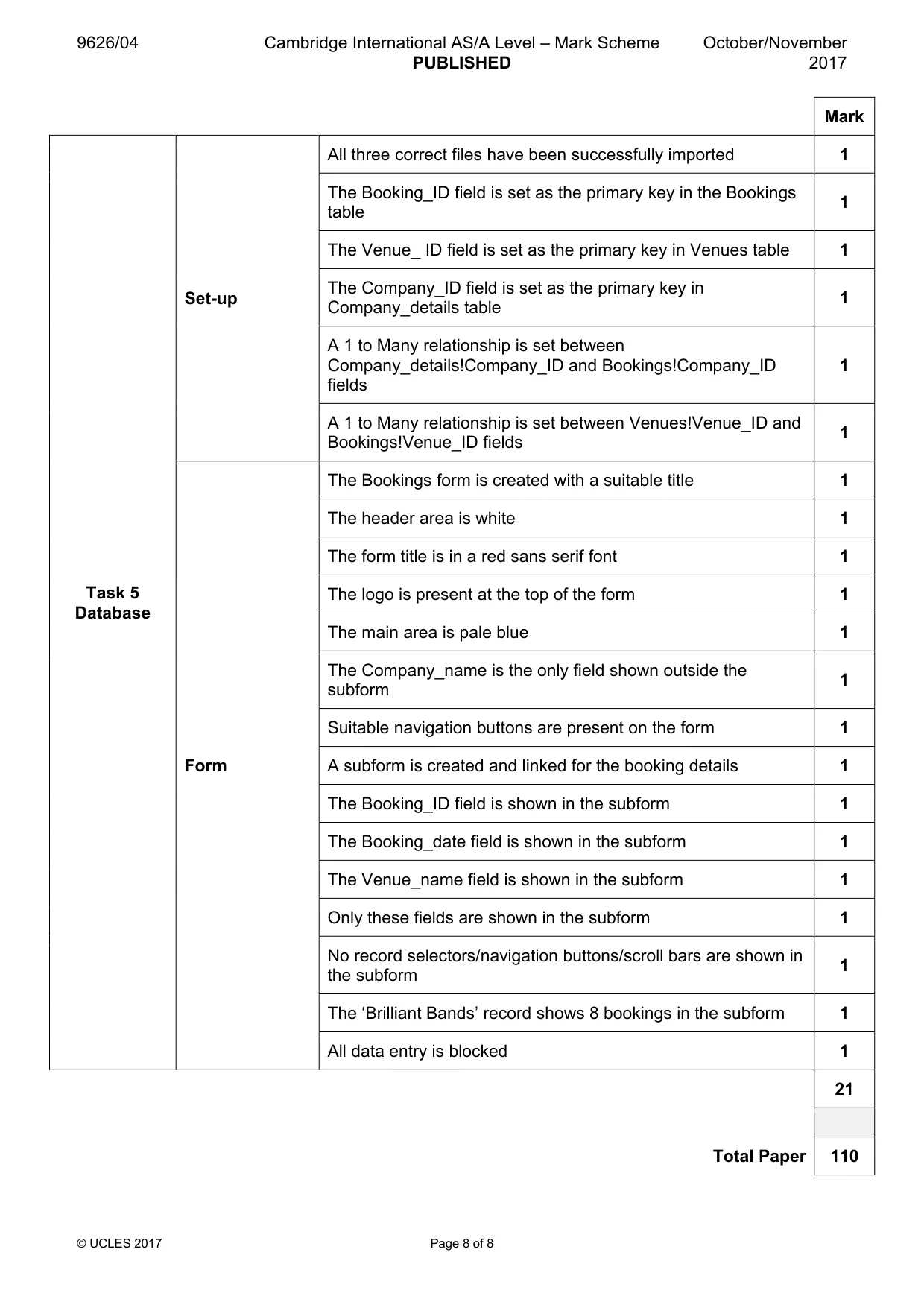
6 9626/04/O/N/17 © UCLES 2017 5 RockICT manages the bookings of other event companies in the local area. They will book the venue for the date that the event company requires. Jared wants a database to view the bookings. Using the files company_details.csv, venues.csv and bookings.csv create a relational database for Jared. Jared wants a form to view the bookings for each company. Users must not be able to add, delete or edit records using the form. The form must meet the following requirements: • the top section of the form must have a white background • the logo must be displayed at the top of the form • the form must have a suitable title in a red sans serif font • the body of the form must have a pale blue background • the form must include suitable navigation buttons • the form must display the Company_name and details of the bookings made by the company in a subform. The subform must meet the following requirements: • it must display only the Booking_ID, the Booking_date, and the Venue_name for each booking made by the company • there must be no record selection controls, navigation buttons or scroll bars. Save the form as Bookings Save the database with the name Venue_bookings_Centre number_candidate number [21]
Question paper, page 7
7 9626/04/O/N/17 © UCLES 2017 BLANK PAGE
Question paper, page 8
8 9626/04/O/N/17 © UCLES 2017 Permission to reproduce items where third-party owned material protected by copyright is included has been sought and cleared where possible. Every reasonable effort has been made by the publisher (UCLES) to trace copyright holders, but if any items requiring clearance have unwittingly been included, the publisher will be pleased to make amends at the earliest possible opportunity. To avoid the issue of disclosure of answer-related information to candidates, all copyright acknowledgements are reproduced online in the Cambridge International Examinations Copyright Acknowledgements Booklet. This is produced for each series of examinations and is freely available to download at www.cie.org.uk after the live examination series. Cambridge International Examinations is part of the Cambridge Assessment Group. Cambridge Assessment is the brand name of University of Cambridge Local Examinations Syndicate (UCLES), which is itself a department of the University of Cambridge. BLANK PAGE
Mark scheme, page 1
® IGCSE is a registered trademark. This document consists of 8 printed pages. © UCLES 2017 [Turn over Cambridge Assessment International Education Cambridge International Advanced Subsidiary and Advanced Level INFORMATION TECHNOLOGY 9626/04 Paper 4 Advanced Practical October/November 2017 MARK SCHEME Maximum Mark: 110 Published This mark scheme is published as an aid to teachers and candidates, to indicate the requirements of the examination. It shows the basis on which Examiners were instructed to award marks. It does not indicate the details of the discussions that took place at an Examiners’ meeting before marking began, which would have considered the acceptability of alternative answers. Mark schemes should be read in conjunction with the question paper and the Principal Examiner Report for Teachers. Cambridge International will not enter into discussions about these mark schemes. Cambridge International is publishing the mark schemes for the October/November 2017 series for most Cambridge IGCSE®, Cambridge International A and AS Level components and some Cambridge O Level components.
Mark scheme, page 2
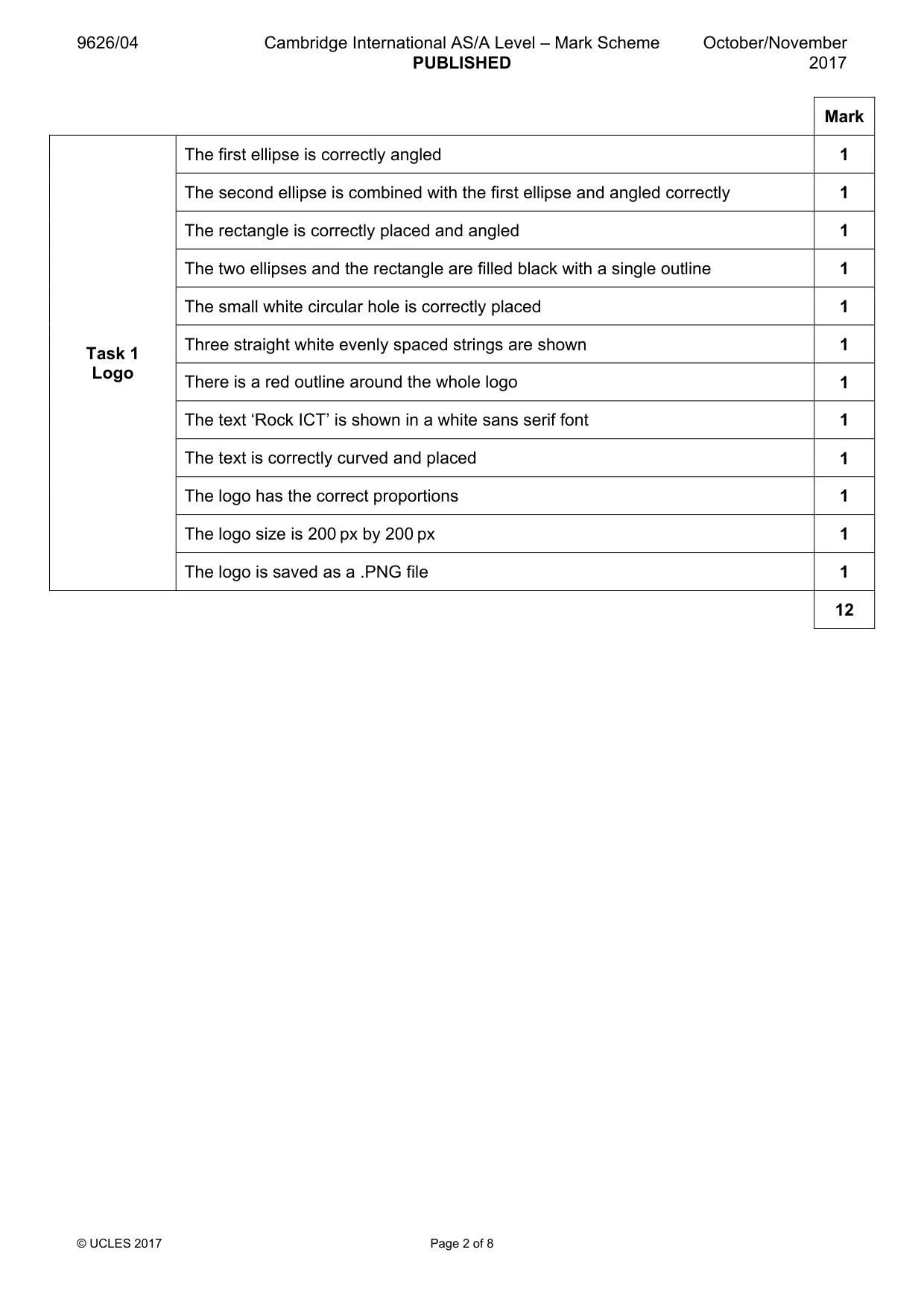
9626/04 Cambridge International AS/A Level – Mark Scheme PUBLISHED October/November 2017 © UCLES 2017 Page 2 of 8 Mark Task 1 Logo The first ellipse is correctly angled 1 The second ellipse is combined with the first ellipse and angled correctly 1 The rectangle is correctly placed and angled 1 The two ellipses and the rectangle are filled black with a single outline 1 The small white circular hole is correctly placed 1 Three straight white evenly spaced strings are shown 1 There is a red outline around the whole logo 1 The text ‘Rock ICT’ is shown in a white sans serif font 1 The text is correctly curved and placed 1 The logo has the correct proportions 1 The logo size is 200 px by 200 px 1 The logo is saved as a .PNG file 1 12
Mark scheme, page 3
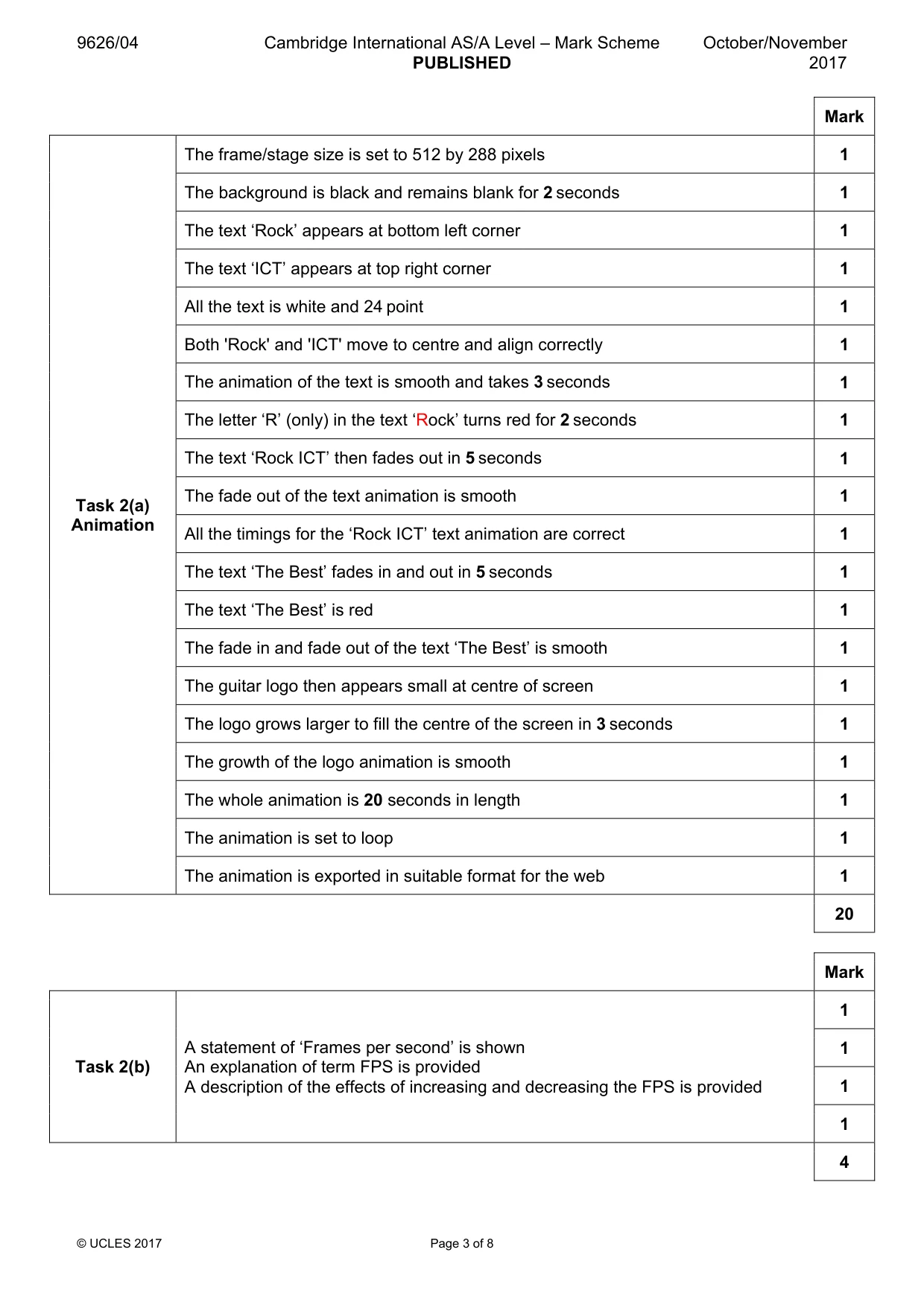
9626/04 Cambridge International AS/A Level – Mark Scheme PUBLISHED October/November 2017 © UCLES 2017 Page 3 of 8 Mark Task 2(a) Animation The frame/stage size is set to 512 by 288 pixels 1 The background is black and remains blank for 2 seconds 1 The text ‘Rock’ appears at bottom left corner 1 The text ‘ICT’ appears at top right corner 1 All the text is white and 24 point 1 Both 'Rock' and 'ICT' move to centre and align correctly 1 The animation of the text is smooth and takes 3 seconds 1 The letter ‘R’ (only) in the text ‘Rock’ turns red for 2 seconds 1 The text ‘Rock ICT’ then fades out in 5 seconds 1 The fade out of the text animation is smooth 1 All the timings for the ‘Rock ICT’ text animation are correct 1 The text ‘The Best’ fades in and out in 5 seconds 1 The text ‘The Best’ is red 1 The fade in and fade out of the text ‘The Best’ is smooth 1 The guitar logo then appears small at centre of screen 1 The logo grows larger to fill the centre of the screen in 3 seconds 1 The growth of the logo animation is smooth 1 The whole animation is 20 seconds in length 1 The animation is set to loop 1 The animation is exported in suitable format for the web 1 20 Mark Task 2(b) A statement of ‘Frames per second’ is shown An explanation of term FPS is provided A description of the effects of increasing and decreasing the FPS is provided 1 1 1 1 4
Mark scheme, page 4
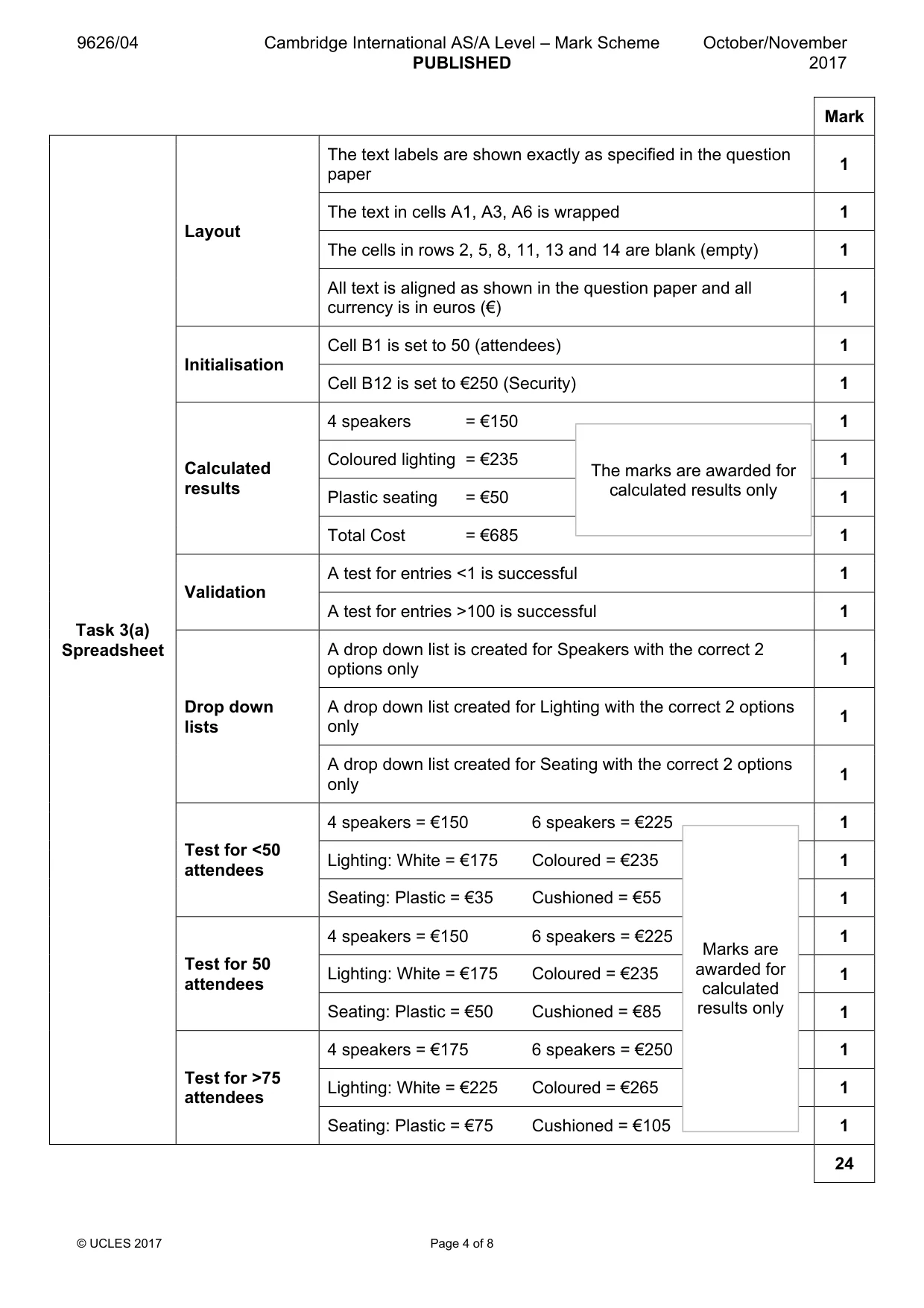
9626/04 Cambridge International AS/A Level – Mark Scheme PUBLISHED October/November 2017 © UCLES 2017 Page 4 of 8 Mark Task 3(a) Spreadsheet Layout The text labels are shown exactly as specified in the question paper 1 The text in cells A1, A3, A6 is wrapped 1 The cells in rows 2, 5, 8, 11, 13 and 14 are blank (empty) 1 All text is aligned as shown in the question paper and all currency is in euros (€) 1 Initialisation Cell B1 is set to 50 (attendees) 1 Cell B12 is set to €250 (Security) 1 Calculated results 4 speakers = €150 1 Coloured lighting = €235 1 Plastic seating = €50 1 Total Cost = €685 1 Validation A test for entries <1 is successful 1 A test for entries >100 is successful 1 Drop down lists A drop down list is created for Speakers with the correct 2 options only 1 A drop down list created for Lighting with the correct 2 options only 1 A drop down list created for Seating with the correct 2 options only 1 Test for <50 attendees 4 speakers = €150 6 speakers = €225 1 Lighting: White = €175 Coloured = €235 1 Seating: Plastic = €35 Cushioned = €55 1 Test for 50 attendees 4 speakers = €150 6 speakers = €225 1 Lighting: White = €175 Coloured = €235 1 Seating: Plastic = €50 Cushioned = €85 1 Test for >75 attendees 4 speakers = €175 6 speakers = €250 1 Lighting: White = €225 Coloured = €265 1 Seating: Plastic = €75 Cushioned = €105 1 24 The marks are awarded for calculated results only Marks are awarded for calculated results only
Mark scheme, page 5
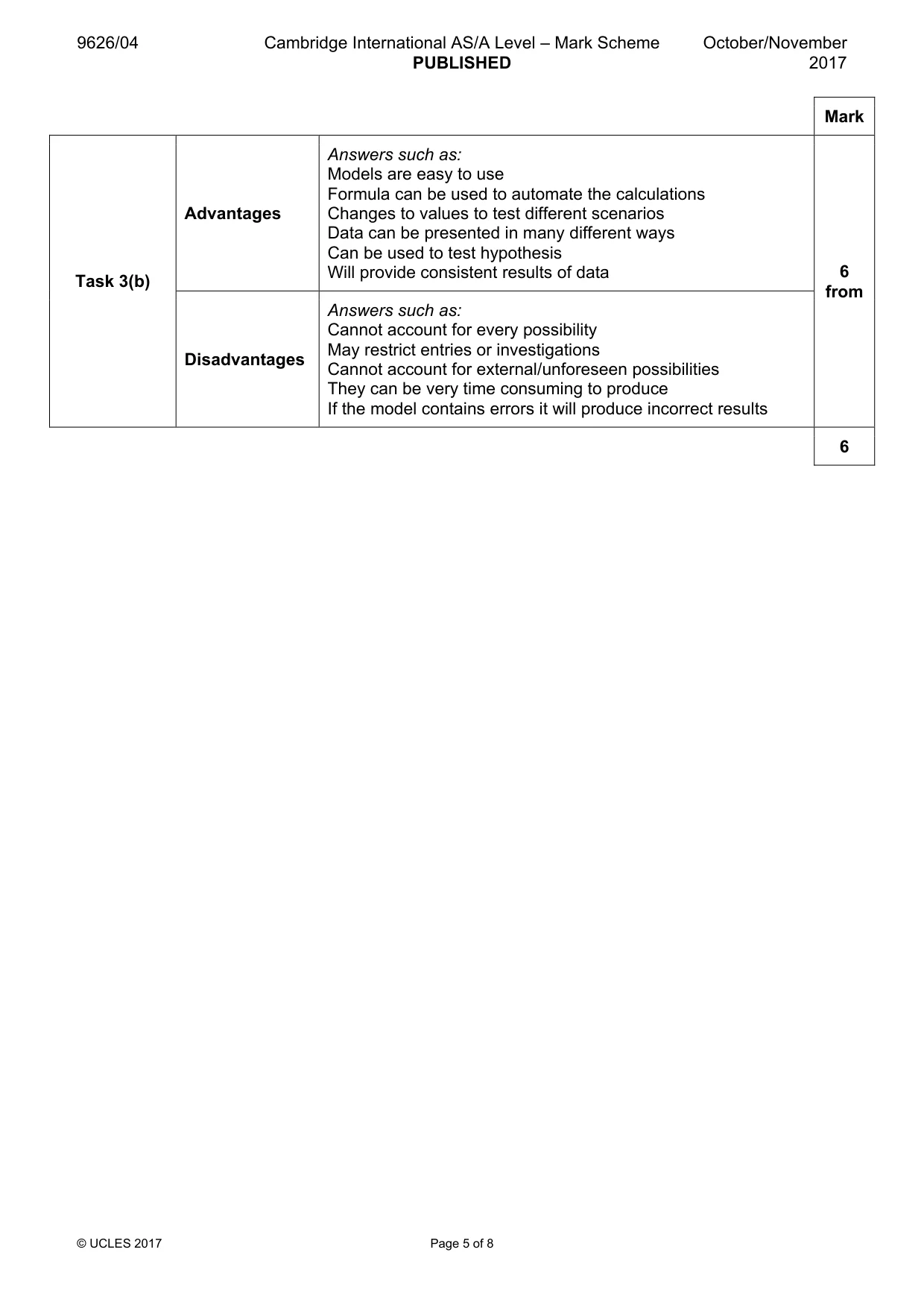
9626/04 Cambridge International AS/A Level – Mark Scheme PUBLISHED October/November 2017 © UCLES 2017 Page 5 of 8 Mark Task 3(b) Advantages Answers such as: Models are easy to use Formula can be used to automate the calculations Changes to values to test different scenarios Data can be presented in many different ways Can be used to test hypothesis Will provide consistent results of data 6 from Disadvantages Answers such as: Cannot account for every possibility May restrict entries or investigations Cannot account for external/unforeseen possibilities They can be very time consuming to produce If the model contains errors it will produce incorrect results 6
Mark scheme, page 6
9626/04 Cambridge International AS/A Level – Mark Scheme PUBLISHED October/November 2017 © UCLES 2017 Page 6 of 8 Mark Task 4 Mailmerge Ticket number LEFT(), RIGHT() or MID() functions are used 1 The correct Forename characters are chosen 1 The correct Surname characters are chosen 1 The correct Concatenation includes the Cost and no spaces 1 Ticket The labels are set at 7 cm by 8.5 cm 1 Merge The layout is set as 8 per page with evidence of propogation 1 Document The Forename mergefield is inserted 1 The Surname mergefield is inserted with space or on a new line 1 The Cost mergefield is inserted 1 A conditional mergefield is used for ticket type IF {Ticket_cost} = 55 "... 1 The correct TRUE conditional text is shown ‘VIP Ticket’ 1 The correct ELSE conditional text is shown ‘Standard Ticket’ 1 The Ticket number (only) is shown in italics 1 The Name is in a serif font and is larger than the ticket number 1 The logo is inserted and set to a suitable size 1 Merged All Tickets are merged and formatted correctly and 1 ticket per customer only 1 Tickets The correct 5 VIP tickets are shown 1 17
Mark scheme, page 7
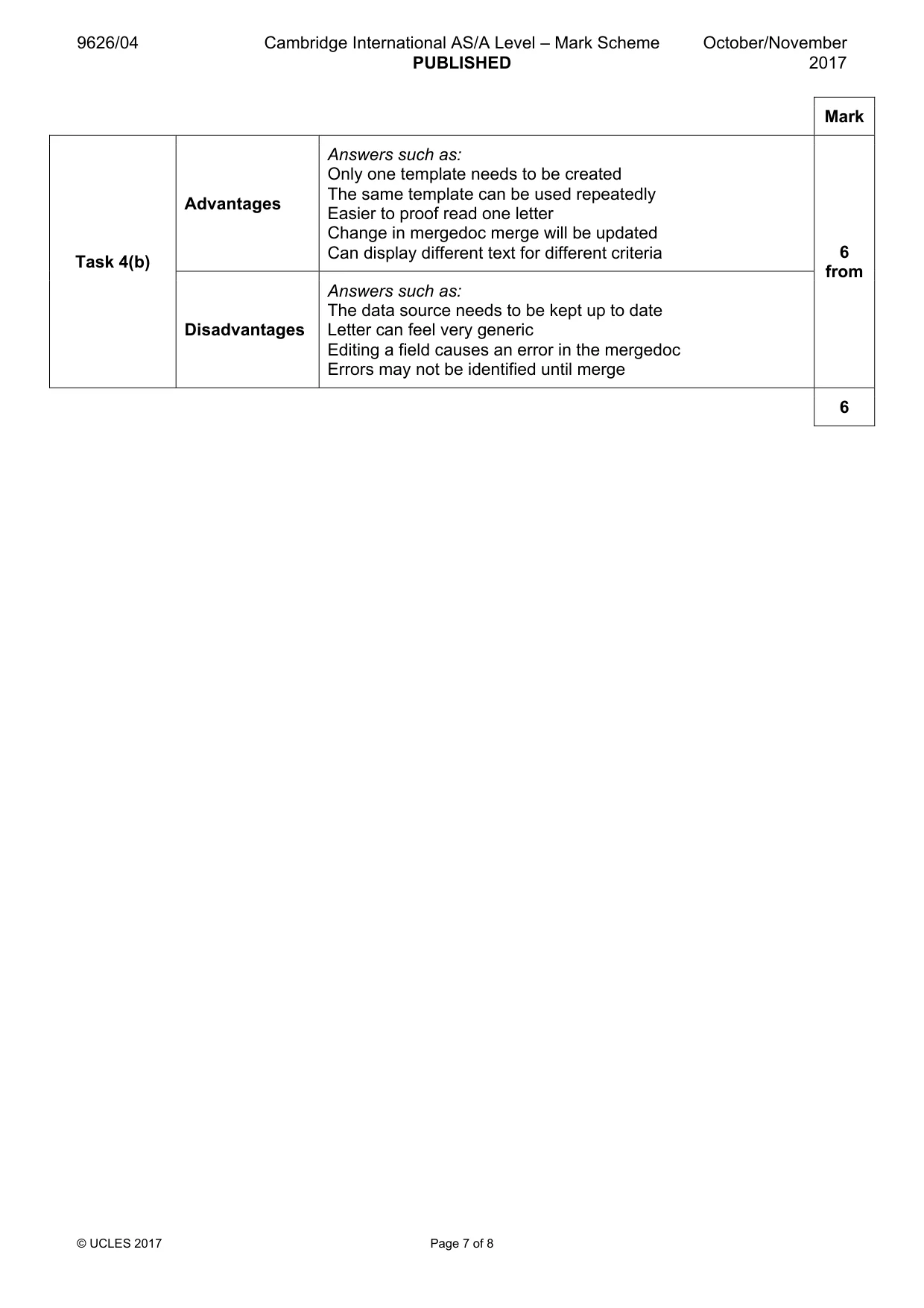
9626/04 Cambridge International AS/A Level – Mark Scheme PUBLISHED October/November 2017 © UCLES 2017 Page 7 of 8 Mark Task 4(b) Advantages Answers such as: Only one template needs to be created The same template can be used repeatedly Easier to proof read one letter Change in mergedoc merge will be updated Can display different text for different criteria 6 from Disadvantages Answers such as: The data source needs to be kept up to date Letter can feel very generic Editing a field causes an error in the mergedoc Errors may not be identified until merge 6
Mark scheme, page 8
9626/04 Cambridge International AS/A Level – Mark Scheme PUBLISHED October/November 2017 © UCLES 2017 Page 8 of 8 Mark Task 5 Database Set-up All three correct files have been successfully imported 1 The Booking_ID field is set as the primary key in the Bookings table 1 The Venue_ ID field is set as the primary key in Venues table 1 The Company_ID field is set as the primary key in Company_details table 1 A 1 to Many relationship is set between Company_details!Company_ID and Bookings!Company_ID fields 1 A 1 to Many relationship is set between Venues!Venue_ID and Bookings!Venue_ID fields 1 Form The Bookings form is created with a suitable title 1 The header area is white 1 The form title is in a red sans serif font 1 The logo is present at the top of the form 1 The main area is pale blue 1 The Company_name is the only field shown outside the subform 1 Suitable navigation buttons are present on the form 1 A subform is created and linked for the booking details 1 The Booking_ID field is shown in the subform 1 The Booking_date field is shown in the subform 1 The Venue_name field is shown in the subform 1 Only these fields are shown in the subform 1 No record selectors/navigation buttons/scroll bars are shown in the subform 1 The ‘Brilliant Bands’ record shows 8 bookings in the subform 1 All data entry is blocked 1 21 Total Paper 110
What you needed in this session
Cambridge’s own grade thresholds for 2017 Oct/Nov, Paper 4 · Variant 1. A higher threshold means an easier paper — the bar moves with how the cohort did.