Questions as text
Q1 · A concert venue uses a program to calculate admission prices and store information about… 9618/21 May/June 2021
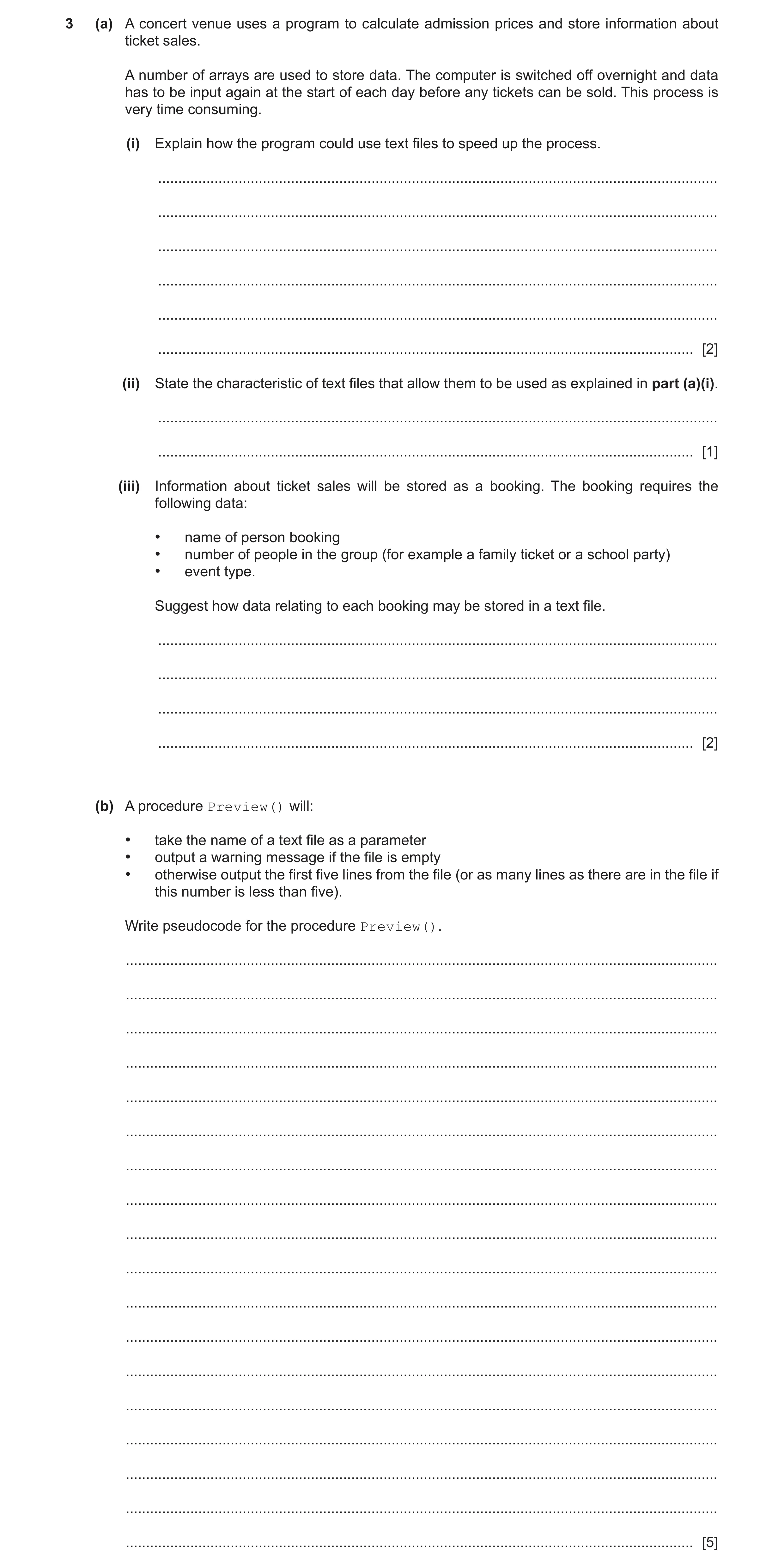
3 (a) A concert venue uses a program to calculate admission prices and store information about ticket sales. A number of arrays are used to store data. The computer is switched off overnight and data has to be input again at the start of each day before any tickets can be sold. This process is very time consuming. (i) Explain how the program could use text files to speed up the process. … … … … … … [2] (ii) State the characteristic of text files that allow them to be used as explained in part (a)(i). … … [1] (iii) Information about ticket sales will be stored as a booking. The booking requires the following data: • name of person booking • number of people in the group (for example a family ticket or a school party) • event type. Suggest how data relating to each booking may be stored in a text file. … … … … [2] (b) A procedure Preview() will: • take the name of a text file as a parameter • output a warning message if the file is empty • otherwise output the first five lines from the file (or as many lines as there are in the file if this number is less than five). Write pseudocode for the procedure Preview(). … … … … … … … … … … … … … … … … … … [5]
10 marks
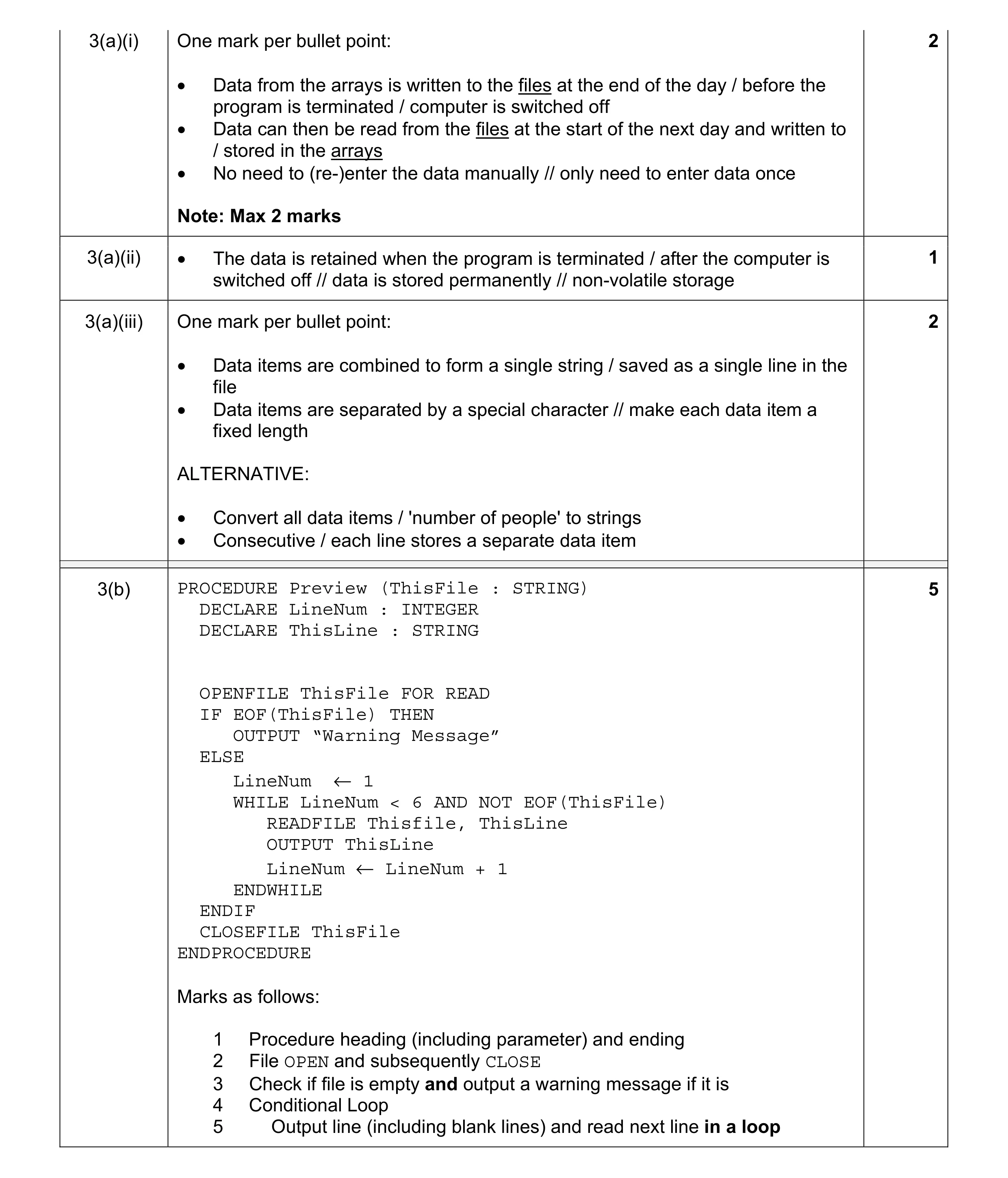
Mark scheme: 3(a)(i) One mark per bullet point: 2 • Data from the arrays is written to the files at the end of the day / before the program is terminated / computer is switched off • Data can then be read from the files at the start of the next day and written to / stored in the arrays • No need to (re-)enter the data manually // only need to enter data once Note: Max 2 marks 3(a)(ii) • The data is retained when the program is terminated / after the computer is 1 switched off // data is stored permanently // non-volatile storage 3(a)(iii) One mark per bullet point: 2 • Data items are combined to form a single string / saved as a single line in the file • Data items are separated by a special character // make each data item a fixed length ALTERNATIVE: • Convert all data items / 'number of people' to strings • Consecutive / each line stores a separate data item 3(b) PROCEDURE Preview (ThisFile : STRING) 5 DECLARE LineNum : INTEGER DECLARE ThisLine : STRING OPENFILE ThisFile FOR READ IF EOF(ThisFile) THEN OUTPUT “Warning Message” ELSE LineNum ← 1 WHILE LineNum < 6 AND NOT EOF(ThisFile) READFILE Thisfile, ThisLine OUTPUT ThisLine LineNum ← LineNum + 1 ENDWHILE ENDIF CLOSEFILE ThisFile ENDPROCEDURE Marks as follows: 1 Procedure heading (including parameter) and ending 2 File OPEN and subsequently CLOSE 3 Check if file is empty and output a warning message if it is 4 Conditional Loop 5 Output line (including blank lines) and read next line in a loop
This question in 9618/21 May/June 2021
Q2 · A concert venue uses a program to calculate admission prices and store information about… 9618/23 May/June 2021
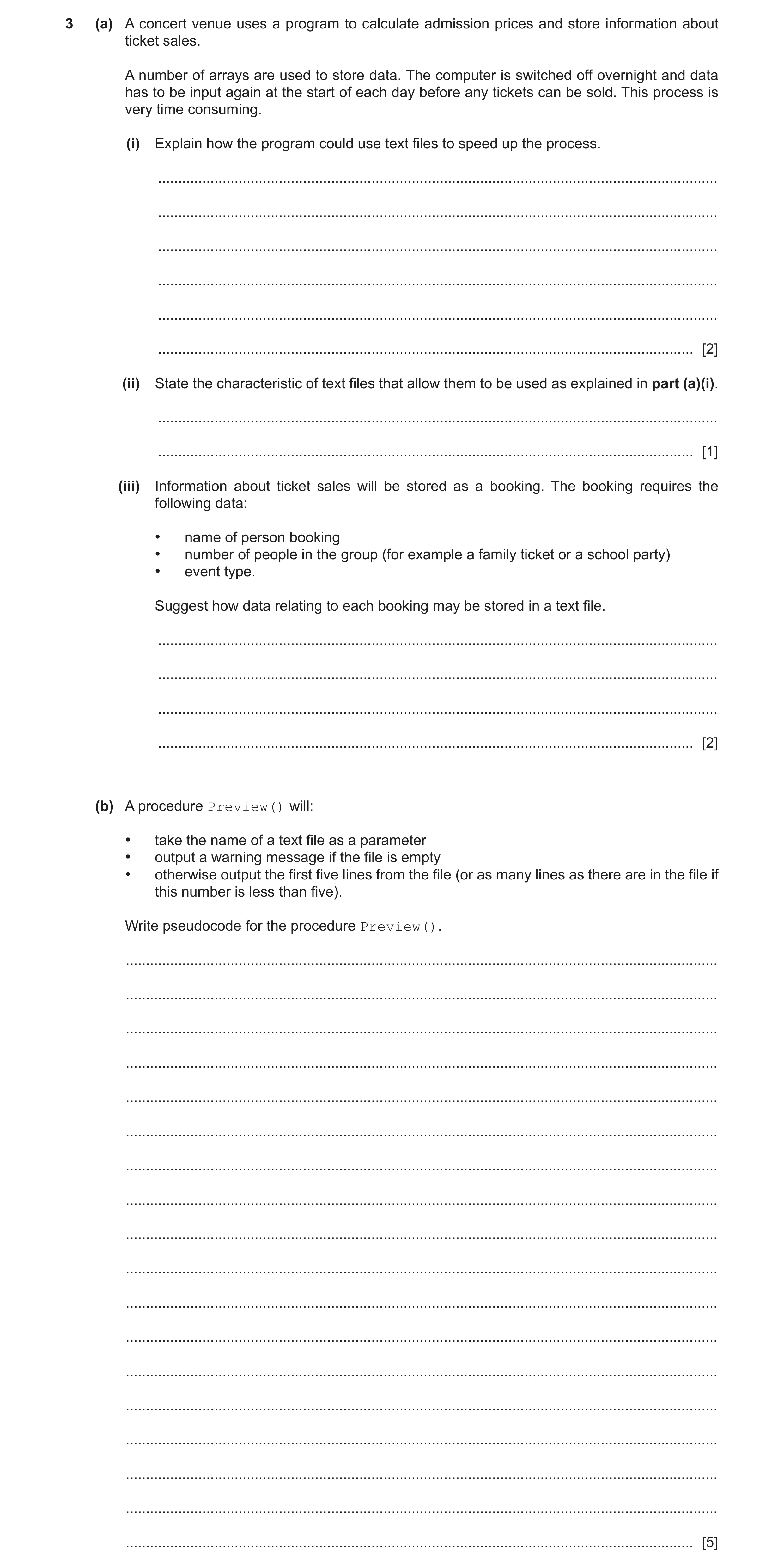
3 (a) A concert venue uses a program to calculate admission prices and store information about ticket sales. A number of arrays are used to store data. The computer is switched off overnight and data has to be input again at the start of each day before any tickets can be sold. This process is very time consuming. (i) Explain how the program could use text files to speed up the process. … … … … … … [2] (ii) State the characteristic of text files that allow them to be used as explained in part (a)(i). … … [1] (iii) Information about ticket sales will be stored as a booking. The booking requires the following data: • name of person booking • number of people in the group (for example a family ticket or a school party) • event type. Suggest how data relating to each booking may be stored in a text file. … … … … [2] (b) A procedure Preview() will: • take the name of a text file as a parameter • output a warning message if the file is empty • otherwise output the first five lines from the file (or as many lines as there are in the file if this number is less than five). Write pseudocode for the procedure Preview(). … … … … … … … … … … … … … … … … … … [5]
10 marks
Mark scheme: 3(a)(i) One mark per bullet point: 2 • Data from the arrays is written to the files at the end of the day / before the program is terminated / computer is switched off • Data can then be read from the files at the start of the next day and written to / stored in the arrays • No need to (re-)enter the data manually // only need to enter data once Note: Max 2 marks 3(a)(ii) • The data is retained when the program is terminated / after the computer is 1 switched off // data is stored permanently // non-volatile storage 3(a)(iii) One mark per bullet point: 2 • Data items are combined to form a single string / saved as a single line in the file • Data items are separated by a special character // make each data item a fixed length ALTERNATIVE: • Convert all data items / 'number of people' to strings • Consecutive / each line stores a separate data item 3(b) PROCEDURE Preview (ThisFile : STRING) 5 DECLARE LineNum : INTEGER DECLARE ThisLine : STRING OPENFILE ThisFile FOR READ IF EOF(ThisFile) THEN OUTPUT “Warning Message” ELSE LineNum ← 1 WHILE LineNum < 6 AND NOT EOF(ThisFile) READFILE Thisfile, ThisLine OUTPUT ThisLine LineNum ← LineNum + 1 ENDWHILE ENDIF CLOSEFILE ThisFile ENDPROCEDURE Marks as follows: 1 Procedure heading (including parameter) and ending 2 File OPEN and subsequently CLOSE 3 Check if file is empty and output a warning message if it is 4 Conditional Loop 5 Output line (including blank lines) and read next line in a loop
This question in 9618/23 May/June 2021
Q3 · The following data items will be recorded each time a student successfully logs on to the… 9618/21 Oct/Nov 2021
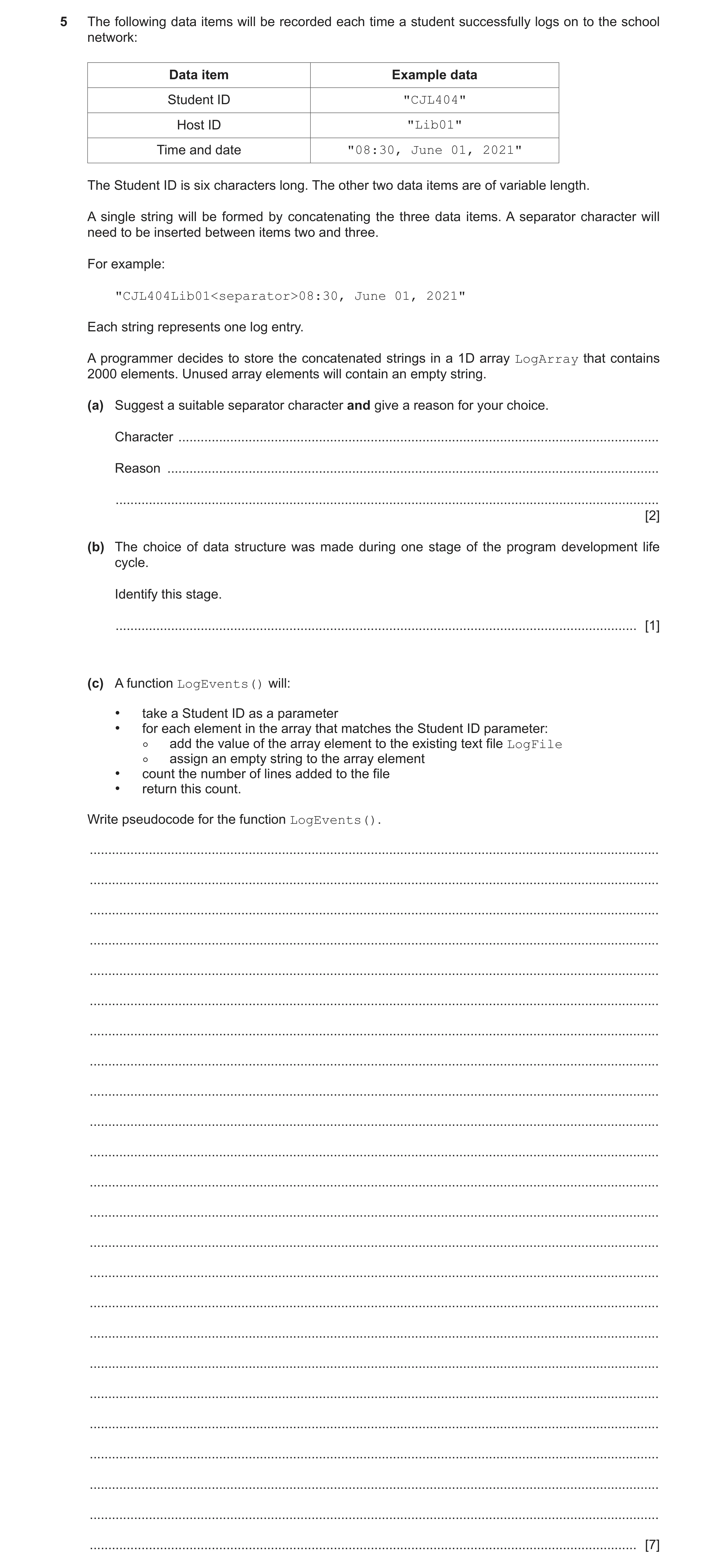
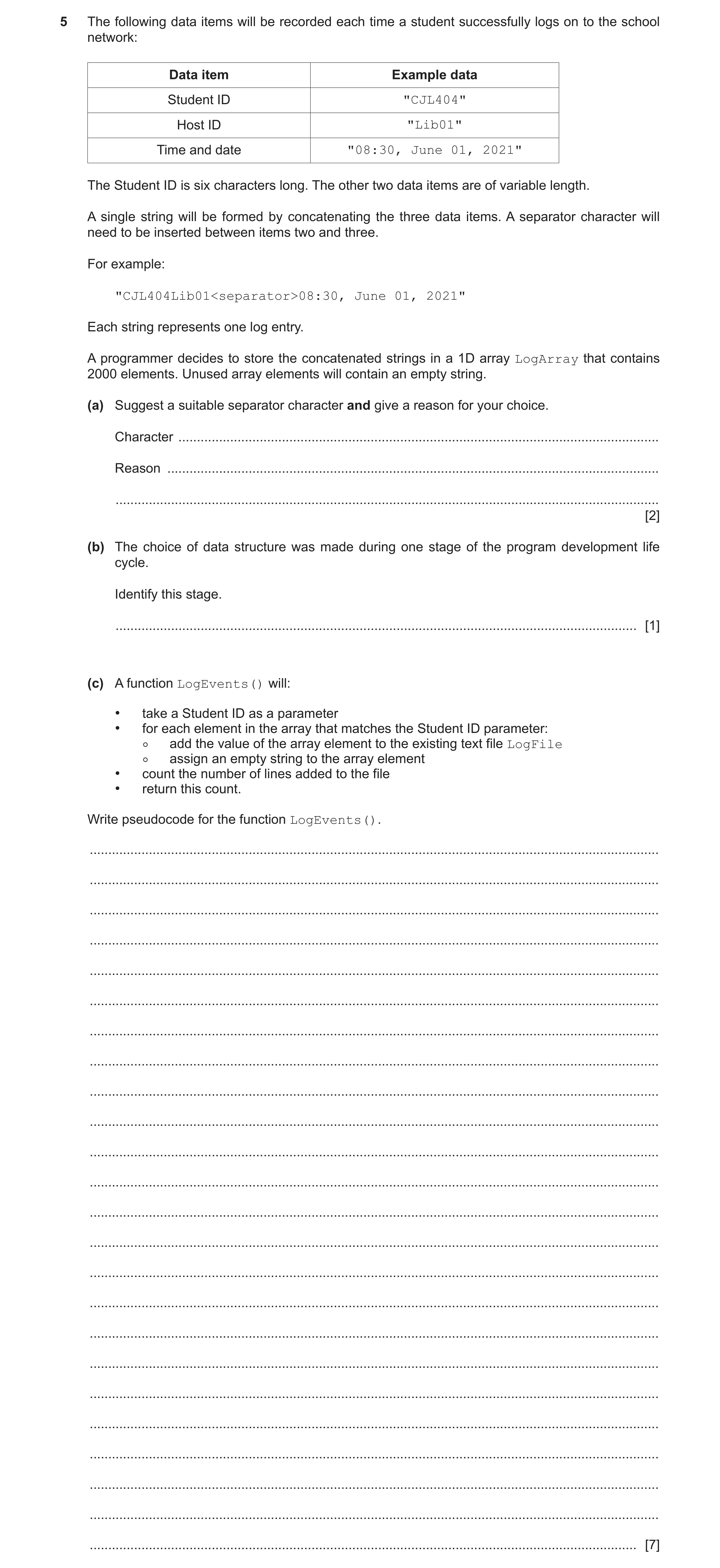
5 The following data items will be recorded each time a student successfully logs on to the school network: Data item Example data Student ID "CJL404" Host ID "Lib01" Time and date "08:30, June 01, 2021" The Student ID is six characters long. The other two data items are of variable length. A single string will be formed by concatenating the three data items. A separator character will need to be inserted between items two and three. For example: "CJL404Lib01<separator>08:30, June 01, 2021" Each string represents one log entry. A programmer decides to store the concatenated strings in a 1D array LogArray that contains 2000 elements. Unused array elements will contain an empty string. (a) Suggest a suitable separator character and give a reason for your choice. Character … Reason … … [2] (b) The choice of data structure was made during one stage of the program development life cycle. Identify this stage. … [1] (c) A function LogEvents() will: • take a Student ID as a parameter • for each element in the array that matches the Student ID parameter: ◦ add the value of the array element to the existing text file LogFile ◦ assign an empty string to the array element • count the number of lines added to the file • return this count. Write pseudocode for the function LogEvents(). … … … … … … … … … … … … … … … … … … … … … … … … [7]
10 marks
Mark scheme: 5(a) One mark for the character and one for the corresponding reason. 2 • Character: Any except alphabetic, numeric, ',' ':' or space • Reason: character doesn't occur in data to be recorded 5(b) Design 1 5(c) FUNCTION LogEvents(StudentID : STRING) RETURNS INTEGER 7 DECLARE FileData : STRING DECLARE Index, Count : INTEGER CONSTANT LogFile = "LogFile" Count ← 0 OPENFILE LogFile FOR APPEND FOR Index ← 1 TO 2000 FileData ← LogArray[Index] IF LEFT(FileData, 6) = StudentID THEN WRITEFILE (LogFile, FileData) //brackets optional Count ← Count + 1 LogArray[Index] ← "" // clear the element ENDIF NEXT Index CLOSEFILE LogFile RETURN Count ENDFUNCTION 1 mark for each of the following: 1 Function heading and ending including parameter and return type 2 OPEN file LogFile for APPEND and subsequent CLOSE 3 Loop for 2000 iterations 4 Extract first 6 characters from array element in a loop 5 Compare first 6 characters with parameter in a loop 6 If equal: • write whole array element string to file and • increment Count and • clear array element in a loop 7 Return Count (must have been declared and initialised)
This question in 9618/21 Oct/Nov 2021
Q4 · A company has several departments 9618/22 Oct/Nov 2021
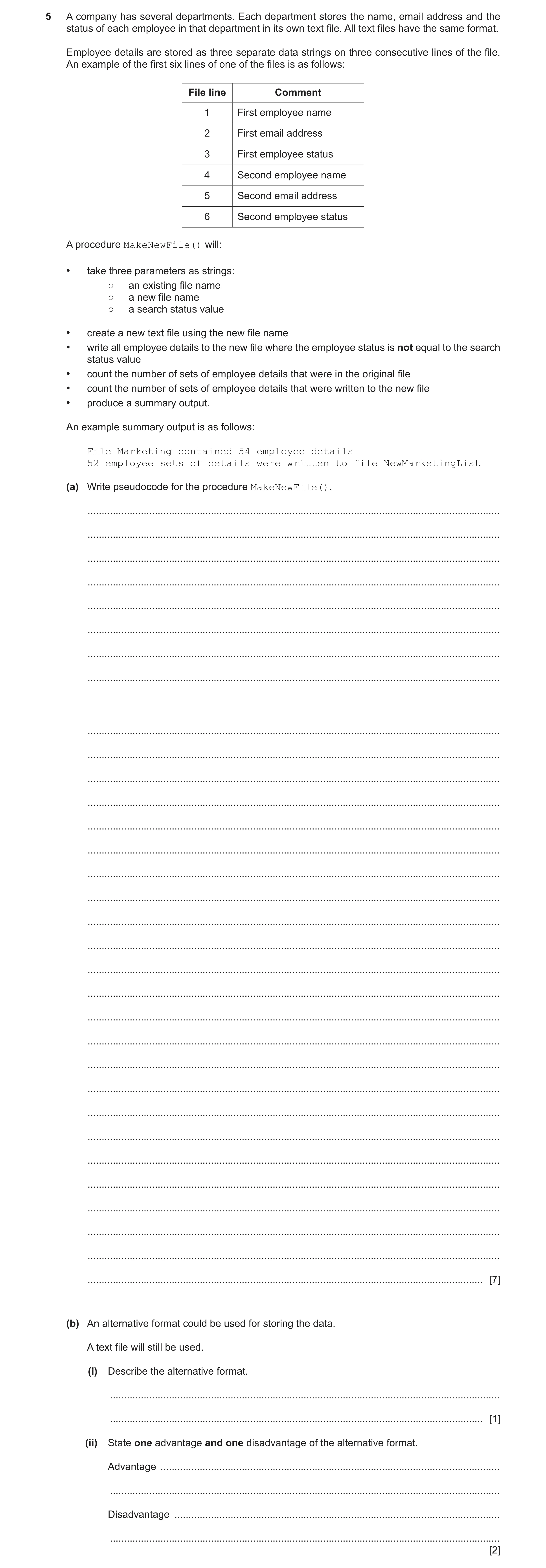
5 A company has several departments. Each department stores the name, email address and the status of each employee in that department in its own text file. All text files have the same format. Employee details are stored as three separate data strings on three consecutive lines of the file. An example of the first six lines of one of the files is as follows: File line Comment 1 First employee name 2 First email address 3 First employee status 4 Second employee name 5 Second email address 6 Second employee status A procedure MakeNewFile() will: • take three parameters as strings: ○ an existing file name ○ a new file name ○ a search status value • create a new text file using the new file name • write all employee details to the new file where the employee status is not equal to the search status value • count the number of sets of employee details that were in the original file • count the number of sets of employee details that were written to the new file • produce a summary output. An example summary output is as follows: File Marketing contained 54 employee details 52 employee sets of details were written to file NewMarketingList (a) Write pseudocode for the procedure MakeNewFile(). … … … … … … … … … … … … … … … … … … … … … … … … … … … … … … … … [7] (b) An alternative format could be used for storing the data. A text file will still be used. (i) Describe the alternative format. … … [1] (ii) State one advantage and one disadvantage of the alternative format. Advantage … … Disadvantage … … [2]
10 marks
Mark scheme: 5(a) PROCEDURE MakeNewFile(OldFile, NewFile, Status : STRING) 7 DECLARE Line1, Line2, Line3 : STRING DECLARE NumCopied, NumRecs : INTEGER NumRecs ← 0 NumCopied ← 0 OPENFILE OldFile FOR READ OPENFILE NewFile FOR WRITE WHILE NOT EOF(OldFile) READFILE OldFile, Line1 READFILE OldFile, Line2 READFILE OldFile, Line3 NumRecs ← NumRecs + 1 IF Line3 <> Status THEN WRITEFILE NewFile, Line1 WRITEFILE NewFile, Line2 WRITEFILE NewFile, Line3 NumCopied ← NumCopied + 1 ENDIF ENDWHILE OUTPUT "File " , OldFile , " contained " , NumRecs ,__ " employee details" OUTPUT Numcopied , " employee sets of details were __ written to file", NewFile CLOSEFILE OldFile CLOSEFILE NewFile ENDPROCEDURE Mark as follows: 1 Procedure heading and ending, including parameters 2 OPEN OldFile for READ and NewFile for WRITE and subsequently CLOSE both files 3 Conditional loop until EOF(OldFile) 4 Read three lines from OldFile in a loop 5 Compare 3rd line read with Status parameter and if not equal write 3 lines to NewFile in a loop 6 Count number of sets read and those written in a loop 7 Final output including both counts and file names with suitable text after a loop Note: MP6: Both counts must have been declared and initialised 5(b)(i) Store all three items on one line 1 5(b)(ii) One mark per point: 2 Advantage: Fewer file operations required Disadvantage: Algorithm to combine / extract individual data items is more complex
This question in 9618/22 Oct/Nov 2021
Q5 · The following data items will be recorded each time a student successfully logs on to the… 9618/23 Oct/Nov 2021
5 The following data items will be recorded each time a student successfully logs on to the school network: Data item Example data Student ID "CJL404" Host ID "Lib01" Time and date "08:30, June 01, 2021" The Student ID is six characters long. The other two data items are of variable length. A single string will be formed by concatenating the three data items. A separator character will need to be inserted between items two and three. For example: "CJL404Lib01<separator>08:30, June 01, 2021" Each string represents one log entry. A programmer decides to store the concatenated strings in a 1D array LogArray that contains 2000 elements. Unused array elements will contain an empty string. (a) Suggest a suitable separator character and give a reason for your choice. Character … Reason … … [2] (b) The choice of data structure was made during one stage of the program development life cycle. Identify this stage. … [1] (c) A function LogEvents() will: • take a Student ID as a parameter • for each element in the array that matches the Student ID parameter: ◦ add the value of the array element to the existing text file LogFile ◦ assign an empty string to the array element • count the number of lines added to the file • return this count. Write pseudocode for the function LogEvents(). … … … … … … … … … … … … … … … … … … … … … … … … [7]
10 marks
Mark scheme: 5(a) One mark for the character and one for the corresponding reason. 2 • Character: Any except alphabetic, numeric, ',' ':' or space • Reason: character doesn't occur in data to be recorded 5(b) Design 1 5(c) FUNCTION LogEvents(StudentID : STRING) RETURNS INTEGER 7 DECLARE FileData : STRING DECLARE Index, Count : INTEGER CONSTANT LogFile = "LogFile" Count ← 0 OPENFILE LogFile FOR APPEND FOR Index ← 1 TO 2000 FileData ← LogArray[Index] IF LEFT(FileData, 6) = StudentID THEN WRITEFILE (LogFile, FileData) //brackets optional Count ← Count + 1 LogArray[Index] ← "" // clear the element ENDIF NEXT Index CLOSEFILE LogFile RETURN Count ENDFUNCTION 1 mark for each of the following: 1 Function heading and ending including parameter and return type 2 OPEN file LogFile for APPEND and subsequent CLOSE 3 Loop for 2000 iterations 4 Extract first 6 characters from array element in a loop 5 Compare first 6 characters with parameter in a loop 6 If equal: • write whole array element string to file and • increment Count and • clear array element in a loop 7 Return Count (must have been declared and initialised)
This question in 9618/23 Oct/Nov 2021
Q6 · A teacher is designing a program to perform simple syntax checks on programs written by… 9618/21 Oct/Nov 2022
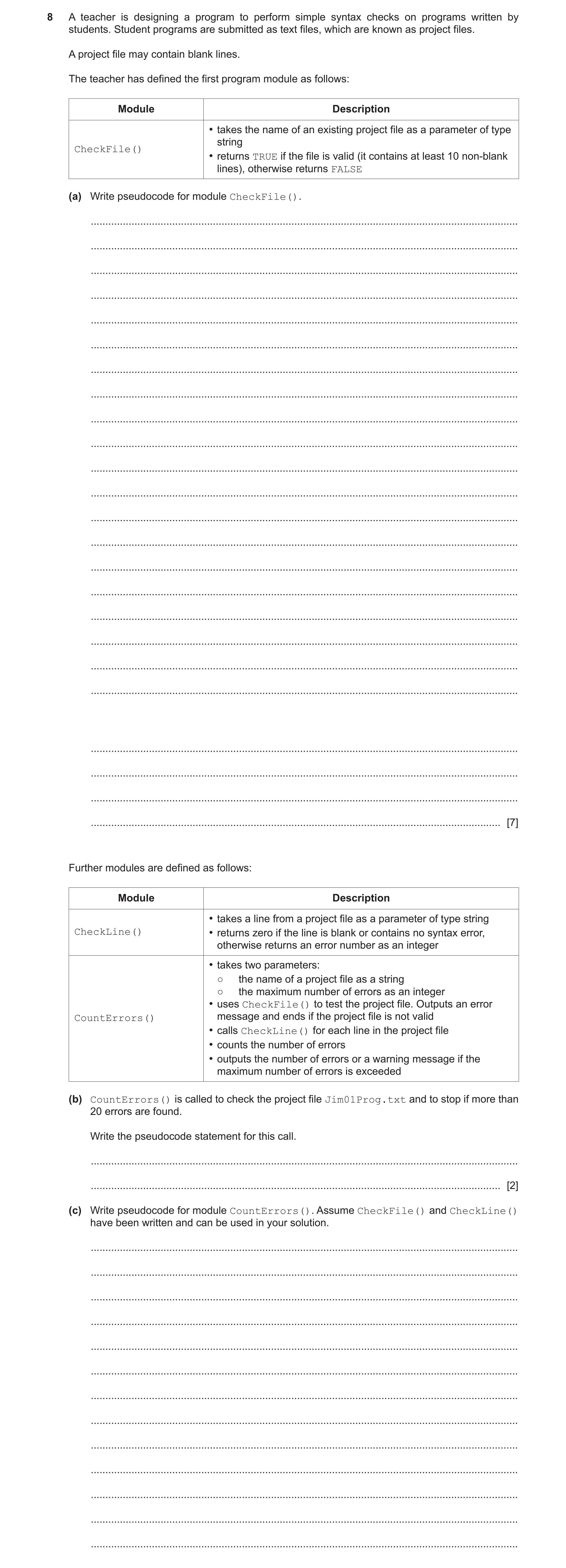
8 A teacher is designing a program to perform simple syntax checks on programs written by students. Student programs are submitted as text files, which are known as project files. A project file may contain blank lines. The teacher has defined the first program module as follows: Module Description • takes the name of an existing project file as a parameter of type string CheckFile() • returns TRUE if the file is valid (it contains at least 10 non-blank lines), otherwise returns FALSE (a) Write pseudocode for module CheckFile(). … … … … … … … … … … … … … … … … … … … … … … … … [7] Further modules are defined as follows: Module Description • takes a line from a project file as a parameter of type string CheckLine() • returns zero if the line is blank or contains no syntax error, otherwise returns an error number as an integer • takes two parameters: ○ the name of a project file as a string ○ the maximum number of errors as an integer • uses CheckFile() to test the project file. Outputs an error CountErrors() message and ends if the project file is not valid • calls CheckLine() for each line in the project file • counts the number of errors • outputs the number of errors or a warning message if the maximum number of errors is exceeded (b) CountErrors() is called to check the project file Jim01Prog.txt and to stop if more than 20 errors are found. Write the pseudocode statement for this call. … … [2] (c) Write pseudocode for module CountErrors(). Assume CheckFile() and CheckLine() have been written and can be used in your solution. … … … … … … … … … … … … …
9 marks
Mark scheme: 8(a) One mark for each point (Max 7) as follows: 7 1 Function heading and ending including parameter and return type 2 Declaration and initialisation of local Integer for Count 3 OPEN in READ mode and CLOSE 4 Conditional loop until EOF() 5 Read a line in a loop 6 If non-blank, increment count in a loop 7 Terminate loop when 10 non-blank lines have been read 8 Return Boolean in both cases FUNCTION CheckFile(Thisfile : STRING) RETURNS BOOLEAN DECLARE Valid : BOOLEAN DECLARE ThisLine : STRING DECLARE Count : INTEGER Count 0 Valid FALSE OPEN ThisFile FOR READ WHILE NOT EOF(ThisFile) AND Valid = FALSE READFILE ThisFile, ThisLine IF ThisLine <> "" THEN Count Count + 1 IF Count > 9 THEN Valid TRUE ENDIF ENDIF ENDWHILE CLOSEFILE ThisFile RETURN Valid ENDFUNCTION 8(b) CALL CountErrors("Jim01Prog.txt", 20) 2 One mark for each: 1 Module name, at least one parameter in brackets and one parameter correct 2 Completely correct statement 8(c) Mark as follows: 8 1 Procedure heading and ending including parameters 2 Declaration and initialisation of local Integer value for ErrCount 3 Use of CheckFile(), output message and terminate if it returns FALSE 4 Conditional loop until EOF() 5 ...or ErrCount > MaxErrors 6 Read line and use as parameter to CheckLine()in a loop 7 Test return value and increment ErrCount if non-zero in a loop 8 Output either message once only as appropriate PROCEDURE CountErrors(ThisFile : STRING, MaxErrors : INTEGER) DECLARE ErrCount, ThisError : INTEGER DECLARE ThisLine : STRING ErrCount 0 IF CheckFile(ThisFile) = FALSE THEN OUTPUT "That program file is not valid" ELSE OPEN ThisFile FOR READ REPEAT READFILE, ThisFile, ThisLine ThisError CheckLine(ThisLine) IF ThisError <> 0 THEN ErrCount ErrCount + 1 ENDIF UNTIL ErrCount > MaxErrors OR EOF(ThisFile) IF EOF(ThisFile) = FALSE THEN OUTPUT "Check terminated – too many errors" ELSE OUTPUT "There were ", ErrCount, " errors." ENDIF CLOSEFILE ThisFile ENDIF ENDPROCEDURE 8(d) One mark for each (Max 2): 2 Examples: 1 Incorrect block structure. Missing keyword denoting part of block (for example ENDPROCEDURE, ENDFUNCTION, ENDTYPE) 2 Data type errors, for example, assigning an integer value to a string 3 Identifier used before it is declared 4 Incorrect parameter use
This question in 9618/21 Oct/Nov 2022
Q7 · An algorithm will process data from a test taken by a group of students 9618/22 Oct/Nov 2022
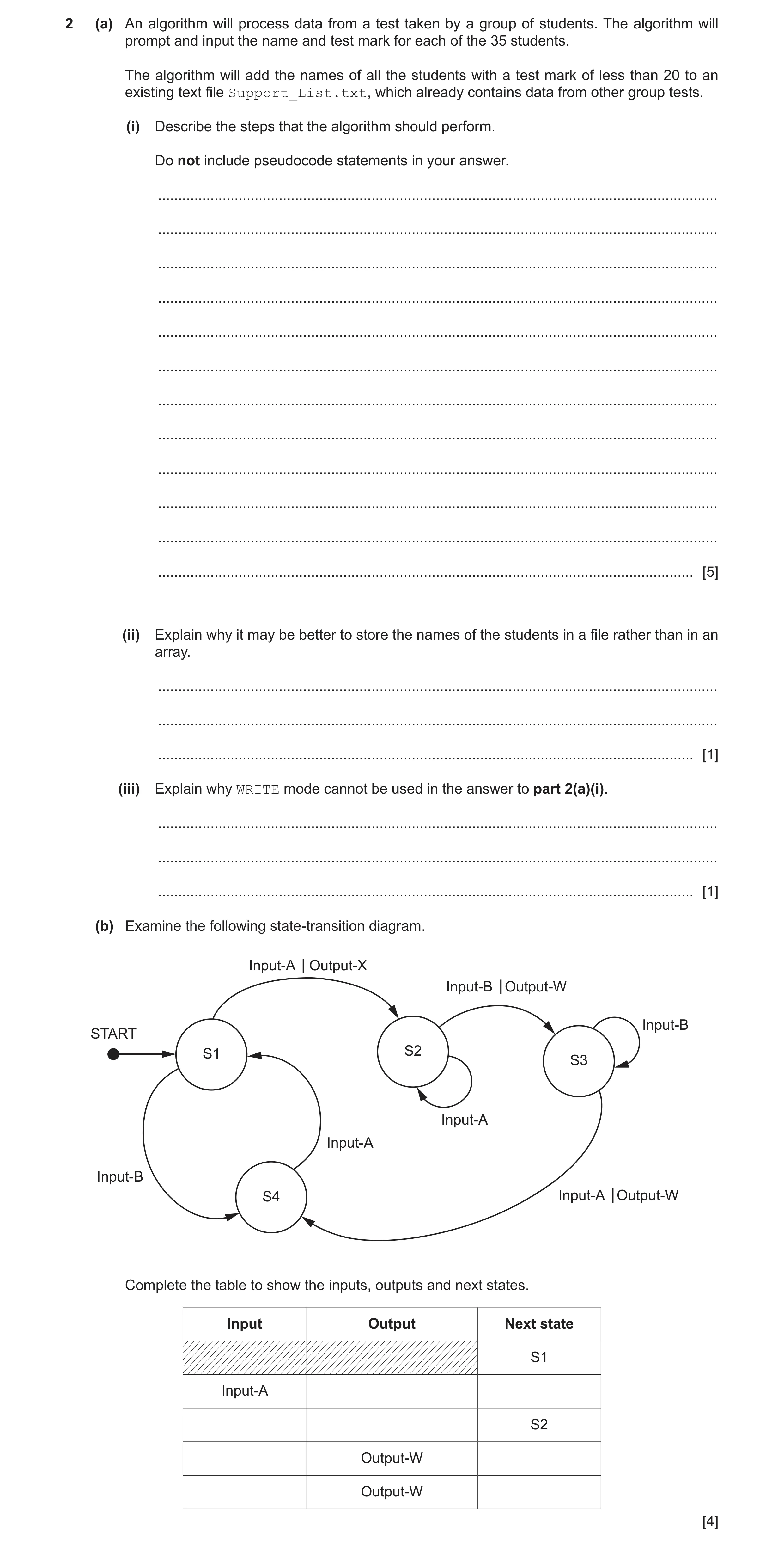
2 (a) An algorithm will process data from a test taken by a group of students. The algorithm will prompt and input the name and test mark for each of the 35 students. The algorithm will add the names of all the students with a test mark of less than 20 to an existing text file Support_List.txt, which already contains data from other group tests. (i) Describe the steps that the algorithm should perform. Do not include pseudocode statements in your answer. … … … … … … … … … … … … [5] (ii) Explain why it may be better to store the names of the students in a file rather than in an array. … … … [1] (iii) Explain why WRITE mode cannot be used in the answer to part 2(a)(i). … … … [1] (b) Examine the following state-transition diagram. Input-A Output-X Input-B Output-W Input-BSTART S1 S2 S3 Input-A Input-A Input-B S4 Input-A Output-W Complete the table to show the inputs, outputs and next states. Input Output Next state S1 Input-A S2 Output-W Output-W [4]
11 marks
Mark scheme: 2(a)(i) One mark per step (or equivalent): 5 1 Open file in APPEND mode (and subsequent Close) 2 Prompt and Input a student name and mark 3 If mark greater than or equal to 20 jump to step 5 4 Write only the name to the file 5 Repeat from Step 2 for 35 times / the number of students 2(a)(ii) Data in a file is saved after the computer is switched off / stored 1 permanently // no need to re-enter the data when the program is re-run 2(a)(iii) Example answer: 1 So that existing file data is not overwritten. 2(b) 4 One mark per row (row 2 to 5): Input Output Next state S1 Input-A Output-X S2 Input-A (none) S2 Input-B Output-W S3 Input-A Output-W S4
This question in 9618/22 Oct/Nov 2022
Q8 · A computer shop assembles computers using items bought from several suppliers 9618/22 May/June 2023
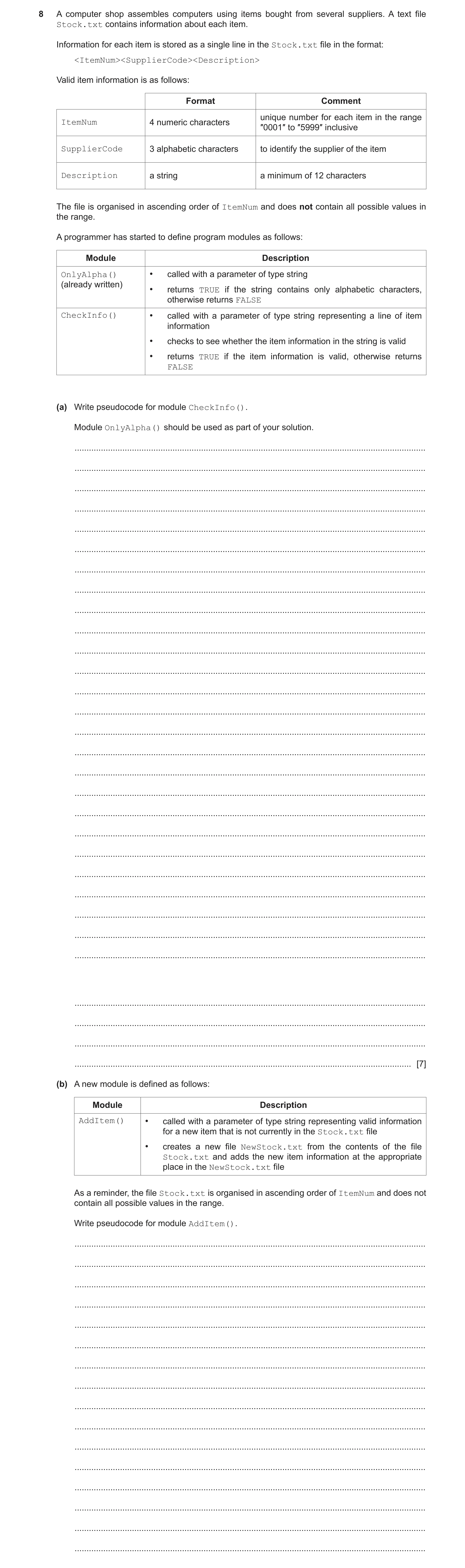
8 A computer shop assembles computers using items bought from several suppliers. A text file Stock.txt contains information about each item. Information for each item is stored as a single line in the Stock.txt file in the format: <ItemNum><SupplierCode><Description> Valid item information is as follows: Format Comment unique number for each item in the range ItemNum 4 numeric characters ″0001″ to ″5999″ inclusive SupplierCode 3 alphabetic characters to identify the supplier of the item Description a string a minimum of 12 characters The file is organised in ascending order of ItemNum and does not contain all possible values in the range. A programmer has started to define program modules as follows: Module Description OnlyAlpha() • called with a parameter of type string (already written) • returns TRUE if the string contains only alphabetic characters, otherwise returns FALSE CheckInfo() • called with a parameter of type string representing a line of item information • checks to see whether the item information in the string is valid • returns TRUE if the item information is valid, otherwise returns FALSE (a) Write pseudocode for module CheckInfo(). Module OnlyAlpha() should be used as part of your solution. … … … … … … … … … … … … … … … … … … … … … … … … … … … … … … [7] (b) A new module is defined as follows: Module Description AddItem() • called with a parameter of type string representing valid information for a new item that is not currently in the Stock.txt file • creates a new file NewStock.txt from the contents of the file Stock.txt and adds the new item information at the appropriate place in the NewStock.txt file As a reminder, the file Stock.txt is organised in ascending order of ItemNum and does not contain all possible values in the range. Write pseudocode for module AddItem(). … … … … … … … … … … … … … … … …
7 marks
Mark scheme: 8(a) FUNCTION CheckInfo(NewLine: STRING) RETURNS BOOLEAN 7 DECLARE ThisNum : STRING DECLARE Index : INTEGER IF LENGTH(NewLine) < 19 THEN RETURN FALSE ENDIF FOR Index 1 TO 4 IF NOT IS_NUM(MID(NewLine, Index, 1)) THEN RETURN FALSE ENDIF NEXT Index ThisNum LEFT(Newline, 4) IF ThisNum < "0001" OR ThisNum > "5999" THEN RETURN FALSE ENDIF IF NOT OnlyAlpha(MID(Newline, 5, 3)) THEN RETURN FALSE ENDIF RETURN TRUE ENDFUNCTION Mark as follows: 1 Test length of parameter 2 Extract first 4 characters of parameter (as ItemNum) 3 Test first four characters are all numeric 4 Test ItemNum in range "0001" to "5999" 5 Extract characters 5 to 7 of parameter (as SupplierCode) 6 Use of OnlyAlpha()with extracted SupplierCode 7 Return BOOLEAN value correctly in all cases, must have been declared as local 8(b) PROCEDURE AddItem(NewLine : STRING) 7 DECLARE NewItemNum, ThisItemNum : STRING OPENFILE "Stock.txt" FOR READ OPENFILE "NewStock.txt" FOR WRITE NewItemNum LEFT(NewLine, 4) WHILE NOT EOF("Stock.txt") READFILE("Stock.txt", ThisLine) ThisItemNum LEFT(ThisLine, 4) IF ThisItemNum > NewItemNum THEN WRITEFILE("NewStock.txt", NewLine) // write New Line... NewItemNum "9999" // ...once only ENDIF WRITEFILE("NewStock.txt", ThisLine) ENDWHILE IF NewItemNum <> "9999" THEN WRITEFILE("NewStock.txt", NewLine) //New last line in the file ENDIF CLOSEFILE "Stock.txt" CLOSEFILE "NewStock.txt" ENDPROCEDURE Mark as follows: 1 Open both files, in correct modes, and subsequently close 2 Conditional loop until end of file Stock.txt 3 Read a line from Stock.txt AND extract ThisItemNum in a loop 4 Test ThisItemNum > NewItemNum then write NewLine to NewStock.txt 5 ...including mechanism to only do this once only 6 Write line read from Stock to NewStock 7 Deal with the case where NewLine is the new last line 8(b) Example of array-based solution: PROCEDURE AddItem(NewLine : STRING) DECLARE ThisItemNum, ThisLine : STRING DECLARE Temp : ARRAY [1:5999] OF STRING DECLARE Index : INTEGER FOR Index 1 TO 5999 Temp[Index] "" //Initialise array NEXT Index Index STR_TO_NUM(LEFT(NewLine, 4)) Temp[Index] NewLine //Add new line to array OPENFILE "Stock.txt" FOR READ WHILE NOT EOF("Stock.txt") READFILE("Stock.txt", ThisLine) Index STR_TO_NUM(LEFT(ThisLine, 4)) Temp[Index] ThisLine //Add line from file to array ENDWHILE CLOSEFILE "Stock.txt" OPENFILE "NewStock.txt" FOR WRITE FOR Index 1 TO 5999 IF Temp[Index] <> "" THEN //Write non-blank element... WRITEFILE("NewStock.txt", Temp[Index]) //...to new file ENDIF NEXT Index CLOSEFILE "NewStock.txt" ENDPROCEDURE Mark as follows: 1 Open both files, in correct modes, and subsequently close 2 Declare AND initialise Temp array 3 Store NewLine in appropriate array element 4 Loop until end of file Stock.txt 5 Read a line from Stock.txt AND extract Index in a loop 6 Assign line read to appropriate array element in a loop 7 Loop through array, writing non-blank elements to file NewStock.txt 8(c) One mark for method: 3 Method: Stub testing Two marks for description: The modules SuppExists() and CheckSupplier() are replaced by dummy modules ...which return a known result / contain an output statement to show they have been called
This question in 9618/22 May/June 2023
Q9 · A program processes data using a stack 9618/23 May/June 2023
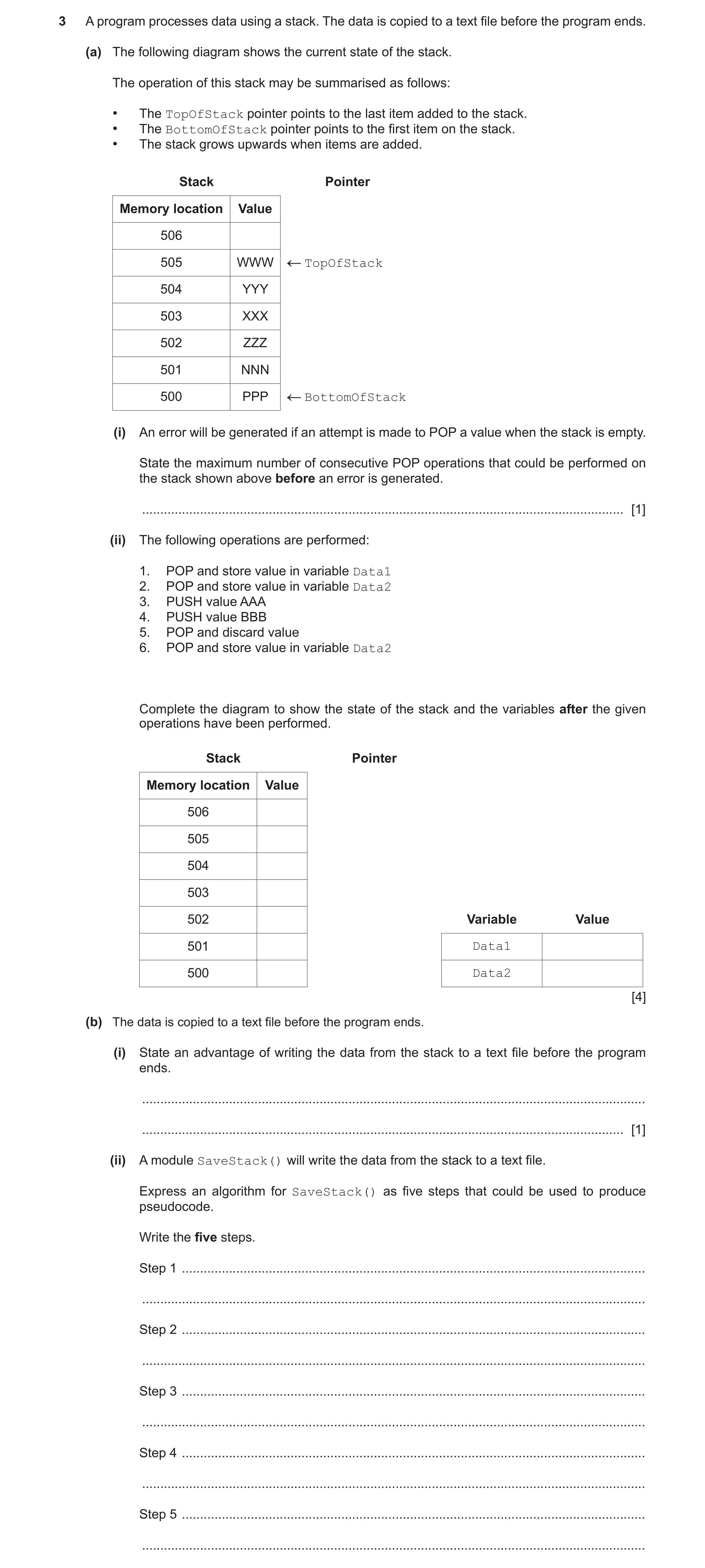
3 A program processes data using a stack. The data is copied to a text file before the program ends. (a) The following diagram shows the current state of the stack. The operation of this stack may be summarised as follows: • The TopOfStack pointer points to the last item added to the stack. • The BottomOfStack pointer points to the first item on the stack. • The stack grows upwards when items are added. Stack Pointer Memory location Value 506 505 WWW TopOfStack 504 YYY 503 XXX 502 ZZZ 501 NNN 500 PPP BottomOfStack (i) An error will be generated if an attempt is made to POP a value when the stack is empty. State the maximum number of consecutive POP operations that could be performed on the stack shown above before an error is generated. … [1] (ii) The following operations are performed: 1. POP and store value in variable Data1 2. POP and store value in variable Data2 3. PUSH value AAA 4. PUSH value BBB 5. POP and discard value 6. POP and store value in variable Data2 Complete the diagram to show the state of the stack and the variables after the given operations have been performed. Stack Pointer Memory location Value 506 505 504 503 502 Variable Value 501 Data1 500 Data2 [4] (b) The data is copied to a text file before the program ends. (i) State an advantage of writing the data from the stack to a text file before the program ends. … … [1] (ii) A module SaveStack() will write the data from the stack to a text file. Express an algorithm for SaveStack() as five steps that could be used to produce pseudocode. Write the five steps. Step 1 … … Step 2 … … Step 3 … … Step 4 … … Step 5 … …
11 marks
Mark scheme: 3(a)(i) 6 1 3(a)(ii) 4 One mark for: MP1 Values 'BBB' and 'AAA' MP2 Values 'XXX' to 'PPP' (unchanged) MP3 Both pointers and labelled22 MP4 Values of both variables 3(b)(i) So that the data may be recovered / restored (the next time the program is 1 run) // the data is permanently saved / data is not lost when the program terminates 3(b)(ii) Max 5 marks 5 MP1 Open the text file in WRITE mode MP2 Check there is a value on the stack MP3 POP value …. MP4 Write value to the text file MP5 Repeat from Step 2 // loop referencing the stack items Alternative solution: Not using POP primitive MP1 Open the text file in WRITE mode MP2 Check there is a value on the stack MP3 Read value from ToS location MP4 Write the value to the text file – Must some attempt at ‘the value’ NOT ‘all the values’ MP5 Decrement ToS MP6 Repeat from step 2 // loop referencing the stack items
This question in 9618/23 May/June 2023
Q10 · A computer shop assembles desktop computers, using items bought from several suppliers 9618/23 May/June 2023
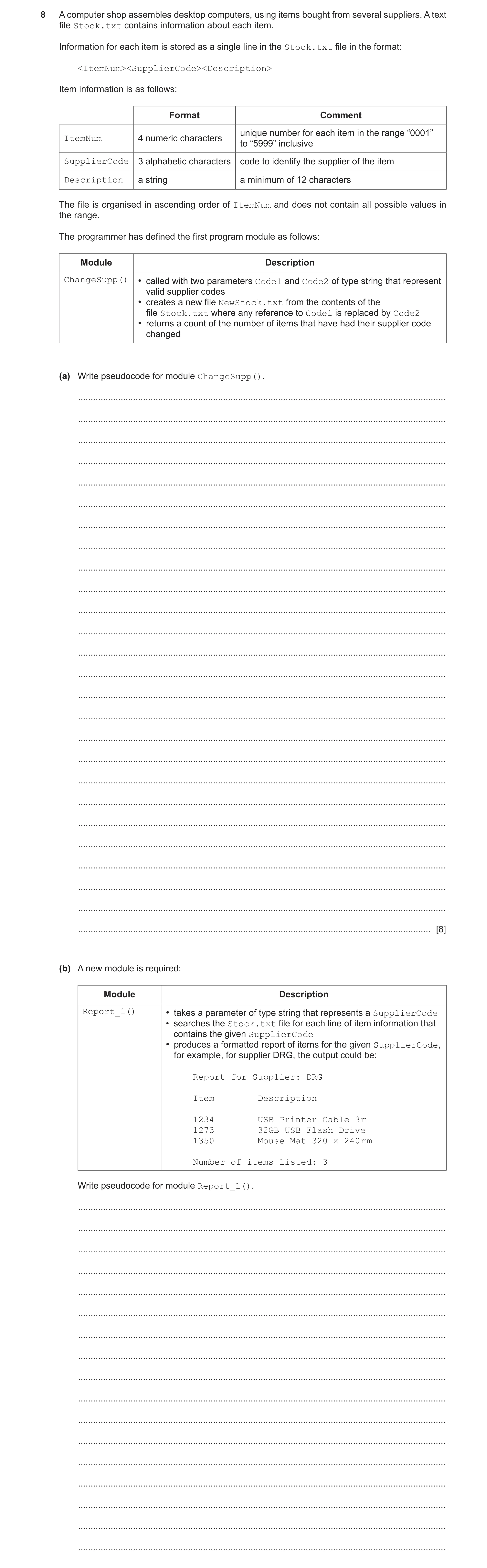
8 A computer shop assembles desktop computers, using items bought from several suppliers. A text file Stock.txt contains information about each item. Information for each item is stored as a single line in the Stock.txt file in the format: <ItemNum><SupplierCode><Description> Item information is as follows: Format Comment unique number for each item in the range “0001” ItemNum 4 numeric characters to “5999” inclusive SupplierCode 3 alphabetic characters code to identify the supplier of the item Description a string a minimum of 12 characters The file is organised in ascending order of ItemNum and does not contain all possible values in the range. The programmer has defined the first program module as follows: Module Description ChangeSupp() • called with two parameters Code1 and Code2 of type string that represent valid supplier codes • creates a new file NewStock.txt from the contents of the file Stock.txt where any reference to Code1 is replaced by Code2 • returns a count of the number of items that have had their supplier code changed (a) Write pseudocode for module ChangeSupp(). … … … … … … … … … … … … … … … … … … … … … … … … … … [8] (b) A new module is required: Module Description Report_1() • takes a parameter of type string that represents a SupplierCode • searches the Stock.txt file for each line of item information that contains the given SupplierCode • produces a formatted report of items for the given SupplierCode, for example, for supplier DRG, the output could be: Report for Supplier: DRG Item Description 1234 USB Printer Cable 3 m 1273 32GB USB Flash Drive 1350 Mouse Mat 320 x 240 mm Number of items listed: 3 Write pseudocode for module Report_1(). … … … … … … … … … … … … … … … … …
8 marks
Mark scheme: 8(a) FUNCTION ChangeSupp(Code1, Code2 : STRING) RETURNS 8 INTEGER DECLARE Count : INTEGER DECLARE ThisLine, ThisCode : STRING OPENFILE "Stock.txt" FOR READ OPENFILE "NewStock.txt" FOR WRITE Count 0 WHILE NOT EOF("Stock.txt") READFILE("Stock.txt ", ThisLine) // brackets optional ThisCode MID(ThisLine, 5, 3) IF ThisCode = Code1 THEN ThisLine LEFT(ThisLine, 4) & Code2 & RIGHT(ThisLine, LENGTH(ThisLine) - 7) Count Count + 1 ENDIF WRITEFILE("NewStock.txt", ThisLine) // brackets optional ENDWHILE CLOSEFILE "NewStock.txt" CLOSEFILE "Stock.txt" RETURN Count ENDFUNCTION MP1 Open both files, in correct modes, and subsequently close MP2 Conditional loop until EOF(“Stock.txt”) MP3 Read a line from Stock.txt AND extract ThisCode in a loop MP4 Test ThisCode = Code1 AND if true, increment Count (must have been Initialised)in a loop MP5 Update ThisLine using substring functions and '&' in a loop MP6 completely correct update of ThisLine in a loop MP7 Write ThisLine to NewStock.txt in a loop MP8 Return count after loop 8(b) PROCEDURE Report_1(Supp : STRING) 6 DECLARE Count : INTEGER DECLARE ThisItemNum, ThisDesc, ThisLine, ThisCode : STRING Count 0 OPENFILE "Stock.txt" FOR READ OUTPUT "Report for Supplier:" & Supp OUTPUT "" //Blank line as per example OUTPUT "Item Description" OUTPUT "" //Blank line as per example WHILE NOT EOF("Stock.txt") READFILE("Stock.txt", ThisLine) ThisCode Mid(ThisLine, 5, 3) IF ThisCode = Supp THEN ThisItemNum LEFT(ThisLine, 4) ThisDesc RIGHT(ThisLine, LENGTH(ThisLine) - 7) OUTPUT ThisItem & " " & ThisDesc Count Count + 1 ENDIF ENDWHILE CLOSEFILE "Stock.txt" OUTPUT "" //Blank line as per example OUTPUT "Number of items listed: ", Count ENDPROCEDURE MP1 Output report header (blank lines optional) – Must contain the parameter code MP2 Conditional loop until EOF("Stock.txt") MP3 Read a line from Stock.txt AND extract SupplierCode in a loop MP4 Test if SupplierCode = Supp then increment count (must have been Initialised) MP5 Extract AND output item and description in a loop MP6 Output the final line with count 8(c)(i) Max 2 marks 2 MP1 Must ‘calculate’ the count before any item + description output / after the file is read once MP2 Lines to be output have to be stored … MP3 The file has to be read twice 8(c)(ii) One mark per point: 3 MP1 Loop through the file calculating the count MP2 Save ‘selected’ items in an array MP3 (After all lines have been read), output the header lines / count MP4 Loop through the array to output each array element
This question in 9618/23 May/June 2023
 10
10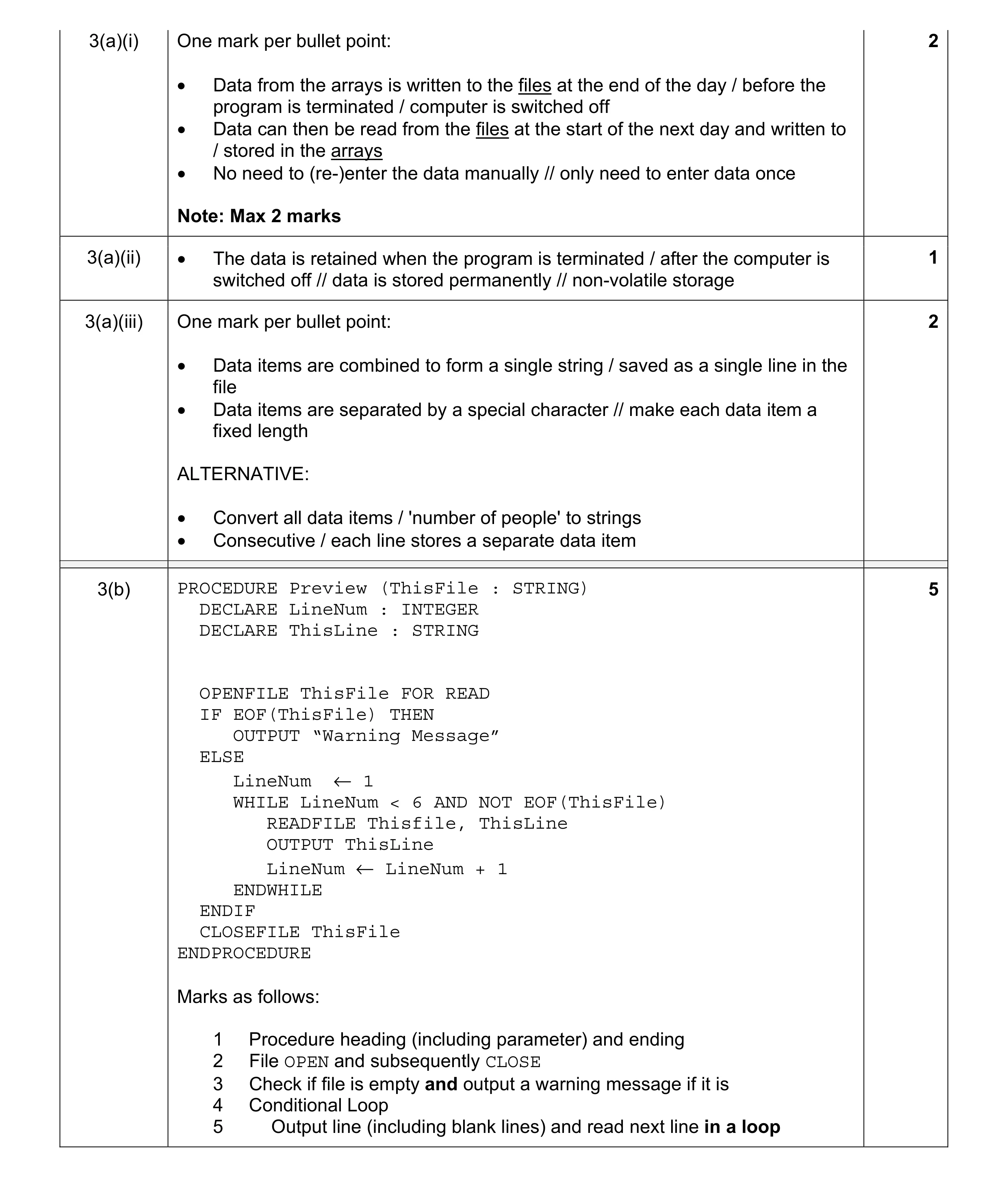 10
10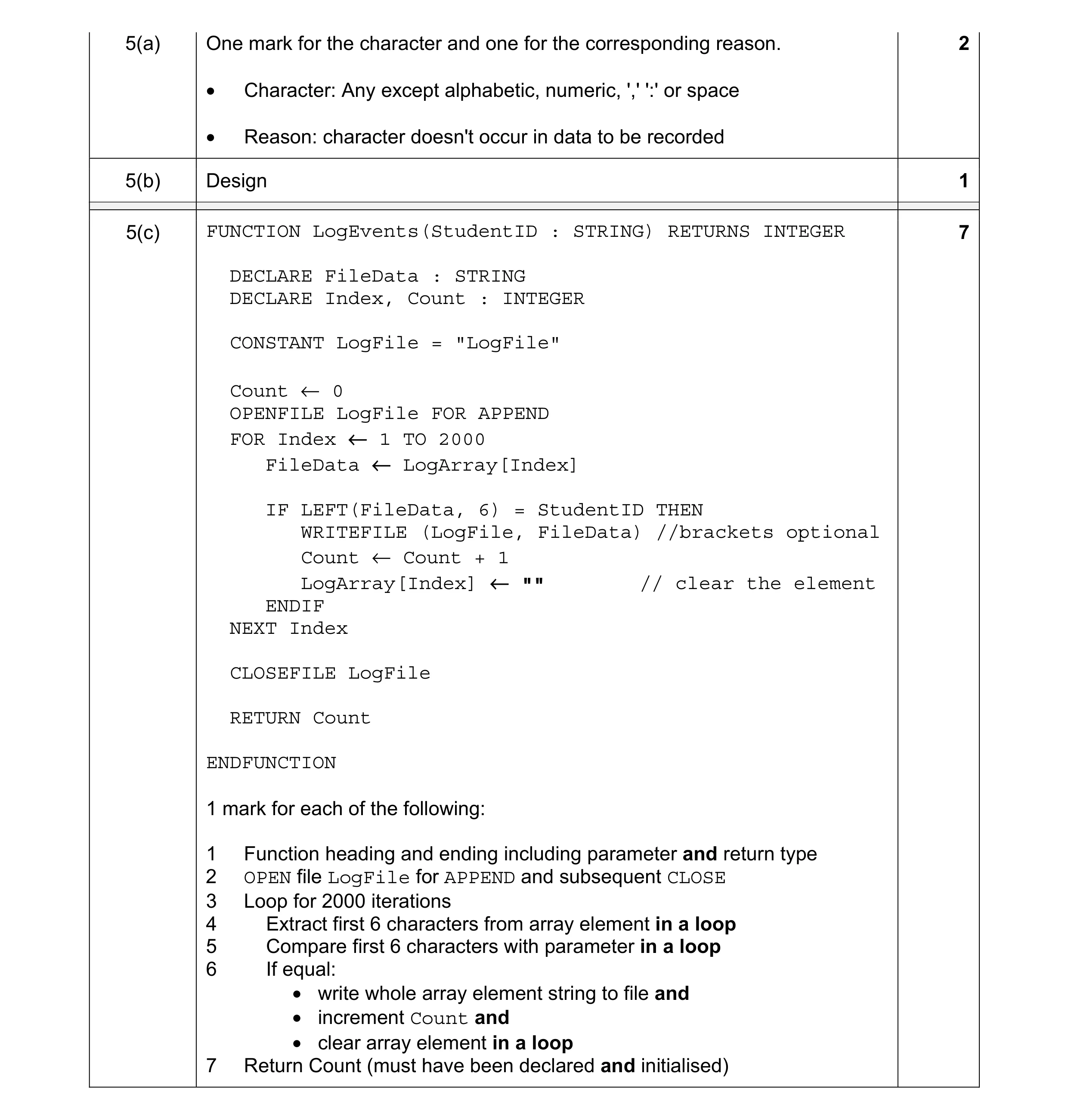 10
10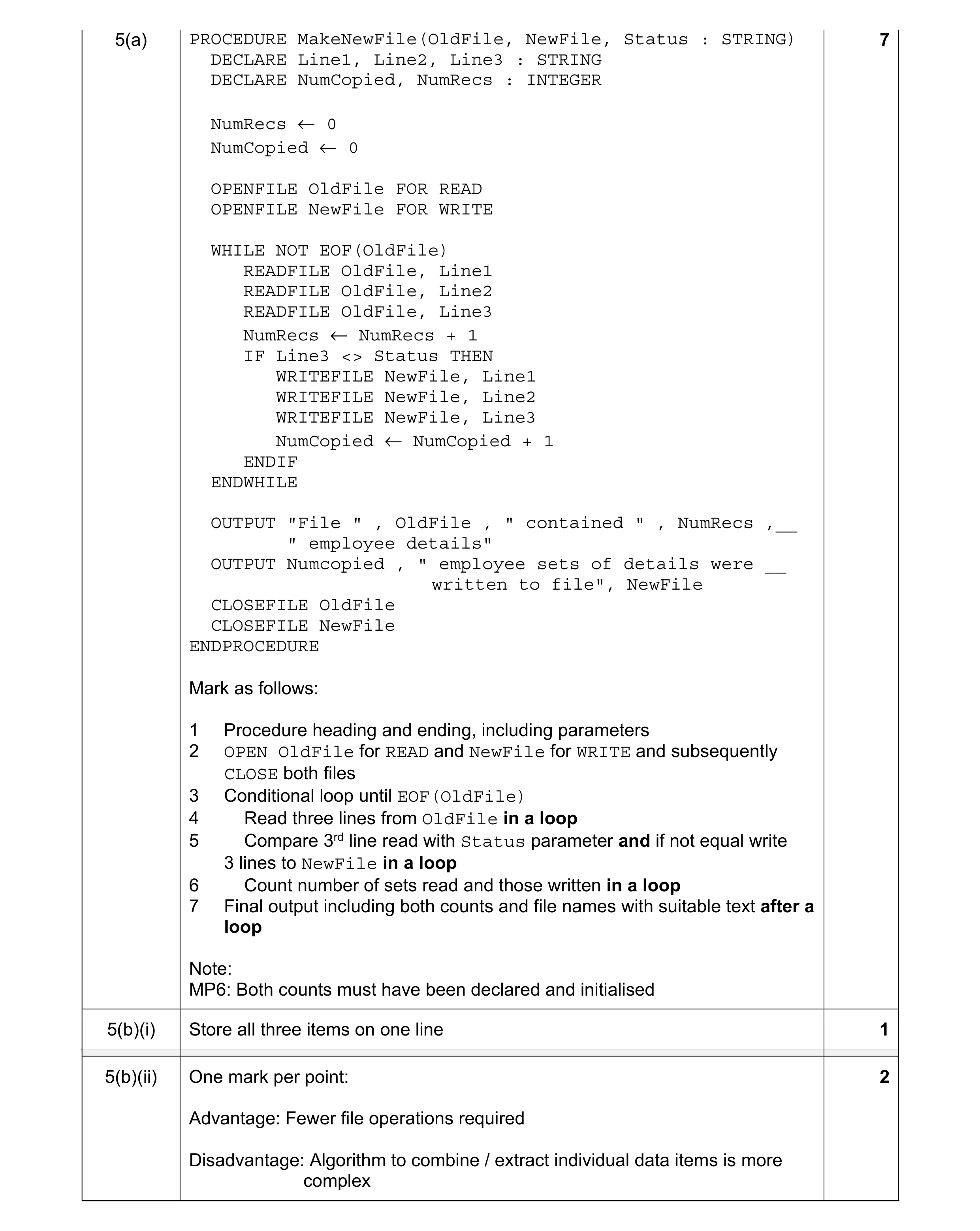 10
10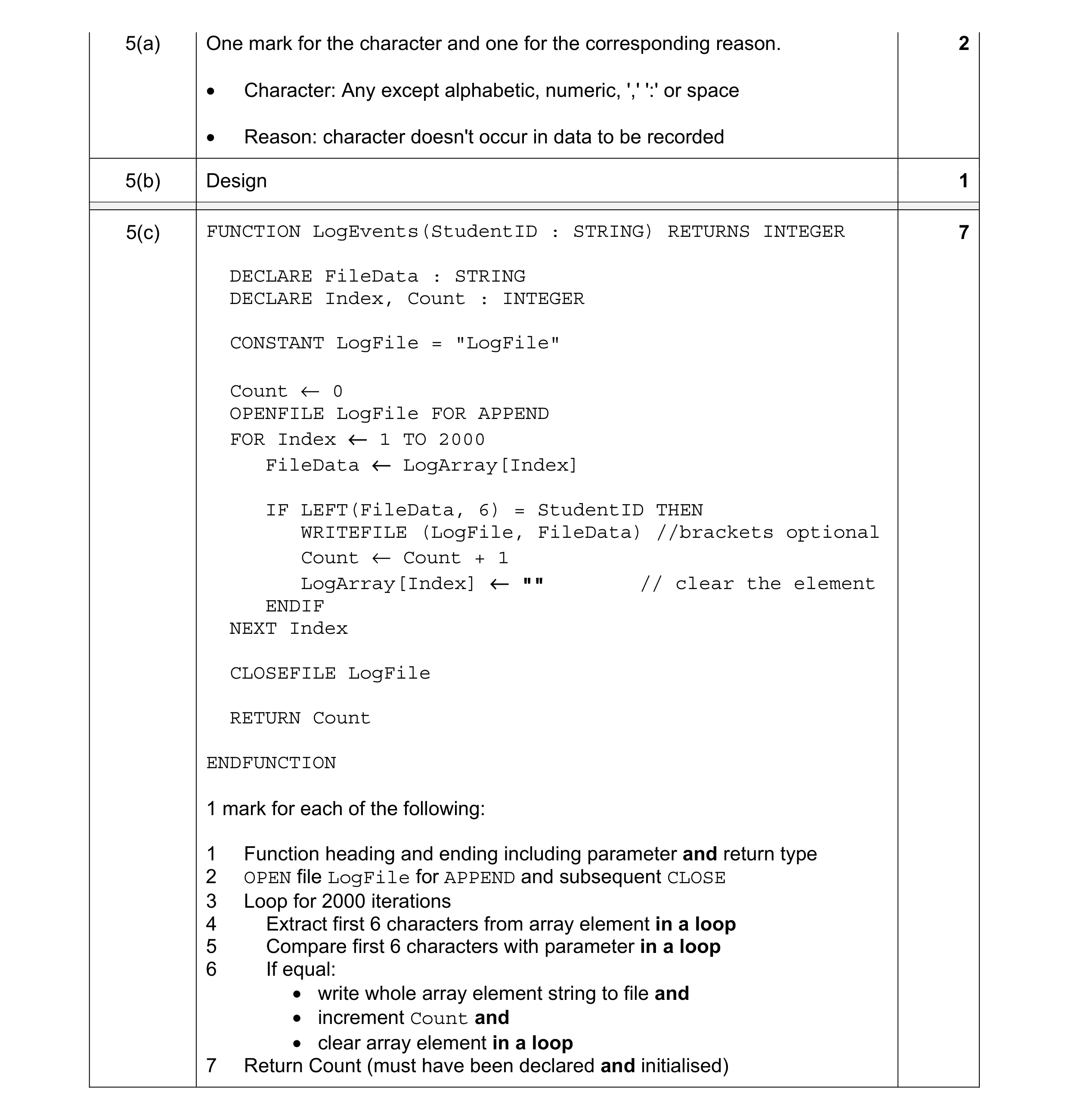 10
10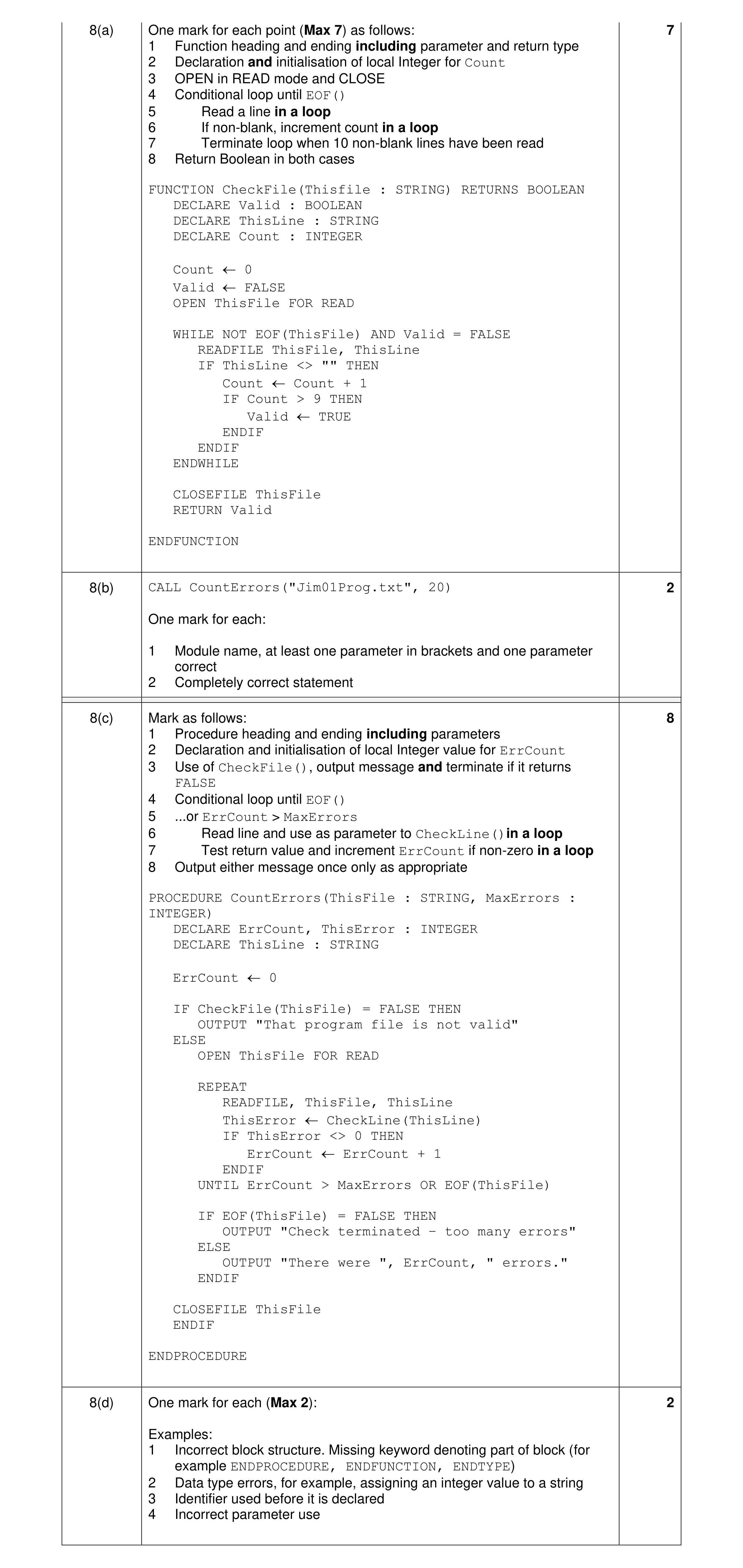 9
9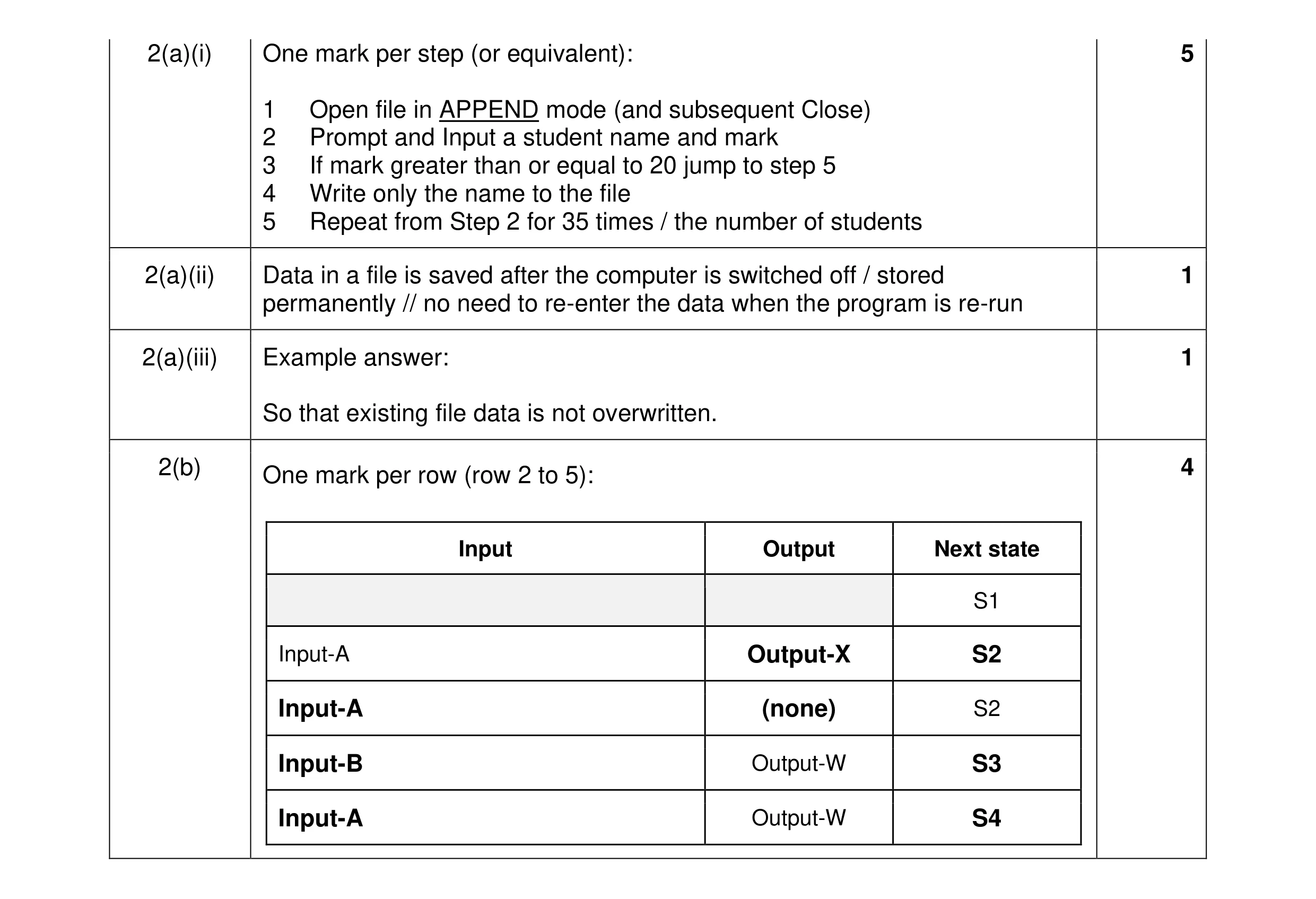 11
11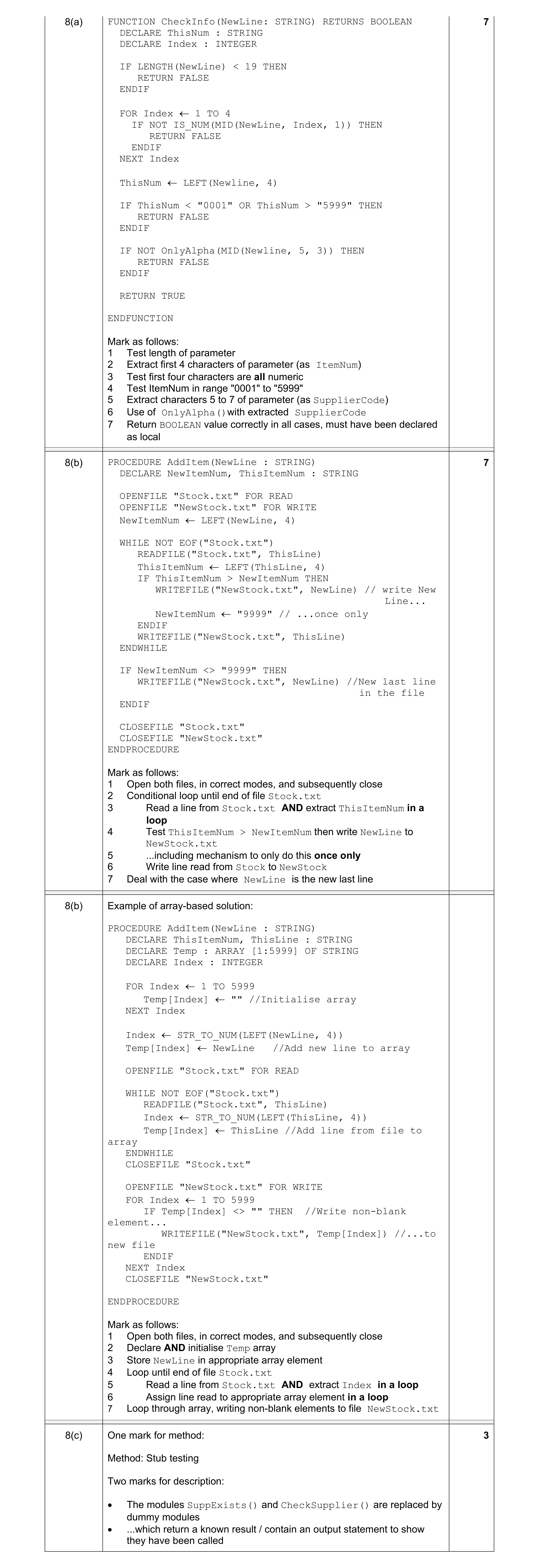 7
7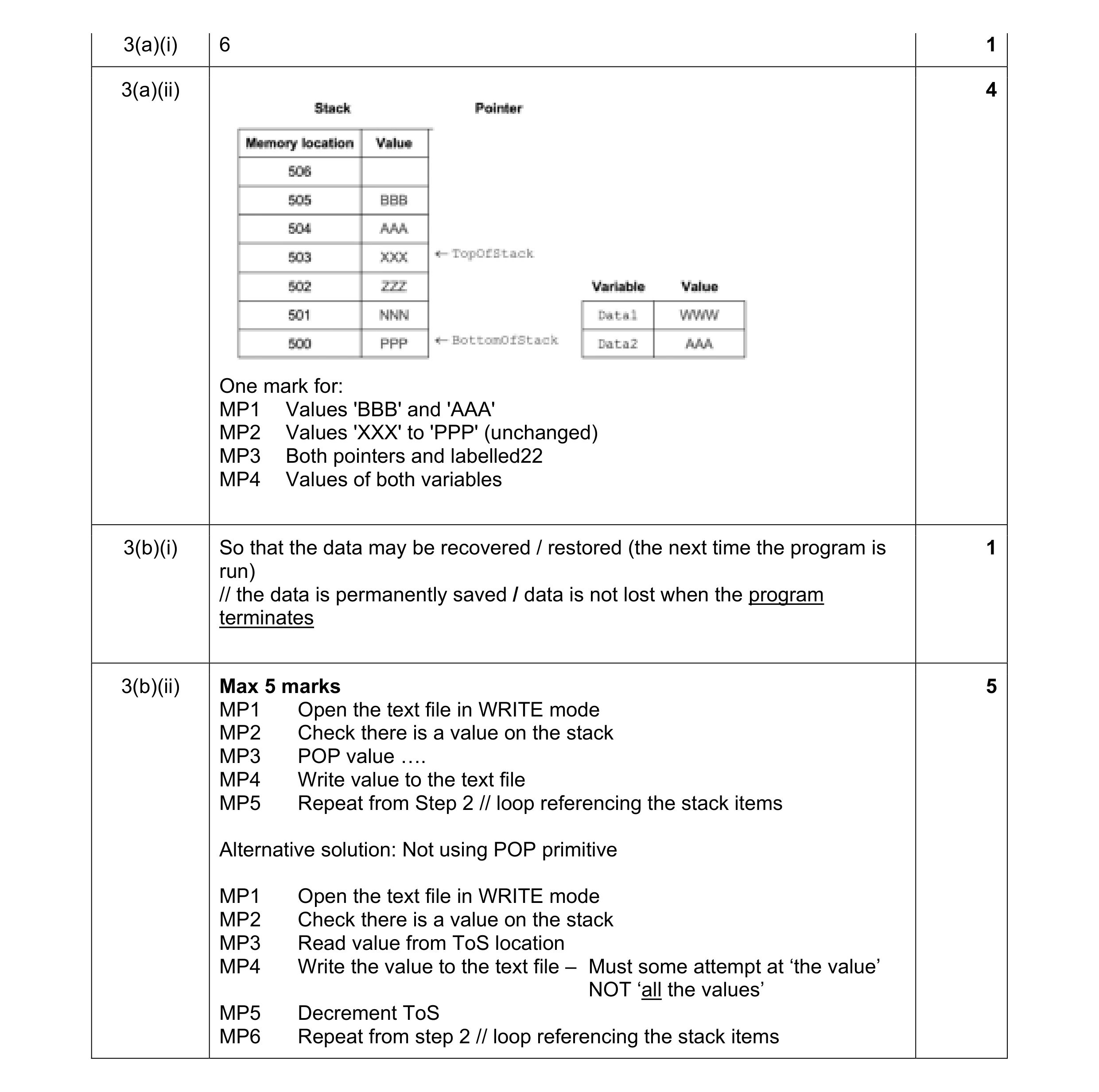 11
11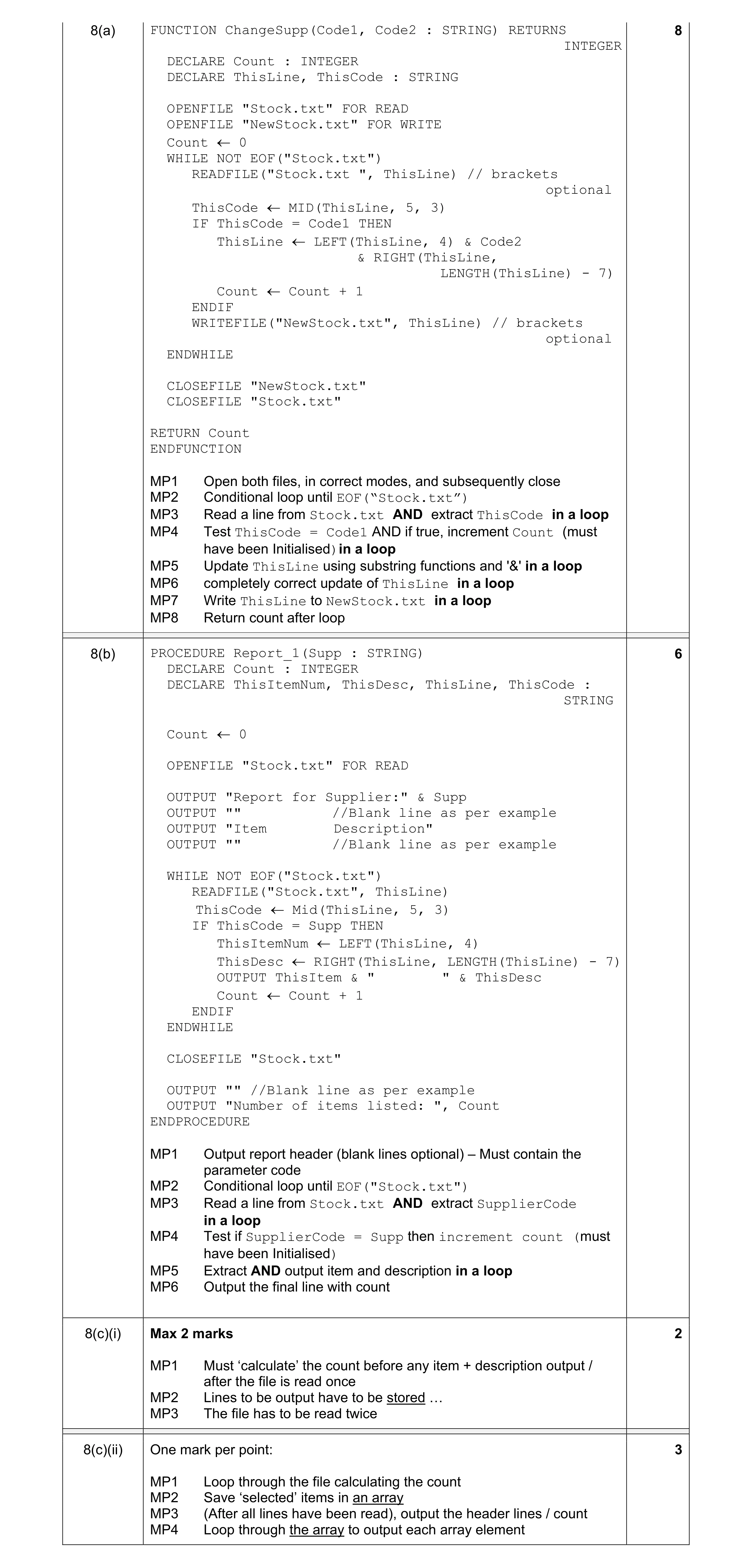 8
8