Cambridge A Level Information Technology (from 2017) 9626 — 2021 May/June Paper 1 · Variant 1
9626/11/M/J/21 · 90 marks · ≈101 min
The question paper and its mark scheme, free to read here and free to download. This is Cambridge’s own paper, exactly as it was sat.
Question paper20 pages








Mark scheme10 pages
Answers below. Sit the paper first if you are practising.
Paper as text
Question paper, page 1
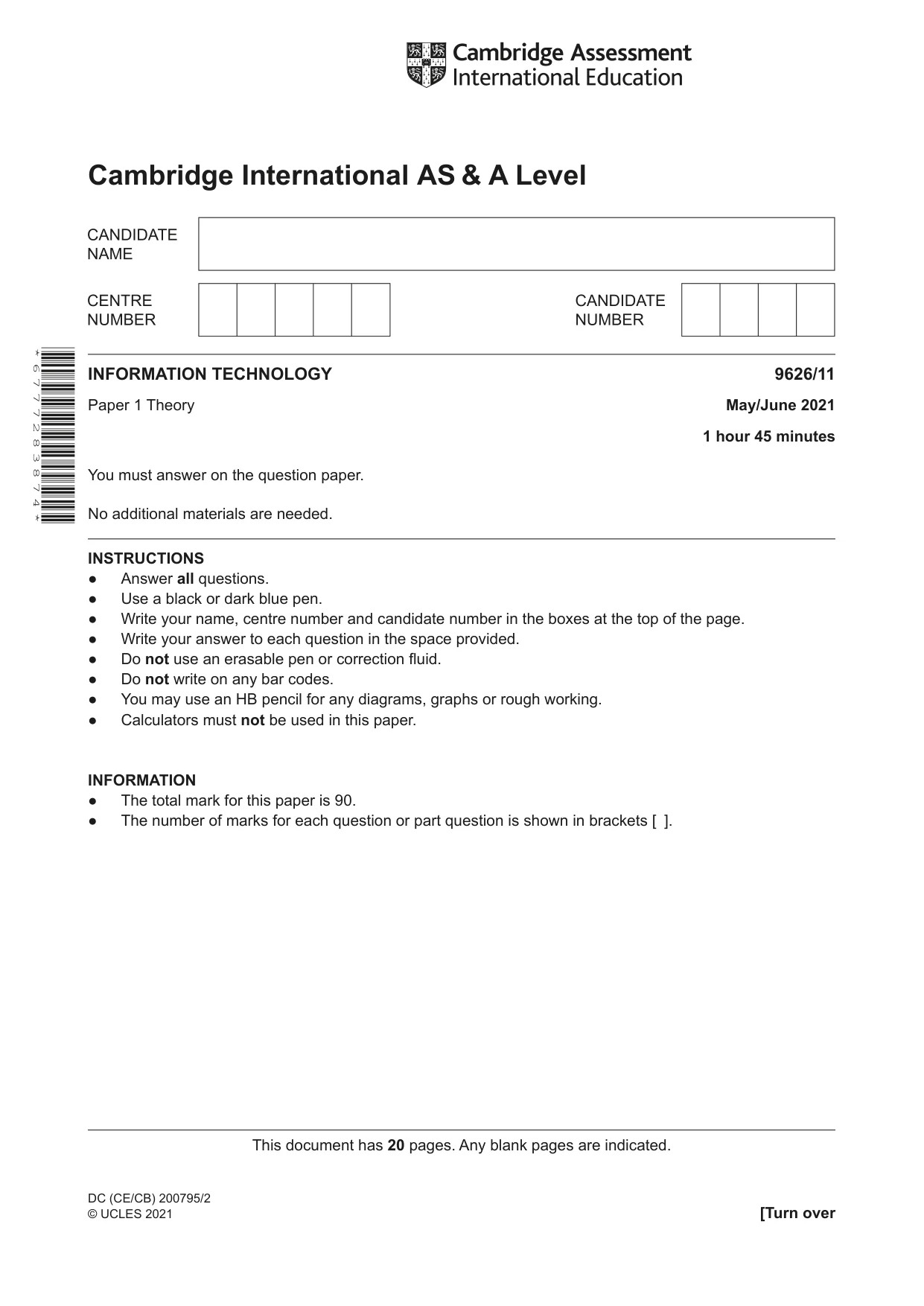
This document has 20 pages. Any blank pages are indicated. Cambridge International AS & A Level DC (CE/CB) 200795/2 © UCLES 2021 [Turn over INFORMATION TECHNOLOGY 9626/11 Paper 1 Theory May/June 2021 1 hour 45 minutes You must answer on the question paper. No additional materials are needed. INSTRUCTIONS ● Answer all questions. ● Use a black or dark blue pen. ● Write your name, centre number and candidate number in the boxes at the top of the page. ● Write your answer to each question in the space provided. ● Do not use an erasable pen or correction fluid. ● Do not write on any bar codes. ● You may use an HB pencil for any diagrams, graphs or rough working. ● Calculators must not be used in this paper. INFORMATION ● The total mark for this paper is 90. ● The number of marks for each question or part question is shown in brackets [ ]. * 6 7 7 7 2 8 3 8 7 4 *
Question paper, page 2
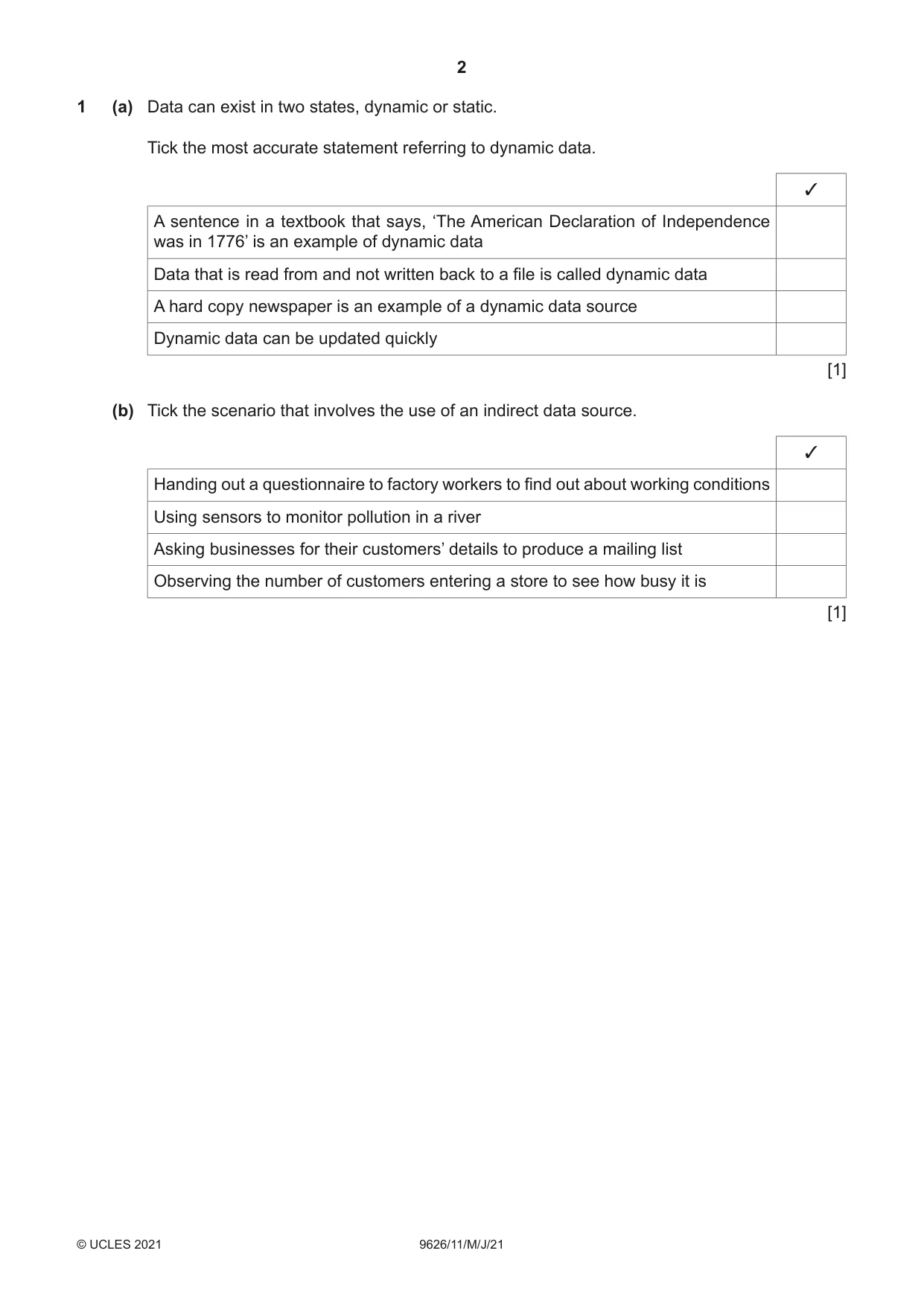
2 9626/11/M/J/21 © UCLES 2021 1 (a) Data can exist in two states, dynamic or static. Tick the most accurate statement referring to dynamic data. ✓ A sentence in a textbook that says, ‘The American Declaration of Independence was in 1776’ is an example of dynamic data Data that is read from and not written back to a file is called dynamic data A hard copy newspaper is an example of a dynamic data source Dynamic data can be updated quickly [1] (b) Tick the scenario that involves the use of an indirect data source. ✓ Handing out a questionnaire to factory workers to find out about working conditions Using sensors to monitor pollution in a river Asking businesses for their customers’ details to produce a mailing list Observing the number of customers entering a store to see how busy it is [1]
Question paper, page 3
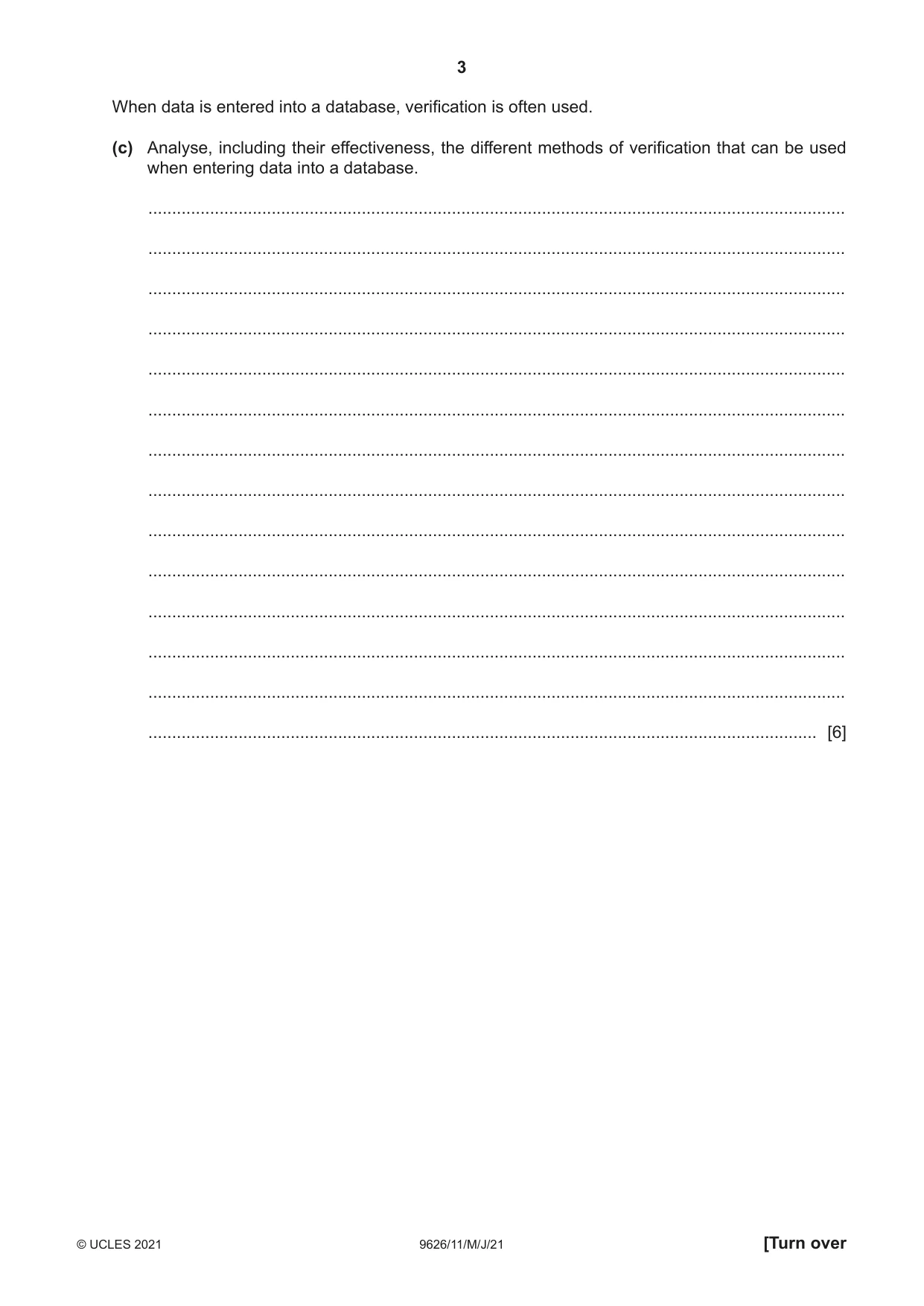
3 9626/11/M/J/21 © UCLES 2021 [Turn over When data is entered into a database, verification is often used. (c) Analyse, including their effectiveness, the different methods of verification that can be used when entering data into a database. … … … … … … … … … … … … … … [6]
Question paper, page 4
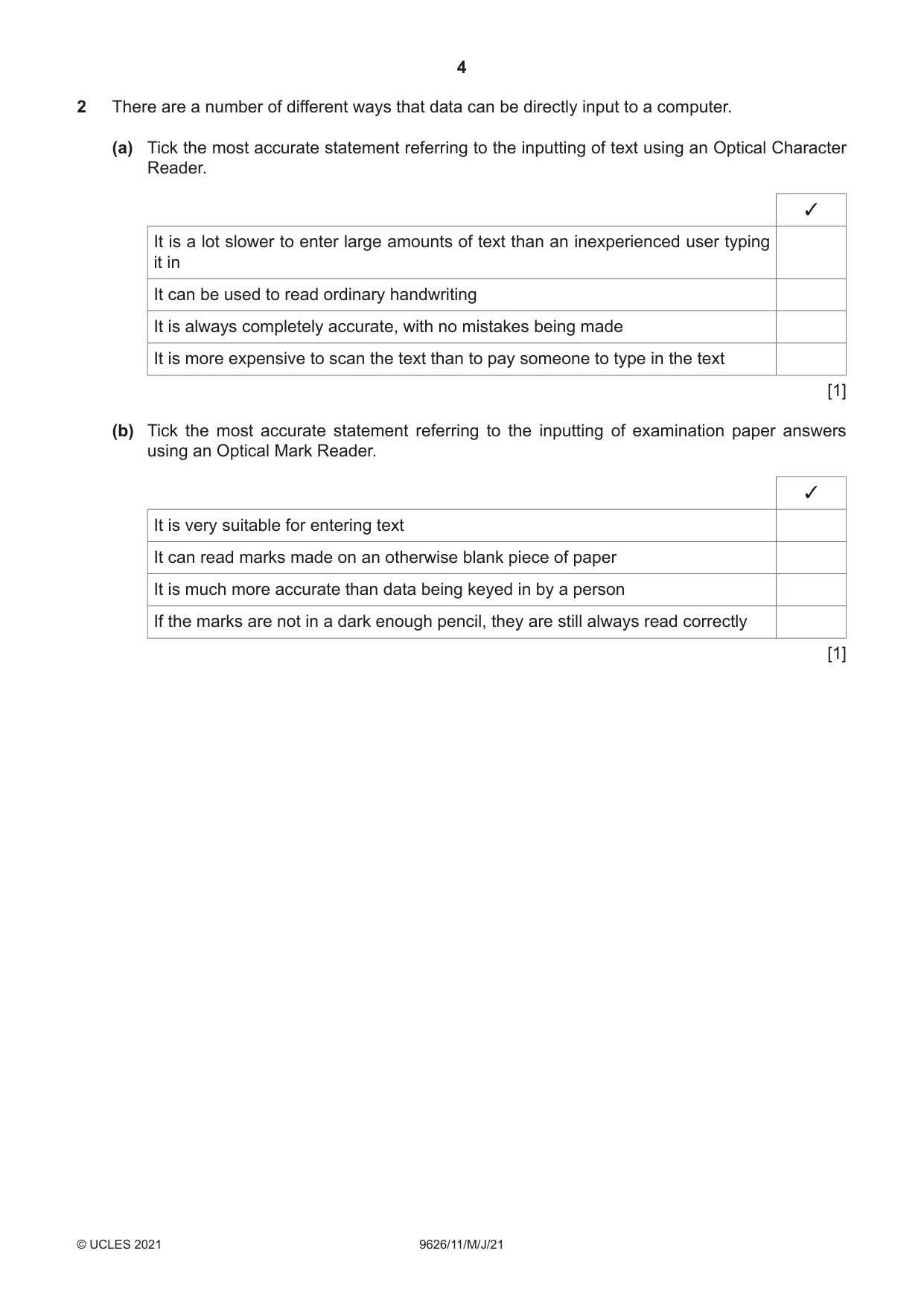
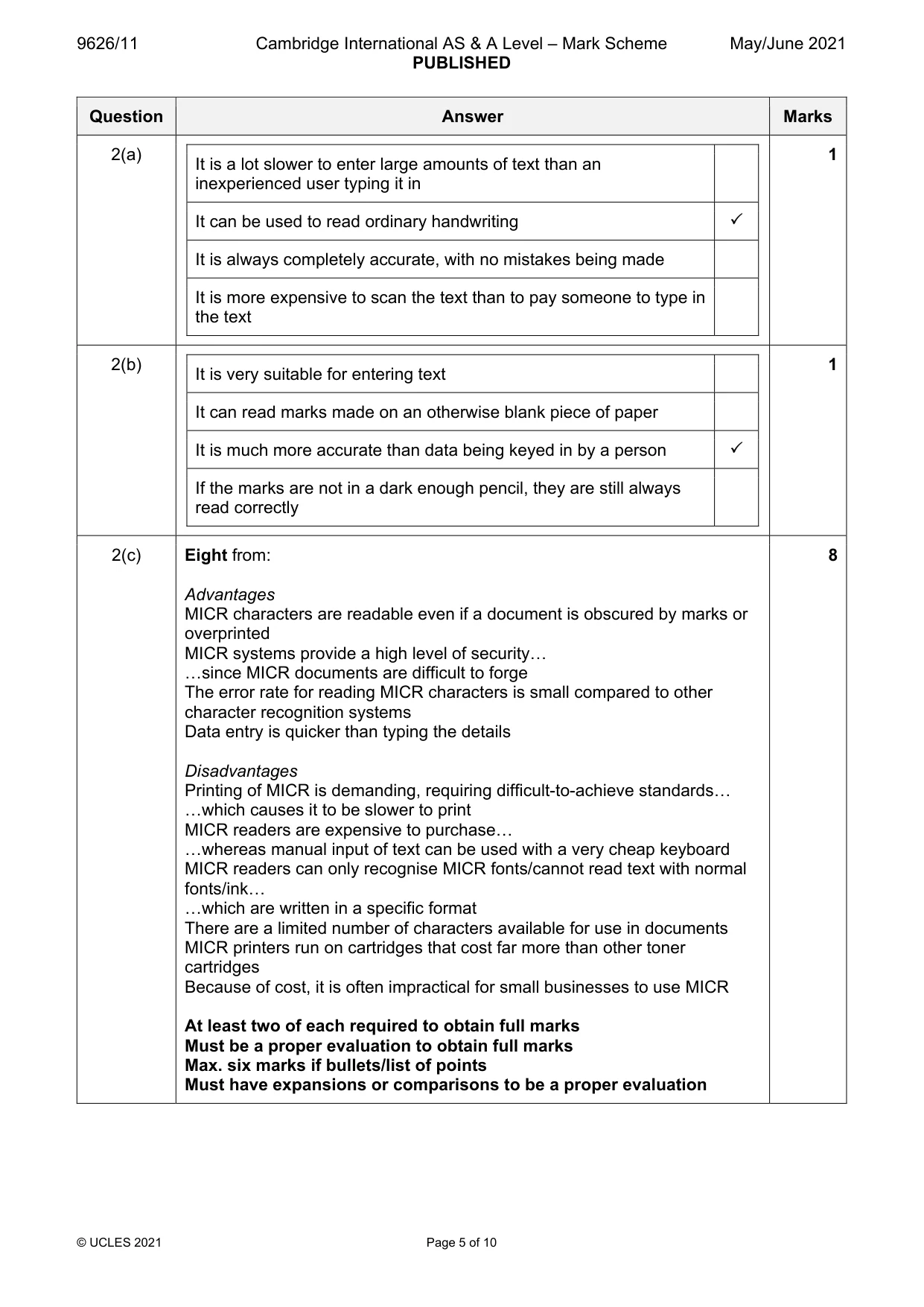
4 9626/11/M/J/21 © UCLES 2021 2 There are a number of different ways that data can be directly input to a computer. (a) Tick the most accurate statement referring to the inputting of text using an Optical Character Reader. ✓ It is a lot slower to enter large amounts of text than an inexperienced user typing it in It can be used to read ordinary handwriting It is always completely accurate, with no mistakes being made It is more expensive to scan the text than to pay someone to type in the text [1] (b) Tick the most accurate statement referring to the inputting of examination paper answers using an Optical Mark Reader. ✓ It is very suitable for entering text It can read marks made on an otherwise blank piece of paper It is much more accurate than data being keyed in by a person If the marks are not in a dark enough pencil, they are still always read correctly [1]
Question paper, page 5
5 9626/11/M/J/21 © UCLES 2021 [Turn over (c) Evaluate, by weighing up the advantages and disadvantages, the use of MICR for inputting text. … … … … … … … … … … … … … … … … … … … [8]
Question paper, page 6
6 9626/11/M/J/21 © UCLES 2021 3 Financial reports can be produced using word processing software or spreadsheet software. Compare and contrast the use of these two pieces of application software for this purpose. … … … … … … … … … … … … … … … … … … … … [8]
Question paper, page 7
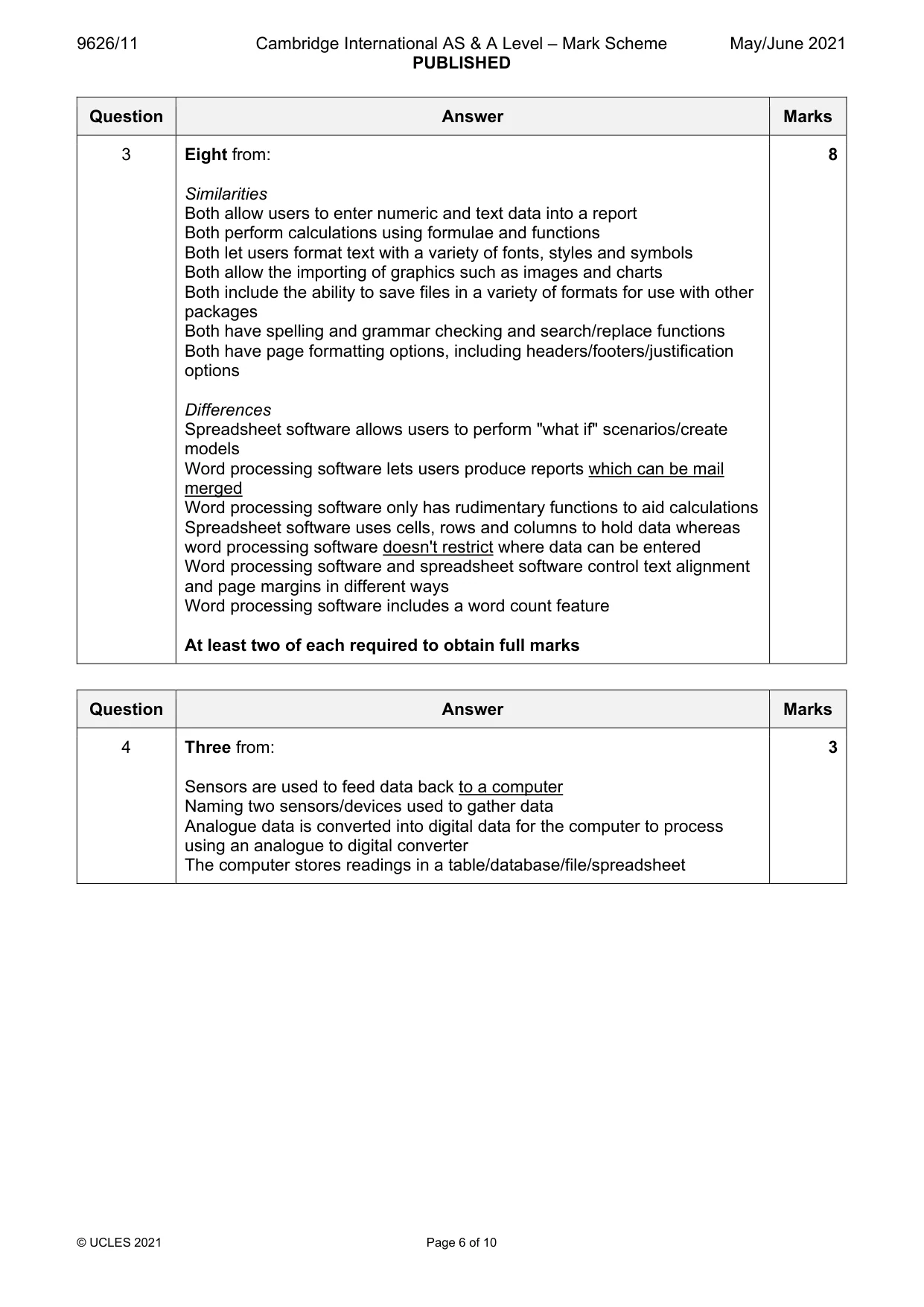
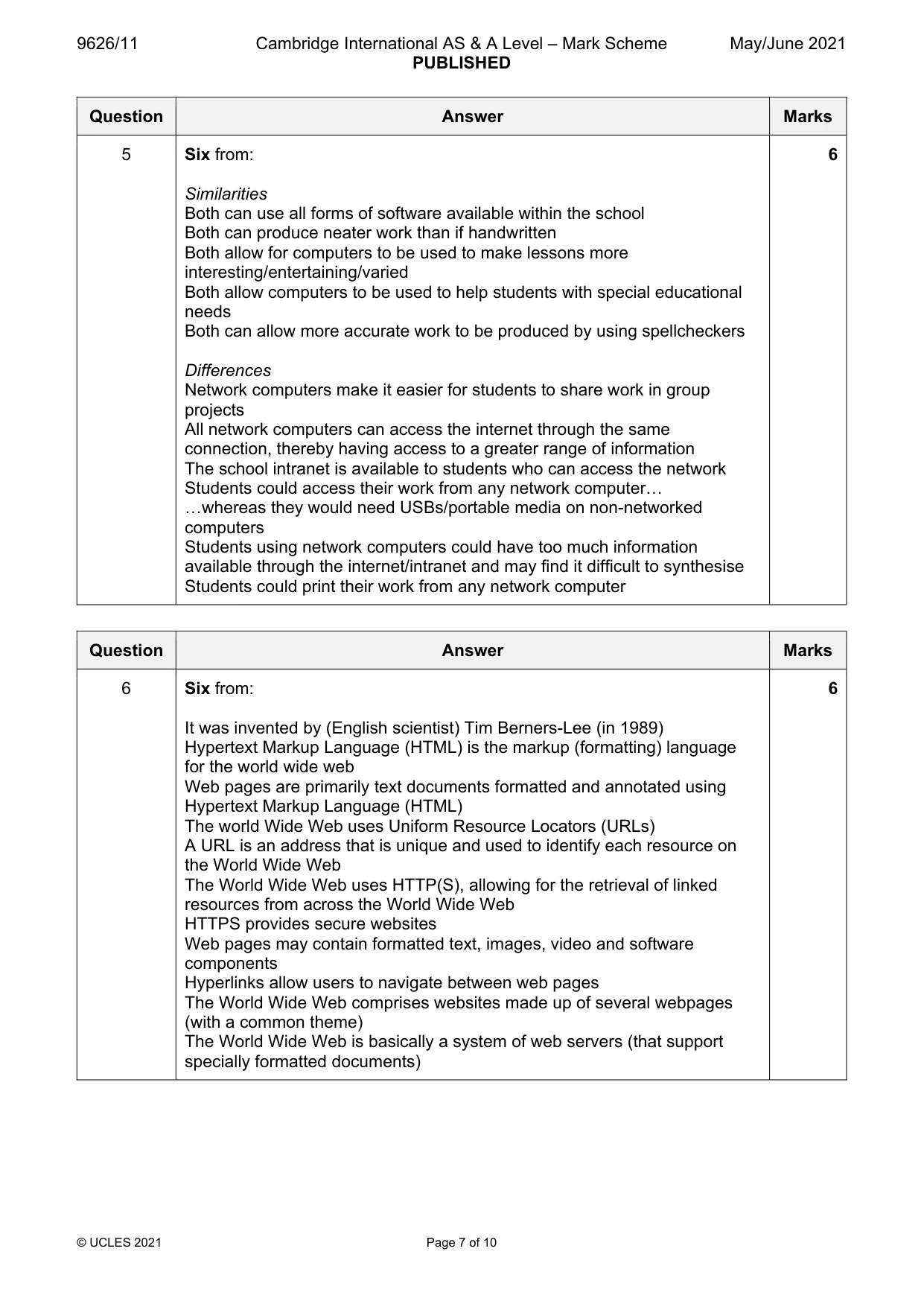
7 9626/11/M/J/21 © UCLES 2021 [Turn over 4 Describe how the data from an air pollution monitoring system is collected and prepared, ready for processing by a computer. … … … … … … … … [3] 5 A school has classrooms where students can use computers to access the school network. There are other classrooms where the computers do not have access to the school network. Compare and contrast the use of computers in both types of classroom. … … … … … … … … … … … … … … [6]
Question paper, page 8
8 9626/11/M/J/21 © UCLES 2021 6 The World Wide Web is a service provided by the internet. Describe, without referring to how it is accessed, what is meant by the World Wide Web. … … … … … … … … … … … … … … [6]
Question paper, page 9
9 9626/11/M/J/21 © UCLES 2021 [Turn over 7 The manager of an IT department has been asked to set up a video-conference. At the moment she only has a router, a networked computer and a large screen. Describe how she would set up this video-conference before joining in. … … … … … … … … … … … … … … … … … … … … [8]
Question paper, page 10
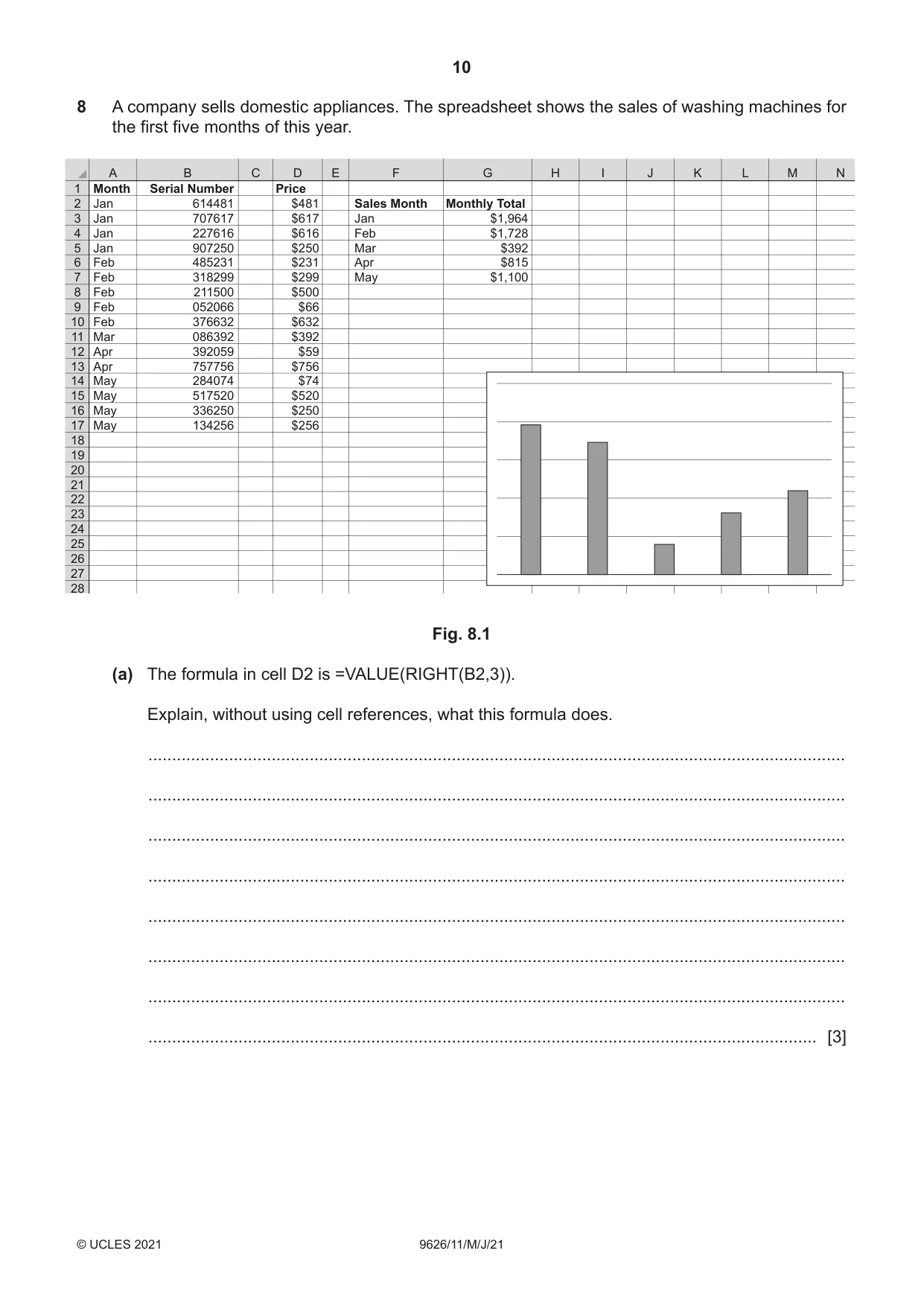
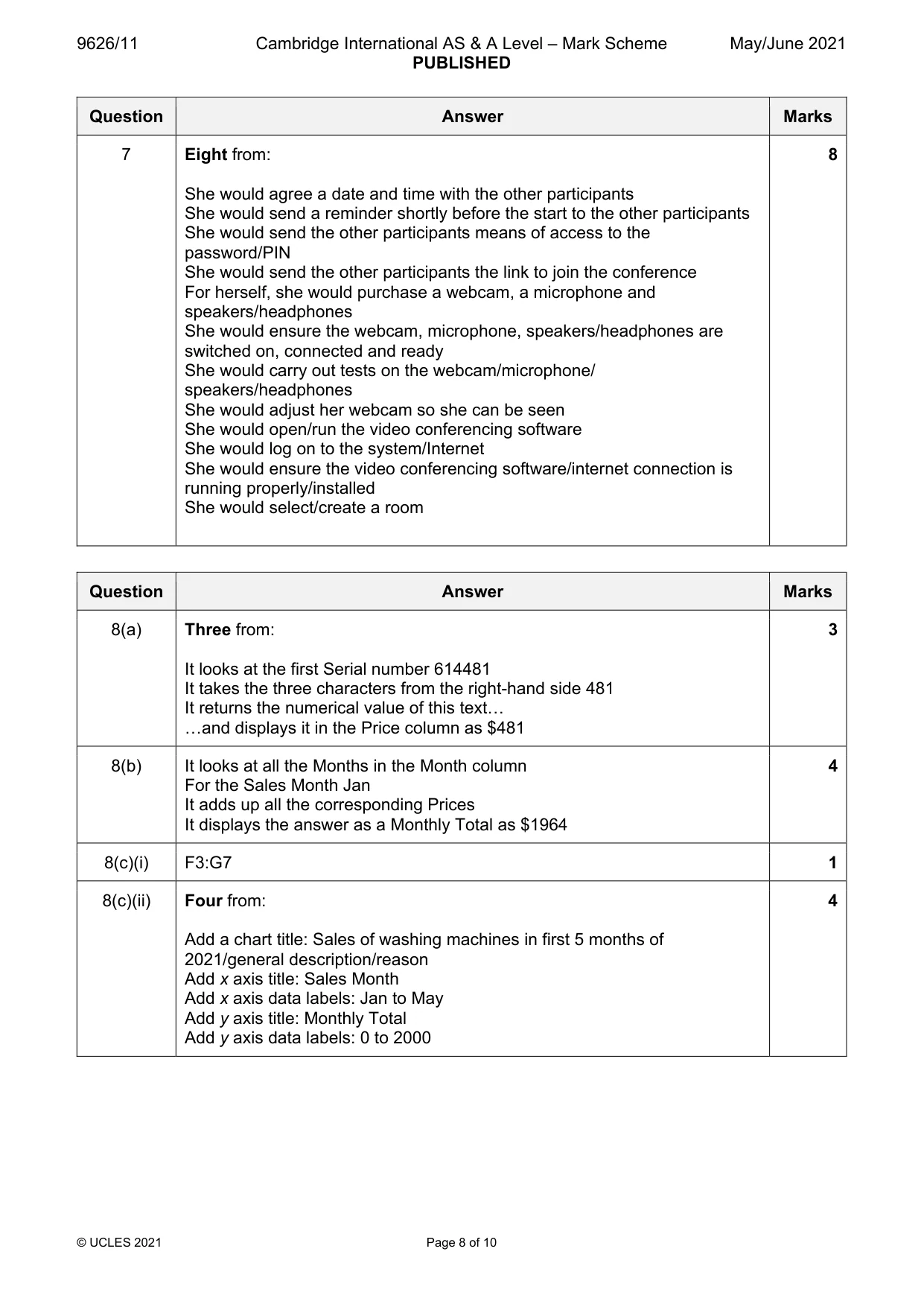
10 9626/11/M/J/21 © UCLES 2021 8 A company sells domestic appliances. The spreadsheet shows the sales of washing machines for the first five months of this year. 1 2 3 4 5 6 7 8 9 10 11 12 13 14 15 16 17 18 19 20 21 22 23 24 25 26 27 28 A B C D E F G H I J K L M N Month Jan Jan Jan Jan Feb Feb Feb Feb Feb Mar Apr Apr May May May May Serial Number 614481 707617 227616 907250 485231 318299 211500 052066 376632 086392 392059 757756 284074 517520 336250 134256 Price $481 $617 $616 $250 $231 $299 $500 $66 $632 $392 $59 $756 $74 $520 $250 $256 Sales Month Jan Feb Mar Apr May Monthly Total $1,964 $1,728 $392 $815 $1,100 Fig. 8.1 (a) The formula in cell D2 is =VALUE(RIGHT(B2,3)). Explain, without using cell references, what this formula does. … … … … … … … … [3]
Question paper, page 11
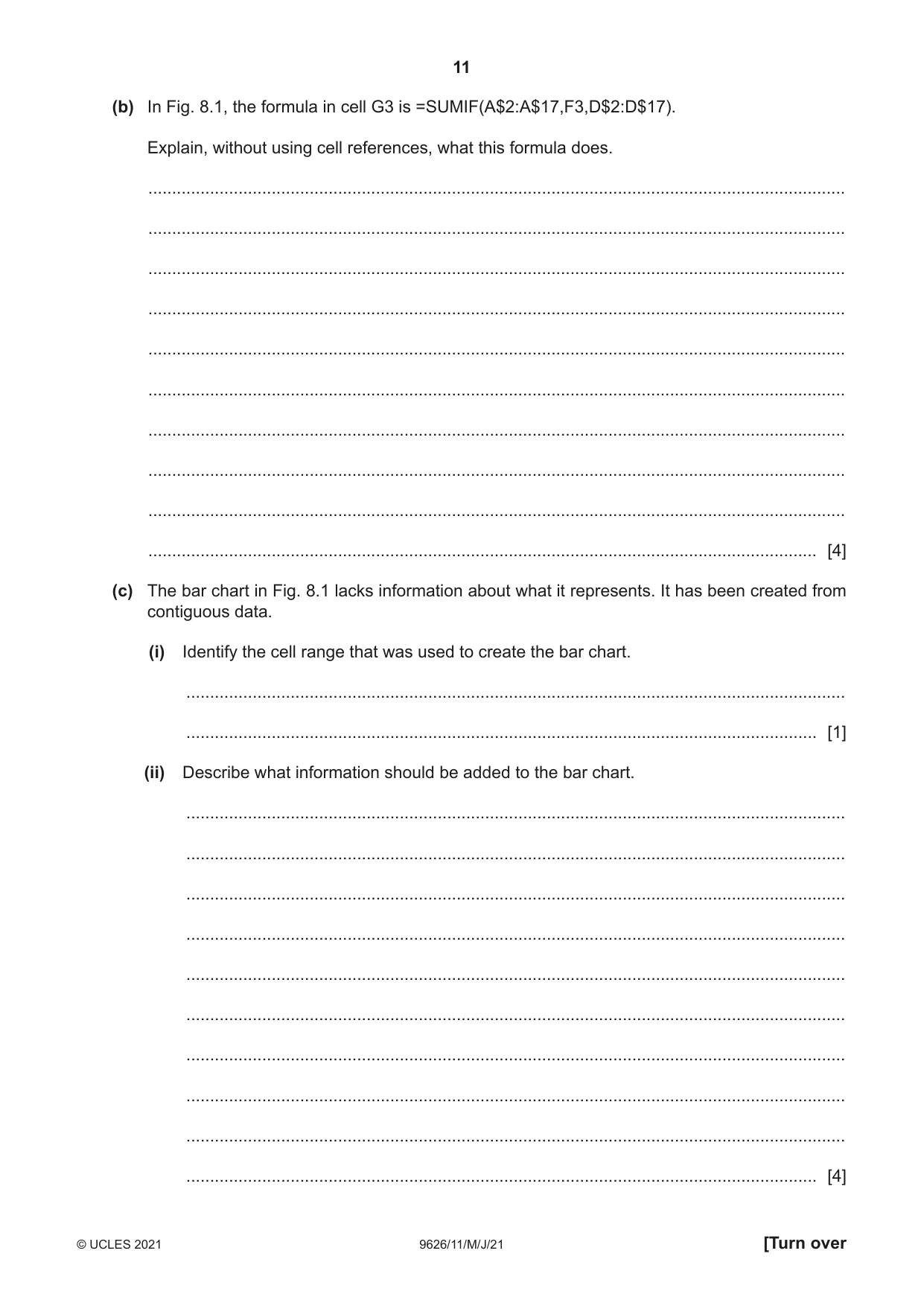
11 9626/11/M/J/21 © UCLES 2021 [Turn over (b) In Fig. 8.1, the formula in cell G3 is =SUMIF(A$2:A$17,F3,D$2:D$17). Explain, without using cell references, what this formula does. … … … … … … … … … … [4] (c) The bar chart in Fig. 8.1 lacks information about what it represents. It has been created from contiguous data. (i) Identify the cell range that was used to create the bar chart. … … [1] (ii) Describe what information should be added to the bar chart. … … … … … … … … … … [4]
Question paper, page 12
12 9626/11/M/J/21 © UCLES 2021 (d) Evaluate, by weighing up the advantages and disadvantages, the use of the spreadsheet in Fig. 8.1 for financial forecasting. … … … … … … … … … … … … … … [6]
Question paper, page 13
13 9626/11/M/J/21 © UCLES 2021 [Turn over BLANK PAGE
Question paper, page 14
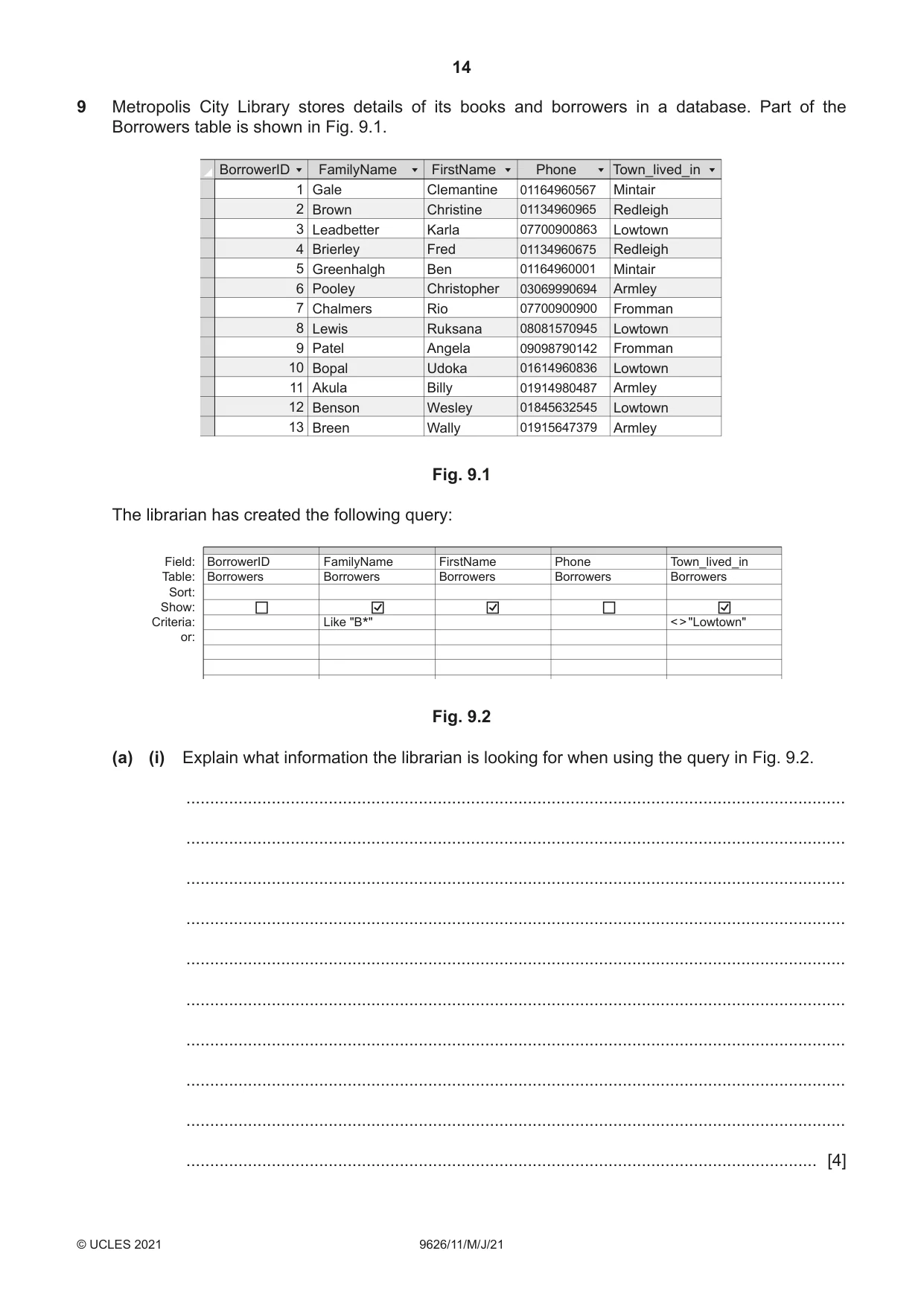
14 9626/11/M/J/21 © UCLES 2021 9 Metropolis City Library stores details of its books and borrowers in a database. Part of the Borrowers table is shown in Fig. 9.1. 1 2 3 4 5 6 7 8 9 10 11 12 13 Gale Brown Leadbetter Brierley Greenhalgh Pooley Chalmers Lewis Patel Bopal Akula Benson Breen Clemantine Christine Karla Fred Ben Christopher Rio Ruksana Angela Udoka Billy Wesley Wally Mintair Redleigh Lowtown Redleigh Mintair Armley Fromman Lowtown Fromman Lowtown Armley Lowtown Armley 01164960567 01134960965 07700900863 01134960675 01164960001 03069990694 07700900900 08081570945 09098790142 01614960836 01914980487 01845632545 01915647379 BorrowerID FamilyName FirstName Phone Town_lived_in Fig. 9.1 The librarian has created the following query: Field: Table: Sort: Show: Criteria: or: BorrowerID Borrowers FamilyName Borrowers Like ʺB*ʺ FirstName Borrowers Phone Borrowers Town_lived_in Borrowers < > ʺLowtownʺ Fig. 9.2 (a) (i) Explain what information the librarian is looking for when using the query in Fig. 9.2. … … … … … … … … … … [4]
Question paper, page 15
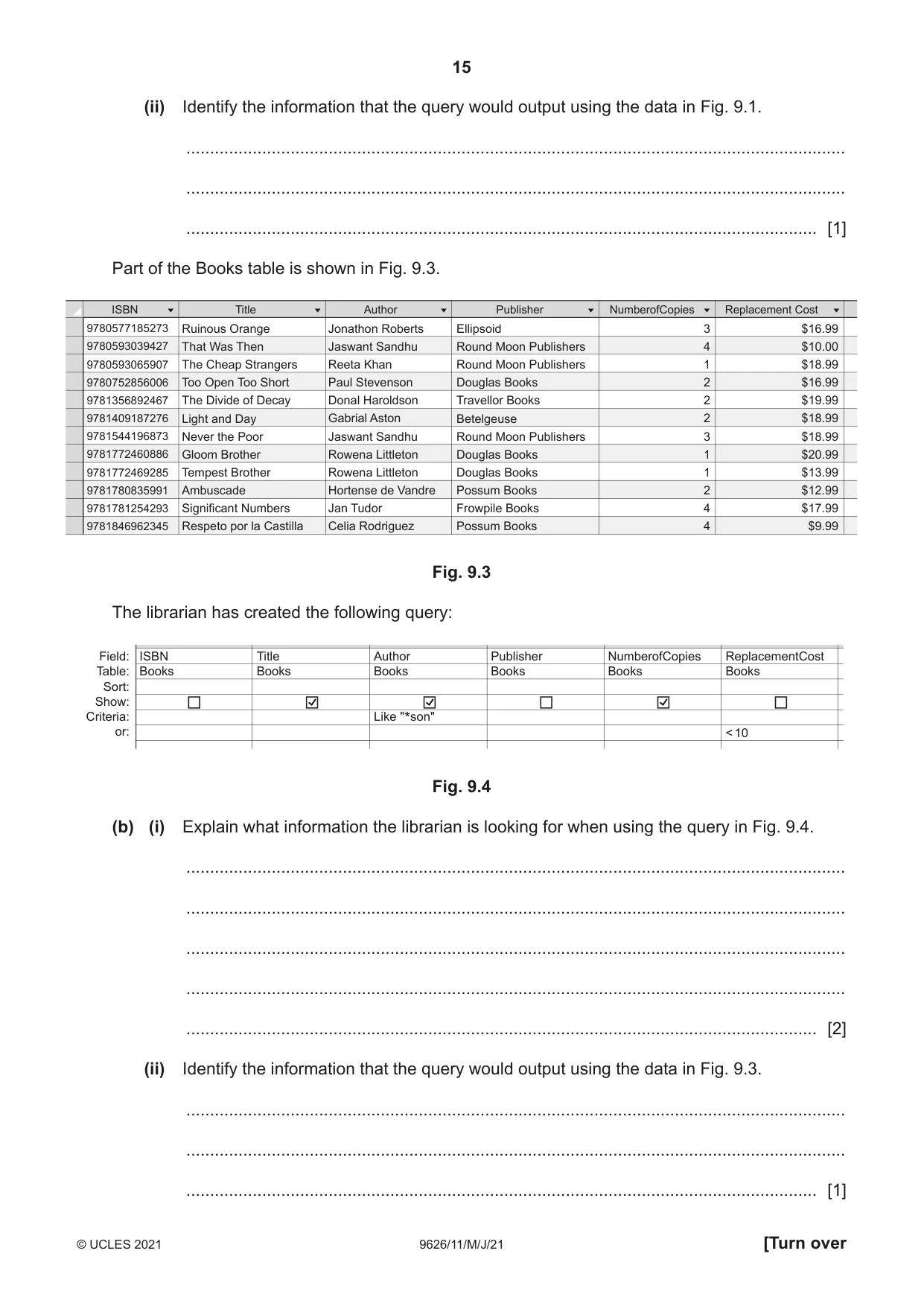
15 9626/11/M/J/21 © UCLES 2021 [Turn over (ii) Identify the information that the query would output using the data in Fig. 9.1. … … … [1] Part of the Books table is shown in Fig. 9.3. 9780577185273 9780593039427 9780593065907 9780752856006 9781356892467 9781409187276 9781544196873 9781772460886 9781772469285 9781780835991 9781781254293 9781846962345 Ruinous Orange That Was Then The Cheap Strangers Too Open Too Short The Divide of Decay Light and Day Never the Poor Gloom Brother Tempest Brother Ambuscade Significant Numbers Respeto por la Castilla Jonathon Roberts Jaswant Sandhu Reeta Khan Paul Stevenson Donal Haroldson Gabrial Aston Jaswant Sandhu Rowena Littleton Rowena Littleton Hortense de Vandre Jan Tudor Celia Rodriguez ISBN Title Author Ellipsoid Round Moon Publishers Round Moon Publishers Douglas Books Travellor Books Betelgeuse Round Moon Publishers Douglas Books Douglas Books Possum Books Frowpile Books Possum Books 3 4 1 2 2 2 3 1 1 2 4 4 $16.99 $10.00 $18.99 $16.99 $19.99 $18.99 $18.99 $20.99 $13.99 $12.99 $17.99 $9.99 Publisher NumberofCopies Replacement Cost Fig. 9.3 The librarian has created the following query: Field: Table: Sort: Show: Criteria: or: ISBN Books Title Books Author Books Like ʺ*sonʺ Publisher Books NumberofCopies Books ReplacementCost Books < 10 Fig. 9.4 (b) (i) Explain what information the librarian is looking for when using the query in Fig. 9.4. … … … … … [2] (ii) Identify the information that the query would output using the data in Fig. 9.3. … … … [1]
Question paper, page 16
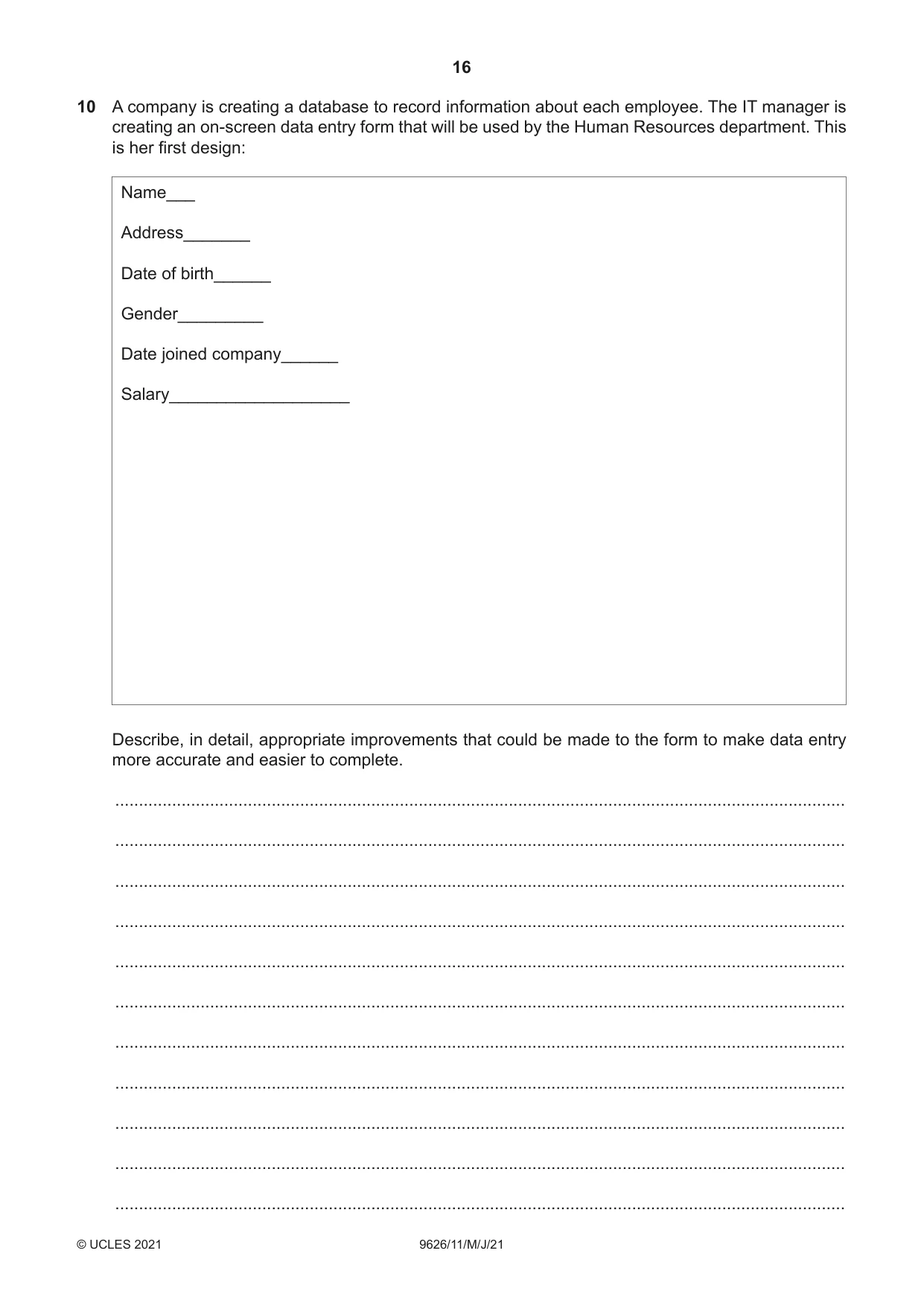
16 9626/11/M/J/21 © UCLES 2021 10 A company is creating a database to record information about each employee. The IT manager is creating an on-screen data entry form that will be used by the Human Resources department. This is her first design: Name___ Address_______ Date of birth______ Gender_________ Date joined company______ Salary___________________ Describe, in detail, appropriate improvements that could be made to the form to make data entry more accurate and easier to complete. … … … … … … … … … … …
Question paper, page 17
17 9626/11/M/J/21 © UCLES 2021 [Turn over … … … … … … … … … … [8]
Question paper, page 18
18 9626/11/M/J/21 © UCLES 2021 11 Explain, using examples, what is meant by the term generic file format. … … … … … … … … [3] 12 Describe, in detail, what is meant by a hierarchical database management system. … … … … … … … … … … [4]
Question paper, page 19
19 9626/11/M/J/21 © UCLES 2021 BLANK PAGE
Question paper, page 20
20 9626/11/M/J/21 © UCLES 2021 Permission to reproduce items where third-party owned material protected by copyright is included has been sought and cleared where possible. Every reasonable effort has been made by the publisher (UCLES) to trace copyright holders, but if any items requiring clearance have unwittingly been included, the publisher will be pleased to make amends at the earliest possible opportunity. To avoid the issue of disclosure of answer-related information to candidates, all copyright acknowledgements are reproduced online in the Cambridge Assessment International Education Copyright Acknowledgements Booklet. This is produced for each series of examinations and is freely available to download at www.cambridgeinternational.org after the live examination series. Cambridge Assessment International Education is part of the Cambridge Assessment Group. Cambridge Assessment is the brand name of the University of Cambridge Local Examinations Syndicate (UCLES), which itself is a department of the University of Cambridge. BLANK PAGE
Mark scheme, page 1
This document consists of 10 printed pages. © UCLES 2021 [Turn over Cambridge International AS & A Level INFORMATION TECHNOLOGY 9626/11 Paper 1 Theory May/June 2021 MARK SCHEME Maximum Mark: 90 Published This mark scheme is published as an aid to teachers and candidates, to indicate the requirements of the examination. It shows the basis on which Examiners were instructed to award marks. It does not indicate the details of the discussions that took place at an Examiners’ meeting before marking began, which would have considered the acceptability of alternative answers. Mark schemes should be read in conjunction with the question paper and the Principal Examiner Report for Teachers. Cambridge International will not enter into discussions about these mark schemes. Cambridge International is publishing the mark schemes for the May/June 2021 series for most Cambridge IGCSE™, Cambridge International A and AS Level components and some Cambridge O Level components.
Mark scheme, page 2
9626/11 Cambridge International AS & A Level – Mark Scheme PUBLISHED May/June 2021 © UCLES 2021 Page 2 of 10 Generic Marking Principles These general marking principles must be applied by all examiners when marking candidate answers. They should be applied alongside the specific content of the mark scheme or generic level descriptors for a question. Each question paper and mark scheme will also comply with these marking principles. GENERIC MARKING PRINCIPLE 1: Marks must be awarded in line with: • the specific content of the mark scheme or the generic level descriptors for the question • the specific skills defined in the mark scheme or in the generic level descriptors for the question • the standard of response required by a candidate as exemplified by the standardisation scripts. GENERIC MARKING PRINCIPLE 2: Marks awarded are always whole marks (not half marks, or other fractions). GENERIC MARKING PRINCIPLE 3: Marks must be awarded positively: • marks are awarded for correct/valid answers, as defined in the mark scheme. However, credit is given for valid answers which go beyond the scope of the syllabus and mark scheme, referring to your Team Leader as appropriate • marks are awarded when candidates clearly demonstrate what they know and can do • marks are not deducted for errors • marks are not deducted for omissions • answers should only be judged on the quality of spelling, punctuation and grammar when these features are specifically assessed by the question as indicated by the mark scheme. The meaning, however, should be unambiguous. GENERIC MARKING PRINCIPLE 4: Rules must be applied consistently, e.g. in situations where candidates have not followed instructions or in the application of generic level descriptors. GENERIC MARKING PRINCIPLE 5: Marks should be awarded using the full range of marks defined in the mark scheme for the question (however; the use of the full mark range may be limited according to the quality of the candidate responses seen). GENERIC MARKING PRINCIPLE 6: Marks awarded are based solely on the requirements as defined in the mark scheme. Marks should not be awarded with grade thresholds or grade descriptors in mind.
Mark scheme, page 3
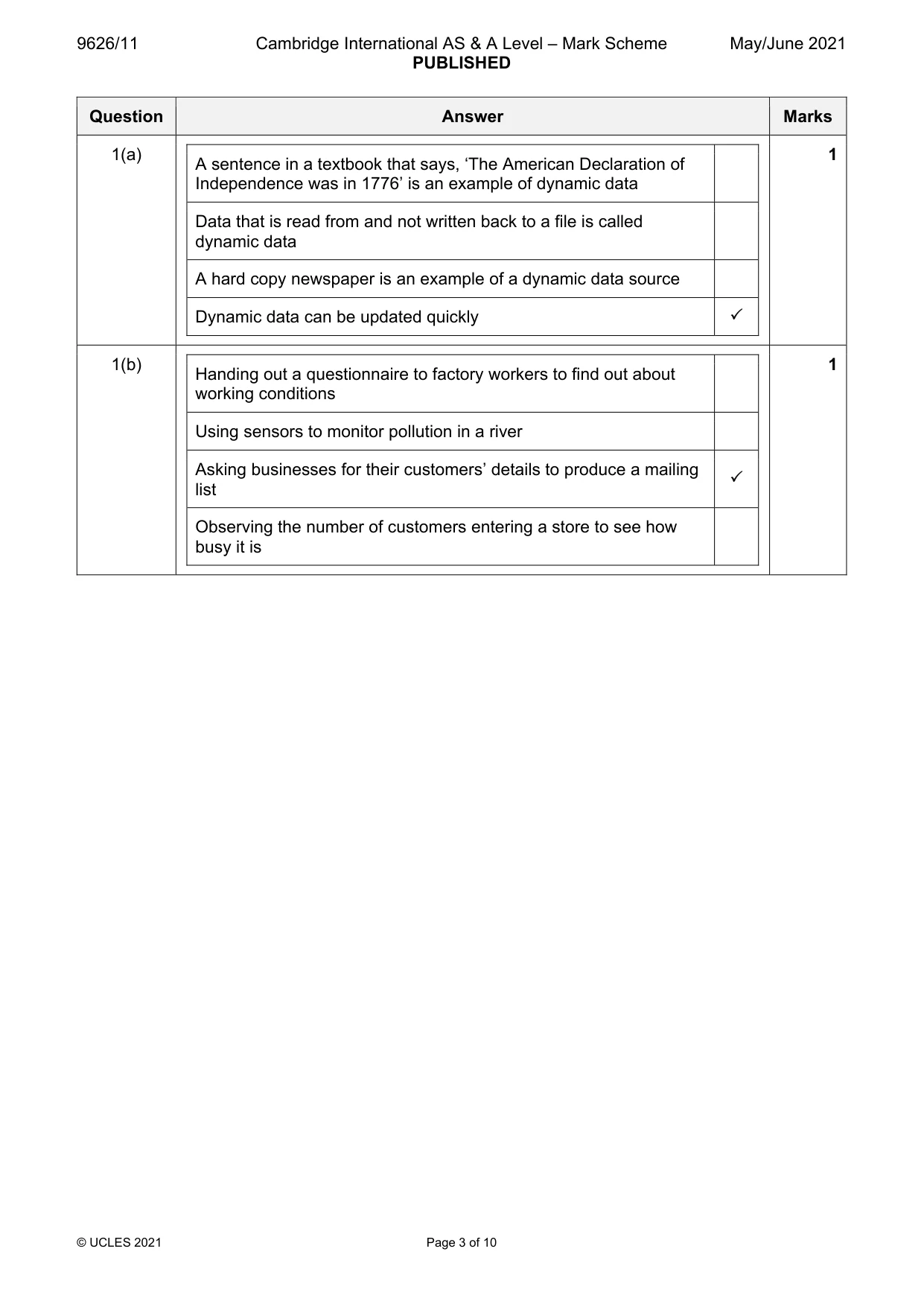
9626/11 Cambridge International AS & A Level – Mark Scheme PUBLISHED May/June 2021 © UCLES 2021 Page 3 of 10 Question Answer Marks 1(a) A sentence in a textbook that says, ‘The American Declaration of Independence was in 1776’ is an example of dynamic data Data that is read from and not written back to a file is called dynamic data A hard copy newspaper is an example of a dynamic data source Dynamic data can be updated quickly 1 1(b) Handing out a questionnaire to factory workers to find out about working conditions Using sensors to monitor pollution in a river Asking businesses for their customers’ details to produce a mailing list Observing the number of customers entering a store to see how busy it is 1
Mark scheme, page 4
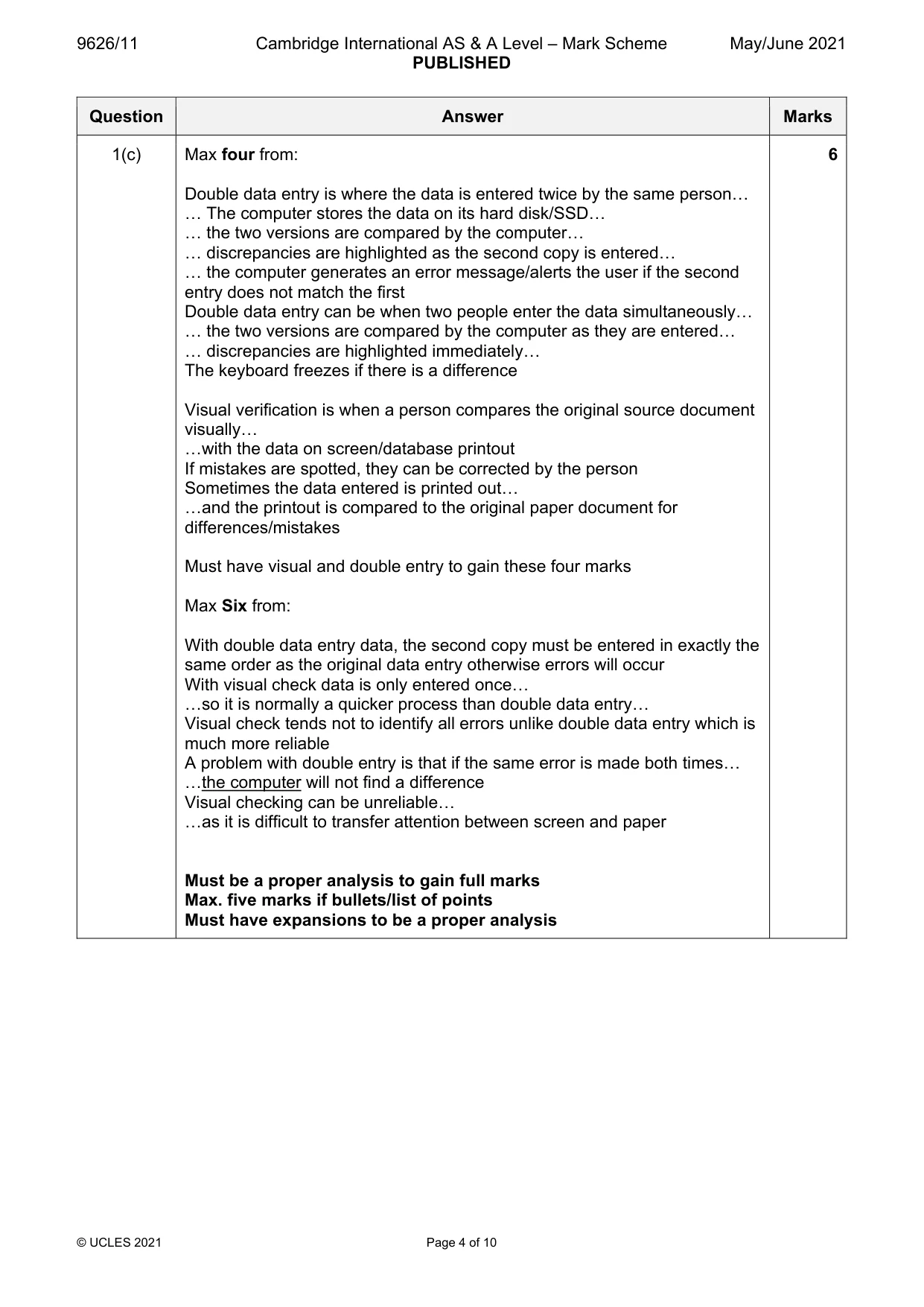
9626/11 Cambridge International AS & A Level – Mark Scheme PUBLISHED May/June 2021 © UCLES 2021 Page 4 of 10 Question Answer Marks 1(c) Max four from: Double data entry is where the data is entered twice by the same person… … The computer stores the data on its hard disk/SSD… … the two versions are compared by the computer… … discrepancies are highlighted as the second copy is entered… … the computer generates an error message/alerts the user if the second entry does not match the first Double data entry can be when two people enter the data simultaneously… … the two versions are compared by the computer as they are entered… … discrepancies are highlighted immediately… The keyboard freezes if there is a difference Visual verification is when a person compares the original source document visually… …with the data on screen/database printout If mistakes are spotted, they can be corrected by the person Sometimes the data entered is printed out… …and the printout is compared to the original paper document for differences/mistakes Must have visual and double entry to gain these four marks Max Six from: With double data entry data, the second copy must be entered in exactly the same order as the original data entry otherwise errors will occur With visual check data is only entered once… …so it is normally a quicker process than double data entry… Visual check tends not to identify all errors unlike double data entry which is much more reliable A problem with double entry is that if the same error is made both times… …the computer will not find a difference Visual checking can be unreliable… …as it is difficult to transfer attention between screen and paper Must be a proper analysis to gain full marks Max. five marks if bullets/list of points Must have expansions to be a proper analysis 6
Mark scheme, page 5
9626/11 Cambridge International AS & A Level – Mark Scheme PUBLISHED May/June 2021 © UCLES 2021 Page 5 of 10 Question Answer Marks 2(a) It is a lot slower to enter large amounts of text than an inexperienced user typing it in It can be used to read ordinary handwriting It is always completely accurate, with no mistakes being made It is more expensive to scan the text than to pay someone to type in the text 1 2(b) It is very suitable for entering text It can read marks made on an otherwise blank piece of paper It is much more accurate than data being keyed in by a person If the marks are not in a dark enough pencil, they are still always read correctly 1 2(c) Eight from: Advantages MICR characters are readable even if a document is obscured by marks or overprinted MICR systems provide a high level of security… …since MICR documents are difficult to forge The error rate for reading MICR characters is small compared to other character recognition systems Data entry is quicker than typing the details Disadvantages Printing of MICR is demanding, requiring difficult-to-achieve standards… …which causes it to be slower to print MICR readers are expensive to purchase… …whereas manual input of text can be used with a very cheap keyboard MICR readers can only recognise MICR fonts/cannot read text with normal fonts/ink… …which are written in a specific format There are a limited number of characters available for use in documents MICR printers run on cartridges that cost far more than other toner cartridges Because of cost, it is often impractical for small businesses to use MICR At least two of each required to obtain full marks Must be a proper evaluation to obtain full marks Max. six marks if bullets/list of points Must have expansions or comparisons to be a proper evaluation 8
Mark scheme, page 6
9626/11 Cambridge International AS & A Level – Mark Scheme PUBLISHED May/June 2021 © UCLES 2021 Page 6 of 10 Question Answer Marks 3 Eight from: Similarities Both allow users to enter numeric and text data into a report Both perform calculations using formulae and functions Both let users format text with a variety of fonts, styles and symbols Both allow the importing of graphics such as images and charts Both include the ability to save files in a variety of formats for use with other packages Both have spelling and grammar checking and search/replace functions Both have page formatting options, including headers/footers/justification options Differences Spreadsheet software allows users to perform "what if" scenarios/create models Word processing software lets users produce reports which can be mail merged Word processing software only has rudimentary functions to aid calculations Spreadsheet software uses cells, rows and columns to hold data whereas word processing software doesn't restrict where data can be entered Word processing software and spreadsheet software control text alignment and page margins in different ways Word processing software includes a word count feature At least two of each required to obtain full marks 8 Question Answer Marks 4 Three from: Sensors are used to feed data back to a computer Naming two sensors/devices used to gather data Analogue data is converted into digital data for the computer to process using an analogue to digital converter The computer stores readings in a table/database/file/spreadsheet 3
Mark scheme, page 7
9626/11 Cambridge International AS & A Level – Mark Scheme PUBLISHED May/June 2021 © UCLES 2021 Page 7 of 10 Question Answer Marks 5 Six from: Similarities Both can use all forms of software available within the school Both can produce neater work than if handwritten Both allow for computers to be used to make lessons more interesting/entertaining/varied Both allow computers to be used to help students with special educational needs Both can allow more accurate work to be produced by using spellcheckers Differences Network computers make it easier for students to share work in group projects All network computers can access the internet through the same connection, thereby having access to a greater range of information The school intranet is available to students who can access the network Students could access their work from any network computer… …whereas they would need USBs/portable media on non-networked computers Students using network computers could have too much information available through the internet/intranet and may find it difficult to synthesise Students could print their work from any network computer 6 Question Answer Marks 6 Six from: It was invented by (English scientist) Tim Berners-Lee (in 1989) Hypertext Markup Language (HTML) is the markup (formatting) language for the world wide web Web pages are primarily text documents formatted and annotated using Hypertext Markup Language (HTML) The world Wide Web uses Uniform Resource Locators (URLs) A URL is an address that is unique and used to identify each resource on the World Wide Web The World Wide Web uses HTTP(S), allowing for the retrieval of linked resources from across the World Wide Web HTTPS provides secure websites Web pages may contain formatted text, images, video and software components Hyperlinks allow users to navigate between web pages The World Wide Web comprises websites made up of several webpages (with a common theme) The World Wide Web is basically a system of web servers (that support specially formatted documents) 6
Mark scheme, page 8
9626/11 Cambridge International AS & A Level – Mark Scheme PUBLISHED May/June 2021 © UCLES 2021 Page 8 of 10 Question Answer Marks 7 Eight from: She would agree a date and time with the other participants She would send a reminder shortly before the start to the other participants She would send the other participants means of access to the password/PIN She would send the other participants the link to join the conference For herself, she would purchase a webcam, a microphone and speakers/headphones She would ensure the webcam, microphone, speakers/headphones are switched on, connected and ready She would carry out tests on the webcam/microphone/ speakers/headphones She would adjust her webcam so she can be seen She would open/run the video conferencing software She would log on to the system/Internet She would ensure the video conferencing software/internet connection is running properly/installed She would select/create a room 8 Question Answer Marks 8(a) Three from: It looks at the first Serial number 614481 It takes the three characters from the right-hand side 481 It returns the numerical value of this text… …and displays it in the Price column as $481 3 8(b) It looks at all the Months in the Month column For the Sales Month Jan It adds up all the corresponding Prices It displays the answer as a Monthly Total as $1964 4 8(c)(i) F3:G7 1 8(c)(ii) Four from: Add a chart title: Sales of washing machines in first 5 months of 2021/general description/reason Add x axis title: Sales Month Add x axis data labels: Jan to May Add y axis title: Monthly Total Add y axis data labels: 0 to 2000 4
Mark scheme, page 9
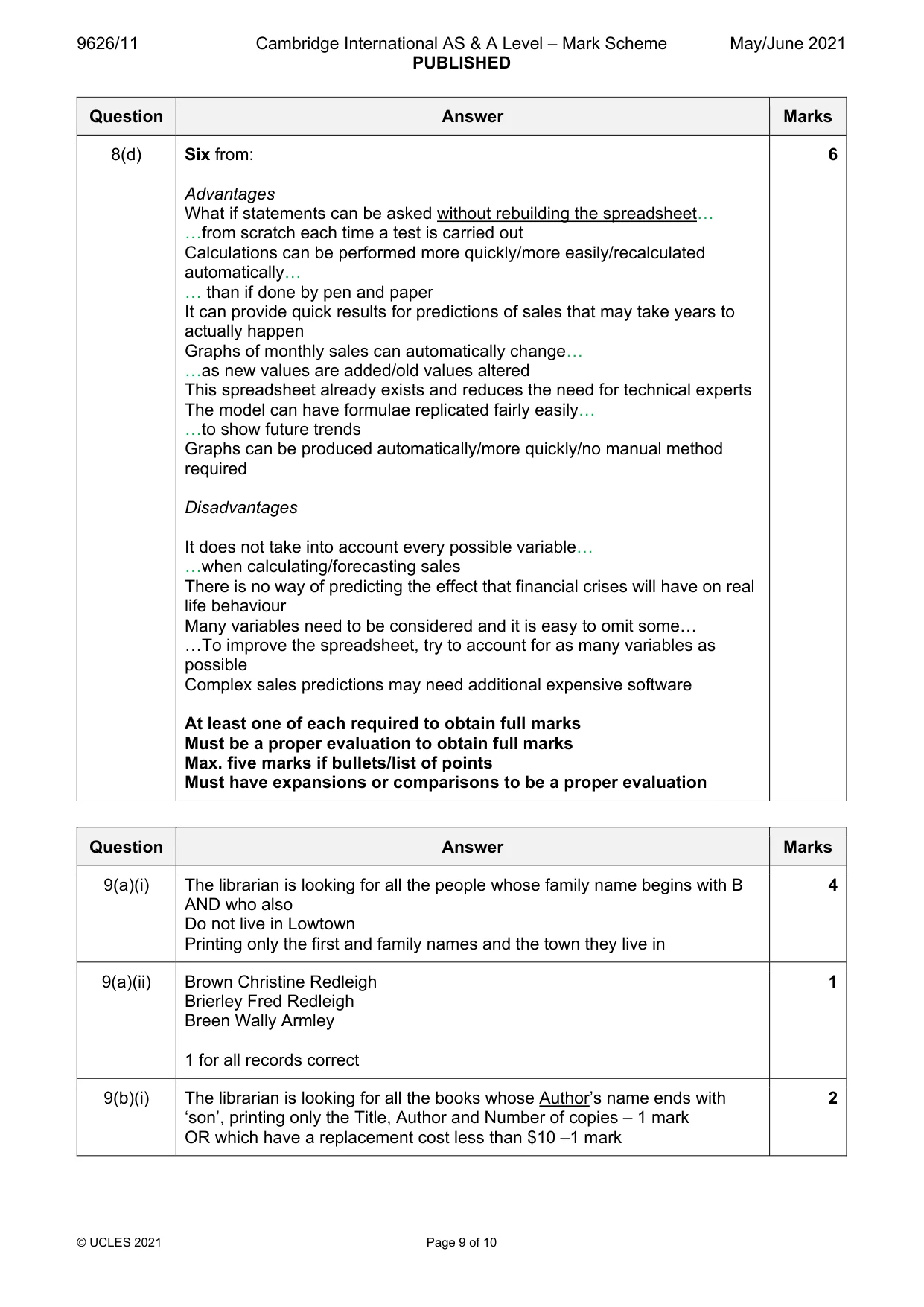
9626/11 Cambridge International AS & A Level – Mark Scheme PUBLISHED May/June 2021 © UCLES 2021 Page 9 of 10 Question Answer Marks 8(d) Six from: Advantages What if statements can be asked without rebuilding the spreadsheet… …from scratch each time a test is carried out Calculations can be performed more quickly/more easily/recalculated automatically… … than if done by pen and paper It can provide quick results for predictions of sales that may take years to actually happen Graphs of monthly sales can automatically change… …as new values are added/old values altered This spreadsheet already exists and reduces the need for technical experts The model can have formulae replicated fairly easily… …to show future trends Graphs can be produced automatically/more quickly/no manual method required Disadvantages It does not take into account every possible variable… …when calculating/forecasting sales There is no way of predicting the effect that financial crises will have on real life behaviour Many variables need to be considered and it is easy to omit some… …To improve the spreadsheet, try to account for as many variables as possible Complex sales predictions may need additional expensive software At least one of each required to obtain full marks Must be a proper evaluation to obtain full marks Max. five marks if bullets/list of points Must have expansions or comparisons to be a proper evaluation 6 Question Answer Marks 9(a)(i) The librarian is looking for all the people whose family name begins with B AND who also Do not live in Lowtown Printing only the first and family names and the town they live in 4 9(a)(ii) Brown Christine Redleigh Brierley Fred Redleigh Breen Wally Armley 1 for all records correct 1 9(b)(i) The librarian is looking for all the books whose Author’s name ends with ‘son’, printing only the Title, Author and Number of copies – 1 mark OR which have a replacement cost less than $10 –1 mark 2
Mark scheme, page 10
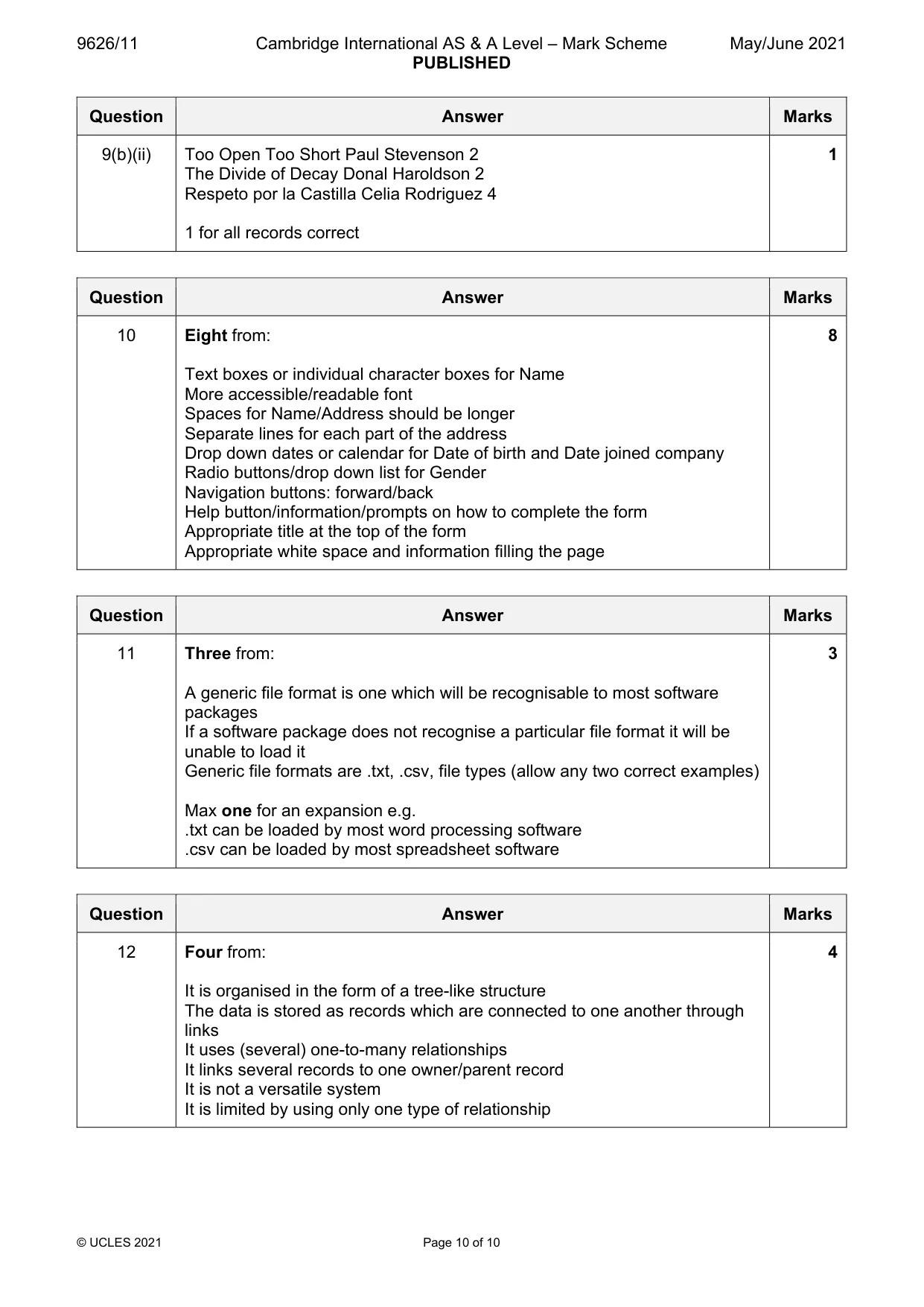
9626/11 Cambridge International AS & A Level – Mark Scheme PUBLISHED May/June 2021 © UCLES 2021 Page 10 of 10 Question Answer Marks 9(b)(ii) Too Open Too Short Paul Stevenson 2 The Divide of Decay Donal Haroldson 2 Respeto por la Castilla Celia Rodriguez 4 1 for all records correct 1 Question Answer Marks 10 Eight from: Text boxes or individual character boxes for Name More accessible/readable font Spaces for Name/Address should be longer Separate lines for each part of the address Drop down dates or calendar for Date of birth and Date joined company Radio buttons/drop down list for Gender Navigation buttons: forward/back Help button/information/prompts on how to complete the form Appropriate title at the top of the form Appropriate white space and information filling the page 8 Question Answer Marks 11 Three from: A generic file format is one which will be recognisable to most software packages If a software package does not recognise a particular file format it will be unable to load it Generic file formats are .txt, .csv, file types (allow any two correct examples) Max one for an expansion e.g. .txt can be loaded by most word processing software .csv can be loaded by most spreadsheet software 3 Question Answer Marks 12 Four from: It is organised in the form of a tree-like structure The data is stored as records which are connected to one another through links It uses (several) one-to-many relationships It links several records to one owner/parent record It is not a versatile system It is limited by using only one type of relationship 4
What you needed in this session
Cambridge’s own grade thresholds for 2021 May/June, Paper 1 · Variant 1. A higher threshold means an easier paper — the bar moves with how the cohort did.