Cambridge A Level Applied Information and Communication Technology 9713 — 2016 Oct/Nov Paper 3 · Variant 1
9713/31/O/N/16 · 80 marks · ≈90 min
The question paper and its mark scheme, free to read here and free to download. This is Cambridge’s own paper, exactly as it was sat.
Question paper16 pages








Mark scheme6 pages
Answers below. Sit the paper first if you are practising.

Paper as text
Question paper, page 1
This document consists of 14 printed pages and 2 blank pages. DC (ST/CGW) 113548/3 © UCLES 2016 [Turn over Cambridge International Examinations Cambridge International Advanced Level * 3 9 7 0 8 7 9 4 6 9 * APPLIED INFORMATION AND COMMUNICATION TECHNOLOGY 9713/31 Paper 3 October/November 2016 1 hour 15 minutes Candidates answer on the Question Paper. No additional materials are required. READ THESE INSTRUCTIONS FIRST Write your Centre number, candidate number and name on all the work you hand in. Write in dark blue or black pen. Do not use staples, paper clips, glue or correction fluid. You may use an HB pencil for any diagrams, graphs or rough working. DO NOT WRITE IN ANY BARCODES. Answer all questions. The number of marks is given in brackets [ ] at the end of each question or part question. The businesses described in this paper are entirely fictitious.
Question paper, page 2
2 9713/31/O/N/16 © UCLES 2016 Scenario 1 Questions 1, 2, 3 and 4 Faster Cars is a racing car company that produces high-speed racing cars. The company uses CAD/CAM. The company employs engineers and mechanics to maintain the cars. It has an expert system that can be used by the mechanics when trying to diagnose faults in the car engines. The company has its own racing drivers who use simulators to practise high-speed racing for when they are driving the real racing cars.
Question paper, page 3
3 9713/31/O/N/16 © UCLES 2016 [Turn over 1 (a) Explain what is meant by CAD/CAM. … … … … … … … … … …[4] (b) Describe two specialist input devices that could be used by a designer using CAD. 1 … … … 2 … … …[2] (c) Describe two specialist output devices that could be used by a designer using CAD. 1 … … … 2 … … …[2]
Question paper, page 4
4 9713/31/O/N/16 © UCLES 2016 (d) Discuss the benefits and drawbacks of using CAD. … … … … … … … … … … … … … …[6] (e) Explain why the company would choose to use CAM to produce the cars. … … … … … … … … … …[4]
Question paper, page 5
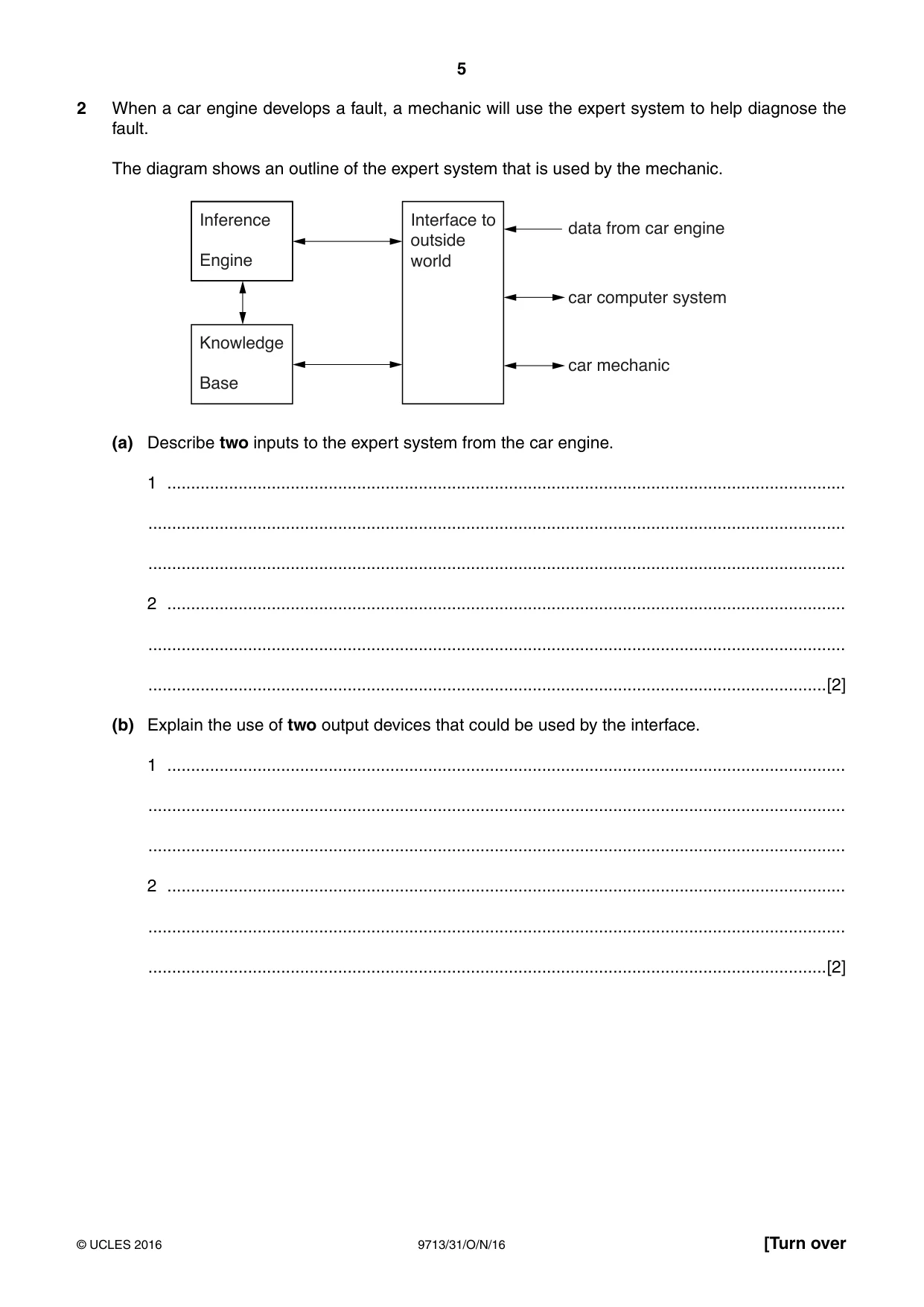
5 9713/31/O/N/16 © UCLES 2016 [Turn over 2 When a car engine develops a fault, a mechanic will use the expert system to help diagnose the fault. The diagram shows an outline of the expert system that is used by the mechanic. Interface to outside world Inference data from car engine car computer system car mechanic Engine Knowledge Base (a) Describe two inputs to the expert system from the car engine. 1 … … … 2 … … …[2] (b) Explain the use of two output devices that could be used by the interface. 1 … … … 2 … … …[2]
Question paper, page 6
6 9713/31/O/N/16 © UCLES 2016 (c) Describe the knowledge base of the expert system and how it may be expanded. … … … … … … … … … … … …[6] (d) Explain how the inference engine of the expert system helps to diagnose the fault. … … … … … … … … … … … …[6]
Question paper, page 7
7 9713/31/O/N/16 © UCLES 2016 [Turn over 3 Describe how each of the following output devices might be used in a racing car simulator. motor … … … buzzer … … … large screen … … … loudspeaker … … …[4]
Question paper, page 8
8 9713/31/O/N/16 © UCLES 2016 4 Discuss the benefits and drawbacks of using computer simulations to practise driving the racing cars. … … … … … … … … … … … … … … … … … … … …[8]
Question paper, page 9
9 9713/31/O/N/16 © UCLES 2016 [Turn over BLANK PAGE
Question paper, page 10
10 9713/31/O/N/16 © UCLES 2016 Scenario 2 Questions 5, 6 and 7 Floatem is a multi-national shipping company which owns a fleet of cruise ships. These ships sail to and from ports all over the world carrying passengers on holidays. Passengers may book holiday cruises in person at any office or online using the company’s website. Every passenger cabin on the cruise ships is equipped with an entertainment system that can be used to: • listen to music from CDs • listen to radio programmes • listen to audio books • access MP3 files stored on a file server • watch video on-demand or satellite TV.
Question paper, page 11
11 9713/31/O/N/16 © UCLES 2016 [Turn over 5 (a) Describe, including their purpose, six items of information that a customer would have to enter when booking a holiday cruise online. 1 … … … 2 … … … 3 … … … 4 … … … 5 … … … 6 … … …[6]
Question paper, page 12
12 9713/31/O/N/16 © UCLES 2016 (b) Explain why a customer would prefer to book a cruise online rather than at one of the company offices. … … … … … … … … … … … … … …[6] (c) An e-ticket and an e-receipt are issued when a booking is made online. (i) Describe one item of information that might be shown on the e-ticket. … … …[1] (ii) Describe one item of information that might be shown on the e-receipt. This item must be different from the one given in (c)(i). … … …[1]
Question paper, page 13
13 9713/31/O/N/16 © UCLES 2016 [Turn over 6 (a) Describe how each of the following could be used in the entertainment system in the passenger cabins. (i) USB port … … … … … …[2] (ii) Flash memory card … … … … … …[2] (b) Explain why MP3 files are used to distribute content to the entertainment system. … … … … … … … … … …[4]
Question paper, page 14
14 9713/31/O/N/16 © UCLES 2016 7 Kumar, a passenger, decides to use the entertainment system to watch TV in his cabin. (a) Kumar watches a live sports programme on a satellite TV channel. Describe how the sports programme is sent to, and received by, the entertainment system for Kumar to watch. … … … … … … … … … … … … … …[6]
Question paper, page 15
15 9713/31/O/N/16 © UCLES 2016 (b) Kumar watches a movie using the ship’s video on-demand system. Explain how the ship’s video on-demand system enables Kumar to watch the movie of his choice. … … … … … … … … … … … … … …[6]
Question paper, page 16
16 9713/31/O/N/16 © UCLES 2016 Permission to reproduce items where third-party owned material protected by copyright is included has been sought and cleared where possible. Every reasonable effort has been made by the publisher (UCLES) to trace copyright holders, but if any items requiring clearance have unwittingly been included, the publisher will be pleased to make amends at the earliest possible opportunity. To avoid the issue of disclosure of answer-related information to candidates, all copyright acknowledgements are reproduced online in the Cambridge International Examinations Copyright Acknowledgements Booklet. This is produced for each series of examinations and is freely available to download at www.cie.org.uk after the live examination series. Cambridge International Examinations is part of the Cambridge Assessment Group. Cambridge Assessment is the brand name of University of Cambridge Local Examinations Syndicate (UCLES), which is itself a department of the University of Cambridge. BLANK PAGE
Mark scheme, page 1
® IGCSE is the registered trademark of Cambridge International Examinations. This document consists of 6 printed pages. © UCLES 2016 [Turn over Cambridge International Examinations Cambridge International Advanced Subsidiary and Advanced Level APPLIED INFORMATION AND COMMUNICATION TECHNOLOGY 9713/31 Paper 3 Written B October/November 2016 MARK SCHEME Maximum Mark: 80 Published This mark scheme is published as an aid to teachers and candidates, to indicate the requirements of the examination. It shows the basis on which Examiners were instructed to award marks. It does not indicate the details of the discussions that took place at an Examiners’ meeting before marking began, which would have considered the acceptability of alternative answers. Mark schemes should be read in conjunction with the question paper and the Principal Examiner Report for Teachers. Cambridge will not enter into discussions about these mark schemes. Cambridge is publishing the mark schemes for the October/November 2016 series for most Cambridge IGCSE®, Cambridge International A and AS Level components and some Cambridge O Level components.
Mark scheme, page 2
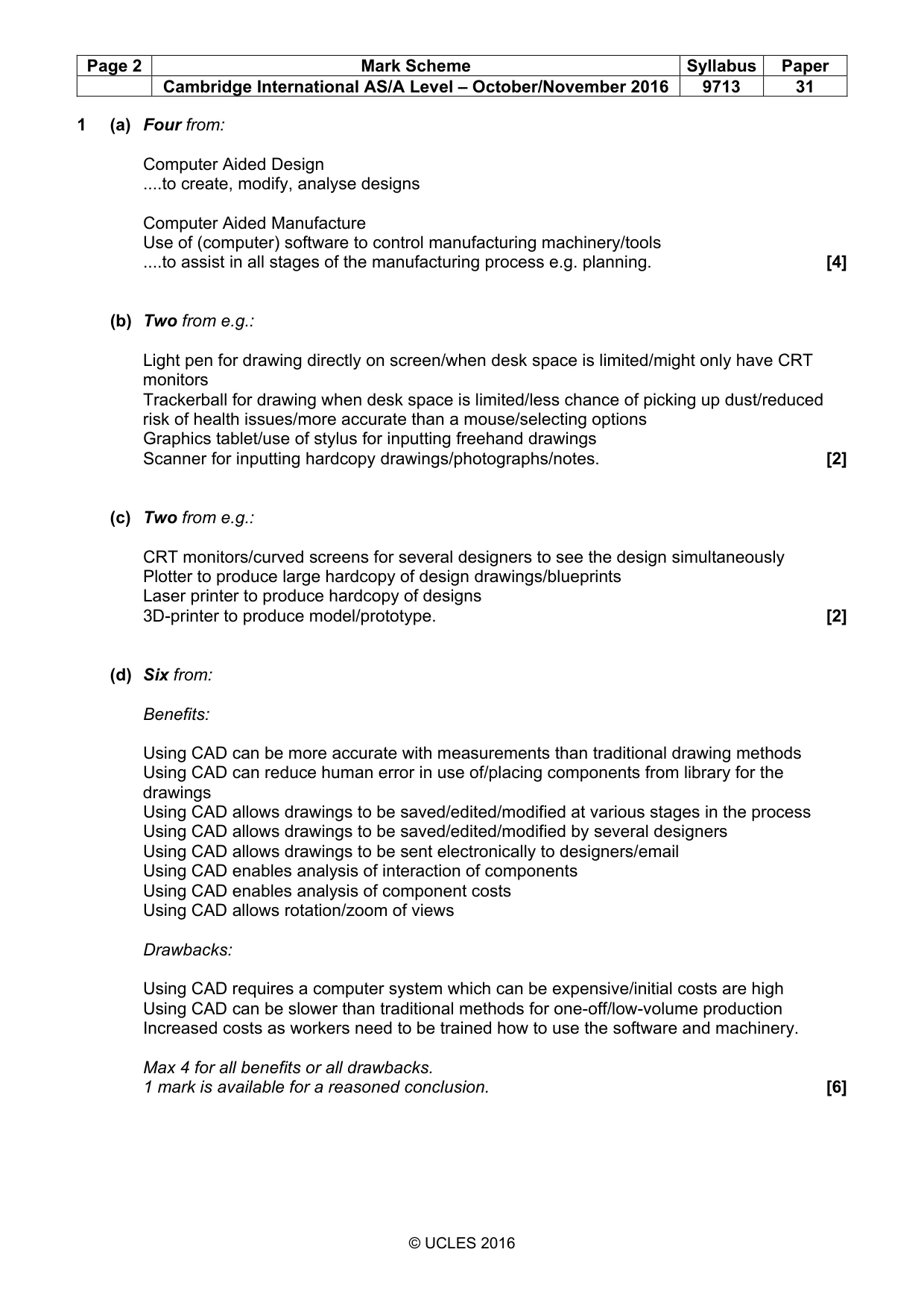
Page 2 Mark Scheme Syllabus Paper Cambridge International AS/A Level – October/November 2016 9713 31 © UCLES 2016 1 (a) Four from: Computer Aided Design …to create, modify, analyse designs Computer Aided Manufacture Use of (computer) software to control manufacturing machinery/tools …to assist in all stages of the manufacturing process e.g. planning. [4] (b) Two from e.g.: Light pen for drawing directly on screen/when desk space is limited/might only have CRT monitors Trackerball for drawing when desk space is limited/less chance of picking up dust/reduced risk of health issues/more accurate than a mouse/selecting options Graphics tablet/use of stylus for inputting freehand drawings Scanner for inputting hardcopy drawings/photographs/notes. [2] (c) Two from e.g.: CRT monitors/curved screens for several designers to see the design simultaneously Plotter to produce large hardcopy of design drawings/blueprints Laser printer to produce hardcopy of designs 3D-printer to produce model/prototype. [2] (d) Six from: Benefits: Using CAD can be more accurate with measurements than traditional drawing methods Using CAD can reduce human error in use of/placing components from library for the drawings Using CAD allows drawings to be saved/edited/modified at various stages in the process Using CAD allows drawings to be saved/edited/modified by several designers Using CAD allows drawings to be sent electronically to designers/email Using CAD enables analysis of interaction of components Using CAD enables analysis of component costs Using CAD allows rotation/zoom of views Drawbacks: Using CAD requires a computer system which can be expensive/initial costs are high Using CAD can be slower than traditional methods for one-off/low-volume production Increased costs as workers need to be trained how to use the software and machinery. Max 4 for all benefits or all drawbacks. 1 mark is available for a reasoned conclusion. [6]
Mark scheme, page 3
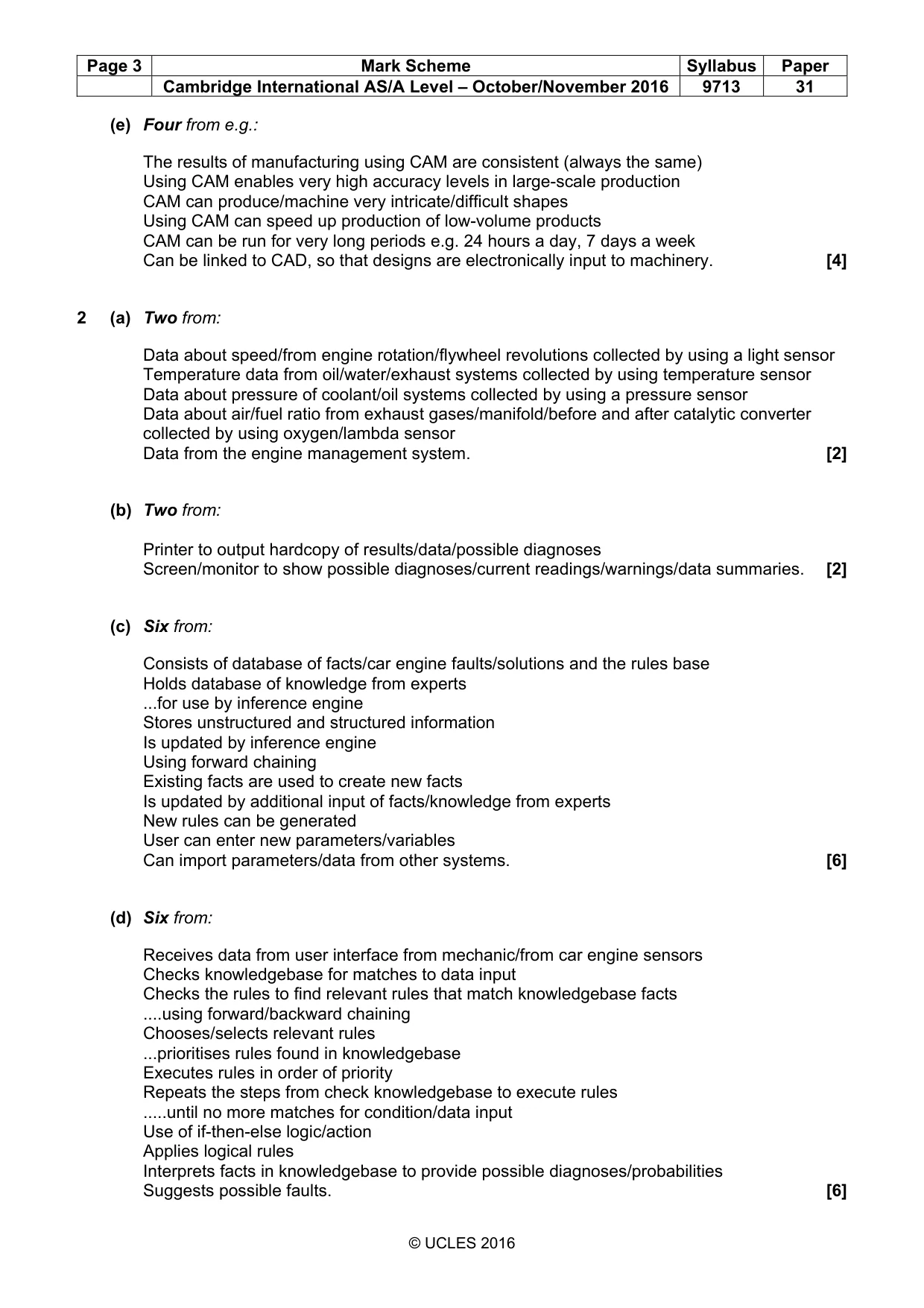
Page 3 Mark Scheme Syllabus Paper Cambridge International AS/A Level – October/November 2016 9713 31 © UCLES 2016 (e) Four from e.g.: The results of manufacturing using CAM are consistent (always the same) Using CAM enables very high accuracy levels in large-scale production CAM can produce/machine very intricate/difficult shapes Using CAM can speed up production of low-volume products CAM can be run for very long periods e.g. 24 hours a day, 7 days a week Can be linked to CAD, so that designs are electronically input to machinery. [4] 2 (a) Two from: Data about speed/from engine rotation/flywheel revolutions collected by using a light sensor Temperature data from oil/water/exhaust systems collected by using temperature sensor Data about pressure of coolant/oil systems collected by using a pressure sensor Data about air/fuel ratio from exhaust gases/manifold/before and after catalytic converter collected by using oxygen/lambda sensor Data from the engine management system. [2] (b) Two from: Printer to output hardcopy of results/data/possible diagnoses Screen/monitor to show possible diagnoses/current readings/warnings/data summaries. [2] (c) Six from: Consists of database of facts/car engine faults/solutions and the rules base Holds database of knowledge from experts ...for use by inference engine Stores unstructured and structured information Is updated by inference engine Using forward chaining Existing facts are used to create new facts Is updated by additional input of facts/knowledge from experts New rules can be generated User can enter new parameters/variables Can import parameters/data from other systems. [6] (d) Six from: Receives data from user interface from mechanic/from car engine sensors Checks knowledgebase for matches to data input Checks the rules to find relevant rules that match knowledgebase facts …using forward/backward chaining Chooses/selects relevant rules ...prioritises rules found in knowledgebase Executes rules in order of priority Repeats the steps from check knowledgebase to execute rules …until no more matches for condition/data input Use of if-then-else logic/action Applies logical rules Interprets facts in knowledgebase to provide possible diagnoses/probabilities Suggests possible faults. [6]
Mark scheme, page 4
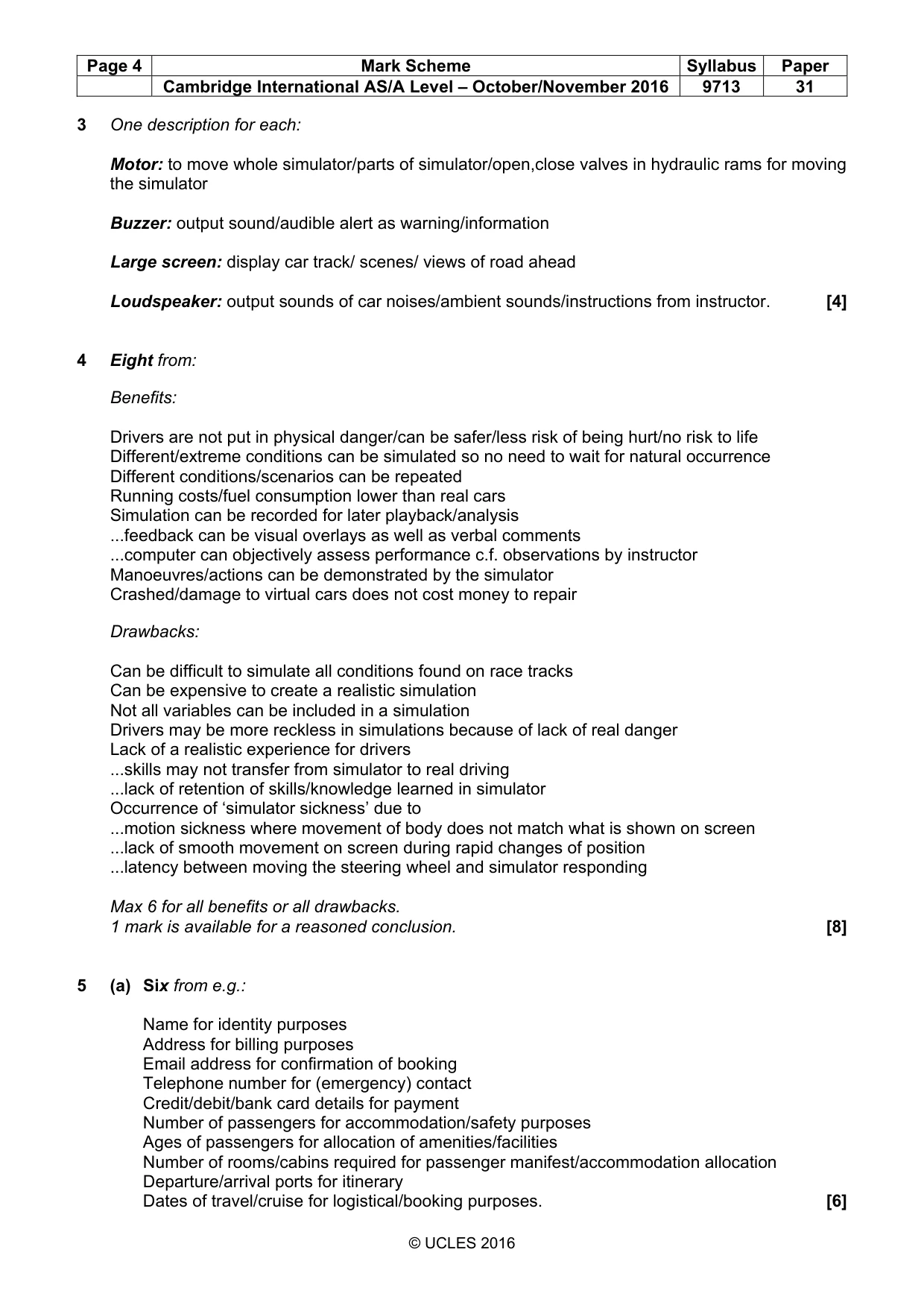
Page 4 Mark Scheme Syllabus Paper Cambridge International AS/A Level – October/November 2016 9713 31 © UCLES 2016 3 One description for each: Motor: to move whole simulator/parts of simulator/open,close valves in hydraulic rams for moving the simulator Buzzer: output sound/audible alert as warning/information Large screen: display car track/ scenes/ views of road ahead Loudspeaker: output sounds of car noises/ambient sounds/instructions from instructor. [4] 4 Eight from: Benefits: Drivers are not put in physical danger/can be safer/less risk of being hurt/no risk to life Different/extreme conditions can be simulated so no need to wait for natural occurrence Different conditions/scenarios can be repeated Running costs/fuel consumption lower than real cars Simulation can be recorded for later playback/analysis ...feedback can be visual overlays as well as verbal comments ...computer can objectively assess performance c.f. observations by instructor Manoeuvres/actions can be demonstrated by the simulator Crashed/damage to virtual cars does not cost money to repair Drawbacks: Can be difficult to simulate all conditions found on race tracks Can be expensive to create a realistic simulation Not all variables can be included in a simulation Drivers may be more reckless in simulations because of lack of real danger Lack of a realistic experience for drivers ...skills may not transfer from simulator to real driving ...lack of retention of skills/knowledge learned in simulator Occurrence of ‘simulator sickness’ due to ...motion sickness where movement of body does not match what is shown on screen ...lack of smooth movement on screen during rapid changes of position ...latency between moving the steering wheel and simulator responding Max 6 for all benefits or all drawbacks. 1 mark is available for a reasoned conclusion. [8] 5 (a) Six from e.g.: Name for identity purposes Address for billing purposes Email address for confirmation of booking Telephone number for (emergency) contact Credit/debit/bank card details for payment Number of passengers for accommodation/safety purposes Ages of passengers for allocation of amenities/facilities Number of rooms/cabins required for passenger manifest/accommodation allocation Departure/arrival ports for itinerary Dates of travel/cruise for logistical/booking purposes. [6]
Mark scheme, page 5
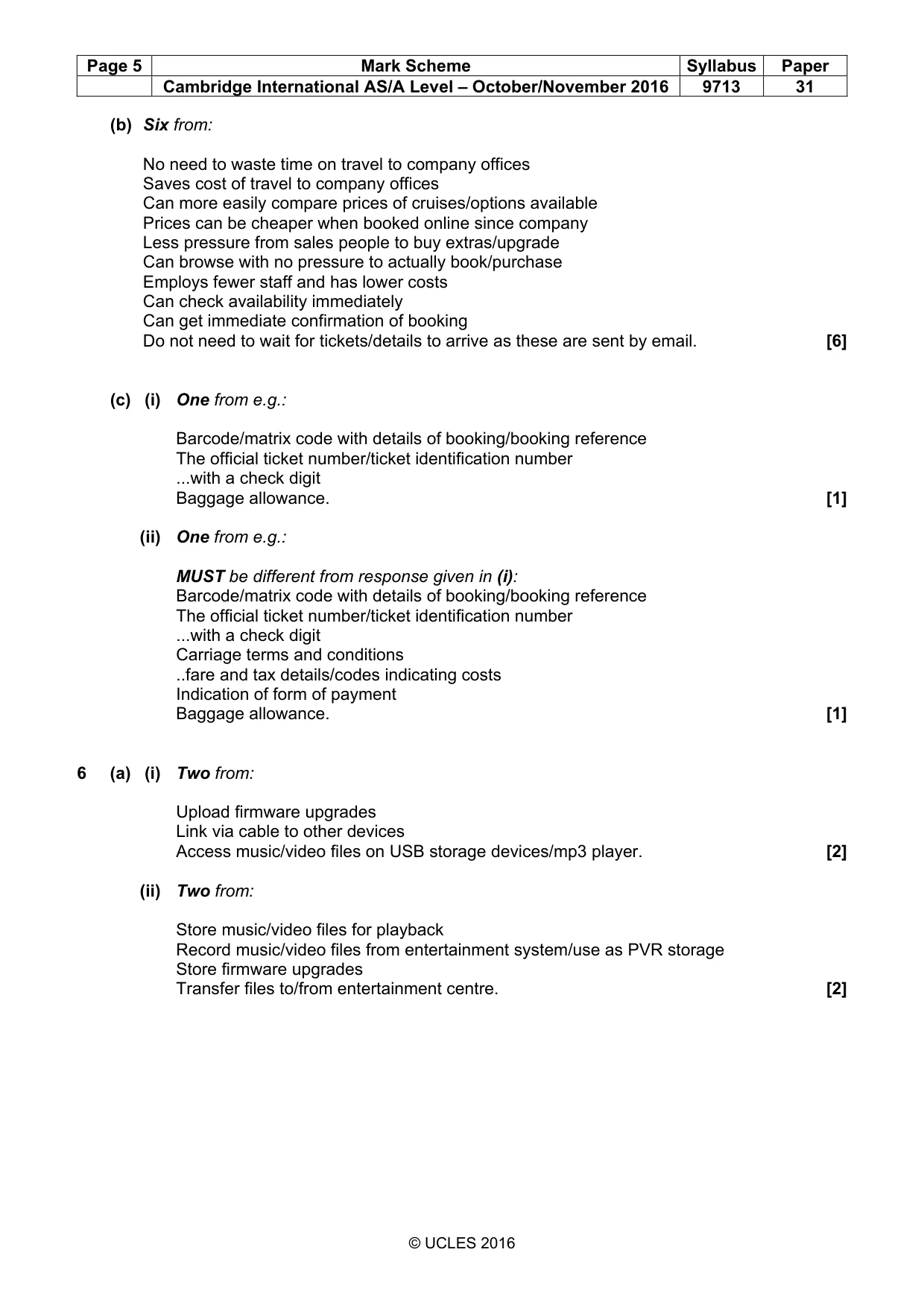
Page 5 Mark Scheme Syllabus Paper Cambridge International AS/A Level – October/November 2016 9713 31 © UCLES 2016 (b) Six from: No need to waste time on travel to company offices Saves cost of travel to company offices Can more easily compare prices of cruises/options available Prices can be cheaper when booked online since company Less pressure from sales people to buy extras/upgrade Can browse with no pressure to actually book/purchase Employs fewer staff and has lower costs Can check availability immediately Can get immediate confirmation of booking Do not need to wait for tickets/details to arrive as these are sent by email. [6] (c) (i) One from e.g.: Barcode/matrix code with details of booking/booking reference The official ticket number/ticket identification number ...with a check digit Baggage allowance. [1] (ii) One from e.g.: MUST be different from response given in (i): Barcode/matrix code with details of booking/booking reference The official ticket number/ticket identification number ...with a check digit Carriage terms and conditions ..fare and tax details/codes indicating costs Indication of form of payment Baggage allowance. [1] 6 (a) (i) Two from: Upload firmware upgrades Link via cable to other devices Access music/video files on USB storage devices/mp3 player. [2] (ii) Two from: Store music/video files for playback Record music/video files from entertainment system/use as PVR storage Store firmware upgrades Transfer files to/from entertainment centre. [2]
Mark scheme, page 6
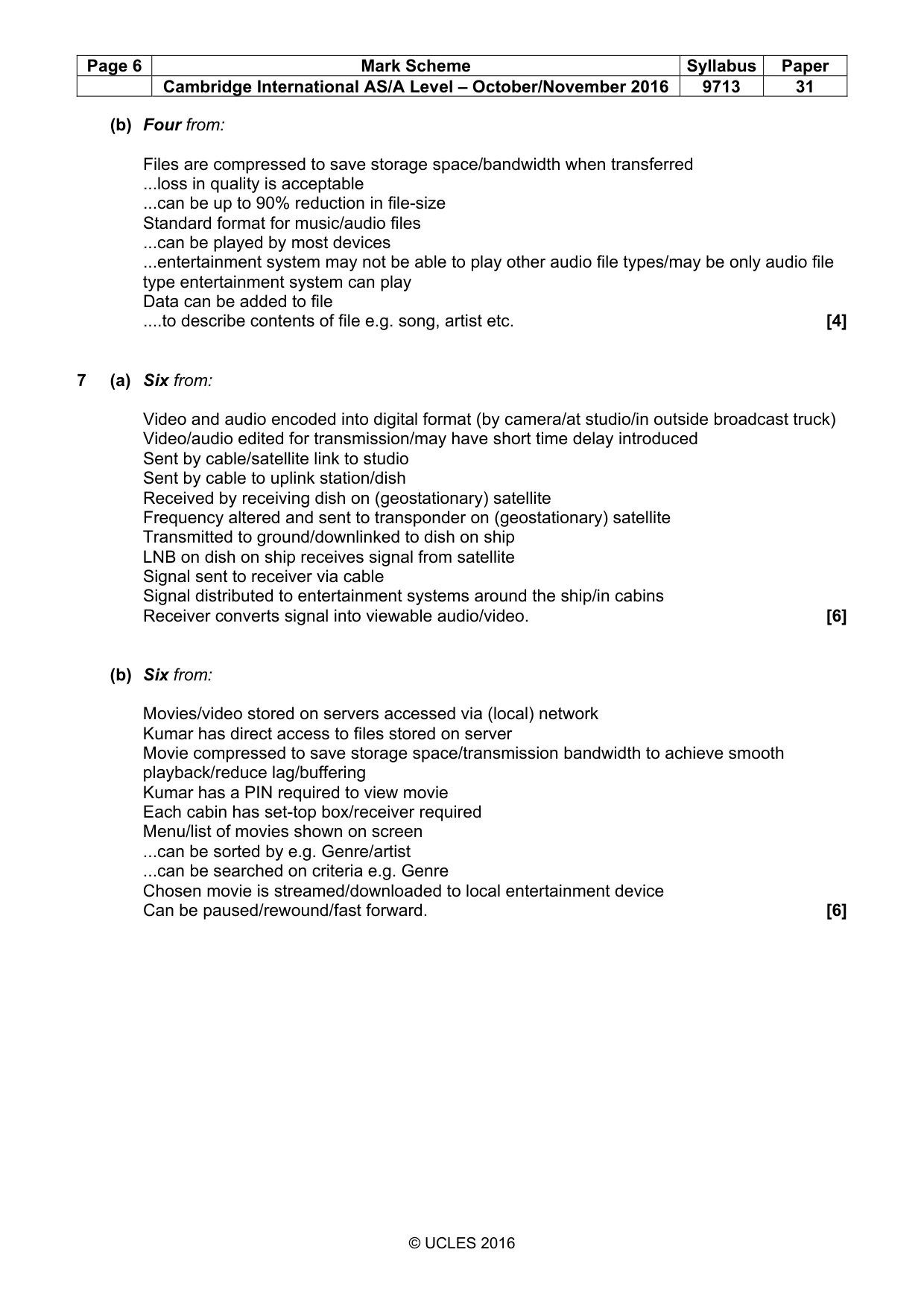
Page 6 Mark Scheme Syllabus Paper Cambridge International AS/A Level – October/November 2016 9713 31 © UCLES 2016 (b) Four from: Files are compressed to save storage space/bandwidth when transferred ...loss in quality is acceptable ...can be up to 90% reduction in file-size Standard format for music/audio files ...can be played by most devices ...entertainment system may not be able to play other audio file types/may be only audio file type entertainment system can play Data can be added to file …to describe contents of file e.g. song, artist etc. [4] 7 (a) Six from: Video and audio encoded into digital format (by camera/at studio/in outside broadcast truck) Video/audio edited for transmission/may have short time delay introduced Sent by cable/satellite link to studio Sent by cable to uplink station/dish Received by receiving dish on (geostationary) satellite Frequency altered and sent to transponder on (geostationary) satellite Transmitted to ground/downlinked to dish on ship LNB on dish on ship receives signal from satellite Signal sent to receiver via cable Signal distributed to entertainment systems around the ship/in cabins Receiver converts signal into viewable audio/video. [6] (b) Six from: Movies/video stored on servers accessed via (local) network Kumar has direct access to files stored on server Movie compressed to save storage space/transmission bandwidth to achieve smooth playback/reduce lag/buffering Kumar has a PIN required to view movie Each cabin has set-top box/receiver required Menu/list of movies shown on screen ...can be sorted by e.g. Genre/artist ...can be searched on criteria e.g. Genre Chosen movie is streamed/downloaded to local entertainment device Can be paused/rewound/fast forward. [6]
What you needed in this session
Cambridge’s own grade thresholds for 2016 Oct/Nov, Paper 3 · Variant 1. A higher threshold means an easier paper — the bar moves with how the cohort did.