Cambridge IGCSE Information and Communication Technology (9-1) 0983 — 2022 Oct/Nov Paper 1 · Variant 1
0983/11/O/N/22 · 100 marks · ≈113 min
The question paper and its mark scheme, free to read here and free to download. This is Cambridge’s own paper, exactly as it was sat.
Question paper16 pages


Mark scheme10 pages
Answers below. Sit the paper first if you are practising.
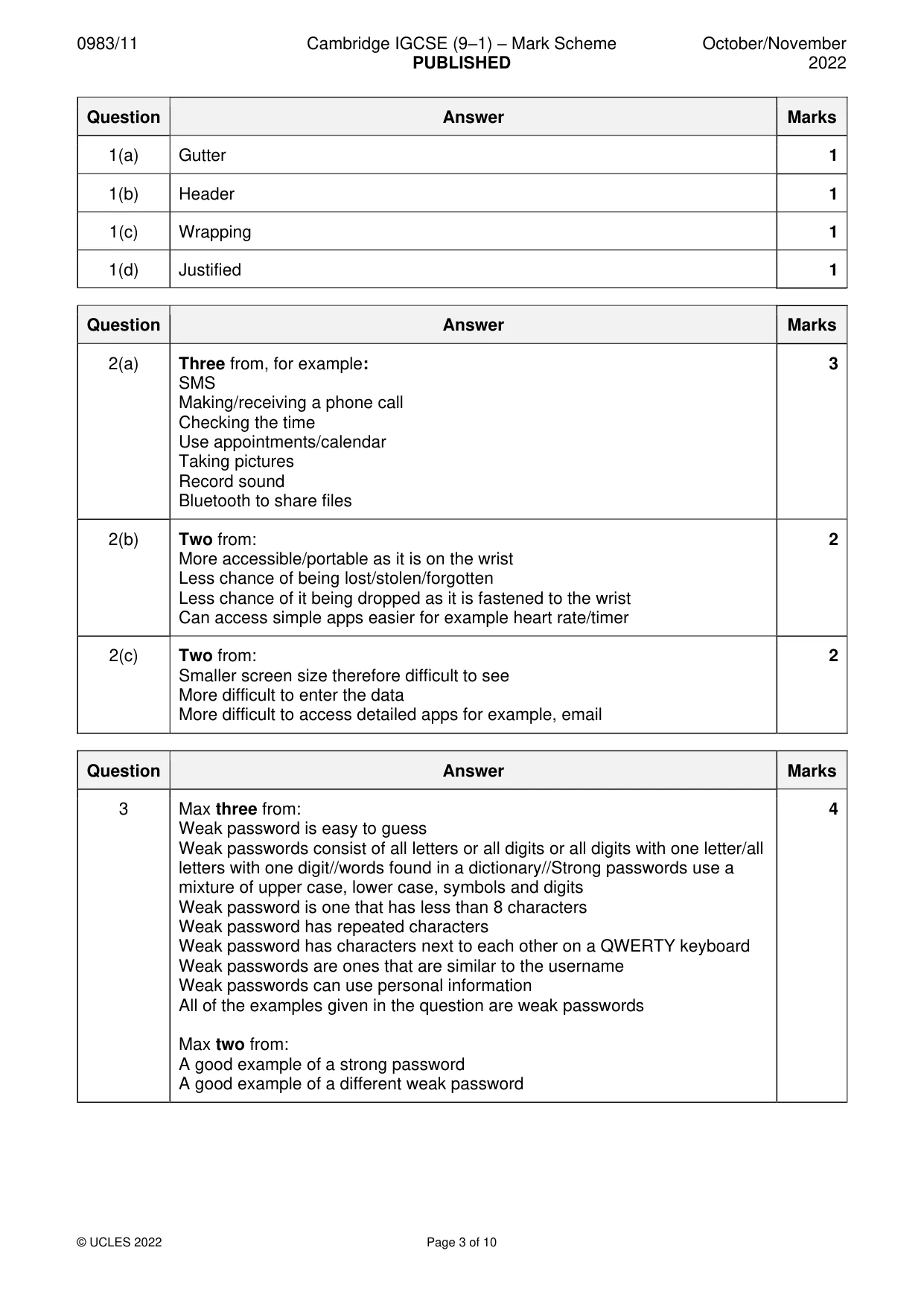
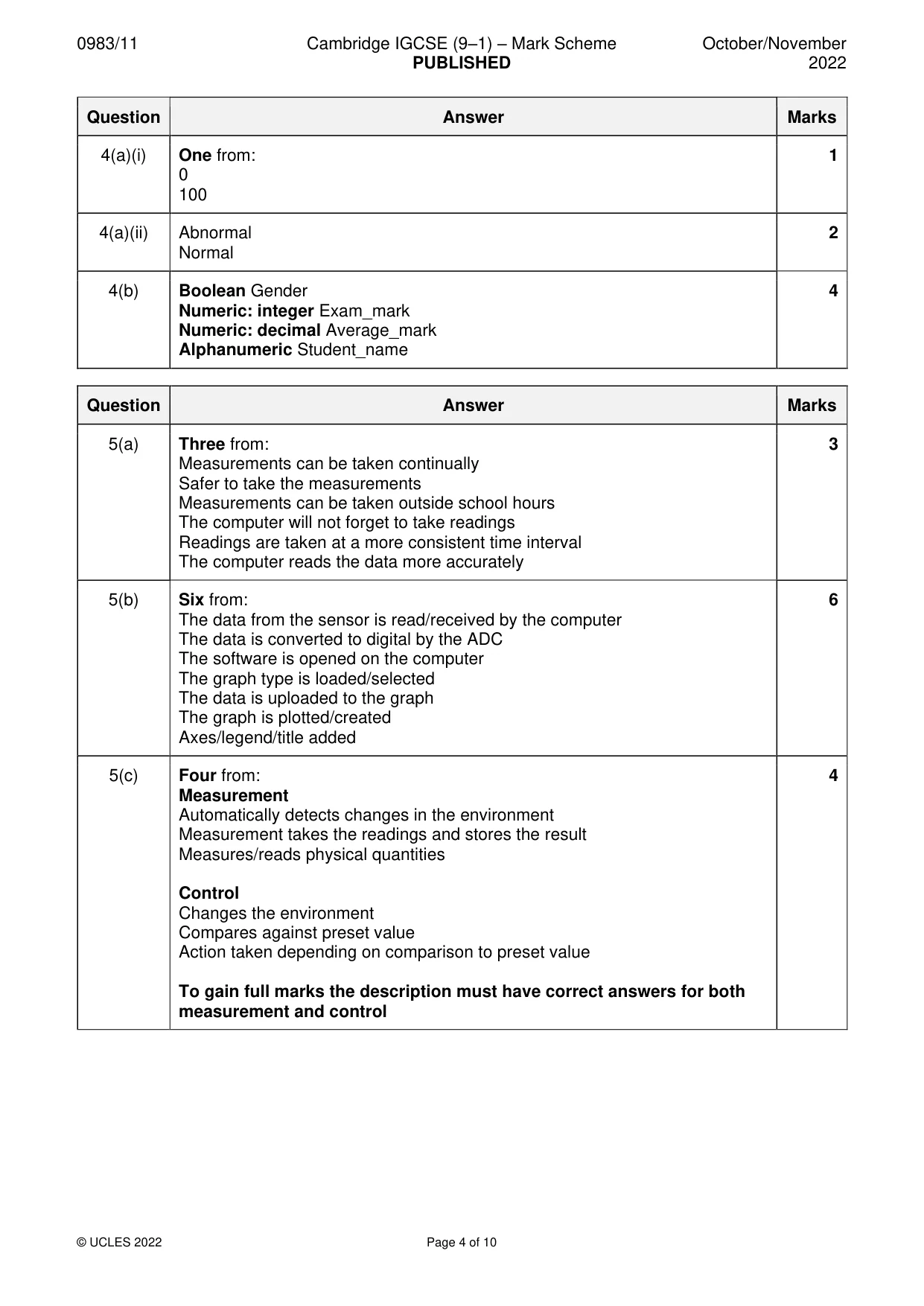
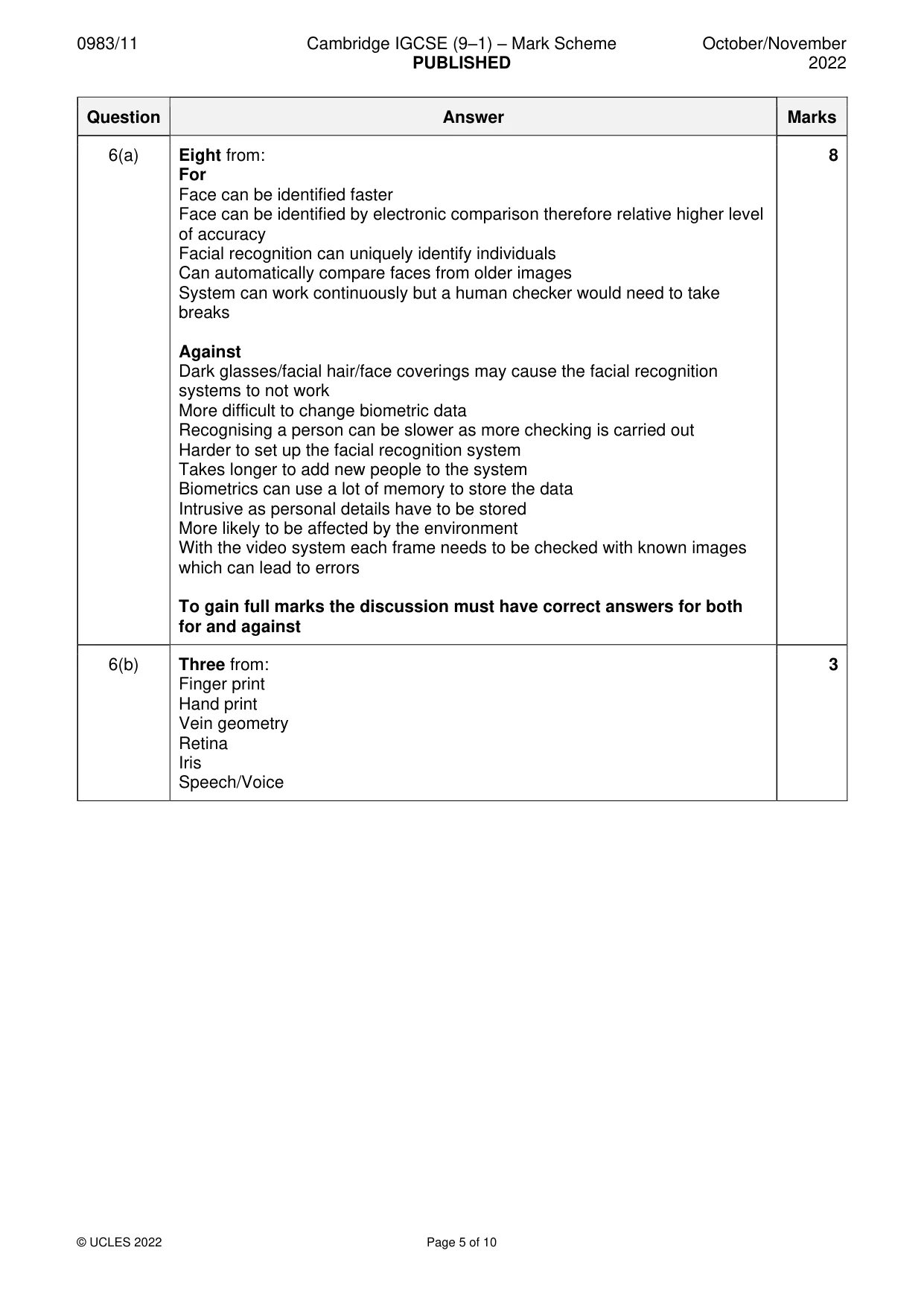
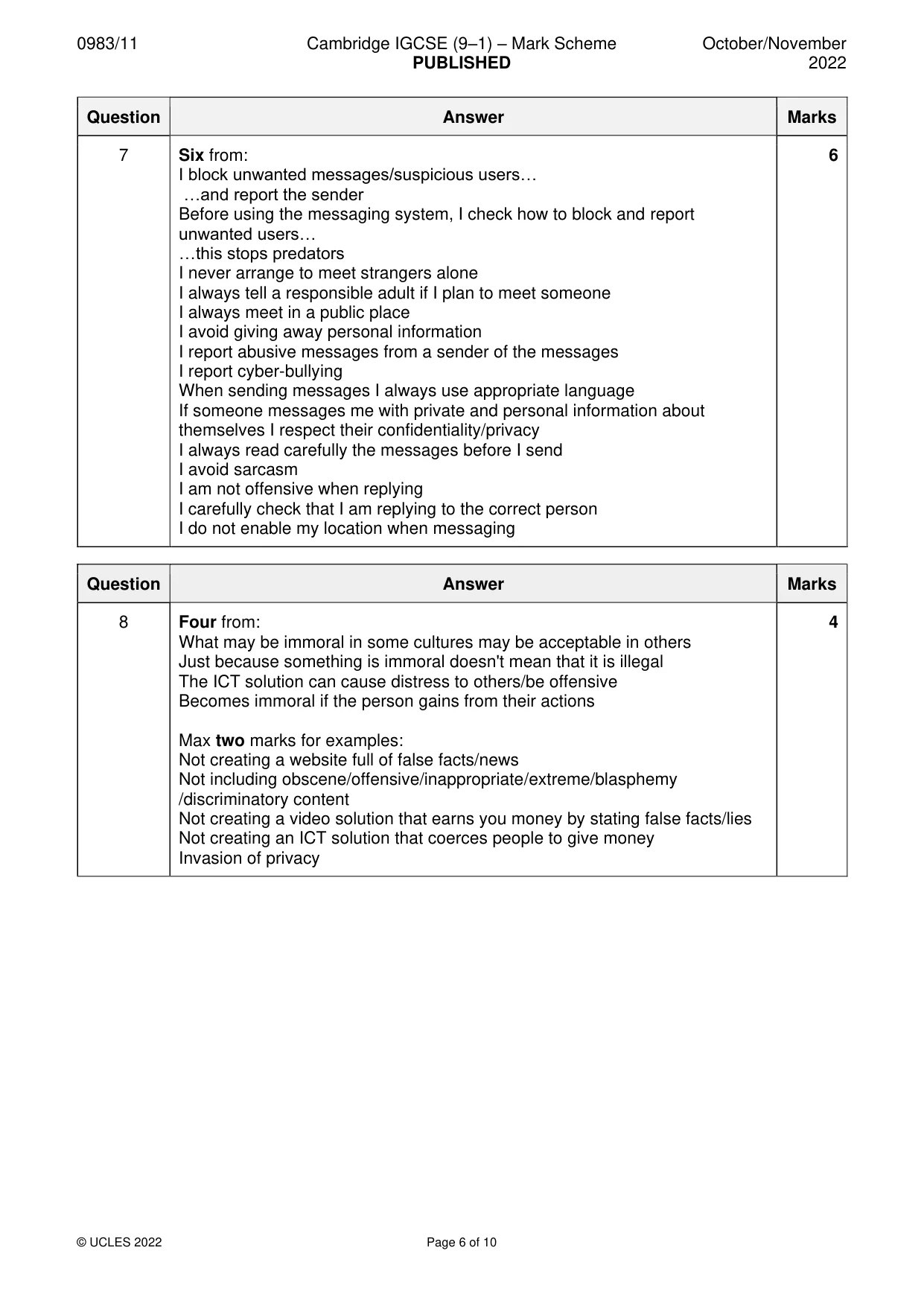
Paper as text
Question paper, page 1
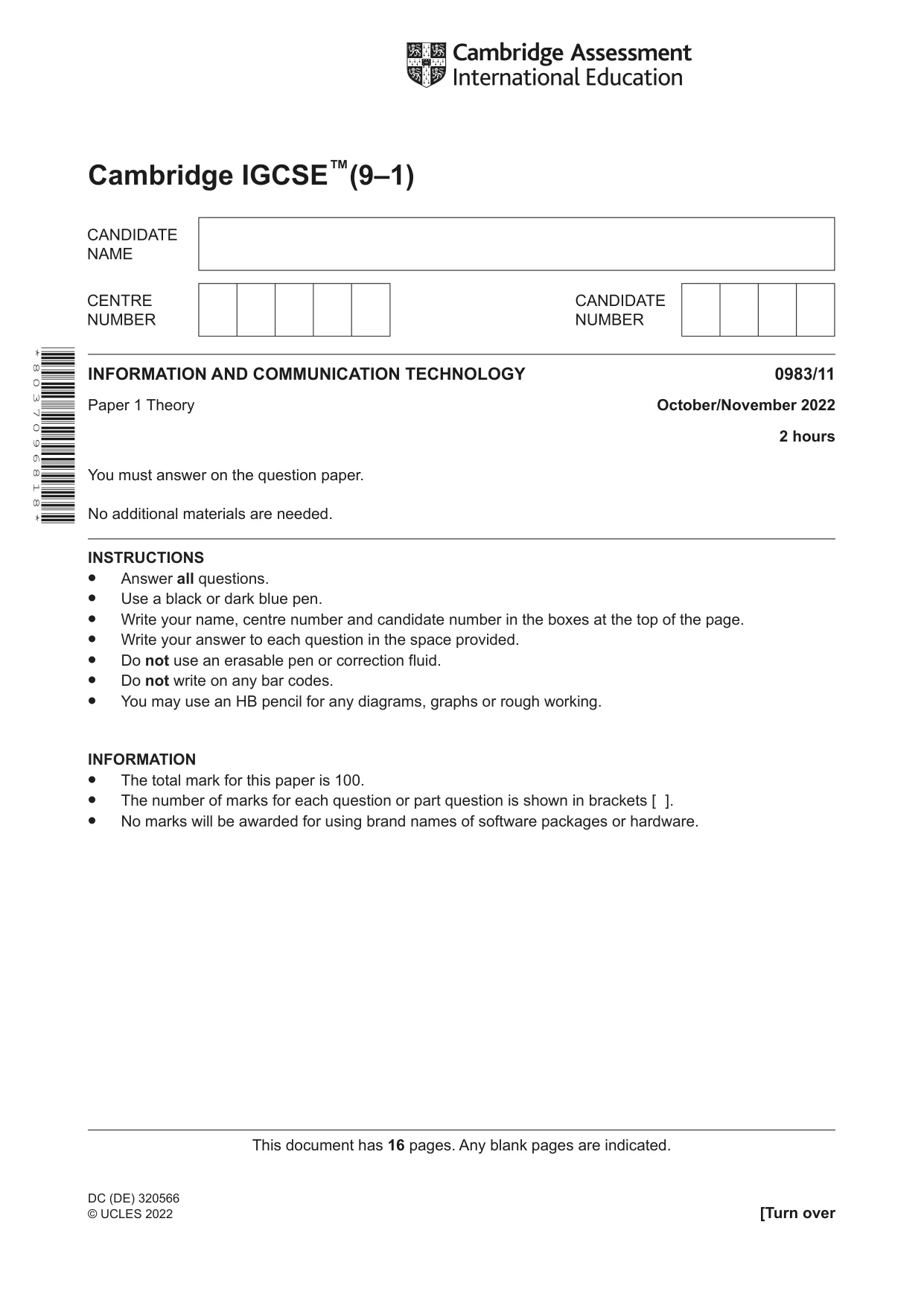
INSTRUCTIONS • Answer all questions. • Use a black or dark blue pen. • Write your name, centre number and candidate number in the boxes at the top of the page. • Write your answer to each question in the space provided. • Do not use an erasable pen or correction fluid. • Do not write on any bar codes. • You may use an HB pencil for any diagrams, graphs or rough working. INFORMATION • The total mark for this paper is 100. • The number of marks for each question or part question is shown in brackets [ ]. • No marks will be awarded for using brand names of software packages or hardware. This document has 16 pages. Any blank pages are indicated. [Turn over * 8 0 3 7 0 9 6 8 1 8 * Cambridge IGCSE™(9–1) DC (DE) 320566 © UCLES 2022 INFORMATION AND COMMUNICATION TECHNOLOGY 0983/11 Paper 1 Theory October/November 2022 2 hours You must answer on the question paper. No additional materials are needed.
Question paper, page 2
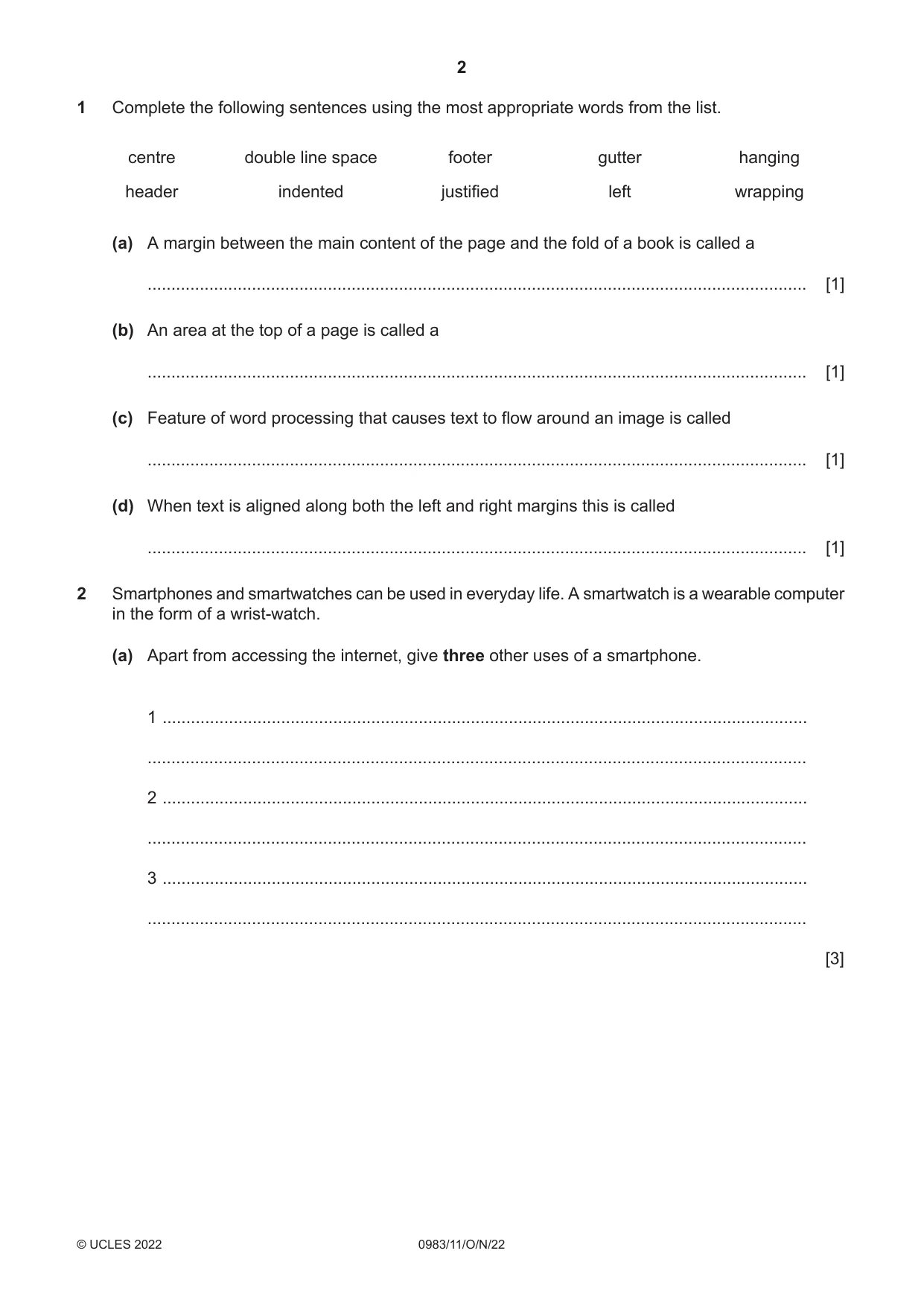
Complete the following sentences using the most appropriate words from the list. 1 hanging gutter footer double line space centre wrapping left justified indented header A margin between the main content of the page and the fold of a book is called a (a) … [1] An area at the top of a page is called a (b) … [1] Feature of word processing that causes text to flow around an image is called (c) … [1] When text is aligned along both the left and right margins this is called (d) … [1] Smartphones and smartwatches can be used in everyday life. A smartwatch is a wearable computer in the form of a wrist-watch. 2 Apart from accessing the internet, give three other uses of a smartphone. (a) 1 … … 2 … … 3 … … [3] 2 0983/11/O/N/22 © UCLES 2022
Question paper, page 3
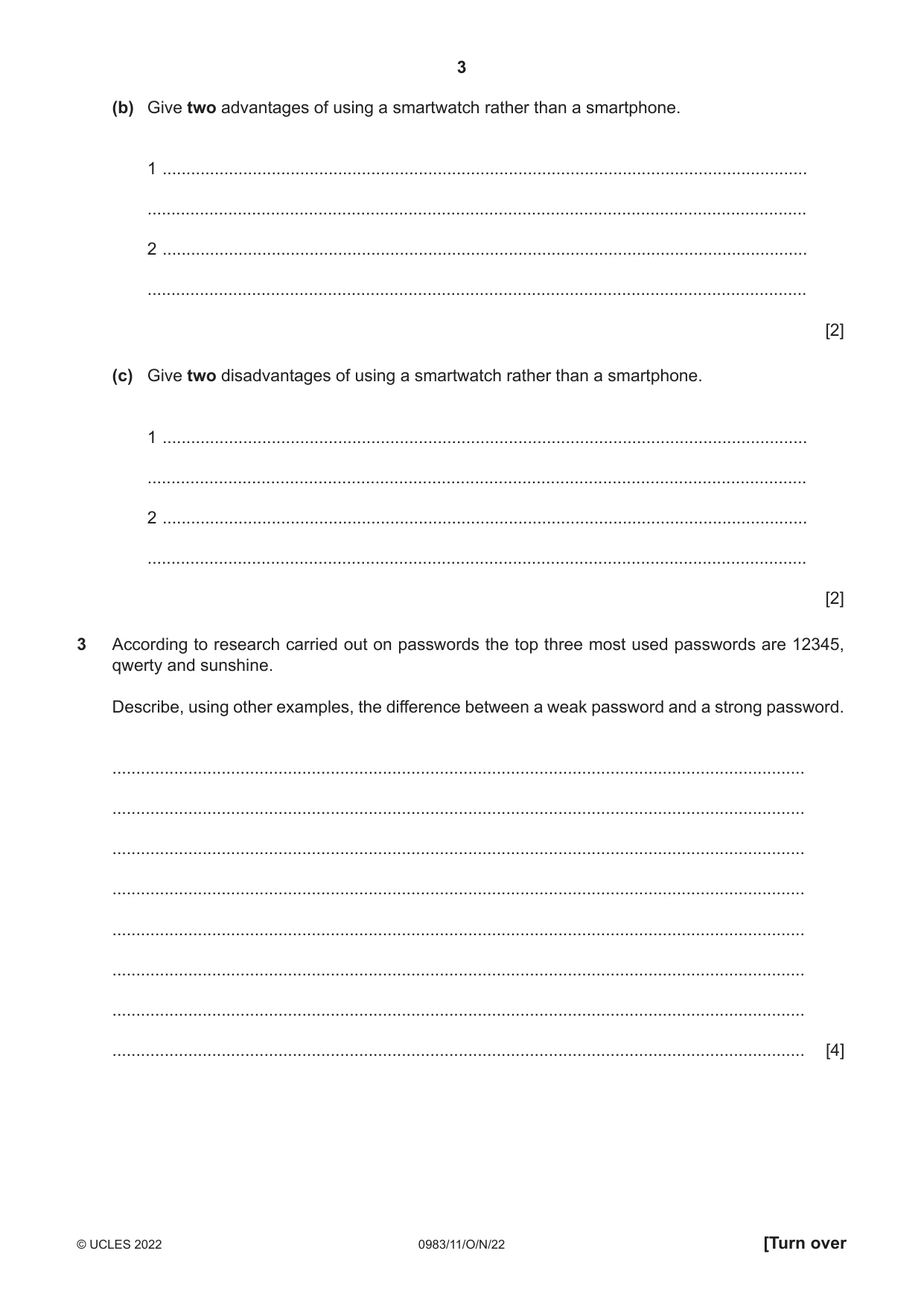
Give two advantages of using a smartwatch rather than a smartphone. (b) 1 … … 2 … … [2] Give two disadvantages of using a smartwatch rather than a smartphone. (c) 1 … … 2 … … [2] According to research carried out on passwords the top three most used passwords are 12345, qwerty and sunshine. Describe, using other examples, the difference between a weak password and a strong password. 3 … … … … … … … … [4] 3 0983/11/O/N/22 © UCLES 2022 [Turn over
Question paper, page 4
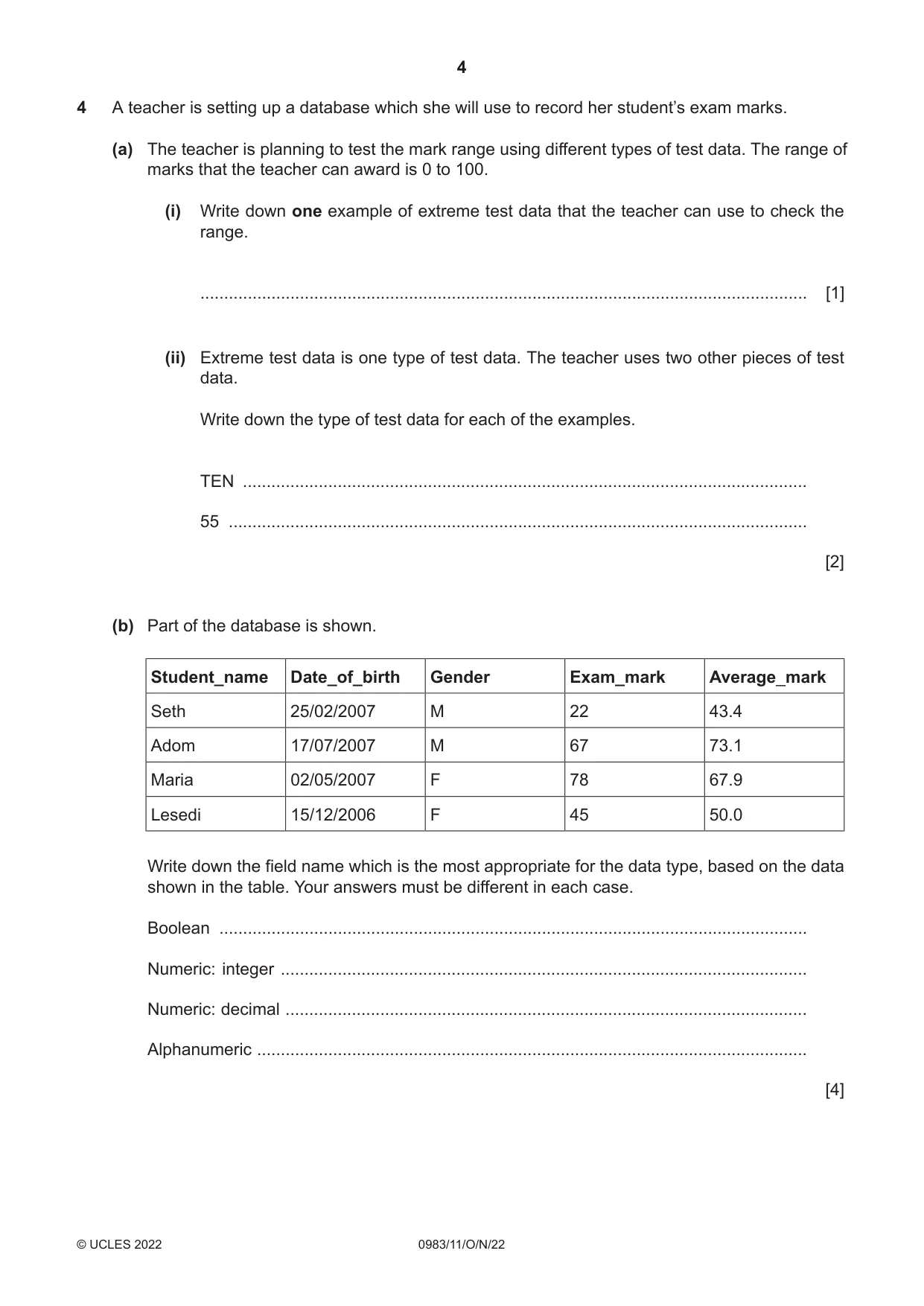
A teacher is setting up a database which she will use to record her student’s exam marks. 4 The teacher is planning to test the mark range using different types of test data. The range of marks that the teacher can award is 0 to 100. (a) Write down one example of extreme test data that the teacher can use to check the range. (i) … [1] Extreme test data is one type of test data. The teacher uses two other pieces of test data. Write down the type of test data for each of the examples. (ii) TEN … 55 … [2] Part of the database is shown. (b) Average_mark Exam_mark Gender Date_of_birth Student_name 43.4 22 M 25/02/2007 Seth 73.1 67 M 17/07/2007 Adom 67.9 78 F 02/05/2007 Maria 50.0 45 F 15/12/2006 Lesedi Write down the field name which is the most appropriate for the data type, based on the data shown in the table. Your answers must be different in each case. Boolean … Numeric: integer … Numeric: decimal … Alphanumeric … [4] 4 0983/11/O/N/22 © UCLES 2022
Question paper, page 5
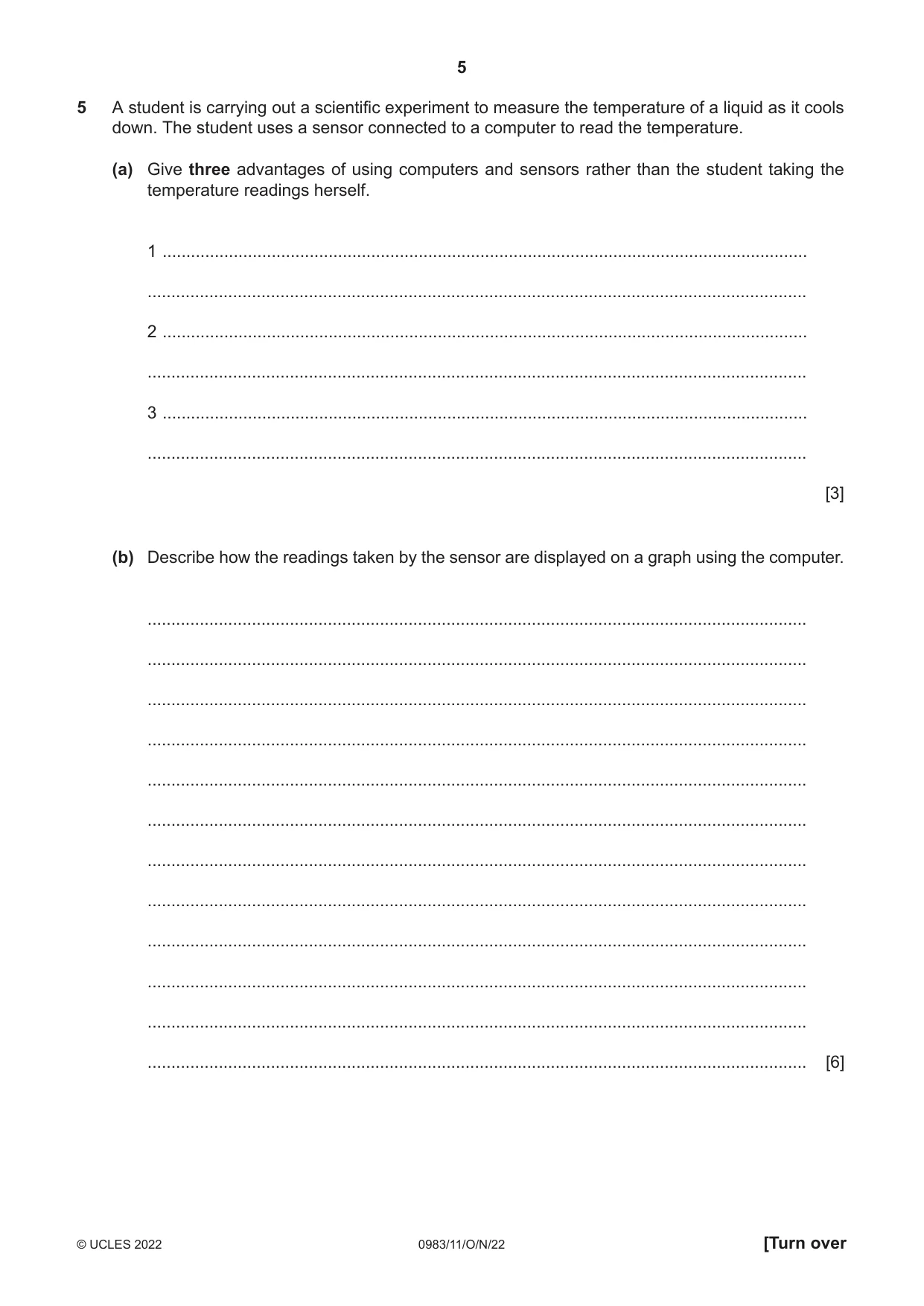
A student is carrying out a scientific experiment to measure the temperature of a liquid as it cools down. The student uses a sensor connected to a computer to read the temperature. 5 Give three advantages of using computers and sensors rather than the student taking the temperature readings herself. (a) 1 … … 2 … … 3 … … [3] Describe how the readings taken by the sensor are displayed on a graph using the computer. (b) … … … … … … … … … … … … [6] 5 0983/11/O/N/22 © UCLES 2022 [Turn over
Question paper, page 6
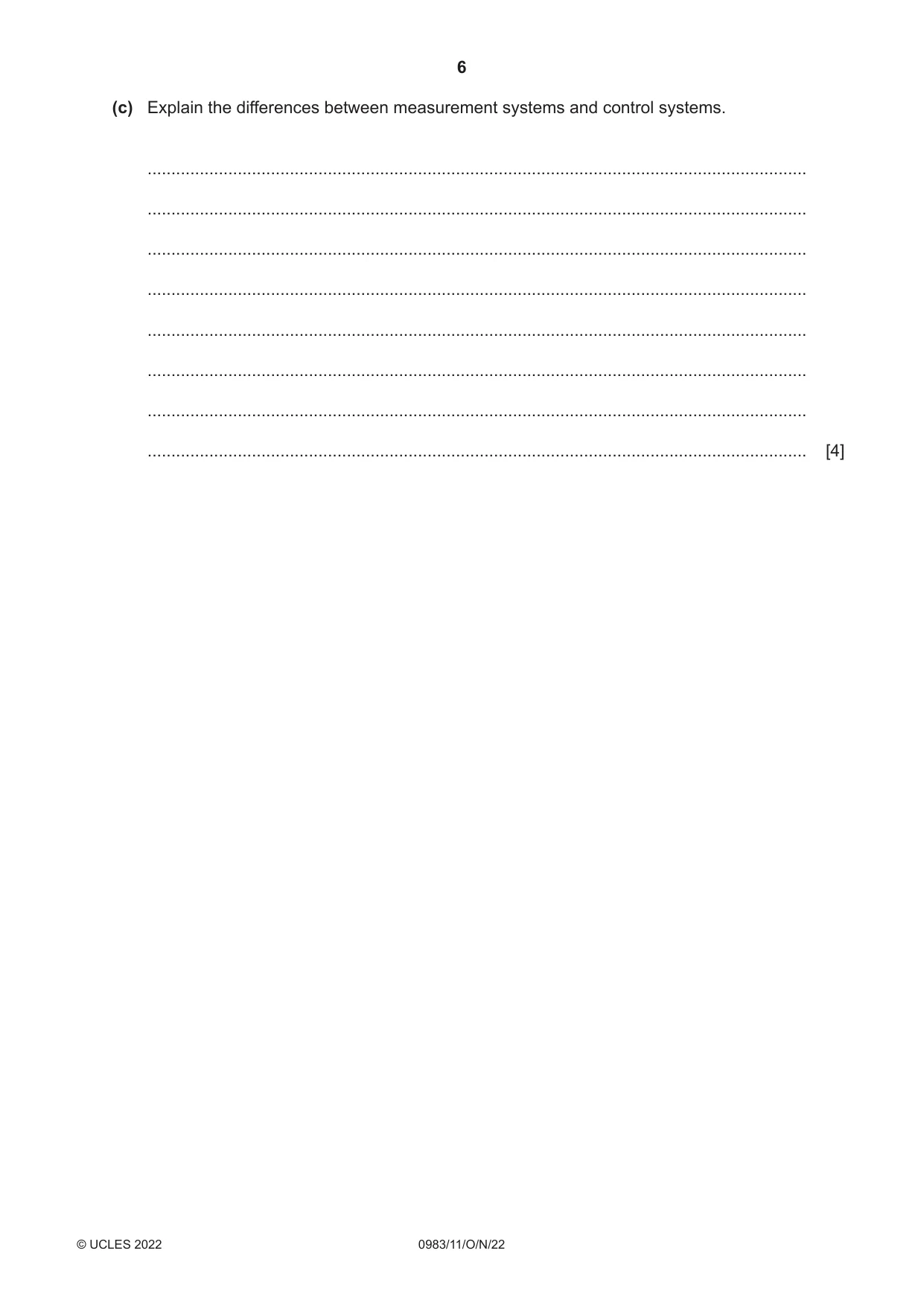
Explain the differences between measurement systems and control systems. (c) … … … … … … … … [4] 6 0983/11/O/N/22 © UCLES 2022
Question paper, page 7
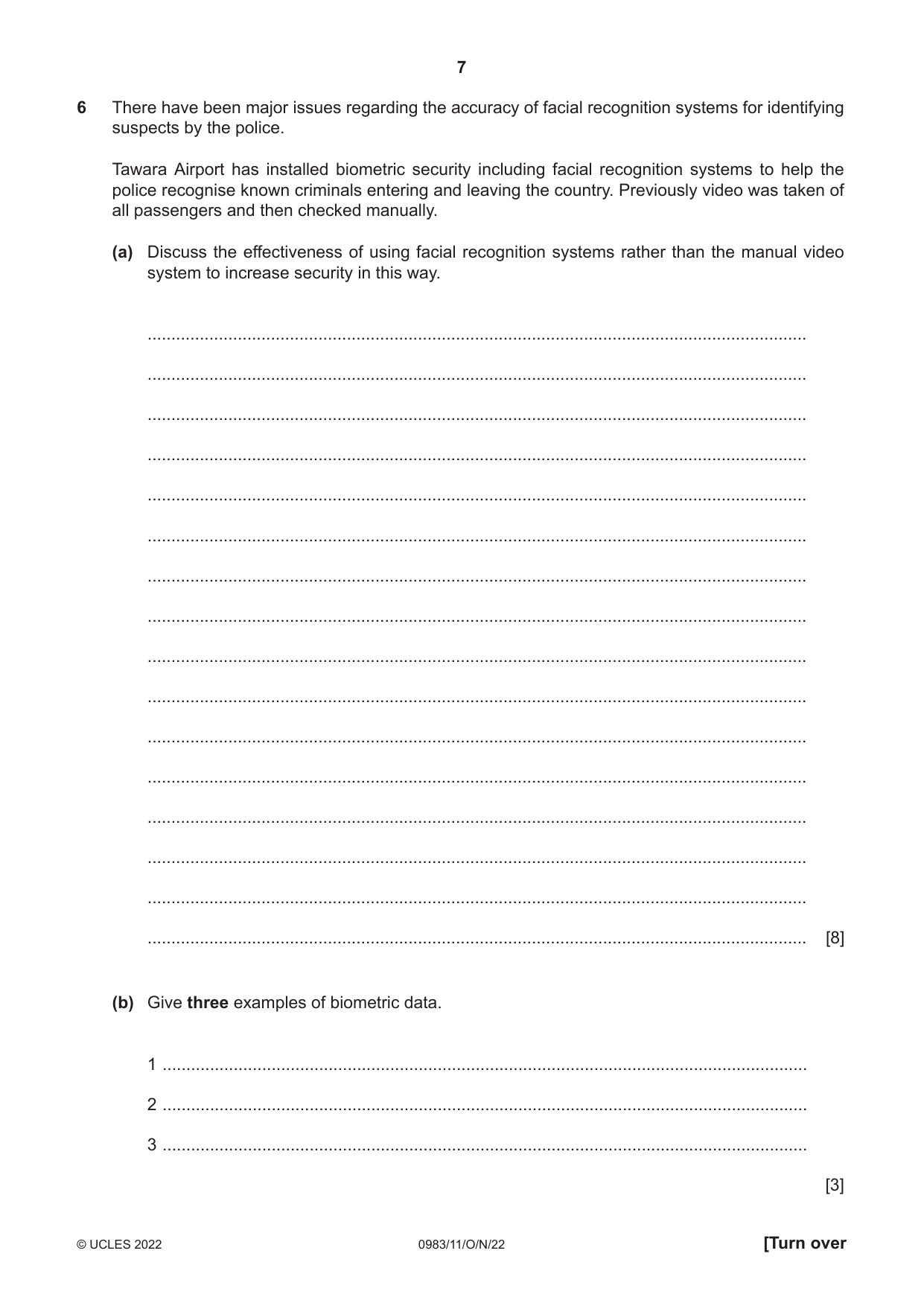
There have been major issues regarding the accuracy of facial recognition systems for identifying suspects by the police. 6 Tawara Airport has installed biometric security including facial recognition systems to help the police recognise known criminals entering and leaving the country. Previously video was taken of all passengers and then checked manually. Discuss the effectiveness of using facial recognition systems rather than the manual video system to increase security in this way. (a) … … … … … … … … … … … … … … … … [8] Give three examples of biometric data. (b) 1 … 2 … 3 … [3] 7 0983/11/O/N/22 © UCLES 2022 [Turn over
Question paper, page 8
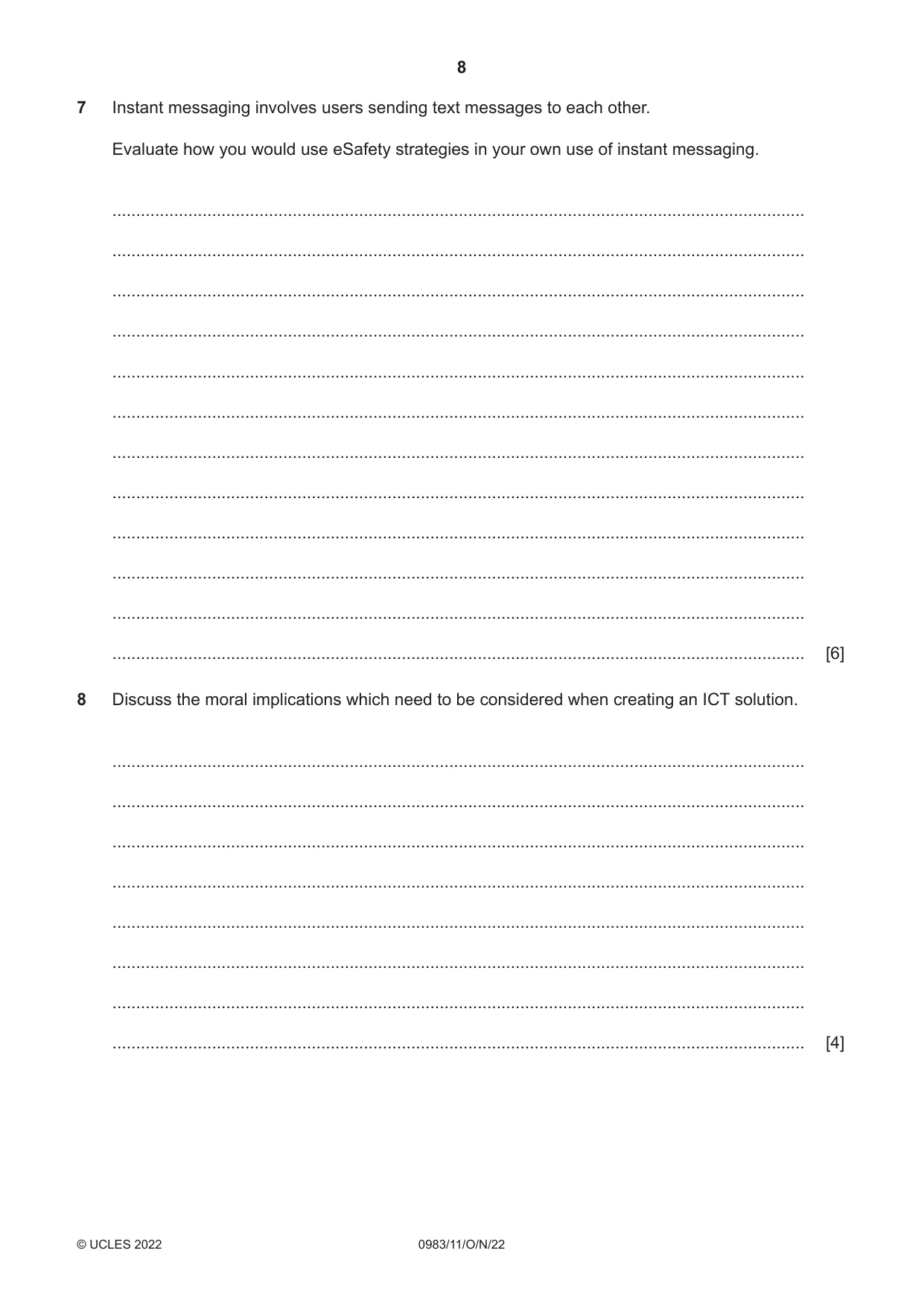
Instant messaging involves users sending text messages to each other. Evaluate how you would use eSafety strategies in your own use of instant messaging. 7 … … … … … … … … … … … … [6] Discuss the moral implications which need to be considered when creating an ICT solution. 8 … … … … … … … … [4] 8 0983/11/O/N/22 © UCLES 2022
Question paper, page 9
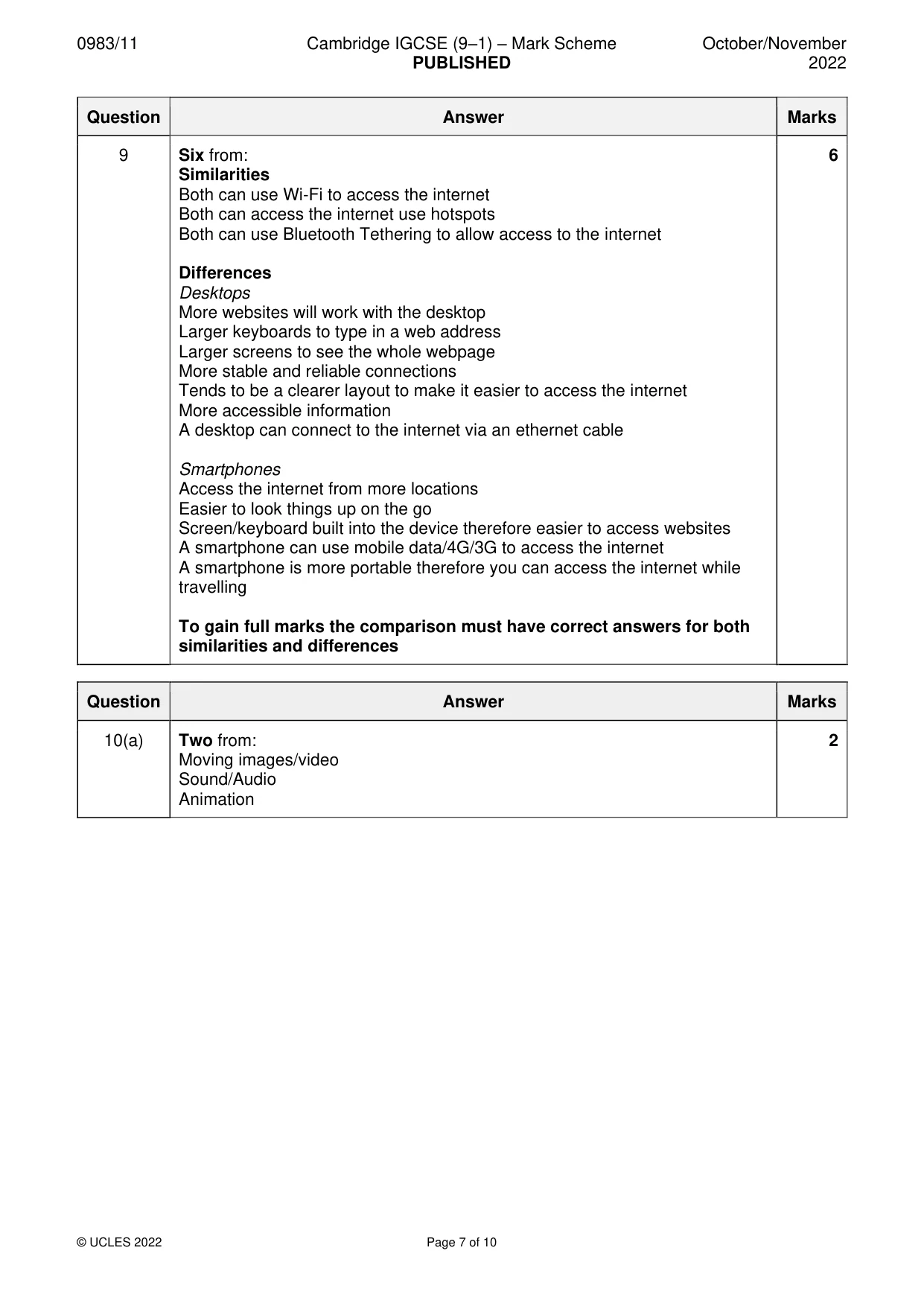
Use of smartphones to access the internet has increased by over 200% in the past five years. Compare the use of smartphones to access the internet with the use of desktop computers to access the internet. Your answer must include similarities and differences. 9 … … … … … … … … … … … … [6] 9 0983/11/O/N/22 © UCLES 2022 [Turn over
Question paper, page 10
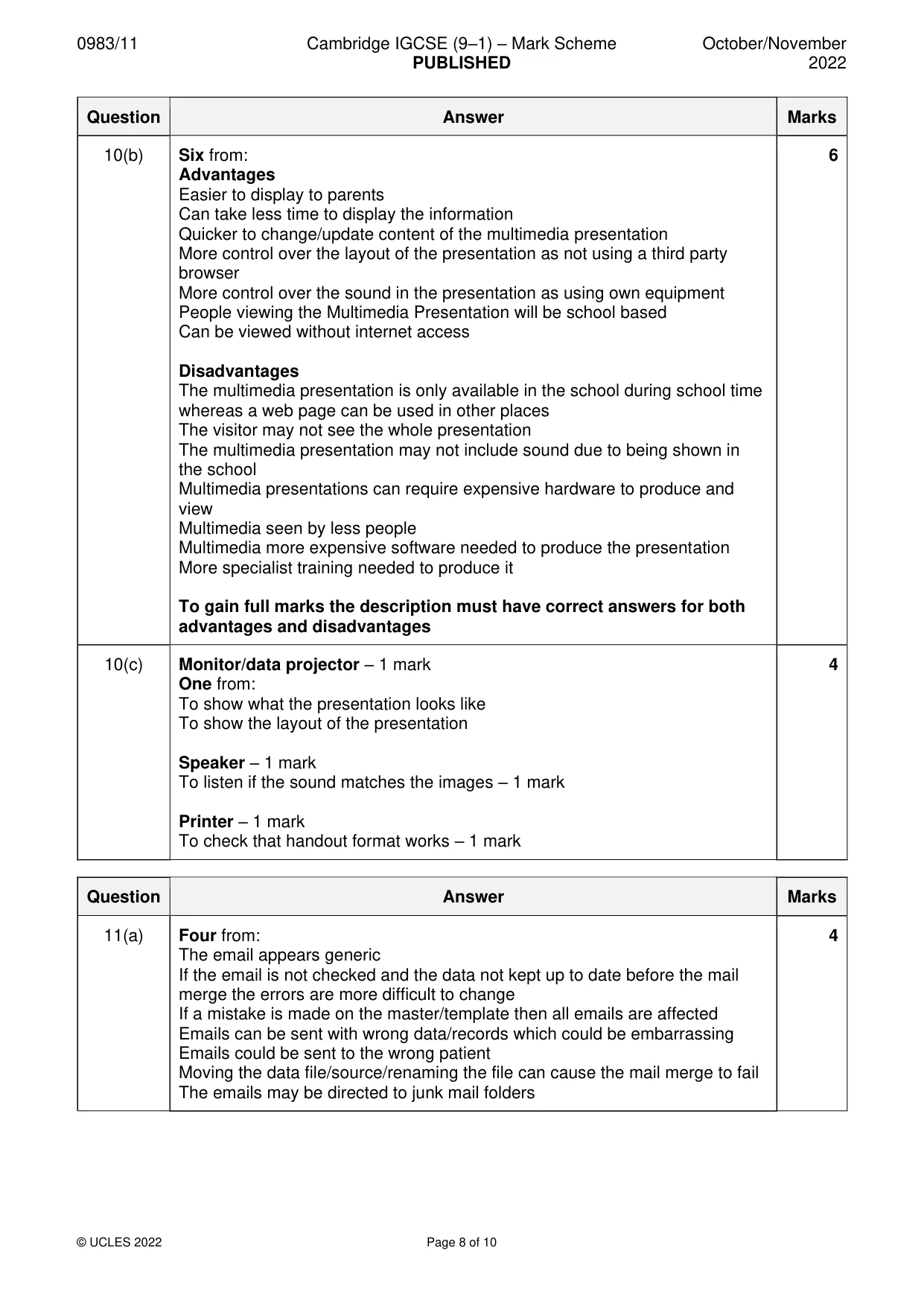
A group of students in a school are planning to publicise a school concert. They can either produce a web page which will be sent to the company that runs the school website or create a multimedia presentation and show this to students and visitors. 10 Give two types of content which could be used in a multimedia presentation that cannot be used in a printed leaflet. (a) 1 … 2 … [2] Describe the advantages and disadvantages of using a multimedia presentation rather than a web page on the school website. (b) … … … … … … … … … … … … [6] 10 0983/11/O/N/22 © UCLES 2022
Question paper, page 11
The students need to test their multimedia presentation before it can be used. Name two output devices they can use and for each one, write down a reason for its use. (c) Output device 1 … Reason … … Output device 2 … Reason … … [4] A receptionist in a medical centre is going to send out emails to patients about medical results. The receptionist will use the data from patients’ medical and personal records and mail merge these. One of the disadvantages of this system is that the receptionist will have access to personal data. 11 Describe four other disadvantages of using mail merge. (a) 1 … … 2 … … 3 … … 4 … … [4] 11 0983/11/O/N/22 © UCLES 2022 [Turn over
Question paper, page 12
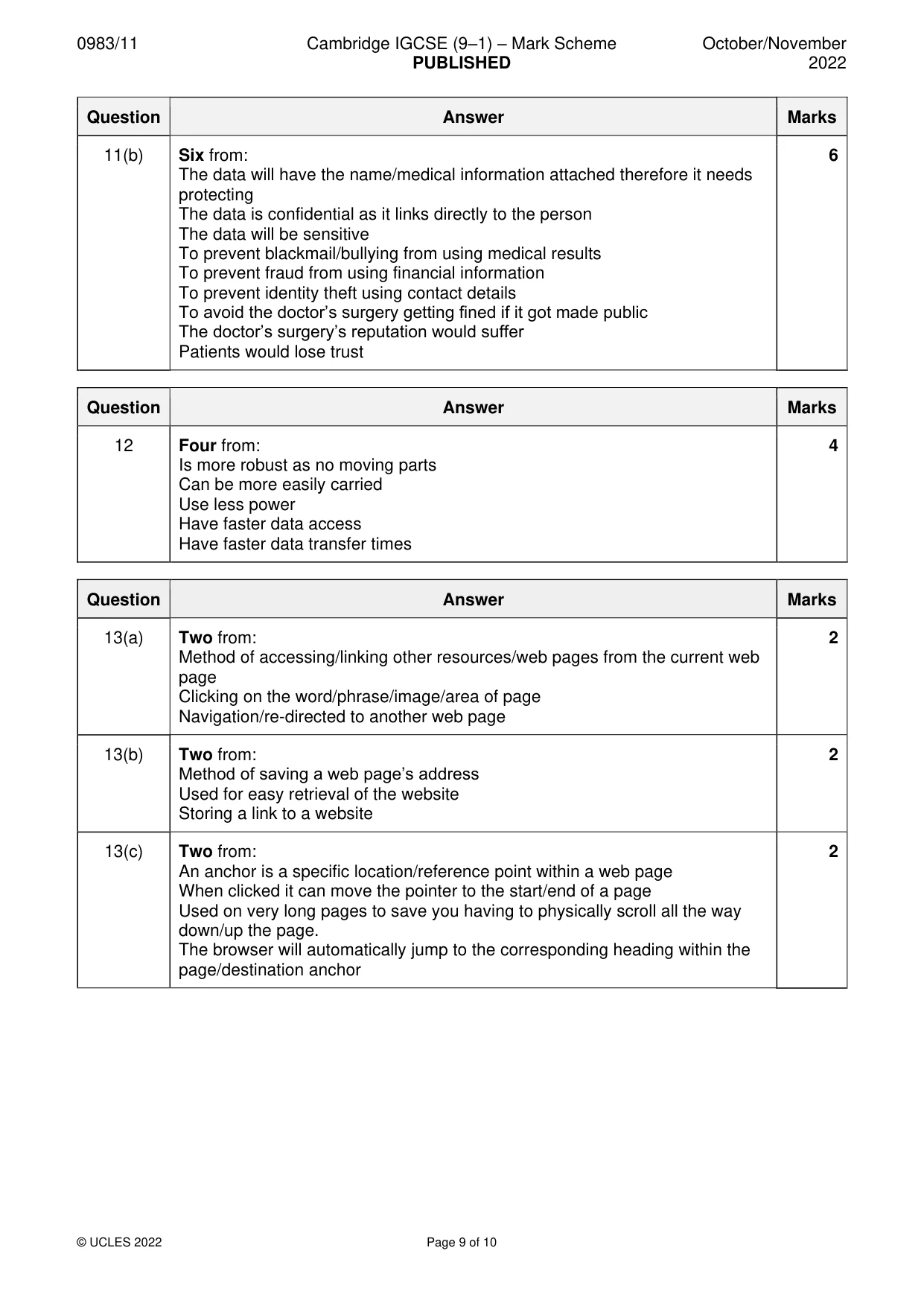
Due to data protection laws, personal data should be kept confidential and secure. Explain why personal data should be kept confidential and secure. (b) … … … … … … … … … … … … [6] Many students prefer to store data on external storage devices like pen drives or portable hard disk drives. Describe four advantages of using a pen drive rather than a portable hard disk drive. 12 1 … … 2 … … 3 … … 4 … … [4] 12 0983/11/O/N/22 © UCLES 2022
Question paper, page 13
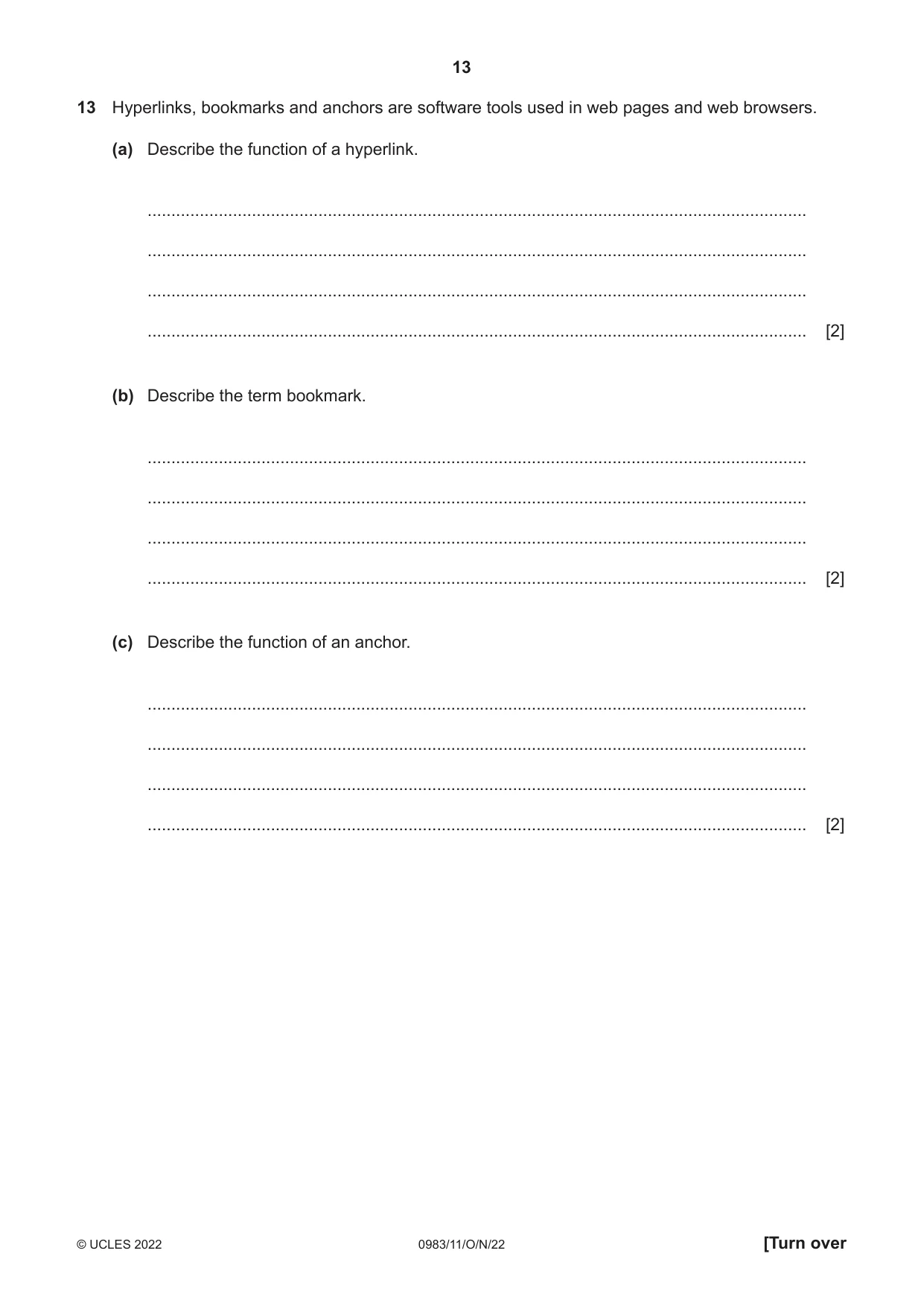
Hyperlinks, bookmarks and anchors are software tools used in web pages and web browsers. 13 Describe the function of a hyperlink. (a) … … … … [2] Describe the term bookmark. (b) … … … … [2] Describe the function of an anchor. (c) … … … … [2] 13 0983/11/O/N/22 © UCLES 2022 [Turn over
Question paper, page 14
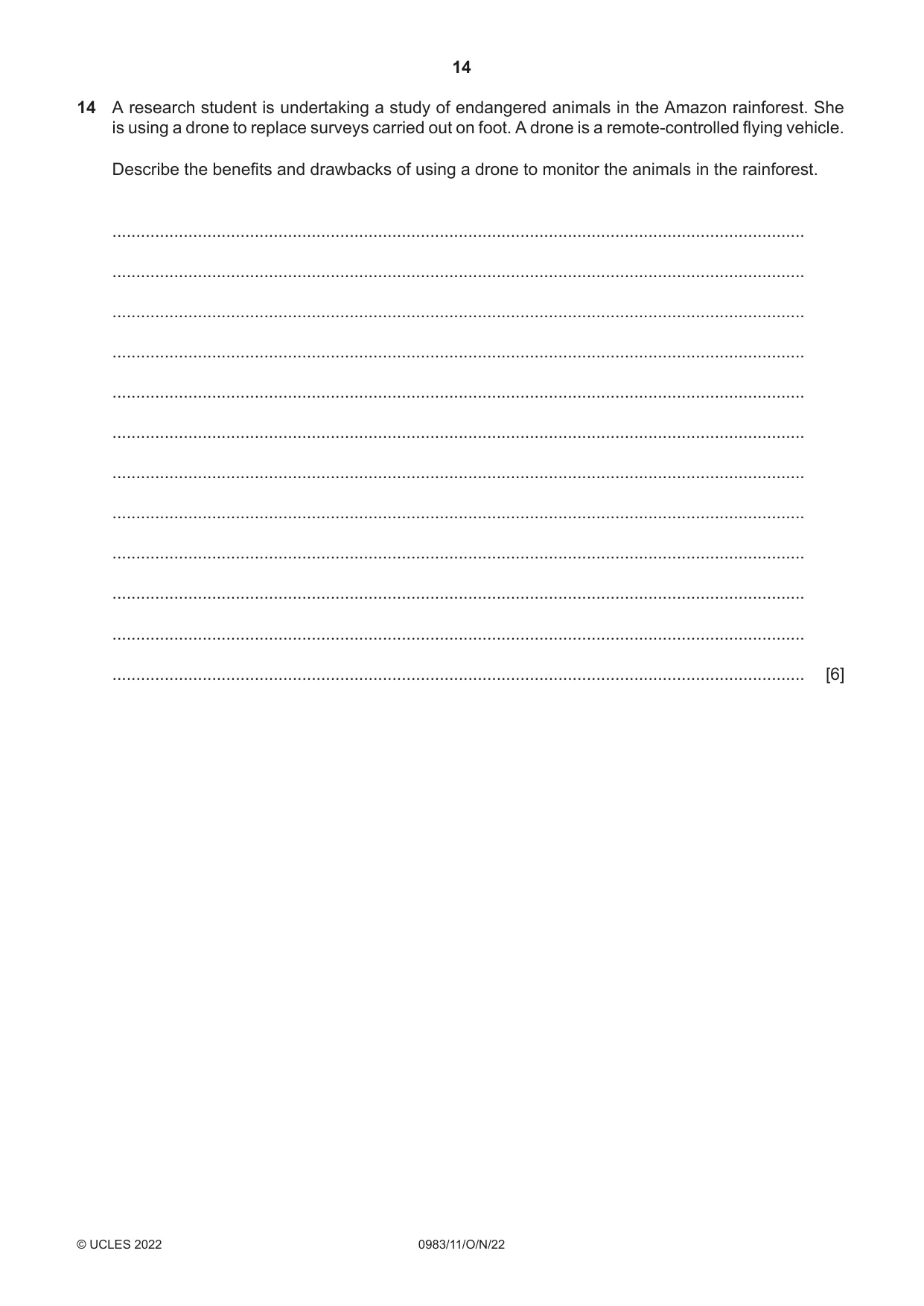
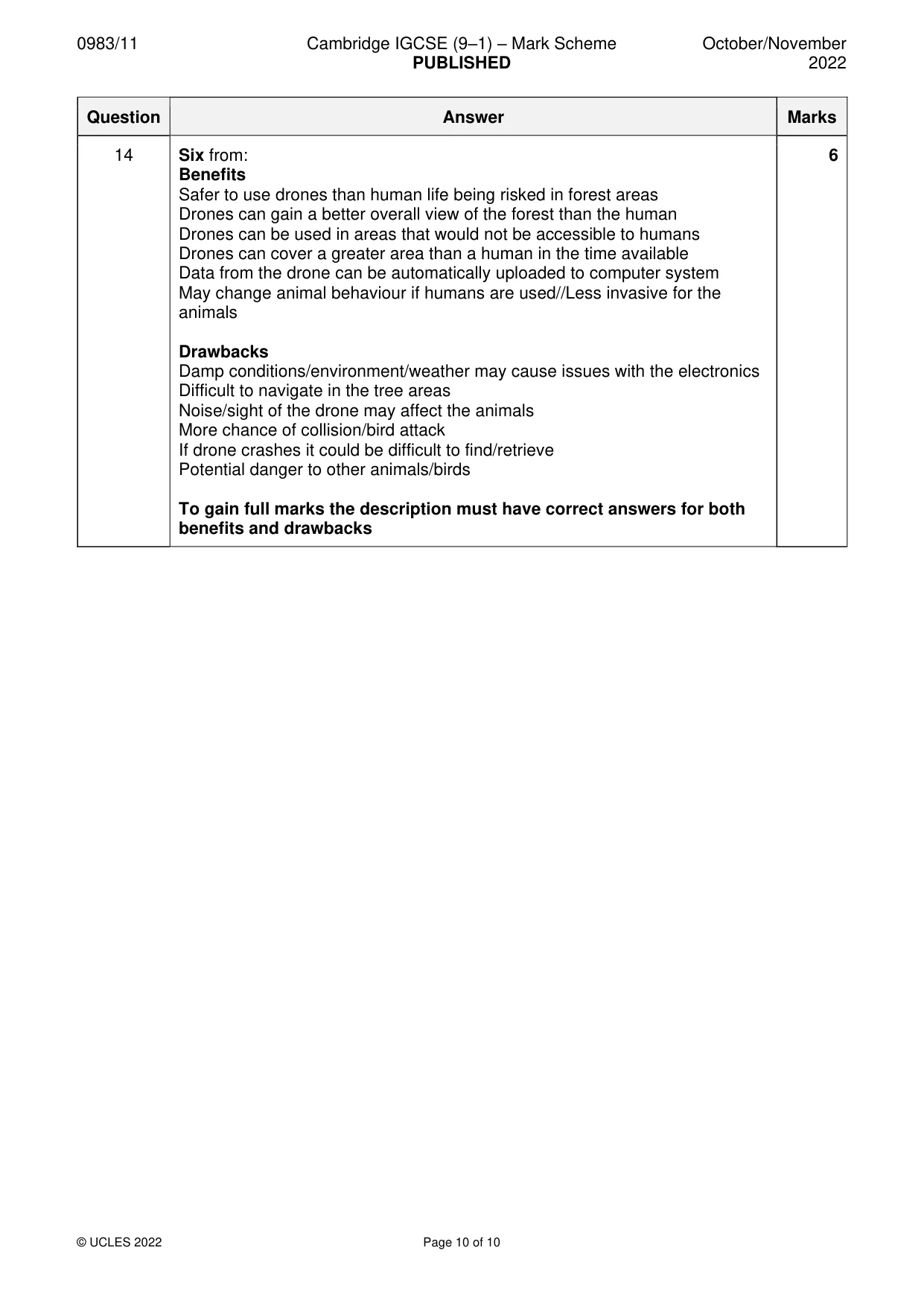
A research student is undertaking a study of endangered animals in the Amazon rainforest. She is using a drone to replace surveys carried out on foot. A drone is a remote-controlled flying vehicle. Describe the benefits and drawbacks of using a drone to monitor the animals in the rainforest. 14 … … … … … … … … … … … … [6] 14 0983/11/O/N/22 © UCLES 2022
Question paper, page 15
BLANK PAGE 15 0983/11/O/N/22 © UCLES 2022
Question paper, page 16
BLANK PAGE 16 0983/11/O/N/22 © UCLES 2022 Permission to reproduce items where third-party owned material protected by copyright is included has been sought and cleared where possible. Every reasonable effort has been made by the publisher (UCLES) to trace copyright holders, but if any items requiring clearance have unwittingly been included, the publisher will be pleased to make amends at the earliest possible opportunity. To avoid the issue of disclosure of answer-related information to candidates, all copyright acknowledgements are reproduced online in the Cambridge Assessment International Education Copyright Acknowledgements Booklet. This is produced for each series of examinations and is freely available to download at www.cambridgeinternational.org after the live examination series. Cambridge Assessment International Education is part of Cambridge Assessment. Cambridge Assessment is the brand name of the University of Cambridge Local Examinations Syndicate (UCLES), which is a department of the University of Cambridge.
Mark scheme, page 1
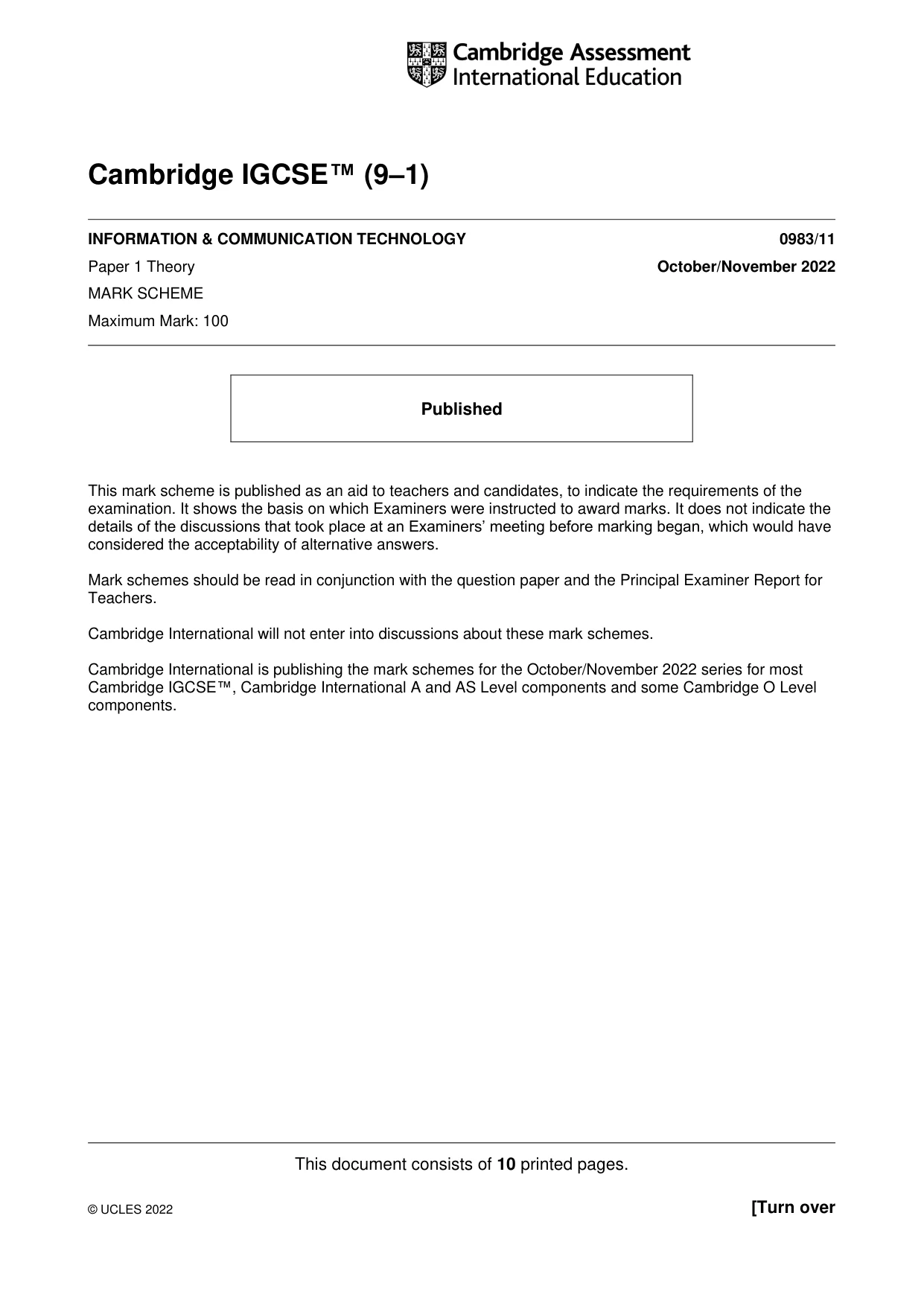
This document consists of 10 printed pages. © UCLES 2022 [Turn over Cambridge IGCSE™ (9–1) INFORMATION & COMMUNICATION TECHNOLOGY 0983/11 Paper 1 Theory October/November 2022 MARK SCHEME Maximum Mark: 100 Published This mark scheme is published as an aid to teachers and candidates, to indicate the requirements of the examination. It shows the basis on which Examiners were instructed to award marks. It does not indicate the details of the discussions that took place at an Examiners’ meeting before marking began, which would have considered the acceptability of alternative answers. Mark schemes should be read in conjunction with the question paper and the Principal Examiner Report for Teachers. Cambridge International will not enter into discussions about these mark schemes. Cambridge International is publishing the mark schemes for the October/November 2022 series for most Cambridge IGCSE™, Cambridge International A and AS Level components and some Cambridge O Level components.
Mark scheme, page 2
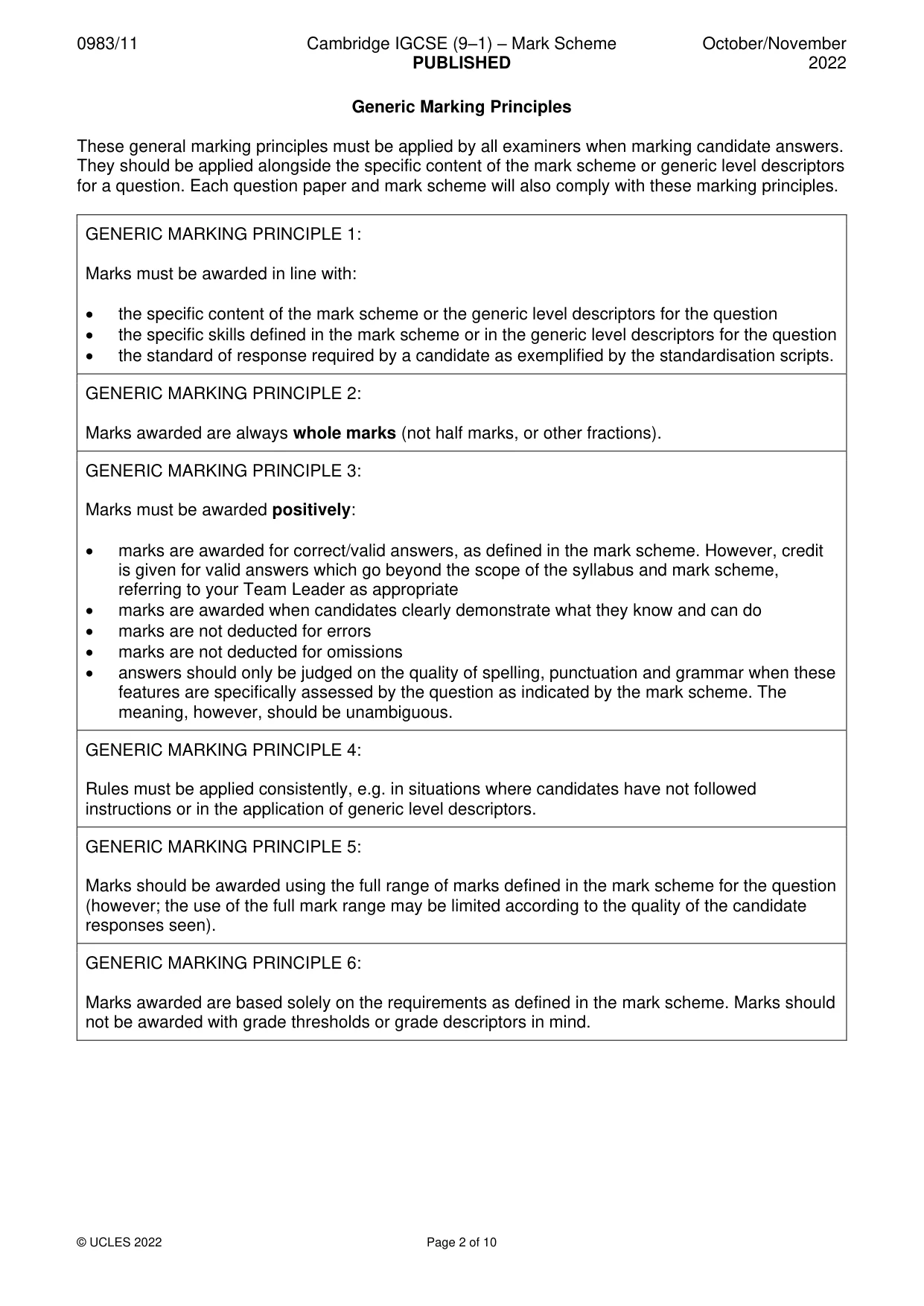
0983/11 Cambridge IGCSE (9–1) – Mark Scheme PUBLISHED October/November 2022 © UCLES 2022 Page 2 of 10 Generic Marking Principles These general marking principles must be applied by all examiners when marking candidate answers. They should be applied alongside the specific content of the mark scheme or generic level descriptors for a question. Each question paper and mark scheme will also comply with these marking principles. GENERIC MARKING PRINCIPLE 1: Marks must be awarded in line with: • the specific content of the mark scheme or the generic level descriptors for the question • the specific skills defined in the mark scheme or in the generic level descriptors for the question • the standard of response required by a candidate as exemplified by the standardisation scripts. GENERIC MARKING PRINCIPLE 2: Marks awarded are always whole marks (not half marks, or other fractions). GENERIC MARKING PRINCIPLE 3: Marks must be awarded positively: • marks are awarded for correct/valid answers, as defined in the mark scheme. However, credit is given for valid answers which go beyond the scope of the syllabus and mark scheme, referring to your Team Leader as appropriate • marks are awarded when candidates clearly demonstrate what they know and can do • marks are not deducted for errors • marks are not deducted for omissions • answers should only be judged on the quality of spelling, punctuation and grammar when these features are specifically assessed by the question as indicated by the mark scheme. The meaning, however, should be unambiguous. GENERIC MARKING PRINCIPLE 4: Rules must be applied consistently, e.g. in situations where candidates have not followed instructions or in the application of generic level descriptors. GENERIC MARKING PRINCIPLE 5: Marks should be awarded using the full range of marks defined in the mark scheme for the question (however; the use of the full mark range may be limited according to the quality of the candidate responses seen). GENERIC MARKING PRINCIPLE 6: Marks awarded are based solely on the requirements as defined in the mark scheme. Marks should not be awarded with grade thresholds or grade descriptors in mind.
Mark scheme, page 3
0983/11 Cambridge IGCSE (9–1) – Mark Scheme PUBLISHED October/November 2022 © UCLES 2022 Page 3 of 10 Question Answer Marks 1(a) Gutter 1 1(b) Header 1 1(c) Wrapping 1 1(d) Justified 1 Question Answer Marks 2(a) Three from, for example: SMS Making/receiving a phone call Checking the time Use appointments/calendar Taking pictures Record sound Bluetooth to share files 3 2(b) Two from: More accessible/portable as it is on the wrist Less chance of being lost/stolen/forgotten Less chance of it being dropped as it is fastened to the wrist Can access simple apps easier for example heart rate/timer 2 2(c) Two from: Smaller screen size therefore difficult to see More difficult to enter the data More difficult to access detailed apps for example, email 2 Question Answer Marks 3 Max three from: Weak password is easy to guess Weak passwords consist of all letters or all digits or all digits with one letter/all letters with one digit//words found in a dictionary//Strong passwords use a mixture of upper case, lower case, symbols and digits Weak password is one that has less than 8 characters Weak password has repeated characters Weak password has characters next to each other on a QWERTY keyboard Weak passwords are ones that are similar to the username Weak passwords can use personal information All of the examples given in the question are weak passwords Max two from: A good example of a strong password A good example of a different weak password 4
Mark scheme, page 4
0983/11 Cambridge IGCSE (9–1) – Mark Scheme PUBLISHED October/November 2022 © UCLES 2022 Page 4 of 10 Question Answer Marks 4(a)(i) One from: 0 100 1 4(a)(ii) Abnormal Normal 2 4(b) Boolean Gender Numeric: integer Exam_mark Numeric: decimal Average_mark Alphanumeric Student_name 4 Question Answer Marks 5(a) Three from: Measurements can be taken continually Safer to take the measurements Measurements can be taken outside school hours The computer will not forget to take readings Readings are taken at a more consistent time interval The computer reads the data more accurately 3 5(b) Six from: The data from the sensor is read/received by the computer The data is converted to digital by the ADC The software is opened on the computer The graph type is loaded/selected The data is uploaded to the graph The graph is plotted/created Axes/legend/title added 6 5(c) Four from: Measurement Automatically detects changes in the environment Measurement takes the readings and stores the result Measures/reads physical quantities Control Changes the environment Compares against preset value Action taken depending on comparison to preset value To gain full marks the description must have correct answers for both measurement and control 4
Mark scheme, page 5
0983/11 Cambridge IGCSE (9–1) – Mark Scheme PUBLISHED October/November 2022 © UCLES 2022 Page 5 of 10 Question Answer Marks 6(a) Eight from: For Face can be identified faster Face can be identified by electronic comparison therefore relative higher level of accuracy Facial recognition can uniquely identify individuals Can automatically compare faces from older images System can work continuously but a human checker would need to take breaks Against Dark glasses/facial hair/face coverings may cause the facial recognition systems to not work More difficult to change biometric data Recognising a person can be slower as more checking is carried out Harder to set up the facial recognition system Takes longer to add new people to the system Biometrics can use a lot of memory to store the data Intrusive as personal details have to be stored More likely to be affected by the environment With the video system each frame needs to be checked with known images which can lead to errors To gain full marks the discussion must have correct answers for both for and against 8 6(b) Three from: Finger print Hand print Vein geometry Retina Iris Speech/Voice 3
Mark scheme, page 6
0983/11 Cambridge IGCSE (9–1) – Mark Scheme PUBLISHED October/November 2022 © UCLES 2022 Page 6 of 10 Question Answer Marks 7 Six from: I block unwanted messages/suspicious users… …and report the sender Before using the messaging system, I check how to block and report unwanted users… …this stops predators I never arrange to meet strangers alone I always tell a responsible adult if I plan to meet someone I always meet in a public place I avoid giving away personal information I report abusive messages from a sender of the messages I report cyber-bullying When sending messages I always use appropriate language If someone messages me with private and personal information about themselves I respect their confidentiality/privacy I always read carefully the messages before I send I avoid sarcasm I am not offensive when replying I carefully check that I am replying to the correct person I do not enable my location when messaging 6 Question Answer Marks 8 Four from: What may be immoral in some cultures may be acceptable in others Just because something is immoral doesn't mean that it is illegal The ICT solution can cause distress to others/be offensive Becomes immoral if the person gains from their actions Max two marks for examples: Not creating a website full of false facts/news Not including obscene/offensive/inappropriate/extreme/blasphemy /discriminatory content Not creating a video solution that earns you money by stating false facts/lies Not creating an ICT solution that coerces people to give money Invasion of privacy 4
Mark scheme, page 7
0983/11 Cambridge IGCSE (9–1) – Mark Scheme PUBLISHED October/November 2022 © UCLES 2022 Page 7 of 10 Question Answer Marks 9 Six from: Similarities Both can use Wi-Fi to access the internet Both can access the internet use hotspots Both can use Bluetooth Tethering to allow access to the internet Differences Desktops More websites will work with the desktop Larger keyboards to type in a web address Larger screens to see the whole webpage More stable and reliable connections Tends to be a clearer layout to make it easier to access the internet More accessible information A desktop can connect to the internet via an ethernet cable Smartphones Access the internet from more locations Easier to look things up on the go Screen/keyboard built into the device therefore easier to access websites A smartphone can use mobile data/4G/3G to access the internet A smartphone is more portable therefore you can access the internet while travelling To gain full marks the comparison must have correct answers for both similarities and differences 6 Question Answer Marks 10(a) Two from: Moving images/video Sound/Audio Animation 2
Mark scheme, page 8
0983/11 Cambridge IGCSE (9–1) – Mark Scheme PUBLISHED October/November 2022 © UCLES 2022 Page 8 of 10 Question Answer Marks 10(b) Six from: Advantages Easier to display to parents Can take less time to display the information Quicker to change/update content of the multimedia presentation More control over the layout of the presentation as not using a third party browser More control over the sound in the presentation as using own equipment People viewing the Multimedia Presentation will be school based Can be viewed without internet access Disadvantages The multimedia presentation is only available in the school during school time whereas a web page can be used in other places The visitor may not see the whole presentation The multimedia presentation may not include sound due to being shown in the school Multimedia presentations can require expensive hardware to produce and view Multimedia seen by less people Multimedia more expensive software needed to produce the presentation More specialist training needed to produce it To gain full marks the description must have correct answers for both advantages and disadvantages 6 10(c) Monitor/data projector – 1 mark One from: To show what the presentation looks like To show the layout of the presentation Speaker – 1 mark To listen if the sound matches the images – 1 mark Printer – 1 mark To check that handout format works – 1 mark 4 Question Answer Marks 11(a) Four from: The email appears generic If the email is not checked and the data not kept up to date before the mail merge the errors are more difficult to change If a mistake is made on the master/template then all emails are affected Emails can be sent with wrong data/records which could be embarrassing Emails could be sent to the wrong patient Moving the data file/source/renaming the file can cause the mail merge to fail The emails may be directed to junk mail folders 4
Mark scheme, page 9
0983/11 Cambridge IGCSE (9–1) – Mark Scheme PUBLISHED October/November 2022 © UCLES 2022 Page 9 of 10 Question Answer Marks 11(b) Six from: The data will have the name/medical information attached therefore it needs protecting The data is confidential as it links directly to the person The data will be sensitive To prevent blackmail/bullying from using medical results To prevent fraud from using financial information To prevent identity theft using contact details To avoid the doctor’s surgery getting fined if it got made public The doctor’s surgery’s reputation would suffer Patients would lose trust 6 Question Answer Marks 12 Four from: Is more robust as no moving parts Can be more easily carried Use less power Have faster data access Have faster data transfer times 4 Question Answer Marks 13(a) Two from: Method of accessing/linking other resources/web pages from the current web page Clicking on the word/phrase/image/area of page Navigation/re-directed to another web page 2 13(b) Two from: Method of saving a web page’s address Used for easy retrieval of the website Storing a link to a website 2 13(c) Two from: An anchor is a specific location/reference point within a web page When clicked it can move the pointer to the start/end of a page Used on very long pages to save you having to physically scroll all the way down/up the page. The browser will automatically jump to the corresponding heading within the page/destination anchor 2
Mark scheme, page 10
0983/11 Cambridge IGCSE (9–1) – Mark Scheme PUBLISHED October/November 2022 © UCLES 2022 Page 10 of 10 Question Answer Marks 14 Six from: Benefits Safer to use drones than human life being risked in forest areas Drones can gain a better overall view of the forest than the human Drones can be used in areas that would not be accessible to humans Drones can cover a greater area than a human in the time available Data from the drone can be automatically uploaded to computer system May change animal behaviour if humans are used//Less invasive for the animals Drawbacks Damp conditions/environment/weather may cause issues with the electronics Difficult to navigate in the tree areas Noise/sight of the drone may affect the animals More chance of collision/bird attack If drone crashes it could be difficult to find/retrieve Potential danger to other animals/birds To gain full marks the description must have correct answers for both benefits and drawbacks 6
What you needed in this session
Cambridge’s own grade thresholds for 2022 Oct/Nov, Paper 1 · Variant 1. A higher threshold means an easier paper — the bar moves with how the cohort did.