Cambridge IGCSE Information and Communication Technology (9-1) 0983 — 2020 Oct/Nov Paper 1 · Variant 1
0983/11/O/N/20 · 100 marks · ≈113 min
The question paper and its mark scheme, free to read here and free to download. This is Cambridge’s own paper, exactly as it was sat.
Question paper16 pages


Mark scheme9 pages
Answers below. Sit the paper first if you are practising.
Paper as text
Question paper, page 1
Cambridge IGCSE™(9–1) This document has 16 pages. Blank pages are indicated. DC (CJ) 215561/2 © UCLES 2020 [Turn over * 4 8 4 3 6 8 5 1 9 0 * INFORMATION AND COMMUNICATION TECHNOLOGY 0983/11 Paper 1 Theory October/November 2020 2 hours You must answer on the question paper. No additional materials are needed. INSTRUCTIONS ● Answer all questions. ● Use a black or dark blue pen. ● Write your name, centre number and candidate number in the boxes at the top of the page. ● Write your answer to each question in the space provided. ● Do not use an erasable pen or correction fluid. ● Do not write on any bar codes. ● You may use an HB pencil for any diagrams, graphs or rough working. INFORMATION ● The total mark for this paper is 100. ● The number of marks for each question or part question is shown in brackets [ ]. ● No marks will be awarded for using brand names of software packages or hardware.
Question paper, page 2
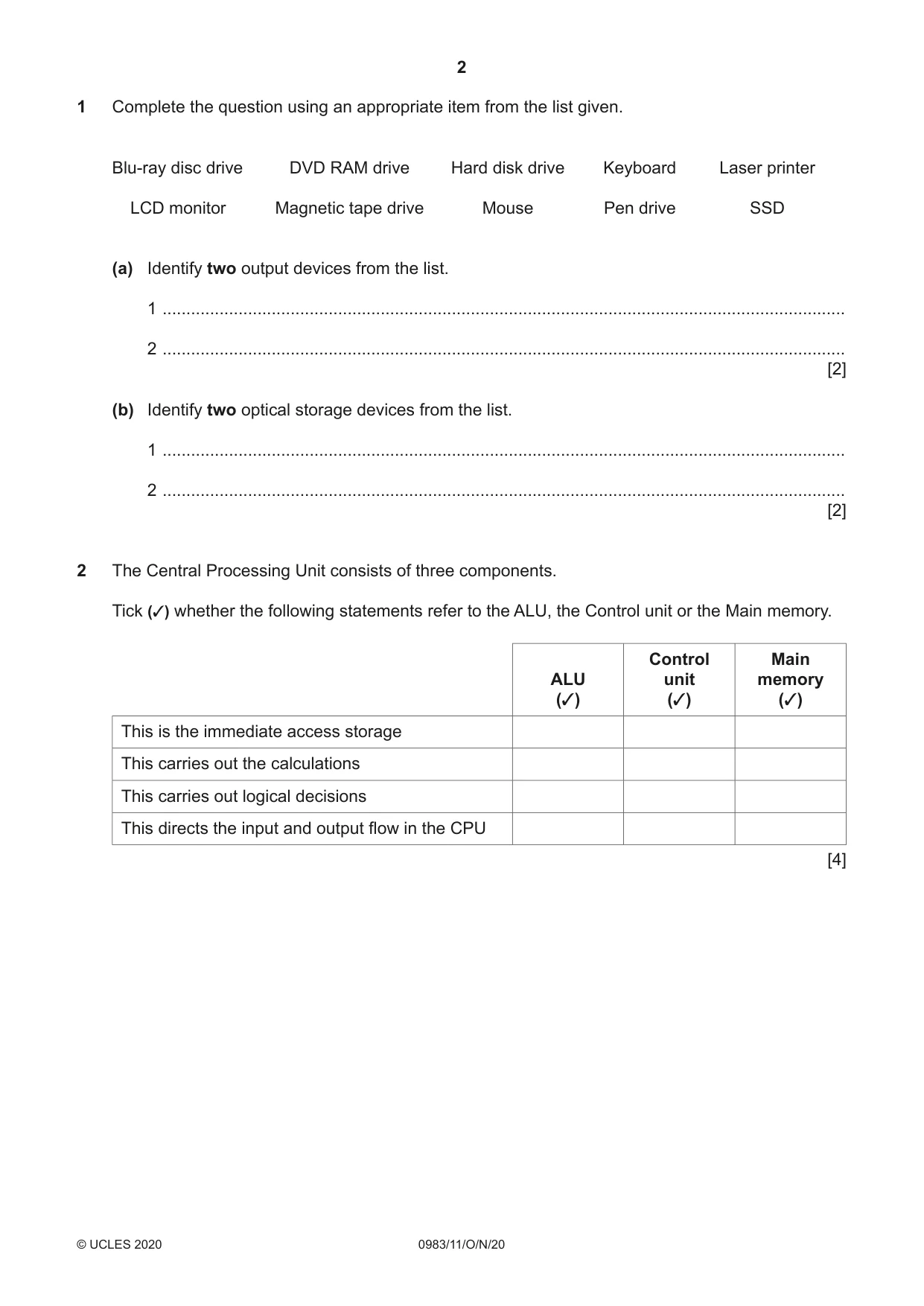
2 0983/11/O/N/20 © UCLES 2020 1 Complete the question using an appropriate item from the list given. Blu-ray disc drive DVD RAM drive Hard disk drive Keyboard Laser printer LCD monitor Magnetic tape drive Mouse Pen drive SSD (a) Identify two output devices from the list. 1 … 2 … [2] (b) Identify two optical storage devices from the list. 1 … 2 … [2] 2 The Central Processing Unit consists of three components. Tick (3) whether the following statements refer to the ALU, the Control unit or the Main memory. ALU (3) Control unit (3) Main memory (3) This is the immediate access storage This carries out the calculations This carries out logical decisions This directs the input and output flow in the CPU [4]
Question paper, page 3
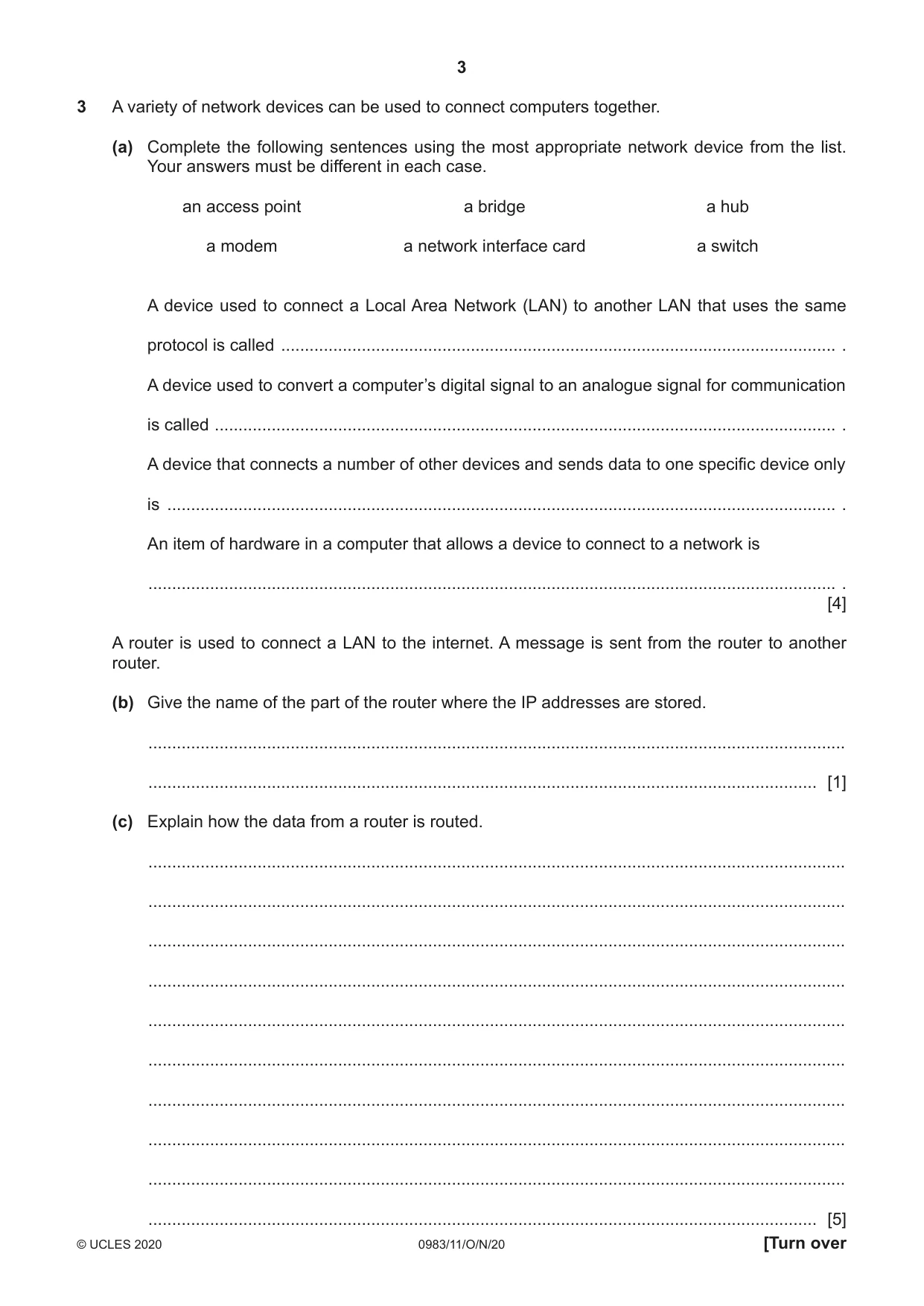
3 0983/11/O/N/20 © UCLES 2020 [Turn over 3 A variety of network devices can be used to connect computers together. (a) Complete the following sentences using the most appropriate network device from the list. Your answers must be different in each case. an access point a bridge a hub a modem a network interface card a switch A device used to connect a Local Area Network (LAN) to another LAN that uses the same protocol is called … . A device used to convert a computer’s digital signal to an analogue signal for communication is called … . A device that connects a number of other devices and sends data to one specific device only is … . An item of hardware in a computer that allows a device to connect to a network is … . [4] A router is used to connect a LAN to the internet. A message is sent from the router to another router. (b) Give the name of the part of the router where the IP addresses are stored. … … [1] (c) Explain how the data from a router is routed. … … … … … … … … … … [5]
Question paper, page 4
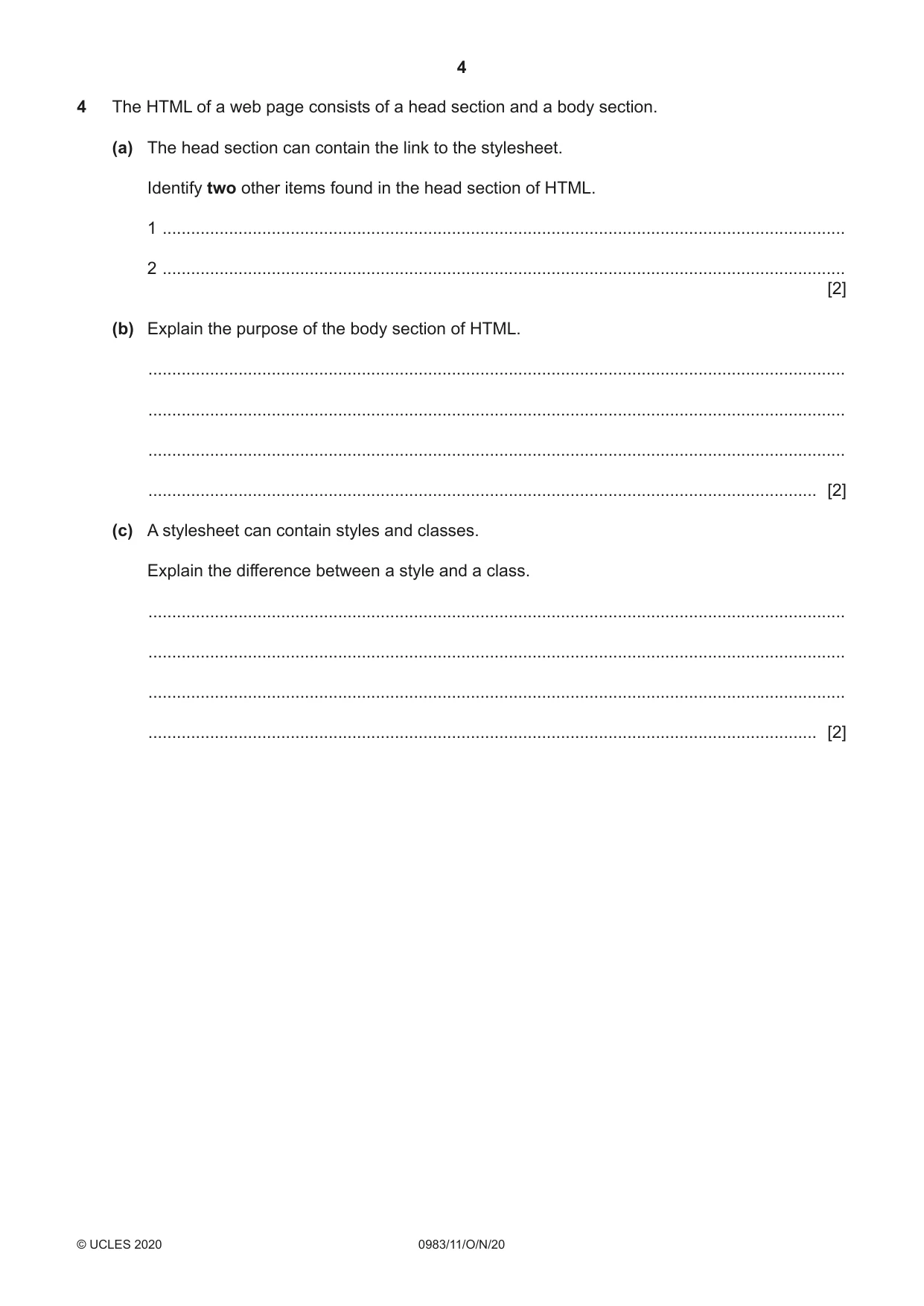
4 0983/11/O/N/20 © UCLES 2020 4 The HTML of a web page consists of a head section and a body section. (a) The head section can contain the link to the stylesheet. Identify two other items found in the head section of HTML. 1 … 2 … [2] (b) Explain the purpose of the body section of HTML. … … … … [2] (c) A stylesheet can contain styles and classes. Explain the difference between a style and a class. … … … … [2]
Question paper, page 5
5 0983/11/O/N/20 © UCLES 2020 [Turn over Question 5 starts on page 6.
Question paper, page 6
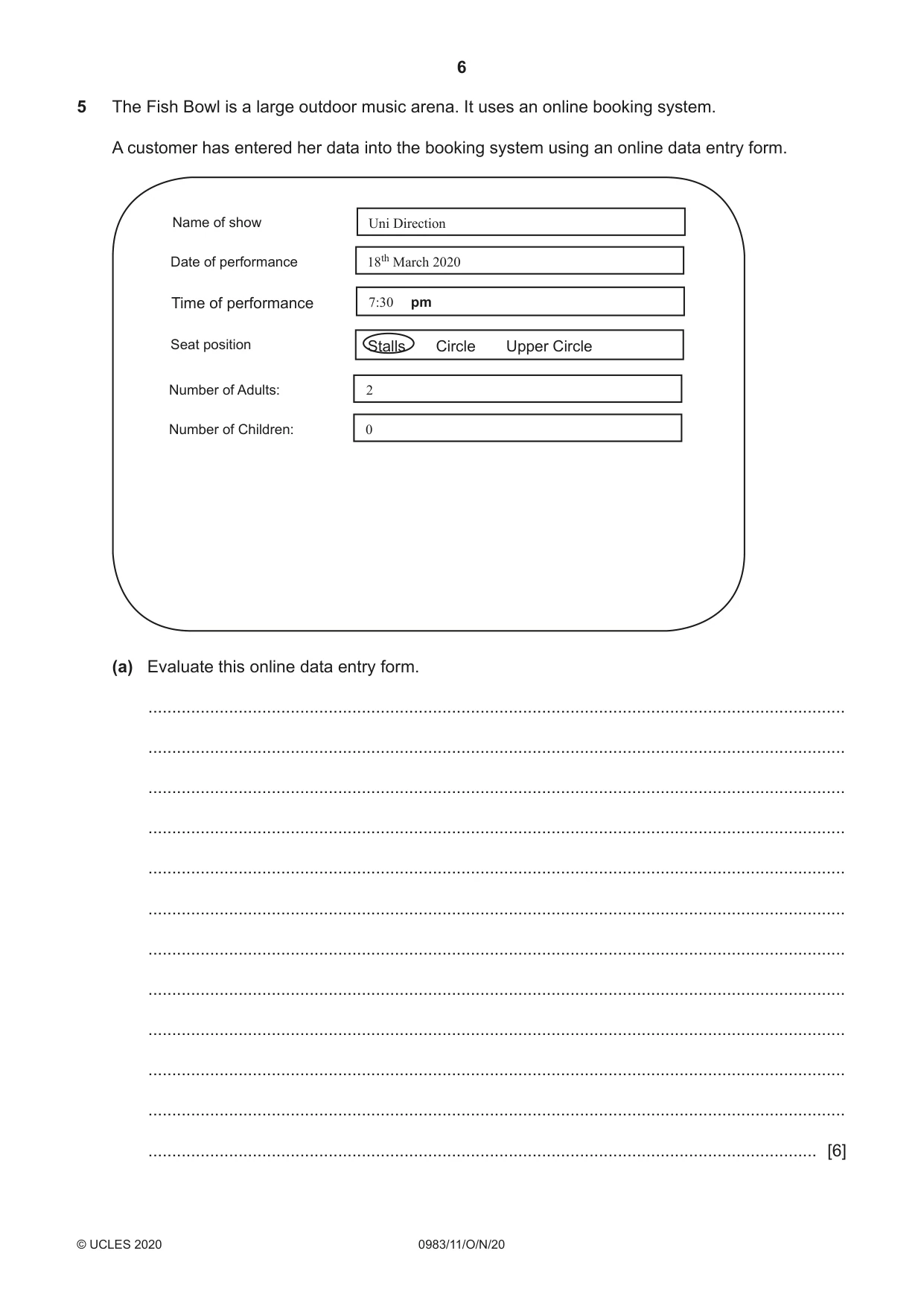
6 0983/11/O/N/20 © UCLES 2020 5 The Fish Bowl is a large outdoor music arena. It uses an online booking system. A customer has entered her data into the booking system using an online data entry form. Name of show Uni Direction 2 0 18th March 2020 7:30 pm Date of performance Seat position Number of Adults: Number of Children: Time of performance Stalls Circle Upper Circle (a) Evaluate this online data entry form. … … … … … … … … … … … … [6]
Question paper, page 7
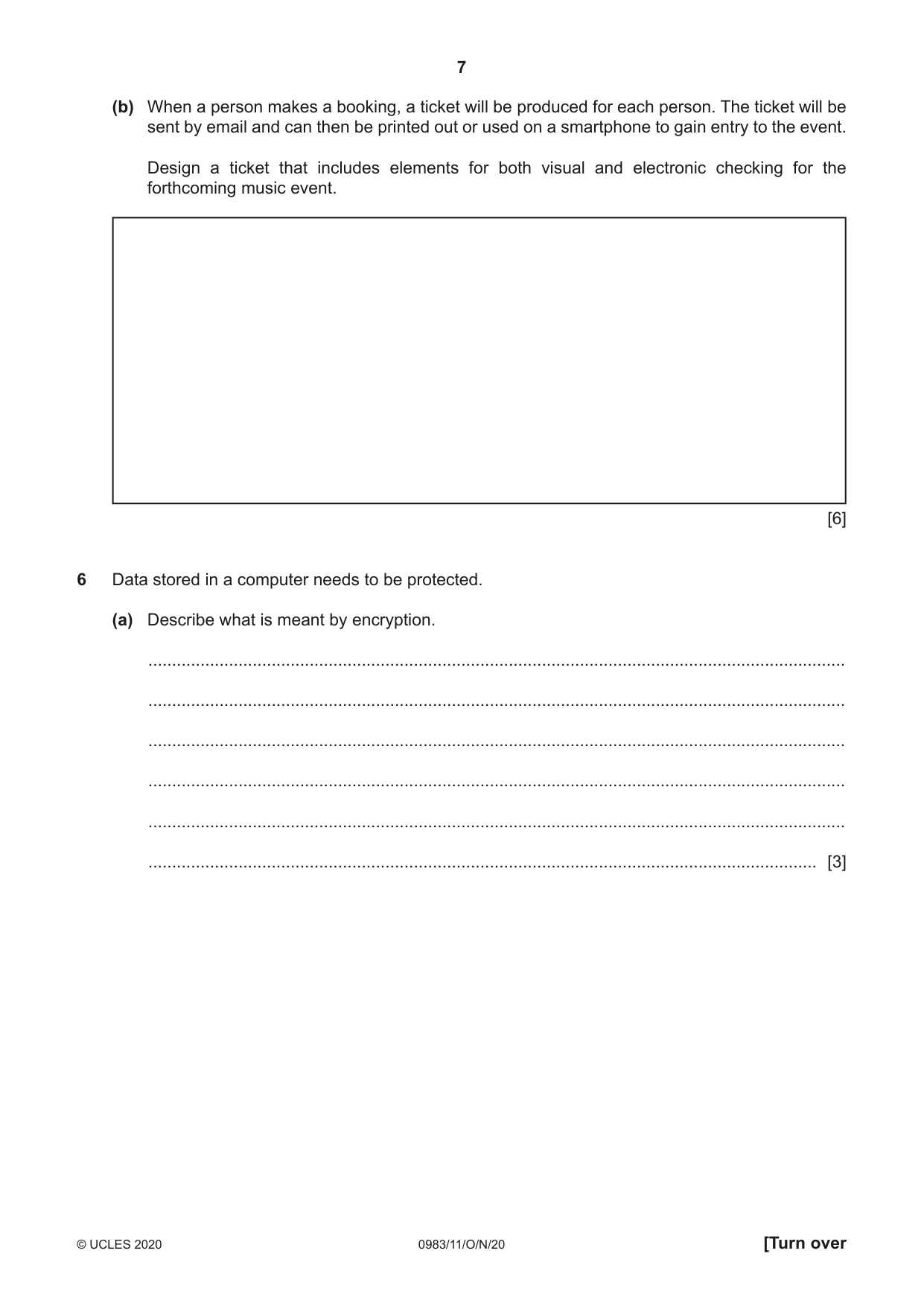
7 0983/11/O/N/20 © UCLES 2020 [Turn over (b) When a person makes a booking, a ticket will be produced for each person. The ticket will be sent by email and can then be printed out or used on a smartphone to gain entry to the event. Design a ticket that includes elements for both visual and electronic checking for the forthcoming music event. [6] 6 Data stored in a computer needs to be protected. (a) Describe what is meant by encryption. … … … … … … [3]
Question paper, page 8
8 0983/11/O/N/20 © UCLES 2020 Due to an issue with Question 6b, the question has been removed from the question paper.
Question paper, page 9
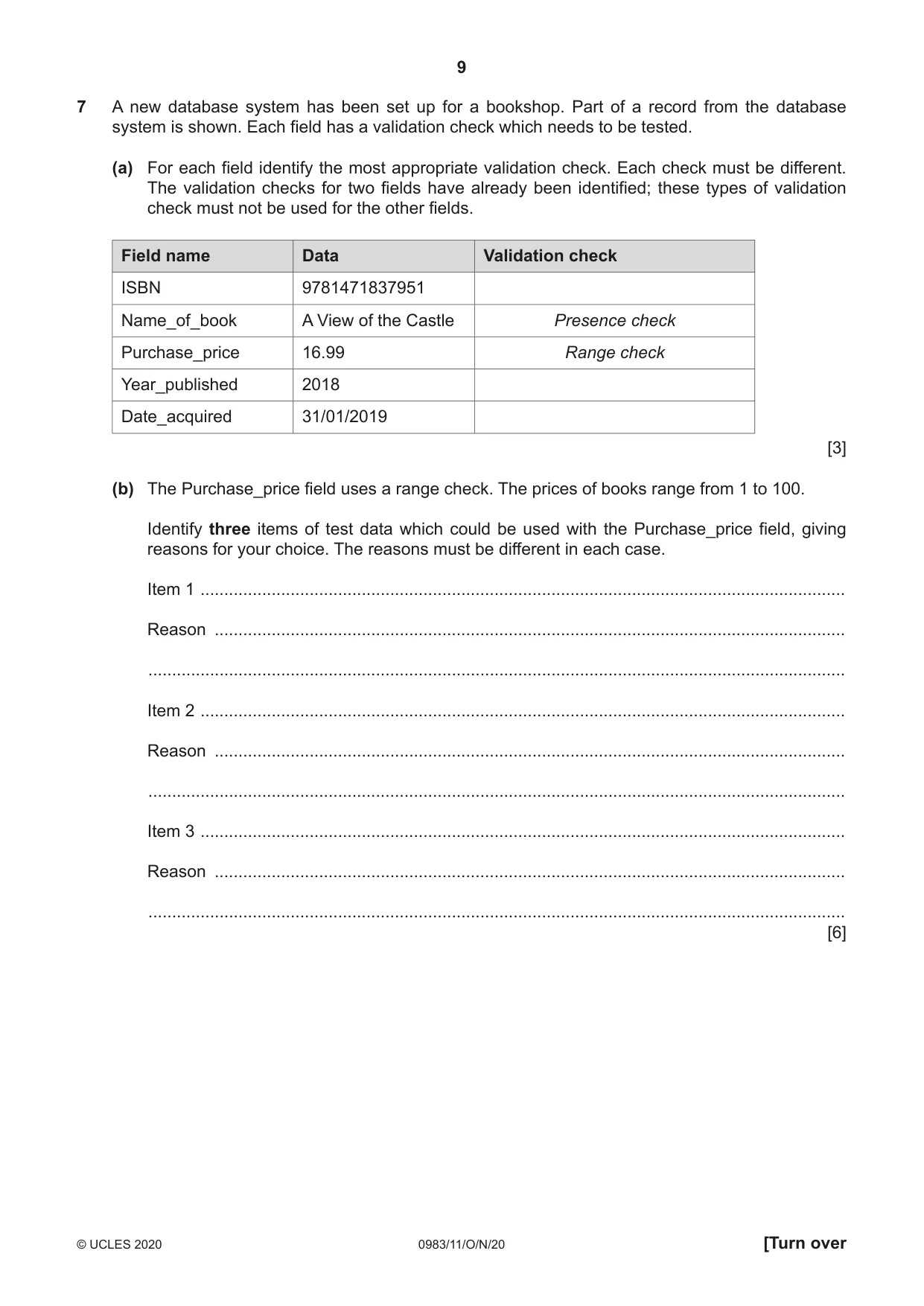
9 0983/11/O/N/20 © UCLES 2020 [Turn over 7 A new database system has been set up for a bookshop. Part of a record from the database system is shown. Each field has a validation check which needs to be tested. (a) For each field identify the most appropriate validation check. Each check must be different. The validation checks for two fields have already been identified; these types of validation check must not be used for the other fields. Field name Data Validation check ISBN 9781471837951 Name_of_book A View of the Castle Presence check Purchase_price 16.99 Range check Year_published 2018 Date_acquired 31/01/2019 [3] (b) The Purchase_price field uses a range check. The prices of books range from 1 to 100. Identify three items of test data which could be used with the Purchase_price field, giving reasons for your choice. The reasons must be different in each case. Item 1 … Reason … … Item 2 … Reason … … Item 3 … Reason … … [6]
Question paper, page 10
10 0983/11/O/N/20 © UCLES 2020 8 Autonomous vehicles are being tested on some of the world’s roads. These vehicles can travel in convoys with each vehicle following the one in front with a set distance between them. The whole operation is computer controlled. If the vehicle in front slows down, then the following vehicle also slows down to maintain the distance between them. A proximity sensor is used to detect how close the vehicle is to the vehicle in front. Describe how the microprocessor would maintain the set distance between the vehicles. … … … … … … … … … … … … [6]
Question paper, page 11
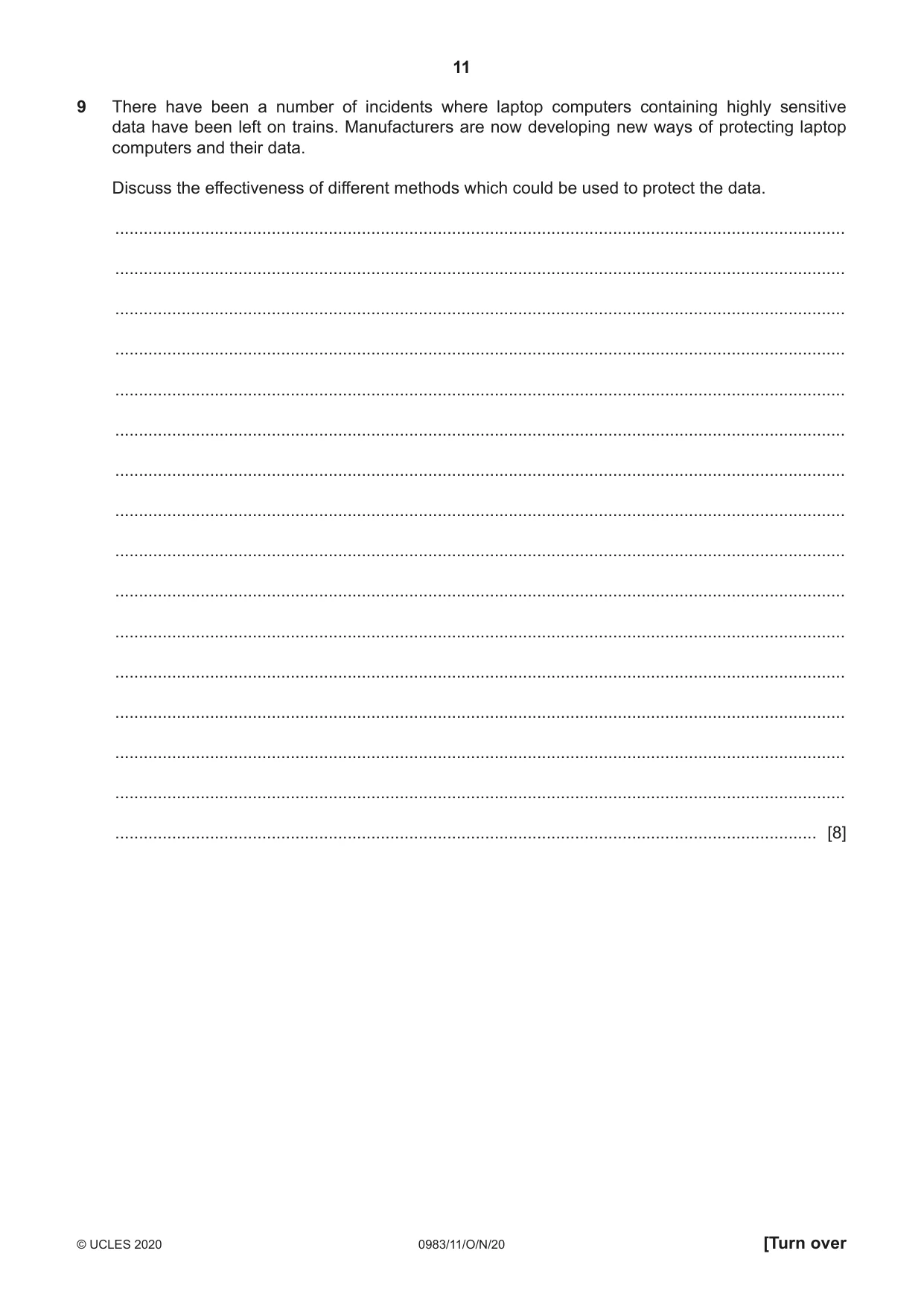
11 0983/11/O/N/20 © UCLES 2020 [Turn over 9 There have been a number of incidents where laptop computers containing highly sensitive data have been left on trains. Manufacturers are now developing new ways of protecting laptop computers and their data. Discuss the effectiveness of different methods which could be used to protect the data. … … … … … … … … … … … … … … … … [8]
Question paper, page 12
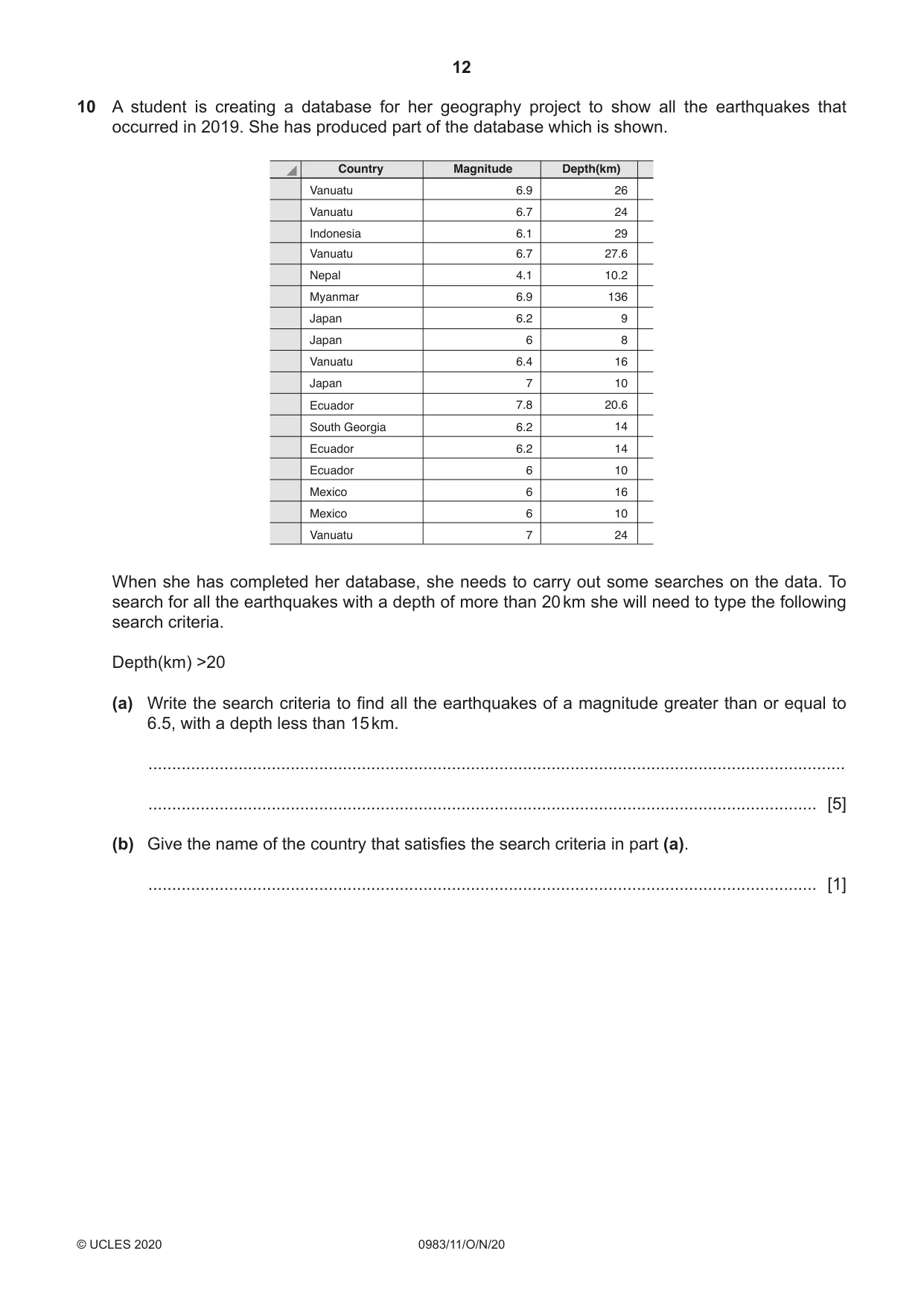
12 0983/11/O/N/20 © UCLES 2020 10 A student is creating a database for her geography project to show all the earthquakes that occurred in 2019. She has produced part of the database which is shown. Country Magnitude Depth(km) Vanuatu Vanuatu Indonesia Vanuatu Nepal Myanmar Japan Japan Vanuatu Japan Ecuador South Georgia Ecuador Ecuador Mexico Mexico Vanuatu 6.9 6.7 6.1 6.7 4.1 6.9 6.2 6 6.4 7 7.8 6.2 6.2 6 6 6 7 26 24 29 27.6 10.2 136 9 8 16 10 20.6 14 14 10 16 10 24 When she has completed her database, she needs to carry out some searches on the data. To search for all the earthquakes with a depth of more than 20 km she will need to type the following search criteria. Depth(km) >20 (a) Write the search criteria to find all the earthquakes of a magnitude greater than or equal to 6.5, with a depth less than 15 km. … … [5] (b) Give the name of the country that satisfies the search criteria in part (a). … [1]
Question paper, page 13
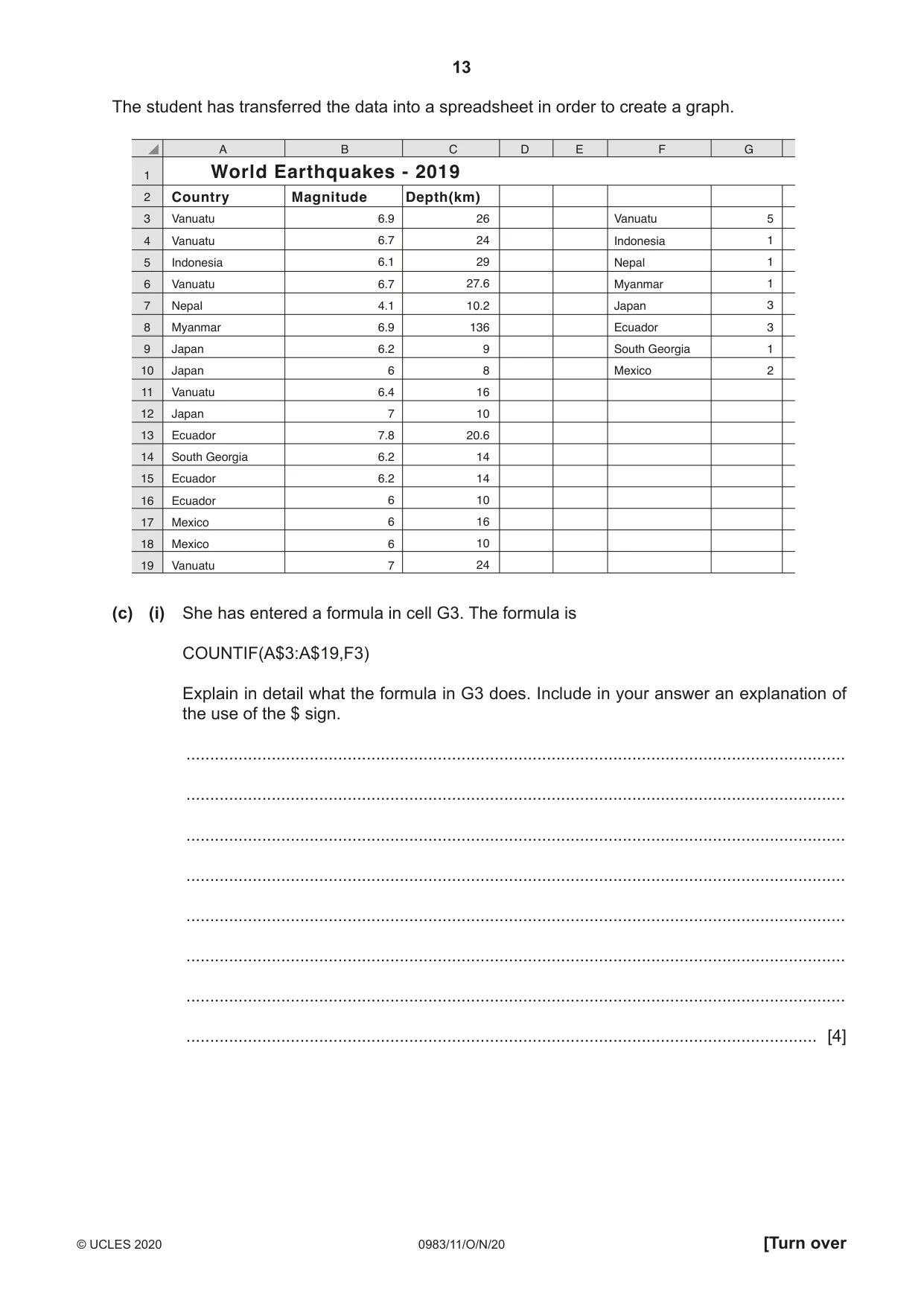
13 0983/11/O/N/20 © UCLES 2020 [Turn over The student has transferred the data into a spreadsheet in order to create a graph. A 1 2 3 4 5 6 7 8 9 10 11 12 13 14 15 B C D E F G World Earthquakes - 2019 Country Magnitude Depth(km) 16 17 18 19 Vanuatu Vanuatu Indonesia Vanuatu Nepal Myanmar Japan Japan Vanuatu Indonesia Nepal Myanmar Japan Ecuador South Georgia Mexico Vanuatu Japan Ecuador South Georgia Ecuador Ecuador Mexico Mexico Vanuatu 6.9 6.7 6.1 6.7 4.1 6.9 6.2 6 6.4 7 7.8 6.2 6.2 6 6 6 7 26 24 29 27.6 10.2 136 9 8 5 1 1 1 3 3 1 2 16 10 20.6 14 14 10 16 10 24 (c) (i) She has entered a formula in cell G3. The formula is COUNTIF(A$3:A$19,F3) Explain in detail what the formula in G3 does. Include in your answer an explanation of the use of the $ sign. … … … … … … … … [4]
Question paper, page 14
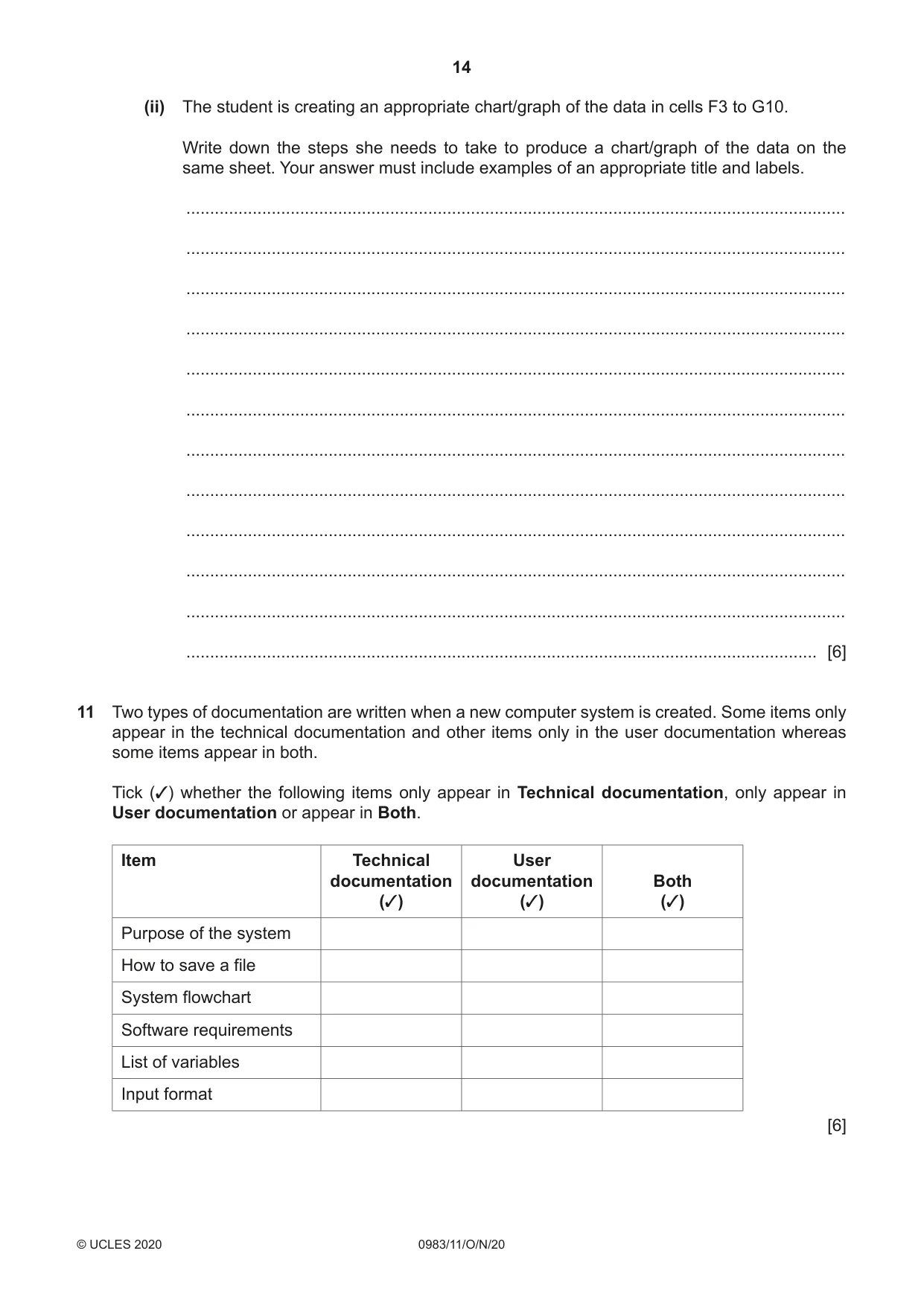
14 0983/11/O/N/20 © UCLES 2020 (ii) The student is creating an appropriate chart/graph of the data in cells F3 to G10. Write down the steps she needs to take to produce a chart/graph of the data on the same sheet. Your answer must include examples of an appropriate title and labels. … … … … … … … … … … … … [6] 11 Two types of documentation are written when a new computer system is created. Some items only appear in the technical documentation and other items only in the user documentation whereas some items appear in both. Tick (3) whether the following items only appear in Technical documentation, only appear in User documentation or appear in Both. Item Technical documentation (3) User documentation (3) Both (3) Purpose of the system How to save a file System flowchart Software requirements List of variables Input format [6]
Question paper, page 15
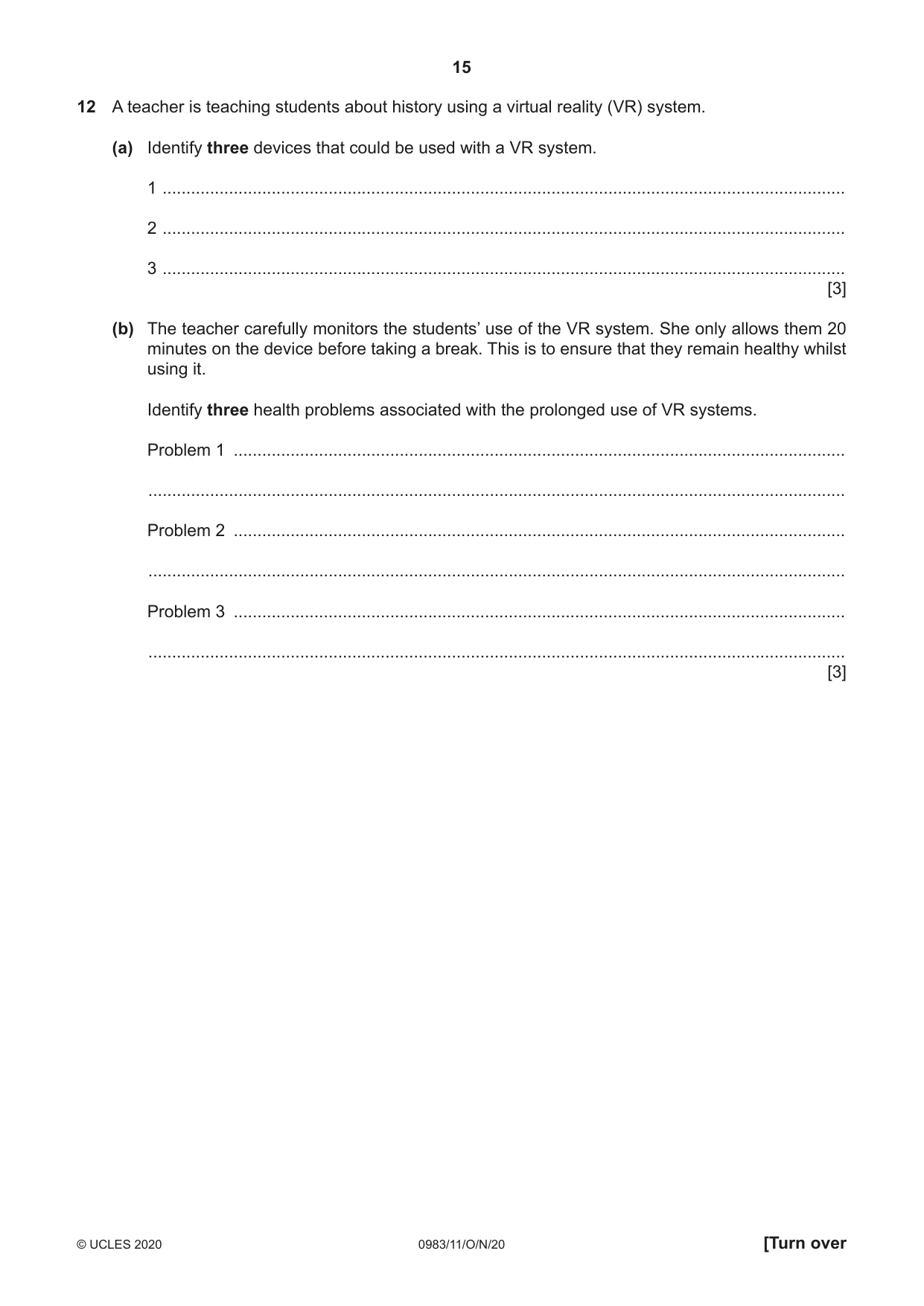
15 0983/11/O/N/20 © UCLES 2020 [Turn over 12 A teacher is teaching students about history using a virtual reality (VR) system. (a) Identify three devices that could be used with a VR system. 1 … 2 … 3 … [3] (b) The teacher carefully monitors the students’ use of the VR system. She only allows them 20 minutes on the device before taking a break. This is to ensure that they remain healthy whilst using it. Identify three health problems associated with the prolonged use of VR systems. Problem 1 … … Problem 2 … … Problem 3 … … [3]
Question paper, page 16
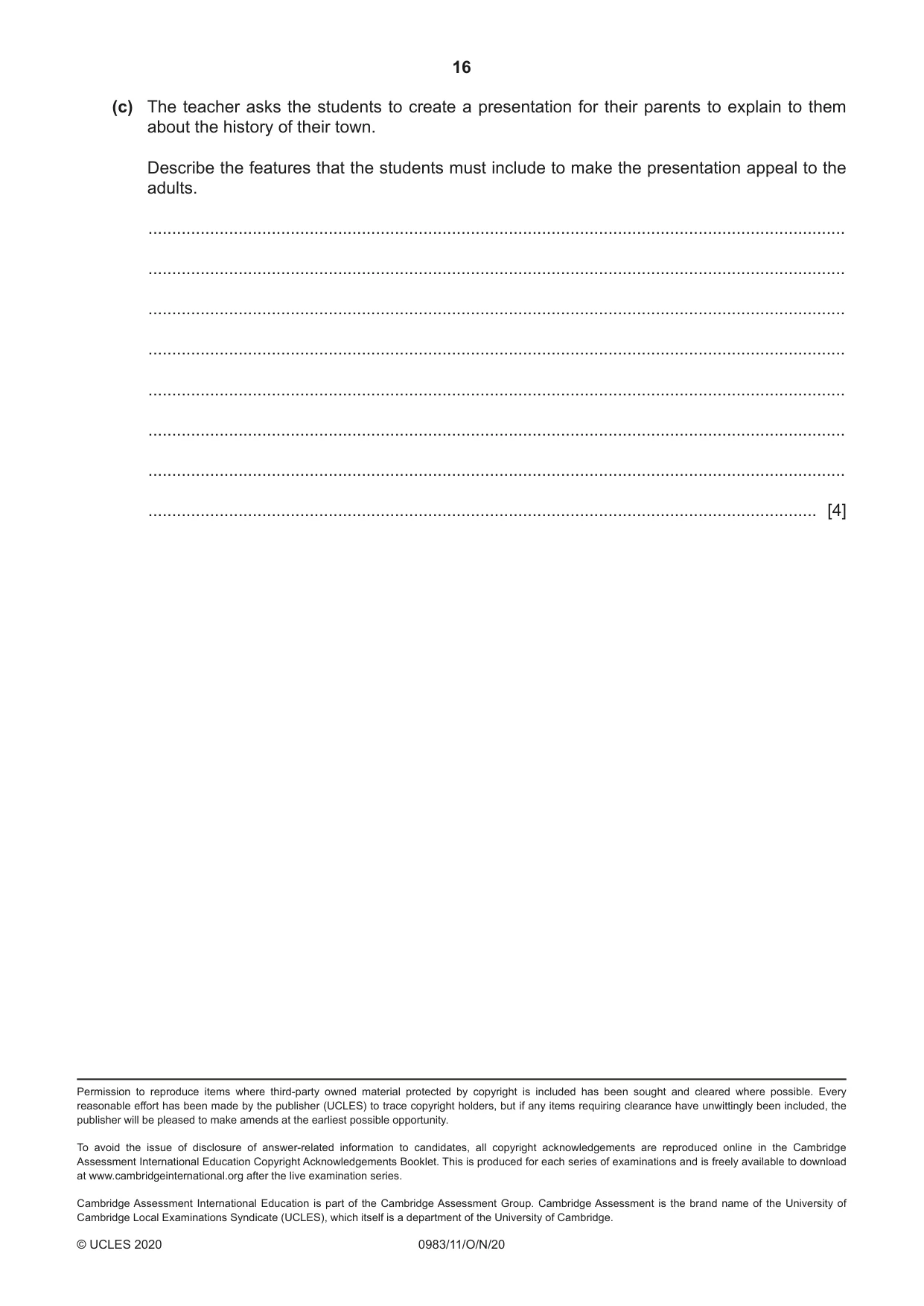
16 0983/11/O/N/20 © UCLES 2020 (c) The teacher asks the students to create a presentation for their parents to explain to them about the history of their town. Describe the features that the students must include to make the presentation appeal to the adults. … … … … … … … … [4] Permission to reproduce items where third-party owned material protected by copyright is included has been sought and cleared where possible. Every reasonable effort has been made by the publisher (UCLES) to trace copyright holders, but if any items requiring clearance have unwittingly been included, the publisher will be pleased to make amends at the earliest possible opportunity. To avoid the issue of disclosure of answer-related information to candidates, all copyright acknowledgements are reproduced online in the Cambridge Assessment International Education Copyright Acknowledgements Booklet. This is produced for each series of examinations and is freely available to download at www.cambridgeinternational.org after the live examination series. Cambridge Assessment International Education is part of the Cambridge Assessment Group. Cambridge Assessment is the brand name of the University of Cambridge Local Examinations Syndicate (UCLES), which itself is a department of the University of Cambridge.
Mark scheme, page 1
This document consists of 9 printed pages. © UCLES 2020 [Turn over Cambridge IGCSE™ (9–1) INFORMATION AND COMMUNICATION TECHNOLOGY 0983/11 Paper 1 Written October/November 2020 MARK SCHEME Maximum Mark: 100 Published This mark scheme is published as an aid to teachers and candidates, to indicate the requirements of the examination. It shows the basis on which Examiners were instructed to award marks. It does not indicate the details of the discussions that took place at an Examiners’ meeting before marking began, which would have considered the acceptability of alternative answers. Mark schemes should be read in conjunction with the question paper and the Principal Examiner Report for Teachers. Cambridge International will not enter into discussions about these mark schemes. Cambridge International is publishing the mark schemes for the October/November 2020 series for most Cambridge IGCSE™, Cambridge International A and AS Level and Cambridge Pre-U components, and some Cambridge O Level components.
Mark scheme, page 2
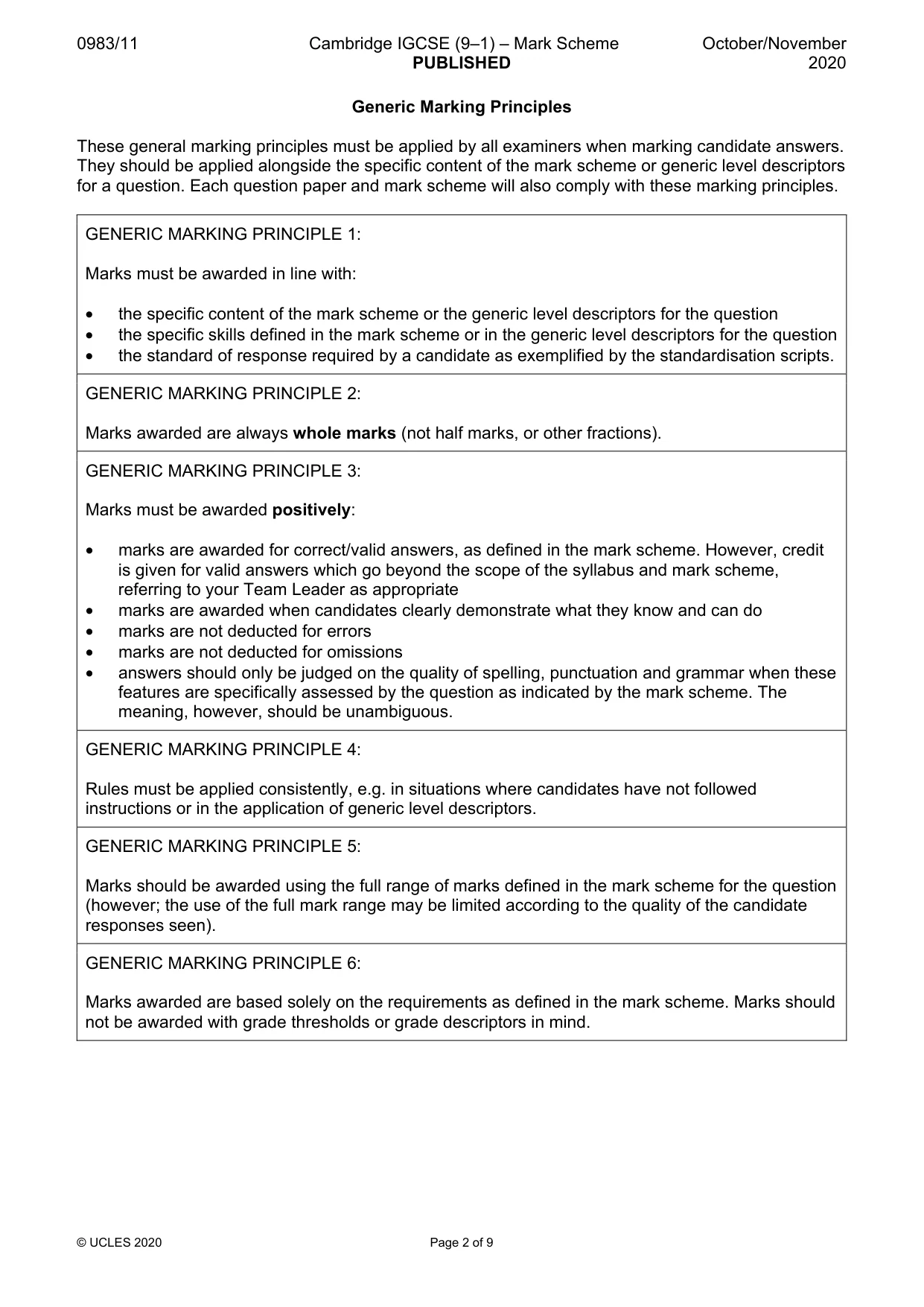
0983/11 Cambridge IGCSE (9–1) – Mark Scheme PUBLISHED October/November 2020 © UCLES 2020 Page 2 of 9 Generic Marking Principles These general marking principles must be applied by all examiners when marking candidate answers. They should be applied alongside the specific content of the mark scheme or generic level descriptors for a question. Each question paper and mark scheme will also comply with these marking principles. GENERIC MARKING PRINCIPLE 1: Marks must be awarded in line with: • the specific content of the mark scheme or the generic level descriptors for the question • the specific skills defined in the mark scheme or in the generic level descriptors for the question • the standard of response required by a candidate as exemplified by the standardisation scripts. GENERIC MARKING PRINCIPLE 2: Marks awarded are always whole marks (not half marks, or other fractions). GENERIC MARKING PRINCIPLE 3: Marks must be awarded positively: • marks are awarded for correct/valid answers, as defined in the mark scheme. However, credit is given for valid answers which go beyond the scope of the syllabus and mark scheme, referring to your Team Leader as appropriate • marks are awarded when candidates clearly demonstrate what they know and can do • marks are not deducted for errors • marks are not deducted for omissions • answers should only be judged on the quality of spelling, punctuation and grammar when these features are specifically assessed by the question as indicated by the mark scheme. The meaning, however, should be unambiguous. GENERIC MARKING PRINCIPLE 4: Rules must be applied consistently, e.g. in situations where candidates have not followed instructions or in the application of generic level descriptors. GENERIC MARKING PRINCIPLE 5: Marks should be awarded using the full range of marks defined in the mark scheme for the question (however; the use of the full mark range may be limited according to the quality of the candidate responses seen). GENERIC MARKING PRINCIPLE 6: Marks awarded are based solely on the requirements as defined in the mark scheme. Marks should not be awarded with grade thresholds or grade descriptors in mind.
Mark scheme, page 3
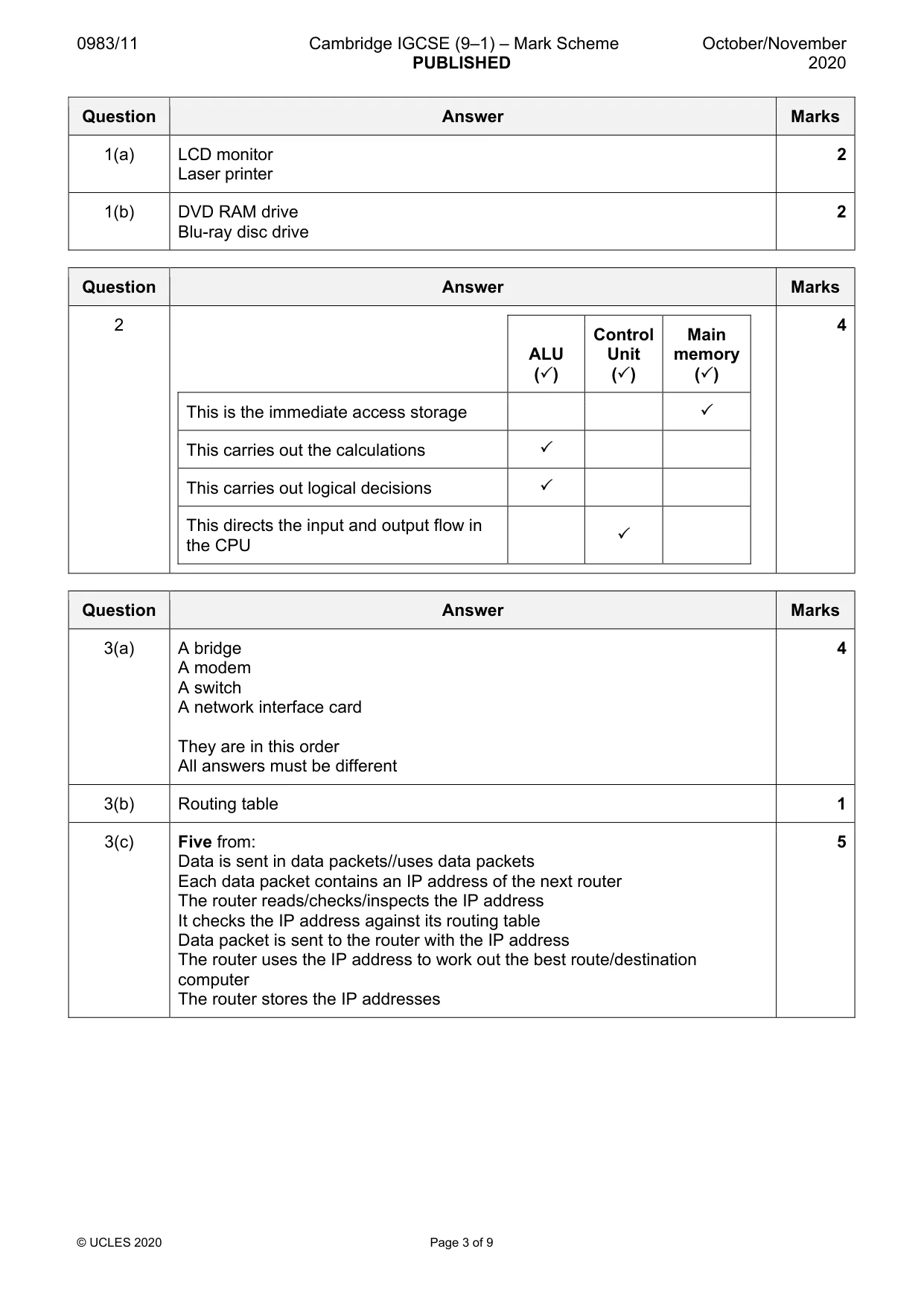
0983/11 Cambridge IGCSE (9–1) – Mark Scheme PUBLISHED October/November 2020 © UCLES 2020 Page 3 of 9 Question Answer Marks 1(a) LCD monitor Laser printer 2 1(b) DVD RAM drive Blu-ray disc drive 2 Question Answer Marks 2 ALU () Control Unit () Main memory () This is the immediate access storage This carries out the calculations This carries out logical decisions This directs the input and output flow in the CPU 4 Question Answer Marks 3(a) A bridge A modem A switch A network interface card They are in this order All answers must be different 4 3(b) Routing table 1 3(c) Five from: Data is sent in data packets//uses data packets Each data packet contains an IP address of the next router The router reads/checks/inspects the IP address It checks the IP address against its routing table Data packet is sent to the router with the IP address The router uses the IP address to work out the best route/destination computer The router stores the IP addresses 5
Mark scheme, page 4
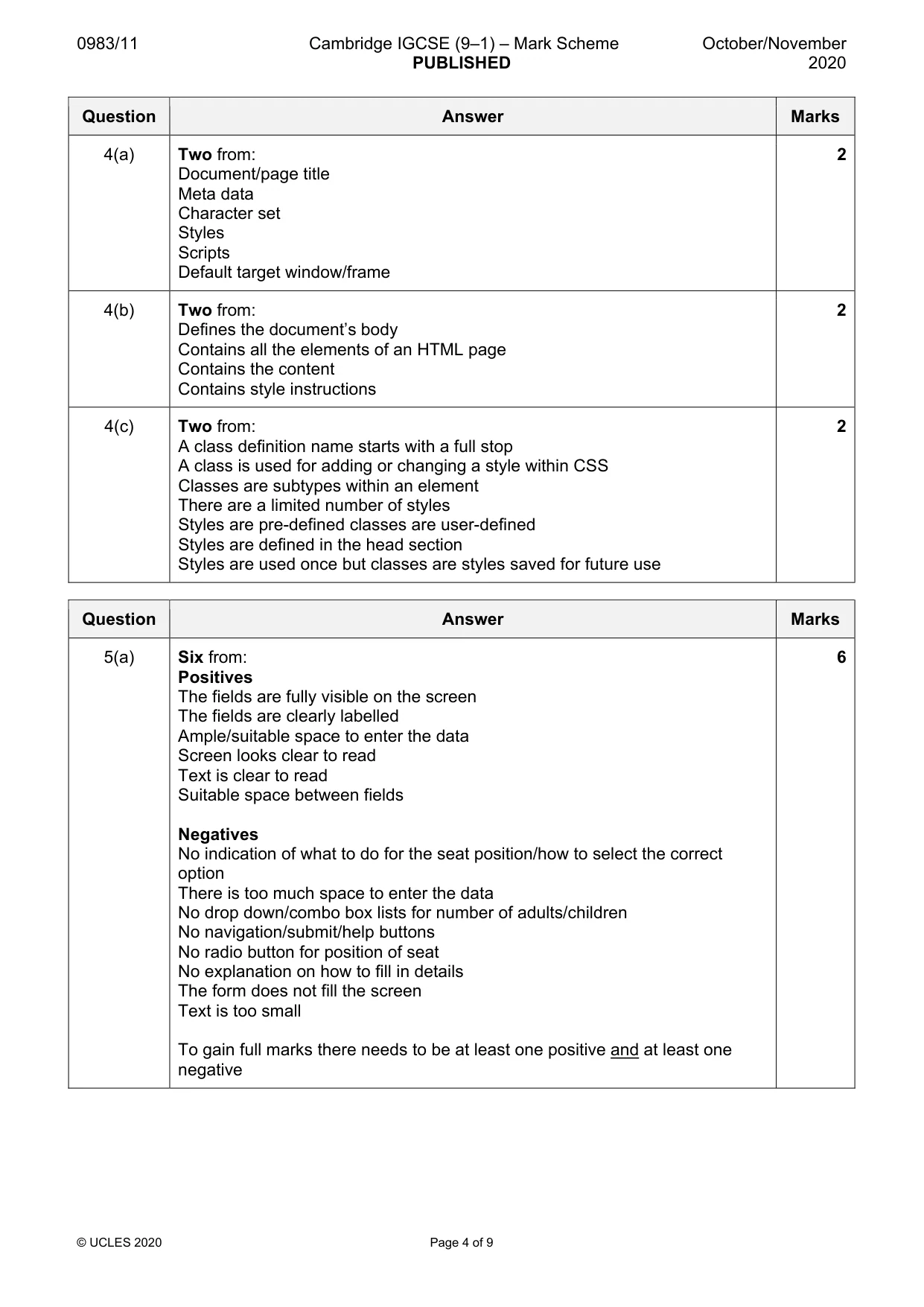
0983/11 Cambridge IGCSE (9–1) – Mark Scheme PUBLISHED October/November 2020 © UCLES 2020 Page 4 of 9 Question Answer Marks 4(a) Two from: Document/page title Meta data Character set Styles Scripts Default target window/frame 2 4(b) Two from: Defines the document’s body Contains all the elements of an HTML page Contains the content Contains style instructions 2 4(c) Two from: A class definition name starts with a full stop A class is used for adding or changing a style within CSS Classes are subtypes within an element There are a limited number of styles Styles are pre-defined classes are user-defined Styles are defined in the head section Styles are used once but classes are styles saved for future use 2 Question Answer Marks 5(a) Six from: Positives The fields are fully visible on the screen The fields are clearly labelled Ample/suitable space to enter the data Screen looks clear to read Text is clear to read Suitable space between fields Negatives No indication of what to do for the seat position/how to select the correct option There is too much space to enter the data No drop down/combo box lists for number of adults/children No navigation/submit/help buttons No radio button for position of seat No explanation on how to fill in details The form does not fill the screen Text is too small To gain full marks there needs to be at least one positive and at least one negative 6
Mark scheme, page 5
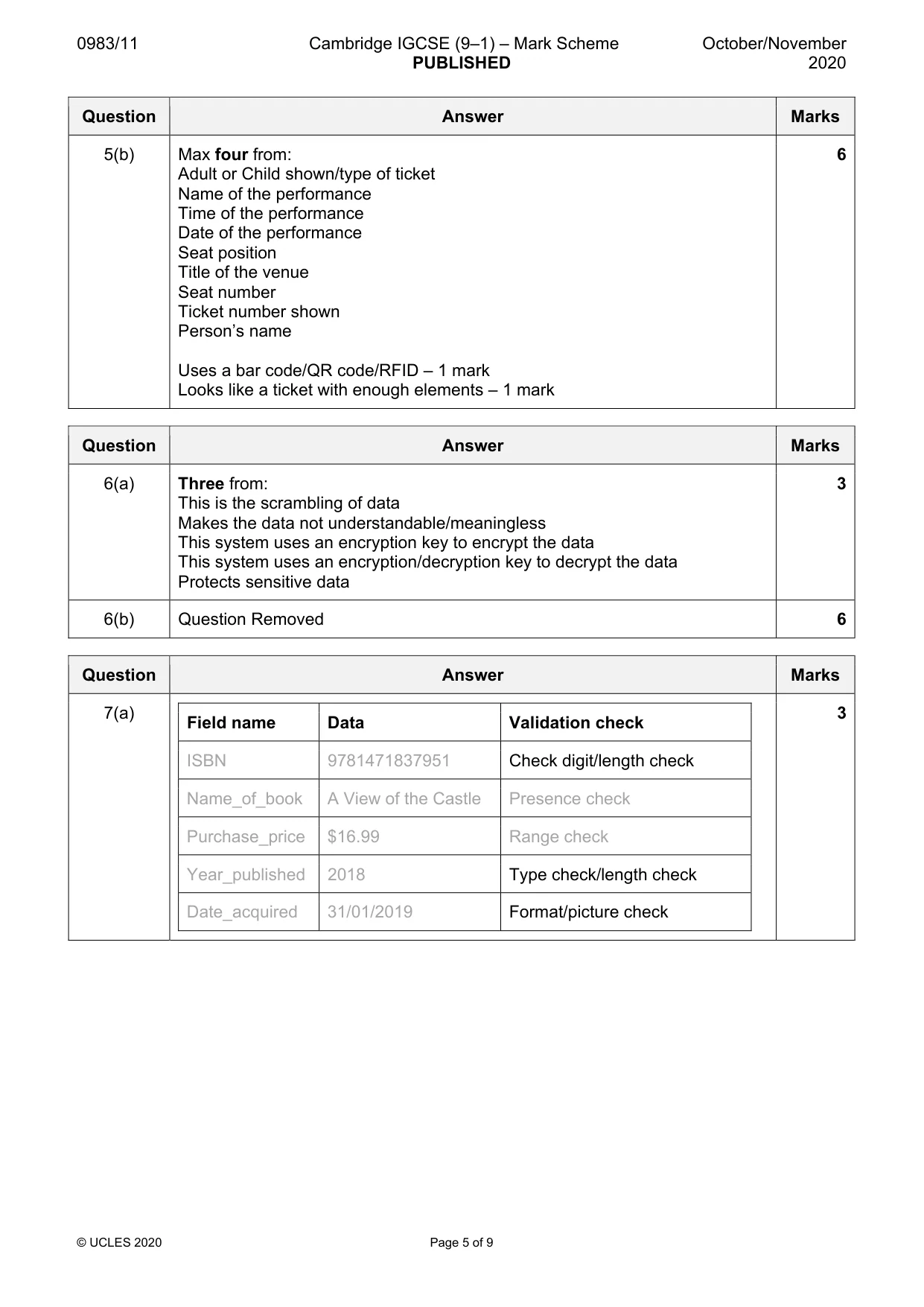
0983/11 Cambridge IGCSE (9–1) – Mark Scheme PUBLISHED October/November 2020 © UCLES 2020 Page 5 of 9 Question Answer Marks 5(b) Max four from: Adult or Child shown/type of ticket Name of the performance Time of the performance Date of the performance Seat position Title of the venue Seat number Ticket number shown Person’s name Uses a bar code/QR code/RFID – 1 mark Looks like a ticket with enough elements – 1 mark 6 Question Answer Marks 6(a) Three from: This is the scrambling of data Makes the data not understandable/meaningless This system uses an encryption key to encrypt the data This system uses an encryption/decryption key to decrypt the data Protects sensitive data 3 6(b) Question Removed 6 Question Answer Marks 7(a) Field name Data Validation check ISBN 9781471837951 Check digit/length check Name_of_book A View of the Castle Presence check Purchase_price $16.99 Range check Year_published 2018 Type check/length check Date_acquired 31/01/2019 Format/picture check 3
Mark scheme, page 6
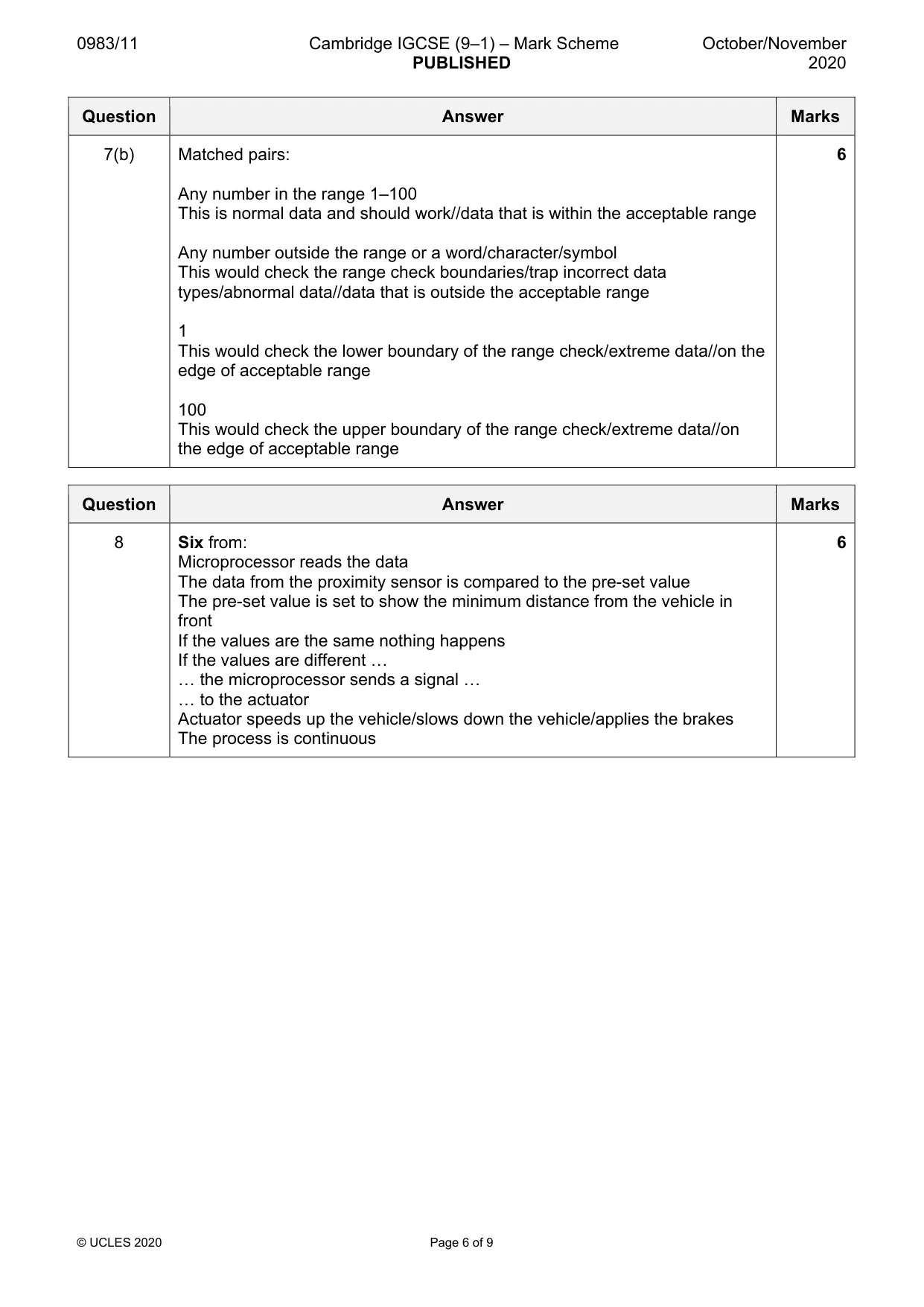
0983/11 Cambridge IGCSE (9–1) – Mark Scheme PUBLISHED October/November 2020 © UCLES 2020 Page 6 of 9 Question Answer Marks 7(b) Matched pairs: Any number in the range 1–100 This is normal data and should work//data that is within the acceptable range Any number outside the range or a word/character/symbol This would check the range check boundaries/trap incorrect data types/abnormal data//data that is outside the acceptable range 1 This would check the lower boundary of the range check/extreme data//on the edge of acceptable range 100 This would check the upper boundary of the range check/extreme data//on the edge of acceptable range 6 Question Answer Marks 8 Six from: Microprocessor reads the data The data from the proximity sensor is compared to the pre-set value The pre-set value is set to show the minimum distance from the vehicle in front If the values are the same nothing happens If the values are different … … the microprocessor sends a signal … … to the actuator Actuator speeds up the vehicle/slows down the vehicle/applies the brakes The process is continuous 6
Mark scheme, page 7
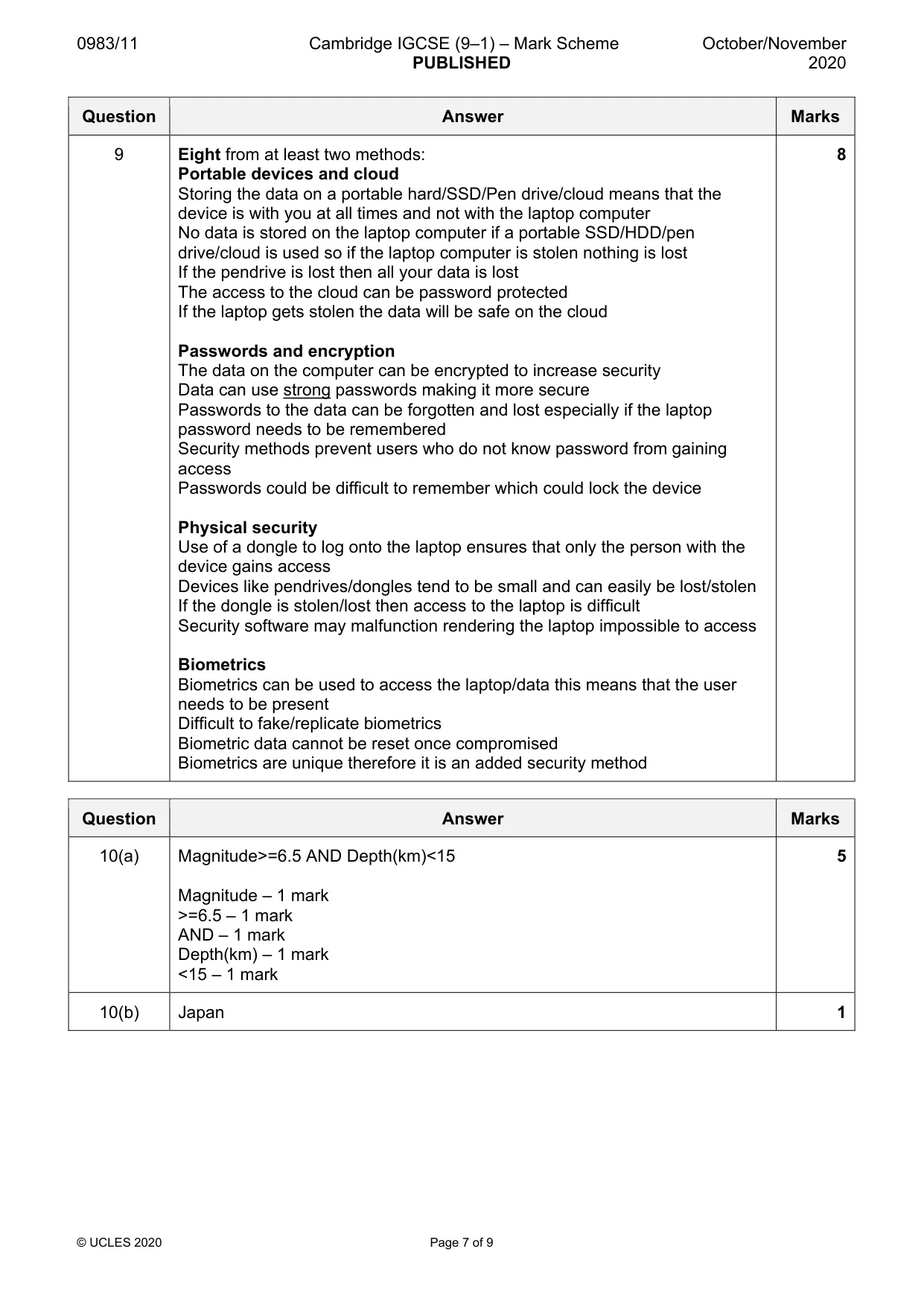
0983/11 Cambridge IGCSE (9–1) – Mark Scheme PUBLISHED October/November 2020 © UCLES 2020 Page 7 of 9 Question Answer Marks 9 Eight from at least two methods: Portable devices and cloud Storing the data on a portable hard/SSD/Pen drive/cloud means that the device is with you at all times and not with the laptop computer No data is stored on the laptop computer if a portable SSD/HDD/pen drive/cloud is used so if the laptop computer is stolen nothing is lost If the pendrive is lost then all your data is lost The access to the cloud can be password protected If the laptop gets stolen the data will be safe on the cloud Passwords and encryption The data on the computer can be encrypted to increase security Data can use strong passwords making it more secure Passwords to the data can be forgotten and lost especially if the laptop password needs to be remembered Security methods prevent users who do not know password from gaining access Passwords could be difficult to remember which could lock the device Physical security Use of a dongle to log onto the laptop ensures that only the person with the device gains access Devices like pendrives/dongles tend to be small and can easily be lost/stolen If the dongle is stolen/lost then access to the laptop is difficult Security software may malfunction rendering the laptop impossible to access Biometrics Biometrics can be used to access the laptop/data this means that the user needs to be present Difficult to fake/replicate biometrics Biometric data cannot be reset once compromised Biometrics are unique therefore it is an added security method 8 Question Answer Marks 10(a) Magnitude>=6.5 AND Depth(km)<15 Magnitude – 1 mark >=6.5 – 1 mark AND – 1 mark Depth(km) – 1 mark <15 – 1 mark 5 10(b) Japan 1
Mark scheme, page 8
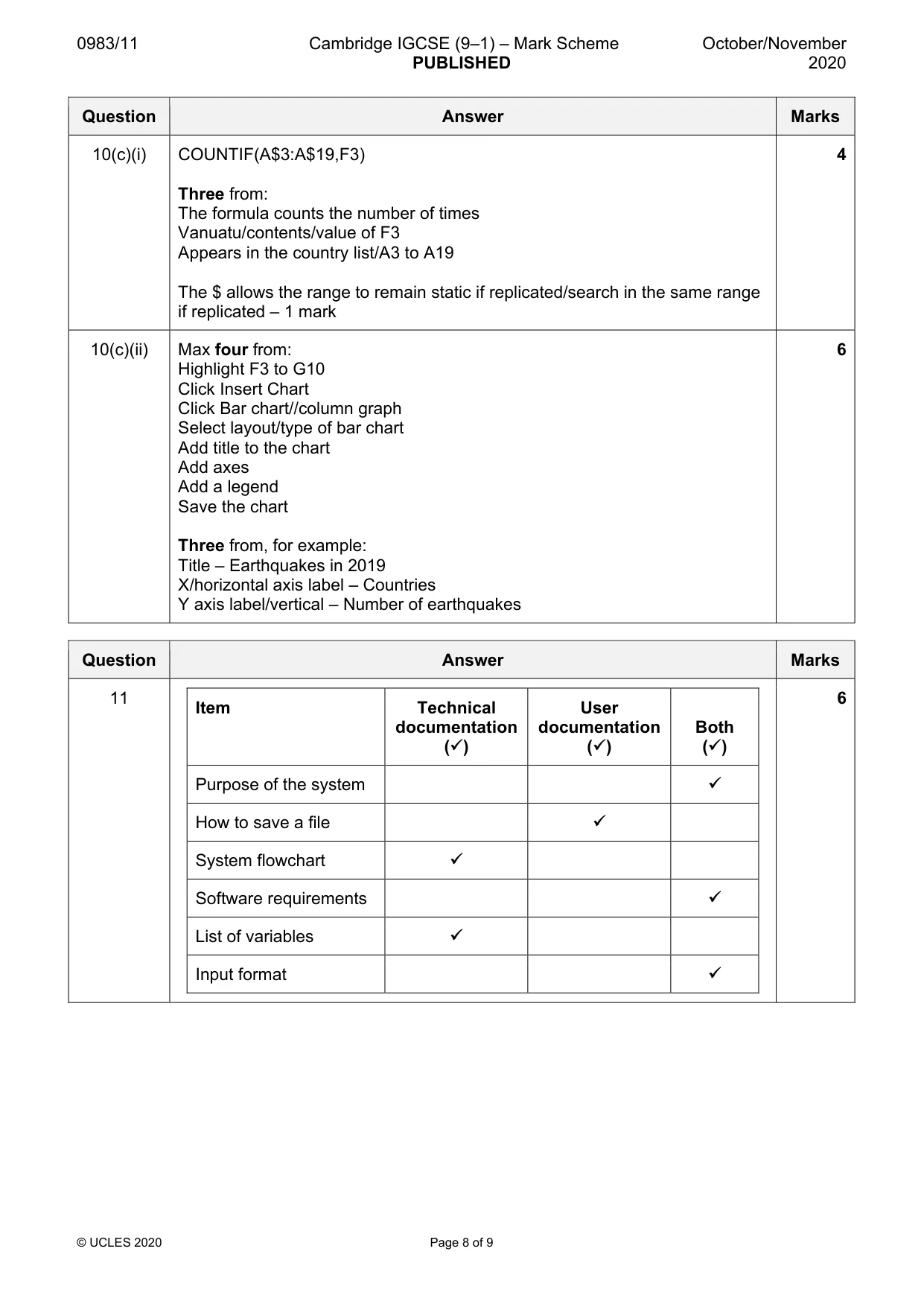
0983/11 Cambridge IGCSE (9–1) – Mark Scheme PUBLISHED October/November 2020 © UCLES 2020 Page 8 of 9 Question Answer Marks 10(c)(i) COUNTIF(A$3:A$19,F3) Three from: The formula counts the number of times Vanuatu/contents/value of F3 Appears in the country list/A3 to A19 The $ allows the range to remain static if replicated/search in the same range if replicated – 1 mark 4 10(c)(ii) Max four from: Highlight F3 to G10 Click Insert Chart Click Bar chart//column graph Select layout/type of bar chart Add title to the chart Add axes Add a legend Save the chart Three from, for example: Title – Earthquakes in 2019 X/horizontal axis label – Countries Y axis label/vertical – Number of earthquakes 6 Question Answer Marks 11 Item Technical documentation () User documentation () Both () Purpose of the system How to save a file System flowchart Software requirements List of variables Input format 6
Mark scheme, page 9
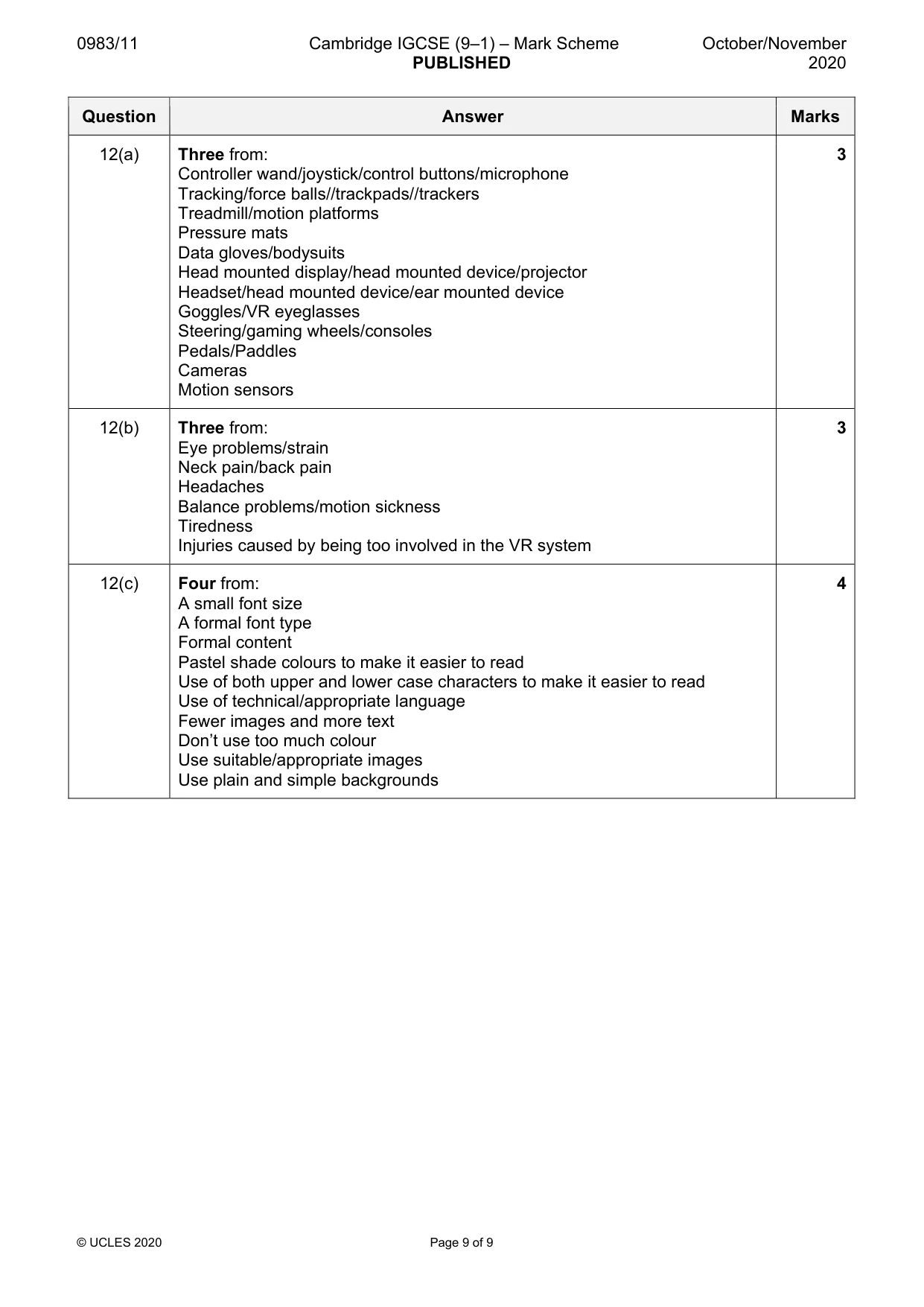
0983/11 Cambridge IGCSE (9–1) – Mark Scheme PUBLISHED October/November 2020 © UCLES 2020 Page 9 of 9 Question Answer Marks 12(a) Three from: Controller wand/joystick/control buttons/microphone Tracking/force balls//trackpads//trackers Treadmill/motion platforms Pressure mats Data gloves/bodysuits Head mounted display/head mounted device/projector Headset/head mounted device/ear mounted device Goggles/VR eyeglasses Steering/gaming wheels/consoles Pedals/Paddles Cameras Motion sensors 3 12(b) Three from: Eye problems/strain Neck pain/back pain Headaches Balance problems/motion sickness Tiredness Injuries caused by being too involved in the VR system 3 12(c) Four from: A small font size A formal font type Formal content Pastel shade colours to make it easier to read Use of both upper and lower case characters to make it easier to read Use of technical/appropriate language Fewer images and more text Don’t use too much colour Use suitable/appropriate images Use plain and simple backgrounds 4
What you needed in this session
Cambridge’s own grade thresholds for 2020 Oct/Nov, Paper 1 · Variant 1. A higher threshold means an easier paper — the bar moves with how the cohort did.