Cambridge IGCSE Information and Communication Technology (9-1) 0983 — 2022 May/June Paper 3 · Variant 2
0983/32/M/J/22 · 80 marks · ≈90 min
The question paper and its mark scheme, free to read here and free to download. This is Cambridge’s own paper, exactly as it was sat.
Question paper8 pages
Mark scheme19 pages
Answers below. Sit the paper first if you are practising.
Paper as text
Question paper, page 1
This document has 8 pages. Any blank pages are indicated. [Turn over Cambridge IGCSE™(9–1) * 8 9 7 9 5 1 7 4 8 9 * INFORMATION AND COMMUNICATION TECHNOLOGY 0983/32 Paper 3 Data Analysis and Website Authoring May/June 2022 2 hours 30 minutes You will need: Candidate source files (listed on page 2) INSTRUCTIONS ● Carry out all instructions in each step. ● Enter your name, centre number and candidate number on every printout before it is sent to the printer. ● Printouts with handwritten candidate details will not be marked. ● At the end of the examination, put all your printouts into the Assessment Record Folder. ● If you have produced rough copies of printouts, put a cross through each one to indicate that it is not the copy to be marked. ● You must not have access to either the internet or any email system during this examination. INFORMATION ● The total mark for this paper is 80. ● The number of marks for each question or part question is shown in brackets [ ]. DC (LK) 310890 © UCLES 2022
Question paper, page 2
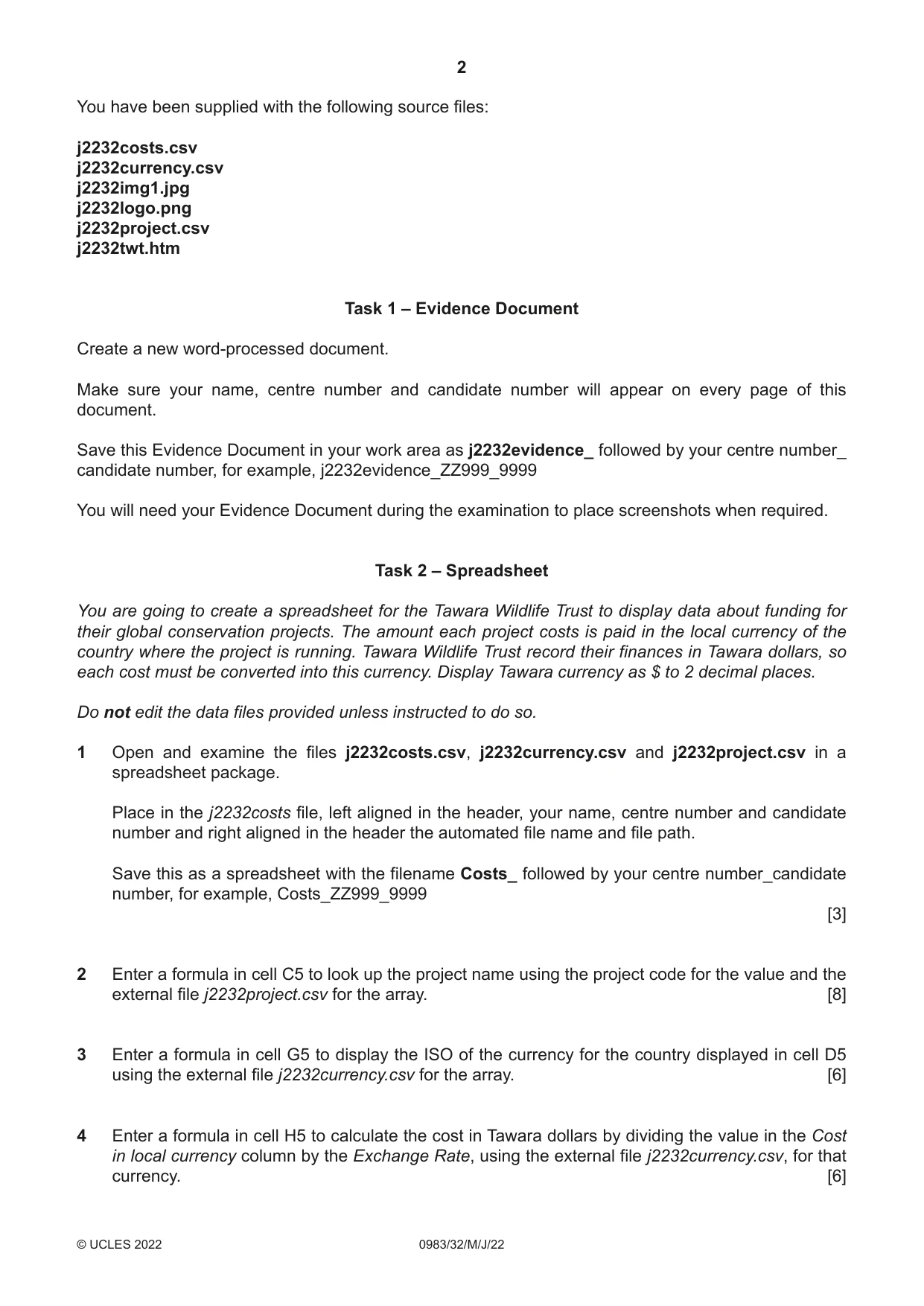
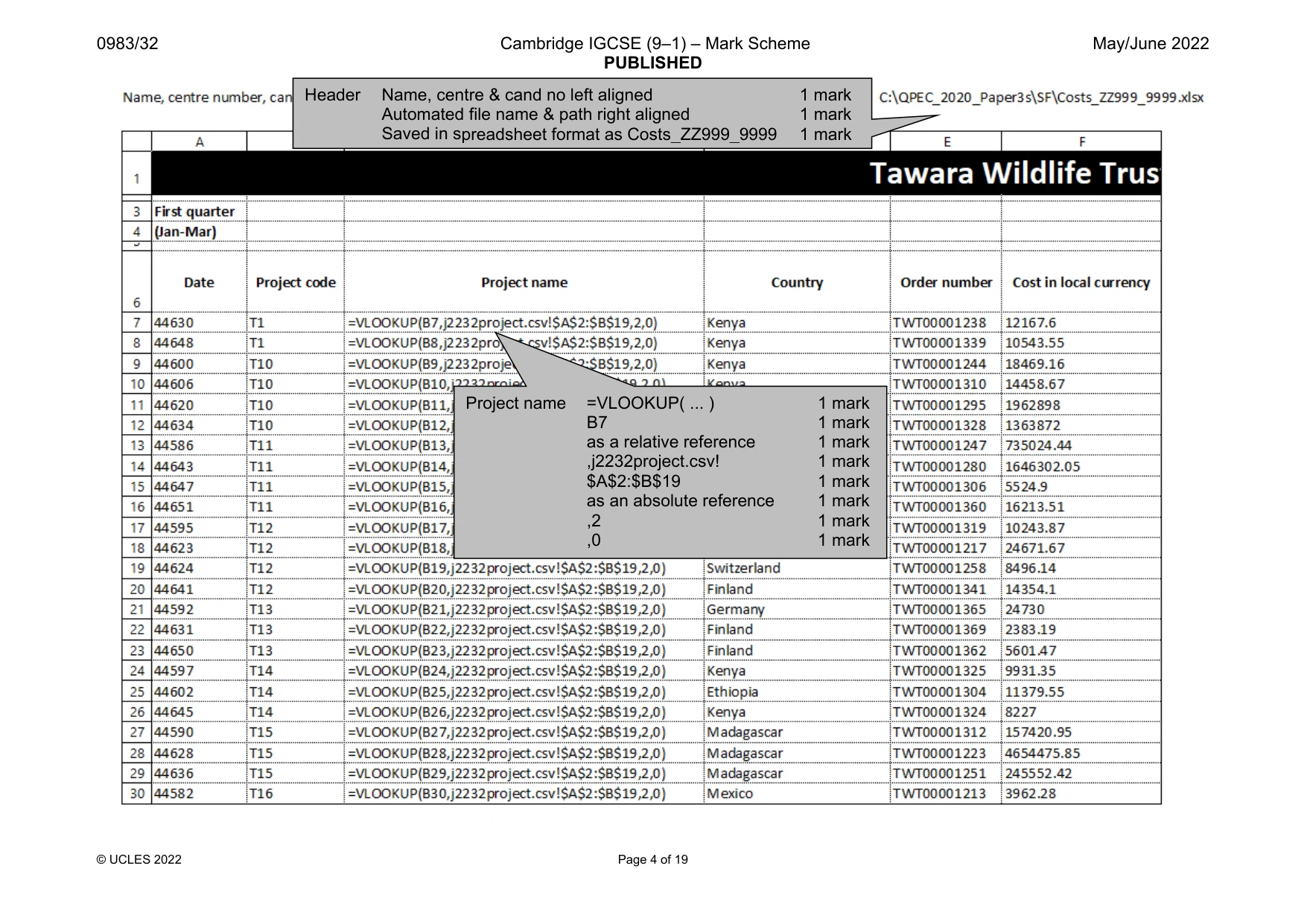
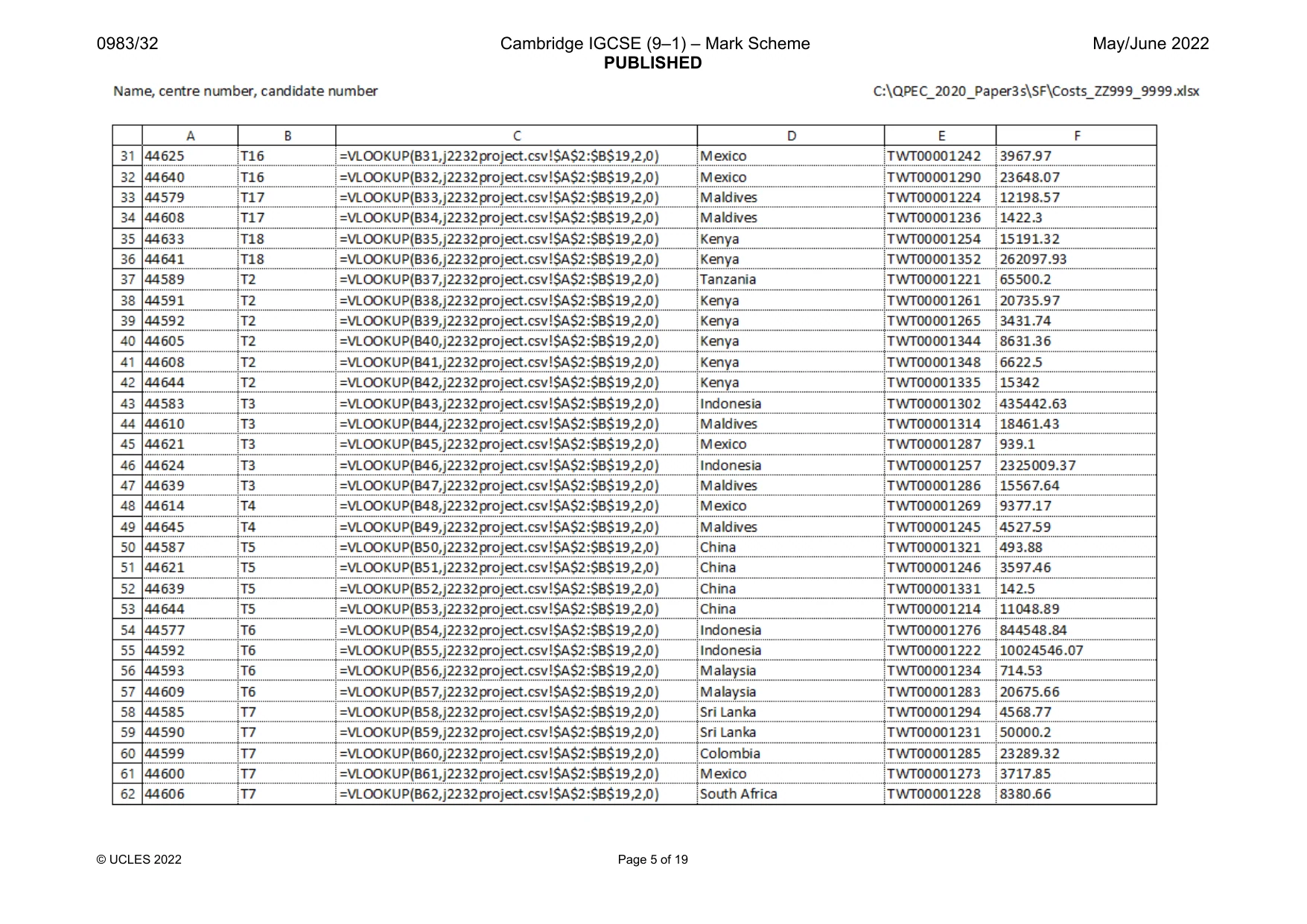
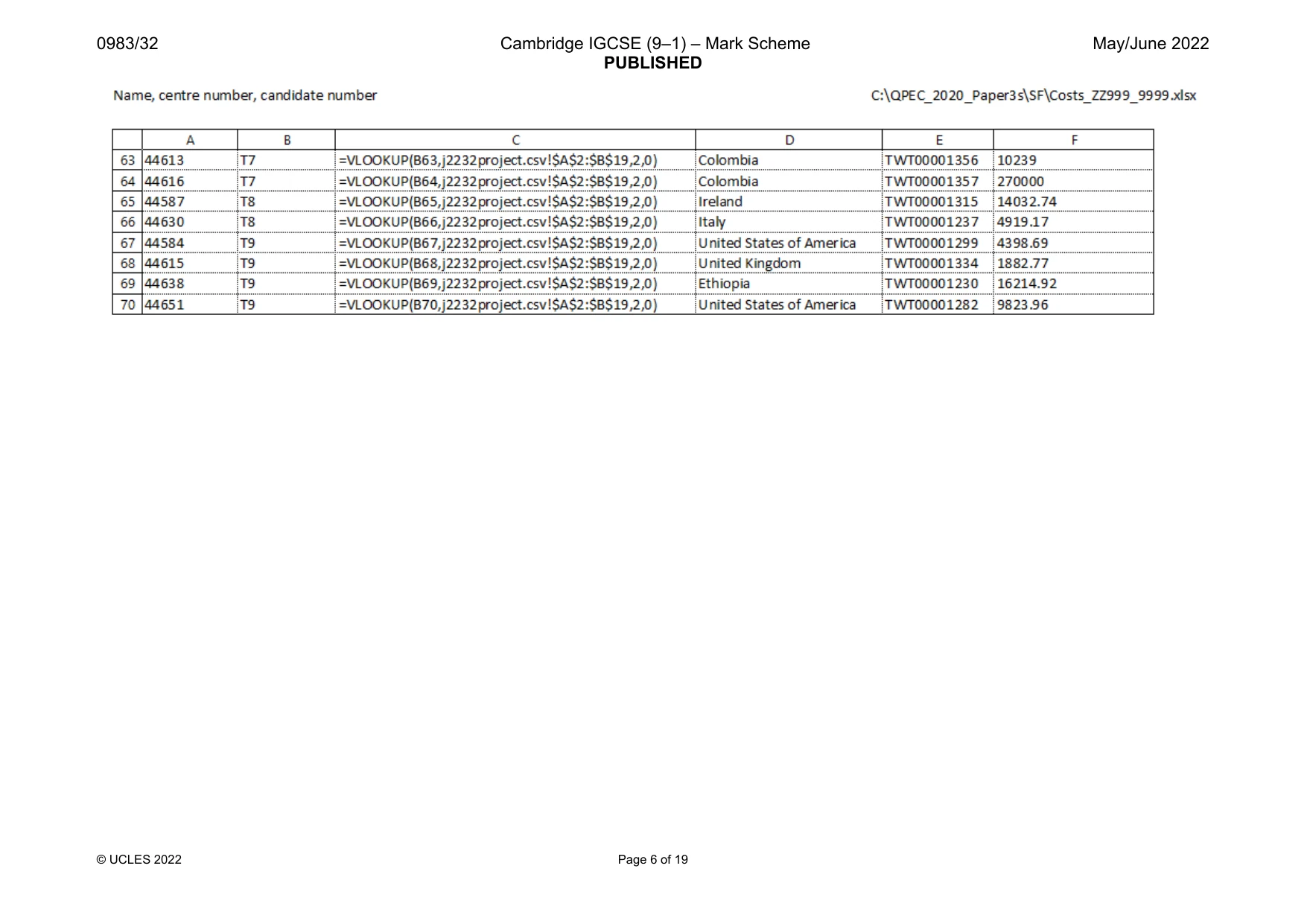
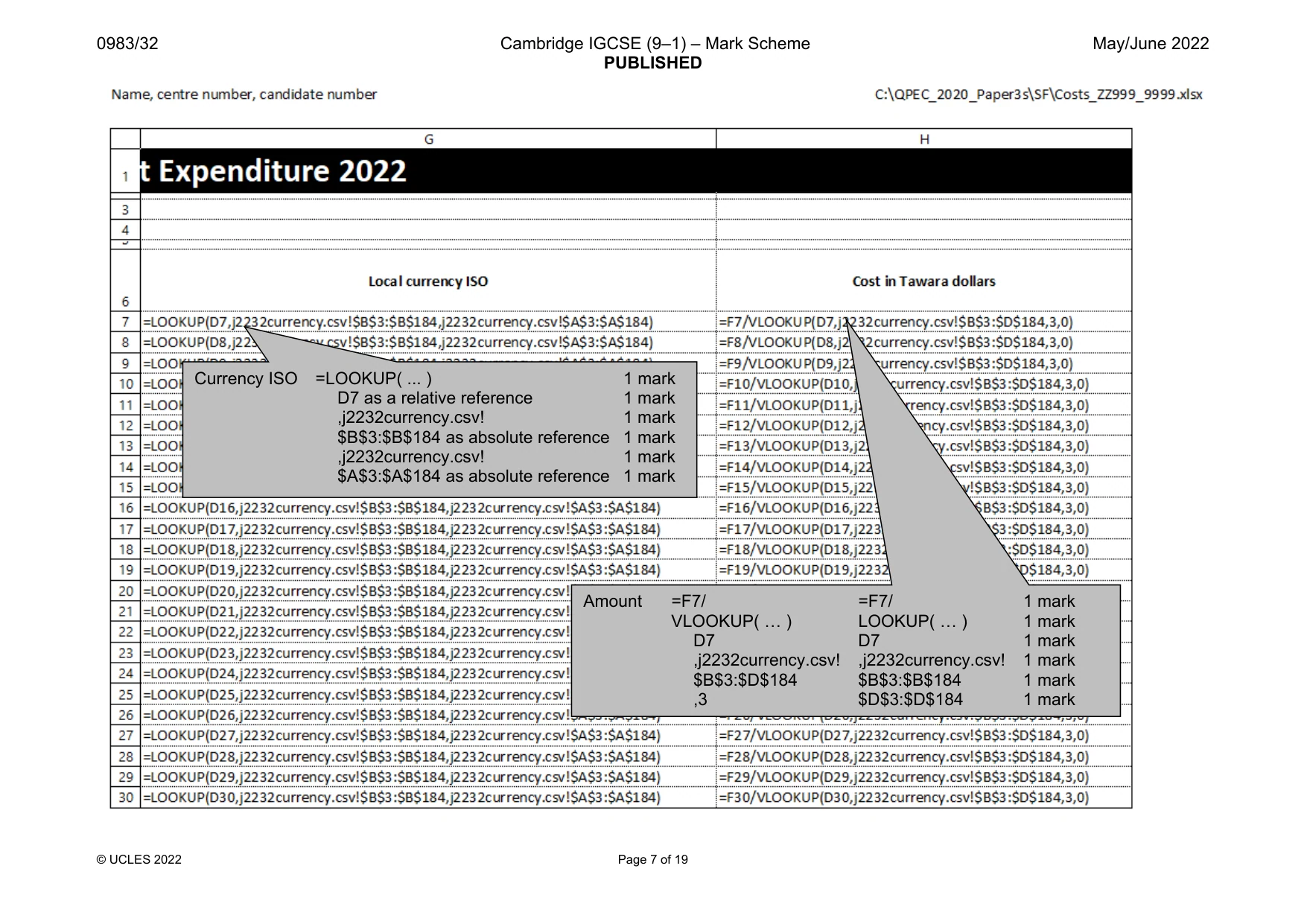
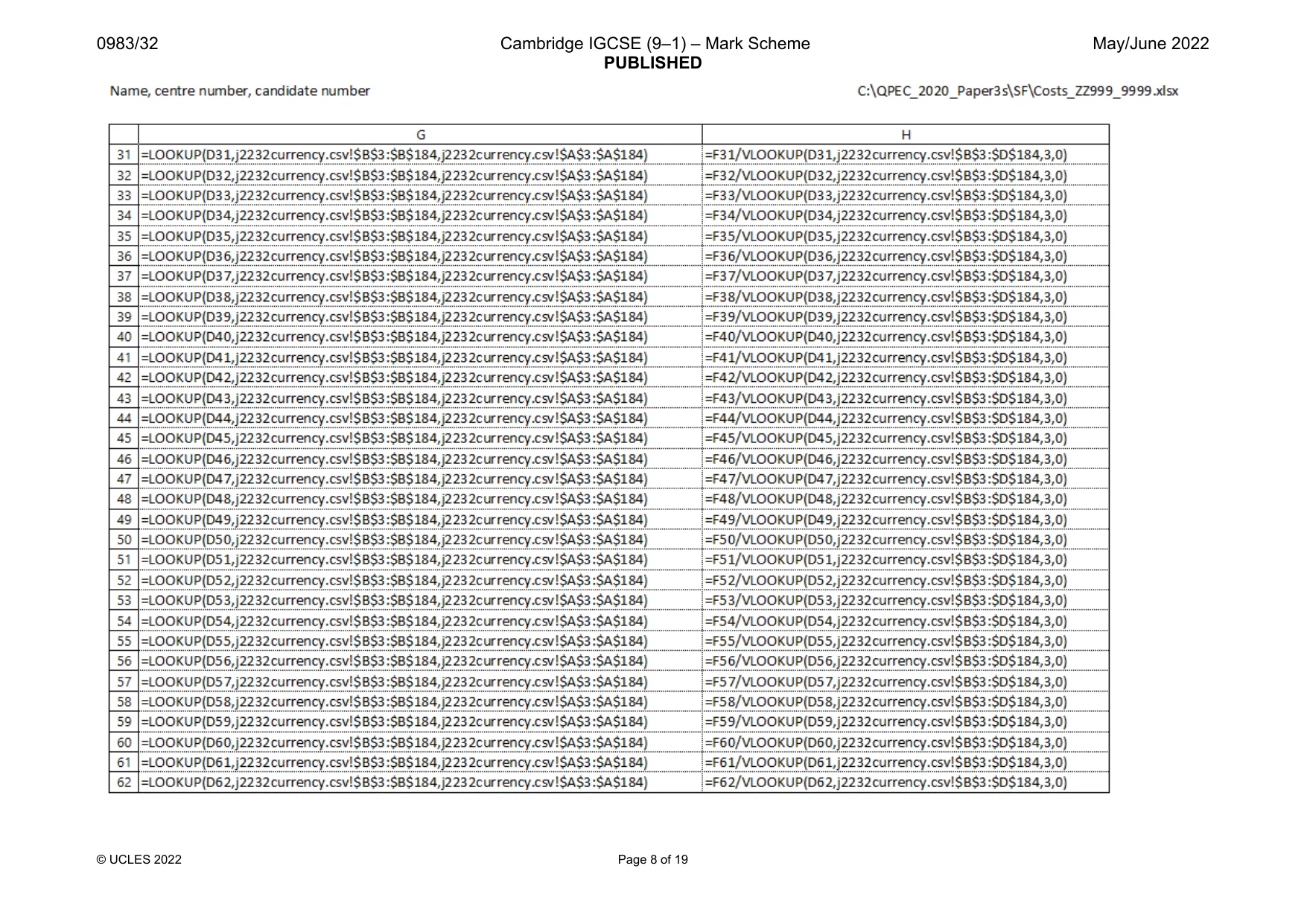
2 0983/32/M/J/22 © UCLES 2022 You have been supplied with the following source files: j2232costs.csv j2232currency.csv j2232img1.jpg j2232logo.png j2232project.csv j2232twt.htm Task 1 – Evidence Document Create a new word-processed document. Make sure your name, centre number and candidate number will appear on every page of this document. Save this Evidence Document in your work area as j2232evidence_ followed by your centre number_ candidate number, for example, j2232evidence_ZZ999_9999 You will need your Evidence Document during the examination to place screenshots when required. Task 2 – Spreadsheet You are going to create a spreadsheet for the Tawara Wildlife Trust to display data about funding for their global conservation projects. The amount each project costs is paid in the local currency of the country where the project is running. Tawara Wildlife Trust record their finances in Tawara dollars, so each cost must be converted into this currency. Display Tawara currency as $ to 2 decimal places. Do not edit the data files provided unless instructed to do so. 1 Open and examine the files j2232costs.csv, j2232currency.csv and j2232project.csv in a spreadsheet package. Place in the j2232costs file, left aligned in the header, your name, centre number and candidate number and right aligned in the header the automated file name and file path. Save this as a spreadsheet with the filename Costs_ followed by your centre number_candidate number, for example, Costs_ZZ999_9999 [3] 2 Enter a formula in cell C5 to look up the project name using the project code for the value and the external file j2232project.csv for the array. [8] 3 Enter a formula in cell G5 to display the ISO of the currency for the country displayed in cell D5 using the external file j2232currency.csv for the array. [6] 4 Enter a formula in cell H5 to calculate the cost in Tawara dollars by dividing the value in the Cost in local currency column by the Exchange Rate, using the external file j2232currency.csv, for that currency. [6]
Question paper, page 3
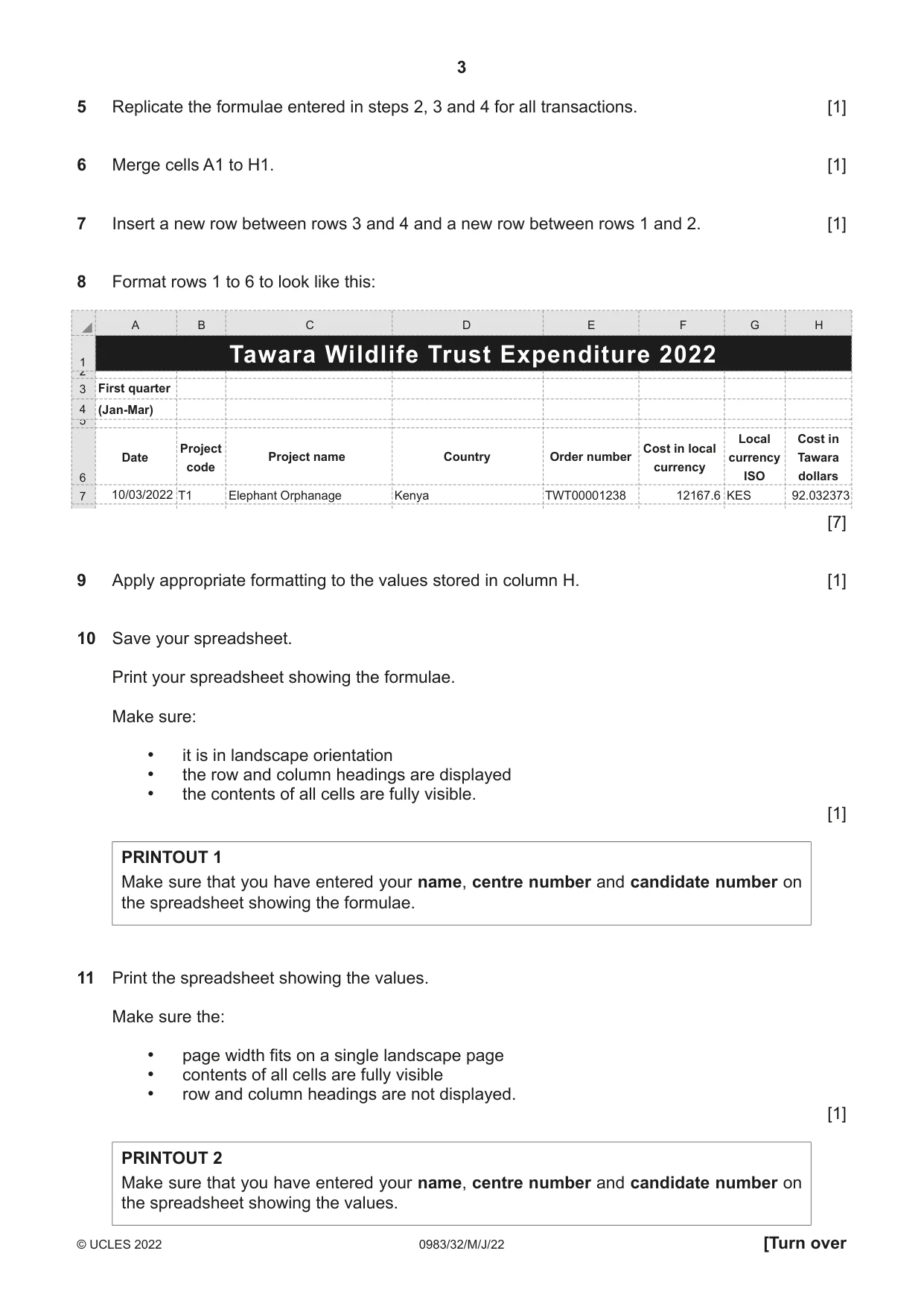
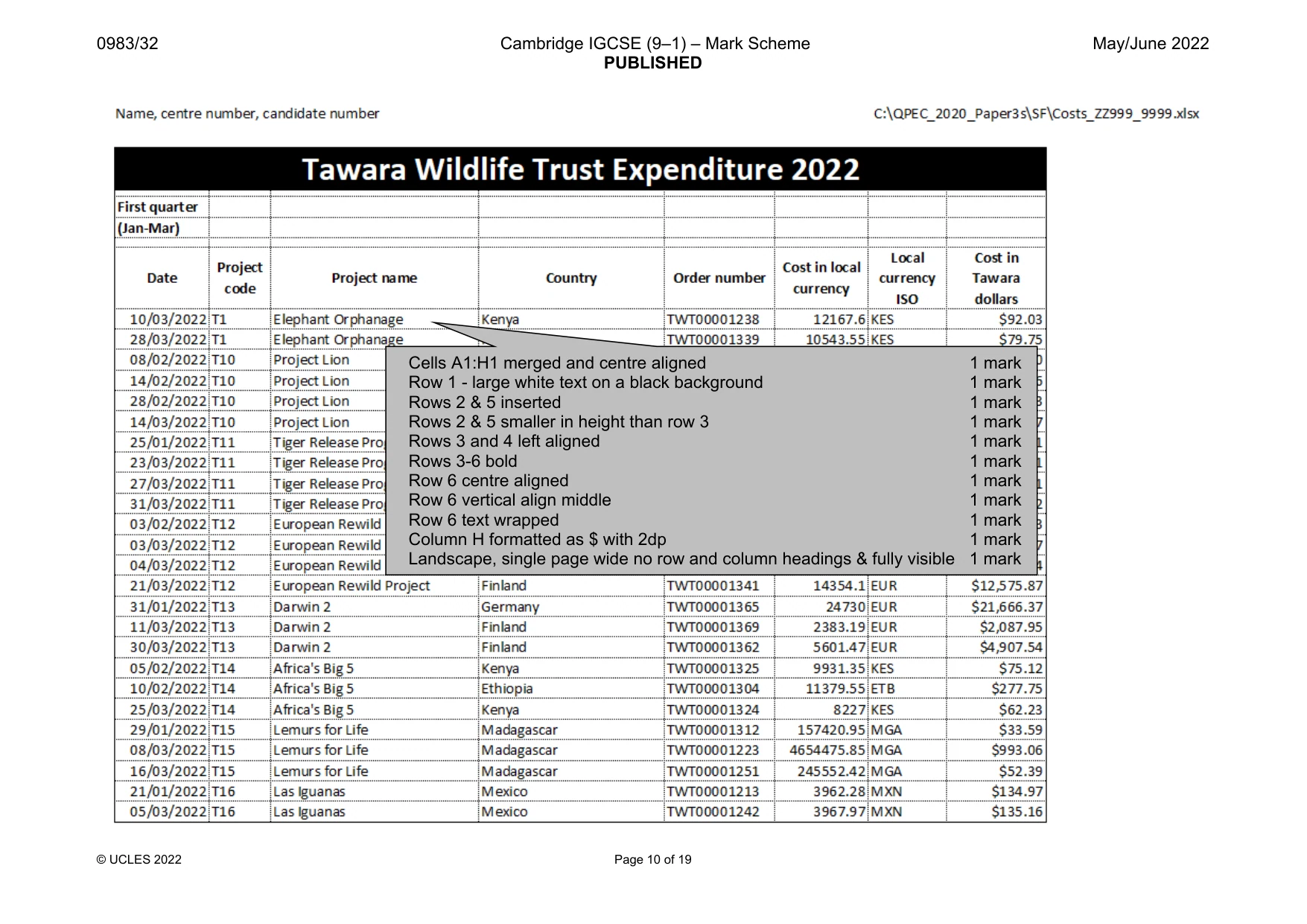
3 0983/32/M/J/22 © UCLES 2022 [Turn over 5 Replicate the formulae entered in steps 2, 3 and 4 for all transactions. [1] 6 Merge cells A1 to H1. [1] 7 Insert a new row between rows 3 and 4 and a new row between rows 1 and 2. [1] 8 Format rows 1 to 6 to look like this: A 1 3 4 6 7 B C D E F G H Tawara Wildlife Trust Expenditure 2022 First quarter (Jan-Mar) Date Project name Project code Cost in local currency Local currency ISO Cost in Tawara dollars Country Order number Kenya 12167.6 KES 92.032373 TWT00001238 Elephant Orphanage T1 10/03/2022 [7] 9 Apply appropriate formatting to the values stored in column H. [1] 10 Save your spreadsheet. Print your spreadsheet showing the formulae. Make sure: • it is in landscape orientation • the row and column headings are displayed • the contents of all cells are fully visible. [1] PRINTOUT 1 Make sure that you have entered your name, centre number and candidate number on the spreadsheet showing the formulae. 11 Print the spreadsheet showing the values. Make sure the: • page width fits on a single landscape page • contents of all cells are fully visible • row and column headings are not displayed. [1] PRINTOUT 2 Make sure that you have entered your name, centre number and candidate number on the spreadsheet showing the values.
Question paper, page 4
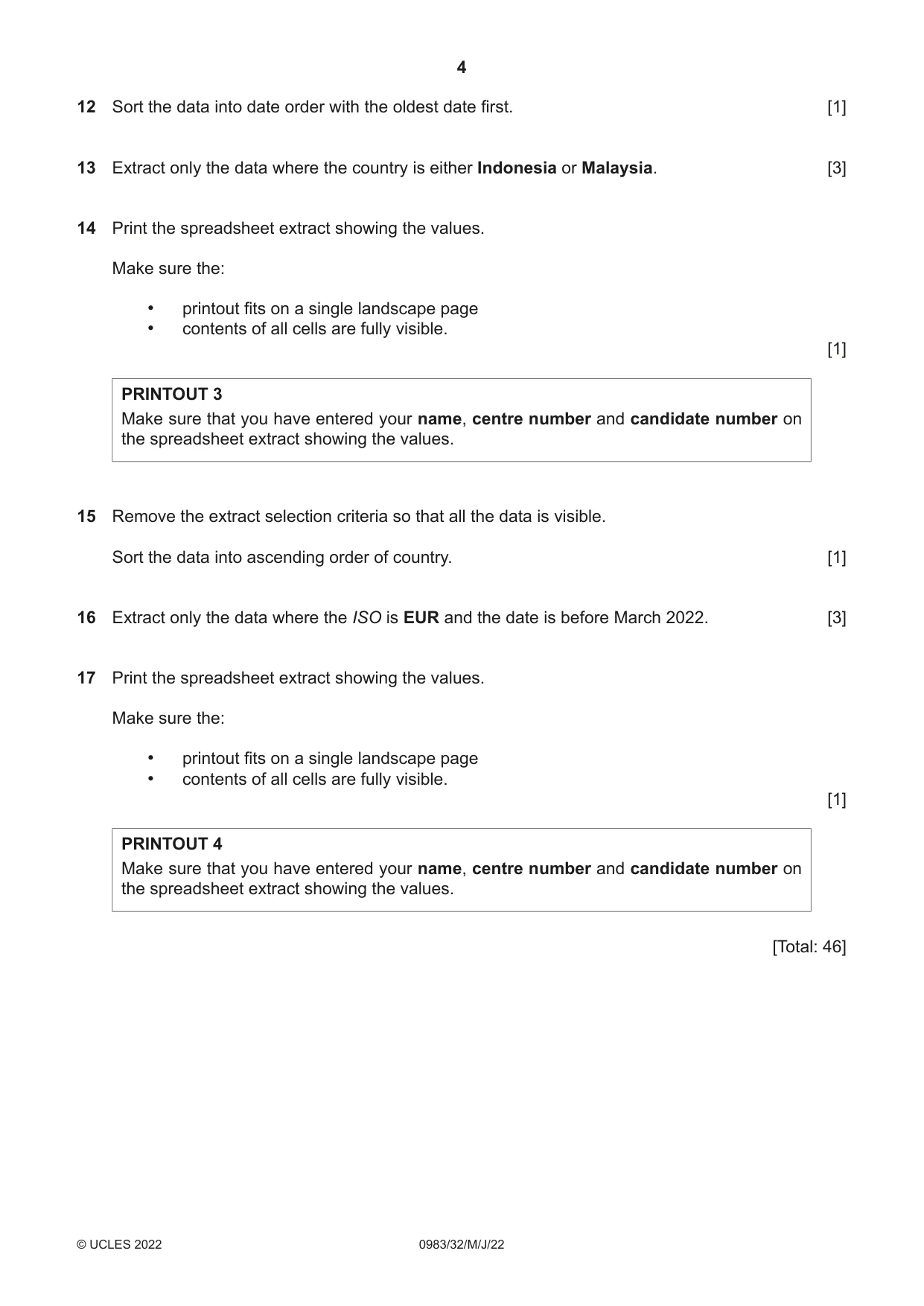
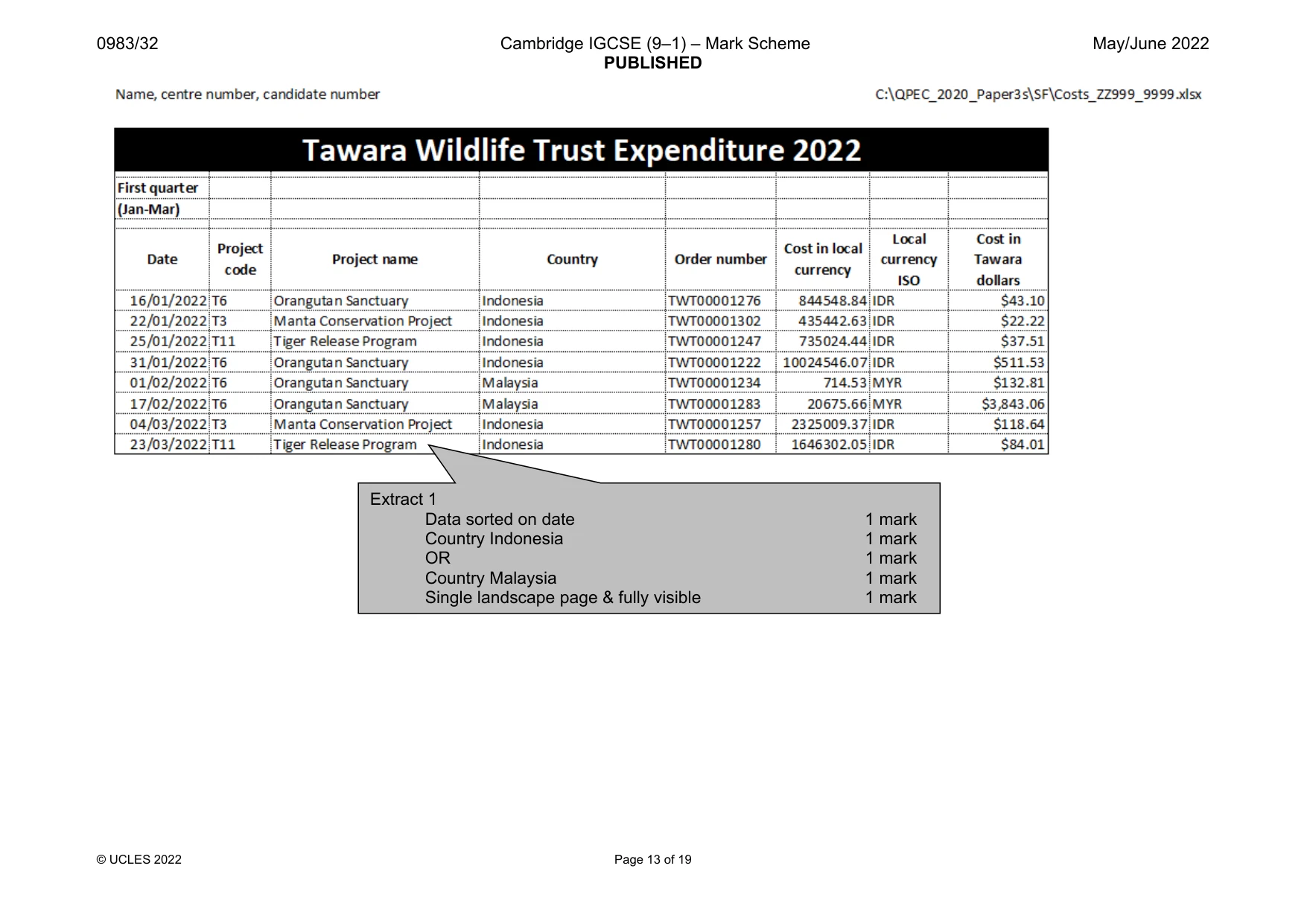
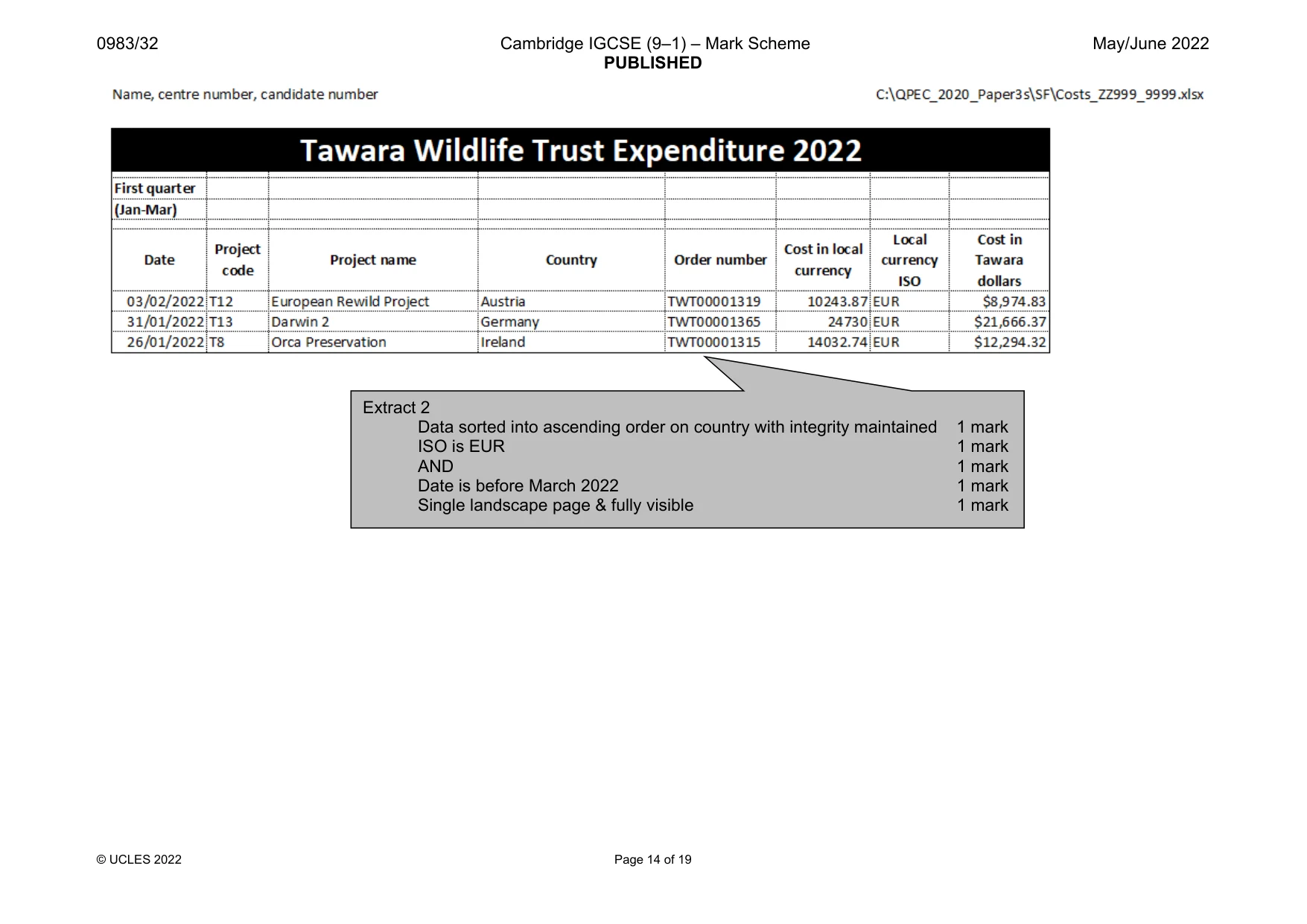
4 0983/32/M/J/22 © UCLES 2022 12 Sort the data into date order with the oldest date first. [1] 13 Extract only the data where the country is either Indonesia or Malaysia. [3] 14 Print the spreadsheet extract showing the values. Make sure the: • printout fits on a single landscape page • contents of all cells are fully visible. [1] PRINTOUT 3 Make sure that you have entered your name, centre number and candidate number on the spreadsheet extract showing the values. 15 Remove the extract selection criteria so that all the data is visible. Sort the data into ascending order of country. [1] 16 Extract only the data where the ISO is EUR and the date is before March 2022. [3] 17 Print the spreadsheet extract showing the values. Make sure the: • printout fits on a single landscape page • contents of all cells are fully visible. [1] PRINTOUT 4 Make sure that you have entered your name, centre number and candidate number on the spreadsheet extract showing the values. [Total: 46]
Question paper, page 5
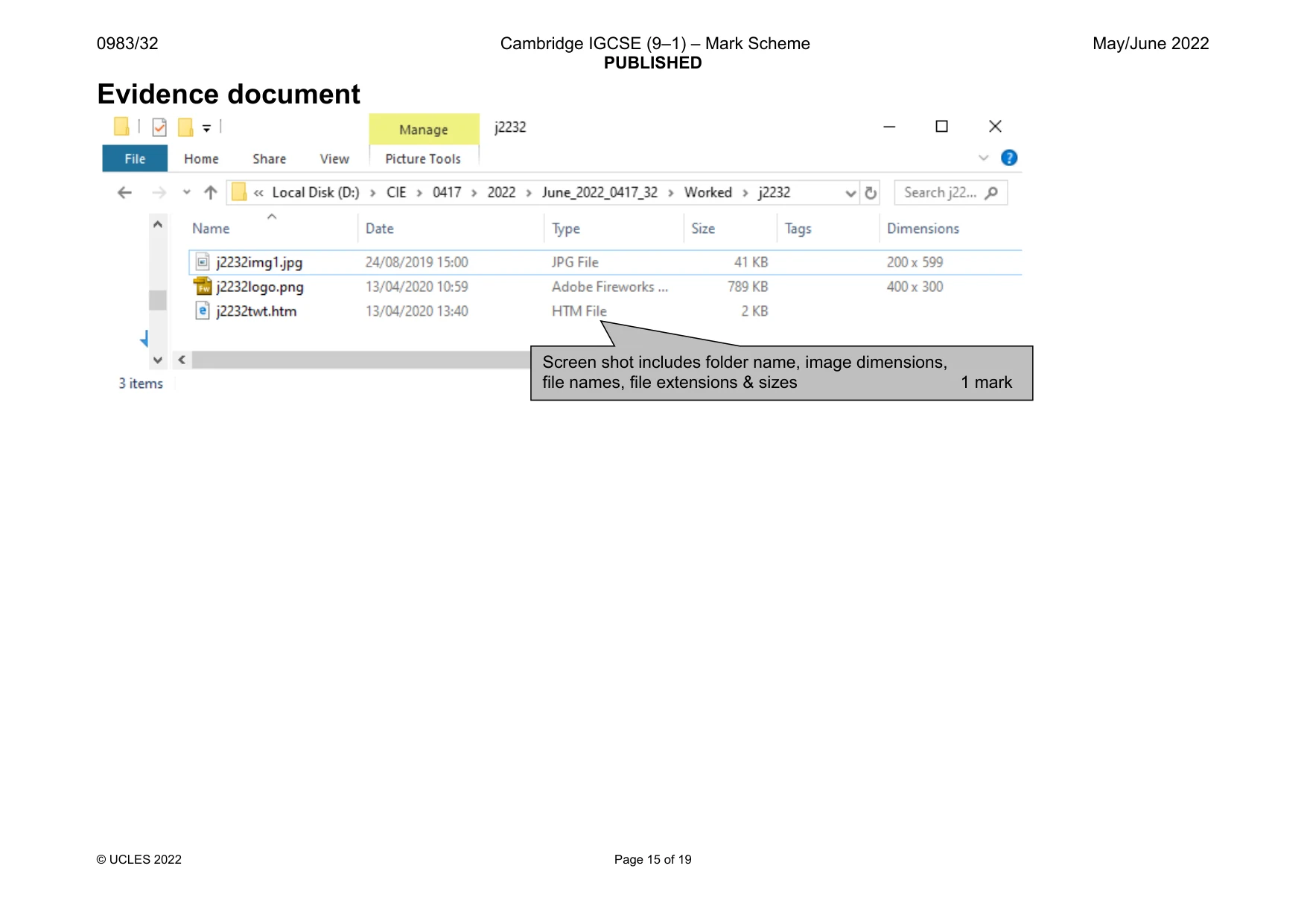
5 0983/32/M/J/22 © UCLES 2022 [Turn over Task 3 – File Management 18 Create a new folder called j2232 Locate the following files and store them in your j2232 folder. • j2232img1.jpg • j2232logo.png • j2232twt.htm Display the contents of your j2232 folder showing the folder name, all file names, file extensions, file sizes and image dimensions. Take a screenshot of this folder and place this in your Evidence Document. [1] EVIDENCE 1 A screenshot of your j2232 folder with the required information clearly visible. [Total: 1] Task 4 is on Page 6.
Question paper, page 6
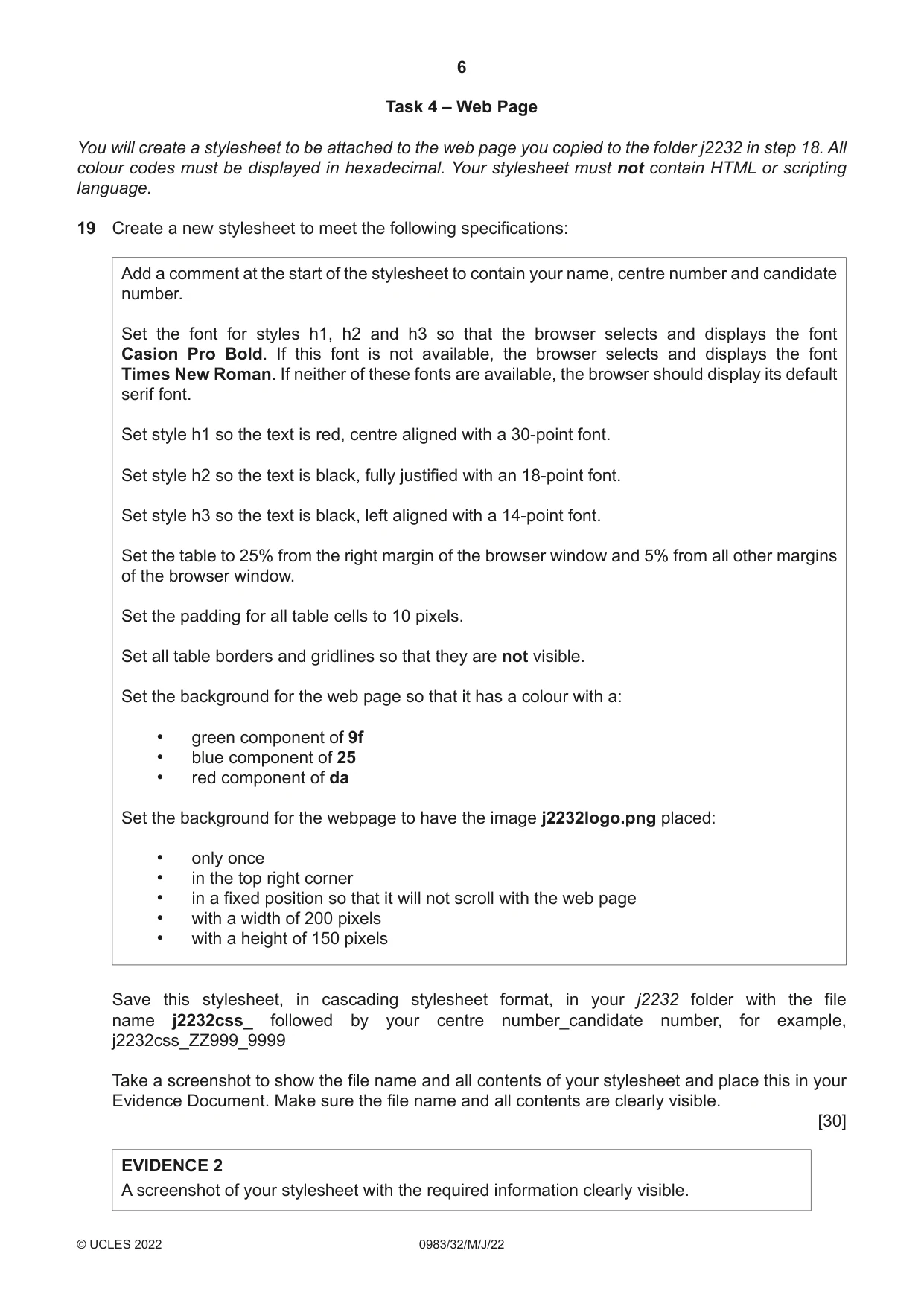
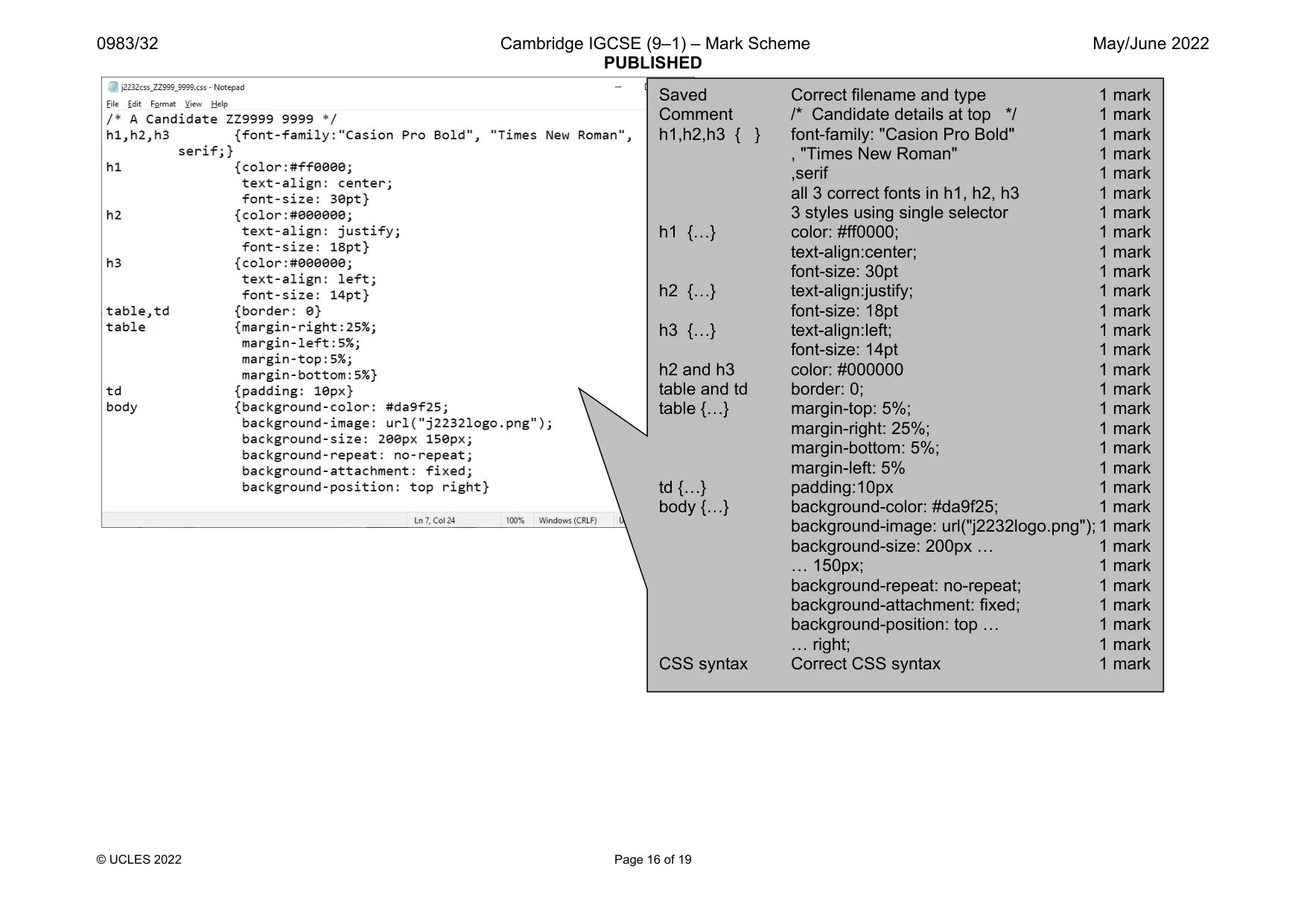
6 0983/32/M/J/22 © UCLES 2022 Task 4 – Web Page You will create a stylesheet to be attached to the web page you copied to the folder j2232 in step 18. All colour codes must be displayed in hexadecimal. Your stylesheet must not contain HTML or scripting language. 19 Create a new stylesheet to meet the following specifications: Add a comment at the start of the stylesheet to contain your name, centre number and candidate number. Set the font for styles h1, h2 and h3 so that the browser selects and displays the font Casion Pro Bold. If this font is not available, the browser selects and displays the font Times New Roman. If neither of these fonts are available, the browser should display its default serif font. Set style h1 so the text is red, centre aligned with a 30-point font. Set style h2 so the text is black, fully justified with an 18-point font. Set style h3 so the text is black, left aligned with a 14-point font. Set the table to 25% from the right margin of the browser window and 5% from all other margins of the browser window. Set the padding for all table cells to 10 pixels. Set all table borders and gridlines so that they are not visible. Set the background for the web page so that it has a colour with a: • green component of 9f • blue component of 25 • red component of da Set the background for the webpage to have the image j2232logo.png placed: • only once • in the top right corner • in a fixed position so that it will not scroll with the web page • with a width of 200 pixels • with a height of 150 pixels Save this stylesheet, in cascading stylesheet format, in your j2232 folder with the file name j2232css_ followed by your centre number_candidate number, for example, j2232css_ZZ999_9999 Take a screenshot to show the file name and all contents of your stylesheet and place this in your Evidence Document. Make sure the file name and all contents are clearly visible. [30] EVIDENCE 2 A screenshot of your stylesheet with the required information clearly visible.
Question paper, page 7
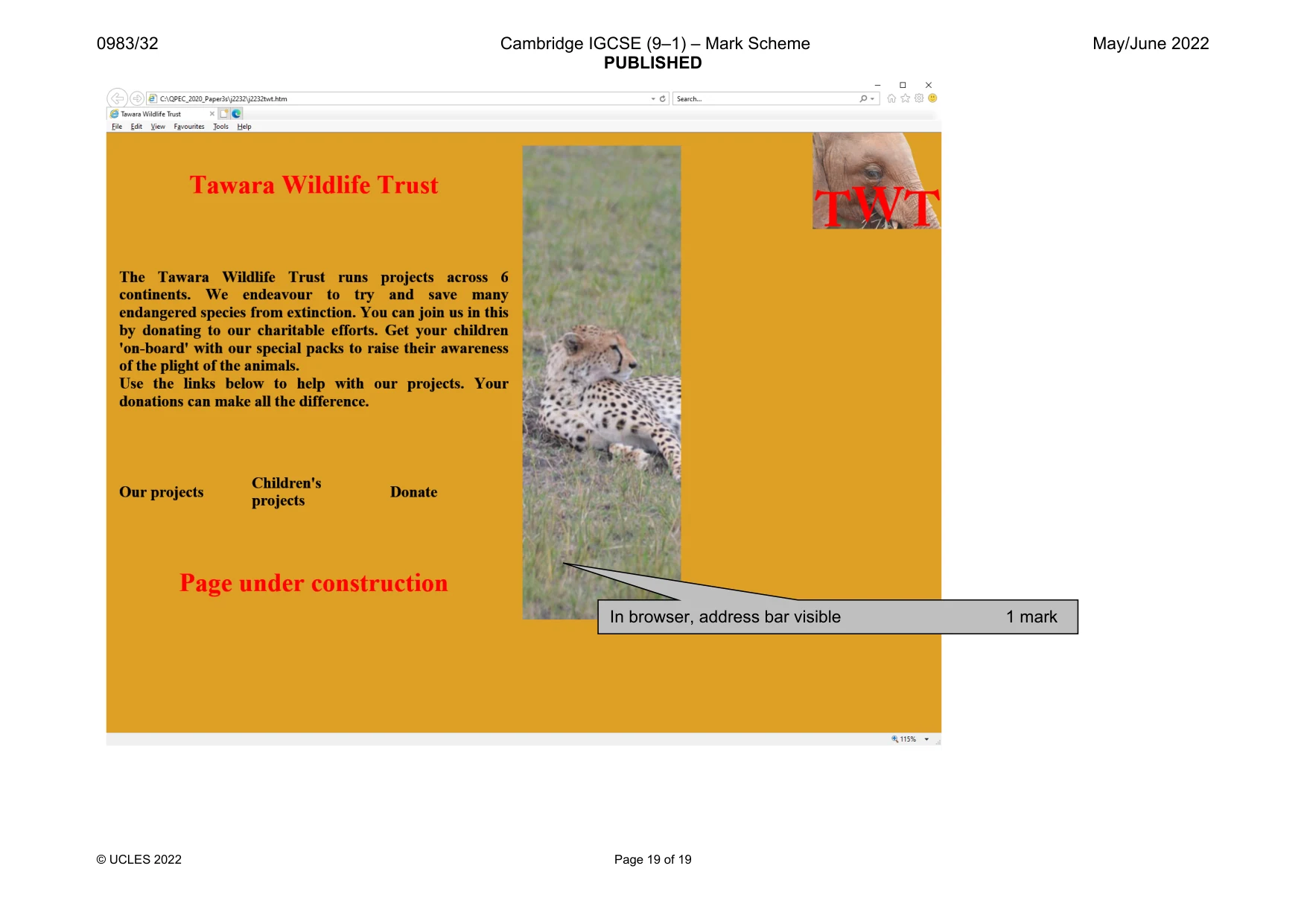
7 0983/32/M/J/22 © UCLES 2022 20 Open the webpage j2232twt.htm in an editing package. Attach the stylesheet saved in step 19 to your web page. [1] 21 Set the title of your web page to Tawara Wildlife Trust [1] 22 Save your web page. Take a copy of your HTML source and place this in your Evidence Document. EVIDENCE 3 A copy of your HTML source. Display your web page in a browser. If necessary resize it so that: • all the page can be seen • all text can be easily read • the address bar is visible. Take screenshot evidence showing your web page in the browser. Place this in your Evidence Document. [1] EVIDENCE 4 Screenshot evidence of your web page in the browser with the table contents and background elements clearly visible. [Total: 33] Task 5 – Printing the Evidence Document Save and print your Evidence Document. PRINTOUT 5 Make sure your name, centre number and candidate number appear on every page of your Evidence Document.
Question paper, page 8
8 0983/32/M/J/22 © UCLES 2022 Permission to reproduce items where third-party owned material protected by copyright is included has been sought and cleared where possible. Every reasonable effort has been made by the publisher (UCLES) to trace copyright holders, but if any items requiring clearance have unwittingly been included, the publisher will be pleased to make amends at the earliest possible opportunity. To avoid the issue of disclosure of answer-related information to candidates, all copyright acknowledgements are reproduced online in the Cambridge Assessment International Education Copyright Acknowledgements Booklet. This is produced for each series of examinations and is freely available to download at www.cambridgeinternational.org after the live examination series. Cambridge Assessment International Education is part of Cambridge Assessment. Cambridge Assessment is the brand name of the University of Cambridge Local Examinations Syndicate (UCLES), which is a department of the University of Cambridge. BLANK PAGE
Mark scheme, page 1
This document consists of 19 printed pages. © UCLES 2022 [Turn over Cambridge IGCSE™ (9–1) INFORMATION AND COMMUNICATION TECHNOLOGY 0983/32 Paper 3 Data Analysis and Website Authoring May/June 2022 MARK SCHEME Maximum Mark: 80 Published This mark scheme is published as an aid to teachers and candidates, to indicate the requirements of the examination. It shows the basis on which Examiners were instructed to award marks. It does not indicate the details of the discussions that took place at an Examiners’ meeting before marking began, which would have considered the acceptability of alternative answers. Mark schemes should be read in conjunction with the question paper and the Principal Examiner Report for Teachers. Cambridge International will not enter into discussions about these mark schemes. Cambridge International is publishing the mark schemes for the May/June 2022 series for most Cambridge IGCSE, Cambridge International A and AS Level and Cambridge Pre-U components, and some Cambridge O Level components.
Mark scheme, page 2
0983/32 Cambridge IGCSE (9–1) – Mark Scheme PUBLISHED May/June 2022 © UCLES 2022 Page 2 of 19 Generic Marking Principles These general marking principles must be applied by all examiners when marking candidate answers. They should be applied alongside the specific content of the mark scheme or generic level descriptors for a question. Each question paper and mark scheme will also comply with these marking principles. GENERIC MARKING PRINCIPLE 1: Marks must be awarded in line with: the specific content of the mark scheme or the generic level descriptors for the question the specific skills defined in the mark scheme or in the generic level descriptors for the question the standard of response required by a candidate as exemplified by the standardisation scripts. GENERIC MARKING PRINCIPLE 2: Marks awarded are always whole marks (not half marks, or other fractions). GENERIC MARKING PRINCIPLE 3: Marks must be awarded positively: marks are awarded for correct/valid answers, as defined in the mark scheme. However, credit is given for valid answers which go beyond the scope of the syllabus and mark scheme, referring to your Team Leader as appropriate marks are awarded when candidates clearly demonstrate what they know and can do marks are not deducted for errors marks are not deducted for omissions answers should only be judged on the quality of spelling, punctuation and grammar when these features are specifically assessed by the question as indicated by the mark scheme. The meaning, however, should be unambiguous. GENERIC MARKING PRINCIPLE 4: Rules must be applied consistently, e.g. in situations where candidates have not followed instructions or in the application of generic level descriptors.
Mark scheme, page 3
0983/32 Cambridge IGCSE (9–1) – Mark Scheme PUBLISHED May/June 2022 © UCLES 2022 Page 3 of 19 GENERIC MARKING PRINCIPLE 5: Marks should be awarded using the full range of marks defined in the mark scheme for the question (however; the use of the full mark range may be limited according to the quality of the candidate responses seen). GENERIC MARKING PRINCIPLE 6: Marks awarded are based solely on the requirements as defined in the mark scheme. Marks should not be awarded with grade thresholds or grade descriptors in mind.
Mark scheme, page 4
0983/32 Cambridge IGCSE (9–1) – Mark Scheme PUBLISHED May/June 2022 © UCLES 2022 Page 4 of 19 Header Name, centre & cand no left aligned 1 mark Automated file name & path right aligned 1 mark Saved in spreadsheet format as Costs_ZZ999_9999 1 mark Project name =VLOOKUP( ... ) 1 mark B7 1 mark as a relative reference 1 mark ,j2232project.csv! 1 mark $A$2:$B$19 1 mark as an absolute reference 1 mark ,2 1 mark ,0 1 mark
Mark scheme, page 5
0983/32 Cambridge IGCSE (9–1) – Mark Scheme PUBLISHED May/June 2022 © UCLES 2022 Page 5 of 19
Mark scheme, page 6
0983/32 Cambridge IGCSE (9–1) – Mark Scheme PUBLISHED May/June 2022 © UCLES 2022 Page 6 of 19
Mark scheme, page 7
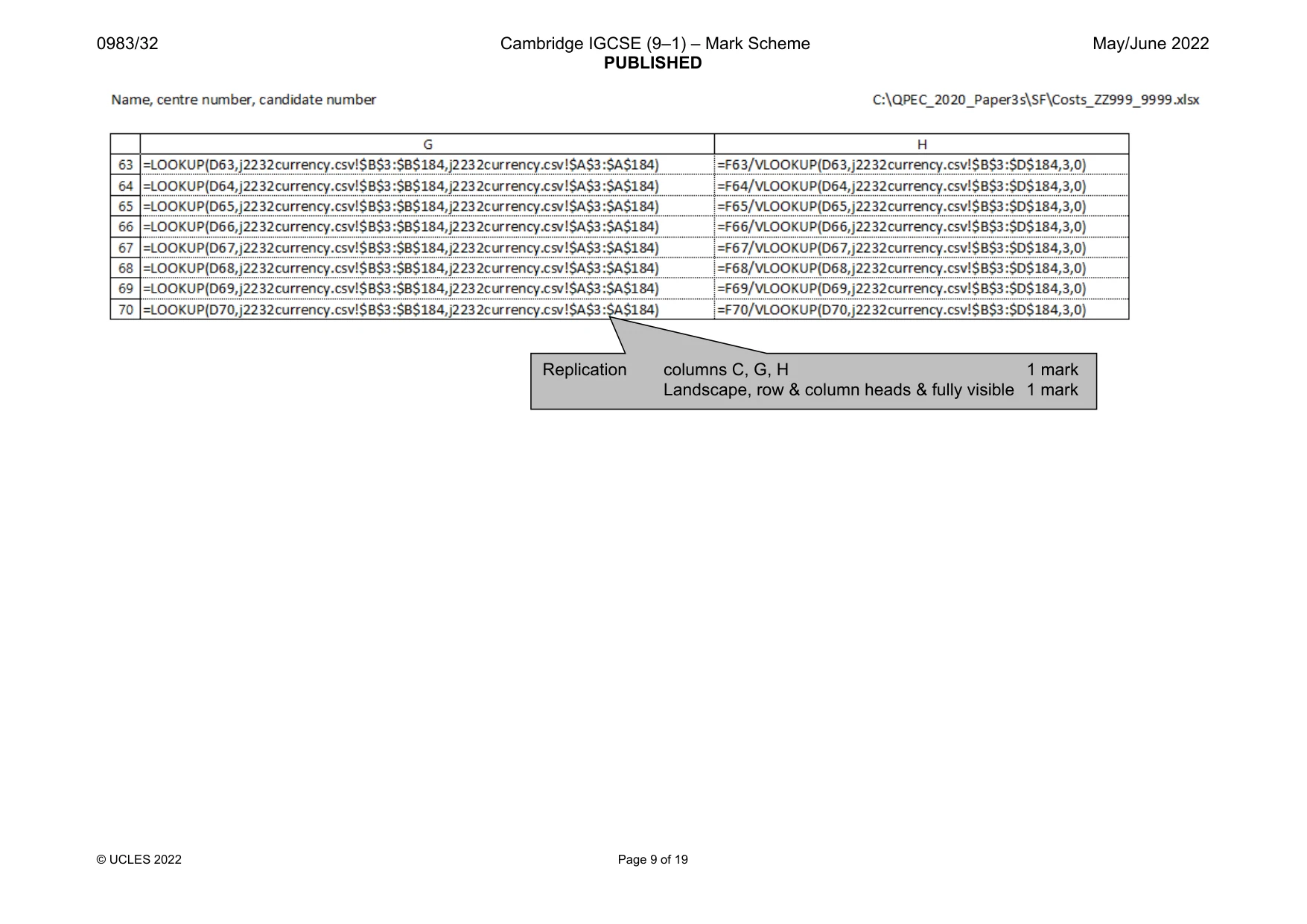
0983/32 Cambridge IGCSE (9–1) – Mark Scheme PUBLISHED May/June 2022 © UCLES 2022 Page 7 of 19 Currency ISO =LOOKUP( ... ) 1 mark D7 as a relative reference 1 mark ,j2232currency.csv! 1 mark $B$3:$B$184 as absolute reference 1 mark ,j2232currency.csv! 1 mark $A$3:$A$184 as absolute reference 1 mark Amount =F7/ =F7/ 1 mark VLOOKUP( … ) LOOKUP( … ) 1 mark D7 D7 1 mark ,j2232currency.csv! ,j2232currency.csv! 1 mark $B$3:$D$184 $B$3:$B$184 1 mark ,3 $D$3:$D$184 1 mark
Mark scheme, page 8
0983/32 Cambridge IGCSE (9–1) – Mark Scheme PUBLISHED May/June 2022 © UCLES 2022 Page 8 of 19
Mark scheme, page 9
0983/32 Cambridge IGCSE (9–1) – Mark Scheme PUBLISHED May/June 2022 © UCLES 2022 Page 9 of 19 Replication columns C, G, H 1 mark Landscape, row & column heads & fully visible 1 mark
Mark scheme, page 10
0983/32 Cambridge IGCSE (9–1) – Mark Scheme PUBLISHED May/June 2022 © UCLES 2022 Page 10 of 19 Cells A1:H1 merged and centre aligned 1 mark Row 1 - large white text on a black background 1 mark Rows 2 & 5 inserted 1 mark Rows 2 & 5 smaller in height than row 3 1 mark Rows 3 and 4 left aligned 1 mark Rows 3-6 bold 1 mark Row 6 centre aligned 1 mark Row 6 vertical align middle 1 mark Row 6 text wrapped 1 mark Column H formatted as $ with 2dp 1 mark Landscape, single page wide no row and column headings & fully visible 1 mark
Mark scheme, page 11
0983/32 Cambridge IGCSE (9–1) – Mark Scheme PUBLISHED May/June 2022 © UCLES 2022 Page 11 of 19
Mark scheme, page 12
0983/32 Cambridge IGCSE (9–1) – Mark Scheme PUBLISHED May/June 2022 © UCLES 2022 Page 12 of 19
Mark scheme, page 13
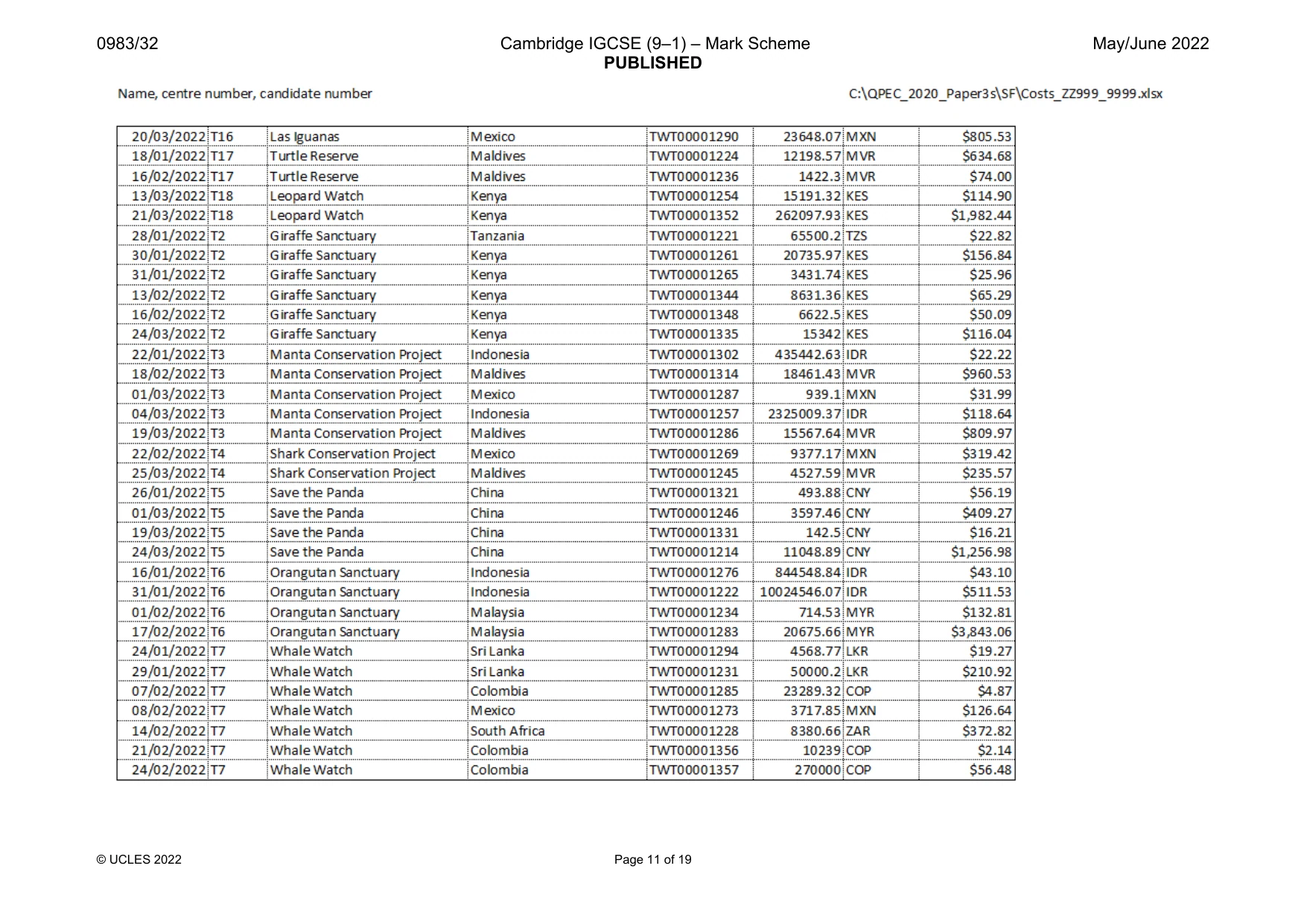
0983/32 Cambridge IGCSE (9–1) – Mark Scheme PUBLISHED May/June 2022 © UCLES 2022 Page 13 of 19 Extract 1 Data sorted on date 1 mark Country Indonesia 1 mark OR 1 mark Country Malaysia 1 mark Single landscape page & fully visible 1 mark
Mark scheme, page 14
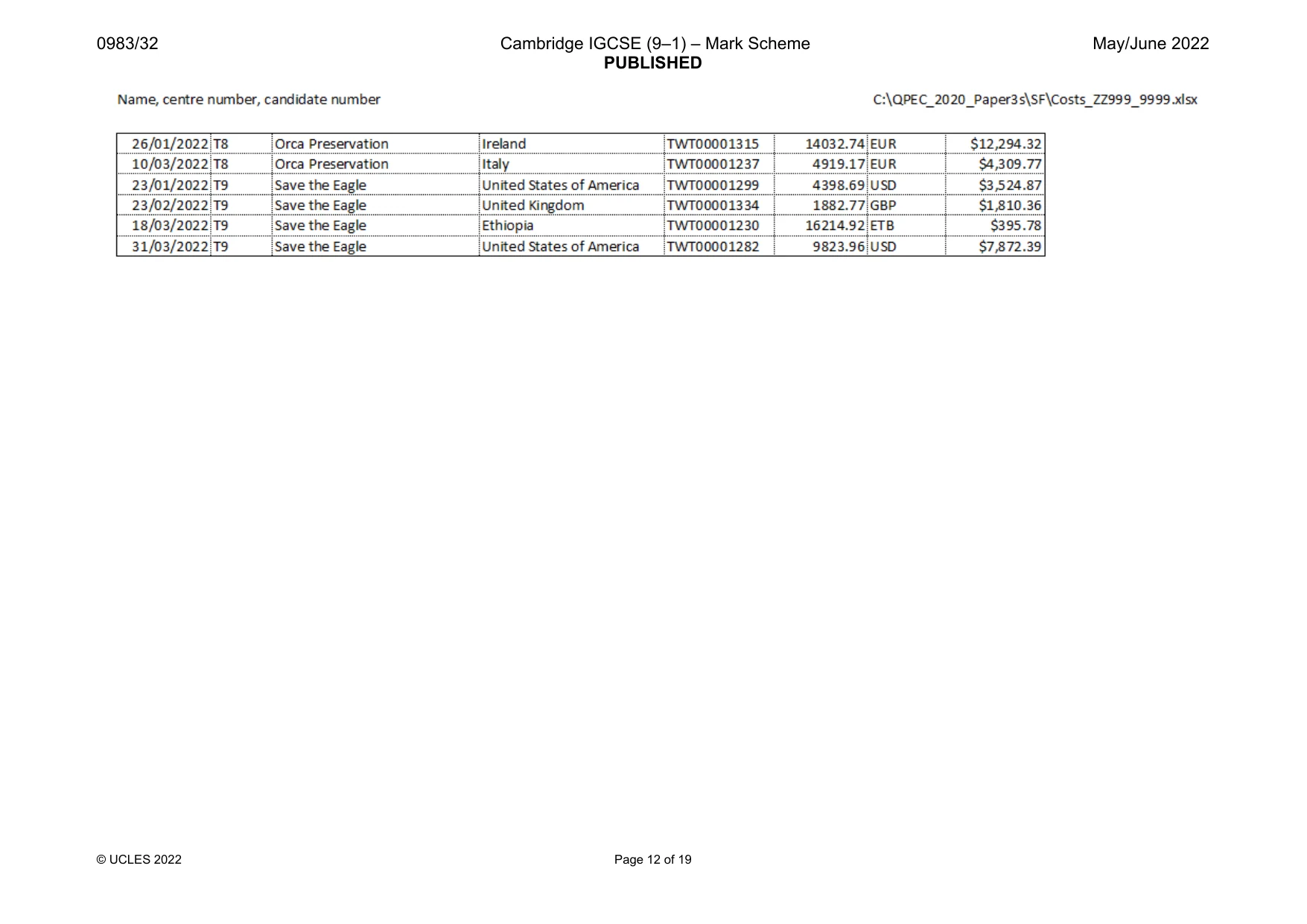
0983/32 Cambridge IGCSE (9–1) – Mark Scheme PUBLISHED May/June 2022 © UCLES 2022 Page 14 of 19 Extract 2 Data sorted into ascending order on country with integrity maintained 1 mark ISO is EUR 1 mark AND 1 mark Date is before March 2022 1 mark Single landscape page & fully visible 1 mark
Mark scheme, page 15
0983/32 Cambridge IGCSE (9–1) – Mark Scheme PUBLISHED May/June 2022 © UCLES 2022 Page 15 of 19 Evidence document Screen shot includes folder name, image dimensions, file names, file extensions & sizes 1 mark
Mark scheme, page 16
0983/32 Cambridge IGCSE (9–1) – Mark Scheme PUBLISHED May/June 2022 © UCLES 2022 Page 16 of 19 Saved Correct filename and type 1 mark Comment /* Candidate details at top */ 1 mark h1,h2,h3 { } font-family: "Casion Pro Bold" 1 mark , "Times New Roman" 1 mark ,serif 1 mark all 3 correct fonts in h1, h2, h3 1 mark 3 styles using single selector 1 mark h1 {…} color: #ff0000; 1 mark text-align:center; 1 mark font-size: 30pt 1 mark h2 {…} text-align:justify; 1 mark font-size: 18pt 1 mark h3 {…} text-align:left; 1 mark font-size: 14pt 1 mark h2 and h3 color: #000000 1 mark table and td border: 0; 1 mark table {…} margin-top: 5%; 1 mark margin-right: 25%; 1 mark margin-bottom: 5%; 1 mark margin-left: 5% 1 mark td {…} padding:10px 1 mark body {…} background-color: #da9f25; 1 mark background-image: url("j2232logo.png"); 1 mark background-size: 200px … 1 mark … 150px; 1 mark background-repeat: no-repeat; 1 mark background-attachment: fixed; 1 mark background-position: top … 1 mark … right; 1 mark CSS syntax Correct CSS syntax 1 mark
Mark scheme, page 17
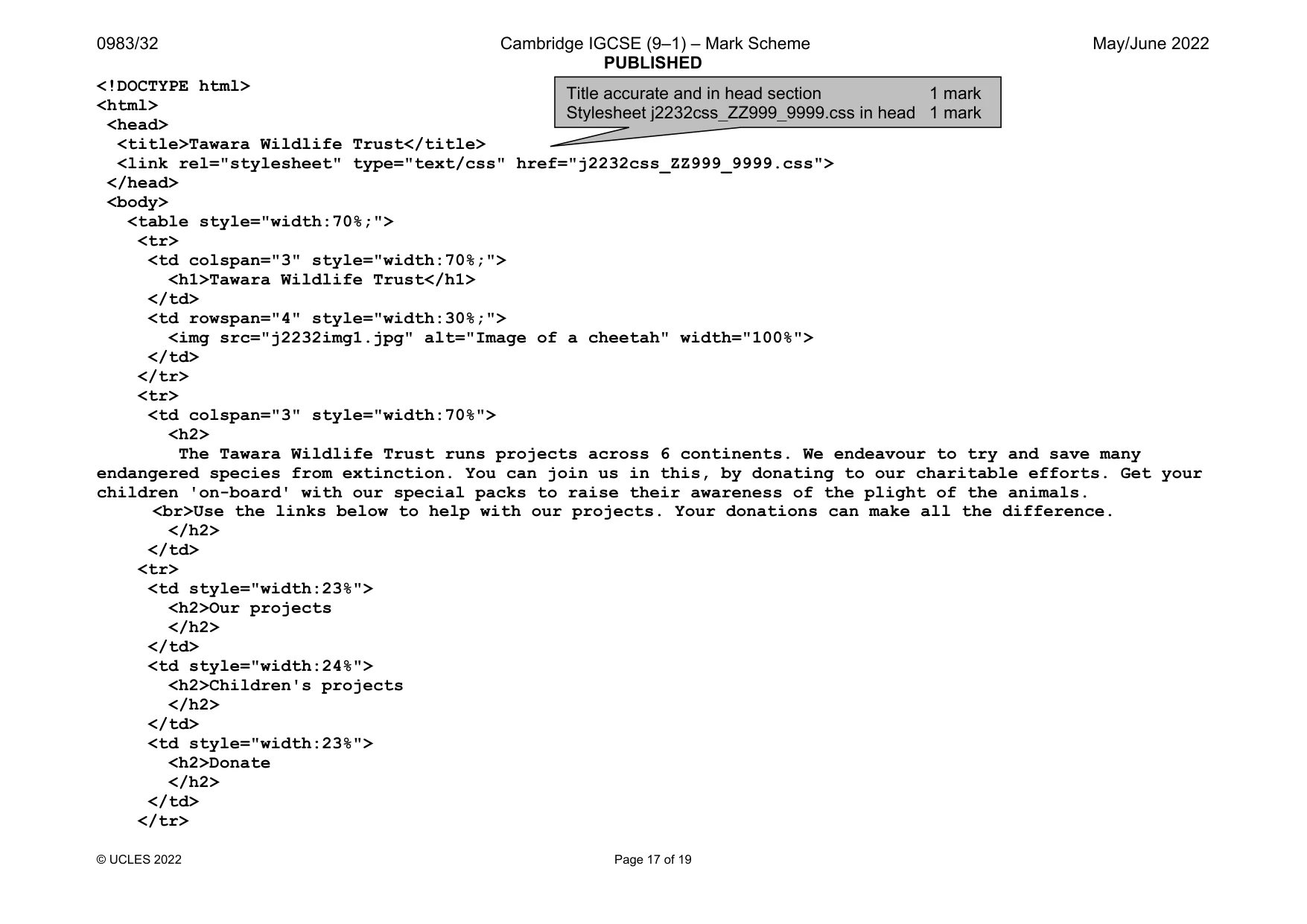
0983/32 Cambridge IGCSE (9–1) – Mark Scheme PUBLISHED May/June 2022 © UCLES 2022 Page 17 of 19 <!DOCTYPE html> <html> <head> <title>Tawara Wildlife Trust</title> <link rel="stylesheet" type="text/css" href="j2232css_ZZ999_9999.css"> </head> <body> <table style="width:70%;"> <tr> <td colspan="3" style="width:70%;"> <h1>Tawara Wildlife Trust</h1> </td> <td rowspan="4" style="width:30%;"> <img src="j2232img1.jpg" alt="Image of a cheetah" width="100%"> </td> </tr> <tr> <td colspan="3" style="width:70%"> <h2> The Tawara Wildlife Trust runs projects across 6 continents. We endeavour to try and save many endangered species from extinction. You can join us in this, by donating to our charitable efforts. Get your children 'on-board' with our special packs to raise their awareness of the plight of the animals. <br>Use the links below to help with our projects. Your donations can make all the difference. </h2> </td> <tr> <td style="width:23%"> <h2>Our projects </h2> </td> <td style="width:24%"> <h2>Children's projects </h2> </td> <td style="width:23%"> <h2>Donate </h2> </td> </tr> Title accurate and in head section 1 mark Stylesheet j2232css_ZZ999_9999.css in head 1 mark
Mark scheme, page 18
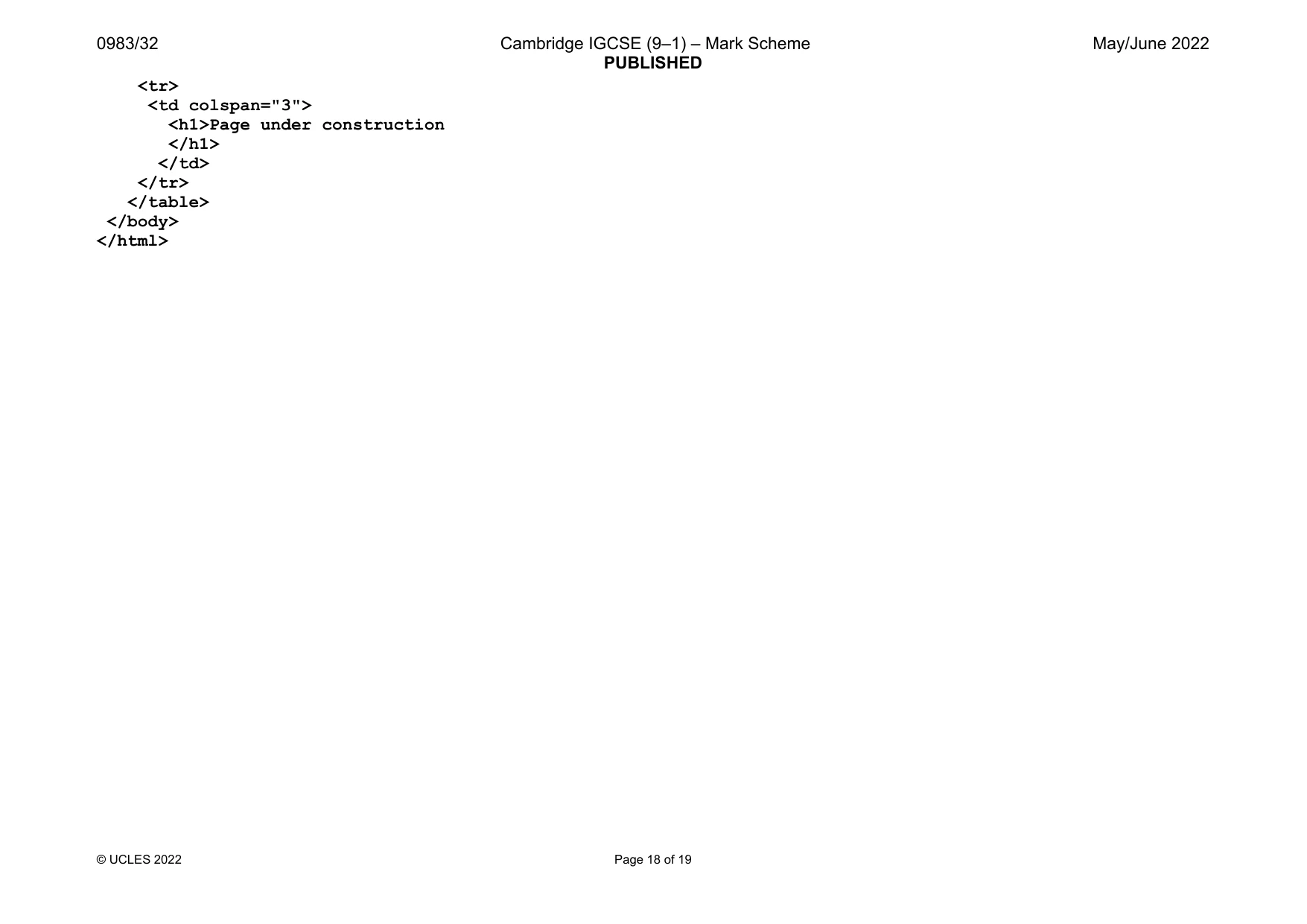
0983/32 Cambridge IGCSE (9–1) – Mark Scheme PUBLISHED May/June 2022 © UCLES 2022 Page 18 of 19 <tr> <td colspan="3"> <h1>Page under construction </h1> </td> </tr> </table> </body> </html>
Mark scheme, page 19
0983/32 Cambridge IGCSE (9–1) – Mark Scheme PUBLISHED May/June 2022 © UCLES 2022 Page 19 of 19 In browser, address bar visible 1 mark
What you needed in this session
Cambridge’s own grade thresholds for 2022 May/June, Paper 3 · Variant 2. A higher threshold means an easier paper — the bar moves with how the cohort did.