Cambridge IGCSE Computer Studies 0420 — 2011 May/June Paper 1 · Variant 2
0420/12/M/J/11 · 100 marks · ≈113 min
The question paper and its mark scheme, free to read here and free to download. This is Cambridge’s own paper, exactly as it was sat.
Question paper20 pages



Mark scheme10 pages
Answers below. Sit the paper first if you are practising.

Paper as text
Question paper, page 1
This document consists of 20 printed pages. IB11 06_0420_12/4RP © UCLES 2011 [Turn over *3308700159* For Examiner's Use UNIVERSITY OF CAMBRIDGE INTERNATIONAL EXAMINATIONS International General Certificate of Secondary Education COMPUTER STUDIES 0420/12 Paper 1 May/June 2011 2 hours 30 minutes Candidates answer on the Question Paper. No Additional Materials are required. READ THESE INSTRUCTIONS FIRST Write your Centre number, candidate number and name on all the work you hand in. Write in dark blue or black pen. You may use a soft pencil for any diagrams, graphs or rough working. Do not use staples, paper clips, highlighters, glue or correction fluid. DO NOT WRITE IN ANY BARCODES. Answer all questions. No marks will be awarded for using brand names of software packages or hardware. At the end of the examination, fasten all your work securely together. The number of marks is given in brackets [ ] at the end of each question or part question. www.XtremePapers.com
Question paper, page 2
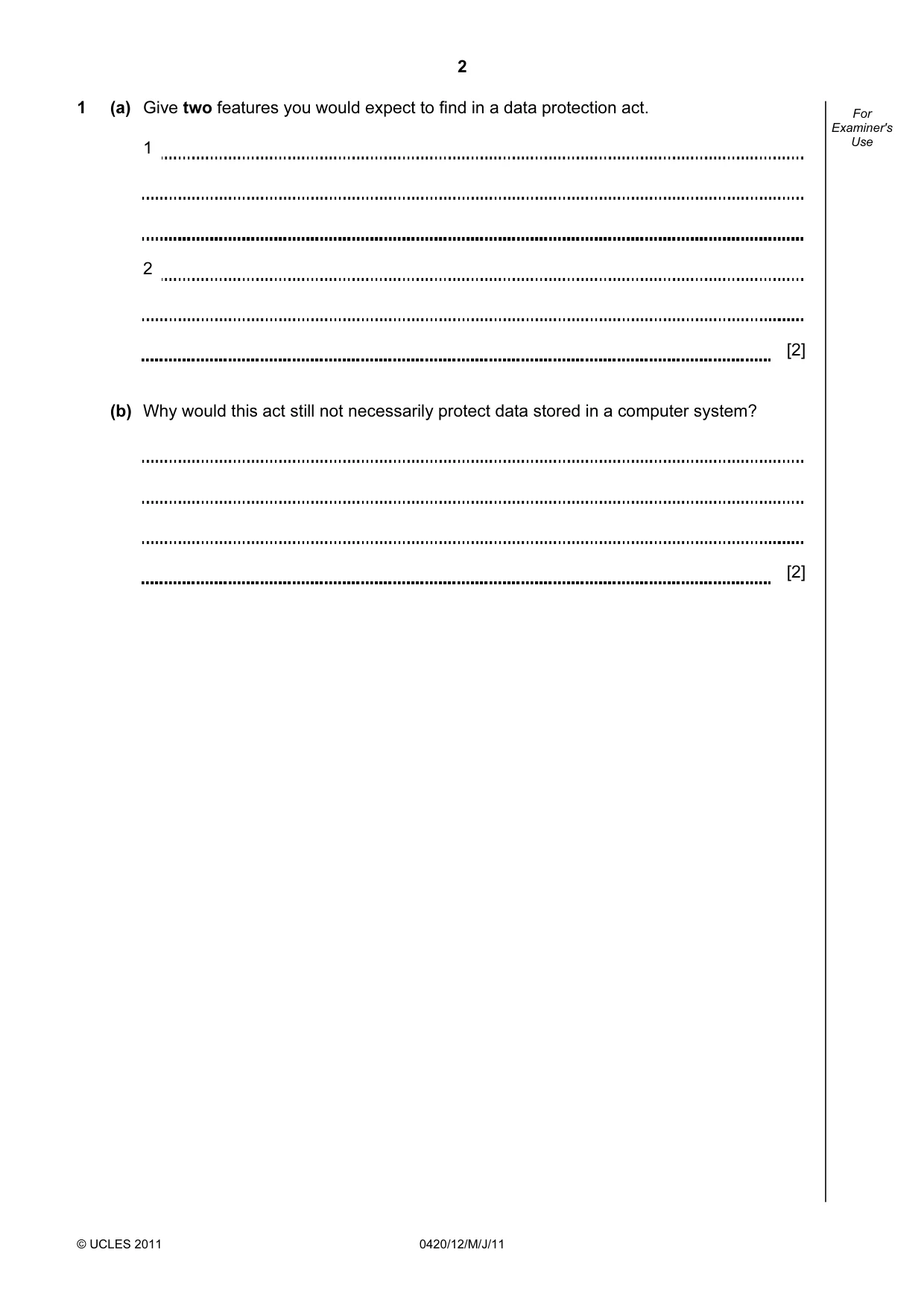
2 © UCLES 2011 0420/12/M/J/11 For Examiner's Use 1 (a) Give two features you would expect to find in a data protection act. 1 2 [2] (b) Why would this act still not necessarily protect data stored in a computer system? [2]
Question paper, page 3
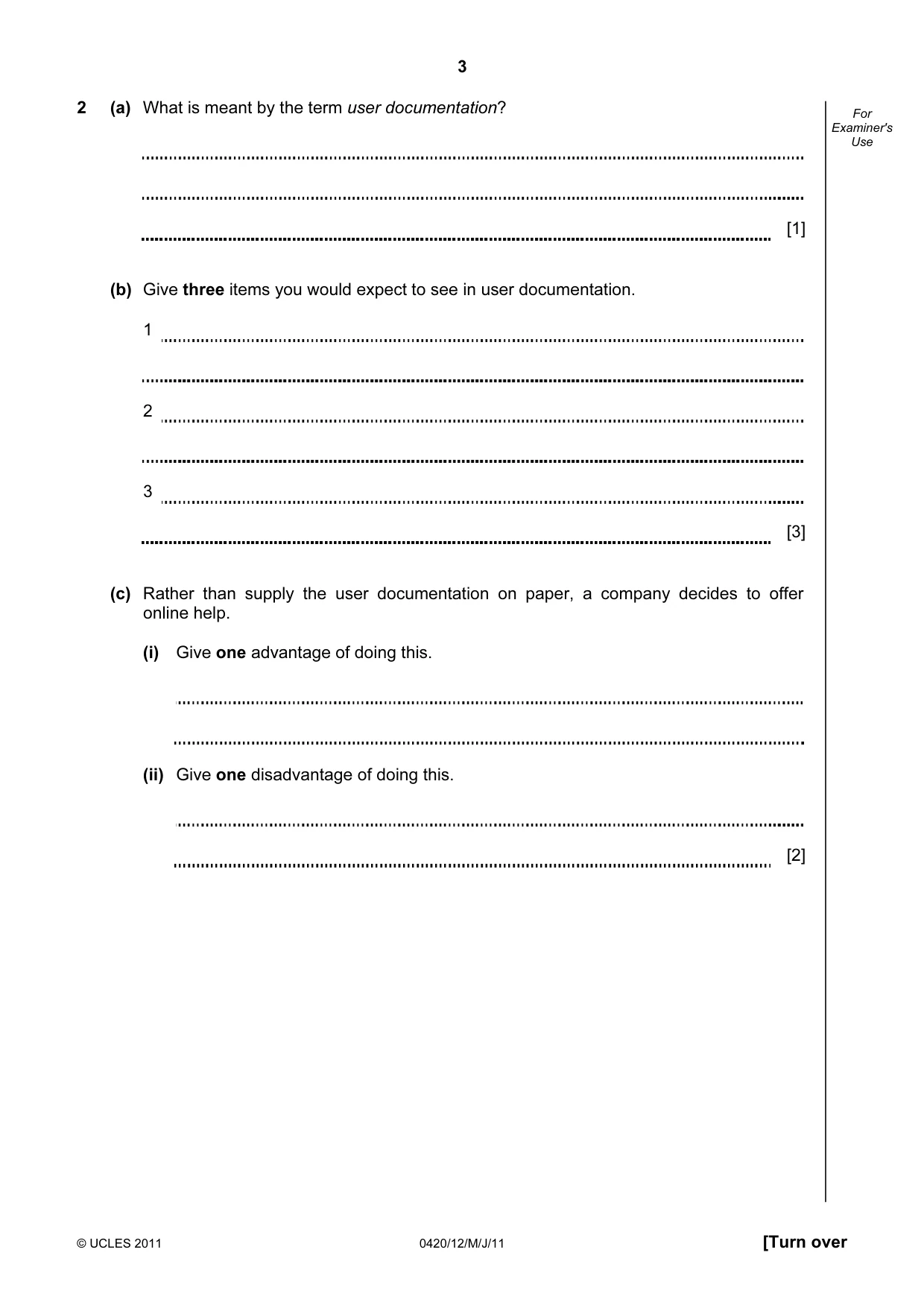
3 © UCLES 2011 0420/12/M/J/11 [Turn over For Examiner's Use 2 (a) What is meant by the term user documentation? [1] (b) Give three items you would expect to see in user documentation. 1 2 3 [3] (c) Rather than supply the user documentation on paper, a company decides to offer online help. (i) Give one advantage of doing this. (ii) Give one disadvantage of doing this. [2]
Question paper, page 4
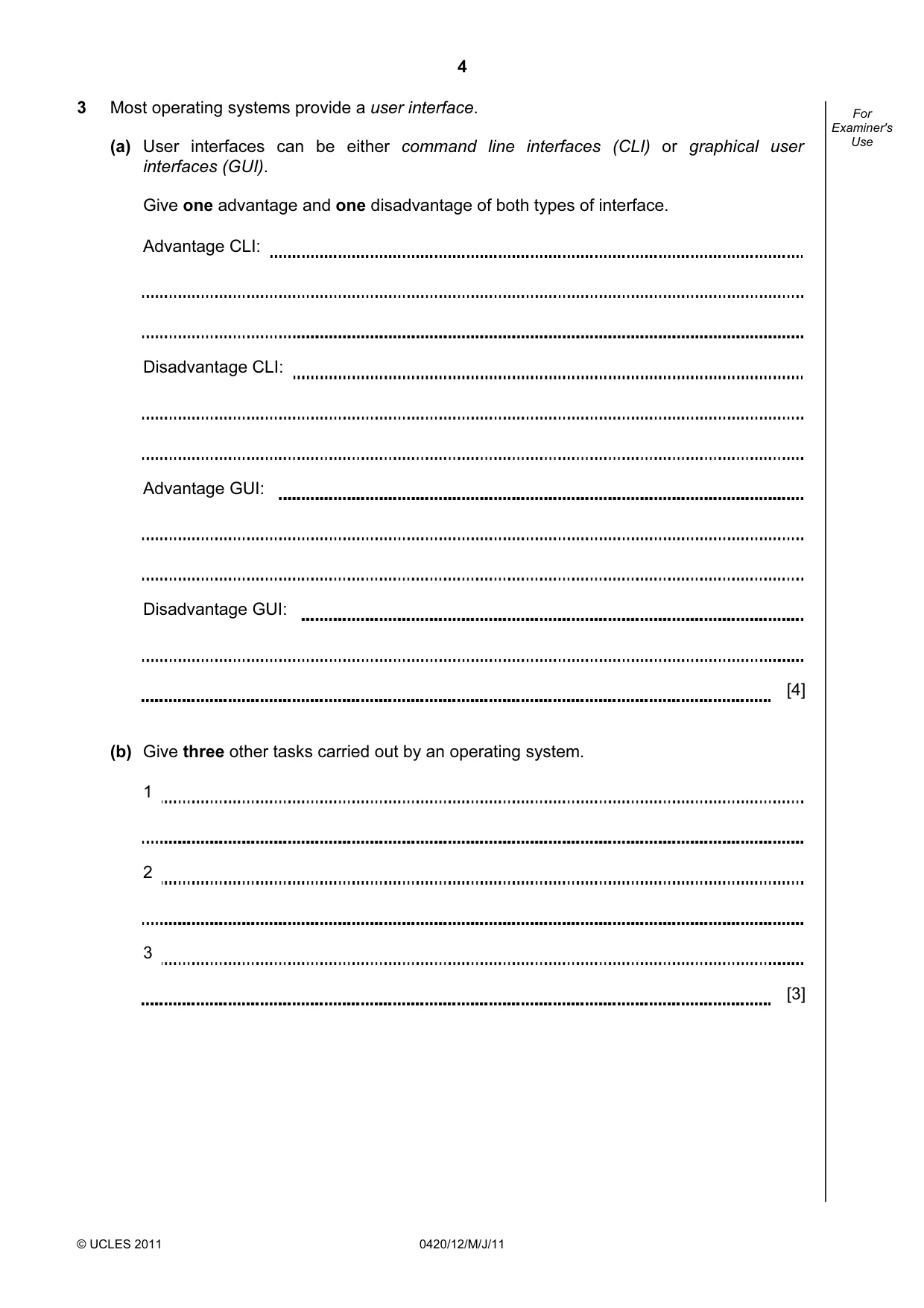
4 © UCLES 2011 0420/12/M/J/11 For Examiner's Use 3 Most operating systems provide a user interface. (a) User interfaces can be either command line interfaces (CLI) or graphical user interfaces (GUI). Give one advantage and one disadvantage of both types of interface. Advantage CLI: Disadvantage CLI: Advantage GUI: Disadvantage GUI: [4] (b) Give three other tasks carried out by an operating system. 1 2 3 [3]
Question paper, page 5
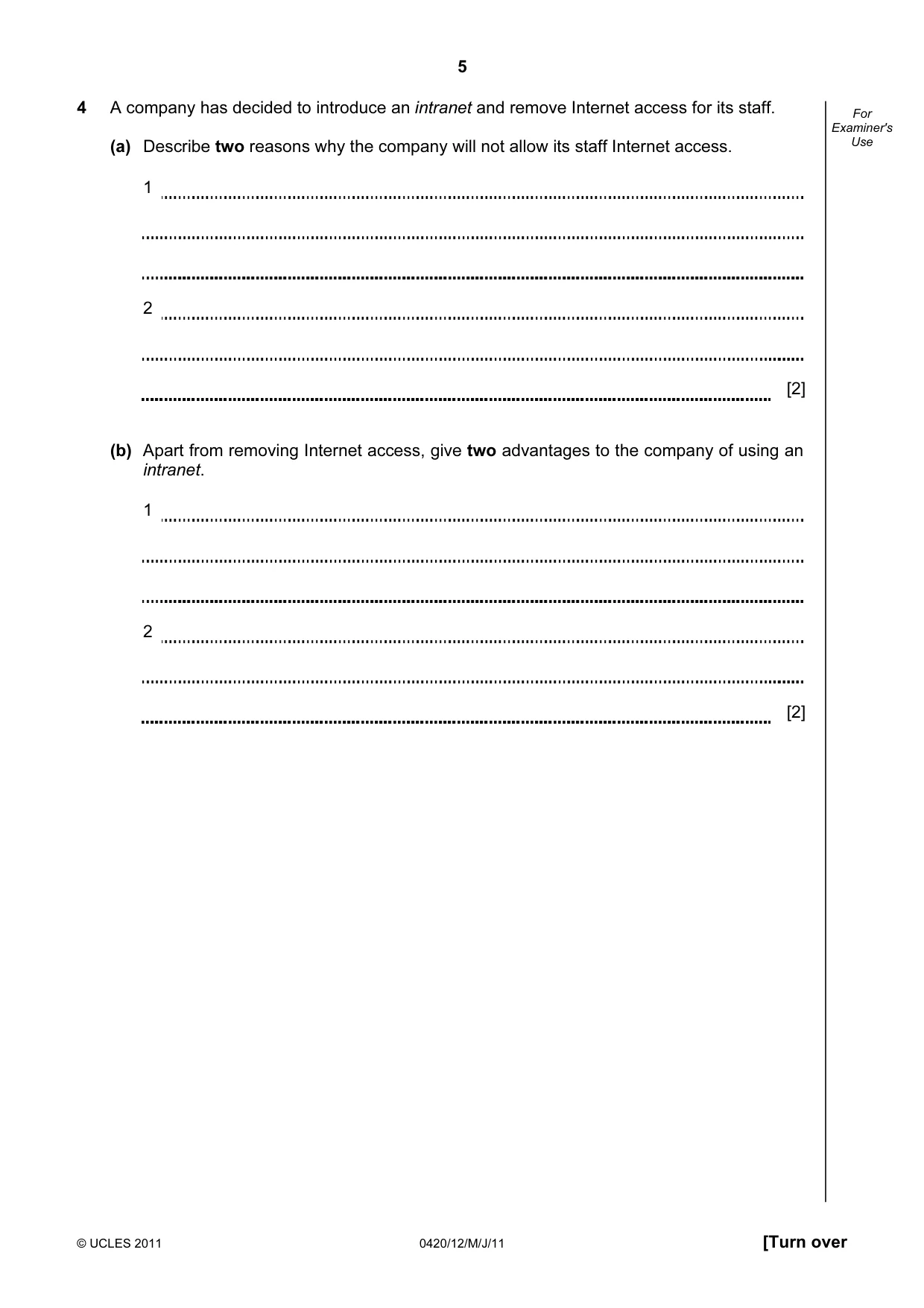
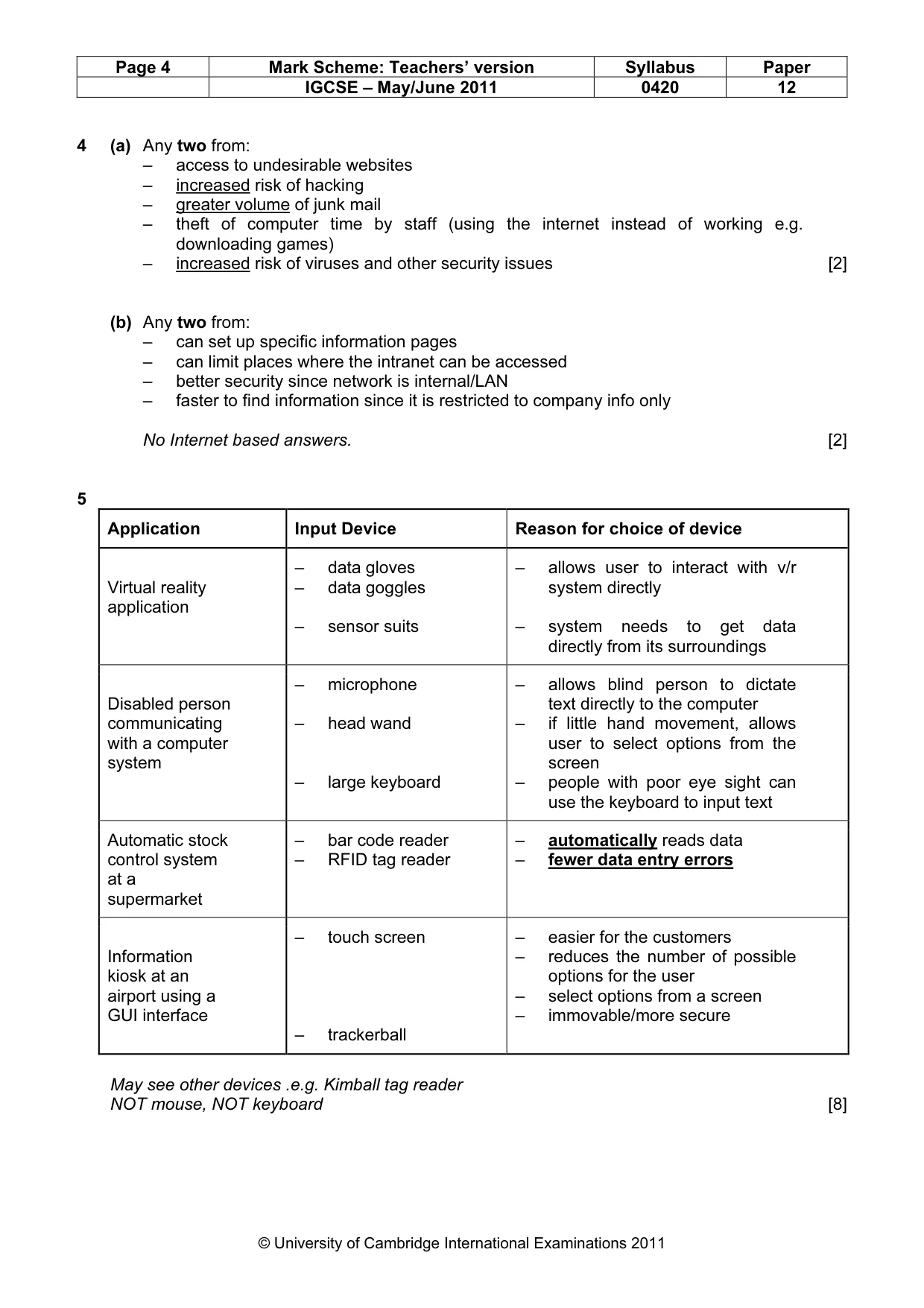
5 © UCLES 2011 0420/12/M/J/11 [Turn over For Examiner's Use 4 A company has decided to introduce an intranet and remove Internet access for its staff. (a) Describe two reasons why the company will not allow its staff Internet access. 1 2 [2] (b) Apart from removing Internet access, give two advantages to the company of using an intranet. 1 2 [2]
Question paper, page 6
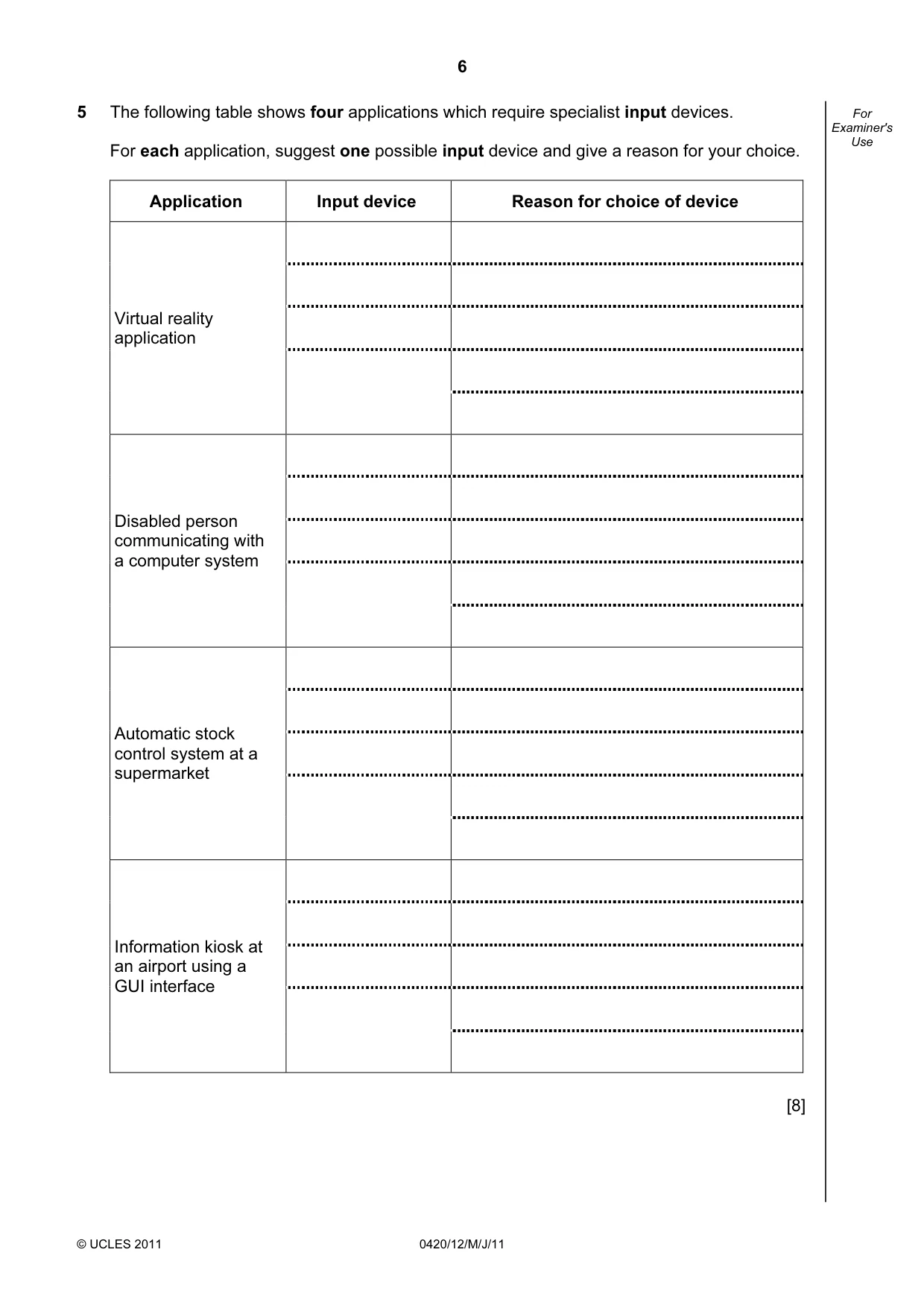
6 © UCLES 2011 0420/12/M/J/11 For Examiner's Use 5 The following table shows four applications which require specialist input devices. For each application, suggest one possible input device and give a reason for your choice. Application Input device Reason for choice of device Virtual reality application Disabled person communicating with a computer system Automatic stock control system at a supermarket Information kiosk at an airport using a GUI interface [8]
Question paper, page 7
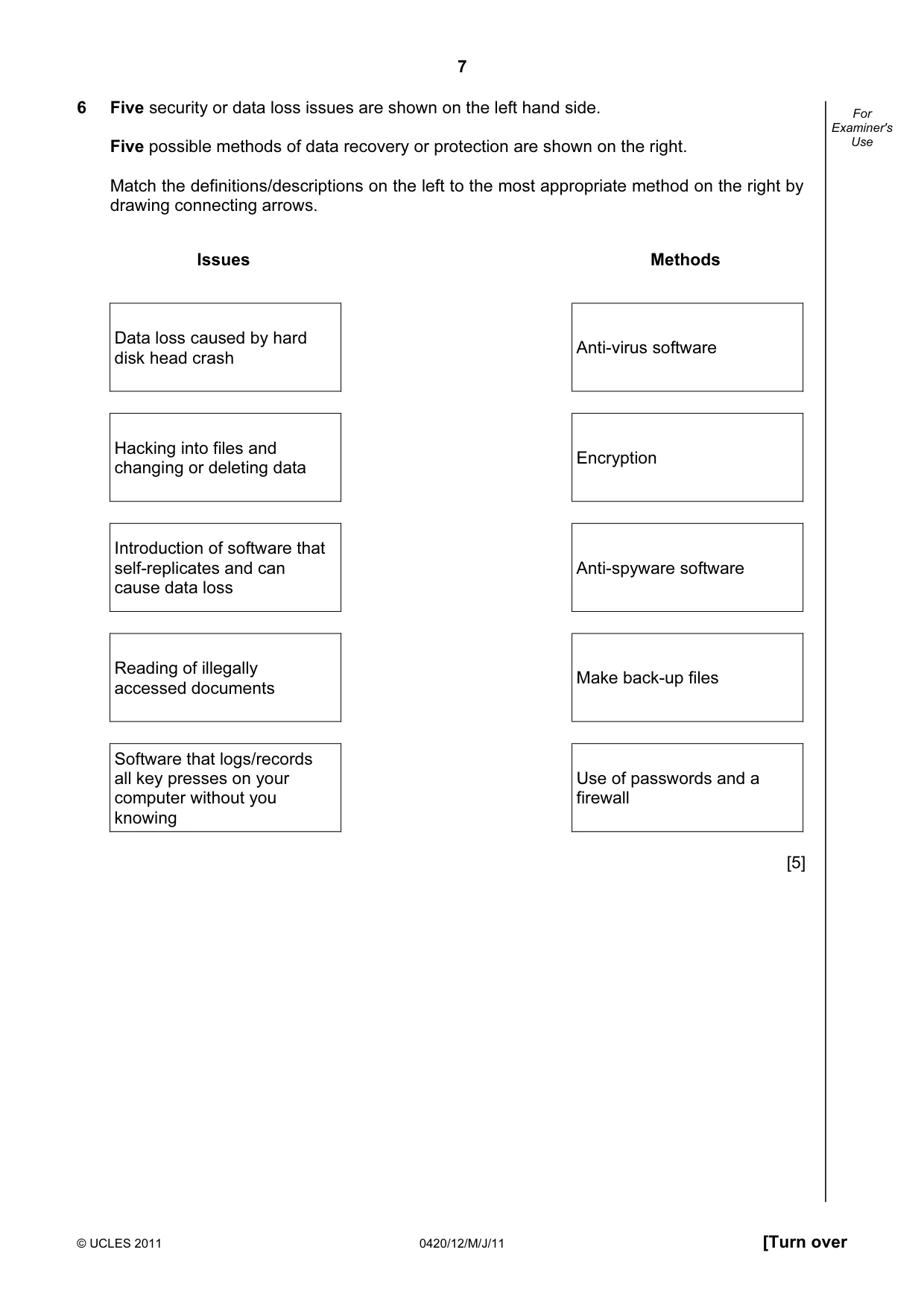
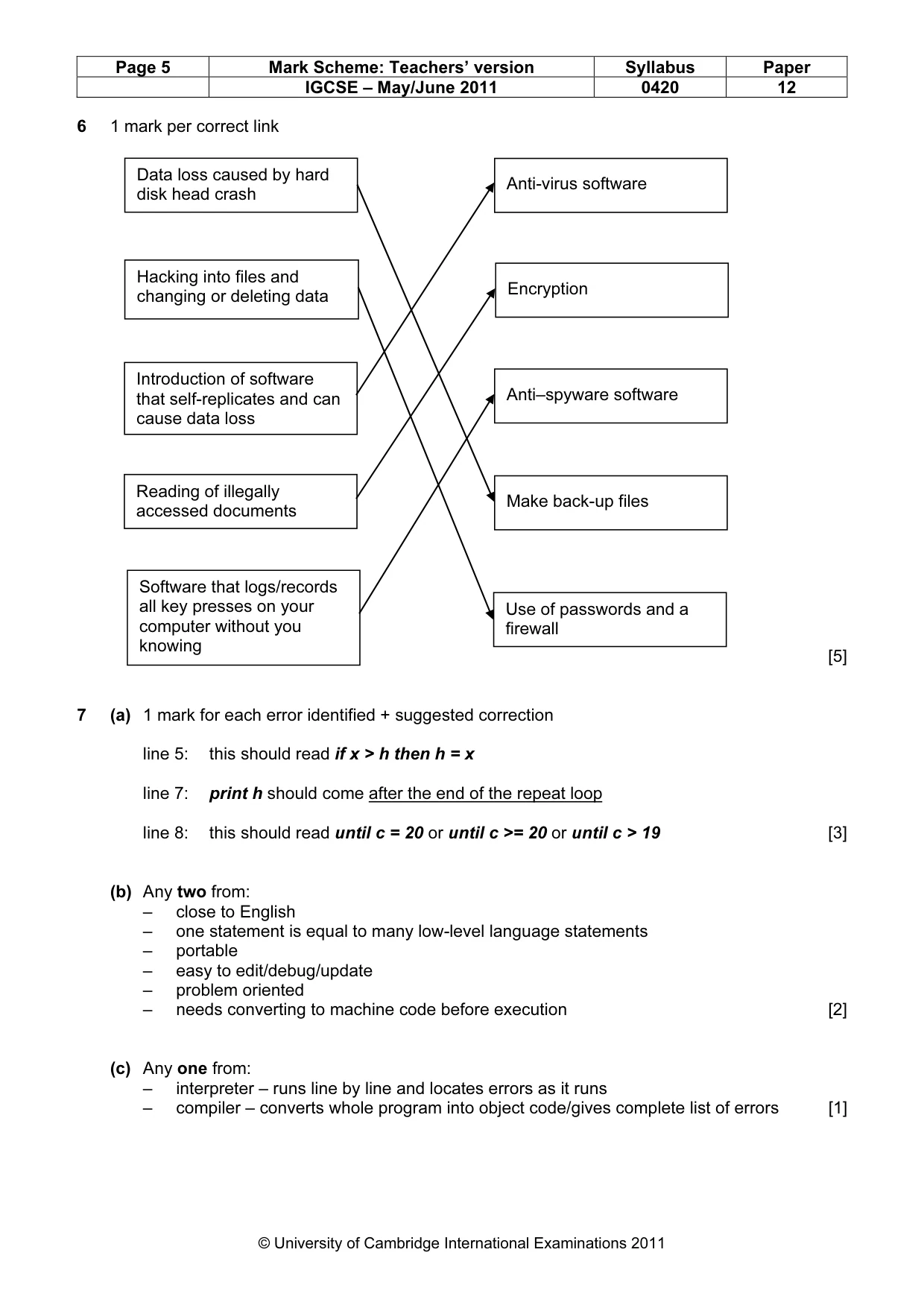
7 © UCLES 2011 0420/12/M/J/11 [Turn over For Examiner's Use 6 Five security or data loss issues are shown on the left hand side. Five possible methods of data recovery or protection are shown on the right. Match the definitions/descriptions on the left to the most appropriate method on the right by drawing connecting arrows. Issues Methods Data loss caused by hard disk head crash Anti-virus software Hacking into files and changing or deleting data Encryption Introduction of software that self-replicates and can cause data loss Anti-spyware software Reading of illegally accessed documents Make back-up files Software that logs/records all key presses on your computer without you knowing Use of passwords and a firewall [5]
Question paper, page 8
8 © UCLES 2011 0420/12/M/J/11 For Examiner's Use 7 (a) Read the following section of code that inputs twenty (20) numbers and then outputs the largest number input. 1 h = 0 2 c = 0 3 repeat 4 read x 5 if x > h then x = h 6 c = c + 1 7 print h 8 until c < 20 There are three errors in this code. Locate these errors and suggest a corrected piece of code. 1 2 3 [3] (b) The above code is an example of a high-level language. Give two features of a high-level language. 1 2 [2]
Question paper, page 9
9 © UCLES 2011 0420/12/M/J/11 [Turn over For Examiner's Use (c) The code is to be interpreted rather than compiled. Give one difference between these two methods. [1]
Question paper, page 10
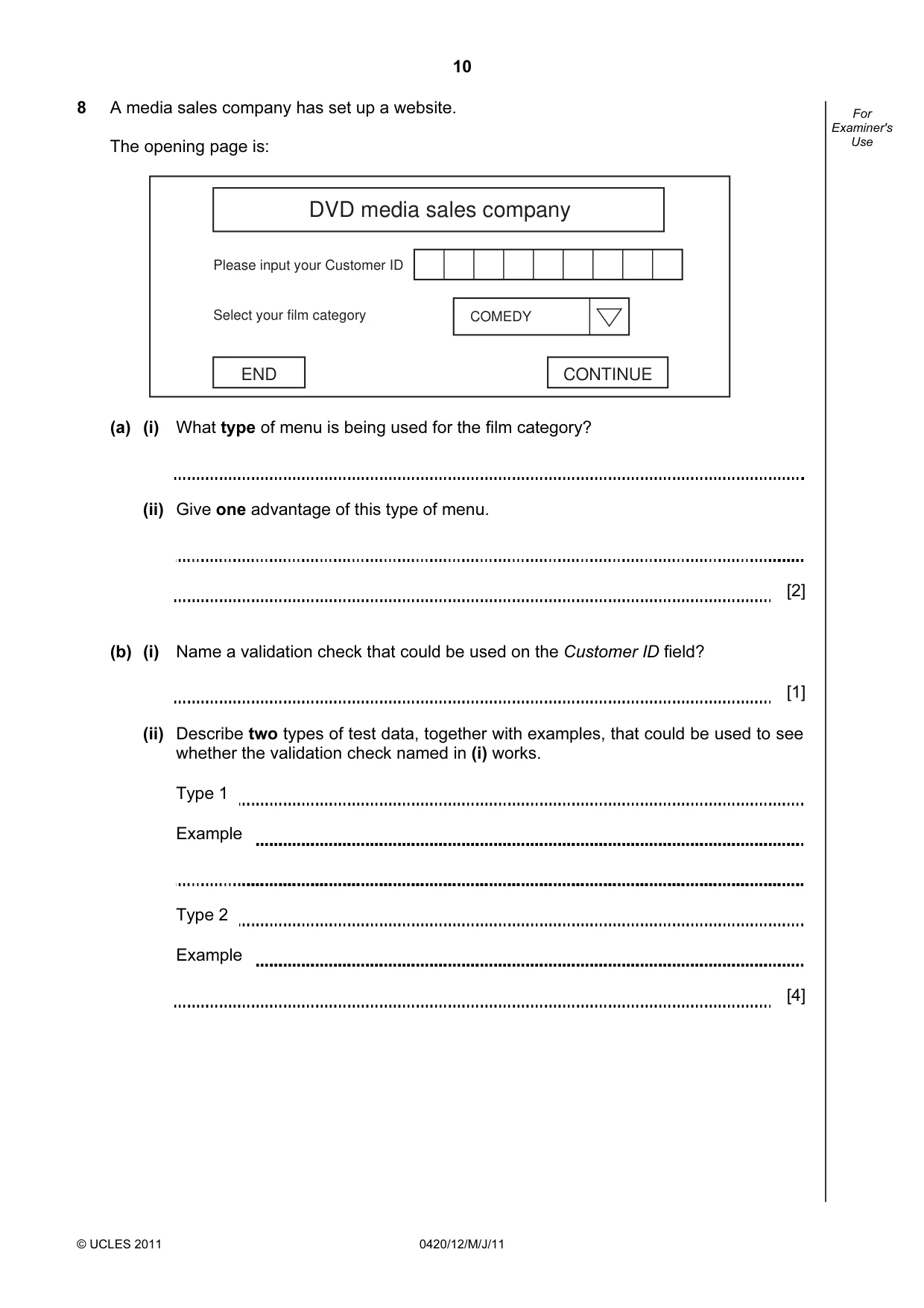
10 © UCLES 2011 0420/12/M/J/11 For Examiner's Use 8 A media sales company has set up a website. The opening page is: CONTINUE END COMEDY Please input your Customer ID Select your film category DVD media sales company (a) (i) What type of menu is being used for the film category? (ii) Give one advantage of this type of menu. [2] (b) (i) Name a validation check that could be used on the Customer ID field? [1] (ii) Describe two types of test data, together with examples, that could be used to see whether the validation check named in (i) works. Type 1 Example Type 2 Example [4]
Question paper, page 11
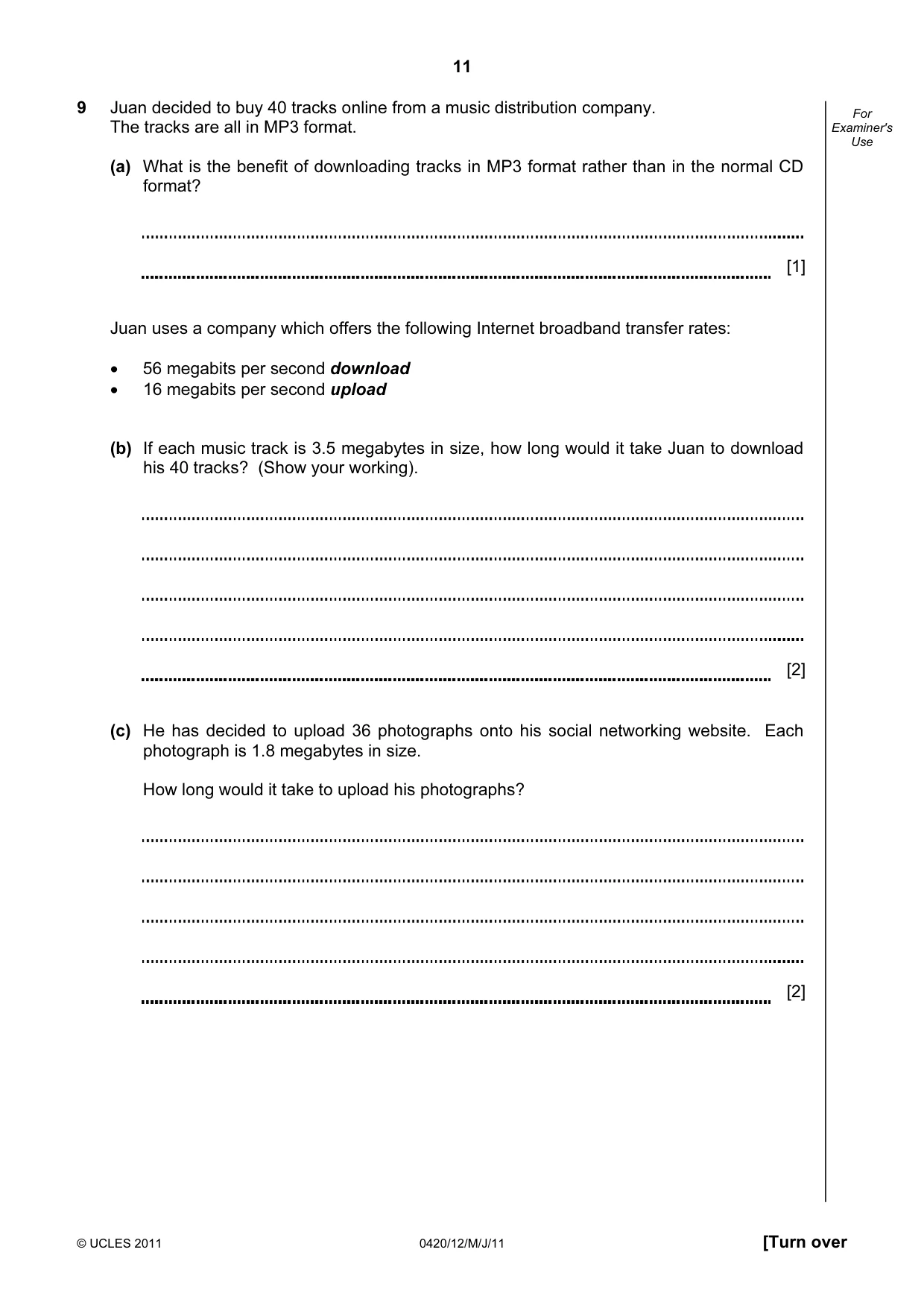
11 © UCLES 2011 0420/12/M/J/11 [Turn over For Examiner's Use 9 Juan decided to buy 40 tracks online from a music distribution company. The tracks are all in MP3 format. (a) What is the benefit of downloading tracks in MP3 format rather than in the normal CD format? [1] Juan uses a company which offers the following Internet broadband transfer rates: • 56 megabits per second download • 16 megabits per second upload (b) If each music track is 3.5 megabytes in size, how long would it take Juan to download his 40 tracks? (Show your working). [2] (c) He has decided to upload 36 photographs onto his social networking website. Each photograph is 1.8 megabytes in size. How long would it take to upload his photographs? [2]
Question paper, page 12
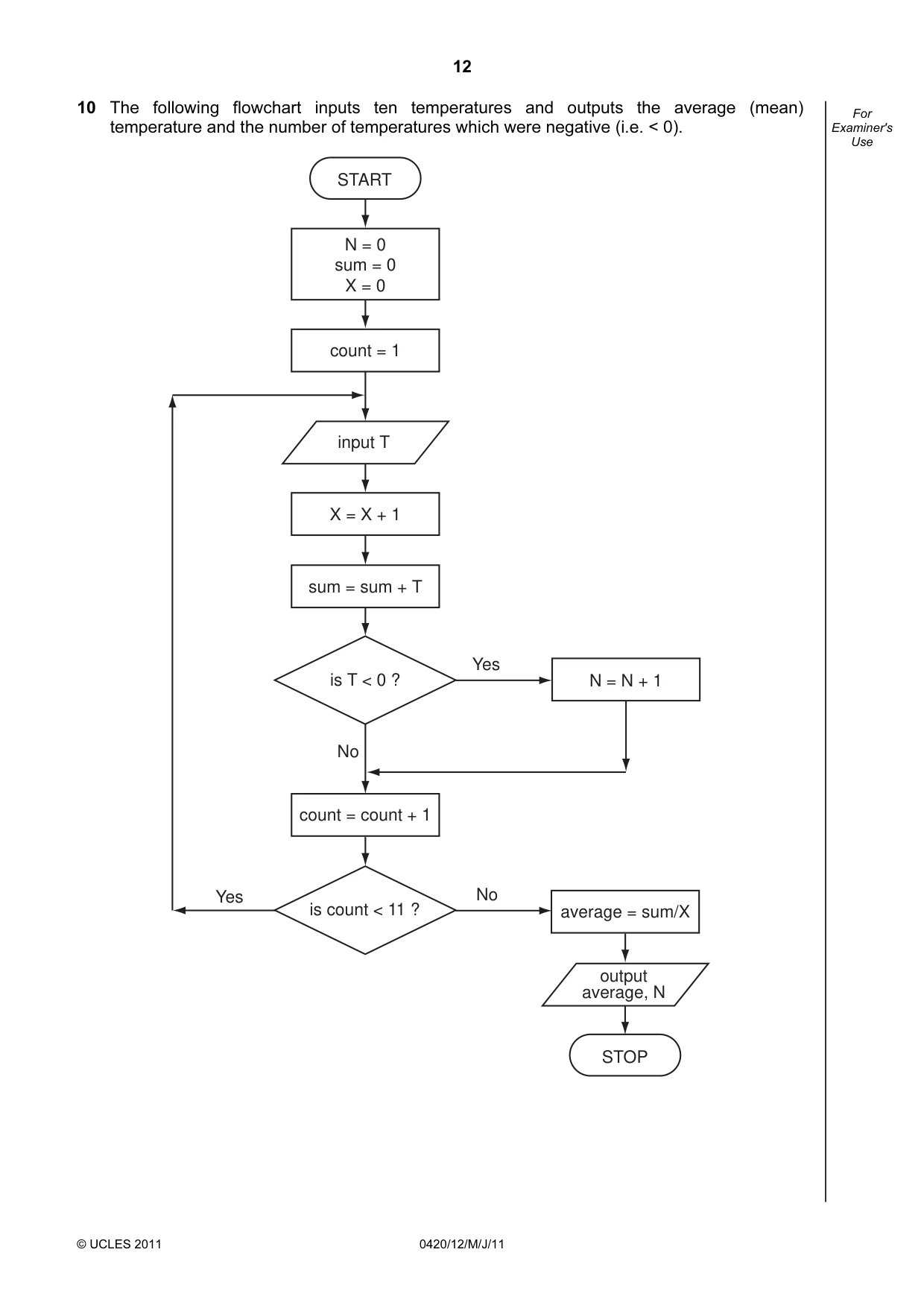
12 © UCLES 2011 0420/12/M/J/11 For Examiner's Use 10 The following flowchart inputs ten temperatures and outputs the average (mean) temperature and the number of temperatures which were negative (i.e. < 0). START STOP N = 0 sum = 0 X = 0 count = count + 1 count = 1 X = X + 1 sum = sum + T N = N + 1 average = sum/X is T < 0 ? is count < 11 ? No input T output average, N Yes No Yes
Question paper, page 13
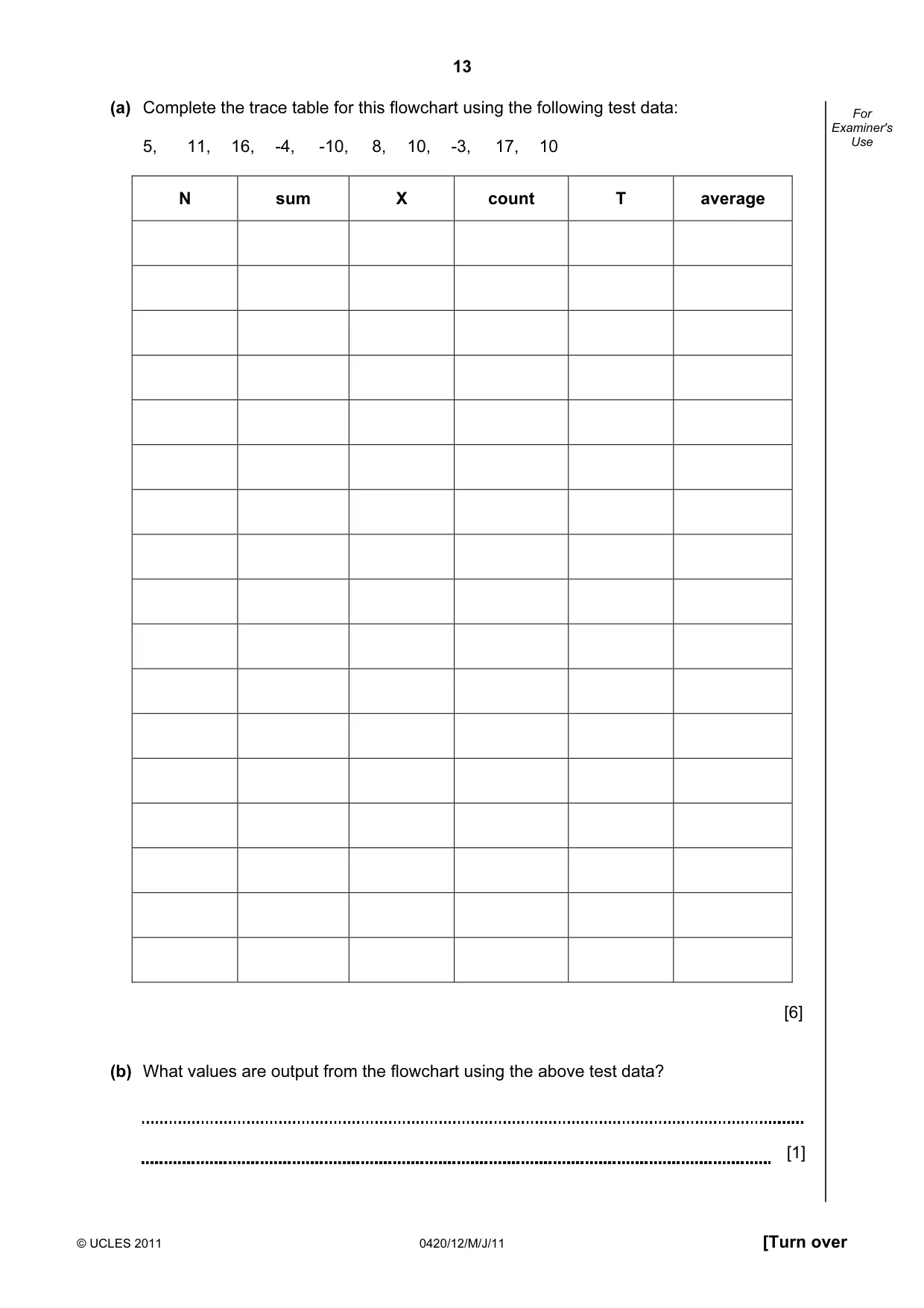
13 © UCLES 2011 0420/12/M/J/11 [Turn over For Examiner's Use (a) Complete the trace table for this flowchart using the following test data: 5, 11, 16, -4, -10, 8, 10, -3, 17, 10 N sum X count T average [6] (b) What values are output from the flowchart using the above test data? [1]
Question paper, page 14
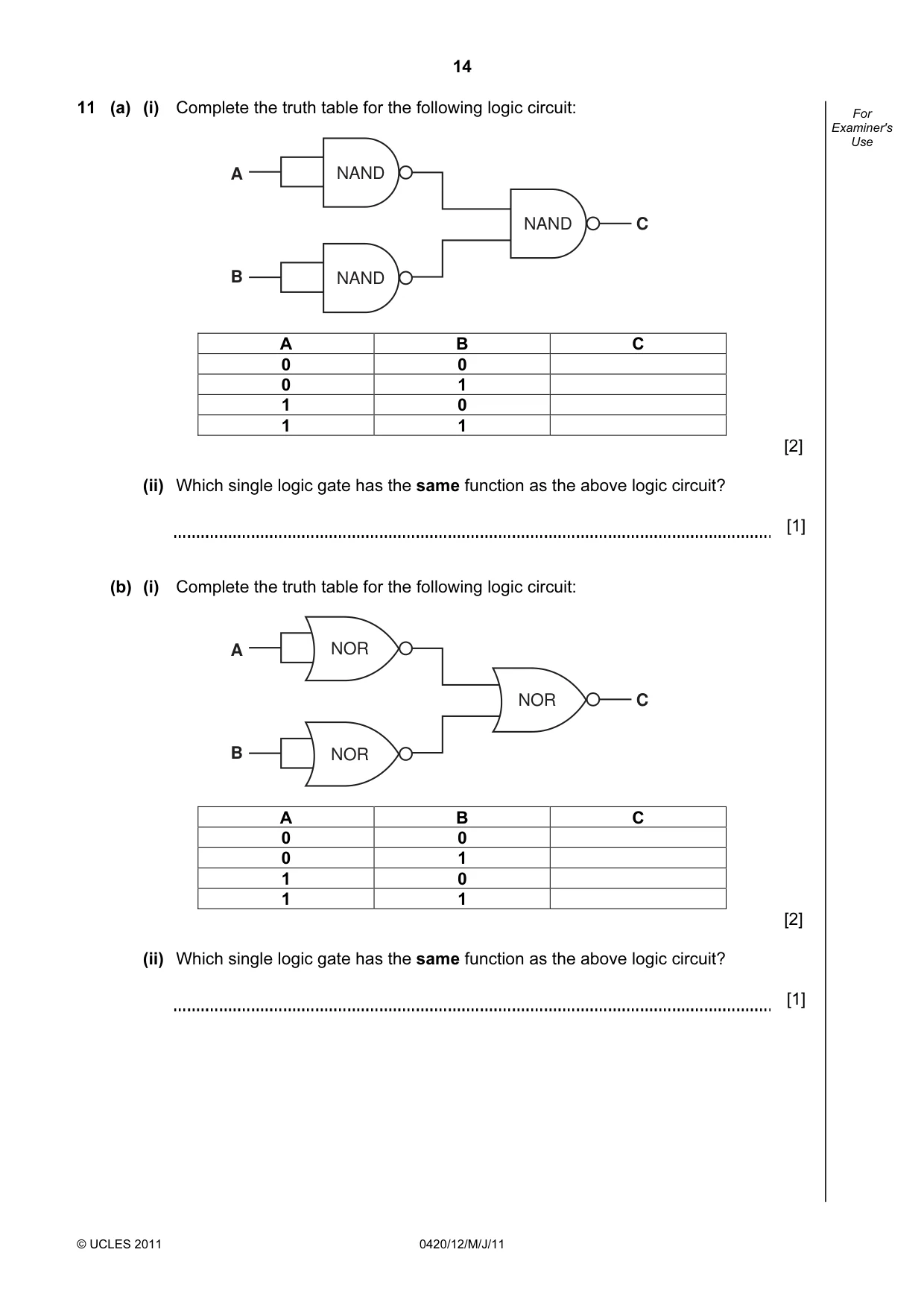
14 © UCLES 2011 0420/12/M/J/11 For Examiner's Use 11 (a) (i) Complete the truth table for the following logic circuit: A B NAND NAND NAND C A B C 0 0 0 1 1 0 1 1 [2] (ii) Which single logic gate has the same function as the above logic circuit? [1] (b) (i) Complete the truth table for the following logic circuit: A B NOR NOR C NOR A B C 0 0 0 1 1 0 1 1 [2] (ii) Which single logic gate has the same function as the above logic circuit? [1]
Question paper, page 15
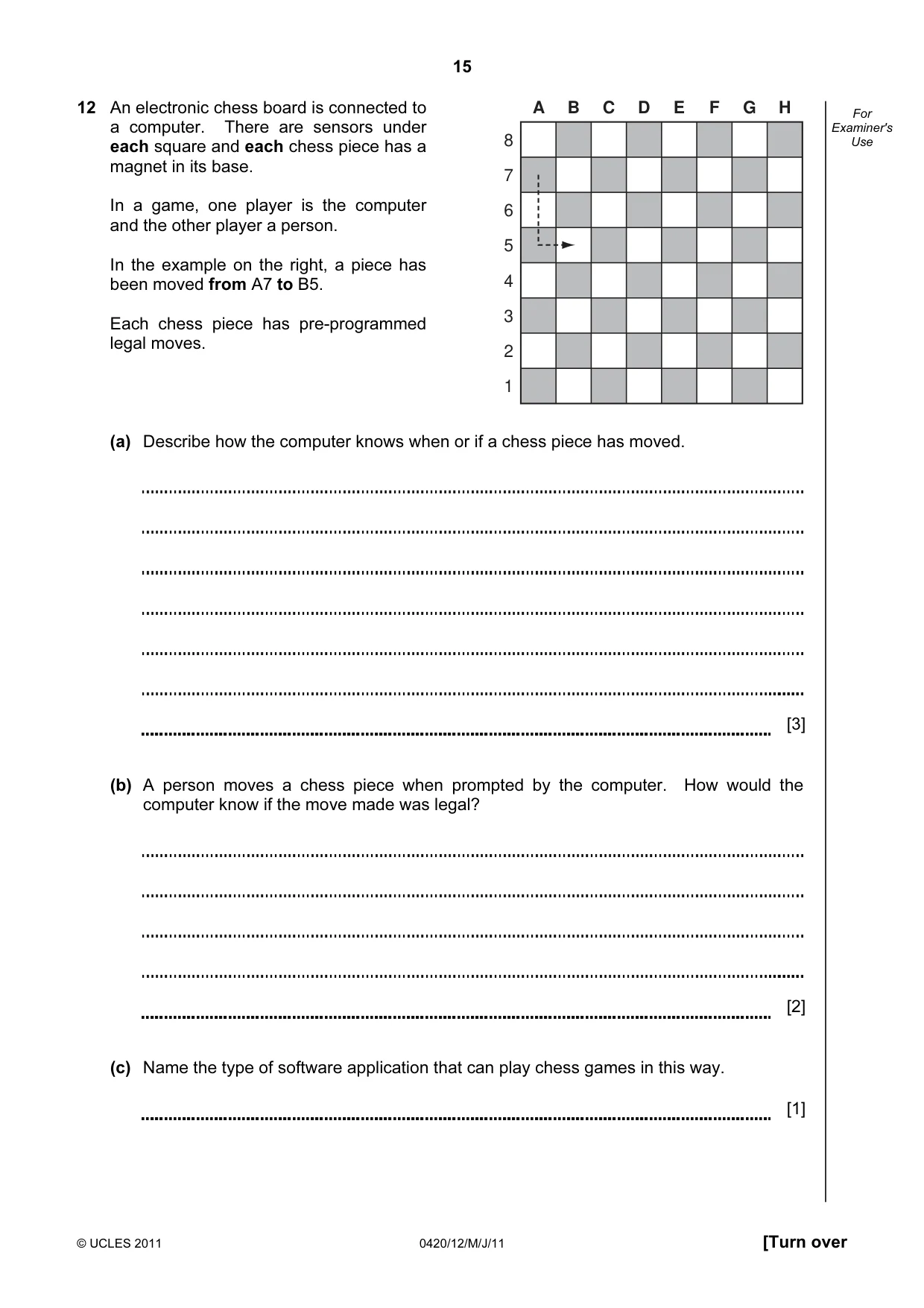
15 © UCLES 2011 0420/12/M/J/11 [Turn over For Examiner's Use 12 An electronic chess board is connected to a computer. There are sensors under each square and each chess piece has a magnet in its base. In a game, one player is the computer and the other player a person. In the example on the right, a piece has been moved from A7 to B5. Each chess piece has pre-programmed legal moves. (a) Describe how the computer knows when or if a chess piece has moved. [3] (b) A person moves a chess piece when prompted by the computer. How would the computer know if the move made was legal? [2] (c) Name the type of software application that can play chess games in this way. [1] A B C D E F G H 8 7 6 5 4 3 2 1
Question paper, page 16
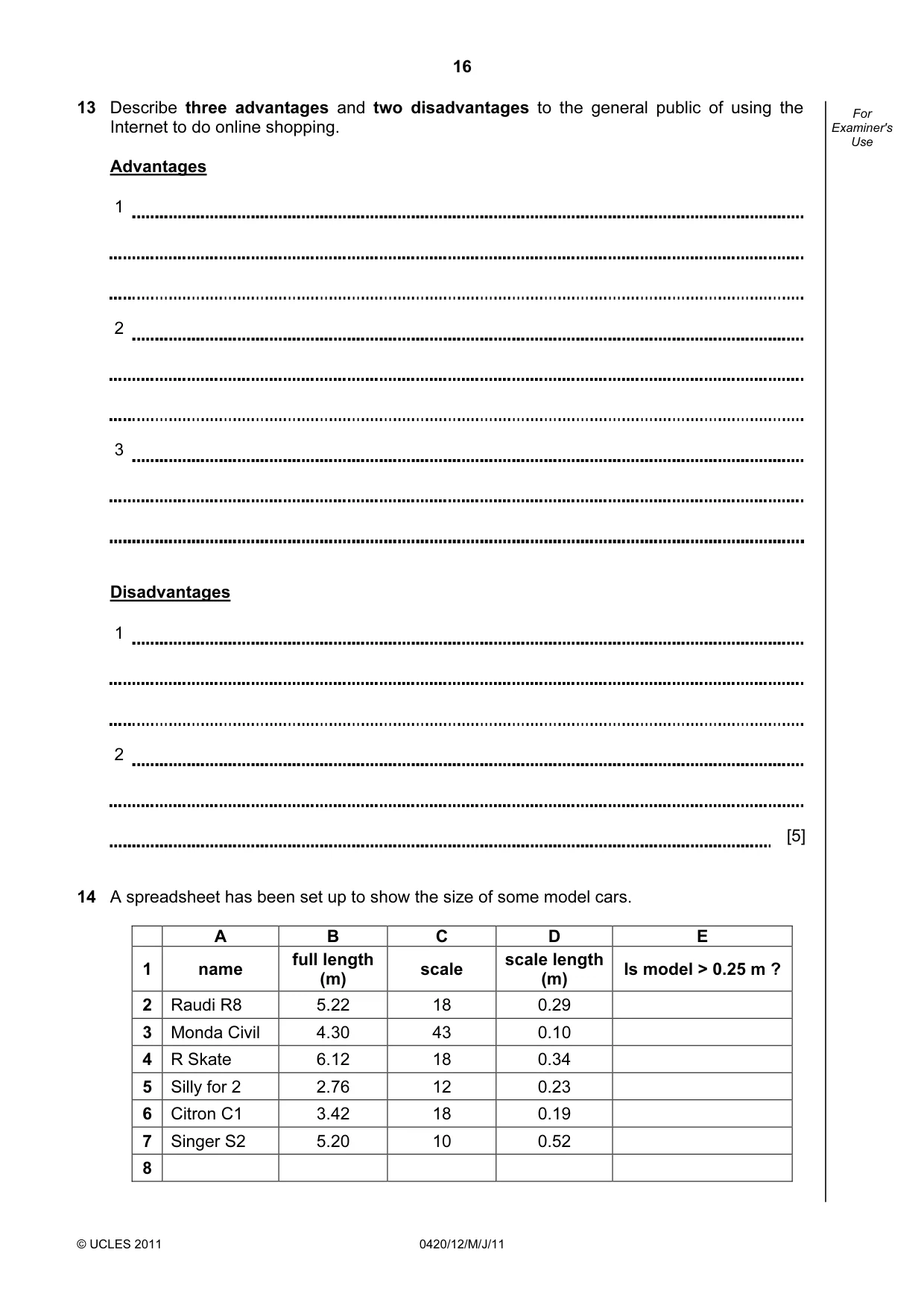
16 © UCLES 2011 0420/12/M/J/11 For Examiner's Use 13 Describe three advantages and two disadvantages to the general public of using the Internet to do online shopping. Advantages 1 2 3 Disadvantages 1 2 [5] 14 A spreadsheet has been set up to show the size of some model cars. A B C D E 1 name full length (m) scale scale length (m) Is model > 0.25 m ? 2 Raudi R8 5.22 18 0.29 3 Monda Civil 4.30 43 0.10 4 R Skate 6.12 18 0.34 5 Silly for 2 2.76 12 0.23 6 Citron C1 3.42 18 0.19 7 Singer S2 5.20 10 0.52 8
Question paper, page 17
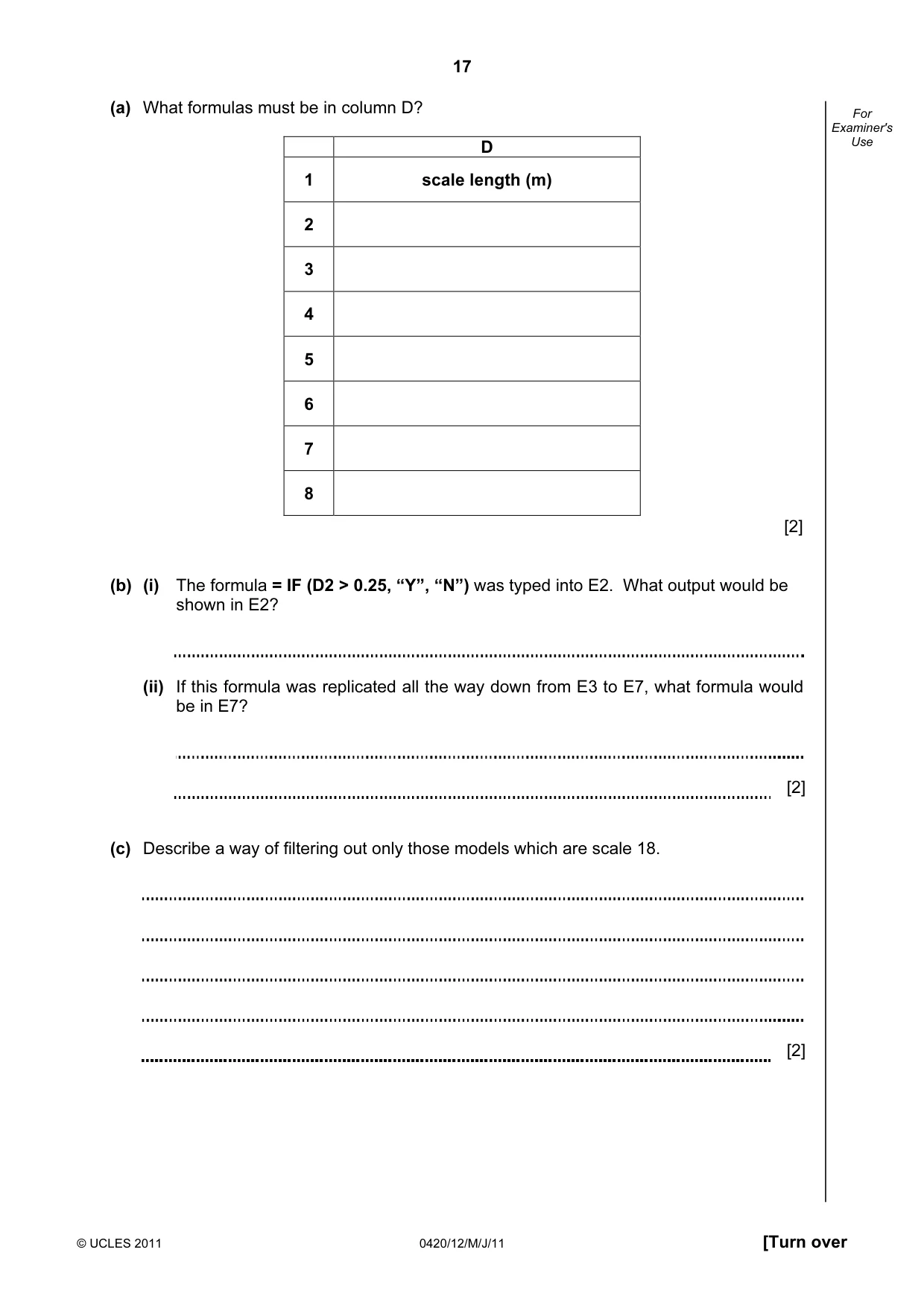
17 © UCLES 2011 0420/12/M/J/11 [Turn over For Examiner's Use (a) What formulas must be in column D? D 1 scale length (m) 2 3 4 5 6 7 8 [2] (b) (i) The formula = IF (D2 > 0.25, “Y”, “N”) was typed into E2. What output would be shown in E2? (ii) If this formula was replicated all the way down from E3 to E7, what formula would be in E7? [2] (c) Describe a way of filtering out only those models which are scale 18. [2]
Question paper, page 18
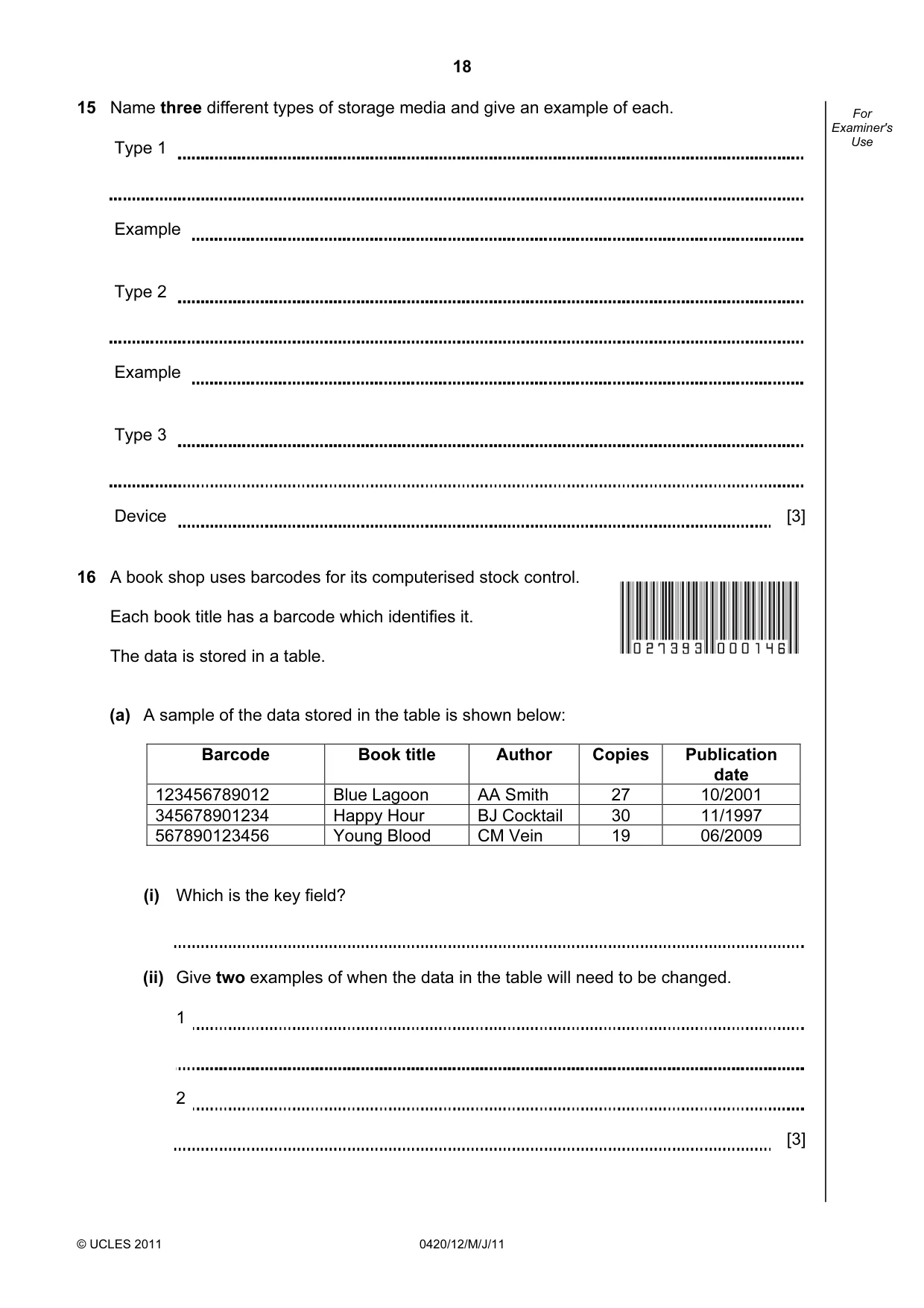
18 © UCLES 2011 0420/12/M/J/11 For Examiner's Use 15 Name three different types of storage media and give an example of each. Type 1 Example Type 2 Example Type 3 Device [3] 16 A book shop uses barcodes for its computerised stock control. Each book title has a barcode which identifies it. The data is stored in a table. (a) A sample of the data stored in the table is shown below: Barcode Book title Author Copies Publication date 123456789012 Blue Lagoon AA Smith 27 10/2001 345678901234 Happy Hour BJ Cocktail 30 11/1997 567890123456 Young Blood CM Vein 19 06/2009 (i) Which is the key field? (ii) Give two examples of when the data in the table will need to be changed. 1 2 [3]
Question paper, page 19
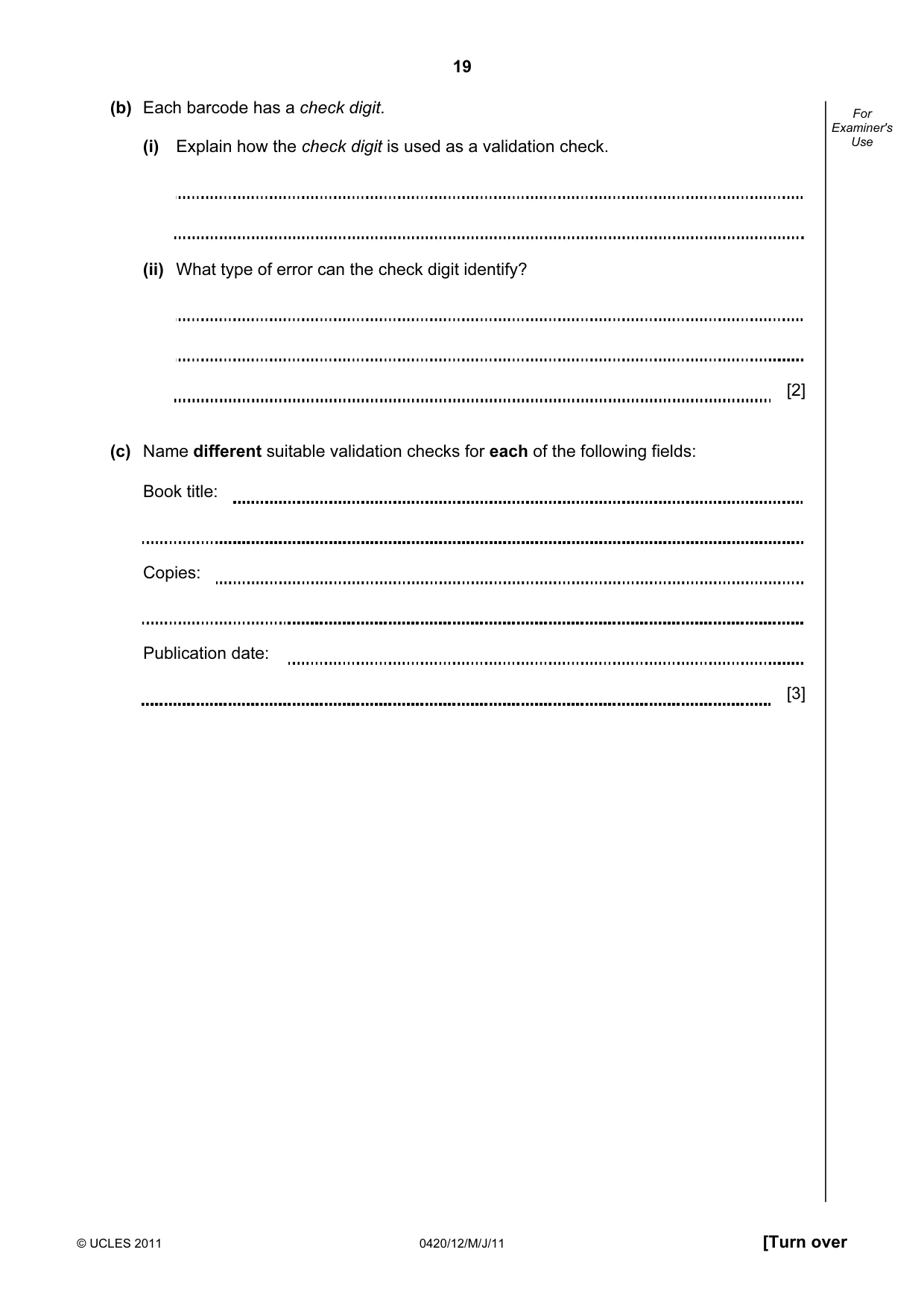
19 © UCLES 2011 0420/12/M/J/11 [Turn over For Examiner's Use (b) Each barcode has a check digit. (i) Explain how the check digit is used as a validation check. (ii) What type of error can the check digit identify? [2] (c) Name different suitable validation checks for each of the following fields: Book title: Copies: Publication date: [3]
Question paper, page 20
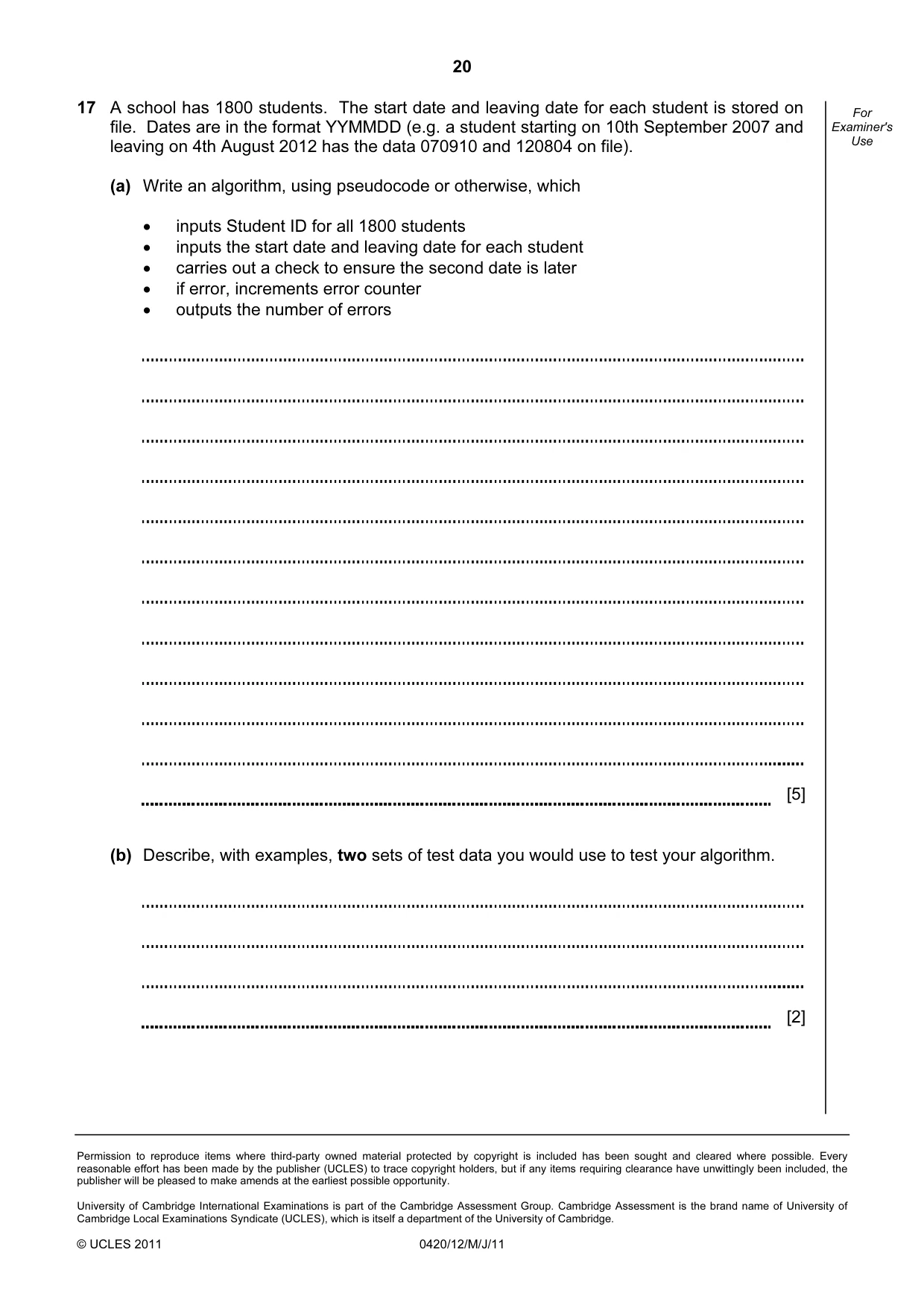
20 Permission to reproduce items where third-party owned material protected by copyright is included has been sought and cleared where possible. Every reasonable effort has been made by the publisher (UCLES) to trace copyright holders, but if any items requiring clearance have unwittingly been included, the publisher will be pleased to make amends at the earliest possible opportunity. University of Cambridge International Examinations is part of the Cambridge Assessment Group. Cambridge Assessment is the brand name of University of Cambridge Local Examinations Syndicate (UCLES), which is itself a department of the University of Cambridge. © UCLES 2011 0420/12/M/J/11 For Examiner's Use 17 A school has 1800 students. The start date and leaving date for each student is stored on file. Dates are in the format YYMMDD (e.g. a student starting on 10th September 2007 and leaving on 4th August 2012 has the data 070910 and 120804 on file). (a) Write an algorithm, using pseudocode or otherwise, which • inputs Student ID for all 1800 students • inputs the start date and leaving date for each student • carries out a check to ensure the second date is later • if error, increments error counter • outputs the number of errors [5] (b) Describe, with examples, two sets of test data you would use to test your algorithm. [2]
Mark scheme, page 1
UNIVERSITY OF CAMBRIDGE INTERNATIONAL EXAMINATIONS International General Certificate of Secondary Education MARK SCHEME for the May/June 2011 question paper for the guidance of teachers 0420 COMPUTER STUDIES 0420/12 Paper 1, maximum raw mark 100 This mark scheme is published as an aid to teachers and candidates, to indicate the requirements of the examination. It shows the basis on which Examiners were instructed to award marks. It does not indicate the details of the discussions that took place at an Examiners’ meeting before marking began, which would have considered the acceptability of alternative answers. Mark schemes must be read in conjunction with the question papers and the report on the examination. • Cambridge will not enter into discussions or correspondence in connection with these mark schemes. Cambridge is publishing the mark schemes for the May/June 2011 question papers for most IGCSE, GCE Advanced Level and Advanced Subsidiary Level syllabuses and some Ordinary Level syllabuses. www.XtremePapers.com
Mark scheme, page 2
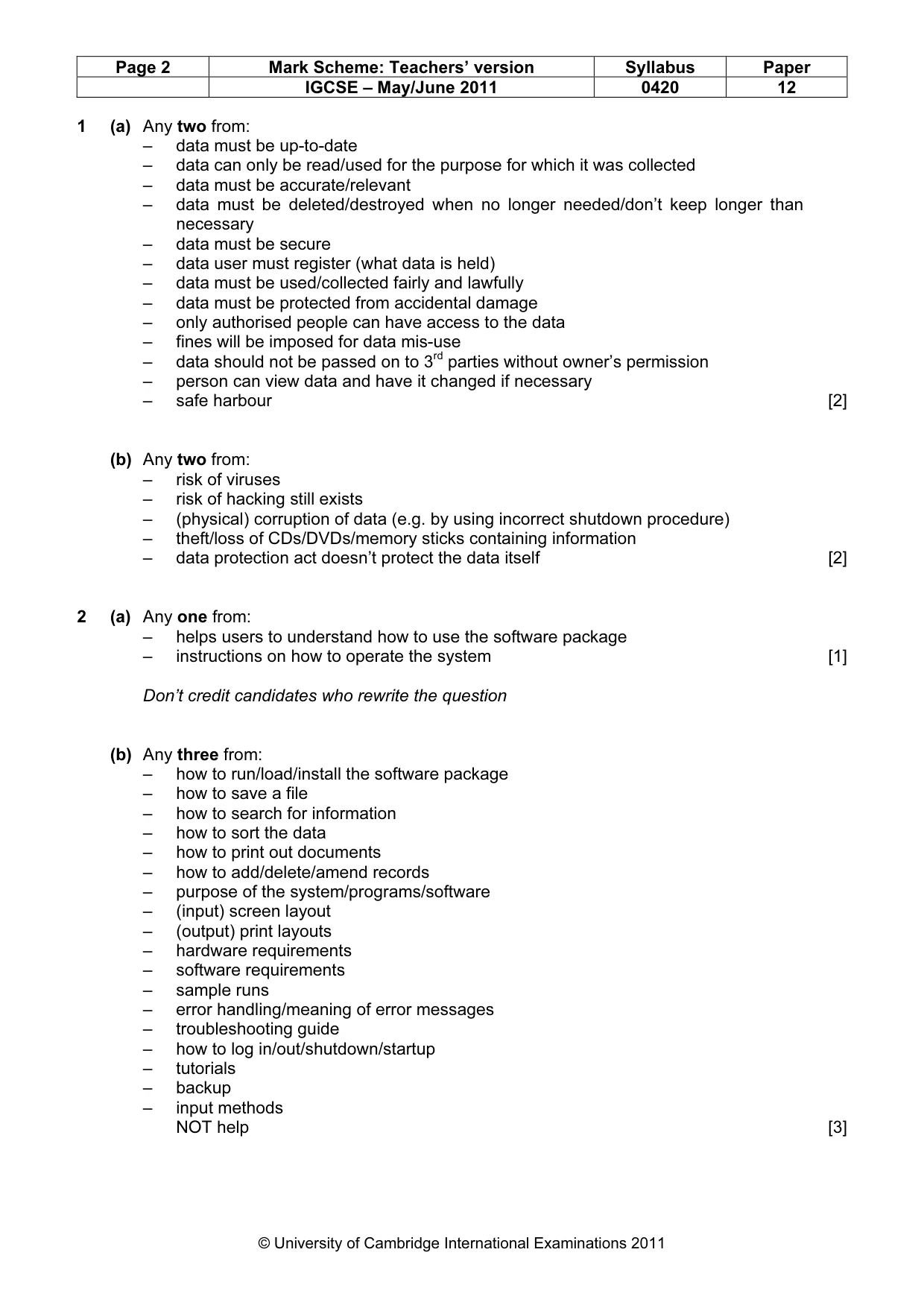
Page 2 Mark Scheme: Teachers’ version Syllabus Paper IGCSE – May/June 2011 0420 12 © University of Cambridge International Examinations 2011 1 (a) Any two from: – data must be up-to-date – data can only be read/used for the purpose for which it was collected – data must be accurate/relevant – data must be deleted/destroyed when no longer needed/don’t keep longer than necessary – data must be secure – data user must register (what data is held) – data must be used/collected fairly and lawfully – data must be protected from accidental damage – only authorised people can have access to the data – fines will be imposed for data mis-use – data should not be passed on to 3rd parties without owner’s permission – person can view data and have it changed if necessary – safe harbour [2] (b) Any two from: – risk of viruses – risk of hacking still exists – (physical) corruption of data (e.g. by using incorrect shutdown procedure) – theft/loss of CDs/DVDs/memory sticks containing information – data protection act doesn’t protect the data itself [2] 2 (a) Any one from: – helps users to understand how to use the software package – instructions on how to operate the system [1] Don’t credit candidates who rewrite the question (b) Any three from: – how to run/load/install the software package – how to save a file – how to search for information – how to sort the data – how to print out documents – how to add/delete/amend records – purpose of the system/programs/software – (input) screen layout – (output) print layouts – hardware requirements – software requirements – sample runs – error handling/meaning of error messages – troubleshooting guide – how to log in/out/shutdown/startup – tutorials – backup – input methods NOT help [3]
Mark scheme, page 3
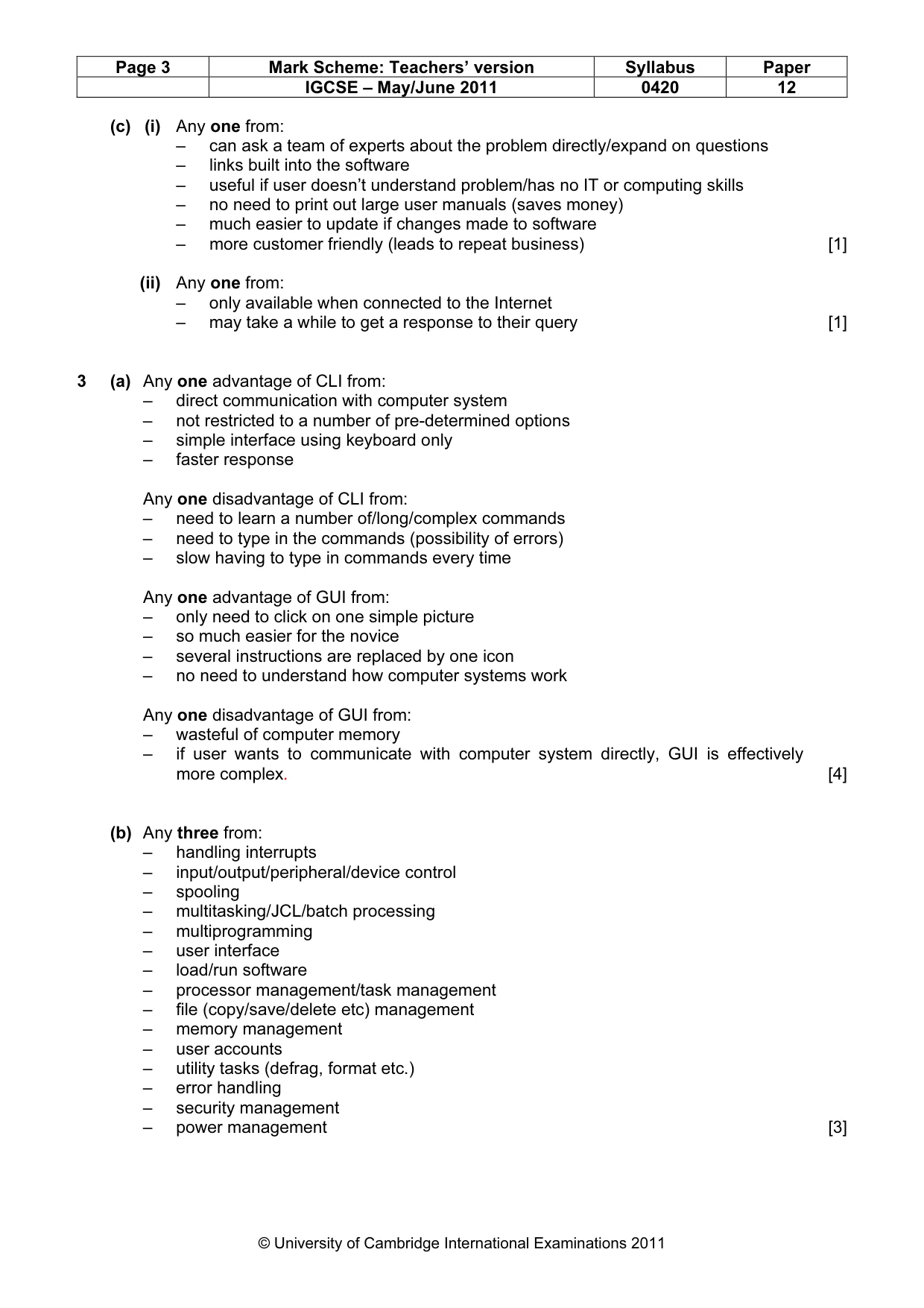
Page 3 Mark Scheme: Teachers’ version Syllabus Paper IGCSE – May/June 2011 0420 12 © University of Cambridge International Examinations 2011 (c) (i) Any one from: – can ask a team of experts about the problem directly/expand on questions – links built into the software – useful if user doesn’t understand problem/has no IT or computing skills – no need to print out large user manuals (saves money) – much easier to update if changes made to software – more customer friendly (leads to repeat business) [1] (ii) Any one from: – only available when connected to the Internet – may take a while to get a response to their query [1] 3 (a) Any one advantage of CLI from: – direct communication with computer system – not restricted to a number of pre-determined options – simple interface using keyboard only – faster response Any one disadvantage of CLI from: – need to learn a number of/long/complex commands – need to type in the commands (possibility of errors) – slow having to type in commands every time Any one advantage of GUI from: – only need to click on one simple picture – so much easier for the novice – several instructions are replaced by one icon – no need to understand how computer systems work Any one disadvantage of GUI from: – wasteful of computer memory – if user wants to communicate with computer system directly, GUI is effectively more complex. [4] (b) Any three from: – handling interrupts – input/output/peripheral/device control – spooling – multitasking/JCL/batch processing – multiprogramming – user interface – load/run software – processor management/task management – file (copy/save/delete etc) management – memory management – user accounts – utility tasks (defrag, format etc.) – error handling – security management – power management [3]
Mark scheme, page 4
Page 4 Mark Scheme: Teachers’ version Syllabus Paper IGCSE – May/June 2011 0420 12 © University of Cambridge International Examinations 2011 4 (a) Any two from: – access to undesirable websites – increased risk of hacking – greater volume of junk mail – theft of computer time by staff (using the internet instead of working e.g. downloading games) – increased risk of viruses and other security issues [2] (b) Any two from: – can set up specific information pages – can limit places where the intranet can be accessed – better security since network is internal/LAN – faster to find information since it is restricted to company info only No Internet based answers. [2] 5 Application Input Device Reason for choice of device Virtual reality application – data gloves – data goggles – sensor suits – allows user to interact with v/r system directly – system needs to get data directly from its surroundings Disabled person communicating with a computer system – microphone – head wand – large keyboard – allows blind person to dictate text directly to the computer – if little hand movement, allows user to select options from the screen – people with poor eye sight can use the keyboard to input text Automatic stock control system at a supermarket – bar code reader – RFID tag reader – automatically reads data – fewer data entry errors Information kiosk at an airport using a GUI interface – touch screen – trackerball – easier for the customers – reduces the number of possible options for the user – select options from a screen – immovable/more secure May see other devices .e.g. Kimball tag reader NOT mouse, NOT keyboard [8]
Mark scheme, page 5
Page 5 Mark Scheme: Teachers’ version Syllabus Paper IGCSE – May/June 2011 0420 12 © University of Cambridge International Examinations 2011 6 1 mark per correct link [5] 7 (a) 1 mark for each error identified + suggested correction line 5: this should read if x > h then h = x line 7: print h should come after the end of the repeat loop line 8: this should read until c = 20 or until c >= 20 or until c > 19 [3] (b) Any two from: – close to English – one statement is equal to many low-level language statements – portable – easy to edit/debug/update – problem oriented – needs converting to machine code before execution [2] (c) Any one from: – interpreter – runs line by line and locates errors as it runs – compiler – converts whole program into object code/gives complete list of errors [1] Data loss caused by hard disk head crash Hacking into files and changing or deleting data Introduction of software that self-replicates and can cause data loss Reading of illegally accessed documents Software that logs/records all key presses on your computer without you knowing Anti-virus software Encryption Anti–spyware software Make back-up files Use of passwords and a firewall
Mark scheme, page 6
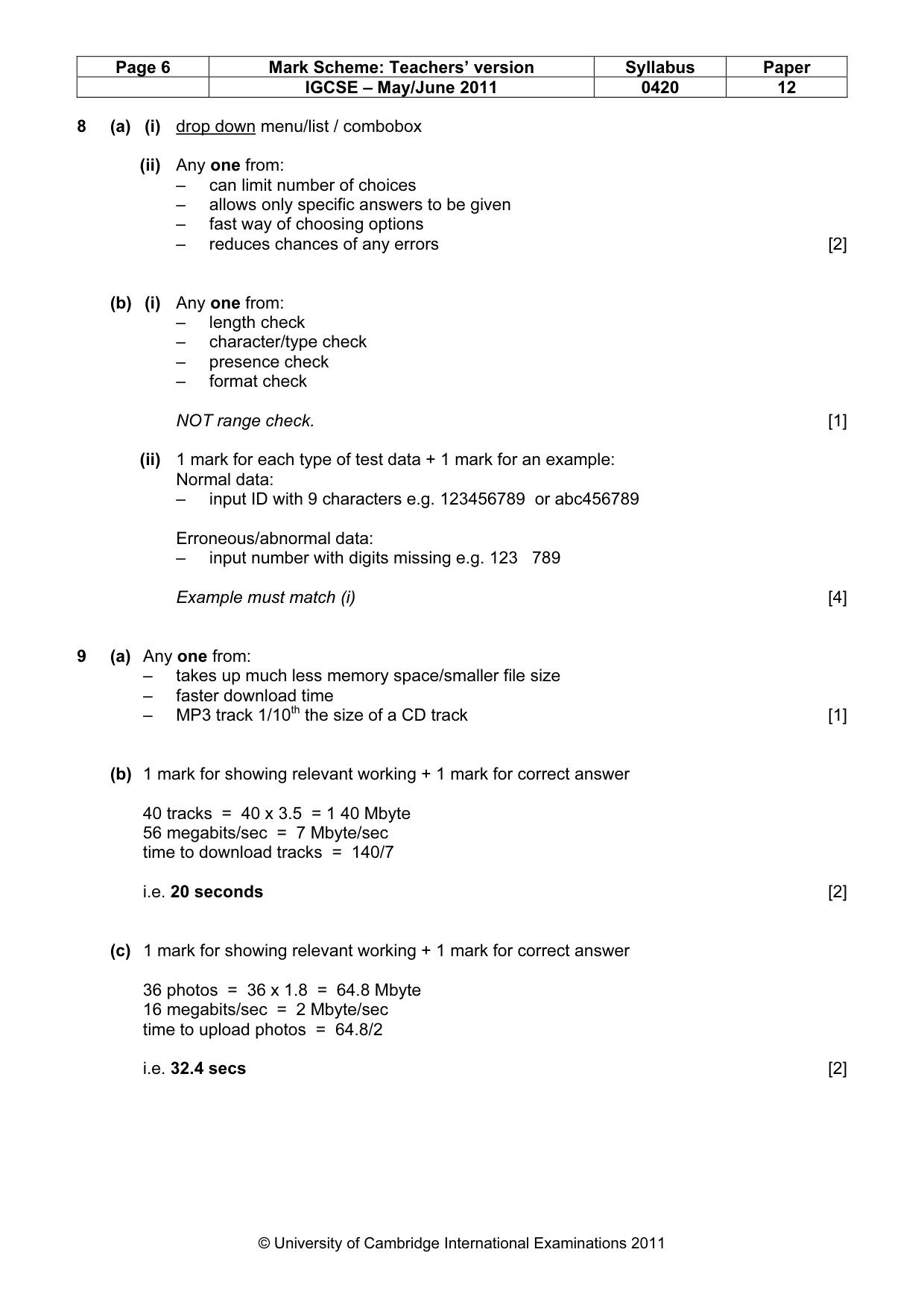
Page 6 Mark Scheme: Teachers’ version Syllabus Paper IGCSE – May/June 2011 0420 12 © University of Cambridge International Examinations 2011 8 (a) (i) drop down menu/list / combobox (ii) Any one from: – can limit number of choices – allows only specific answers to be given – fast way of choosing options – reduces chances of any errors [2] (b) (i) Any one from: – length check – character/type check – presence check – format check NOT range check. [1] (ii) 1 mark for each type of test data + 1 mark for an example: Normal data: – input ID with 9 characters e.g. 123456789 or abc456789 Erroneous/abnormal data: – input number with digits missing e.g. 123 789 Example must match (i) [4] 9 (a) Any one from: – takes up much less memory space/smaller file size – faster download time – MP3 track 1/10th the size of a CD track [1] (b) 1 mark for showing relevant working + 1 mark for correct answer 40 tracks = 40 x 3.5 = 1 40 Mbyte 56 megabits/sec = 7 Mbyte/sec time to download tracks = 140/7 i.e. 20 seconds [2] (c) 1 mark for showing relevant working + 1 mark for correct answer 36 photos = 36 x 1.8 = 64.8 Mbyte 16 megabits/sec = 2 Mbyte/sec time to upload photos = 64.8/2 i.e. 32.4 secs [2]
Mark scheme, page 7
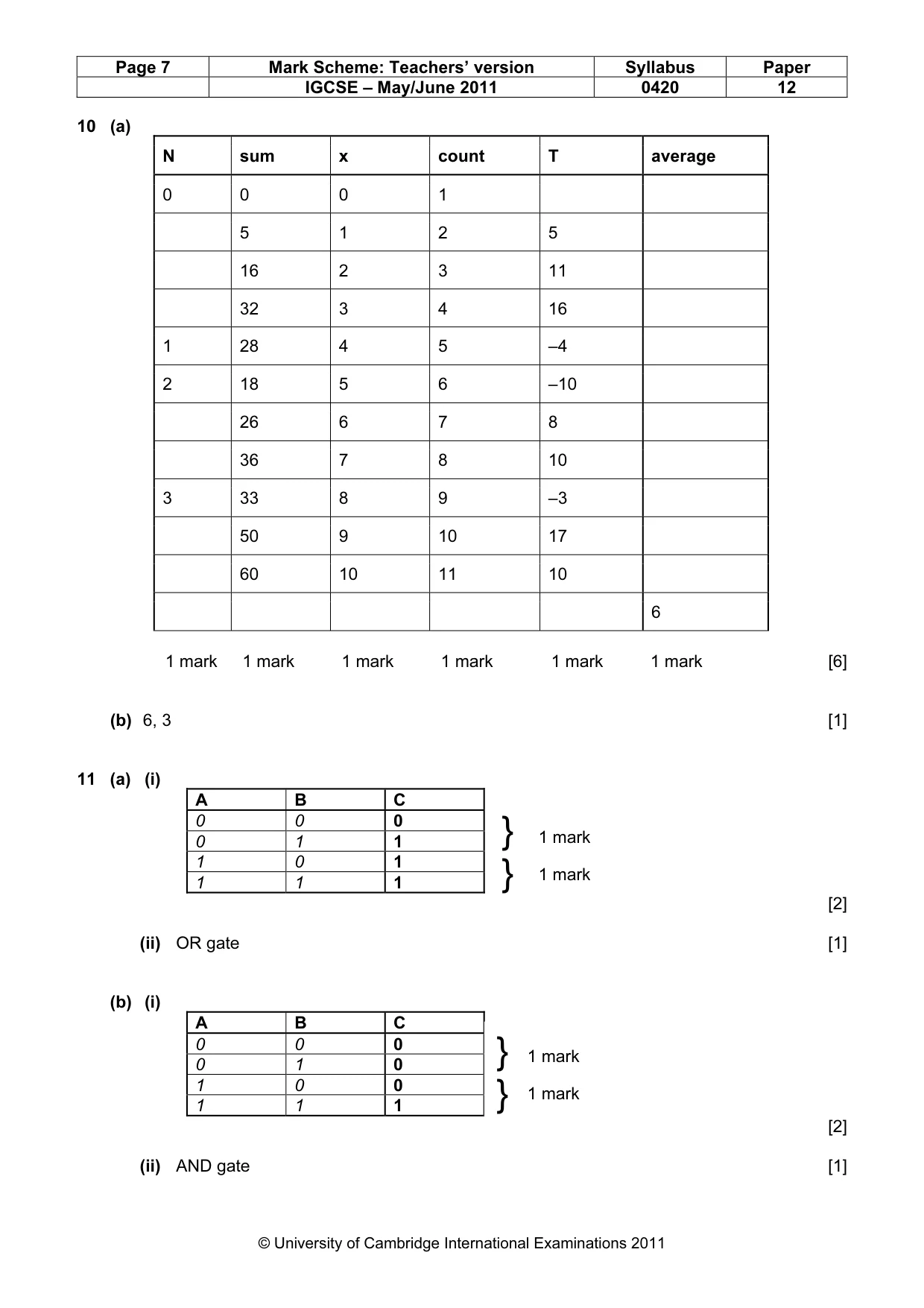
Page 7 Mark Scheme: Teachers’ version Syllabus Paper IGCSE – May/June 2011 0420 12 © University of Cambridge International Examinations 2011 10 (a) N sum x count T average 0 0 0 1 5 1 2 5 16 2 3 11 32 3 4 16 1 28 4 5 –4 2 18 5 6 –10 26 6 7 8 36 7 8 10 3 33 8 9 –3 50 9 10 17 60 10 11 10 6 1 mark 1 mark 1 mark 1 mark 1 mark 1 mark [6] (b) 6, 3 [1] 11 (a) (i) A B C 0 0 0 0 1 1 1 0 1 1 1 1 [2] (ii) OR gate [1] (b) (i) A B C 0 0 0 0 1 0 1 0 0 1 1 1 [2] (ii) AND gate [1] } } 1 mark 1 mark } } 1 mark 1 mark
Mark scheme, page 8
Page 8 Mark Scheme: Teachers’ version Syllabus Paper IGCSE – May/June 2011 0420 12 © University of Cambridge International Examinations 2011 12 (a) Any three from: – sensors detect magnets – send signals to the computer – signals changed to digital using ADC – computer checks all previous positions ... – ... which are stored in memory/on file – and determines which piece has moved [3] (b) Any two from: – legal/acceptable moves stored in memory/on file – computer can calculate which squares the piece is allowed to move to – computer tracks each move made by each piece – compare actual move with permissible move [2] (c) – expert system/Artificial Intelligence [1] 13 Any three advantages from: – can shop 24–7/in own time – worldwide therefore greater choice – no need to waste money on travelling to shops – no need to waste time travelling – disabled/elderly people don’t have to leave their homes – cost savings often passed on to customer – can look for “best value” in a short time – less pollution since fewer car journeys Any two disadvantages from: – shops close down in cities/unemployment/”ghost towns” – increased risk of fraud/hacking – less social interaction between people – can’t see the goods first – goods may not arrive/”bogus” web sites – environmental issues/wasted packaging – “ties up” the phone line if broadband not available – increase in phone bills [5] 14 (a) 1 mark for correct formula in D2 and 1 mark for correct replication D 1 scale length (m) 2 = B2/C2 3 = B3/C3 4 = B4/C4 5 = B5/C5 6 = B6/C6 7 = B7/C7 8 [2] (b) (i) Y [1] (ii) = IF (D7 > 0.25, “Y”, “N”) [1]
Mark scheme, page 9
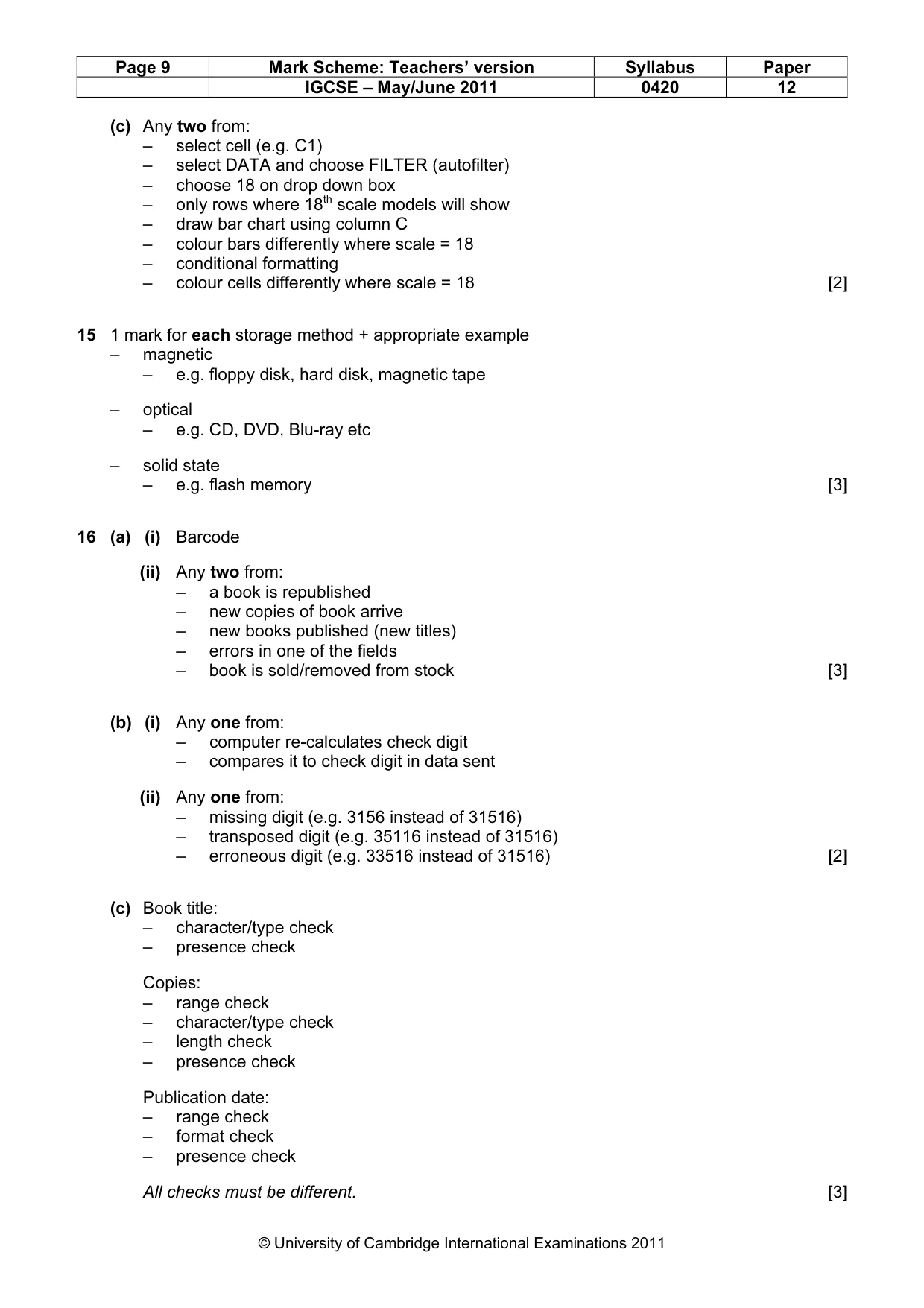
Page 9 Mark Scheme: Teachers’ version Syllabus Paper IGCSE – May/June 2011 0420 12 © University of Cambridge International Examinations 2011 (c) Any two from: – select cell (e.g. C1) – select DATA and choose FILTER (autofilter) – choose 18 on drop down box – only rows where 18th scale models will show – draw bar chart using column C – colour bars differently where scale = 18 – conditional formatting – colour cells differently where scale = 18 [2] 15 1 mark for each storage method + appropriate example – magnetic – e.g. floppy disk, hard disk, magnetic tape – optical – e.g. CD, DVD, Blu-ray etc – solid state – e.g. flash memory [3] 16 (a) (i) Barcode (ii) Any two from: – a book is republished – new copies of book arrive – new books published (new titles) – errors in one of the fields – book is sold/removed from stock [3] (b) (i) Any one from: – computer re-calculates check digit – compares it to check digit in data sent (ii) Any one from: – missing digit (e.g. 3156 instead of 31516) – transposed digit (e.g. 35116 instead of 31516) – erroneous digit (e.g. 33516 instead of 31516) [2] (c) Book title: – character/type check – presence check Copies: – range check – character/type check – length check – presence check Publication date: – range check – format check – presence check All checks must be different. [3]
Mark scheme, page 10
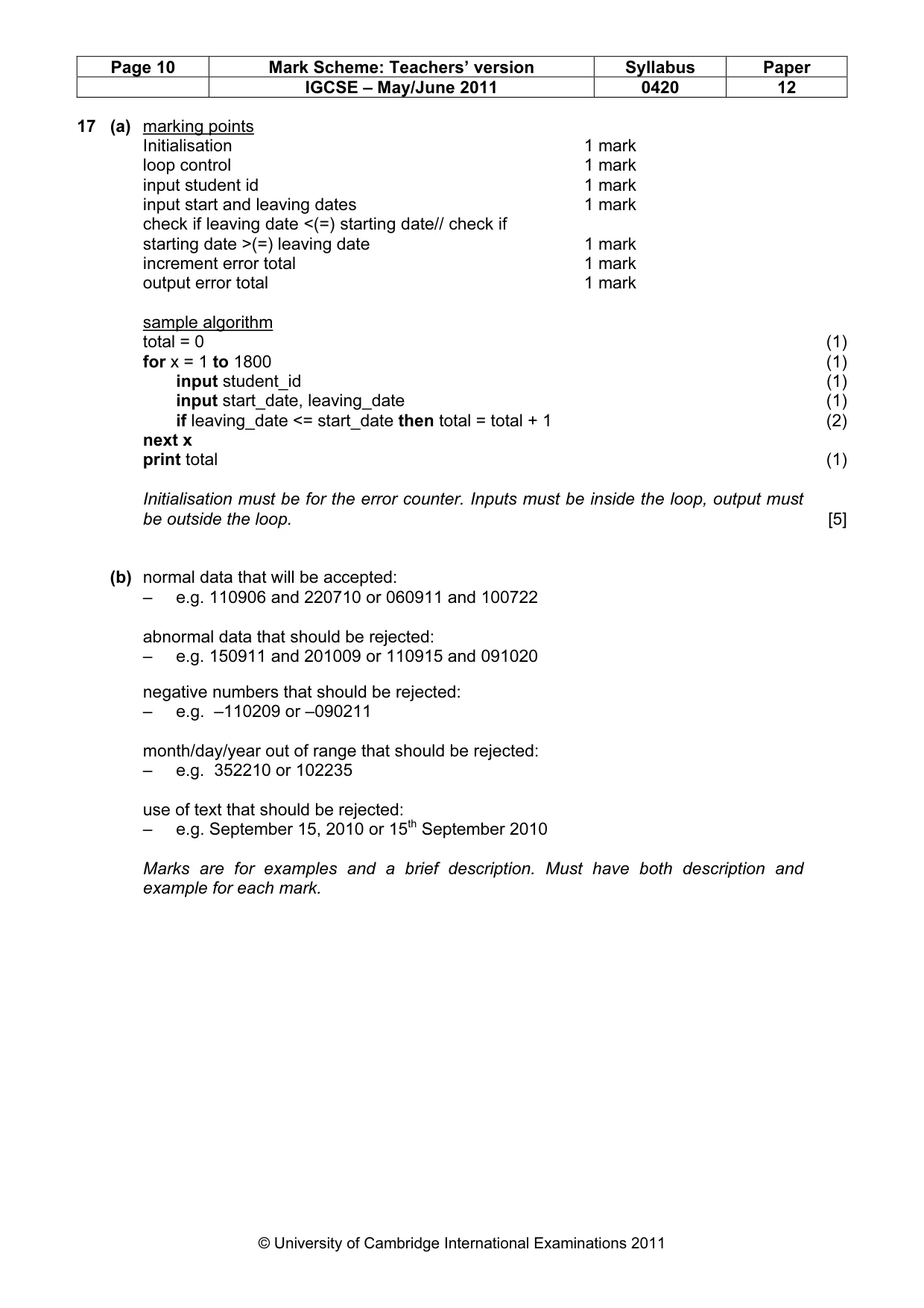
Page 10 Mark Scheme: Teachers’ version Syllabus Paper IGCSE – May/June 2011 0420 12 © University of Cambridge International Examinations 2011 17 (a) marking points Initialisation 1 mark loop control 1 mark input student id 1 mark input start and leaving dates 1 mark check if leaving date <(=) starting date// check if starting date >(=) leaving date 1 mark increment error total 1 mark output error total 1 mark sample algorithm total = 0 (1) for x = 1 to 1800 (1) input student_id (1) input start_date, leaving_date (1) if leaving_date <= start_date then total = total + 1 (2) next x print total (1) Initialisation must be for the error counter. Inputs must be inside the loop, output must be outside the loop. [5] (b) normal data that will be accepted: – e.g. 110906 and 220710 or 060911 and 100722 abnormal data that should be rejected: – e.g. 150911 and 201009 or 110915 and 091020 negative numbers that should be rejected: – e.g. –110209 or –090211 month/day/year out of range that should be rejected: – e.g. 352210 or 102235 use of text that should be rejected: – e.g. September 15, 2010 or 15th September 2010 Marks are for examples and a brief description. Must have both description and example for each mark.
What you needed in this session
Cambridge’s own grade thresholds for 2011 May/June, Paper 1 · Variant 2. A higher threshold means an easier paper — the bar moves with how the cohort did.