Cambridge IGCSE Computer Studies 0420 — 2009 Oct/Nov Paper 1 · Variant 1
0420/11/O/N/09 · 100 marks · ≈113 min
The question paper and its mark scheme, free to read here and free to download. This is Cambridge’s own paper, exactly as it was sat.
Question paper20 pages






Mark scheme10 pages
Answers below. Sit the paper first if you are practising.
Paper as text
Question paper, page 1
For Examiner's Use This document consists of 20 printed pages. IB09 11_0420_01/3RP © UCLES 2009 [Turn over *7983207402* UNIVERSITY OF CAMBRIDGE INTERNATIONAL EXAMINATIONS International General Certificate of Secondary Education COMPUTER STUDIES 0420/01 Paper 1 October/November 2009 2 hours 30 minutes Candidates answer on the Question Paper. No Additional Materials are required. READ THESE INSTRUCTIONS FIRST Write your Centre number, candidate number and name on all the work you hand in. Write in dark blue or black pen. You may use a soft pencil for any diagrams, graphs or rough working. Do not use staples, paper clips, highlighters, glue or correction fluid. DO NOT WRITE IN ANY BARCODES. Answer all questions. No marks will be awarded for using brand names of software packages or hardware. At the end of the examination, fasten all your work securely together. The number of marks is given in brackets [ ] at the end of each question or part question. www.XtremePapers.com
Question paper, page 2
2 © UCLES 2009 0420/01/O/N/09 For Examiner's Use 1 Explain, using examples where appropriate, the meaning of these computer terms. (a) interrupt [2] (b) icon [2] (c) ROM [2] (d) buffer [2] (e) validation [2]
Question paper, page 3
3 © UCLES 2009 0420/01/O/N/09 [Turn over For Examiner's Use 2 Give two advantages of using high level languages when writing new computer software rather than using low level languages. 1 2 [2] 3 A school decides to allow internet access on all its networked computers. (a) Describe two problems this could create and how the system could be protected against these problems. Problem 1 Protection 1 Problem 2 Protection 2 [4] (b) Student records are stored on a computer. This is linked to the network to allow teachers to access information from anywhere on the school site. (i) How is it possible to prevent unauthorised access to student records? (ii) Each student record is approximately 5 megabytes. Suggest a possible back up device to store the student records. [2]
Question paper, page 4
4 © UCLES 2009 0420/01/O/N/09 For Examiner's Use 4 A fashion company wants to produce a catalogue advertising their latest clothes. Describe two ways they could obtain images of clothes and use them in their catalogue. 1 2 [4] 5 Name two methods of implementing a new computer system. Give one advantage and one disadvantage of each method chosen. Method 1 Advantage Disadvantage Method 2 Advantage Disadvantage [4]
Question paper, page 5
5 © UCLES 2009 0420/01/O/N/09 [Turn over For Examiner's Use 6 As well as being a valuable source of information, the internet has also enabled users to save money through a number of online services. Give two different examples of services that have allowed users to save money and describe how the internet has made these savings possible. Example 1 Reason Example 2 Reason [4]
Question paper, page 6
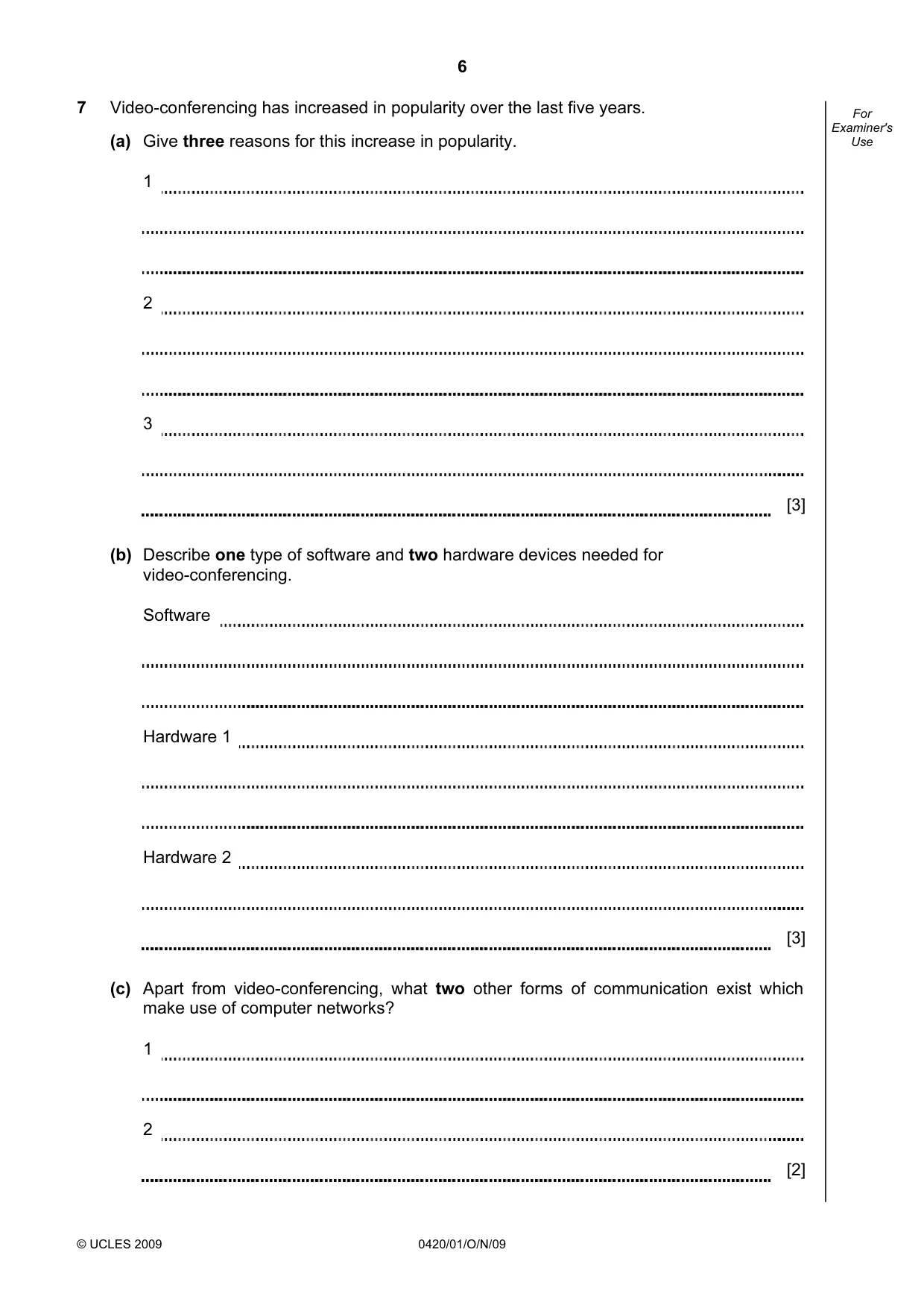
6 © UCLES 2009 0420/01/O/N/09 For Examiner's Use 7 Video-conferencing has increased in popularity over the last five years. (a) Give three reasons for this increase in popularity. 1 2 3 [3] (b) Describe one type of software and two hardware devices needed for video-conferencing. Software Hardware 1 Hardware 2 [3] (c) Apart from video-conferencing, what two other forms of communication exist which make use of computer networks? 1 2 [2]
Question paper, page 7
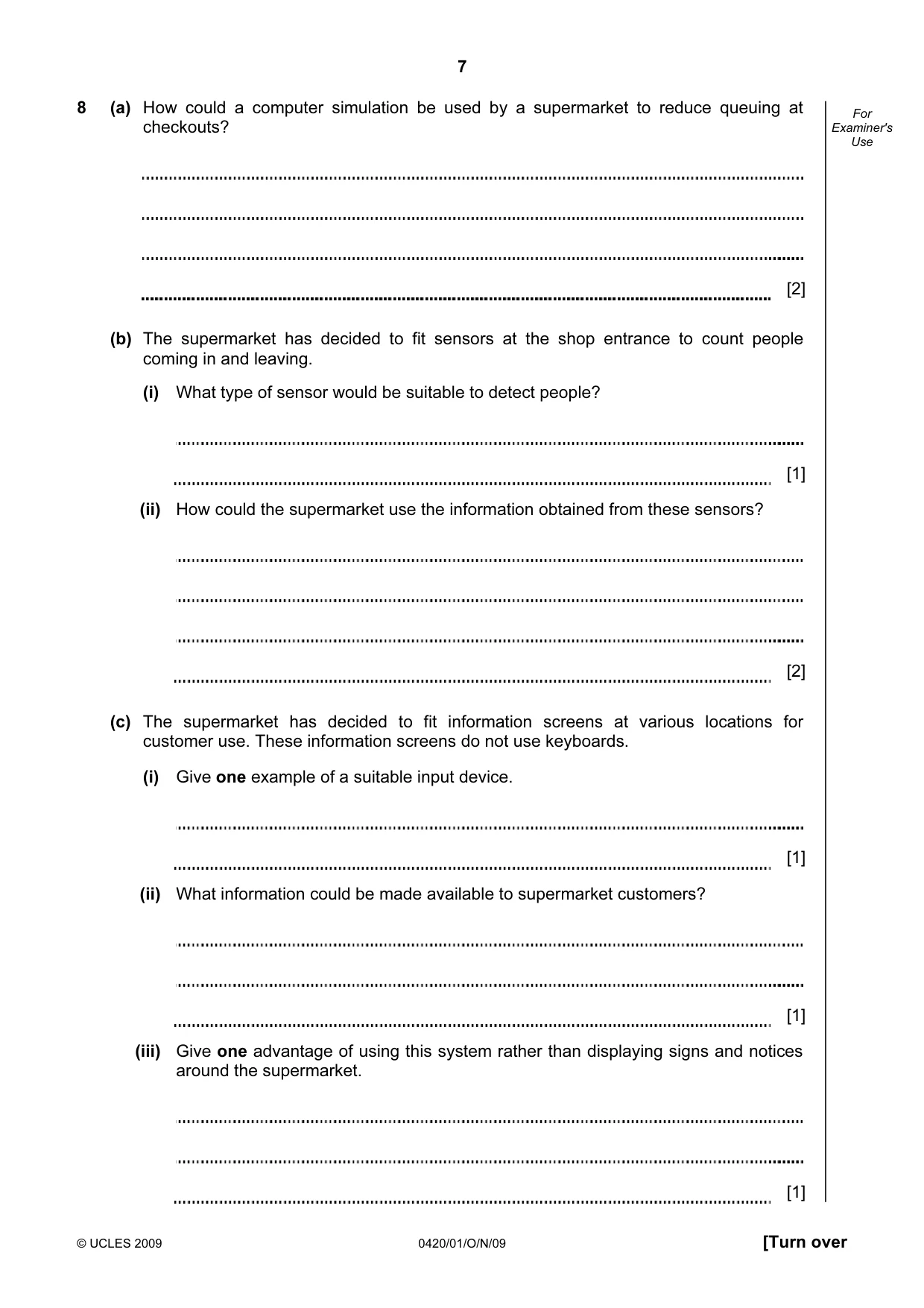
7 © UCLES 2009 0420/01/O/N/09 [Turn over For Examiner's Use 8 (a) How could a computer simulation be used by a supermarket to reduce queuing at checkouts? [2] (b) The supermarket has decided to fit sensors at the shop entrance to count people coming in and leaving. (i) What type of sensor would be suitable to detect people? [1] (ii) How could the supermarket use the information obtained from these sensors? [2] (c) The supermarket has decided to fit information screens at various locations for customer use. These information screens do not use keyboards. (i) Give one example of a suitable input device. [1] (ii) What information could be made available to supermarket customers? [1] (iii) Give one advantage of using this system rather than displaying signs and notices around the supermarket. [1]
Question paper, page 8
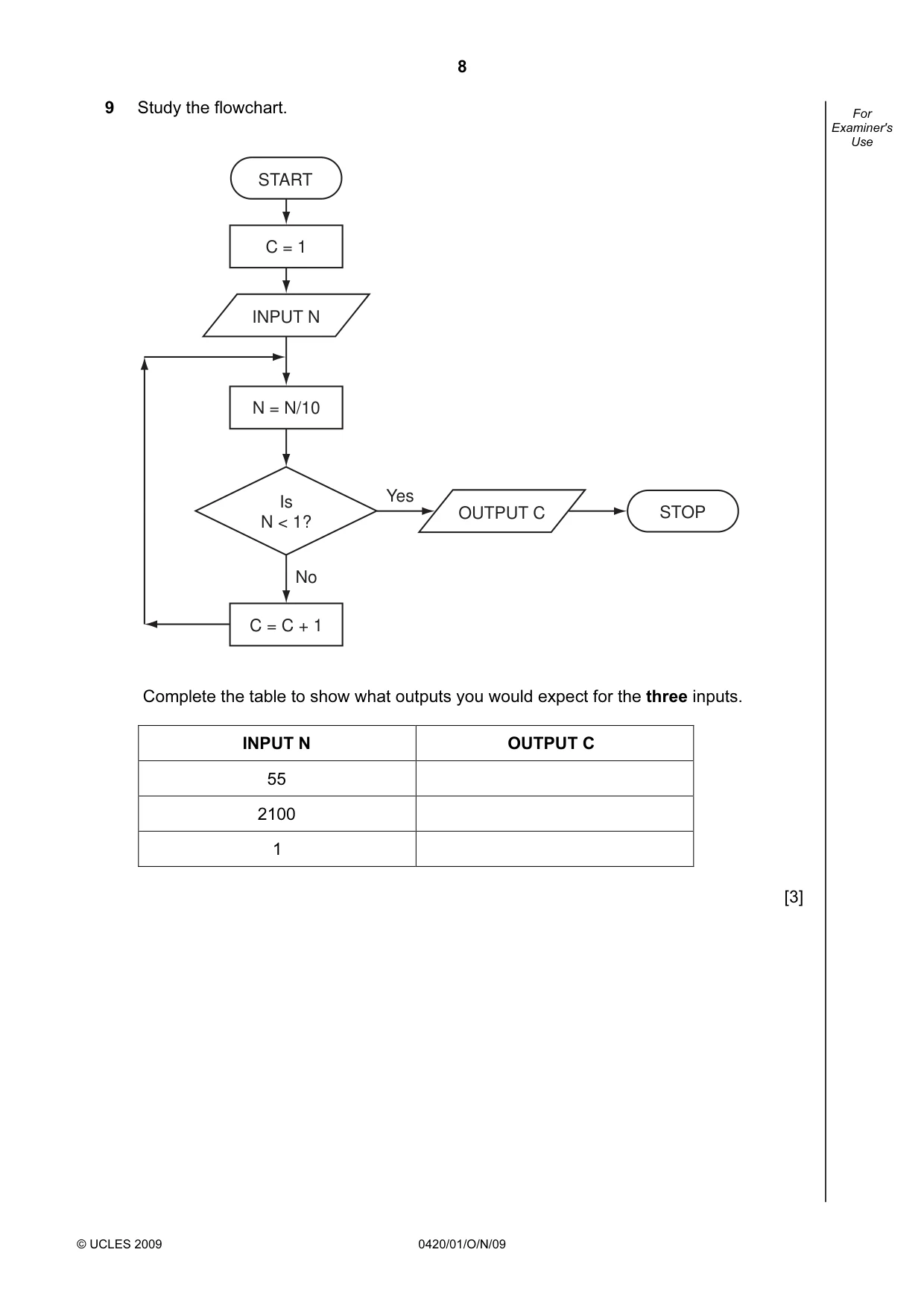
8 © UCLES 2009 0420/01/O/N/09 For Examiner's Use 9 Study the flowchart. START STOP C = 1 INPUT N C = C + 1 N = N/10 Is N < 1? OUTPUT C No Yes Complete the table to show what outputs you would expect for the three inputs. INPUT N OUTPUT C 55 2100 1 [3]
Question paper, page 9
9 © UCLES 2009 0420/01/O/N/09 [Turn over For Examiner's Use 10 Houses for sale can be viewed using a Virtual Reality Tour. This takes you round the house in three dimensions (3D) on a computer screen “as if you were there in person”. (a) Give two advantages of Virtual Reality Tours. 1 2 [2] (b) How are the house images created for the Virtual Reality Tour? [2] (c) What two changes in technology have allowed Virtual Reality Tours to become possible? 1 2 [2] (d) Describe a typical tool on a Virtual Reality Tour web page. [1] (e) Give another application of Virtual Reality Tours. [1]
Question paper, page 10
10 © UCLES 2009 0420/01/O/N/09 For Examiner's Use 11 A spreadsheet has been set up to store results of football matches for 12 teams. Halfway through the year the results were: (a) What formula is in cell E4 to calculate the Number of Points for United? [1] (b) Goal Difference = (Goals For – Goals Against). What formula is in cell H4 to find Goal Difference for United? [1] A B C D E F G H I 1 2 Team Name Won (3 points) Drawn (1 point) Lost (0 points) Number of Points Goals For Goals Against Goal Difference Matches Played 3 4 United 7 2 2 23 16 4 12 11 5 City 7 2 2 23 21 10 11 11 6 Town 6 1 4 19 16 10 6 11 7 Academics 4 6 1 18 12 9 3 11 8 Rovers 4 4 3 16 16 14 2 11 9 Runaways 3 5 3 14 10 12 -2 11 10 Yorkers 3 5 3 14 10 14 -4 11 11 Albion 3 3 5 12 14 15 -1 11 12 Knights 4 0 7 12 10 18 -8 11 13 Sporting 2 5 4 11 10 12 -2 11 14 Nohopers 2 3 6 9 8 16 -8 11 15 Jokers 2 2 7 8 6 14 -8 11
Question paper, page 11
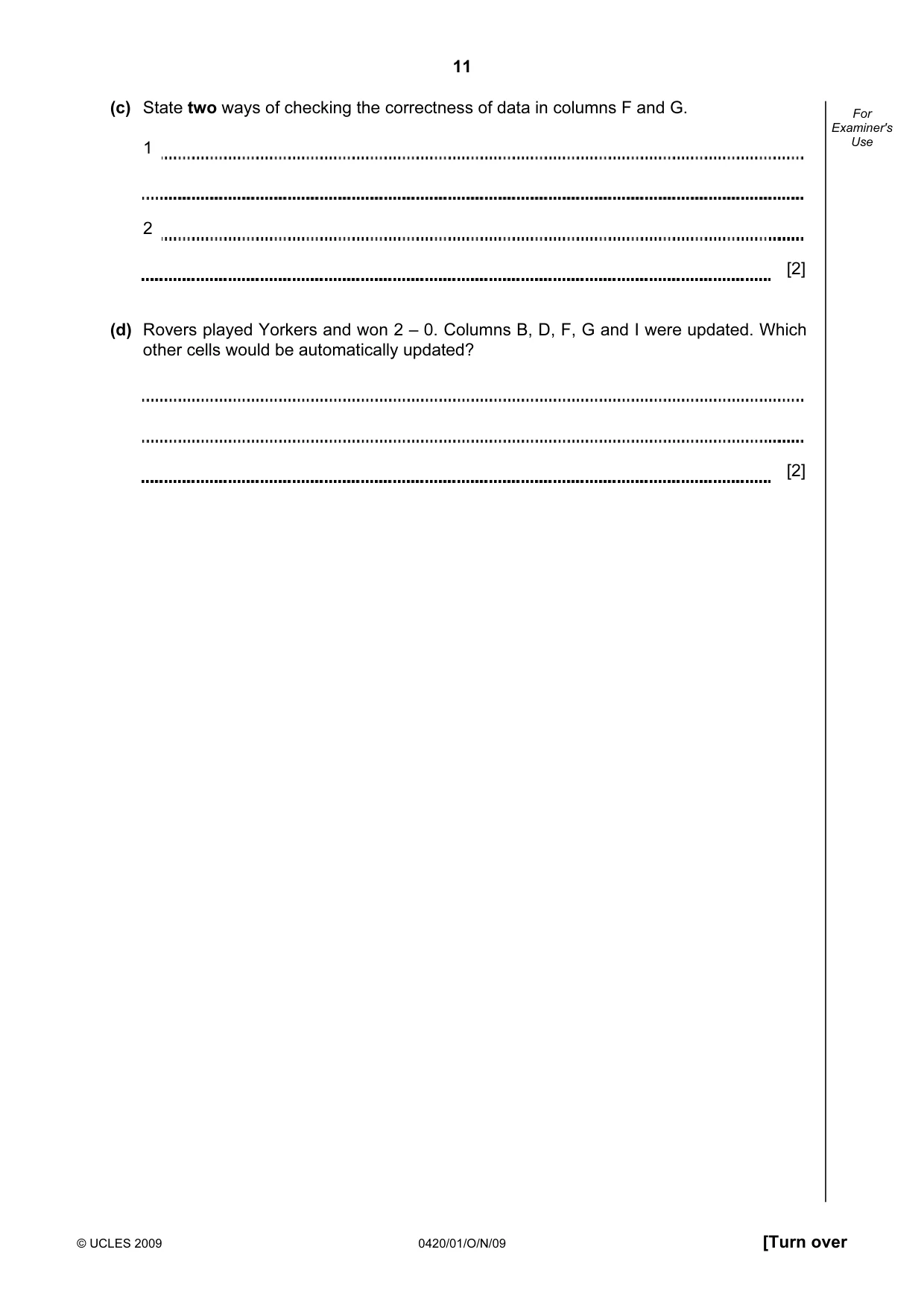
11 © UCLES 2009 0420/01/O/N/09 [Turn over For Examiner's Use (c) State two ways of checking the correctness of data in columns F and G. 1 2 [2] (d) Rovers played Yorkers and won 2 – 0. Columns B, D, F, G and I were updated. Which other cells would be automatically updated? [2]
Question paper, page 12
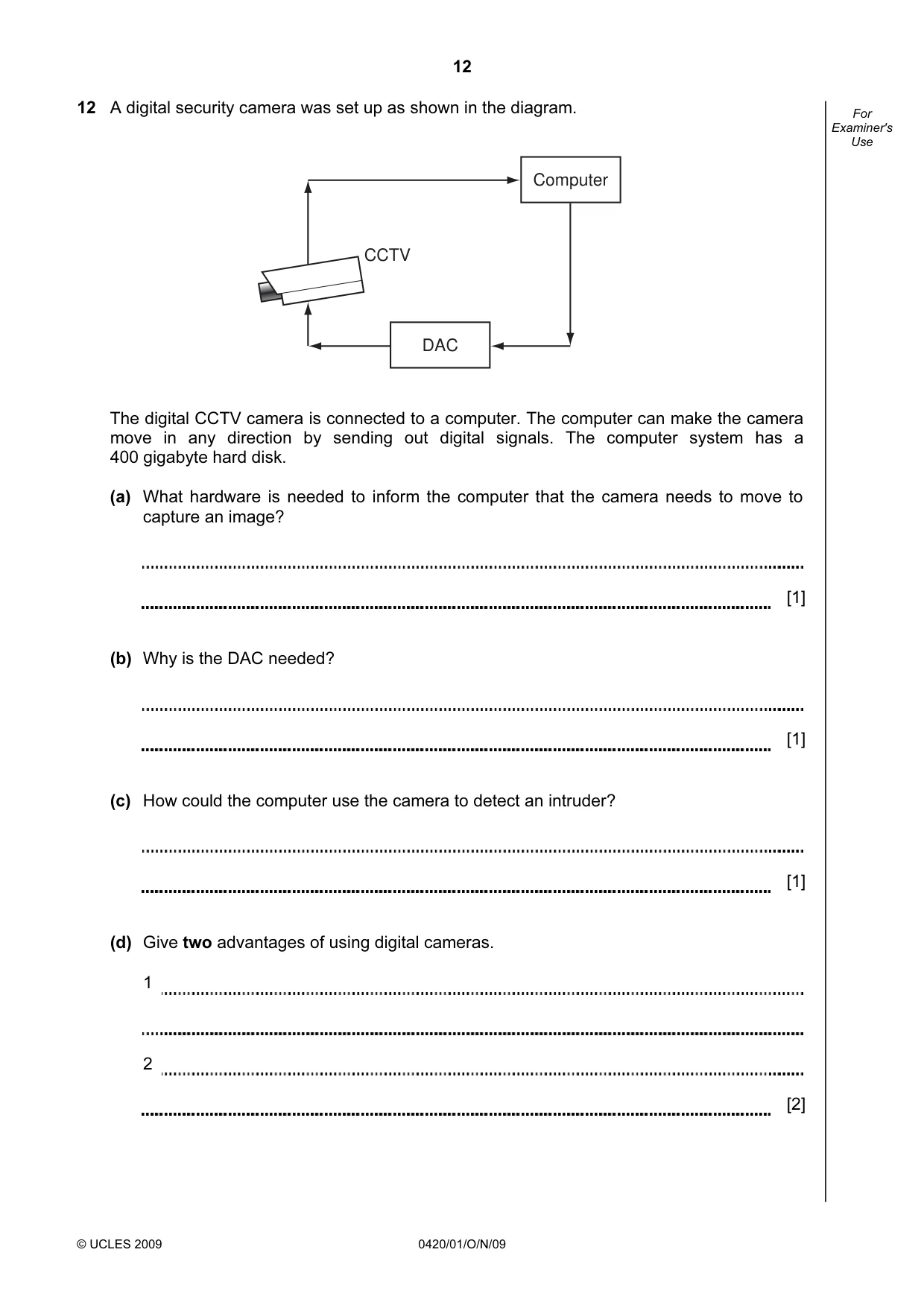
12 © UCLES 2009 0420/01/O/N/09 For Examiner's Use 12 A digital security camera was set up as shown in the diagram. Computer DAC CCTV The digital CCTV camera is connected to a computer. The computer can make the camera move in any direction by sending out digital signals. The computer system has a 400 gigabyte hard disk. (a) What hardware is needed to inform the computer that the camera needs to move to capture an image? [1] (b) Why is the DAC needed? [1] (c) How could the computer use the camera to detect an intruder? [1] (d) Give two advantages of using digital cameras. 1 2 [2]
Question paper, page 13
13 © UCLES 2009 0420/01/O/N/09 [Turn over For Examiner's Use (e) Each image size is 400 kilobytes (0.4 gigabytes). (i) How many images can be stored before the hard disk is full? [1] (ii) Once the hard disk is full, how can the system ensure that the stored images are not lost and new images can be stored? [1]
Question paper, page 14
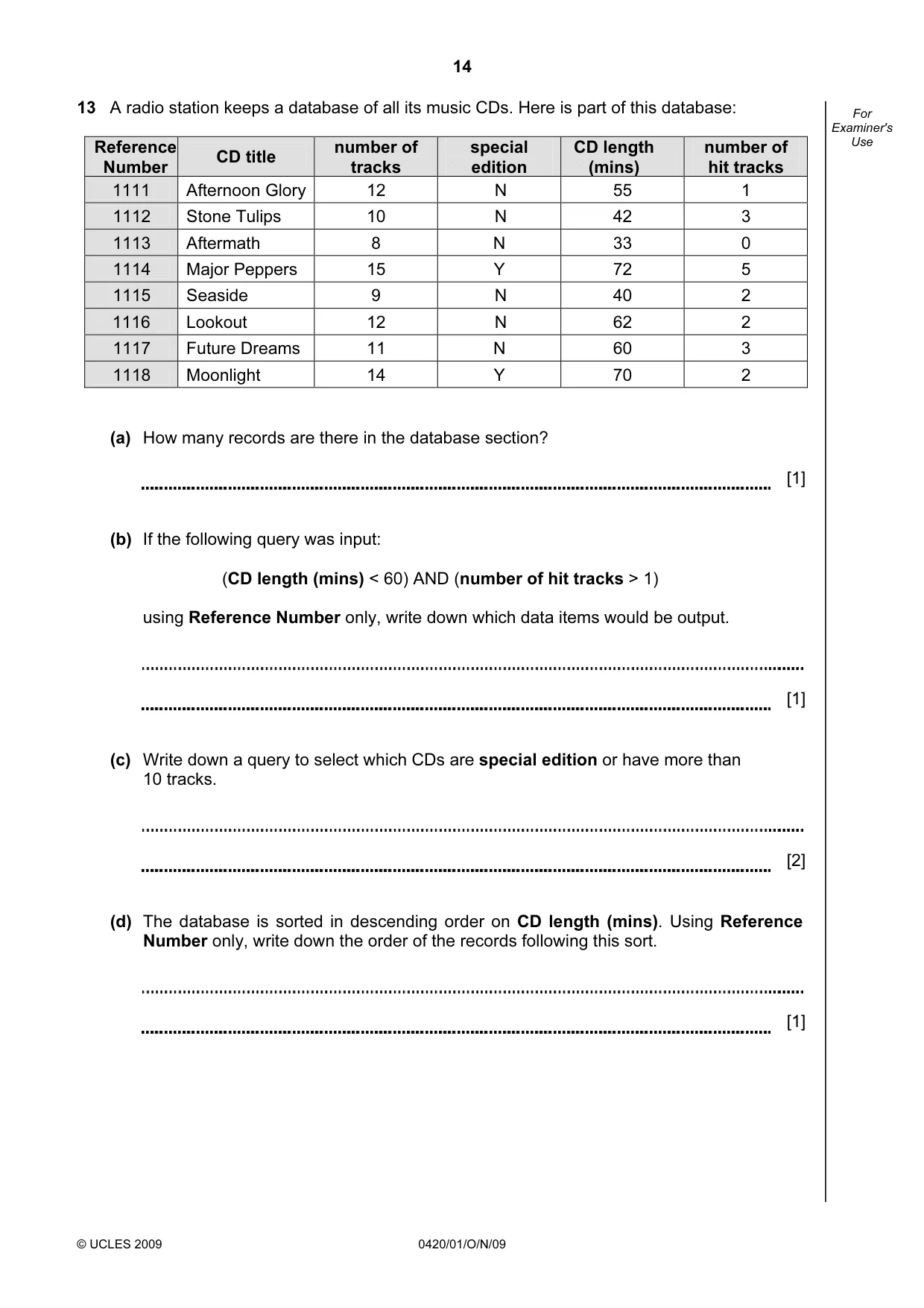
14 © UCLES 2009 0420/01/O/N/09 For Examiner's Use 13 A radio station keeps a database of all its music CDs. Here is part of this database: Reference Number CD title number of tracks special edition CD length (mins) number of hit tracks 1111 Afternoon Glory 12 N 55 1 1112 Stone Tulips 10 N 42 3 1113 Aftermath 8 N 33 0 1114 Major Peppers 15 Y 72 5 1115 Seaside 9 N 40 2 1116 Lookout 12 N 62 2 1117 Future Dreams 11 N 60 3 1118 Moonlight 14 Y 70 2 (a) How many records are there in the database section? [1] (b) If the following query was input: (CD length (mins) < 60) AND (number of hit tracks > 1) using Reference Number only, write down which data items would be output. [1] (c) Write down a query to select which CDs are special edition or have more than 10 tracks. [2] (d) The database is sorted in descending order on CD length (mins). Using Reference Number only, write down the order of the records following this sort. [1]
Question paper, page 15
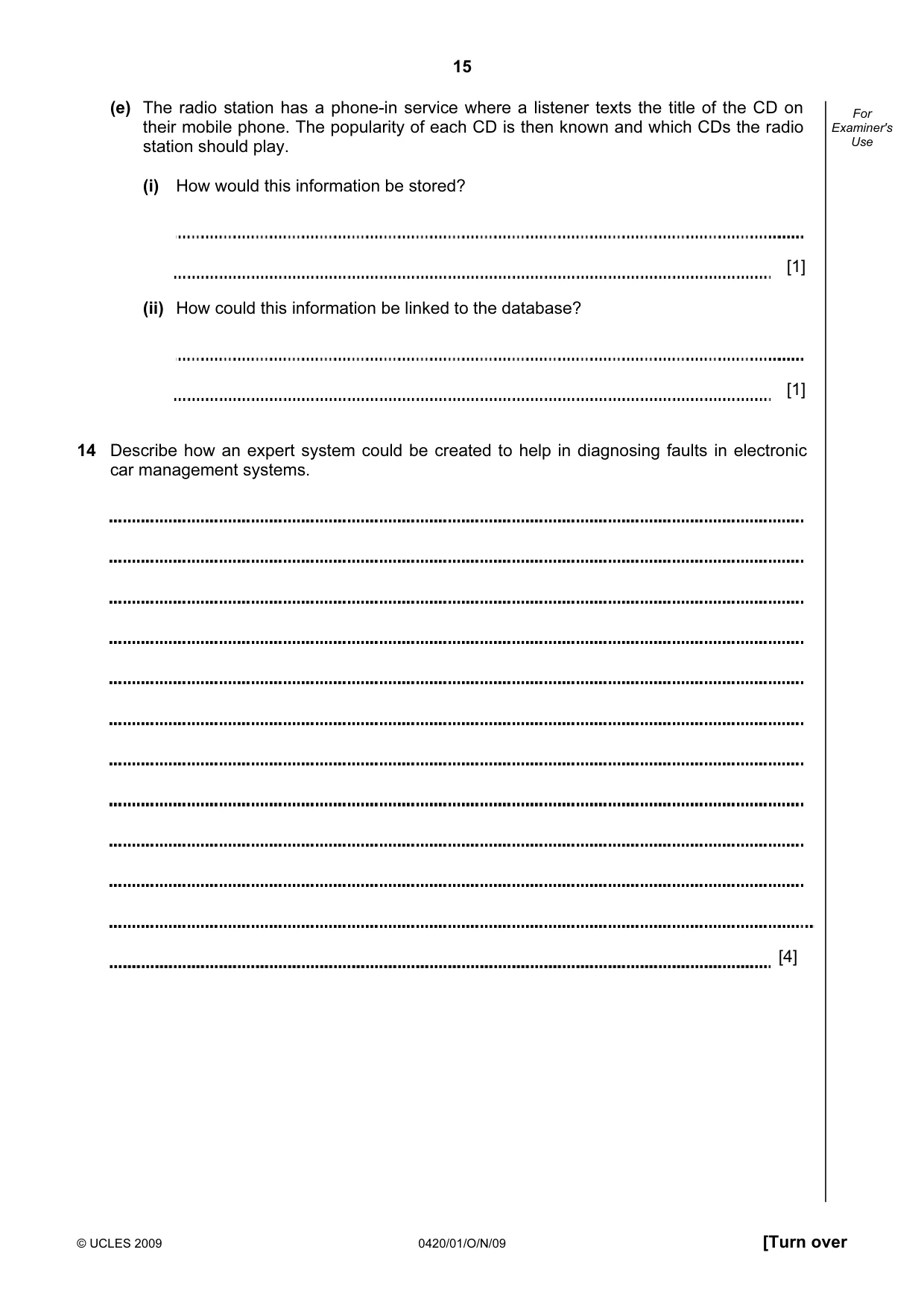
15 © UCLES 2009 0420/01/O/N/09 [Turn over For Examiner's Use (e) The radio station has a phone-in service where a listener texts the title of the CD on their mobile phone. The popularity of each CD is then known and which CDs the radio station should play. (i) How would this information be stored? [1] (ii) How could this information be linked to the database? [1] 14 Describe how an expert system could be created to help in diagnosing faults in electronic car management systems. [4]
Question paper, page 16
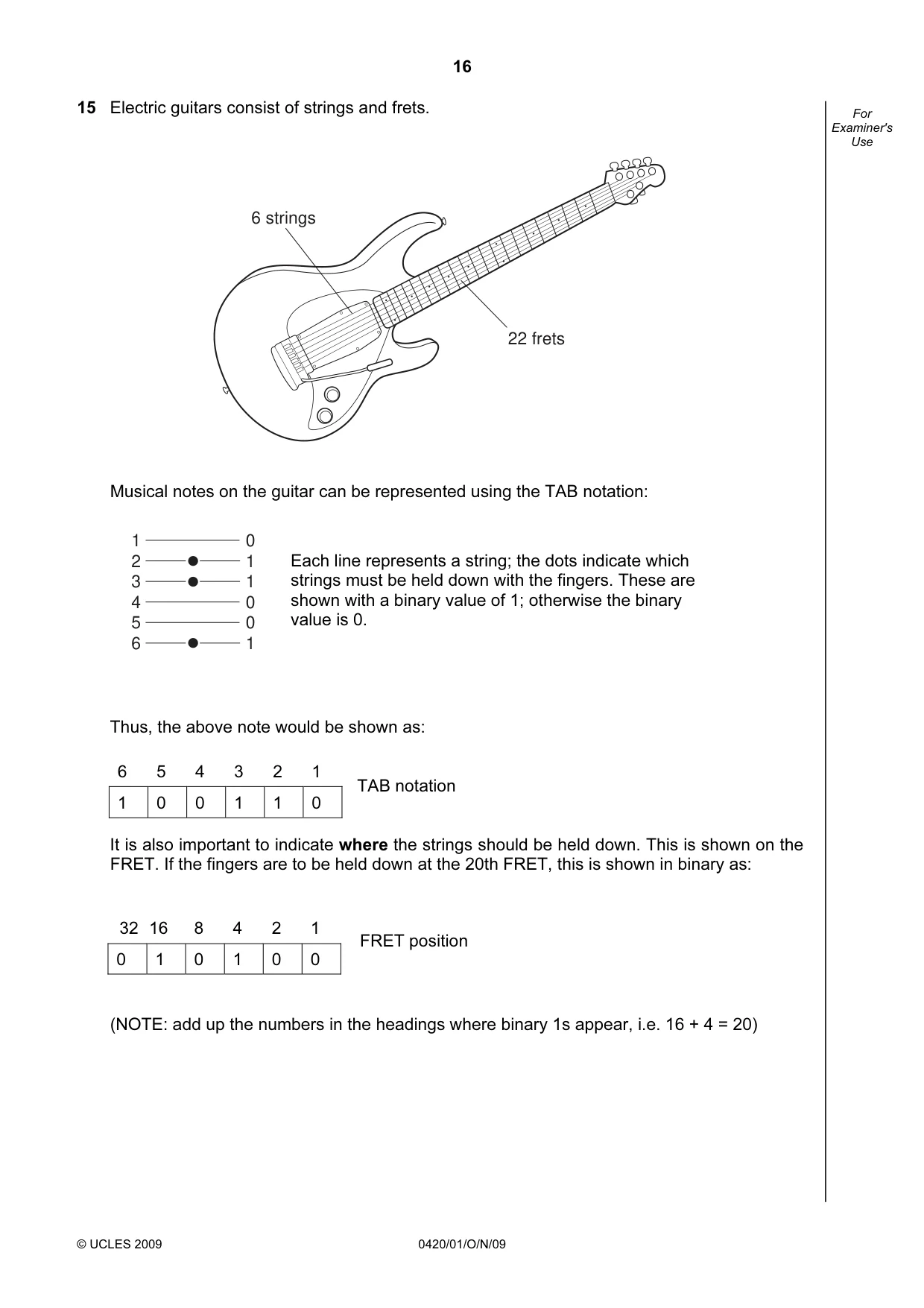
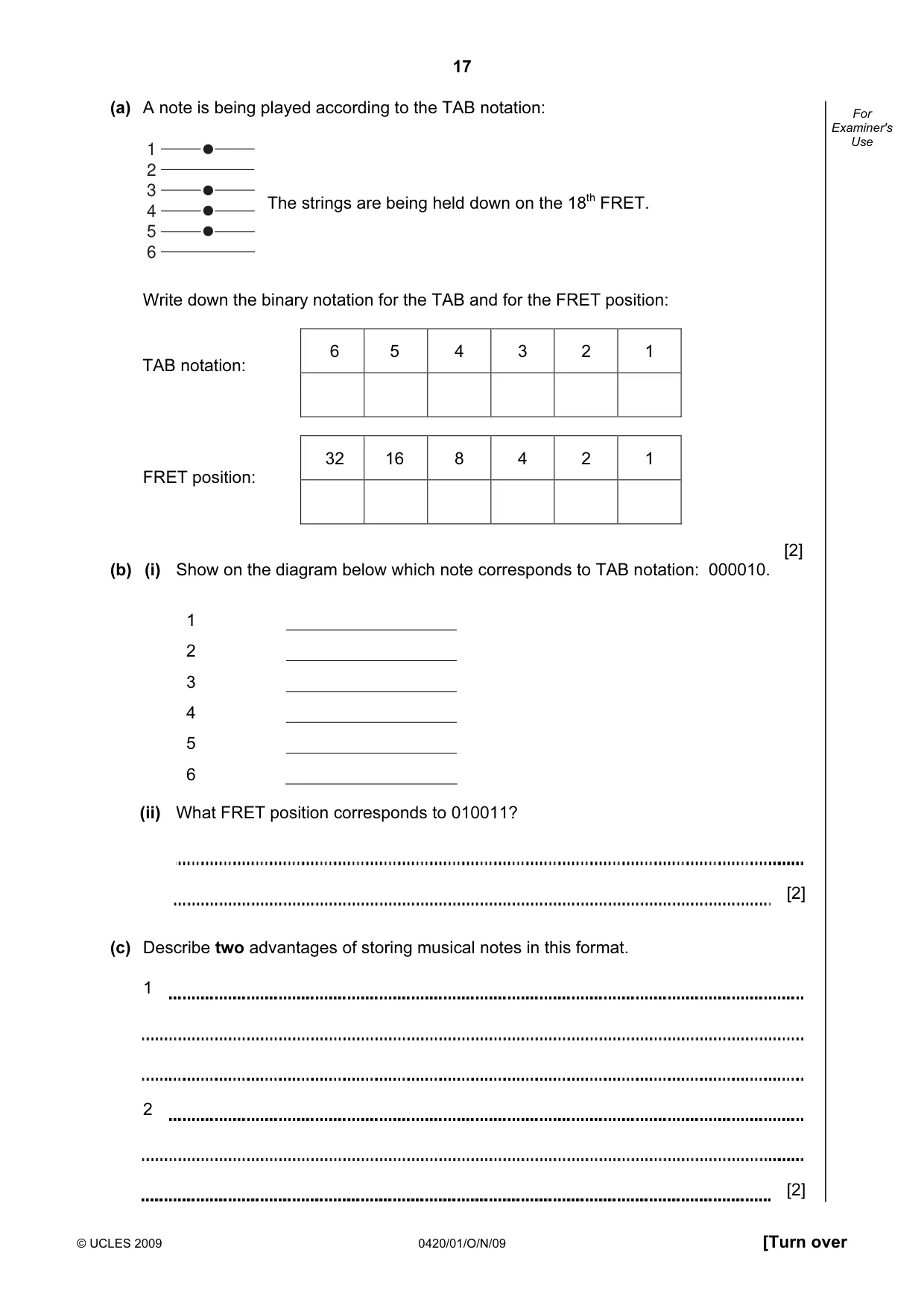
16 © UCLES 2009 0420/01/O/N/09 For Examiner's Use 15 Electric guitars consist of strings and frets. 6 strings 22 frets Musical notes on the guitar can be represented using the TAB notation: Thus, the above note would be shown as: TAB notation It is also important to indicate where the strings should be held down. This is shown on the FRET. If the fingers are to be held down at the 20th FRET, this is shown in binary as: 32 16 8 4 2 1 0 1 0 1 0 0 (NOTE: add up the numbers in the headings where binary 1s appear, i.e. 16 + 4 = 20) 6 5 4 3 2 1 1 0 0 1 1 0 Each line represents a string; the dots indicate which strings must be held down with the fingers. These are shown with a binary value of 1; otherwise the binary value is 0. FRET position 1 2 3 4 5 6 0 1 1 0 0 1
Question paper, page 17
17 © UCLES 2009 0420/01/O/N/09 [Turn over For Examiner's Use (a) A note is being played according to the TAB notation: Write down the binary notation for the TAB and for the FRET position: FRET position: [2] (b) (i) Show on the diagram below which note corresponds to TAB notation: 000010. 1 2 3 4 5 6 (ii) What FRET position corresponds to 010011? [2] (c) Describe two advantages of storing musical notes in this format. 1 2 [2] 6 5 4 3 2 1 32 16 8 4 2 1 The strings are being held down on the 18th FRET. TAB notation: 1 2 3 4 5 6
Question paper, page 18
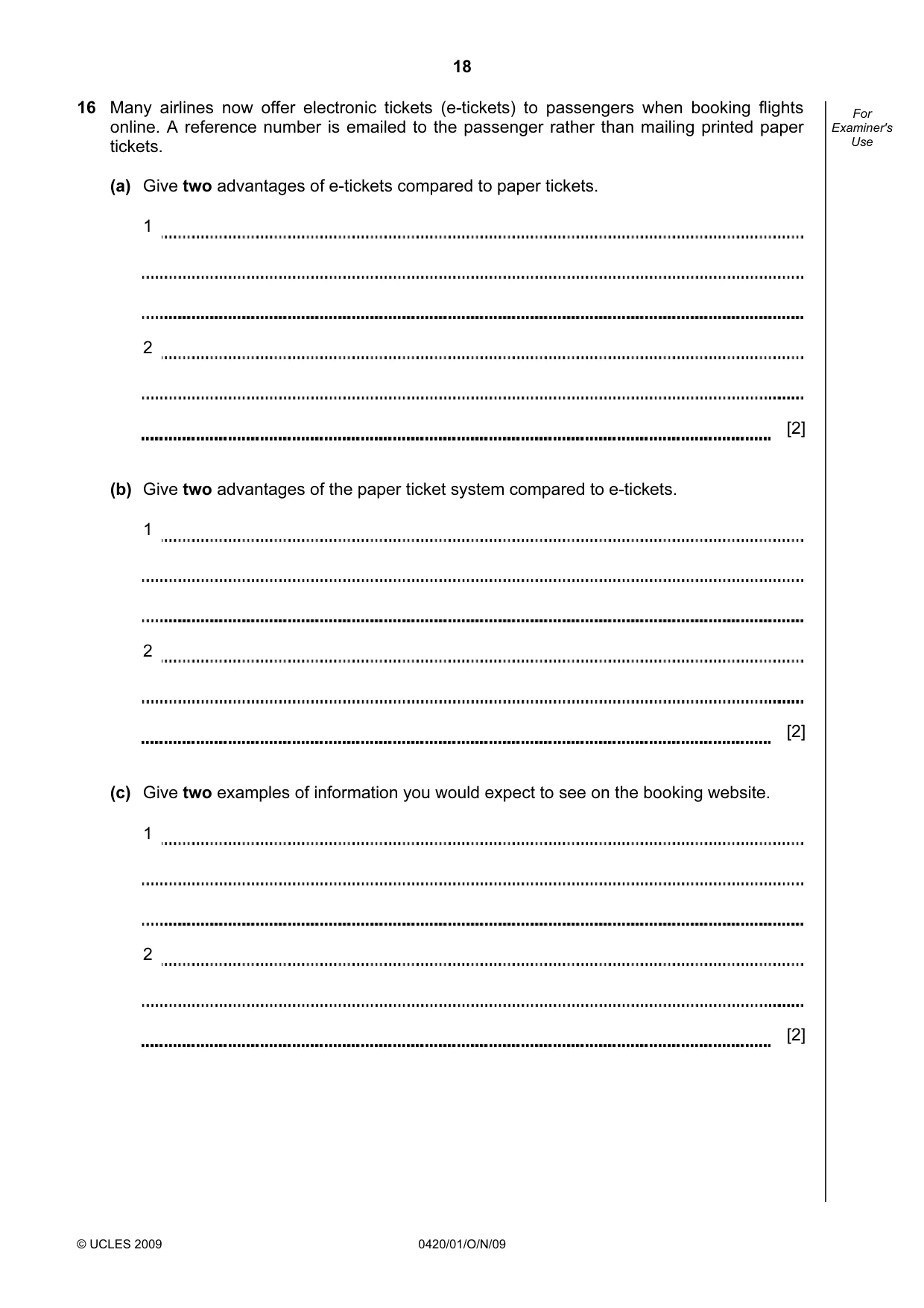
18 © UCLES 2009 0420/01/O/N/09 For Examiner's Use 16 Many airlines now offer electronic tickets (e-tickets) to passengers when booking flights online. A reference number is emailed to the passenger rather than mailing printed paper tickets. (a) Give two advantages of e-tickets compared to paper tickets. 1 2 [2] (b) Give two advantages of the paper ticket system compared to e-tickets. 1 2 [2] (c) Give two examples of information you would expect to see on the booking website. 1 2 [2]
Question paper, page 19
19 © UCLES 2009 0420/01/O/N/09 [Turn over For Examiner's Use 17 (a) A car’s speed is measured between points A and B, which are 200 km apart. A B 200 km The final speed of the car is calculated using the formula: What is the final speed of a car if it takes 2 hours to get from A to B? [1] Part (b) is on the next page. 200 Final Speed = ──────── Time (hours)
Question paper, page 20
20 Permission to reproduce items where third-party owned material protected by copyright is included has been sought and cleared where possible. Every reasonable effort has been made by the publisher (UCLES) to trace copyright holders, but if any items requiring clearance have unwittingly been included, the publisher will be pleased to make amends at the earliest possible opportunity. University of Cambridge International Examinations is part of the Cambridge Assessment Group. Cambridge Assessment is the brand name of University of Cambridge Local Examinations Syndicate (UCLES), which is itself a department of the University of Cambridge. © UCLES 2009 0420/01/O/N/09 For Examiner's Use (b) Write an algorithm, using pseudocode or otherwise, which inputs the times for 500 cars, calculates the final speed of each car using the formula in part (a), and then outputs: • the final speed for ALL 500 cars • the slowest (lowest) final speed • the fastest (highest) final speed • the average final speed for all the cars. [6]
Mark scheme, page 1
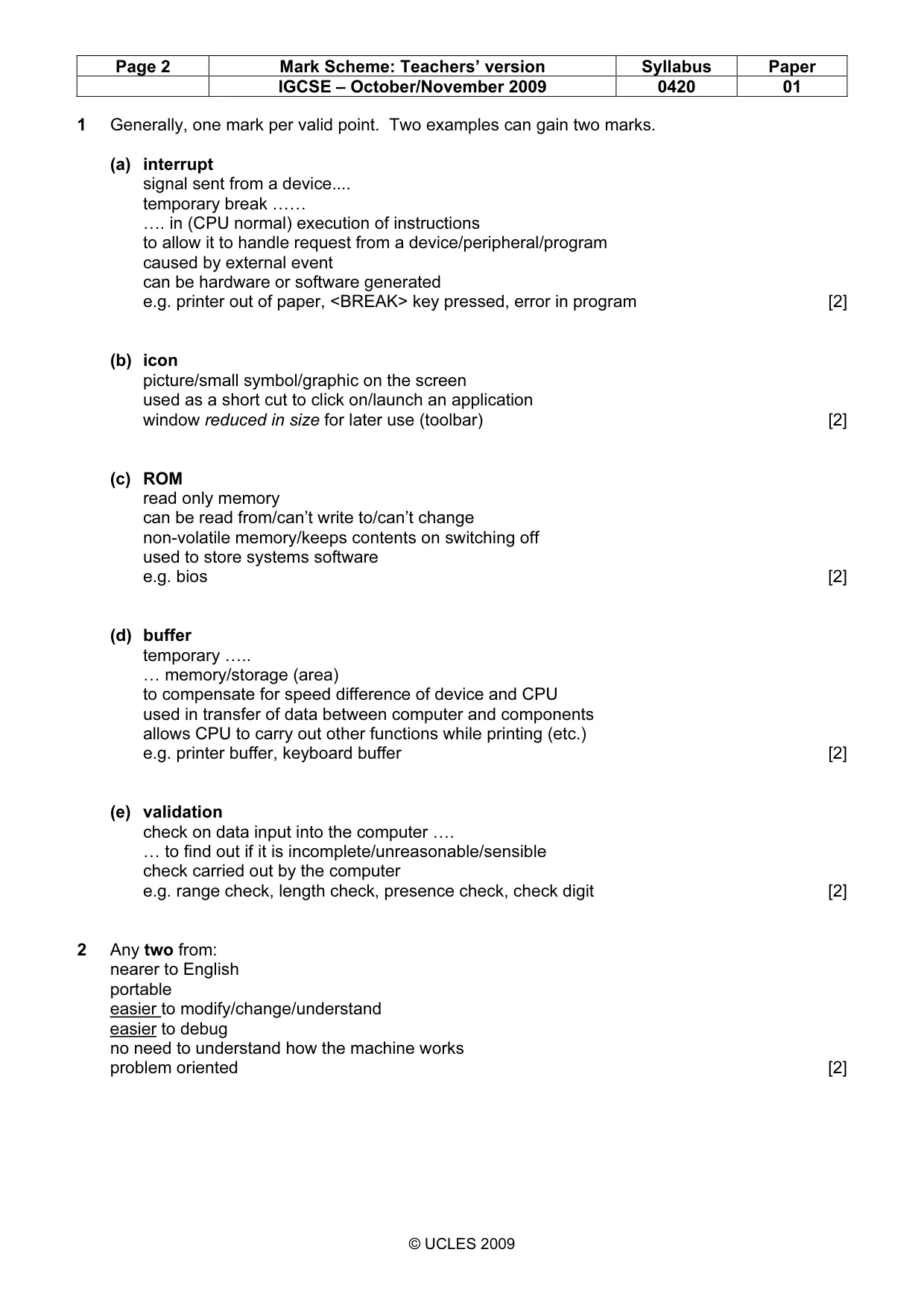
UNIVERSITY OF CAMBRIDGE INTERNATIONAL EXAMINATIONS International General Certificate of Secondary Education MARK SCHEME for the October/November 2009 question paper for the guidance of teachers 0420 COMPUTER STUDIES 0420/01 Paper 1, maximum raw mark 100 This mark scheme is published as an aid to teachers and candidates, to indicate the requirements of the examination. It shows the basis on which Examiners were instructed to award marks. It does not indicate the details of the discussions that took place at an Examiners’ meeting before marking began, which would have considered the acceptability of alternative answers. Mark schemes must be read in conjunction with the question papers and the report on the examination. • CIE will not enter into discussions or correspondence in connection with these mark schemes. CIE is publishing the mark schemes for the October/November 2009 question papers for most IGCSE, GCE Advanced Level and Advanced Subsidiary Level syllabuses and some Ordinary Level syllabuses. www.XtremePapers.com
Mark scheme, page 2
Page 2 Mark Scheme: Teachers’ version Syllabus Paper IGCSE – October/November 2009 0420 01 © UCLES 2009 1 Generally, one mark per valid point. Two examples can gain two marks. (a) interrupt signal sent from a device… temporary break …… …. in (CPU normal) execution of instructions to allow it to handle request from a device/peripheral/program caused by external event can be hardware or software generated e.g. printer out of paper, <BREAK> key pressed, error in program [2] (b) icon picture/small symbol/graphic on the screen used as a short cut to click on/launch an application window reduced in size for later use (toolbar) [2] (c) ROM read only memory can be read from/can’t write to/can’t change non-volatile memory/keeps contents on switching off used to store systems software e.g. bios [2] (d) buffer temporary ….. … memory/storage (area) to compensate for speed difference of device and CPU used in transfer of data between computer and components allows CPU to carry out other functions while printing (etc.) e.g. printer buffer, keyboard buffer [2] (e) validation check on data input into the computer …. … to find out if it is incomplete/unreasonable/sensible check carried out by the computer e.g. range check, length check, presence check, check digit [2] 2 Any two from: nearer to English portable easier to modify/change/understand easier to debug no need to understand how the machine works problem oriented [2]
Mark scheme, page 3
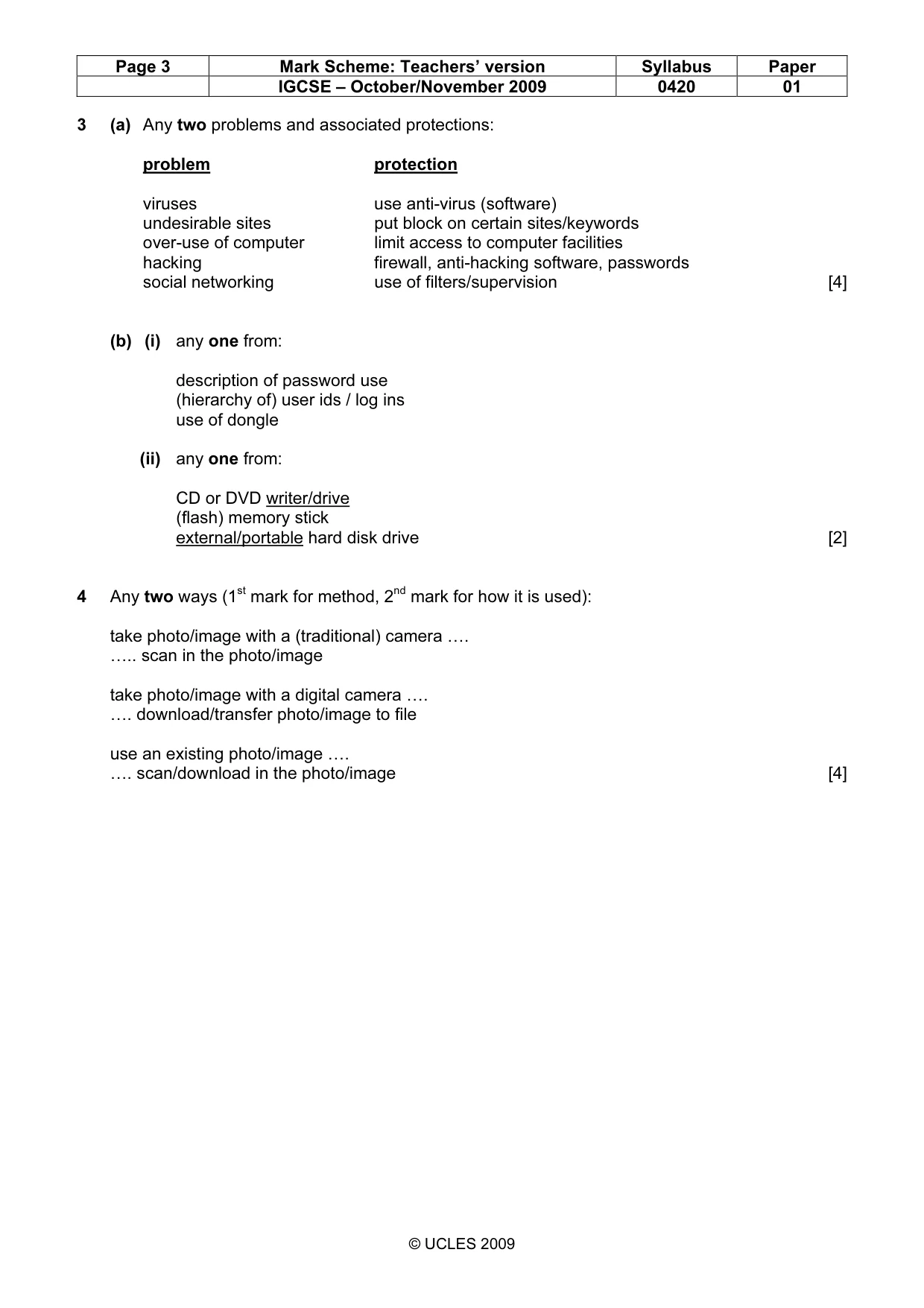
Page 3 Mark Scheme: Teachers’ version Syllabus Paper IGCSE – October/November 2009 0420 01 © UCLES 2009 3 (a) Any two problems and associated protections: problem protection viruses use anti-virus (software) undesirable sites put block on certain sites/keywords over-use of computer limit access to computer facilities hacking firewall, anti-hacking software, passwords social networking use of filters/supervision [4] (b) (i) any one from: description of password use (hierarchy of) user ids / log ins use of dongle (ii) any one from: CD or DVD writer/drive (flash) memory stick external/portable hard disk drive [2] 4 Any two ways (1st mark for method, 2nd mark for how it is used): take photo/image with a (traditional) camera …. ….. scan in the photo/image take photo/image with a digital camera …. …. download/transfer photo/image to file use an existing photo/image …. …. scan/download in the photo/image [4]
Mark scheme, page 4
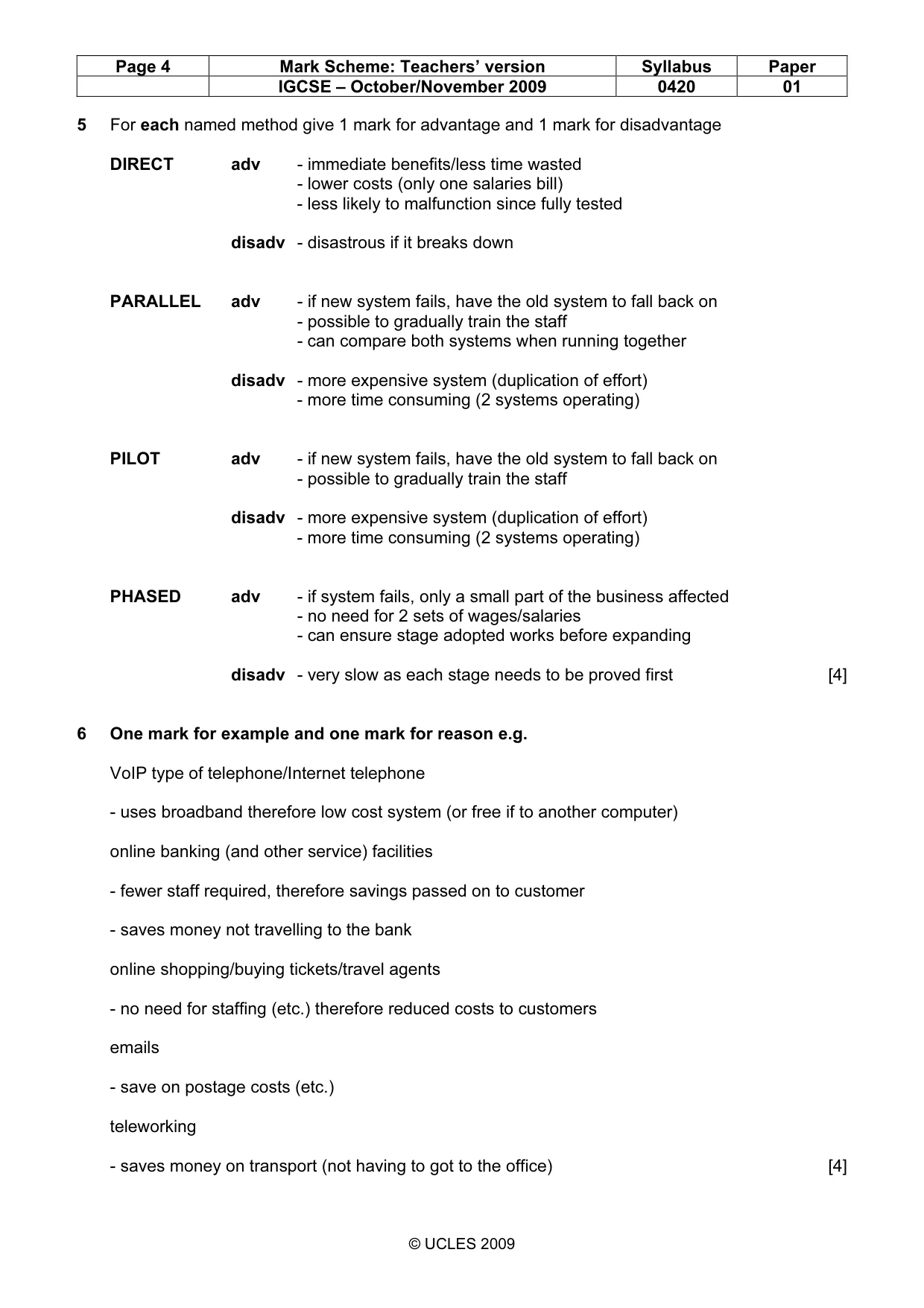
Page 4 Mark Scheme: Teachers’ version Syllabus Paper IGCSE – October/November 2009 0420 01 © UCLES 2009 5 For each named method give 1 mark for advantage and 1 mark for disadvantage DIRECT adv - immediate benefits/less time wasted - lower costs (only one salaries bill) - less likely to malfunction since fully tested disadv - disastrous if it breaks down PARALLEL adv - if new system fails, have the old system to fall back on - possible to gradually train the staff - can compare both systems when running together disadv - more expensive system (duplication of effort) - more time consuming (2 systems operating) PILOT adv - if new system fails, have the old system to fall back on - possible to gradually train the staff disadv - more expensive system (duplication of effort) - more time consuming (2 systems operating) PHASED adv - if system fails, only a small part of the business affected - no need for 2 sets of wages/salaries - can ensure stage adopted works before expanding disadv - very slow as each stage needs to be proved first [4] 6 One mark for example and one mark for reason e.g. VoIP type of telephone/Internet telephone - uses broadband therefore low cost system (or free if to another computer) online banking (and other service) facilities - fewer staff required, therefore savings passed on to customer - saves money not travelling to the bank online shopping/buying tickets/travel agents - no need for staffing (etc.) therefore reduced costs to customers emails - save on postage costs (etc.) teleworking - saves money on transport (not having to got to the office) [4]
Mark scheme, page 5
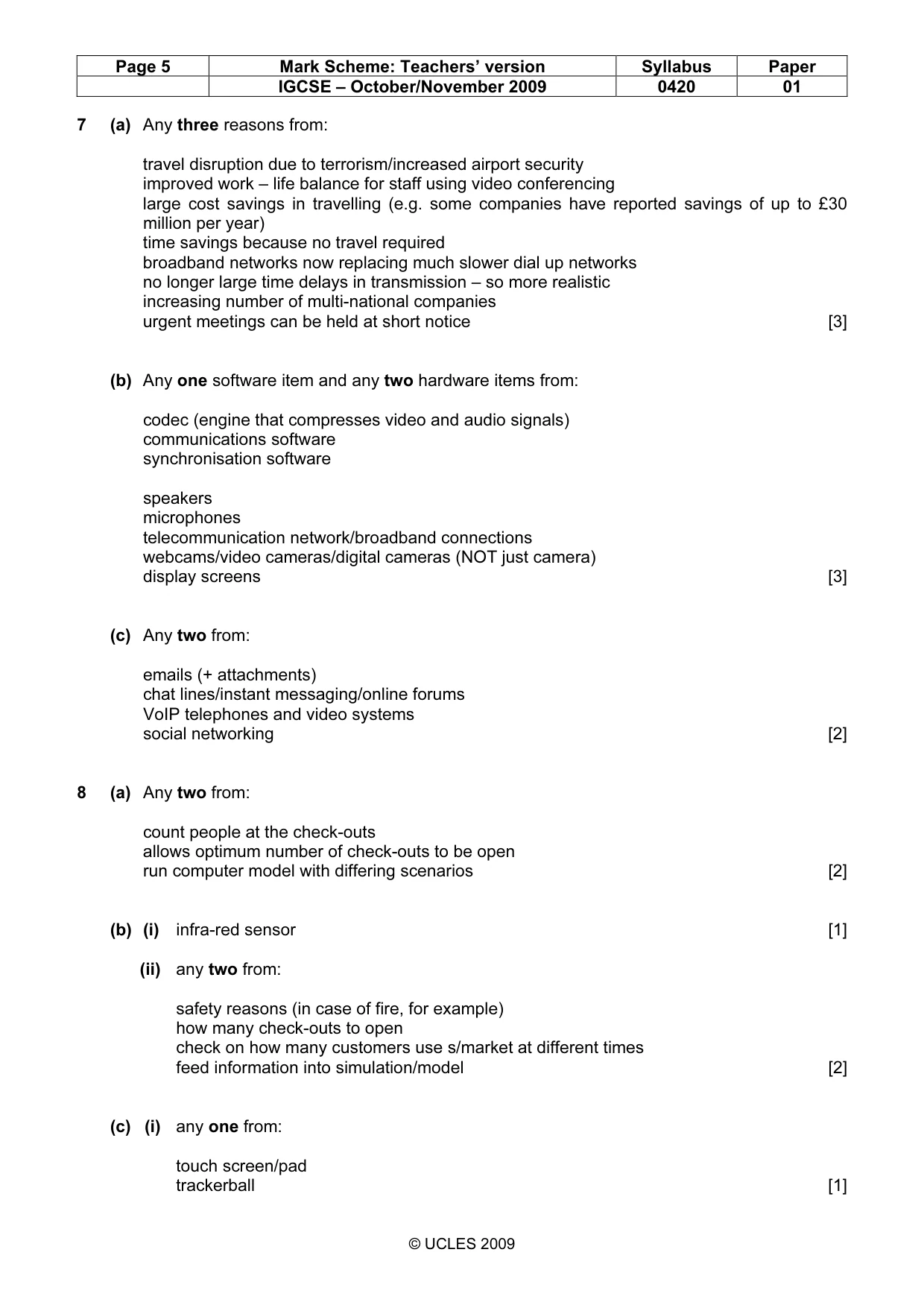
Page 5 Mark Scheme: Teachers’ version Syllabus Paper IGCSE – October/November 2009 0420 01 © UCLES 2009 7 (a) Any three reasons from: travel disruption due to terrorism/increased airport security improved work – life balance for staff using video conferencing large cost savings in travelling (e.g. some companies have reported savings of up to £30 million per year) time savings because no travel required broadband networks now replacing much slower dial up networks no longer large time delays in transmission – so more realistic increasing number of multi-national companies urgent meetings can be held at short notice [3] (b) Any one software item and any two hardware items from: codec (engine that compresses video and audio signals) communications software synchronisation software speakers microphones telecommunication network/broadband connections webcams/video cameras/digital cameras (NOT just camera) display screens [3] (c) Any two from: emails (+ attachments) chat lines/instant messaging/online forums VoIP telephones and video systems social networking [2] 8 (a) Any two from: count people at the check-outs allows optimum number of check-outs to be open run computer model with differing scenarios [2] (b) (i) infra-red sensor [1] (ii) any two from: safety reasons (in case of fire, for example) how many check-outs to open check on how many customers use s/market at different times feed information into simulation/model [2] (c) (i) any one from: touch screen/pad trackerball [1]
Mark scheme, page 6
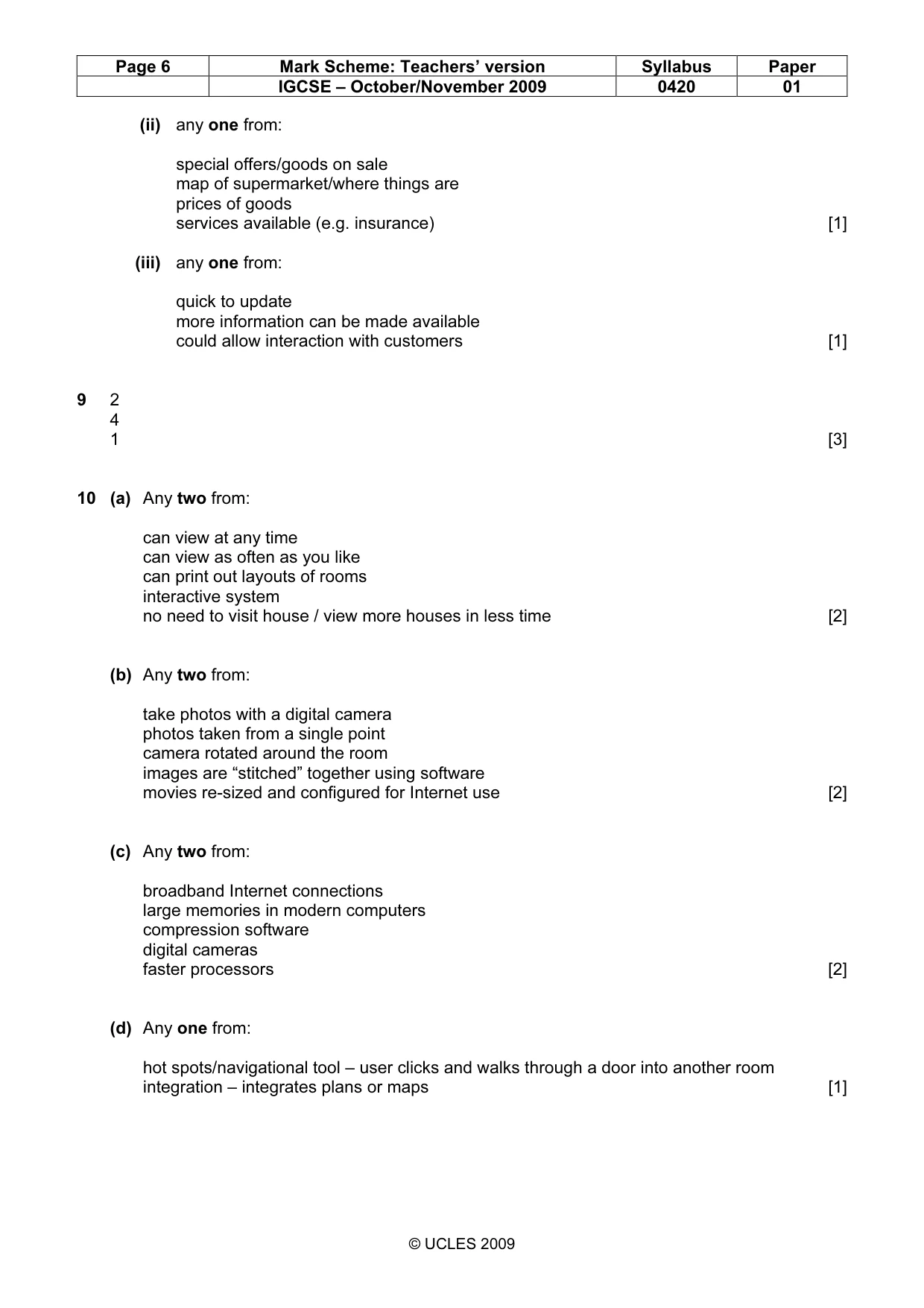
Page 6 Mark Scheme: Teachers’ version Syllabus Paper IGCSE – October/November 2009 0420 01 © UCLES 2009 (ii) any one from: special offers/goods on sale map of supermarket/where things are prices of goods services available (e.g. insurance) [1] (iii) any one from: quick to update more information can be made available could allow interaction with customers [1] 9 2 4 1 [3] 10 (a) Any two from: can view at any time can view as often as you like can print out layouts of rooms interactive system no need to visit house / view more houses in less time [2] (b) Any two from: take photos with a digital camera photos taken from a single point camera rotated around the room images are “stitched” together using software movies re-sized and configured for Internet use [2] (c) Any two from: broadband Internet connections large memories in modern computers compression software digital cameras faster processors [2] (d) Any one from: hot spots/navigational tool – user clicks and walks through a door into another room integration – integrates plans or maps [1]
Mark scheme, page 7
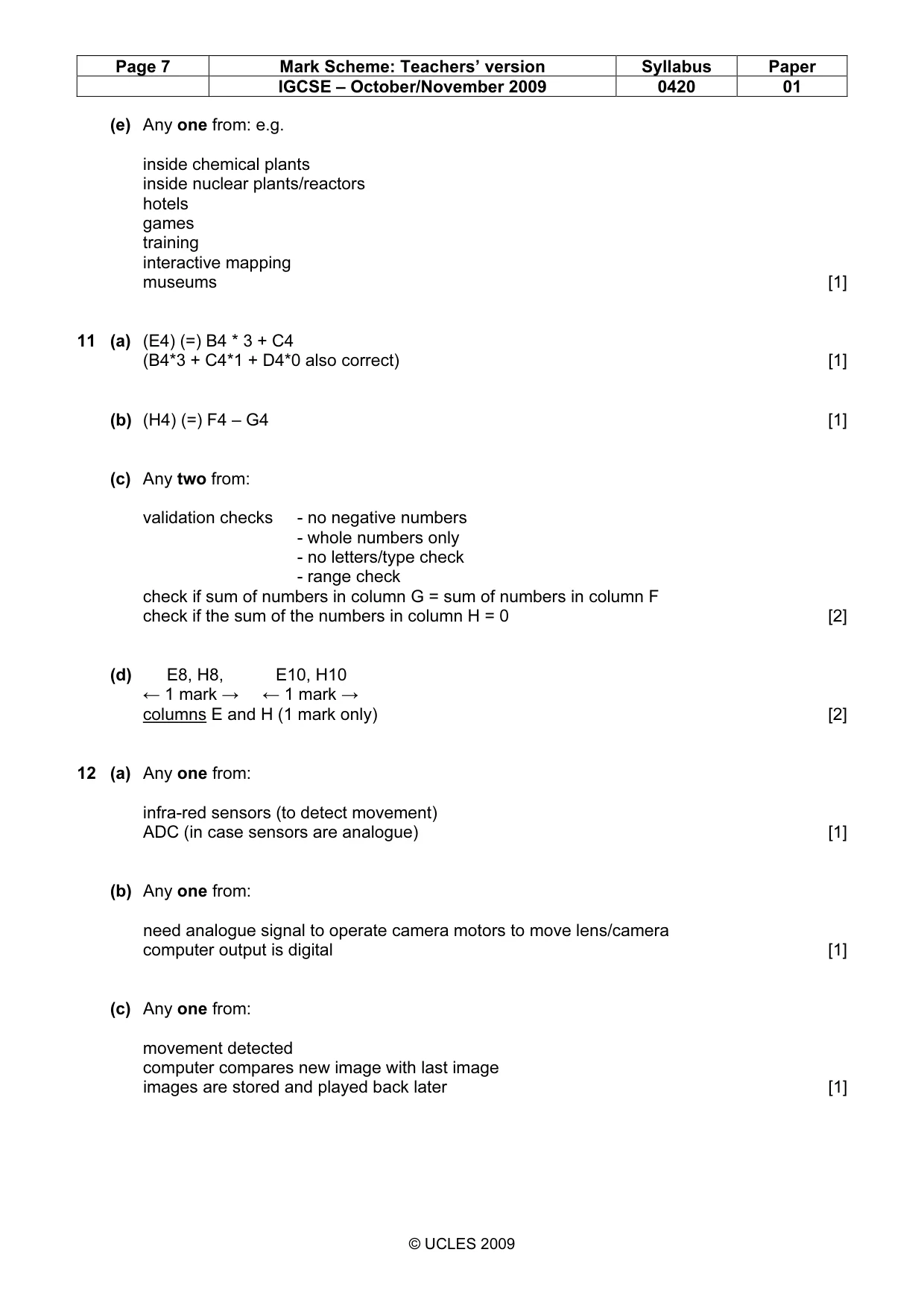
Page 7 Mark Scheme: Teachers’ version Syllabus Paper IGCSE – October/November 2009 0420 01 © UCLES 2009 (e) Any one from: e.g. inside chemical plants inside nuclear plants/reactors hotels games training interactive mapping museums [1] 11 (a) (E4) (=) B4 * 3 + C4 (B4*3 + C4*1 + D4*0 also correct) [1] (b) (H4) (=) F4 – G4 [1] (c) Any two from: validation checks - no negative numbers - whole numbers only - no letters/type check - range check check if sum of numbers in column G = sum of numbers in column F check if the sum of the numbers in column H = 0 [2] (d) E8, H8, E10, H10 ← 1 mark → ← 1 mark → columns E and H (1 mark only) [2] 12 (a) Any one from: infra-red sensors (to detect movement) ADC (in case sensors are analogue) [1] (b) Any one from: need analogue signal to operate camera motors to move lens/camera computer output is digital [1] (c) Any one from: movement detected computer compares new image with last image images are stored and played back later [1]
Mark scheme, page 8
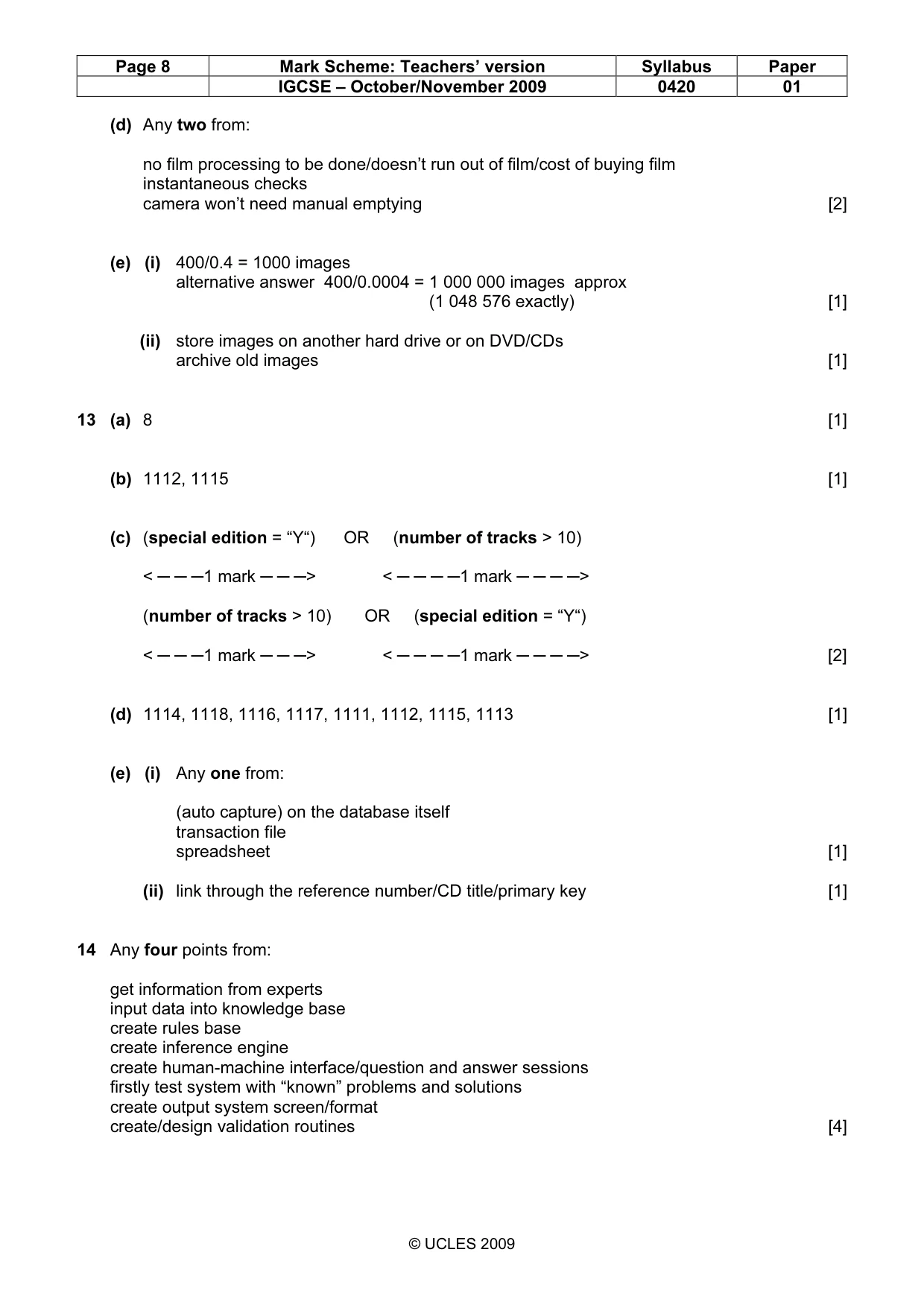
Page 8 Mark Scheme: Teachers’ version Syllabus Paper IGCSE – October/November 2009 0420 01 © UCLES 2009 (d) Any two from: no film processing to be done/doesn’t run out of film/cost of buying film instantaneous checks camera won’t need manual emptying [2] (e) (i) 400/0.4 = 1000 images alternative answer 400/0.0004 = 1 000 000 images approx (1 048 576 exactly) [1] (ii) store images on another hard drive or on DVD/CDs archive old images [1] 13 (a) 8 [1] (b) 1112, 1115 [1] (c) (special edition = “Y“) OR (number of tracks > 10) < ─ ─ ─1 mark ─ ─ ─> < ─ ─ ─ ─1 mark ─ ─ ─ ─> (number of tracks > 10) OR (special edition = “Y“) < ─ ─ ─1 mark ─ ─ ─> < ─ ─ ─ ─1 mark ─ ─ ─ ─> [2] (d) 1114, 1118, 1116, 1117, 1111, 1112, 1115, 1113 [1] (e) (i) Any one from: (auto capture) on the database itself transaction file spreadsheet [1] (ii) link through the reference number/CD title/primary key [1] 14 Any four points from: get information from experts input data into knowledge base create rules base create inference engine create human-machine interface/question and answer sessions firstly test system with “known” problems and solutions create output system screen/format create/design validation routines [4]
Mark scheme, page 9
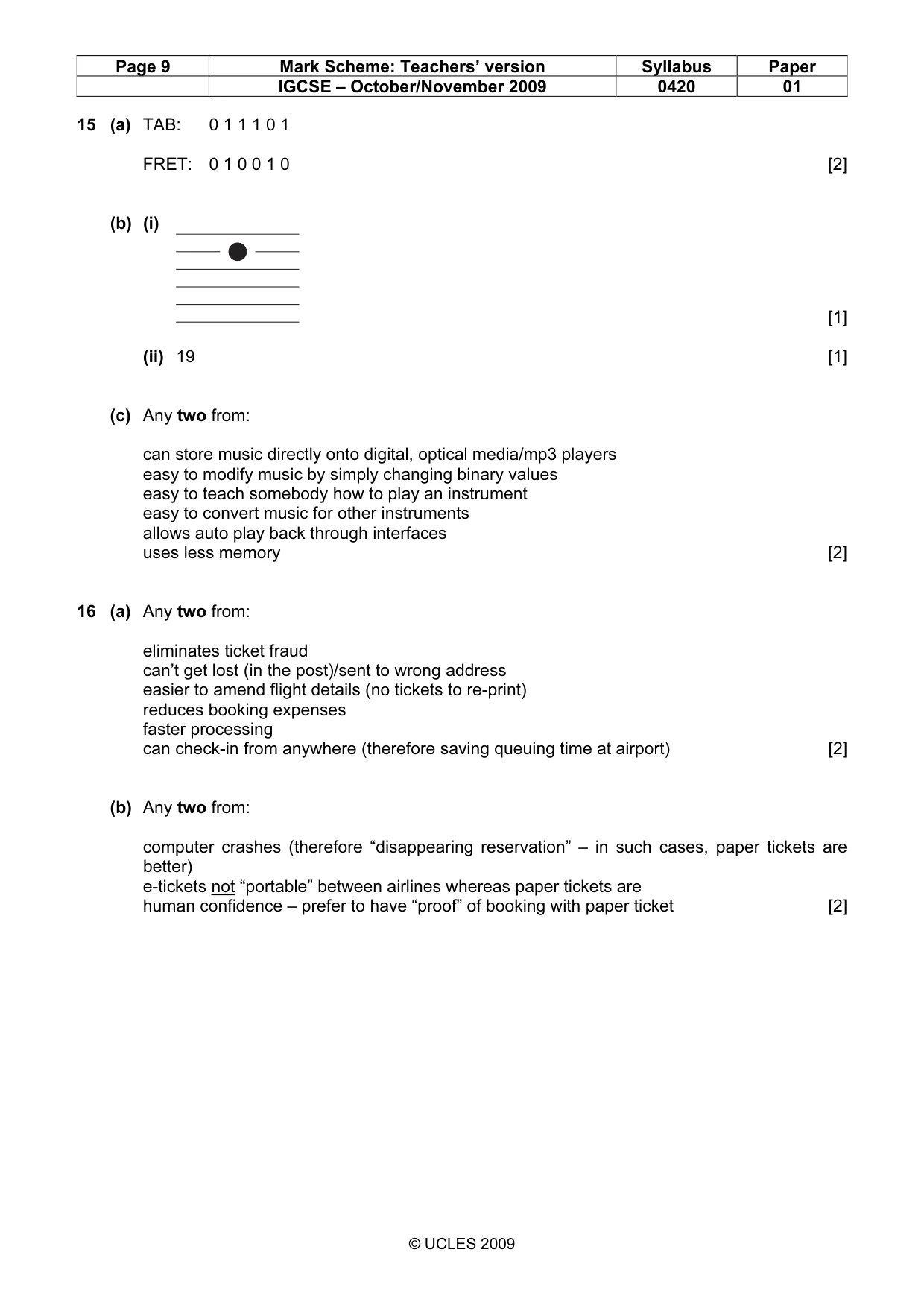
Page 9 Mark Scheme: Teachers’ version Syllabus Paper IGCSE – October/November 2009 0420 01 © UCLES 2009 15 (a) TAB: 0 1 1 1 0 1 FRET: 0 1 0 0 1 0 [2] (b) (i) [1] (ii) 19 [1] (c) Any two from: can store music directly onto digital, optical media/mp3 players easy to modify music by simply changing binary values easy to teach somebody how to play an instrument easy to convert music for other instruments allows auto play back through interfaces uses less memory [2] 16 (a) Any two from: eliminates ticket fraud can’t get lost (in the post)/sent to wrong address easier to amend flight details (no tickets to re-print) reduces booking expenses faster processing can check-in from anywhere (therefore saving queuing time at airport) [2] (b) Any two from: computer crashes (therefore “disappearing reservation” – in such cases, paper tickets are better) e-tickets not “portable” between airlines whereas paper tickets are human confidence – prefer to have “proof” of booking with paper ticket [2]
Mark scheme, page 10
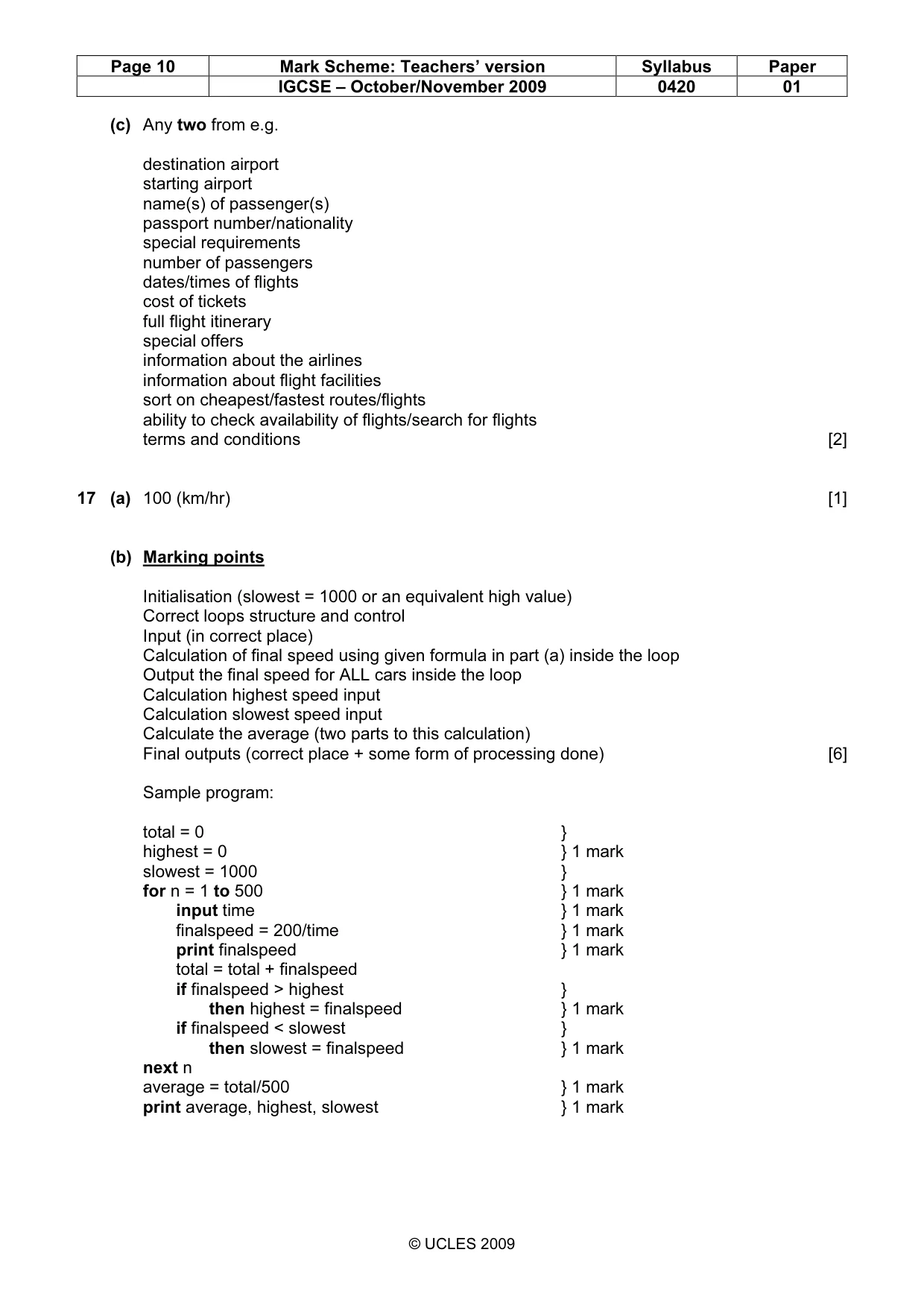
Page 10 Mark Scheme: Teachers’ version Syllabus Paper IGCSE – October/November 2009 0420 01 © UCLES 2009 (c) Any two from e.g. destination airport starting airport name(s) of passenger(s) passport number/nationality special requirements number of passengers dates/times of flights cost of tickets full flight itinerary special offers information about the airlines information about flight facilities sort on cheapest/fastest routes/flights ability to check availability of flights/search for flights terms and conditions [2] 17 (a) 100 (km/hr) [1] (b) Marking points Initialisation (slowest = 1000 or an equivalent high value) Correct loops structure and control Input (in correct place) Calculation of final speed using given formula in part (a) inside the loop Output the final speed for ALL cars inside the loop Calculation highest speed input Calculation slowest speed input Calculate the average (two parts to this calculation) Final outputs (correct place + some form of processing done) [6] Sample program: total = 0 } highest = 0 } 1 mark slowest = 1000 } for n = 1 to 500 } 1 mark input time } 1 mark finalspeed = 200/time } 1 mark print finalspeed } 1 mark total = total + finalspeed if finalspeed > highest } then highest = finalspeed } 1 mark if finalspeed < slowest } then slowest = finalspeed } 1 mark next n average = total/500 } 1 mark print average, highest, slowest } 1 mark
What you needed in this session
Cambridge’s own grade thresholds for 2009 Oct/Nov, Paper 1 · Variant 1. A higher threshold means an easier paper — the bar moves with how the cohort did.