Cambridge A Level Information Technology (from 2017) 9626 — 2017 Oct/Nov Paper 2 · Variant 1
9626/21/O/N/17 · 110 marks · ≈124 min
The question paper and its mark scheme, free to read here and free to download. This is Cambridge’s own paper, exactly as it was sat.
Question paper8 pages



Mark scheme7 pages
Answers below. Sit the paper first if you are practising.
Paper as text
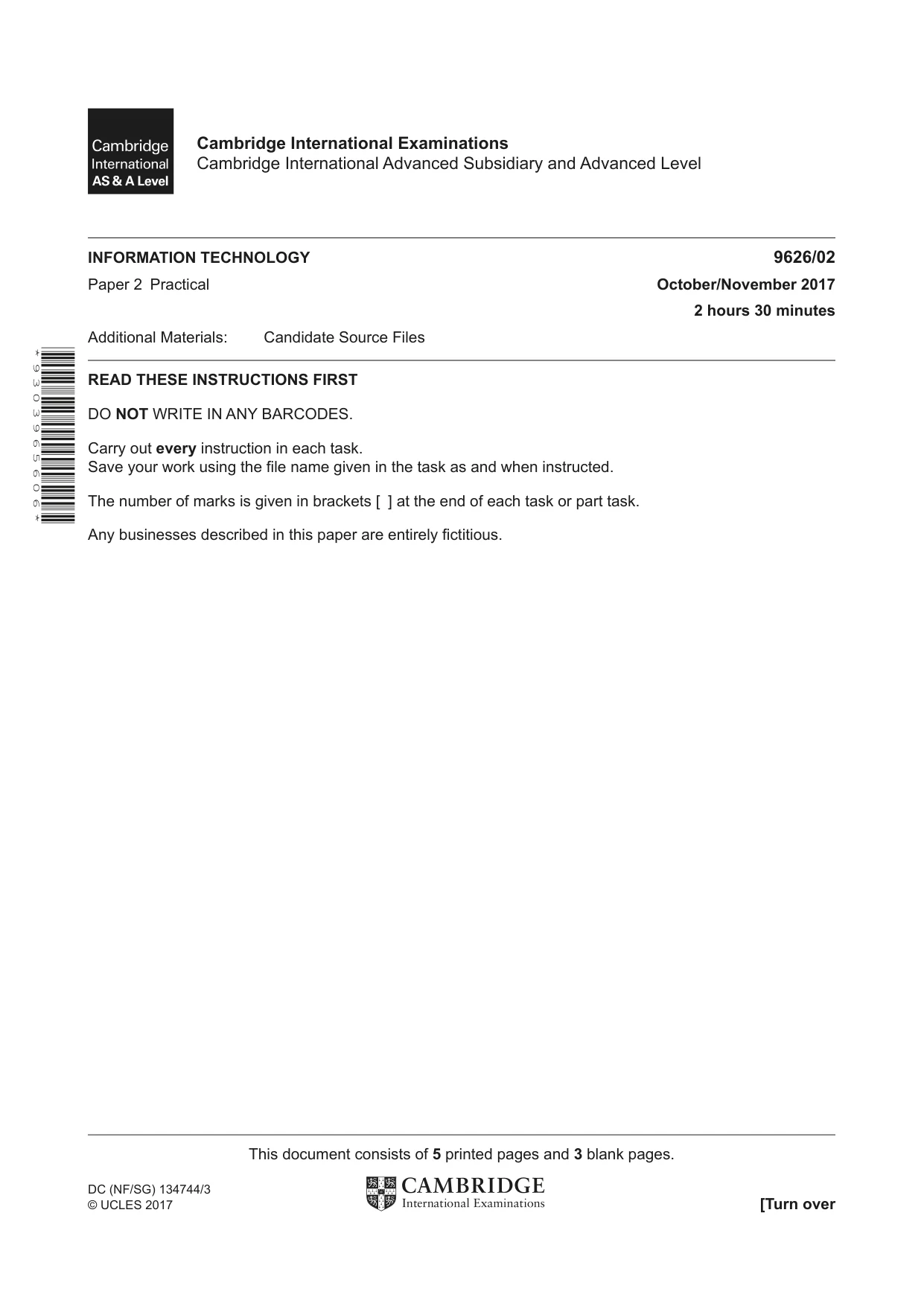
Question paper, page 1
INFORMATION TECHNOLOGY 9626/02 Paper 2 Practical October/November 2017 2 hours 30 minutes Additional Materials: Candidate Source Files READ THESE INSTRUCTIONS FIRST DO NOT WRITE IN ANY BARCODES. Carry out every instruction in each task. Save your work using the file name given in the task as and when instructed. The number of marks is given in brackets [ ] at the end of each task or part task. Any businesses described in this paper are entirely fictitious. This document consists of 5 printed pages and 3 blank pages. DC (NF/SG) 134744/3 © UCLES 2017 [Turn over Cambridge International Examinations Cambridge International Advanced Subsidiary and Advanced Level * 9 3 0 3 9 6 5 6 0 6 *
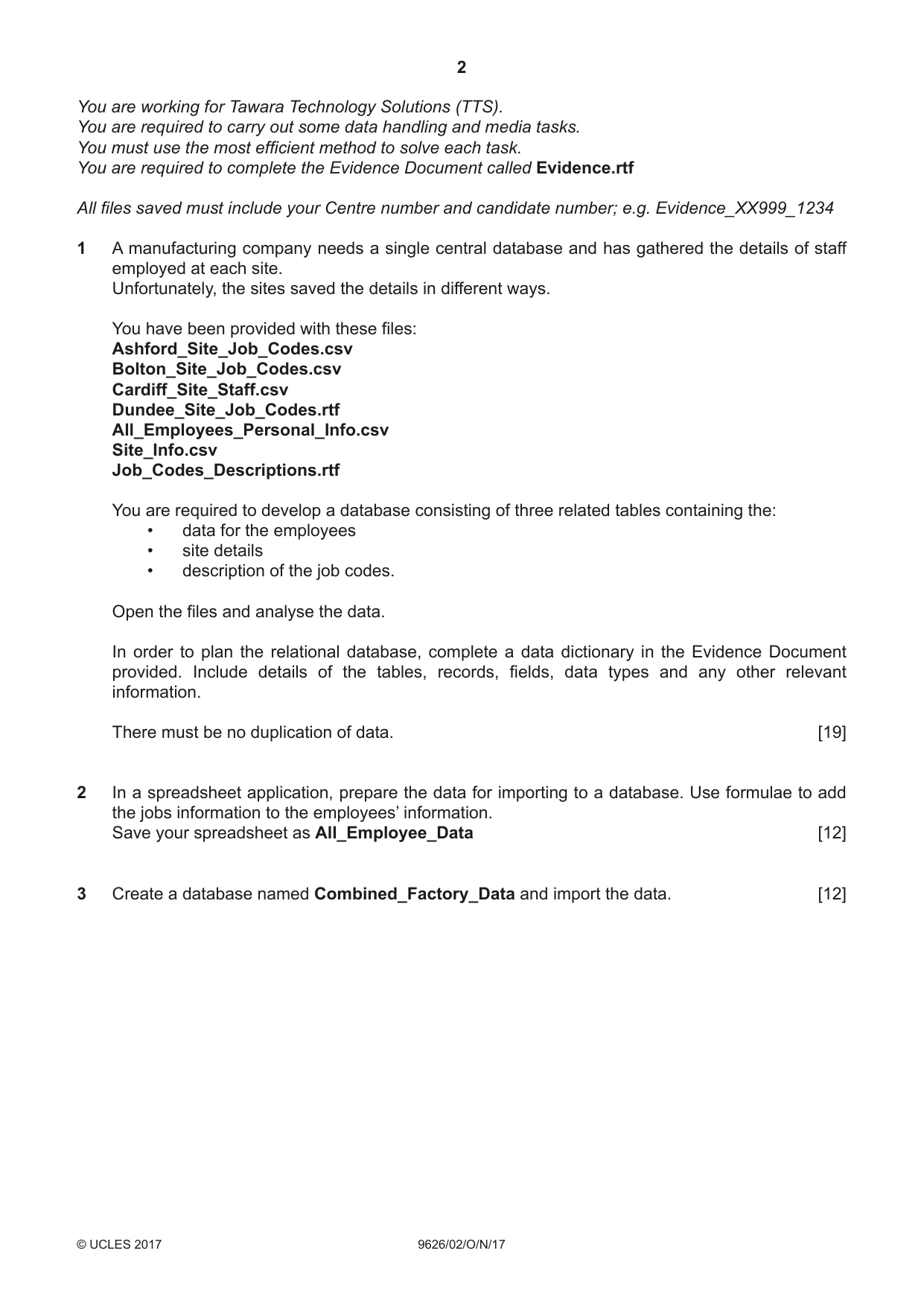
Question paper, page 2
2 9626/02/O/N/17 © UCLES 2017 You are working for Tawara Technology Solutions (TTS). You are required to carry out some data handling and media tasks. You must use the most efficient method to solve each task. You are required to complete the Evidence Document called Evidence.rtf All files saved must include your Centre number and candidate number; e.g. Evidence_XX999_1234 1 A manufacturing company needs a single central database and has gathered the details of staff employed at each site. Unfortunately, the sites saved the details in different ways. You have been provided with these files: Ashford_Site_Job_Codes.csv Bolton_Site_Job_Codes.csv Cardiff_Site_Staff.csv Dundee_Site_Job_Codes.rtf All_Employees_Personal_Info.csv Site_Info.csv Job_Codes_Descriptions.rtf You are required to develop a database consisting of three related tables containing the: • data for the employees • site details • description of the job codes. Open the files and analyse the data. In order to plan the relational database, complete a data dictionary in the Evidence Document provided. Include details of the tables, records, fields, data types and any other relevant information. There must be no duplication of data. [19] 2 In a spreadsheet application, prepare the data for importing to a database. Use formulae to add the jobs information to the employees’ information. Save your spreadsheet as All_Employee_Data [12] 3 Create a database named Combined_Factory_Data and import the data. [12]
Question paper, page 3
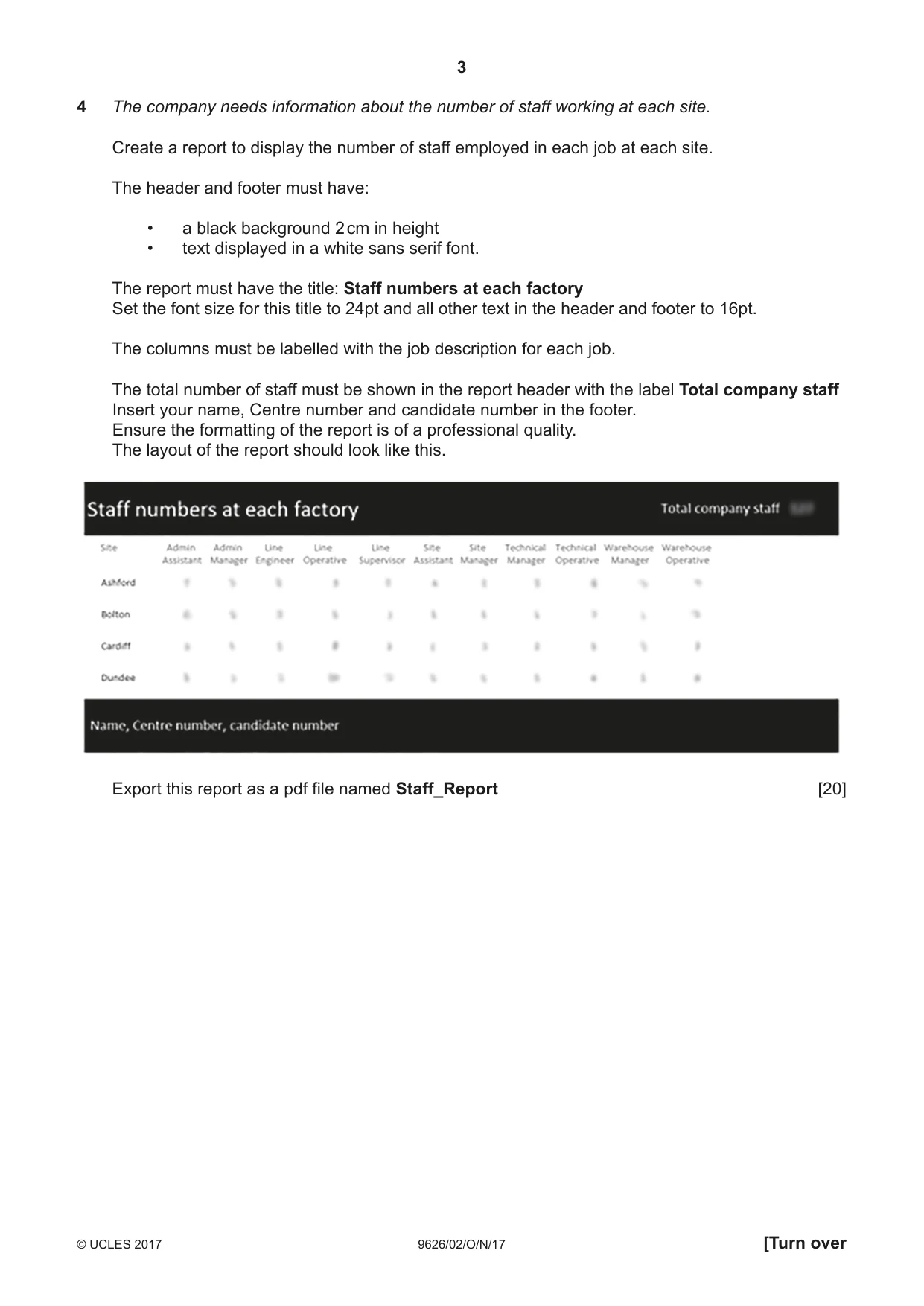
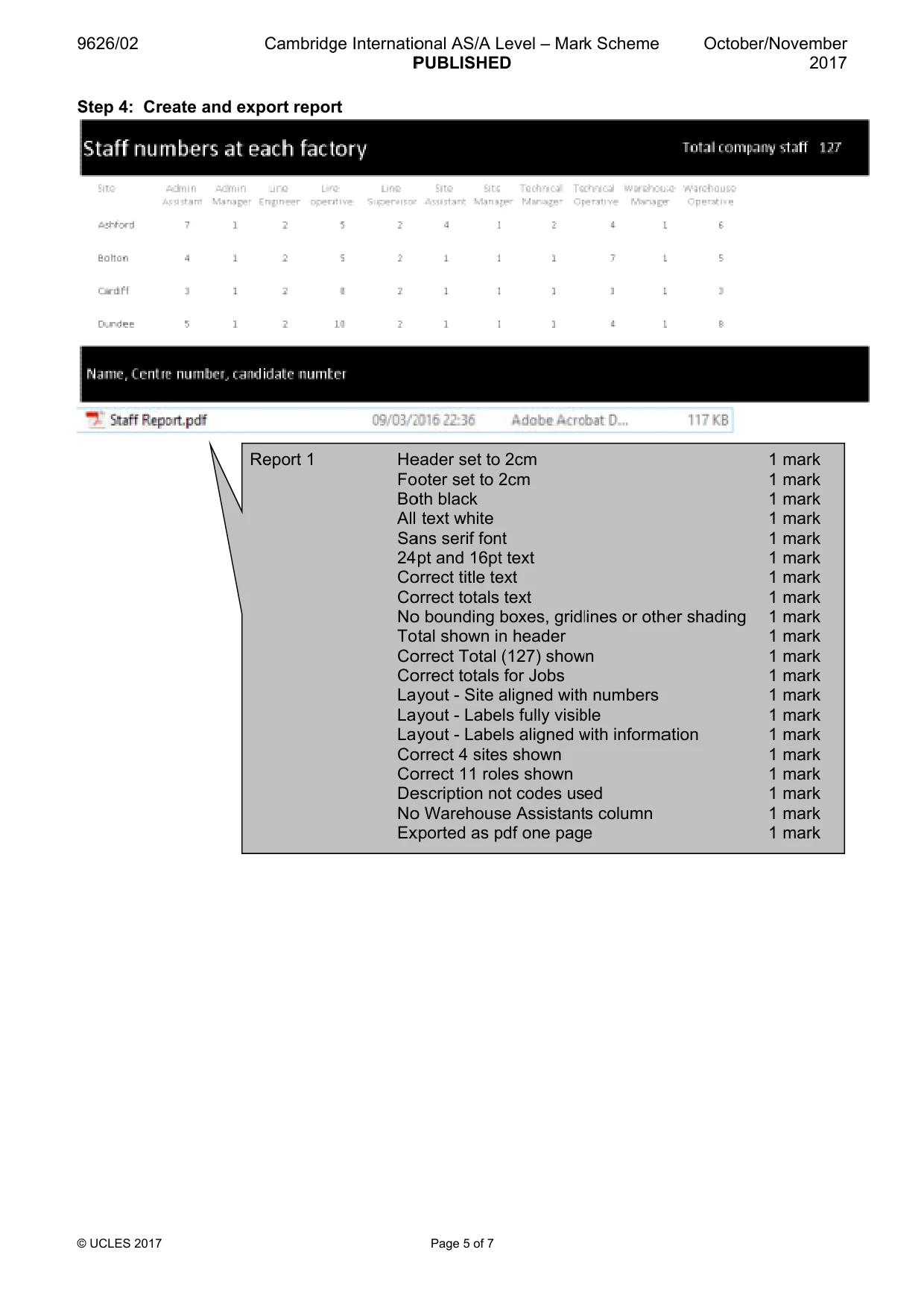
3 9626/02/O/N/17 © UCLES 2017 [Turn over 4 The company needs information about the number of staff working at each site. Create a report to display the number of staff employed in each job at each site. The header and footer must have: • a black background 2 cm in height • text displayed in a white sans serif font. The report must have the title: Staff numbers at each factory Set the font size for this title to 24pt and all other text in the header and footer to 16pt. The columns must be labelled with the job description for each job. The total number of staff must be shown in the report header with the label Total company staff Insert your name, Centre number and candidate number in the footer. Ensure the formatting of the report is of a professional quality. The layout of the report should look like this. Export this report as a pdf file named Staff_Report [20]
Question paper, page 4
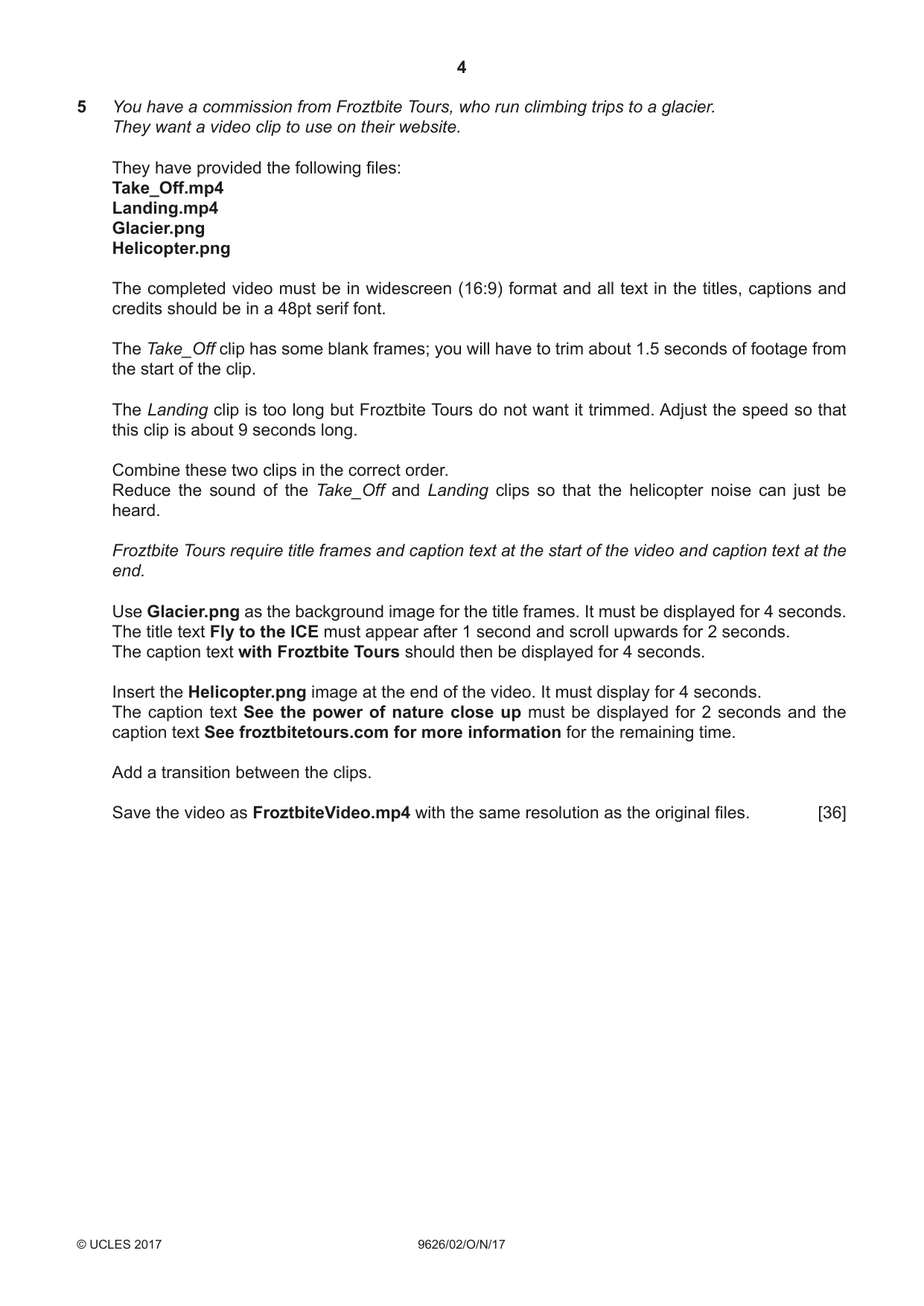
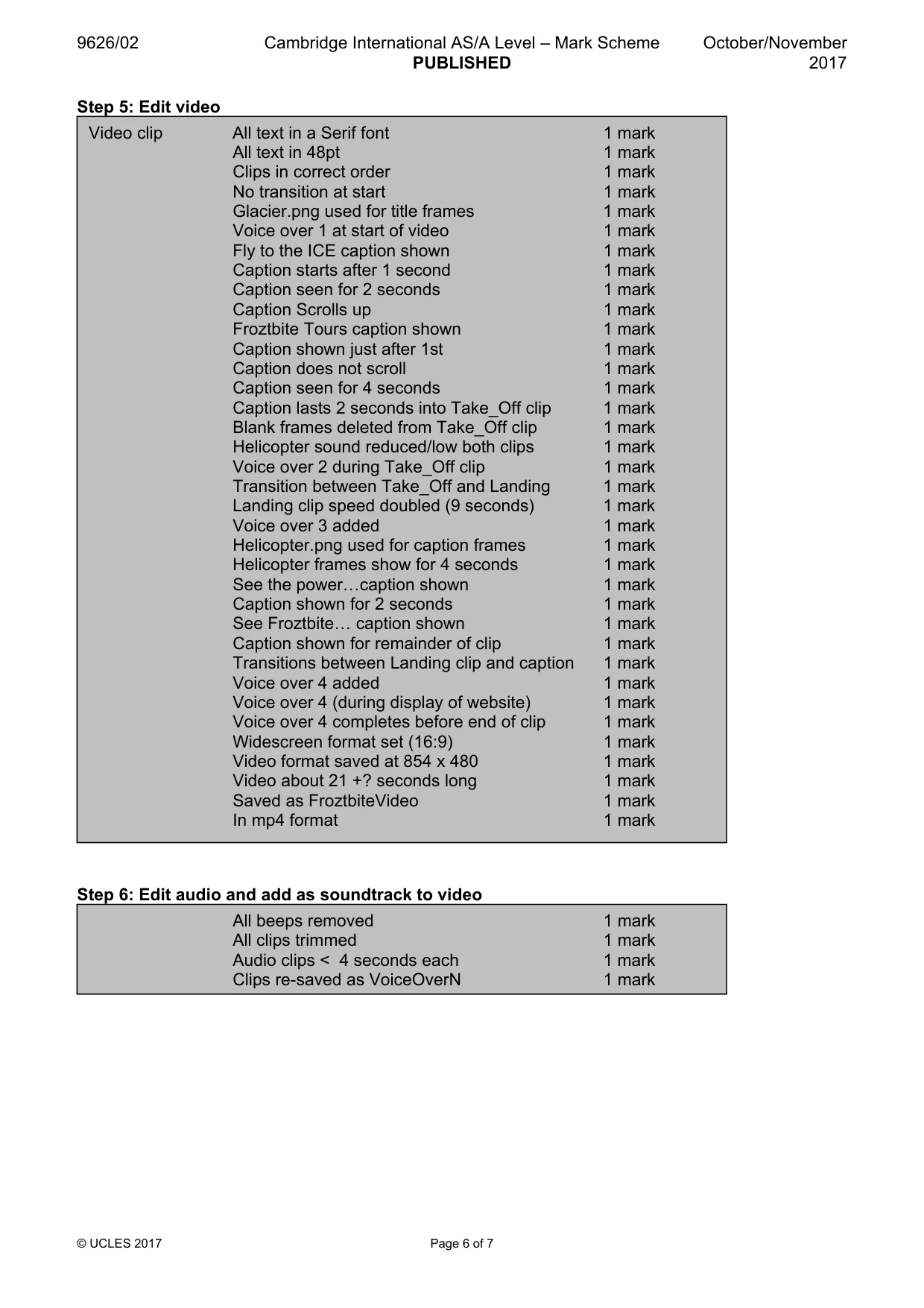
4 9626/02/O/N/17 © UCLES 2017 5 You have a commission from Froztbite Tours, who run climbing trips to a glacier. They want a video clip to use on their website. They have provided the following files: Take_Off.mp4 Landing.mp4 Glacier.png Helicopter.png The completed video must be in widescreen (16:9) format and all text in the titles, captions and credits should be in a 48pt serif font. The Take_Off clip has some blank frames; you will have to trim about 1.5 seconds of footage from the start of the clip. The Landing clip is too long but Froztbite Tours do not want it trimmed. Adjust the speed so that this clip is about 9 seconds long. Combine these two clips in the correct order. Reduce the sound of the Take_Off and Landing clips so that the helicopter noise can just be heard. Froztbite Tours require title frames and caption text at the start of the video and caption text at the end. Use Glacier.png as the background image for the title frames. It must be displayed for 4 seconds. The title text Fly to the ICE must appear after 1 second and scroll upwards for 2 seconds. The caption text with Froztbite Tours should then be displayed for 4 seconds. Insert the Helicopter.png image at the end of the video. It must display for 4 seconds. The caption text See the power of nature close up must be displayed for 2 seconds and the caption text See froztbitetours.com for more information for the remaining time. Add a transition between the clips. Save the video as FroztbiteVideo.mp4 with the same resolution as the original files. [36]
Question paper, page 5
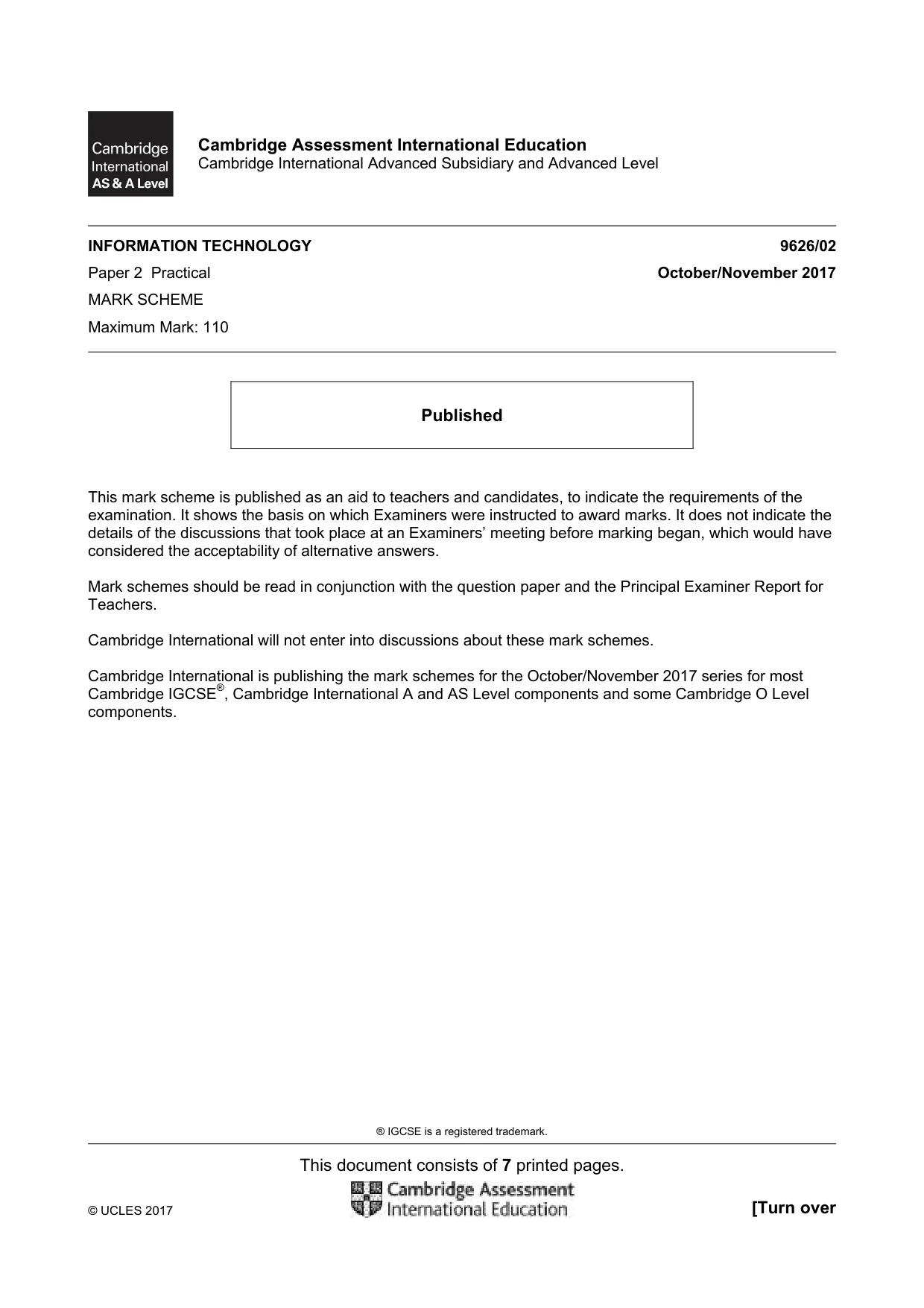
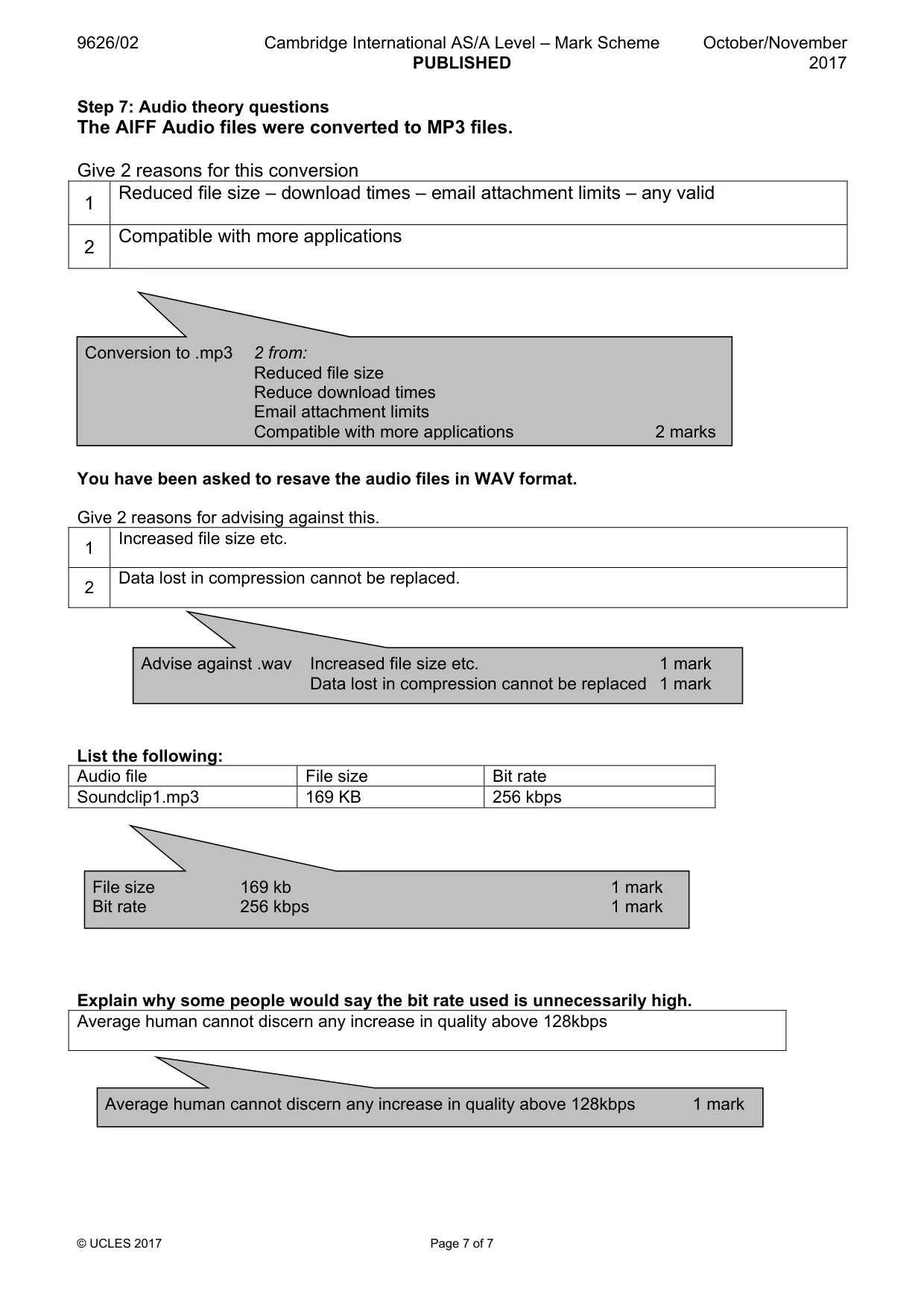
5 9626/02/O/N/17 © UCLES 2017 6 Froztbite Tours want voice-over clips added to the video. They have provided you with four clips. SoundClip1.mp3 SoundClip2.mp3 SoundClip3.mp3 SoundClip4.mp3 You must edit the clips to remove the starting beep and any sounds or quiet periods that are not needed. Resave the clips as VoiceOver1 to VoiceOver4 Add the voice-over clips to the video in that order. VoiceOver1 must play at the start of the video and VoiceOver4 must play during the See froztbitetours.com for more information caption. [4] 7 The original recordings of the voice-over clips were saved as AIFF files but they were provided as MP3 files. In your Evidence Document answer the following questions: The AIFF audio files were converted to MP3 files. Give two reasons for this conversion. You have been asked to resave the audio files to WAV format. Give two reasons for advising against this. Complete the table to show the file size and bit rate of SoundClip1.mp3 and explain why some people would say the bit rate used is unnecessarily high. [7] Save your Evidence Document.
Question paper, page 6
6 9626/02/O/N/17 © UCLES 2017 BLANK PAGE
Question paper, page 7
7 9626/02/O/N/17 © UCLES 2017 BLANK PAGE
Question paper, page 8
8 9626/02/O/N/17 © UCLES 2017 BLANK PAGE Permission to reproduce items where third-party owned material protected by copyright is included has been sought and cleared where possible. Every reasonable effort has been made by the publisher (UCLES) to trace copyright holders, but if any items requiring clearance have unwittingly been included, the publisher will be pleased to make amends at the earliest possible opportunity. To avoid the issue of disclosure of answer-related information to candidates, all copyright acknowledgements are reproduced online in the Cambridge International Examinations Copyright Acknowledgements Booklet. This is produced for each series of examinations and is freely available to download at www.cie.org.uk after the live examination series. Cambridge International Examinations is part of the Cambridge Assessment Group. Cambridge Assessment is the brand name of University of Cambridge Local Examinations Syndicate (UCLES), which is itself a department of the University of Cambridge.
Mark scheme, page 1
® IGCSE is a registered trademark. This document consists of 7 printed pages. © UCLES 2017 [Turn over Cambridge Assessment International Education Cambridge International Advanced Subsidiary and Advanced Level INFORMATION TECHNOLOGY 9626/02 Paper 2 Practical October/November 2017 MARK SCHEME Maximum Mark: 110 Published This mark scheme is published as an aid to teachers and candidates, to indicate the requirements of the examination. It shows the basis on which Examiners were instructed to award marks. It does not indicate the details of the discussions that took place at an Examiners’ meeting before marking began, which would have considered the acceptability of alternative answers. Mark schemes should be read in conjunction with the question paper and the Principal Examiner Report for Teachers. Cambridge International will not enter into discussions about these mark schemes. Cambridge International is publishing the mark schemes for the October/November 2017 series for most Cambridge IGCSE®, Cambridge International A and AS Level components and some Cambridge O Level components.
Mark scheme, page 2
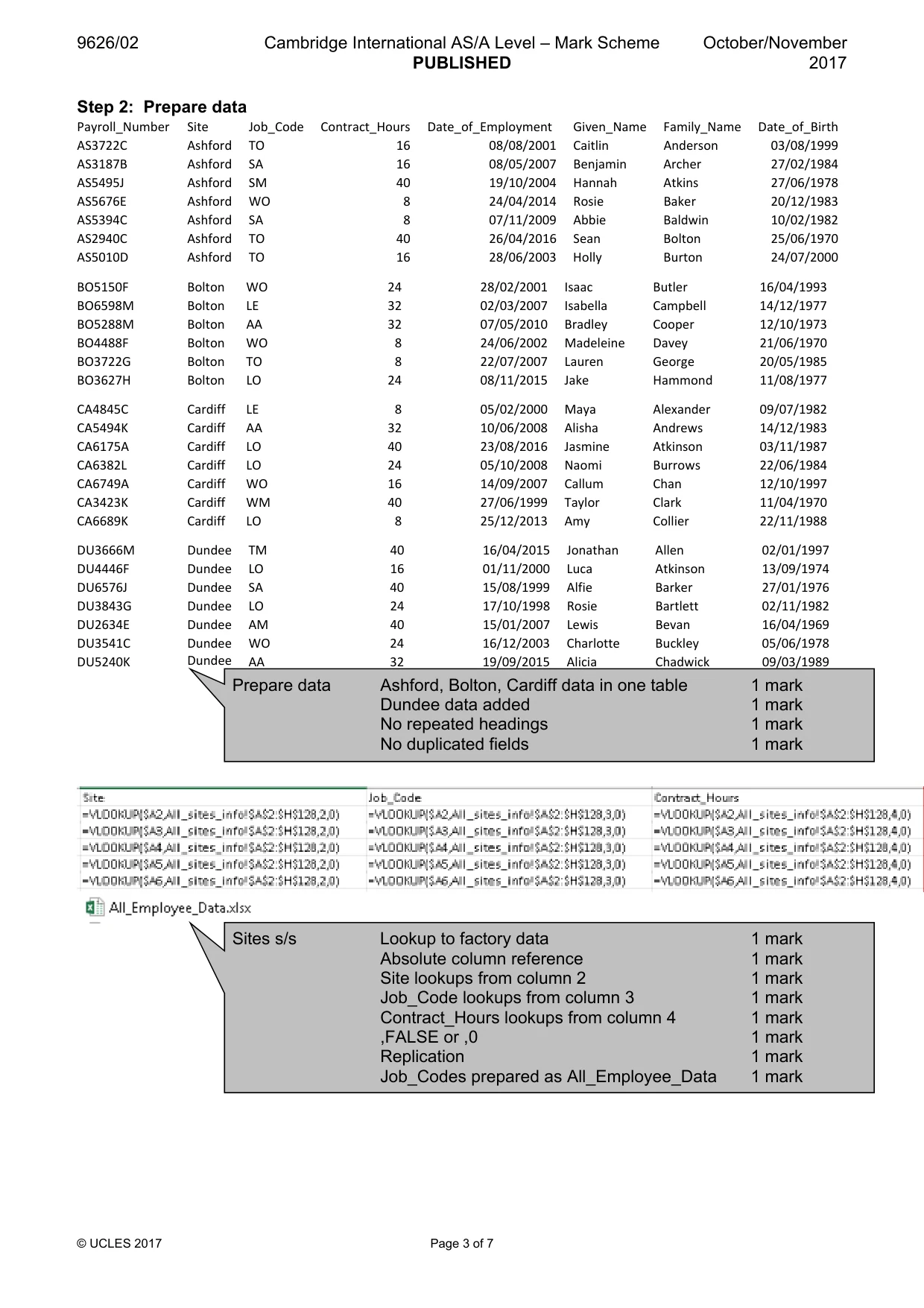
9626/02 Cambridge International AS/A Level – Mark Scheme PUBLISHED October/November 2017 © UCLES 2017 Page 2 of 7 Step 1: Data Dictionary Employees/Personnel table Field Data type Field size Other metadata – input mask, validation, default value etc. Payroll_Number Text/Alphanumeric 7 chrs Primary Key Given_Name Text/Alphanumeric Family_Name Text/Alphanumeric Street_Address Text/Alphanumeric City/Town Text/Alphanumeric Post_Code Text/Alphanumeric Date_of_Birth Date/Time dd/mm/yyyy Site Text/Alphanumeric Job_Code Text/Alphanumeric Contract_Hours Number Integer? Date_Employed Date/Time Sites table Field Data type Field size Other metadata – input mask, validation, default value etc. Site Text/Alphanumeric 7 chrs Primary Key Address_1 Text/Alphanumeric 2 chrs Address_2 Text/Alphanumeric Town/City Text/Alphanumeric Post_Code Text/Alphanumeric Office_Tel_Number Text/Alphanumeric Office_Fax_Number Text/Alphanumeric Job_Codes/Job description table Field Data type Field size Other metadata – input mask, validation, default value etc. Job_Code Text/Alphanumeric 2 chrs Primary key Job_Description Text/Alphanumeric Data dictionary with 3 tables 1 mark Employees table Table name – appropriate e.g. Employees/Personnel 1 mark Payroll number as primary key 1 mark Personal information fields 1 mark Personal information data types 1 mark Job information fields 1 mark Job information data types 1 mark DOB once only 1 mark Employment date once only 1 mark Any extra metadata 1 mark Job_codes / job description table Table name – appropriate e.g. Job codes 1 mark Job code = Primary Key 1 mark Correct fields 1 mark Correct data types 1 mark Some field sizes set 1 mark Any extra metadata 1 mark Sites table Table name – appropriate e.g. Sites 1 mark Correct fields 1 mark Primary key 1 mark
Mark scheme, page 3
9626/02 Cambridge International AS/A Level – Mark Scheme PUBLISHED October/November 2017 © UCLES 2017 Page 3 of 7 Step 2: Prepare data Payroll_Number Site Job_Code Contract_Hours Date_of_Employment Given_Name Family_Name Date_of_Birth AS3722C Ashford TO 16 08/08/2001 Caitlin Anderson 03/08/1999 AS3187B Ashford SA 16 08/05/2007 Benjamin Archer 27/02/1984 AS5495J Ashford SM 40 19/10/2004 Hannah Atkins 27/06/1978 AS5676E Ashford WO 8 24/04/2014 Rosie Baker 20/12/1983 AS5394C Ashford SA 8 07/11/2009 Abbie Baldwin 10/02/1982 AS2940C Ashford TO 40 26/04/2016 Sean Bolton 25/06/1970 AS5010D Ashford TO 16 28/06/2003 Holly Burton 24/07/2000 BO5150F Bolton WO 24 28/02/2001 Isaac Butler 16/04/1993 BO6598M Bolton LE 32 02/03/2007 Isabella Campbell 14/12/1977 BO5288M Bolton AA 32 07/05/2010 Bradley Cooper 12/10/1973 BO4488F Bolton WO 8 24/06/2002 Madeleine Davey 21/06/1970 BO3722G Bolton TO 8 22/07/2007 Lauren George 20/05/1985 BO3627H Bolton LO 24 08/11/2015 Jake Hammond 11/08/1977 CA4845C Cardiff LE 8 05/02/2000 Maya Alexander 09/07/1982 CA5494K Cardiff AA 32 10/06/2008 Alisha Andrews 14/12/1983 CA6175A Cardiff LO 40 23/08/2016 Jasmine Atkinson 03/11/1987 CA6382L Cardiff LO 24 05/10/2008 Naomi Burrows 22/06/1984 CA6749A Cardiff WO 16 14/09/2007 Callum Chan 12/10/1997 CA3423K Cardiff WM 40 27/06/1999 Taylor Clark 11/04/1970 CA6689K Cardiff LO 8 25/12/2013 Amy Collier 22/11/1988 DU3666M Dundee TM 40 16/04/2015 Jonathan Allen 02/01/1997 DU4446F Dundee LO 16 01/11/2000 Luca Atkinson 13/09/1974 DU6576J Dundee SA 40 15/08/1999 Alfie Barker 27/01/1976 DU3843G Dundee LO 24 17/10/1998 Rosie Bartlett 02/11/1982 DU2634E Dundee AM 40 15/01/2007 Lewis Bevan 16/04/1969 DU3541C Dundee WO 24 16/12/2003 Charlotte Buckley 05/06/1978 DU5240K Dundee AA 32 19/09/2015 Alicia Chadwick 09/03/1989 Prepare data Ashford, Bolton, Cardiff data in one table 1 mark Dundee data added 1 mark No repeated headings 1 mark No duplicated fields 1 mark Sites s/s Lookup to factory data 1 mark Absolute column reference 1 mark Site lookups from column 2 1 mark Job_Code lookups from column 3 1 mark Contract_Hours lookups from column 4 1 mark ,FALSE or ,0 1 mark Replication 1 mark Job_Codes prepared as All_Employee_Data 1 mark
Mark scheme, page 4
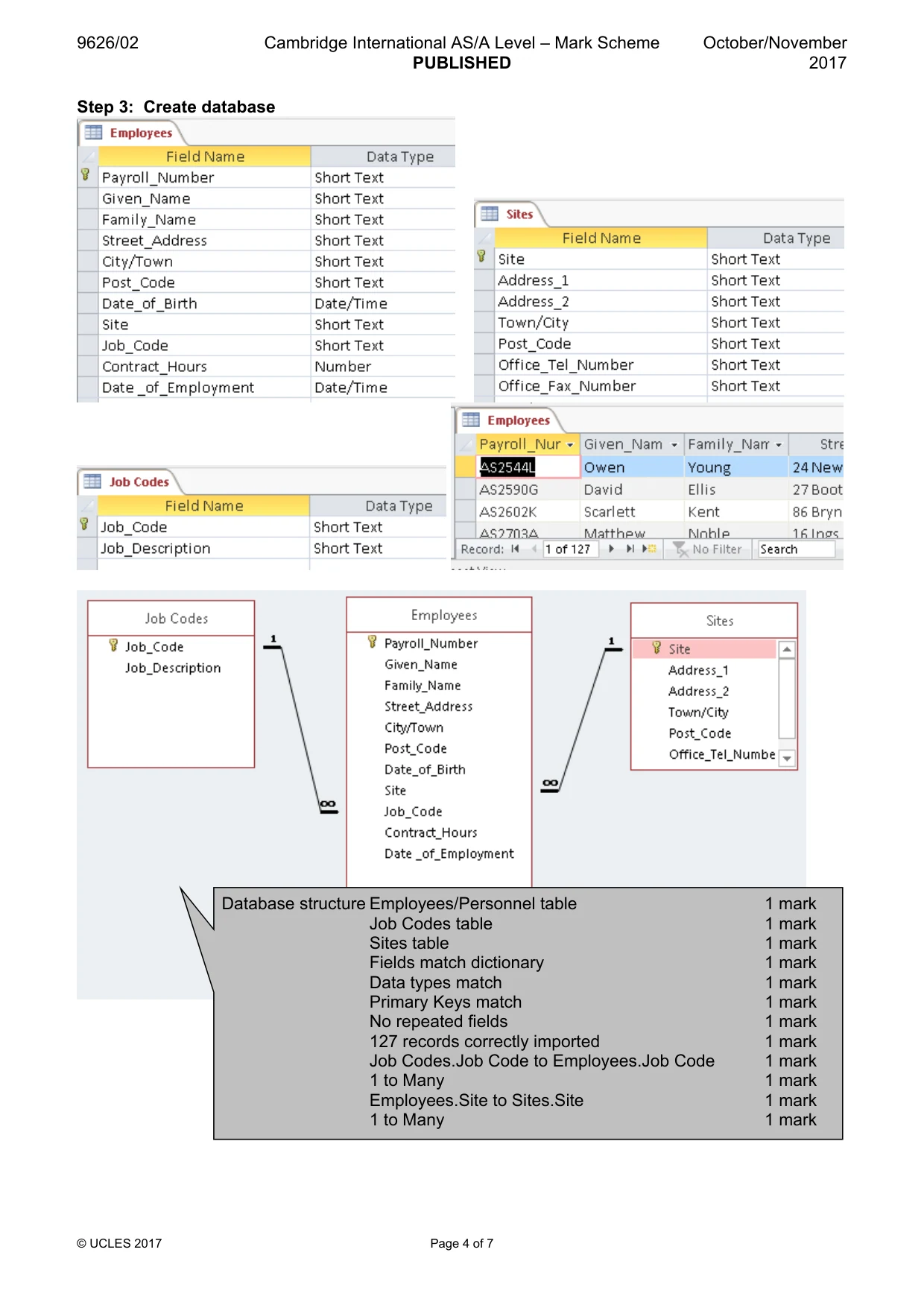
9626/02 Cambridge International AS/A Level – Mark Scheme PUBLISHED October/November 2017 © UCLES 2017 Page 4 of 7 Step 3: Create database Database structure Employees/Personnel table 1 mark Job Codes table 1 mark Sites table 1 mark Fields match dictionary 1 mark Data types match 1 mark Primary Keys match 1 mark No repeated fields 1 mark 127 records correctly imported 1 mark Job Codes.Job Code to Employees.Job Code 1 mark 1 to Many 1 mark Employees.Site to Sites.Site 1 mark 1 to Many 1 mark
Mark scheme, page 5
9 © S 9626/02 © UCLES 2017 Step 4: Create and ex Cambridg xport repor Report 1 ge Internatio P rt He Fo Bo All Sa 24 Co Co No To Co Co Lay Lay Lay Co Co De No Ex onal AS/A L PUBLISHED Page 5 of 7 eader set to oter set to 2 oth black text white ans serif fon pt and 16pt orrect title te orrect totals o bounding b tal shown in orrect Total orrect totals yout - Site a yout - Labe yout - Labe orrect 4 sites orrect 11 rol escription no o Warehous xported as p Level – Mar D 2cm 2cm nt t text ext text boxes, gridl n header (127) show for Jobs aligned with els fully visib els aligned w s shown es shown ot codes us se Assistant pdf one pag k Scheme lines or othe wn h numbers ble with informa ed ts column e Octobe er shading ation er/Novembe 201 1 mark 1 mark 1 mark 1 mark 1 mark 1 mark 1 mark 1 mark 1 mark 1 mark 1 mark 1 mark 1 mark 1 mark 1 mark 1 mark 1 mark 1 mark 1 mark 1 mark er 17
Mark scheme, page 6
9626/02 Cambridge International AS/A Level – Mark Scheme PUBLISHED October/November 2017 © UCLES 2017 Page 6 of 7 Step 5: Edit video Step 6: Edit audio and add as soundtrack to video Video clip All text in a Serif font 1 mark All text in 48pt 1 mark Clips in correct order 1 mark No transition at start 1 mark Glacier.png used for title frames 1 mark Voice over 1 at start of video 1 mark Fly to the ICE caption shown 1 mark Caption starts after 1 second 1 mark Caption seen for 2 seconds 1 mark Caption Scrolls up 1 mark Froztbite Tours caption shown 1 mark Caption shown just after 1st 1 mark Caption does not scroll 1 mark Caption seen for 4 seconds 1 mark Caption lasts 2 seconds into Take_Off clip 1 mark Blank frames deleted from Take_Off clip 1 mark Helicopter sound reduced/low both clips 1 mark Voice over 2 during Take_Off clip 1 mark Transition between Take_Off and Landing 1 mark Landing clip speed doubled (9 seconds) 1 mark Voice over 3 added 1 mark Helicopter.png used for caption frames 1 mark Helicopter frames show for 4 seconds 1 mark See the power«caption shown 1 mark Caption shown for 2 seconds 1 mark See Froztbite« caption shown 1 mark Caption shown for remainder of clip 1 mark Transitions between Landing clip and caption 1 mark Voice over 4 added 1 mark Voice over 4 (during display of website) 1 mark Voice over 4 completes before end of clip 1 mark Widescreen format set (16:9) 1 mark Video format saved at 854 x 480 1 mark Video about 21 +? seconds long 1 mark Saved as FroztbiteVideo 1 mark In mp4 format 1 mark All beeps removed 1 mark All clips trimmed 1 mark Audio clips < 4 seconds each 1 mark Clips re-saved as VoiceOverN 1 mark
Mark scheme, page 7
9626/02 Cambridge International AS/A Level – Mark Scheme PUBLISHED October/November 2017 © UCLES 2017 Page 7 of 7 Advise against .wav Increased file size etc. 1 mark Data lost in compression cannot be replaced 1 mark Average human cannot discern any increase in quality above 128kbps 1 mark Step 7: Audio theory questions The AIFF Audio files were converted to MP3 files. Give 2 reasons for this conversion 1 Reduced file size – download times – email attachment limits – any valid 2 Compatible with more applications You have been asked to resave the audio files in WAV format. Give 2 reasons for advising against this. 1 Increased file size etc. 2 Data lost in compression cannot be replaced. List the following: Audio file File size Bit rate Soundclip1.mp3 169 KB 256 kbps Explain why some people would say the bit rate used is unnecessarily high. Average human cannot discern any increase in quality above 128kbps Conversion to .mp3 2 from: Reduced file size Reduce download times Email attachment limits Compatible with more applications 2 marks File size 169 kb 1 mark Bit rate 256 kbps 1 mark
What you needed in this session
Cambridge’s own grade thresholds for 2017 Oct/Nov, Paper 2 · Variant 1. A higher threshold means an easier paper — the bar moves with how the cohort did.