Cambridge A Level Information Technology (from 2017) 9626 — 2017 Feb/March Paper 2 · Variant 1
9626/21/F/M/17 · 110 marks · ≈124 min
The question paper and its mark scheme, free to read here and free to download. This is Cambridge’s own paper, exactly as it was sat.
Question paper8 pages



Mark scheme17 pages
Answers below. Sit the paper first if you are practising.
Paper as text
Question paper, page 1
This document consists of 5 printed pages and 3 blank pages. DC (ST/CGW) 132934/2 © UCLES 2017 [Turn over Cambridge International Examinations Cambridge International Advanced Subsidiary and Advanced Level * 3 0 8 9 9 3 3 9 3 8 * INFORMATION TECHNOLOGY 9626/02 Paper 2 Practical February/March 2017 2 hours 30 minutes Additional Materials: Candidate Source Files READ THESE INSTRUCTIONS FIRST DO NOT WRITE IN ANY BARCODES. Carry out every instruction in each task. Save your work using the file name given in the task as and when instructed. The number of marks is given in brackets [ ] at the end of each task or part task. Any businesses described in this paper are entirely fictitious. You must not have access to either the internet or any email system during this examination.
Question paper, page 2
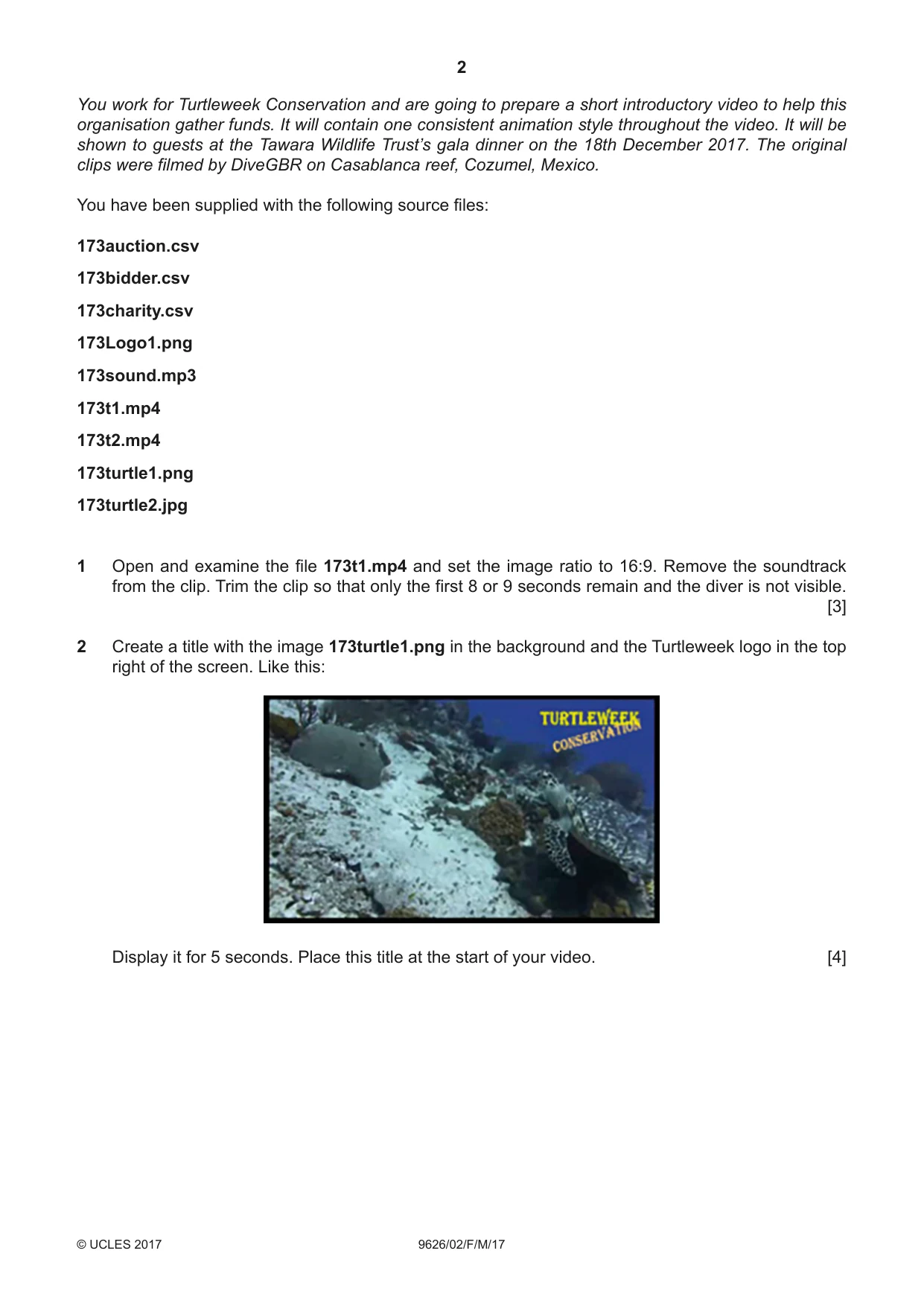
2 9626/02/F/M/17 © UCLES 2017 You work for Turtleweek Conservation and are going to prepare a short introductory video to help this organisation gather funds. It will contain one consistent animation style throughout the video. It will be shown to guests at the Tawara Wildlife Trust’s gala dinner on the 18th December 2017. The original clips were filmed by DiveGBR on Casablanca reef, Cozumel, Mexico. You have been supplied with the following source files: 173auction.csv 173bidder.csv 173charity.csv 173Logo1.png 173sound.mp3 173t1.mp4 173t2.mp4 173turtle1.png 173turtle2.jpg 1 Open and examine the file 173t1.mp4 and set the image ratio to 16:9. Remove the soundtrack from the clip. Trim the clip so that only the first 8 or 9 seconds remain and the diver is not visible. [3] 2 Create a title with the image 173turtle1.png in the background and the Turtleweek logo in the top right of the screen. Like this: Display it for 5 seconds. Place this title at the start of your video. [4]
Question paper, page 3
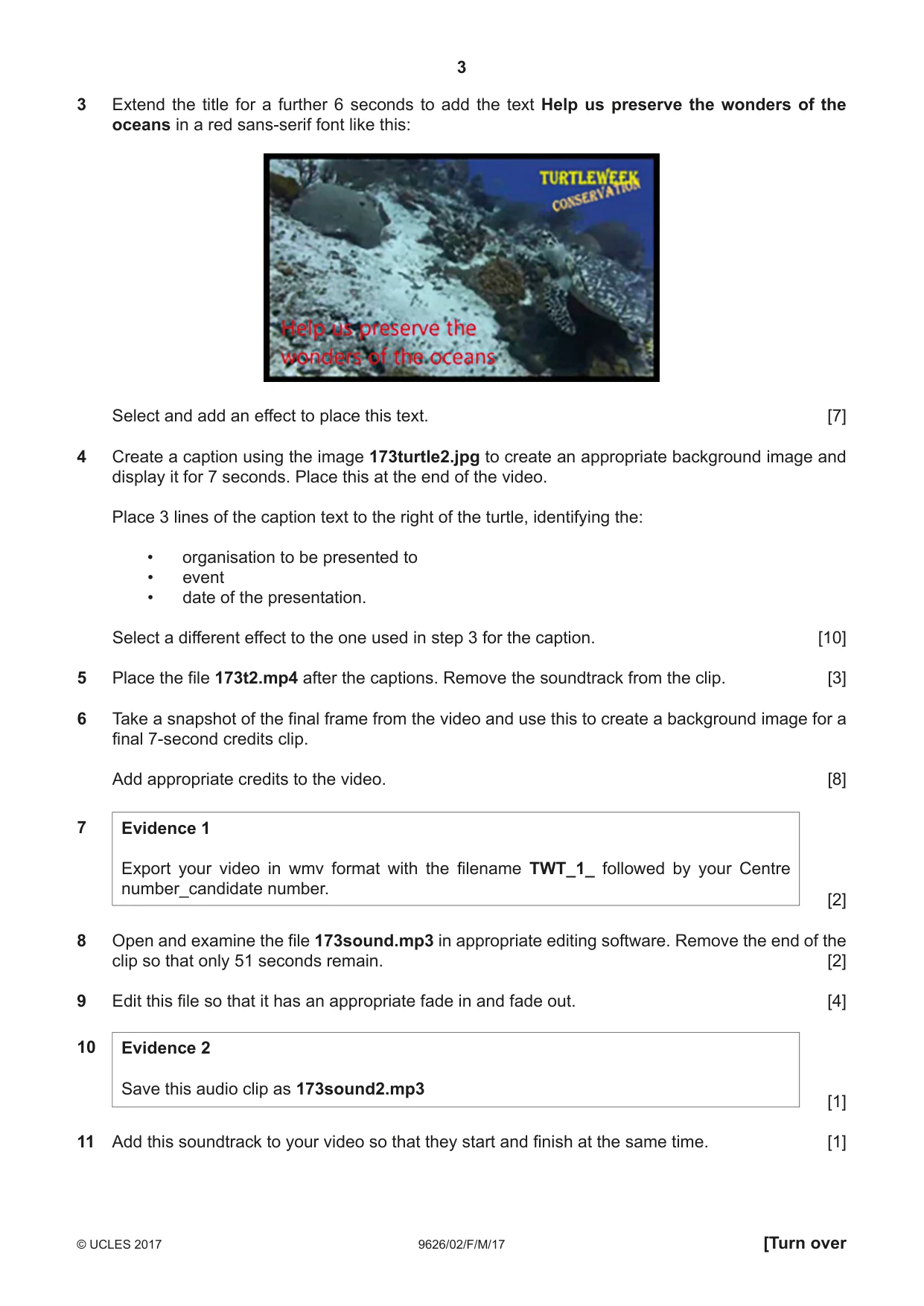
3 9626/02/F/M/17 © UCLES 2017 [Turn over 3 Extend the title for a further 6 seconds to add the text Help us preserve the wonders of the oceans in a red sans-serif font like this: Select and add an effect to place this text. [7] 4 Create a caption using the image 173turtle2.jpg to create an appropriate background image and display it for 7 seconds. Place this at the end of the video. Place 3 lines of the caption text to the right of the turtle, identifying the: • organisation to be presented to • event • date of the presentation. Select a different effect to the one used in step 3 for the caption. [10] 5 Place the file 173t2.mp4 after the captions. Remove the soundtrack from the clip. [3] 6 Take a snapshot of the final frame from the video and use this to create a background image for a final 7-second credits clip. Add appropriate credits to the video. [8] 7 Evidence 1 Export your video in wmv format with the filename TWT_1_ followed by your Centre number_candidate number. [2] 8 Open and examine the file 173sound.mp3 in appropriate editing software. Remove the end of the clip so that only 51 seconds remain. [2] 9 Edit this file so that it has an appropriate fade in and fade out. [4] 10 Evidence 2 Save this audio clip as 173sound2.mp3 [1] 11 Add this soundtrack to your video so that they start and finish at the same time. [1]
Question paper, page 4
4 9626/02/F/M/17 © UCLES 2017 12 Evidence 3 Export your video in wmv format with the filename TWT_2_ followed by your Centre number_candidate number. [1] 13 Evidence 4 Export or convert your video into mp4 format with the filename TWT_3_ followed by your Centre number_candidate number. [2] The last fundraising event was an auction run by three different charities. Data was collected about this auction and stored in a number of spreadsheet files. All documents must fit on a single portrait page wide when printed on A4 paper with text at least 12 points high. Display all currency values in dollars with 2 decimal places. All documents must be of a professional standard and produced using the most efficient methods. 14 Using suitable spreadsheet software, open and examine the data in the files: 173auction.csv 173bidder.csv 173charity.csv In the most appropriate file, create a footer containing the text Auction item winners - last edited by: followed by your name, Centre number and candidate number. [2] 15 Insert a new column after the Charity column. In cell C3 use a function to look up the charity name. Insert an appropriate label in C2. [8] 16 Insert a formula in cell F3 that uses the most appropriate file to look up the name of the auction winner and display it in the format Surname: Forename [8] 17 Replicate the functions entered in questions 15 and 16 for all auction lots. [1] 18 Apply appropriate formatting to the spreadsheet. [4] Evidence 5 Save your spreadsheet as Auction1_ followed by your Centre number_candidate number. A list of all the auction winners will be created to show how much each winner has donated to each charity for the items that they have won. 19 Create a pivot table to display the amount due by each person to each charity, total amount due for each person and the amount raised by each charity from this event. [11] Evidence 6 Save your pivot table as Auction2_ followed by your Centre number_candidate number.
Question paper, page 5
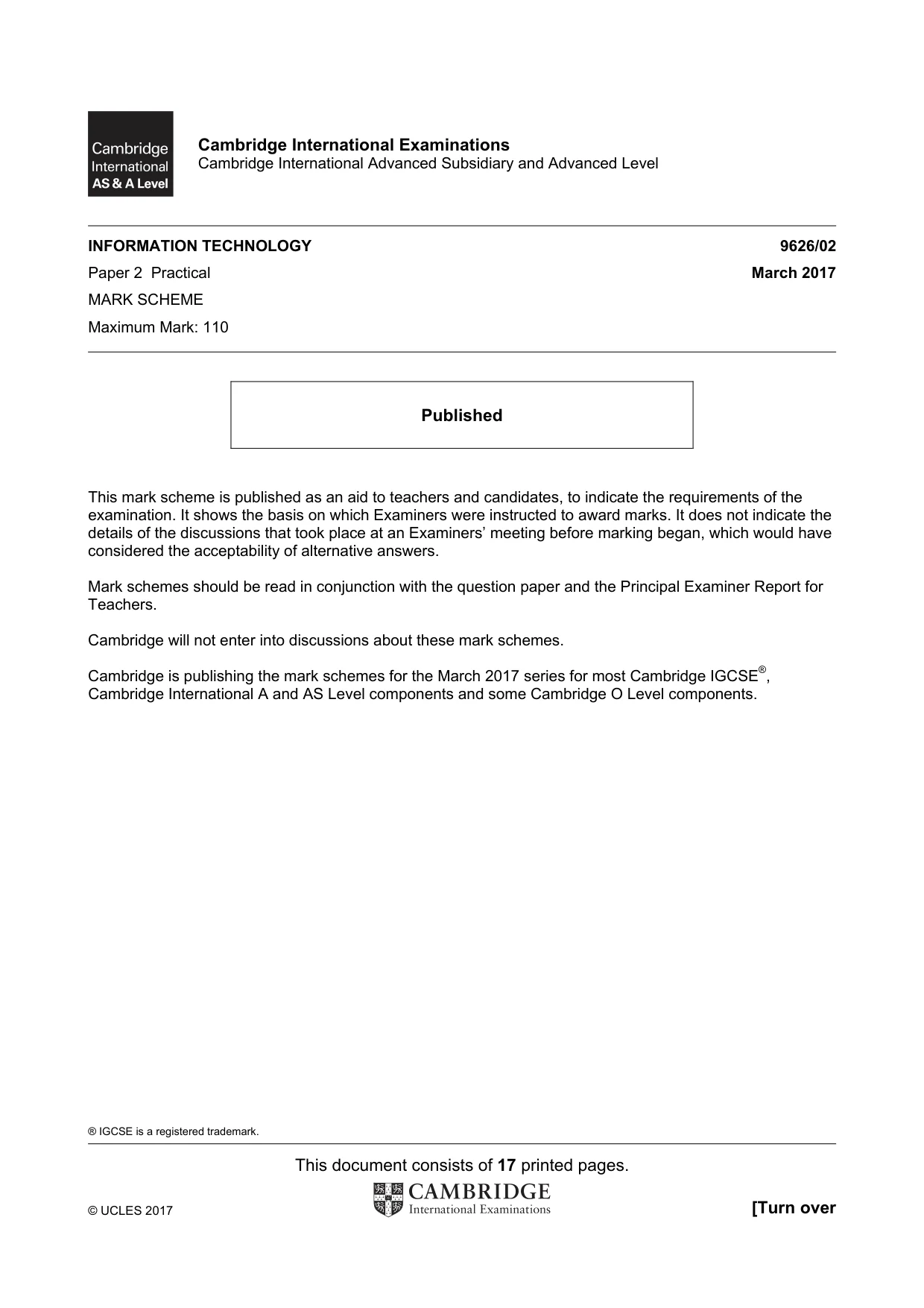
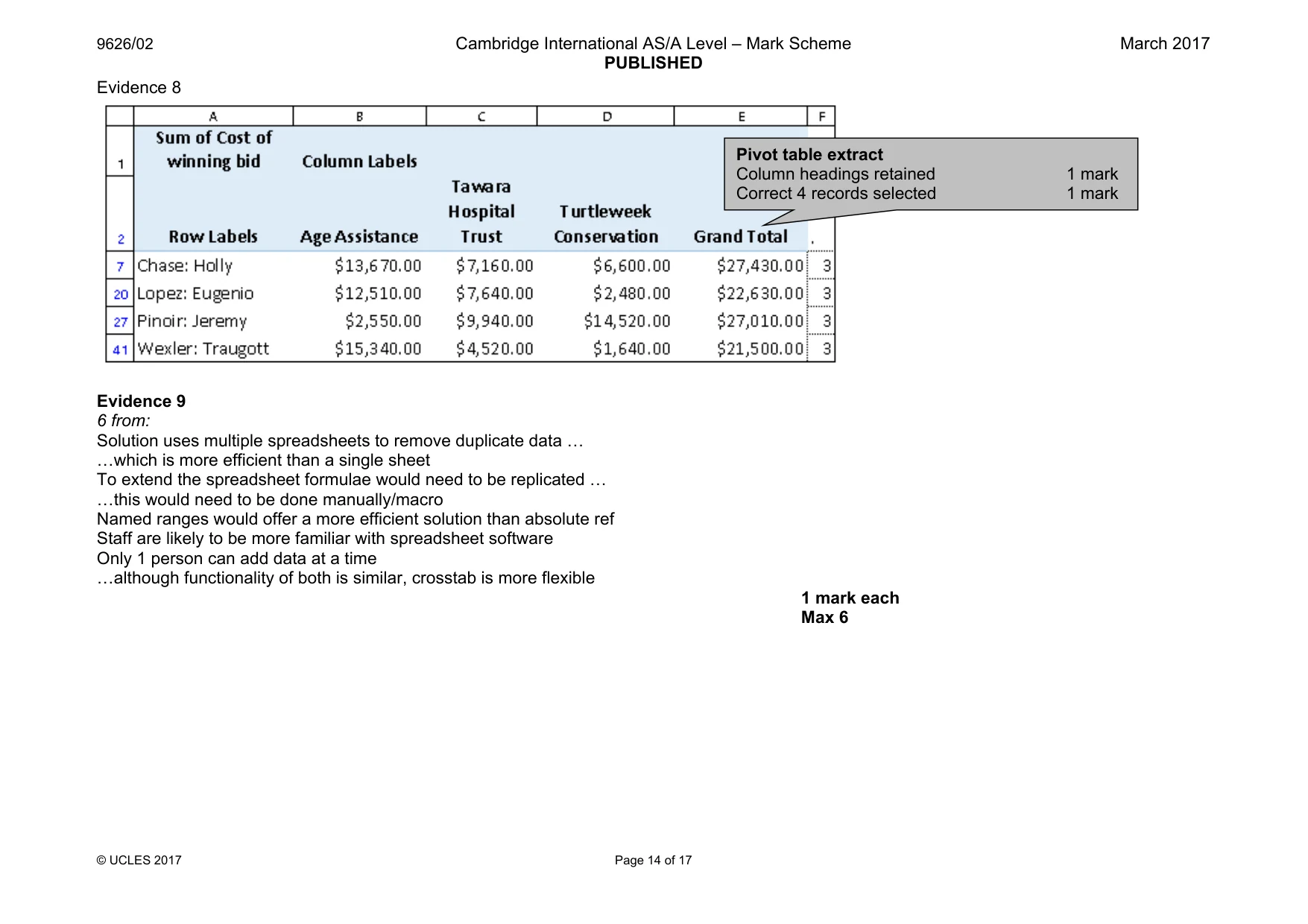
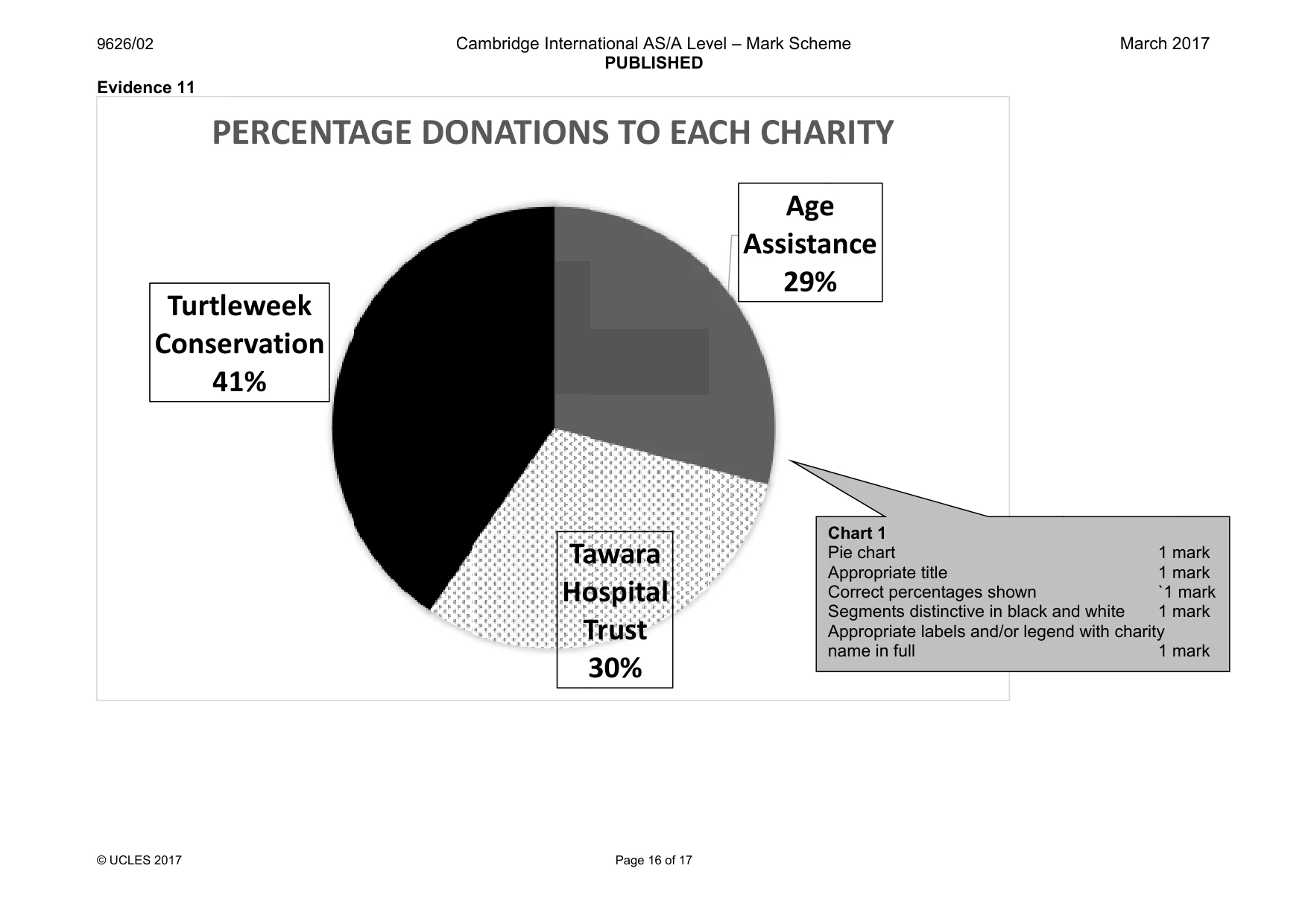
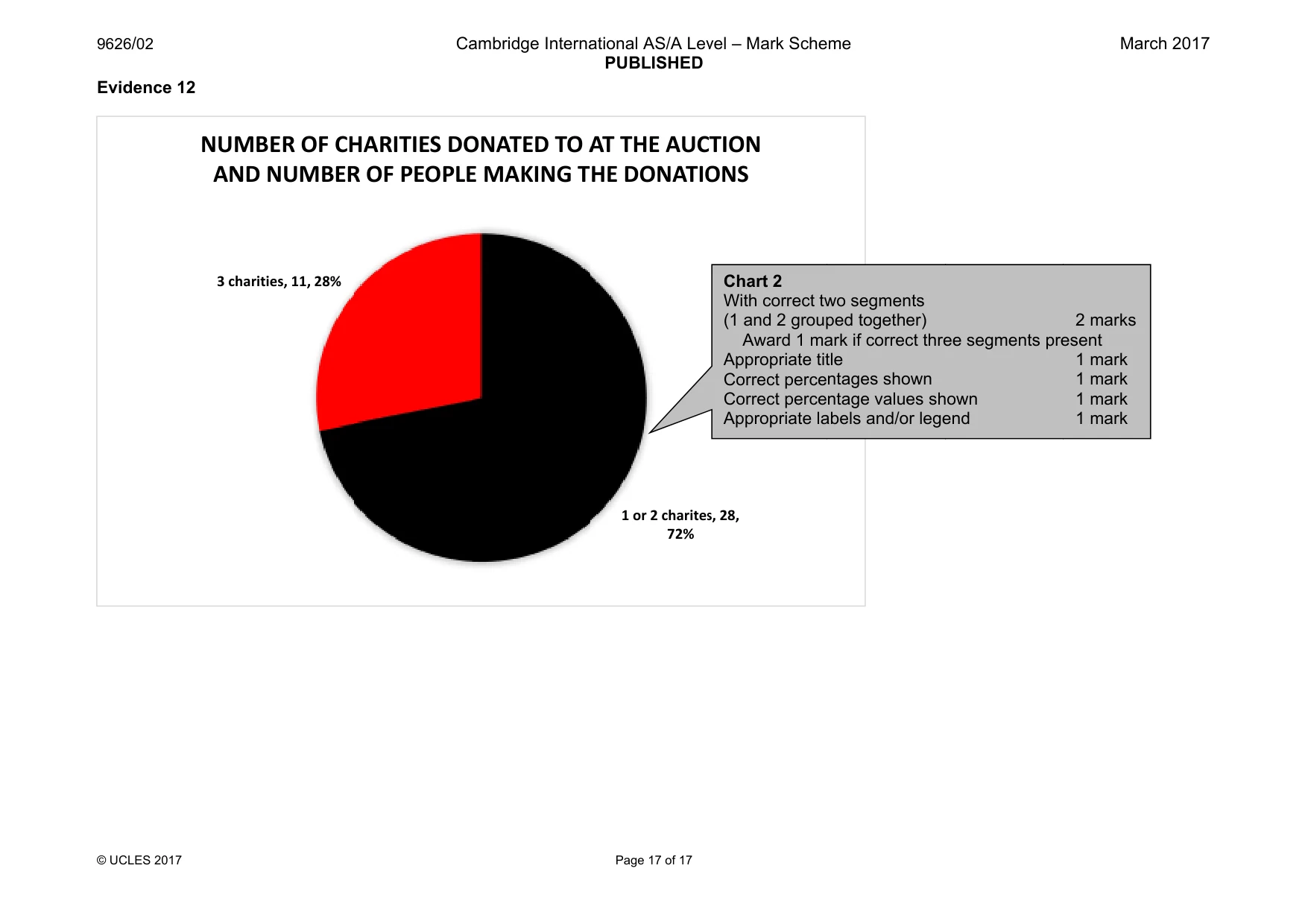
5 9626/02/F/M/17 © UCLES 2017 20 Extract from the pivot table, only the people who donated to all three charities with a total of more than $20,000. [6] Evidence 7 Show evidence of your method in a new document saved as Evidence_ followed by your Centre number_candidate number. Evidence 8 Save your pivot table extract as Auction3_ followed by your Centre number_candidate number. 21 Evaluate the efficiency of your spreadsheet solution using no more than 150 words. [6] Evidence 9 Place your evaluation in your Evidence Document. 22 Identify another application that may be used for these tasks and describe the efficiency of its features using no more than 150 words. [5] Evidence 10 Place your answer in your Evidence Document. 23 Create the most appropriate graph or chart to compare the percentage income for each charity from the event. Ensure your chart is suitable for inclusion in a black and white publication. Evidence 11 Place a copy of this graph or chart in your Evidence Document. [5] 24 A worker for one of the charities states “People attending events usually donate to one or two charities but not all three”. Create the most appropriate graph or chart to prove or disprove this statement. [6] Evidence 12 Place a copy of this graph or chart in your Evidence Document. Save your Evidence Document.
Question paper, page 6
6 9626/02/F/M/17 © UCLES 2017 BLANK PAGE
Question paper, page 7
7 9626/02/F/M/17 © UCLES 2017 BLANK PAGE
Question paper, page 8
8 9626/02/F/M/17 © UCLES 2017 Permission to reproduce items where third-party owned material protected by copyright is included has been sought and cleared where possible. Every reasonable effort has been made by the publisher (UCLES) to trace copyright holders, but if any items requiring clearance have unwittingly been included, the publisher will be pleased to make amends at the earliest possible opportunity. To avoid the issue of disclosure of answer-related information to candidates, all copyright acknowledgements are reproduced online in the Cambridge International Examinations Copyright Acknowledgements Booklet. This is produced for each series of examinations and is freely available to download at www.cie.org.uk after the live examination series. Cambridge International Examinations is part of the Cambridge Assessment Group. Cambridge Assessment is the brand name of University of Cambridge Local Examinations Syndicate (UCLES), which is itself a department of the University of Cambridge. BLANK PAGE
Mark scheme, page 1
® IGCSE is a registered trademark. This document consists of 17 printed pages. © UCLES 2017 [Turn over Cambridge International Examinations Cambridge International Advanced Subsidiary and Advanced Level INFORMATION TECHNOLOGY 9626/02 Paper 2 Practical March 2017 MARK SCHEME Maximum Mark: 110 Published This mark scheme is published as an aid to teachers and candidates, to indicate the requirements of the examination. It shows the basis on which Examiners were instructed to award marks. It does not indicate the details of the discussions that took place at an Examiners’ meeting before marking began, which would have considered the acceptability of alternative answers. Mark schemes should be read in conjunction with the question paper and the Principal Examiner Report for Teachers. Cambridge will not enter into discussions about these mark schemes. Cambridge is publishing the mark schemes for the March 2017 series for most Cambridge IGCSE®, Cambridge International A and AS Level components and some Cambridge O Level components.
Mark scheme, page 2
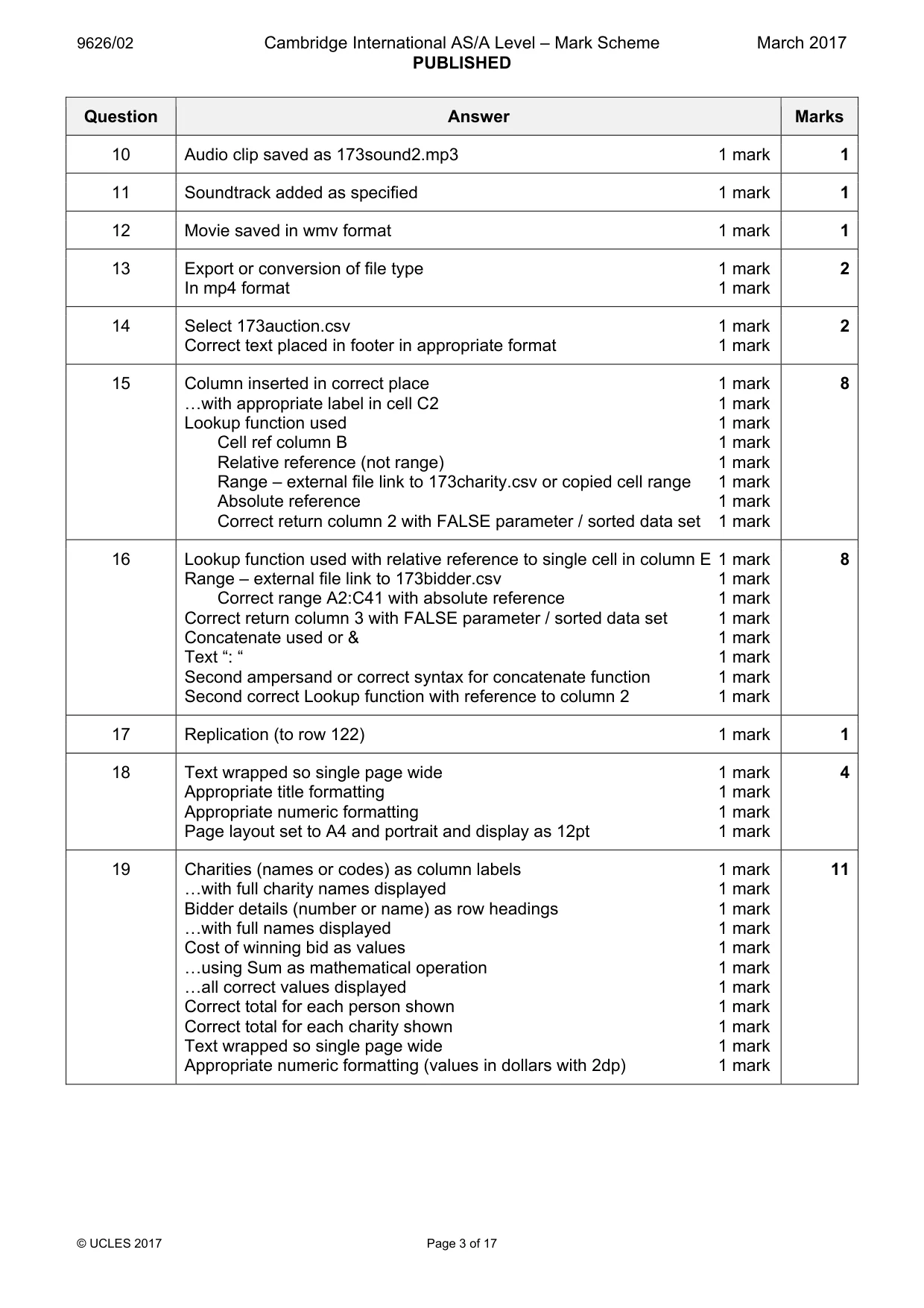
9626/02 Cambridge International AS/A Level – Mark Scheme PUBLISHED March 2017 © UCLES 2017 Page 2 of 17 Question Answer Marks 1 Image ratio of software set to 16:9 1 mark End of video cut 1 mark Only 8–9 seconds of video remain (diver does not appear) 1 mark 3 2 Title background set to 173turtle1.png 1 mark Title 5 seconds duration 1 mark Logo placed with transparency 1 mark Top right of background image and clearly visible 1 mark 4 3 Title background full screen with no adjustment/movement 1 mark Additional 6 seconds duration 1 mark Title text Help us preserve the wonders of the oceans 1 mark Bottom left of image and clearly visible 1 mark Large easily read font with good contrast 1 mark Effect added for title animation 1 mark Effect added to give sufficient time to read text within the 6 seconds 1 mark 7 4 Caption background set to 173turtle2.jpg 1 mark Appropriate image editing to amend aspect ratio 1 mark The image fills the full screen. 1 mark Placed after video 1 mark Caption frames 7 seconds duration 1 mark Caption placed to right of turtle in a clearly visible font with good contrast 1 mark Caption text includes Tawara Wildlife Trust 1 mark 2nd block includes Gala Dinner 1 mark 3rd block includes 18th December 2017 1 mark Different effect added for caption animation 1 mark 10 5 Clip placed as specified 1 mark Consistent animation used for all elements 1 mark Soundtracks removed from both clips 1 mark 3 6 Snapshot of final frame extracted in appropriate format 1 mark «and set as background for credits 1 mark Credits 7 seconds duration 1 mark Credits include: Filmed by 1 mark Location 1 mark Country 1 mark Appropriate blank line/s as spacing between credits 1 mark Candidate name and numbers in credits in appropriate format 1 mark 8 7 Movie exported / saved 1 mark In wmv format 1 mark 2 8 End of clip removed 1 mark «cut to 51 seconds 1 mark 2 9 Fade in present 1 mark «with appropriate duration for length of sound clip 1 mark Fade out present 1 mark «with appropriate duration for length of sound clip 1 mark 4
Mark scheme, page 3
9626/02 Cambridge International AS/A Level – Mark Scheme PUBLISHED March 2017 © UCLES 2017 Page 3 of 17 Question Answer Marks 10 Audio clip saved as 173sound2.mp3 1 mark 1 11 Soundtrack added as specified 1 mark 1 12 Movie saved in wmv format 1 mark 1 13 Export or conversion of file type 1 mark In mp4 format 1 mark 2 14 Select 173auction.csv 1 mark Correct text placed in footer in appropriate format 1 mark 2 15 Column inserted in correct place 1 mark «with appropriate label in cell C2 1 mark Lookup function used 1 mark Cell ref column B 1 mark Relative reference (not range) 1 mark Range – external file link to 173charity.csv or copied cell range 1 mark Absolute reference 1 mark Correct return column 2 with FALSE parameter / sorted data set 1 mark 8 16 Lookup function used with relative reference to single cell in column E 1 mark Range – external file link to 173bidder.csv 1 mark Correct range A2:C41 with absolute reference 1 mark Correct return column 3 with FALSE parameter / sorted data set 1 mark Concatenate used or & 1 mark Text “: “ 1 mark Second ampersand or correct syntax for concatenate function 1 mark Second correct Lookup function with reference to column 2 1 mark 8 17 Replication (to row 122) 1 mark 1 18 Text wrapped so single page wide 1 mark Appropriate title formatting 1 mark Appropriate numeric formatting 1 mark Page layout set to A4 and portrait and display as 12pt 1 mark 4 19 Charities (names or codes) as column labels 1 mark «with full charity names displayed 1 mark Bidder details (number or name) as row headings 1 mark «with full names displayed 1 mark Cost of winning bid as values 1 mark «using Sum as mathematical operation 1 mark «all correct values displayed 1 mark Correct total for each person shown 1 mark Correct total for each charity shown 1 mark Text wrapped so single page wide 1 mark Appropriate numeric formatting (values in dollars with 2dp) 1 mark 11
Mark scheme, page 4
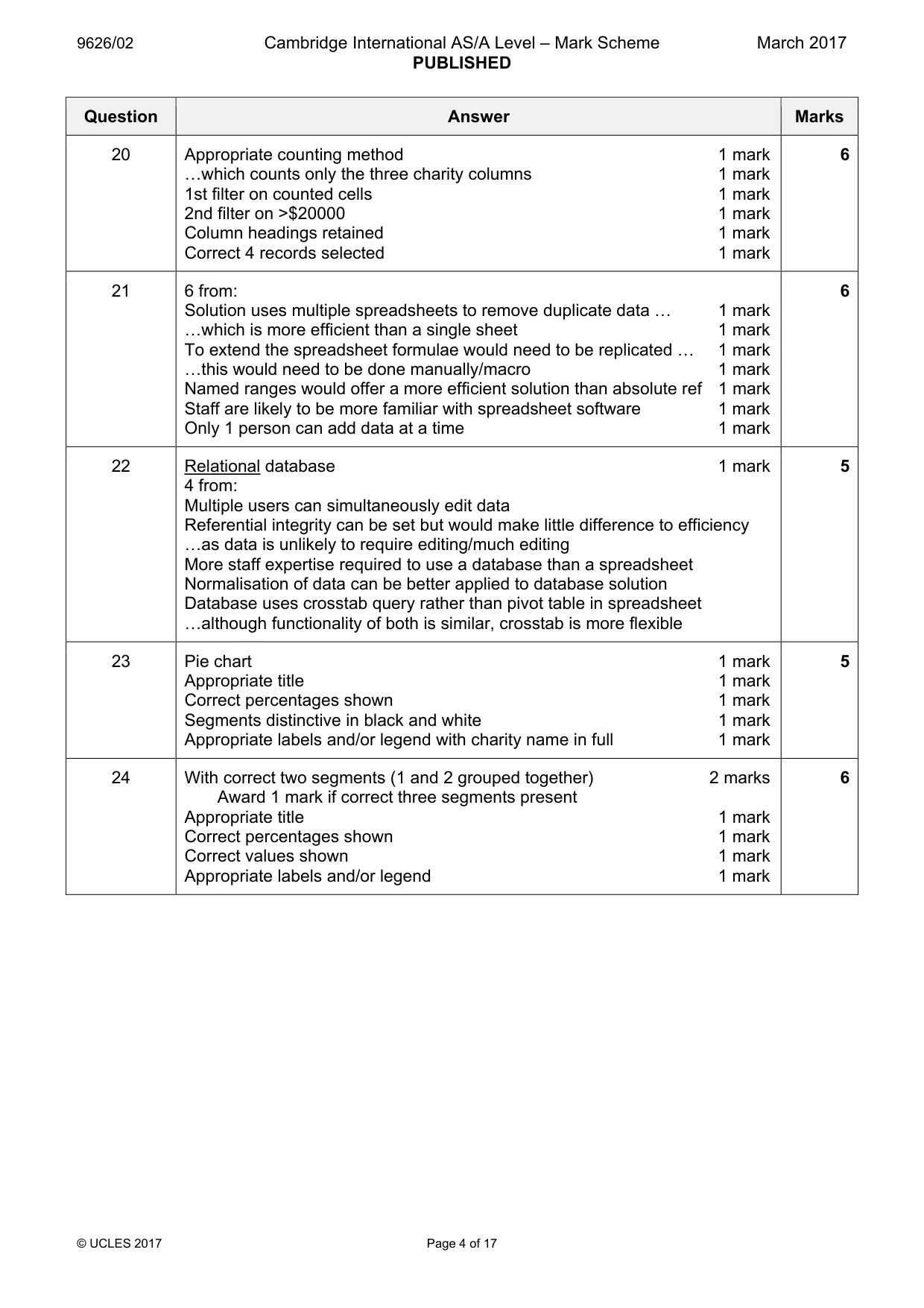
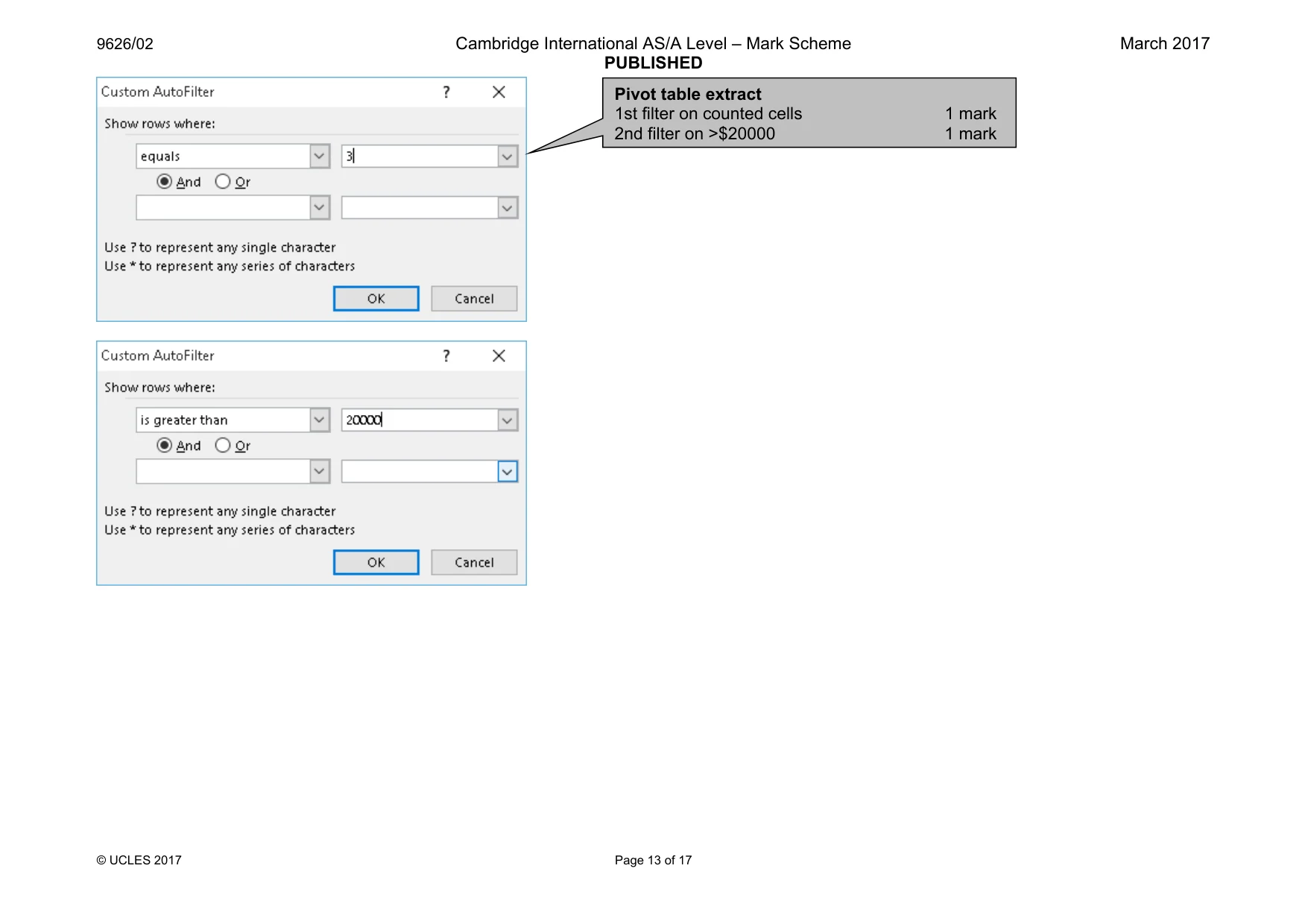
9626/02 Cambridge International AS/A Level – Mark Scheme PUBLISHED March 2017 © UCLES 2017 Page 4 of 17 Question Answer Marks 20 Appropriate counting method 1 mark «which counts only the three charity columns 1 mark 1st filter on counted cells 1 mark 2nd filter on >$20000 1 mark Column headings retained 1 mark Correct 4 records selected 1 mark 6 21 6 from: Solution uses multiple spreadsheets to remove duplicate data « 1 mark «which is more efficient than a single sheet 1 mark To extend the spreadsheet formulae would need to be replicated « 1 mark «this would need to be done manually/macro 1 mark Named ranges would offer a more efficient solution than absolute ref 1 mark Staff are likely to be more familiar with spreadsheet software 1 mark Only 1 person can add data at a time 1 mark 6 22 Relational database 1 mark 4 from: Multiple users can simultaneously edit data Referential integrity can be set but would make little difference to efficiency «as data is unlikely to require editing/much editing More staff expertise required to use a database than a spreadsheet Normalisation of data can be better applied to database solution Database uses crosstab query rather than pivot table in spreadsheet «although functionality of both is similar, crosstab is more flexible 5 23 Pie chart 1 mark Appropriate title 1 mark Correct percentages shown 1 mark Segments distinctive in black and white 1 mark Appropriate labels and/or legend with charity name in full 1 mark 5 24 With correct two segments (1 and 2 grouped together) 2 marks Award 1 mark if correct three segments present Appropriate title 1 mark Correct percentages shown 1 mark Correct values shown 1 mark Appropriate labels and/or legend 1 mark 6
Mark scheme, page 5
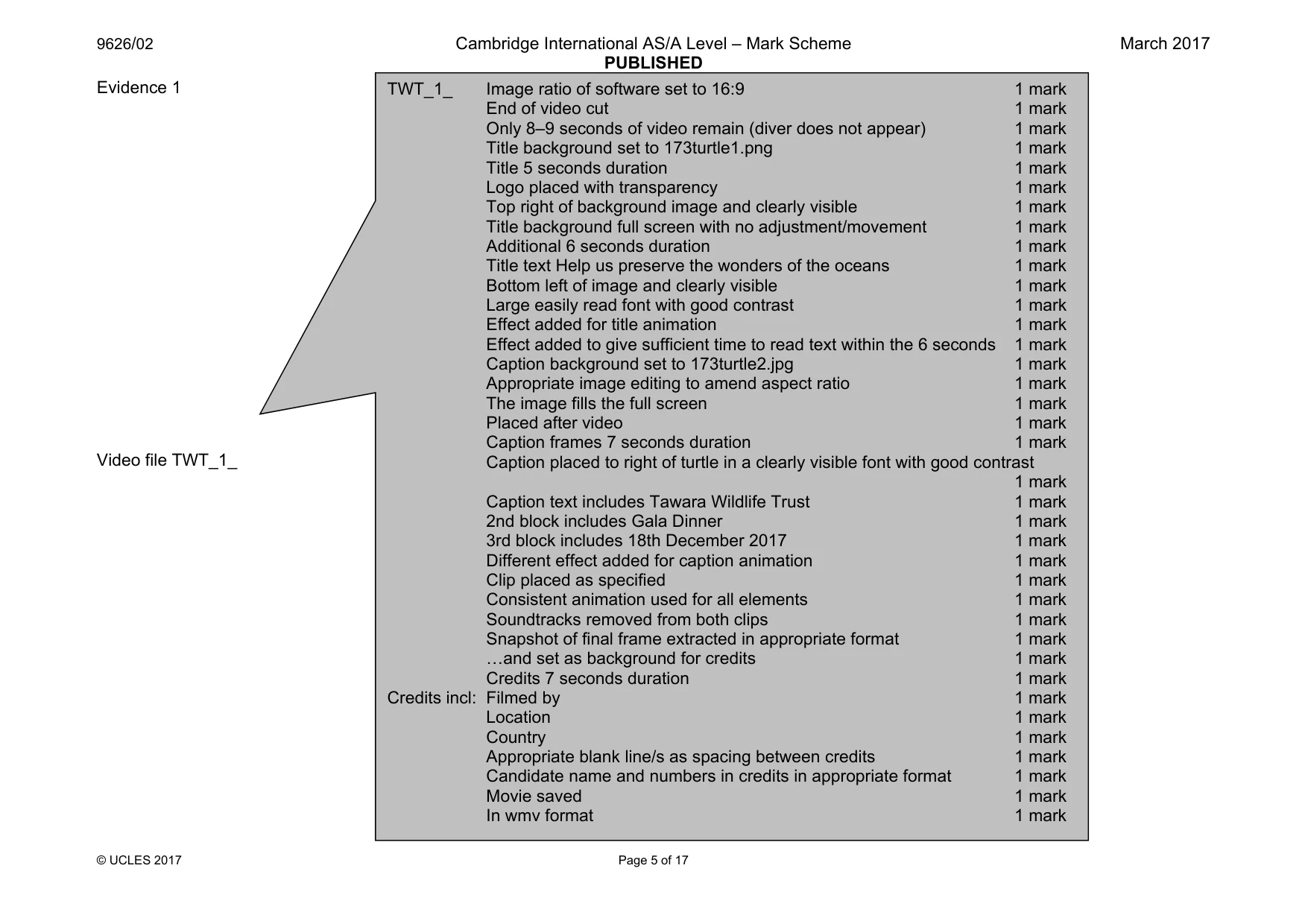
9626/02 Cambridge International AS/A Level – Mark Scheme PUBLISHED March 2017 © UCLES 2017 Page 5 of 17 Evidence 1 Video file TWT_1_ TWT_1_ Image ratio of software set to 16:9 1 mark End of video cut 1 mark Only 8–9 seconds of video remain (diver does not appear) 1 mark Title background set to 173turtle1.png 1 mark Title 5 seconds duration 1 mark Logo placed with transparency 1 mark Top right of background image and clearly visible 1 mark Title background full screen with no adjustment/movement 1 mark Additional 6 seconds duration 1 mark Title text Help us preserve the wonders of the oceans 1 mark Bottom left of image and clearly visible 1 mark Large easily read font with good contrast 1 mark Effect added for title animation 1 mark Effect added to give sufficient time to read text within the 6 seconds 1 mark Caption background set to 173turtle2.jpg 1 mark Appropriate image editing to amend aspect ratio 1 mark The image fills the full screen 1 mark Placed after video 1 mark Caption frames 7 seconds duration 1 mark Caption placed to right of turtle in a clearly visible font with good contrast 1 mark Caption text includes Tawara Wildlife Trust 1 mark 2nd block includes Gala Dinner 1 mark 3rd block includes 18th December 2017 1 mark Different effect added for caption animation 1 mark Clip placed as specified 1 mark Consistent animation used for all elements 1 mark Soundtracks removed from both clips 1 mark Snapshot of final frame extracted in appropriate format 1 mark «and set as background for credits 1 mark Credits 7 seconds duration 1 mark Credits incl: Filmed by 1 mark Location 1 mark Country 1 mark Appropriate blank line/s as spacing between credits 1 mark Candidate name and numbers in credits in appropriate format 1 mark Movie saved 1 mark In wmv format 1 mark
Mark scheme, page 6
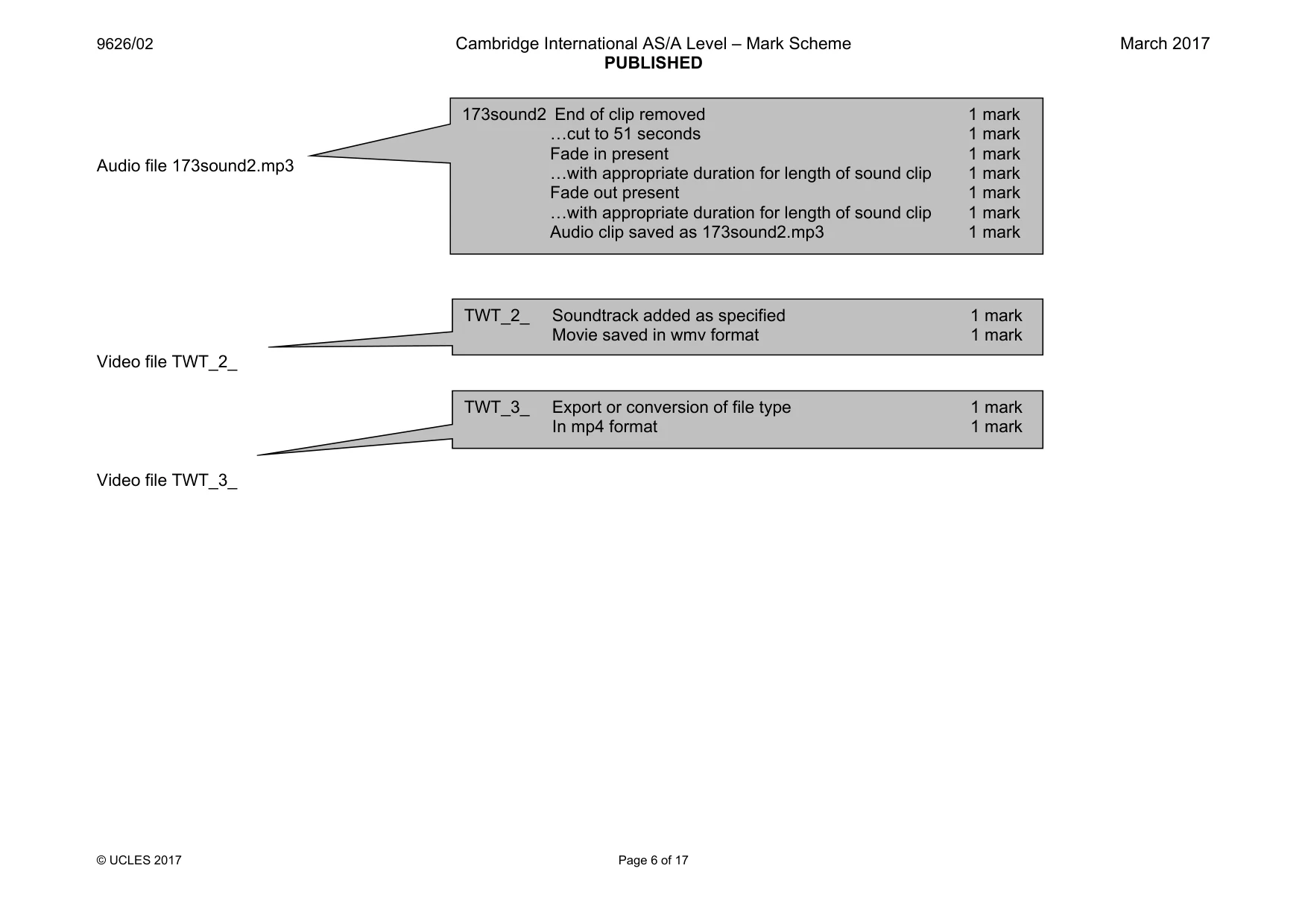
9626/02 Cambridge International AS/A Level – Mark Scheme PUBLISHED March 2017 © UCLES 2017 Page 6 of 17 Audio file 173sound2.mp3 Video file TWT_2_ Video file TWT_3_ 173sound2 End of clip removed 1 mark «cut to 51 seconds 1 mark Fade in present 1 mark «with appropriate duration for length of sound clip 1 mark Fade out present 1 mark «with appropriate duration for length of sound clip 1 mark Audio clip saved as 173sound2.mp3 1 mark TWT_2_ Soundtrack added as specified 1 mark Movie saved in wmv format 1 mark TWT_3_ Export or conversion of file type 1 mark In mp4 format 1 mark
Mark scheme, page 7
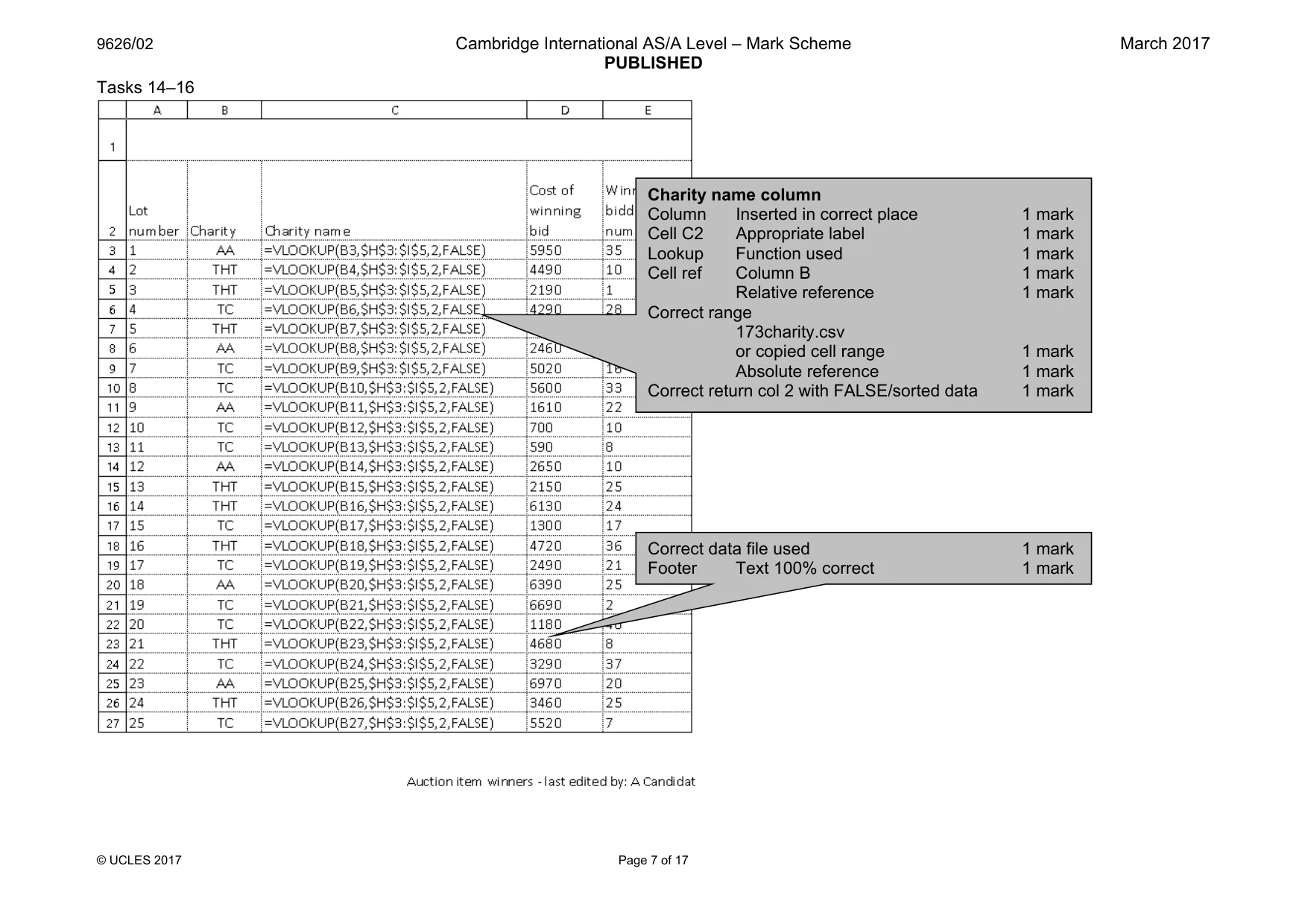
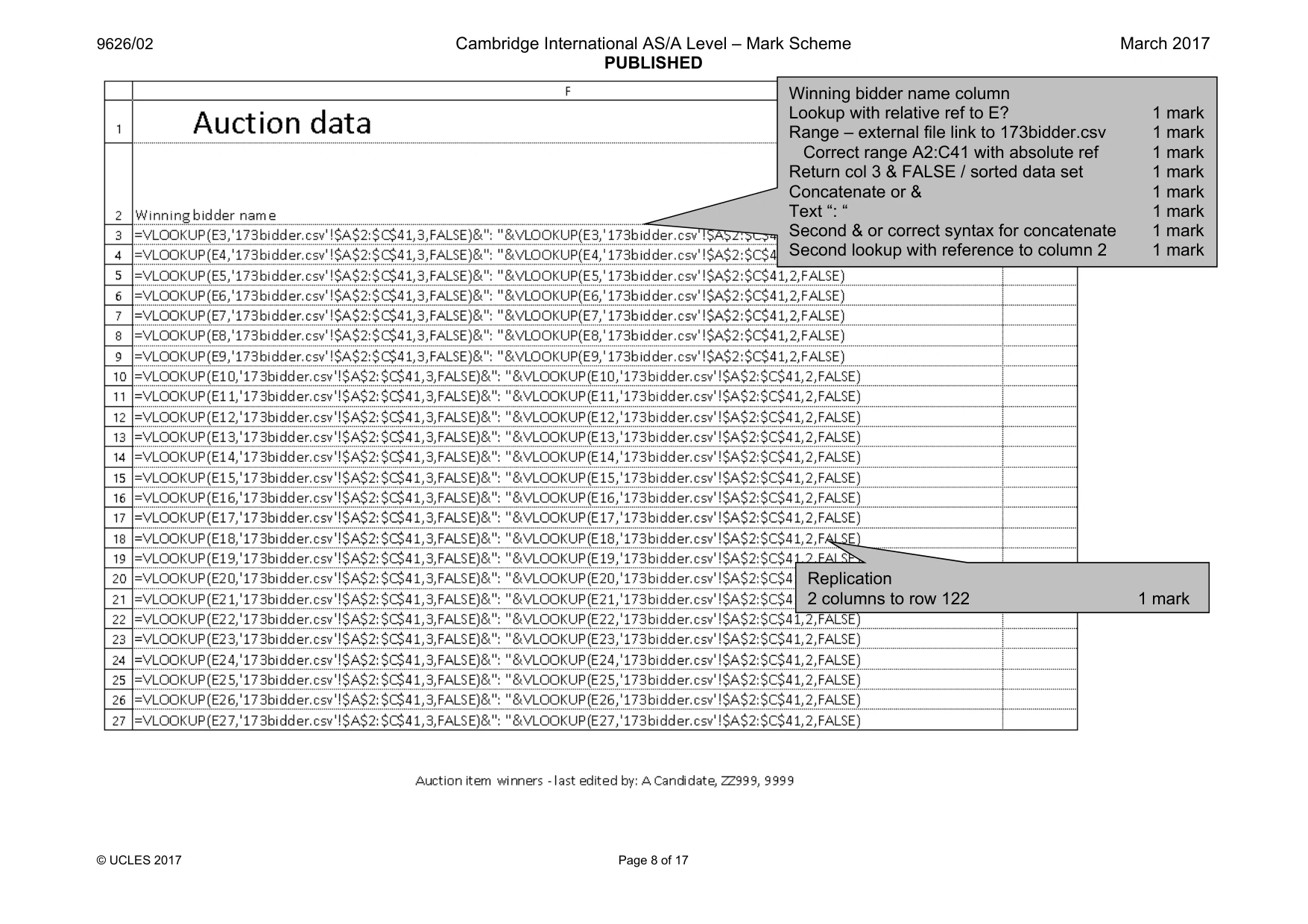
9626/02 Cambridge International AS/A Level – Mark Scheme PUBLISHED March 2017 © UCLES 2017 Page 7 of 17 Tasks 14–16 Correct data file used 1 mark Footer Text 100% correct 1 mark Charity name column Column Inserted in correct place 1 mark Cell C2 Appropriate label 1 mark Lookup Function used 1 mark Cell ref Column B 1 mark Relative reference 1 mark Correct range 173charity.csv or copied cell range 1 mark Absolute reference 1 mark Correct return col 2 with FALSE/sorted data 1 mark
Mark scheme, page 8
9626/02 Cambridge International AS/A Level – Mark Scheme PUBLISHED March 2017 © UCLES 2017 Page 8 of 17 Winning bidder name column Lookup with relative ref to E? 1 mark Range – external file link to 173bidder.csv 1 mark Correct range A2:C41 with absolute ref 1 mark Return col 3 & FALSE / sorted data set 1 mark Concatenate or & 1 mark Text “: “ 1 mark Second & or correct syntax for concatenate 1 mark Second lookup with reference to column 2 1 mark Replication 2 columns to row 122 1 mark
Mark scheme, page 9
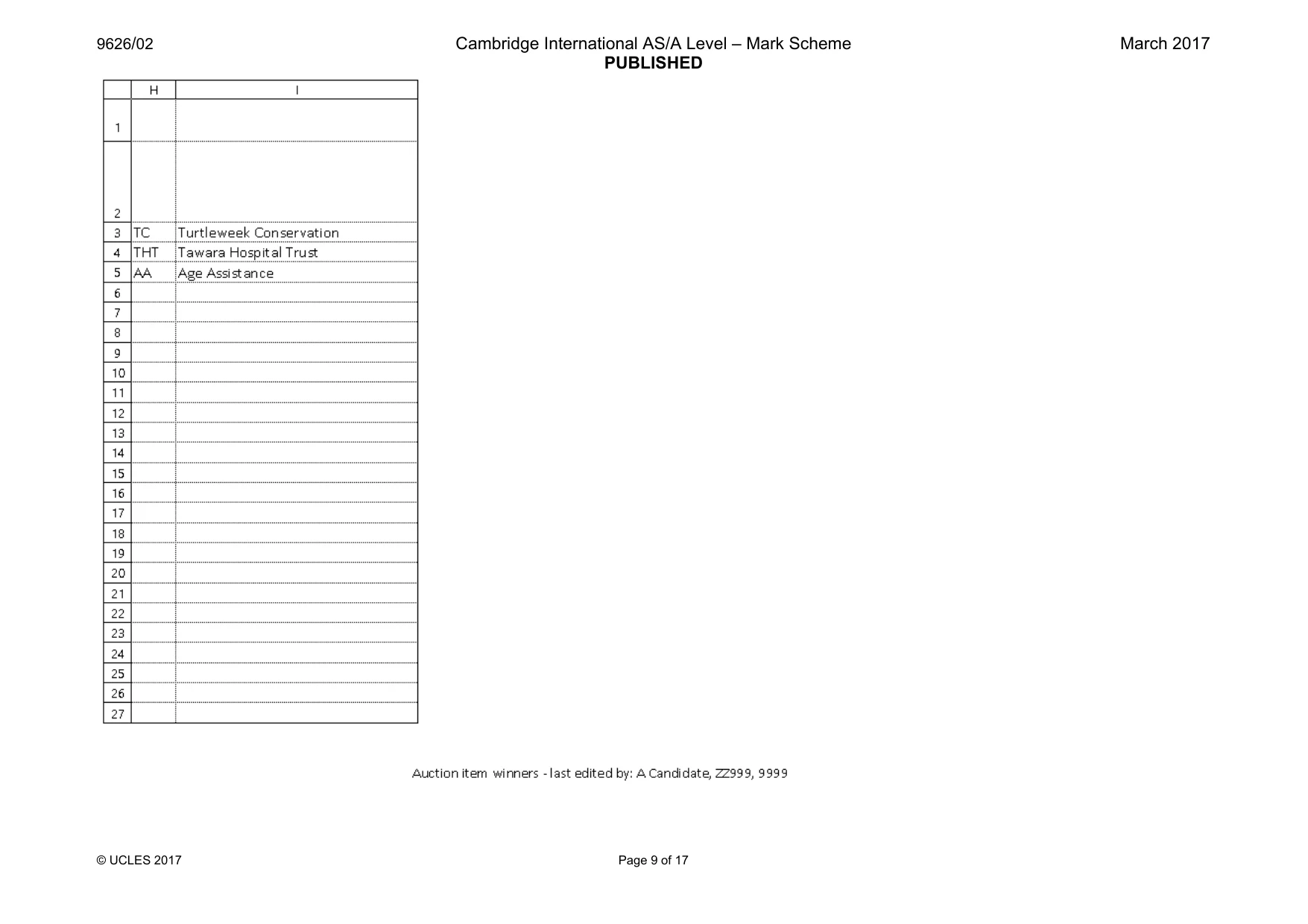
9626/02 Cambridge International AS/A Level – Mark Scheme PUBLISHED March 2017 © UCLES 2017 Page 9 of 17
Mark scheme, page 10
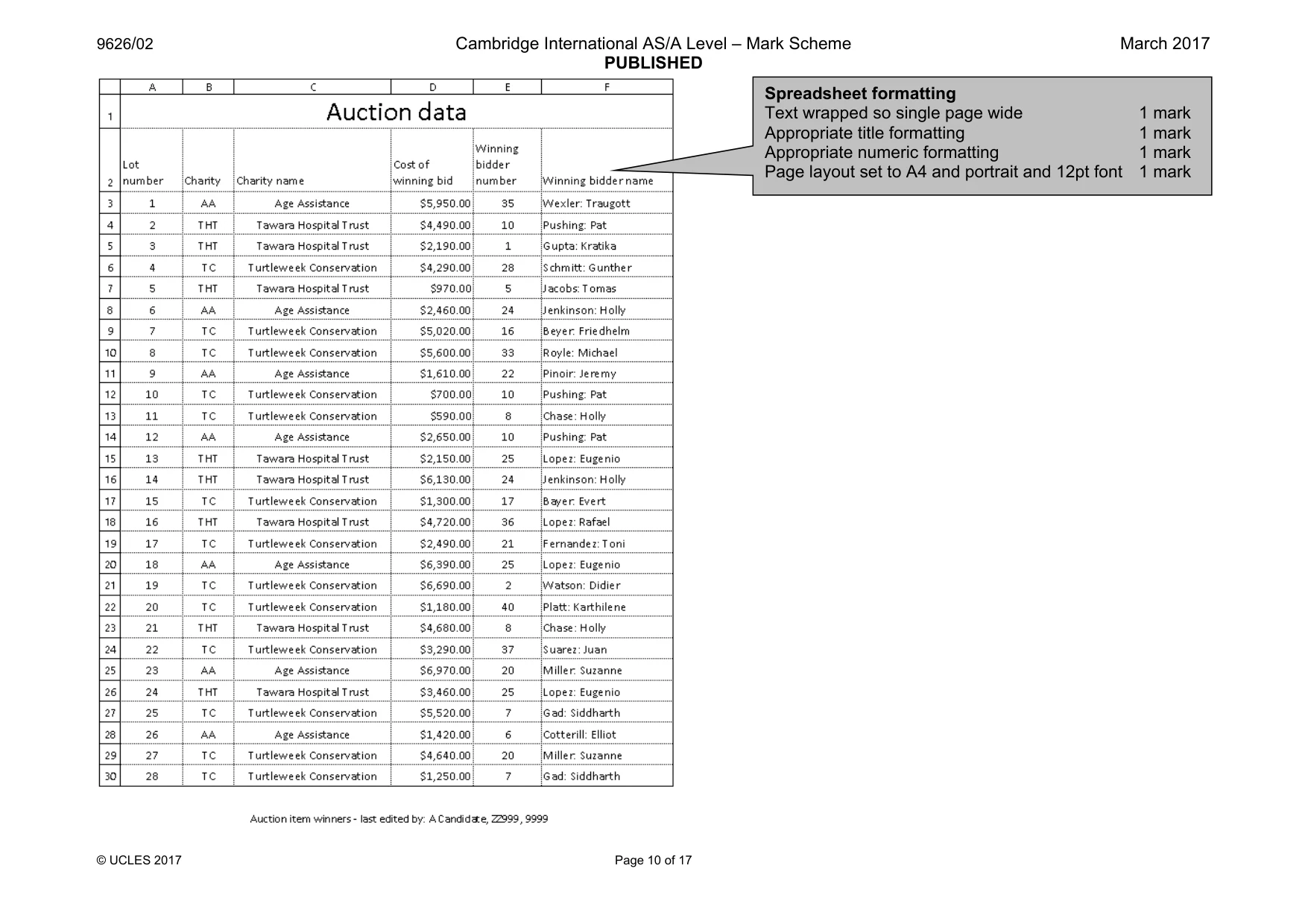
9626/02 Cambridge International AS/A Level – Mark Scheme PUBLISHED March 2017 © UCLES 2017 Page 10 of 17 Spreadsheet formatting Text wrapped so single page wide 1 mark Appropriate title formatting 1 mark Appropriate numeric formatting 1 mark Page layout set to A4 and portrait and 12pt font 1 mark
Mark scheme, page 11
9626/02 Cambridge International AS/A Level – Mark Scheme PUBLISHED March 2017 © UCLES 2017 Page 11 of 17
Mark scheme, page 12
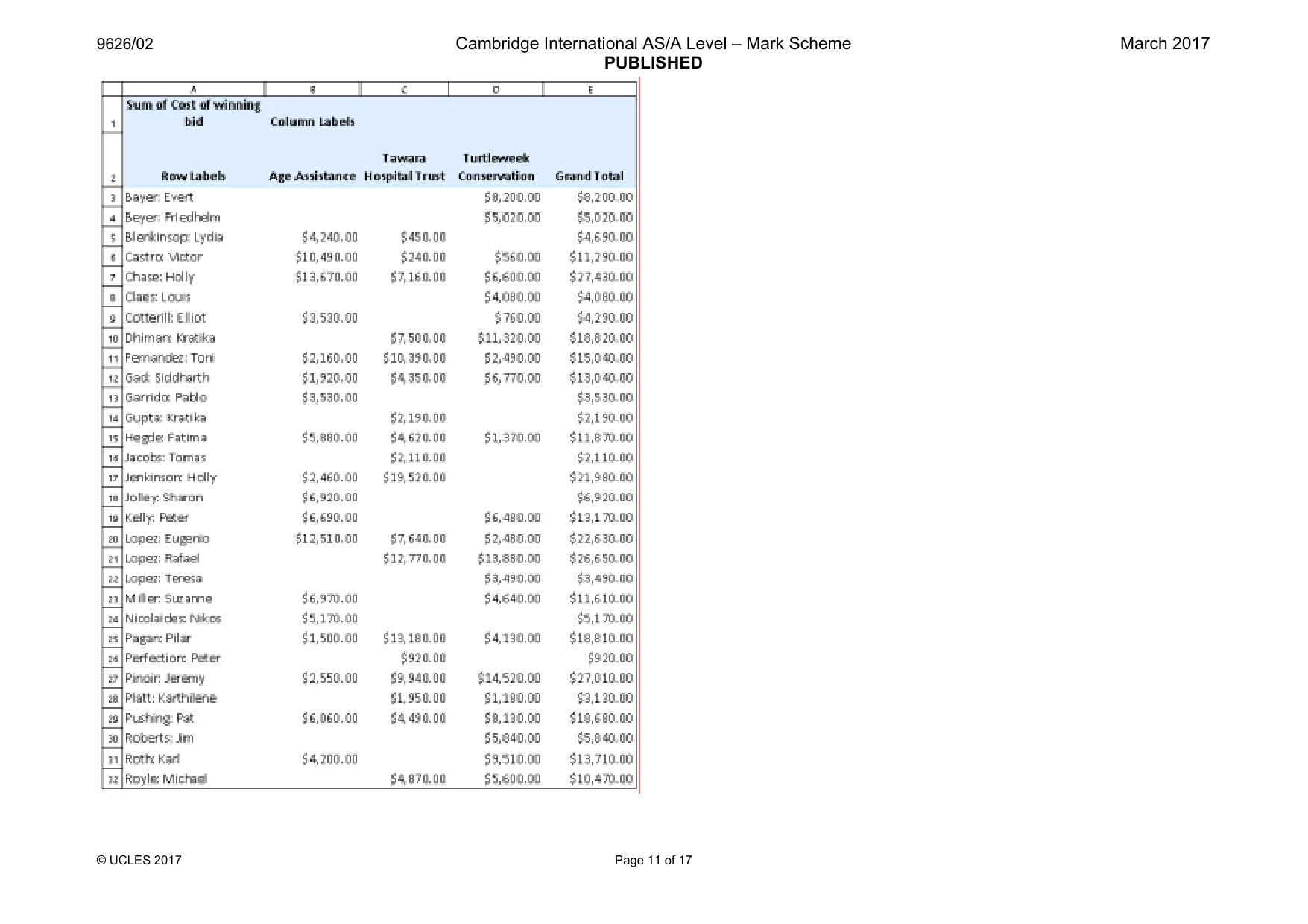
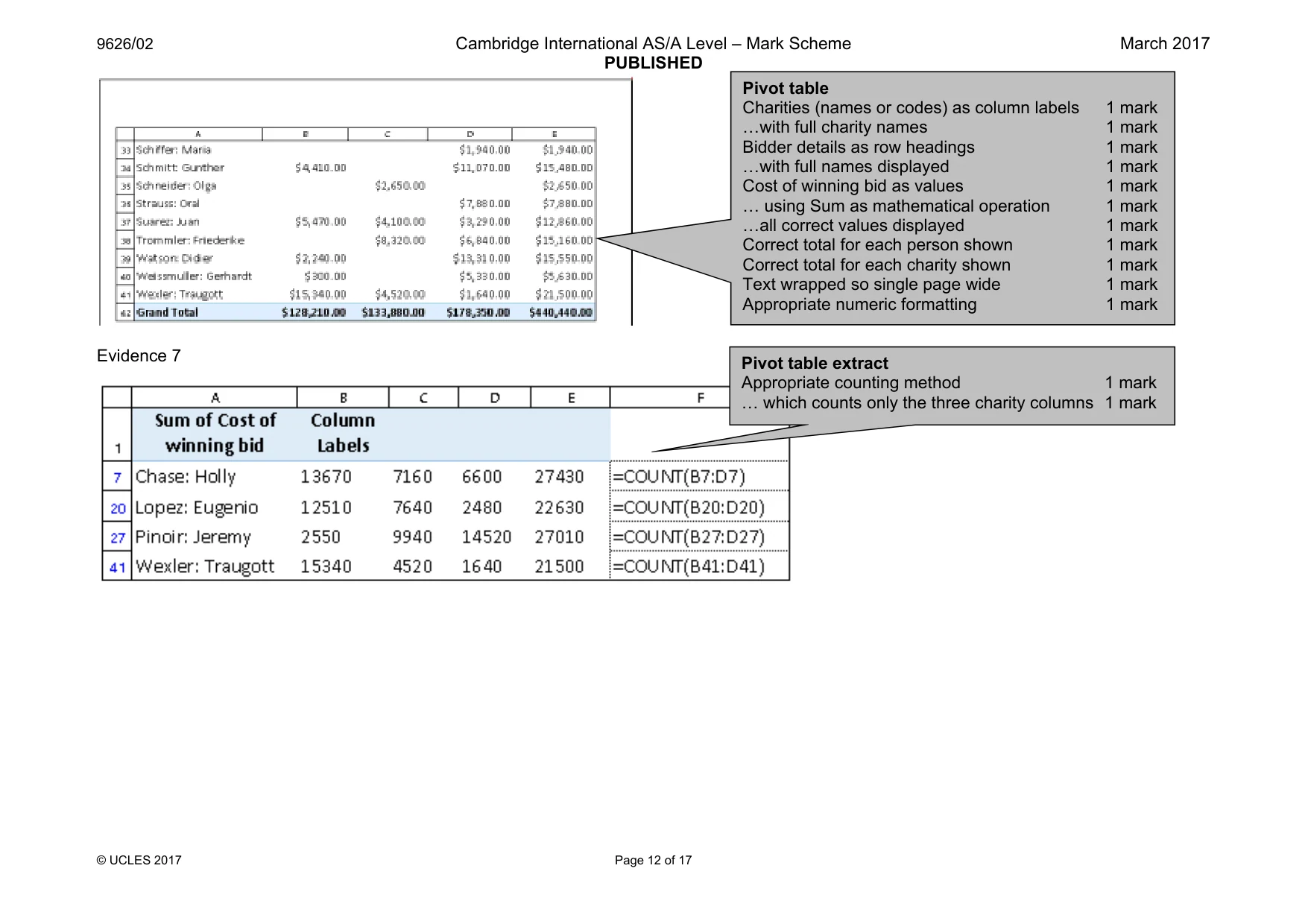
9626/02 Cambridge International AS/A Level – Mark Scheme PUBLISHED March 2017 © UCLES 2017 Page 12 of 17 Evidence 7 Pivot table Charities (names or codes) as column labels 1 mark «with full charity names 1 mark Bidder details as row headings 1 mark «with full names displayed 1 mark Cost of winning bid as values 1 mark « using Sum as mathematical operation 1 mark «all correct values displayed 1 mark Correct total for each person shown 1 mark Correct total for each charity shown 1 mark Text wrapped so single page wide 1 mark Appropriate numeric formatting 1 mark Pivot table extract Appropriate counting method 1 mark « which counts only the three charity columns 1 mark
Mark scheme, page 13
9626/02 Cambridge International AS/A Level – Mark Scheme PUBLISHED March 2017 © UCLES 2017 Page 13 of 17 Pivot table extract 1st filter on counted cells 1 mark 2nd filter on >$20000 1 mark
Mark scheme, page 14
9626/02 Cambridge International AS/A Level – Mark Scheme PUBLISHED March 2017 © UCLES 2017 Page 14 of 17 Evidence 8 Evidence 9 6 from: Solution uses multiple spreadsheets to remove duplicate data « «which is more efficient than a single sheet To extend the spreadsheet formulae would need to be replicated « «this would need to be done manually/macro Named ranges would offer a more efficient solution than absolute ref Staff are likely to be more familiar with spreadsheet software Only 1 person can add data at a time «although functionality of both is similar, crosstab is more flexible 1 mark each Max 6 Pivot table extract Column headings retained 1 mark Correct 4 records selected 1 mark
Mark scheme, page 15
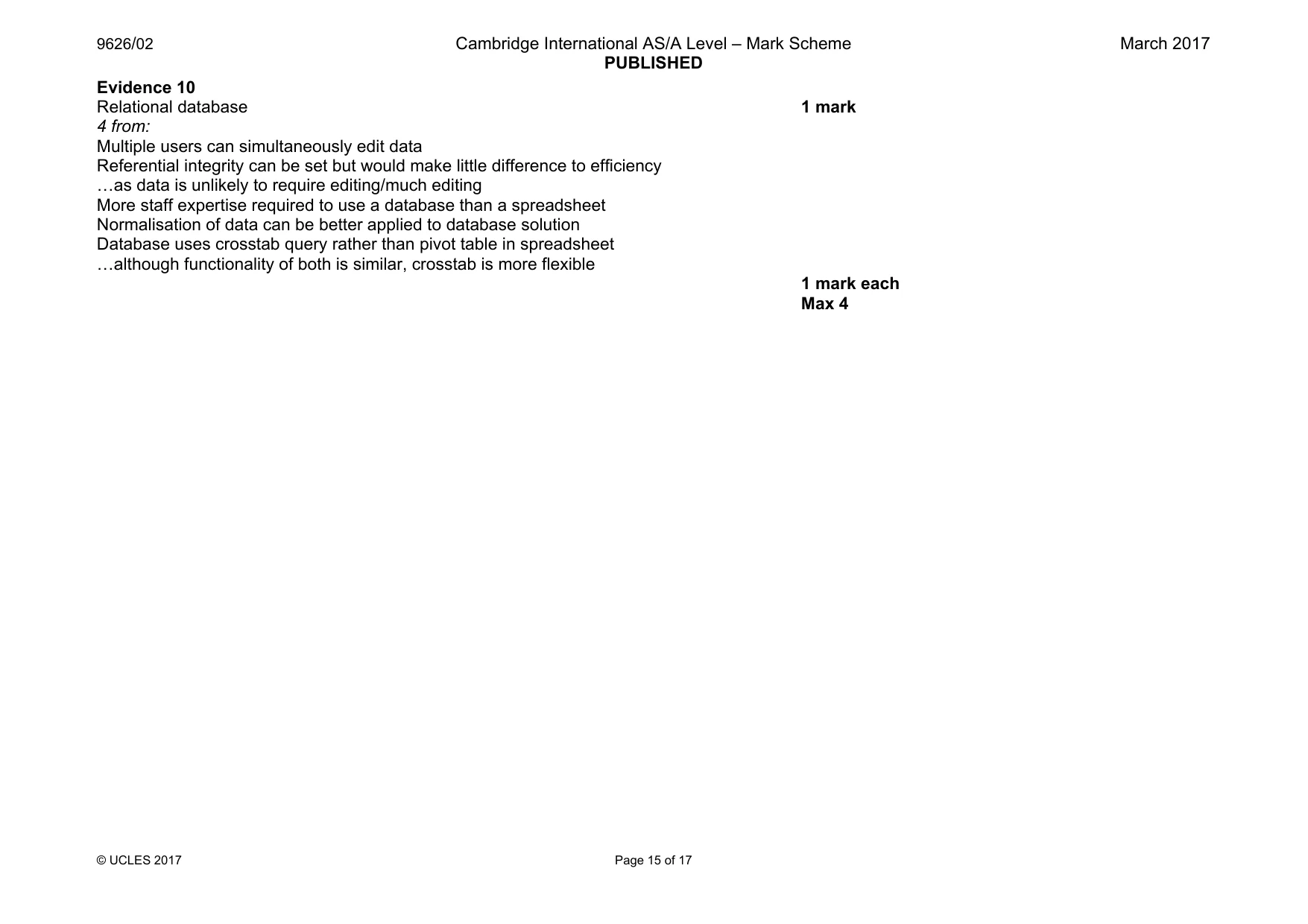
9626/02 Cambridge International AS/A Level – Mark Scheme PUBLISHED March 2017 © UCLES 2017 Page 15 of 17 Evidence 10 Relational database 1 mark 4 from: Multiple users can simultaneously edit data Referential integrity can be set but would make little difference to efficiency «as data is unlikely to require editing/much editing More staff expertise required to use a database than a spreadsheet Normalisation of data can be better applied to database solution Database uses crosstab query rather than pivot table in spreadsheet «although functionality of both is similar, crosstab is more flexible 1 mark each Max 4
Mark scheme, page 16
962 © U Ev 26/02 CLES 2017 idence 11 Turtle Conser 41 PE eweek rvation 1% ERCENTA Ca AGE DON ambridge Interna Ta Ho T 3 NATION ational AS/A Lev PUBLISHED Page 16 of 17 awara ospital Trust 30% S TO EA vel – Mark Sche Age Assista 29% CH CHA me e ance % RITY Chart 1 Pie chart Appropriate title Correct percent Segments distin Appropriate labe name in full e tages shown nctive in black an els and/or legen March 2 1 m 1 m `1 m nd white 1 m nd with charity 1 m 017 mark mark mark mark mark
Mark scheme, page 17
962 © U Ev 26/02 CLES 2017 idence 12 3 ch NUM AN harities, 11, 28% MBER OF CH ND NUMBER Ca HARITIES DO R OF PEOPLE ambridge Interna ONATED TO A E MAKING T ational AS/A Lev PUBLISHED Page 17 of 17 1 or 2 charites 72% AT THE AUC HE DONATIO vel – Mark Sche s, 28, TION ONS Chart 2 With correct tw (1 and 2 group Award 1 ma Appropriate tit Correct perce Correct perce Appropriate la me wo segments ped together) ark if correct thre tle ntages shown ntage values sh abels and/or lege ee segments pre hown end March 2 2 marks esent 1 mark 1 mark 1 mark 1 mark 017
What you needed in this session
Cambridge’s own grade thresholds for 2017 Feb/March, Paper 2 · Variant 1. A higher threshold means an easier paper — the bar moves with how the cohort did.