Cambridge A Level Information Technology (from 2017) 9626 — 2017 May/June Paper 2 · Variant 1
9626/21/M/J/17 · 110 marks · ≈124 min
The question paper and its mark scheme, free to read here and free to download. This is Cambridge’s own paper, exactly as it was sat.
Question paper8 pages



Mark scheme9 pages
Answers below. Sit the paper first if you are practising.
Paper as text
Question paper, page 1
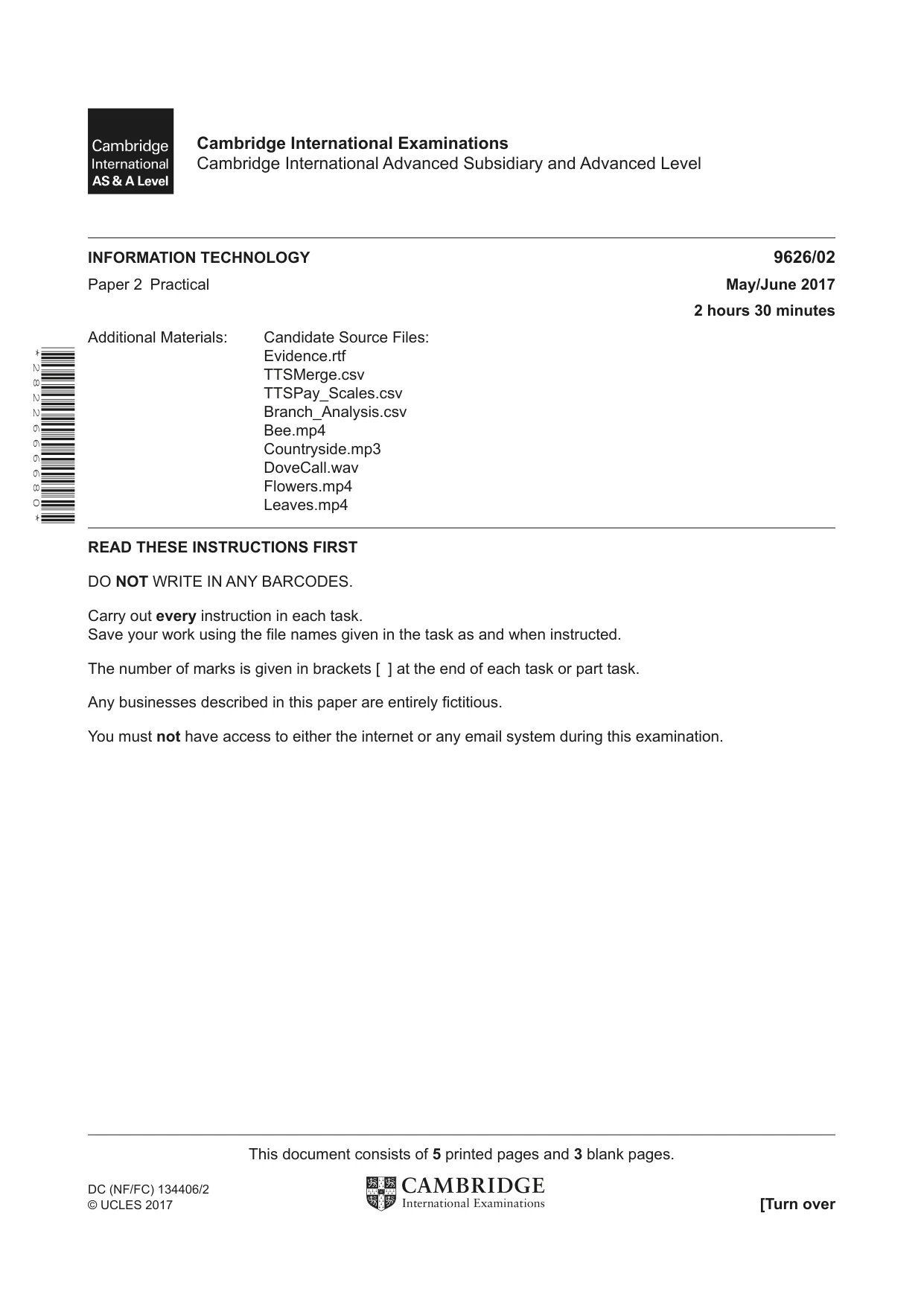
INFORMATION TECHNOLOGY 9626/02 Paper 2 Practical May/June 2017 2 hours 30 minutes Additional Materials: Candidate Source Files: Evidence.rtf TTSMerge.csv TTSPay_Scales.csv Branch_Analysis.csv Bee.mp4 Countryside.mp3 DoveCall.wav Flowers.mp4 Leaves.mp4 READ THESE INSTRUCTIONS FIRST DO NOT WRITE IN ANY BARCODES. Carry out every instruction in each task. Save your work using the file names given in the task as and when instructed. The number of marks is given in brackets [ ] at the end of each task or part task. Any businesses described in this paper are entirely fictitious. You must not have access to either the internet or any email system during this examination. This document consists of 5 printed pages and 3 blank pages. DC (NF/FC) 134406/2 © UCLES 2017 [Turn over Cambridge International Examinations Cambridge International Advanced Subsidiary and Advanced Level * 2 8 2 2 6 6 6 6 8 0 *
Question paper, page 2
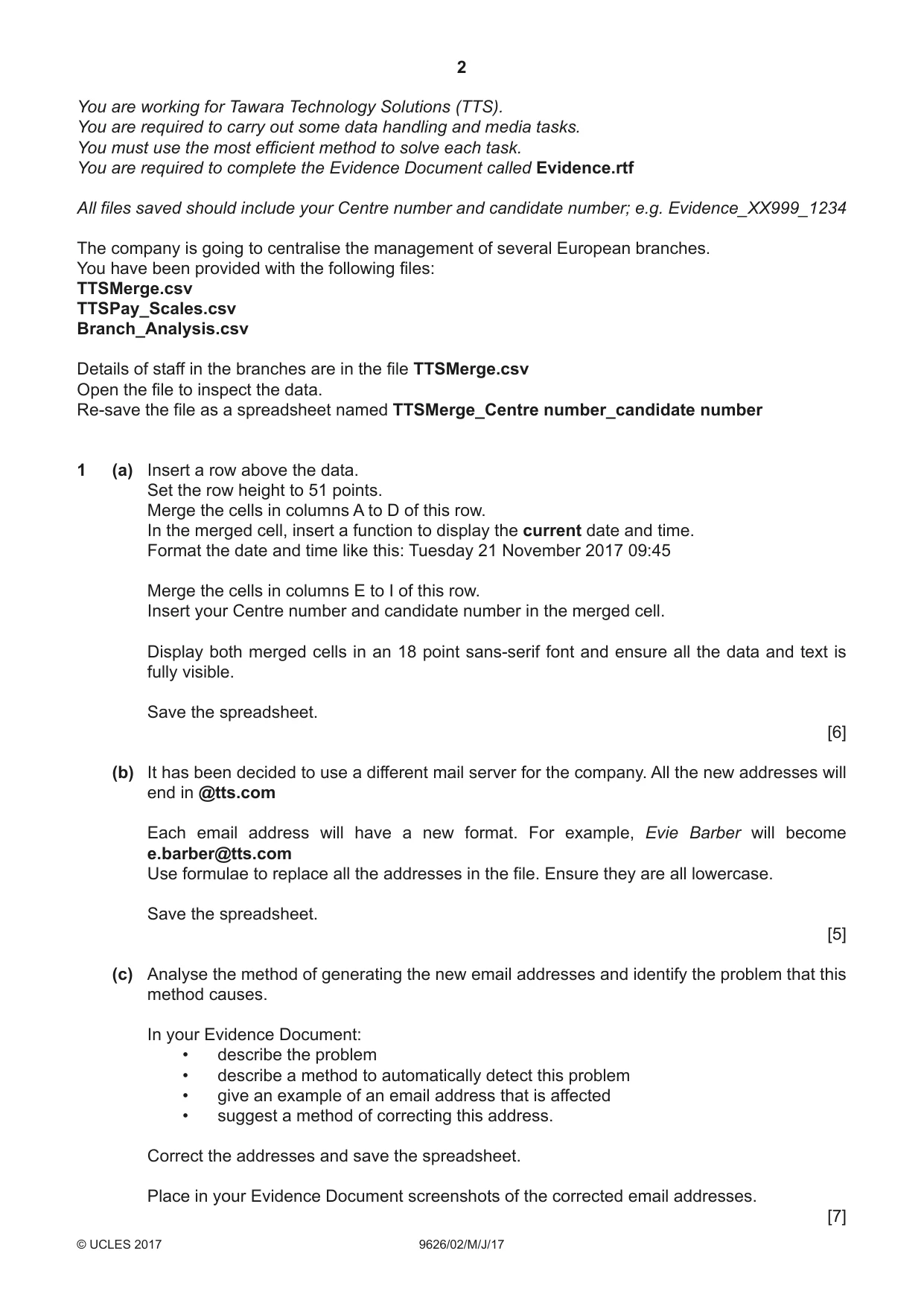
2 9626/02/M/J/17 © UCLES 2017 You are working for Tawara Technology Solutions (TTS). You are required to carry out some data handling and media tasks. You must use the most efficient method to solve each task. You are required to complete the Evidence Document called Evidence.rtf All files saved should include your Centre number and candidate number; e.g. Evidence_XX999_1234 The company is going to centralise the management of several European branches. You have been provided with the following files: TTSMerge.csv TTSPay_Scales.csv Branch_Analysis.csv Details of staff in the branches are in the file TTSMerge.csv Open the file to inspect the data. Re-save the file as a spreadsheet named TTSMerge_Centre number_candidate number 1 (a) Insert a row above the data. Set the row height to 51 points. Merge the cells in columns A to D of this row. In the merged cell, insert a function to display the current date and time. Format the date and time like this: Tuesday 21 November 2017 09:45 Merge the cells in columns E to I of this row. Insert your Centre number and candidate number in the merged cell. Display both merged cells in an 18 point sans-serif font and ensure all the data and text is fully visible. Save the spreadsheet. [6] (b) It has been decided to use a different mail server for the company. All the new addresses will end in @tts.com Each email address will have a new format. For example, Evie Barber will become e.barber@tts.com Use formulae to replace all the addresses in the file. Ensure they are all lowercase. Save the spreadsheet. [5] (c) Analyse the method of generating the new email addresses and identify the problem that this method causes. In your Evidence Document: • describe the problem • describe a method to automatically detect this problem • give an example of an email address that is affected • suggest a method of correcting this address. Correct the addresses and save the spreadsheet. Place in your Evidence Document screenshots of the corrected email addresses. [7]
Question paper, page 3
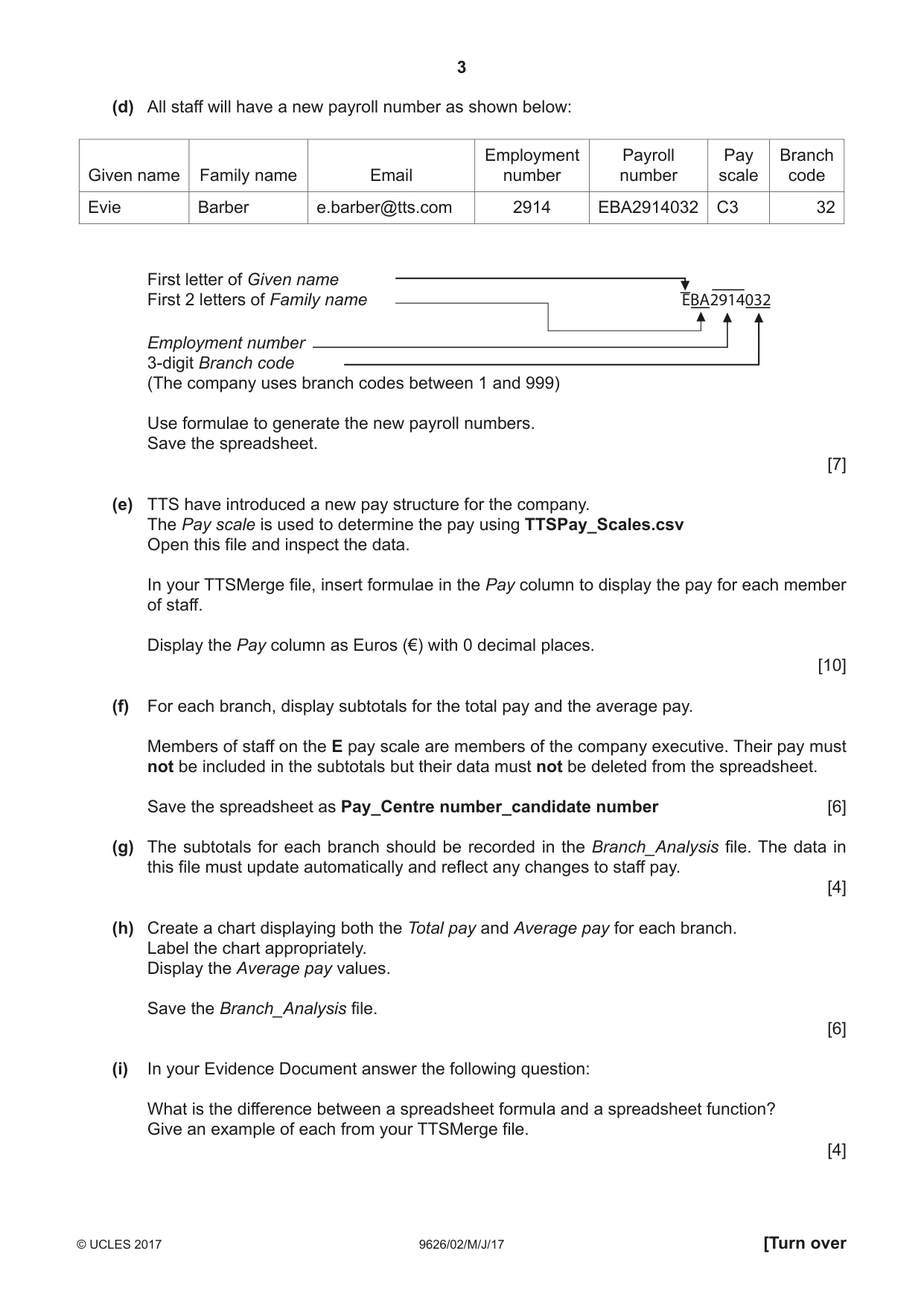
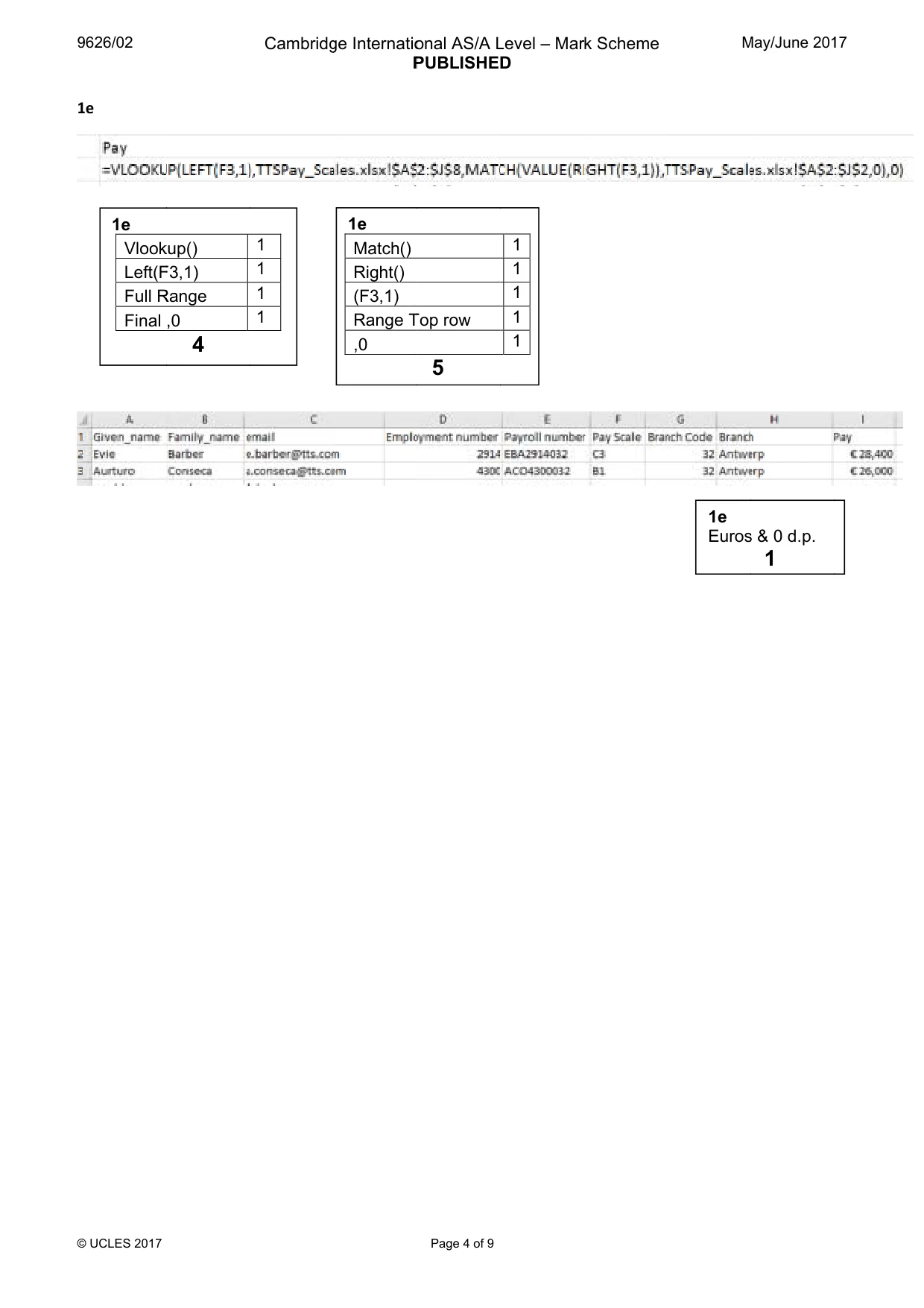
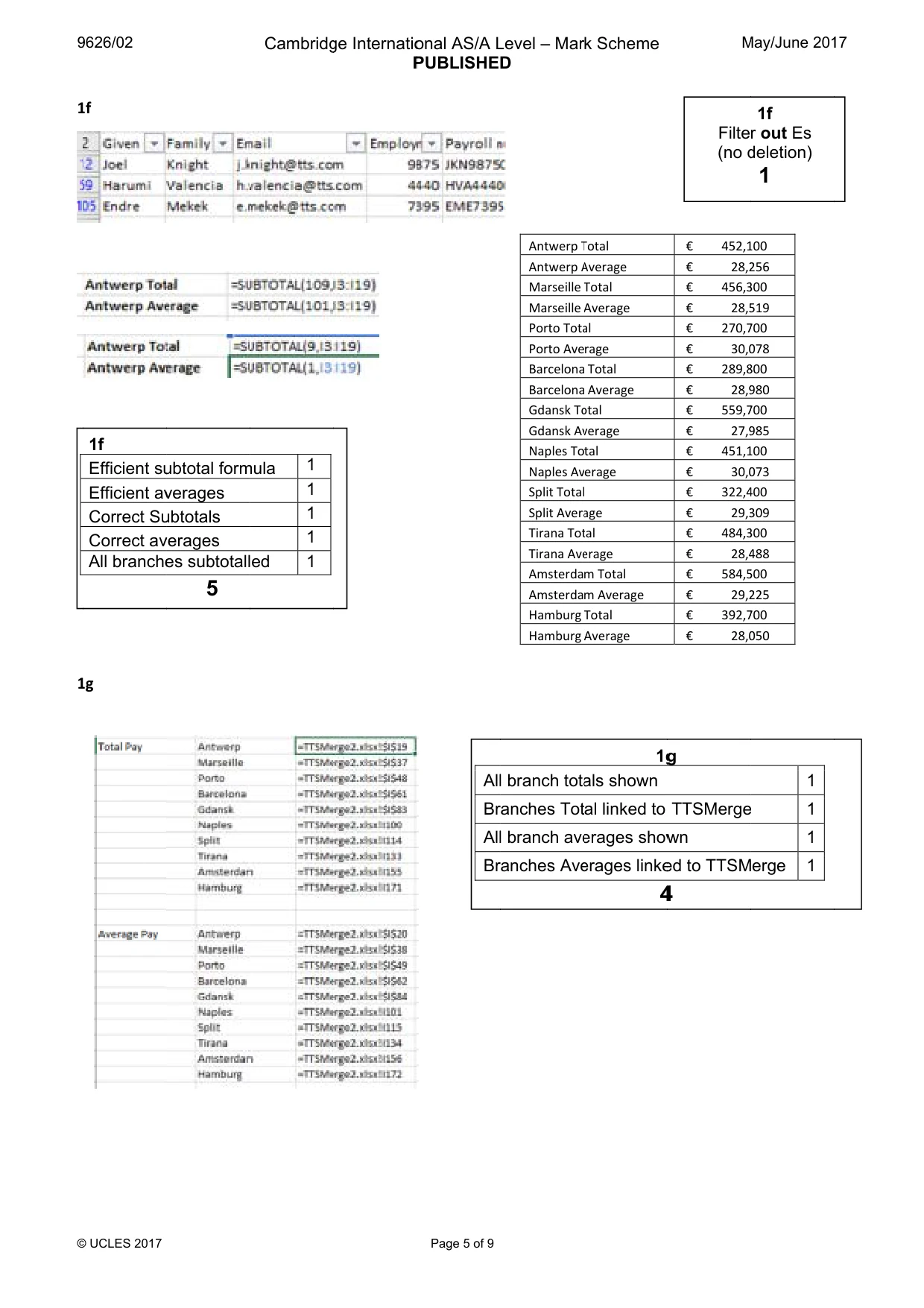
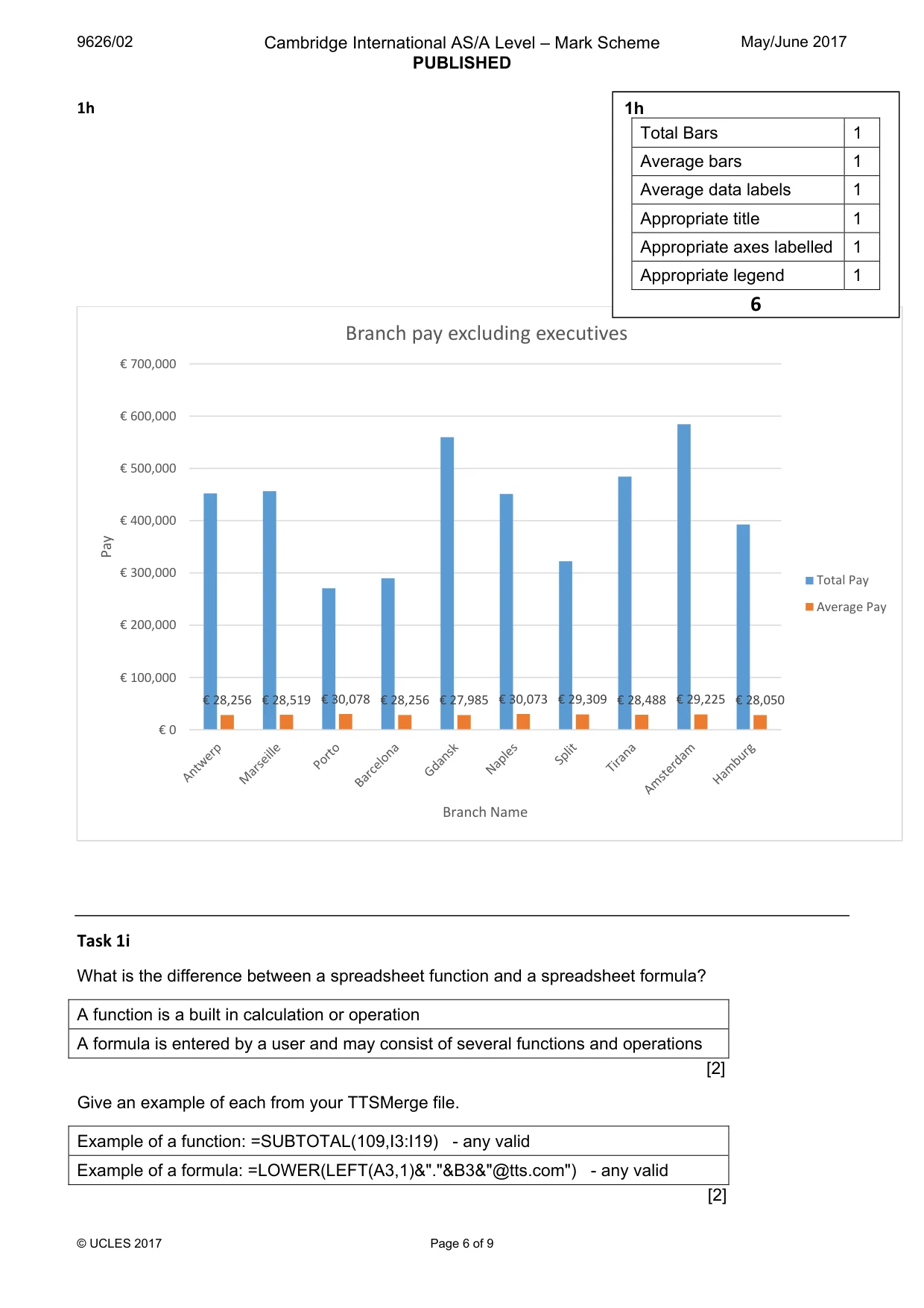
3 9626/02/M/J/17 © UCLES 2017 [Turn over (d) All staff will have a new payroll number as shown below: Given name Family name Email Employment number Payroll number Pay scale Branch code Evie Barber e.barber@tts.com 2914 EBA2914032 C3 32 First letter of Given name First 2 letters of Family name Employment number 3-digit Branch code (The company uses branch codes between 1 and 999) EBA2914032 Use formulae to generate the new payroll numbers. Save the spreadsheet. [7] (e) TTS have introduced a new pay structure for the company. The Pay scale is used to determine the pay using TTSPay_Scales.csv Open this file and inspect the data. In your TTSMerge file, insert formulae in the Pay column to display the pay for each member of staff. Display the Pay column as Euros (€) with 0 decimal places. [10] (f) For each branch, display subtotals for the total pay and the average pay. Members of staff on the E pay scale are members of the company executive. Their pay must not be included in the subtotals but their data must not be deleted from the spreadsheet. Save the spreadsheet as Pay_Centre number_candidate number [6] (g) The subtotals for each branch should be recorded in the Branch_Analysis file. The data in this file must update automatically and reflect any changes to staff pay. [4] (h) Create a chart displaying both the Total pay and Average pay for each branch. Label the chart appropriately. Display the Average pay values. Save the Branch_Analysis file. [6] (i) In your Evidence Document answer the following question: What is the difference between a spreadsheet formula and a spreadsheet function? Give an example of each from your TTSMerge file. [4]
Question paper, page 4
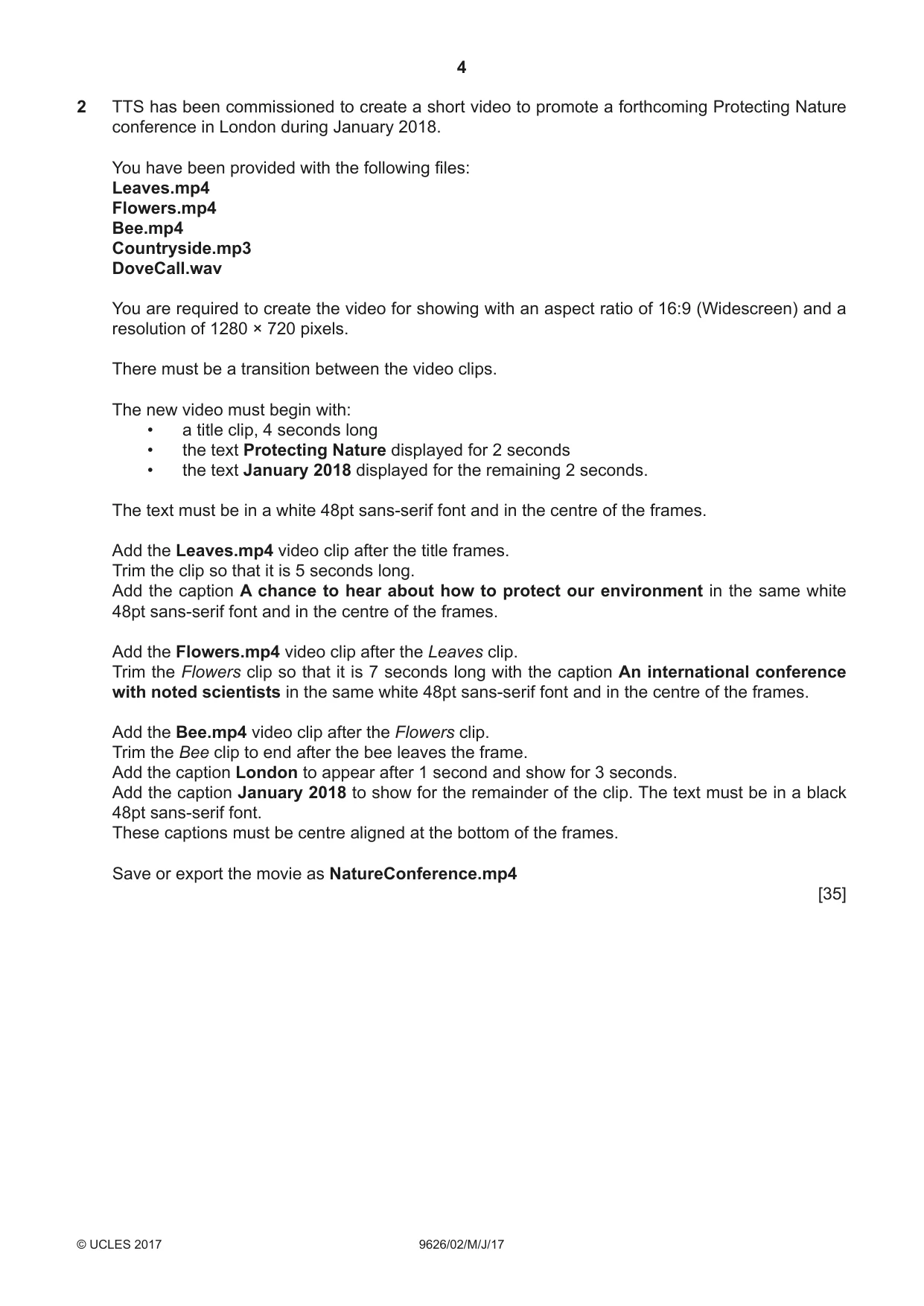
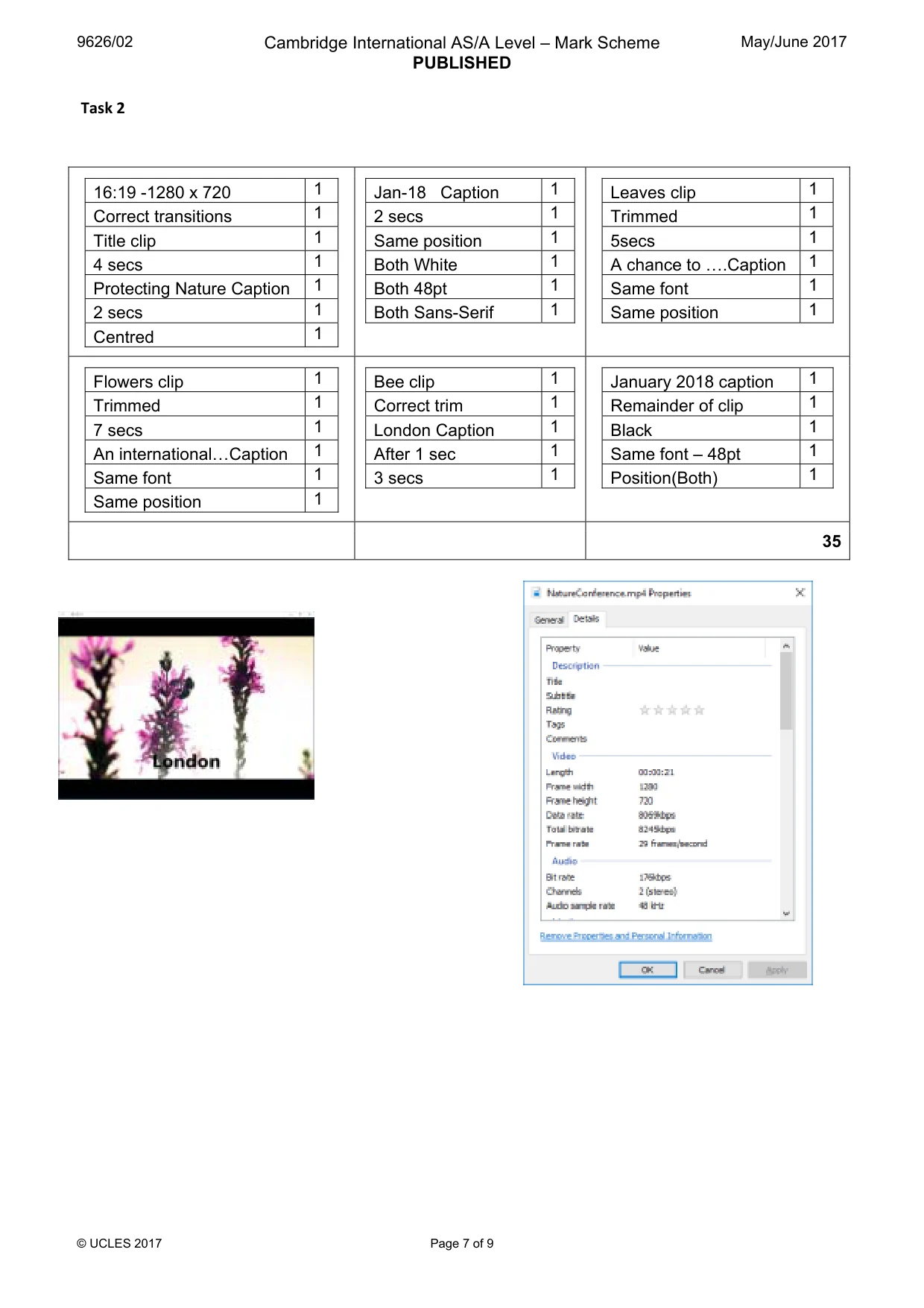
4 9626/02/M/J/17 © UCLES 2017 2 TTS has been commissioned to create a short video to promote a forthcoming Protecting Nature conference in London during January 2018. You have been provided with the following files: Leaves.mp4 Flowers.mp4 Bee.mp4 Countryside.mp3 DoveCall.wav You are required to create the video for showing with an aspect ratio of 16:9 (Widescreen) and a resolution of 1280 × 720 pixels. There must be a transition between the video clips. The new video must begin with: • a title clip, 4 seconds long • the text Protecting Nature displayed for 2 seconds • the text January 2018 displayed for the remaining 2 seconds. The text must be in a white 48pt sans-serif font and in the centre of the frames. Add the Leaves.mp4 video clip after the title frames. Trim the clip so that it is 5 seconds long. Add the caption A chance to hear about how to protect our environment in the same white 48pt sans-serif font and in the centre of the frames. Add the Flowers.mp4 video clip after the Leaves clip. Trim the Flowers clip so that it is 7 seconds long with the caption An international conference with noted scientists in the same white 48pt sans-serif font and in the centre of the frames. Add the Bee.mp4 video clip after the Flowers clip. Trim the Bee clip to end after the bee leaves the frame. Add the caption London to appear after 1 second and show for 3 seconds. Add the caption January 2018 to show for the remainder of the clip. The text must be in a black 48pt sans-serif font. These captions must be centre aligned at the bottom of the frames. Save or export the movie as NatureConference.mp4 [35]
Question paper, page 5
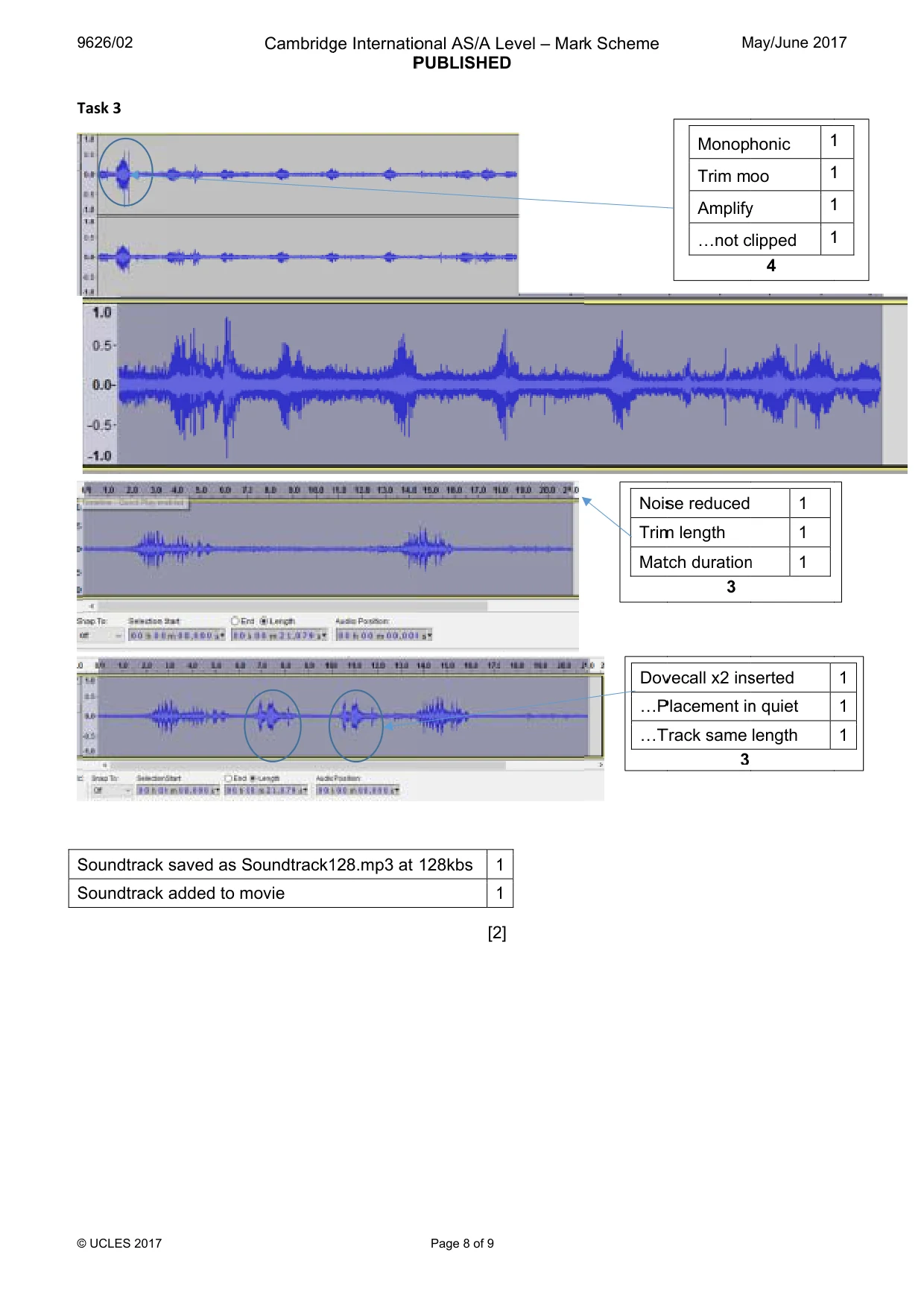
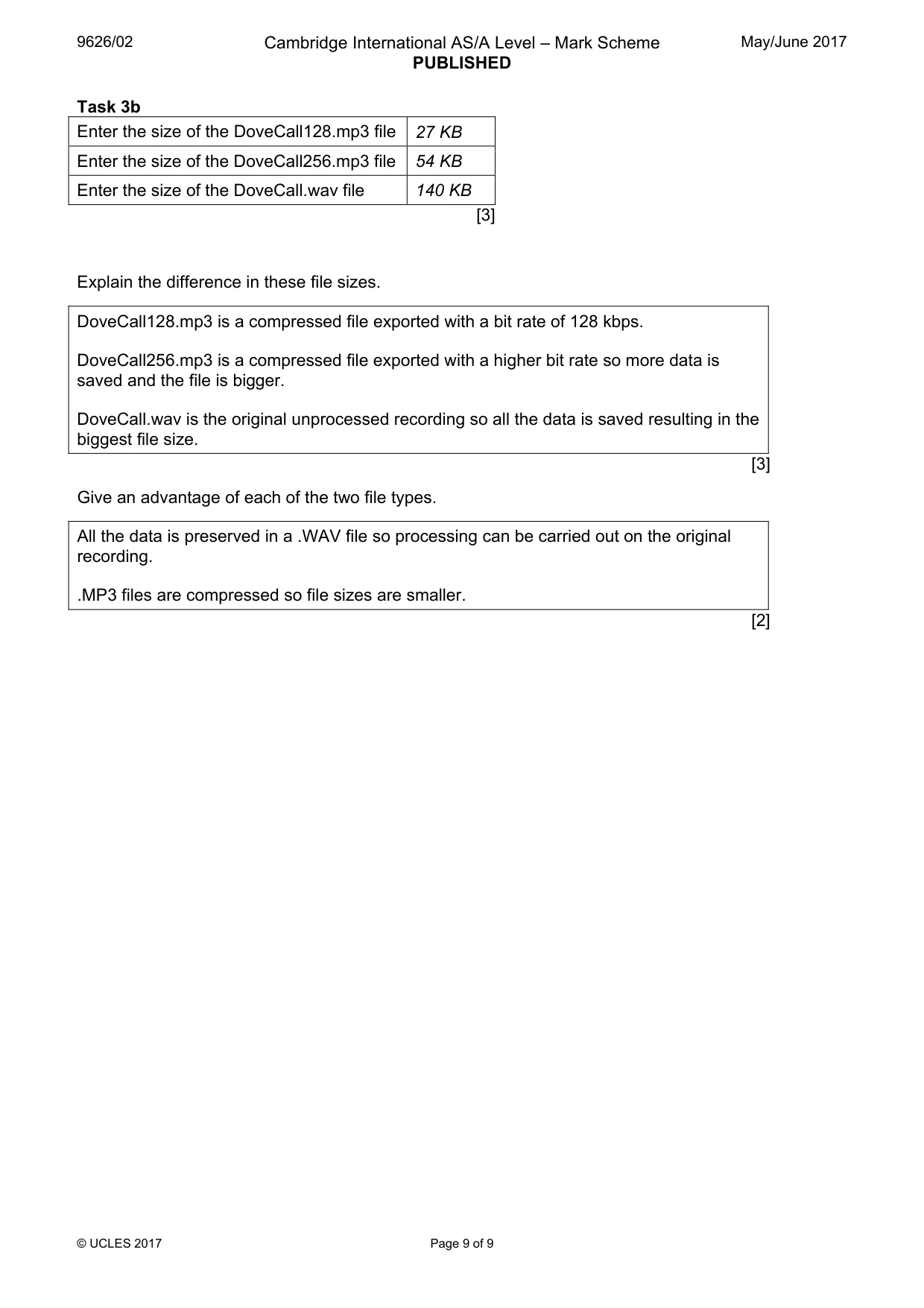
5 9626/02/M/J/17 © UCLES 2017 3 (a) You are required to add a soundtrack to the movie. Open the file Countryside.mp3 in an audio editing application. Convert the sound file to monophonic. Edit the audio clip so that only birdsong can be heard. Amplify the sound to the maximum volume without clipping. Choose an appropriate section and trim the audio to the same duration as the movie created in task 2. Insert the DoveCall.wav audio clip in two of the quieter periods of the soundtrack file without extending the length of the clip. Export the audio as Soundtrack128.mp3 at 128 kbps. Add the Soundtrack128.mp3 file to the movie and resave the movie. [12] (b) Open the DoveCall.wav file. Export the audio as DoveCall128.mp3 at 128kbps. Export the audio as DoveCall256.mp3 at 256kbps. In your Evidence Document answer the Audio questions. Save your Evidence Document. [8]
Question paper, page 6
6 9626/02/M/J/17 © UCLES 2017 BLANK PAGE
Question paper, page 7
7 9626/02/M/J/17 © UCLES 2017 BLANK PAGE
Question paper, page 8
8 9626/02/M/J/17 © UCLES 2017 BLANK PAGE Permission to reproduce items where third-party owned material protected by copyright is included has been sought and cleared where possible. Every reasonable effort has been made by the publisher (UCLES) to trace copyright holders, but if any items requiring clearance have unwittingly been included, the publisher will be pleased to make amends at the earliest possible opportunity. To avoid the issue of disclosure of answer-related information to candidates, all copyright acknowledgements are reproduced online in the Cambridge International Examinations Copyright Acknowledgements Booklet. This is produced for each series of examinations and is freely available to download at www.cie.org.uk after the live examination series. Cambridge International Examinations is part of the Cambridge Assessment Group. Cambridge Assessment is the brand name of University of Cambridge Local Examinations Syndicate (UCLES), which is itself a department of the University of Cambridge.
Mark scheme, page 1
® IGCSE is a registered trademark. This document consists of 9 printed pages. © UCLES 2017 [Turn over Cambridge International Examinations Cambridge International Advanced Subsidiary and Advanced Level INFORMATION TECHNOLOGY 9626/02 Paper 2 Practical May/June 2017 MARK SCHEME Maximum Mark: 110 Published This mark scheme is published as an aid to teachers and candidates, to indicate the requirements of the examination. It shows the basis on which Examiners were instructed to award marks. It does not indicate the details of the discussions that took place at an Examiners’ meeting before marking began, which would have considered the acceptability of alternative answers. Mark schemes should be read in conjunction with the question paper and the Principal Examiner Report for Teachers. Cambridge will not enter into discussions about these mark schemes. Cambridge is publishing the mark schemes for the May/June 2017 series for most Cambridge IGCSE®, Cambridge International A and AS Level and Cambridge Pre-U components, and some Cambridge O Level components.
Mark scheme, page 2
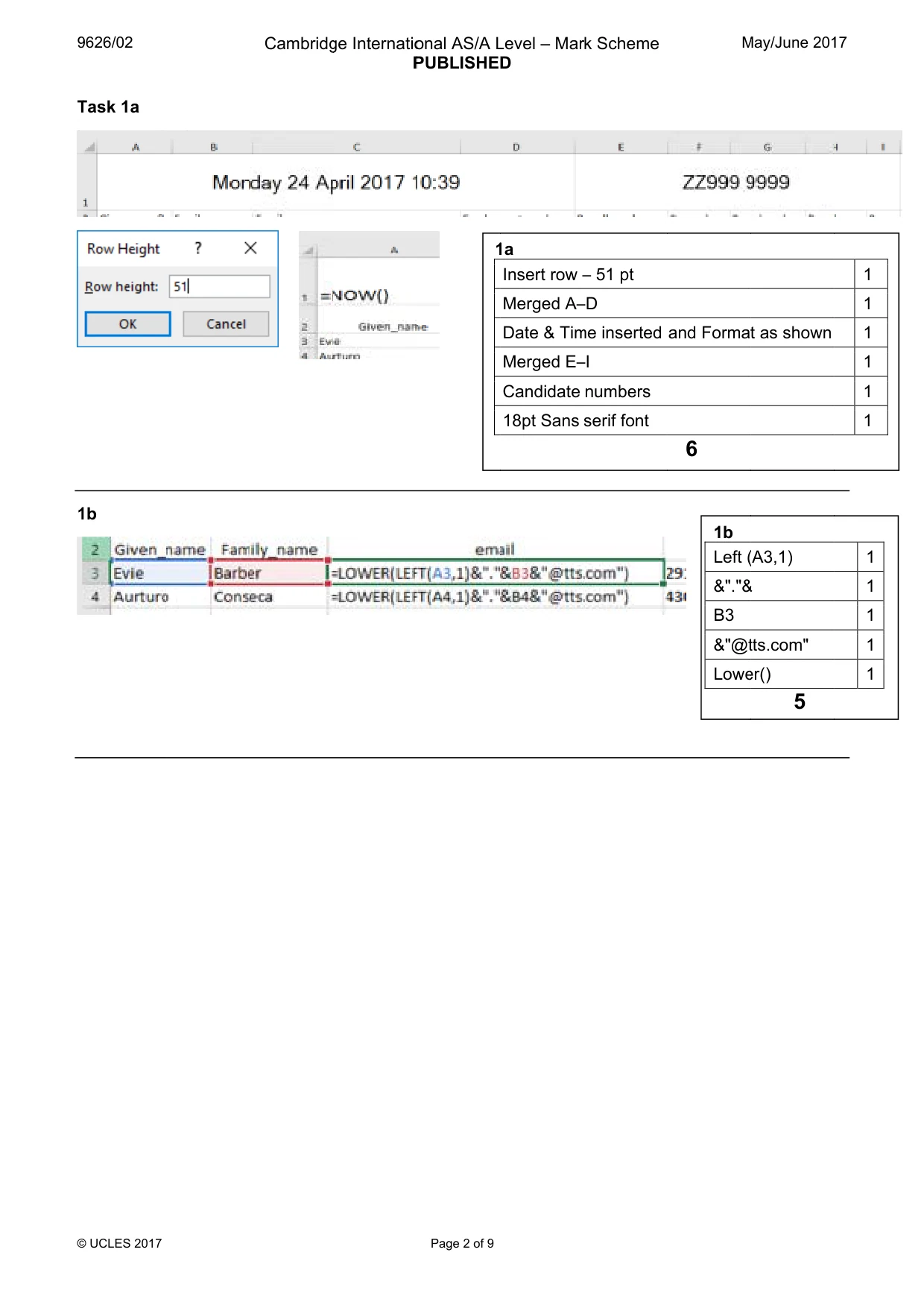
9 © T 1 9626/02 © UCLES 2017 Task 1a 1b Cambridg ge Internatio P onal AS/A L PUBLISHED Page 2 of 9 1 Level – Mar D 1a Insert row – Merged A– Date & Tim Merged E– Candidate 18pt Sans k Scheme – 51 pt –D me inserted –I numbers serif font M and Format 6 1b Left ( &"."& B3 &"@t Lowe May/June 201 t as shown (A3,1) & tts.com" er() 5 17 1 1 1 1 1 1 1 1 1 1 1
Mark scheme, page 3
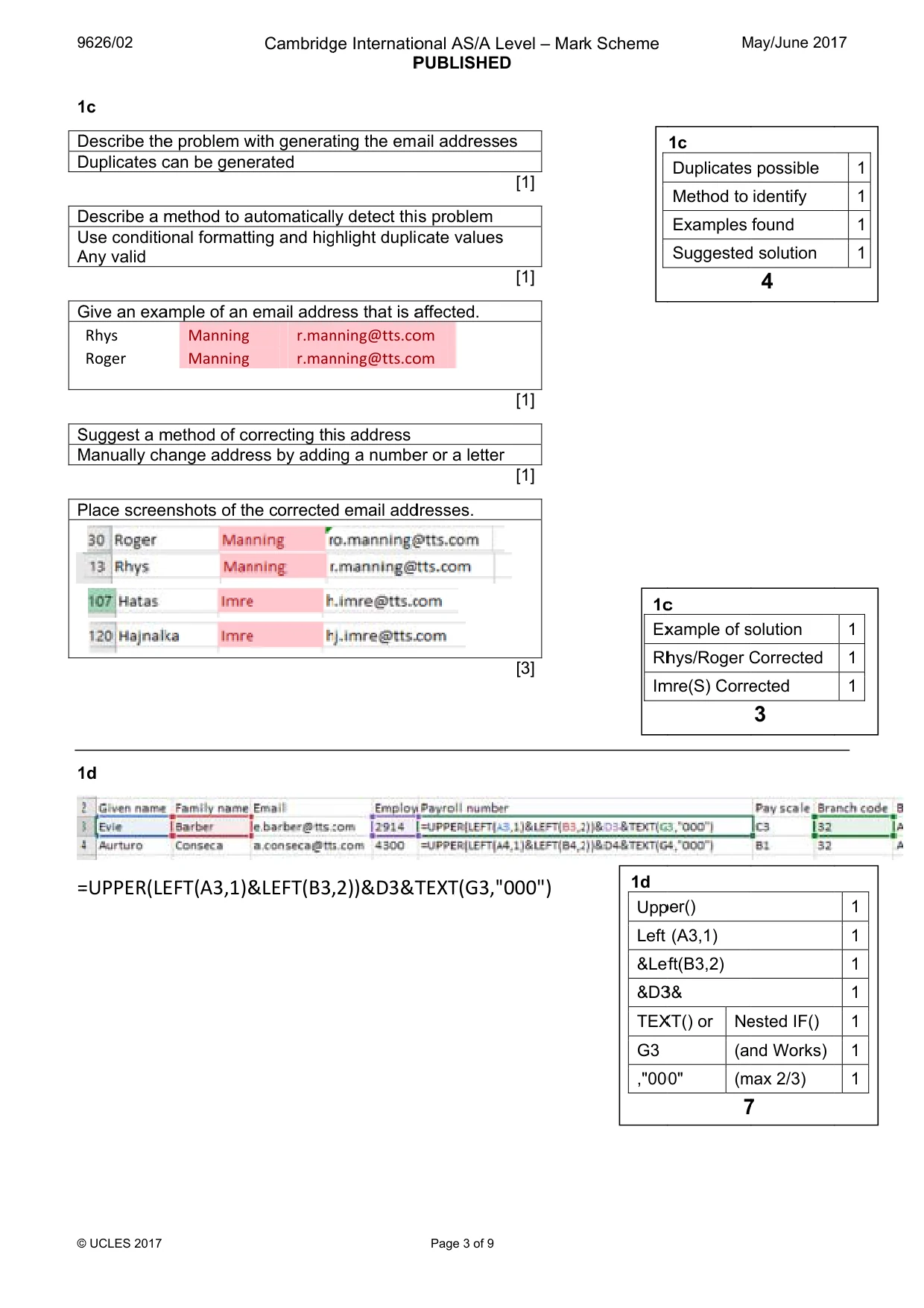
9 © 1 D D D U A G S M P 1 = 9626/02 © UCLES 2017 1c Describe the Duplicates c Describe a m Use conditio Any valid Give an exa Rhys Roger Suggest a m Manually ch Place scree 1d =UPPER(LE e problem w can be gene method to a onal formatt ample of an Manning Manning method of co hange addre nshots of th EFT(A3,1)& Cambridg with generat erated automaticall ting and hig email addre r.man r.man orrecting th ess by addin he corrected &LEFT(B3, ge Internatio P ting the ema y detect thi ghlight dupli ess that is a nning@tts.co nning@tts.co is address ng a numbe d email add ,2))&D3&T onal AS/A L PUBLISHED Page 3 of 9 ail addresse s problem cate values affected. om om er or a letter dresses. TEXT(G3," Level – Mar D es [1] s [1] [1] r [1] [3] "000") k Scheme 1c Ex Rh Im 1d Upp Left &Lef &D3 TEX G3 ,"000 M 1c Duplicates Method to Examples Suggested c xample of s hys/Roger C mre(S) Corre per() (A3,1) ft(B3,2) 3& XT() or Ne (an 0" (m 7 May/June 201 s possible identify found d solution 4 solution Corrected ected 3 ested IF() nd Works) max 2/3) 7 17 1 1 1 1 1 1 1 1 1 1 1 1 1 1
Mark scheme, page 4
9 © 1 9626/02 © UCLES 2017 1e 1e Vlook Left(F Full R Final kup() F3,1) Range ,0 4 Cambridg 1 1 1 1 ge Internatio P 1e Match() Right() (F3,1) Range T ,0 onal AS/A L PUBLISHED Page 4 of 9 Top row 5 Level – Mar D 1 1 1 1 1 k Scheme M 1e Euros May/June 201 s & 0 d.p. 1 17
Mark scheme, page 5
9 © 1 1 9626/02 © UCLES 2017 1f 1g 1f Efficient su Efficient av Correct Su Correct av All branche ubtotal form verages ubtotals verages es subtotall 5 Cambridg mula 1 1 1 1 ed 1 ge Internatio P onal AS/A L PUBLISHED Page 5 of 9 All Br All Br Level – Mar D Antwerp T Antwerp A Marseille Marseille Porto Tota Porto Ave Barcelona Barcelona Gdansk To Gdansk Av Naples To Naples Av Split Total Split Avera Tirana Tot Tirana Ave Amsterda Amsterda Hamburg Hamburg l branch tota anches Tot l branch ave anches Ave k Scheme Total Average Total Average al rage Total Average otal verage tal erage age tal erage m Total m Average Total Average 1g als shown al linked to erages show erages linke 4 M € 452,1 € 28,2 € 456,3 € 28,5 € 270,7 € 30,0 € 289,8 € 28,9 € 559,7 € 27,9 € 451,1 € 30,0 € 322,4 € 29,3 € 484,3 € 28,4 € 584,5 € 29,2 € 392,7 € 28,0 Filte (no d g TTSMerge wn ed to TTSM 4 May/June 201 100 256 300 519 700 078 800 980 700 985 100 073 400 309 300 488 500 225 700 050 1f r out Es deletion) 1 1 1 1 erge 1 17
Mark scheme, page 6
9626/02 Cambridge International AS/A Level – Mark Scheme PUBLISHED May/June 2017 © UCLES 2017 Page 6 of 9 1h Task 1i What is the difference between a spreadsheet function and a spreadsheet formula? A function is a built in calculation or operation A formula is entered by a user and may consist of several functions and operations [2] Give an example of each from your TTSMerge file. Example of a function: =SUBTOTAL(109,I3:I19) - any valid Example of a formula: =LOWER(LEFT(A3,1)&"."&B3&"@tts.com") - any valid [2] € 28,256 € 28,519 € 30,078 € 28,256 € 27,985 € 30,073 € 29,309 € 28,488 € 29,225 € 28,050 € 0 € 100,000 € 200,000 € 300,000 € 400,000 € 500,000 € 600,000 € 700,000 Pay Branch Name Branch pay excluding executives Total Pay Average Pay 1h Total Bars 1 Average bars 1 Average data labels 1 Appropriate title 1 Appropriate axes labelled 1 Appropriate legend 1 6
Mark scheme, page 7
9626/02 Cambridge International AS/A Level – Mark Scheme PUBLISHED May/June 2017 © UCLES 2017 Page 7 of 9 Task 2 16:19 -1280 x 720 1 Correct transitions 1 Title clip 1 4 secs 1 Protecting Nature Caption 1 2 secs 1 Centred 1 Jan-18 Caption 1 2 secs 1 Same position 1 Both White 1 Both 48pt 1 Both Sans-Serif 1 Leaves clip 1 Trimmed 1 5secs 1 A chance to «.Caption 1 Same font 1 Same position 1 Flowers clip 1 Trimmed 1 7 secs 1 An international«Caption 1 Same font 1 Same position 1 Bee clip 1 Correct trim 1 London Caption 1 After 1 sec 1 3 secs 1 January 2018 caption 1 Remainder of clip 1 Black 1 Same font – 48pt 1 Position(Both) 1 35
Mark scheme, page 8
9 © T S S 9626/02 © UCLES 2017 Task 3 Soundtrack Soundtrack saved as S added to m Cambridg Soundtrack1 movie ge Internatio P 28.mp3 at onal AS/A L PUBLISHED Page 8 of 9 [2 128kbs 1 1 Level – Mar D 2] 1 1 k Scheme Nois Trim Mat Dov «P «T M Monoph Trim m Amplify «not c se reduced m length tch duration 3 vecall x2 ins Placement in Track same 3 May/June 201 honic 1 oo 1 y 1 clipped 1 4 1 1 n 1 serted n quiet length 17 1 1 1 1 1 1 1
Mark scheme, page 9
9626/02 Cambridge International AS/A Level – Mark Scheme PUBLISHED May/June 2017 © UCLES 2017 Page 9 of 9 Task 3b Enter the size of the DoveCall128.mp3 file 27 KB Enter the size of the DoveCall256.mp3 file 54 KB Enter the size of the DoveCall.wav file 140 KB [3] Explain the difference in these file sizes. DoveCall128.mp3 is a compressed file exported with a bit rate of 128 kbps. DoveCall256.mp3 is a compressed file exported with a higher bit rate so more data is saved and the file is bigger. DoveCall.wav is the original unprocessed recording so all the data is saved resulting in the biggest file size. [3] Give an advantage of each of the two file types. All the data is preserved in a .WAV file so processing can be carried out on the original recording. .MP3 files are compressed so file sizes are smaller. [2]
What you needed in this session
Cambridge’s own grade thresholds for 2017 May/June, Paper 2 · Variant 1. A higher threshold means an easier paper — the bar moves with how the cohort did.