Cambridge A Level Applied Information and Communication Technology 9713 — 2017 Oct/Nov Paper 1 · Variant 2
9713/12/O/N/17 · 80 marks · ≈90 min
The question paper and its mark scheme, free to read here and free to download. This is Cambridge’s own paper, exactly as it was sat.
Question paper16 pages

Mark scheme7 pages
Answers below. Sit the paper first if you are practising.
Paper as text
Question paper, page 1
* 2 1 6 7 9 1 4 3 5 0 * This document consists of 15 printed pages and 1 blank page. DC (CE/FC) 143195/2 © UCLES 2017 [Turn over Cambridge International Examinations Cambridge International Advanced Subsidiary and Advanced Level APPLIED INFORMATION AND COMMUNICATION TECHNOLOGY 9713/12 Paper 1 October/November 2017 1 hour 15 minutes Candidates answer on the Question Paper. No Additional Materials are required. READ THESE INSTRUCTIONS FIRST Write your Centre number, candidate number and name on all the work you hand in. Write in dark blue or black pen. Do not use staples, paper clips, glue or correction fluid. You may use an HB pencil for any diagrams, graphs or rough working. DO NOT WRITE IN ANY BARCODES. Answer all questions. The number of marks is given in brackets [ ] at the end of each question or part question. The businesses described in this paper are entirely fictitious.
Question paper, page 2
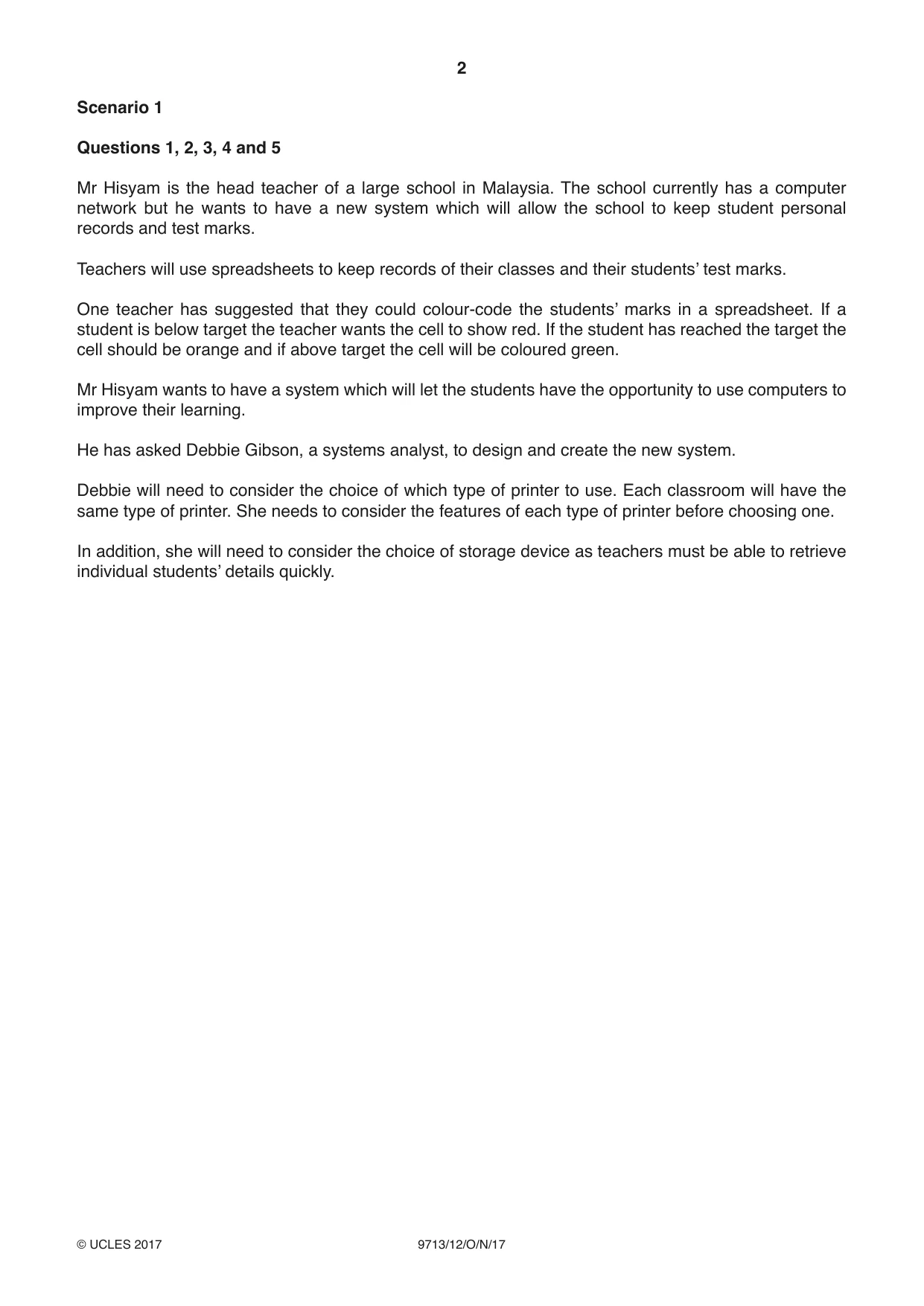
2 9713/12/O/N/17 © UCLES 2017 Scenario 1 Questions 1, 2, 3, 4 and 5 Mr Hisyam is the head teacher of a large school in Malaysia. The school currently has a computer network but he wants to have a new system which will allow the school to keep student personal records and test marks. Teachers will use spreadsheets to keep records of their classes and their students’ test marks. One teacher has suggested that they could colour-code the students’ marks in a spreadsheet. If a student is below target the teacher wants the cell to show red. If the student has reached the target the cell should be orange and if above target the cell will be coloured green. Mr Hisyam wants to have a system which will let the students have the opportunity to use computers to improve their learning. He has asked Debbie Gibson, a systems analyst, to design and create the new system. Debbie will need to consider the choice of which type of printer to use. Each classroom will have the same type of printer. She needs to consider the features of each type of printer before choosing one. In addition, she will need to consider the choice of storage device as teachers must be able to retrieve individual students’ details quickly.
Question paper, page 3
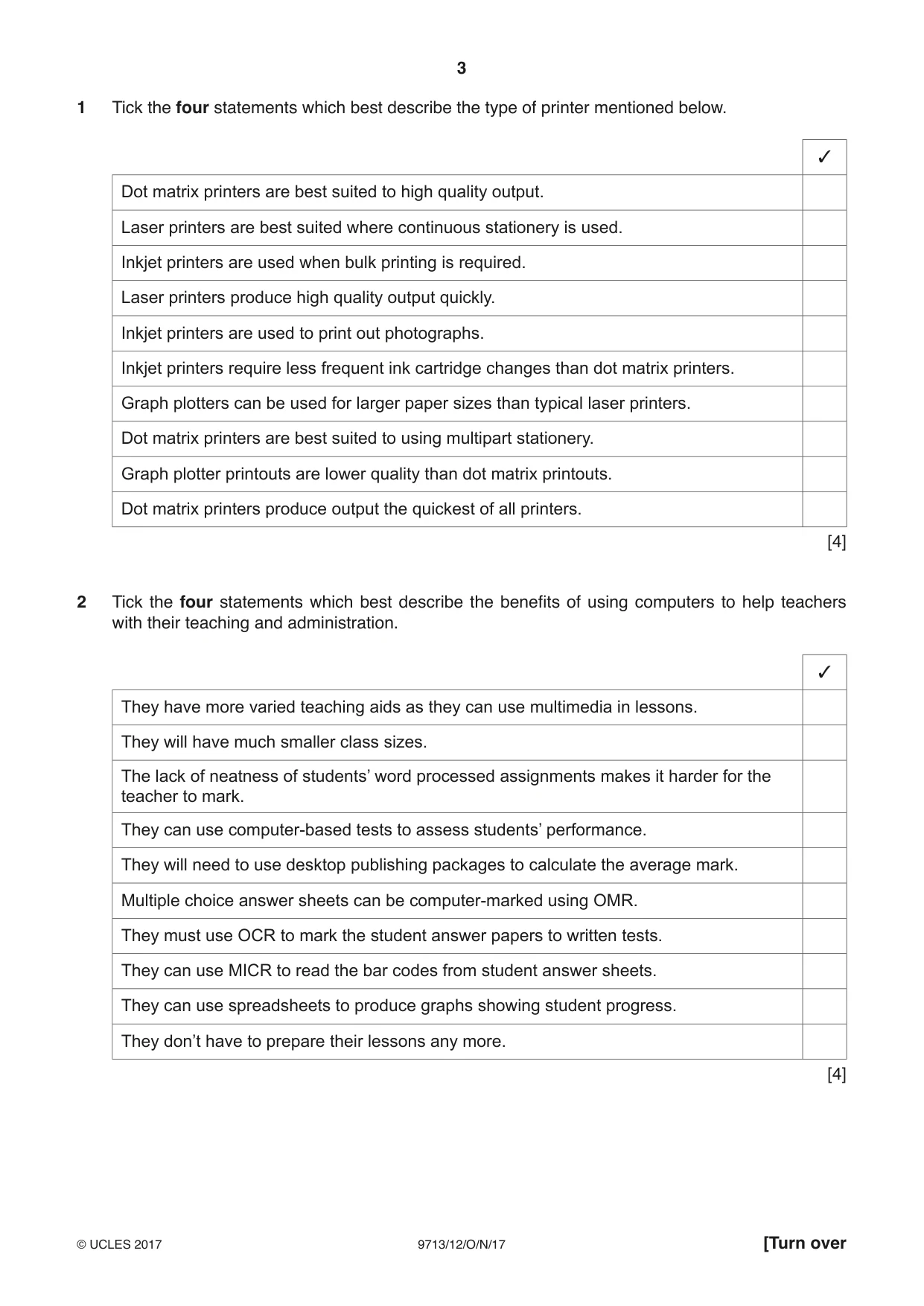
3 9713/12/O/N/17 © UCLES 2017 [Turn over 1 Tick the four statements which best describe the type of printer mentioned below. 3 Dot matrix printers are best suited to high quality output. Laser printers are best suited where continuous stationery is used. Inkjet printers are used when bulk printing is required. Laser printers produce high quality output quickly. Inkjet printers are used to print out photographs. Inkjet printers require less frequent ink cartridge changes than dot matrix printers. Graph plotters can be used for larger paper sizes than typical laser printers. Dot matrix printers are best suited to using multipart stationery. Graph plotter printouts are lower quality than dot matrix printouts. Dot matrix printers produce output the quickest of all printers. [4] 2 Tick the four statements which best describe the benefits of using computers to help teachers with their teaching and administration. 3 They have more varied teaching aids as they can use multimedia in lessons. They will have much smaller class sizes. The lack of neatness of students’ word processed assignments makes it harder for the teacher to mark. They can use computer-based tests to assess students’ performance. They will need to use desktop publishing packages to calculate the average mark. Multiple choice answer sheets can be computer-marked using OMR. They must use OCR to mark the student answer papers to written tests. They can use MICR to read the bar codes from student answer sheets. They can use spreadsheets to produce graphs showing student progress. They don’t have to prepare their lessons any more. [4]
Question paper, page 4
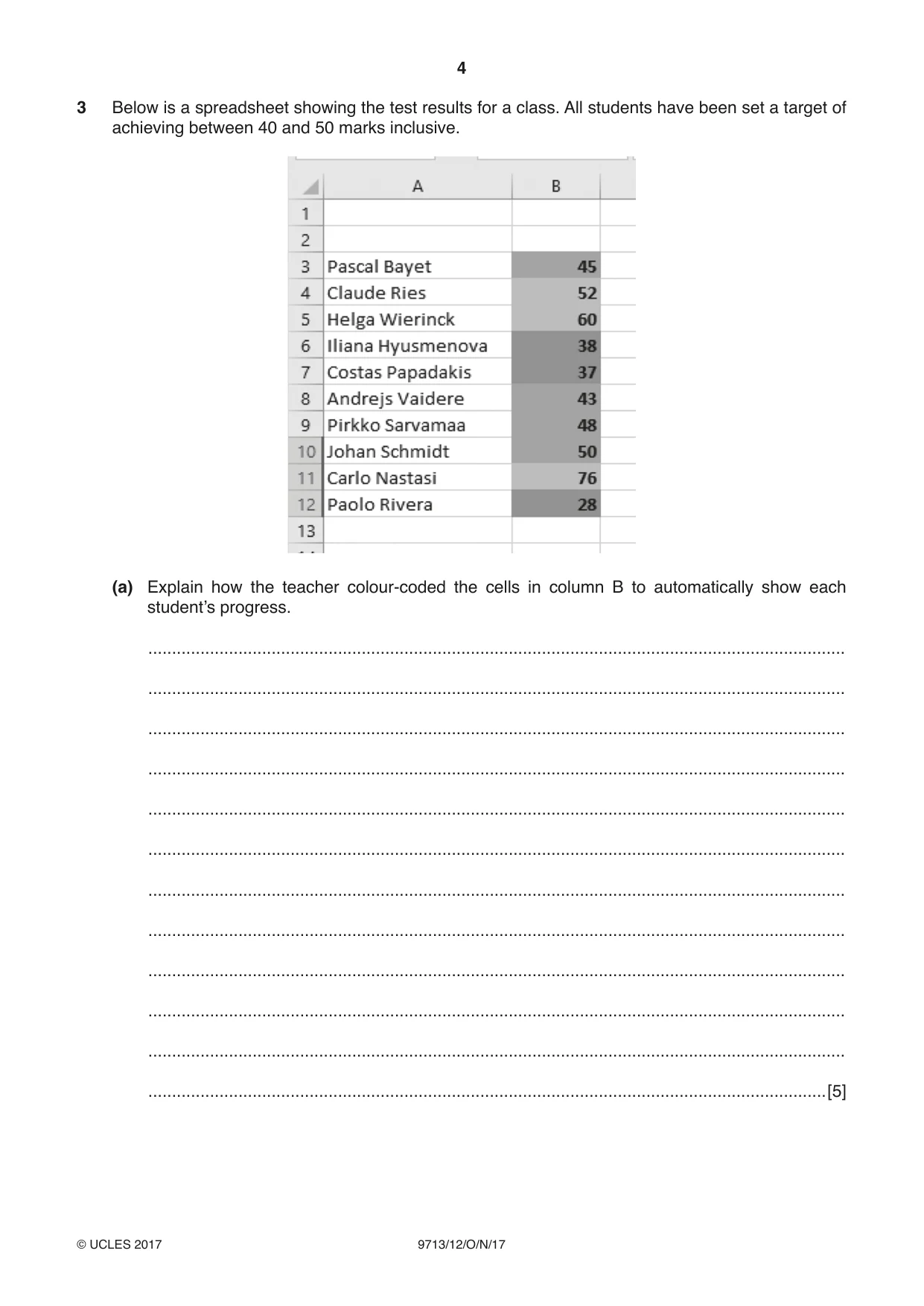
4 9713/12/O/N/17 © UCLES 2017 3 Below is a spreadsheet showing the test results for a class. All students have been set a target of achieving between 40 and 50 marks inclusive. (a) Explain how the teacher colour-coded the cells in column B to automatically show each student’s progress. … … … … … … … … … … … …[5]
Question paper, page 5
5 9713/12/O/N/17 © UCLES 2017 [Turn over (b) Describe four testing strategies that could be used to test the colour-coding in column B of the spreadsheet. With each strategy give examples of test data. 1 … … … 2 … … … 3 … … … 4 … … … [4]
Question paper, page 6
6 9713/12/O/N/17 © UCLES 2017 4 Mr Hisyam wants all teachers to use computers in their subjects. Give five reasons why this approach can help students with their learning. 1 … … … 2 … … … 3 … … … 4 … … … 5 … … … [5]
Question paper, page 7
7 9713/12/O/N/17 © UCLES 2017 [Turn over 5 Debbie has considered the use of magnetic tape drives, hard disk drives and solid state drives which use flash memory. Discuss the advantages and disadvantages of the use of these alternatives to store student data. … … … … … … … … … … … … … … … … … … … …[8]
Question paper, page 8
8 9713/12/O/N/17 © UCLES 2017 Scenario 2 Questions 6 and 7 RockICT produces CDs and DVDs of their artists’ music. Because of the increase in sales of downloads, they realise the importance of marketing their media. They have employed Arthur to create some innovative designs for the covers to their CDs and DVDs. Arthur will use graphics software to change images that have been imported into the software. He will use a number of sites on the internet to find images suitable for inclusion on the covers. Arthur, who is able-bodied, wishes to work from home as he lives a long way from the RockICT offices. RockICT know that he is well motivated but would want to be sure that he has other personal characteristics that would make him suitable for working from home. It may also lead to other staff being asked to work from home.
Question paper, page 9
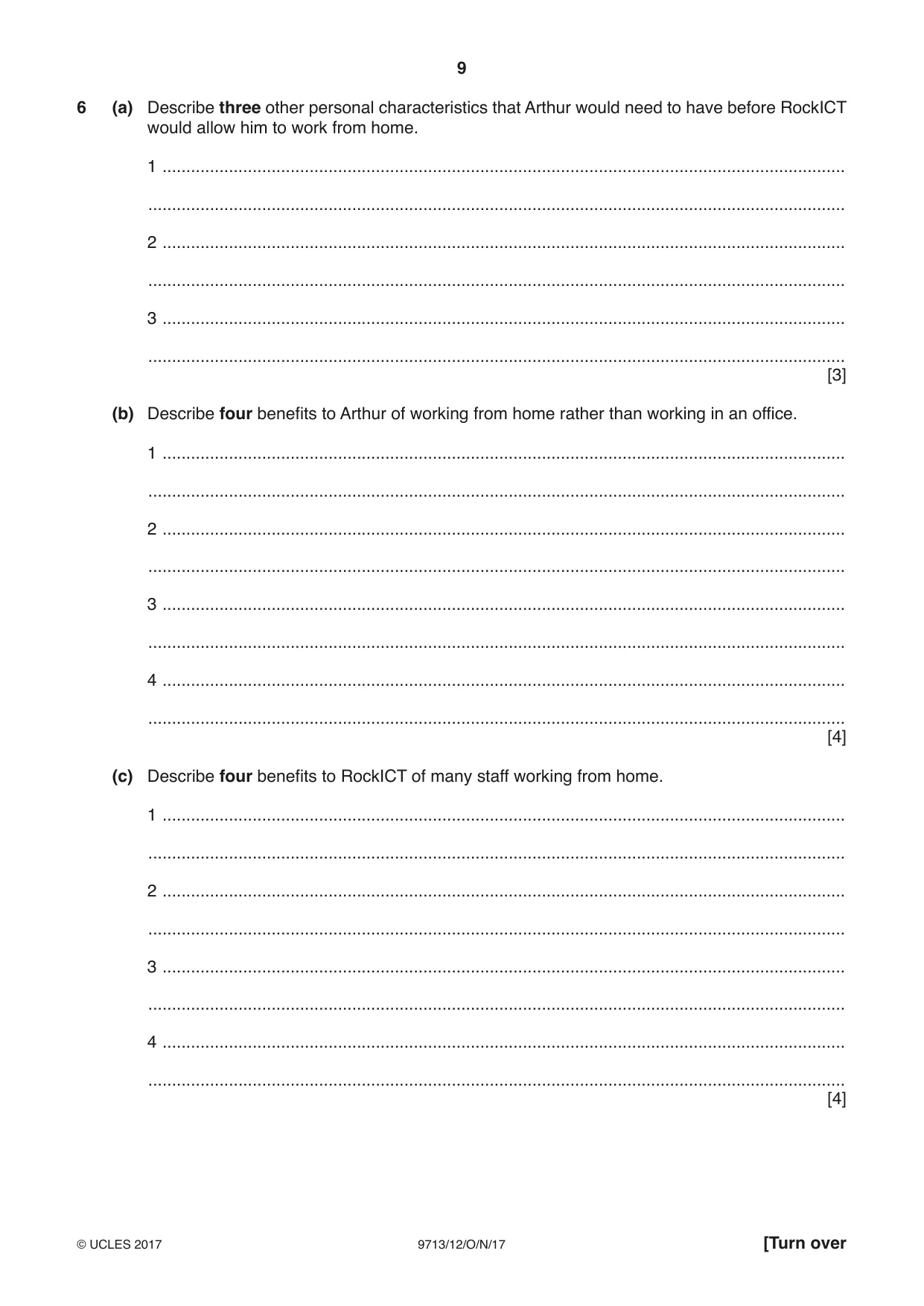
9 9713/12/O/N/17 © UCLES 2017 [Turn over 6 (a) Describe three other personal characteristics that Arthur would need to have before RockICT would allow him to work from home. 1 … … 2 … … 3 … … [3] (b) Describe four benefits to Arthur of working from home rather than working in an office. 1 … … 2 … … 3 … … 4 … … [4] (c) Describe four benefits to RockICT of many staff working from home. 1 … … 2 … … 3 … … 4 … … [4]
Question paper, page 10
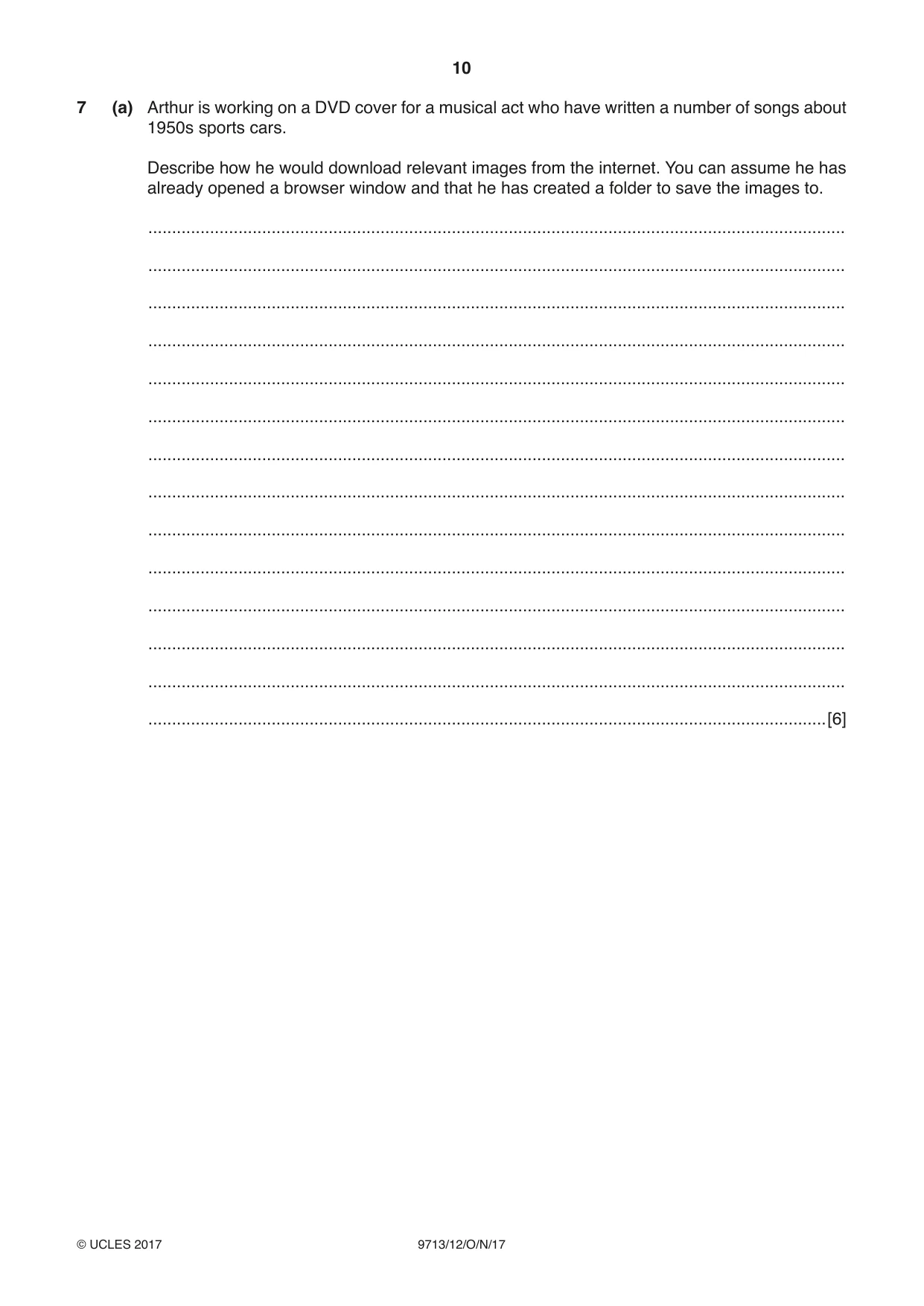
10 9713/12/O/N/17 © UCLES 2017 7 (a) Arthur is working on a DVD cover for a musical act who have written a number of songs about 1950s sports cars. Describe how he would download relevant images from the internet. You can assume he has already opened a browser window and that he has created a folder to save the images to. … … … … … … … … … … … … … …[6]
Question paper, page 11
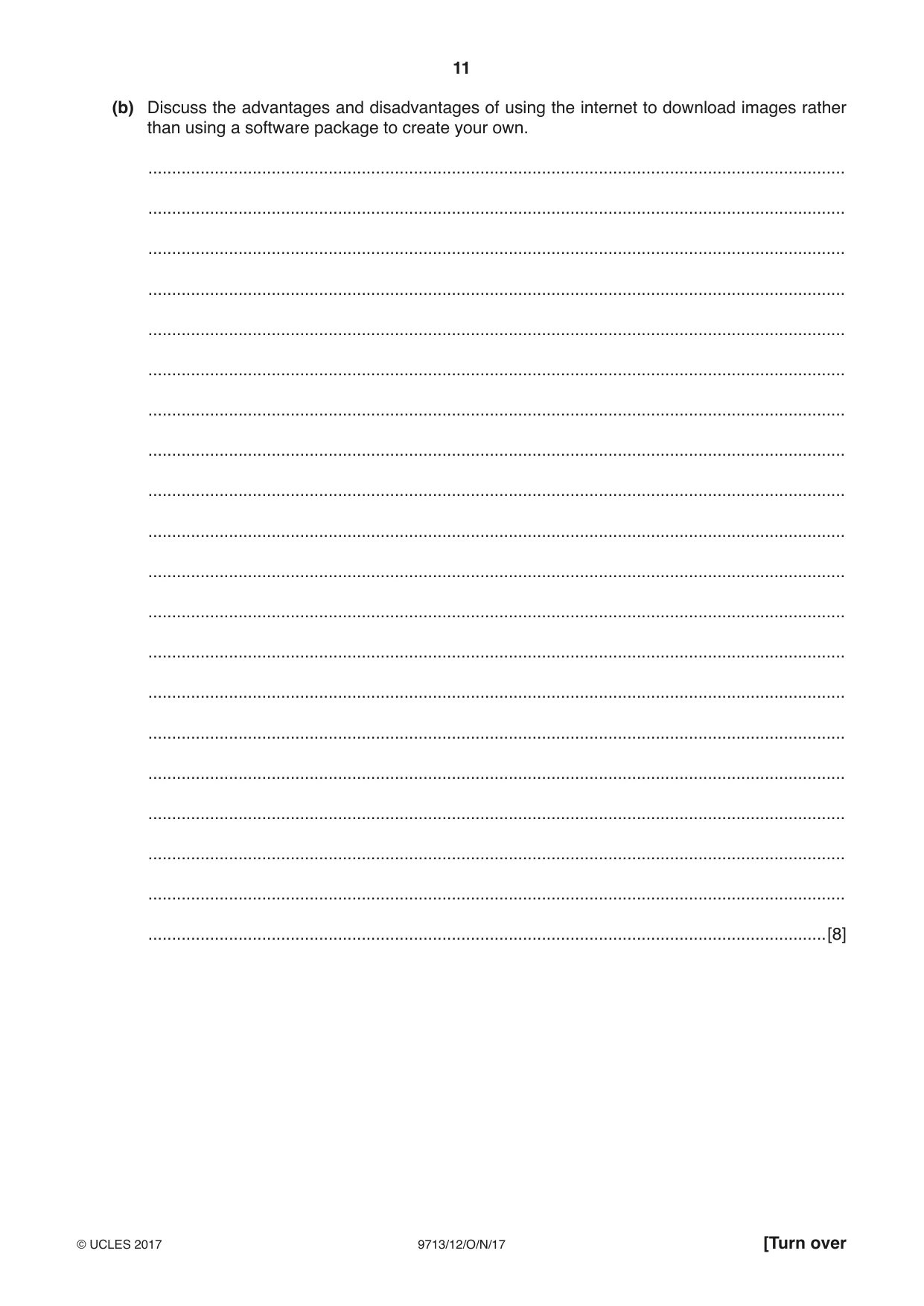
11 9713/12/O/N/17 © UCLES 2017 [Turn over (b) Discuss the advantages and disadvantages of using the internet to download images rather than using a software package to create your own. … … … … … … … … … … … … … … … … … … … …[8]
Question paper, page 12
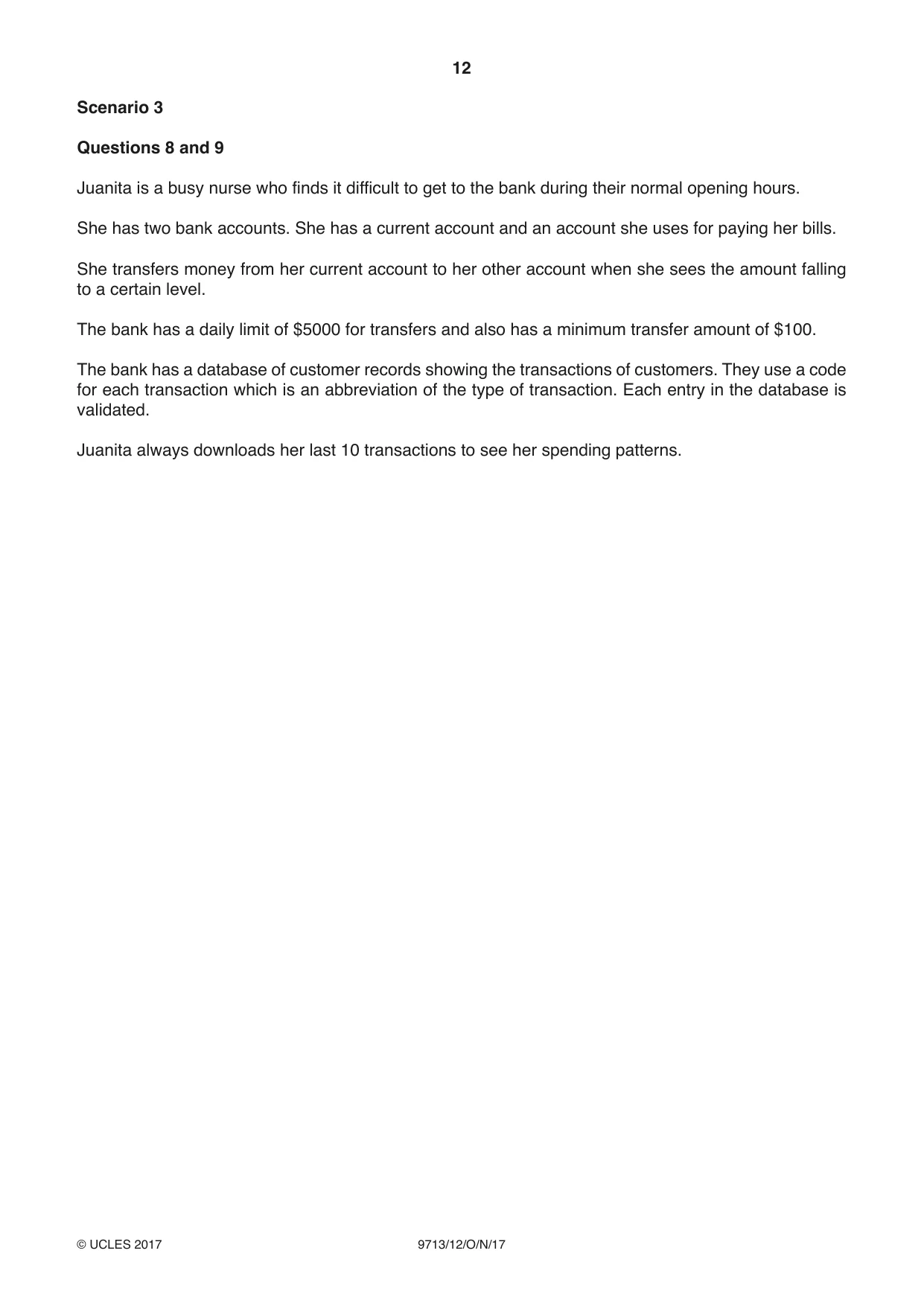
12 9713/12/O/N/17 © UCLES 2017 Scenario 3 Questions 8 and 9 Juanita is a busy nurse who finds it difficult to get to the bank during their normal opening hours. She has two bank accounts. She has a current account and an account she uses for paying her bills. She transfers money from her current account to her other account when she sees the amount falling to a certain level. The bank has a daily limit of $5000 for transfers and also has a minimum transfer amount of $100. The bank has a database of customer records showing the transactions of customers. They use a code for each transaction which is an abbreviation of the type of transaction. Each entry in the database is validated. Juanita always downloads her last 10 transactions to see her spending patterns.
Question paper, page 13
13 9713/12/O/N/17 © UCLES 2017 [Turn over 8 Juanita has already selected the logon page from the homepage of the online banking system. Describe six steps involved in transferring money from one account to another. 1 … … 2 … … 3 … … 4 … … 5 … … 6 … … [6]
Question paper, page 14
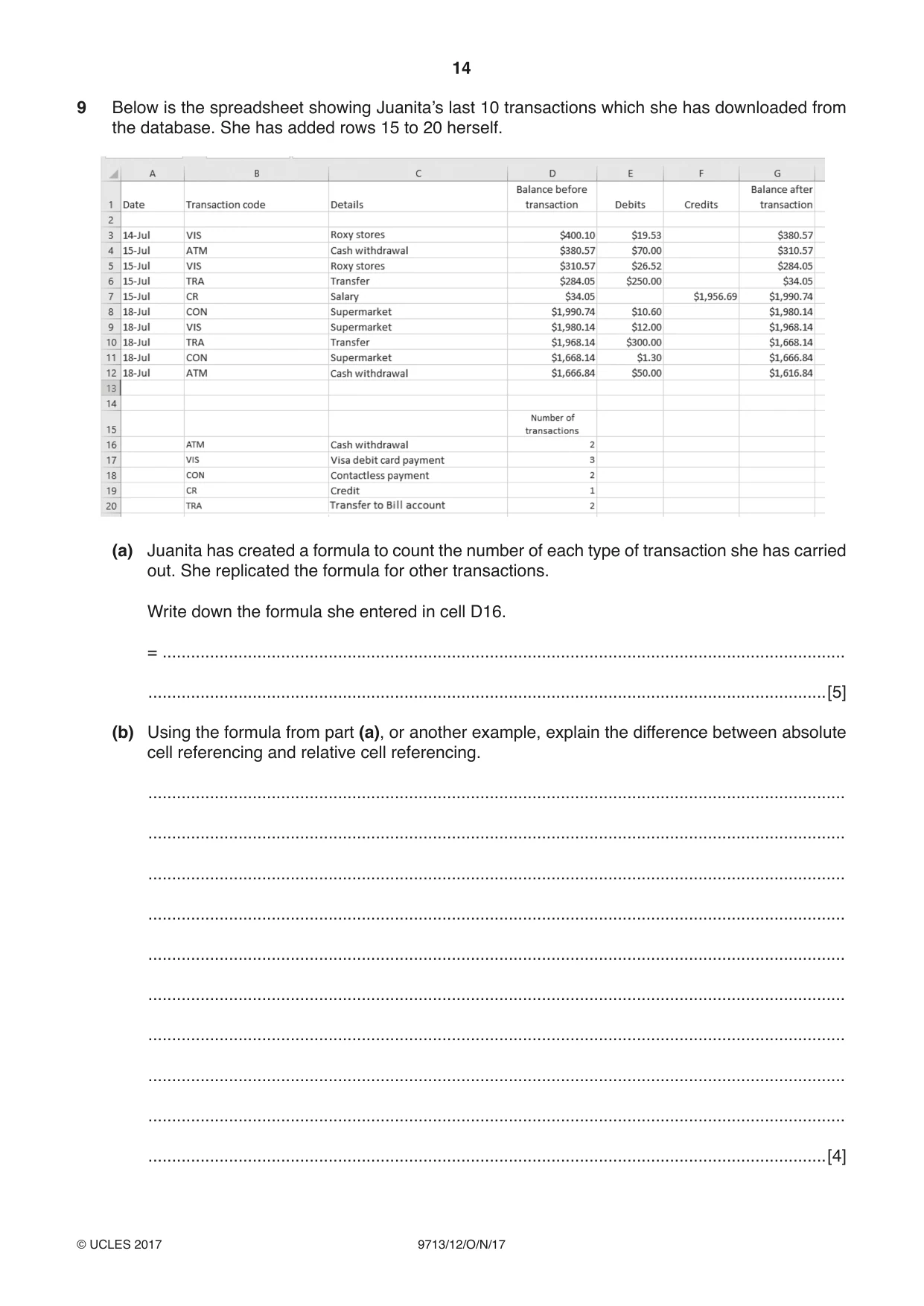
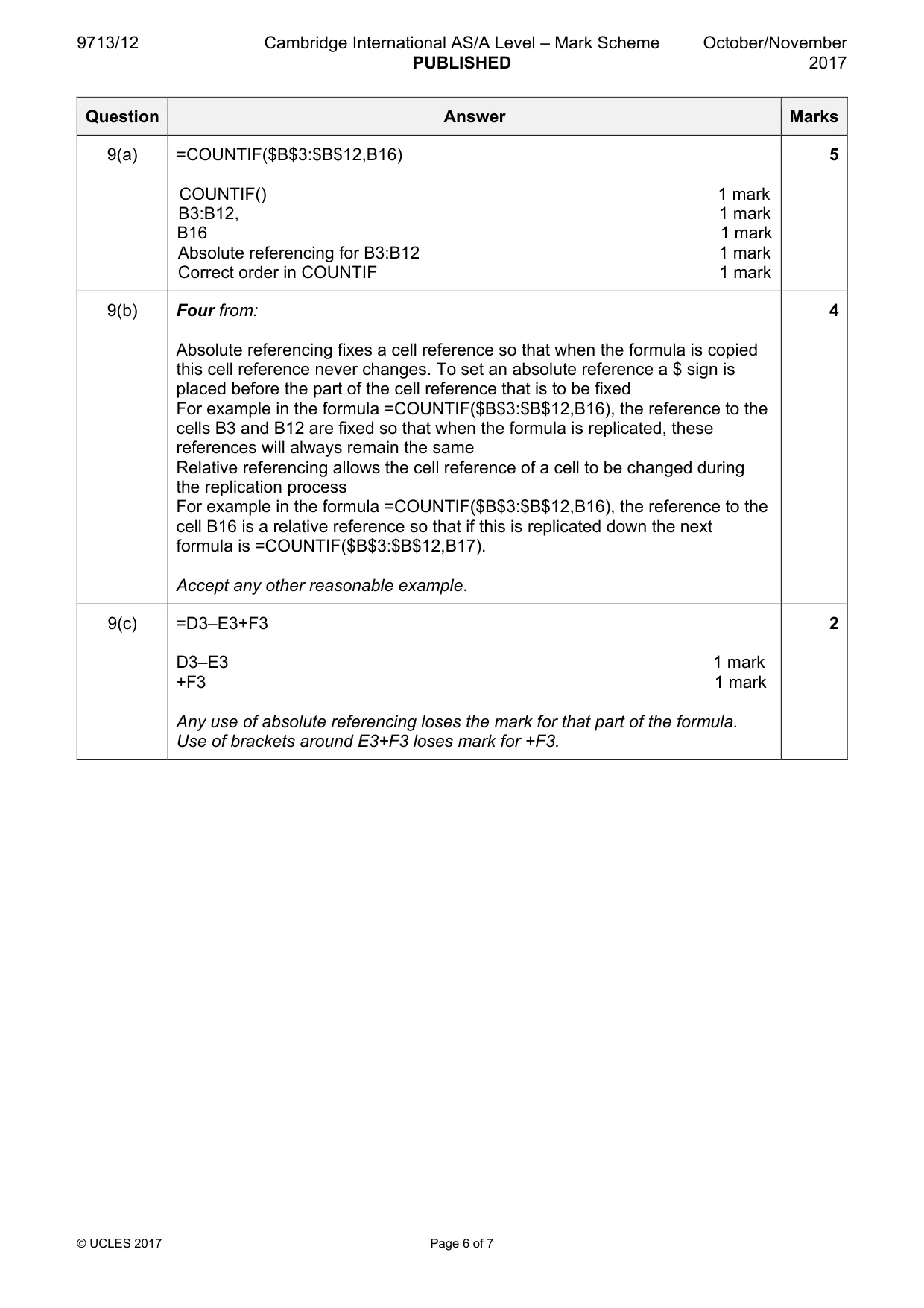
14 9713/12/O/N/17 © UCLES 2017 9 Below is the spreadsheet showing Juanita’s last 10 transactions which she has downloaded from the database. She has added rows 15 to 20 herself. (a) Juanita has created a formula to count the number of each type of transaction she has carried out. She replicated the formula for other transactions. Write down the formula she entered in cell D16. = … …[5] (b) Using the formula from part (a), or another example, explain the difference between absolute cell referencing and relative cell referencing. … … … … … … … … … …[4]
Question paper, page 15
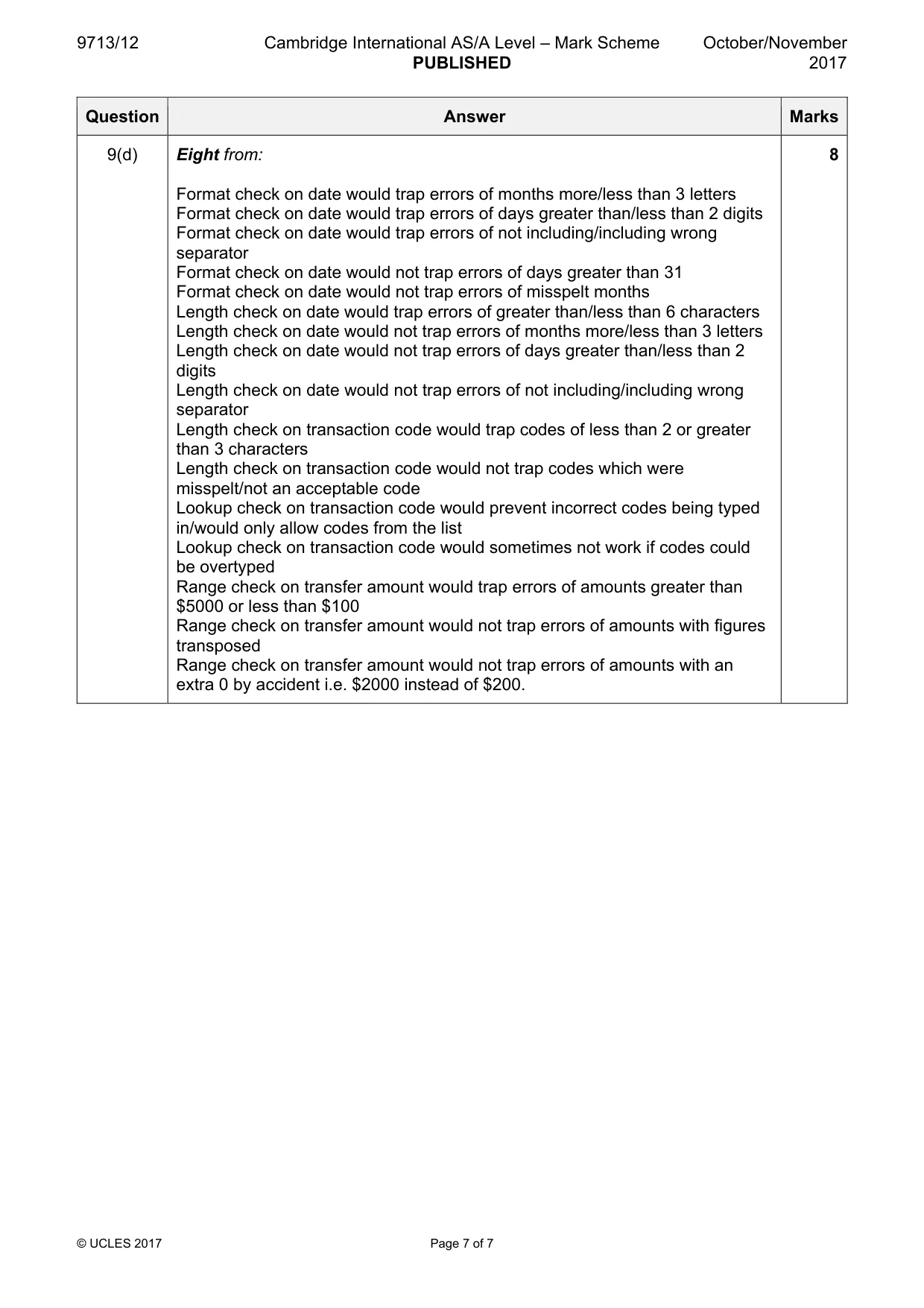
15 9713/12/O/N/17 © UCLES 2017 (c) Write down the formula that was entered in cell G3 that would make it easier to replicate down to G12. = … …[2] (d) Discuss the effectiveness of the validation checks the bank could employ when entering a new transaction. … … … … … … … … … … … … … … … … … … … …[8]
Question paper, page 16
16 9713/12/O/N/17 © UCLES 2017 Permission to reproduce items where third-party owned material protected by copyright is included has been sought and cleared where possible. Every reasonable effort has been made by the publisher (UCLES) to trace copyright holders, but if any items requiring clearance have unwittingly been included, the publisher will be pleased to make amends at the earliest possible opportunity. To avoid the issue of disclosure of answer-related information to candidates, all copyright acknowledgements are reproduced online in the Cambridge International Examinations Copyright Acknowledgements Booklet. This is produced for each series of examinations and is freely available to download at www.cie.org.uk after the live examination series. Cambridge International Examinations is part of the Cambridge Assessment Group. Cambridge Assessment is the brand name of University of Cambridge Local Examinations Syndicate (UCLES), which is itself a department of the University of Cambridge. BLANK PAGE
Mark scheme, page 1
® IGCSE is a registered trademark. This document consists of 7 printed pages. © UCLES 2017 [Turn over Cambridge Assessment International Education Cambridge International Advanced Subsidiary and Advanced Level APPLIED INFORMATION AND COMMUNICATION TECHNOLOGY 9713/12 Paper 1 Written A October/November 2017 MARK SCHEME Maximum Mark: 80 Published This mark scheme is published as an aid to teachers and candidates, to indicate the requirements of the examination. It shows the basis on which Examiners were instructed to award marks. It does not indicate the details of the discussions that took place at an Examiners’ meeting before marking began, which would have considered the acceptability of alternative answers. Mark schemes should be read in conjunction with the question paper and the Principal Examiner Report for Teachers. Cambridge International will not enter into discussions about these mark schemes. Cambridge International is publishing the mark schemes for the October/November 2017 series for most Cambridge IGCSE®, Cambridge International A and AS Level components and some Cambridge O Level components.
Mark scheme, page 2
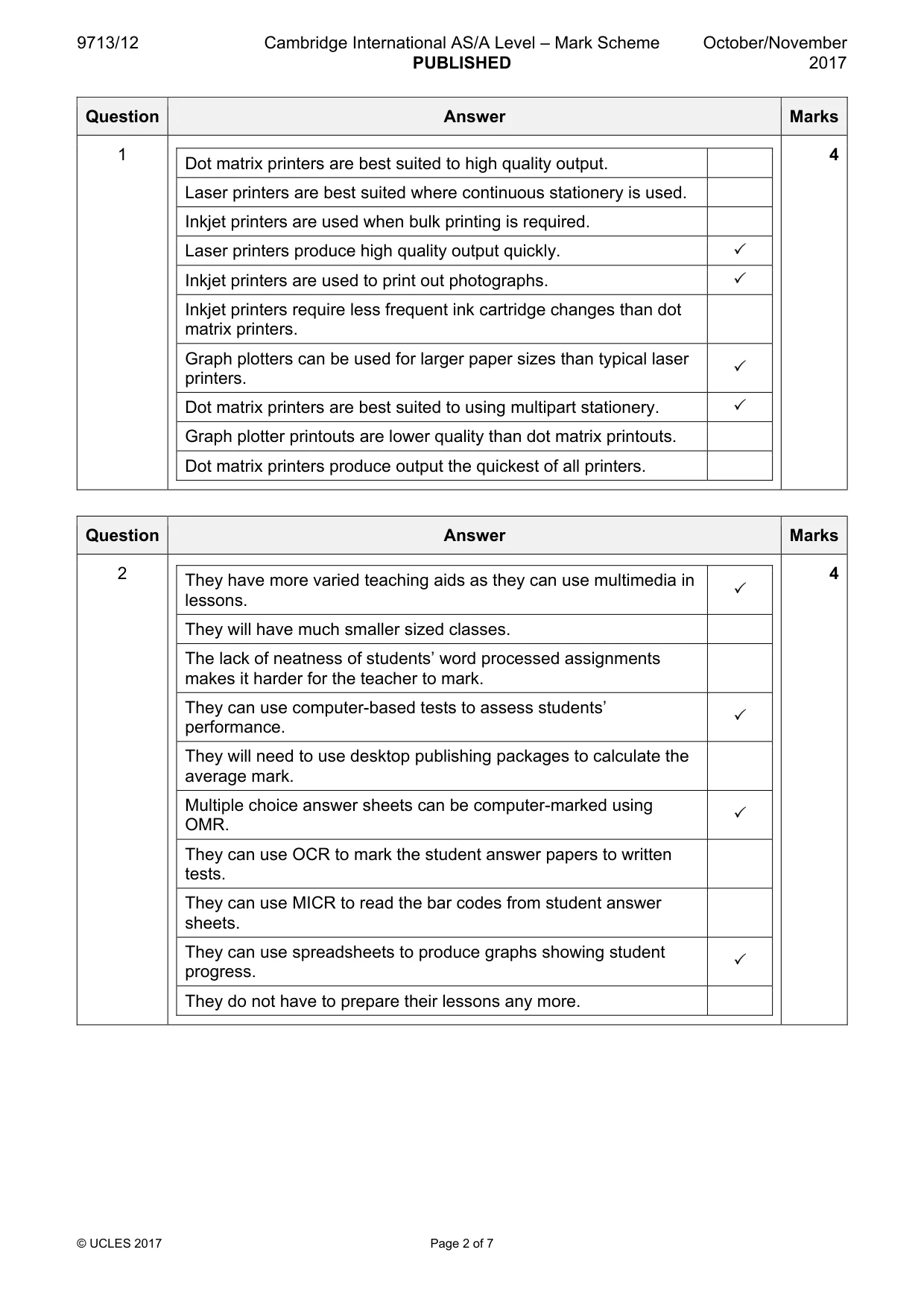
9713/12 Cambridge International AS/A Level – Mark Scheme PUBLISHED October/November 2017 © UCLES 2017 Page 2 of 7 Question Answer Marks 1 Dot matrix printers are best suited to high quality output. Laser printers are best suited where continuous stationery is used. Inkjet printers are used when bulk printing is required. Laser printers produce high quality output quickly. 3 Inkjet printers are used to print out photographs. 3 Inkjet printers require less frequent ink cartridge changes than dot matrix printers. Graph plotters can be used for larger paper sizes than typical laser printers. 3 Dot matrix printers are best suited to using multipart stationery. 3 Graph plotter printouts are lower quality than dot matrix printouts. Dot matrix printers produce output the quickest of all printers. 4 Question Answer Marks 2 They have more varied teaching aids as they can use multimedia in lessons. 3 They will have much smaller sized classes. The lack of neatness of students’ word processed assignments makes it harder for the teacher to mark. They can use computer-based tests to assess students’ performance. 3 They will need to use desktop publishing packages to calculate the average mark. Multiple choice answer sheets can be computer-marked using OMR. 3 They can use OCR to mark the student answer papers to written tests. They can use MICR to read the bar codes from student answer sheets. They can use spreadsheets to produce graphs showing student progress. 3 They do not have to prepare their lessons any more. 4
Mark scheme, page 3
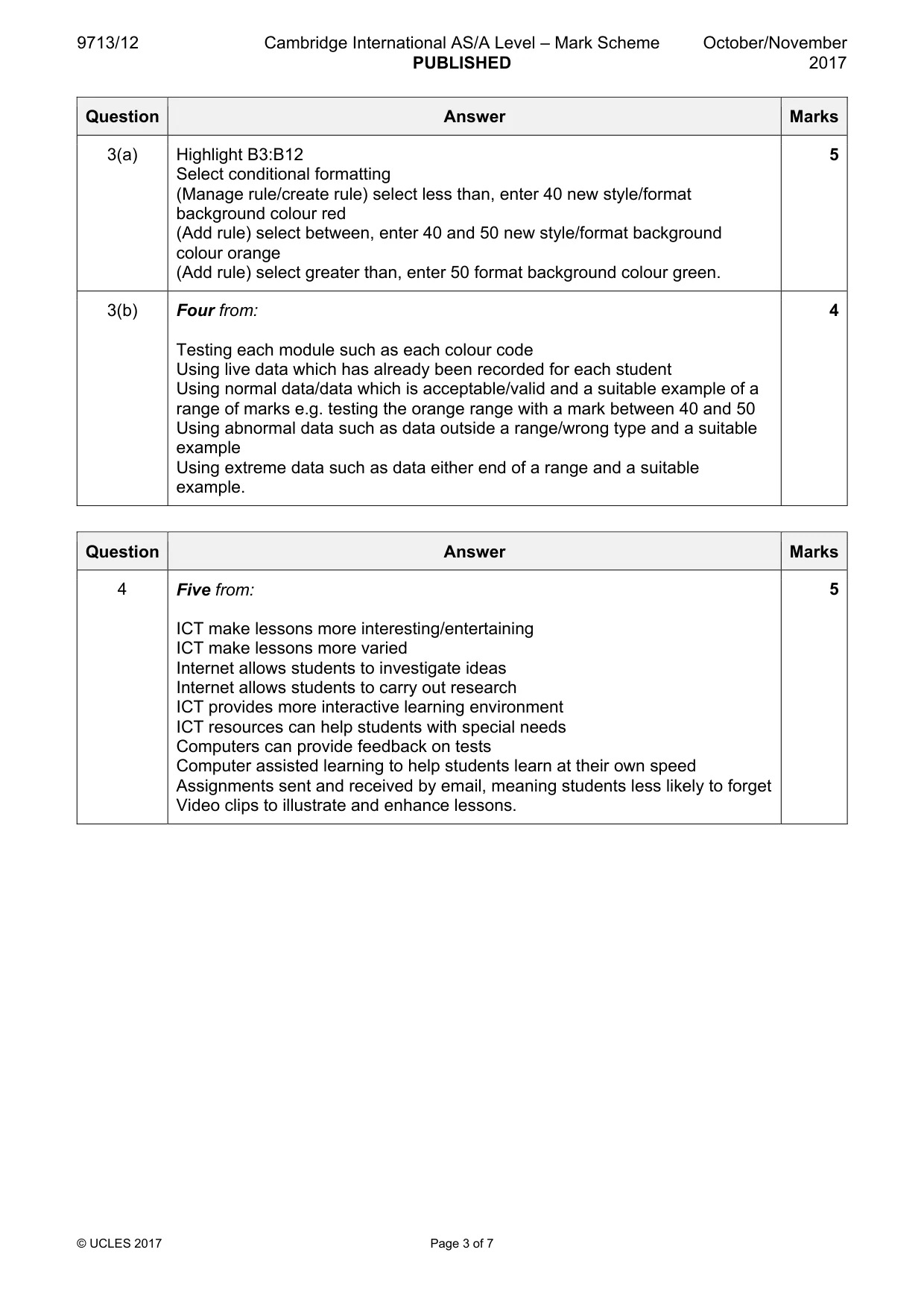
9713/12 Cambridge International AS/A Level – Mark Scheme PUBLISHED October/November 2017 © UCLES 2017 Page 3 of 7 Question Answer Marks 3(a) Highlight B3:B12 Select conditional formatting (Manage rule/create rule) select less than, enter 40 new style/format background colour red (Add rule) select between, enter 40 and 50 new style/format background colour orange (Add rule) select greater than, enter 50 format background colour green. 5 3(b) Four from: Testing each module such as each colour code Using live data which has already been recorded for each student Using normal data/data which is acceptable/valid and a suitable example of a range of marks e.g. testing the orange range with a mark between 40 and 50 Using abnormal data such as data outside a range/wrong type and a suitable example Using extreme data such as data either end of a range and a suitable example. 4 Question Answer Marks 4 Five from: ICT make lessons more interesting/entertaining ICT make lessons more varied Internet allows students to investigate ideas Internet allows students to carry out research ICT provides more interactive learning environment ICT resources can help students with special needs Computers can provide feedback on tests Computer assisted learning to help students learn at their own speed Assignments sent and received by email, meaning students less likely to forget Video clips to illustrate and enhance lessons. 5
Mark scheme, page 4
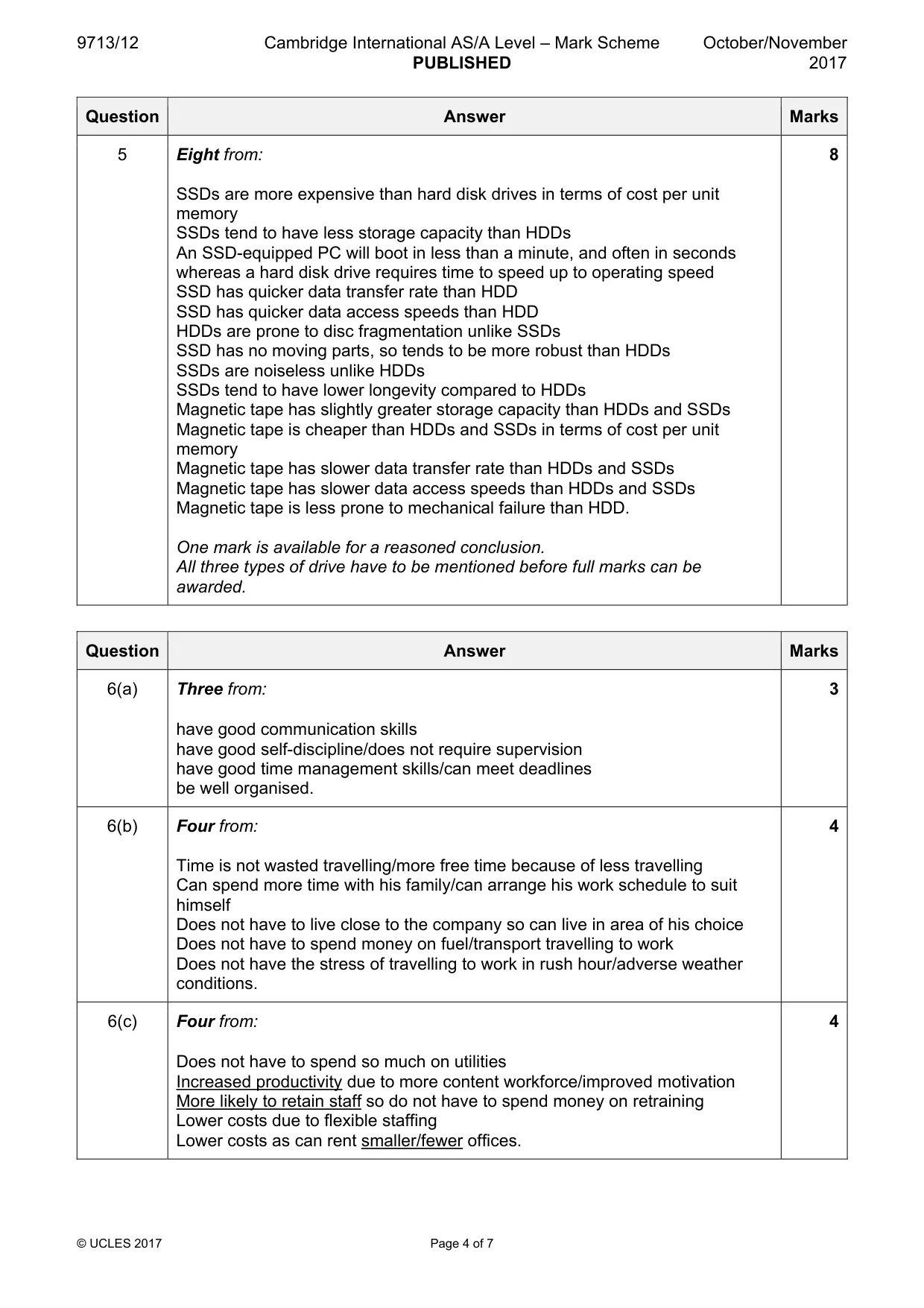
9713/12 Cambridge International AS/A Level – Mark Scheme PUBLISHED October/November 2017 © UCLES 2017 Page 4 of 7 Question Answer Marks 5 Eight from: SSDs are more expensive than hard disk drives in terms of cost per unit memory SSDs tend to have less storage capacity than HDDs An SSD-equipped PC will boot in less than a minute, and often in seconds whereas a hard disk drive requires time to speed up to operating speed SSD has quicker data transfer rate than HDD SSD has quicker data access speeds than HDD HDDs are prone to disc fragmentation unlike SSDs SSD has no moving parts, so tends to be more robust than HDDs SSDs are noiseless unlike HDDs SSDs tend to have lower longevity compared to HDDs Magnetic tape has slightly greater storage capacity than HDDs and SSDs Magnetic tape is cheaper than HDDs and SSDs in terms of cost per unit memory Magnetic tape has slower data transfer rate than HDDs and SSDs Magnetic tape has slower data access speeds than HDDs and SSDs Magnetic tape is less prone to mechanical failure than HDD. One mark is available for a reasoned conclusion. All three types of drive have to be mentioned before full marks can be awarded. 8 Question Answer Marks 6(a) Three from: have good communication skills have good self-discipline/does not require supervision have good time management skills/can meet deadlines be well organised. 3 6(b) Four from: Time is not wasted travelling/more free time because of less travelling Can spend more time with his family/can arrange his work schedule to suit himself Does not have to live close to the company so can live in area of his choice Does not have to spend money on fuel/transport travelling to work Does not have the stress of travelling to work in rush hour/adverse weather conditions. 4 6(c) Four from: Does not have to spend so much on utilities Increased productivity due to more content workforce/improved motivation More likely to retain staff so do not have to spend money on retraining Lower costs due to flexible staffing Lower costs as can rent smaller/fewer offices. 4
Mark scheme, page 5
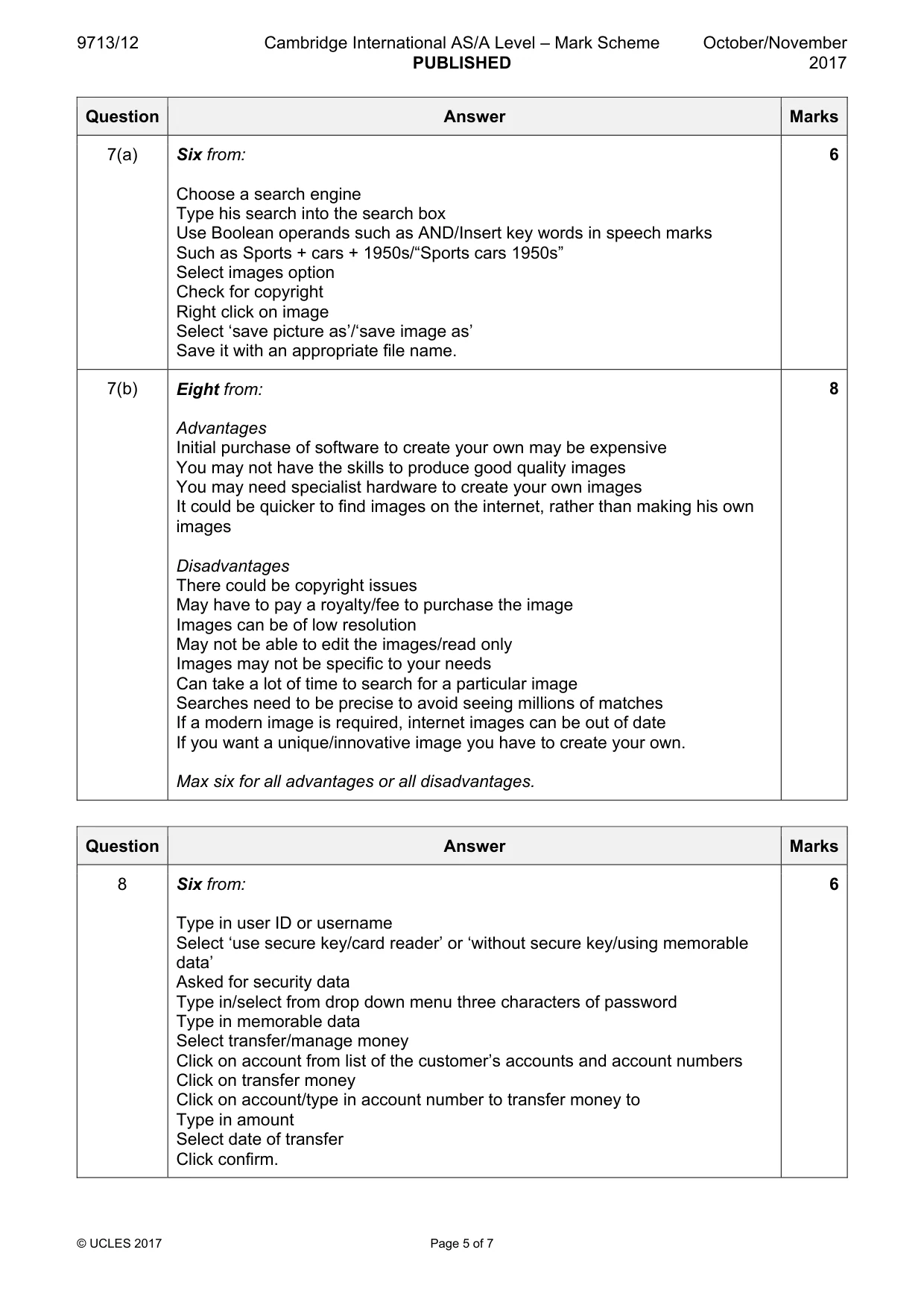
9713/12 Cambridge International AS/A Level – Mark Scheme PUBLISHED October/November 2017 © UCLES 2017 Page 5 of 7 Question Answer Marks 7(a) Six from: Choose a search engine Type his search into the search box Use Boolean operands such as AND/Insert key words in speech marks Such as Sports + cars + 1950s/“Sports cars 1950s” Select images option Check for copyright Right click on image Select ‘save picture as’/‘save image as’ Save it with an appropriate file name. 6 7(b) Eight from: Advantages Initial purchase of software to create your own may be expensive You may not have the skills to produce good quality images You may need specialist hardware to create your own images It could be quicker to find images on the internet, rather than making his own images Disadvantages There could be copyright issues May have to pay a royalty/fee to purchase the image Images can be of low resolution May not be able to edit the images/read only Images may not be specific to your needs Can take a lot of time to search for a particular image Searches need to be precise to avoid seeing millions of matches If a modern image is required, internet images can be out of date If you want a unique/innovative image you have to create your own. Max six for all advantages or all disadvantages. 8 Question Answer Marks 8 Six from: Type in user ID or username Select ‘use secure key/card reader’ or ‘without secure key/using memorable data’ Asked for security data Type in/select from drop down menu three characters of password Type in memorable data Select transfer/manage money Click on account from list of the customer’s accounts and account numbers Click on transfer money Click on account/type in account number to transfer money to Type in amount Select date of transfer Click confirm. 6
Mark scheme, page 6
9713/12 Cambridge International AS/A Level – Mark Scheme PUBLISHED October/November 2017 © UCLES 2017 Page 6 of 7 Question Answer Marks 9(a) =COUNTIF($B$3:$B$12,B16) COUNTIF() 1 mark B3:B12, 1 mark B16 1 mark Absolute referencing for B3:B12 1 mark Correct order in COUNTIF 1 mark 5 9(b) Four from: Absolute referencing fixes a cell reference so that when the formula is copied this cell reference never changes. To set an absolute reference a $ sign is placed before the part of the cell reference that is to be fixed For example in the formula =COUNTIF($B$3:$B$12,B16), the reference to the cells B3 and B12 are fixed so that when the formula is replicated, these references will always remain the same Relative referencing allows the cell reference of a cell to be changed during the replication process For example in the formula =COUNTIF($B$3:$B$12,B16), the reference to the cell B16 is a relative reference so that if this is replicated down the next formula is =COUNTIF($B$3:$B$12,B17). Accept any other reasonable example. 4 9(c) =D3–E3+F3 D3–E3 1 mark +F3 1 mark Any use of absolute referencing loses the mark for that part of the formula. Use of brackets around E3+F3 loses mark for +F3. 2
Mark scheme, page 7
9713/12 Cambridge International AS/A Level – Mark Scheme PUBLISHED October/November 2017 © UCLES 2017 Page 7 of 7 Question Answer Marks 9(d) Eight from: Format check on date would trap errors of months more/less than 3 letters Format check on date would trap errors of days greater than/less than 2 digits Format check on date would trap errors of not including/including wrong separator Format check on date would not trap errors of days greater than 31 Format check on date would not trap errors of misspelt months Length check on date would trap errors of greater than/less than 6 characters Length check on date would not trap errors of months more/less than 3 letters Length check on date would not trap errors of days greater than/less than 2 digits Length check on date would not trap errors of not including/including wrong separator Length check on transaction code would trap codes of less than 2 or greater than 3 characters Length check on transaction code would not trap codes which were misspelt/not an acceptable code Lookup check on transaction code would prevent incorrect codes being typed in/would only allow codes from the list Lookup check on transaction code would sometimes not work if codes could be overtyped Range check on transfer amount would trap errors of amounts greater than $5000 or less than $100 Range check on transfer amount would not trap errors of amounts with figures transposed Range check on transfer amount would not trap errors of amounts with an extra 0 by accident i.e. $2000 instead of $200. 8
What you needed in this session
Cambridge’s own grade thresholds for 2017 Oct/Nov, Paper 1 · Variant 2. A higher threshold means an easier paper — the bar moves with how the cohort did.