Cambridge A Level Applied Information and Communication Technology 9713 — 2014 May/June Paper 3 · Variant 2
9713/32/M/J/14 · 80 marks · ≈90 min
The question paper and its mark scheme, free to read here and free to download. This is Cambridge’s own paper, exactly as it was sat.
Question paper16 pages





Mark scheme7 pages
Answers below. Sit the paper first if you are practising.
Paper as text
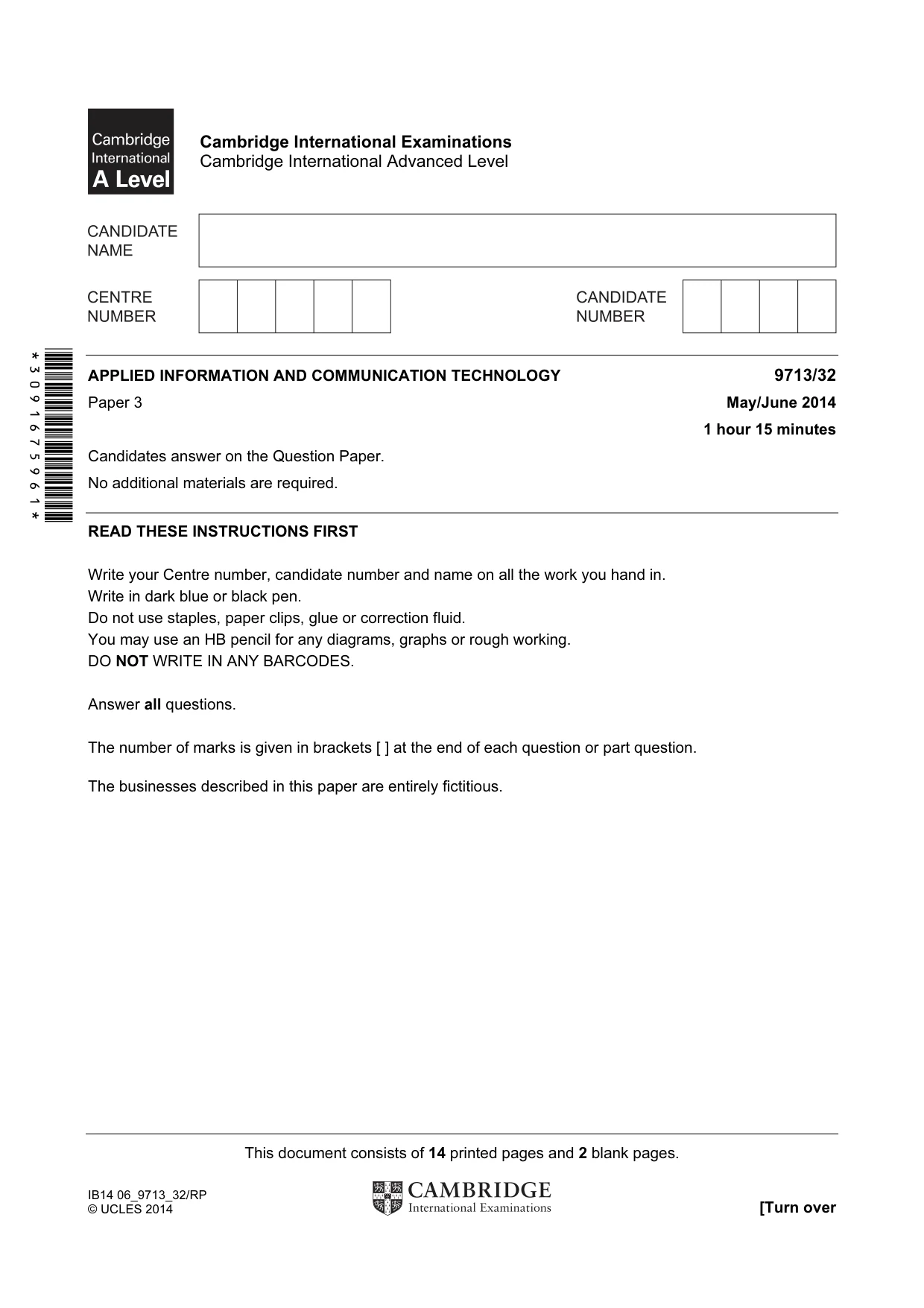
Question paper, page 1
This document consists of 14 printed pages and 2 blank pages. IB14 06_9713_32/RP © UCLES 2014 [Turn over *3091675961* Cambridge International Examinations Cambridge International Advanced Level APPLIED INFORMATION AND COMMUNICATION TECHNOLOGY 9713/32 Paper 3 May/June 2014 1 hour 15 minutes Candidates answer on the Question Paper. No additional materials are required. READ THESE INSTRUCTIONS FIRST Write your Centre number, candidate number and name on all the work you hand in. Write in dark blue or black pen. Do not use staples, paper clips, glue or correction fluid. You may use an HB pencil for any diagrams, graphs or rough working. DO NOT WRITE IN ANY BARCODES. Answer all questions. The number of marks is given in brackets [ ] at the end of each question or part question. The businesses described in this paper are entirely fictitious.
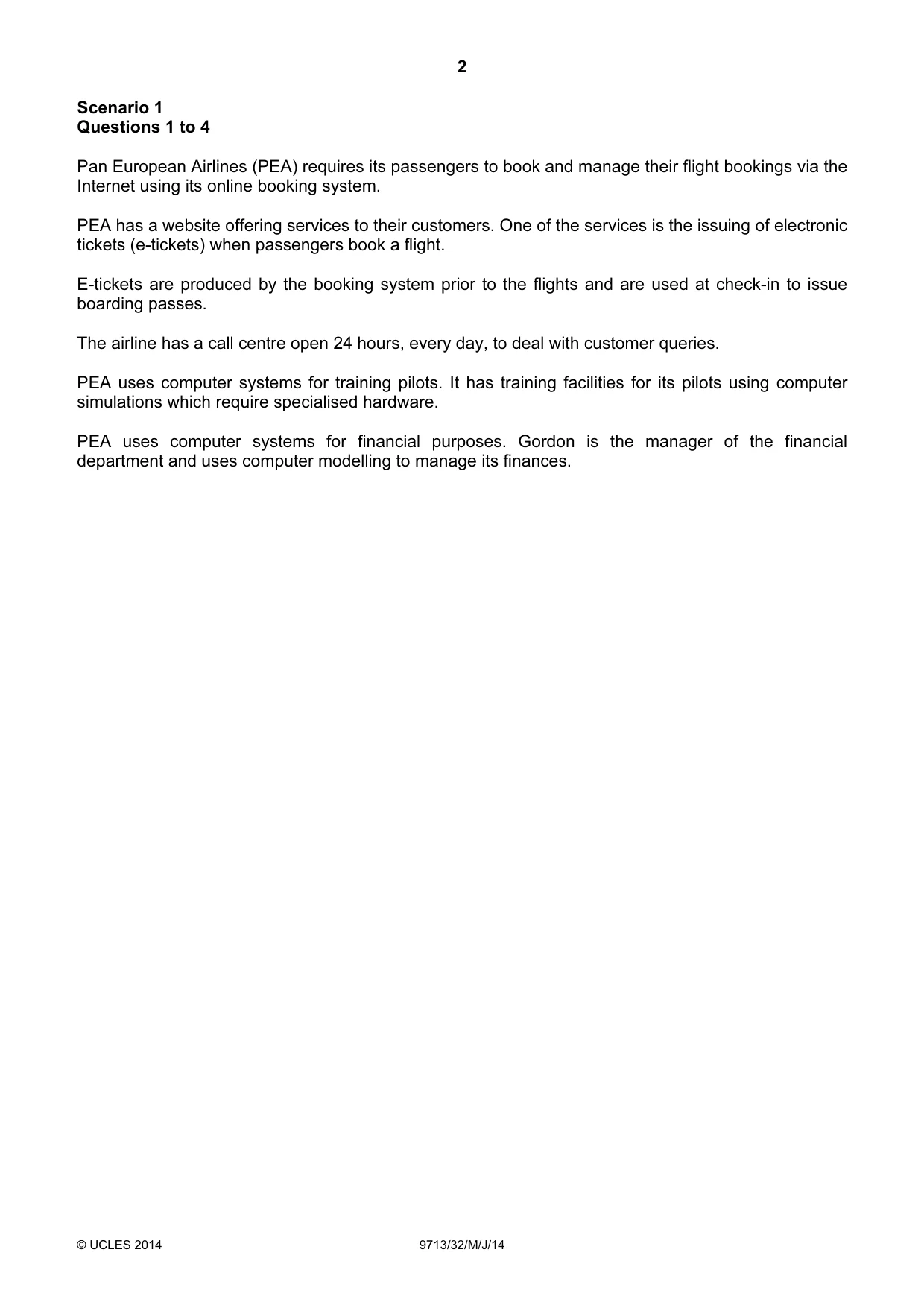
Question paper, page 2
2 © UCLES 2014 9713/32/M/J/14 Scenario 1 Questions 1 to 4 Pan European Airlines (PEA) requires its passengers to book and manage their flight bookings via the Internet using its online booking system. PEA has a website offering services to their customers. One of the services is the issuing of electronic tickets (e-tickets) when passengers book a flight. E-tickets are produced by the booking system prior to the flights and are used at check-in to issue boarding passes. The airline has a call centre open 24 hours, every day, to deal with customer queries. PEA uses computer systems for training pilots. It has training facilities for its pilots using computer simulations which require specialised hardware. PEA uses computer systems for financial purposes. Gordon is the manager of the financial department and uses computer modelling to manage its finances.
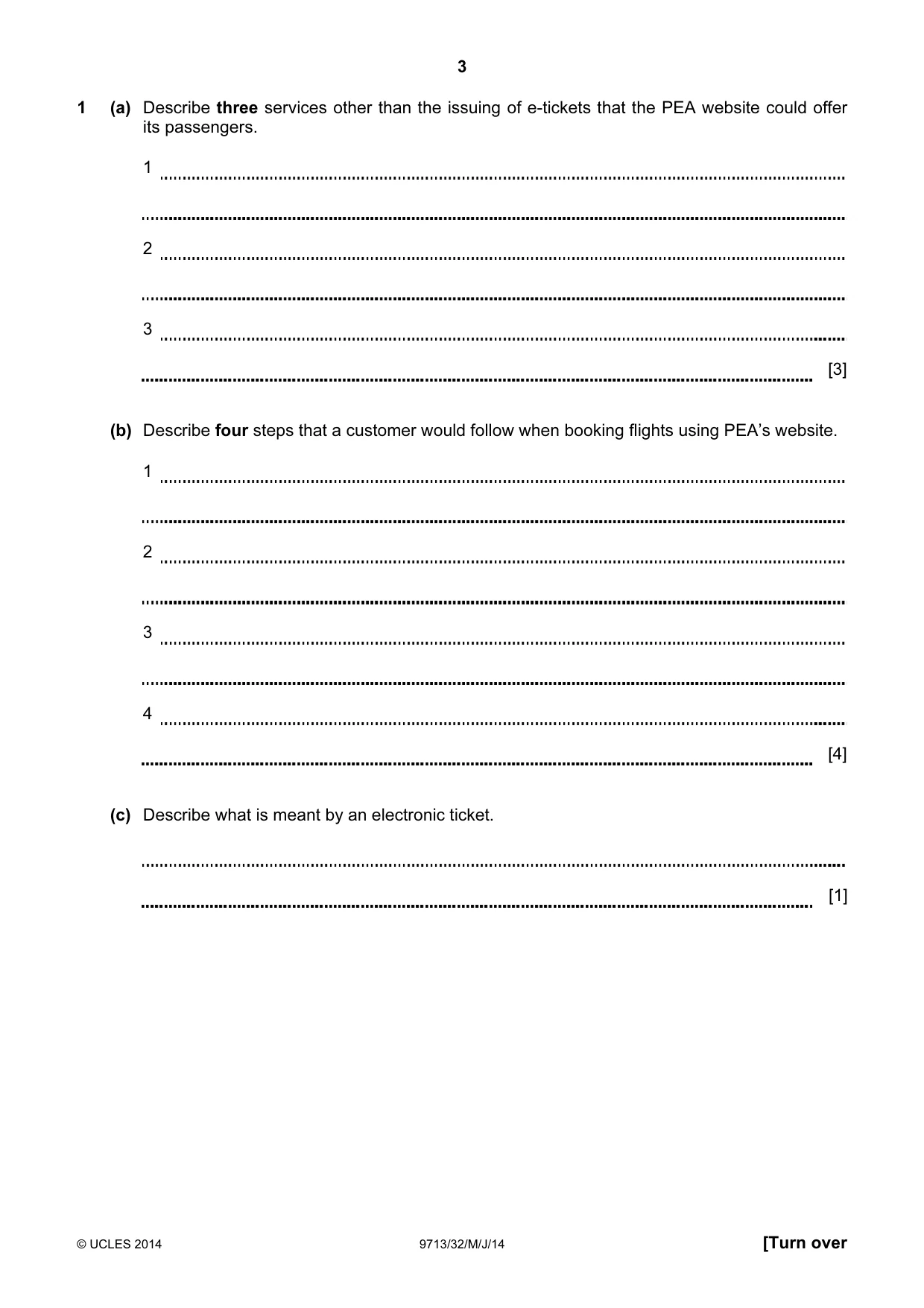
Question paper, page 3
3 © UCLES 2014 9713/32/M/J/14 [Turn over 1 (a) Describe three services other than the issuing of e-tickets that the PEA website could offer its passengers. (b) Describe four steps that a customer would follow when booking flights using PEA’s website. (c) Describe what is meant by an electronic ticket. [1] 1 2 3 [3] 1 2 3 4 [4]
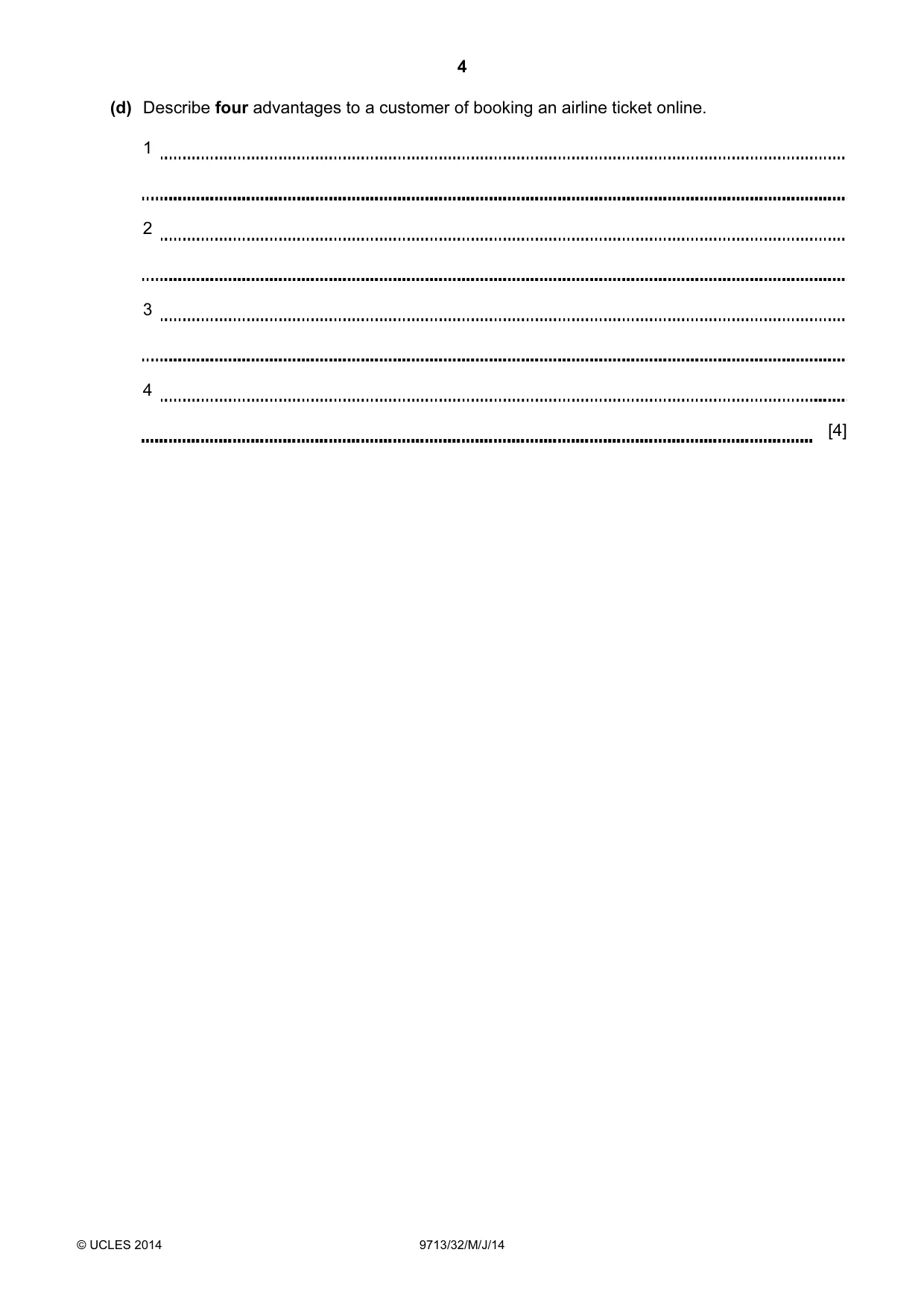
Question paper, page 4
4 © UCLES 2014 9713/32/M/J/14 (d) Describe four advantages to a customer of booking an airline ticket online. 1 2 3 4 [4]
Question paper, page 5
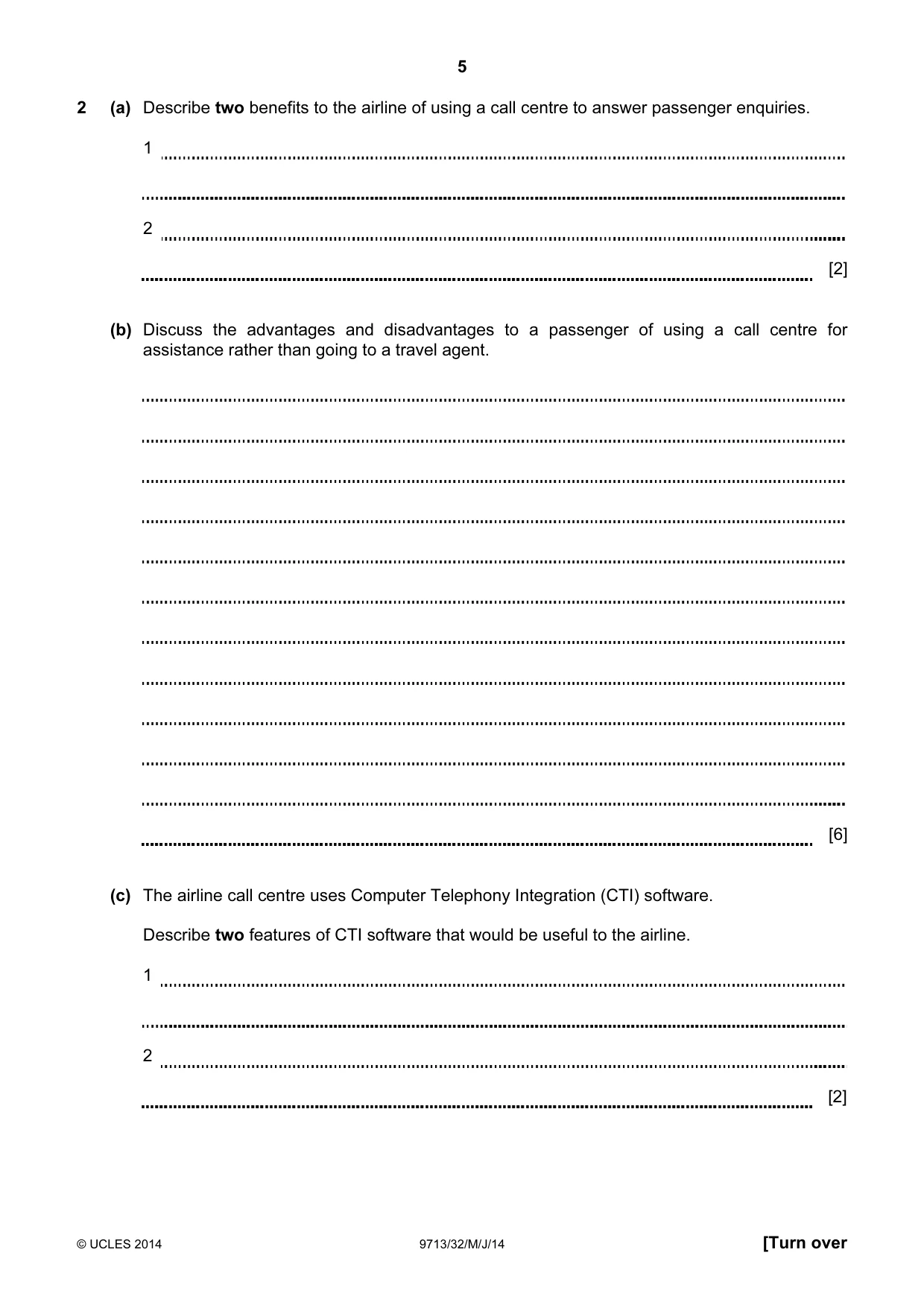
5 © UCLES 2014 9713/32/M/J/14 [Turn over 2 (a) Describe two benefits to the airline of using a call centre to answer passenger enquiries. 1 2 [2] (b) Discuss the advantages and disadvantages to a passenger of using a call centre for assistance rather than going to a travel agent. [6] (c) The airline call centre uses Computer Telephony Integration (CTI) software. Describe two features of CTI software that would be useful to the airline. 1 2 [2]
Question paper, page 6
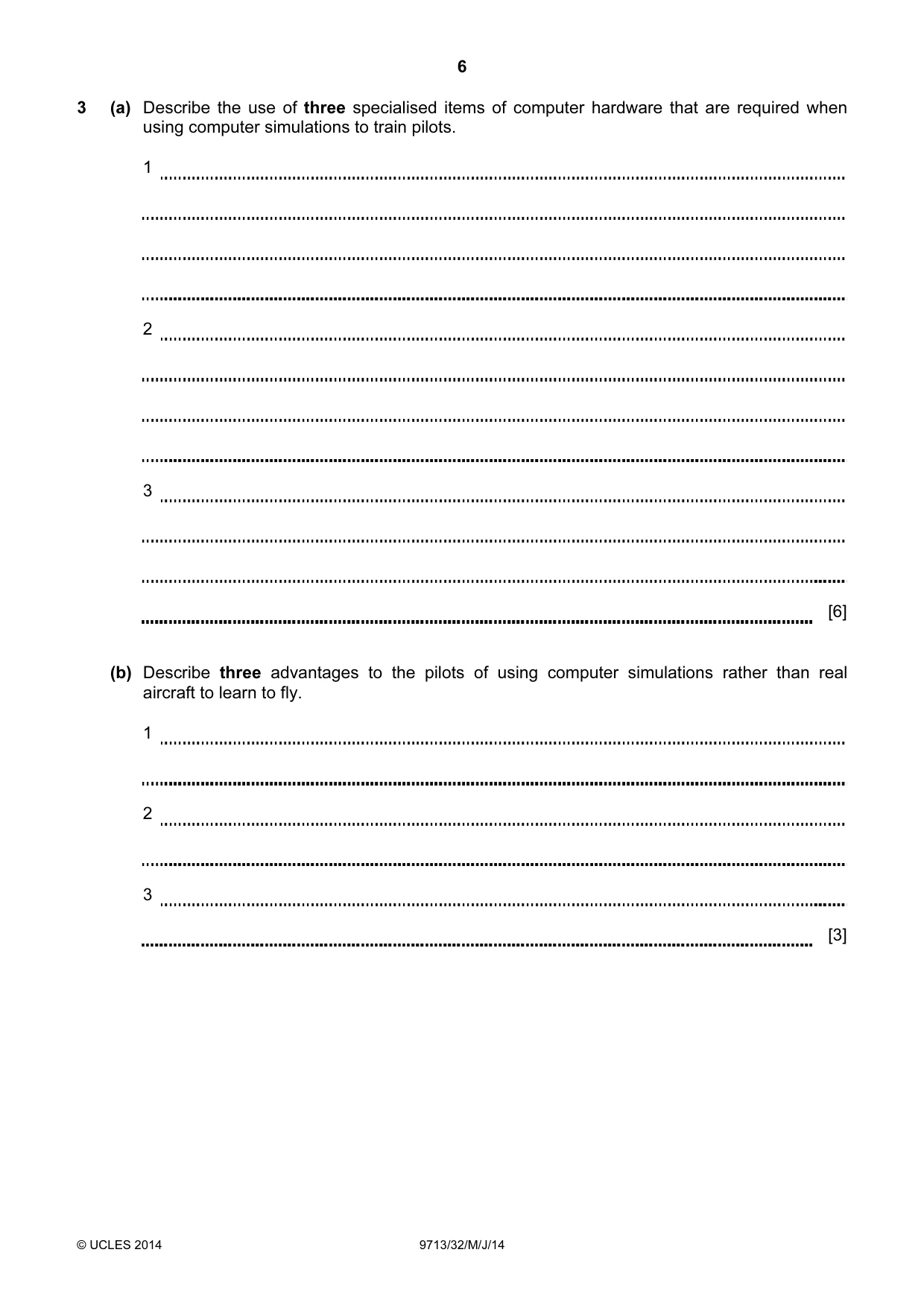
6 © UCLES 2014 9713/32/M/J/14 3 (a) Describe the use of three specialised items of computer hardware that are required when using computer simulations to train pilots. (b) Describe three advantages to the pilots of using computer simulations rather than real aircraft to learn to fly. 1 2 3 [6] 1 2 3 [3]
Question paper, page 7
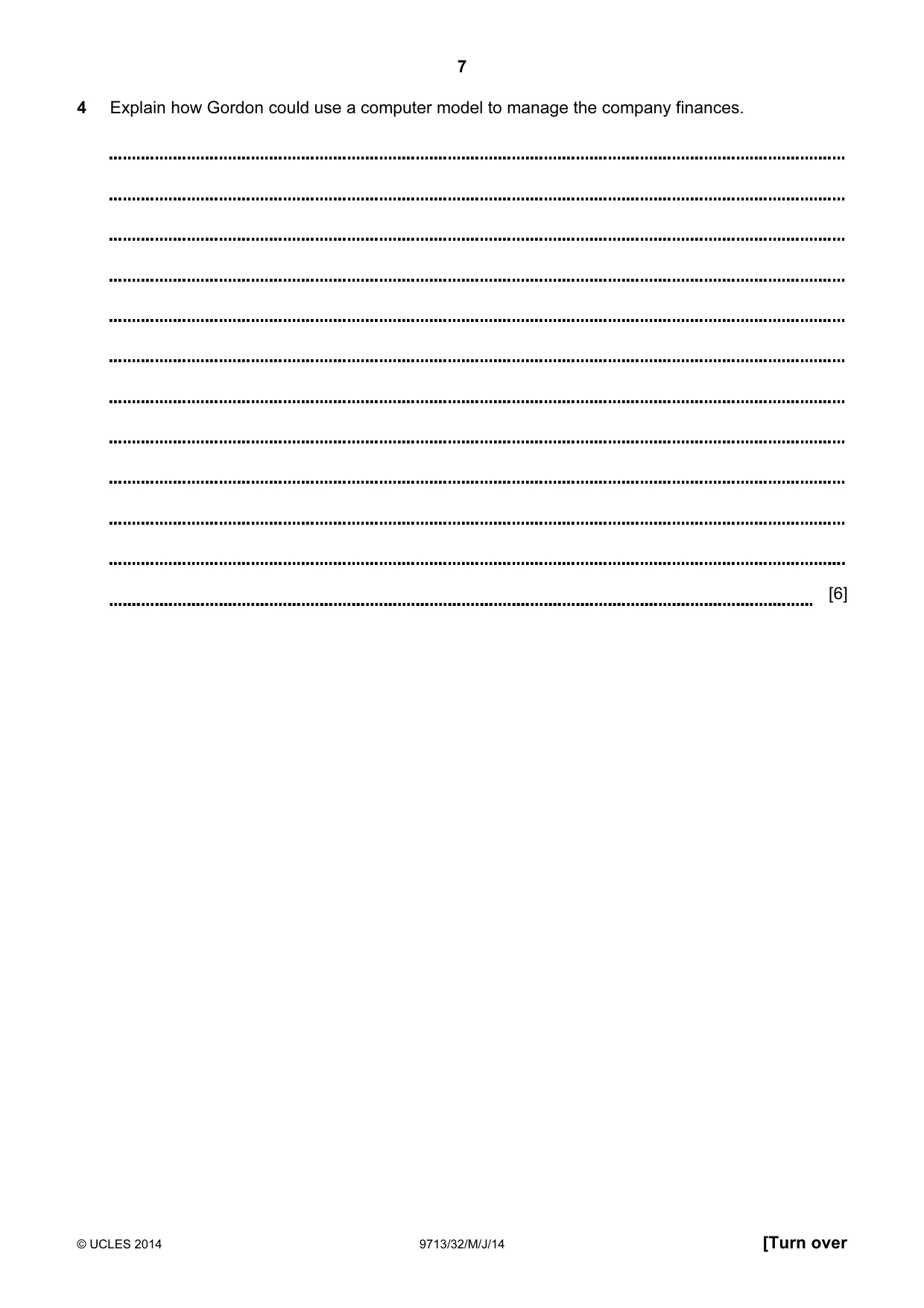
7 © UCLES 2014 9713/32/M/J/14 [Turn over 4 Explain how Gordon could use a computer model to manage the company finances. [6]
Question paper, page 8
8 © UCLES 2014 9713/32/M/J/14 Scenario 2 Questions 5 to 7 International Credit Enterprise is a bank with branches around the country. It holds customers’ personal accounts and their savings accounts. Customers can access their accounts either at a branch or by online banking via the bank’s website. The website can be used by disabled customers with suitably configured computers. The bank also offers financial advice for customers and uses an expert system to help customers with their financial planning.
Question paper, page 9
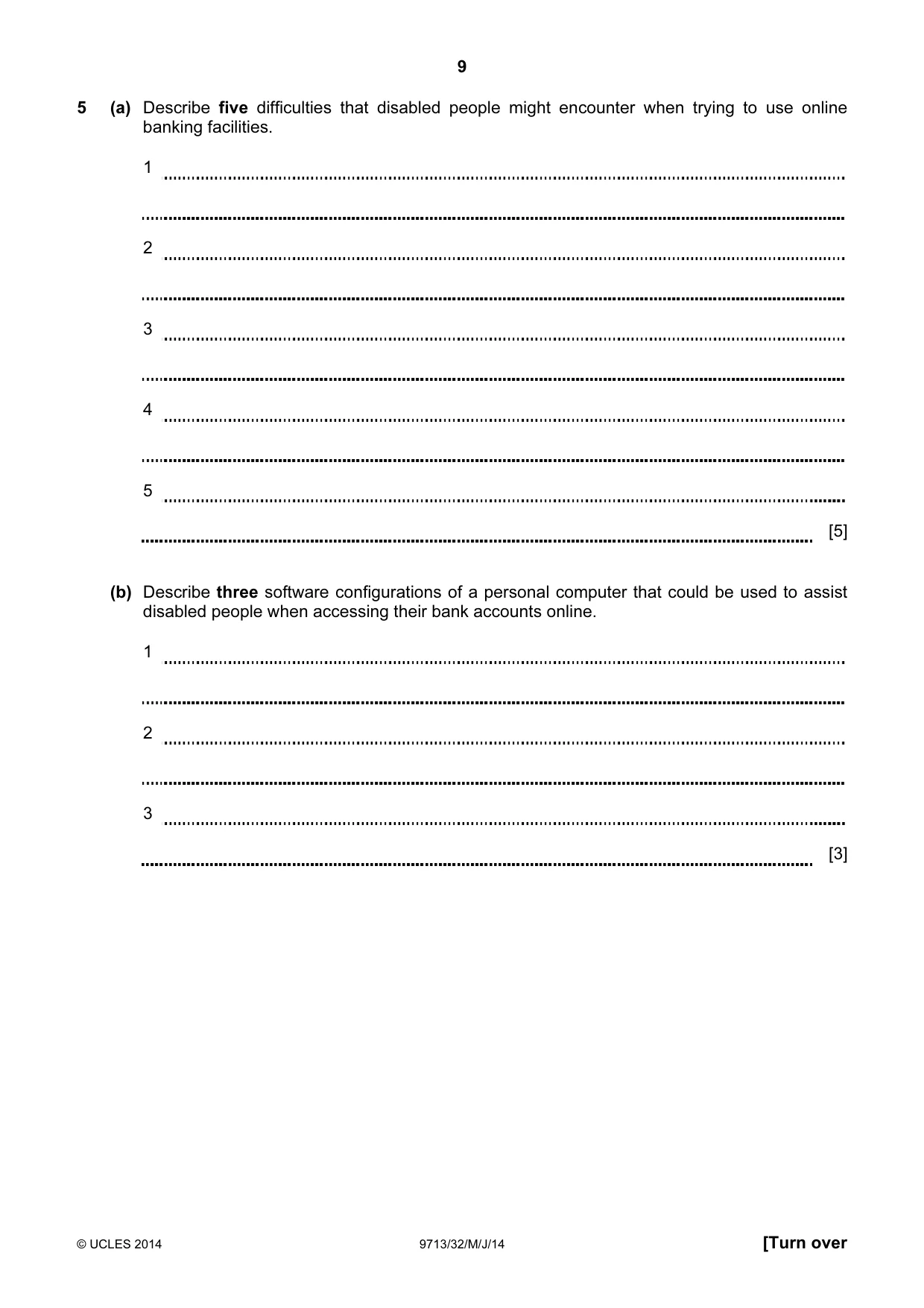
9 © UCLES 2014 9713/32/M/J/14 [Turn over 5 (a) Describe five difficulties that disabled people might encounter when trying to use online banking facilities. 1 2 3 4 5 [5] (b) Describe three software configurations of a personal computer that could be used to assist disabled people when accessing their bank accounts online. 1 2 3 [3]
Question paper, page 10
10 © UCLES 2014 9713/32/M/J/14 6 Explain how the bank’s computer system would check that the person accessing the account details has the authority to do so. [6]
Question paper, page 11
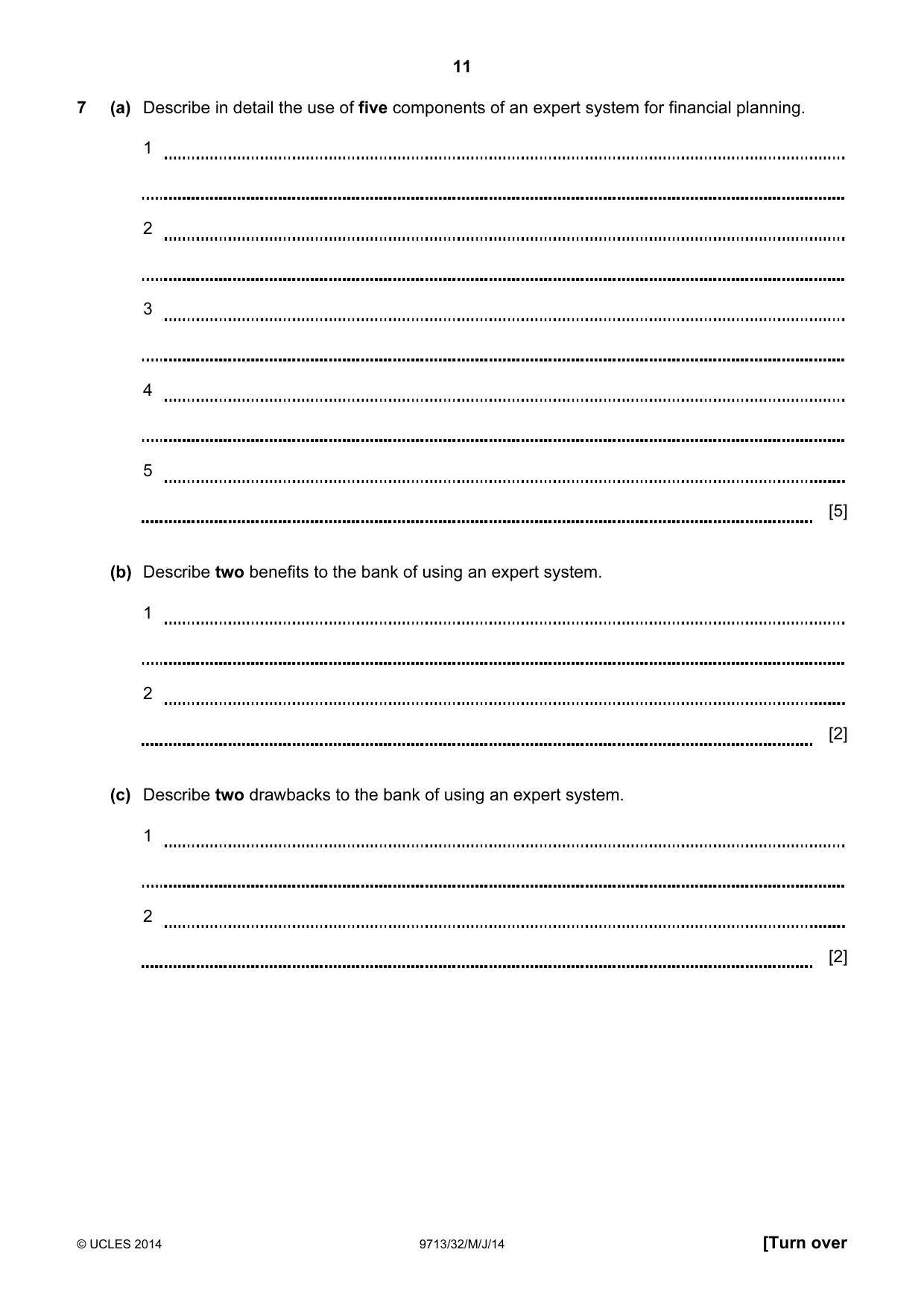
11 © UCLES 2014 9713/32/M/J/14 [Turn over 7 (a) Describe in detail the use of five components of an expert system for financial planning. 1 2 3 4 5 [5] (b) Describe two benefits to the bank of using an expert system. 1 2 [2] (c) Describe two drawbacks to the bank of using an expert system. 1 2 [2]
Question paper, page 12
12 © UCLES 2014 9713/32/M/J/14 Scenario 3 Questions 8 to 10 A school has a computer network that can be accessed by students from any computer in the school and remotely through the school website. The students use the computers to improve their learning. The teachers use ICT to assist in the assessment of the students’ work and to keep records of the students’ progress. The school uses a VPN to enable teachers to access the school network from home.
Question paper, page 13
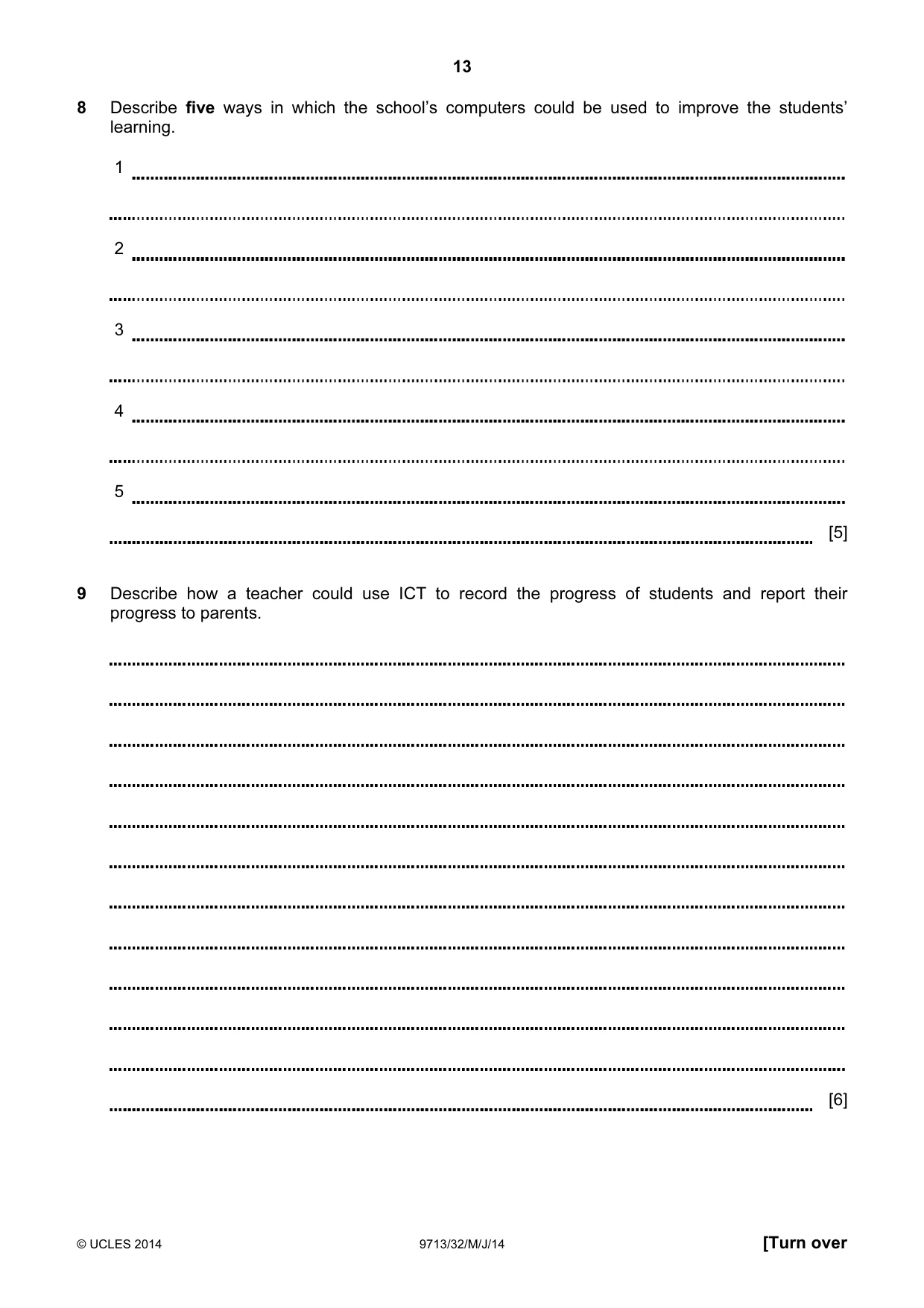
13 © UCLES 2014 9713/32/M/J/14 [Turn over 8 Describe five ways in which the school’s computers could be used to improve the students’ learning. 1 2 3 4 5 [5] 9 Describe how a teacher could use ICT to record the progress of students and report their progress to parents. [6]
Question paper, page 14
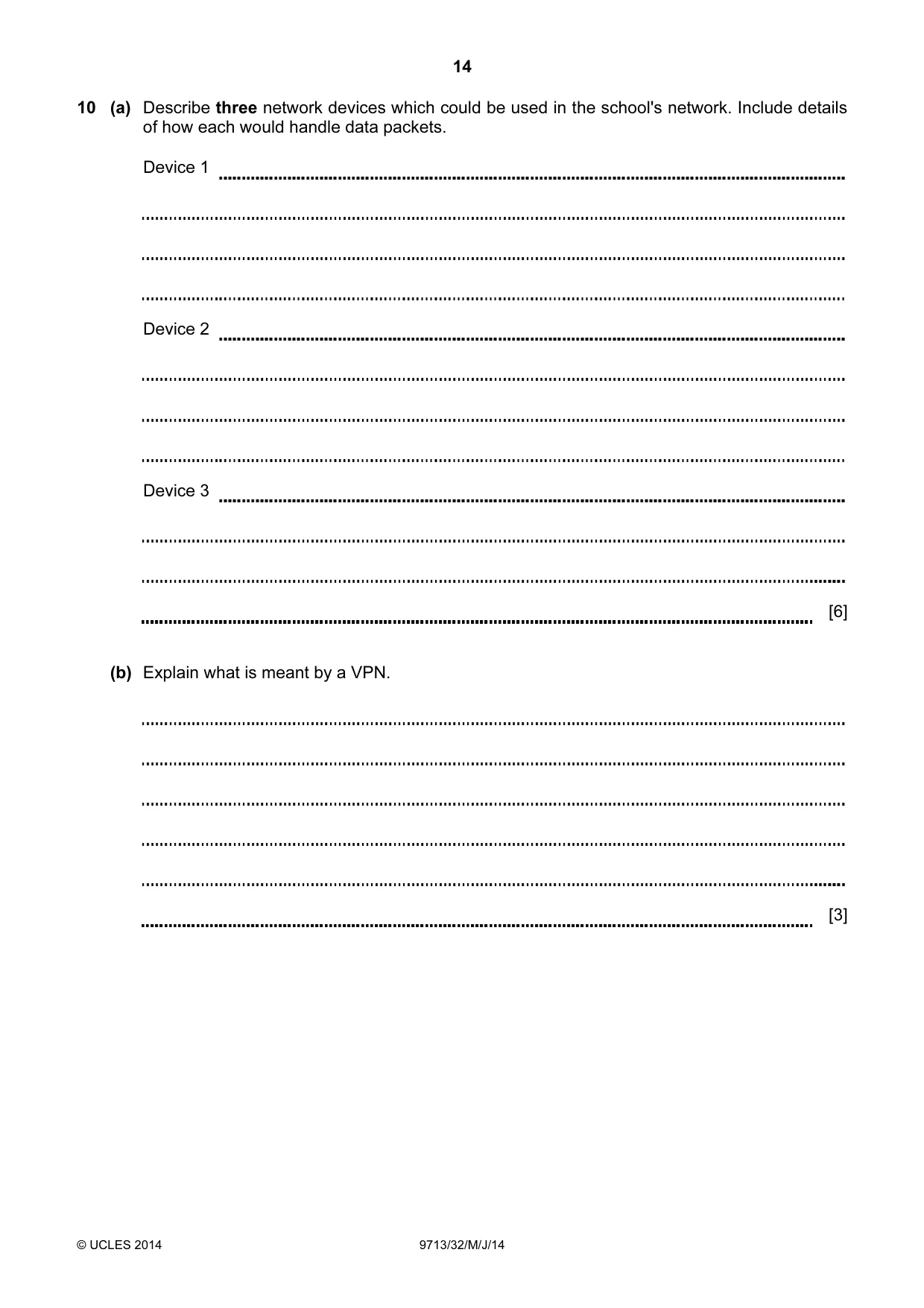
14 © UCLES 2014 9713/32/M/J/14 10 (a) Describe three network devices which could be used in the school's network. Include details of how each would handle data packets. Device 1 Device 2 Device 3 [6] (b) Explain what is meant by a VPN. [3]
Question paper, page 15
15 © UCLES 2014 9713/32/M/J/14 BLANK PAGE
Question paper, page 16
16 Permission to reproduce items where third-party owned material protected by copyright is included has been sought and cleared where possible. Every reasonable effort has been made by the publisher (UCLES) to trace copyright holders, but if any items requiring clearance have unwittingly been included, the publisher will be pleased to make amends at the earliest possible opportunity. Cambridge International Examinations is part of the Cambridge Assessment Group. Cambridge Assessment is the brand name of University of Cambridge Local Examinations Syndicate (UCLES), which is itself a department of the University of Cambridge. © UCLES 2014 9713/32/M/J/14 BLANK PAGE
Mark scheme, page 1
CAMBRIDGE INTERNATIONAL EXAMINATIONS GCE Advanced Level MARK SCHEME for the May/June 2014 series 9713 APPLIED INFORMATION AND COMMUNICATION TECHNOLOGY 9713/32 Paper 3 (Written B), maximum raw mark 80 This mark scheme is published as an aid to teachers and candidates, to indicate the requirements of the examination. It shows the basis on which Examiners were instructed to award marks. It does not indicate the details of the discussions that took place at an Examiners’ meeting before marking began, which would have considered the acceptability of alternative answers. Mark schemes should be read in conjunction with the question paper and the Principal Examiner Report for Teachers. Cambridge will not enter into discussions about these mark schemes. Cambridge is publishing the mark schemes for the May/June 2014 series for most IGCSE, GCE Advanced Level and Advanced Subsidiary Level components and some Ordinary Level components.
Mark scheme, page 2
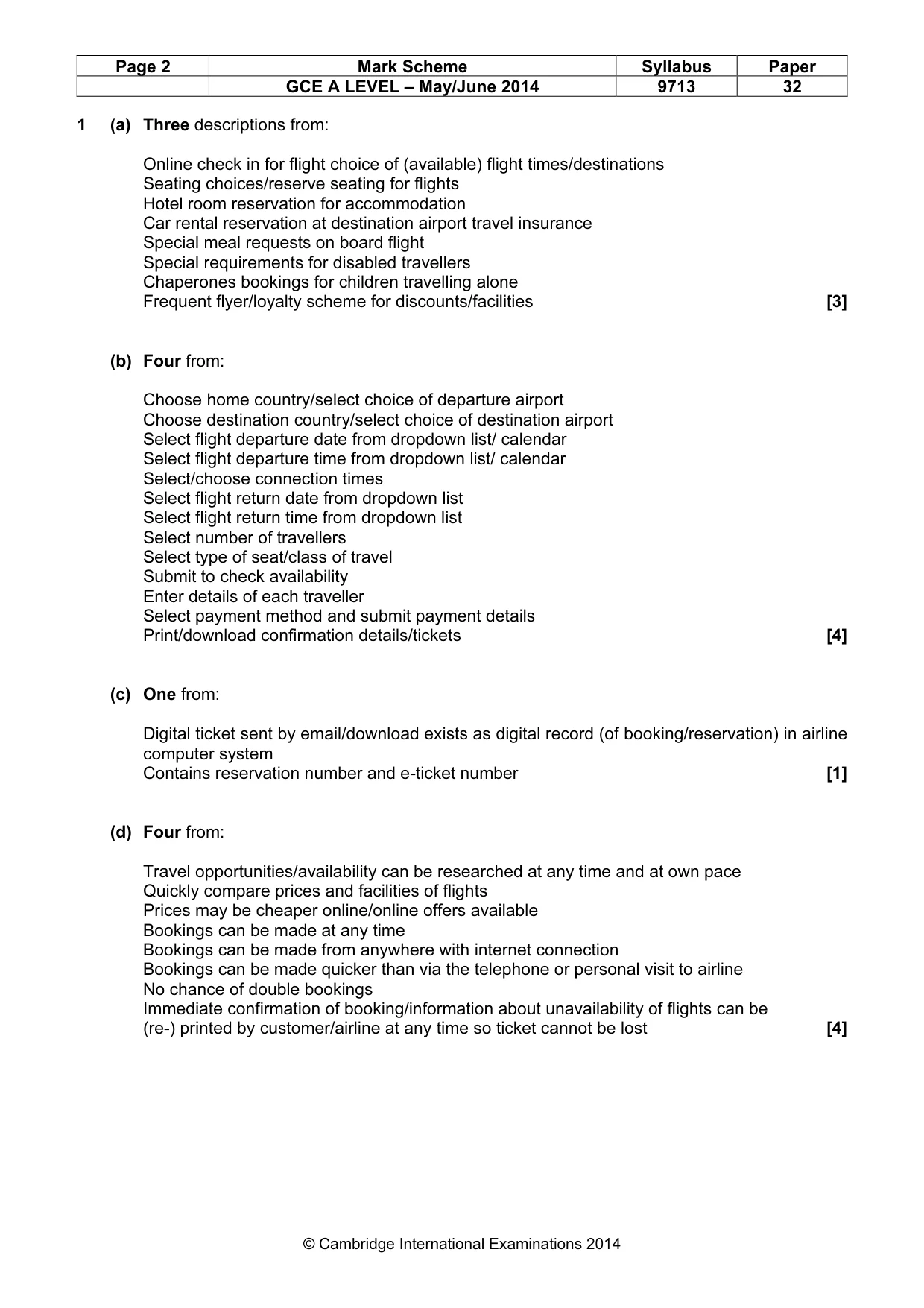
Page 2 Mark Scheme Syllabus Paper GCE A LEVEL – May/June 2014 9713 32 © Cambridge International Examinations 2014 1 (a) Three descriptions from: Online check in for flight choice of (available) flight times/destinations Seating choices/reserve seating for flights Hotel room reservation for accommodation Car rental reservation at destination airport travel insurance Special meal requests on board flight Special requirements for disabled travellers Chaperones bookings for children travelling alone Frequent flyer/loyalty scheme for discounts/facilities [3] (b) Four from: Choose home country/select choice of departure airport Choose destination country/select choice of destination airport Select flight departure date from dropdown list/ calendar Select flight departure time from dropdown list/ calendar Select/choose connection times Select flight return date from dropdown list Select flight return time from dropdown list Select number of travellers Select type of seat/class of travel Submit to check availability Enter details of each traveller Select payment method and submit payment details Print/download confirmation details/tickets [4] (c) One from: Digital ticket sent by email/download exists as digital record (of booking/reservation) in airline computer system Contains reservation number and e-ticket number [1] (d) Four from: Travel opportunities/availability can be researched at any time and at own pace Quickly compare prices and facilities of flights Prices may be cheaper online/online offers available Bookings can be made at any time Bookings can be made from anywhere with internet connection Bookings can be made quicker than via the telephone or personal visit to airline No chance of double bookings Immediate confirmation of booking/information about unavailability of flights can be (re-) printed by customer/airline at any time so ticket cannot be lost [4]
Mark scheme, page 3
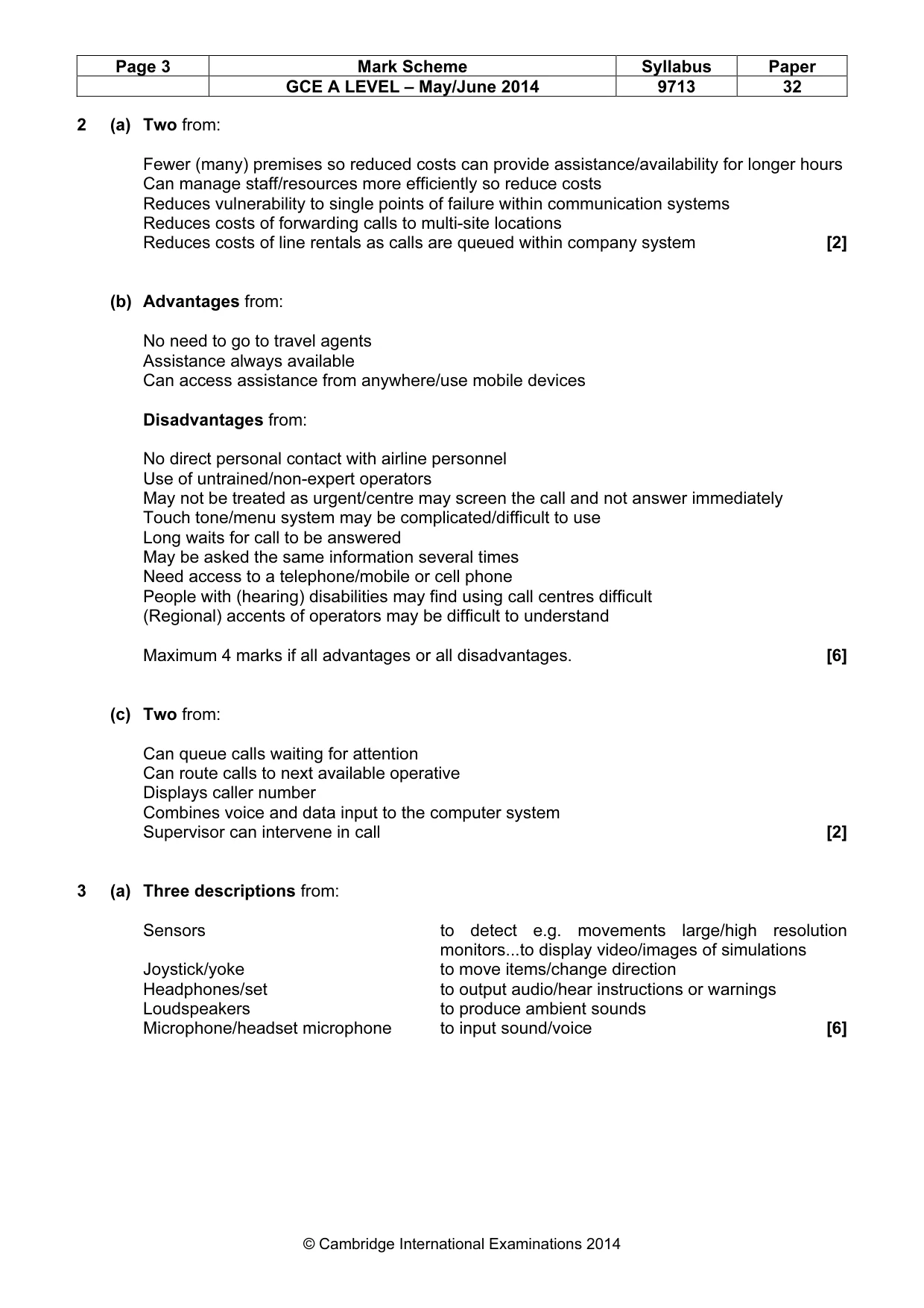
Page 3 Mark Scheme Syllabus Paper GCE A LEVEL – May/June 2014 9713 32 © Cambridge International Examinations 2014 2 (a) Two from: Fewer (many) premises so reduced costs can provide assistance/availability for longer hours Can manage staff/resources more efficiently so reduce costs Reduces vulnerability to single points of failure within communication systems Reduces costs of forwarding calls to multi-site locations Reduces costs of line rentals as calls are queued within company system [2] (b) Advantages from: No need to go to travel agents Assistance always available Can access assistance from anywhere/use mobile devices Disadvantages from: No direct personal contact with airline personnel Use of untrained/non-expert operators May not be treated as urgent/centre may screen the call and not answer immediately Touch tone/menu system may be complicated/difficult to use Long waits for call to be answered May be asked the same information several times Need access to a telephone/mobile or cell phone People with (hearing) disabilities may find using call centres difficult (Regional) accents of operators may be difficult to understand Maximum 4 marks if all advantages or all disadvantages. [6] (c) Two from: Can queue calls waiting for attention Can route calls to next available operative Displays caller number Combines voice and data input to the computer system Supervisor can intervene in call [2] 3 (a) Three descriptions from: Sensors to detect e.g. movements large/high resolution monitors...to display video/images of simulations Joystick/yoke to move items/change direction Headphones/set to output audio/hear instructions or warnings Loudspeakers to produce ambient sounds Microphone/headset microphone to input sound/voice [6]
Mark scheme, page 4
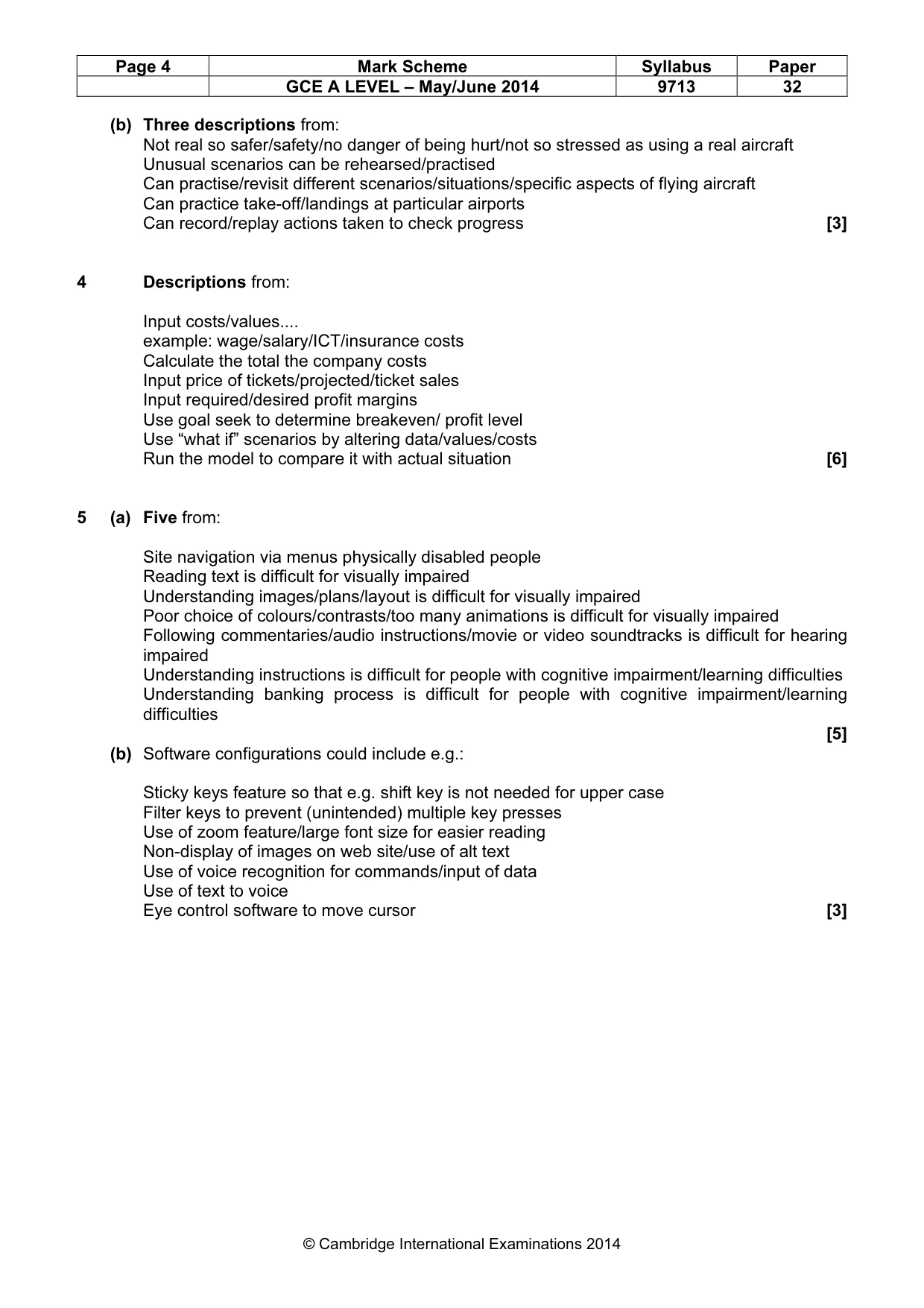
Page 4 Mark Scheme Syllabus Paper GCE A LEVEL – May/June 2014 9713 32 © Cambridge International Examinations 2014 (b) Three descriptions from: Not real so safer/safety/no danger of being hurt/not so stressed as using a real aircraft Unusual scenarios can be rehearsed/practised Can practise/revisit different scenarios/situations/specific aspects of flying aircraft Can practice take-off/landings at particular airports Can record/replay actions taken to check progress [3] 4 Descriptions from: Input costs/values… example: wage/salary/ICT/insurance costs Calculate the total the company costs Input price of tickets/projected/ticket sales Input required/desired profit margins Use goal seek to determine breakeven/ profit level Use “what if” scenarios by altering data/values/costs Run the model to compare it with actual situation [6] 5 (a) Five from: Site navigation via menus physically disabled people Reading text is difficult for visually impaired Understanding images/plans/layout is difficult for visually impaired Poor choice of colours/contrasts/too many animations is difficult for visually impaired Following commentaries/audio instructions/movie or video soundtracks is difficult for hearing impaired Understanding instructions is difficult for people with cognitive impairment/learning difficulties Understanding banking process is difficult for people with cognitive impairment/learning difficulties [5] (b) Software configurations could include e.g.: Sticky keys feature so that e.g. shift key is not needed for upper case Filter keys to prevent (unintended) multiple key presses Use of zoom feature/large font size for easier reading Non-display of images on web site/use of alt text Use of voice recognition for commands/input of data Use of text to voice Eye control software to move cursor [3]
Mark scheme, page 5
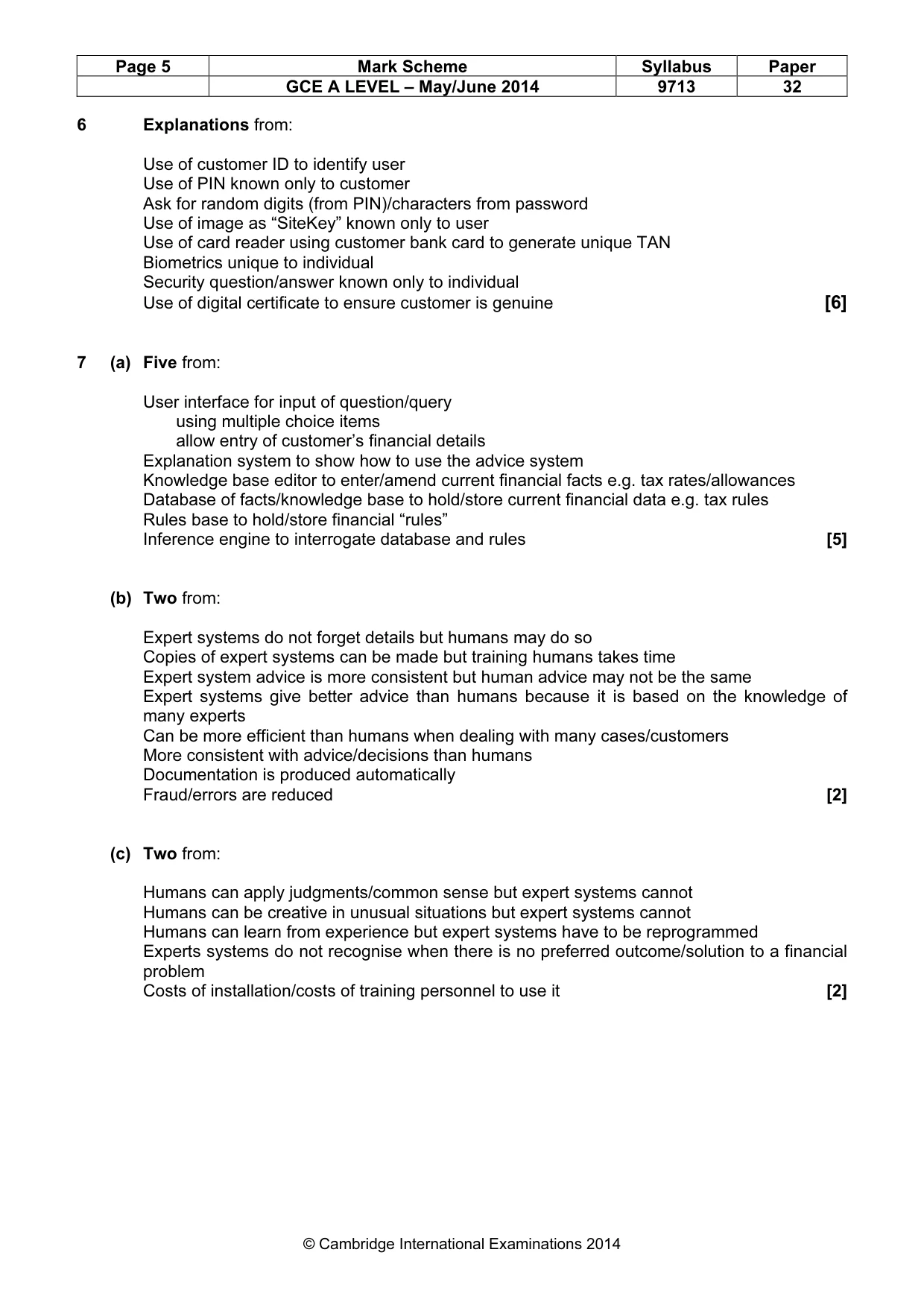
Page 5 Mark Scheme Syllabus Paper GCE A LEVEL – May/June 2014 9713 32 © Cambridge International Examinations 2014 6 Explanations from: Use of customer ID to identify user Use of PIN known only to customer Ask for random digits (from PIN)/characters from password Use of image as “SiteKey” known only to user Use of card reader using customer bank card to generate unique TAN Biometrics unique to individual Security question/answer known only to individual Use of digital certificate to ensure customer is genuine [6] 7 (a) Five from: User interface for input of question/query using multiple choice items allow entry of customer’s financial details Explanation system to show how to use the advice system Knowledge base editor to enter/amend current financial facts e.g. tax rates/allowances Database of facts/knowledge base to hold/store current financial data e.g. tax rules Rules base to hold/store financial “rules” Inference engine to interrogate database and rules [5] (b) Two from: Expert systems do not forget details but humans may do so Copies of expert systems can be made but training humans takes time Expert system advice is more consistent but human advice may not be the same Expert systems give better advice than humans because it is based on the knowledge of many experts Can be more efficient than humans when dealing with many cases/customers More consistent with advice/decisions than humans Documentation is produced automatically Fraud/errors are reduced [2] (c) Two from: Humans can apply judgments/common sense but expert systems cannot Humans can be creative in unusual situations but expert systems cannot Humans can learn from experience but expert systems have to be reprogrammed Experts systems do not recognise when there is no preferred outcome/solution to a financial problem Costs of installation/costs of training personnel to use it [2]
Mark scheme, page 6
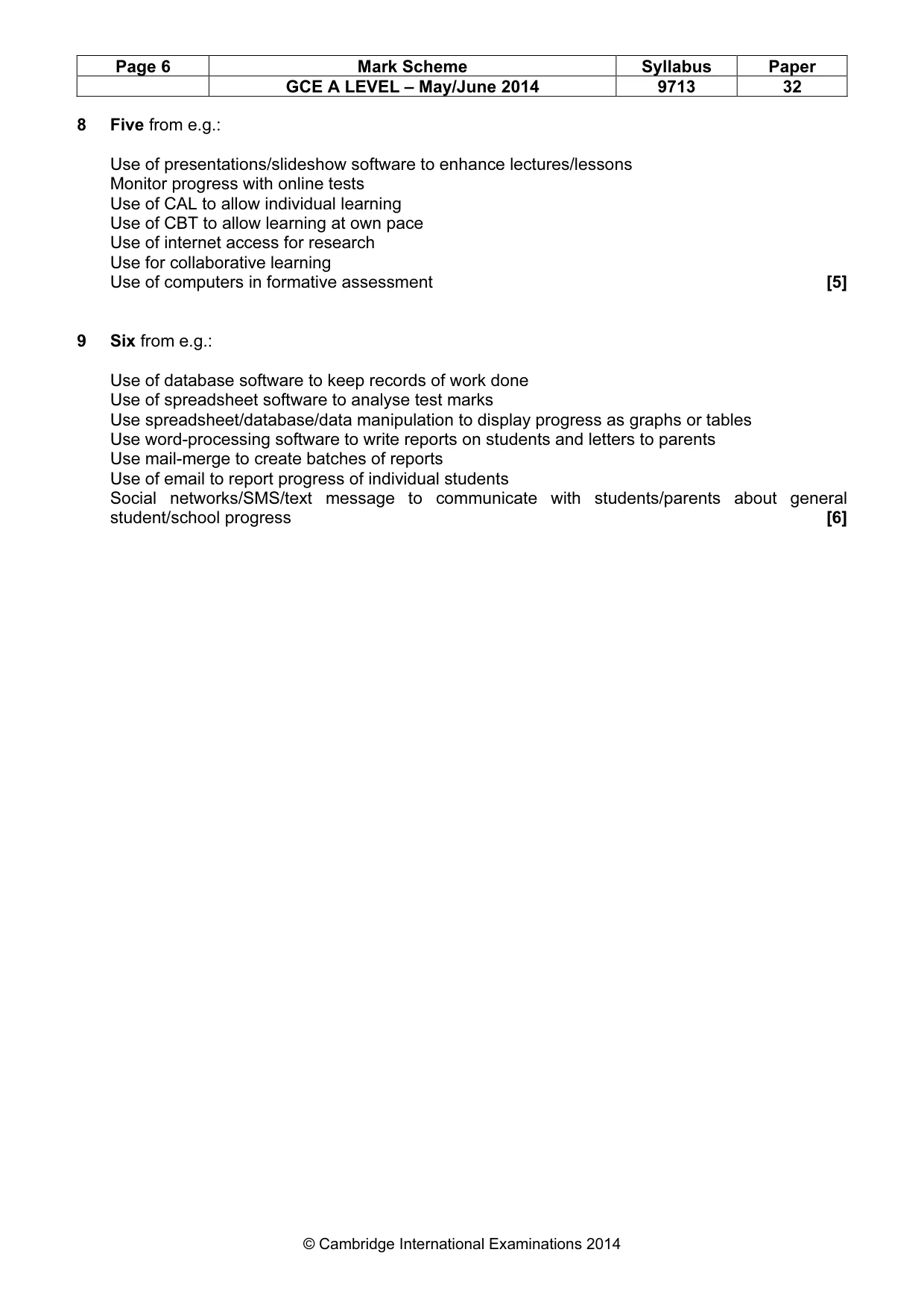
Page 6 Mark Scheme Syllabus Paper GCE A LEVEL – May/June 2014 9713 32 © Cambridge International Examinations 2014 8 Five from e.g.: Use of presentations/slideshow software to enhance lectures/lessons Monitor progress with online tests Use of CAL to allow individual learning Use of CBT to allow learning at own pace Use of internet access for research Use for collaborative learning Use of computers in formative assessment [5] 9 Six from e.g.: Use of database software to keep records of work done Use of spreadsheet software to analyse test marks Use spreadsheet/database/data manipulation to display progress as graphs or tables Use word-processing software to write reports on students and letters to parents Use mail-merge to create batches of reports Use of email to report progress of individual students Social networks/SMS/text message to communicate with students/parents about general student/school progress [6]
Mark scheme, page 7
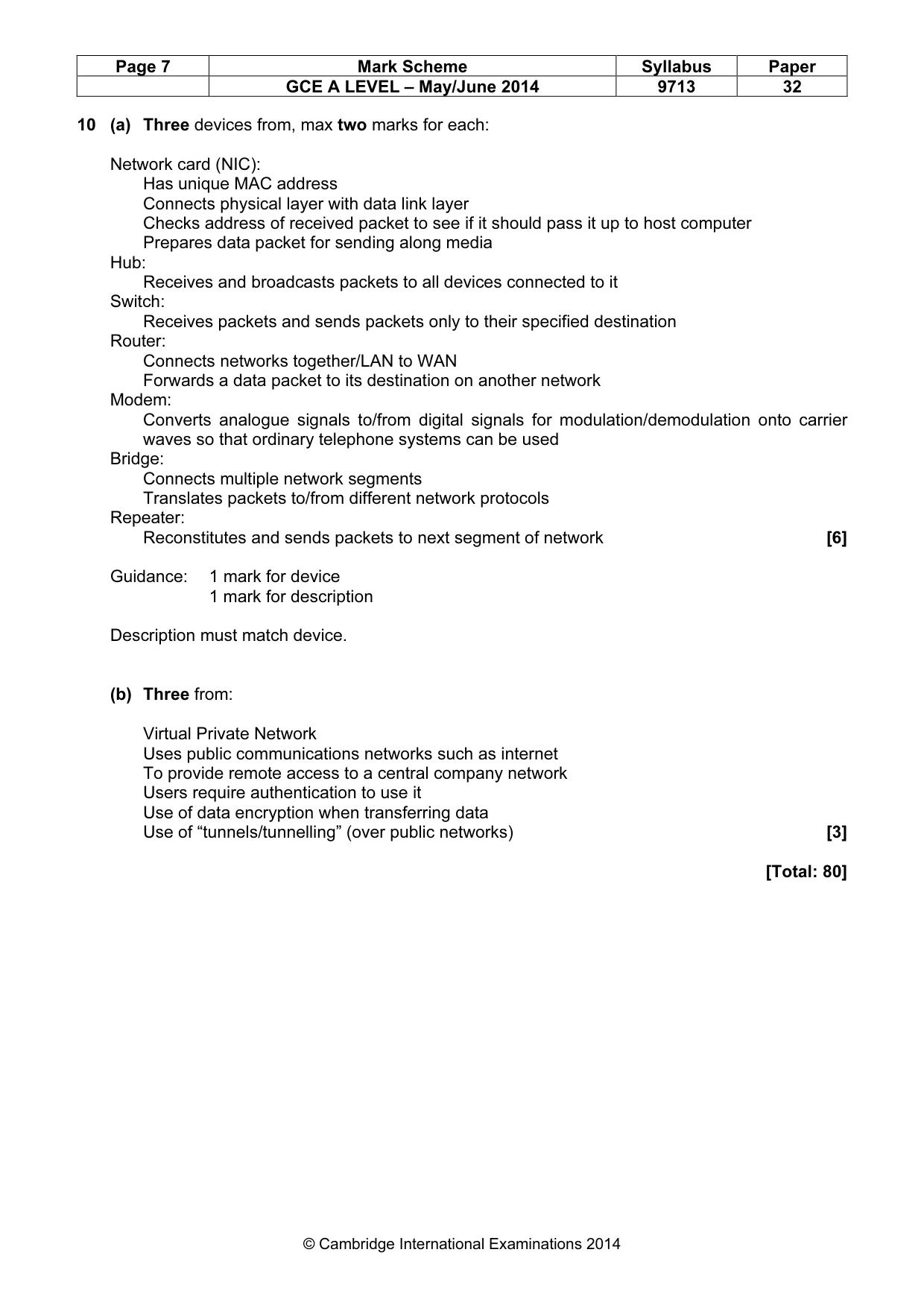
Page 7 Mark Scheme Syllabus Paper GCE A LEVEL – May/June 2014 9713 32 © Cambridge International Examinations 2014 10 (a) Three devices from, max two marks for each: Network card (NIC): Has unique MAC address Connects physical layer with data link layer Checks address of received packet to see if it should pass it up to host computer Prepares data packet for sending along media Hub: Receives and broadcasts packets to all devices connected to it Switch: Receives packets and sends packets only to their specified destination Router: Connects networks together/LAN to WAN Forwards a data packet to its destination on another network Modem: Converts analogue signals to/from digital signals for modulation/demodulation onto carrier waves so that ordinary telephone systems can be used Bridge: Connects multiple network segments Translates packets to/from different network protocols Repeater: Reconstitutes and sends packets to next segment of network [6] Guidance: 1 mark for device 1 mark for description Description must match device. (b) Three from: Virtual Private Network Uses public communications networks such as internet To provide remote access to a central company network Users require authentication to use it Use of data encryption when transferring data Use of “tunnels/tunnelling” (over public networks) [3] [Total: 80]
What you needed in this session
Cambridge’s own grade thresholds for 2014 May/June, Paper 3 · Variant 2. A higher threshold means an easier paper — the bar moves with how the cohort did.