Cambridge A Level Applied Information and Communication Technology 9713 — 2011 Oct/Nov Paper 3 · Variant 2
9713/32/O/N/11 · 80 marks · ≈90 min
The question paper and its mark scheme, free to read here and free to download. This is Cambridge’s own paper, exactly as it was sat.
Question paper24 pages

















Mark scheme7 pages
Answers below. Sit the paper first if you are practising.
Paper as text
Question paper, page 1
This document consists of 21 printed pages and 3 blank pages. IB11 11_9713_32/FP © UCLES 2011 [Turn over *7236655889* UNIVERSITY OF CAMBRIDGE INTERNATIONAL EXAMINATIONS General Certificate of Education Advanced Level APPLIED INFORMATION AND COMMUNICATION TECHNOLOGY 9713/32 Paper 3 October/November 2011 1 hour 15 minutes Candidates answer on the Question Paper. No additional materials are required. READ THESE INSTRUCTIONS FIRST Write your Centre number, candidate number and name on all the work you hand in. Write in dark blue or black pen. Do not use staples, paper clips, highlighters, glue or correction fluid. You may use a pencil for any diagrams, graphs or rough working. DO NOT WRITE IN ANY BARCODES. Answer all questions. The number of marks is given in brackets [ ] at the end of each question or part question. The businesses described in this paper are entirely fictitious.
Question paper, page 2
2 © UCLES 2011 9713/32/O/N/11 For Examiner's Use Scenario 1 Questions 1 and 2 Cambridge Zoo is expanding its activities to bring in more visitors. The Zoo Director has decided to introduce a website for visitors that enables several functions to be carried out. Tickets can be bought in advance to be used with a bar code reader linked to an automatic gate. In the visitor centre there is an expert system that can be used to identify animals. A new building will house animals who hunt in the daytime and at night. The director wants it to be open in time for the peak visitor season. The new animal house will have a computer controlled environment.
Question paper, page 3
3 © UCLES 2011 9713/32/O/N/11 [Turn over For Examiner's Use 1 (a) Explain the advantages to the zoo of allowing visitors to buy tickets in advance. [3] (b) A visitor uses a touch screen to access the expert system. Describe: (i) the format of the input screen, giving an example of a suitable question, [3]
Question paper, page 4
4 © UCLES 2011 9713/32/O/N/11 For Examiner's Use (ii) the output after the visitor has input all of the details. [3]
Question paper, page 5
5 © UCLES 2011 9713/32/O/N/11 [Turn over For Examiner's Use (c) Describe three security problems that the Zoo Director will have to consider when the website goes online. For each of these problems suggest a solution. [6]
Question paper, page 6
6 © UCLES 2011 9713/32/O/N/11 For Examiner's Use 2 (a) Describe features of Computer Aided Design (CAD) software that could be used in planning and creating a design for the new building. [5]
Question paper, page 7
7 © UCLES 2011 9713/32/O/N/11 [Turn over For Examiner's Use (b) Describe how project management software would be used in the production of the new building. [4]
Question paper, page 8
8 © UCLES 2011 9713/32/O/N/11 For Examiner's Use (c) Describe four sensors and how they would be used for monitoring conditions in the new building. [4]
Question paper, page 9
9 © UCLES 2011 9713/32/O/N/11 [Turn over For Examiner's Use Scenario 2 Question 3 The Midland Examining Group (MEG) is investigating the use of computer marked examinations.
Question paper, page 10
10 © UCLES 2011 9713/32/O/N/11 For Examiner's Use 3 (a) Describe how a student would give their answers to questions. [2]
Question paper, page 11
11 © UCLES 2011 9713/32/O/N/11 [Turn over For Examiner's Use (b) Discuss the advantages and disadvantages to the examination group of using this system. [7]
Question paper, page 12
12 © UCLES 2011 9713/32/O/N/11 For Examiner's Use Scenario 3 Question 4 The National Meteorological Service uses a supercomputer to produce weather forecasts.
Question paper, page 13
13 © UCLES 2011 9713/32/O/N/11 [Turn over For Examiner's Use 4 (a) Compare and contrast a PC (personal computer) and a supercomputer. [4]
Question paper, page 14
14 © UCLES 2011 9713/32/O/N/11 For Examiner's Use (b) Explain how supercomputers are used to produce weather forecasts. [5]
Question paper, page 15
15 © UCLES 2011 9713/32/O/N/11 [Turn over For Examiner's Use Scenario 4 Questions 5 and 6 Goshawk Airways provides flights throughout the Middle East. They use flight simulators to train their pilots. Goshawk Airways offers online booking through their website which is held, together with customer details, on a server.
Question paper, page 16
16 © UCLES 2011 9713/32/O/N/11 For Examiner's Use 5 (a) Describe how four output devices of the simulator are used to simulate the actual flying experience. [4] (b) Explain why Goshawk Airways uses a flight simulator rather than using real aircraft to train pilots. [4]
Question paper, page 17
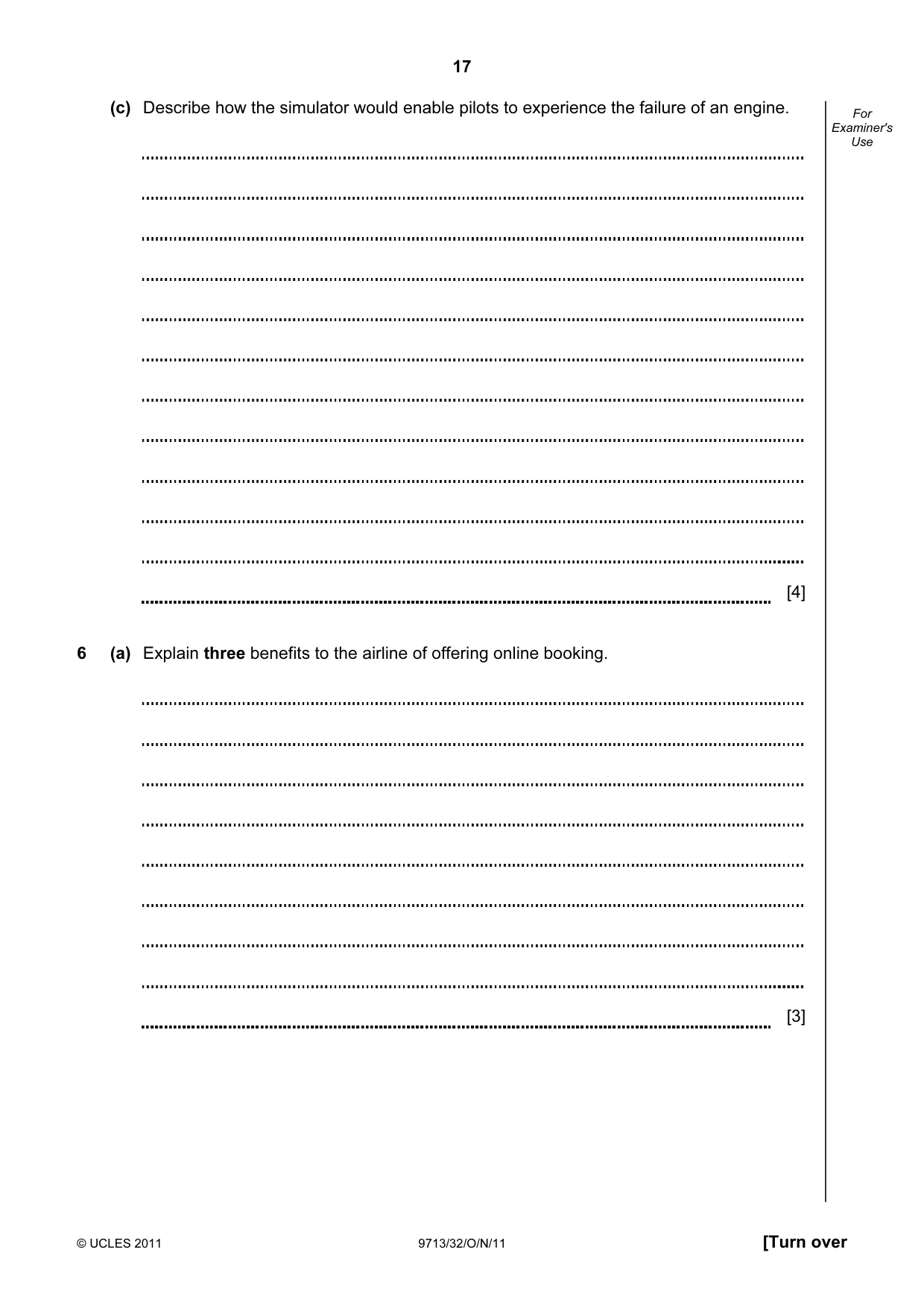
17 © UCLES 2011 9713/32/O/N/11 [Turn over For Examiner's Use (c) Describe how the simulator would enable pilots to experience the failure of an engine. [4] 6 (a) Explain three benefits to the airline of offering online booking. [3]
Question paper, page 18
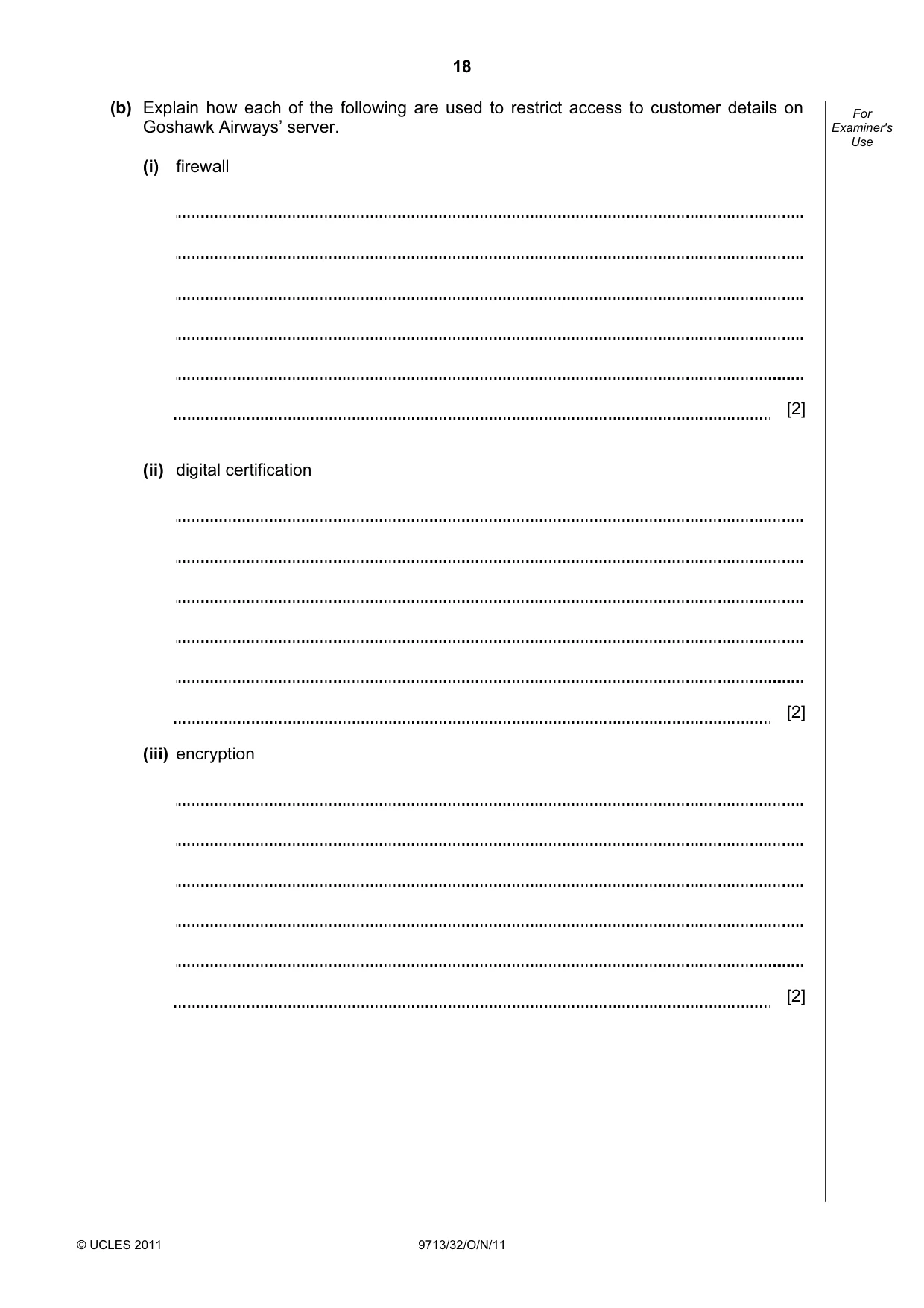
18 © UCLES 2011 9713/32/O/N/11 For Examiner's Use (b) Explain how each of the following are used to restrict access to customer details on Goshawk Airways’ server. (i) firewall [2] (ii) digital certification [2] (iii) encryption [2]
Question paper, page 19
19 © UCLES 2011 9713/32/O/N/11 [Turn over For Examiner's Use (c) Explain the different functions of a file server and a typical PC. [5]
Question paper, page 20
20 © UCLES 2011 9713/32/O/N/11 For Examiner's Use Scenario 5 Question 7 Bangalore Audio Company (BAC) distributes electronic goods to the south of India. It uses ICT systems to assist with all aspects of the business. Just in time (JIT) is used to order goods from suppliers and despatch goods to customers. Damaged goods are sold on auction pages which are part of the BAC website.
Question paper, page 21
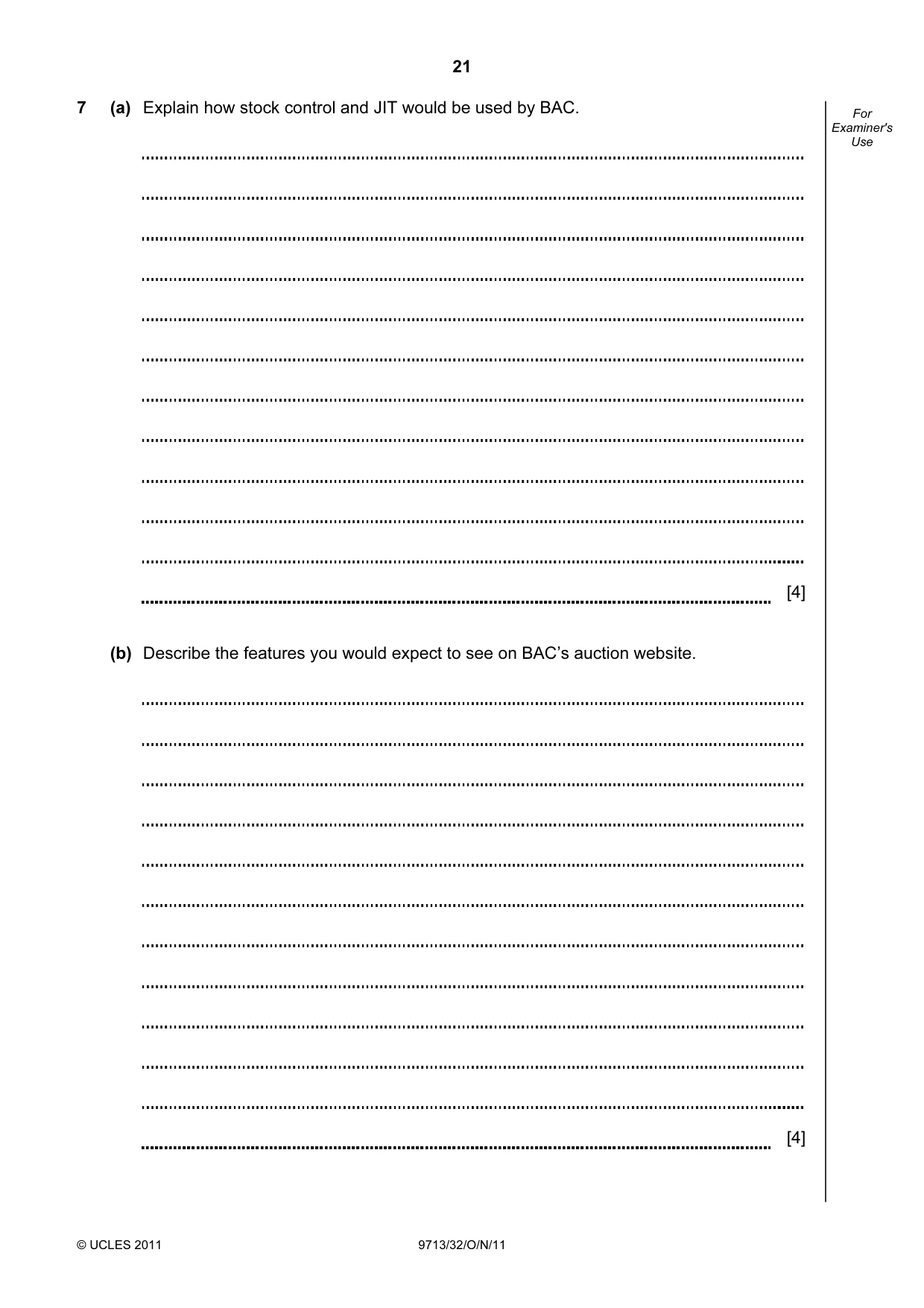
21 © UCLES 2011 9713/32/O/N/11 For Examiner's Use 7 (a) Explain how stock control and JIT would be used by BAC. [4] (b) Describe the features you would expect to see on BAC’s auction website. [4]
Question paper, page 22
22 © UCLES 2011 9713/32/O/N/11 BLANK PAGE
Question paper, page 23
23 © UCLES 2011 9713/32/O/N/11 BLANK PAGE
Question paper, page 24
24 Permission to reproduce items where third-party owned material protected by copyright is included has been sought and cleared where possible. Every reasonable effort has been made by the publisher (UCLES) to trace copyright holders, but if any items requiring clearance have unwittingly been included, the publisher will be pleased to make amends at the earliest possible opportunity. University of Cambridge International Examinations is part of the Cambridge Assessment Group. Cambridge Assessment is the brand name of University of Cambridge Local Examinations Syndicate (UCLES), which is itself a department of the University of Cambridge. © UCLES 2011 9713/32/O/N/11 BLANK PAGE
Mark scheme, page 1
UNIVERSITY OF CAMBRIDGE INTERNATIONAL EXAMINATIONS GCE Advanced Subsidiary Level and GCE Advanced Level MARK SCHEME for the October/November 2011 question paper for the guidance of teachers 9713 APPLIED ICT 9713/32 Paper 3 (Written B), maximum raw mark 80 This mark scheme is published as an aid to teachers and candidates, to indicate the requirements of the examination. It shows the basis on which Examiners were instructed to award marks. It does not indicate the details of the discussions that took place at an Examiners’ meeting before marking began, which would have considered the acceptability of alternative answers. Mark schemes must be read in conjunction with the question papers and the report on the examination. • Cambridge will not enter into discussions or correspondence in connection with these mark schemes. Cambridge is publishing the mark schemes for the October/November 2011 question papers for most IGCSE, GCE Advanced Level and Advanced Subsidiary Level syllabuses and some Ordinary Level syllabuses.
Mark scheme, page 2
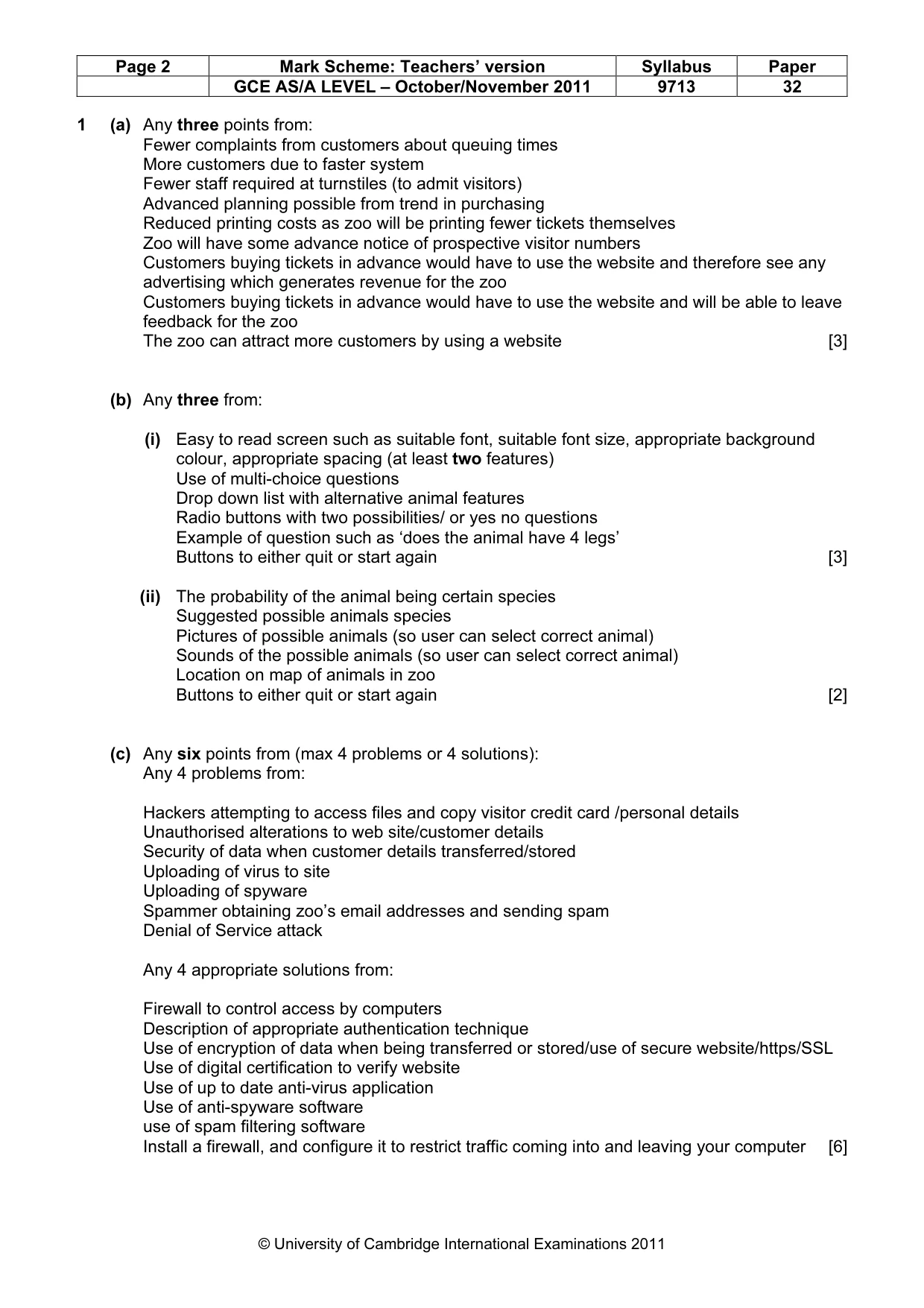
Page 2 Mark Scheme: Teachers’ version Syllabus Paper GCE AS/A LEVEL – October/November 2011 9713 32 © University of Cambridge International Examinations 2011 1 (a) Any three points from: Fewer complaints from customers about queuing times More customers due to faster system Fewer staff required at turnstiles (to admit visitors) Advanced planning possible from trend in purchasing Reduced printing costs as zoo will be printing fewer tickets themselves Zoo will have some advance notice of prospective visitor numbers Customers buying tickets in advance would have to use the website and therefore see any advertising which generates revenue for the zoo Customers buying tickets in advance would have to use the website and will be able to leave feedback for the zoo The zoo can attract more customers by using a website [3] (b) Any three from: (i) Easy to read screen such as suitable font, suitable font size, appropriate background colour, appropriate spacing (at least two features) Use of multi-choice questions Drop down list with alternative animal features Radio buttons with two possibilities/ or yes no questions Example of question such as ‘does the animal have 4 legs’ Buttons to either quit or start again [3] (ii) The probability of the animal being certain species Suggested possible animals species Pictures of possible animals (so user can select correct animal) Sounds of the possible animals (so user can select correct animal) Location on map of animals in zoo Buttons to either quit or start again [2] (c) Any six points from (max 4 problems or 4 solutions): Any 4 problems from: Hackers attempting to access files and copy visitor credit card /personal details Unauthorised alterations to web site/customer details Security of data when customer details transferred/stored Uploading of virus to site Uploading of spyware Spammer obtaining zoo’s email addresses and sending spam Denial of Service attack Any 4 appropriate solutions from: Firewall to control access by computers Description of appropriate authentication technique Use of encryption of data when being transferred or stored/use of secure website/https/SSL Use of digital certification to verify website Use of up to date anti-virus application Use of anti-spyware software use of spam filtering software Install a firewall, and configure it to restrict traffic coming into and leaving your computer [6]
Mark scheme, page 3
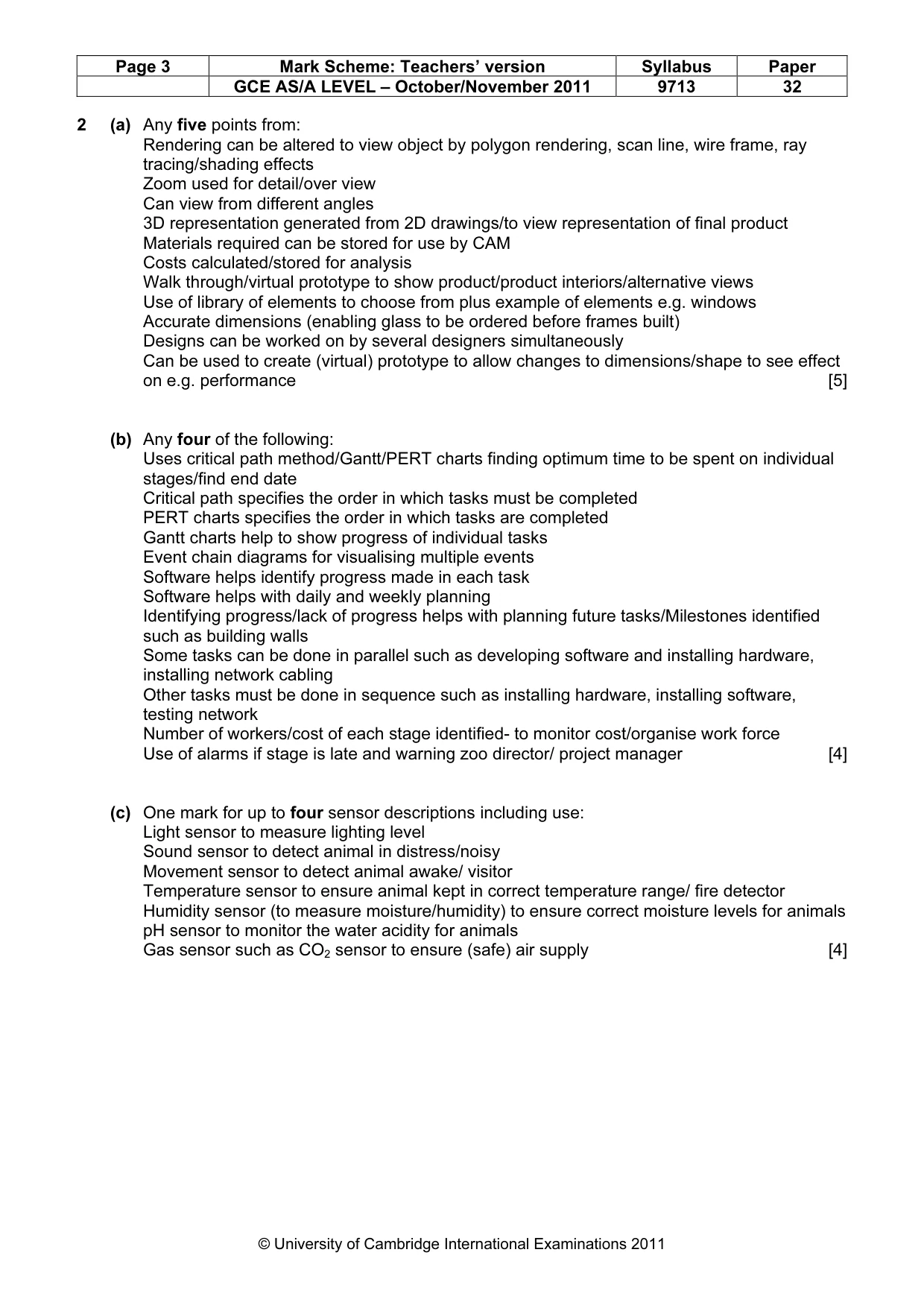
Page 3 Mark Scheme: Teachers’ version Syllabus Paper GCE AS/A LEVEL – October/November 2011 9713 32 © University of Cambridge International Examinations 2011 2 (a) Any five points from: Rendering can be altered to view object by polygon rendering, scan line, wire frame, ray tracing/shading effects Zoom used for detail/over view Can view from different angles 3D representation generated from 2D drawings/to view representation of final product Materials required can be stored for use by CAM Costs calculated/stored for analysis Walk through/virtual prototype to show product/product interiors/alternative views Use of library of elements to choose from plus example of elements e.g. windows Accurate dimensions (enabling glass to be ordered before frames built) Designs can be worked on by several designers simultaneously Can be used to create (virtual) prototype to allow changes to dimensions/shape to see effect on e.g. performance [5] (b) Any four of the following: Uses critical path method/Gantt/PERT charts finding optimum time to be spent on individual stages/find end date Critical path specifies the order in which tasks must be completed PERT charts specifies the order in which tasks are completed Gantt charts help to show progress of individual tasks Event chain diagrams for visualising multiple events Software helps identify progress made in each task Software helps with daily and weekly planning Identifying progress/lack of progress helps with planning future tasks/Milestones identified such as building walls Some tasks can be done in parallel such as developing software and installing hardware, installing network cabling Other tasks must be done in sequence such as installing hardware, installing software, testing network Number of workers/cost of each stage identified- to monitor cost/organise work force Use of alarms if stage is late and warning zoo director/ project manager [4] (c) One mark for up to four sensor descriptions including use: Light sensor to measure lighting level Sound sensor to detect animal in distress/noisy Movement sensor to detect animal awake/ visitor Temperature sensor to ensure animal kept in correct temperature range/ fire detector Humidity sensor (to measure moisture/humidity) to ensure correct moisture levels for animals pH sensor to monitor the water acidity for animals Gas sensor such as CO2 sensor to ensure (safe) air supply [4]
Mark scheme, page 4
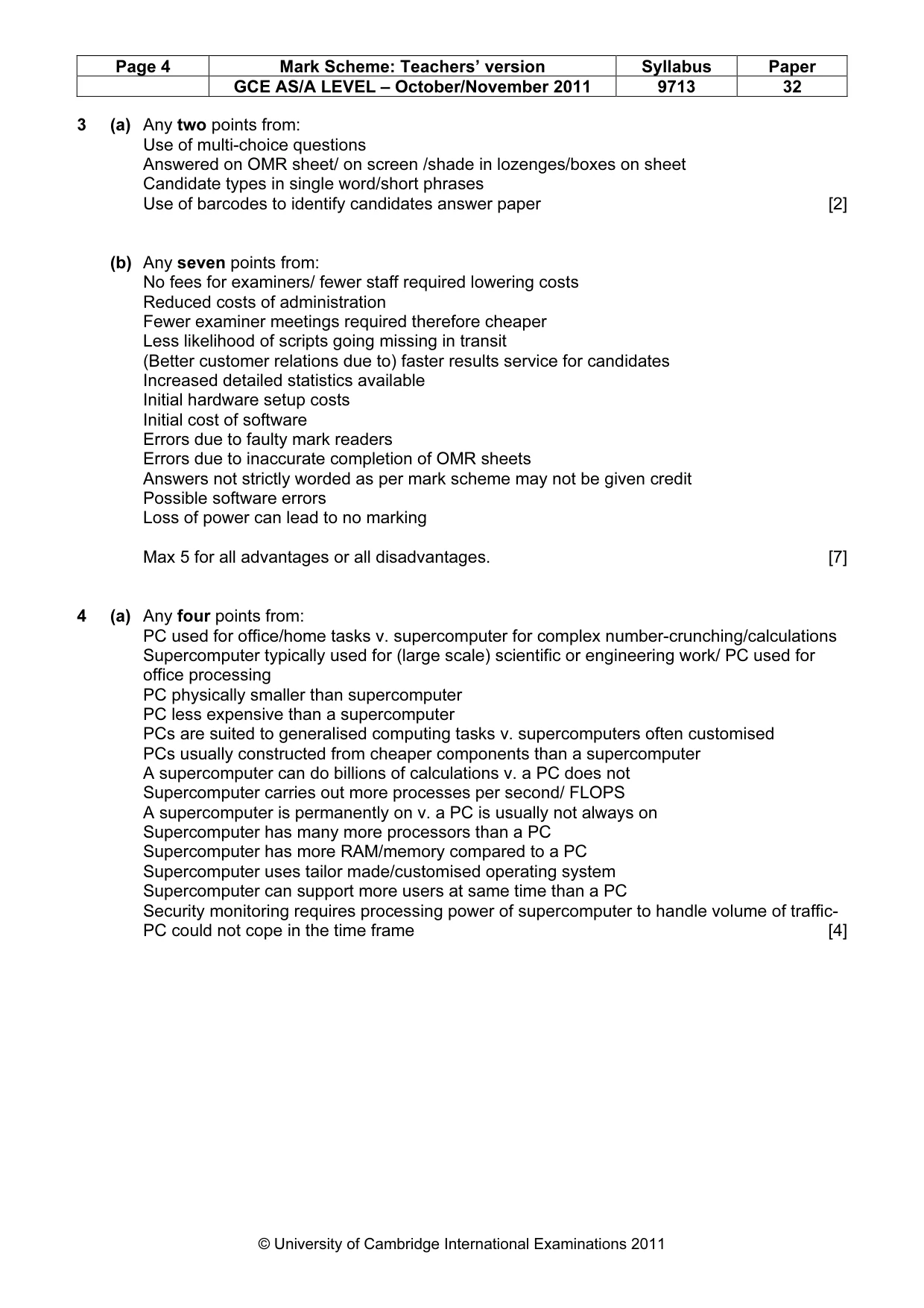
Page 4 Mark Scheme: Teachers’ version Syllabus Paper GCE AS/A LEVEL – October/November 2011 9713 32 © University of Cambridge International Examinations 2011 3 (a) Any two points from: Use of multi-choice questions Answered on OMR sheet/ on screen /shade in lozenges/boxes on sheet Candidate types in single word/short phrases Use of barcodes to identify candidates answer paper [2] (b) Any seven points from: No fees for examiners/ fewer staff required lowering costs Reduced costs of administration Fewer examiner meetings required therefore cheaper Less likelihood of scripts going missing in transit (Better customer relations due to) faster results service for candidates Increased detailed statistics available Initial hardware setup costs Initial cost of software Errors due to faulty mark readers Errors due to inaccurate completion of OMR sheets Answers not strictly worded as per mark scheme may not be given credit Possible software errors Loss of power can lead to no marking Max 5 for all advantages or all disadvantages. [7] 4 (a) Any four points from: PC used for office/home tasks v. supercomputer for complex number-crunching/calculations Supercomputer typically used for (large scale) scientific or engineering work/ PC used for office processing PC physically smaller than supercomputer PC less expensive than a supercomputer PCs are suited to generalised computing tasks v. supercomputers often customised PCs usually constructed from cheaper components than a supercomputer A supercomputer can do billions of calculations v. a PC does not Supercomputer carries out more processes per second/ FLOPS A supercomputer is permanently on v. a PC is usually not always on Supercomputer has many more processors than a PC Supercomputer has more RAM/memory compared to a PC Supercomputer uses tailor made/customised operating system Supercomputer can support more users at same time than a PC Security monitoring requires processing power of supercomputer to handle volume of traffic- PC could not cope in the time frame [4]
Mark scheme, page 5
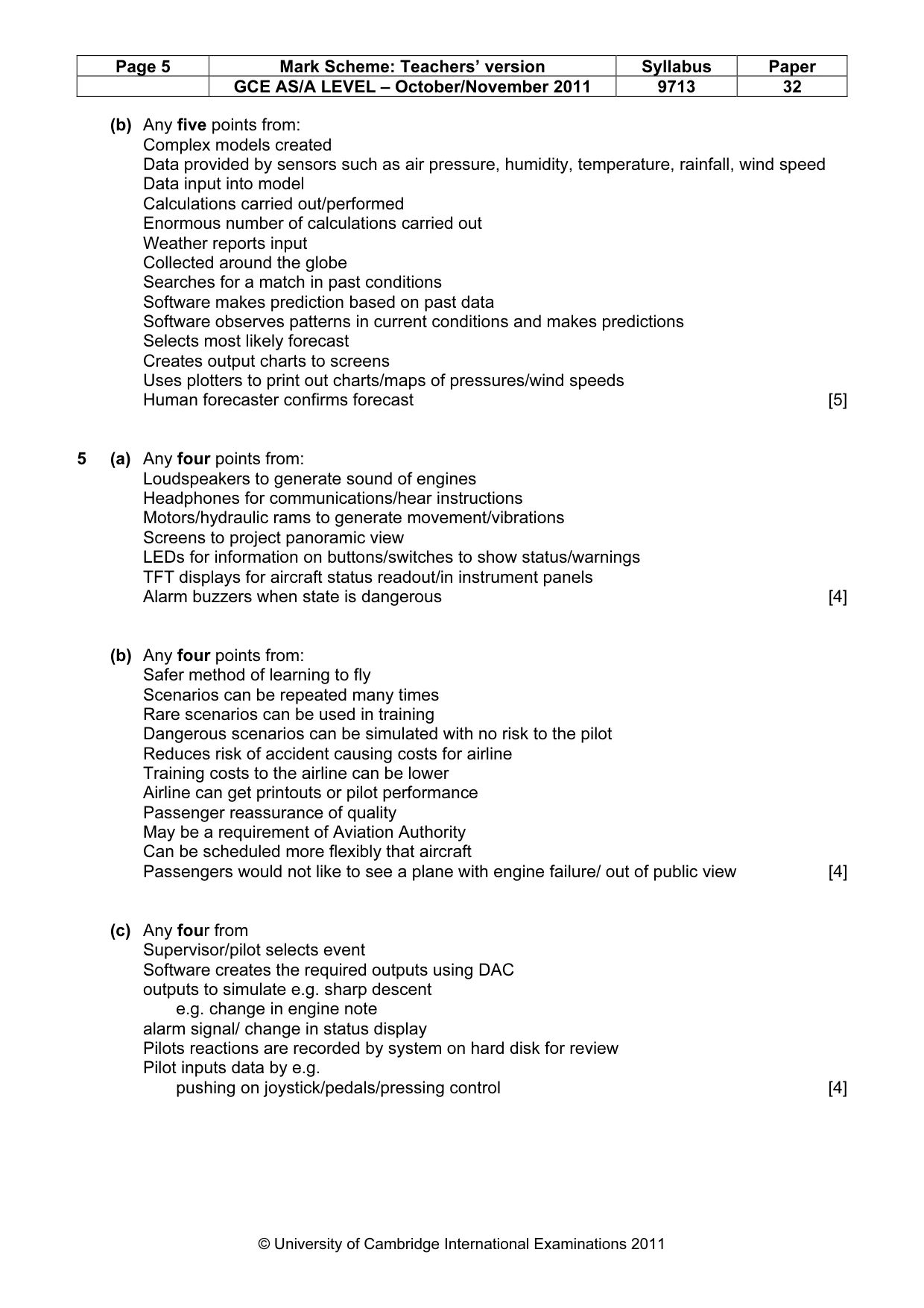
Page 5 Mark Scheme: Teachers’ version Syllabus Paper GCE AS/A LEVEL – October/November 2011 9713 32 © University of Cambridge International Examinations 2011 (b) Any five points from: Complex models created Data provided by sensors such as air pressure, humidity, temperature, rainfall, wind speed Data input into model Calculations carried out/performed Enormous number of calculations carried out Weather reports input Collected around the globe Searches for a match in past conditions Software makes prediction based on past data Software observes patterns in current conditions and makes predictions Selects most likely forecast Creates output charts to screens Uses plotters to print out charts/maps of pressures/wind speeds Human forecaster confirms forecast [5] 5 (a) Any four points from: Loudspeakers to generate sound of engines Headphones for communications/hear instructions Motors/hydraulic rams to generate movement/vibrations Screens to project panoramic view LEDs for information on buttons/switches to show status/warnings TFT displays for aircraft status readout/in instrument panels Alarm buzzers when state is dangerous [4] (b) Any four points from: Safer method of learning to fly Scenarios can be repeated many times Rare scenarios can be used in training Dangerous scenarios can be simulated with no risk to the pilot Reduces risk of accident causing costs for airline Training costs to the airline can be lower Airline can get printouts or pilot performance Passenger reassurance of quality May be a requirement of Aviation Authority Can be scheduled more flexibly that aircraft Passengers would not like to see a plane with engine failure/ out of public view [4] (c) Any four from Supervisor/pilot selects event Software creates the required outputs using DAC outputs to simulate e.g. sharp descent e.g. change in engine note alarm signal/ change in status display Pilots reactions are recorded by system on hard disk for review Pilot inputs data by e.g. pushing on joystick/pedals/pressing control [4]
Mark scheme, page 6
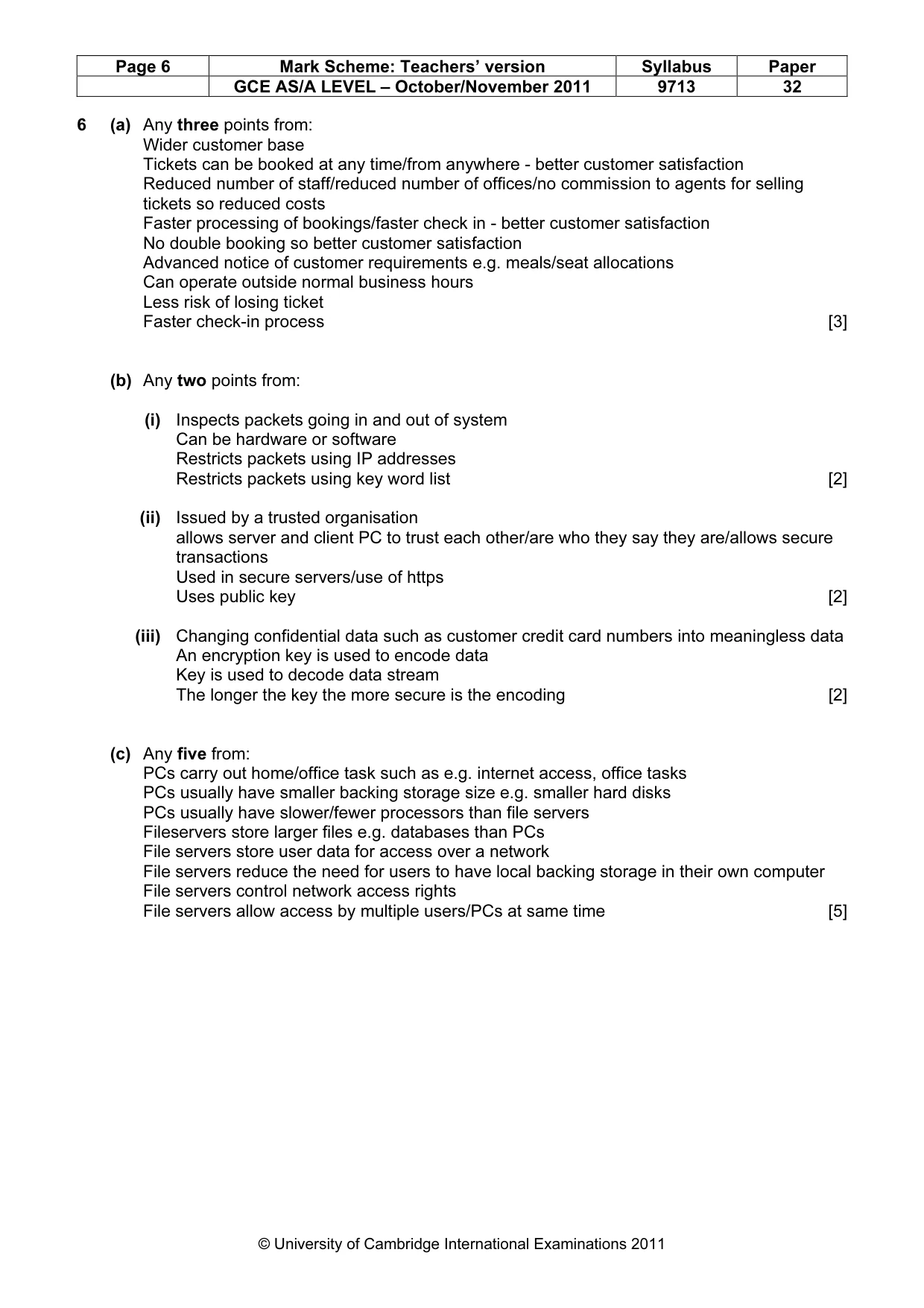
Page 6 Mark Scheme: Teachers’ version Syllabus Paper GCE AS/A LEVEL – October/November 2011 9713 32 © University of Cambridge International Examinations 2011 6 (a) Any three points from: Wider customer base Tickets can be booked at any time/from anywhere - better customer satisfaction Reduced number of staff/reduced number of offices/no commission to agents for selling tickets so reduced costs Faster processing of bookings/faster check in - better customer satisfaction No double booking so better customer satisfaction Advanced notice of customer requirements e.g. meals/seat allocations Can operate outside normal business hours Less risk of losing ticket Faster check-in process [3] (b) Any two points from: (i) Inspects packets going in and out of system Can be hardware or software Restricts packets using IP addresses Restricts packets using key word list [2] (ii) Issued by a trusted organisation allows server and client PC to trust each other/are who they say they are/allows secure transactions Used in secure servers/use of https Uses public key [2] (iii) Changing confidential data such as customer credit card numbers into meaningless data An encryption key is used to encode data Key is used to decode data stream The longer the key the more secure is the encoding [2] (c) Any five from: PCs carry out home/office task such as e.g. internet access, office tasks PCs usually have smaller backing storage size e.g. smaller hard disks PCs usually have slower/fewer processors than file servers Fileservers store larger files e.g. databases than PCs File servers store user data for access over a network File servers reduce the need for users to have local backing storage in their own computer File servers control network access rights File servers allow access by multiple users/PCs at same time [5]
Mark scheme, page 7
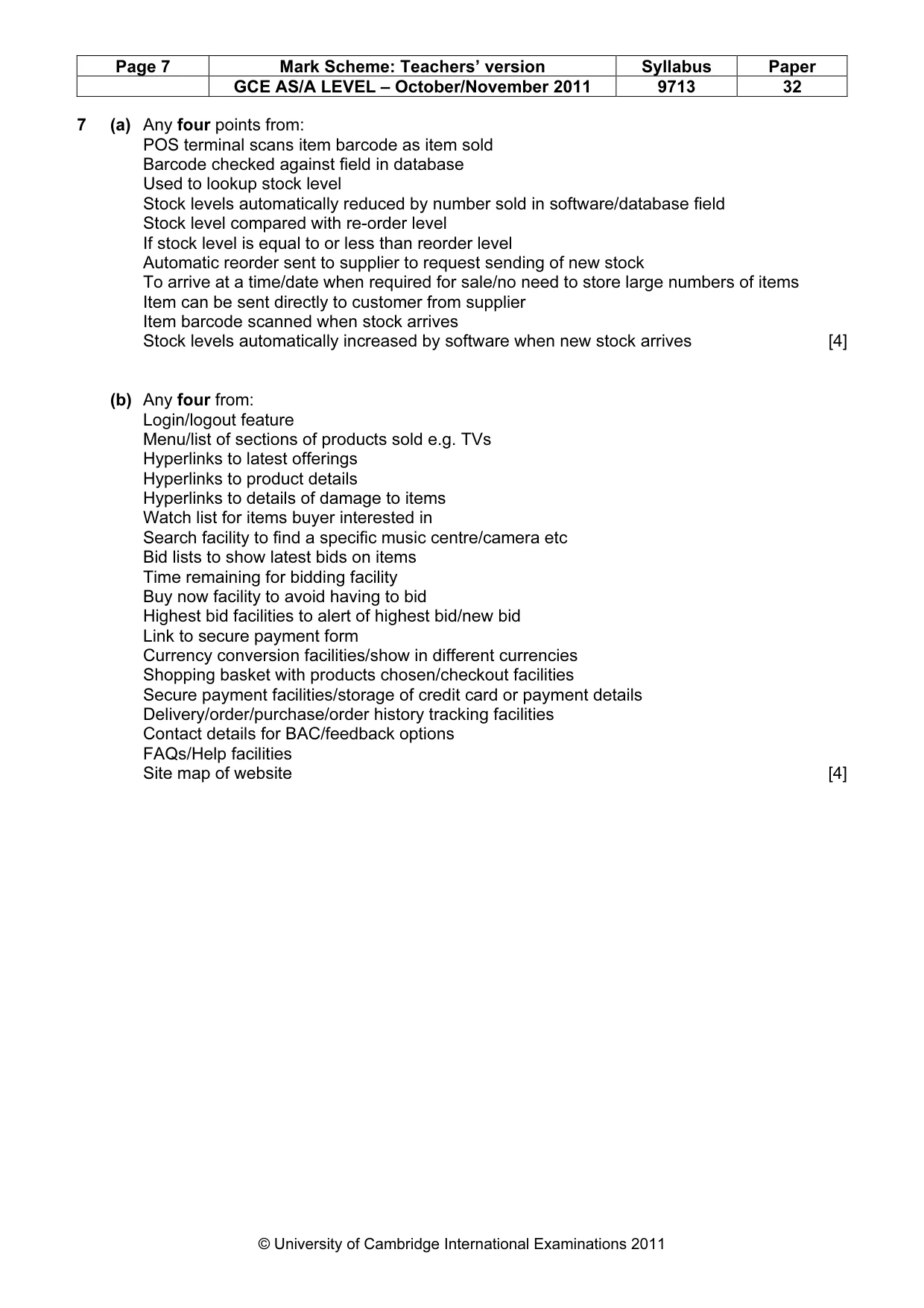
Page 7 Mark Scheme: Teachers’ version Syllabus Paper GCE AS/A LEVEL – October/November 2011 9713 32 © University of Cambridge International Examinations 2011 7 (a) Any four points from: POS terminal scans item barcode as item sold Barcode checked against field in database Used to lookup stock level Stock levels automatically reduced by number sold in software/database field Stock level compared with re-order level If stock level is equal to or less than reorder level Automatic reorder sent to supplier to request sending of new stock To arrive at a time/date when required for sale/no need to store large numbers of items Item can be sent directly to customer from supplier Item barcode scanned when stock arrives Stock levels automatically increased by software when new stock arrives [4] (b) Any four from: Login/logout feature Menu/list of sections of products sold e.g. TVs Hyperlinks to latest offerings Hyperlinks to product details Hyperlinks to details of damage to items Watch list for items buyer interested in Search facility to find a specific music centre/camera etc Bid lists to show latest bids on items Time remaining for bidding facility Buy now facility to avoid having to bid Highest bid facilities to alert of highest bid/new bid Link to secure payment form Currency conversion facilities/show in different currencies Shopping basket with products chosen/checkout facilities Secure payment facilities/storage of credit card or payment details Delivery/order/purchase/order history tracking facilities Contact details for BAC/feedback options FAQs/Help facilities Site map of website [4]
What you needed in this session
Cambridge’s own grade thresholds for 2011 Oct/Nov, Paper 3 · Variant 2. A higher threshold means an easier paper — the bar moves with how the cohort did.