Cambridge A Level Applied Information and Communication Technology 9713 — 2010 May/June Paper 3 · Variant 3
9713/33/M/J/10 · 80 marks · ≈90 min
The question paper and its mark scheme, free to read here and free to download. This is Cambridge’s own paper, exactly as it was sat.
Question paper20 pages


Mark scheme8 pages
Answers below. Sit the paper first if you are practising.
Paper as text
Question paper, page 1
This document consists of 20 printed pages. IB10 06_9713_33/RP © UCLES 2010 [Turn over *2600594890* UNIVERSITY OF CAMBRIDGE INTERNATIONAL EXAMINATIONS General Certificate of Education Advanced Level APPLIED INFORMATION AND COMMUNICATION TECHNOLOGY 9713/33 Paper 3 May/June 2010 1 hour 15 minutes Candidates answer on the Question Paper. No additional materials are required READ THESE INSTRUCTIONS FIRST Write your Centre number, candidate number and name on all the work you hand in. Write in dark blue or black pen. Do not use staples, paper clips, highlighters, glue or correction fluid. You may use a pencil for any diagrams, graphs or rough working. DO NOT WRITE IN ANY BARCODES. Answer all questions. The number of marks is given in brackets [ ] at the end of each question or part question. The businesses described in this paper are entirely fictitious.
Question paper, page 2
2 © UCLES 2010 9713/33/M/J/10 For Examiner's Use Scenario 1 Questions 1 to 3 A large international airport is required to introduce a number of security measures and has introduced new customer information services. All passengers will need to have an electronic passport. The airport will use additional identification in the form of electronic fingerprinting at various points in the airport. Tickets for all flights are now electronic (e-tickets). There are computer-based information kiosks throughout the airport. Passengers can now print out their own boarding passes and obtain flight information from any one of these kiosks.
Question paper, page 3
3 © UCLES 2010 9713/33/M/J/10 [Turn over For Examiner's Use 1 (a) State three items of information that would be stored on the passport. 1 2 3 [3] (b) Describe the electronic components in the passport. [2] (c) Describe three advantages of electronic passports when compared to paper-based passports. [3]
Question paper, page 4
4 © UCLES 2010 9713/33/M/J/10 For Examiner's Use (d) Explain how the use of electronic fingerprinting improves airport security. [4]
Question paper, page 5
5 © UCLES 2010 9713/33/M/J/10 [Turn over For Examiner's Use 2 (a) Describe how the system will match an e-ticket to a passenger when they check in at the airport. [3] (b) Describe the advantages of e-tickets when compared to paper-based tickets. [3]
Question paper, page 6
6 © UCLES 2010 9713/33/M/J/10 For Examiner's Use 3 (a) Explain the advantages to the passengers of having computer-controlled information kiosks rather than manned desks. [3]
Question paper, page 7
7 © UCLES 2010 9713/33/M/J/10 [Turn over For Examiner's Use (b) Discuss the security risks to the system arising from the introduction of electronic information kiosks. [6]
Question paper, page 8
8 © UCLES 2010 9713/33/M/J/10 For Examiner's Use Scenario 2 Questions 4 to 6 The Niagara Drug Company is a large pharmaceutical company which develops, manufactures and markets new drugs. They are developing an expert system to help chemists in their research. Once a new drug is developed, the company needs to market it. They have a market research team who use primary research techniques. The company’s many processes are monitored and controlled by microprocessors.
Question paper, page 9
9 © UCLES 2010 9713/33/M/J/10 [Turn over For Examiner's Use 4 (a) Describe how the knowledge base of the expert system could be set up. [2] (b) Explain how the knowledge base of the expert system will be edited. [3]
Question paper, page 10
10 © UCLES 2010 9713/33/M/J/10 For Examiner's Use 5 Describe the primary market research techniques that would be used. [5]
Question paper, page 11
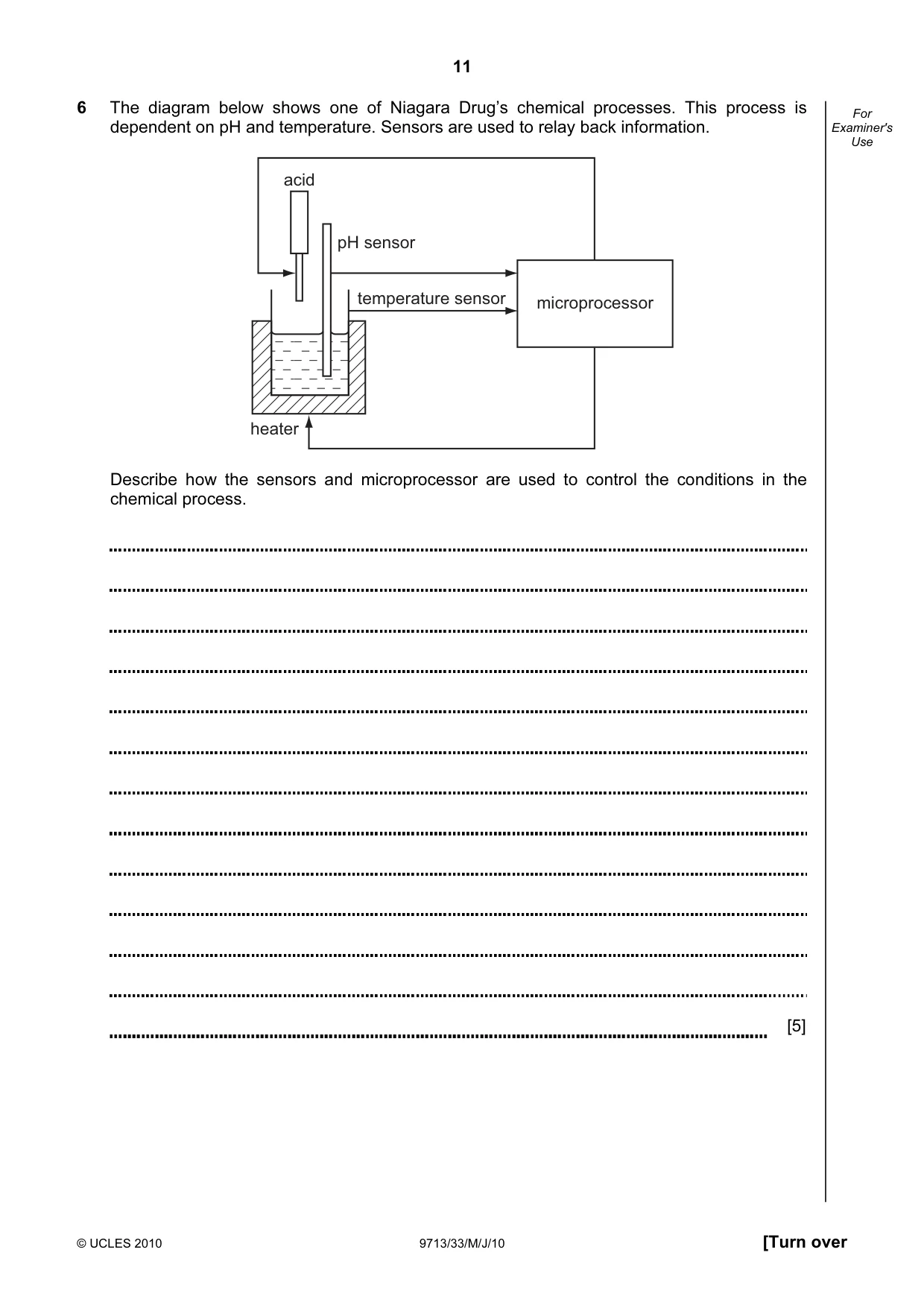
11 © UCLES 2010 9713/33/M/J/10 [Turn over For Examiner's Use 6 The diagram below shows one of Niagara Drug’s chemical processes. This process is dependent on pH and temperature. Sensors are used to relay back information. pH sensor acid heater microprocessor temperature sensor Describe how the sensors and microprocessor are used to control the conditions in the chemical process. [5]
Question paper, page 12
12 © UCLES 2010 9713/33/M/J/10 For Examiner's Use Scenario 3 Questions 7 to 8 Rock-ICT is a large international company involved in the entertainment business. A firm of IT consultants has designed dedicated video conferencing suites for Rock-ICT. This will enable communication between their offices in Lahore and Dubai. However, they are also considering alternative methods of communication. Rock-ICT presently has a large library of CDs of music tracks and DVDs of films and television programmes. They monitor worldwide television and radio transmissions via satellite systems.
Question paper, page 13
13 © UCLES 2010 9713/33/M/J/10 [Turn over For Examiner's Use 7 (a) In the Dubai office they have a dedicated video conferencing suite. Describe in detail how the suite would be set up. [6]
Question paper, page 14
14 © UCLES 2010 9713/33/M/J/10 For Examiner's Use (b) Describe in detail the software requirements necessary to allow video conferencing to take place. [6]
Question paper, page 15
15 © UCLES 2010 9713/33/M/J/10 [Turn over For Examiner's Use (c) Rock-ICT is considering the use of VOIP and instant messaging for communications. Discuss the advantages and disadvantages of these methods compared with video conferencing. [6]
Question paper, page 16
16 © UCLES 2010 9713/33/M/J/10 For Examiner's Use 8 (a) Describe why Rock-ICT are converting their CD and DVD files into MP3 and MP4 format. [3] (b) Describe how a satellite television system works. [4]
Question paper, page 17
17 © UCLES 2010 9713/33/M/J/10 [Turn over For Examiner's Use (c) Describe the advantages of using satellite-based systems rather than using terrestrial television. [3]
Question paper, page 18
18 © UCLES 2010 9713/33/M/J/10 For Examiner's Use Scenario 4 Questions 9 to 10 ScanXam is a company that supports examination marking. Examination papers, containing hand written answers, are input into a computer system. This allows examiners to mark the candidates’ work on their computers at home. This type of working has had a number of effects on the examiners. The candidates’ work is stored on a central database; examiners have to log on to the ScanXam website to gain access to the papers to be marked.
Question paper, page 19
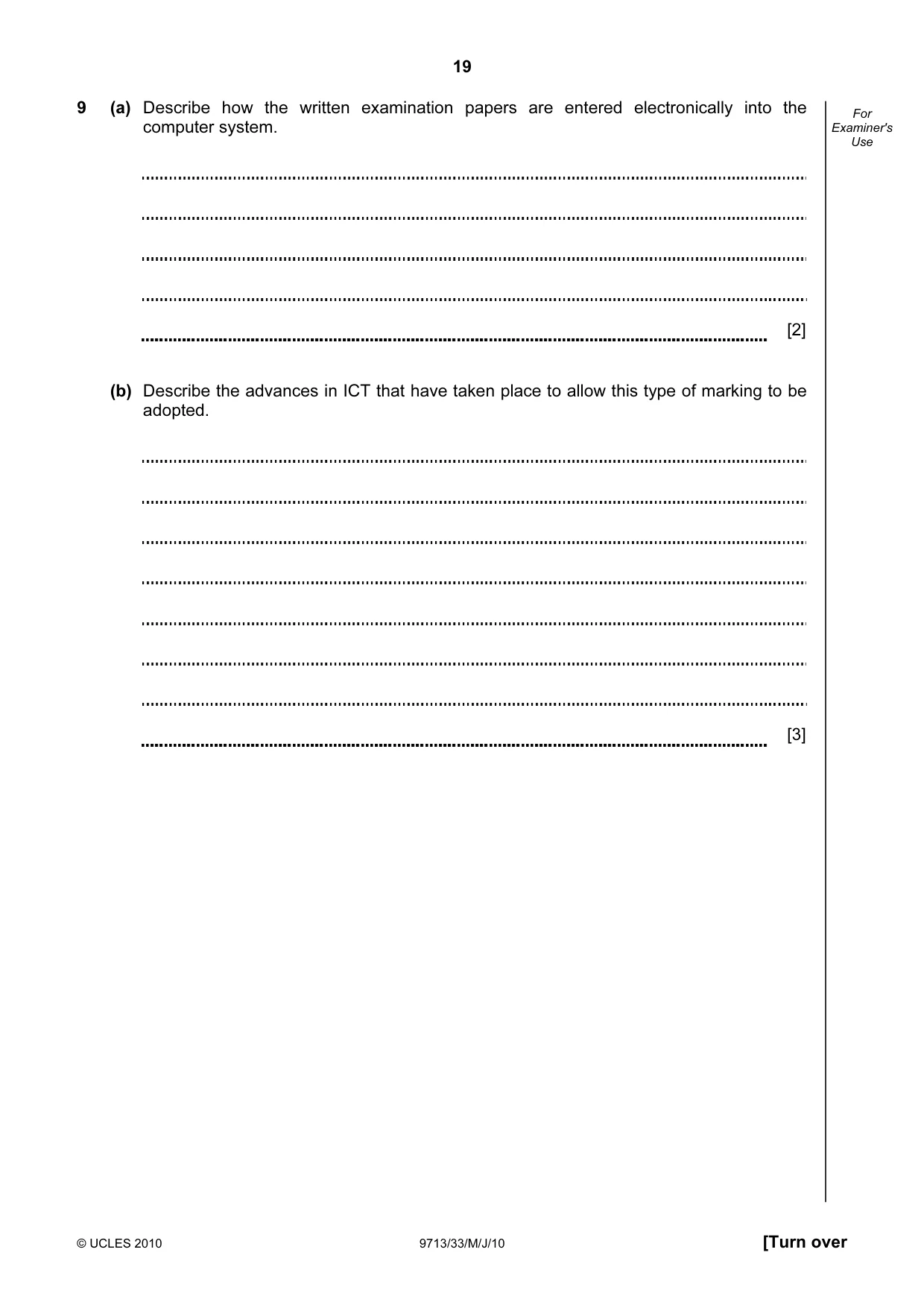
19 © UCLES 2010 9713/33/M/J/10 [Turn over For Examiner's Use 9 (a) Describe how the written examination papers are entered electronically into the computer system. [2] (b) Describe the advances in ICT that have taken place to allow this type of marking to be adopted. [3]
Question paper, page 20
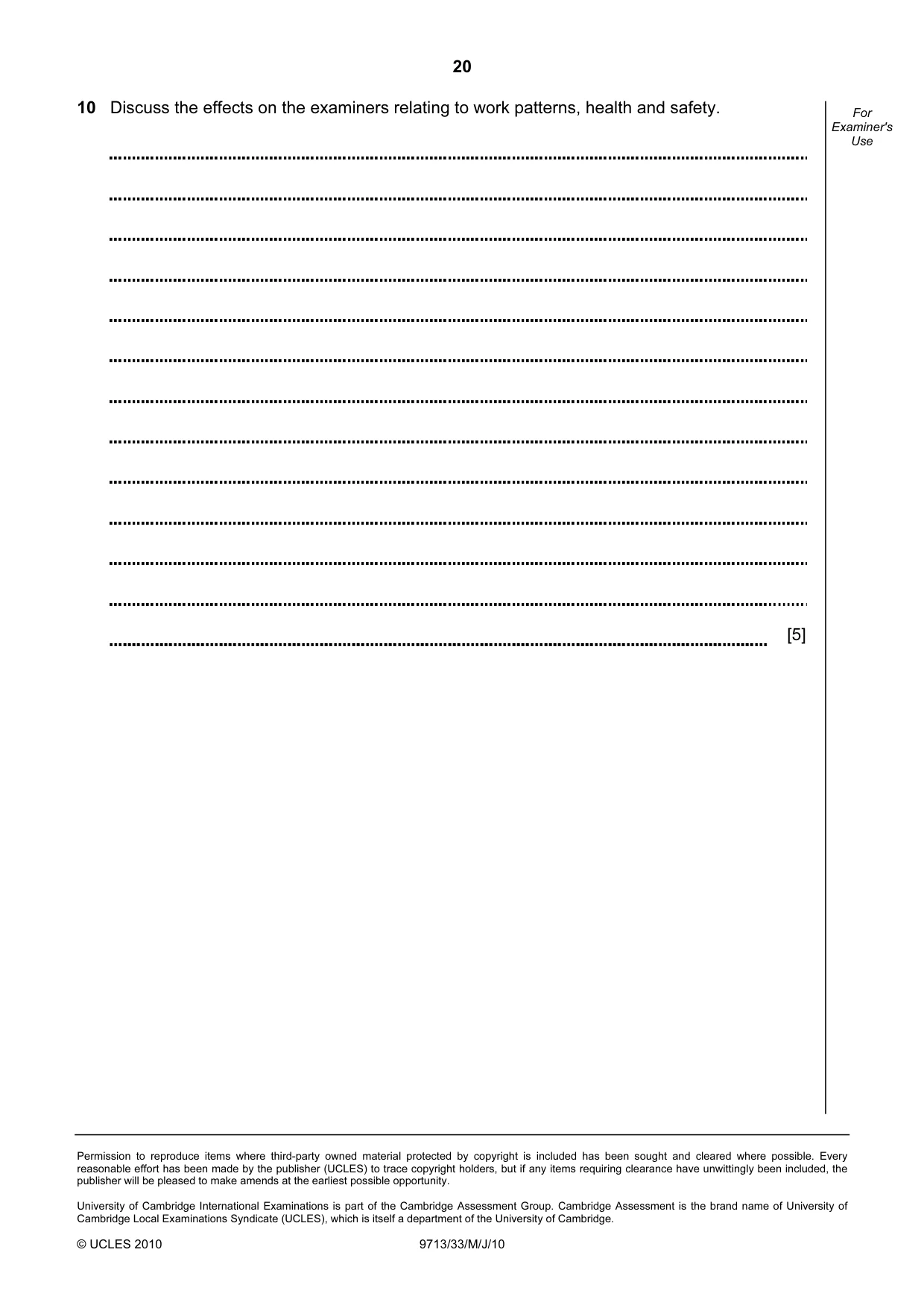
20 Permission to reproduce items where third-party owned material protected by copyright is included has been sought and cleared where possible. Every reasonable effort has been made by the publisher (UCLES) to trace copyright holders, but if any items requiring clearance have unwittingly been included, the publisher will be pleased to make amends at the earliest possible opportunity. University of Cambridge International Examinations is part of the Cambridge Assessment Group. Cambridge Assessment is the brand name of University of Cambridge Local Examinations Syndicate (UCLES), which is itself a department of the University of Cambridge. © UCLES 2010 9713/33/M/J/10 For Examiner's Use 10 Discuss the effects on the examiners relating to work patterns, health and safety. [5]
Mark scheme, page 1
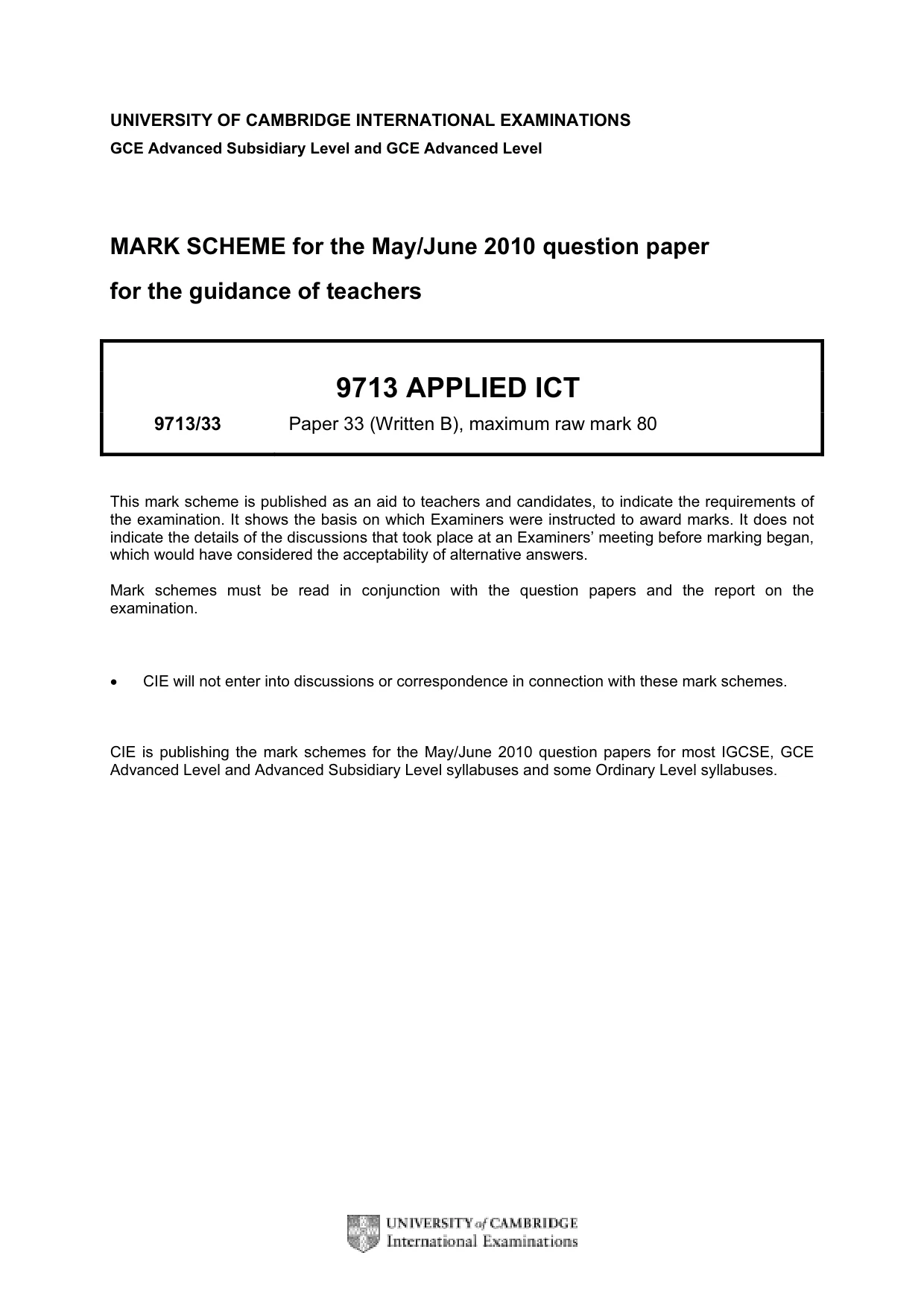
UNIVERSITY OF CAMBRIDGE INTERNATIONAL EXAMINATIONS GCE Advanced Subsidiary Level and GCE Advanced Level MARK SCHEME for the May/June 2010 question paper for the guidance of teachers 9713 APPLIED ICT 9713/33 Paper 33 (Written B), maximum raw mark 80 This mark scheme is published as an aid to teachers and candidates, to indicate the requirements of the examination. It shows the basis on which Examiners were instructed to award marks. It does not indicate the details of the discussions that took place at an Examiners’ meeting before marking began, which would have considered the acceptability of alternative answers. Mark schemes must be read in conjunction with the question papers and the report on the examination. • CIE will not enter into discussions or correspondence in connection with these mark schemes. CIE is publishing the mark schemes for the May/June 2010 question papers for most IGCSE, GCE Advanced Level and Advanced Subsidiary Level syllabuses and some Ordinary Level syllabuses.
Mark scheme, page 2
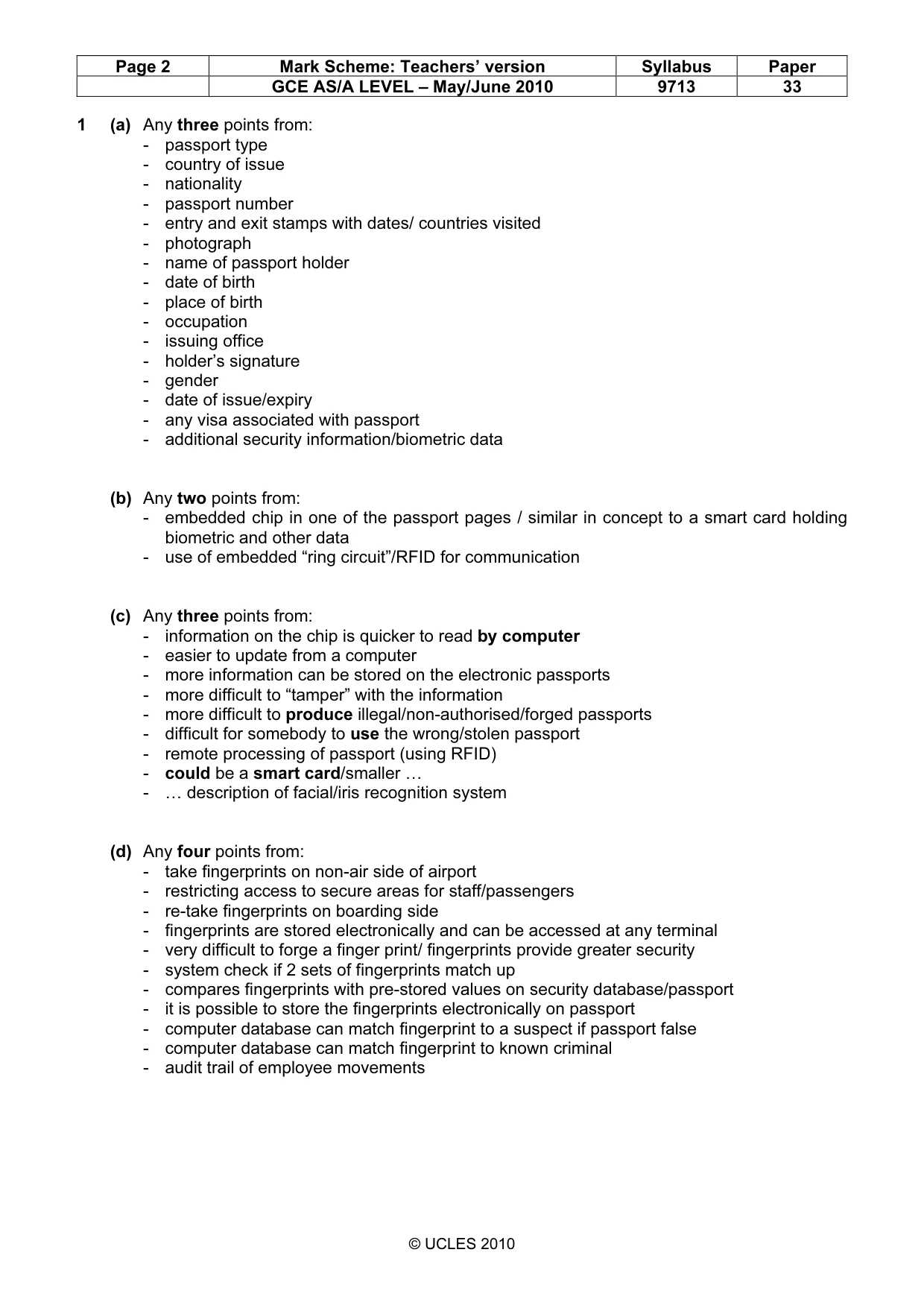
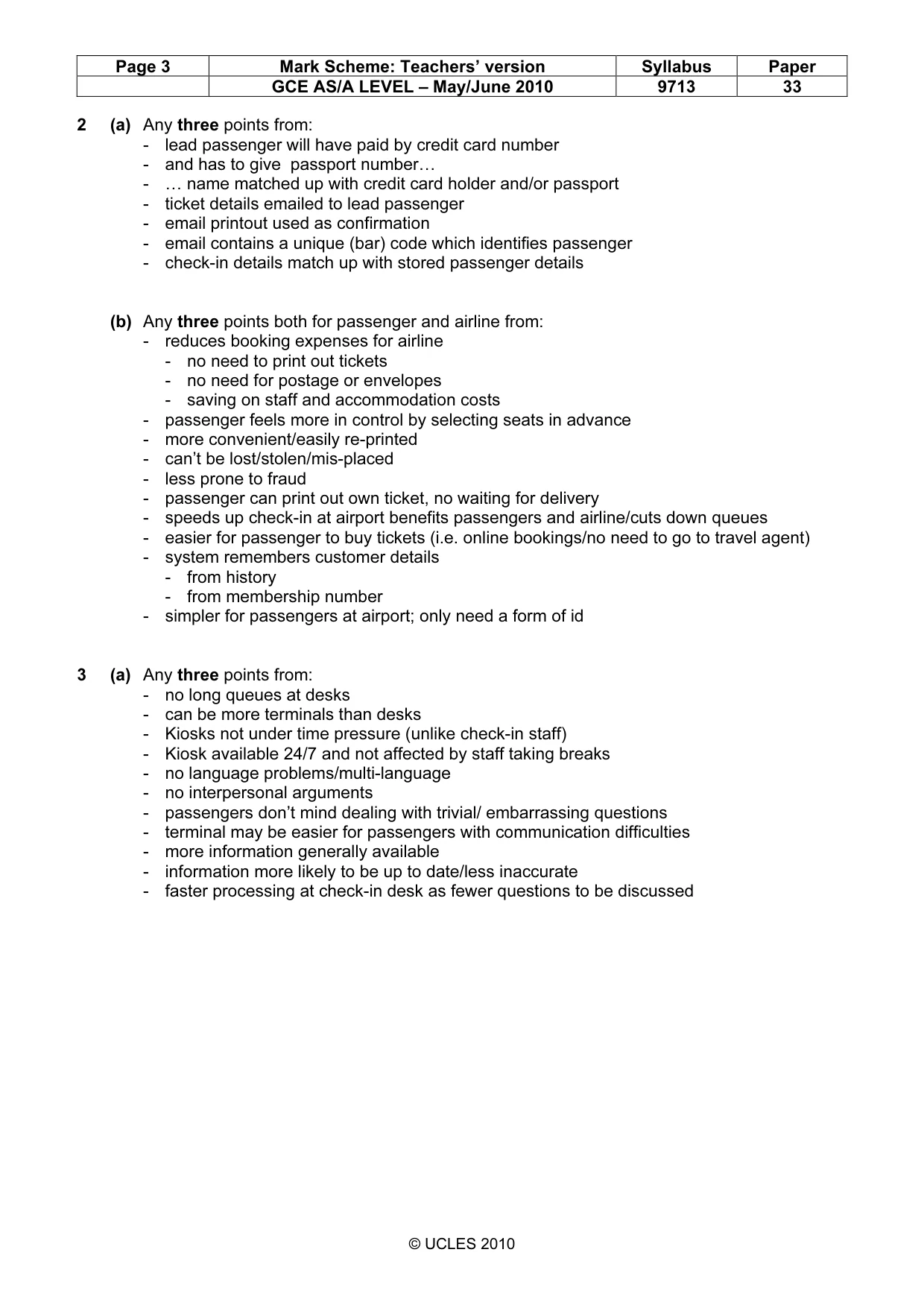
Page 2 Mark Scheme: Teachers’ version Syllabus Paper GCE AS/A LEVEL – May/June 2010 9713 33 © UCLES 2010 1 (a) Any three points from: - passport type - country of issue - nationality - passport number - entry and exit stamps with dates/ countries visited - photograph - name of passport holder - date of birth - place of birth - occupation - issuing office - holder’s signature - gender - date of issue/expiry - any visa associated with passport - additional security information/biometric data (b) Any two points from: - embedded chip in one of the passport pages / similar in concept to a smart card holding biometric and other data - use of embedded “ring circuit”/RFID for communication (c) Any three points from: - information on the chip is quicker to read by computer - easier to update from a computer - more information can be stored on the electronic passports - more difficult to “tamper” with the information - more difficult to produce illegal/non-authorised/forged passports - difficult for somebody to use the wrong/stolen passport - remote processing of passport (using RFID) - could be a smart card/smaller … - … description of facial/iris recognition system (d) Any four points from: - take fingerprints on non-air side of airport - restricting access to secure areas for staff/passengers - re-take fingerprints on boarding side - fingerprints are stored electronically and can be accessed at any terminal - very difficult to forge a finger print/ fingerprints provide greater security - system check if 2 sets of fingerprints match up - compares fingerprints with pre-stored values on security database/passport - it is possible to store the fingerprints electronically on passport - computer database can match fingerprint to a suspect if passport false - computer database can match fingerprint to known criminal - audit trail of employee movements
Mark scheme, page 3
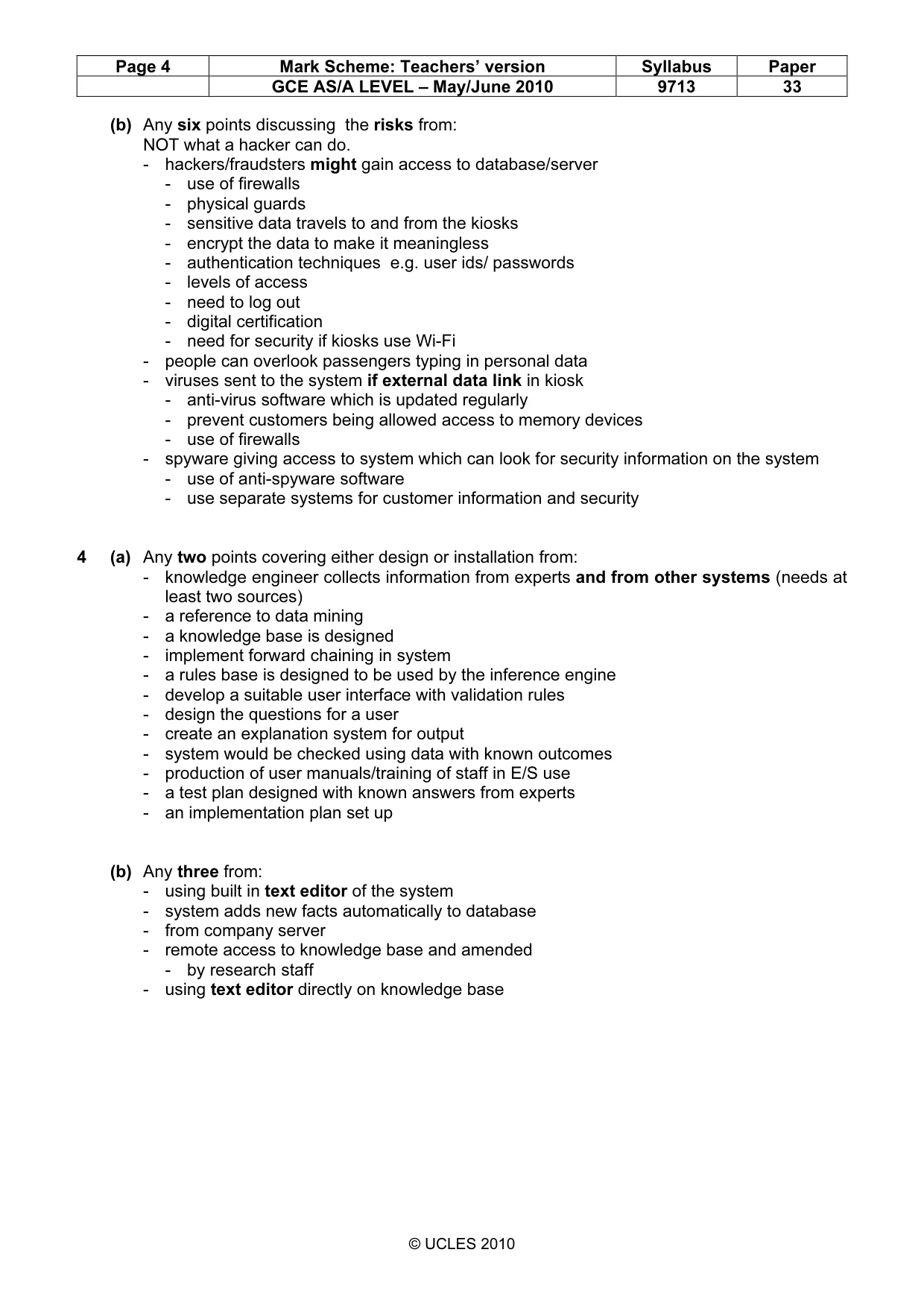
Page 3 Mark Scheme: Teachers’ version Syllabus Paper GCE AS/A LEVEL – May/June 2010 9713 33 © UCLES 2010 2 (a) Any three points from: - lead passenger will have paid by credit card number - and has to give passport number… - … name matched up with credit card holder and/or passport - ticket details emailed to lead passenger - email printout used as confirmation - email contains a unique (bar) code which identifies passenger - check-in details match up with stored passenger details (b) Any three points both for passenger and airline from: - reduces booking expenses for airline - no need to print out tickets - no need for postage or envelopes - saving on staff and accommodation costs - passenger feels more in control by selecting seats in advance - more convenient/easily re-printed - can’t be lost/stolen/mis-placed - less prone to fraud - passenger can print out own ticket, no waiting for delivery - speeds up check-in at airport benefits passengers and airline/cuts down queues - easier for passenger to buy tickets (i.e. online bookings/no need to go to travel agent) - system remembers customer details - from history - from membership number - simpler for passengers at airport; only need a form of id 3 (a) Any three points from: - no long queues at desks - can be more terminals than desks - Kiosks not under time pressure (unlike check-in staff) - Kiosk available 24/7 and not affected by staff taking breaks - no language problems/multi-language - no interpersonal arguments - passengers don’t mind dealing with trivial/ embarrassing questions - terminal may be easier for passengers with communication difficulties - more information generally available - information more likely to be up to date/less inaccurate - faster processing at check-in desk as fewer questions to be discussed
Mark scheme, page 4
Page 4 Mark Scheme: Teachers’ version Syllabus Paper GCE AS/A LEVEL – May/June 2010 9713 33 © UCLES 2010 (b) Any six points discussing the risks from: NOT what a hacker can do. - hackers/fraudsters might gain access to database/server - use of firewalls - physical guards - sensitive data travels to and from the kiosks - encrypt the data to make it meaningless - authentication techniques e.g. user ids/ passwords - levels of access - need to log out - digital certification - need for security if kiosks use Wi-Fi - people can overlook passengers typing in personal data - viruses sent to the system if external data link in kiosk - anti-virus software which is updated regularly - prevent customers being allowed access to memory devices - use of firewalls - spyware giving access to system which can look for security information on the system - use of anti-spyware software - use separate systems for customer information and security 4 (a) Any two points covering either design or installation from: - knowledge engineer collects information from experts and from other systems (needs at least two sources) - a reference to data mining - a knowledge base is designed - implement forward chaining in system - a rules base is designed to be used by the inference engine - develop a suitable user interface with validation rules - design the questions for a user - create an explanation system for output - system would be checked using data with known outcomes - production of user manuals/training of staff in E/S use - a test plan designed with known answers from experts - an implementation plan set up (b) Any three from: - using built in text editor of the system - system adds new facts automatically to database - from company server - remote access to knowledge base and amended - by research staff - using text editor directly on knowledge base
Mark scheme, page 5
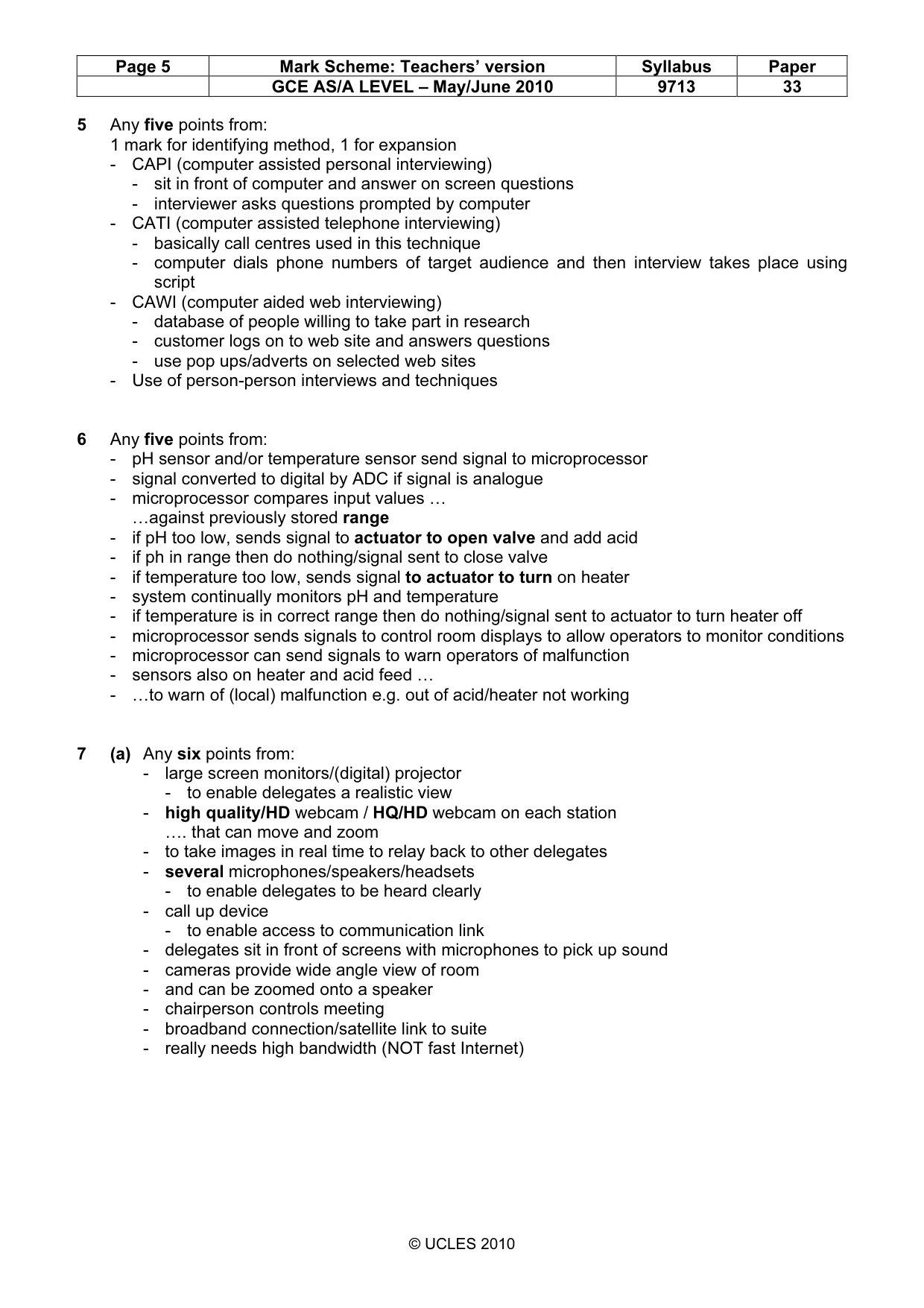
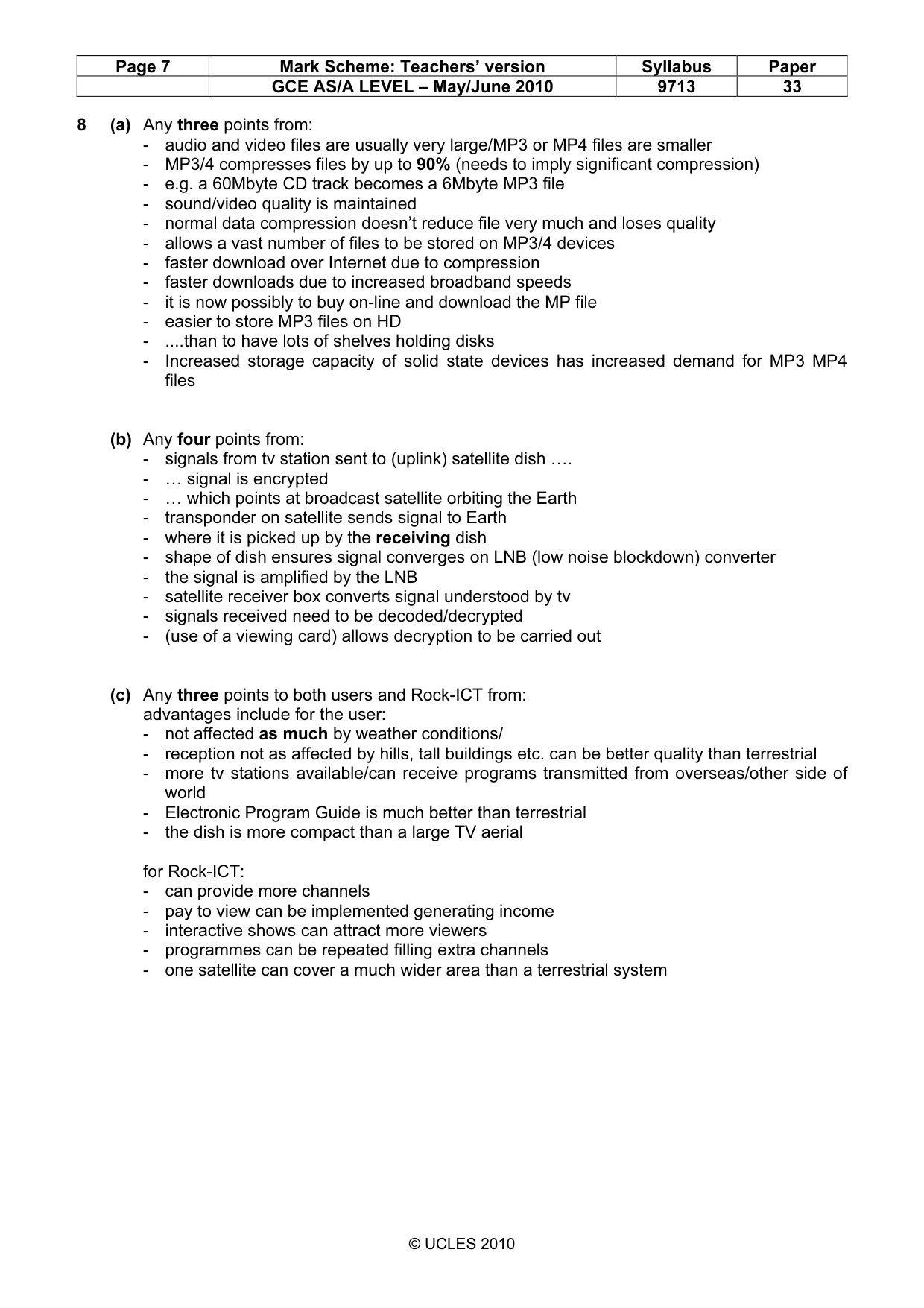
Page 5 Mark Scheme: Teachers’ version Syllabus Paper GCE AS/A LEVEL – May/June 2010 9713 33 © UCLES 2010 5 Any five points from: 1 mark for identifying method, 1 for expansion - CAPI (computer assisted personal interviewing) - sit in front of computer and answer on screen questions - interviewer asks questions prompted by computer - CATI (computer assisted telephone interviewing) - basically call centres used in this technique - computer dials phone numbers of target audience and then interview takes place using script - CAWI (computer aided web interviewing) - database of people willing to take part in research - customer logs on to web site and answers questions - use pop ups/adverts on selected web sites - Use of person-person interviews and techniques 6 Any five points from: - pH sensor and/or temperature sensor send signal to microprocessor - signal converted to digital by ADC if signal is analogue - microprocessor compares input values … …against previously stored range - if pH too low, sends signal to actuator to open valve and add acid - if ph in range then do nothing/signal sent to close valve - if temperature too low, sends signal to actuator to turn on heater - system continually monitors pH and temperature - if temperature is in correct range then do nothing/signal sent to actuator to turn heater off - microprocessor sends signals to control room displays to allow operators to monitor conditions - microprocessor can send signals to warn operators of malfunction - sensors also on heater and acid feed … - …to warn of (local) malfunction e.g. out of acid/heater not working 7 (a) Any six points from: - large screen monitors/(digital) projector - to enable delegates a realistic view - high quality/HD webcam / HQ/HD webcam on each station …. that can move and zoom - to take images in real time to relay back to other delegates - several microphones/speakers/headsets - to enable delegates to be heard clearly - call up device - to enable access to communication link - delegates sit in front of screens with microphones to pick up sound - cameras provide wide angle view of room - and can be zoomed onto a speaker - chairperson controls meeting - broadband connection/satellite link to suite - really needs high bandwidth (NOT fast Internet)
Mark scheme, page 6
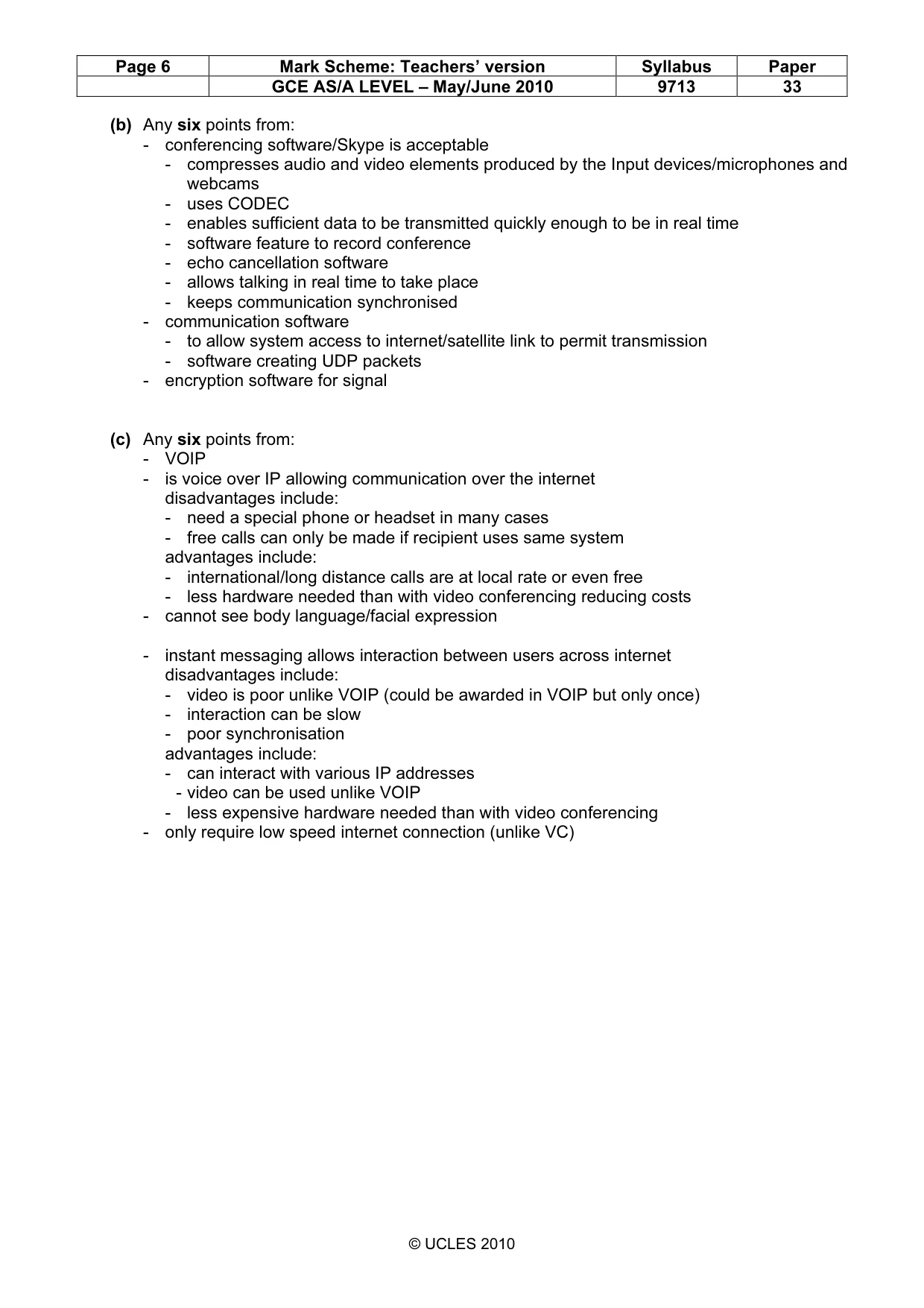
Page 6 Mark Scheme: Teachers’ version Syllabus Paper GCE AS/A LEVEL – May/June 2010 9713 33 © UCLES 2010 (b) Any six points from: - conferencing software/Skype is acceptable - compresses audio and video elements produced by the Input devices/microphones and webcams - uses CODEC - enables sufficient data to be transmitted quickly enough to be in real time - software feature to record conference - echo cancellation software - allows talking in real time to take place - keeps communication synchronised - communication software - to allow system access to internet/satellite link to permit transmission - software creating UDP packets - encryption software for signal (c) Any six points from: - VOIP - is voice over IP allowing communication over the internet disadvantages include: - need a special phone or headset in many cases - free calls can only be made if recipient uses same system advantages include: - international/long distance calls are at local rate or even free - less hardware needed than with video conferencing reducing costs - cannot see body language/facial expression - instant messaging allows interaction between users across internet disadvantages include: - video is poor unlike VOIP (could be awarded in VOIP but only once) - interaction can be slow - poor synchronisation advantages include: - can interact with various IP addresses - video can be used unlike VOIP - less expensive hardware needed than with video conferencing - only require low speed internet connection (unlike VC)
Mark scheme, page 7
Page 7 Mark Scheme: Teachers’ version Syllabus Paper GCE AS/A LEVEL – May/June 2010 9713 33 © UCLES 2010 8 (a) Any three points from: - audio and video files are usually very large/MP3 or MP4 files are smaller - MP3/4 compresses files by up to 90% (needs to imply significant compression) - e.g. a 60Mbyte CD track becomes a 6Mbyte MP3 file - sound/video quality is maintained - normal data compression doesn’t reduce file very much and loses quality - allows a vast number of files to be stored on MP3/4 devices - faster download over Internet due to compression - faster downloads due to increased broadband speeds - it is now possibly to buy on-line and download the MP file - easier to store MP3 files on HD - …than to have lots of shelves holding disks - Increased storage capacity of solid state devices has increased demand for MP3 MP4 files (b) Any four points from: - signals from tv station sent to (uplink) satellite dish …. - … signal is encrypted - … which points at broadcast satellite orbiting the Earth - transponder on satellite sends signal to Earth - where it is picked up by the receiving dish - shape of dish ensures signal converges on LNB (low noise blockdown) converter - the signal is amplified by the LNB - satellite receiver box converts signal understood by tv - signals received need to be decoded/decrypted - (use of a viewing card) allows decryption to be carried out (c) Any three points to both users and Rock-ICT from: advantages include for the user: - not affected as much by weather conditions/ - reception not as affected by hills, tall buildings etc. can be better quality than terrestrial - more tv stations available/can receive programs transmitted from overseas/other side of world - Electronic Program Guide is much better than terrestrial - the dish is more compact than a large TV aerial for Rock-ICT: - can provide more channels - pay to view can be implemented generating income - interactive shows can attract more viewers - programmes can be repeated filling extra channels - one satellite can cover a much wider area than a terrestrial system
Mark scheme, page 8
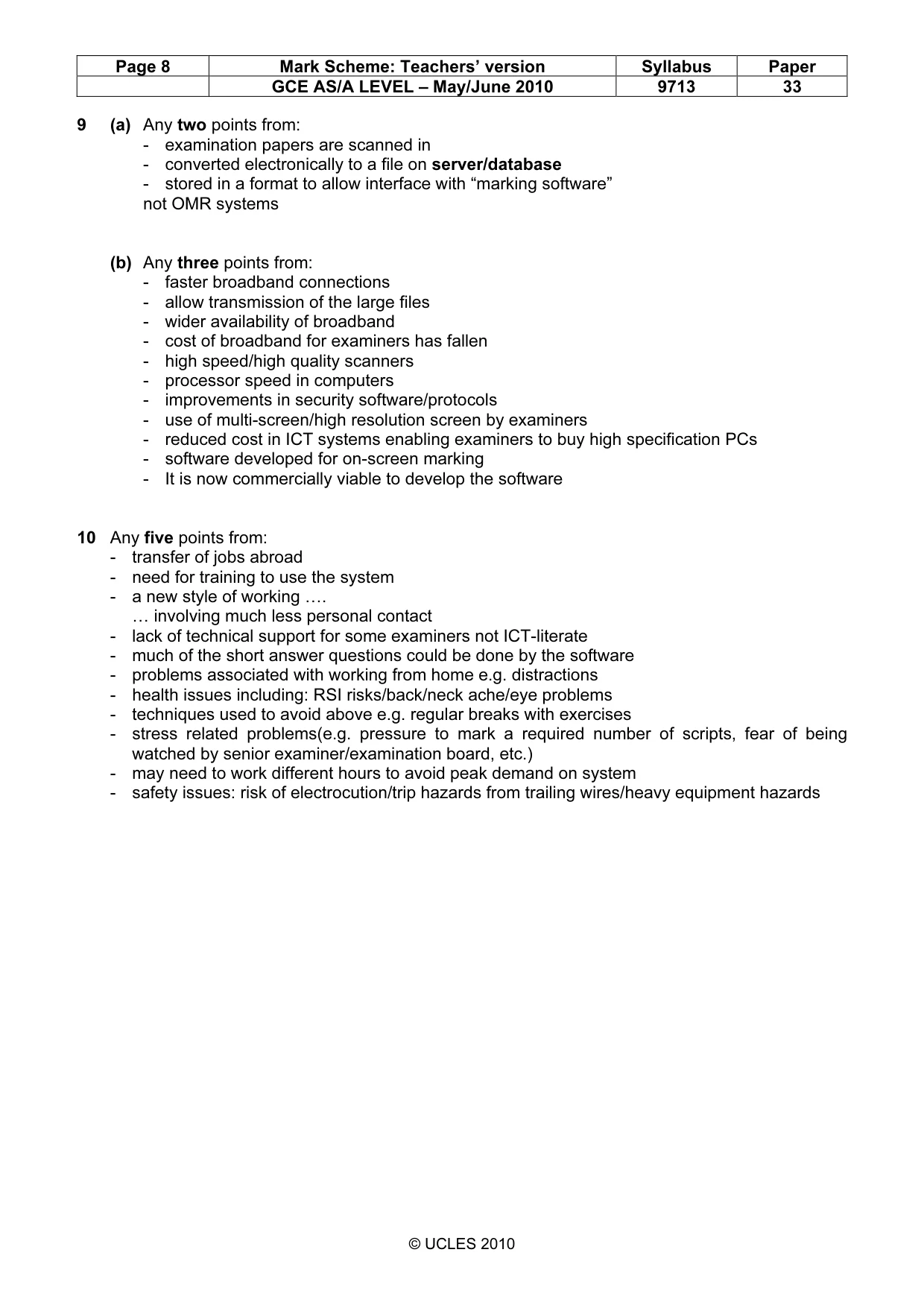
Page 8 Mark Scheme: Teachers’ version Syllabus Paper GCE AS/A LEVEL – May/June 2010 9713 33 © UCLES 2010 9 (a) Any two points from: - examination papers are scanned in - converted electronically to a file on server/database - stored in a format to allow interface with “marking software” not OMR systems (b) Any three points from: - faster broadband connections - allow transmission of the large files - wider availability of broadband - cost of broadband for examiners has fallen - high speed/high quality scanners - processor speed in computers - improvements in security software/protocols - use of multi-screen/high resolution screen by examiners - reduced cost in ICT systems enabling examiners to buy high specification PCs - software developed for on-screen marking - It is now commercially viable to develop the software 10 Any five points from: - transfer of jobs abroad - need for training to use the system - a new style of working …. … involving much less personal contact - lack of technical support for some examiners not ICT-literate - much of the short answer questions could be done by the software - problems associated with working from home e.g. distractions - health issues including: RSI risks/back/neck ache/eye problems - techniques used to avoid above e.g. regular breaks with exercises - stress related problems(e.g. pressure to mark a required number of scripts, fear of being watched by senior examiner/examination board, etc.) - may need to work different hours to avoid peak demand on system - safety issues: risk of electrocution/trip hazards from trailing wires/heavy equipment hazards
What you needed in this session
Cambridge’s own grade thresholds for 2010 May/June, Paper 3 · Variant 3. A higher threshold means an easier paper — the bar moves with how the cohort did.