Cambridge IGCSE Computer Science (9-1) 0984 — 2021 May/June Paper 2 · Variant 1
0984/21/M/J/21 · 50 marks · ≈56 min
The question paper and its mark scheme, free to read here and free to download. This is Cambridge’s own paper, exactly as it was sat.
Question paper16 pages





Mark scheme11 pages
Answers below. Sit the paper first if you are practising.
Paper as text
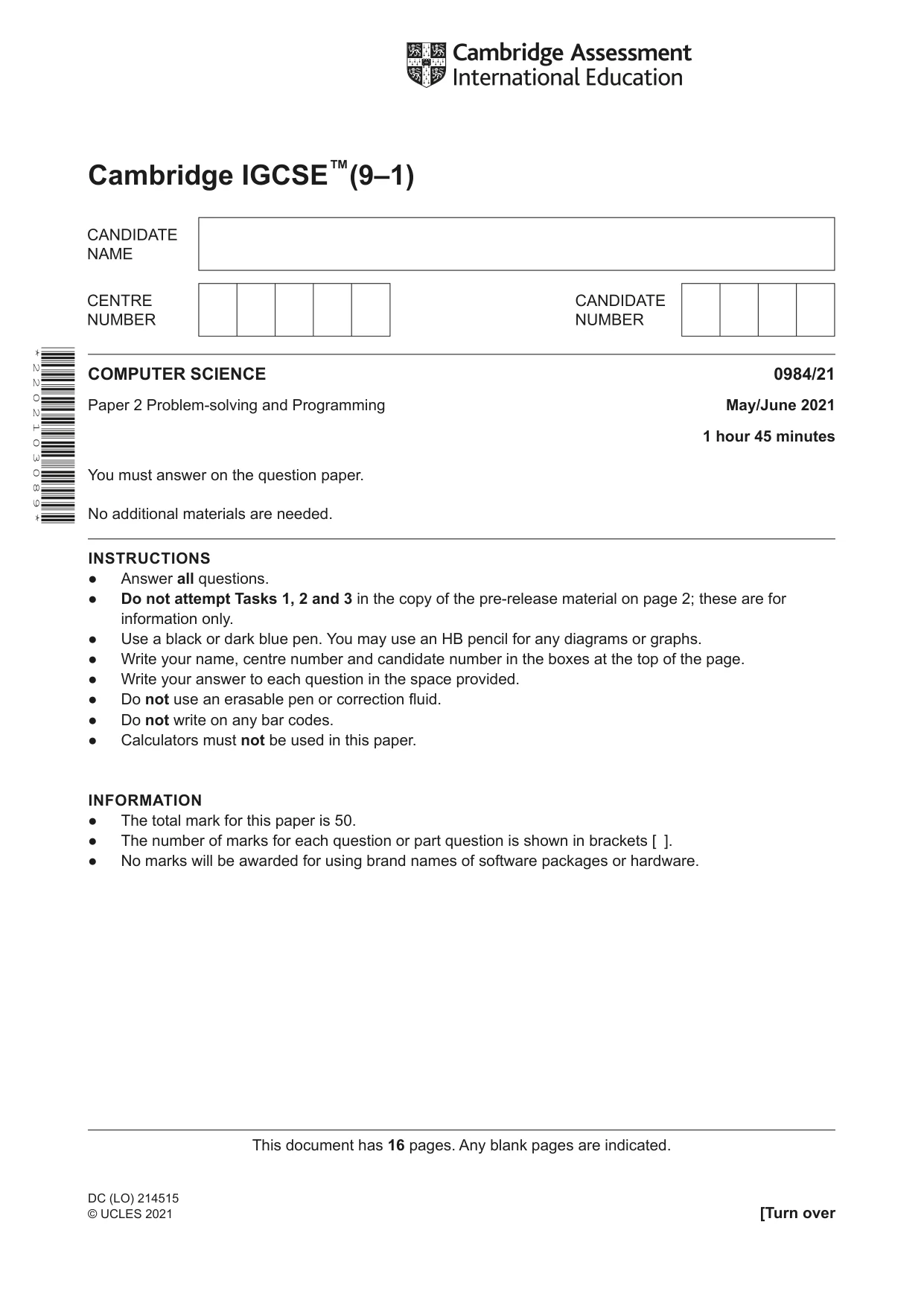
Question paper, page 1
This document has 16 pages. Any blank pages are indicated. Cambridge IGCSE™(9–1) COMPUTER SCIENCE 0984/21 Paper 2 Problem-solving and Programming May/June 2021 1 hour 45 minutes You must answer on the question paper. No additional materials are needed. INSTRUCTIONS ● Answer all questions. ● Do not attempt Tasks 1, 2 and 3 in the copy of the pre-release material on page 2; these are for information only. ● Use a black or dark blue pen. You may use an HB pencil for any diagrams or graphs. ● Write your name, centre number and candidate number in the boxes at the top of the page. ● Write your answer to each question in the space provided. ● Do not use an erasable pen or correction fluid. ● Do not write on any bar codes. ● Calculators must not be used in this paper. INFORMATION ● The total mark for this paper is 50. ● The number of marks for each question or part question is shown in brackets [ ]. ● No marks will be awarded for using brand names of software packages or hardware. * 2 2 0 2 1 0 3 0 8 9 * DC (LO) 214515 © UCLES 2021 [Turn over
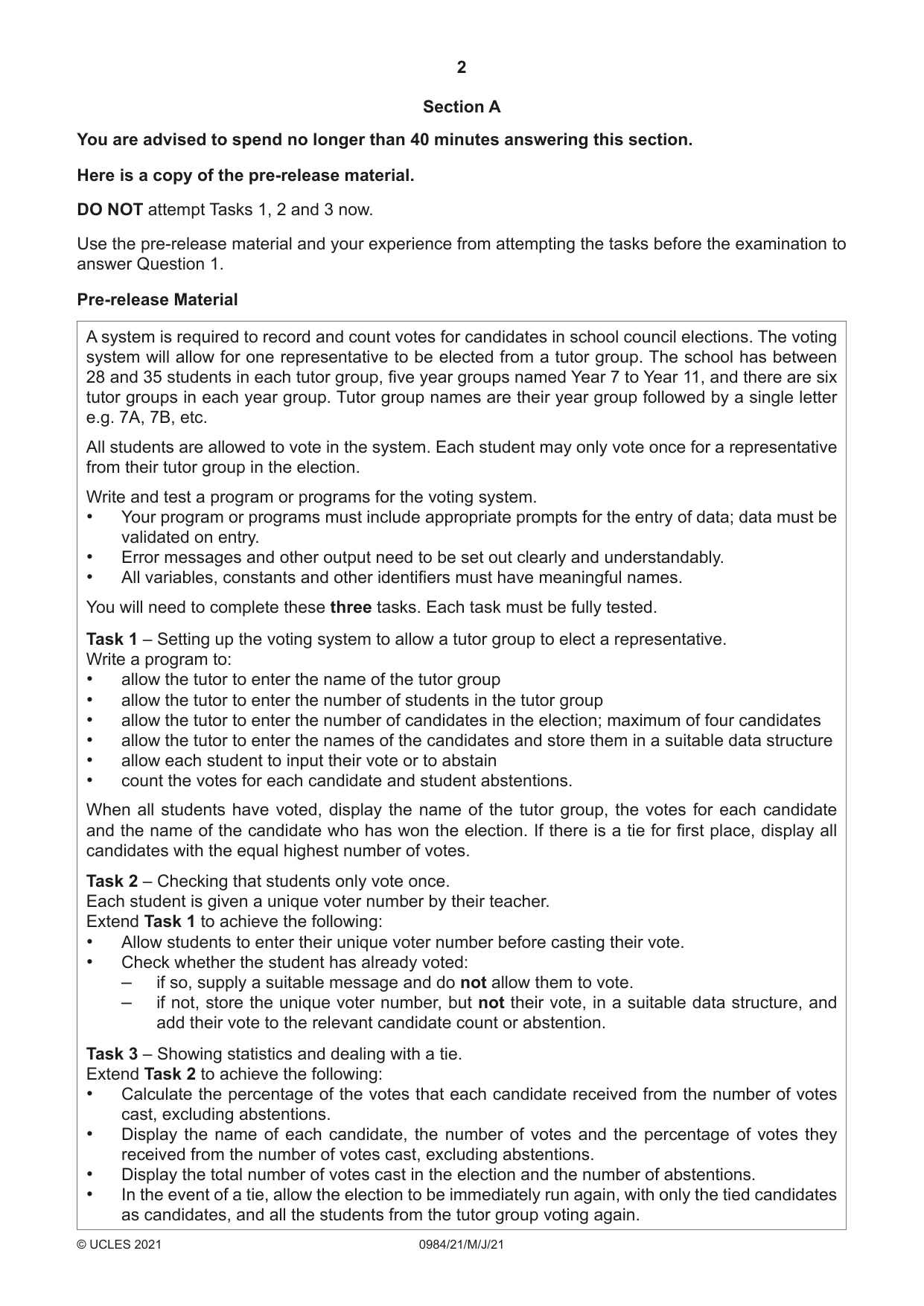
Question paper, page 2
2 0984/21/M/J/21 © UCLES 2021 Section A You are advised to spend no longer than 40 minutes answering this section. Here is a copy of the pre-release material. DO NOT attempt Tasks 1, 2 and 3 now. Use the pre-release material and your experience from attempting the tasks before the examination to answer Question 1. Pre-release Material A system is required to record and count votes for candidates in school council elections. The voting system will allow for one representative to be elected from a tutor group. The school has between 28 and 35 students in each tutor group, five year groups named Year 7 to Year 11, and there are six tutor groups in each year group. Tutor group names are their year group followed by a single letter e.g. 7A, 7B, etc. All students are allowed to vote in the system. Each student may only vote once for a representative from their tutor group in the election. Write and test a program or programs for the voting system. • Your program or programs must include appropriate prompts for the entry of data; data must be validated on entry. • Error messages and other output need to be set out clearly and understandably. • All variables, constants and other identifiers must have meaningful names. You will need to complete these three tasks. Each task must be fully tested. Task 1 – Setting up the voting system to allow a tutor group to elect a representative. Write a program to: • allow the tutor to enter the name of the tutor group • allow the tutor to enter the number of students in the tutor group • allow the tutor to enter the number of candidates in the election; maximum of four candidates • allow the tutor to enter the names of the candidates and store them in a suitable data structure • allow each student to input their vote or to abstain • count the votes for each candidate and student abstentions. When all students have voted, display the name of the tutor group, the votes for each candidate and the name of the candidate who has won the election. If there is a tie for first place, display all candidates with the equal highest number of votes. Task 2 – Checking that students only vote once. Each student is given a unique voter number by their teacher. Extend Task 1 to achieve the following: • Allow students to enter their unique voter number before casting their vote. • Check whether the student has already voted: – if so, supply a suitable message and do not allow them to vote. – if not, store the unique voter number, but not their vote, in a suitable data structure, and add their vote to the relevant candidate count or abstention. Task 3 – Showing statistics and dealing with a tie. Extend Task 2 to achieve the following: • Calculate the percentage of the votes that each candidate received from the number of votes cast, excluding abstentions. • Display the name of each candidate, the number of votes and the percentage of votes they received from the number of votes cast, excluding abstentions. • Display the total number of votes cast in the election and the number of abstentions. • In the event of a tie, allow the election to be immediately run again, with only the tied candidates as candidates, and all the students from the tutor group voting again.
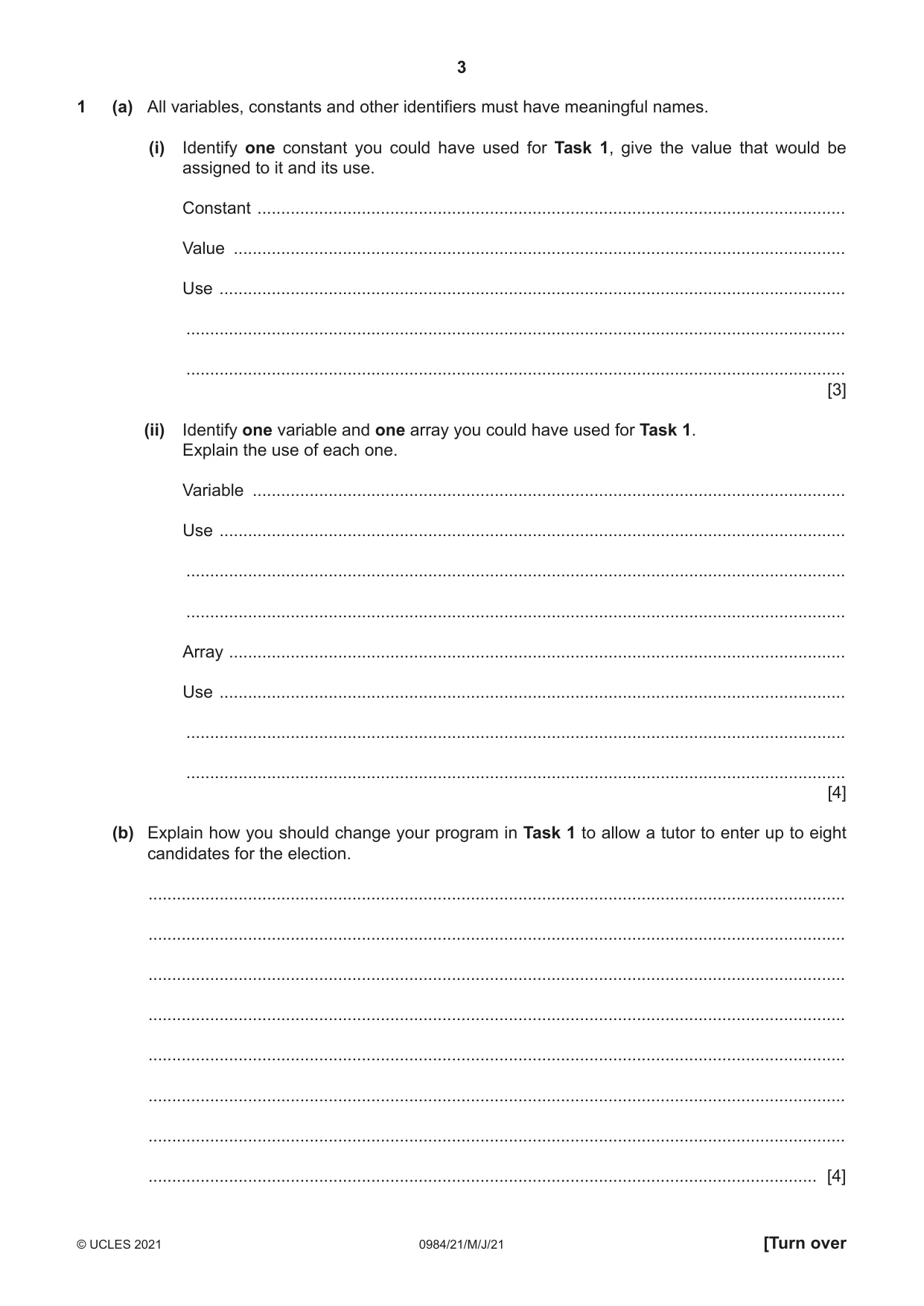
Question paper, page 3
3 0984/21/M/J/21 © UCLES 2021 [Turn over 1 (a) All variables, constants and other identifiers must have meaningful names. (i) Identify one constant you could have used for Task 1, give the value that would be assigned to it and its use. Constant … Value … Use … … … [3] (ii) Identify one variable and one array you could have used for Task 1. Explain the use of each one. Variable … Use … … … Array … Use … … … [4] (b) Explain how you should change your program in Task 1 to allow a tutor to enter up to eight candidates for the election. … … … … … … … … [4]
Question paper, page 4
4 0984/21/M/J/21 © UCLES 2021 (c) Write an algorithm using pseudocode, programming statements or a flowchart to show how your program completes these parts of Task 2: • Allows students to enter their unique voter number before casting their vote. • Checks whether the student has already voted: – if so, supplies a suitable message and does not allow them to vote. – if not, stores the unique voter number, but not their vote, in a suitable data structure. It is not necessary to show parts completed in Task 1, including counting of votes for each candidate. … … … … … … … … … … … … … … … … … … … … … … … … …
Question paper, page 5
5 0984/21/M/J/21 © UCLES 2021 [Turn over … … … … … … … … … … … … … … … … … … … … … … … … … … … … … [5]
Question paper, page 6
6 0984/21/M/J/21 © UCLES 2021 (d) Explain how your program completes these parts of Task 3: • Calculate the percentage of the votes that each candidate received from the number of votes cast, excluding abstentions. • Display the name of each candidate, the number of votes and the percentage of votes they received from the number of votes cast, excluding abstentions. • Display the total number of votes cast in the election and the number of abstentions. Any programming statements used in your answer must be fully explained. … … … … … … … … … … … … … … … … … … … … … … … … … [4]
Question paper, page 7
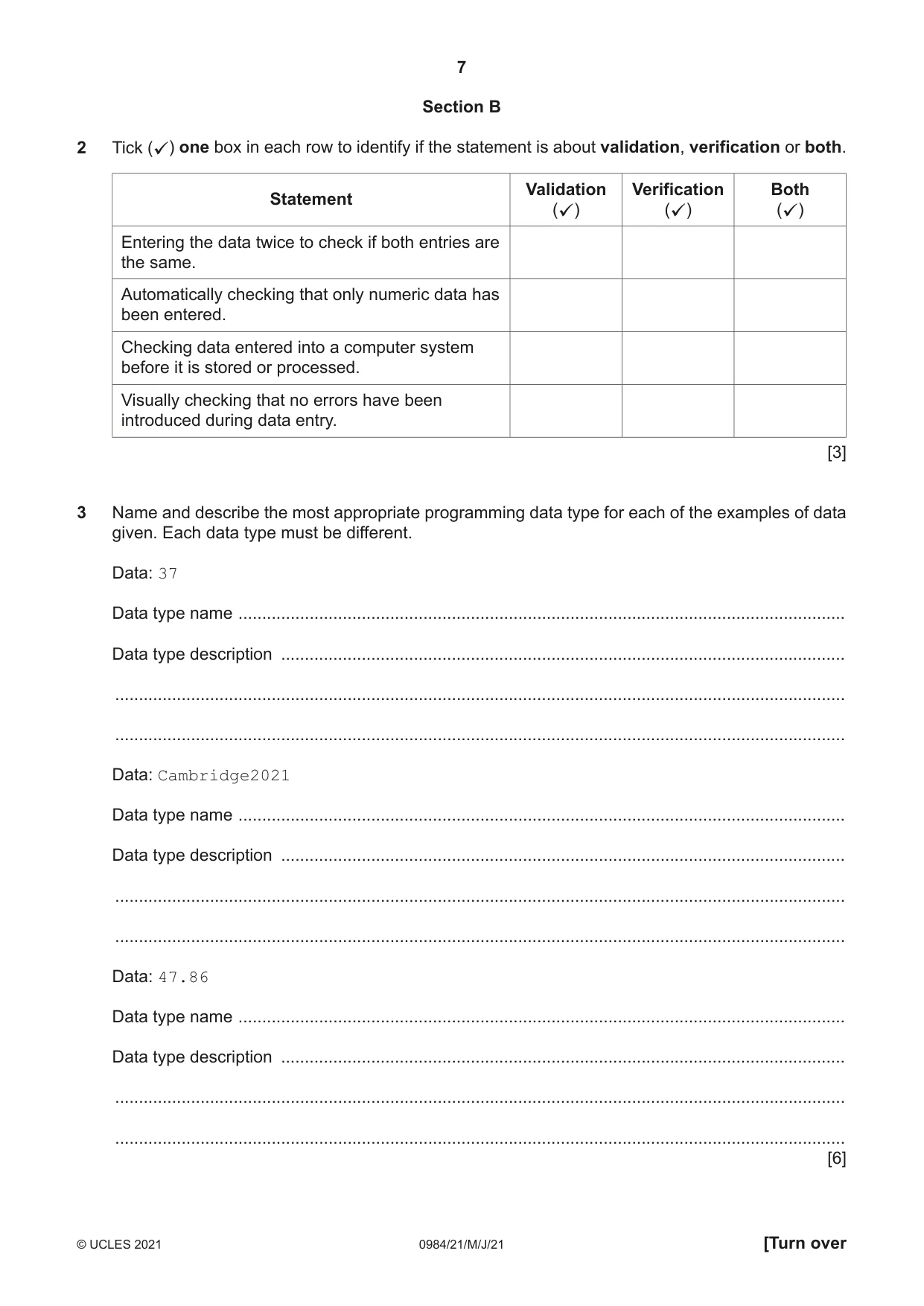
7 0984/21/M/J/21 © UCLES 2021 [Turn over Section B 2 Tick (ü) one box in each row to identify if the statement is about validation, verification or both. Statement Validation (ü) Verification (ü) Both (ü) Entering the data twice to check if both entries are the same. Automatically checking that only numeric data has been entered. Checking data entered into a computer system before it is stored or processed. Visually checking that no errors have been introduced during data entry. [3] 3 Name and describe the most appropriate programming data type for each of the examples of data given. Each data type must be different. Data: 37 Data type name … Data type description … … … Data: Cambridge2021 Data type name … Data type description … … … Data: 47.86 Data type name … Data type description … … … [6]
Question paper, page 8
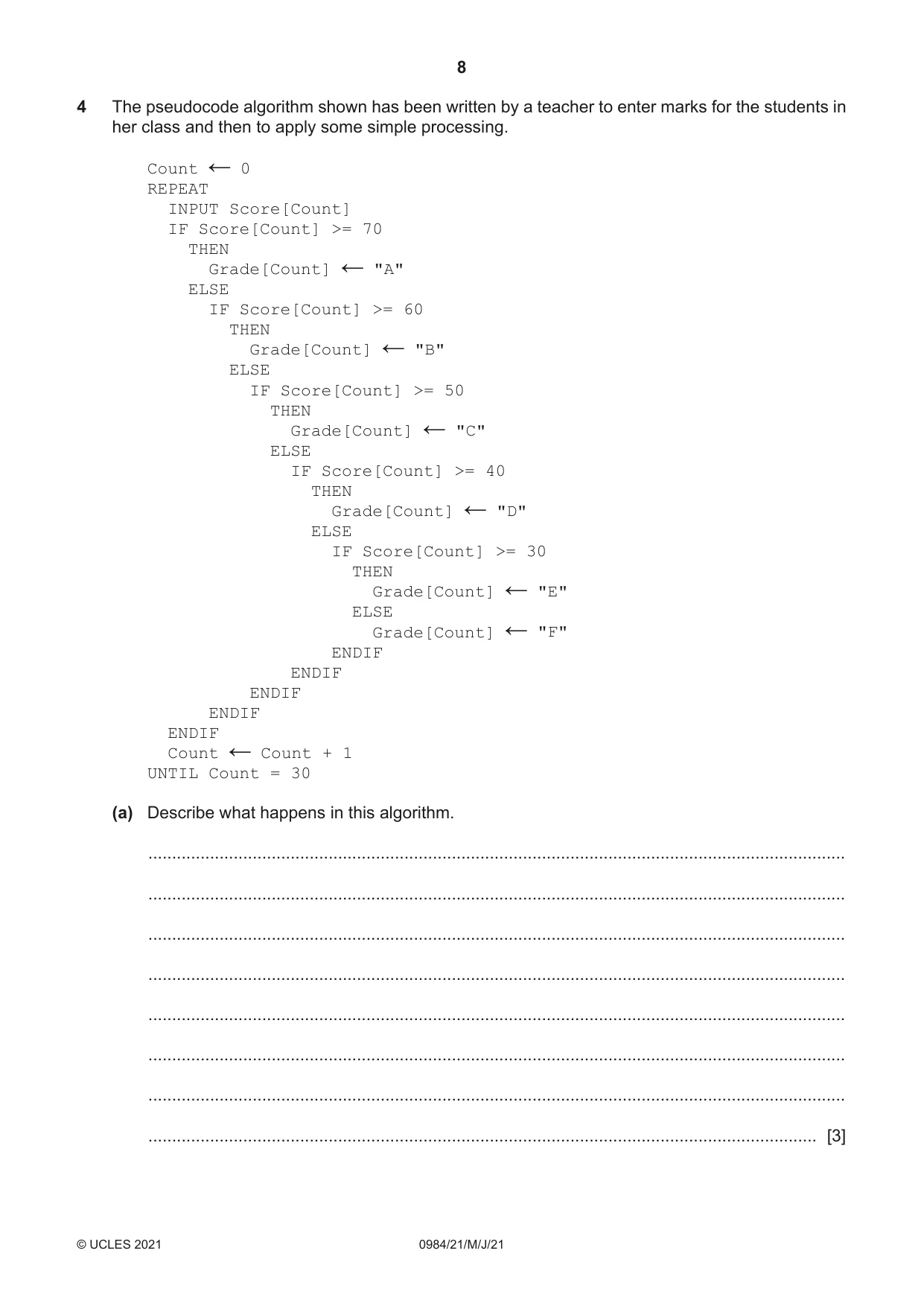
8 0984/21/M/J/21 © UCLES 2021 4 The pseudocode algorithm shown has been written by a teacher to enter marks for the students in her class and then to apply some simple processing. Count ← 0 REPEAT INPUT Score[Count] IF Score[Count] >= 70 THEN Grade[Count] ← "A" ELSE IF Score[Count] >= 60 THEN Grade[Count] ← "B" ELSE IF Score[Count] >= 50 THEN Grade[Count] ← "C" ELSE IF Score[Count] >= 40 THEN Grade[Count] ← "D" ELSE IF Score[Count] >= 30 THEN Grade[Count] ← "E" ELSE Grade[Count] ← "F" ENDIF ENDIF ENDIF ENDIF ENDIF Count ← Count + 1 UNTIL Count = 30 (a) Describe what happens in this algorithm. … … … … … … … … [3]
Question paper, page 9
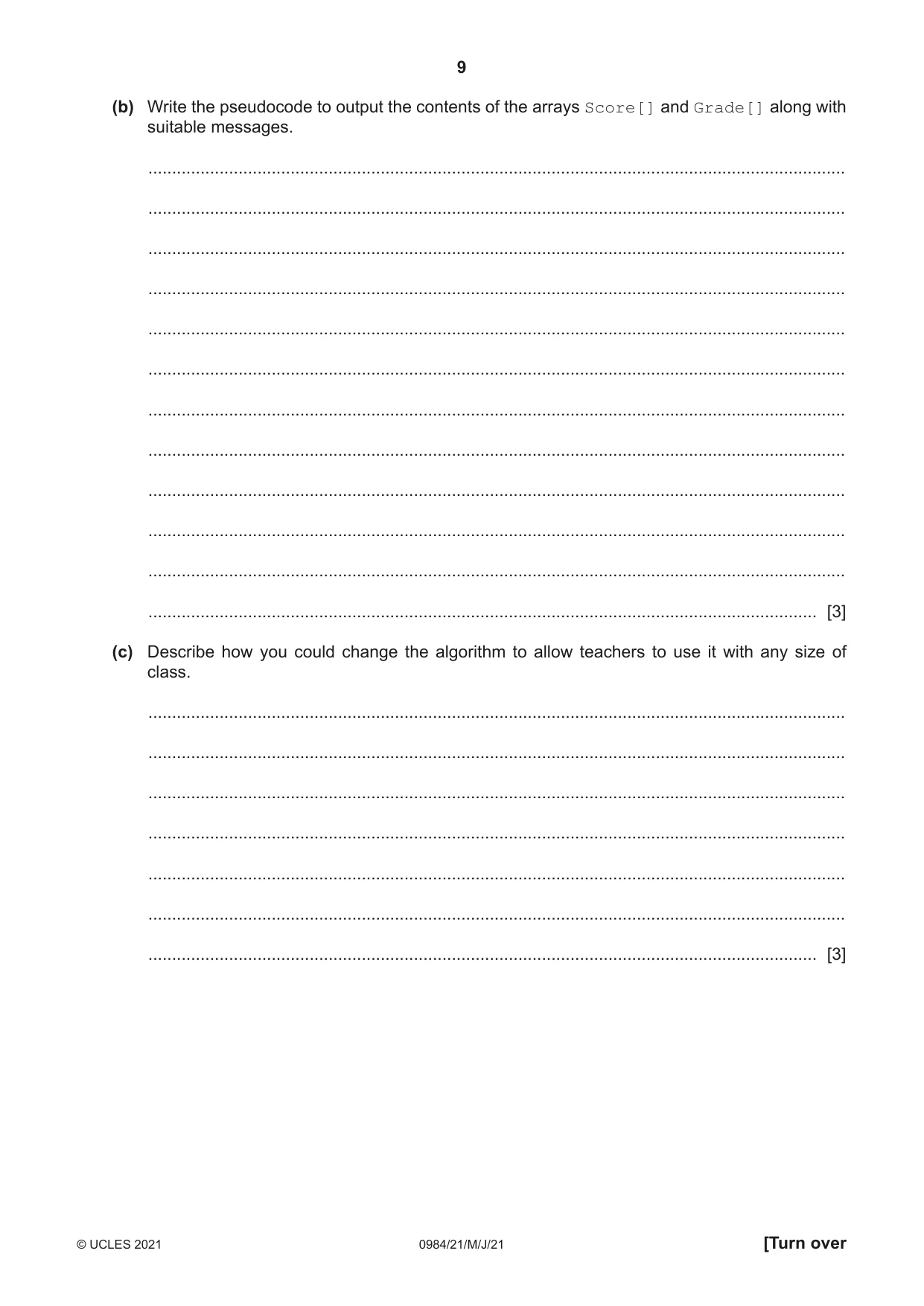
9 0984/21/M/J/21 © UCLES 2021 [Turn over (b) Write the pseudocode to output the contents of the arrays Score[] and Grade[] along with suitable messages. … … … … … … … … … … … … [3] (c) Describe how you could change the algorithm to allow teachers to use it with any size of class. … … … … … … … [3]
Question paper, page 10
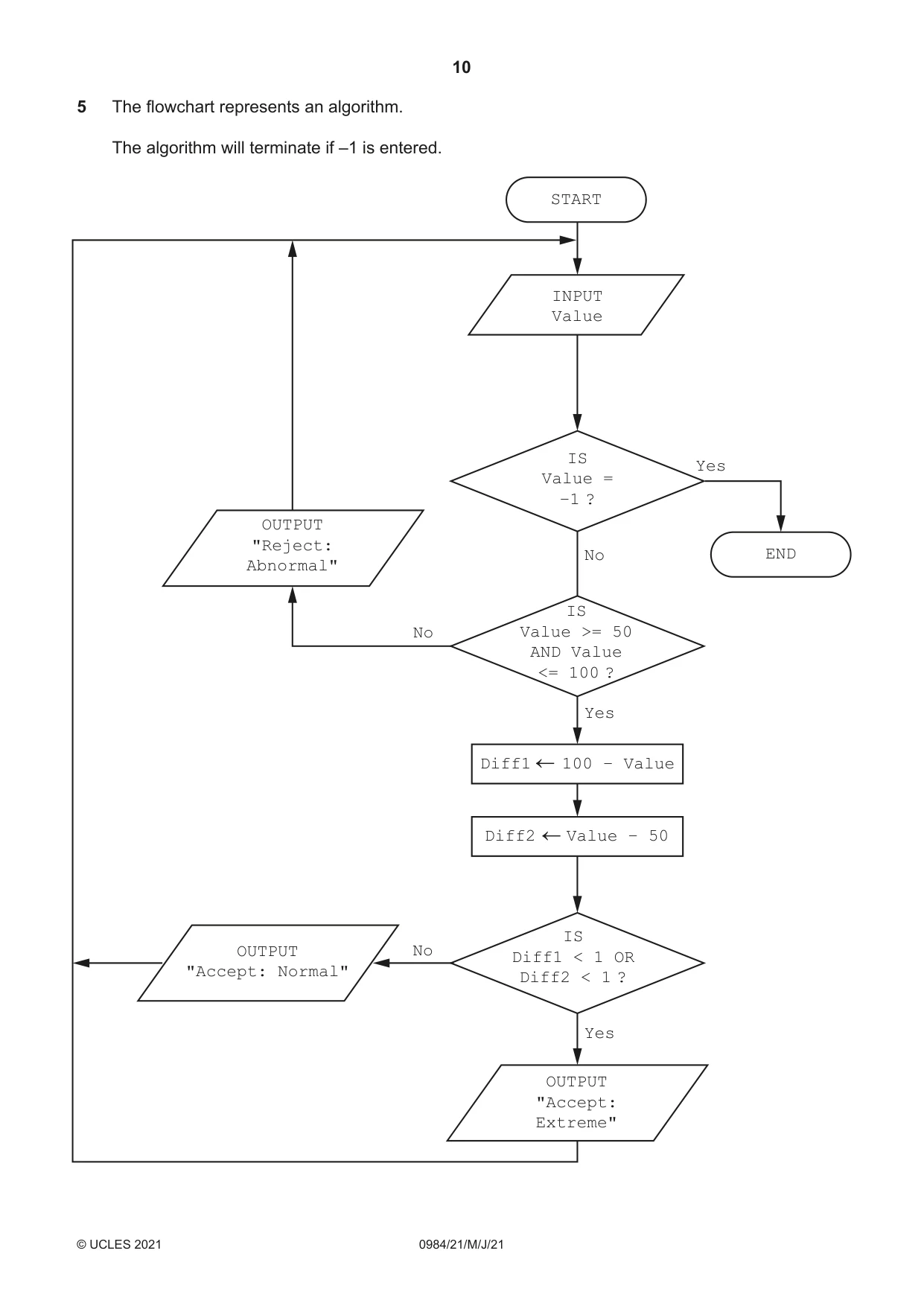
10 0984/21/M/J/21 © UCLES 2021 5 The flowchart represents an algorithm. The algorithm will terminate if –1 is entered. START INPUT Value END OUTPUT "Accept: Normal" OUTPUT "Accept: Extreme" Diff1 100 – Value Diff2 Value – 50 No IS Diff1 < 1 OR Diff2 < 1 ? IS Value = –1 ? OUTPUT "Reject: Abnormal" No No Yes Yes Yes IS Value >= 50 AND Value <= 100 ?
Question paper, page 11
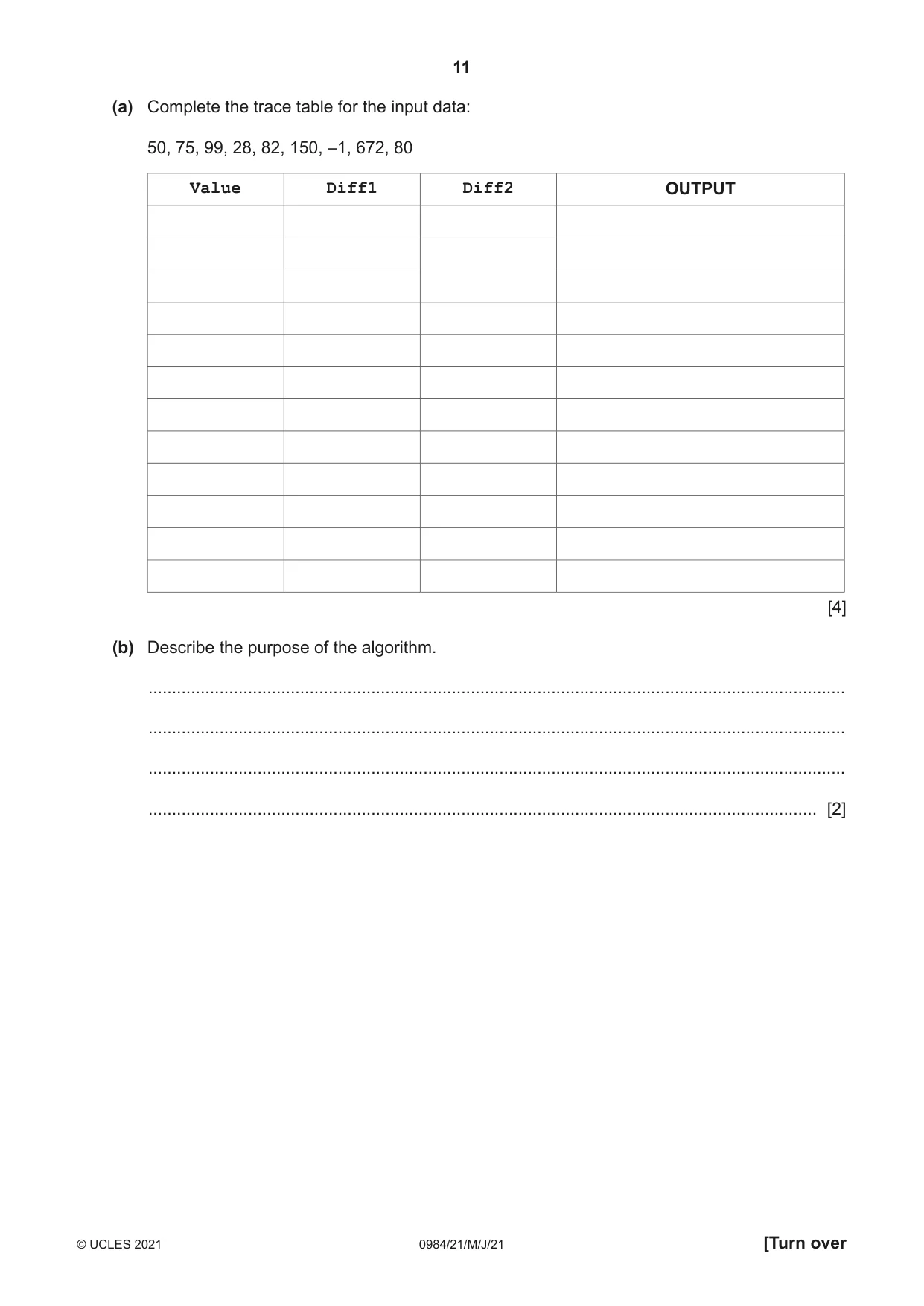
11 0984/21/M/J/21 © UCLES 2021 [Turn over (a) Complete the trace table for the input data: 50, 75, 99, 28, 82, 150, –1, 672, 80 Value Diff1 Diff2 OUTPUT [4] (b) Describe the purpose of the algorithm. … … … … [2]
Question paper, page 12
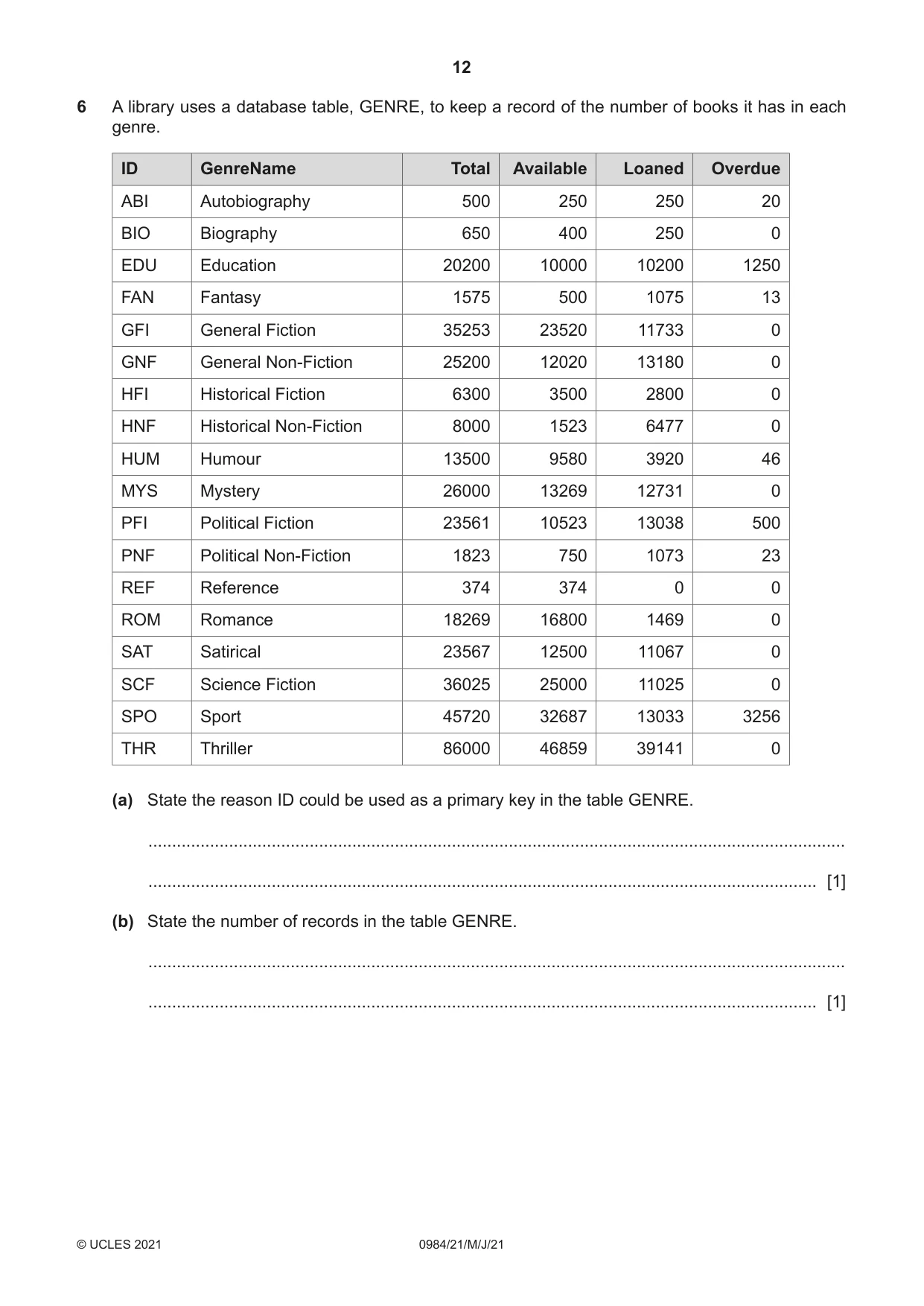
12 0984/21/M/J/21 © UCLES 2021 6 A library uses a database table, GENRE, to keep a record of the number of books it has in each genre. ID GenreName Total Available Loaned Overdue ABI Autobiography 500 250 250 20 BIO Biography 650 400 250 0 EDU Education 20200 10000 10200 1250 FAN Fantasy 1575 500 1075 13 GFI General Fiction 35253 23520 11733 0 GNF General Non-Fiction 25200 12020 13180 0 HFI Historical Fiction 6300 3500 2800 0 HNF Historical Non-Fiction 8000 1523 6477 0 HUM Humour 13500 9580 3920 46 MYS Mystery 26000 13269 12731 0 PFI Political Fiction 23561 10523 13038 500 PNF Political Non-Fiction 1823 750 1073 23 REF Reference 374 374 0 0 ROM Romance 18269 16800 1469 0 SAT Satirical 23567 12500 11067 0 SCF Science Fiction 36025 25000 11025 0 SPO Sport 45720 32687 13033 3256 THR Thriller 86000 46859 39141 0 (a) State the reason ID could be used as a primary key in the table GENRE. … … [1] (b) State the number of records in the table GENRE. … … [1]
Question paper, page 13
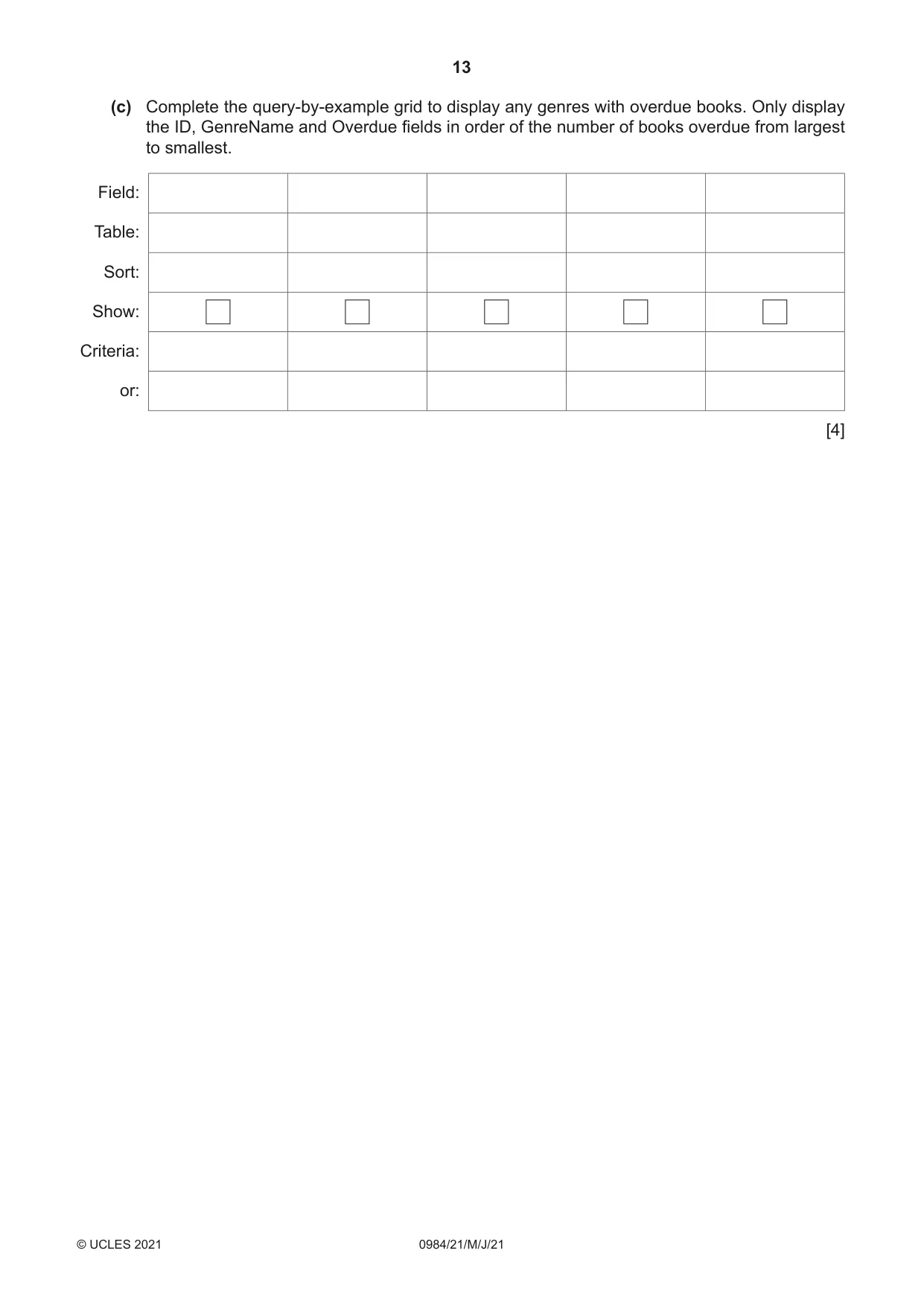
13 0984/21/M/J/21 © UCLES 2021 (c) Complete the query-by-example grid to display any genres with overdue books. Only display the ID, GenreName and Overdue fields in order of the number of books overdue from largest to smallest. Field: Table: Sort: Show: Criteria: or: [4]
Question paper, page 14
14 0984/21/M/J/21 © UCLES 2021 BLANK PAGE
Question paper, page 15
15 0984/21/M/J/21 © UCLES 2021 BLANK PAGE
Question paper, page 16
16 0984/21/M/J/21 © UCLES 2021 Permission to reproduce items where third-party owned material protected by copyright is included has been sought and cleared where possible. Every reasonable effort has been made by the publisher (UCLES) to trace copyright holders, but if any items requiring clearance have unwittingly been included, the publisher will be pleased to make amends at the earliest possible opportunity. To avoid the issue of disclosure of answer-related information to candidates, all copyright acknowledgements are reproduced online in the Cambridge Assessment International Education Copyright Acknowledgements Booklet. This is produced for each series of examinations and is freely available to download at www.cambridgeinternational.org after the live examination series. Cambridge Assessment International Education is part of the Cambridge Assessment Group. Cambridge Assessment is the brand name of the University of Cambridge Local Examinations Syndicate (UCLES), which itself is a department of the University of Cambridge. BLANK PAGE
Mark scheme, page 1
This document consists of 11 printed pages. © UCLES 2021 [Turn over Cambridge IGCSE™ (9–1) COMPUTER SCIENCE 0984/21 Paper 2 May/June 2021 MARK SCHEME Maximum Mark: 50 Published This mark scheme is published as an aid to teachers and candidates, to indicate the requirements of the examination. It shows the basis on which Examiners were instructed to award marks. It does not indicate the details of the discussions that took place at an Examiners’ meeting before marking began, which would have considered the acceptability of alternative answers. Mark schemes should be read in conjunction with the question paper and the Principal Examiner Report for Teachers. Cambridge International will not enter into discussions about these mark schemes. Cambridge International is publishing the mark schemes for the May/June 2021 series for most Cambridge IGCSE™, Cambridge International A and AS Level components and some Cambridge O Level components.
Mark scheme, page 2
0984/21 Cambridge IGCSE (9–1) – Mark Scheme PUBLISHED May/June 2021 © UCLES 2021 Page 2 of 11 Generic Marking Principles These general marking principles must be applied by all examiners when marking candidate answers. They should be applied alongside the specific content of the mark scheme or generic level descriptors for a question. Each question paper and mark scheme will also comply with these marking principles. GENERIC MARKING PRINCIPLE 1: Marks must be awarded in line with: • the specific content of the mark scheme or the generic level descriptors for the question • the specific skills defined in the mark scheme or in the generic level descriptors for the question • the standard of response required by a candidate as exemplified by the standardisation scripts. GENERIC MARKING PRINCIPLE 2: Marks awarded are always whole marks (not half marks, or other fractions). GENERIC MARKING PRINCIPLE 3: Marks must be awarded positively: • marks are awarded for correct/valid answers, as defined in the mark scheme. However, credit is given for valid answers which go beyond the scope of the syllabus and mark scheme, referring to your Team Leader as appropriate • marks are awarded when candidates clearly demonstrate what they know and can do • marks are not deducted for errors • marks are not deducted for omissions • answers should only be judged on the quality of spelling, punctuation and grammar when these features are specifically assessed by the question as indicated by the mark scheme. The meaning, however, should be unambiguous. GENERIC MARKING PRINCIPLE 4: Rules must be applied consistently, e.g. in situations where candidates have not followed instructions or in the application of generic level descriptors.
Mark scheme, page 3
0984/21 Cambridge IGCSE (9–1) – Mark Scheme PUBLISHED May/June 2021 © UCLES 2021 Page 3 of 11 GENERIC MARKING PRINCIPLE 5: Marks should be awarded using the full range of marks defined in the mark scheme for the question (however; the use of the full mark range may be limited according to the quality of the candidate responses seen). GENERIC MARKING PRINCIPLE 6: Marks awarded are based solely on the requirements as defined in the mark scheme. Marks should not be awarded with grade thresholds or grade descriptors in mind.
Mark scheme, page 4
0984/21 Cambridge IGCSE (9–1) – Mark Scheme PUBLISHED May/June 2021 © UCLES 2021 Page 4 of 11 Please note the following further points: The words in bold in the mark scheme are important text that needs to be present, or some notion of it needs to be present. It does not have to be the exact word, but something close to the meaning. If a word is underlined, this exact word must be present. A single forward slash means this is an alternative word. A double forward slash means that this is an alternative mark point. Ellipsis (…) on the end of one-mark point and the start of the next means that the candidate cannot get the second mark point without being awarded the first one. If a MP has ellipsis at the beginning, but there is no ellipsis on the MP before it, then this is just a follow-on sentence and can be awarded without the previous mark point.
Mark scheme, page 5
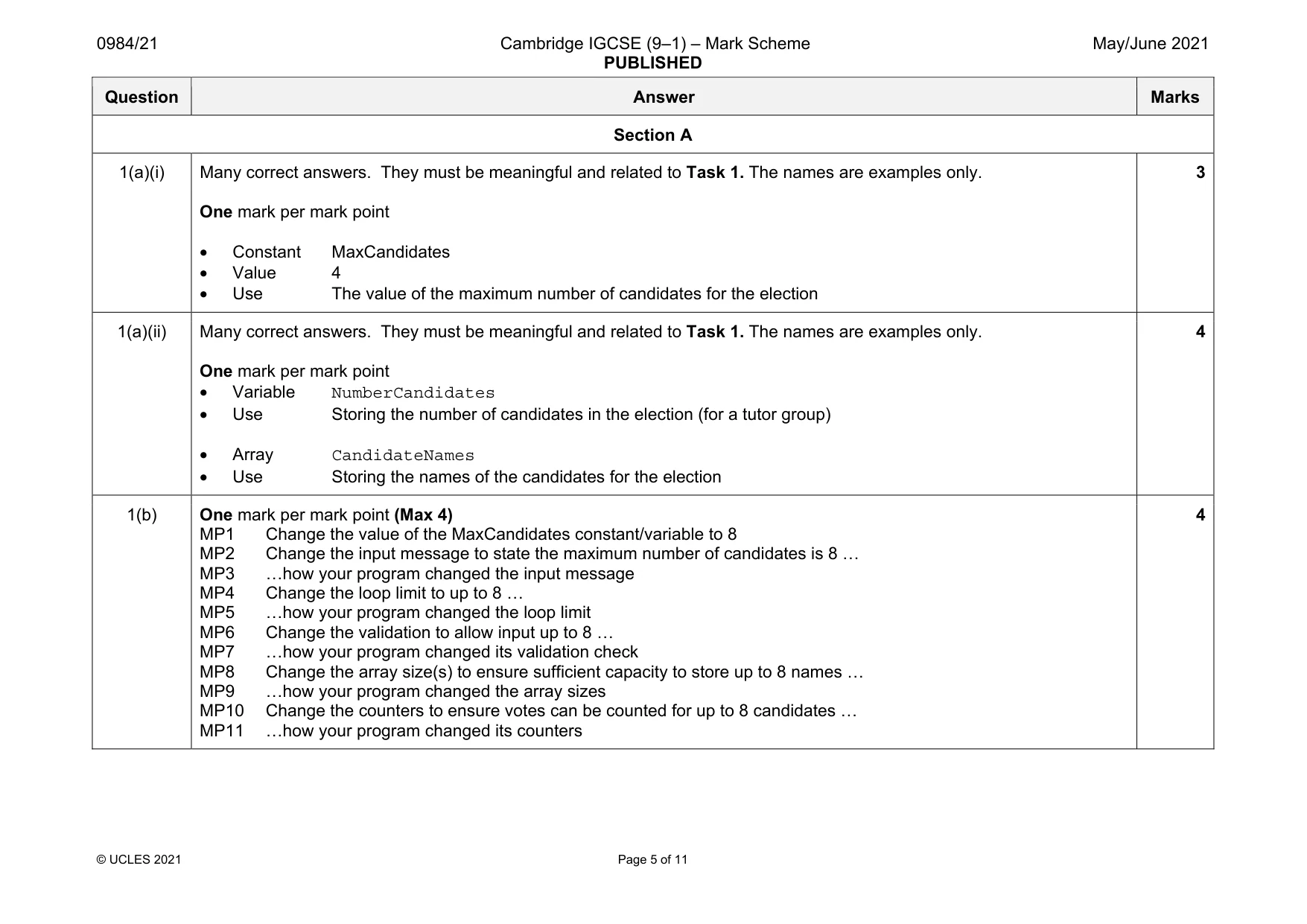
0984/21 Cambridge IGCSE (9–1) – Mark Scheme PUBLISHED May/June 2021 © UCLES 2021 Page 5 of 11 Question Answer Marks Section A 1(a)(i) Many correct answers. They must be meaningful and related to Task 1. The names are examples only. One mark per mark point • Constant MaxCandidates • Value 4 • Use The value of the maximum number of candidates for the election 3 1(a)(ii) Many correct answers. They must be meaningful and related to Task 1. The names are examples only. One mark per mark point • Variable NumberCandidates • Use Storing the number of candidates in the election (for a tutor group) • Array CandidateNames • Use Storing the names of the candidates for the election 4 1(b) One mark per mark point (Max 4) MP1 Change the value of the MaxCandidates constant/variable to 8 MP2 Change the input message to state the maximum number of candidates is 8 … MP3 …how your program changed the input message MP4 Change the loop limit to up to 8 … MP5 …how your program changed the loop limit MP6 Change the validation to allow input up to 8 … MP7 …how your program changed its validation check MP8 Change the array size(s) to ensure sufficient capacity to store up to 8 names … MP9 …how your program changed the array sizes MP10 Change the counters to ensure votes can be counted for up to 8 candidates … MP11 …how your program changed its counters 4
Mark scheme, page 6
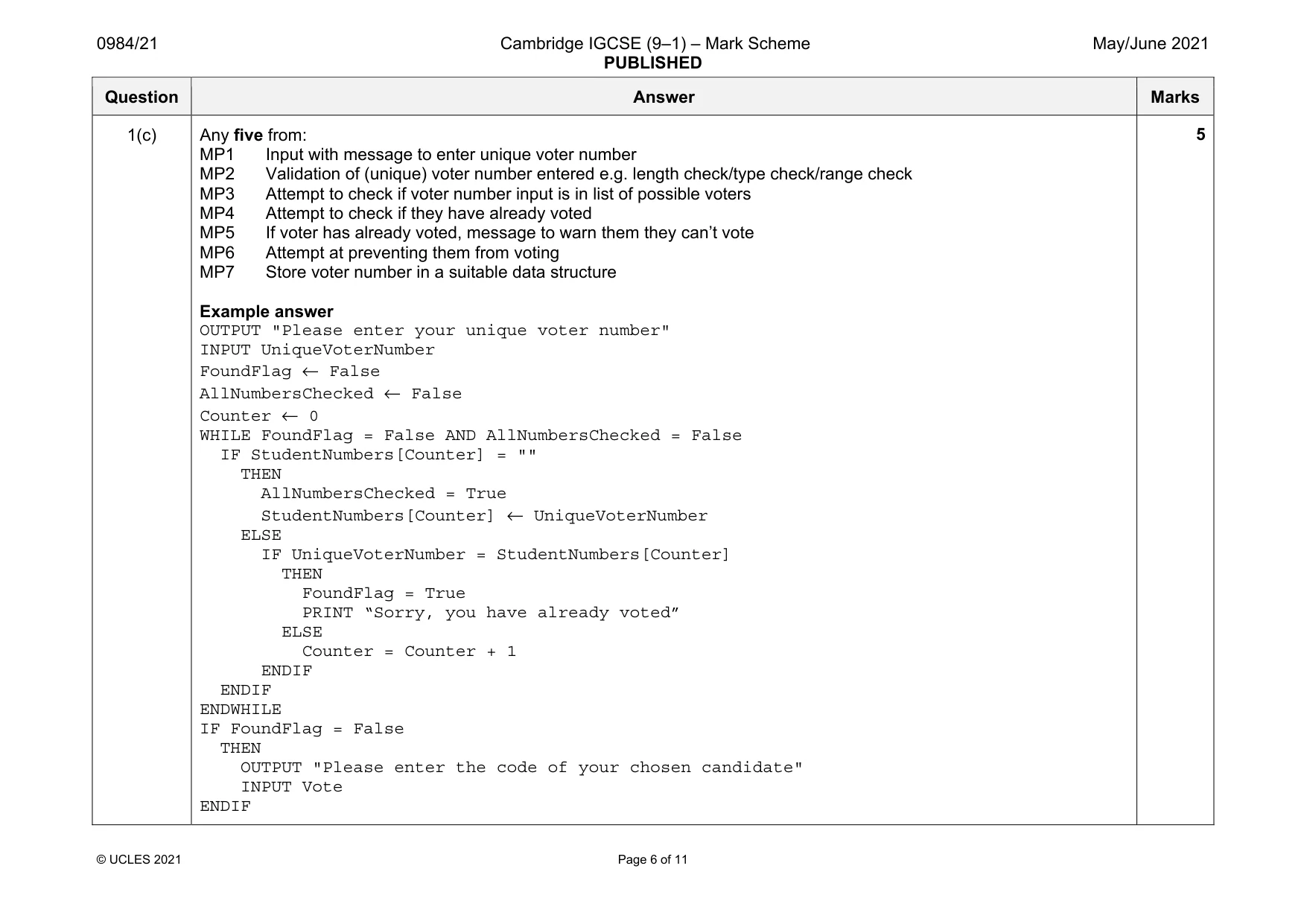
0984/21 Cambridge IGCSE (9–1) – Mark Scheme PUBLISHED May/June 2021 © UCLES 2021 Page 6 of 11 Question Answer Marks 1(c) Any five from: MP1 Input with message to enter unique voter number MP2 Validation of (unique) voter number entered e.g. length check/type check/range check MP3 Attempt to check if voter number input is in list of possible voters MP4 Attempt to check if they have already voted MP5 If voter has already voted, message to warn them they can’t vote MP6 Attempt at preventing them from voting MP7 Store voter number in a suitable data structure Example answer OUTPUT "Please enter your unique voter number" INPUT UniqueVoterNumber FoundFlag ← False AllNumbersChecked ← False Counter ← 0 WHILE FoundFlag = False AND AllNumbersChecked = False IF StudentNumbers[Counter] = "" THEN AllNumbersChecked = True StudentNumbers[Counter] ← UniqueVoterNumber ELSE IF UniqueVoterNumber = StudentNumbers[Counter] THEN FoundFlag = True PRINT “Sorry, you have already voted” ELSE Counter = Counter + 1 ENDIF ENDIF ENDWHILE IF FoundFlag = False THEN OUTPUT "Please enter the code of your chosen candidate" INPUT Vote ENDIF 5
Mark scheme, page 7
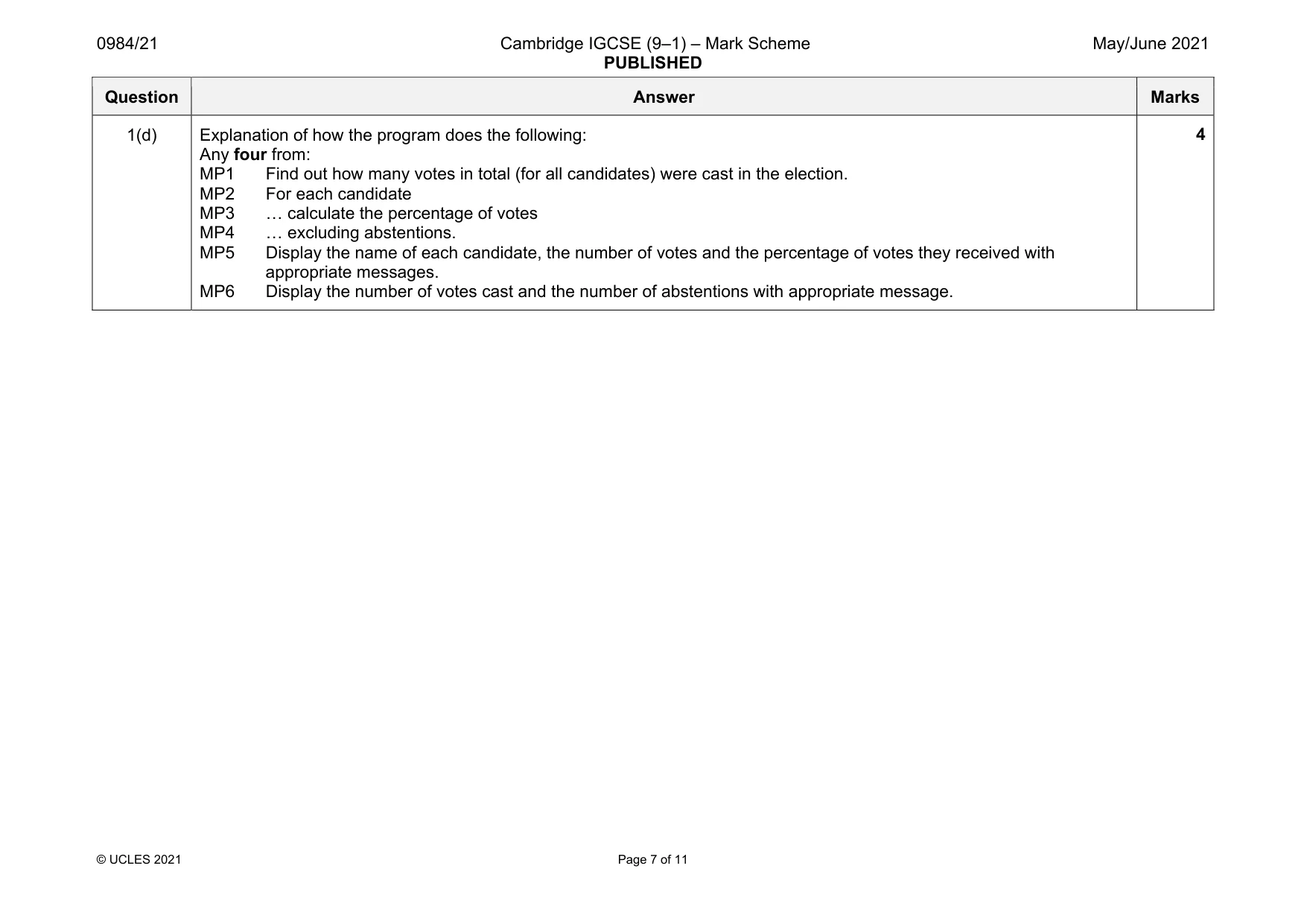
0984/21 Cambridge IGCSE (9–1) – Mark Scheme PUBLISHED May/June 2021 © UCLES 2021 Page 7 of 11 Question Answer Marks 1(d) Explanation of how the program does the following: Any four from: MP1 Find out how many votes in total (for all candidates) were cast in the election. MP2 For each candidate MP3 … calculate the percentage of votes MP4 … excluding abstentions. MP5 Display the name of each candidate, the number of votes and the percentage of votes they received with appropriate messages. MP6 Display the number of votes cast and the number of abstentions with appropriate message. 4
Mark scheme, page 8
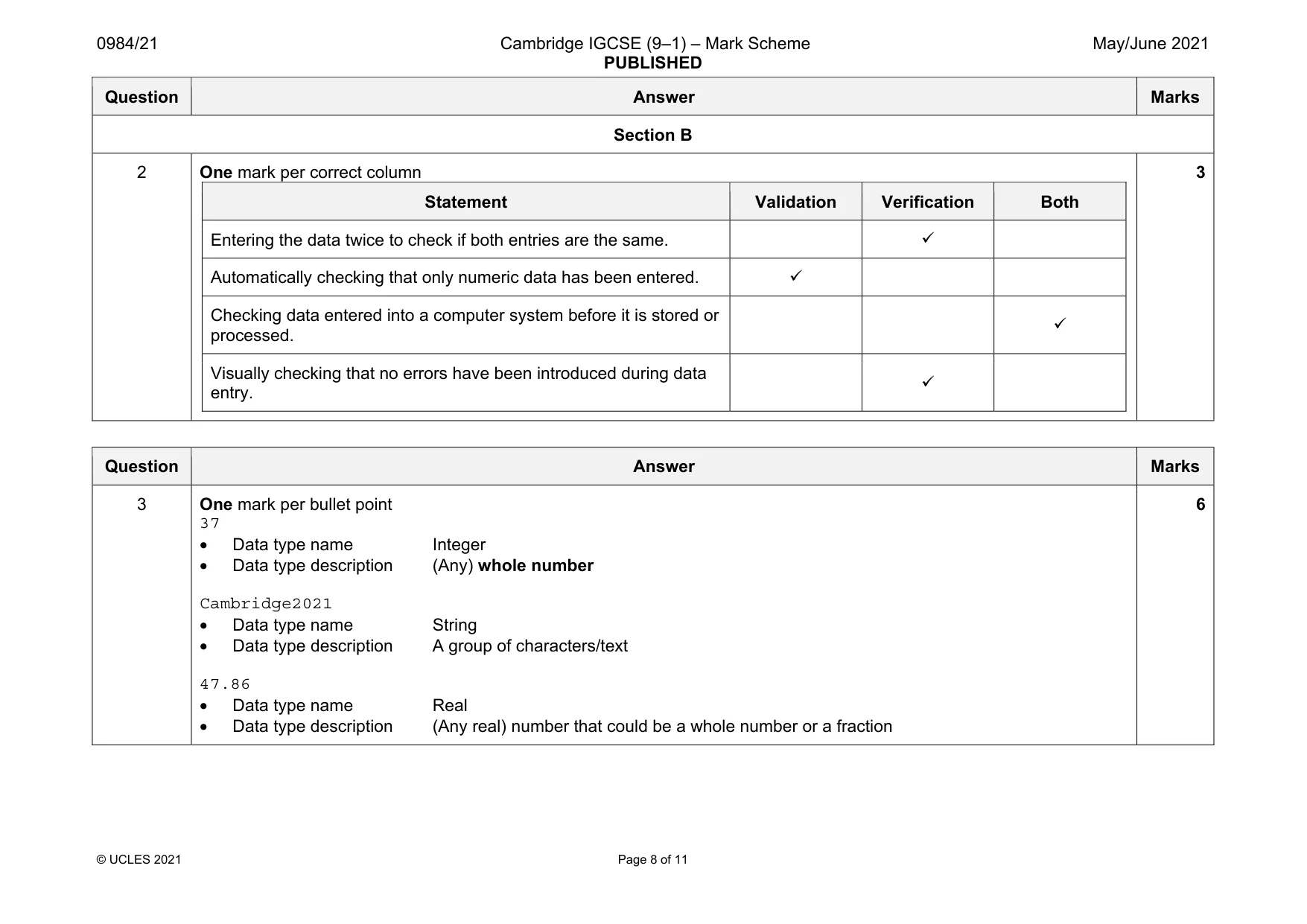
0984/21 Cambridge IGCSE (9–1) – Mark Scheme PUBLISHED May/June 2021 © UCLES 2021 Page 8 of 11 Question Answer Marks Section B 2 One mark per correct column Statement Validation Verification Both Entering the data twice to check if both entries are the same. Automatically checking that only numeric data has been entered. Checking data entered into a computer system before it is stored or processed. Visually checking that no errors have been introduced during data entry. 3 Question Answer Marks 3 One mark per bullet point 37 • Data type name Integer • Data type description (Any) whole number Cambridge2021 • Data type name String • Data type description A group of characters/text 47.86 • Data type name Real • Data type description (Any real) number that could be a whole number or a fraction 6
Mark scheme, page 9
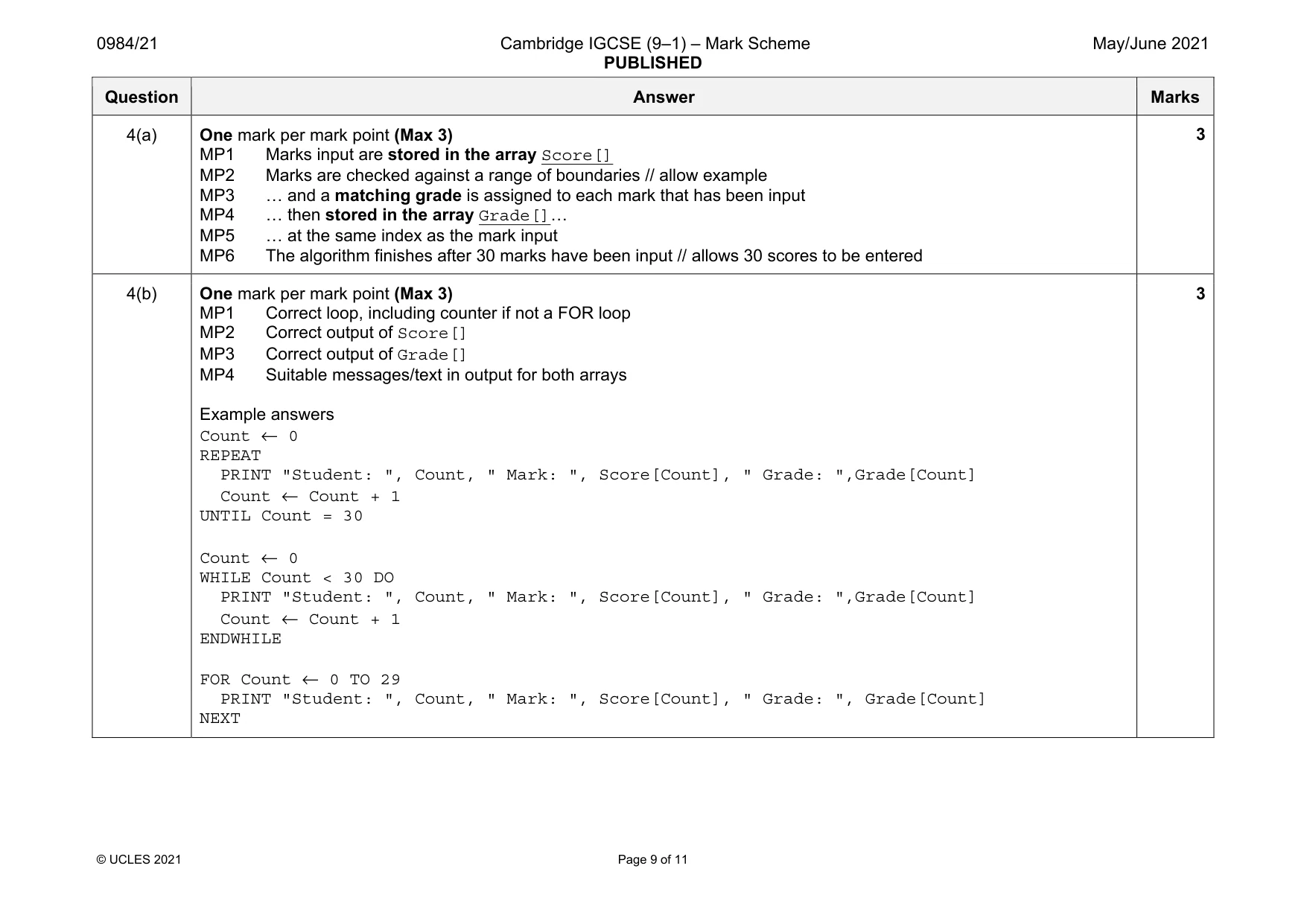
0984/21 Cambridge IGCSE (9–1) – Mark Scheme PUBLISHED May/June 2021 © UCLES 2021 Page 9 of 11 Question Answer Marks 4(a) One mark per mark point (Max 3) MP1 Marks input are stored in the array Score[] MP2 Marks are checked against a range of boundaries // allow example MP3 … and a matching grade is assigned to each mark that has been input MP4 … then stored in the array Grade[]… MP5 … at the same index as the mark input MP6 The algorithm finishes after 30 marks have been input // allows 30 scores to be entered 3 4(b) One mark per mark point (Max 3) MP1 Correct loop, including counter if not a FOR loop MP2 Correct output of Score[] MP3 Correct output of Grade[] MP4 Suitable messages/text in output for both arrays Example answers Count ← 0 REPEAT PRINT "Student: ", Count, " Mark: ", Score[Count], " Grade: ",Grade[Count] Count ← Count + 1 UNTIL Count = 30 Count ← 0 WHILE Count < 30 DO PRINT "Student: ", Count, " Mark: ", Score[Count], " Grade: ",Grade[Count] Count ← Count + 1 ENDWHILE FOR Count ← 0 TO 29 PRINT "Student: ", Count, " Mark: ", Score[Count], " Grade: ", Grade[Count] NEXT 3
Mark scheme, page 10
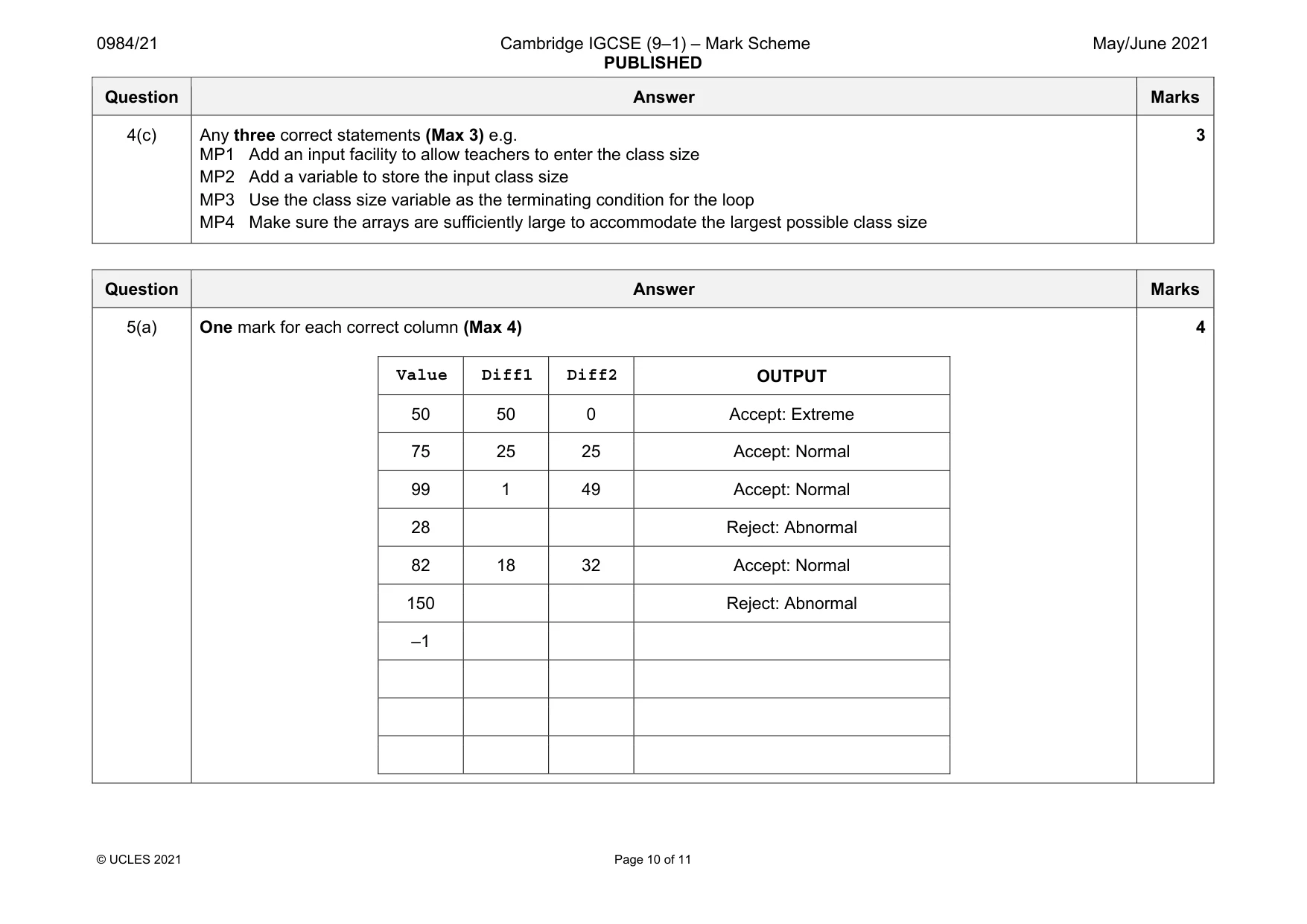
0984/21 Cambridge IGCSE (9–1) – Mark Scheme PUBLISHED May/June 2021 © UCLES 2021 Page 10 of 11 Question Answer Marks 4(c) Any three correct statements (Max 3) e.g. MP1 Add an input facility to allow teachers to enter the class size MP2 Add a variable to store the input class size MP3 Use the class size variable as the terminating condition for the loop MP4 Make sure the arrays are sufficiently large to accommodate the largest possible class size 3 Question Answer Marks 5(a) One mark for each correct column (Max 4) Value Diff1 Diff2 OUTPUT 50 50 0 Accept: Extreme 75 25 25 Accept: Normal 99 1 49 Accept: Normal 28 Reject: Abnormal 82 18 32 Accept: Normal 150 Reject: Abnormal –1 4
Mark scheme, page 11
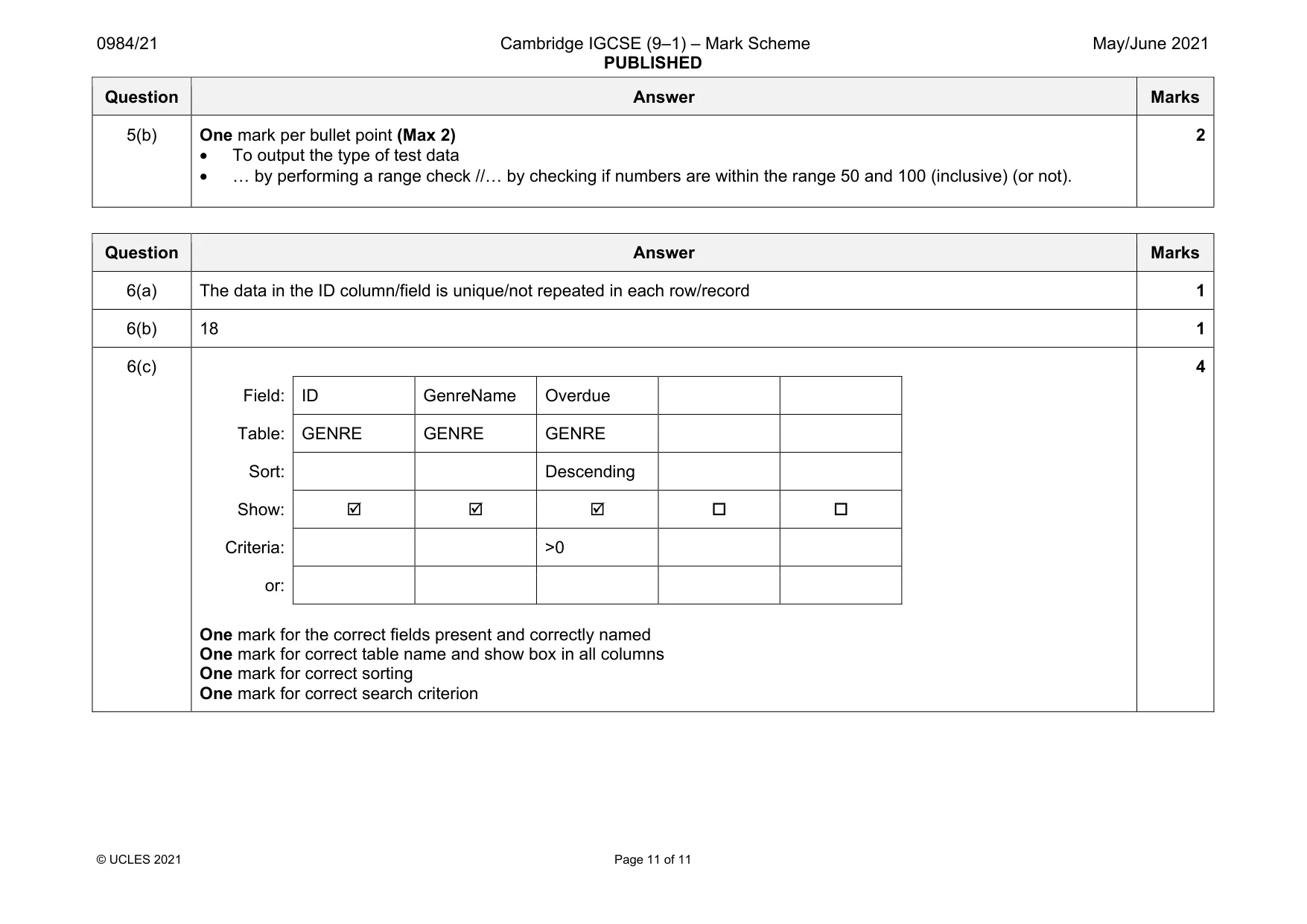
0984/21 Cambridge IGCSE (9–1) – Mark Scheme PUBLISHED May/June 2021 © UCLES 2021 Page 11 of 11 Question Answer Marks 5(b) One mark per bullet point (Max 2) • To output the type of test data • … by performing a range check //… by checking if numbers are within the range 50 and 100 (inclusive) (or not). 2 Question Answer Marks 6(a) The data in the ID column/field is unique/not repeated in each row/record 1 6(b) 18 1 6(c) Field: ID GenreName Overdue Table: GENRE GENRE GENRE Sort: Descending Show: Criteria: >0 or: One mark for the correct fields present and correctly named One mark for correct table name and show box in all columns One mark for correct sorting One mark for correct search criterion 4
What you needed in this session
Cambridge’s own grade thresholds for 2021 May/June, Paper 2 · Variant 1. A higher threshold means an easier paper — the bar moves with how the cohort did.