Cambridge IGCSE Computer Science (9-1) 0984 — 2019 May/June Paper 2 · Variant 2
0984/22/M/J/19 · 50 marks · ≈56 min
The question paper and its mark scheme, free to read here and free to download. This is Cambridge’s own paper, exactly as it was sat.
Question paper16 pages





Mark scheme9 pages
Answers below. Sit the paper first if you are practising.
Paper as text
Question paper, page 1
This document consists of 13 printed pages and 3 blank pages. DC (LEG) 193975/1 © UCLES 2019 [Turn over Cambridge Assessment International Education Cambridge International General Certificate of Secondary Education (9–1) * 6 2 9 2 9 0 6 2 4 7 * COMPUTER SCIENCE 0984/22 Paper 2 Problem-solving and Programming May/June 2019 1 hour 45 minutes Candidates answer on the Question Paper. No Additional Materials are required. No calculators allowed. READ THESE INSTRUCTIONS FIRST Write your centre number, candidate number and name in the spaces at the top of this page. Write in dark blue or black pen. You may use an HB pencil for any diagrams, graphs or rough working. Do not use staples, paper clips, glue or correction fluid. DO NOT WRITE IN ANY BARCODES. Answer all questions. DO NOT ATTEMPT TASKS 1, 2 AND 3 in the pre-release material; these are for information only. You are advised to spend no more than 40 minutes on Section A (Question 1). No marks will be awarded for using brand names of software packages or hardware. Any businesses described in this paper are entirely fictitious. At the end of the examination, fasten all your work securely together. The number of marks is given in brackets [ ] at the end of each question or part question. The maximum number of marks is 50.
Question paper, page 2
2 0984/22/M/J/19 © UCLES 2019 Section A You are advised to spend no longer than 40 minutes answering this section. Here is a copy of the pre-release material. DO NOT attempt Tasks 1, 2 and 3 now. Use the pre-release material and your experience from attempting the tasks before the examination to answer Question 1. Pre-release material An auction company has an interactive auction board at their sale rooms, which allows buyers to place bids at any time during the auction. Before the auction starts, the sellers place their items in the sale room with a unique number attached to each item (item number). The following details about each item need to be set up on the interactive auction board system: item number, number of bids, description and reserve price. The number of bids is initially set to zero. During the auction, buyers can look at the items in the sale room and then place a bid on the interactive auction board at the sale room. Each buyer is given a unique number for identification (buyer number). All the buyer needs to do is enter their buyer number, the item number and their bid. Their bid must be greater than any existing bids. At the end of the auction, the company checks all the items and marks those that have bids greater than the reserve as sold. Any items sold will incur a fee of 10% of the final bid to be paid to the auction company. Write and test a program or programs for the auction company. • Your program or programs must include appropriate prompts for the entry of data, data must be validated on entry. • Error messages and other output need to be set out clearly and understandably. • All variables, constants and other identifiers must have meaningful names. You will need to complete these three tasks. Each task must be fully tested. Task 1 – Auction set up. For every item in the auction the item number, description and the reserve price should be recorded. The number of bids is set to zero. There must be at least 10 items in the auction. Task 2 – Buyer bids. A buyer should be able to find an item and view the item number, description and the current highest bid. A buyer can then enter their buyer number and bid, which must be higher than any previously recorded bids. Every time a new bid is recorded the number of bids for that item is increased by one. Buyers can bid for an item many times and they can bid for many items. Task 3 – At the end of the auction. Using the results from TASK 2, identify items that have reached their reserve price, mark them as sold, calculate 10% of the final bid as the auction company fee and add this to the total fee for all sold items. Display this total fee. Display the item number and final bid for all the items with bids that have not reached their reserve price. Display the item number of any items that have received no bids. Display the number of items sold, the number of items that did not meet the reserve price and the number of items with no bids.
Question paper, page 3
3 0984/22/M/J/19 © UCLES 2019 [Turn over 1 (a) All variables, constants and other identifiers must have meaningful names. Describe the data structures you have used in Task 1 to record the items for sale. Include some sample data for each data structure you have described. … … … … … … … … … … … [5] (b) Explain how your program for Task 1 ensures the item number is unique. … … … … [2]
Question paper, page 4
4 0984/22/M/J/19 © UCLES 2019 (c) Write an algorithm for the part of Task 2 that allows the buyer to add a new bid, using either pseudocode, programming statements or a flowchart. Assume that Task 1 has been completed and that the item details have already been found. … … … … … … … … … … … … … … … … … … … … … … … … … …
Question paper, page 5
5 0984/22/M/J/19 © UCLES 2019 [Turn over … … … … … … … … … … … … … … … … … … … … … … … … … … [5]
Question paper, page 6
6 0984/22/M/J/19 © UCLES 2019 (d) Explain how your program for Task 2 checks that a new bid is higher than previous bids for an item. … … … … … … [3]
Question paper, page 7
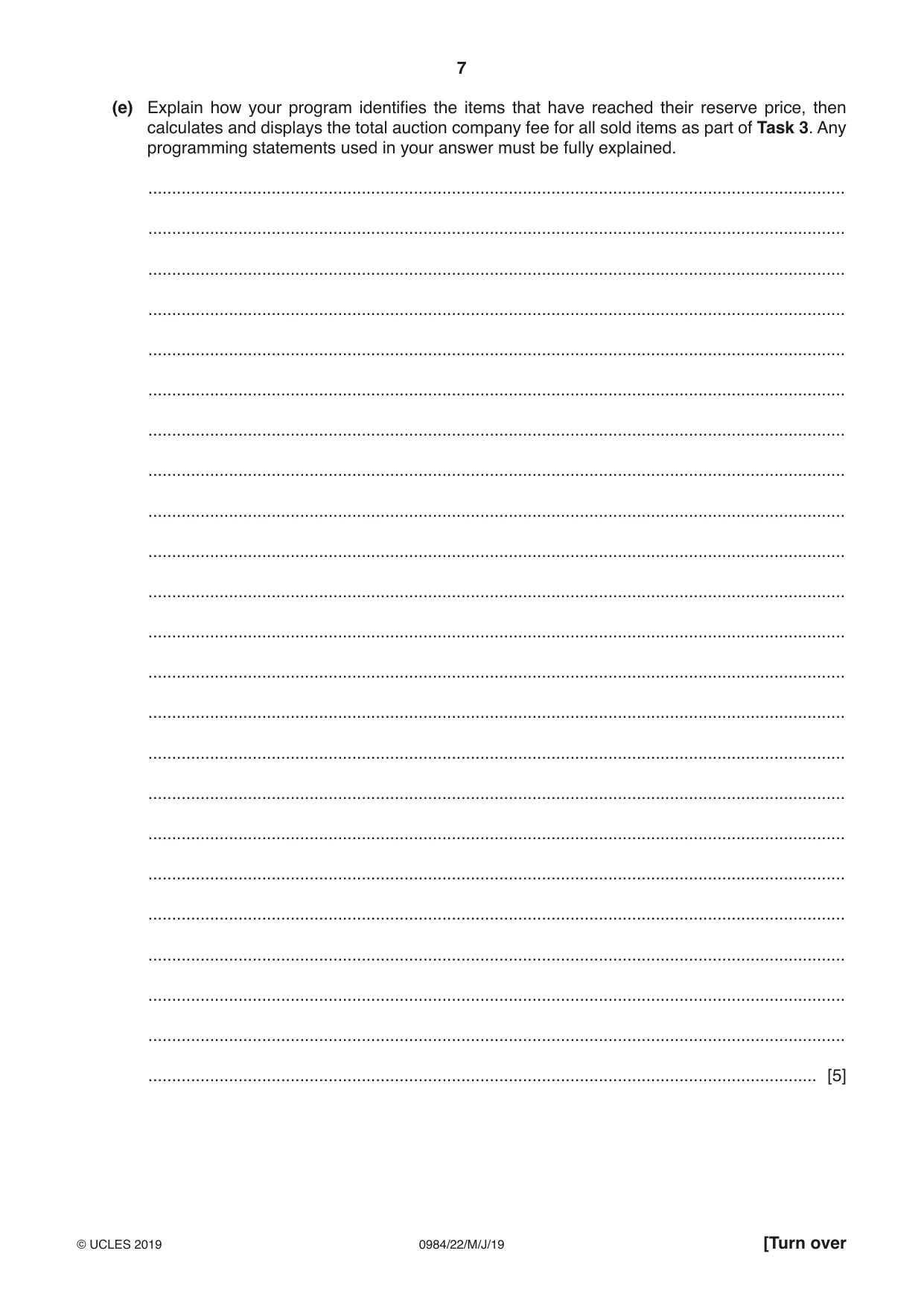
7 0984/22/M/J/19 © UCLES 2019 [Turn over (e) Explain how your program identifies the items that have reached their reserve price, then calculates and displays the total auction company fee for all sold items as part of Task 3. Any programming statements used in your answer must be fully explained. … … … … … … … … … … … … … … … … … … … … … … … [5]
Question paper, page 8
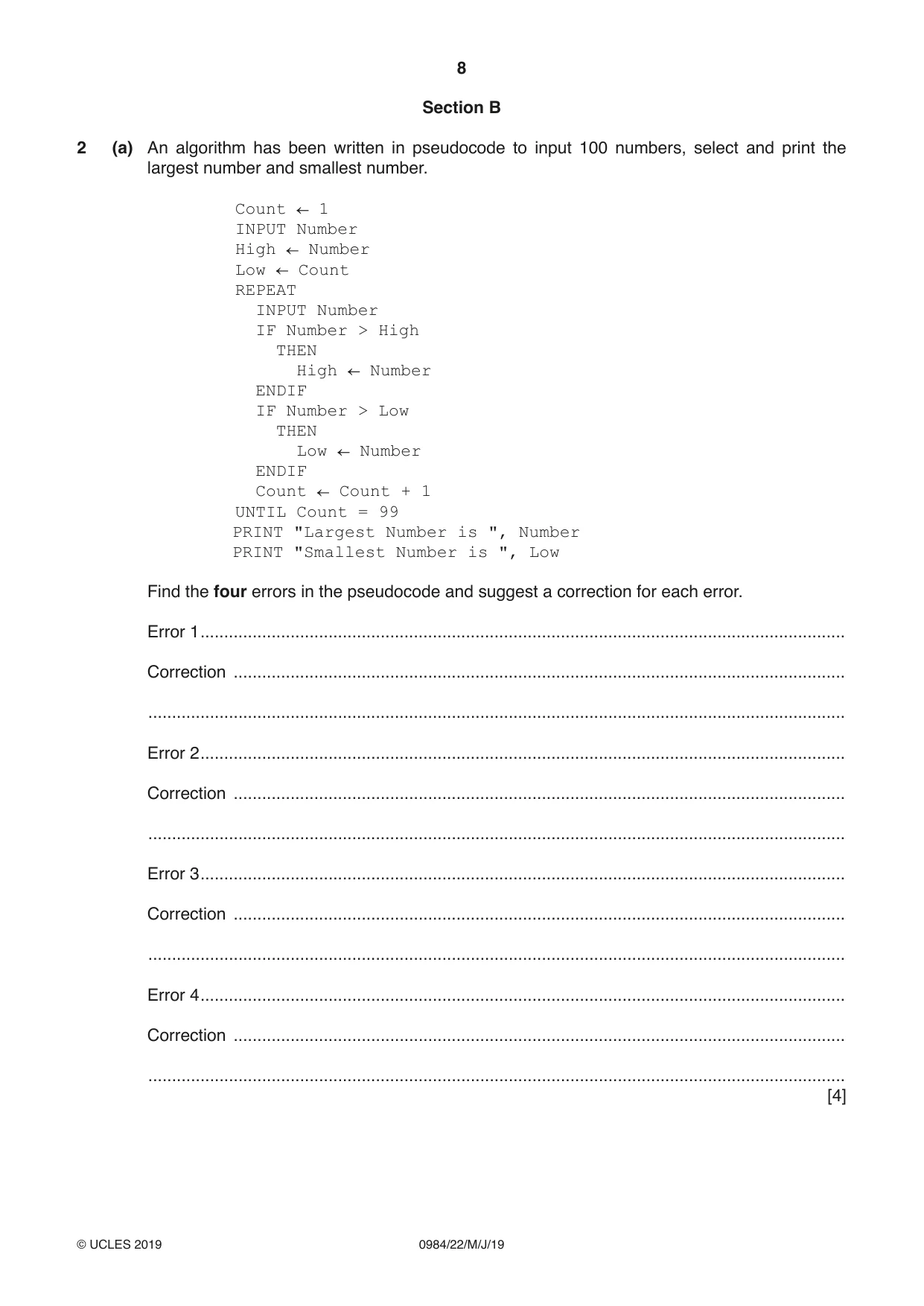
8 0984/22/M/J/19 © UCLES 2019 Section B 2 (a) An algorithm has been written in pseudocode to input 100 numbers, select and print the largest number and smallest number. Count 1 INPUT Number High Number Low Count REPEAT INPUT Number IF Number > High THEN High Number ENDIF IF Number > Low THEN Low Number ENDIF Count Count + 1 UNTIL Count = 99 PRINT "Largest Number is ", Number PRINT "Smallest Number is ", Low Find the four errors in the pseudocode and suggest a correction for each error. Error 1 … Correction … … Error 2 … Correction … … Error 3 … Correction … … Error 4 … Correction … … [4]
Question paper, page 9
9 0984/22/M/J/19 © UCLES 2019 [Turn over (b) Show how you would change the corrected algorithm to total the numbers and print the total. Use a variable Total. … … … … … … … … [4]
Question paper, page 10
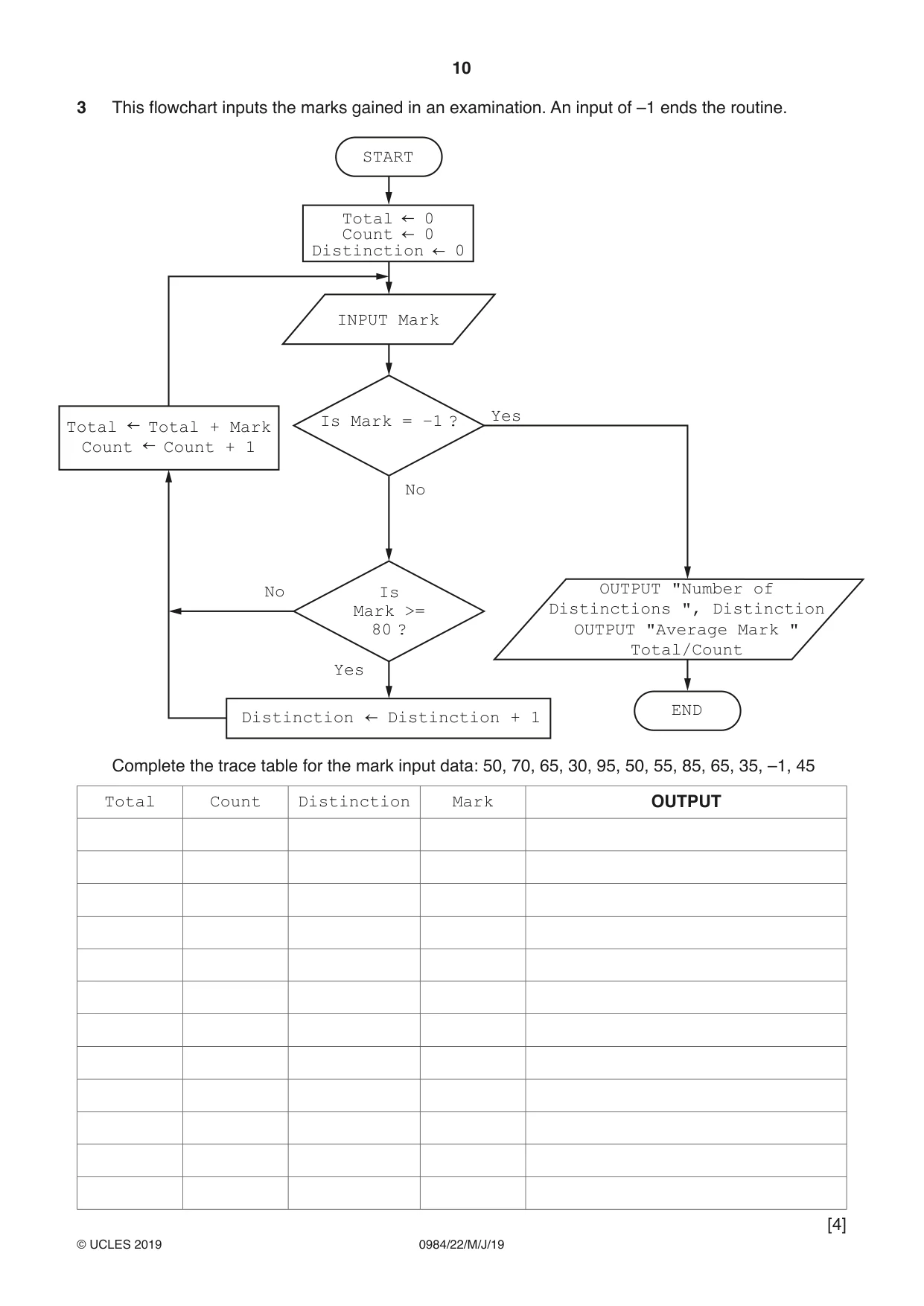
10 0984/22/M/J/19 © UCLES 2019 3 This flowchart inputs the marks gained in an examination. An input of –1 ends the routine. OUTPUT "Number of Distinctions ", Distinction OUTPUT "Average Mark " Total/Count START END Is Mark = –1 ? Is Mark >= 80 ? INPUT Mark Total 0 Count 0 Distinction 0 No No Yes Yes Total Total + Mark Count Count + 1 Distinction Distinction + 1 Complete the trace table for the mark input data: 50, 70, 65, 30, 95, 50, 55, 85, 65, 35, –1, 45 Total Count Distinction Mark OUTPUT [4]
Question paper, page 11
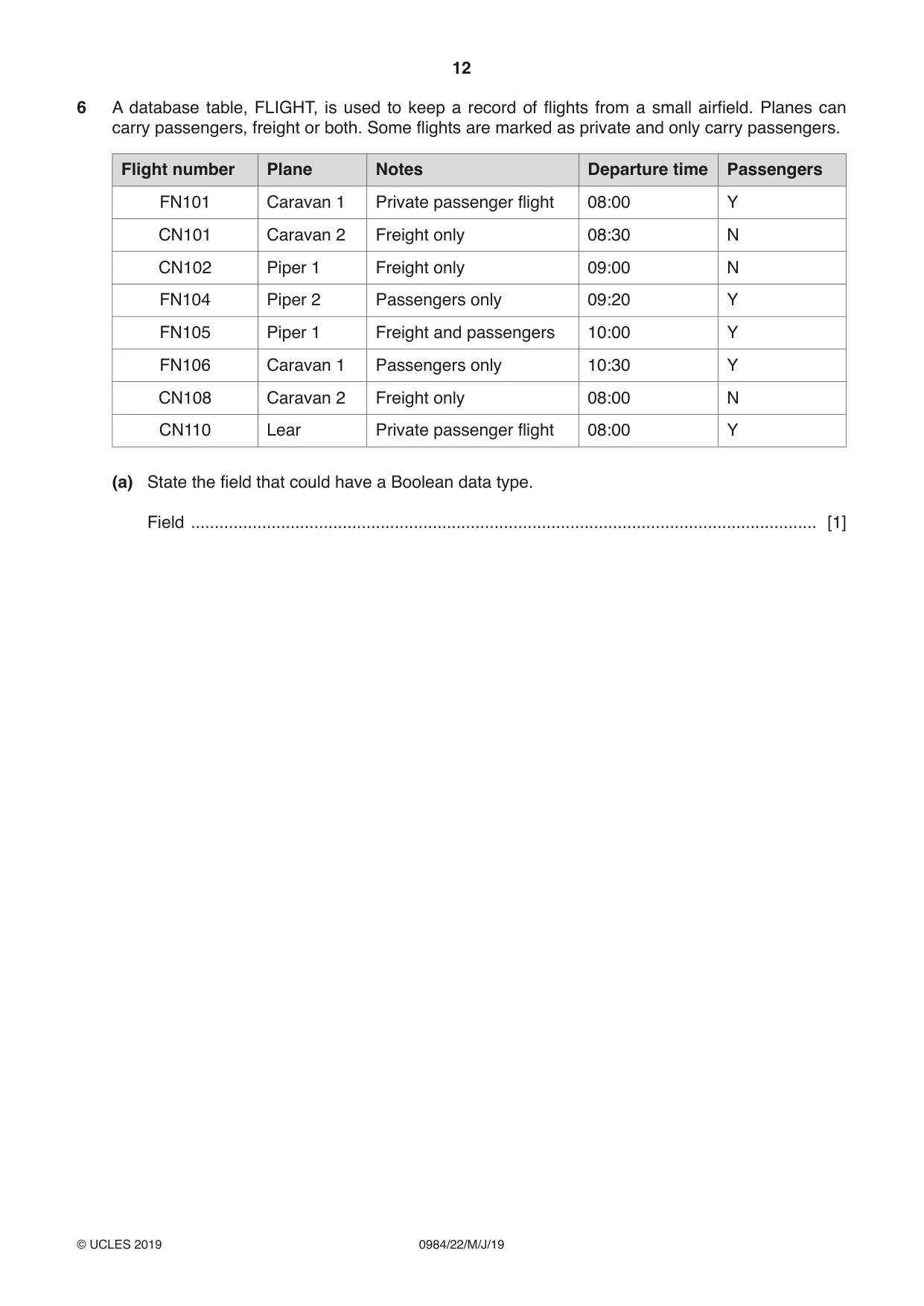
11 0984/22/M/J/19 © UCLES 2019 [Turn over 4 For each of the four groups of statements in the table, place a tick in the correct column to show whether it is an example of Selection or Repetition. Statements Selection Repetition FOR A 1 TO 100 B B + 1 NEXT A CASE A OF 100: B A 200: C A ENDCASE IF A > 100 THEN B A ENDIF REPEAT A B * 10 UNTIL A > 100 [4] 5 Explain what is meant by validation and verification. Give an example for each one. Validation … … … … Example … … … Verification … … … … Example … … … [6]
Question paper, page 12
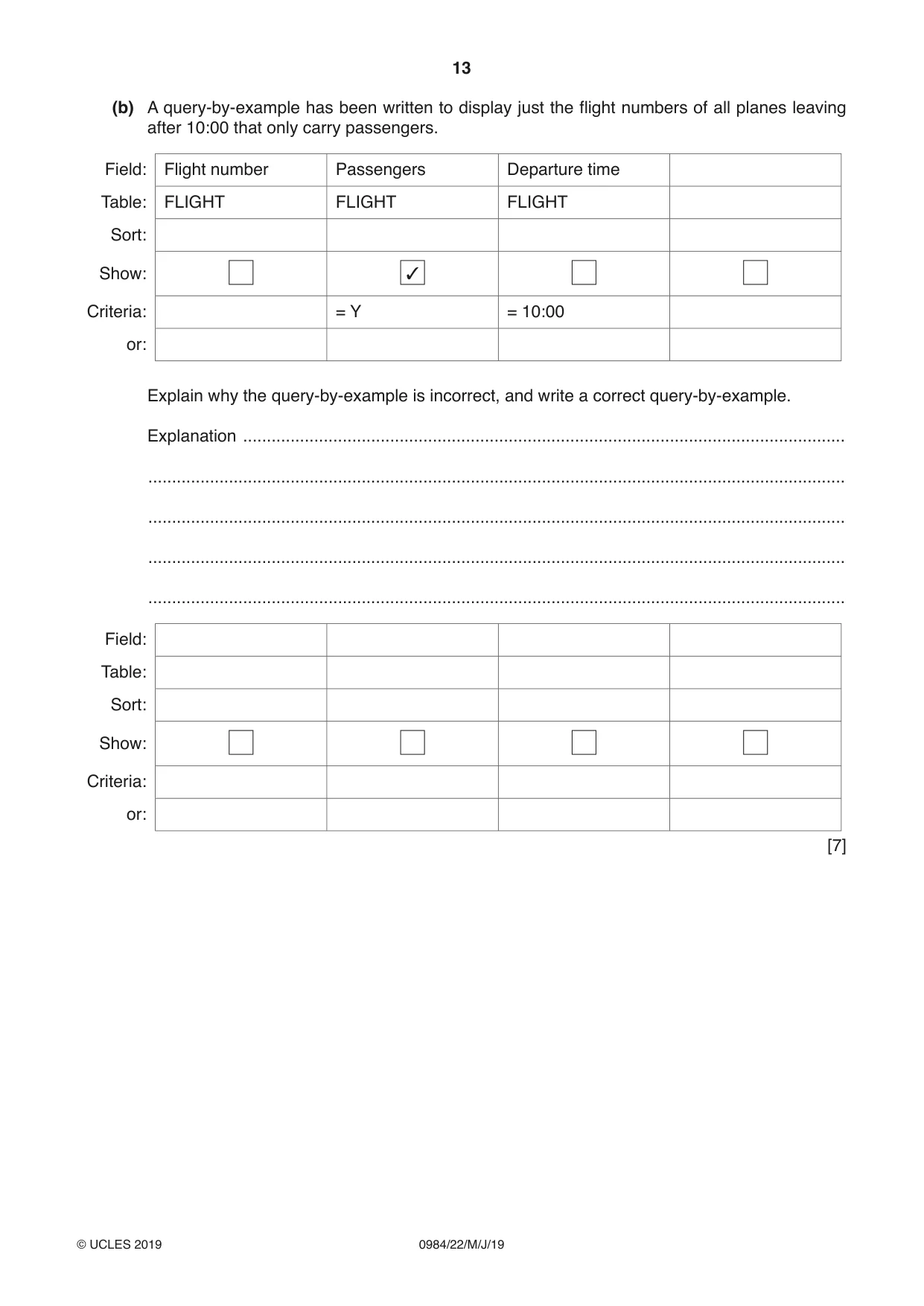
12 0984/22/M/J/19 © UCLES 2019 6 A database table, FLIGHT, is used to keep a record of flights from a small airfield. Planes can carry passengers, freight or both. Some flights are marked as private and only carry passengers. Flight number Plane Notes Departure time Passengers FN101 Caravan 1 Private passenger flight 08:00 Y CN101 Caravan 2 Freight only 08:30 N CN102 Piper 1 Freight only 09:00 N FN104 Piper 2 Passengers only 09:20 Y FN105 Piper 1 Freight and passengers 10:00 Y FN106 Caravan 1 Passengers only 10:30 Y CN108 Caravan 2 Freight only 08:00 N CN110 Lear Private passenger flight 08:00 Y (a) State the field that could have a Boolean data type. Field … [1]
Question paper, page 13
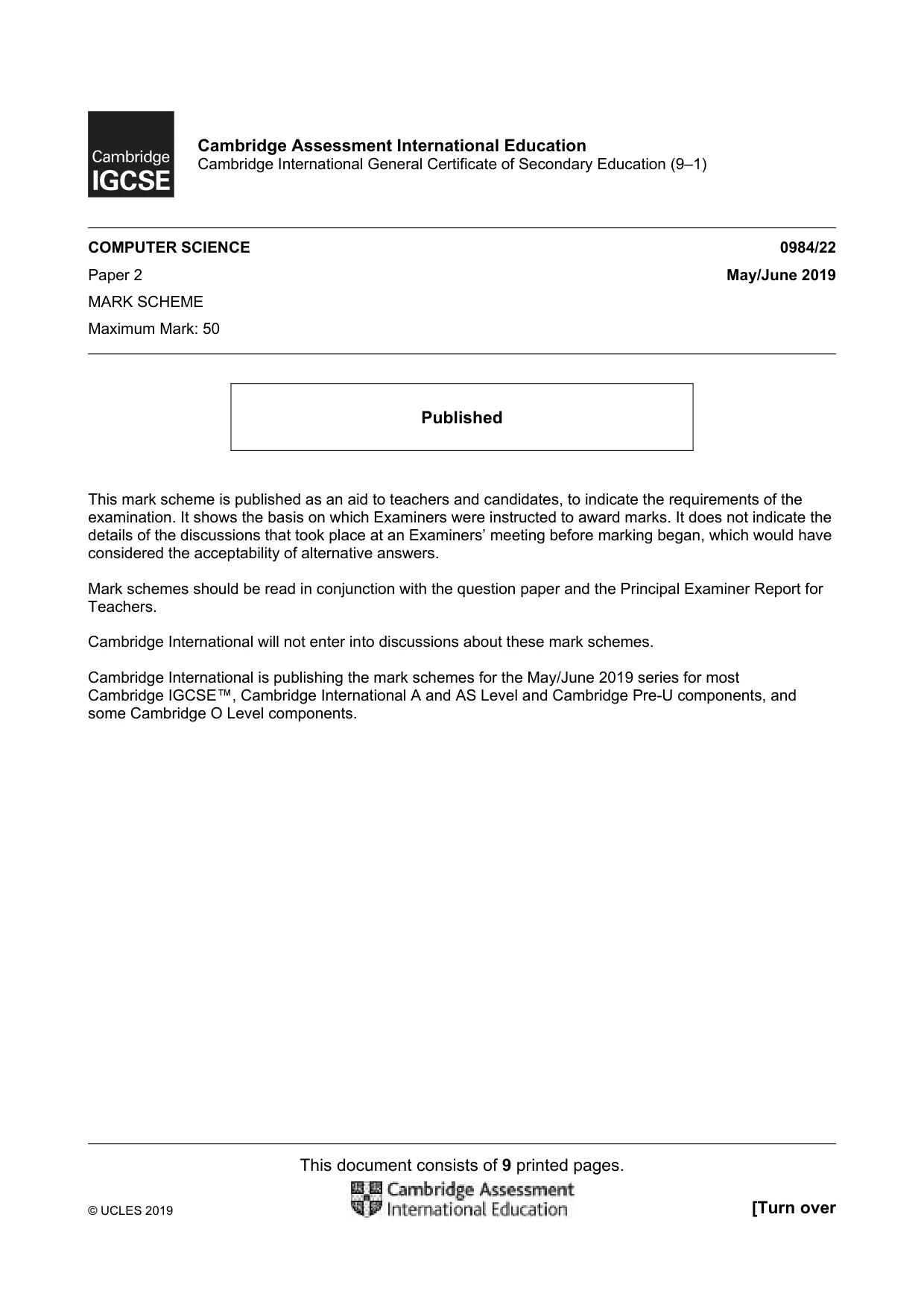
13 0984/22/M/J/19 © UCLES 2019 (b) A query-by-example has been written to display just the flight numbers of all planes leaving after 10:00 that only carry passengers. Field: Flight number Passengers Departure time Table: FLIGHT FLIGHT FLIGHT Sort: Show: 3 Criteria: = Y = 10:00 or: Explain why the query-by-example is incorrect, and write a correct query-by-example. Explanation … … … … … Field: Table: Sort: Show: Criteria: or: [7]
Question paper, page 14
14 0984/22/M/J/19 © UCLES 2019 BLANK PAGE
Question paper, page 15
15 0984/22/M/J/19 © UCLES 2019 BLANK PAGE
Question paper, page 16
16 0984/22/M/J/19 © UCLES 2019 Permission to reproduce items where third-party owned material protected by copyright is included has been sought and cleared where possible. Every reasonable effort has been made by the publisher (UCLES) to trace copyright holders, but if any items requiring clearance have unwittingly been included, the publisher will be pleased to make amends at the earliest possible opportunity. To avoid the issue of disclosure of answer-related information to candidates, all copyright acknowledgements are reproduced online in the Cambridge Assessment International Education Copyright Acknowledgements Booklet. This is produced for each series of examinations and is freely available to download at www.cambridgeinternational.org after the live examination series. Cambridge Assessment International Education is part of the Cambridge Assessment Group. Cambridge Assessment is the brand name of the University of Cambridge Local Examinations Syndicate (UCLES), which itself is a department of the University of Cambridge. BLANK PAGE
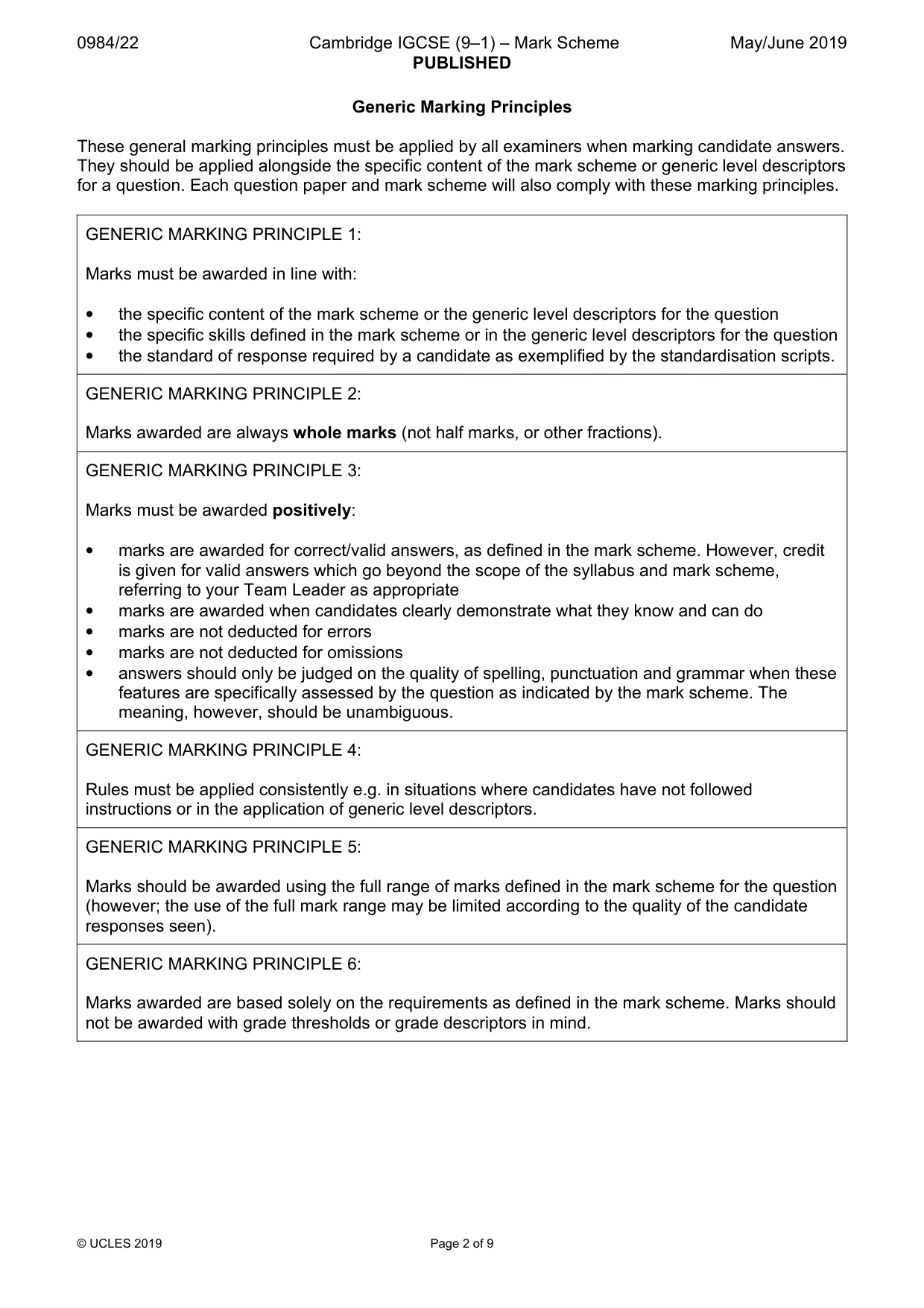
Mark scheme, page 1
This document consists of 9 printed pages. © UCLES 2019 [Turn over Cambridge Assessment International Education Cambridge International General Certificate of Secondary Education (9–1) COMPUTER SCIENCE 0984/22 Paper 2 May/June 2019 MARK SCHEME Maximum Mark: 50 Published This mark scheme is published as an aid to teachers and candidates, to indicate the requirements of the examination. It shows the basis on which Examiners were instructed to award marks. It does not indicate the details of the discussions that took place at an Examiners’ meeting before marking began, which would have considered the acceptability of alternative answers. Mark schemes should be read in conjunction with the question paper and the Principal Examiner Report for Teachers. Cambridge International will not enter into discussions about these mark schemes. Cambridge International is publishing the mark schemes for the May/June 2019 series for most Cambridge IGCSE™, Cambridge International A and AS Level and Cambridge Pre-U components, and some Cambridge O Level components.
Mark scheme, page 2
0984/22 Cambridge IGCSE (9–1) – Mark Scheme PUBLISHED May/June 2019 © UCLES 2019 Page 2 of 9 Generic Marking Principles These general marking principles must be applied by all examiners when marking candidate answers. They should be applied alongside the specific content of the mark scheme or generic level descriptors for a question. Each question paper and mark scheme will also comply with these marking principles. GENERIC MARKING PRINCIPLE 1: Marks must be awarded in line with: • the specific content of the mark scheme or the generic level descriptors for the question • the specific skills defined in the mark scheme or in the generic level descriptors for the question • the standard of response required by a candidate as exemplified by the standardisation scripts. GENERIC MARKING PRINCIPLE 2: Marks awarded are always whole marks (not half marks, or other fractions). GENERIC MARKING PRINCIPLE 3: Marks must be awarded positively: • marks are awarded for correct/valid answers, as defined in the mark scheme. However, credit is given for valid answers which go beyond the scope of the syllabus and mark scheme, referring to your Team Leader as appropriate • marks are awarded when candidates clearly demonstrate what they know and can do • marks are not deducted for errors • marks are not deducted for omissions • answers should only be judged on the quality of spelling, punctuation and grammar when these features are specifically assessed by the question as indicated by the mark scheme. The meaning, however, should be unambiguous. GENERIC MARKING PRINCIPLE 4: Rules must be applied consistently e.g. in situations where candidates have not followed instructions or in the application of generic level descriptors. GENERIC MARKING PRINCIPLE 5: Marks should be awarded using the full range of marks defined in the mark scheme for the question (however; the use of the full mark range may be limited according to the quality of the candidate responses seen). GENERIC MARKING PRINCIPLE 6: Marks awarded are based solely on the requirements as defined in the mark scheme. Marks should not be awarded with grade thresholds or grade descriptors in mind.
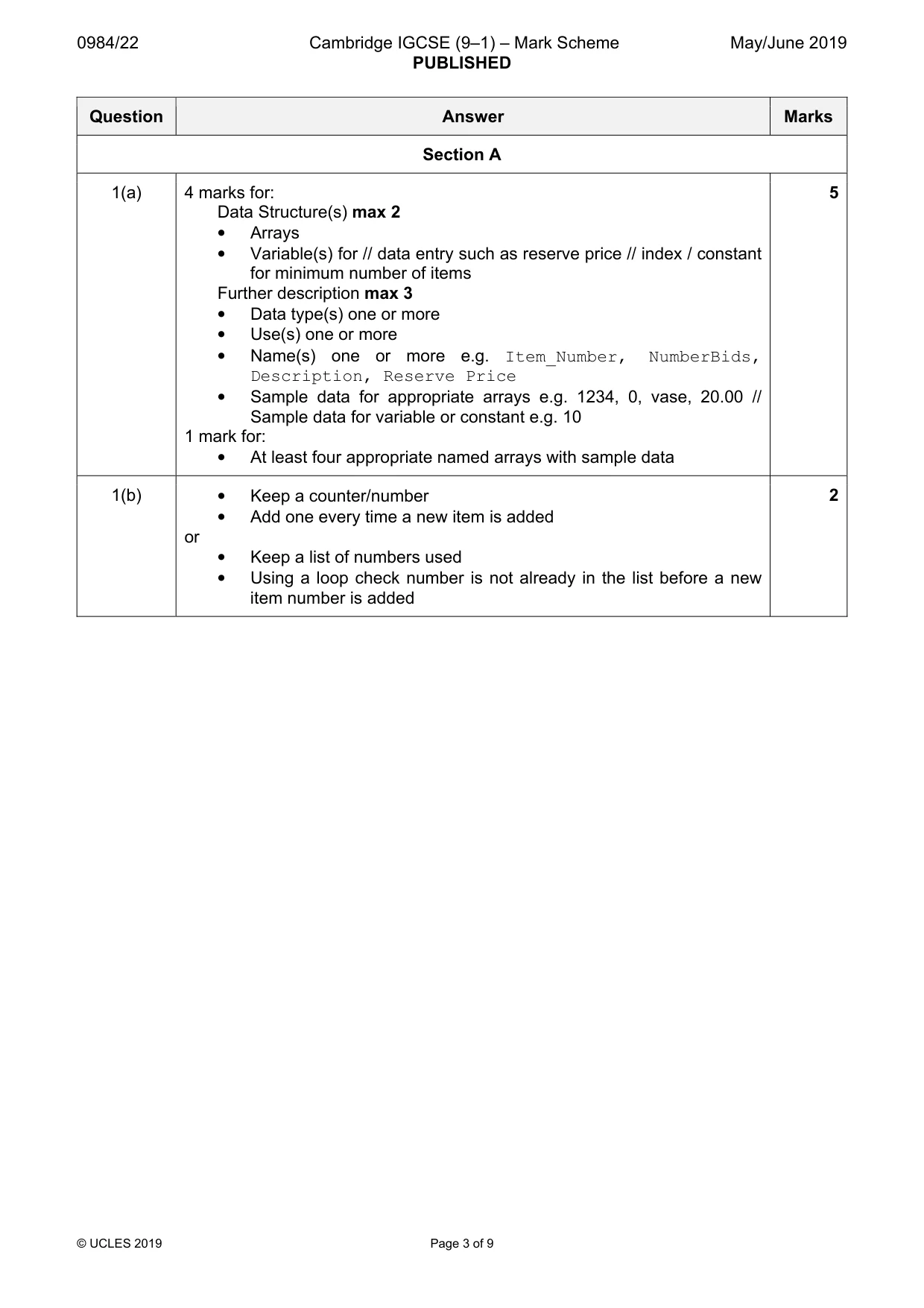
Mark scheme, page 3
0984/22 Cambridge IGCSE (9–1) – Mark Scheme PUBLISHED May/June 2019 © UCLES 2019 Page 3 of 9 Question Answer Marks Section A 1(a) 4 marks for: Data Structure(s) max 2 • Arrays • Variable(s) for // data entry such as reserve price // index / constant for minimum number of items Further description max 3 • Data type(s) one or more • Use(s) one or more • Name(s) one or more e.g. Item_Number, NumberBids, Description, Reserve Price • Sample data for appropriate arrays e.g. 1234, 0, vase, 20.00 // Sample data for variable or constant e.g. 10 1 mark for: • At least four appropriate named arrays with sample data 5 1(b) • Keep a counter/number • Add one every time a new item is added or • Keep a list of numbers used • Using a loop check number is not already in the list before a new item number is added 2
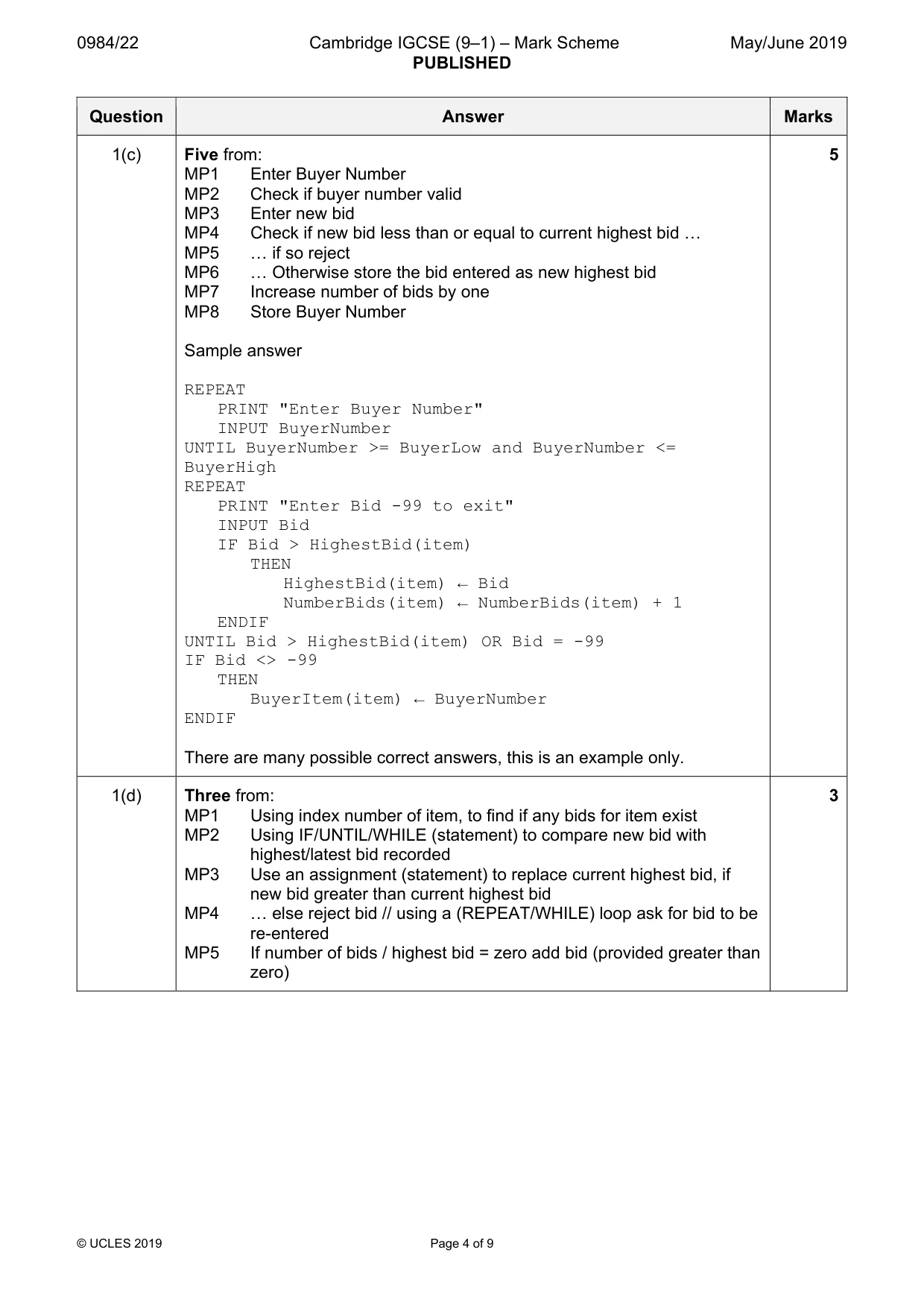
Mark scheme, page 4
0984/22 Cambridge IGCSE (9–1) – Mark Scheme PUBLISHED May/June 2019 © UCLES 2019 Page 4 of 9 Question Answer Marks 1(c) Five from: MP1 Enter Buyer Number MP2 Check if buyer number valid MP3 Enter new bid MP4 Check if new bid less than or equal to current highest bid « MP5 « if so reject MP6 « Otherwise store the bid entered as new highest bid MP7 Increase number of bids by one MP8 Store Buyer Number Sample answer REPEAT PRINT "Enter Buyer Number" INPUT BuyerNumber UNTIL BuyerNumber >= BuyerLow and BuyerNumber <= BuyerHigh REPEAT PRINT "Enter Bid -99 to exit" INPUT Bid IF Bid > HighestBid(item) THEN HighestBid(item) ← Bid NumberBids(item) ← NumberBids(item) + 1 ENDIF UNTIL Bid > HighestBid(item) OR Bid = -99 IF Bid <> -99 THEN BuyerItem(item) ← BuyerNumber ENDIF There are many possible correct answers, this is an example only. 5 1(d) Three from: MP1 Using index number of item, to find if any bids for item exist MP2 Using IF/UNTIL/WHILE (statement) to compare new bid with highest/latest bid recorded MP3 Use an assignment (statement) to replace current highest bid, if new bid greater than current highest bid MP4 « else reject bid // using a (REPEAT/WHILE) loop ask for bid to be re-entered MP5 If number of bids / highest bid = zero add bid (provided greater than zero) 3
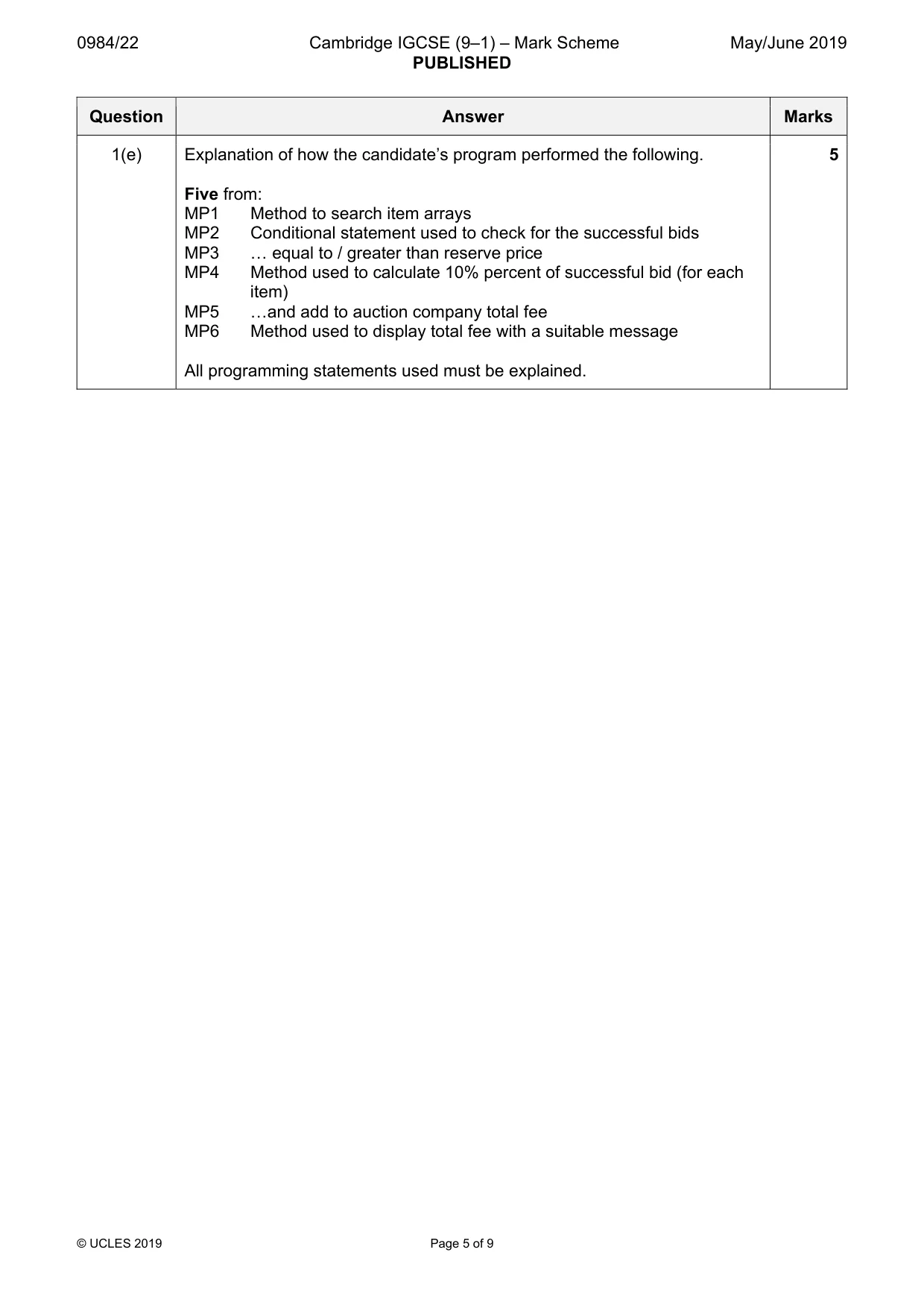
Mark scheme, page 5
0984/22 Cambridge IGCSE (9–1) – Mark Scheme PUBLISHED May/June 2019 © UCLES 2019 Page 5 of 9 Question Answer Marks 1(e) Explanation of how the candidate’s program performed the following. Five from: MP1 Method to search item arrays MP2 Conditional statement used to check for the successful bids MP3 « equal to / greater than reserve price MP4 Method used to calculate 10% percent of successful bid (for each item) MP5 «and add to auction company total fee MP6 Method used to display total fee with a suitable message All programming statements used must be explained. 5
Mark scheme, page 6
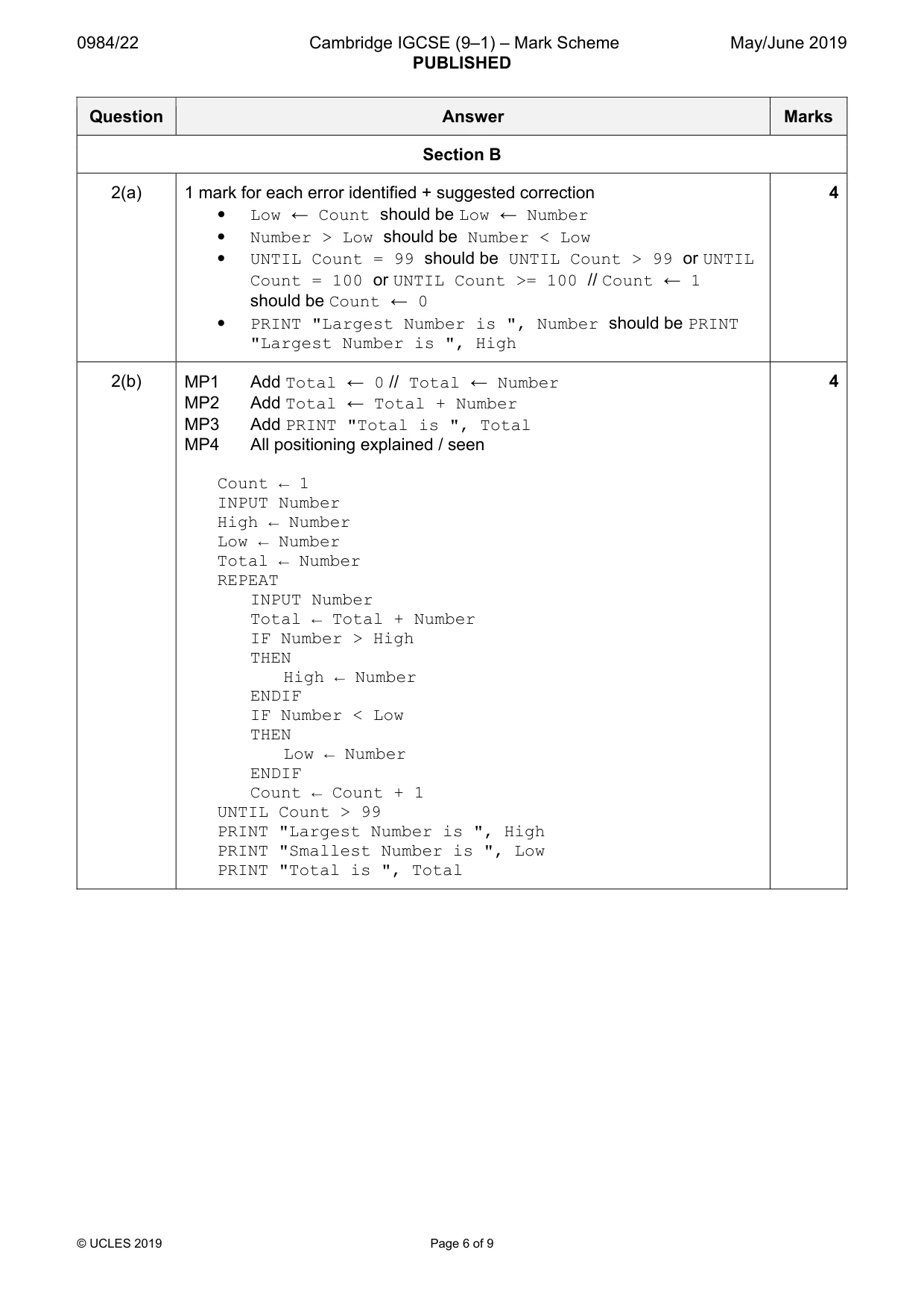
0984/22 Cambridge IGCSE (9–1) – Mark Scheme PUBLISHED May/June 2019 © UCLES 2019 Page 6 of 9 Question Answer Marks Section B 2(a) 1 mark for each error identified + suggested correction • Low ← Count should be Low ← Number • Number > Low should be Number < Low • UNTIL Count = 99 should be UNTIL Count > 99 or UNTIL Count = 100 or UNTIL Count >= 100 // Count ← 1 should be Count ← 0 • PRINT "Largest Number is ", Number should be PRINT "Largest Number is ", High 4 2(b) MP1 Add Total ← 0 // Total ← Number MP2 Add Total ← Total + Number MP3 Add PRINT "Total is ", Total MP4 All positioning explained / seen Count ← 1 INPUT Number High ← Number Low ← Number Total ← Number REPEAT INPUT Number Total ← Total + Number IF Number > High THEN High ← Number ENDIF IF Number < Low THEN Low ← Number ENDIF Count ← Count + 1 UNTIL Count > 99 PRINT "Largest Number is ", High PRINT "Smallest Number is ", Low PRINT "Total is ", Total 4
Mark scheme, page 7
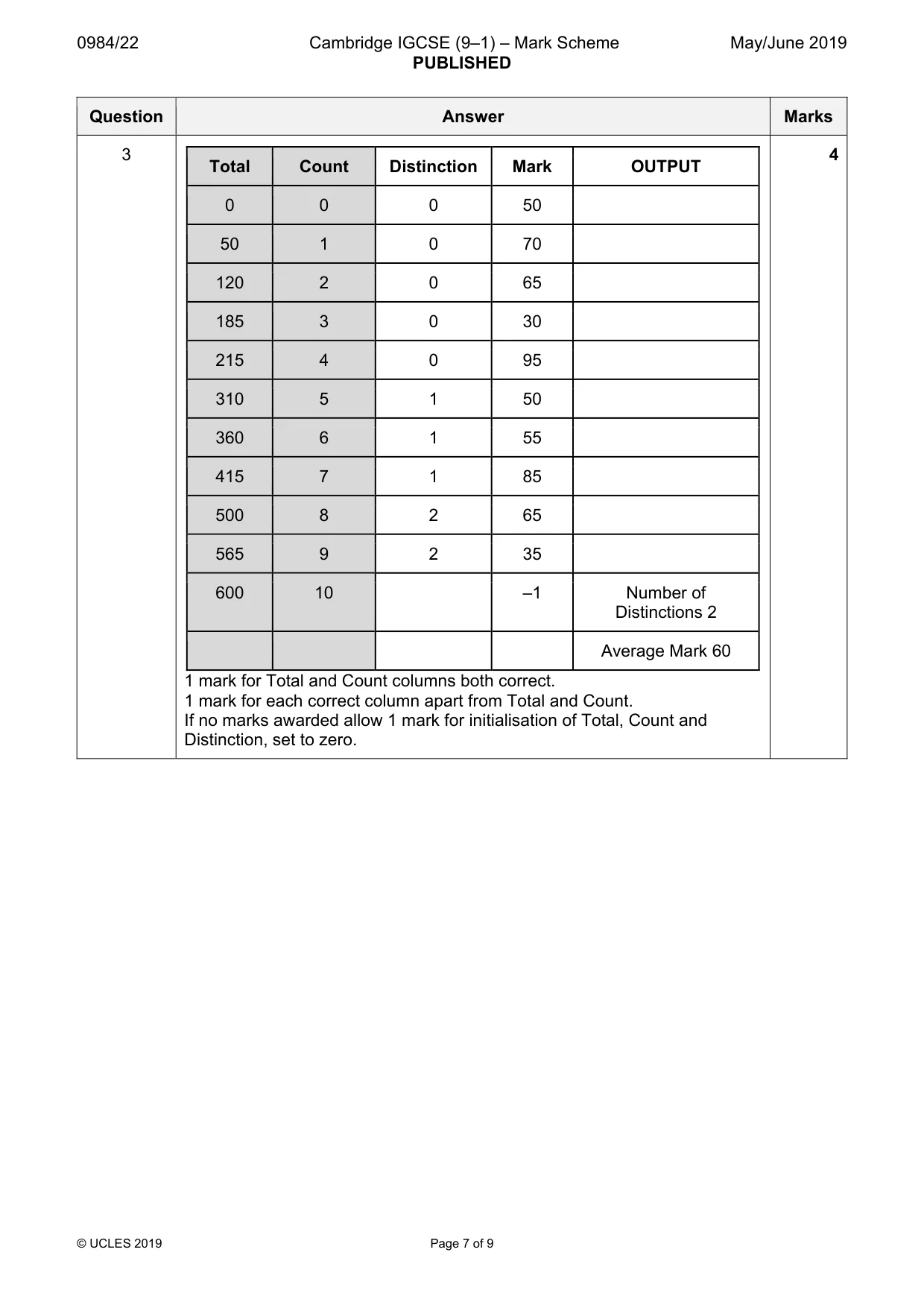
0984/22 Cambridge IGCSE (9–1) – Mark Scheme PUBLISHED May/June 2019 © UCLES 2019 Page 7 of 9 Question Answer Marks 3 Total Count Distinction Mark OUTPUT 0 0 0 50 50 1 0 70 120 2 0 65 185 3 0 30 215 4 0 95 310 5 1 50 360 6 1 55 415 7 1 85 500 8 2 65 565 9 2 35 600 10 –1 Number of Distinctions 2 Average Mark 60 1 mark for Total and Count columns both correct. 1 mark for each correct column apart from Total and Count. If no marks awarded allow 1 mark for initialisation of Total, Count and Distinction, set to zero. 4
Mark scheme, page 8
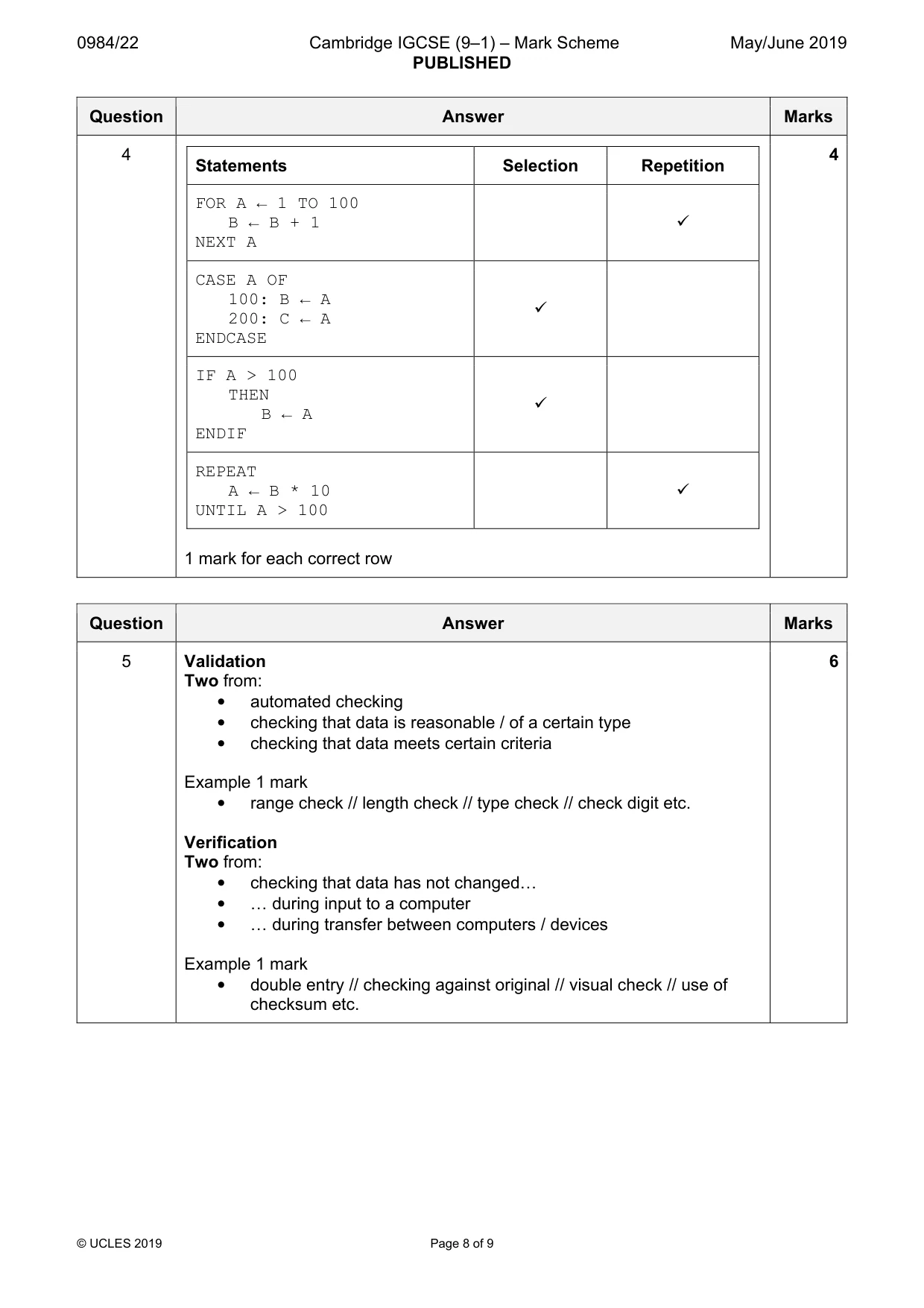
0984/22 Cambridge IGCSE (9–1) – Mark Scheme PUBLISHED May/June 2019 © UCLES 2019 Page 8 of 9 Question Answer Marks 4 Statements Selection Repetition FOR A ← 1 TO 100 B ← B + 1 NEXT A 9 CASE A OF 100: B ← A 200: C ← A ENDCASE 9 IF A > 100 THEN B ← A ENDIF 9 REPEAT A ← B * 10 UNTIL A > 100 9 1 mark for each correct row 4 Question Answer Marks 5 Validation Two from: • automated checking • checking that data is reasonable / of a certain type • checking that data meets certain criteria Example 1 mark • range check // length check // type check // check digit etc. Verification Two from: • checking that data has not changed« • « during input to a computer • « during transfer between computers / devices Example 1 mark • double entry // checking against original // visual check // use of checksum etc. 6
Mark scheme, page 9
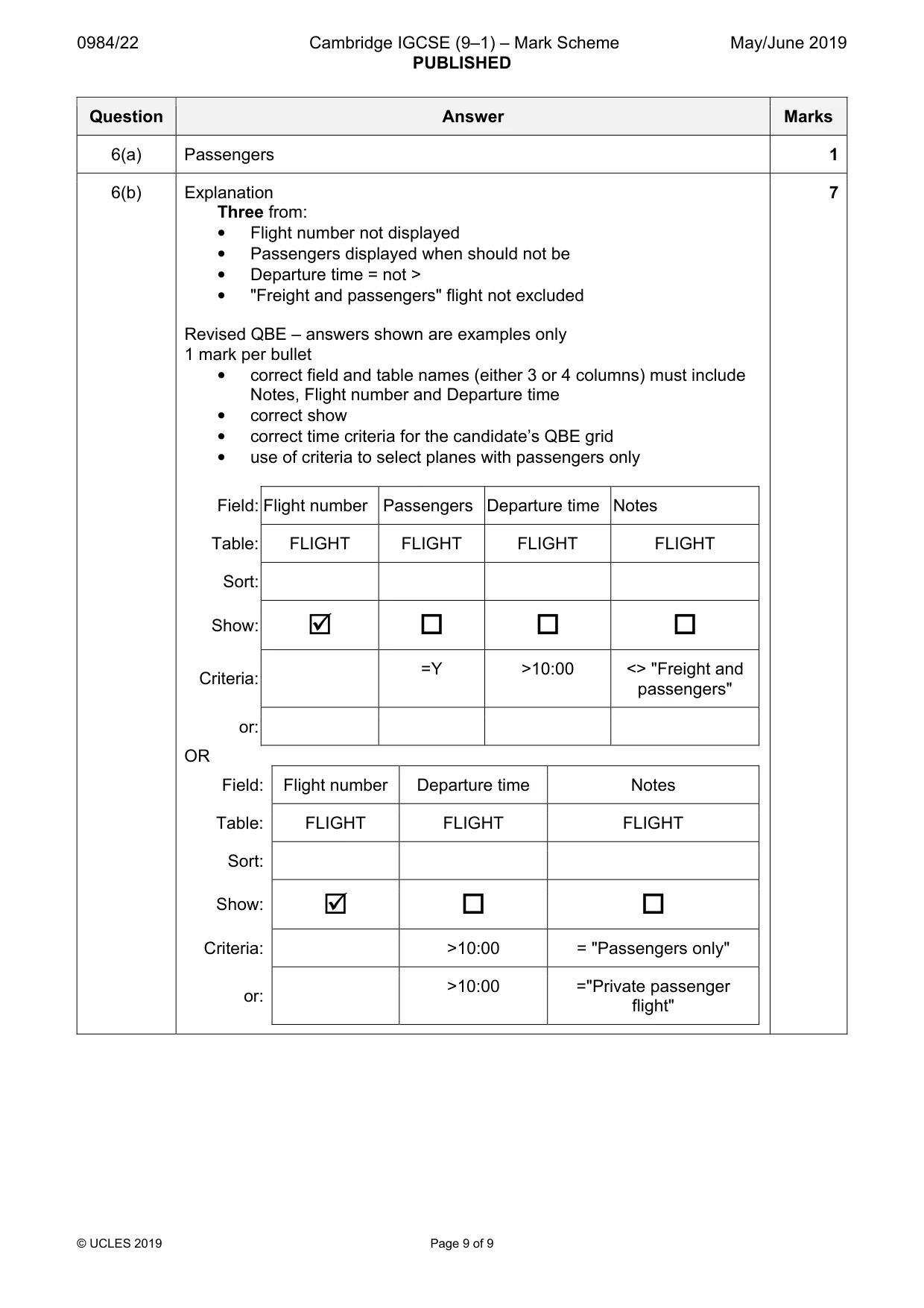
0984/22 Cambridge IGCSE (9–1) – Mark Scheme PUBLISHED May/June 2019 © UCLES 2019 Page 9 of 9 Question Answer Marks 6(a) Passengers 1 6(b) Explanation Three from: • Flight number not displayed • Passengers displayed when should not be • Departure time = not > • "Freight and passengers" flight not excluded Revised QBE – answers shown are examples only 1 mark per bullet • correct field and table names (either 3 or 4 columns) must include Notes, Flight number and Departure time • correct show • correct time criteria for the candidate’s QBE grid • use of criteria to select planes with passengers only Field: Flight number Passengers Departure time Notes Table: FLIGHT FLIGHT FLIGHT FLIGHT Sort: Show: ; Criteria: =Y >10:00 <> "Freight and passengers" or: OR Field: Flight number Departure time Notes Table: FLIGHT FLIGHT FLIGHT Sort: Show: ; Criteria: >10:00 = "Passengers only" or: >10:00 ="Private passenger flight" 7
What you needed in this session
Cambridge’s own grade thresholds for 2019 May/June, Paper 2 · Variant 2. A higher threshold means an easier paper — the bar moves with how the cohort did.