Cambridge A Level Computer Science 9608 — 2021 Oct/Nov Paper 2 · Variant 1
9608/21/O/N/21 · 75 marks · ≈84 min
The question paper and its mark scheme, free to read here and free to download. This is Cambridge’s own paper, exactly as it was sat.
Question paper20 pages


Mark scheme16 pages
Answers below. Sit the paper first if you are practising.
Paper as text
Question paper, page 1
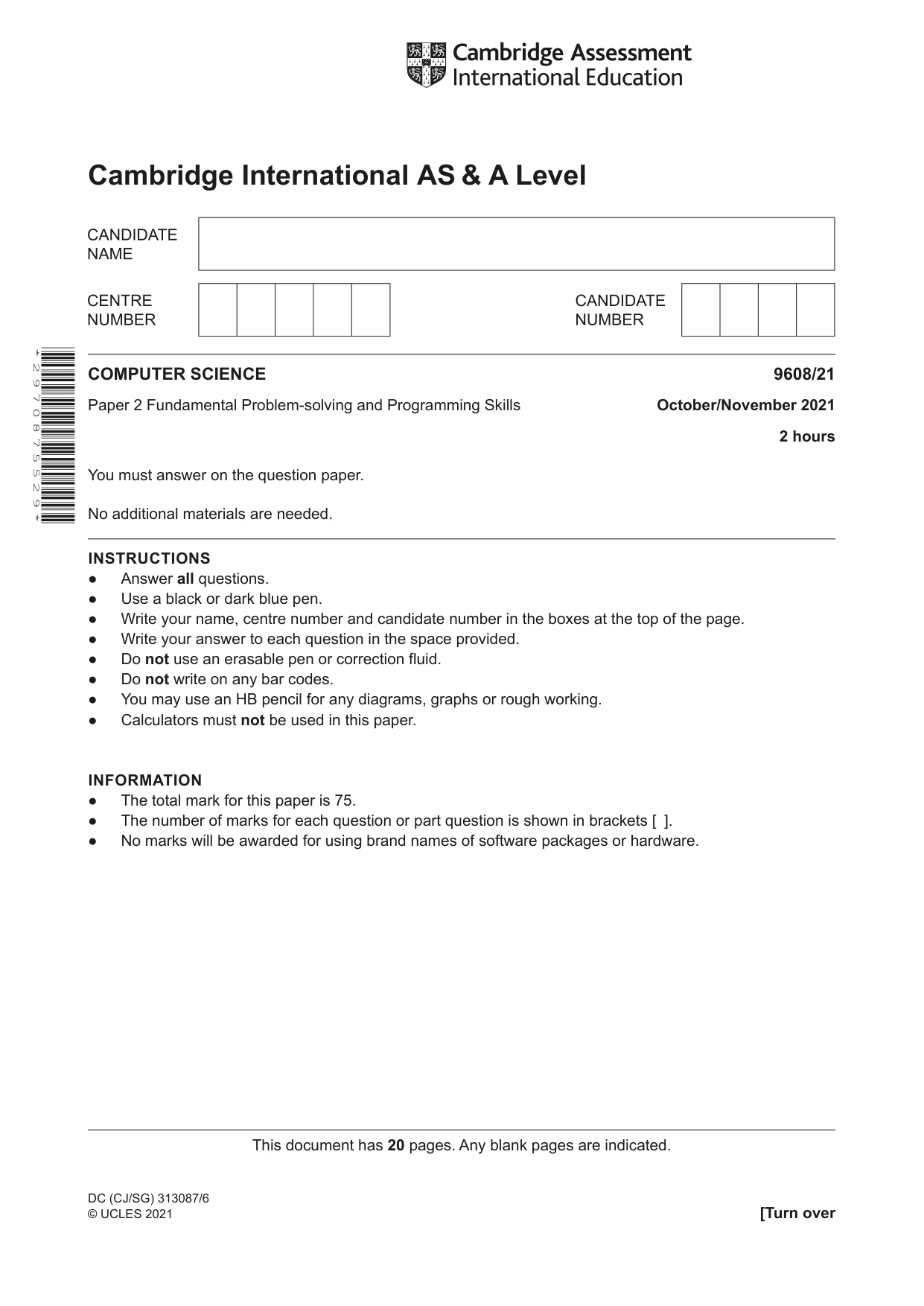
This document has 20 pages. Any blank pages are indicated. Cambridge International AS & A Level COMPUTER SCIENCE 9608/21 Paper 2 Fundamental Problem-solving and Programming Skills October/November 2021 2 hours You must answer on the question paper. No additional materials are needed. INSTRUCTIONS ● Answer all questions. ● Use a black or dark blue pen. ● Write your name, centre number and candidate number in the boxes at the top of the page. ● Write your answer to each question in the space provided. ● Do not use an erasable pen or correction fluid. ● Do not write on any bar codes. ● You may use an HB pencil for any diagrams, graphs or rough working. ● Calculators must not be used in this paper. INFORMATION ● The total mark for this paper is 75. ● The number of marks for each question or part question is shown in brackets [ ]. ● No marks will be awarded for using brand names of software packages or hardware. * 2 9 7 0 8 7 5 5 2 9 * DC (CJ/SG) 313087/6 © UCLES 2021 [Turn over
Question paper, page 2
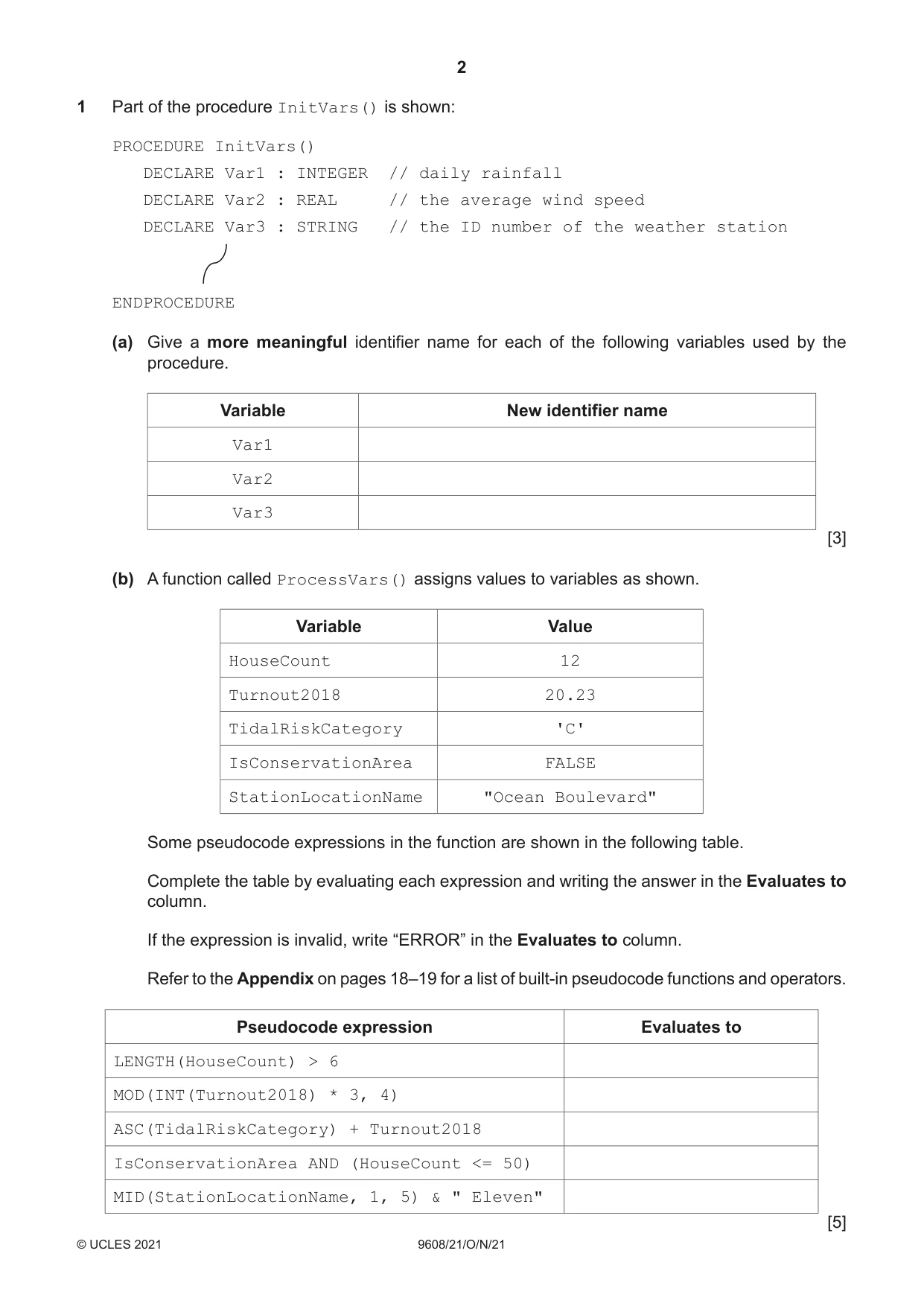
2 9608/21/O/N/21 © UCLES 2021 1 Part of the procedure InitVars() is shown: PROCEDURE InitVars() DECLARE Var1 : INTEGER // daily rainfall DECLARE Var2 : REAL // the average wind speed DECLARE Var3 : STRING // the ID number of the weather station ENDPROCEDURE (a) Give a more meaningful identifier name for each of the following variables used by the procedure. Variable New identifier name Var1 Var2 Var3 [3] (b) A function called ProcessVars() assigns values to variables as shown. Variable Value HouseCount 12 Turnout2018 20.23 TidalRiskCategory 'C' IsConservationArea FALSE StationLocationName "Ocean Boulevard" Some pseudocode expressions in the function are shown in the following table. Complete the table by evaluating each expression and writing the answer in the Evaluates to column. If the expression is invalid, write “ERROR” in the Evaluates to column. Refer to the Appendix on pages 18–19 for a list of built-in pseudocode functions and operators. Pseudocode expression Evaluates to LENGTH(HouseCount) > 6 MOD(INT(Turnout2018) * 3, 4) ASC(TidalRiskCategory) + Turnout2018 IsConservationArea AND (HouseCount <= 50) MID(StationLocationName, 1, 5) & " Eleven" [5]
Question paper, page 3
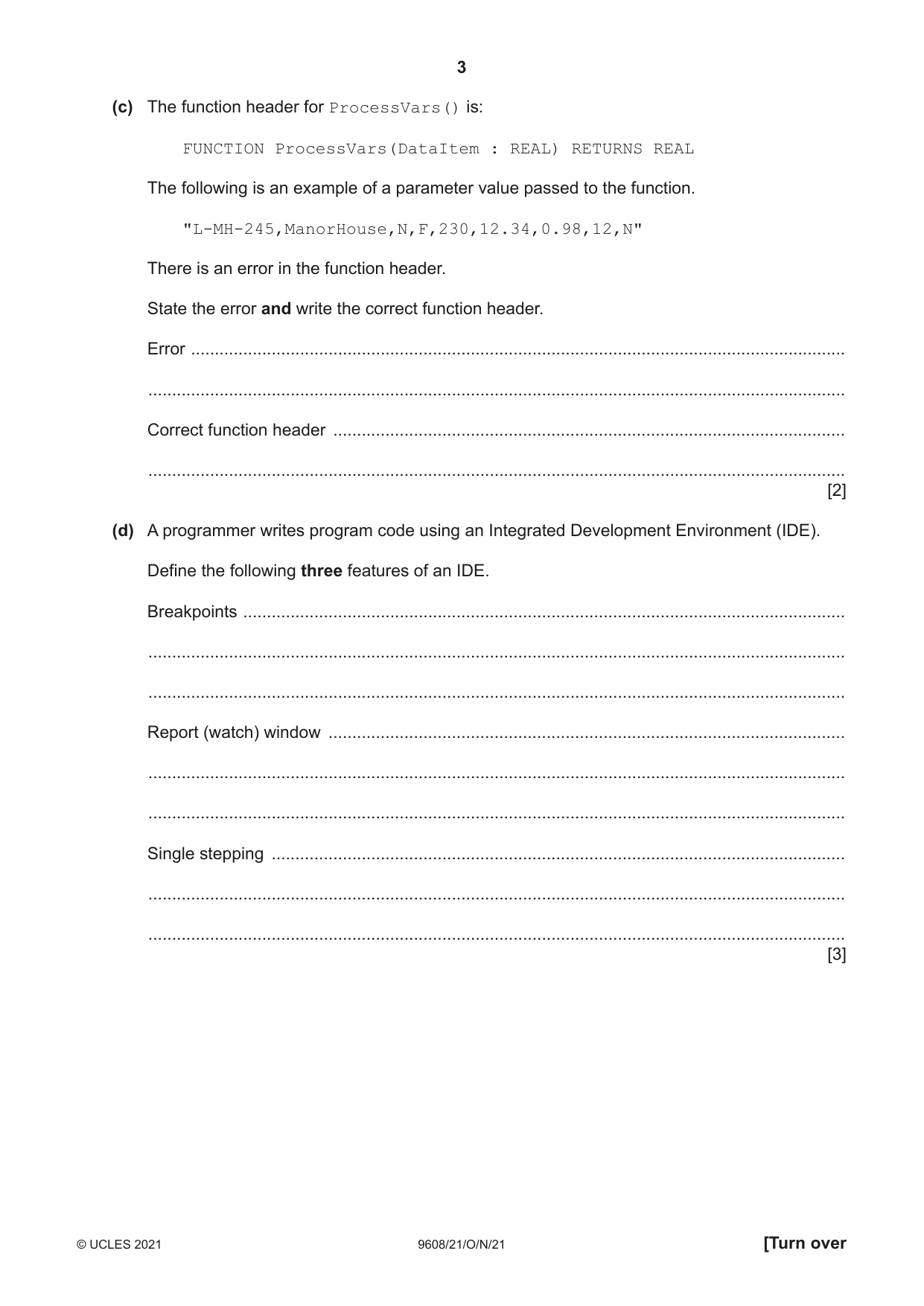
3 9608/21/O/N/21 © UCLES 2021 [Turn over (c) The function header for ProcessVars() is: FUNCTION ProcessVars(DataItem : REAL) RETURNS REAL The following is an example of a parameter value passed to the function. "L-MH-245,ManorHouse,N,F,230,12.34,0.98,12,N" There is an error in the function header. State the error and write the correct function header. Error … … Correct function header … … [2] (d) A programmer writes program code using an Integrated Development Environment (IDE). Define the following three features of an IDE. Breakpoints … … … Report (watch) window … … … Single stepping … … … [3]
Question paper, page 4
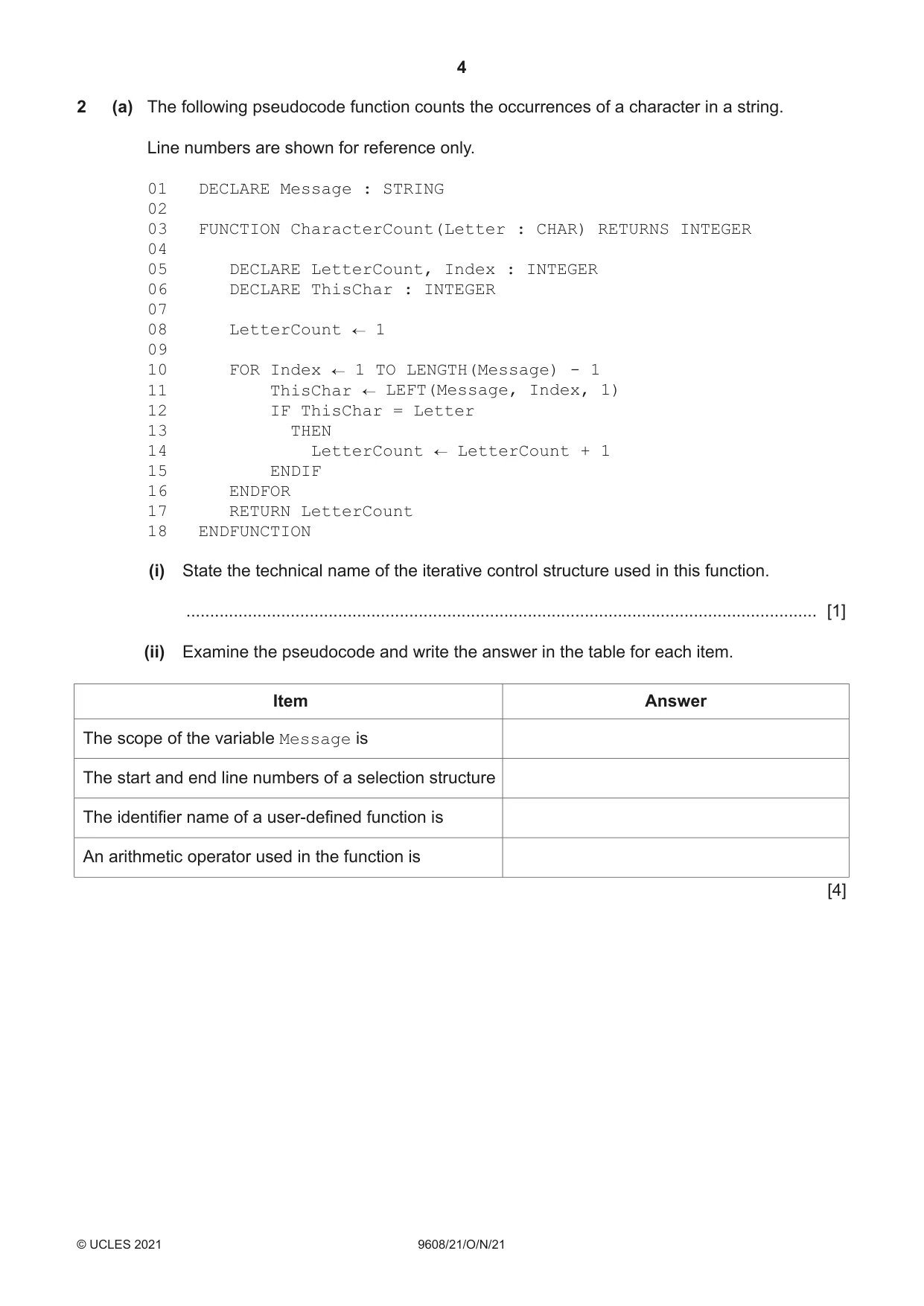
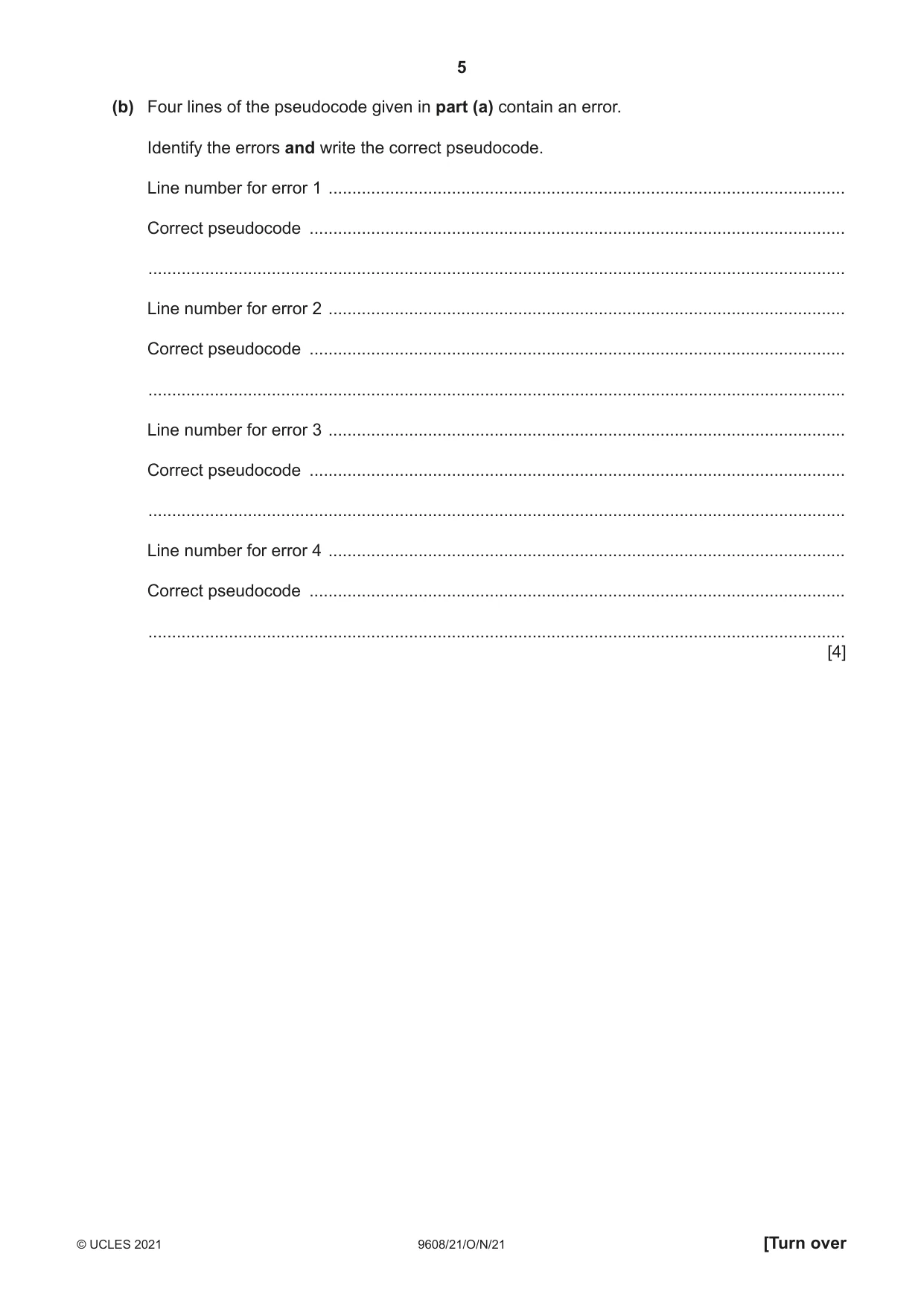
4 9608/21/O/N/21 © UCLES 2021 2 (a) The following pseudocode function counts the occurrences of a character in a string. Line numbers are shown for reference only. 01 DECLARE Message : STRING 02 03 FUNCTION CharacterCount(Letter : CHAR) RETURNS INTEGER 04 05 DECLARE LetterCount, Index : INTEGER 06 DECLARE ThisChar : INTEGER 07 08 LetterCount 1 09 10 FOR Index 1 TO LENGTH(Message) - 1 11 ThisChar LEFT(Message, Index, 1) 12 IF ThisChar = Letter 13 THEN 14 LetterCount LetterCount + 1 15 ENDIF 16 ENDFOR 17 RETURN LetterCount 18 ENDFUNCTION (i) State the technical name of the iterative control structure used in this function. … [1] (ii) Examine the pseudocode and write the answer in the table for each item. Item Answer The scope of the variable Message is The start and end line numbers of a selection structure The identifier name of a user-defined function is An arithmetic operator used in the function is [4]
Question paper, page 5
5 9608/21/O/N/21 © UCLES 2021 [Turn over (b) Four lines of the pseudocode given in part (a) contain an error. Identify the errors and write the correct pseudocode. Line number for error 1 … Correct pseudocode … … Line number for error 2 … Correct pseudocode … … Line number for error 3 … Correct pseudocode … … Line number for error 4 … Correct pseudocode … … [4]
Question paper, page 6
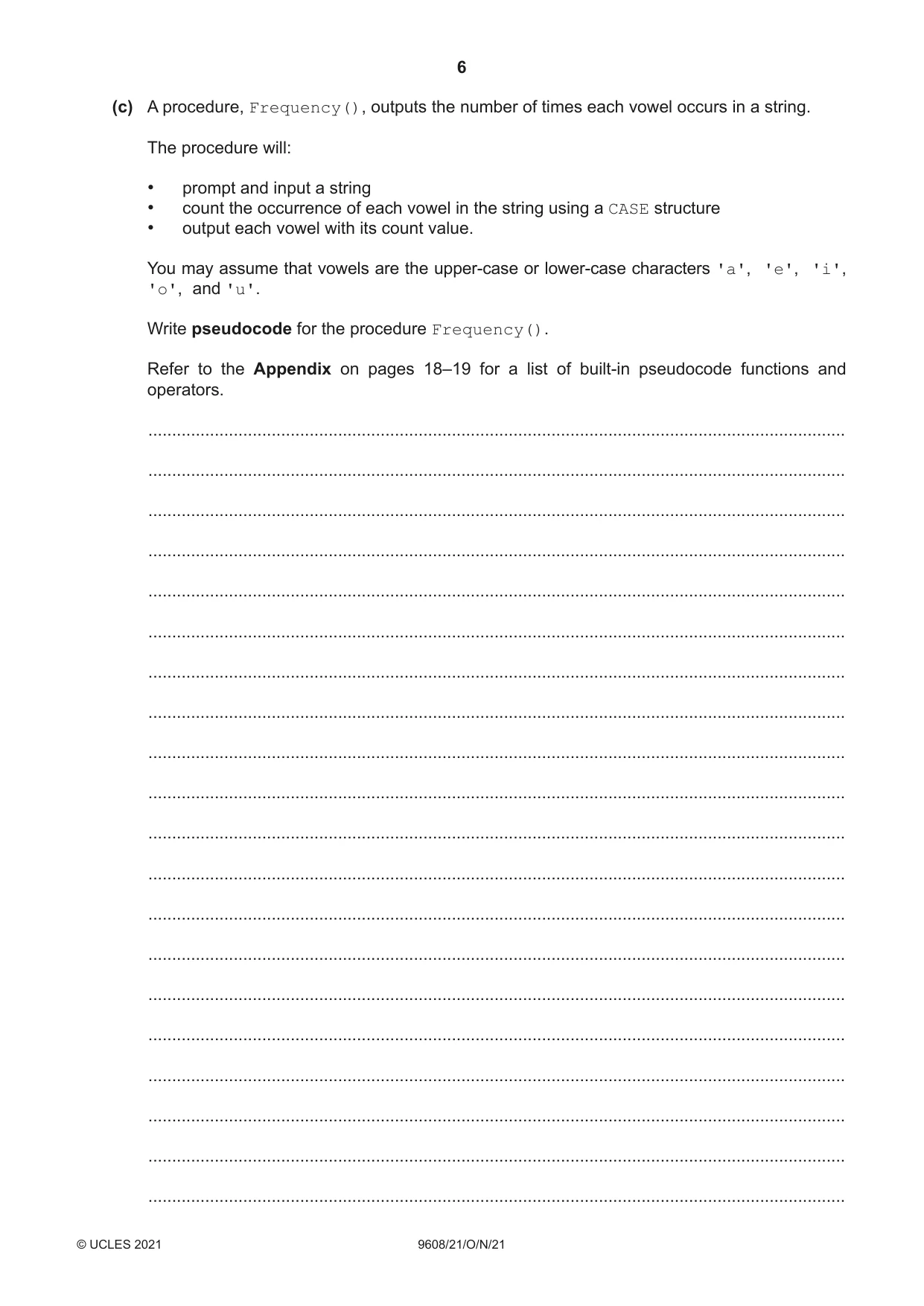
6 9608/21/O/N/21 © UCLES 2021 (c) A procedure, Frequency(), outputs the number of times each vowel occurs in a string. The procedure will: • prompt and input a string • count the occurrence of each vowel in the string using a CASE structure • output each vowel with its count value. You may assume that vowels are the upper-case or lower-case characters 'a', 'e', 'i', 'o', and 'u'. Write pseudocode for the procedure Frequency(). Refer to the Appendix on pages 18–19 for a list of built-in pseudocode functions and operators. … … … … … … … … … … … … … … … … … … … …
Question paper, page 7
7 9608/21/O/N/21 © UCLES 2021 [Turn over … … … … … … … … … … … … … … … … … [5]
Question paper, page 8
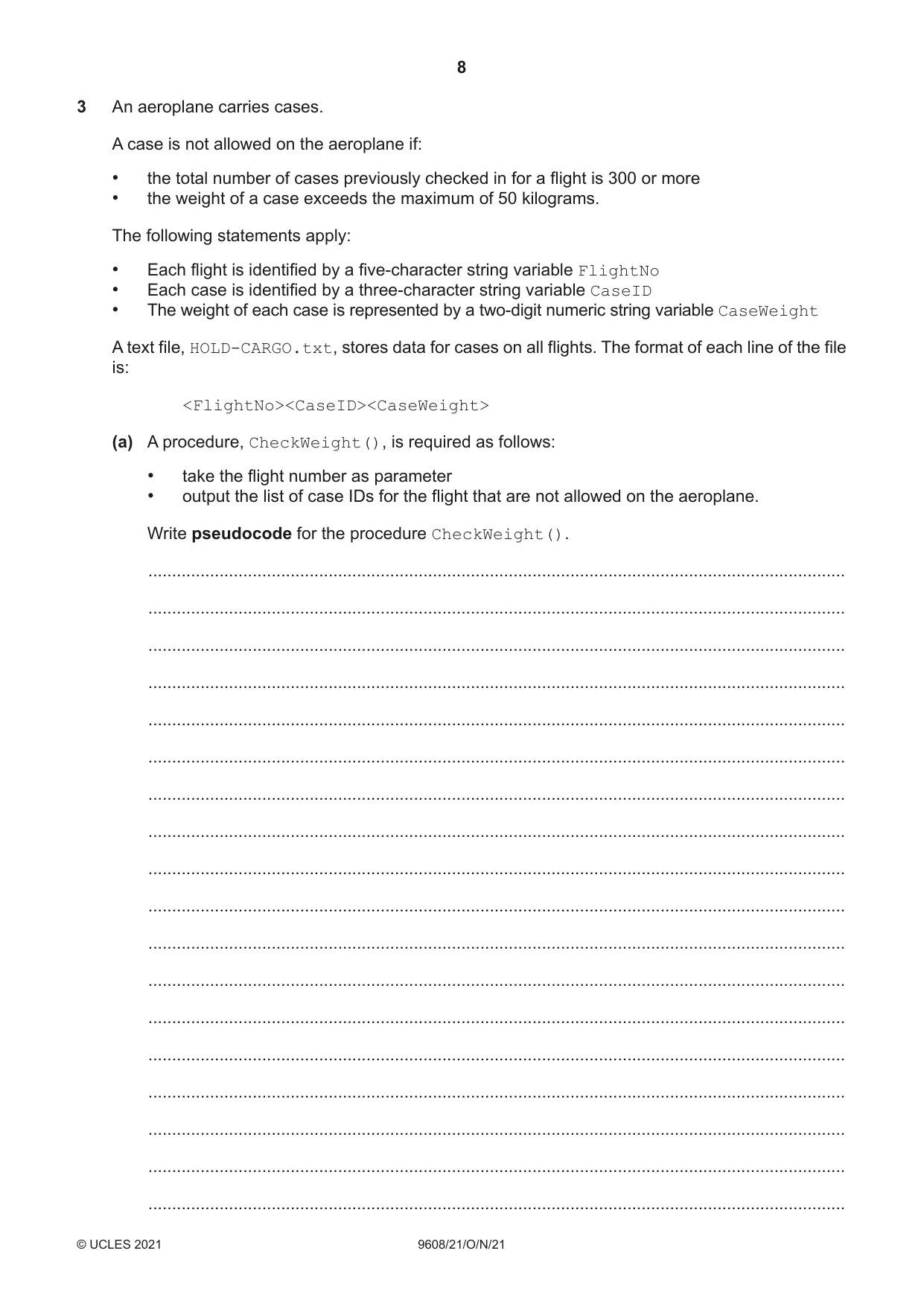
8 9608/21/O/N/21 © UCLES 2021 3 An aeroplane carries cases. A case is not allowed on the aeroplane if: • the total number of cases previously checked in for a flight is 300 or more • the weight of a case exceeds the maximum of 50 kilograms. The following statements apply: • Each flight is identified by a five-character string variable FlightNo • Each case is identified by a three-character string variable CaseID • The weight of each case is represented by a two-digit numeric string variable CaseWeight A text file, HOLD-CARGO.txt, stores data for cases on all flights. The format of each line of the file is: <FlightNo><CaseID><CaseWeight> (a) A procedure, CheckWeight(), is required as follows: • take the flight number as parameter • output the list of case IDs for the flight that are not allowed on the aeroplane. Write pseudocode for the procedure CheckWeight(). … … … … … … … … … … … … … … … … … …
Question paper, page 9
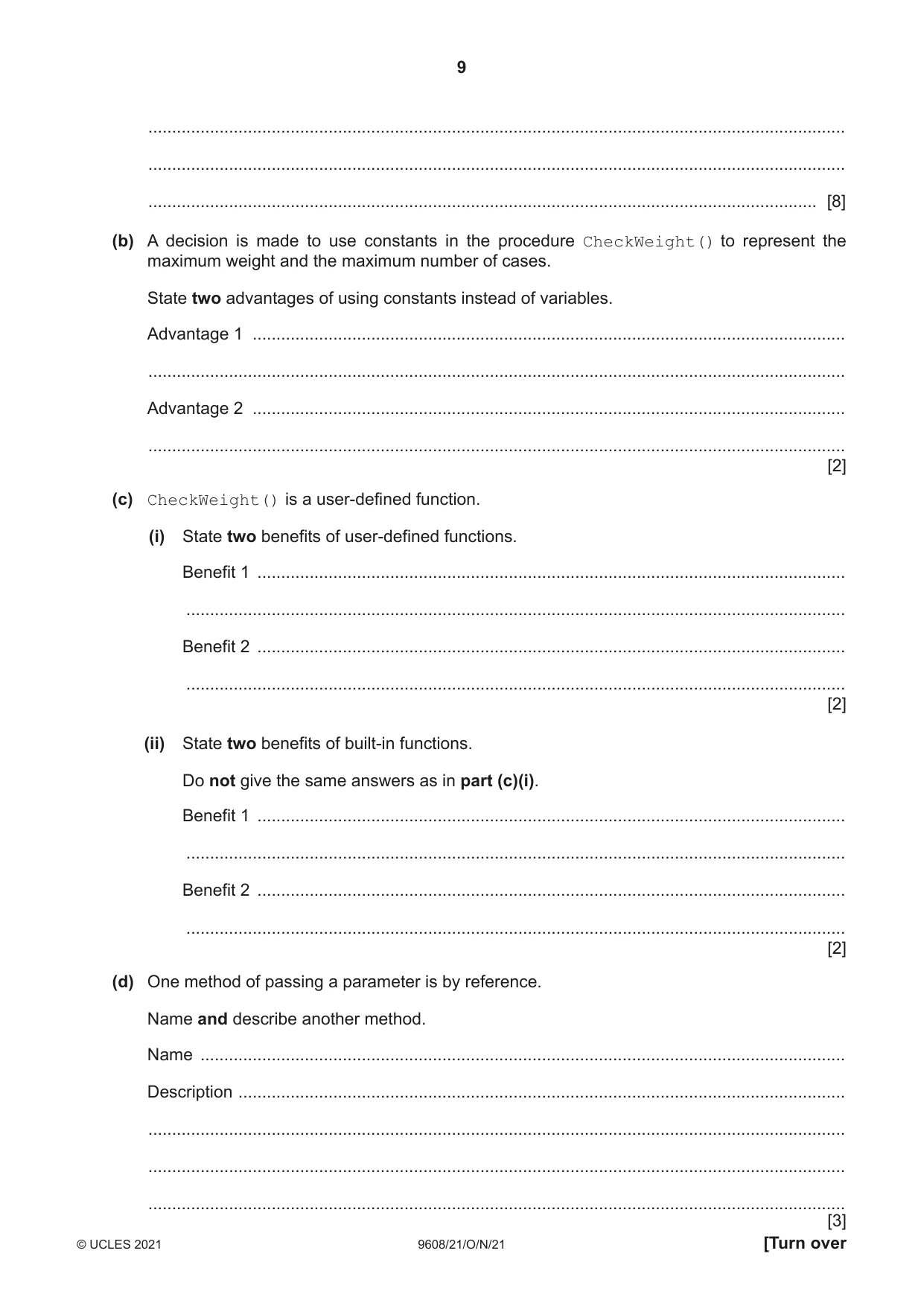
9 9608/21/O/N/21 © UCLES 2021 [Turn over … … … [8] (b) A decision is made to use constants in the procedure CheckWeight() to represent the maximum weight and the maximum number of cases. State two advantages of using constants instead of variables. Advantage 1 … … Advantage 2 … … [2] (c) CheckWeight() is a user-defined function. (i) State two benefits of user-defined functions. Benefit 1 … … Benefit 2 … … [2] (ii) State two benefits of built-in functions. Do not give the same answers as in part (c)(i). Benefit 1 … … Benefit 2 … … [2] (d) One method of passing a parameter is by reference. Name and describe another method. Name … Description … … … … [3]
Question paper, page 10
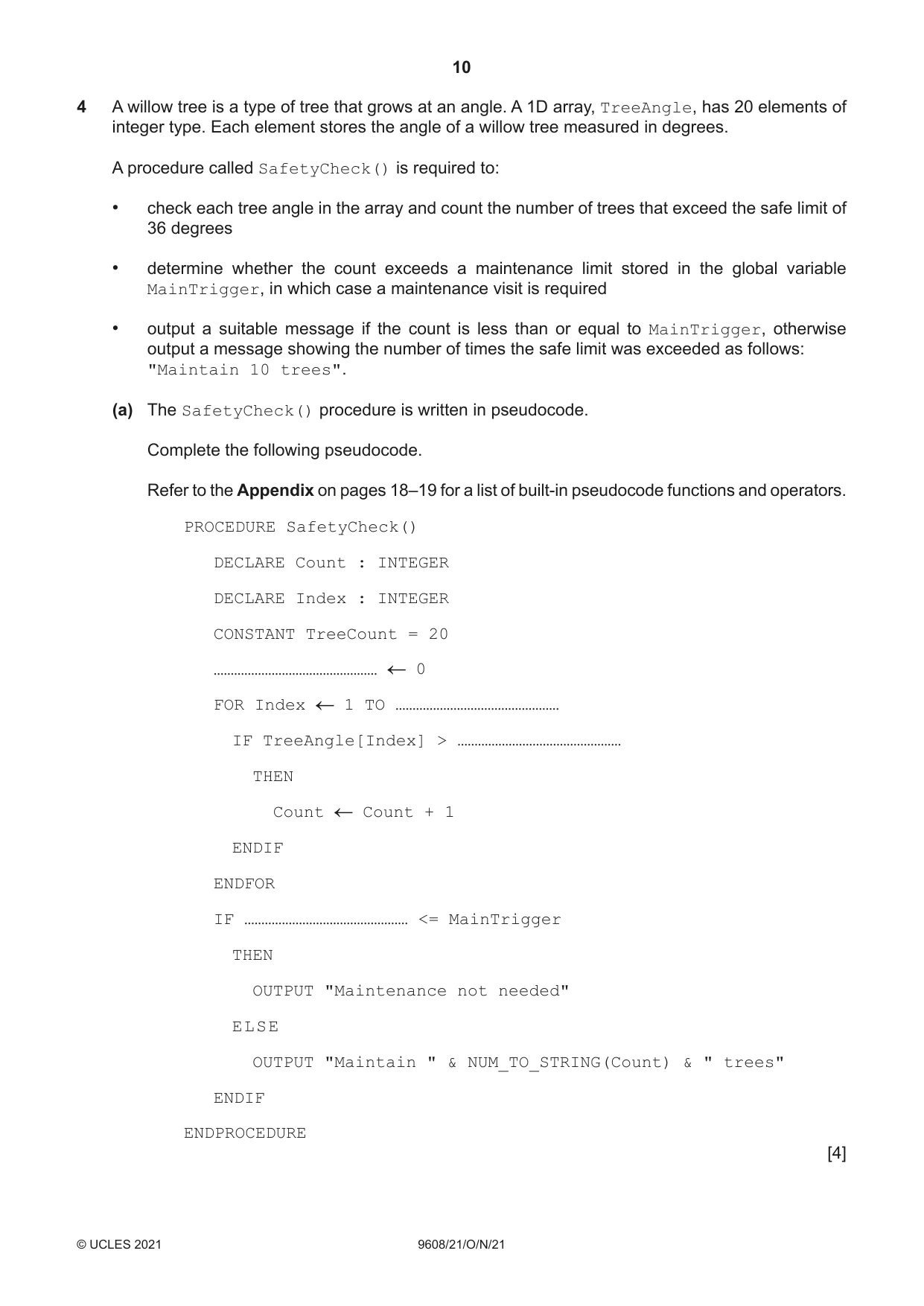
10 9608/21/O/N/21 © UCLES 2021 4 A willow tree is a type of tree that grows at an angle. A 1D array, TreeAngle, has 20 elements of integer type. Each element stores the angle of a willow tree measured in degrees. A procedure called SafetyCheck() is required to: • check each tree angle in the array and count the number of trees that exceed the safe limit of 36 degrees • determine whether the count exceeds a maintenance limit stored in the global variable MainTrigger, in which case a maintenance visit is required • output a suitable message if the count is less than or equal to MainTrigger, otherwise output a message showing the number of times the safe limit was exceeded as follows: "Maintain 10 trees". (a) The SafetyCheck() procedure is written in pseudocode. Complete the following pseudocode. Refer to the Appendix on pages 18–19 for a list of built-in pseudocode functions and operators. PROCEDURE SafetyCheck() DECLARE Count : INTEGER DECLARE Index : INTEGER CONSTANT TreeCount = 20 ………………………………………… 0 FOR Index 1 TO ………………………………………… IF TreeAngle[Index] > ………………………………………… THEN Count Count + 1 ENDIF ENDFOR IF ………………………………………… <= MainTrigger THEN OUTPUT "Maintenance not needed" ELSE OUTPUT "Maintain " & NUM_TO_STRING(Count) & " trees" ENDIF ENDPROCEDURE [4]
Question paper, page 11
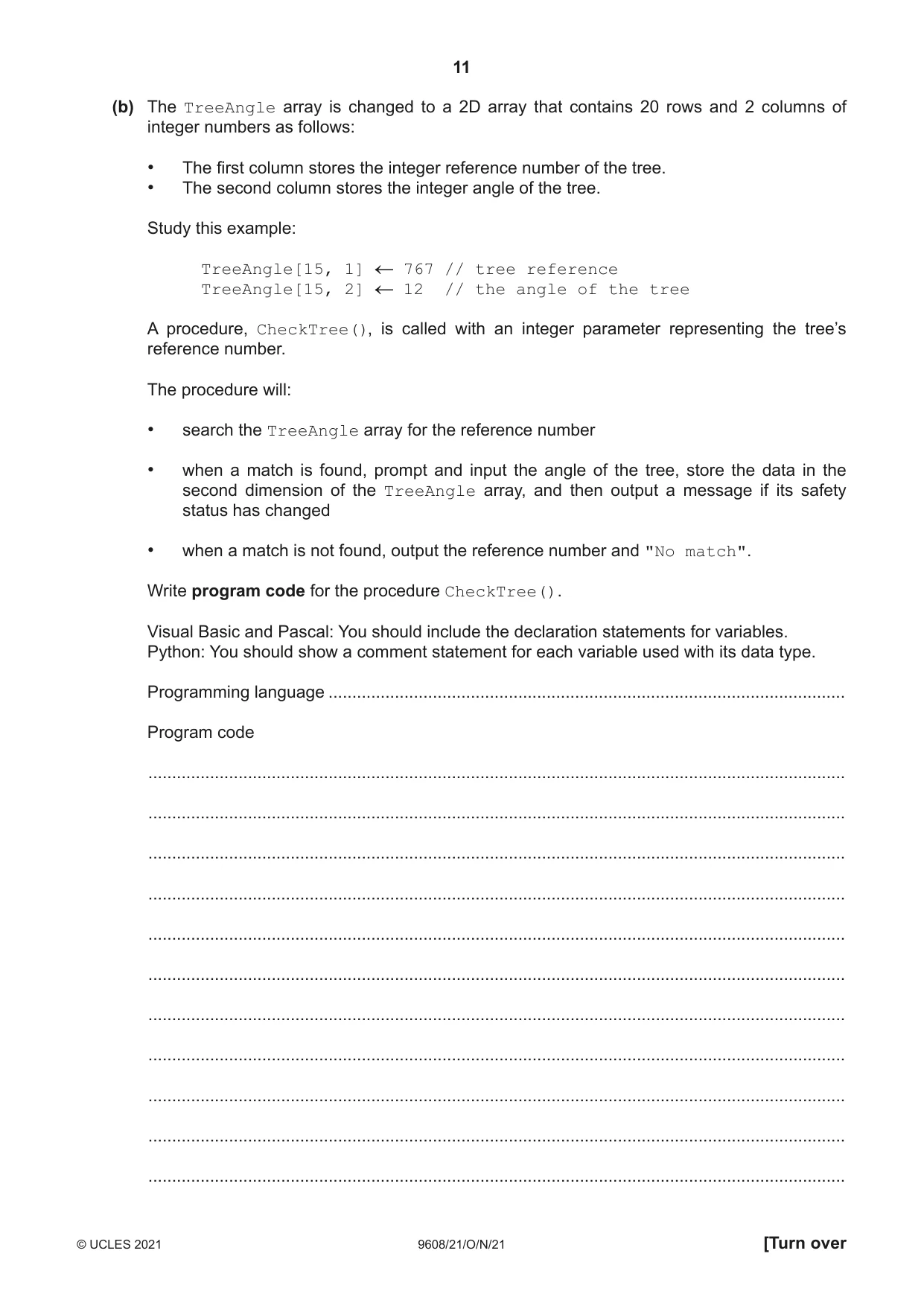
11 9608/21/O/N/21 © UCLES 2021 [Turn over (b) The TreeAngle array is changed to a 2D array that contains 20 rows and 2 columns of integer numbers as follows: • The first column stores the integer reference number of the tree. • The second column stores the integer angle of the tree. Study this example: TreeAngle[15, 1] 767 // tree reference TreeAngle[15, 2] 12 // the angle of the tree A procedure, CheckTree(), is called with an integer parameter representing the tree’s reference number. The procedure will: • search the TreeAngle array for the reference number • when a match is found, prompt and input the angle of the tree, store the data in the second dimension of the TreeAngle array, and then output a message if its safety status has changed • when a match is not found, output the reference number and "No match". Write program code for the procedure CheckTree(). Visual Basic and Pascal: You should include the declaration statements for variables. Python: You should show a comment statement for each variable used with its data type. Programming language … Program code … … … … … … … … … … …
Question paper, page 12
12 9608/21/O/N/21 © UCLES 2021 … … … … … … … … … … … … … … … … … … … … … … … … … … … … [7]
Question paper, page 13
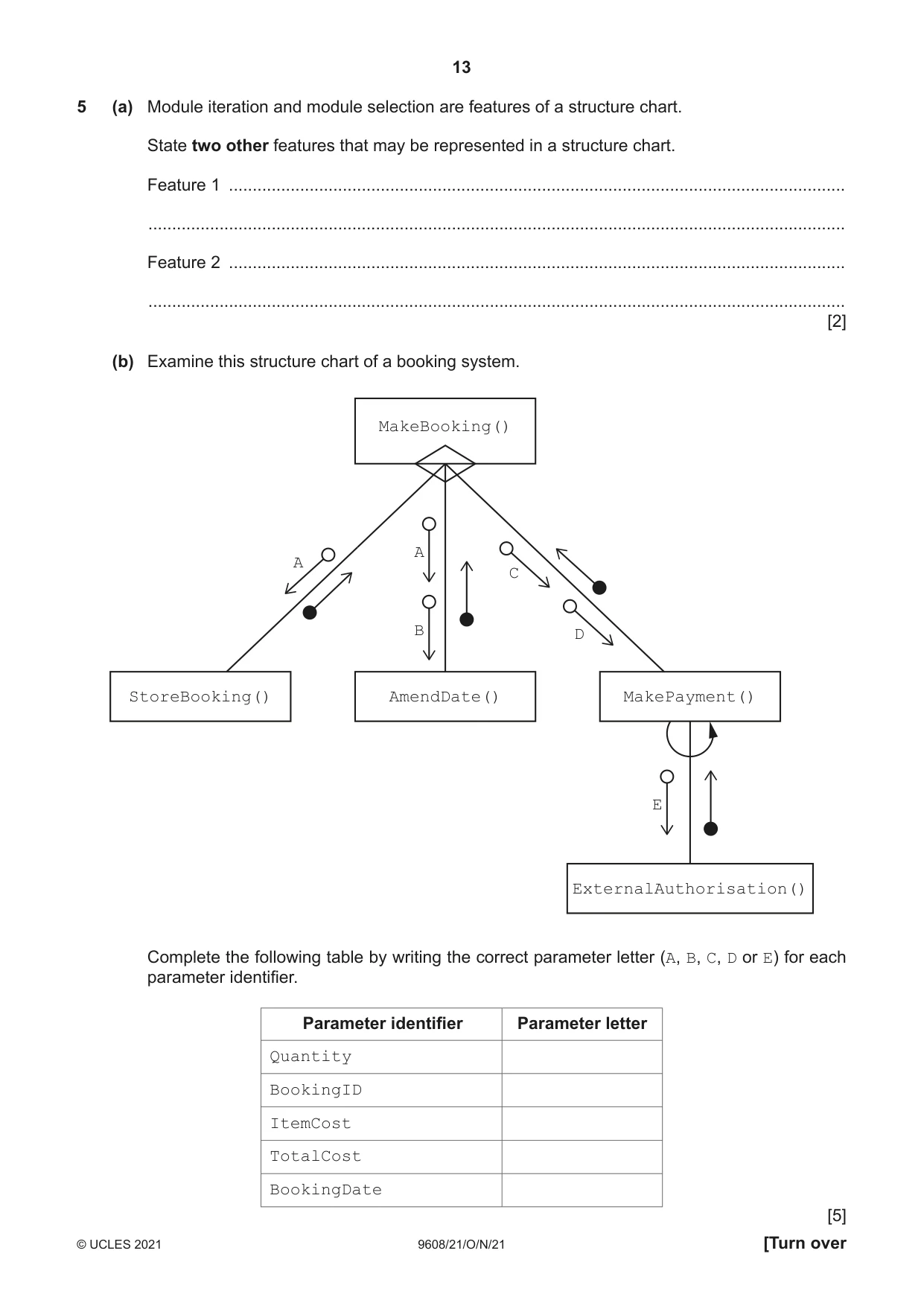
13 9608/21/O/N/21 © UCLES 2021 [Turn over 5 (a) Module iteration and module selection are features of a structure chart. State two other features that may be represented in a structure chart. Feature 1 … … Feature 2 … … [2] (b) Examine this structure chart of a booking system. MakeBooking() AmendDate() MakePayment() ExternalAuthorisation() StoreBooking() A A C D B E Complete the following table by writing the correct parameter letter (A, B, C, D or E) for each parameter identifier. Parameter identifier Parameter letter Quantity BookingID ItemCost TotalCost BookingDate [5]
Question paper, page 14
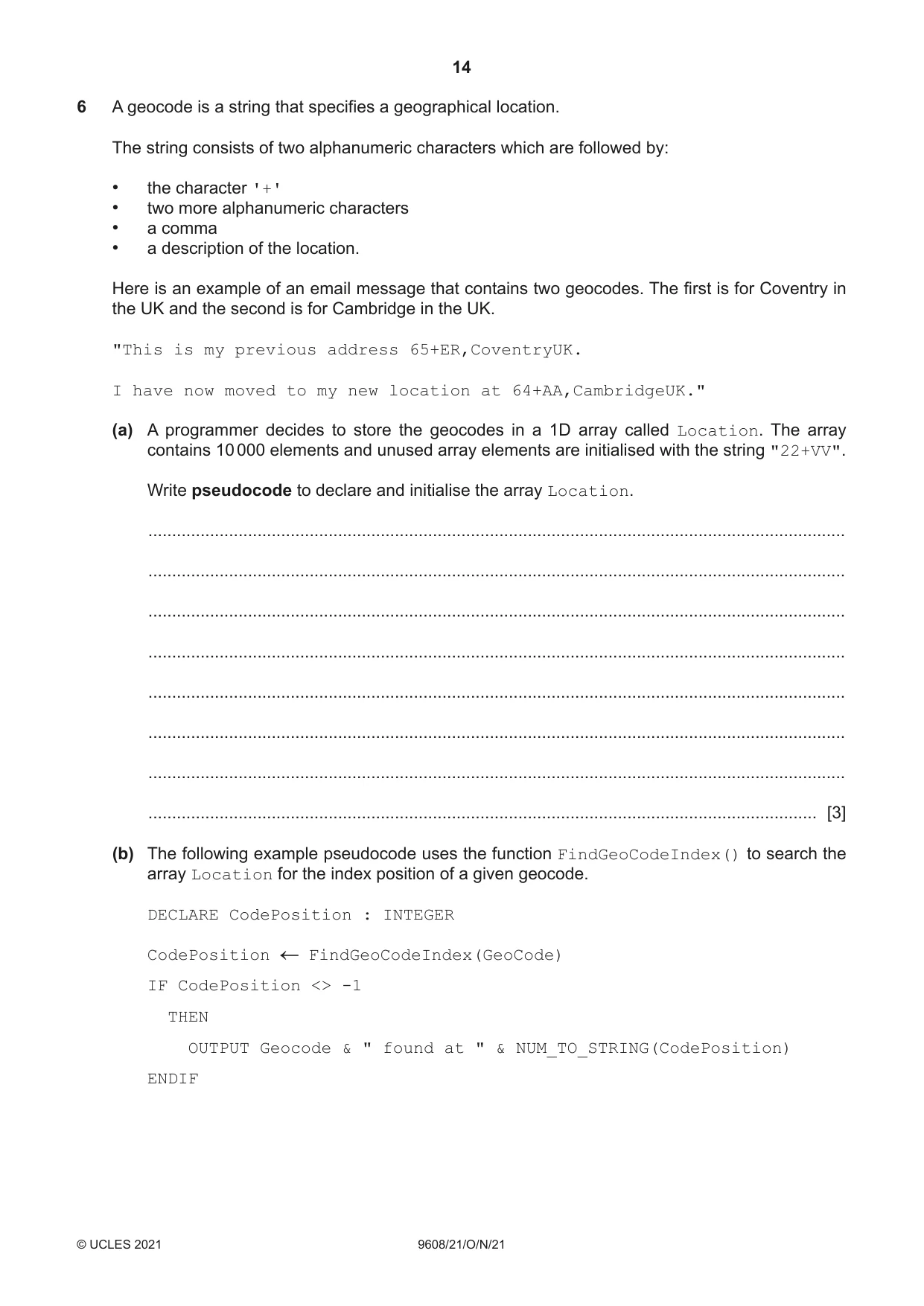
14 9608/21/O/N/21 © UCLES 2021 6 A geocode is a string that specifies a geographical location. The string consists of two alphanumeric characters which are followed by: • the character '+' • two more alphanumeric characters • a comma • a description of the location. Here is an example of an email message that contains two geocodes. The first is for Coventry in the UK and the second is for Cambridge in the UK. "This is my previous address 65+ER,CoventryUK. I have now moved to my new location at 64+AA,CambridgeUK." (a) A programmer decides to store the geocodes in a 1D array called Location. The array contains 10 000 elements and unused array elements are initialised with the string "22+VV". Write pseudocode to declare and initialise the array Location. … … … … … … … … [3] (b) The following example pseudocode uses the function FindGeoCodeIndex() to search the array Location for the index position of a given geocode. DECLARE CodePosition : INTEGER CodePosition FindGeoCodeIndex(GeoCode) IF CodePosition <> -1 THEN OUTPUT Geocode & " found at " & NUM_TO_STRING(CodePosition) ENDIF
Question paper, page 15
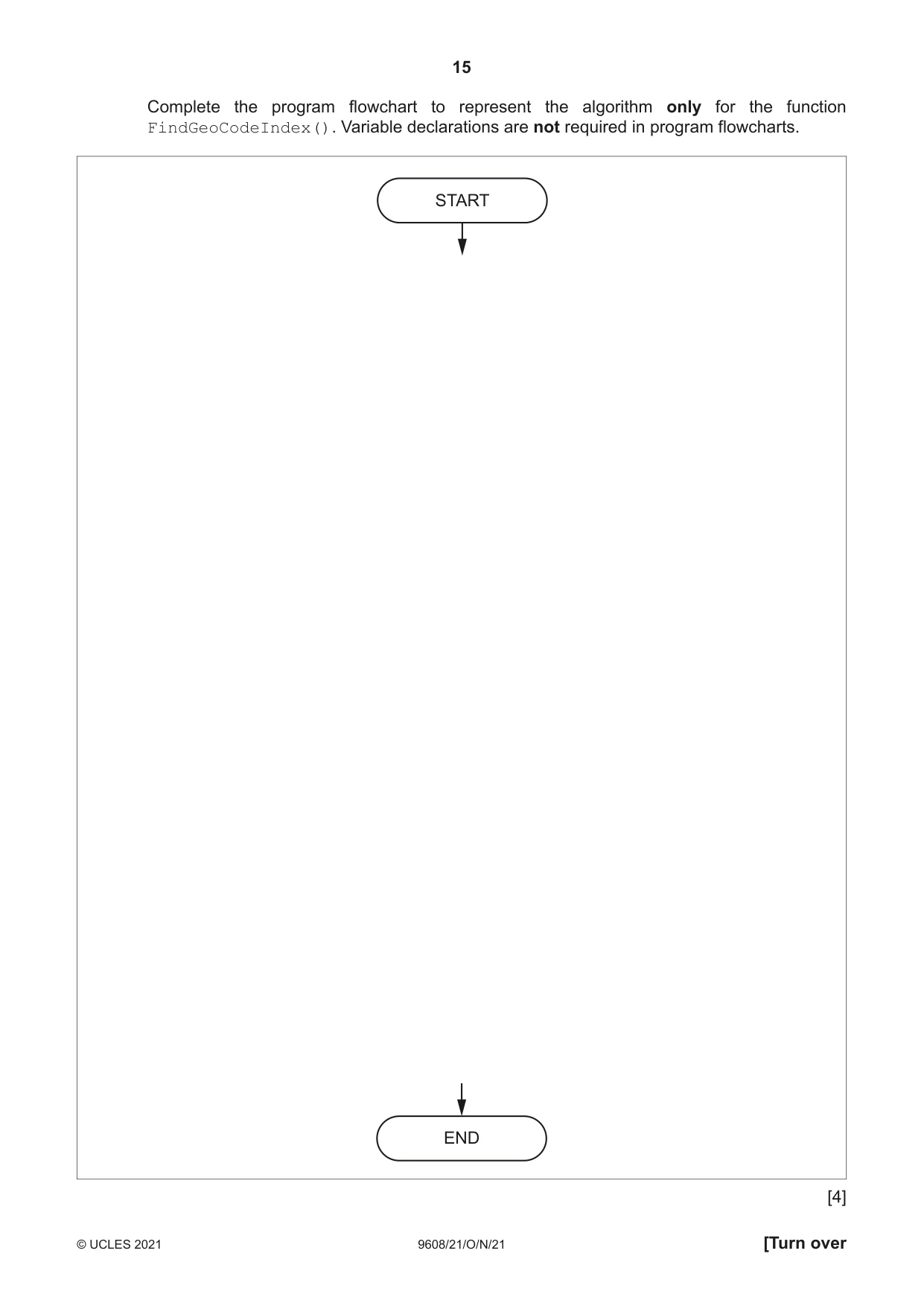
15 9608/21/O/N/21 © UCLES 2021 [Turn over Complete the program flowchart to represent the algorithm only for the function FindGeoCodeIndex(). Variable declarations are not required in program flowcharts. [4] END START
Question paper, page 16
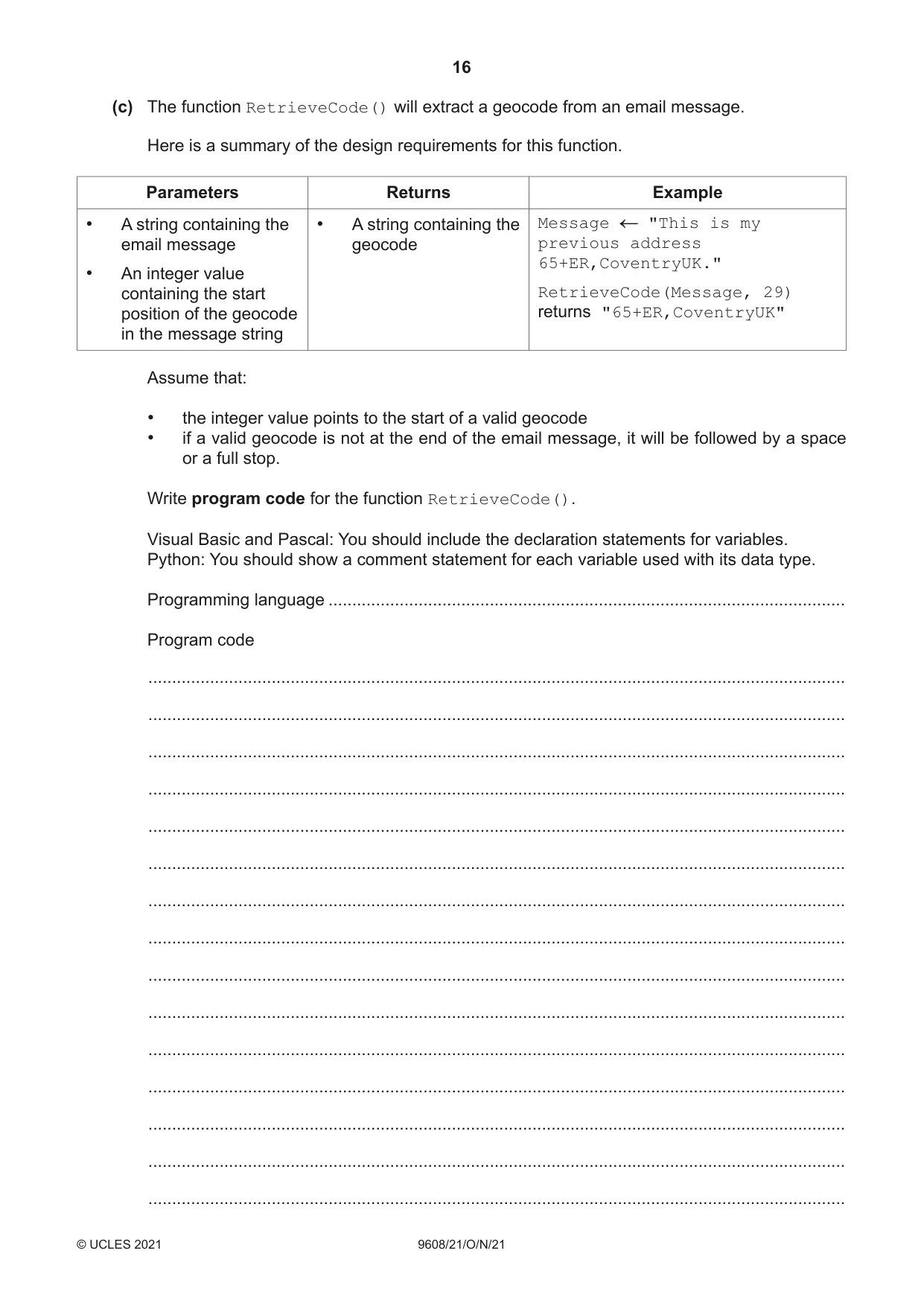
16 9608/21/O/N/21 © UCLES 2021 (c) The function RetrieveCode() will extract a geocode from an email message. Here is a summary of the design requirements for this function. Parameters Returns Example • A string containing the email message • An integer value containing the start position of the geocode in the message string • A string containing the geocode Message "This is my previous address 65+ER,CoventryUK." RetrieveCode(Message, 29) returns "65+ER,CoventryUK" Assume that: • the integer value points to the start of a valid geocode • if a valid geocode is not at the end of the email message, it will be followed by a space or a full stop. Write program code for the function RetrieveCode(). Visual Basic and Pascal: You should include the declaration statements for variables. Python: You should show a comment statement for each variable used with its data type. Programming language … Program code … … … … … … … … … … … … … … …
Question paper, page 17
17 9608/21/O/N/21 © UCLES 2021 … … … … … … … … … … … … … … … … … … … … … … … … … … … … … … [6]
Question paper, page 18
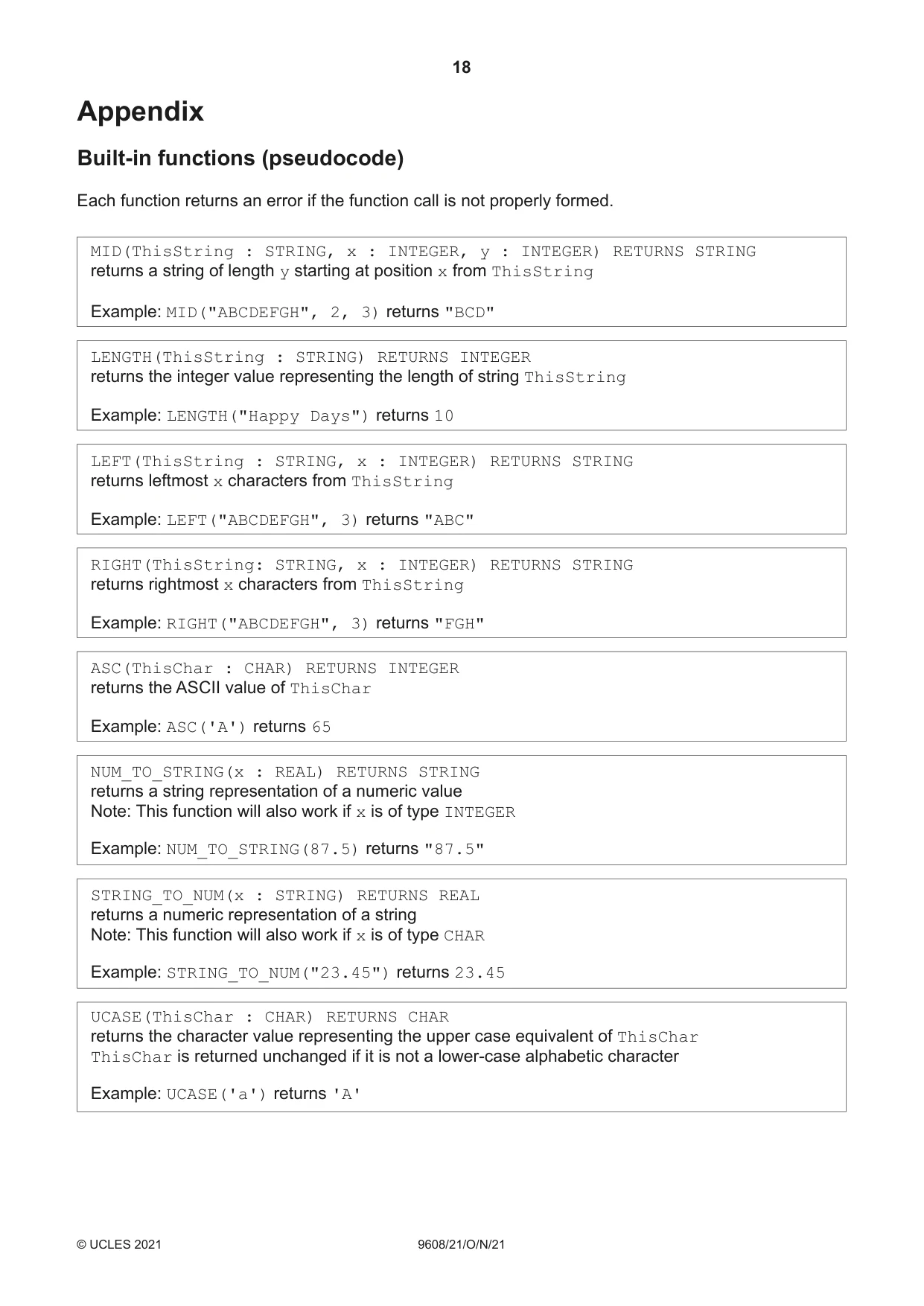
18 9608/21/O/N/21 © UCLES 2021 Appendix Built-in functions (pseudocode) Each function returns an error if the function call is not properly formed. MID(ThisString : STRING, x : INTEGER, y : INTEGER) RETURNS STRING returns a string of length y starting at position x from ThisString Example: MID("ABCDEFGH", 2, 3) returns "BCD" LENGTH(ThisString : STRING) RETURNS INTEGER returns the integer value representing the length of string ThisString Example: LENGTH("Happy Days") returns 10 LEFT(ThisString : STRING, x : INTEGER) RETURNS STRING returns leftmost x characters from ThisString Example: LEFT("ABCDEFGH", 3) returns "ABC" RIGHT(ThisString: STRING, x : INTEGER) RETURNS STRING returns rightmost x characters from ThisString Example: RIGHT("ABCDEFGH", 3) returns "FGH" ASC(ThisChar : CHAR) RETURNS INTEGER returns the ASCII value of ThisChar Example: ASC('A') returns 65 NUM_TO_STRING(x : REAL) RETURNS STRING returns a string representation of a numeric value Note: This function will also work if x is of type INTEGER Example: NUM_TO_STRING(87.5) returns "87.5" STRING_TO_NUM(x : STRING) RETURNS REAL returns a numeric representation of a string Note: This function will also work if x is of type CHAR Example: STRING_TO_NUM("23.45") returns 23.45 UCASE(ThisChar : CHAR) RETURNS CHAR returns the character value representing the upper case equivalent of ThisChar ThisChar is returned unchanged if it is not a lower-case alphabetic character Example: UCASE('a') returns 'A'
Question paper, page 19
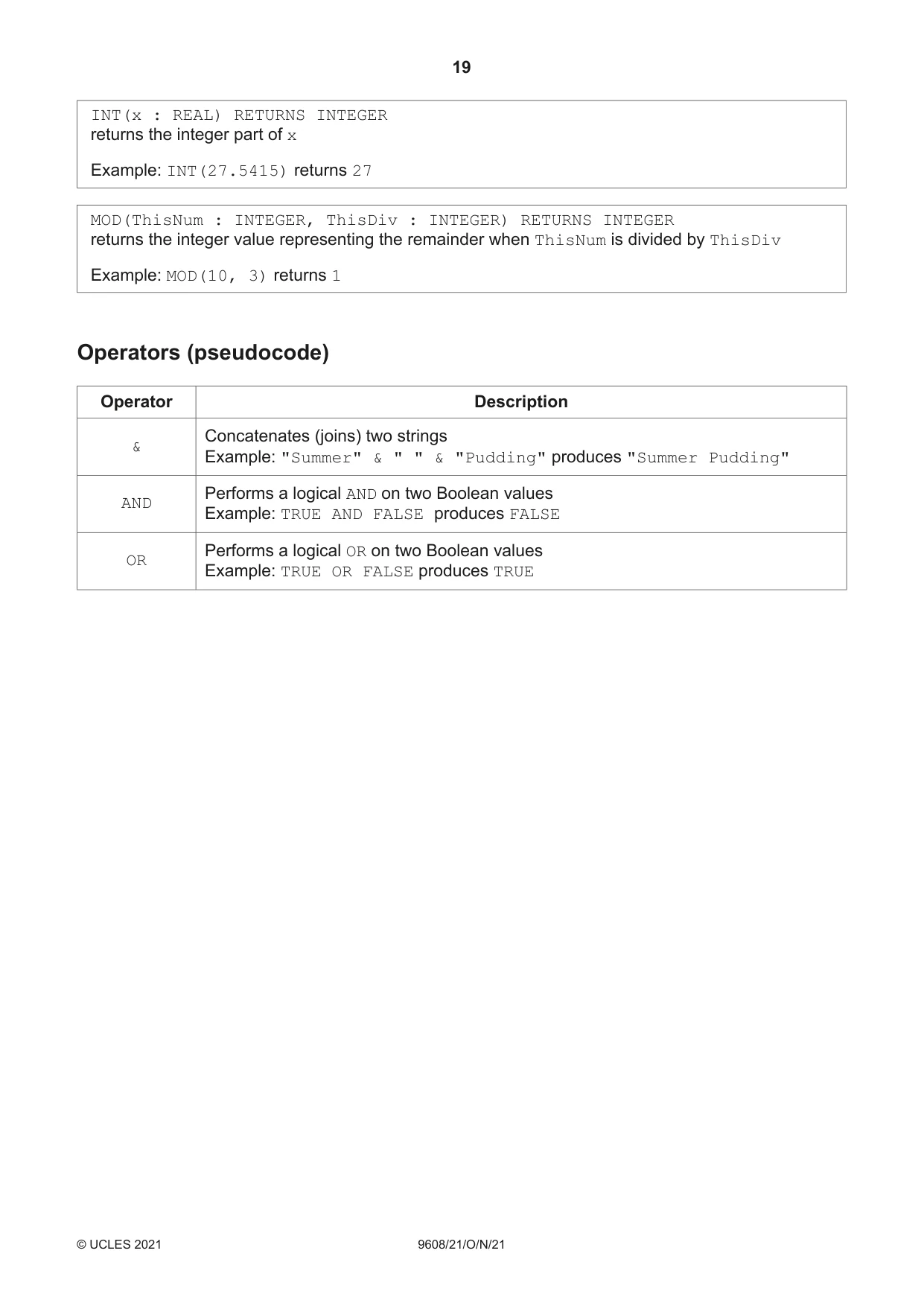
19 9608/21/O/N/21 © UCLES 2021 INT(x : REAL) RETURNS INTEGER returns the integer part of x Example: INT(27.5415) returns 27 MOD(ThisNum : INTEGER, ThisDiv : INTEGER) RETURNS INTEGER returns the integer value representing the remainder when ThisNum is divided by ThisDiv Example: MOD(10, 3) returns 1 Operators (pseudocode) Operator Description & Concatenates (joins) two strings Example: "Summer" & " " & "Pudding" produces "Summer Pudding" AND Performs a logical AND on two Boolean values Example: TRUE AND FALSE produces FALSE OR Performs a logical OR on two Boolean values Example: TRUE OR FALSE produces TRUE
Question paper, page 20
20 9608/21/O/N/21 © UCLES 2021 Permission to reproduce items where third-party owned material protected by copyright is included has been sought and cleared where possible. Every reasonable effort has been made by the publisher (UCLES) to trace copyright holders, but if any items requiring clearance have unwittingly been included, the publisher will be pleased to make amends at the earliest possible opportunity. To avoid the issue of disclosure of answer-related information to candidates, all copyright acknowledgements are reproduced online in the Cambridge Assessment International Education Copyright Acknowledgements Booklet. This is produced for each series of examinations and is freely available to download at www.cambridgeinternational.org after the live examination series. Cambridge Assessment International Education is part of the Cambridge Assessment Group. Cambridge Assessment is the brand name of the University of Cambridge Local Examinations Syndicate (UCLES), which itself is a department of the University of Cambridge. BLANK PAGE
Mark scheme, page 1
This document consists of 16 printed pages. © UCLES 2021 [Turn over Cambridge International AS & A Level COMPUTER SCIENCE 9608/21 Paper 2 Fundamental Problem-Solving and Programming Skills October/November 2021 MARK SCHEME Maximum Mark: 75 Published This mark scheme is published as an aid to teachers and candidates, to indicate the requirements of the examination. It shows the basis on which Examiners were instructed to award marks. It does not indicate the details of the discussions that took place at an Examiners’ meeting before marking began, which would have considered the acceptability of alternative answers. Mark schemes should be read in conjunction with the question paper and the Principal Examiner Report for Teachers. Cambridge International will not enter into discussions about these mark schemes. Cambridge International is publishing the mark schemes for the October/November 2021 series for most Cambridge IGCSE™, Cambridge International A and AS Level components and some Cambridge O Level components.
Mark scheme, page 2
9608/21 Cambridge International AS & A Level – Mark Scheme PUBLISHED October/November 2021 © UCLES 2021 Page 2 of 16 Generic Marking Principles These general marking principles must be applied by all examiners when marking candidate answers. They should be applied alongside the specific content of the mark scheme or generic level descriptors for a question. Each question paper and mark scheme will also comply with these marking principles. GENERIC MARKING PRINCIPLE 1: Marks must be awarded in line with: • the specific content of the mark scheme or the generic level descriptors for the question • the specific skills defined in the mark scheme or in the generic level descriptors for the question • the standard of response required by a candidate as exemplified by the standardisation scripts. GENERIC MARKING PRINCIPLE 2: Marks awarded are always whole marks (not half marks, or other fractions). GENERIC MARKING PRINCIPLE 3: Marks must be awarded positively: • marks are awarded for correct/valid answers, as defined in the mark scheme. However, credit is given for valid answers which go beyond the scope of the syllabus and mark scheme, referring to your Team Leader as appropriate • marks are awarded when candidates clearly demonstrate what they know and can do • marks are not deducted for errors • marks are not deducted for omissions • answers should only be judged on the quality of spelling, punctuation and grammar when these features are specifically assessed by the question as indicated by the mark scheme. The meaning, however, should be unambiguous. GENERIC MARKING PRINCIPLE 4: Rules must be applied consistently, e.g. in situations where candidates have not followed instructions or in the application of generic level descriptors. GENERIC MARKING PRINCIPLE 5: Marks should be awarded using the full range of marks defined in the mark scheme for the question (however; the use of the full mark range may be limited according to the quality of the candidate responses seen). GENERIC MARKING PRINCIPLE 6: Marks awarded are based solely on the requirements as defined in the mark scheme. Marks should not be awarded with grade thresholds or grade descriptors in mind.
Mark scheme, page 3
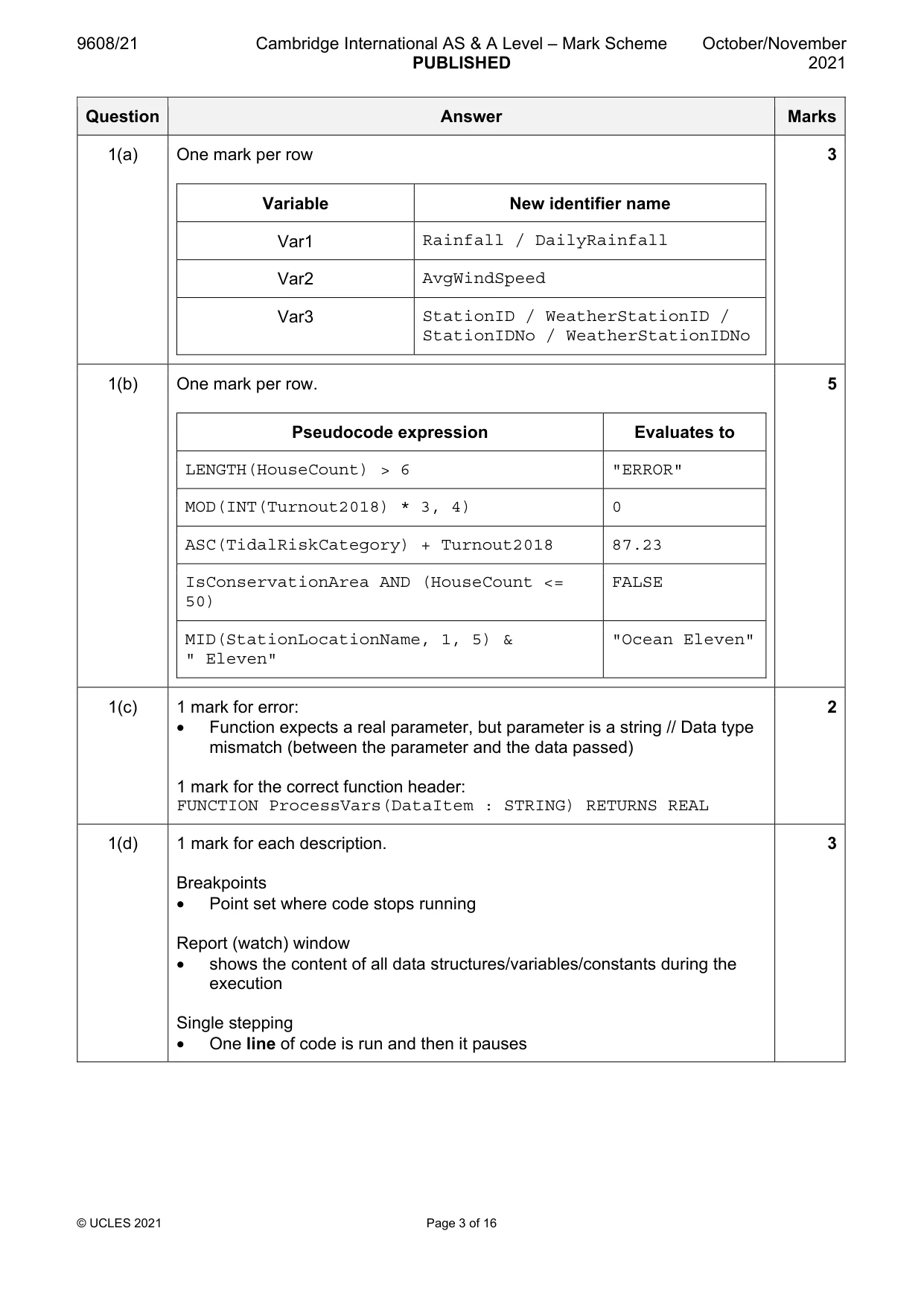
9608/21 Cambridge International AS & A Level – Mark Scheme PUBLISHED October/November 2021 © UCLES 2021 Page 3 of 16 Question Answer Marks 1(a) One mark per row Variable New identifier name Var1 Rainfall / DailyRainfall Var2 AvgWindSpeed Var3 StationID / WeatherStationID / StationIDNo / WeatherStationIDNo 3 1(b) One mark per row. Pseudocode expression Evaluates to LENGTH(HouseCount) > 6 "ERROR" MOD(INT(Turnout2018) * 3, 4) 0 ASC(TidalRiskCategory) + Turnout2018 87.23 IsConservationArea AND (HouseCount <= 50) FALSE MID(StationLocationName, 1, 5) & " Eleven" "Ocean Eleven" 5 1(c) 1 mark for error: • Function expects a real parameter, but parameter is a string // Data type mismatch (between the parameter and the data passed) 1 mark for the correct function header: FUNCTION ProcessVars(DataItem : STRING) RETURNS REAL 2 1(d) 1 mark for each description. Breakpoints • Point set where code stops running Report (watch) window • shows the content of all data structures/variables/constants during the execution Single stepping • One line of code is run and then it pauses 3
Mark scheme, page 4
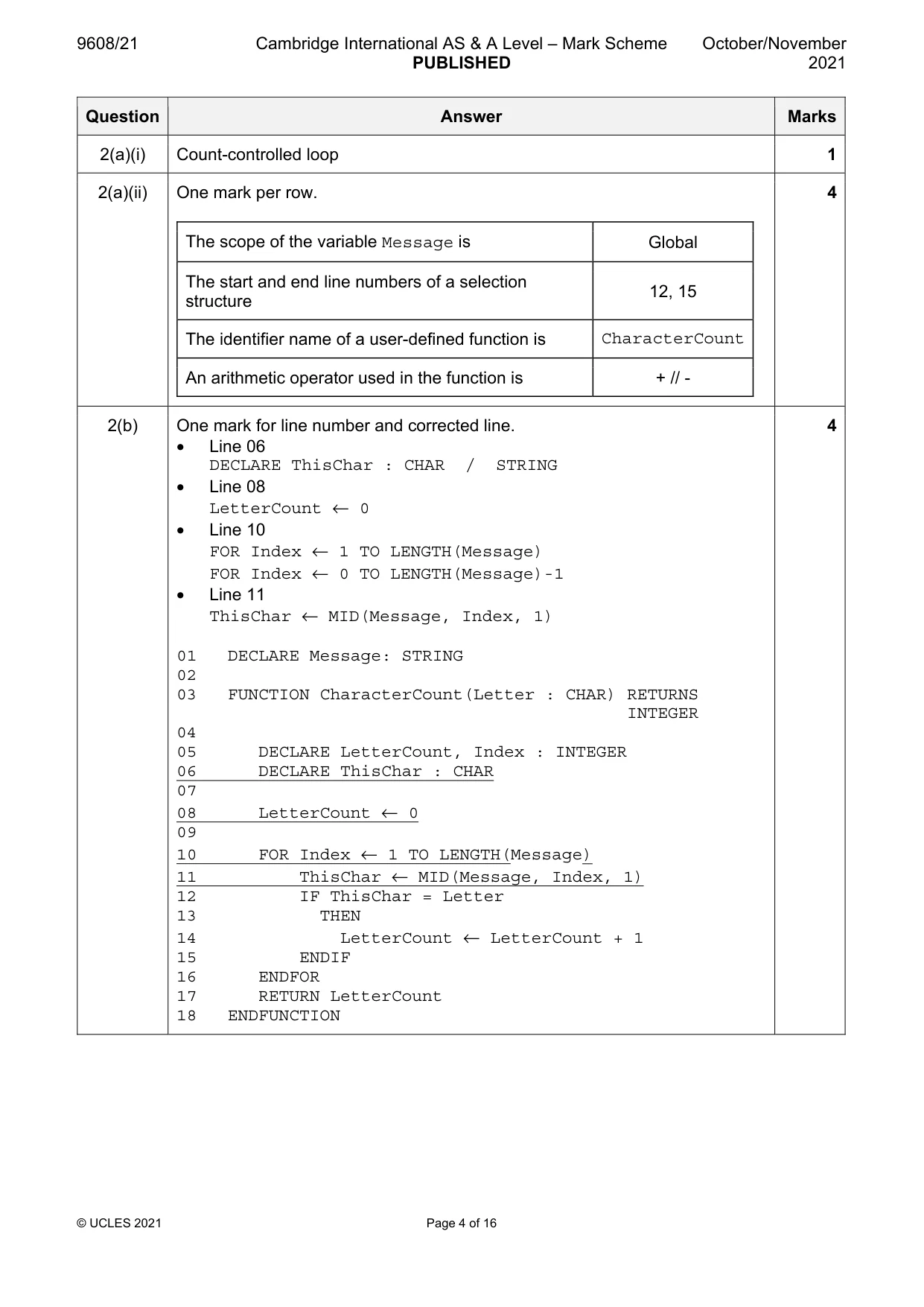
9608/21 Cambridge International AS & A Level – Mark Scheme PUBLISHED October/November 2021 © UCLES 2021 Page 4 of 16 Question Answer Marks 2(a)(i) Count-controlled loop 1 2(a)(ii) One mark per row. The scope of the variable Message is Global The start and end line numbers of a selection structure 12, 15 The identifier name of a user-defined function is CharacterCount An arithmetic operator used in the function is + // - 4 2(b) One mark for line number and corrected line. • Line 06 DECLARE ThisChar : CHAR / STRING • Line 08 LetterCount ← 0 • Line 10 FOR Index ← 1 TO LENGTH(Message) FOR Index ← 0 TO LENGTH(Message)-1 • Line 11 ThisChar ← MID(Message, Index, 1) 01 DECLARE Message: STRING 02 03 FUNCTION CharacterCount(Letter : CHAR) RETURNS INTEGER 04 05 DECLARE LetterCount, Index : INTEGER 06 DECLARE ThisChar : CHAR 07 08 LetterCount ← 0 09 10 FOR Index ← 1 TO LENGTH(Message) 11 ThisChar ← MID(Message, Index, 1) 12 IF ThisChar = Letter 13 THEN 14 LetterCount ← LetterCount + 1 15 ENDIF 16 ENDFOR 17 RETURN LetterCount 18 ENDFUNCTION 4
Mark scheme, page 5
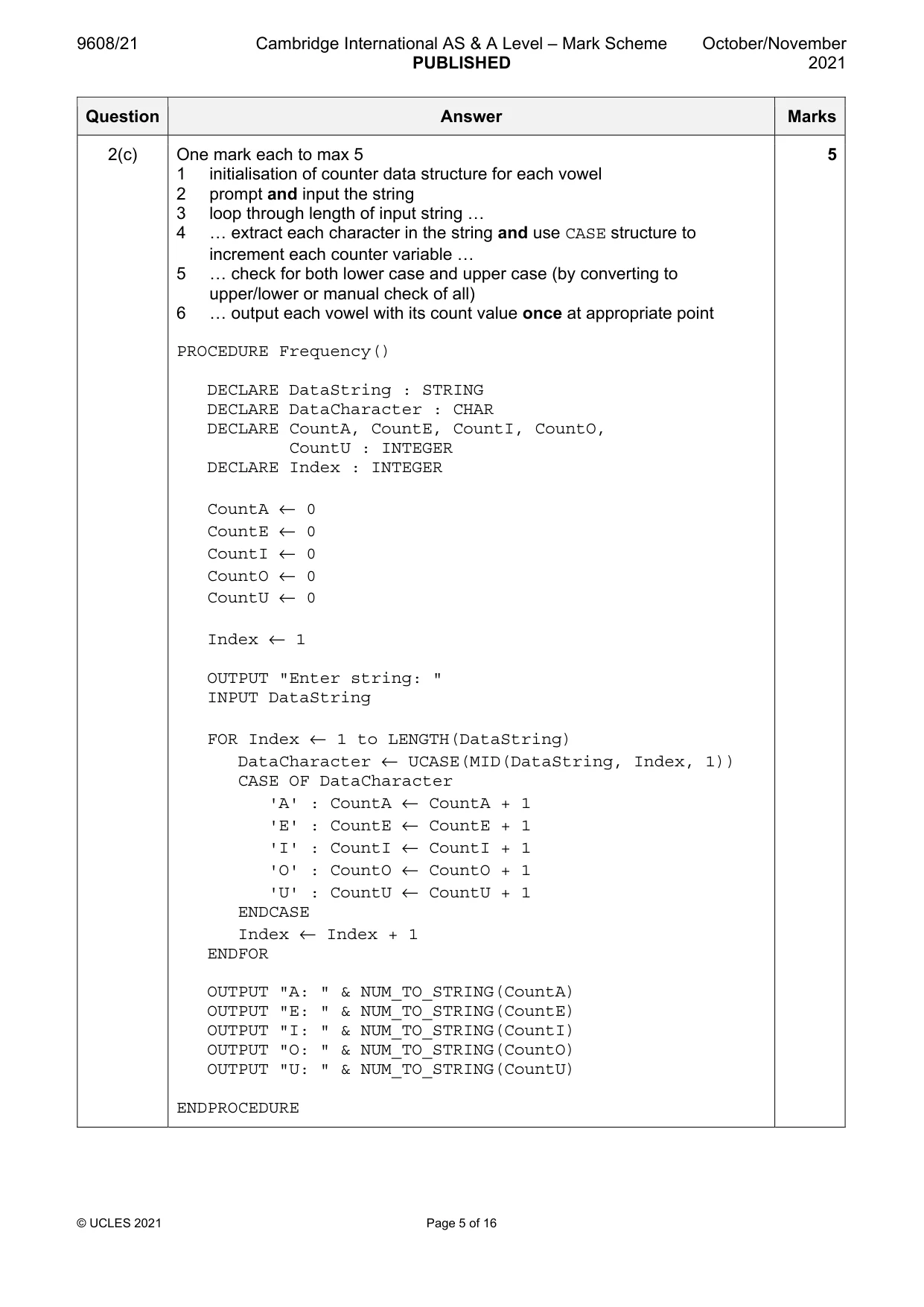
9608/21 Cambridge International AS & A Level – Mark Scheme PUBLISHED October/November 2021 © UCLES 2021 Page 5 of 16 Question Answer Marks 2(c) One mark each to max 5 1 initialisation of counter data structure for each vowel 2 prompt and input the string 3 loop through length of input string … 4 … extract each character in the string and use CASE structure to increment each counter variable … 5 … check for both lower case and upper case (by converting to upper/lower or manual check of all) 6 … output each vowel with its count value once at appropriate point PROCEDURE Frequency() DECLARE DataString : STRING DECLARE DataCharacter : CHAR DECLARE CountA, CountE, CountI, CountO, CountU : INTEGER DECLARE Index : INTEGER CountA ← 0 CountE ← 0 CountI ← 0 CountO ← 0 CountU ← 0 Index ← 1 OUTPUT "Enter string: " INPUT DataString FOR Index ← 1 to LENGTH(DataString) DataCharacter ← UCASE(MID(DataString, Index, 1)) CASE OF DataCharacter 'A' : CountA ← CountA + 1 'E' : CountE ← CountE + 1 'I' : CountI ← CountI + 1 'O' : CountO ← CountO + 1 'U' : CountU ← CountU + 1 ENDCASE Index ← Index + 1 ENDFOR OUTPUT "A: " & NUM_TO_STRING(CountA) OUTPUT "E: " & NUM_TO_STRING(CountE) OUTPUT "I: " & NUM_TO_STRING(CountI) OUTPUT "O: " & NUM_TO_STRING(CountO) OUTPUT "U: " & NUM_TO_STRING(CountU) ENDPROCEDURE 5
Mark scheme, page 6
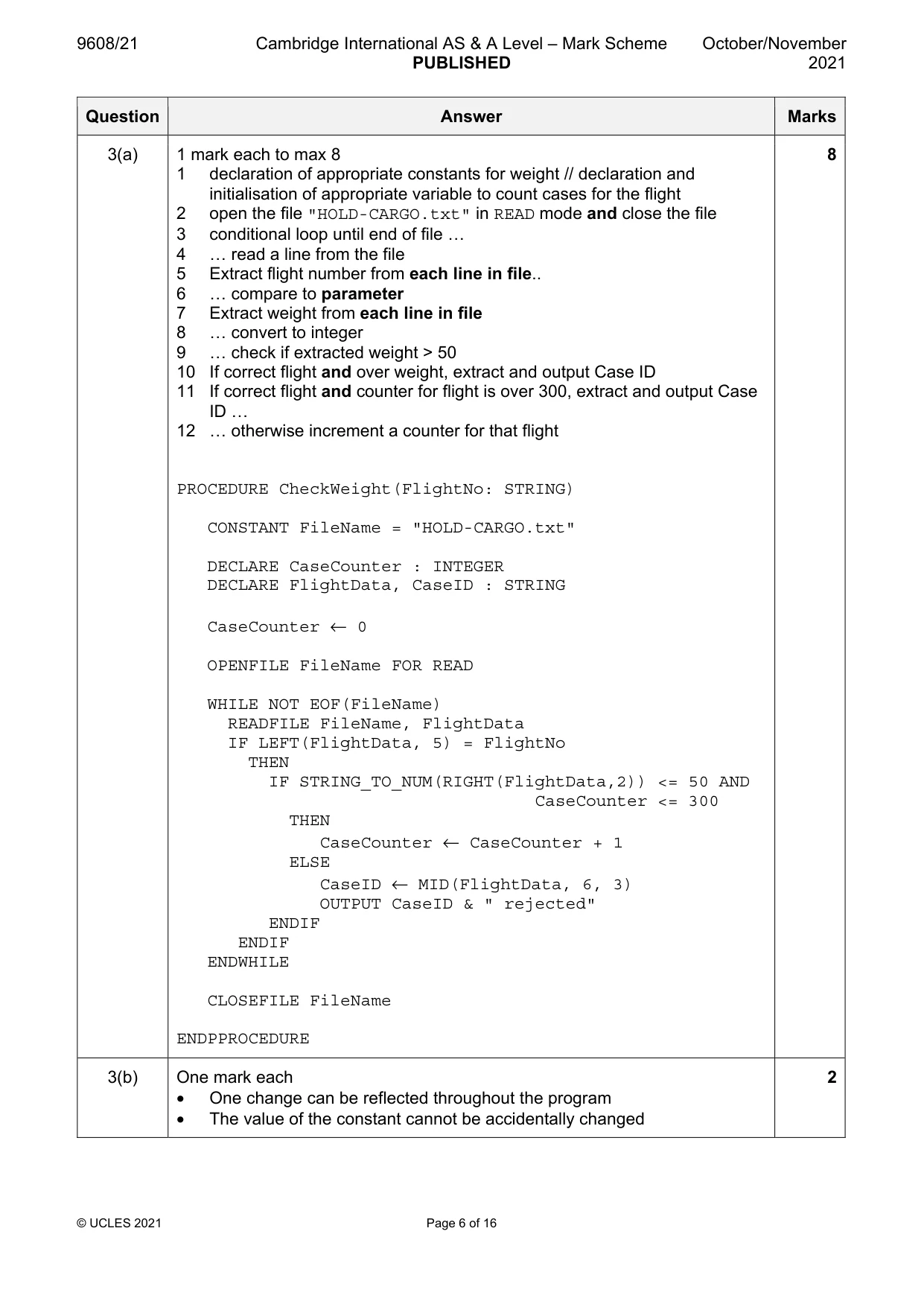
9608/21 Cambridge International AS & A Level – Mark Scheme PUBLISHED October/November 2021 © UCLES 2021 Page 6 of 16 Question Answer Marks 3(a) 1 mark each to max 8 1 declaration of appropriate constants for weight // declaration and initialisation of appropriate variable to count cases for the flight 2 open the file "HOLD-CARGO.txt" in READ mode and close the file 3 conditional loop until end of file … 4 … read a line from the file 5 Extract flight number from each line in file.. 6 … compare to parameter 7 Extract weight from each line in file 8 … convert to integer 9 … check if extracted weight > 50 10 If correct flight and over weight, extract and output Case ID 11 If correct flight and counter for flight is over 300, extract and output Case ID … 12 … otherwise increment a counter for that flight PROCEDURE CheckWeight(FlightNo: STRING) CONSTANT FileName = "HOLD-CARGO.txt" DECLARE CaseCounter : INTEGER DECLARE FlightData, CaseID : STRING CaseCounter ← 0 OPENFILE FileName FOR READ WHILE NOT EOF(FileName) READFILE FileName, FlightData IF LEFT(FlightData, 5) = FlightNo THEN IF STRING_TO_NUM(RIGHT(FlightData,2)) <= 50 AND CaseCounter <= 300 THEN CaseCounter ← CaseCounter + 1 ELSE CaseID ← MID(FlightData, 6, 3) OUTPUT CaseID & " rejected" ENDIF ENDIF ENDWHILE CLOSEFILE FileName ENDPPROCEDURE 8 3(b) One mark each • One change can be reflected throughout the program • The value of the constant cannot be accidentally changed 2
Mark scheme, page 7
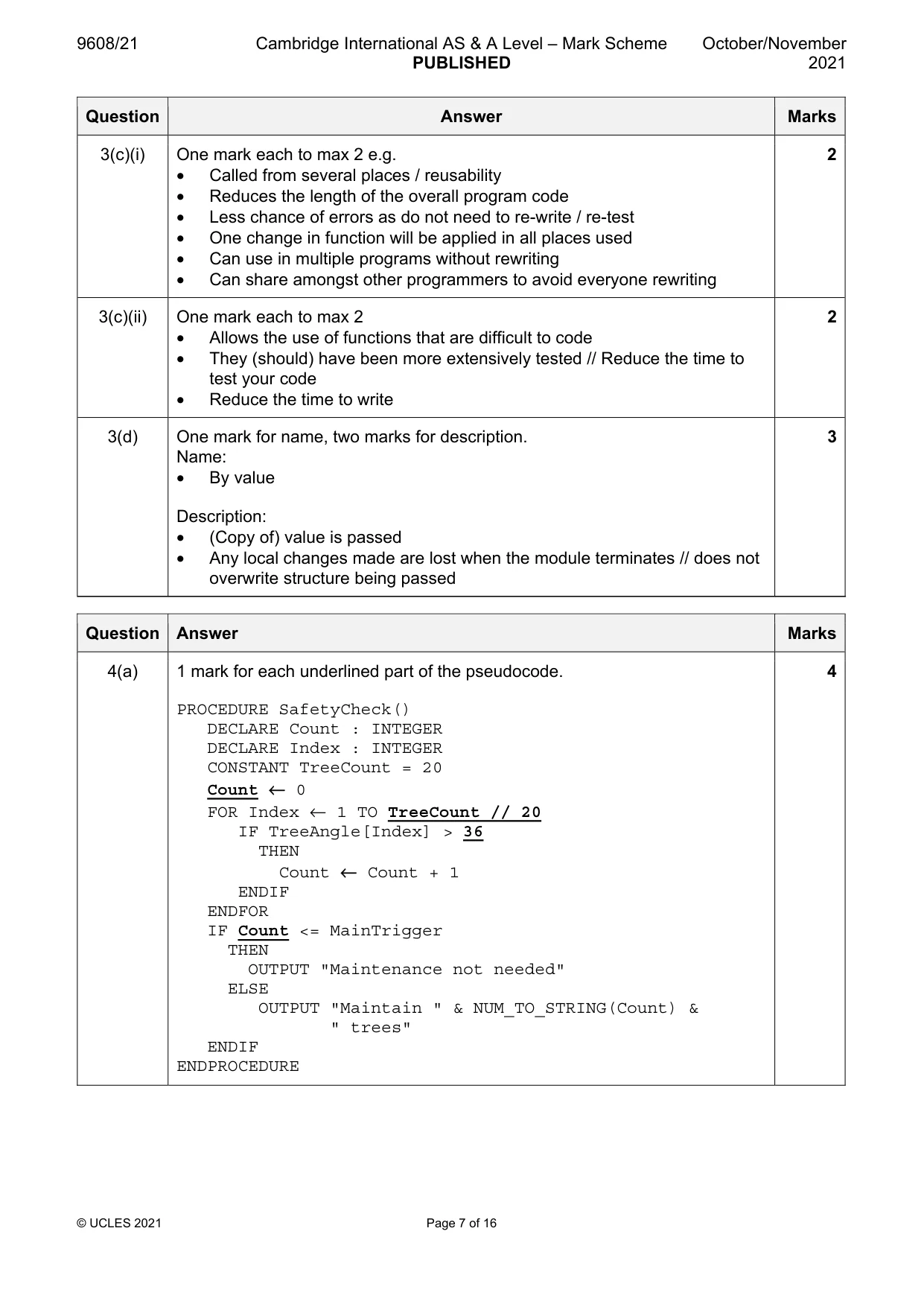
9608/21 Cambridge International AS & A Level – Mark Scheme PUBLISHED October/November 2021 © UCLES 2021 Page 7 of 16 Question Answer Marks 3(c)(i) One mark each to max 2 e.g. • Called from several places / reusability • Reduces the length of the overall program code • Less chance of errors as do not need to re-write / re-test • One change in function will be applied in all places used • Can use in multiple programs without rewriting • Can share amongst other programmers to avoid everyone rewriting 2 3(c)(ii) One mark each to max 2 • Allows the use of functions that are difficult to code • They (should) have been more extensively tested // Reduce the time to test your code • Reduce the time to write 2 3(d) One mark for name, two marks for description. Name: • By value Description: • (Copy of) value is passed • Any local changes made are lost when the module terminates // does not overwrite structure being passed 3 Question Answer Marks 4(a) 1 mark for each underlined part of the pseudocode. PROCEDURE SafetyCheck() DECLARE Count : INTEGER DECLARE Index : INTEGER CONSTANT TreeCount = 20 Count ← 0 FOR Index ← 1 TO TreeCount // 20 IF TreeAngle[Index] > 36 THEN Count ← Count + 1 ENDIF ENDFOR IF Count <= MainTrigger THEN OUTPUT "Maintenance not needed" ELSE OUTPUT "Maintain " & NUM_TO_STRING(Count) & " trees" ENDIF ENDPROCEDURE 4
Mark scheme, page 8
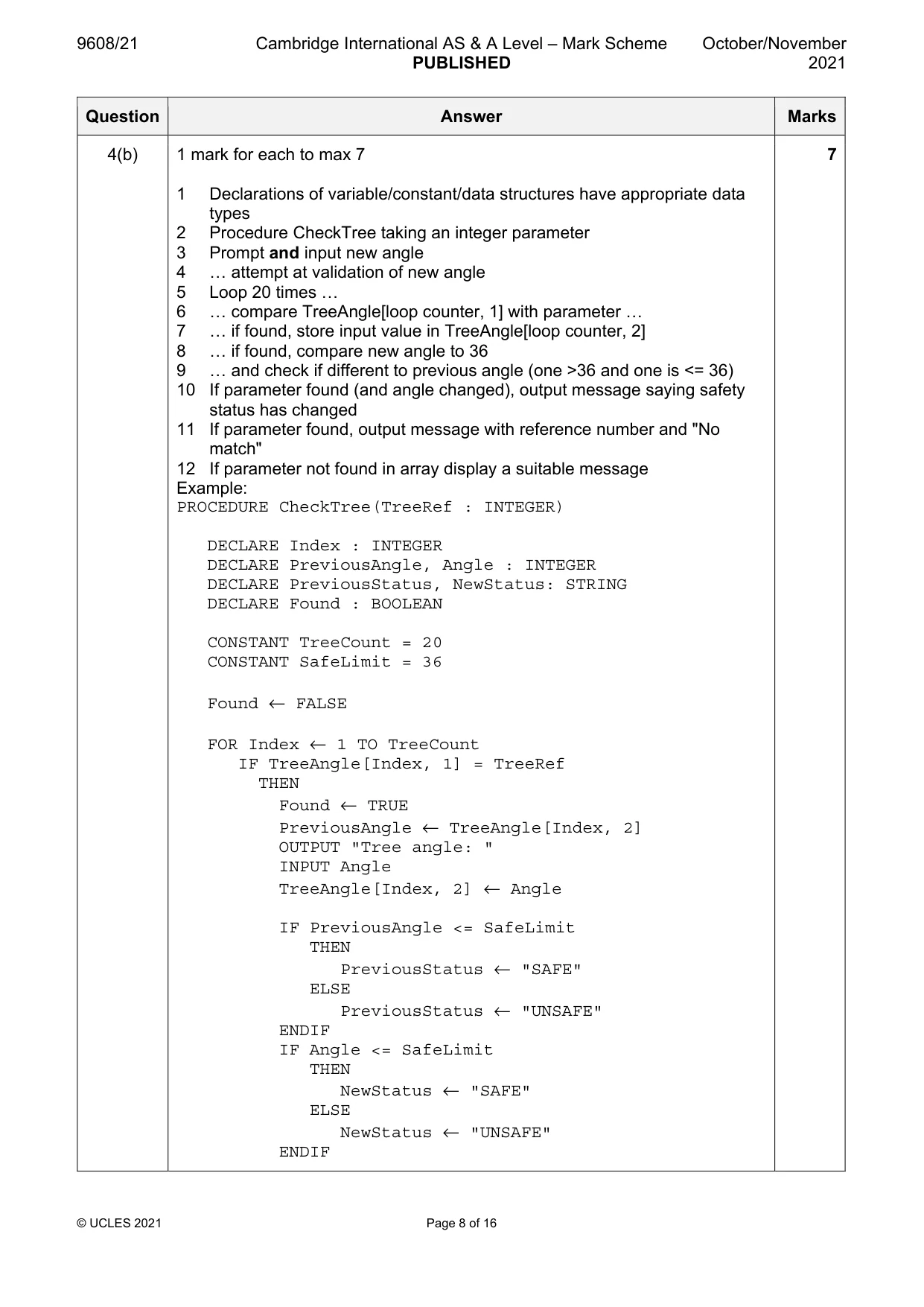
9608/21 Cambridge International AS & A Level – Mark Scheme PUBLISHED October/November 2021 © UCLES 2021 Page 8 of 16 Question Answer Marks 4(b) 1 mark for each to max 7 1 Declarations of variable/constant/data structures have appropriate data types 2 Procedure CheckTree taking an integer parameter 3 Prompt and input new angle 4 … attempt at validation of new angle 5 Loop 20 times … 6 … compare TreeAngle[loop counter, 1] with parameter … 7 … if found, store input value in TreeAngle[loop counter, 2] 8 … if found, compare new angle to 36 9 … and check if different to previous angle (one >36 and one is <= 36) 10 If parameter found (and angle changed), output message saying safety status has changed 11 If parameter found, output message with reference number and "No match" 12 If parameter not found in array display a suitable message Example: PROCEDURE CheckTree(TreeRef : INTEGER) DECLARE Index : INTEGER DECLARE PreviousAngle, Angle : INTEGER DECLARE PreviousStatus, NewStatus: STRING DECLARE Found : BOOLEAN CONSTANT TreeCount = 20 CONSTANT SafeLimit = 36 Found ← FALSE FOR Index ← 1 TO TreeCount IF TreeAngle[Index, 1] = TreeRef THEN Found ← TRUE PreviousAngle ← TreeAngle[Index, 2] OUTPUT "Tree angle: " INPUT Angle TreeAngle[Index, 2] ← Angle IF PreviousAngle <= SafeLimit THEN PreviousStatus ← "SAFE" ELSE PreviousStatus ← "UNSAFE" ENDIF IF Angle <= SafeLimit THEN NewStatus ← "SAFE" ELSE NewStatus ← "UNSAFE" ENDIF 7
Mark scheme, page 9
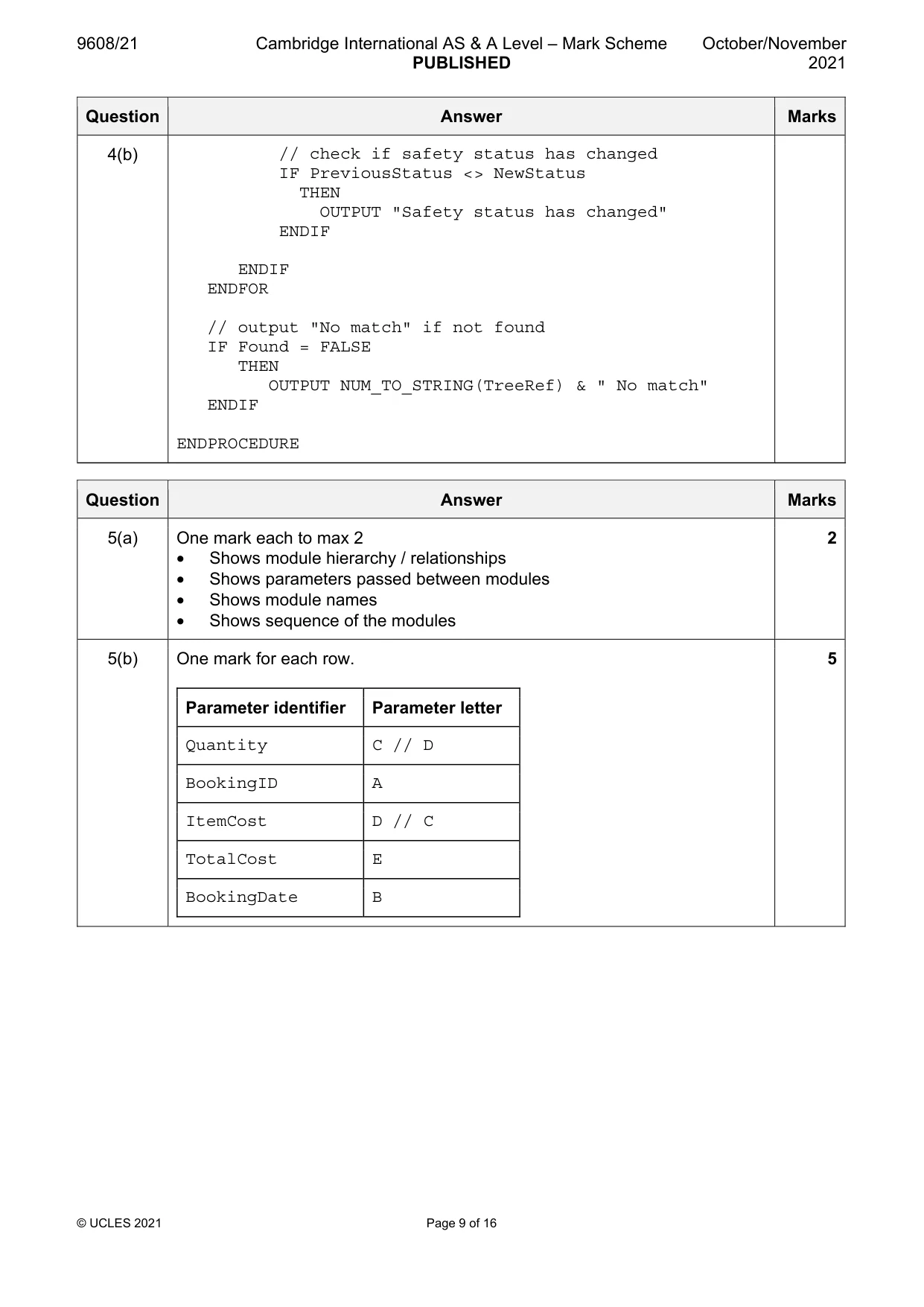
9608/21 Cambridge International AS & A Level – Mark Scheme PUBLISHED October/November 2021 © UCLES 2021 Page 9 of 16 Question Answer Marks 4(b) // check if safety status has changed IF PreviousStatus <> NewStatus THEN OUTPUT "Safety status has changed" ENDIF ENDIF ENDFOR // output "No match" if not found IF Found = FALSE THEN OUTPUT NUM_TO_STRING(TreeRef) & " No match" ENDIF ENDPROCEDURE Question Answer Marks 5(a) One mark each to max 2 • Shows module hierarchy / relationships • Shows parameters passed between modules • Shows module names • Shows sequence of the modules 2 5(b) One mark for each row. Parameter identifier Parameter letter Quantity C // D BookingID A ItemCost D // C TotalCost E BookingDate B 5
Mark scheme, page 10
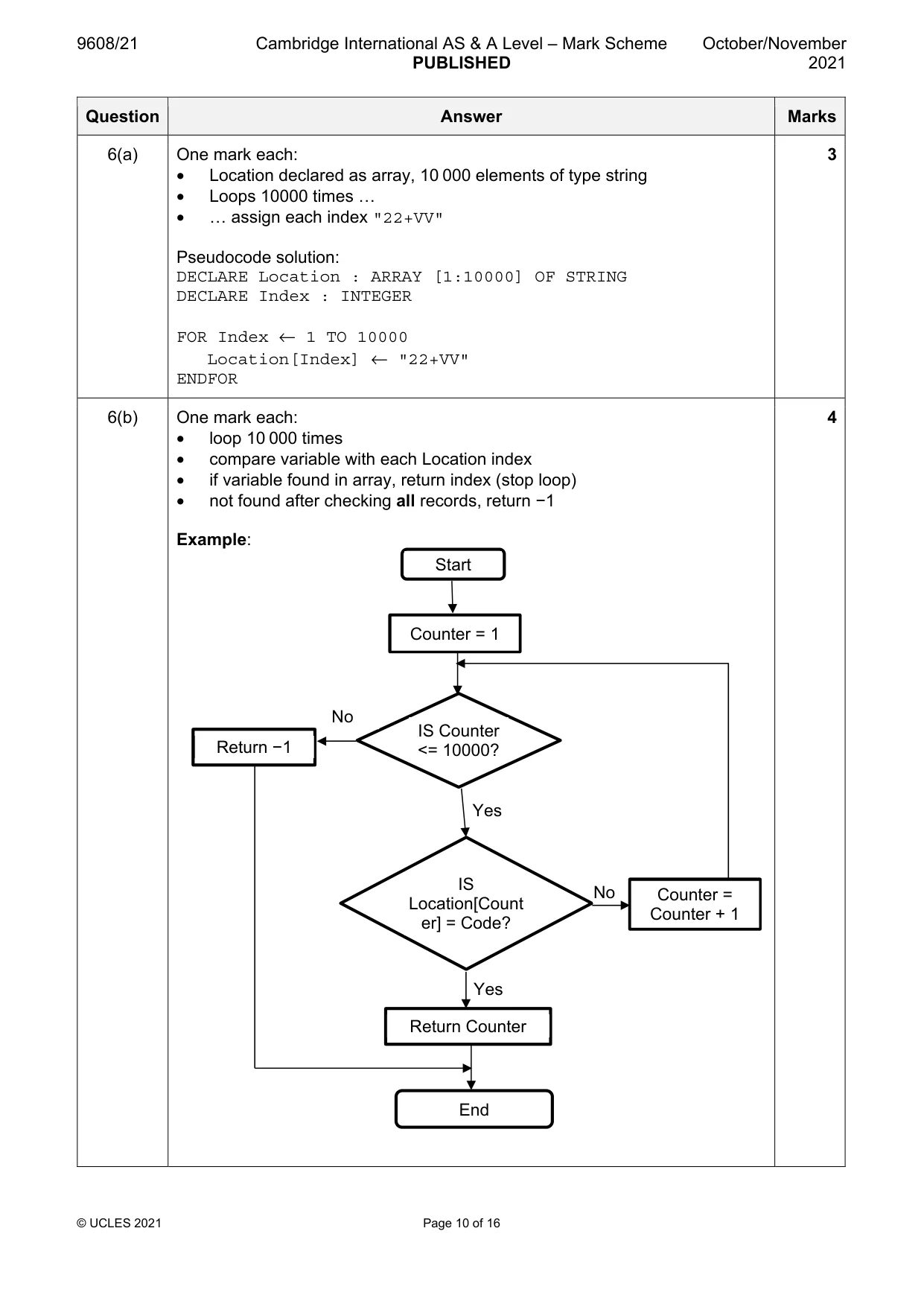
9608/21 Cambridge International AS & A Level – Mark Scheme PUBLISHED October/November 2021 © UCLES 2021 Page 10 of 16 Question Answer Marks 6(a) One mark each: • Location declared as array, 10 000 elements of type string • Loops 10000 times … • … assign each index "22+VV" Pseudocode solution: DECLARE Location : ARRAY [1:10000] OF STRING DECLARE Index : INTEGER FOR Index ← 1 TO 10000 Location[Index] ← "22+VV" ENDFOR 3 6(b) One mark each: • loop 10 000 times • compare variable with each Location index • if variable found in array, return index (stop loop) • not found after checking all records, return −1 Example: 4 Start Counter = 1 IS Counter <= 10000? Counter = Counter + 1 IS Location[Count er] = Code? Return −1 Return Counter End No Yes Yes No
Mark scheme, page 11
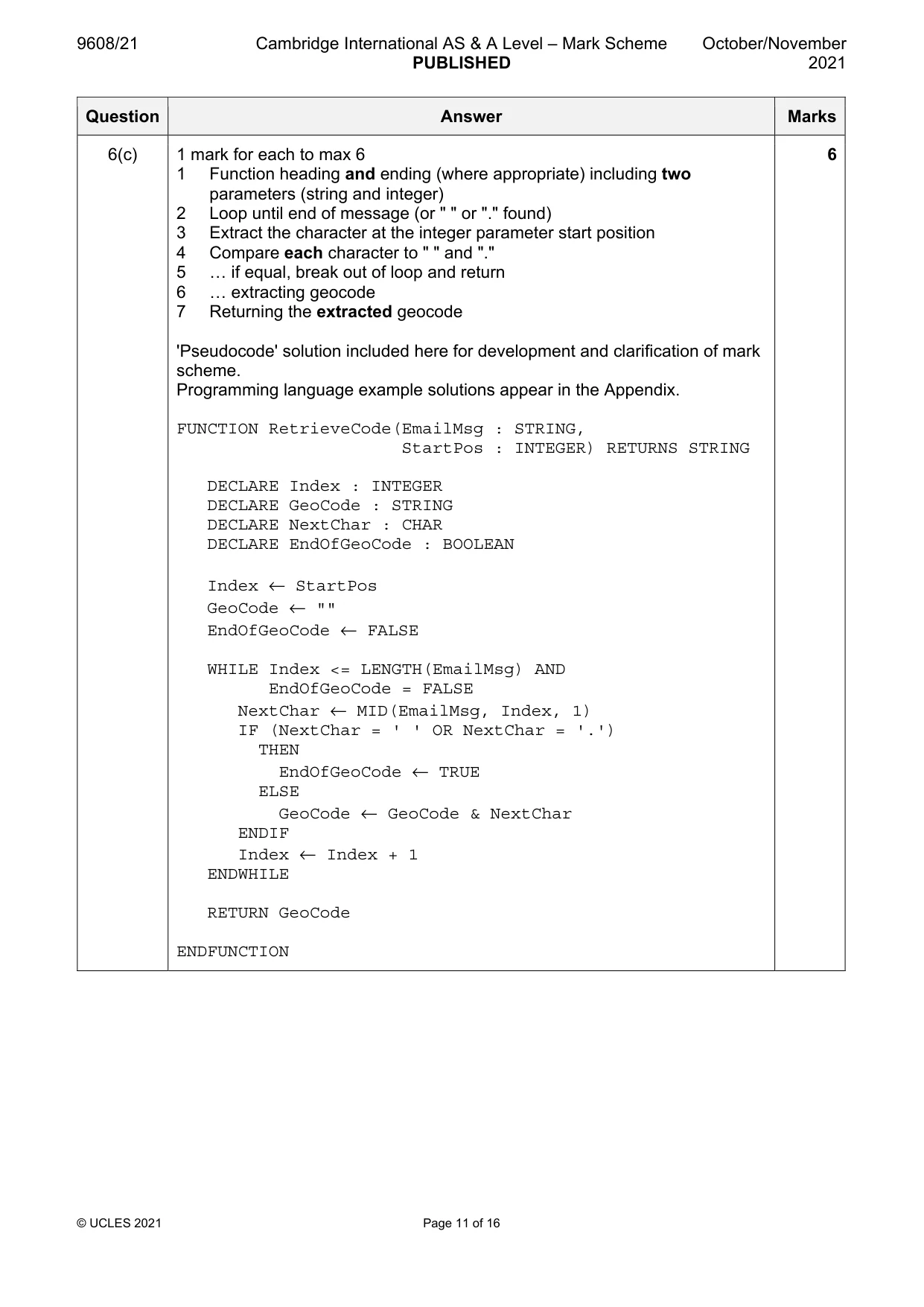
9608/21 Cambridge International AS & A Level – Mark Scheme PUBLISHED October/November 2021 © UCLES 2021 Page 11 of 16 Question Answer Marks 6(c) 1 mark for each to max 6 1 Function heading and ending (where appropriate) including two parameters (string and integer) 2 Loop until end of message (or " " or "." found) 3 Extract the character at the integer parameter start position 4 Compare each character to " " and "." 5 … if equal, break out of loop and return 6 … extracting geocode 7 Returning the extracted geocode 'Pseudocode' solution included here for development and clarification of mark scheme. Programming language example solutions appear in the Appendix. FUNCTION RetrieveCode(EmailMsg : STRING, StartPos : INTEGER) RETURNS STRING DECLARE Index : INTEGER DECLARE GeoCode : STRING DECLARE NextChar : CHAR DECLARE EndOfGeoCode : BOOLEAN Index ← StartPos GeoCode ← "" EndOfGeoCode ← FALSE WHILE Index <= LENGTH(EmailMsg) AND EndOfGeoCode = FALSE NextChar ← MID(EmailMsg, Index, 1) IF (NextChar = ' ' OR NextChar = '.') THEN EndOfGeoCode ← TRUE ELSE GeoCode ← GeoCode & NextChar ENDIF Index ← Index + 1 ENDWHILE RETURN GeoCode ENDFUNCTION 6
Mark scheme, page 12
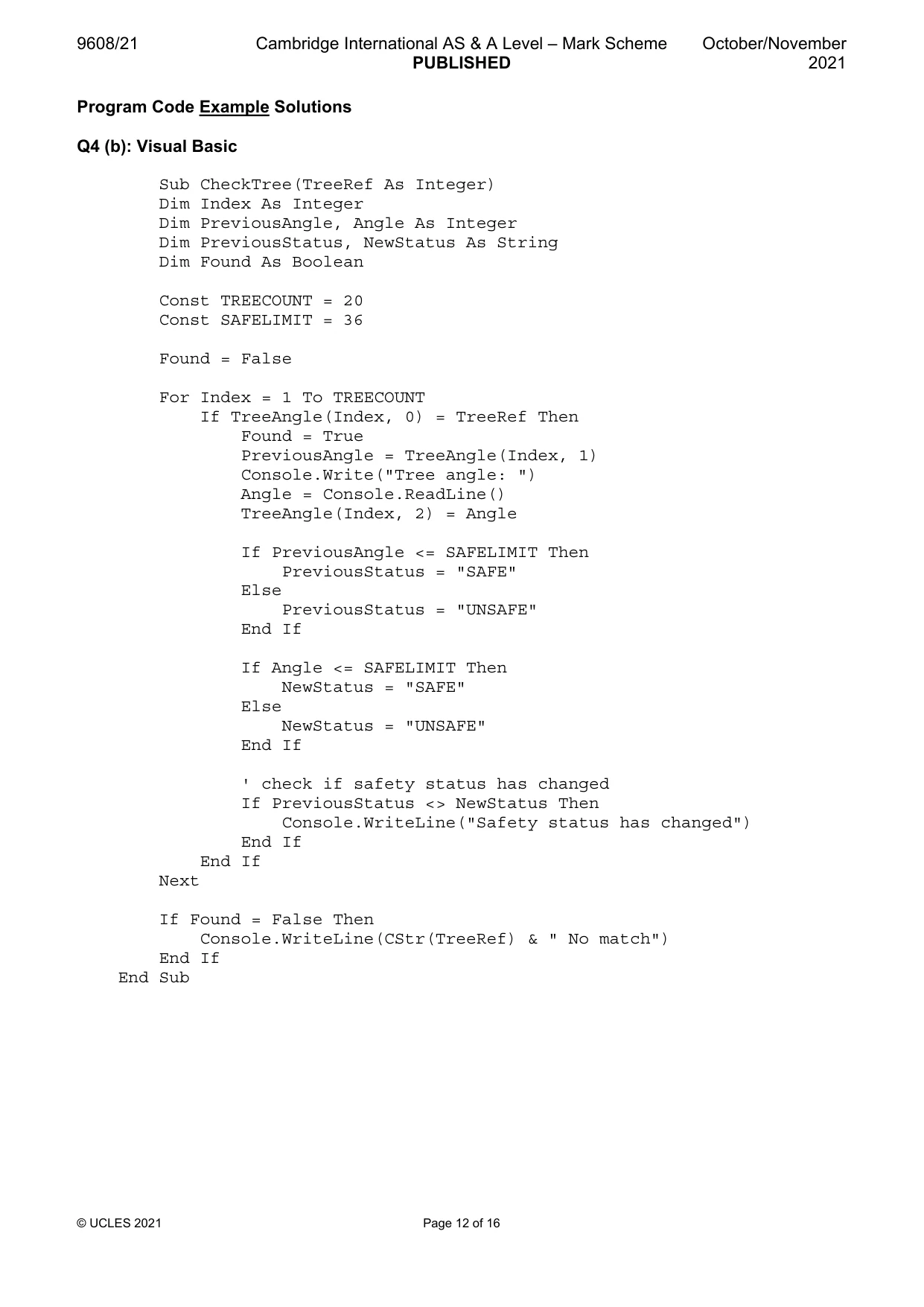
9608/21 Cambridge International AS & A Level – Mark Scheme PUBLISHED October/November 2021 © UCLES 2021 Page 12 of 16 Program Code Example Solutions Q4 (b): Visual Basic Sub CheckTree(TreeRef As Integer) Dim Index As Integer Dim PreviousAngle, Angle As Integer Dim PreviousStatus, NewStatus As String Dim Found As Boolean Const TREECOUNT = 20 Const SAFELIMIT = 36 Found = False For Index = 1 To TREECOUNT If TreeAngle(Index, 0) = TreeRef Then Found = True PreviousAngle = TreeAngle(Index, 1) Console.Write("Tree angle: ") Angle = Console.ReadLine() TreeAngle(Index, 2) = Angle If PreviousAngle <= SAFELIMIT Then PreviousStatus = "SAFE" Else PreviousStatus = "UNSAFE" End If If Angle <= SAFELIMIT Then NewStatus = "SAFE" Else NewStatus = "UNSAFE" End If ' check if safety status has changed If PreviousStatus <> NewStatus Then Console.WriteLine("Safety status has changed") End If End If Next If Found = False Then Console.WriteLine(CStr(TreeRef) & " No match") End If End Sub
Mark scheme, page 13
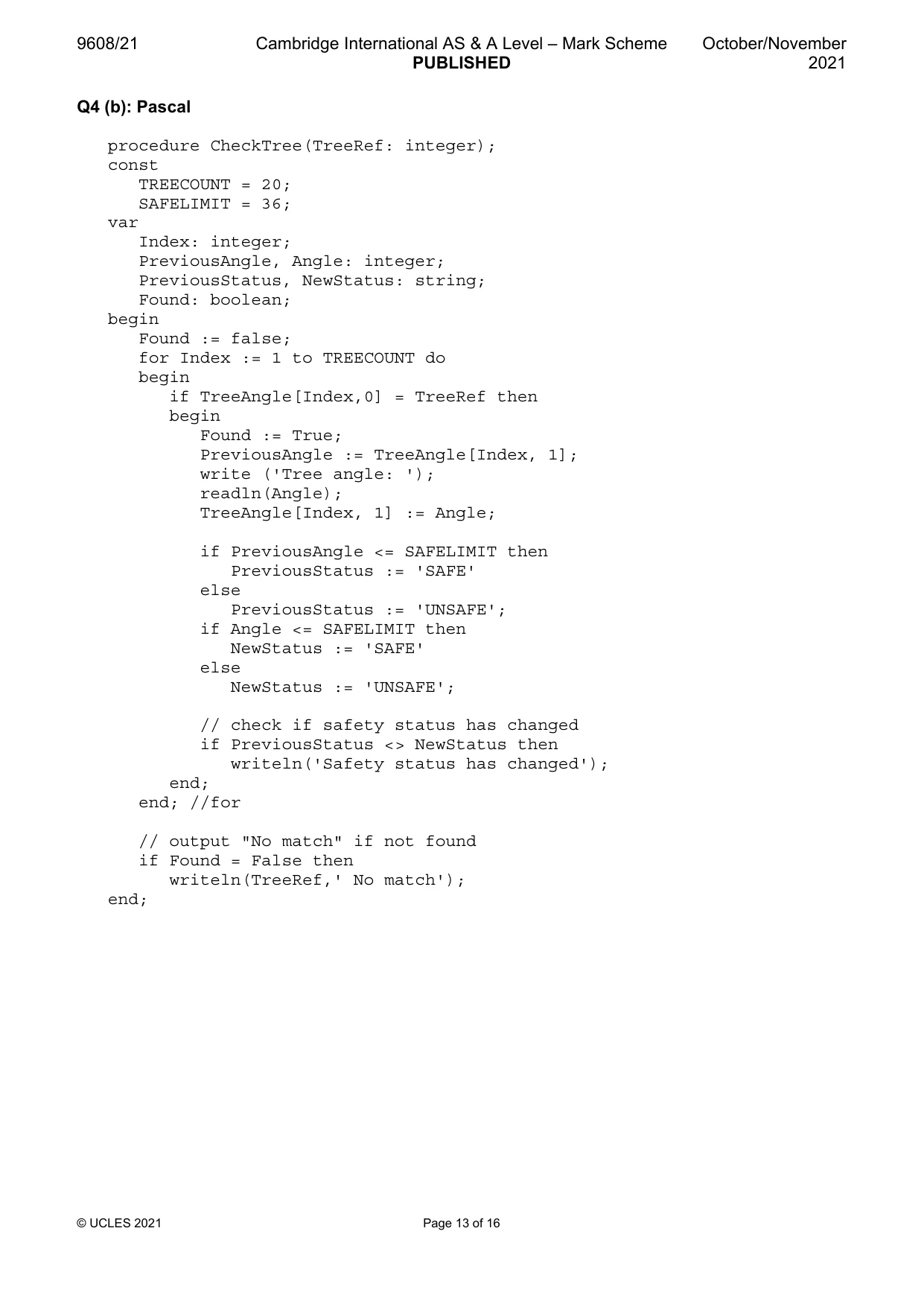
9608/21 Cambridge International AS & A Level – Mark Scheme PUBLISHED October/November 2021 © UCLES 2021 Page 13 of 16 Q4 (b): Pascal procedure CheckTree(TreeRef: integer); const TREECOUNT = 20; SAFELIMIT = 36; var Index: integer; PreviousAngle, Angle: integer; PreviousStatus, NewStatus: string; Found: boolean; begin Found := false; for Index := 1 to TREECOUNT do begin if TreeAngle[Index,0] = TreeRef then begin Found := True; PreviousAngle := TreeAngle[Index, 1]; write ('Tree angle: '); readln(Angle); TreeAngle[Index, 1] := Angle; if PreviousAngle <= SAFELIMIT then PreviousStatus := 'SAFE' else PreviousStatus := 'UNSAFE'; if Angle <= SAFELIMIT then NewStatus := 'SAFE' else NewStatus := 'UNSAFE'; // check if safety status has changed if PreviousStatus <> NewStatus then writeln('Safety status has changed'); end; end; //for // output "No match" if not found if Found = False then writeln(TreeRef,' No match'); end;
Mark scheme, page 14
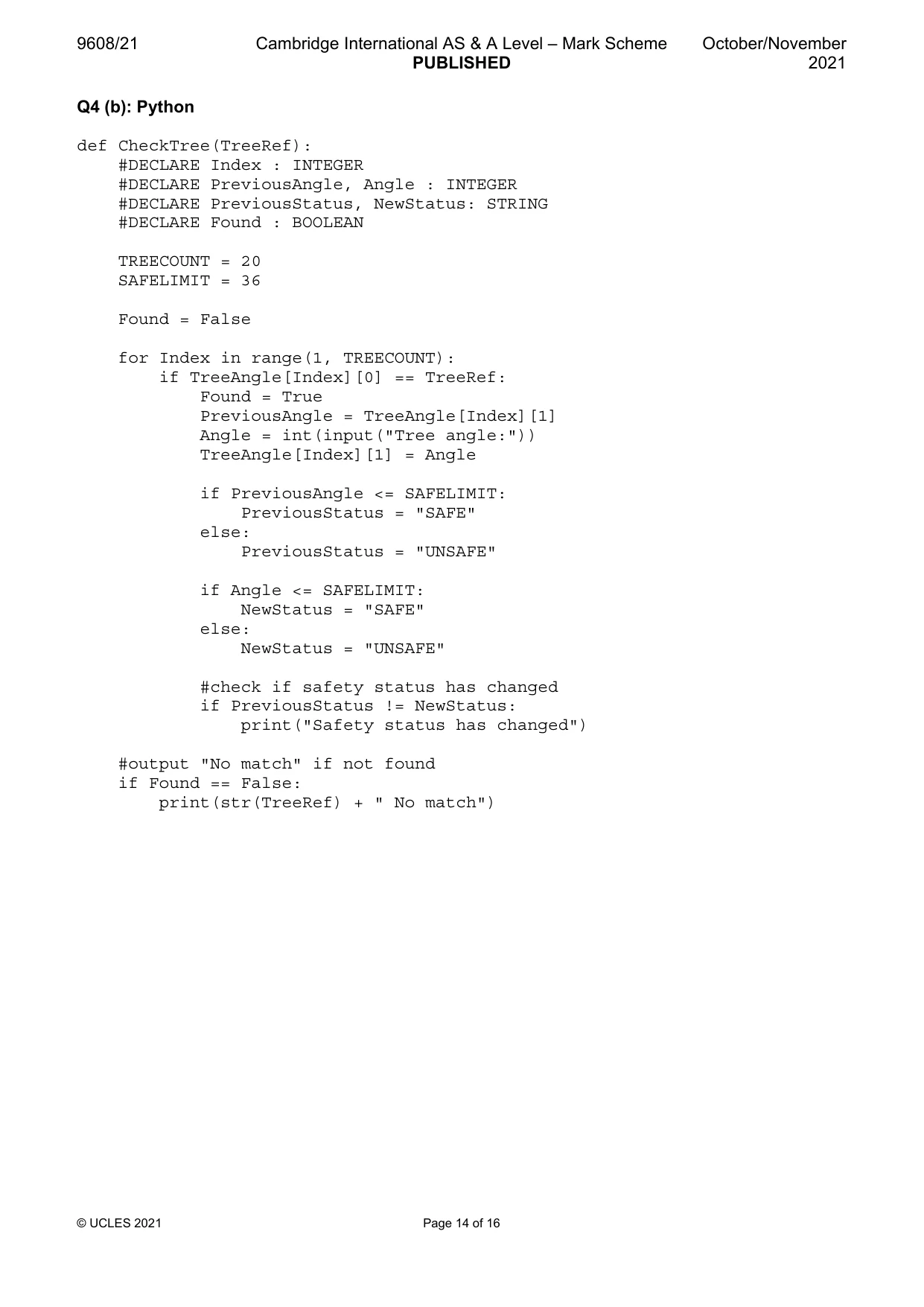
9608/21 Cambridge International AS & A Level – Mark Scheme PUBLISHED October/November 2021 © UCLES 2021 Page 14 of 16 Q4 (b): Python def CheckTree(TreeRef): #DECLARE Index : INTEGER #DECLARE PreviousAngle, Angle : INTEGER #DECLARE PreviousStatus, NewStatus: STRING #DECLARE Found : BOOLEAN TREECOUNT = 20 SAFELIMIT = 36 Found = False for Index in range(1, TREECOUNT): if TreeAngle[Index][0] == TreeRef: Found = True PreviousAngle = TreeAngle[Index][1] Angle = int(input("Tree angle:")) TreeAngle[Index][1] = Angle if PreviousAngle <= SAFELIMIT: PreviousStatus = "SAFE" else: PreviousStatus = "UNSAFE" if Angle <= SAFELIMIT: NewStatus = "SAFE" else: NewStatus = "UNSAFE" #check if safety status has changed if PreviousStatus != NewStatus: print("Safety status has changed") #output "No match" if not found if Found == False: print(str(TreeRef) + " No match")
Mark scheme, page 15
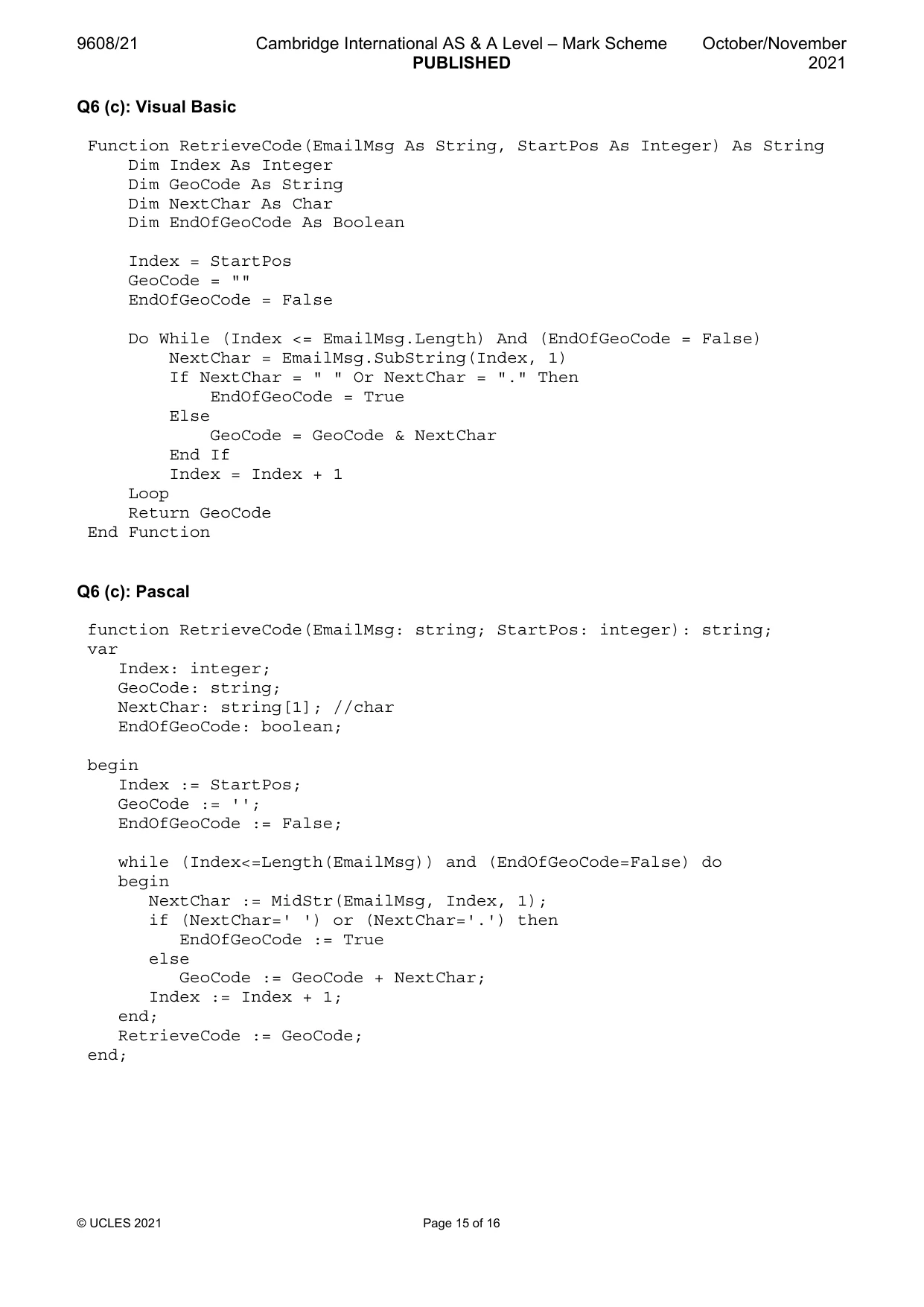
9608/21 Cambridge International AS & A Level – Mark Scheme PUBLISHED October/November 2021 © UCLES 2021 Page 15 of 16 Q6 (c): Visual Basic Function RetrieveCode(EmailMsg As String, StartPos As Integer) As String Dim Index As Integer Dim GeoCode As String Dim NextChar As Char Dim EndOfGeoCode As Boolean Index = StartPos GeoCode = "" EndOfGeoCode = False Do While (Index <= EmailMsg.Length) And (EndOfGeoCode = False) NextChar = EmailMsg.SubString(Index, 1) If NextChar = " " Or NextChar = "." Then EndOfGeoCode = True Else GeoCode = GeoCode & NextChar End If Index = Index + 1 Loop Return GeoCode End Function Q6 (c): Pascal function RetrieveCode(EmailMsg: string; StartPos: integer): string; var Index: integer; GeoCode: string; NextChar: string[1]; //char EndOfGeoCode: boolean; begin Index := StartPos; GeoCode := ''; EndOfGeoCode := False; while (Index<=Length(EmailMsg)) and (EndOfGeoCode=False) do begin NextChar := MidStr(EmailMsg, Index, 1); if (NextChar=' ') or (NextChar='.') then EndOfGeoCode := True else GeoCode := GeoCode + NextChar; Index := Index + 1; end; RetrieveCode := GeoCode; end;
Mark scheme, page 16
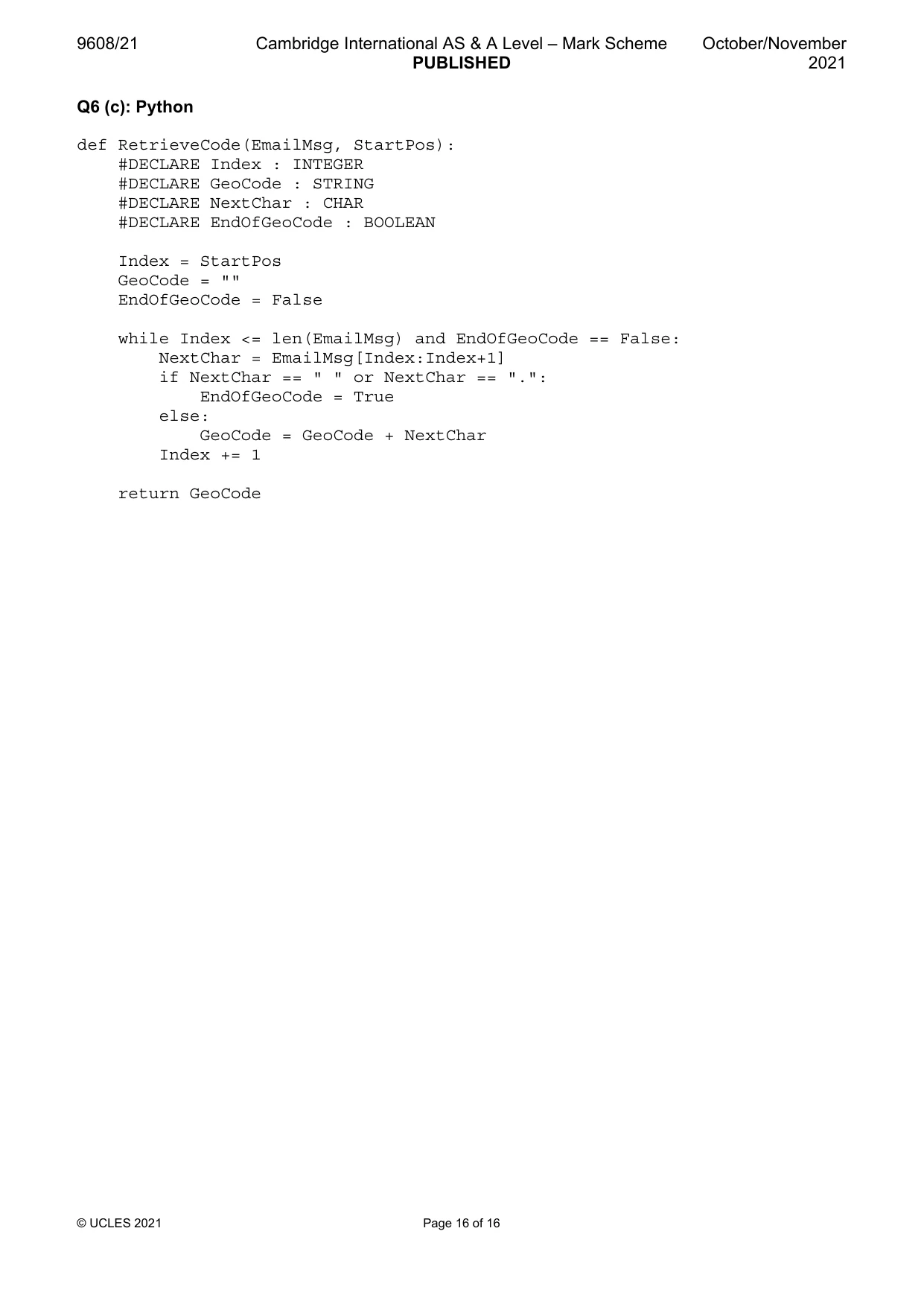
9608/21 Cambridge International AS & A Level – Mark Scheme PUBLISHED October/November 2021 © UCLES 2021 Page 16 of 16 Q6 (c): Python def RetrieveCode(EmailMsg, StartPos): #DECLARE Index : INTEGER #DECLARE GeoCode : STRING #DECLARE NextChar : CHAR #DECLARE EndOfGeoCode : BOOLEAN Index = StartPos GeoCode = "" EndOfGeoCode = False while Index <= len(EmailMsg) and EndOfGeoCode == False: NextChar = EmailMsg[Index:Index+1] if NextChar == " " or NextChar == ".": EndOfGeoCode = True else: GeoCode = GeoCode + NextChar Index += 1 return GeoCode
What you needed in this session
Cambridge’s own grade thresholds for 2021 Oct/Nov, Paper 2 · Variant 1. A higher threshold means an easier paper — the bar moves with how the cohort did.