Cambridge A Level Computer Science 9608 — 2019 May/June Paper 2 · Variant 2
9608/22/M/J/19 · 75 marks · ≈84 min
The question paper and its mark scheme, free to read here and free to download. This is Cambridge’s own paper, exactly as it was sat.
Question paper16 pages

Mark scheme15 pages
Answers below. Sit the paper first if you are practising.
Paper as text
Question paper, page 1
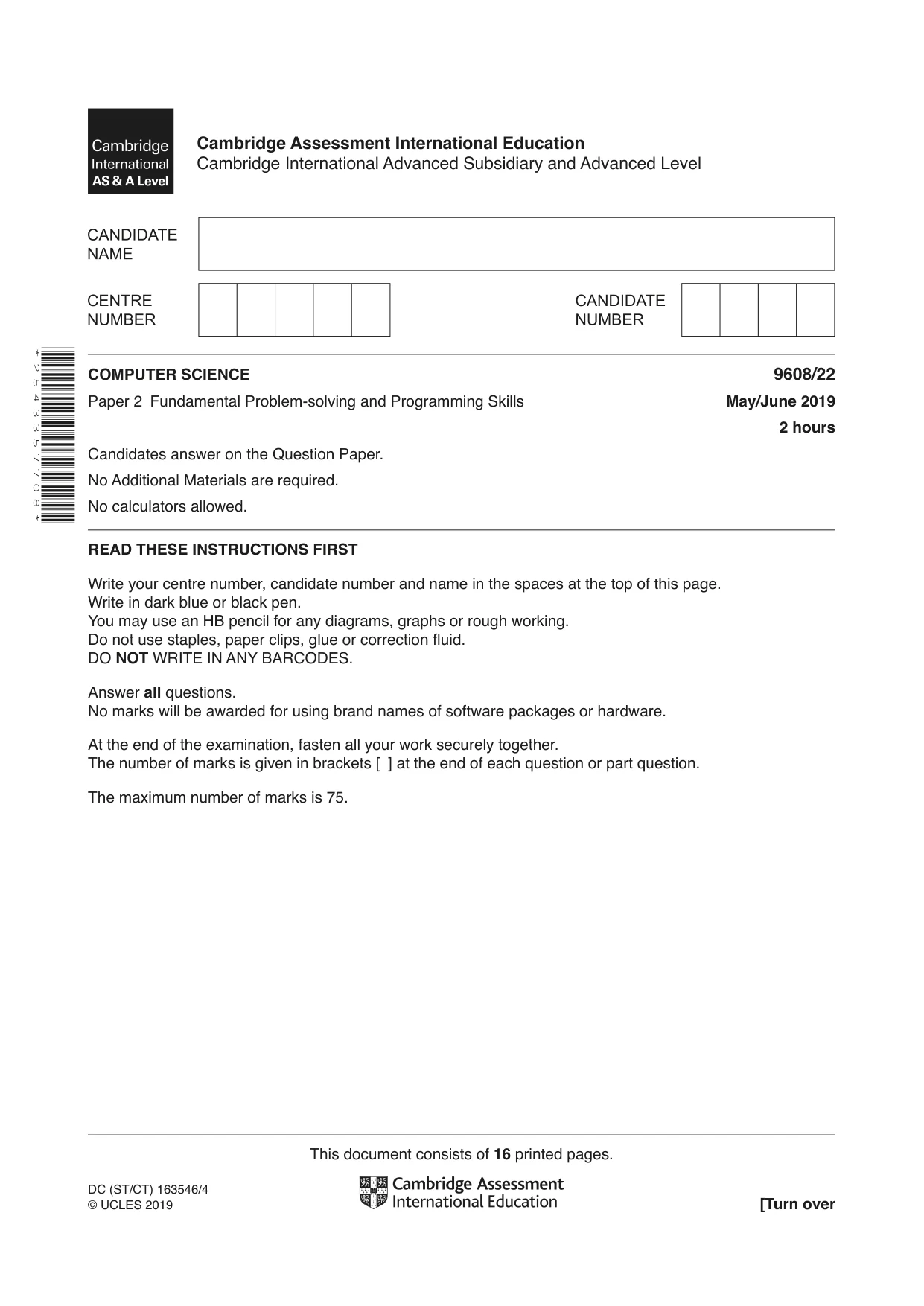
This document consists of 16 printed pages. DC (ST/CT) 163546/4 © UCLES 2019 [Turn over Cambridge Assessment International Education Cambridge International Advanced Subsidiary and Advanced Level * 2 5 4 3 3 5 7 7 0 8 * COMPUTER SCIENCE 9608/22 Paper 2 Fundamental Problem-solving and Programming Skills May/June 2019 2 hours Candidates answer on the Question Paper. No Additional Materials are required. No calculators allowed. READ THESE INSTRUCTIONS FIRST Write your centre number, candidate number and name in the spaces at the top of this page. Write in dark blue or black pen. You may use an HB pencil for any diagrams, graphs or rough working. Do not use staples, paper clips, glue or correction fluid. DO NOT WRITE IN ANY BARCODES. Answer all questions. No marks will be awarded for using brand names of software packages or hardware. At the end of the examination, fasten all your work securely together. The number of marks is given in brackets [ ] at the end of each question or part question. The maximum number of marks is 75.
Question paper, page 2
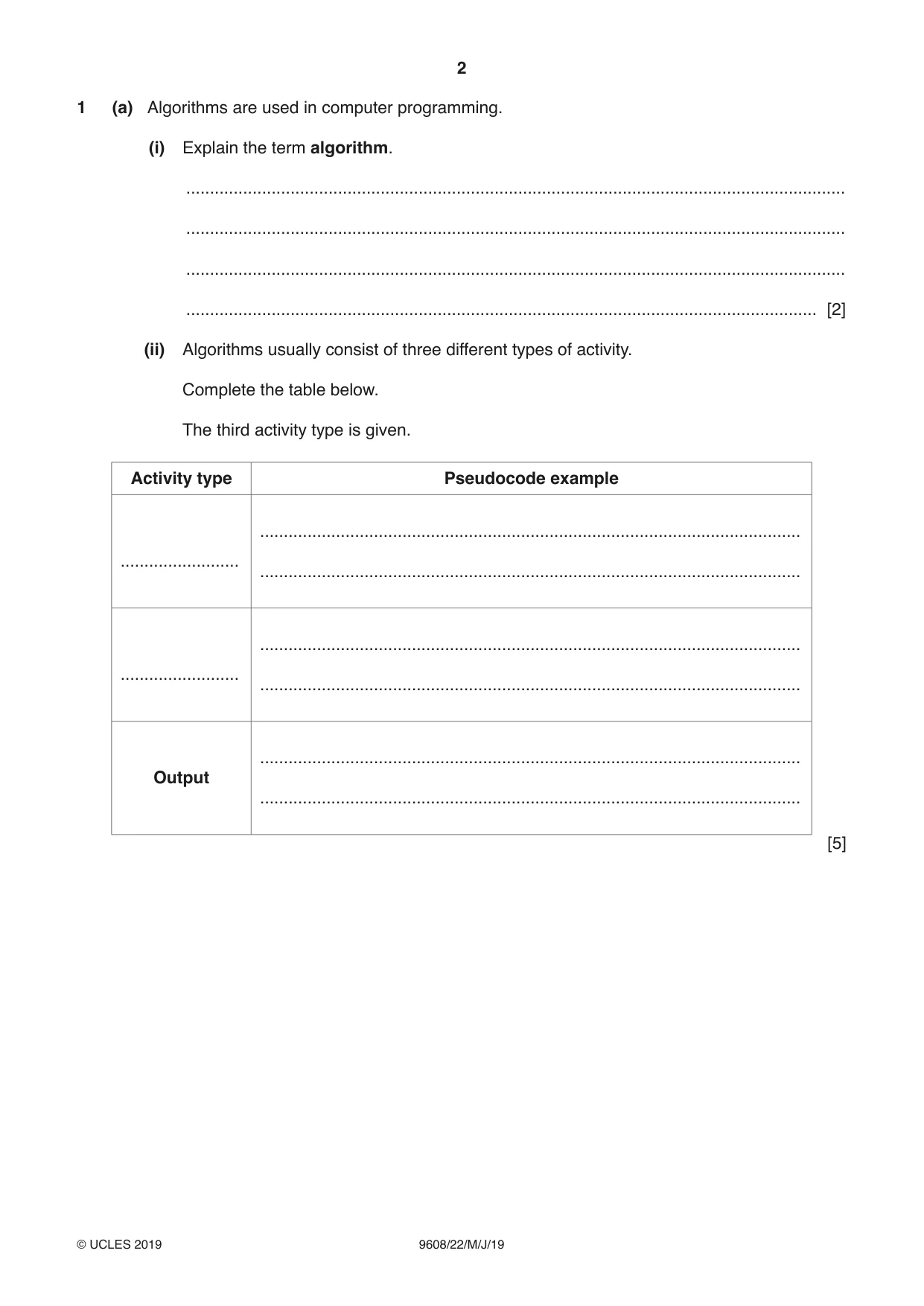
2 9608/22/M/J/19 © UCLES 2019 1 (a) Algorithms are used in computer programming. (i) Explain the term algorithm. … … … … [2] (ii) Algorithms usually consist of three different types of activity. Complete the table below. The third activity type is given. Activity type Pseudocode example … … … … … … Output … … [5]
Question paper, page 3
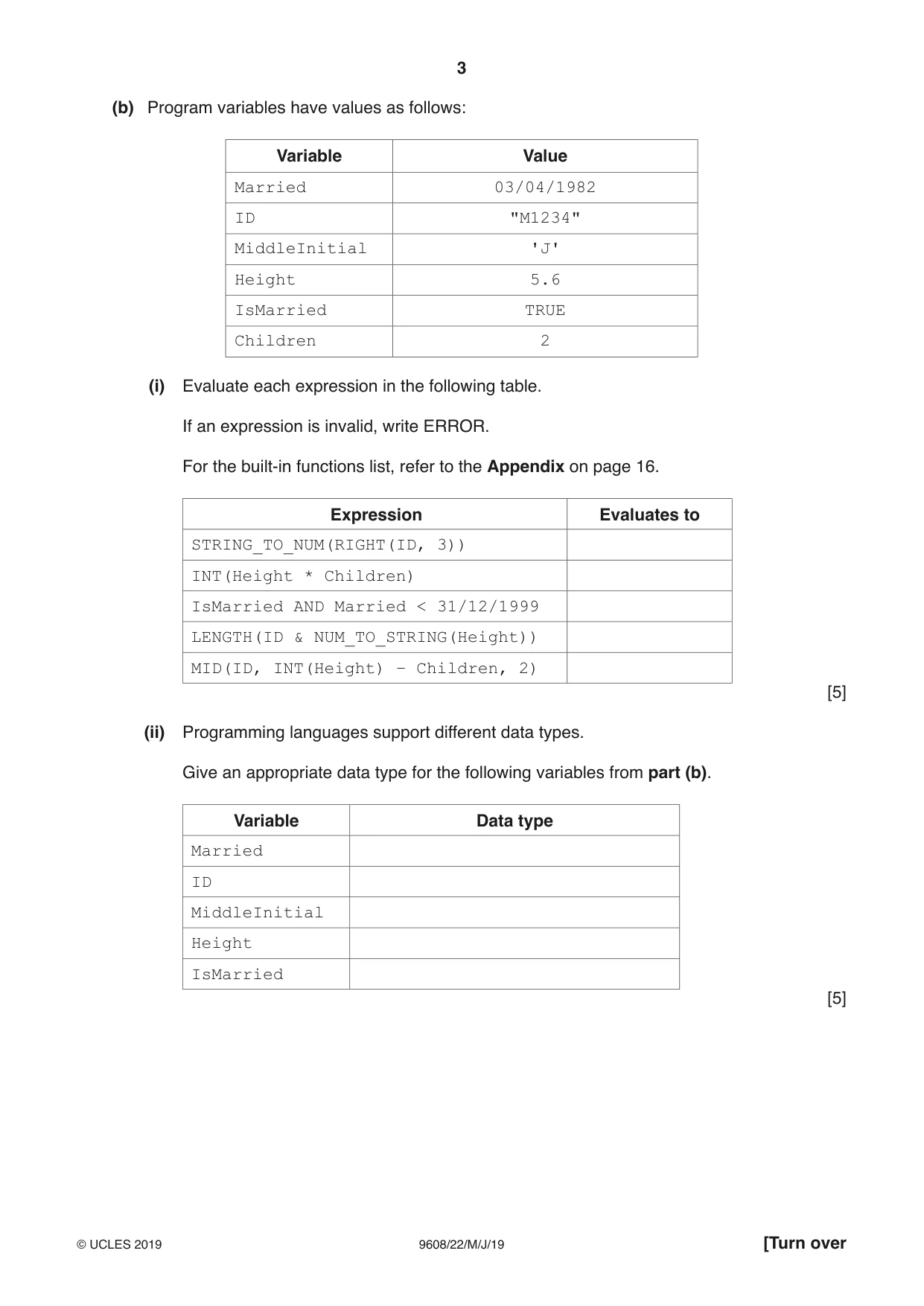
3 9608/22/M/J/19 © UCLES 2019 [Turn over (b) Program variables have values as follows: Variable Value Married 03/04/1982 ID "M1234" MiddleInitial 'J' Height 5.6 IsMarried TRUE Children 2 (i) Evaluate each expression in the following table. If an expression is invalid, write ERROR. For the built-in functions list, refer to the Appendix on page 16. Expression Evaluates to STRING_TO_NUM(RIGHT(ID, 3)) INT(Height * Children) IsMarried AND Married < 31/12/1999 LENGTH(ID & NUM_TO_STRING(Height)) MID(ID, INT(Height) – Children, 2) [5] (ii) Programming languages support different data types. Give an appropriate data type for the following variables from part (b). Variable Data type Married ID MiddleInitial Height IsMarried [5]
Question paper, page 4
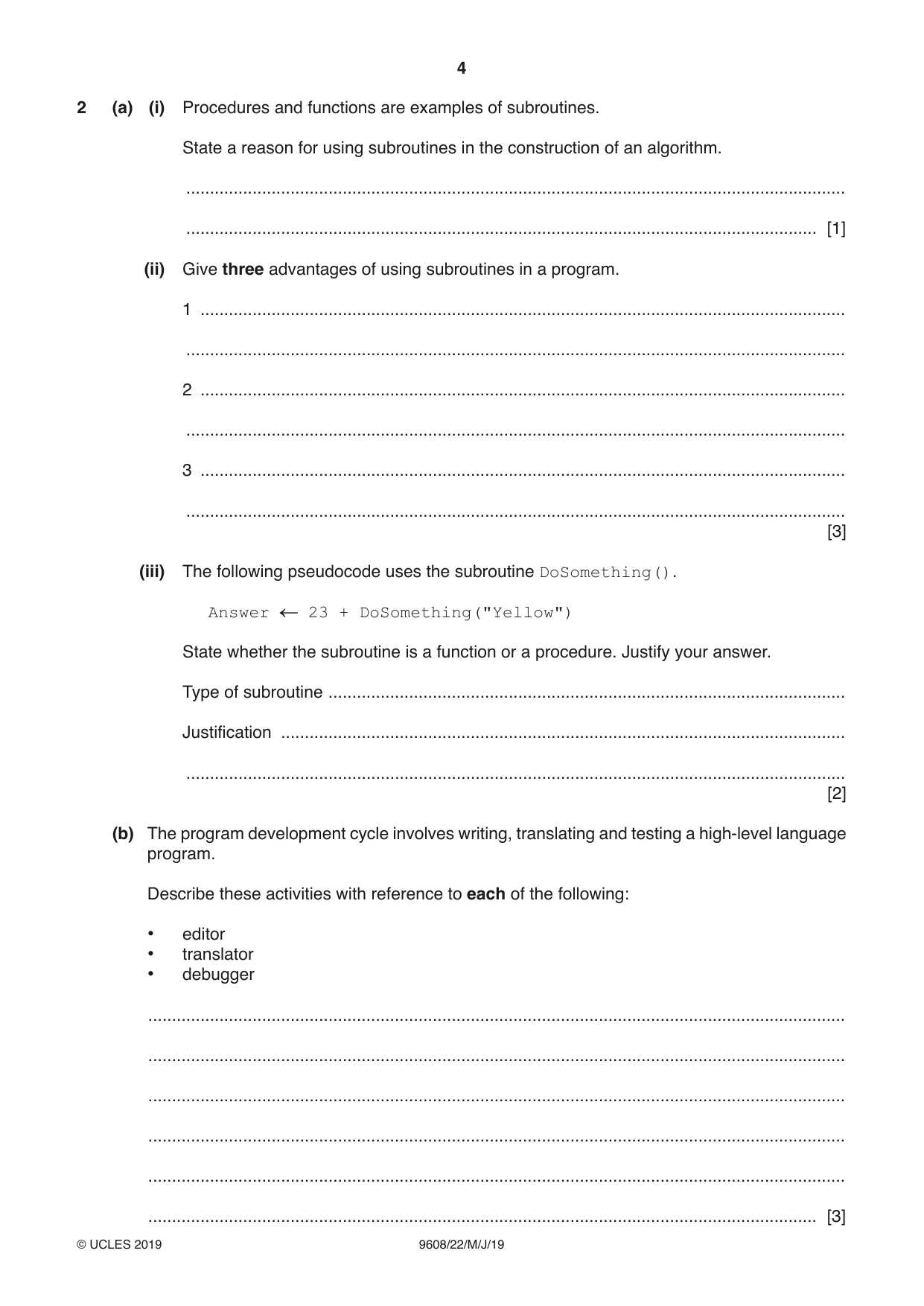
4 9608/22/M/J/19 © UCLES 2019 2 (a) (i) Procedures and functions are examples of subroutines. State a reason for using subroutines in the construction of an algorithm. … … [1] (ii) Give three advantages of using subroutines in a program. 1 … … 2 … … 3 … … [3] (iii) The following pseudocode uses the subroutine DoSomething(). Answer 23 + DoSomething("Yellow") State whether the subroutine is a function or a procedure. Justify your answer. Type of subroutine … Justification … … [2] (b) The program development cycle involves writing, translating and testing a high-level language program. Describe these activities with reference to each of the following: • editor • translator • debugger … … … … … … [3]
Question paper, page 5
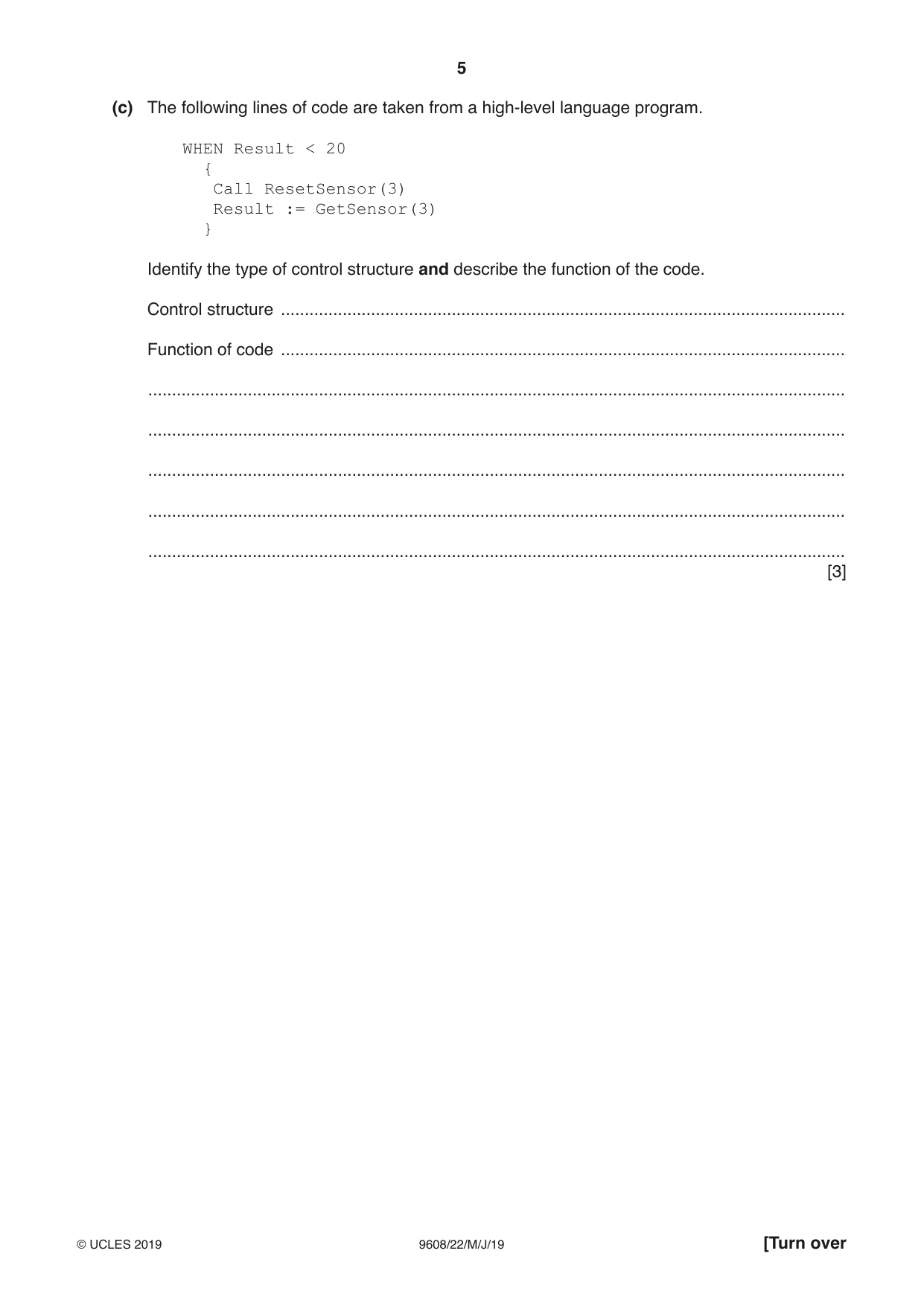
5 9608/22/M/J/19 © UCLES 2019 [Turn over (c) The following lines of code are taken from a high-level language program. WHEN Result < 20 { Call ResetSensor(3) Result := GetSensor(3) } Identify the type of control structure and describe the function of the code. Control structure … Function of code … … … … … … [3]
Question paper, page 6
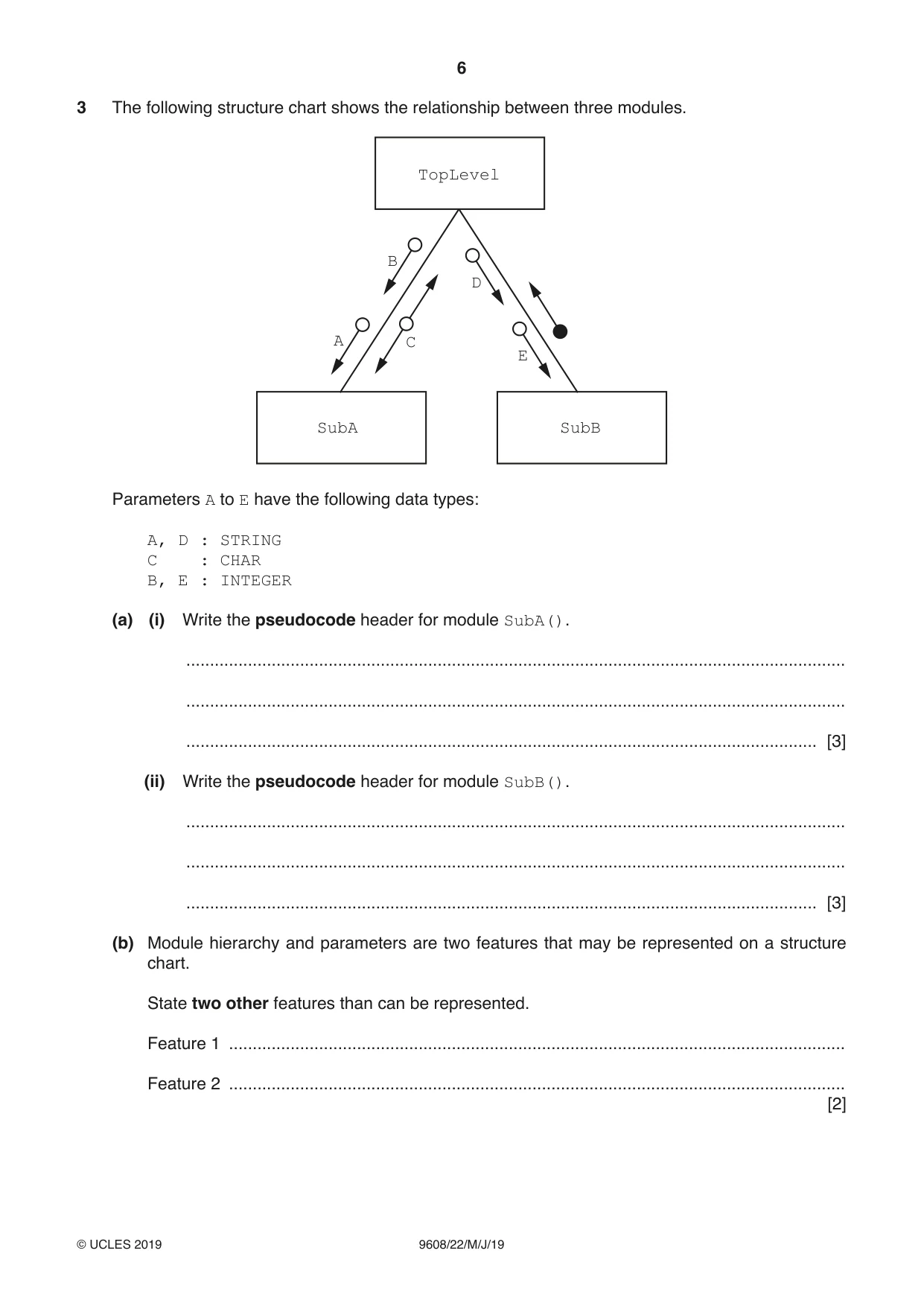
6 9608/22/M/J/19 © UCLES 2019 3 The following structure chart shows the relationship between three modules. TopLevel SubA SubB A C B D E Parameters A to E have the following data types: A, D : STRING C : CHAR B, E : INTEGER (a) (i) Write the pseudocode header for module SubA(). … … … [3] (ii) Write the pseudocode header for module SubB(). … … … [3] (b) Module hierarchy and parameters are two features that may be represented on a structure chart. State two other features than can be represented. Feature 1 … Feature 2 … [2]
Question paper, page 7
7 9608/22/M/J/19 © UCLES 2019 [Turn over Question 4 begins on the next page.
Question paper, page 8
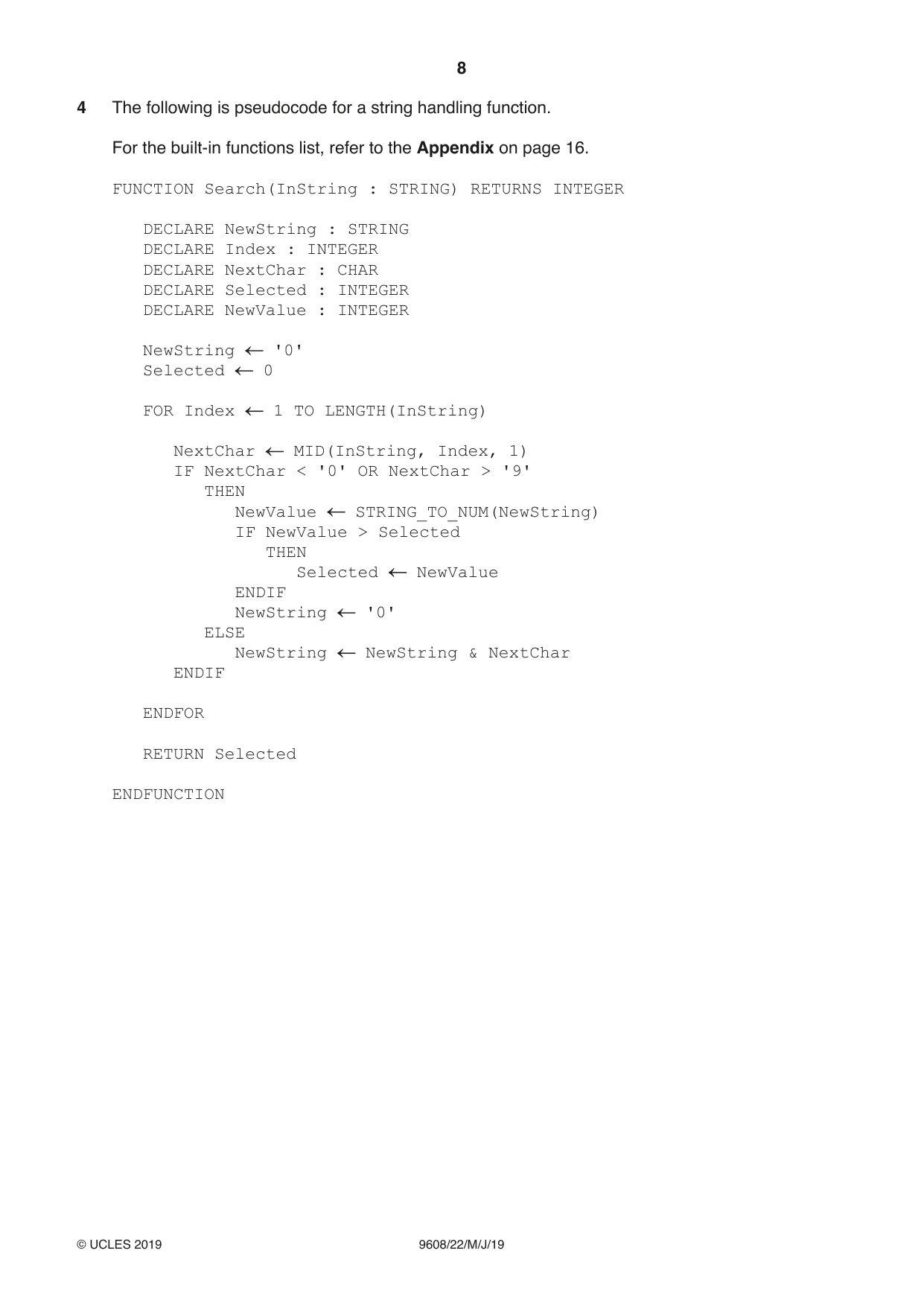
8 9608/22/M/J/19 © UCLES 2019 4 The following is pseudocode for a string handling function. For the built-in functions list, refer to the Appendix on page 16. FUNCTION Search(InString : STRING) RETURNS INTEGER DECLARE NewString : STRING DECLARE Index : INTEGER DECLARE NextChar : CHAR DECLARE Selected : INTEGER DECLARE NewValue : INTEGER NewString '0' Selected 0 FOR Index 1 TO LENGTH(InString) NextChar MID(InString, Index, 1) IF NextChar < '0' OR NextChar > '9' THEN NewValue STRING_TO_NUM(NewString) IF NewValue > Selected THEN Selected NewValue ENDIF NewString '0' ELSE NewString NewString & NextChar ENDIF ENDFOR RETURN Selected ENDFUNCTION
Question paper, page 9
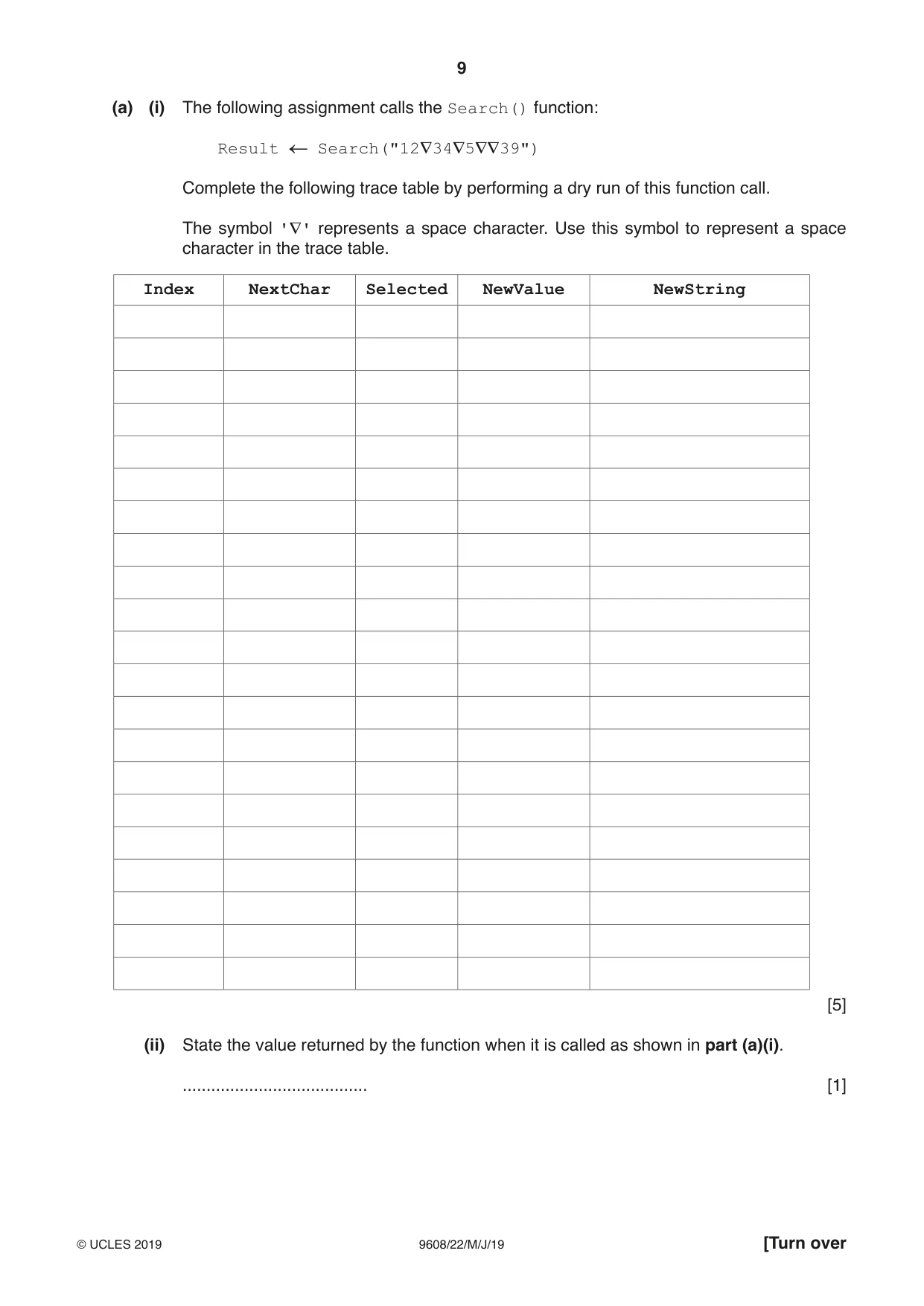
9 9608/22/M/J/19 © UCLES 2019 [Turn over (a) (i) The following assignment calls the Search() function: Result Search("12∇34∇5∇∇39") Complete the following trace table by performing a dry run of this function call. The symbol '∇' represents a space character. Use this symbol to represent a space character in the trace table. Index NextChar Selected NewValue NewString [5] (ii) State the value returned by the function when it is called as shown in part (a)(i). … [1]
Question paper, page 10
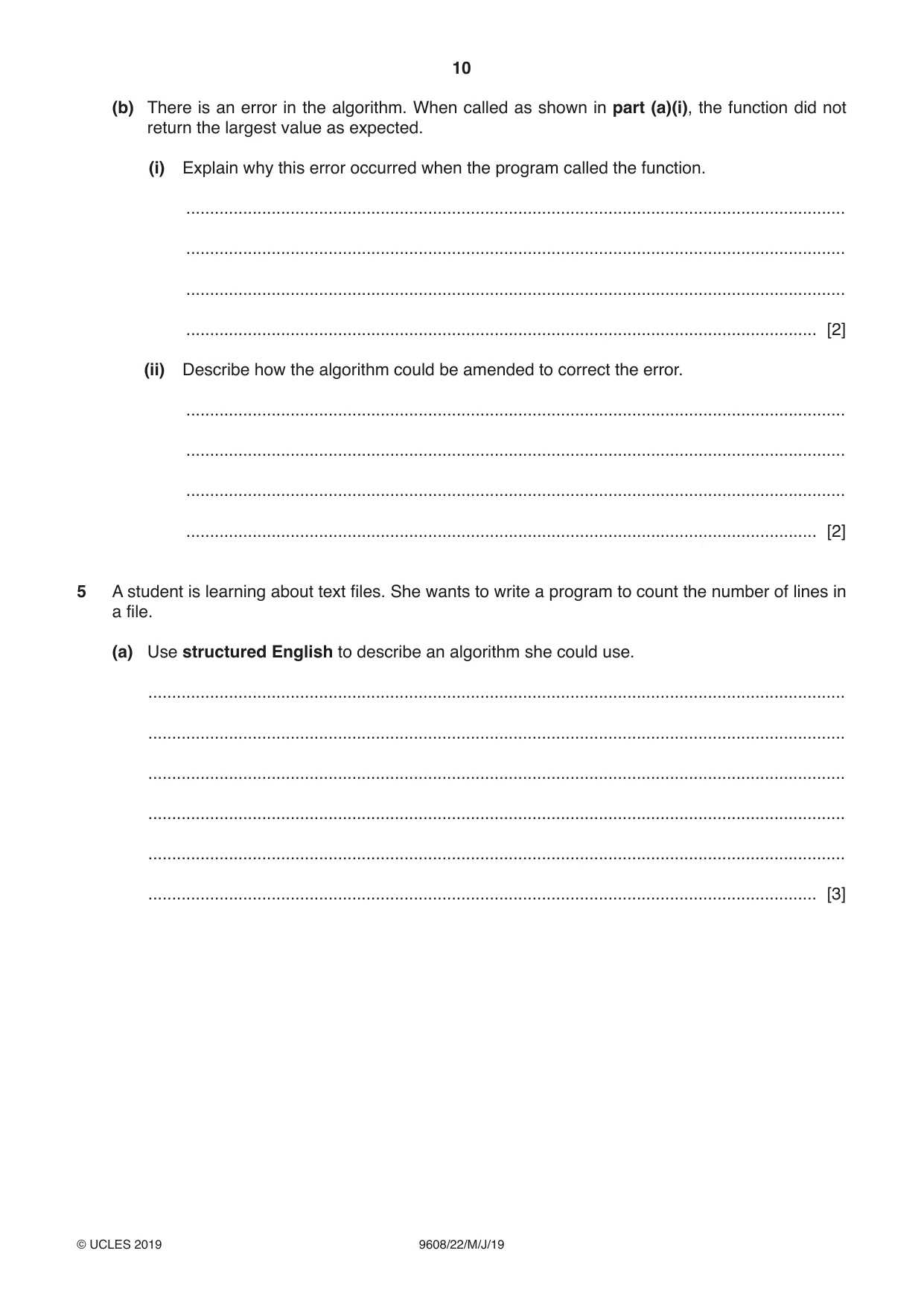
10 9608/22/M/J/19 © UCLES 2019 (b) There is an error in the algorithm. When called as shown in part (a)(i), the function did not return the largest value as expected. (i) Explain why this error occurred when the program called the function. … … … … [2] (ii) Describe how the algorithm could be amended to correct the error. … … … … [2] 5 A student is learning about text files. She wants to write a program to count the number of lines in a file. (a) Use structured English to describe an algorithm she could use. … … … … … … [3]
Question paper, page 11
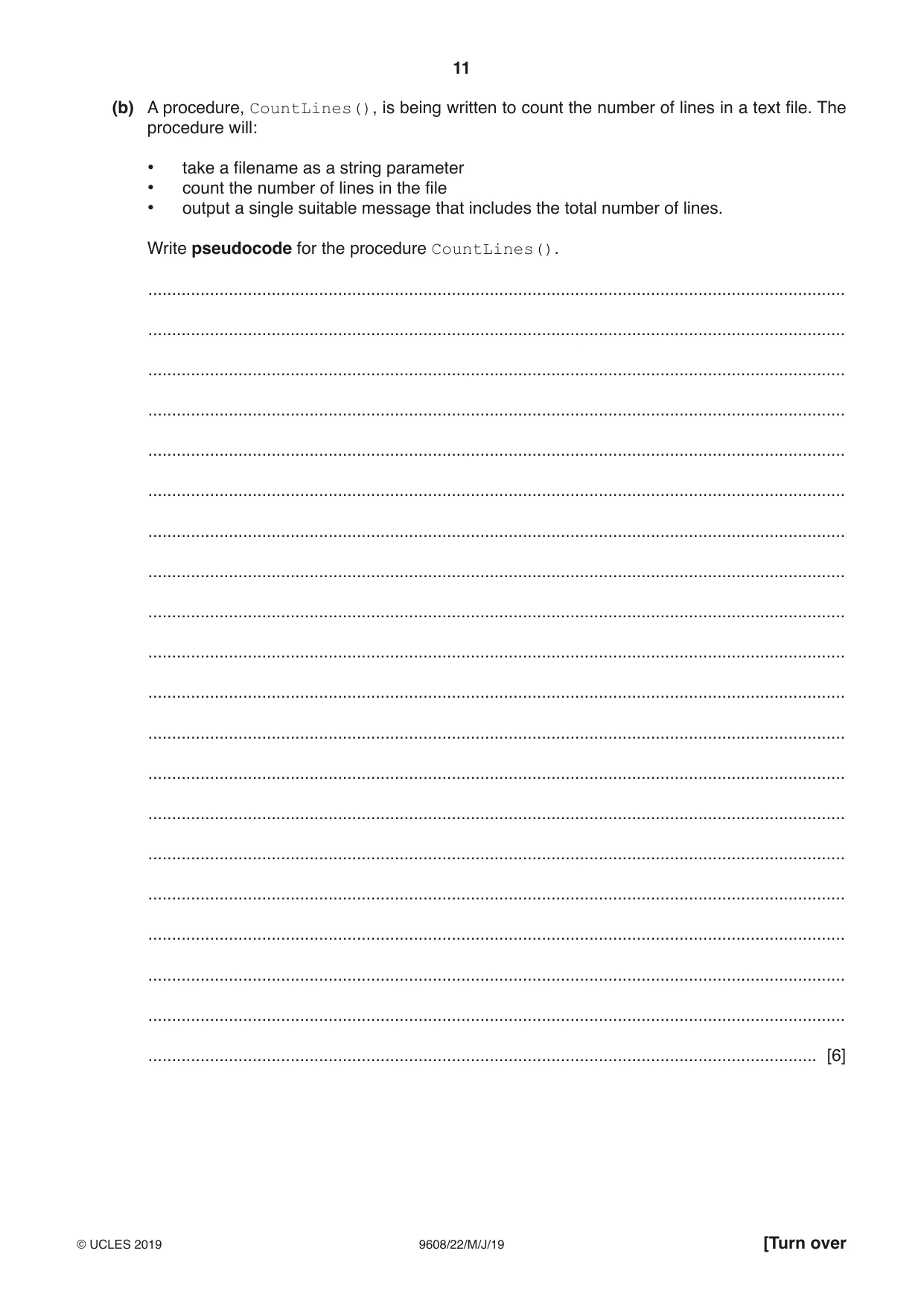
11 9608/22/M/J/19 © UCLES 2019 [Turn over (b) A procedure, CountLines(), is being written to count the number of lines in a text file. The procedure will: • take a filename as a string parameter • count the number of lines in the file • output a single suitable message that includes the total number of lines. Write pseudocode for the procedure CountLines(). … … … … … … … … … … … … … … … … … … … … [6]
Question paper, page 12
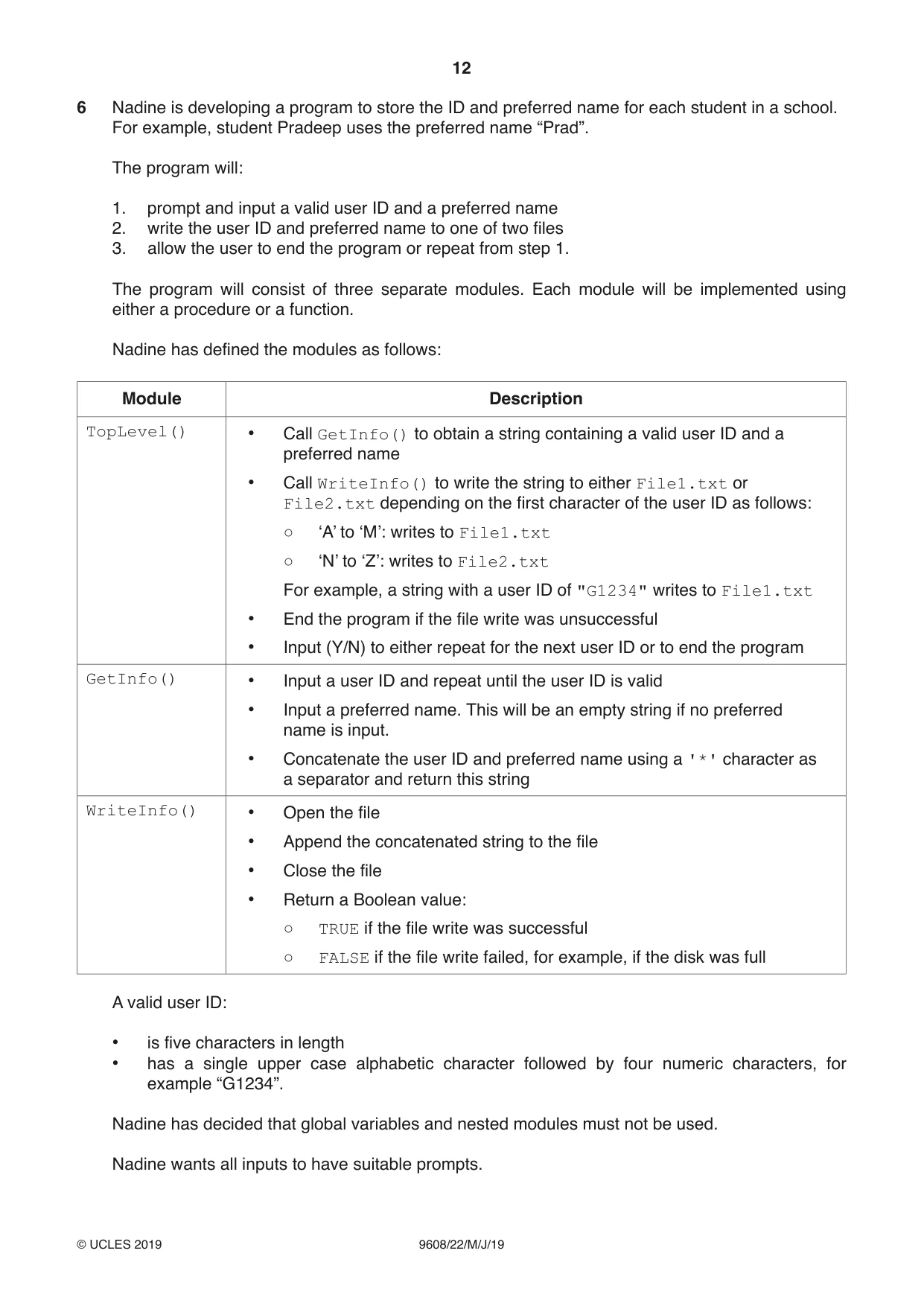
12 9608/22/M/J/19 © UCLES 2019 6 Nadine is developing a program to store the ID and preferred name for each student in a school. For example, student Pradeep uses the preferred name “Prad”. The program will: 1. prompt and input a valid user ID and a preferred name 2. write the user ID and preferred name to one of two files 3. allow the user to end the program or repeat from step 1. The program will consist of three separate modules. Each module will be implemented using either a procedure or a function. Nadine has defined the modules as follows: Module Description TopLevel() • Call GetInfo() to obtain a string containing a valid user ID and a preferred name • Call WriteInfo() to write the string to either File1.txt or File2.txt depending on the first character of the user ID as follows: ○ ‘A’ to ‘M’: writes to File1.txt ○ ‘N’ to ‘Z’: writes to File2.txt For example, a string with a user ID of "G1234" writes to File1.txt • End the program if the file write was unsuccessful • Input (Y/N) to either repeat for the next user ID or to end the program GetInfo() • Input a user ID and repeat until the user ID is valid • Input a preferred name. This will be an empty string if no preferred name is input. • Concatenate the user ID and preferred name using a '*' character as a separator and return this string WriteInfo() • Open the file • Append the concatenated string to the file • Close the file • Return a Boolean value: ○ TRUE if the file write was successful ○ FALSE if the file write failed, for example, if the disk was full A valid user ID: • is five characters in length • has a single upper case alphabetic character followed by four numeric characters, for example “G1234”. Nadine has decided that global variables and nested modules must not be used. Nadine wants all inputs to have suitable prompts.
Question paper, page 13
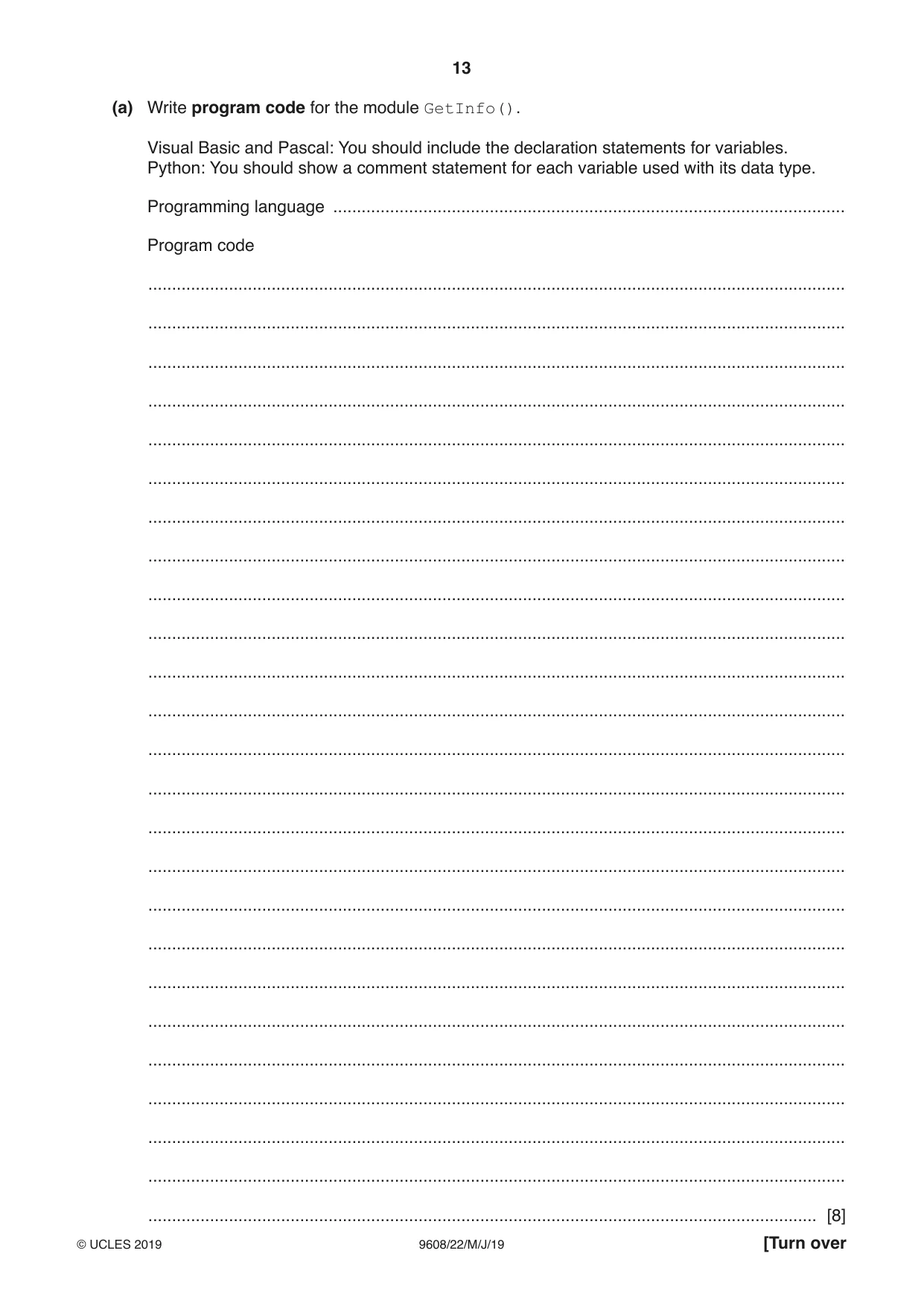
13 9608/22/M/J/19 © UCLES 2019 [Turn over (a) Write program code for the module GetInfo(). Visual Basic and Pascal: You should include the declaration statements for variables. Python: You should show a comment statement for each variable used with its data type. Programming language … Program code … … … … … … … … … … … … … … … … … … … … … … … … … [8]
Question paper, page 14
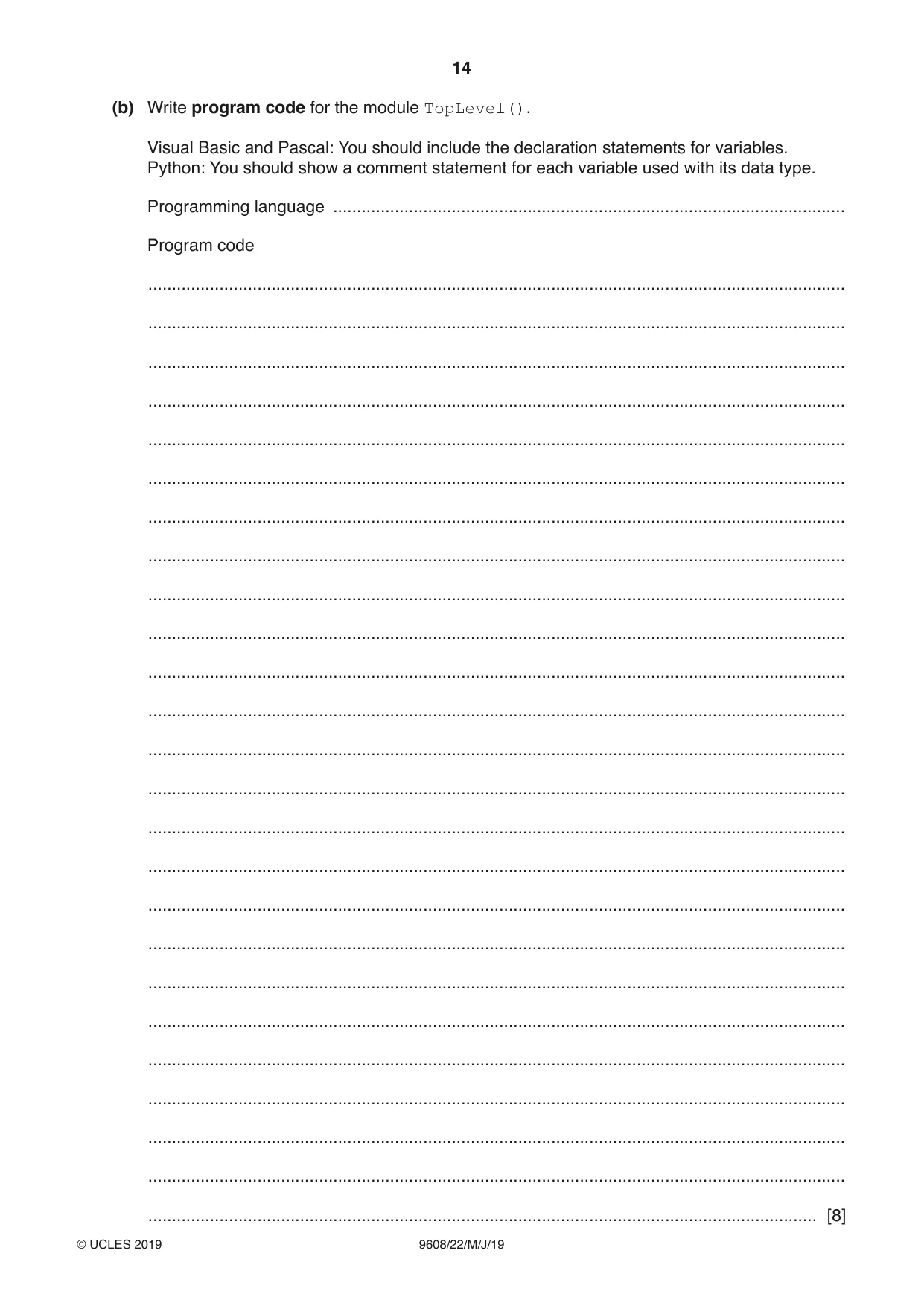
14 9608/22/M/J/19 © UCLES 2019 (b) Write program code for the module TopLevel(). Visual Basic and Pascal: You should include the declaration statements for variables. Python: You should show a comment statement for each variable used with its data type. Programming language … Program code … … … … … … … … … … … … … … … … … … … … … … … … … [8]
Question paper, page 15
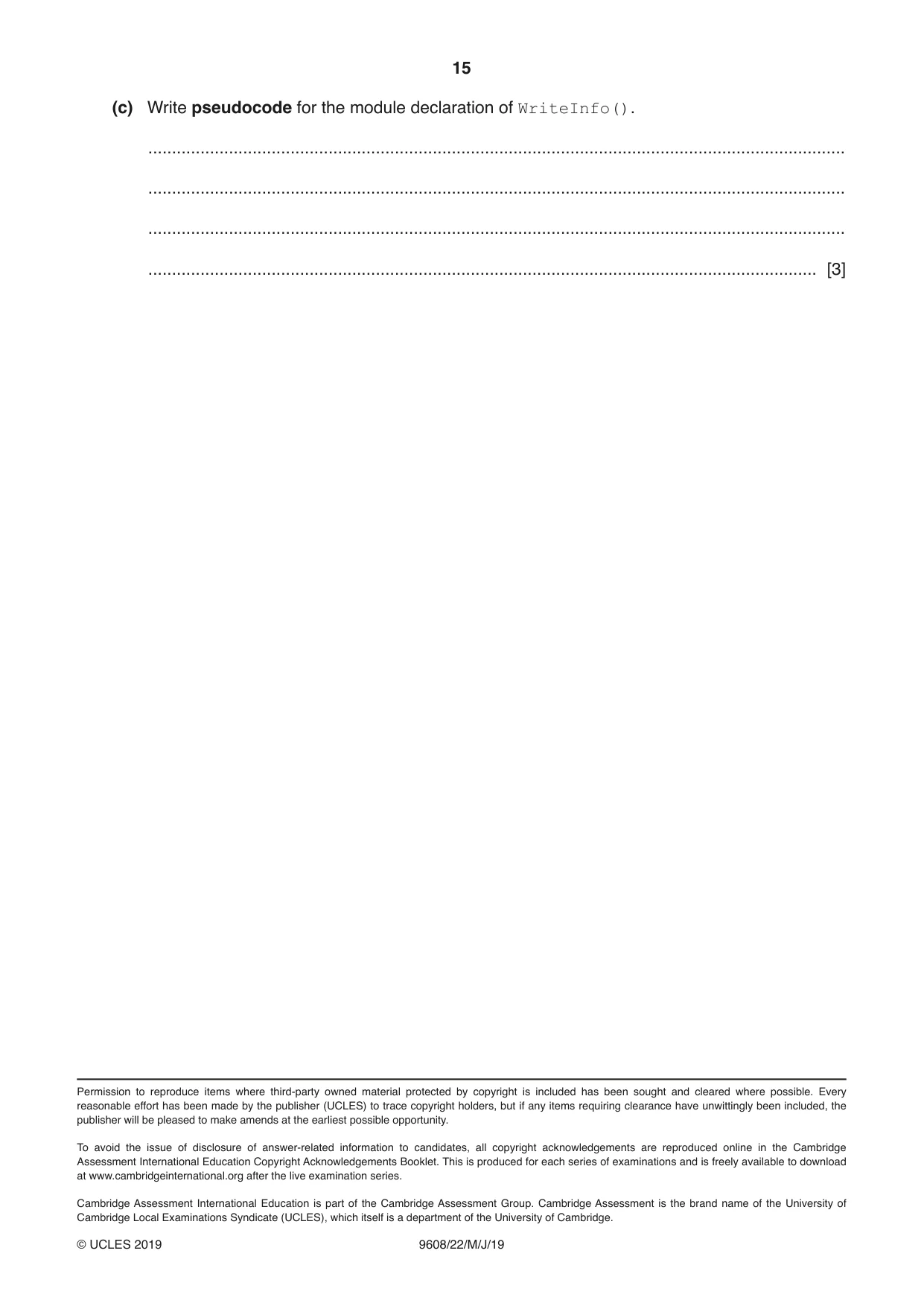
15 9608/22/M/J/19 © UCLES 2019 (c) Write pseudocode for the module declaration of WriteInfo(). … … … … [3] Permission to reproduce items where third-party owned material protected by copyright is included has been sought and cleared where possible. Every reasonable effort has been made by the publisher (UCLES) to trace copyright holders, but if any items requiring clearance have unwittingly been included, the publisher will be pleased to make amends at the earliest possible opportunity. To avoid the issue of disclosure of answer-related information to candidates, all copyright acknowledgements are reproduced online in the Cambridge Assessment International Education Copyright Acknowledgements Booklet. This is produced for each series of examinations and is freely available to download at www.cambridgeinternational.org after the live examination series. Cambridge Assessment International Education is part of the Cambridge Assessment Group. Cambridge Assessment is the brand name of the University of Cambridge Local Examinations Syndicate (UCLES), which itself is a department of the University of Cambridge.
Question paper, page 16
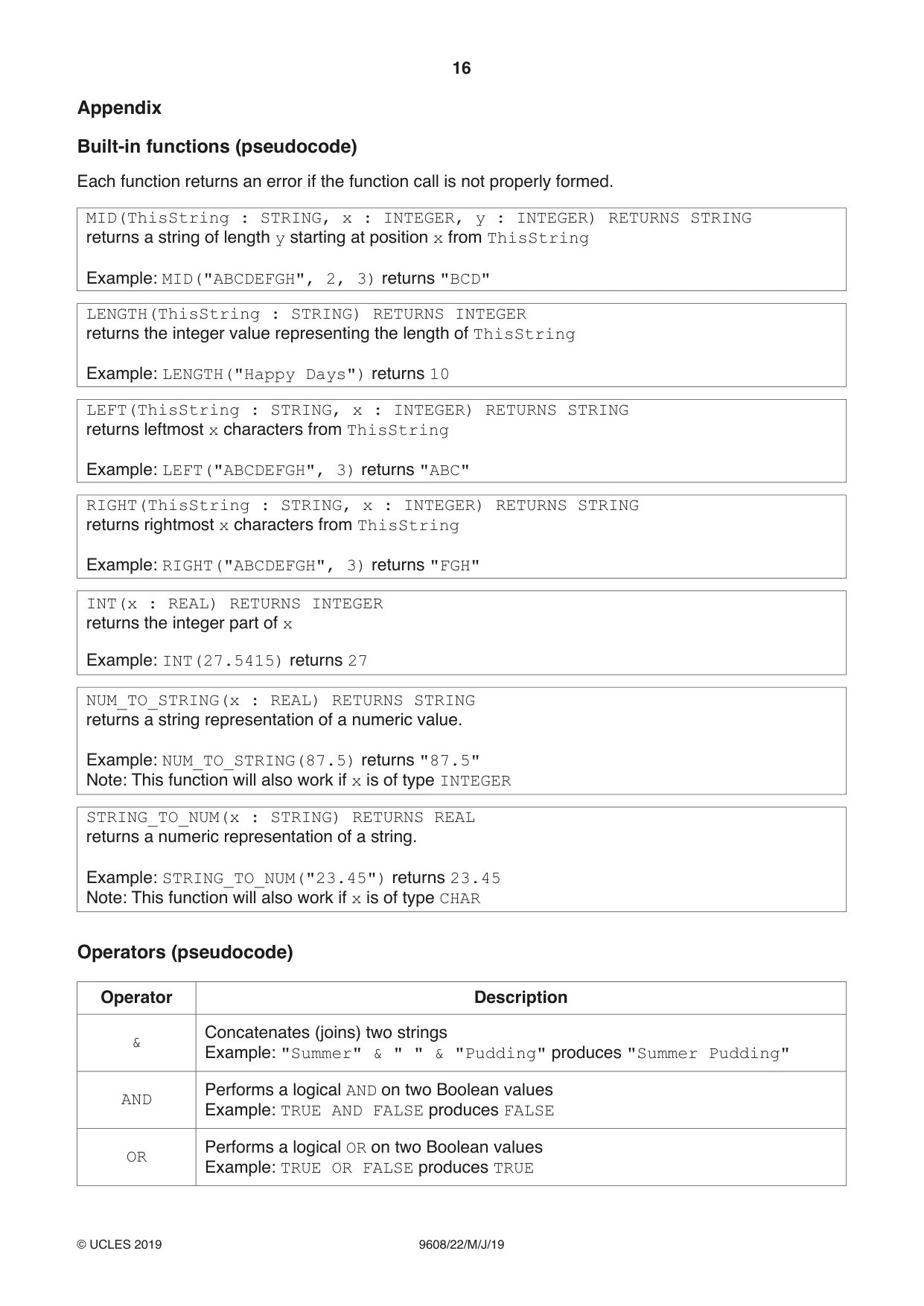
16 9608/22/M/J/19 © UCLES 2019 Appendix Built-in functions (pseudocode) Each function returns an error if the function call is not properly formed. MID(ThisString : STRING, x : INTEGER, y : INTEGER) RETURNS STRING returns a string of length y starting at position x from ThisString Example: MID("ABCDEFGH", 2, 3) returns "BCD" LENGTH(ThisString : STRING) RETURNS INTEGER returns the integer value representing the length of ThisString Example: LENGTH("Happy Days") returns 10 LEFT(ThisString : STRING, x : INTEGER) RETURNS STRING returns leftmost x characters from ThisString Example: LEFT("ABCDEFGH", 3) returns "ABC" RIGHT(ThisString : STRING, x : INTEGER) RETURNS STRING returns rightmost x characters from ThisString Example: RIGHT("ABCDEFGH", 3) returns "FGH" INT(x : REAL) RETURNS INTEGER returns the integer part of x Example: INT(27.5415) returns 27 NUM_TO_STRING(x : REAL) RETURNS STRING returns a string representation of a numeric value. Example: NUM_TO_STRING(87.5) returns "87.5" Note: This function will also work if x is of type INTEGER STRING_TO_NUM(x : STRING) RETURNS REAL returns a numeric representation of a string. Example: STRING_TO_NUM("23.45") returns 23.45 Note: This function will also work if x is of type CHAR Operators (pseudocode) Operator Description & Concatenates (joins) two strings Example: "Summer" & " " & "Pudding" produces "Summer Pudding" AND Performs a logical AND on two Boolean values Example: TRUE AND FALSE produces FALSE OR Performs a logical OR on two Boolean values Example: TRUE OR FALSE produces TRUE
Mark scheme, page 1
This document consists of 15 printed pages. © UCLES 2019 [Turn over Cambridge Assessment International Education Cambridge International Advanced Subsidiary and Advanced Level COMPUTER SCIENCE 9608/22 Paper 2 Written Paper May/June 2019 MARK SCHEME Maximum Mark: 75 Published This mark scheme is published as an aid to teachers and candidates, to indicate the requirements of the examination. It shows the basis on which Examiners were instructed to award marks. It does not indicate the details of the discussions that took place at an Examiners’ meeting before marking began, which would have considered the acceptability of alternative answers. Mark schemes should be read in conjunction with the question paper and the Principal Examiner Report for Teachers. Cambridge International will not enter into discussions about these mark schemes. Cambridge International is publishing the mark schemes for the May/June 2019 series for most Cambridge IGCSE™, Cambridge International A and AS Level and Cambridge Pre-U components, and some Cambridge O Level components.
Mark scheme, page 2
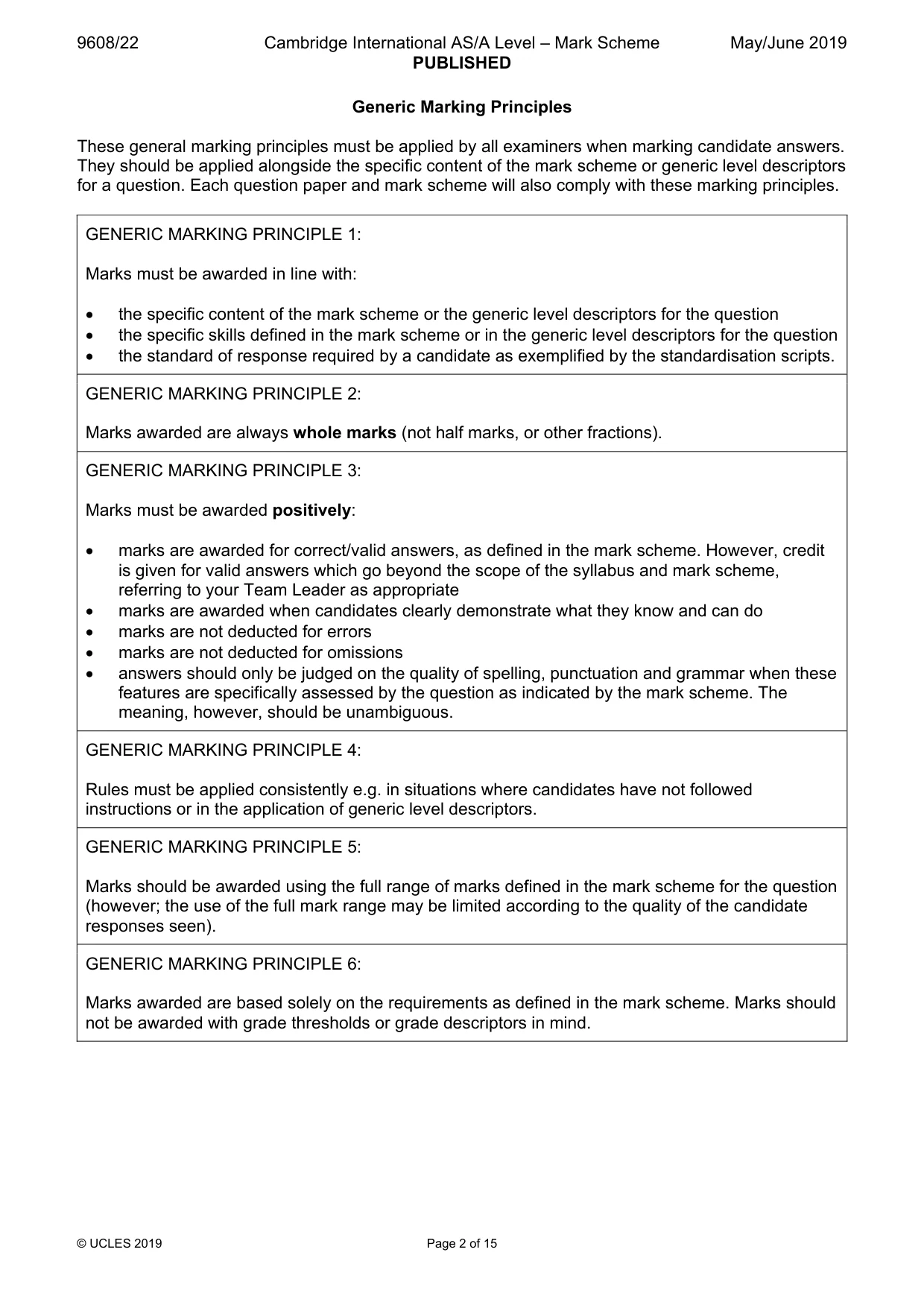
9608/22 Cambridge International AS/A Level – Mark Scheme PUBLISHED May/June 2019 © UCLES 2019 Page 2 of 15 Generic Marking Principles These general marking principles must be applied by all examiners when marking candidate answers. They should be applied alongside the specific content of the mark scheme or generic level descriptors for a question. Each question paper and mark scheme will also comply with these marking principles. GENERIC MARKING PRINCIPLE 1: Marks must be awarded in line with: • the specific content of the mark scheme or the generic level descriptors for the question • the specific skills defined in the mark scheme or in the generic level descriptors for the question • the standard of response required by a candidate as exemplified by the standardisation scripts. GENERIC MARKING PRINCIPLE 2: Marks awarded are always whole marks (not half marks, or other fractions). GENERIC MARKING PRINCIPLE 3: Marks must be awarded positively: • marks are awarded for correct/valid answers, as defined in the mark scheme. However, credit is given for valid answers which go beyond the scope of the syllabus and mark scheme, referring to your Team Leader as appropriate • marks are awarded when candidates clearly demonstrate what they know and can do • marks are not deducted for errors • marks are not deducted for omissions • answers should only be judged on the quality of spelling, punctuation and grammar when these features are specifically assessed by the question as indicated by the mark scheme. The meaning, however, should be unambiguous. GENERIC MARKING PRINCIPLE 4: Rules must be applied consistently e.g. in situations where candidates have not followed instructions or in the application of generic level descriptors. GENERIC MARKING PRINCIPLE 5: Marks should be awarded using the full range of marks defined in the mark scheme for the question (however; the use of the full mark range may be limited according to the quality of the candidate responses seen). GENERIC MARKING PRINCIPLE 6: Marks awarded are based solely on the requirements as defined in the mark scheme. Marks should not be awarded with grade thresholds or grade descriptors in mind.
Mark scheme, page 3
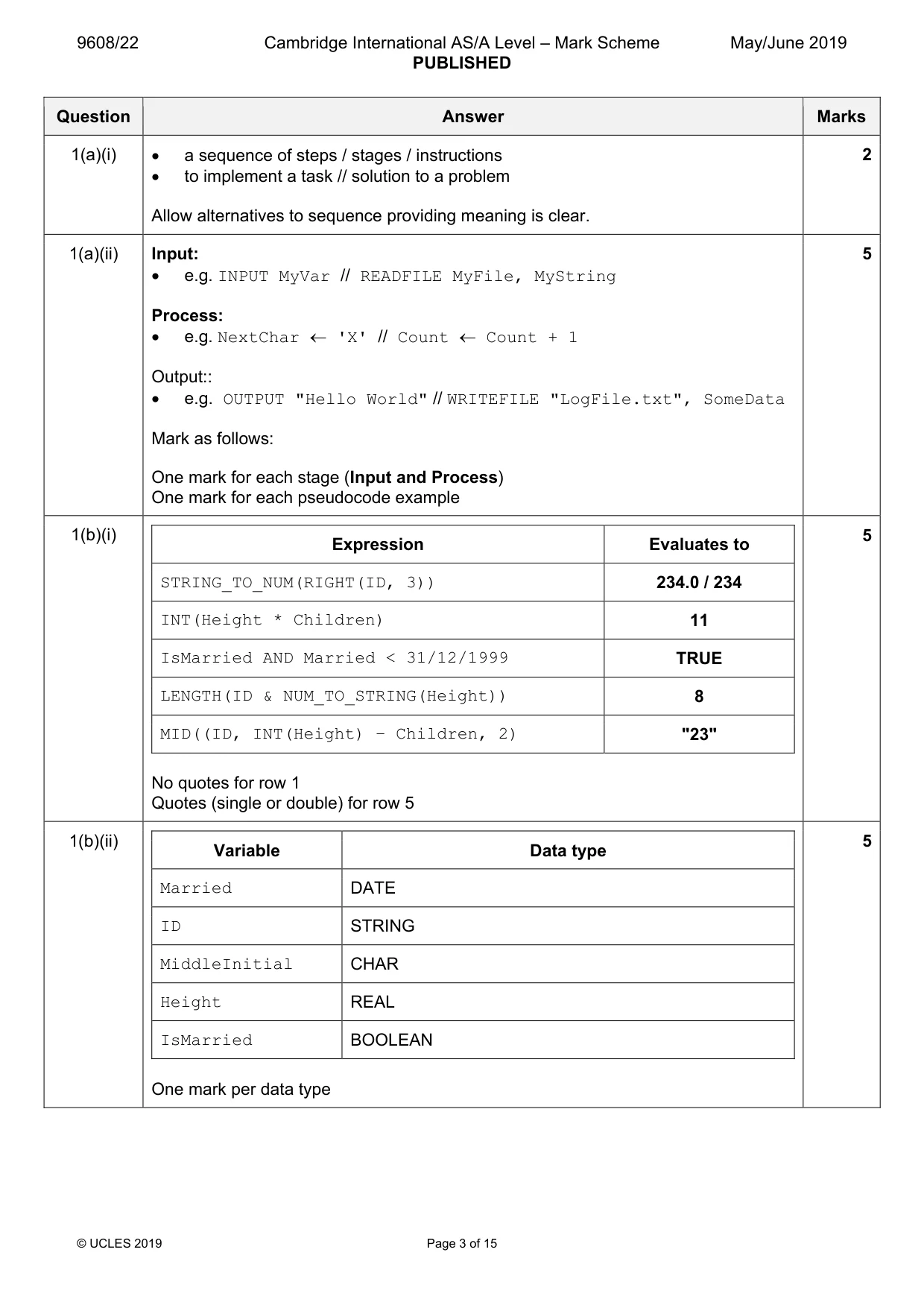
9608/22 Cambridge International AS/A Level – Mark Scheme PUBLISHED May/June 2019 © UCLES 2019 Page 3 of 15 Question Answer Marks 1(a)(i) • a sequence of steps / stages / instructions • to implement a task // solution to a problem Allow alternatives to sequence providing meaning is clear. 2 1(a)(ii) Input: • e.g. INPUT MyVar // READFILE MyFile, MyString Process: • e.g. NextChar ← 'X' // Count ← Count + 1 Output:: • e.g. OUTPUT "Hello World" // WRITEFILE "LogFile.txt", SomeData Mark as follows: One mark for each stage (Input and Process) One mark for each pseudocode example 5 1(b)(i) Expression Evaluates to STRING_TO_NUM(RIGHT(ID, 3)) 234.0 / 234 INT(Height * Children) 11 IsMarried AND Married < 31/12/1999 TRUE LENGTH(ID & NUM_TO_STRING(Height)) 8 MID((ID, INT(Height) – Children, 2) "23" No quotes for row 1 Quotes (single or double) for row 5 5 1(b)(ii) Variable Data type Married DATE ID STRING MiddleInitial CHAR Height REAL IsMarried BOOLEAN One mark per data type 5
Mark scheme, page 4
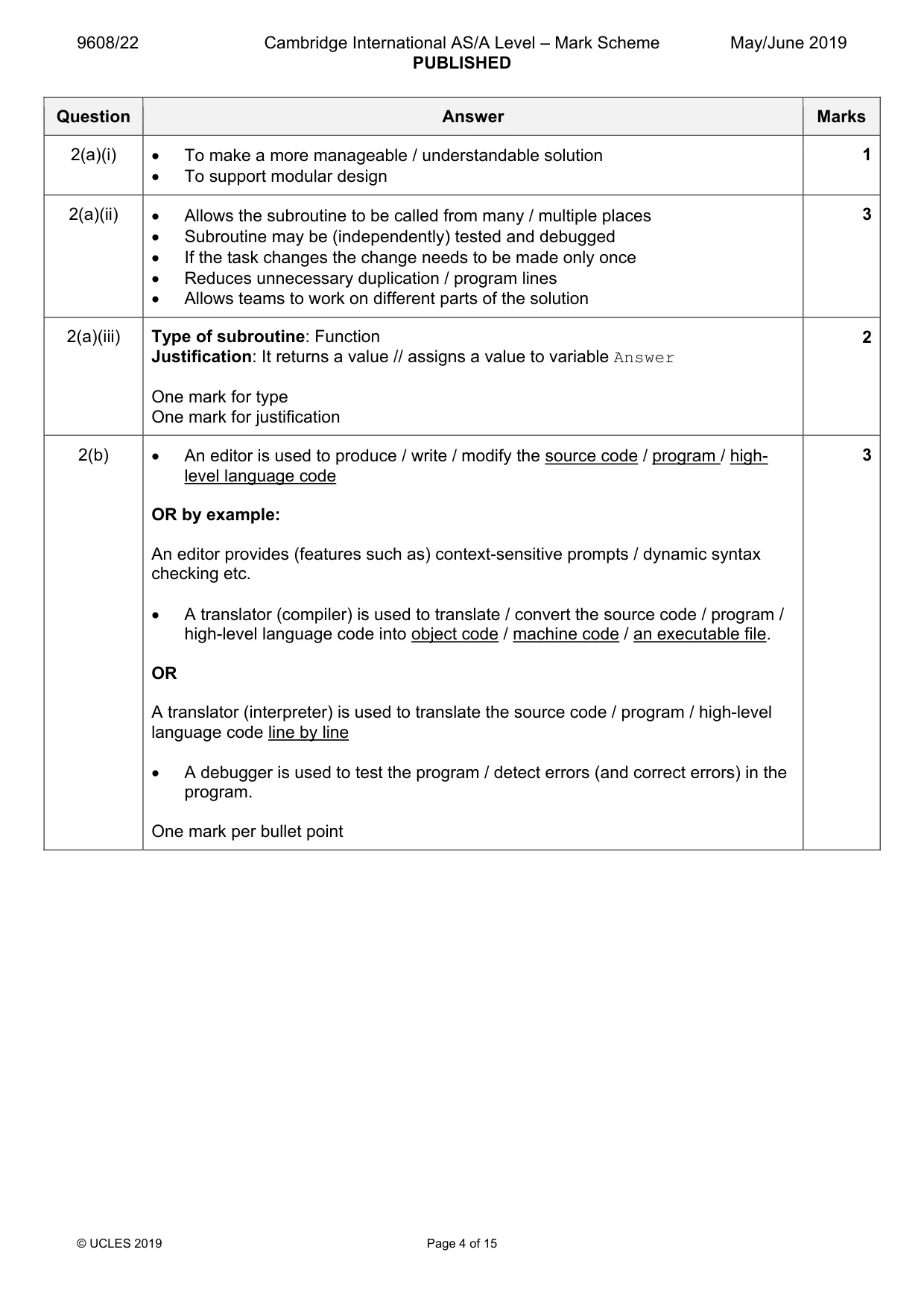
9608/22 Cambridge International AS/A Level – Mark Scheme PUBLISHED May/June 2019 © UCLES 2019 Page 4 of 15 Question Answer Marks 2(a)(i) • To make a more manageable / understandable solution • To support modular design 1 2(a)(ii) • Allows the subroutine to be called from many / multiple places • Subroutine may be (independently) tested and debugged • If the task changes the change needs to be made only once • Reduces unnecessary duplication / program lines • Allows teams to work on different parts of the solution 3 2(a)(iii) Type of subroutine: Function Justification: It returns a value // assigns a value to variable Answer One mark for type One mark for justification 2 2(b) • An editor is used to produce / write / modify the source code / program / high- level language code OR by example: An editor provides (features such as) context-sensitive prompts / dynamic syntax checking etc. • A translator (compiler) is used to translate / convert the source code / program / high-level language code into object code / machine code / an executable file. OR A translator (interpreter) is used to translate the source code / program / high-level language code line by line • A debugger is used to test the program / detect errors (and correct errors) in the program. One mark per bullet point 3
Mark scheme, page 5
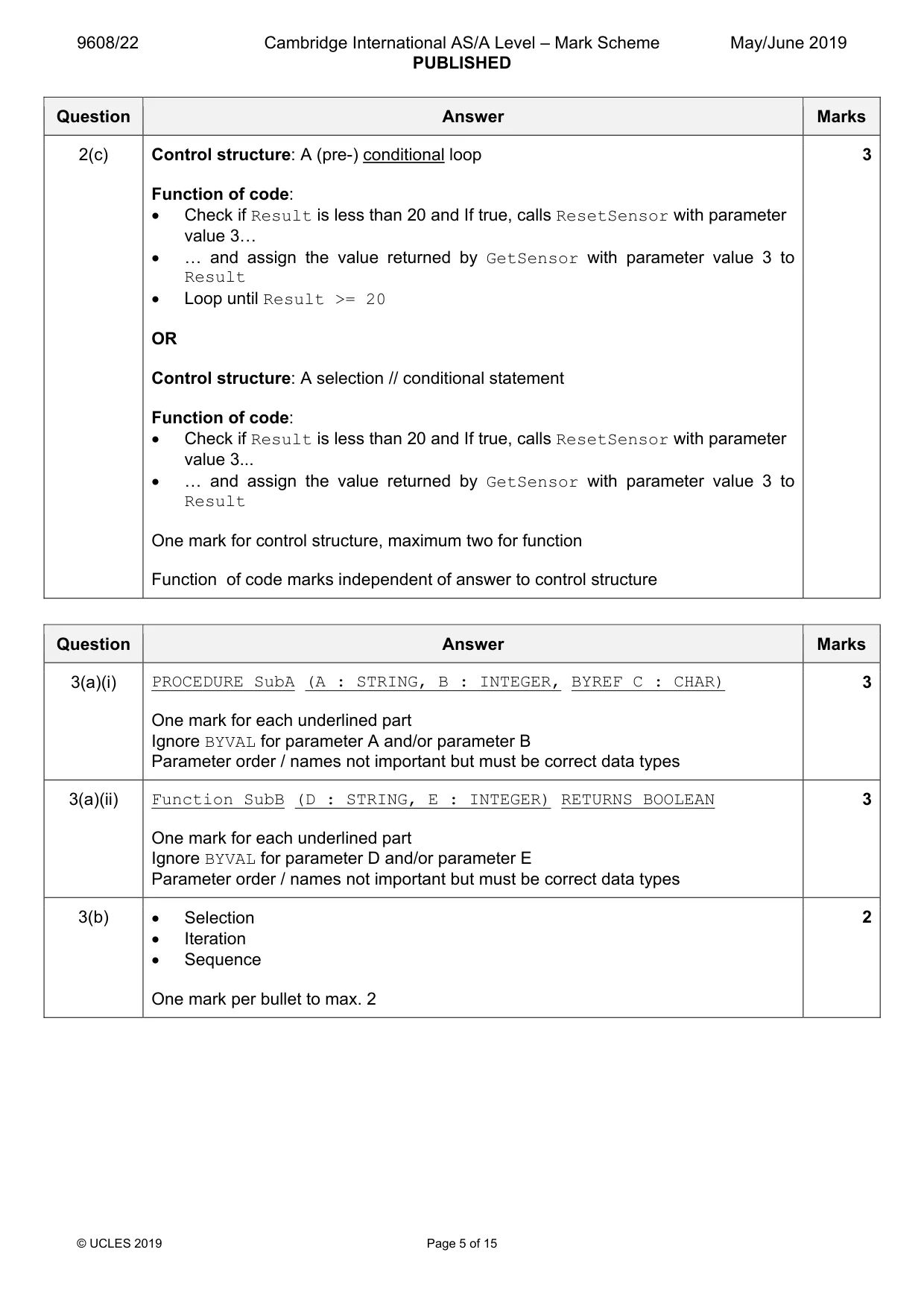
9608/22 Cambridge International AS/A Level – Mark Scheme PUBLISHED May/June 2019 © UCLES 2019 Page 5 of 15 Question Answer Marks 2(c) Control structure: A (pre-) conditional loop Function of code: • Check if Result is less than 20 and If true, calls ResetSensor with parameter value 3« • « and assign the value returned by GetSensor with parameter value 3 to Result • Loop until Result >= 20 OR Control structure: A selection // conditional statement Function of code: • Check if Result is less than 20 and If true, calls ResetSensor with parameter value 3... • « and assign the value returned by GetSensor with parameter value 3 to Result One mark for control structure, maximum two for function Function of code marks independent of answer to control structure 3 Question Answer Marks 3(a)(i) PROCEDURE SubA (A : STRING, B : INTEGER, BYREF C : CHAR) One mark for each underlined part Ignore BYVAL for parameter A and/or parameter B Parameter order / names not important but must be correct data types 3 3(a)(ii) Function SubB (D : STRING, E : INTEGER) RETURNS BOOLEAN One mark for each underlined part Ignore BYVAL for parameter D and/or parameter E Parameter order / names not important but must be correct data types 3 3(b) • Selection • Iteration • Sequence One mark per bullet to max. 2 2
Mark scheme, page 6
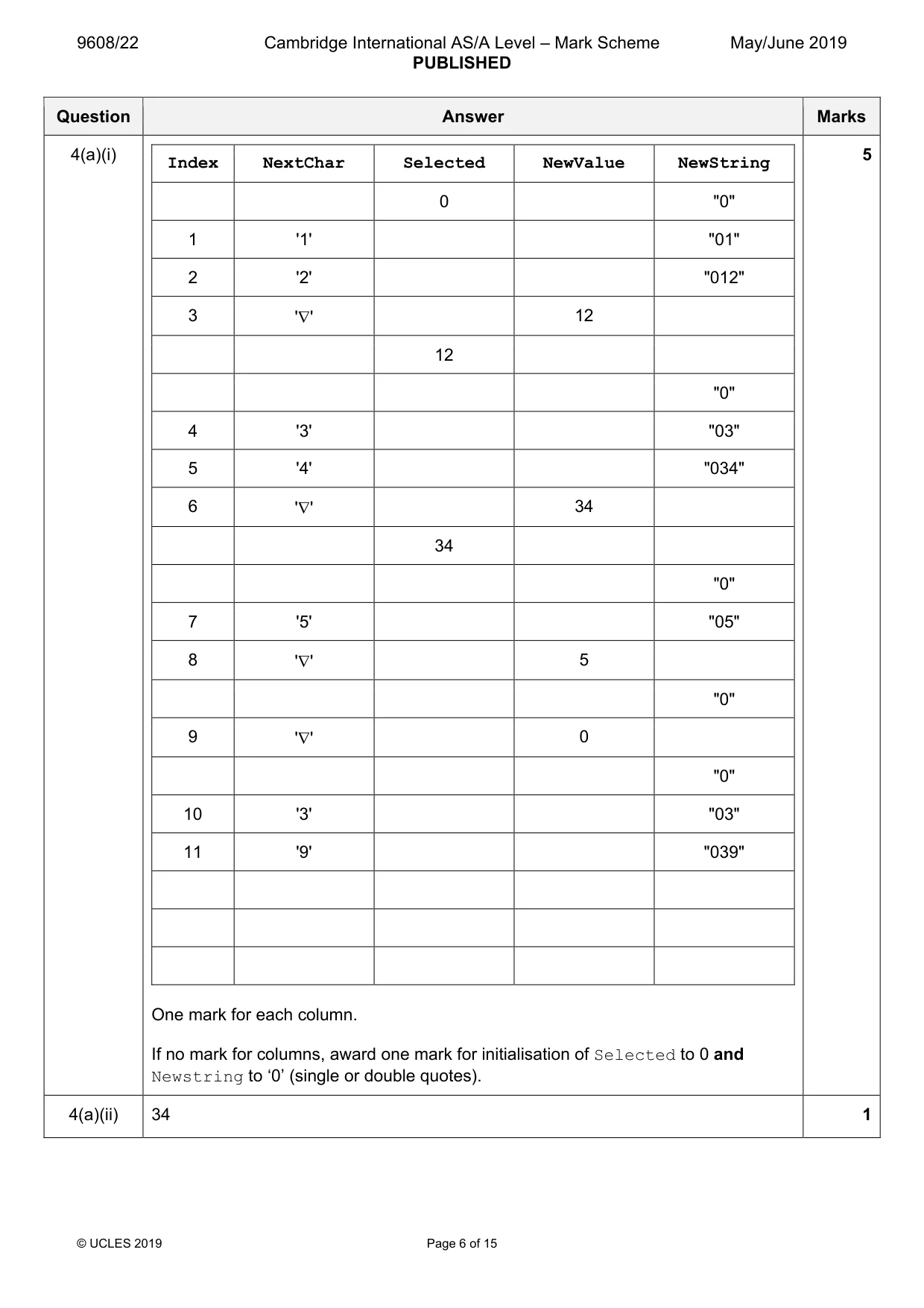
9608/22 Cambridge International AS/A Level – Mark Scheme PUBLISHED May/June 2019 © UCLES 2019 Page 6 of 15 Question Answer Marks 4(a)(i) Index NextChar Selected NewValue NewString 0 "0" 1 '1' "01" 2 '2' "012" 3 '∇' 12 12 "0" 4 '3' "03" 5 '4' "034" 6 '∇' 34 34 "0" 7 '5' "05" 8 '∇' 5 "0" 9 '∇' 0 "0" 10 '3' "03" 11 '9' "039" One mark for each column. If no mark for columns, award one mark for initialisation of Selected to 0 and Newstring to ‘0’ (single or double quotes). 5 4(a)(ii) 34 1
Mark scheme, page 7
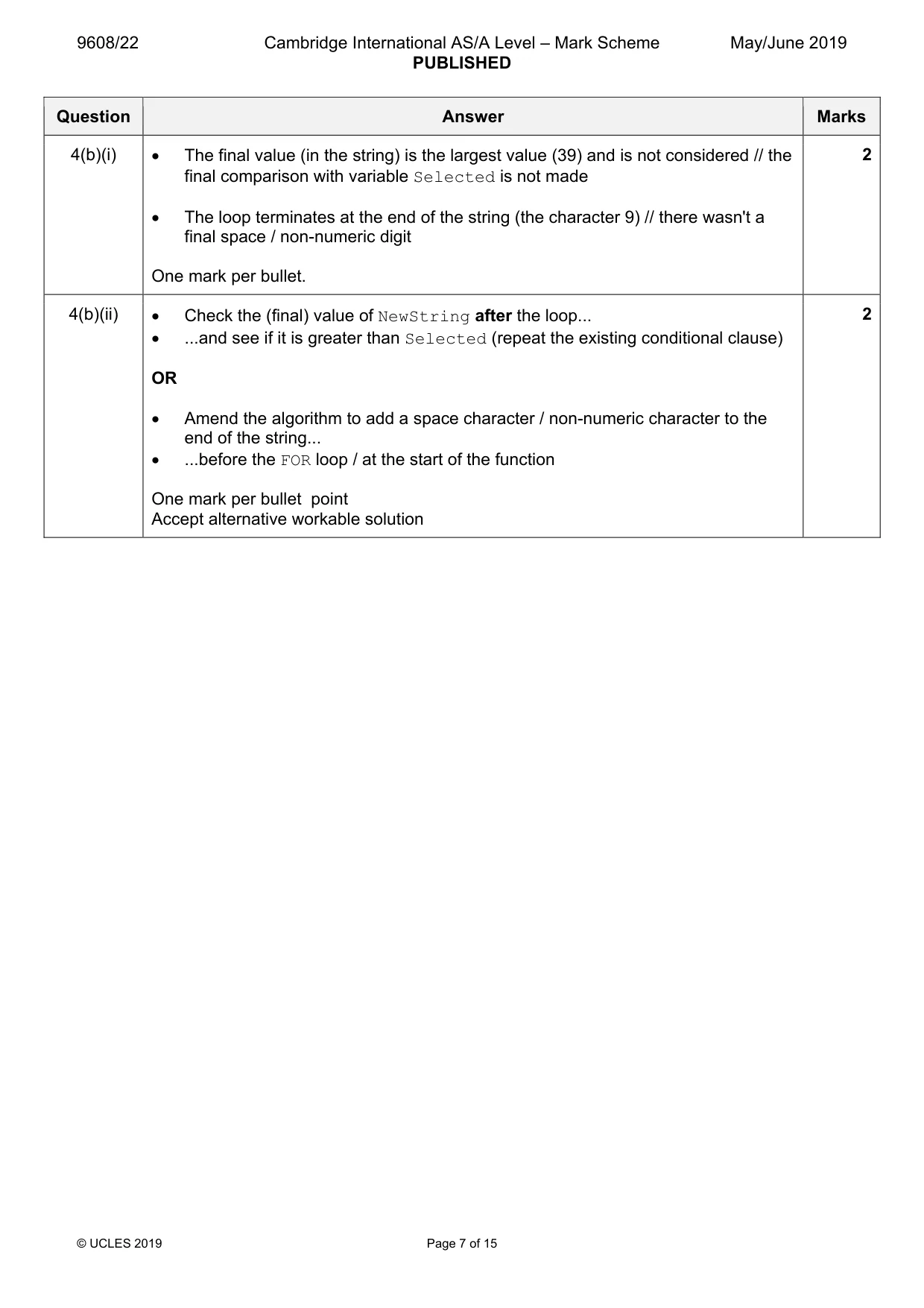
9608/22 Cambridge International AS/A Level – Mark Scheme PUBLISHED May/June 2019 © UCLES 2019 Page 7 of 15 Question Answer Marks 4(b)(i) • The final value (in the string) is the largest value (39) and is not considered // the final comparison with variable Selected is not made • The loop terminates at the end of the string (the character 9) // there wasn't a final space / non-numeric digit One mark per bullet. 2 4(b)(ii) • Check the (final) value of NewString after the loop... • ...and see if it is greater than Selected (repeat the existing conditional clause) OR • Amend the algorithm to add a space character / non-numeric character to the end of the string... • ...before the FOR loop / at the start of the function One mark per bullet point Accept alternative workable solution 2
Mark scheme, page 8
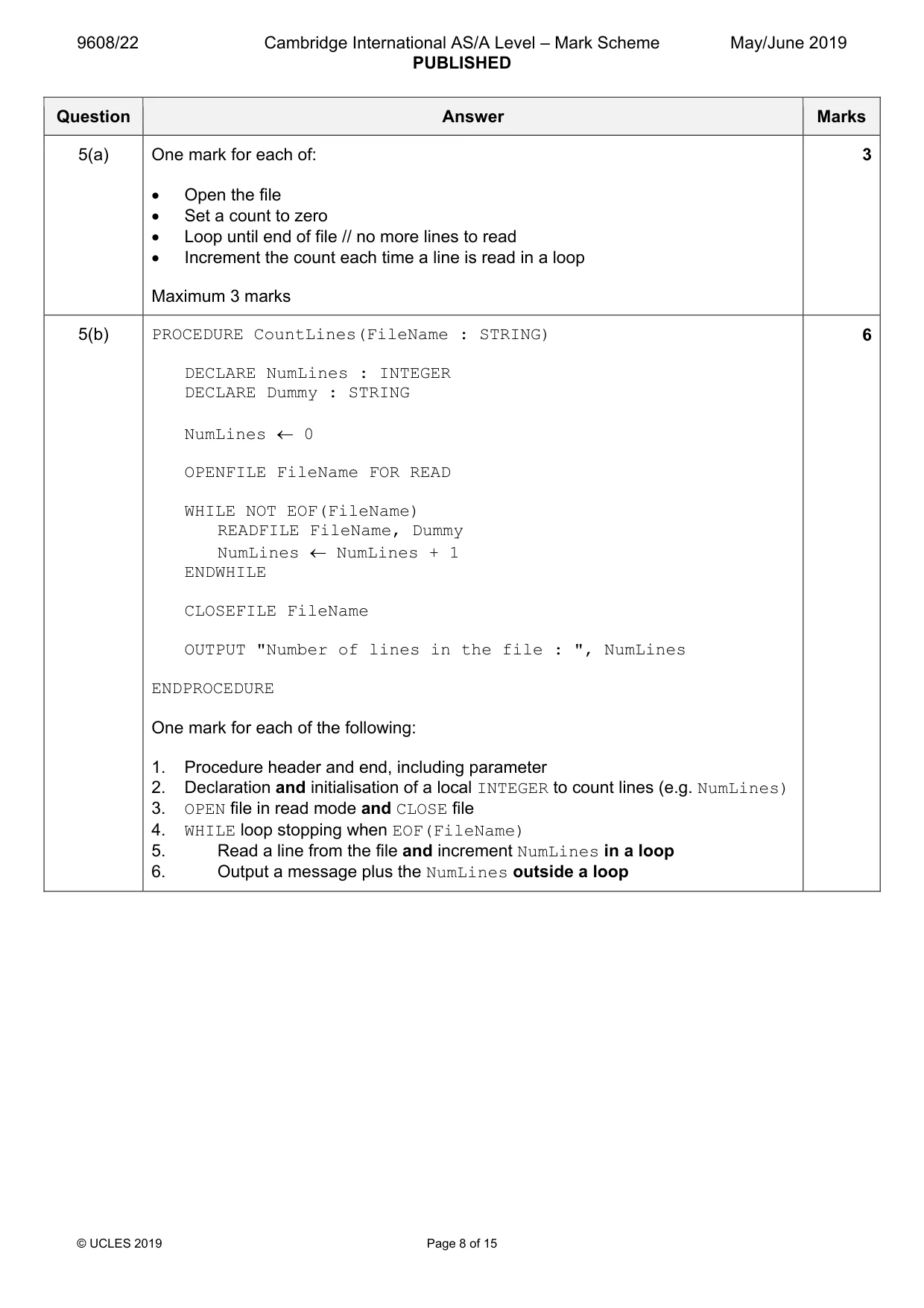
9608/22 Cambridge International AS/A Level – Mark Scheme PUBLISHED May/June 2019 © UCLES 2019 Page 8 of 15 Question Answer Marks 5(a) One mark for each of: • Open the file • Set a count to zero • Loop until end of file // no more lines to read • Increment the count each time a line is read in a loop Maximum 3 marks 3 5(b) PROCEDURE CountLines(FileName : STRING) DECLARE NumLines : INTEGER DECLARE Dummy : STRING NumLines ← 0 OPENFILE FileName FOR READ WHILE NOT EOF(FileName) READFILE FileName, Dummy NumLines ← NumLines + 1 ENDWHILE CLOSEFILE FileName OUTPUT "Number of lines in the file : ", NumLines ENDPROCEDURE One mark for each of the following: 1. Procedure header and end, including parameter 2. Declaration and initialisation of a local INTEGER to count lines (e.g. NumLines) 3. OPEN file in read mode and CLOSE file 4. WHILE loop stopping when EOF(FileName) 5. Read a line from the file and increment NumLines in a loop 6. Output a message plus the NumLines outside a loop 6
Mark scheme, page 9
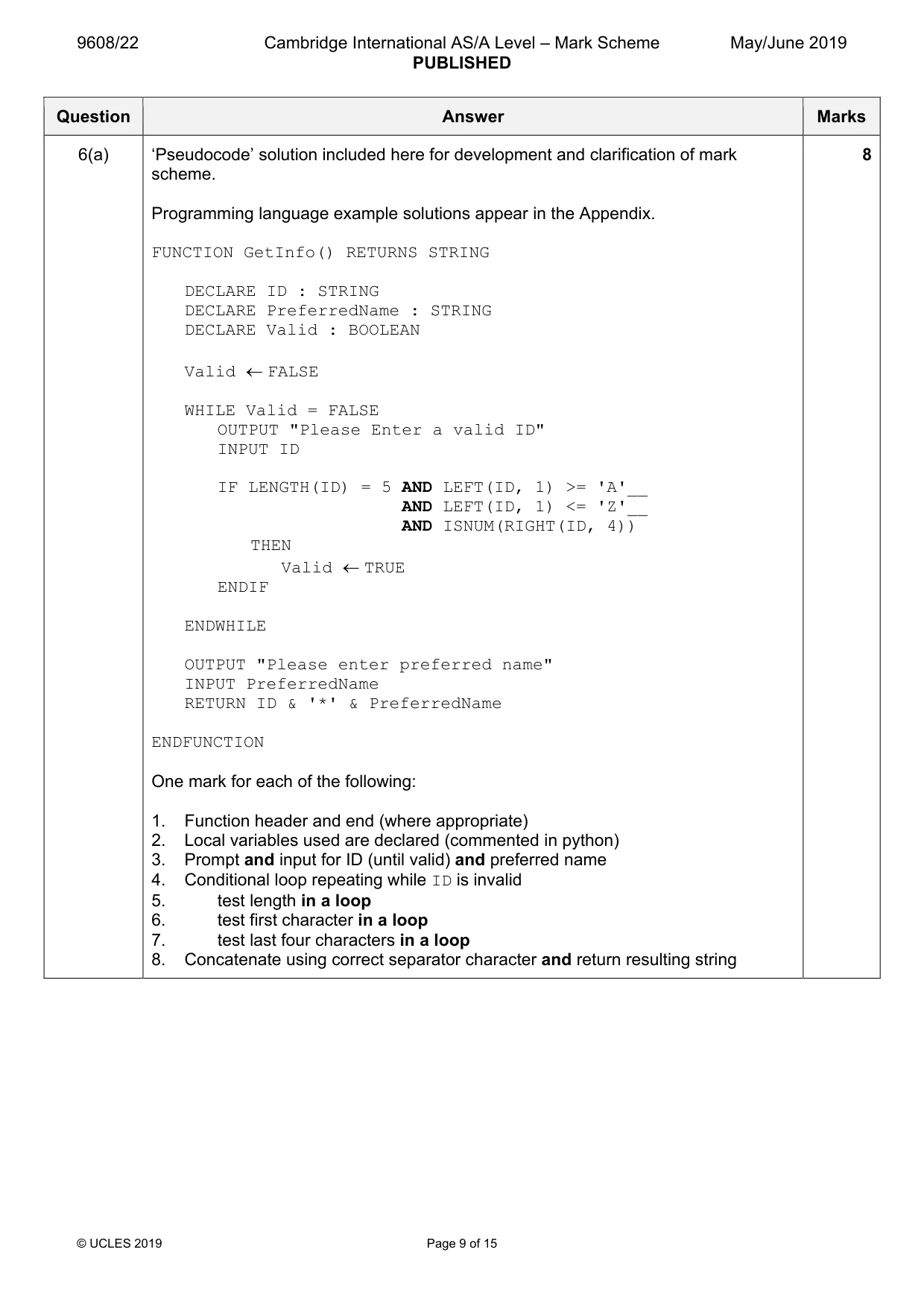
9608/22 Cambridge International AS/A Level – Mark Scheme PUBLISHED May/June 2019 © UCLES 2019 Page 9 of 15 Question Answer Marks 6(a) ‘Pseudocode’ solution included here for development and clarification of mark scheme. Programming language example solutions appear in the Appendix. FUNCTION GetInfo() RETURNS STRING DECLARE ID : STRING DECLARE PreferredName : STRING DECLARE Valid : BOOLEAN Valid ← FALSE WHILE Valid = FALSE OUTPUT "Please Enter a valid ID" INPUT ID IF LENGTH(ID) = 5 AND LEFT(ID, 1) >= 'A'__ AND LEFT(ID, 1) <= 'Z'__ AND ISNUM(RIGHT(ID, 4)) THEN Valid ← TRUE ENDIF ENDWHILE OUTPUT "Please enter preferred name" INPUT PreferredName RETURN ID & '*' & PreferredName ENDFUNCTION One mark for each of the following: 1. Function header and end (where appropriate) 2. Local variables used are declared (commented in python) 3. Prompt and input for ID (until valid) and preferred name 4. Conditional loop repeating while ID is invalid 5. test length in a loop 6. test first character in a loop 7. test last four characters in a loop 8. Concatenate using correct separator character and return resulting string 8
Mark scheme, page 10
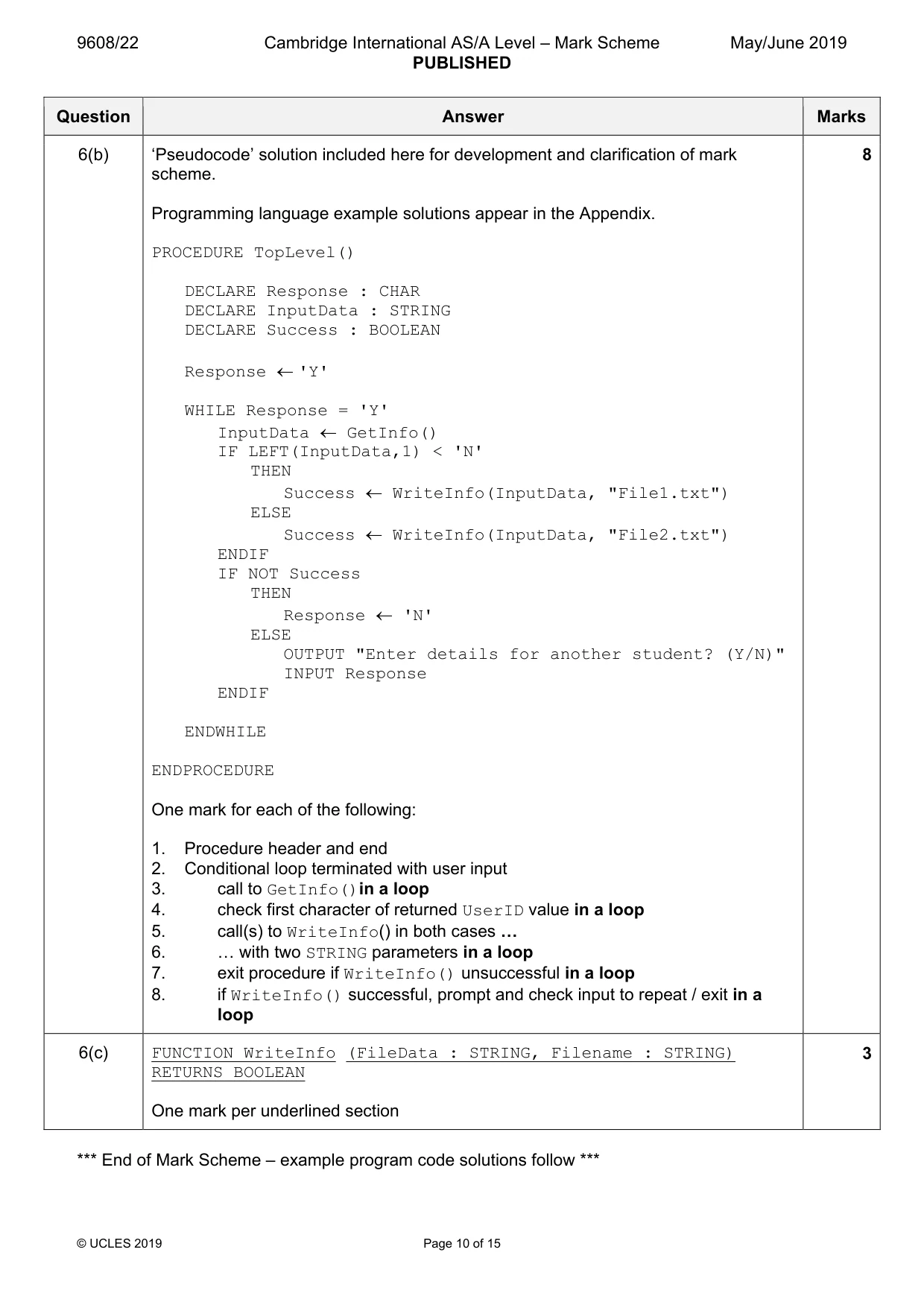
9608/22 Cambridge International AS/A Level – Mark Scheme PUBLISHED May/June 2019 © UCLES 2019 Page 10 of 15 Question Answer Marks 6(b) ‘Pseudocode’ solution included here for development and clarification of mark scheme. Programming language example solutions appear in the Appendix. PROCEDURE TopLevel() DECLARE Response : CHAR DECLARE InputData : STRING DECLARE Success : BOOLEAN Response ← 'Y' WHILE Response = 'Y' InputData ← GetInfo() IF LEFT(InputData,1) < 'N' THEN Success ← WriteInfo(InputData, "File1.txt") ELSE Success ← WriteInfo(InputData, "File2.txt") ENDIF IF NOT Success THEN Response ← 'N' ELSE OUTPUT "Enter details for another student? (Y/N)" INPUT Response ENDIF ENDWHILE ENDPROCEDURE One mark for each of the following: 1. Procedure header and end 2. Conditional loop terminated with user input 3. call to GetInfo()in a loop 4. check first character of returned UserID value in a loop 5. call(s) to WriteInfo() in both cases « 6. « with two STRING parameters in a loop 7. exit procedure if WriteInfo() unsuccessful in a loop 8. if WriteInfo() successful, prompt and check input to repeat / exit in a loop 8 6(c) FUNCTION WriteInfo (FileData : STRING, Filename : STRING) RETURNS BOOLEAN One mark per underlined section 3 *** End of Mark Scheme – example program code solutions follow ***
Mark scheme, page 11
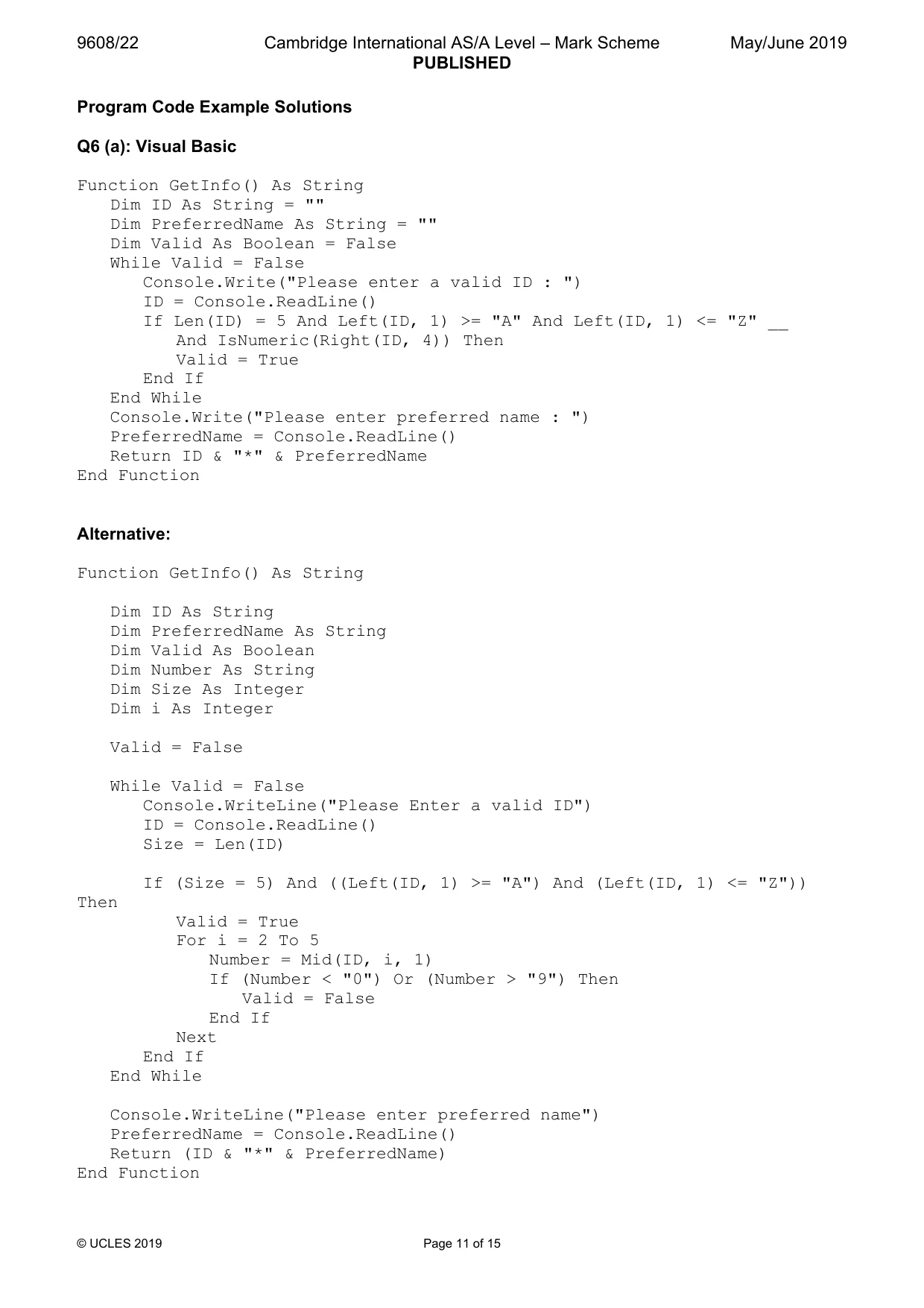
9608/22 Cambridge International AS/A Level – Mark Scheme PUBLISHED May/June 2019 © UCLES 2019 Page 11 of 15 Program Code Example Solutions Q6 (a): Visual Basic Function GetInfo() As String Dim ID As String = "" Dim PreferredName As String = "" Dim Valid As Boolean = False While Valid = False Console.Write("Please enter a valid ID : ") ID = Console.ReadLine() If Len(ID) = 5 And Left(ID, 1) >= "A" And Left(ID, 1) <= "Z" __ And IsNumeric(Right(ID, 4)) Then Valid = True End If End While Console.Write("Please enter preferred name : ") PreferredName = Console.ReadLine() Return ID & "*" & PreferredName End Function Alternative: Function GetInfo() As String Dim ID As String Dim PreferredName As String Dim Valid As Boolean Dim Number As String Dim Size As Integer Dim i As Integer Valid = False While Valid = False Console.WriteLine("Please Enter a valid ID") ID = Console.ReadLine() Size = Len(ID) If (Size = 5) And ((Left(ID, 1) >= "A") And (Left(ID, 1) <= "Z")) Then Valid = True For i = 2 To 5 Number = Mid(ID, i, 1) If (Number < "0") Or (Number > "9") Then Valid = False End If Next End If End While Console.WriteLine("Please enter preferred name") PreferredName = Console.ReadLine() Return (ID & "*" & PreferredName) End Function
Mark scheme, page 12
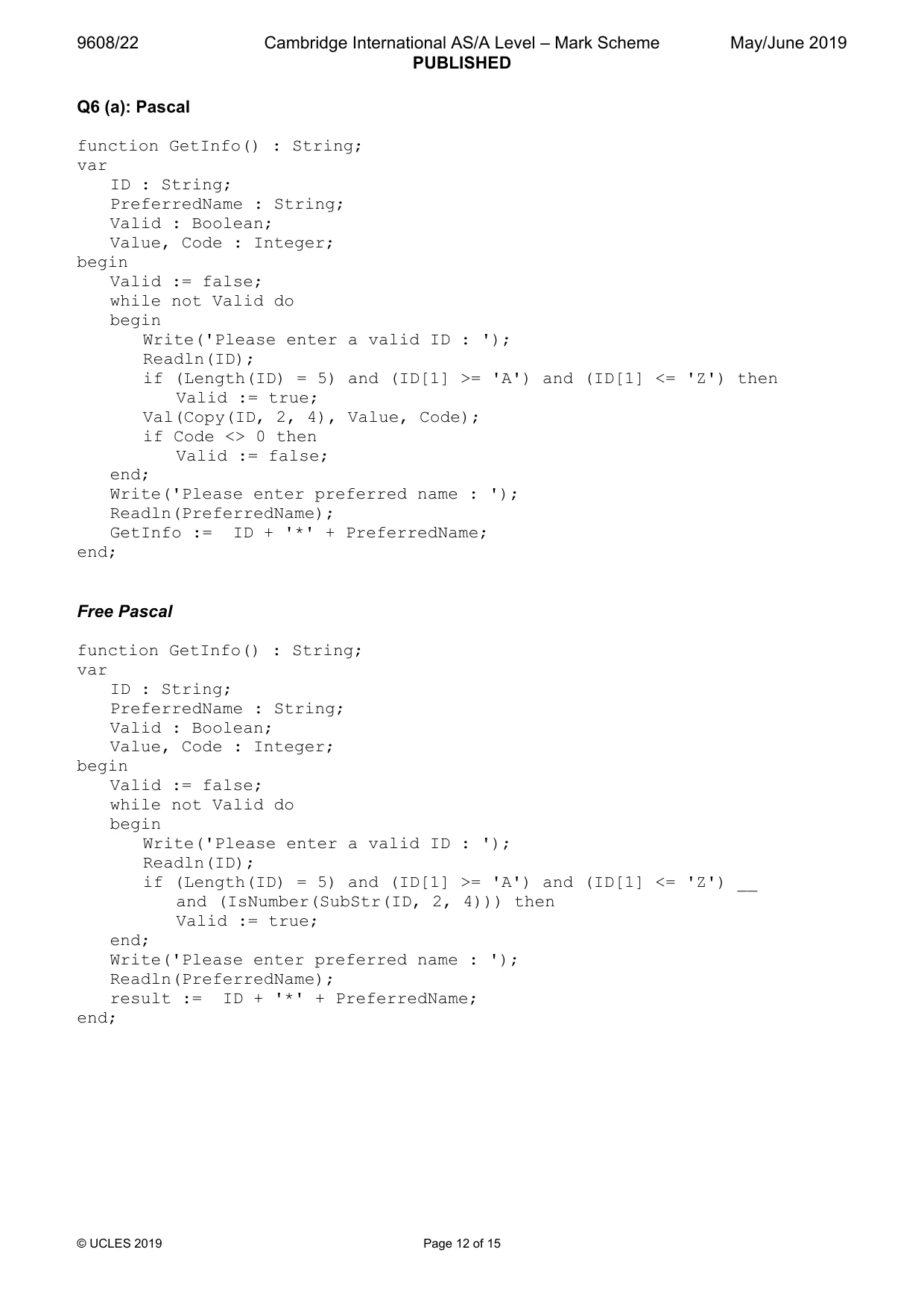
9608/22 Cambridge International AS/A Level – Mark Scheme PUBLISHED May/June 2019 © UCLES 2019 Page 12 of 15 Q6 (a): Pascal function GetInfo() : String; var ID : String; PreferredName : String; Valid : Boolean; Value, Code : Integer; begin Valid := false; while not Valid do begin Write('Please enter a valid ID : '); Readln(ID); if (Length(ID) = 5) and (ID[1] >= 'A') and (ID[1] <= 'Z') then Valid := true; Val(Copy(ID, 2, 4), Value, Code); if Code <> 0 then Valid := false; end; Write('Please enter preferred name : '); Readln(PreferredName); GetInfo := ID + '*' + PreferredName; end; Free Pascal function GetInfo() : String; var ID : String; PreferredName : String; Valid : Boolean; Value, Code : Integer; begin Valid := false; while not Valid do begin Write('Please enter a valid ID : '); Readln(ID); if (Length(ID) = 5) and (ID[1] >= 'A') and (ID[1] <= 'Z') __ and (IsNumber(SubStr(ID, 2, 4))) then Valid := true; end; Write('Please enter preferred name : '); Readln(PreferredName); result := ID + '*' + PreferredName; end;
Mark scheme, page 13
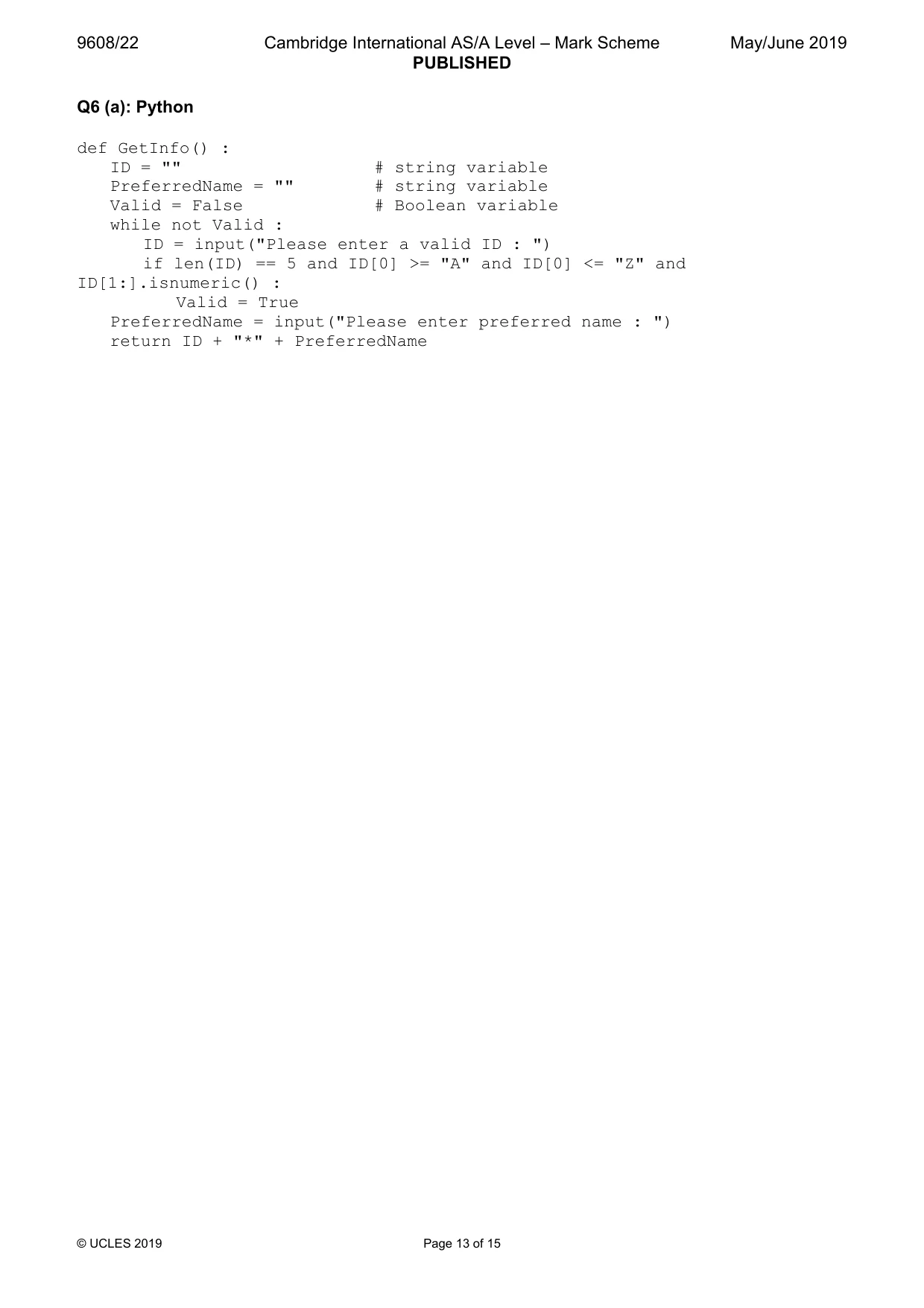
9608/22 Cambridge International AS/A Level – Mark Scheme PUBLISHED May/June 2019 © UCLES 2019 Page 13 of 15 Q6 (a): Python def GetInfo() : ID = "" # string variable PreferredName = "" # string variable Valid = False # Boolean variable while not Valid : ID = input("Please enter a valid ID : ") if len(ID) == 5 and ID[0] >= "A" and ID[0] <= "Z" and ID[1:].isnumeric() : Valid = True PreferredName = input("Please enter preferred name : ") return ID + "*" + PreferredName
Mark scheme, page 14
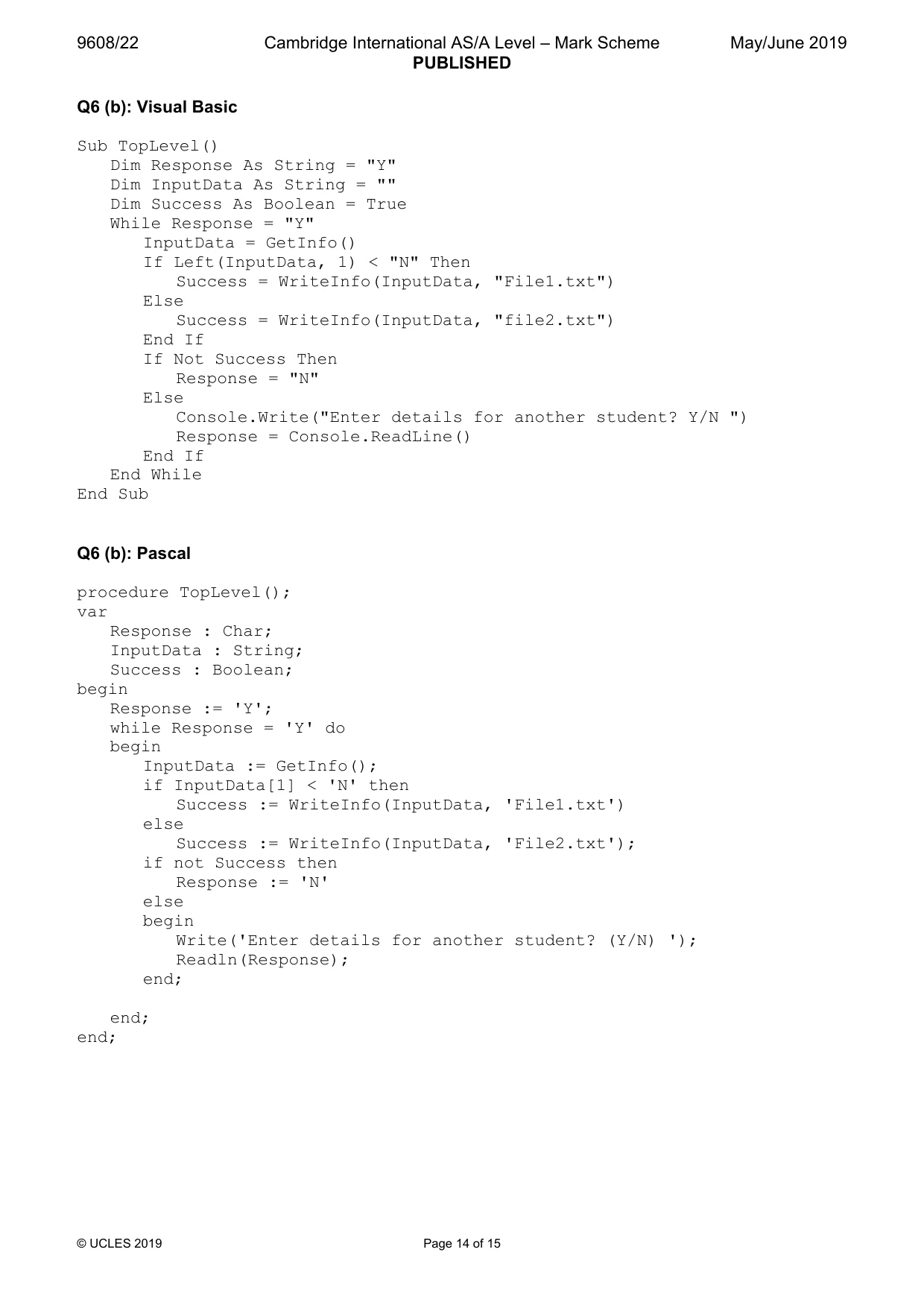
9608/22 Cambridge International AS/A Level – Mark Scheme PUBLISHED May/June 2019 © UCLES 2019 Page 14 of 15 Q6 (b): Visual Basic Sub TopLevel() Dim Response As String = "Y" Dim InputData As String = "" Dim Success As Boolean = True While Response = "Y" InputData = GetInfo() If Left(InputData, 1) < "N" Then Success = WriteInfo(InputData, "File1.txt") Else Success = WriteInfo(InputData, "file2.txt") End If If Not Success Then Response = "N" Else Console.Write("Enter details for another student? Y/N ") Response = Console.ReadLine() End If End While End Sub Q6 (b): Pascal procedure TopLevel(); var Response : Char; InputData : String; Success : Boolean; begin Response := 'Y'; while Response = 'Y' do begin InputData := GetInfo(); if InputData[1] < 'N' then Success := WriteInfo(InputData, 'File1.txt') else Success := WriteInfo(InputData, 'File2.txt'); if not Success then Response := 'N' else begin Write('Enter details for another student? (Y/N) '); Readln(Response); end; end; end;
Mark scheme, page 15
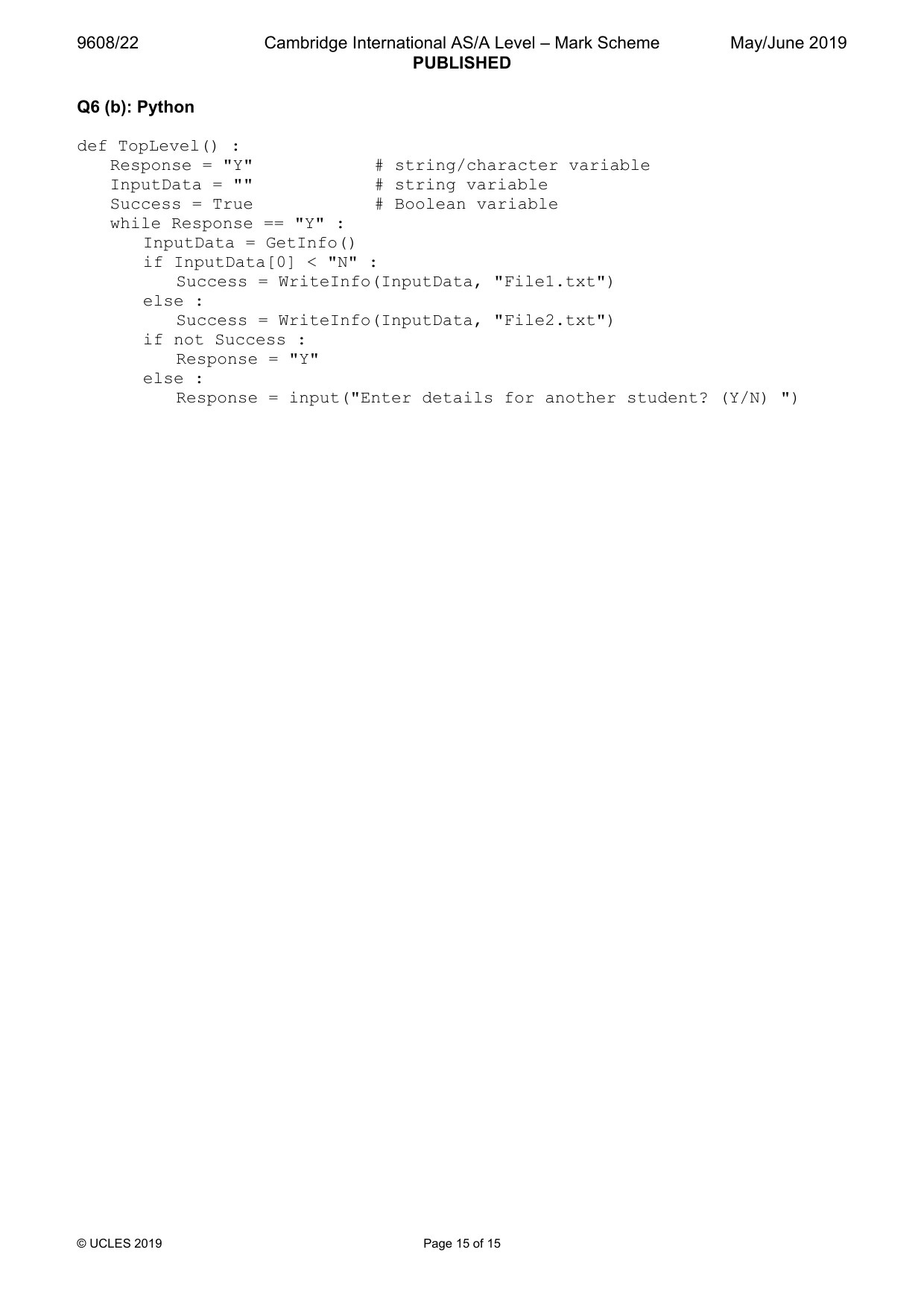
9608/22 Cambridge International AS/A Level – Mark Scheme PUBLISHED May/June 2019 © UCLES 2019 Page 15 of 15 Q6 (b): Python def TopLevel() : Response = "Y" # string/character variable InputData = "" # string variable Success = True # Boolean variable while Response == "Y" : InputData = GetInfo() if InputData[0] < "N" : Success = WriteInfo(InputData, "File1.txt") else : Success = WriteInfo(InputData, "File2.txt") if not Success : Response = "Y" else : Response = input("Enter details for another student? (Y/N) ")
What you needed in this session
Cambridge’s own grade thresholds for 2019 May/June, Paper 2 · Variant 2. A higher threshold means an easier paper — the bar moves with how the cohort did.