Cambridge A Level Computer Science 9608 — 2017 Oct/Nov Paper 4 · Variant 2
9608/42/O/N/17 · 75 marks · ≈84 min
The question paper and its mark scheme, free to read here and free to download. This is Cambridge’s own paper, exactly as it was sat.
Question paper16 pages


Mark scheme16 pages
Answers below. Sit the paper first if you are practising.
Paper as text
Question paper, page 1
This document consists of 14 printed pages and 2 blank pages. DC (LK/JG) 129979/4 © UCLES 2017 [Turn over Cambridge International Examinations Cambridge International Advanced Subsidiary and Advanced Level * 5 5 2 9 0 1 8 9 5 3 * COMPUTER SCIENCE 9608/42 Paper 4 Further Problem-solving and Programming Skills October/November 2017 2 hours Candidates answer on the Question Paper. No Additional Materials are required. No calculators allowed. READ THESE INSTRUCTIONS FIRST Write your Centre number, candidate number and name in the spaces at the top of this page. Write in dark blue or black pen. You may use an HB pencil for any diagrams, graphs or rough working. Do not use staples, paper clips, glue or correction fluid. DO NOT WRITE IN ANY BARCODES. Answer all questions. No marks will be awarded for using brand names of software packages or hardware. At the end of the examination, fasten all your work securely together. The number of marks is given in brackets [ ] at the end of each question or part question. The maximum number of marks is 75.
Question paper, page 2
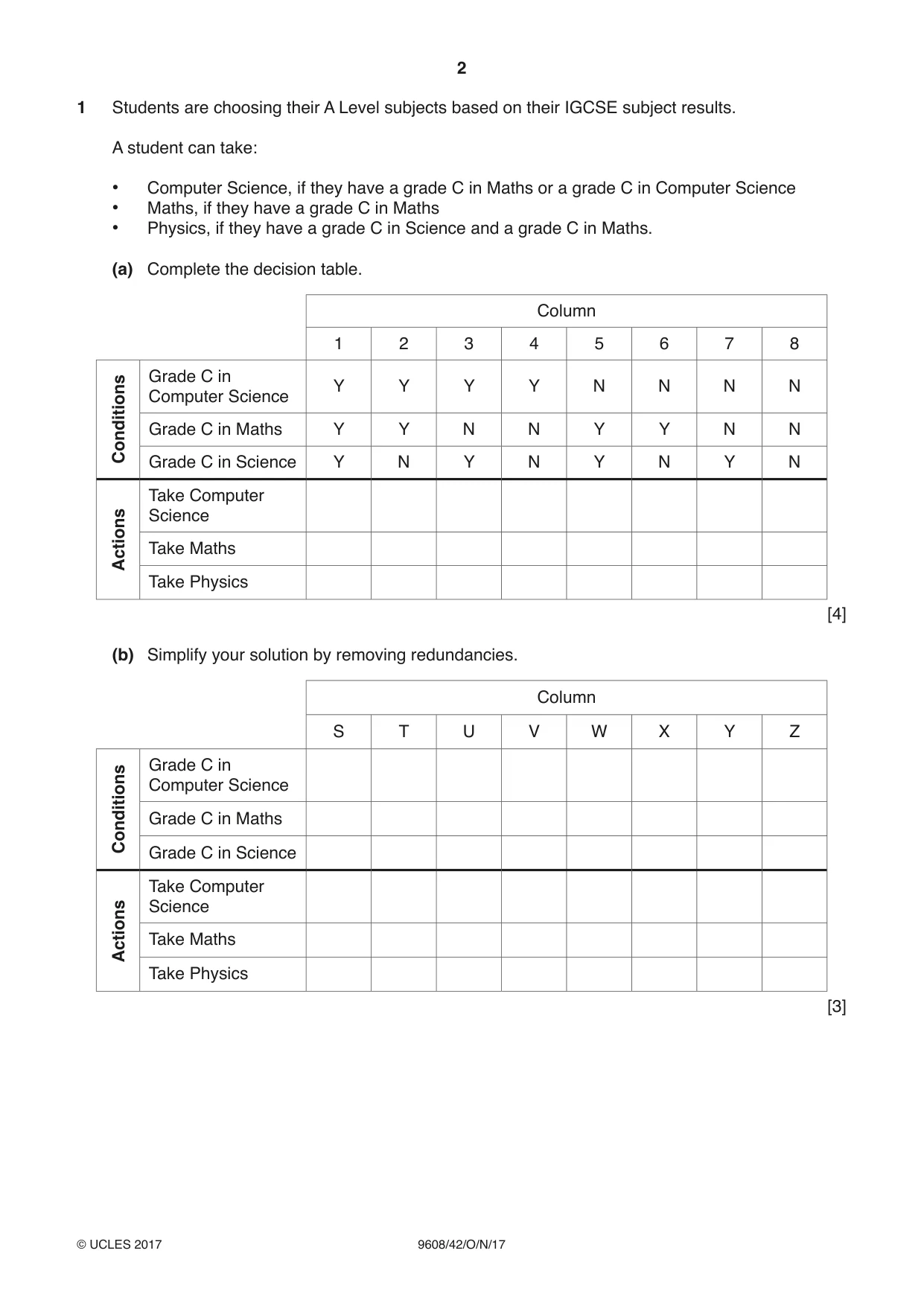
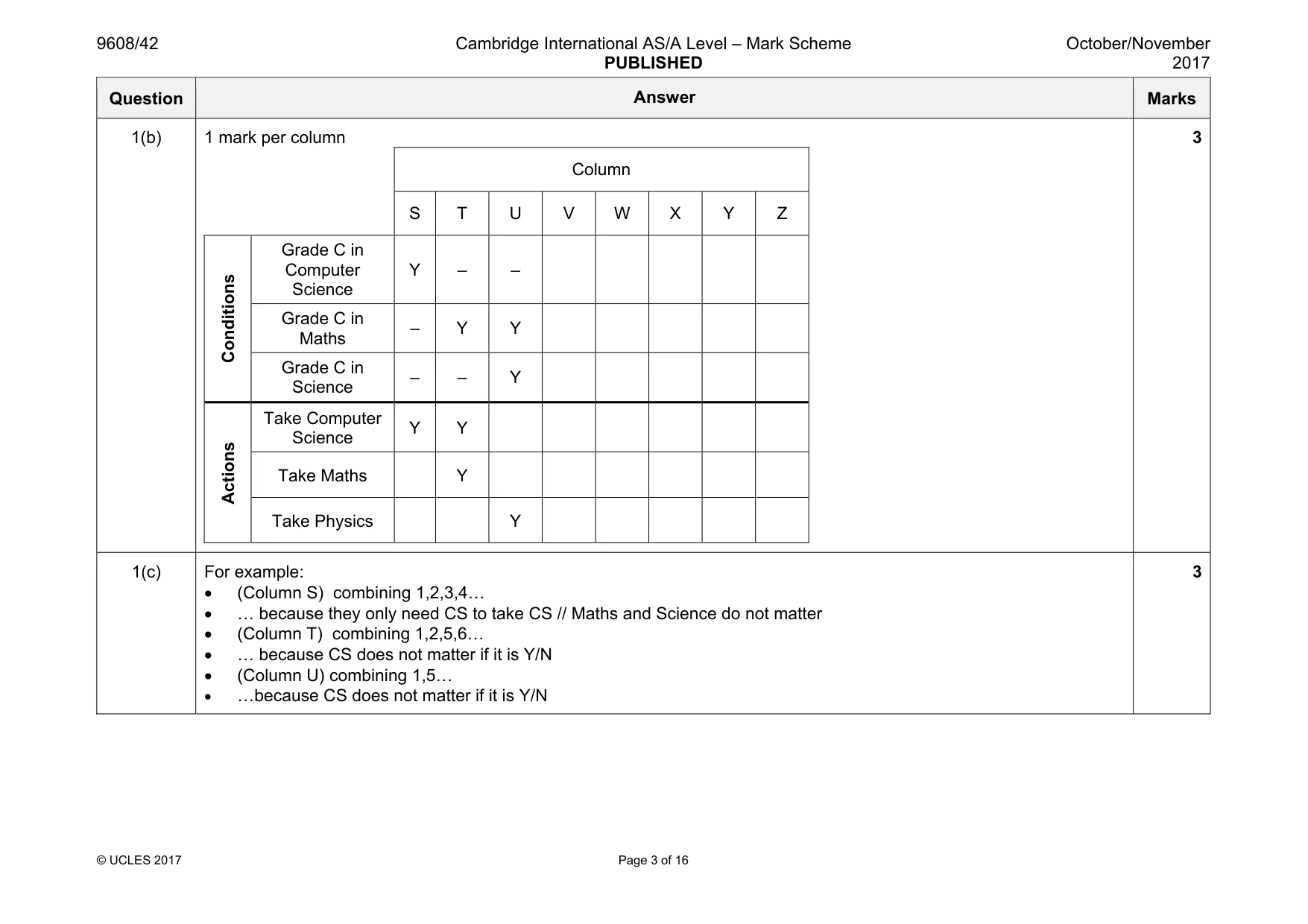
2 9608/42/O/N/17 © UCLES 2017 1 Students are choosing their A Level subjects based on their IGCSE subject results. A student can take: • Computer Science, if they have a grade C in Maths or a grade C in Computer Science • Maths, if they have a grade C in Maths • Physics, if they have a grade C in Science and a grade C in Maths. (a) Complete the decision table. Column 1 2 3 4 5 6 7 8 Conditions Grade C in Computer Science Y Y Y Y N N N N Grade C in Maths Y Y N N Y Y N N Grade C in Science Y N Y N Y N Y N Actions Take Computer Science Take Maths Take Physics [4] (b) Simplify your solution by removing redundancies. Column S T U V W X Y Z Conditions Grade C in Computer Science Grade C in Maths Grade C in Science Actions Take Computer Science Take Maths Take Physics [3]
Question paper, page 3
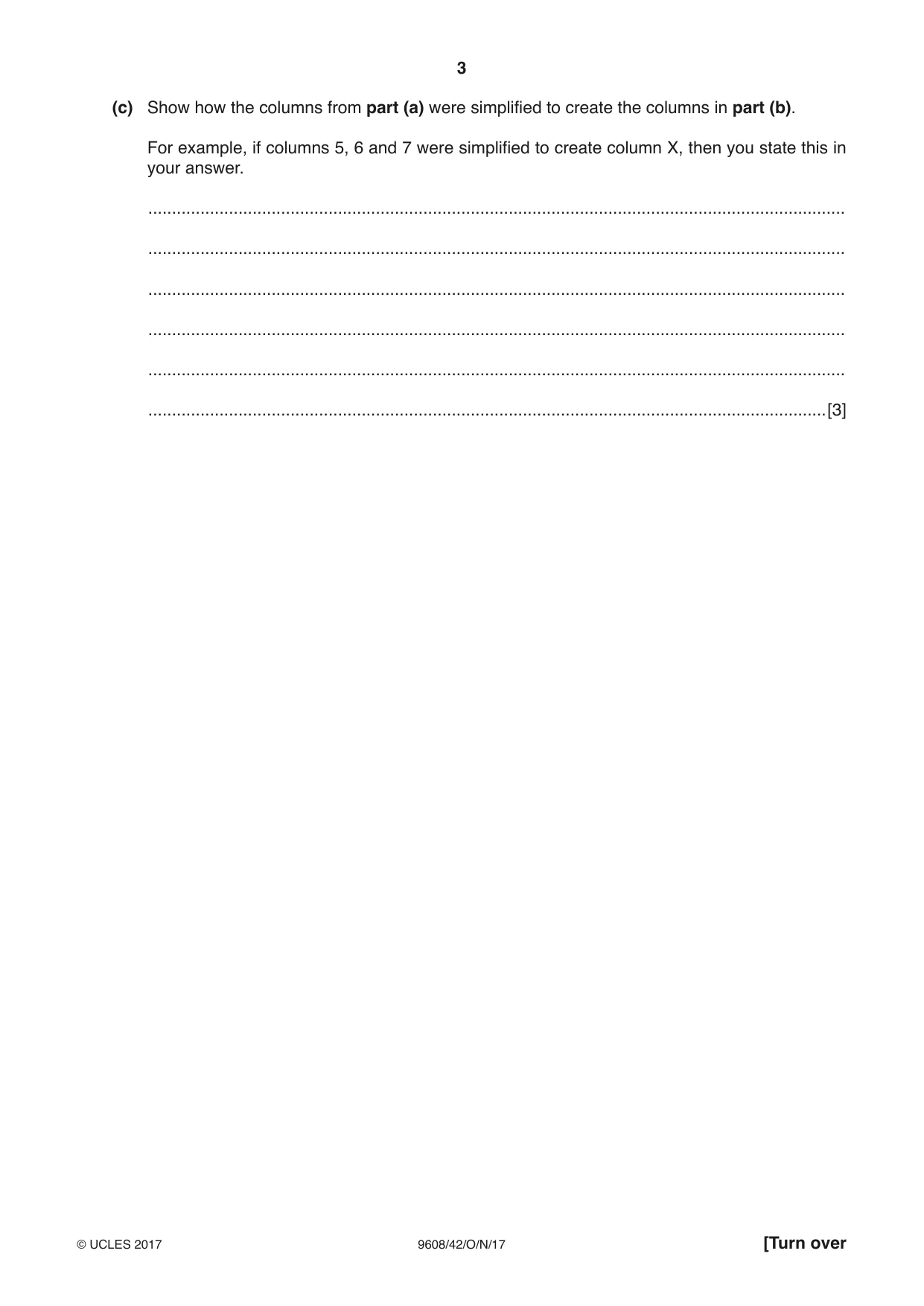
3 9608/42/O/N/17 © UCLES 2017 [Turn over (c) Show how the columns from part (a) were simplified to create the columns in part (b). For example, if columns 5, 6 and 7 were simplified to create column X, then you state this in your answer. … … … … … …[3]
Question paper, page 4
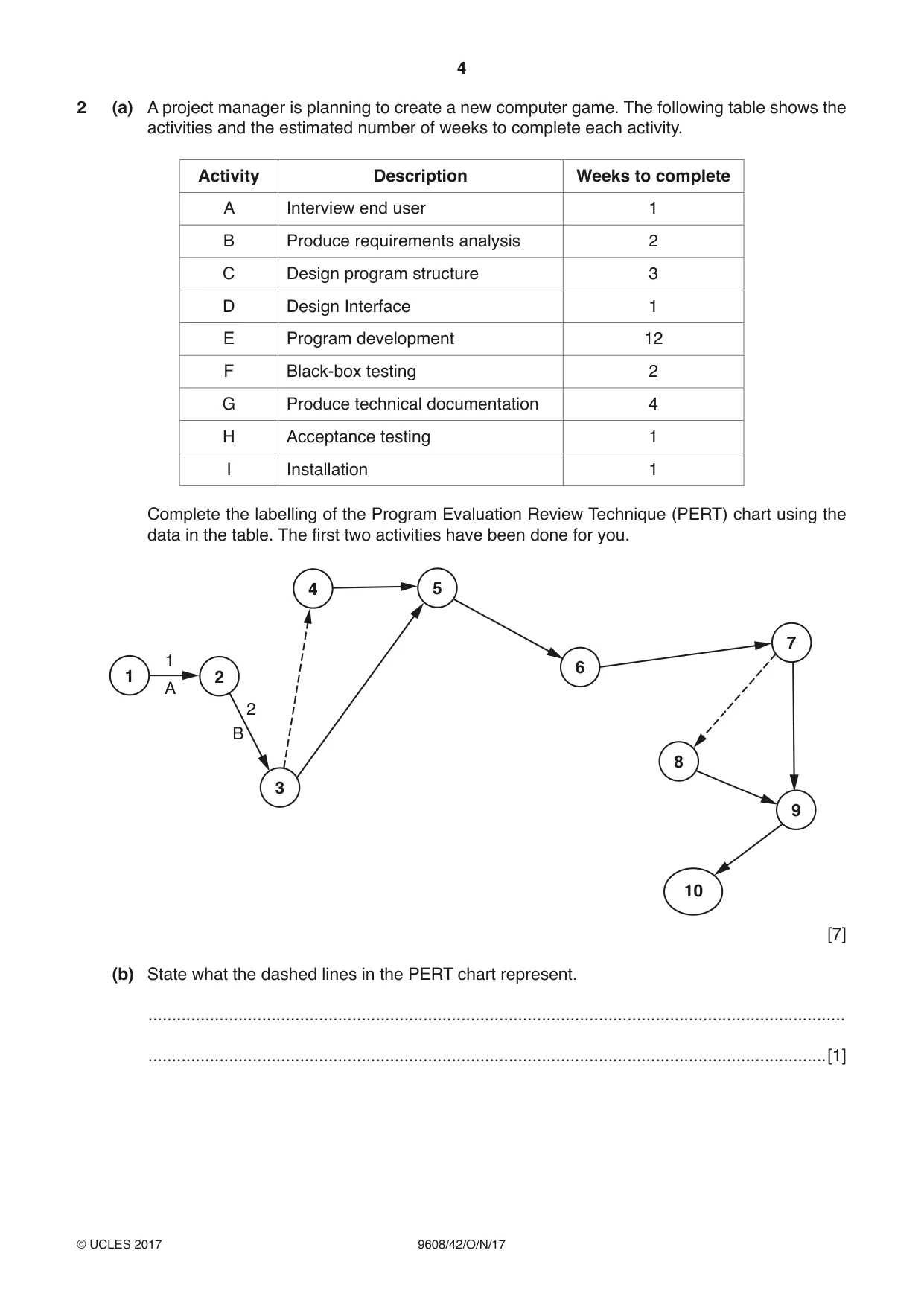
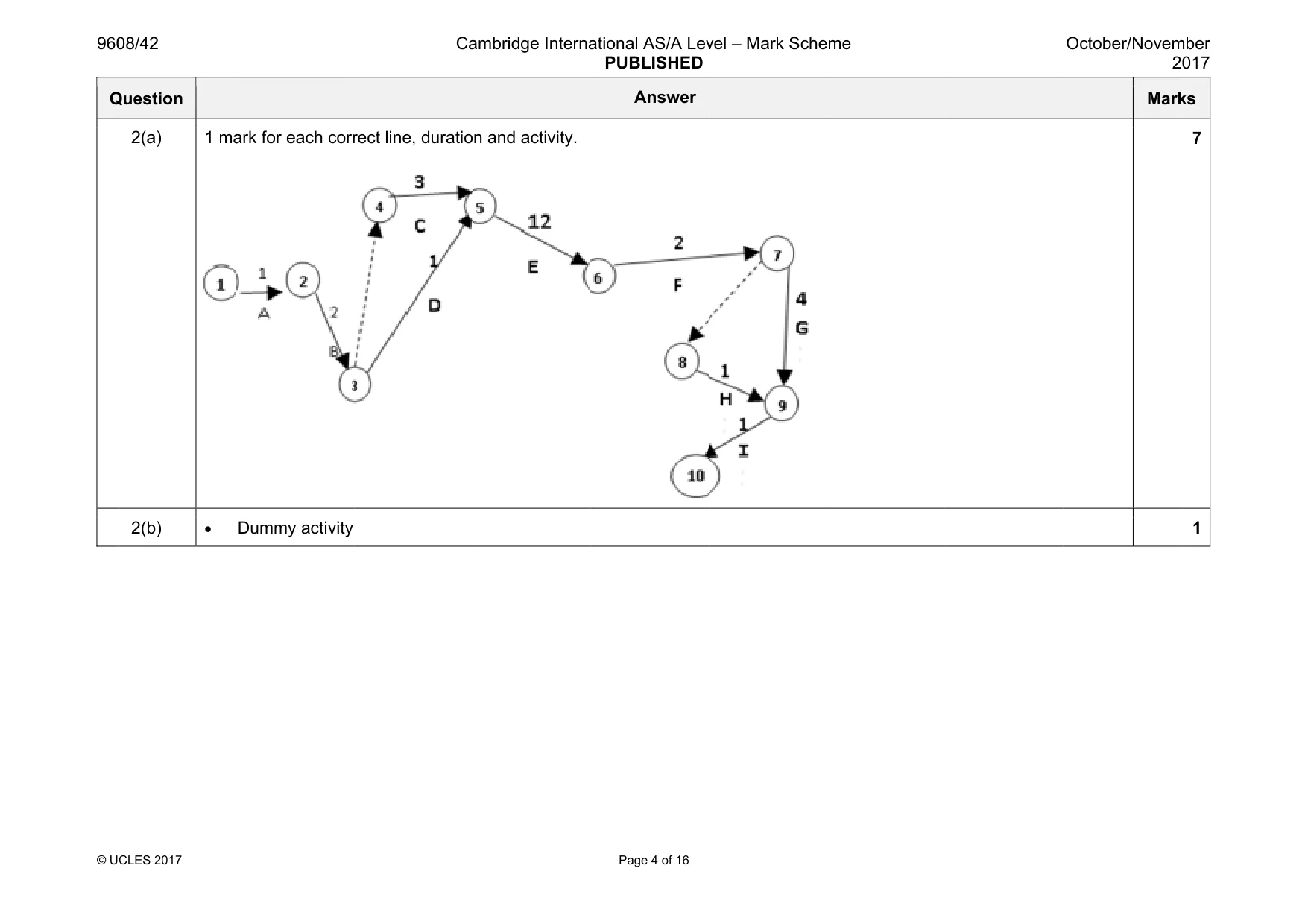
4 9608/42/O/N/17 © UCLES 2017 2 (a) A project manager is planning to create a new computer game. The following table shows the activities and the estimated number of weeks to complete each activity. Activity Description Weeks to complete A Interview end user 1 B Produce requirements analysis 2 C Design program structure 3 D Design Interface 1 E Program development 12 F Black-box testing 2 G Produce technical documentation 4 H Acceptance testing 1 I Installation 1 Complete the labelling of the Program Evaluation Review Technique (PERT) chart using the data in the table. The first two activities have been done for you. 1 2 3 4 5 6 7 8 9 10 1 2 B A [7] (b) State what the dashed lines in the PERT chart represent. … …[1]
Question paper, page 5
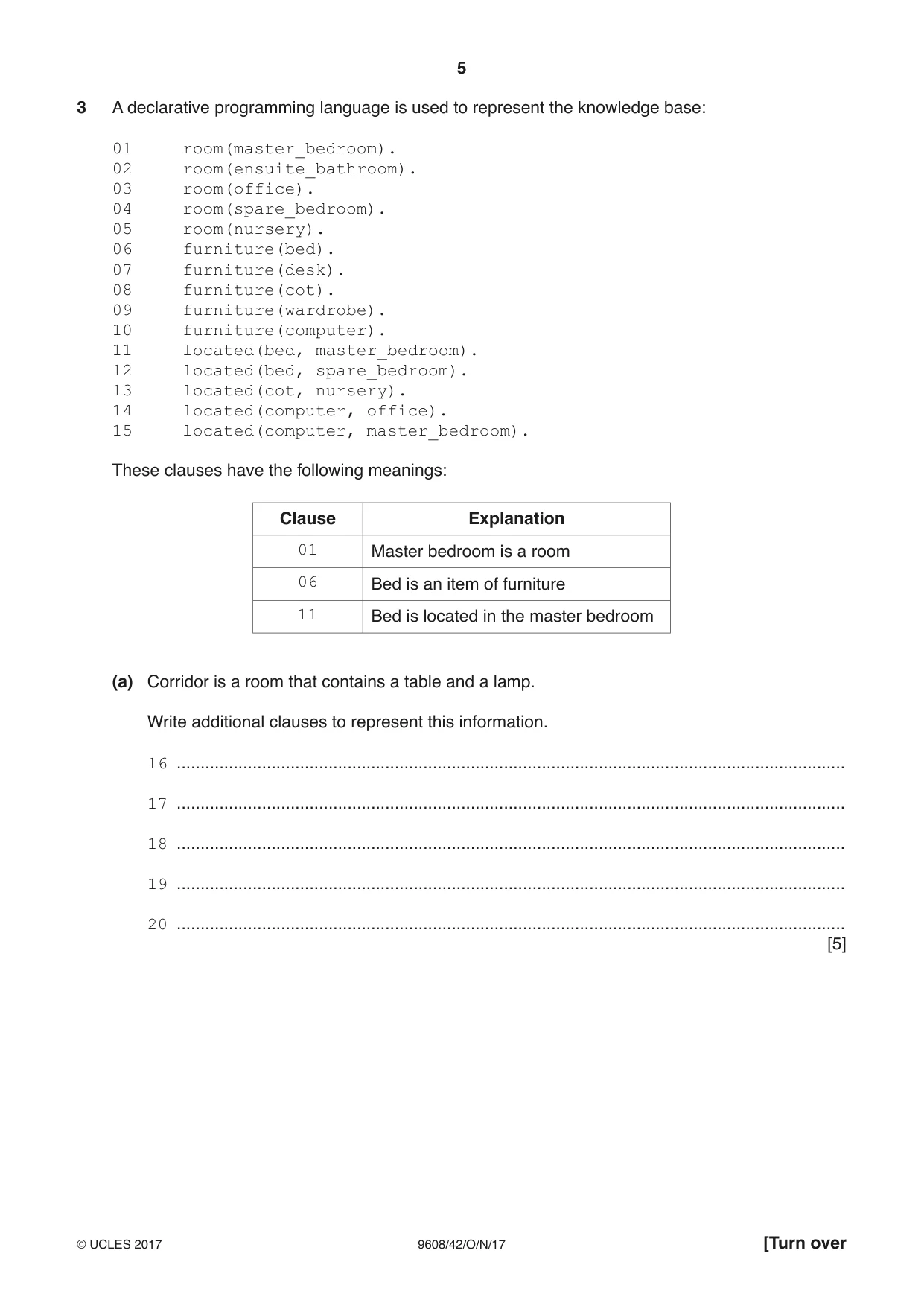
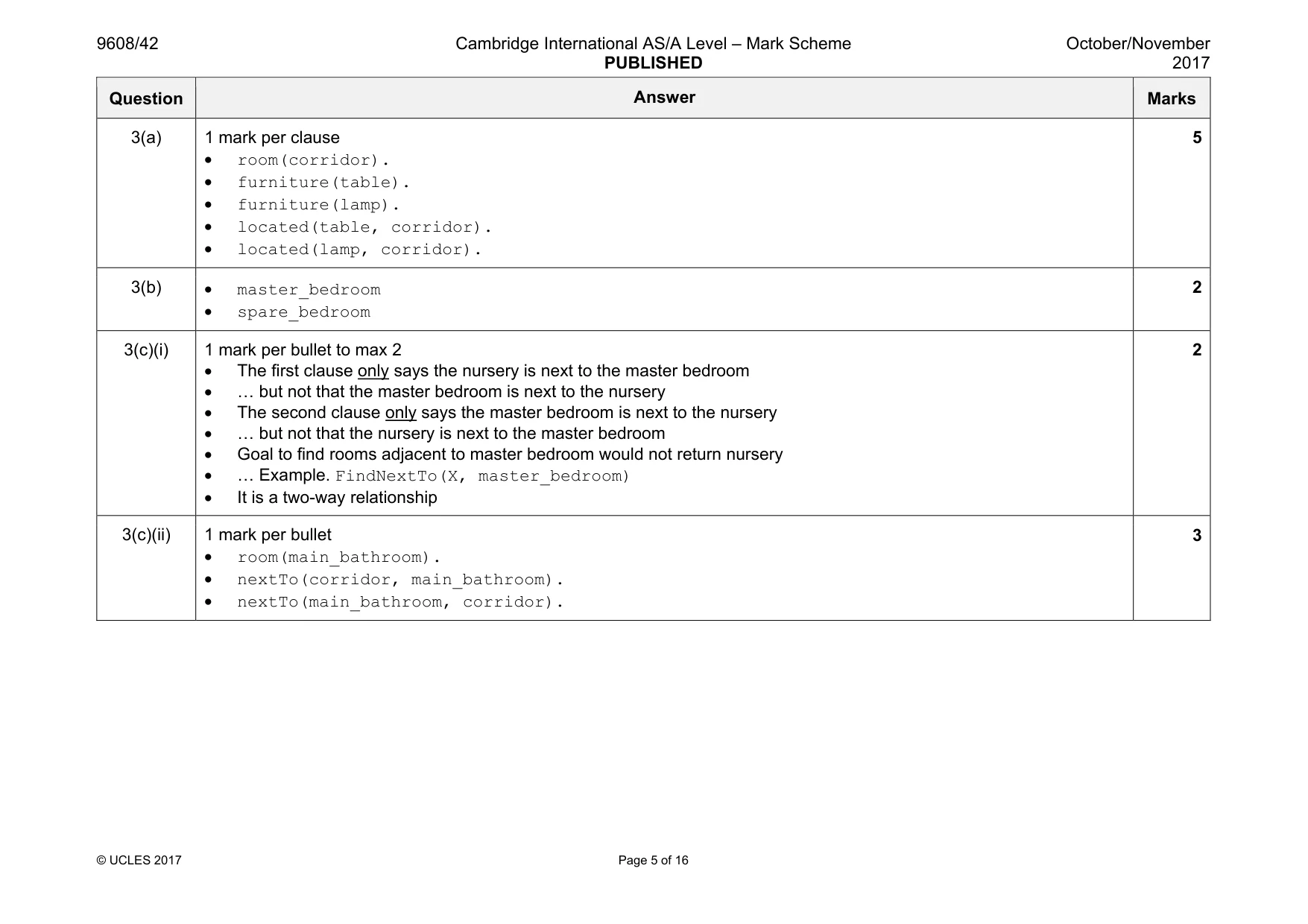
5 9608/42/O/N/17 © UCLES 2017 [Turn over 3 A declarative programming language is used to represent the knowledge base: 01 room(master_bedroom). 02 room(ensuite_bathroom). 03 room(office). 04 room(spare_bedroom). 05 room(nursery). 06 furniture(bed). 07 furniture(desk). 08 furniture(cot). 09 furniture(wardrobe). 10 furniture(computer). 11 located(bed, master_bedroom). 12 located(bed, spare_bedroom). 13 located(cot, nursery). 14 located(computer, office). 15 located(computer, master_bedroom). These clauses have the following meanings: Clause Explanation 01 Master bedroom is a room 06 Bed is an item of furniture 11 Bed is located in the master bedroom (a) Corridor is a room that contains a table and a lamp. Write additional clauses to represent this information. 16 … 17 … 18 … 19 … 20 … [5]
Question paper, page 6
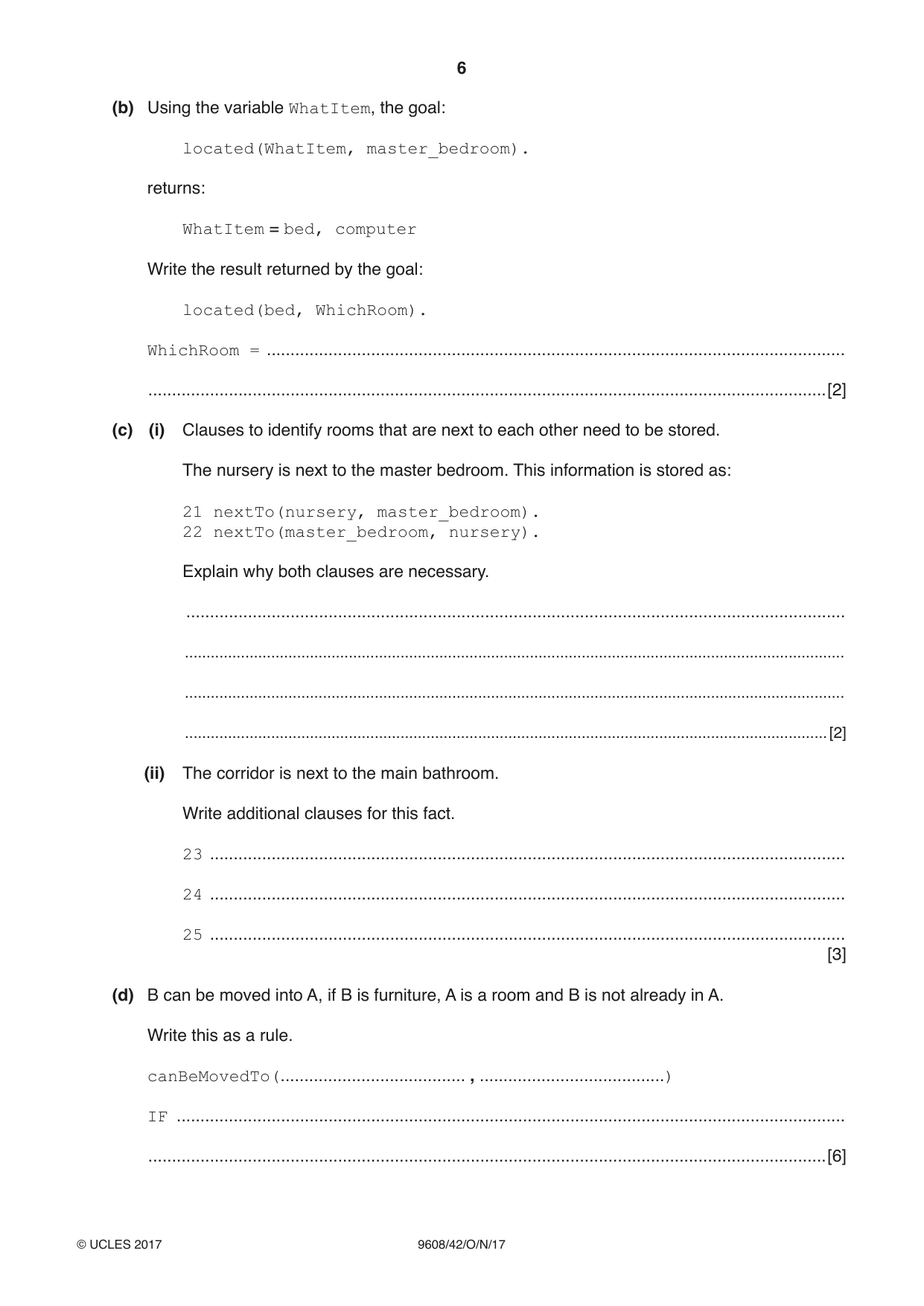
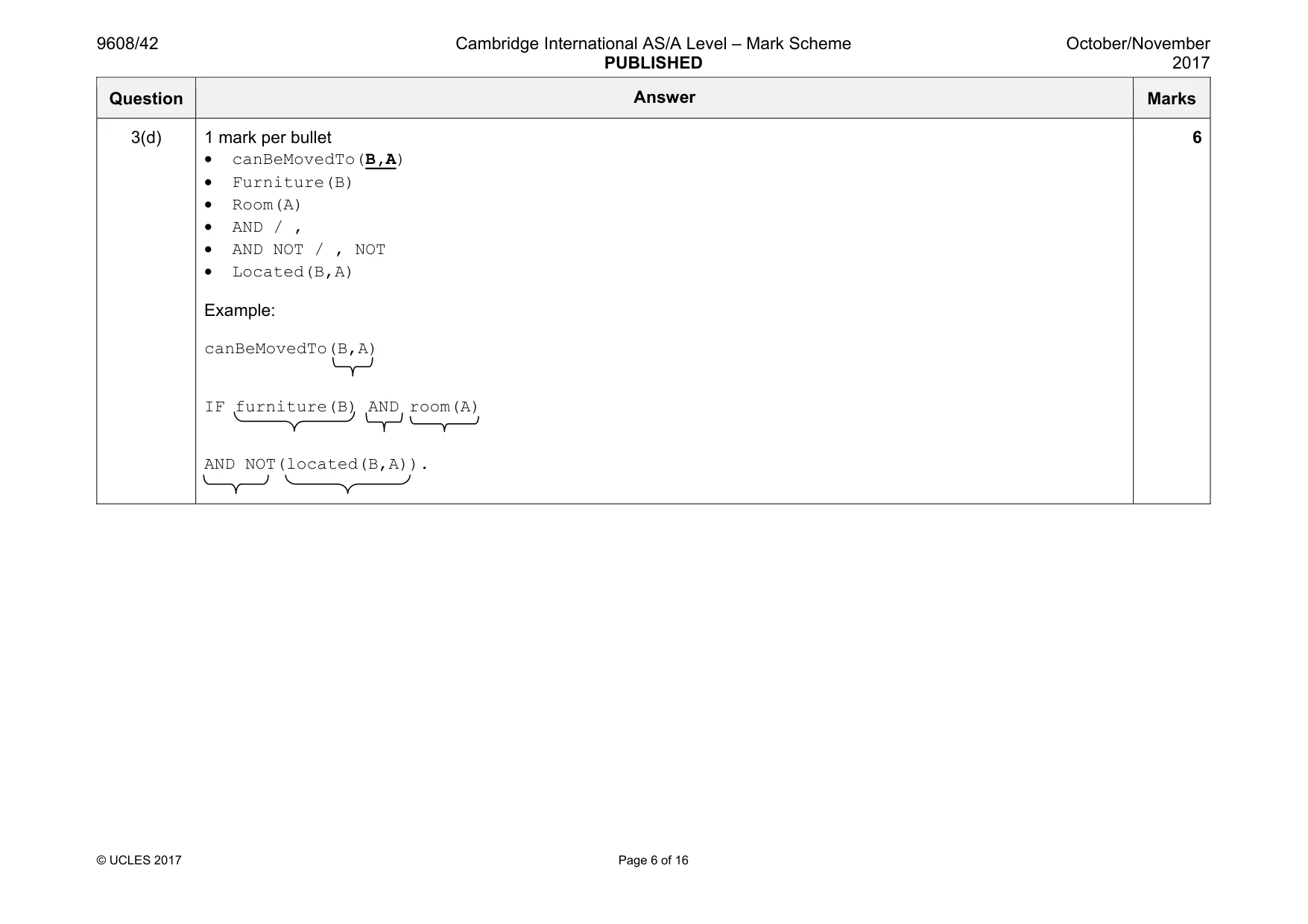
6 9608/42/O/N/17 © UCLES 2017 (b) Using the variable WhatItem, the goal: located(WhatItem, master_bedroom). returns: WhatItem = bed, computer Write the result returned by the goal: located(bed, WhichRoom). WhichRoom = … …[2] (c) (i) Clauses to identify rooms that are next to each other need to be stored. The nursery is next to the master bedroom. This information is stored as: 21 nextTo(nursery, master_bedroom). 22 nextTo(master_bedroom, nursery). Explain why both clauses are necessary. … … … …[2] (ii) The corridor is next to the main bathroom. Write additional clauses for this fact. 23 … 24 … 25 … [3] (d) B can be moved into A, if B is furniture, A is a room and B is not already in A. Write this as a rule. canBeMovedTo(… , …) IF … …[6]
Question paper, page 7
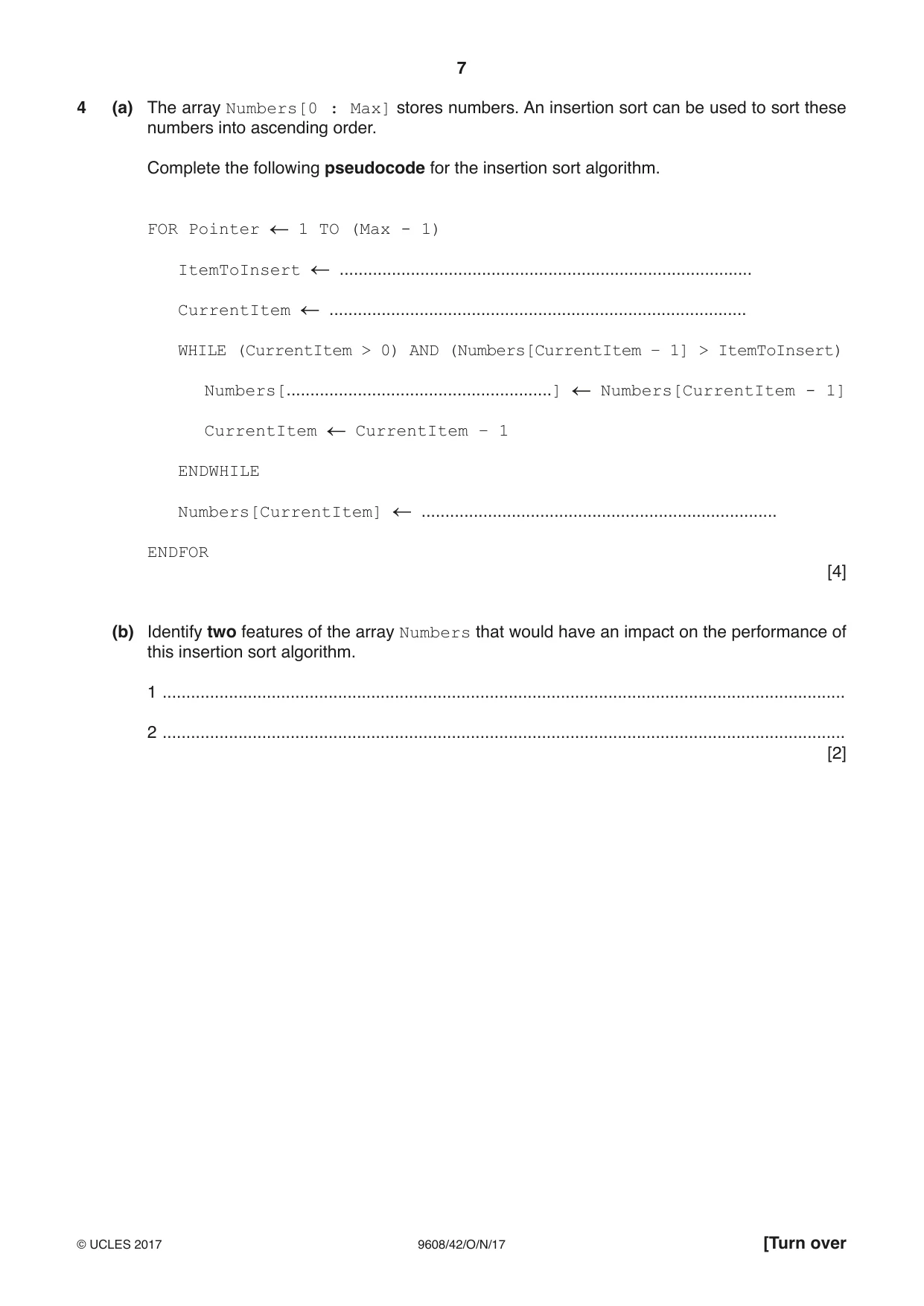
7 9608/42/O/N/17 © UCLES 2017 [Turn over 4 (a) The array Numbers[0 : Max] stores numbers. An insertion sort can be used to sort these numbers into ascending order. Complete the following pseudocode for the insertion sort algorithm. FOR Pointer 1 TO (Max - 1) ItemToInsert … CurrentItem … WHILE (CurrentItem > 0) AND (Numbers[CurrentItem – 1] > ItemToInsert) Numbers[…] Numbers[CurrentItem - 1] CurrentItem CurrentItem – 1 ENDWHILE Numbers[CurrentItem] … ENDFOR [4] (b) Identify two features of the array Numbers that would have an impact on the performance of this insertion sort algorithm. 1 … 2 … [2]
Question paper, page 8
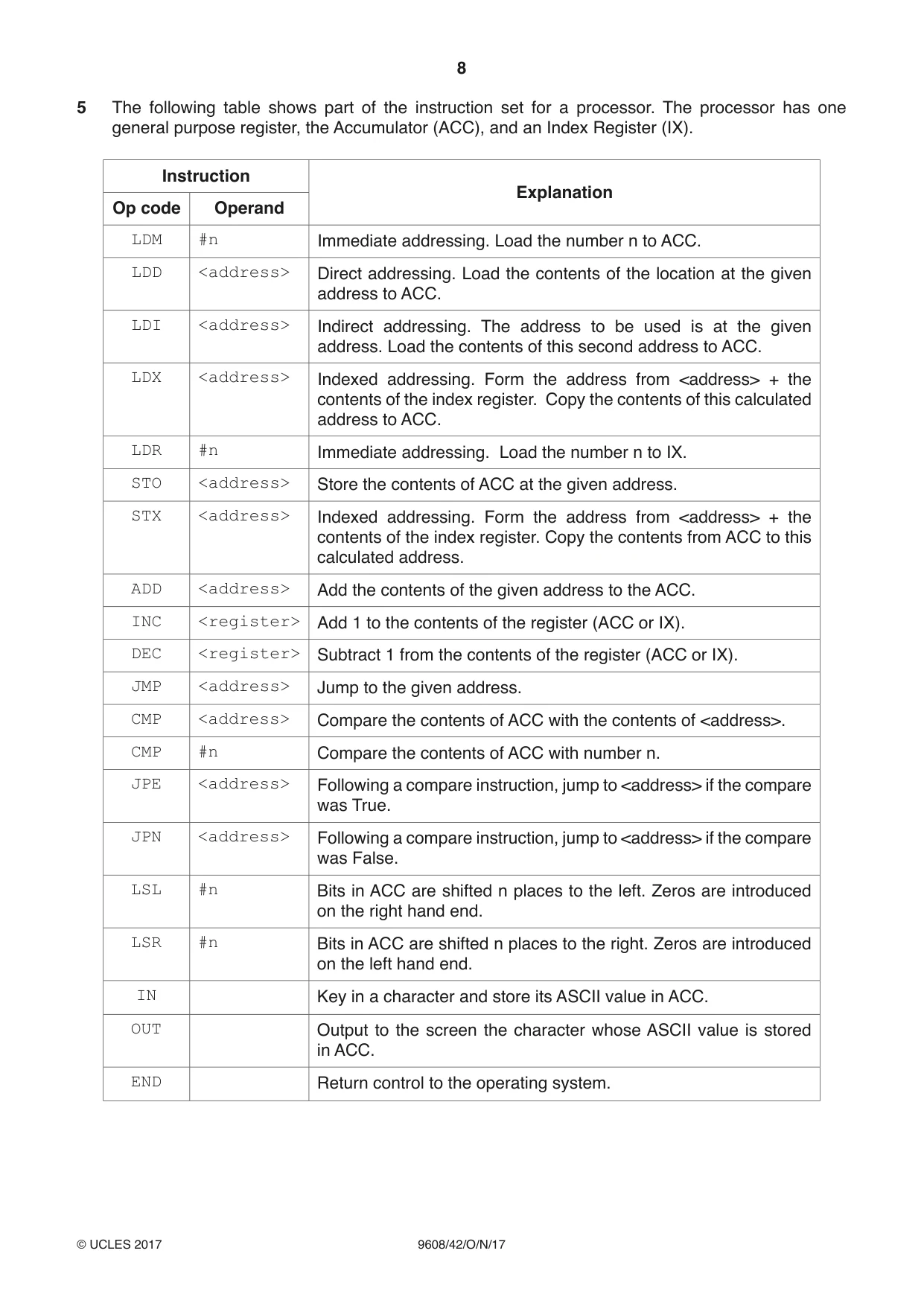
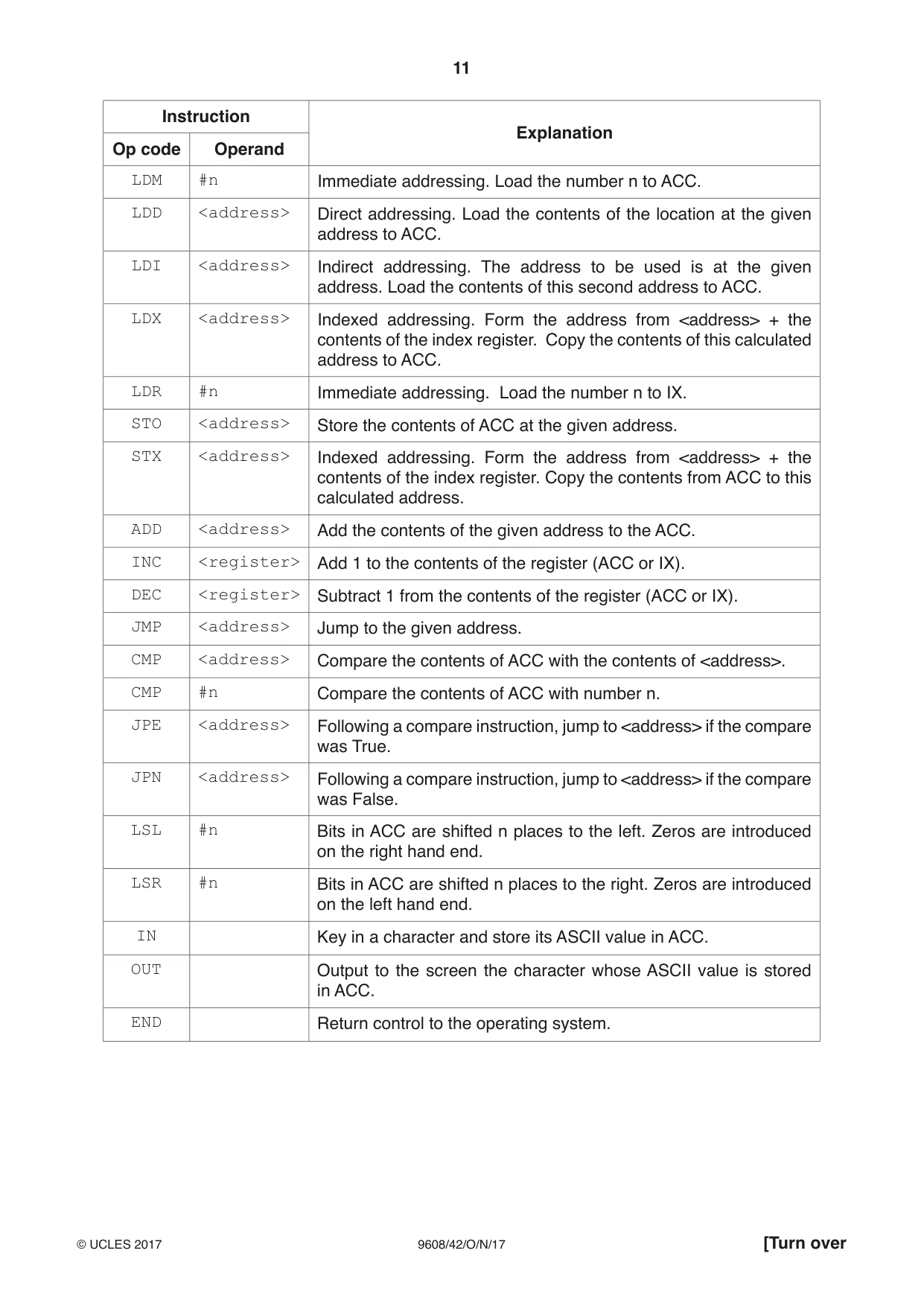
8 9608/42/O/N/17 © UCLES 2017 5 The following table shows part of the instruction set for a processor. The processor has one general purpose register, the Accumulator (ACC), and an Index Register (IX). Instruction Explanation Op code Operand LDM #n Immediate addressing. Load the number n to ACC. LDD <address> Direct addressing. Load the contents of the location at the given address to ACC. LDI <address> Indirect addressing. The address to be used is at the given address. Load the contents of this second address to ACC. LDX <address> Indexed addressing. Form the address from <address> + the contents of the index register. Copy the contents of this calculated address to ACC. LDR #n Immediate addressing. Load the number n to IX. STO <address> Store the contents of ACC at the given address. STX <address> Indexed addressing. Form the address from <address> + the contents of the index register. Copy the contents from ACC to this calculated address. ADD <address> Add the contents of the given address to the ACC. INC <register> Add 1 to the contents of the register (ACC or IX). DEC <register> Subtract 1 from the contents of the register (ACC or IX). JMP <address> Jump to the given address. CMP <address> Compare the contents of ACC with the contents of <address>. CMP #n Compare the contents of ACC with number n. JPE <address> Following a compare instruction, jump to <address> if the compare was True. JPN <address> Following a compare instruction, jump to <address> if the compare was False. LSL #n Bits in ACC are shifted n places to the left. Zeros are introduced on the right hand end. LSR #n Bits in ACC are shifted n places to the right. Zeros are introduced on the left hand end. IN Key in a character and store its ASCII value in ACC. OUT Output to the screen the character whose ASCII value is stored in ACC. END Return control to the operating system.
Question paper, page 9
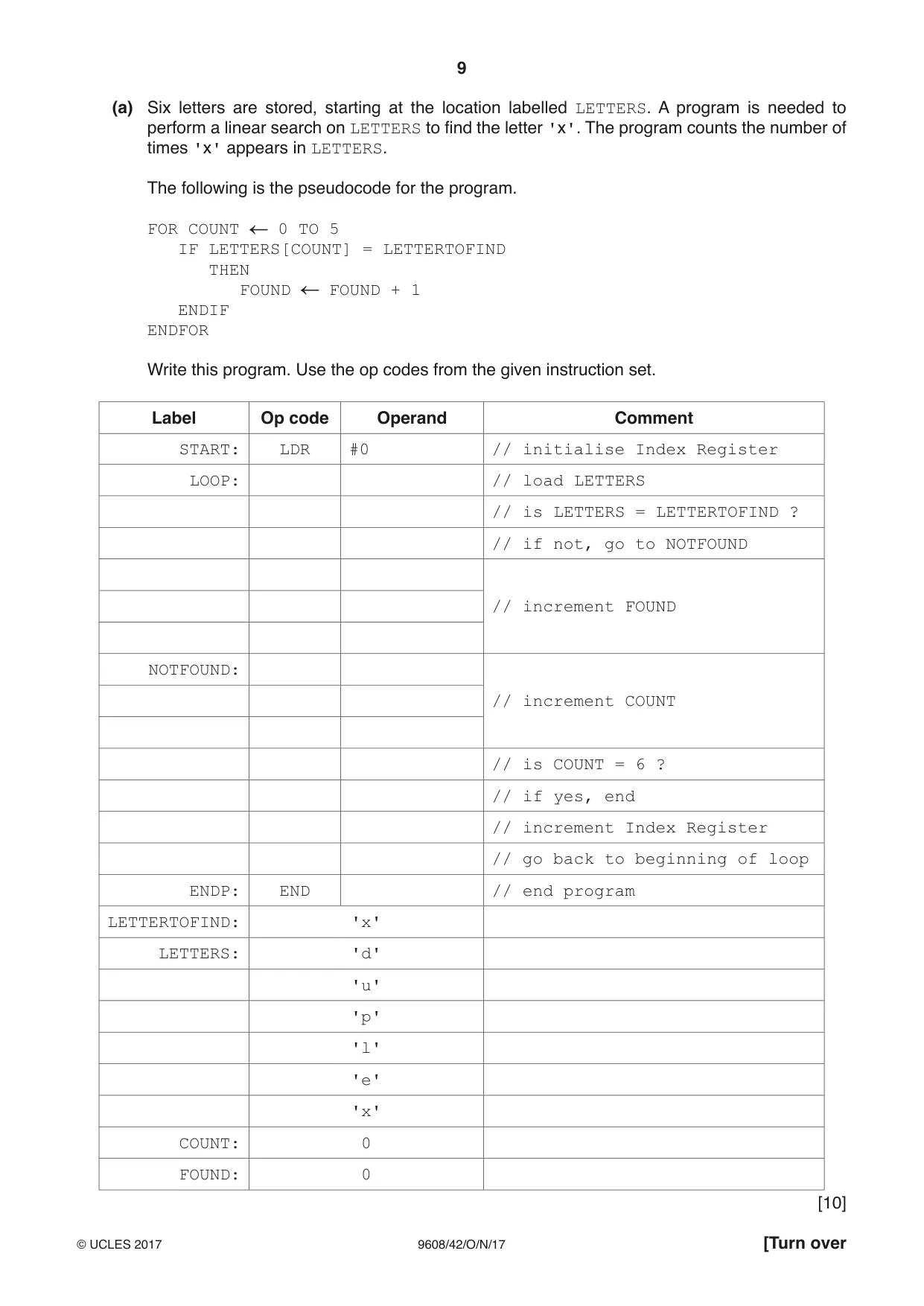
9 9608/42/O/N/17 © UCLES 2017 [Turn over (a) Six letters are stored, starting at the location labelled LETTERS. A program is needed to perform a linear search on LETTERS to find the letter 'x'. The program counts the number of times 'x' appears in LETTERS. The following is the pseudocode for the program. FOR COUNT 0 TO 5 IF LETTERS[COUNT] = LETTERTOFIND THEN FOUND FOUND + 1 ENDIF ENDFOR Write this program. Use the op codes from the given instruction set. Label Op code Operand Comment START: LDR #0 // initialise Index Register LOOP: // load LETTERS // is LETTERS = LETTERTOFIND ? // if not, go to NOTFOUND // increment FOUND NOTFOUND: // increment COUNT // is COUNT = 6 ? // if yes, end // increment Index Register // go back to beginning of loop ENDP: END // end program LETTERTOFIND: 'x' LETTERS: 'd' 'u' 'p' 'l' 'e' 'x' COUNT: 0 FOUND: 0 [10]
Question paper, page 10
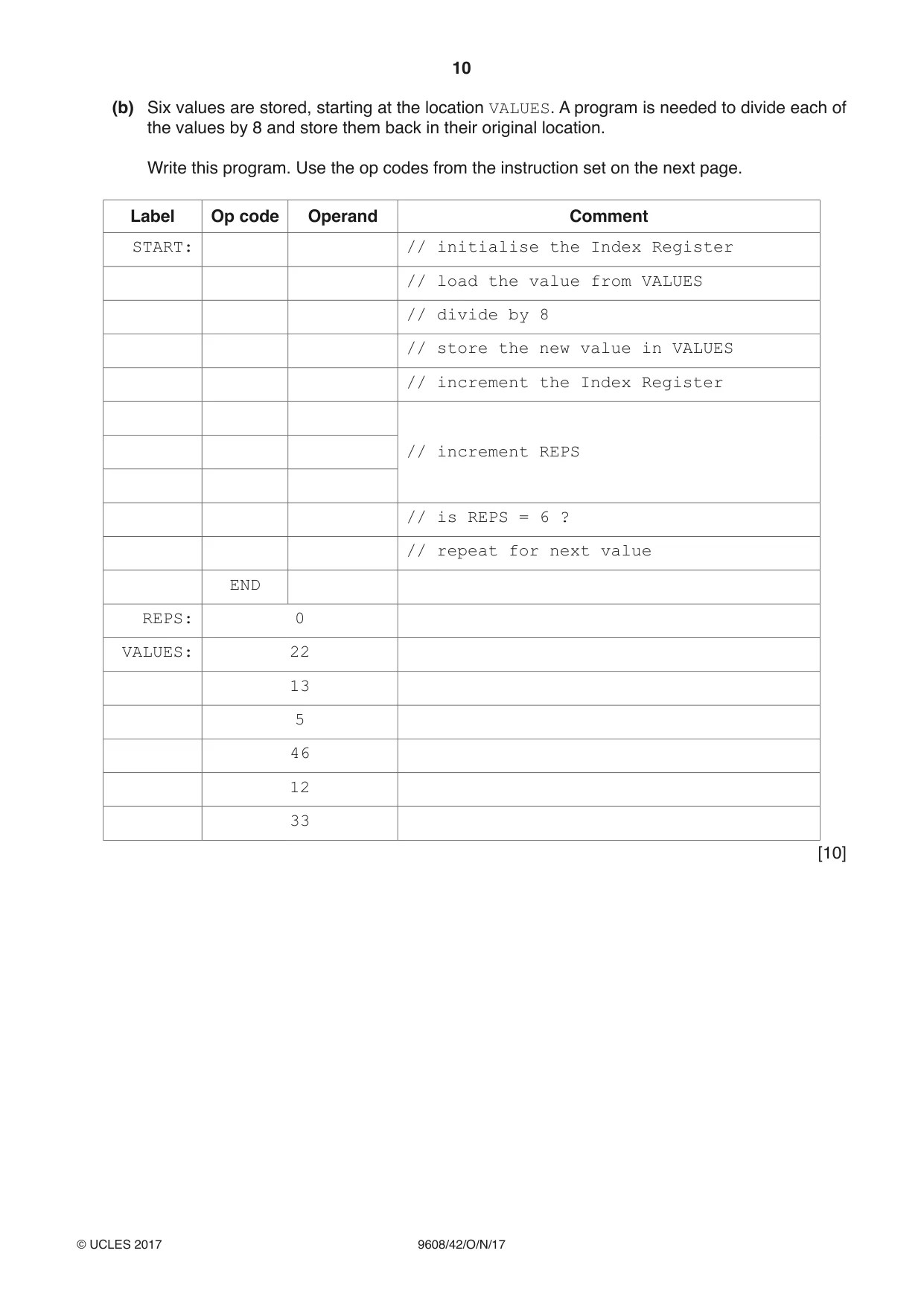
10 9608/42/O/N/17 © UCLES 2017 (b) Six values are stored, starting at the location VALUES. A program is needed to divide each of the values by 8 and store them back in their original location. Write this program. Use the op codes from the instruction set on the next page. Label Op code Operand Comment START: // initialise the Index Register // load the value from VALUES // divide by 8 // store the new value in VALUES // increment the Index Register // increment REPS // is REPS = 6 ? // repeat for next value END REPS: 0 VALUES: 22 13 5 46 12 33 [10]
Question paper, page 11
11 9608/42/O/N/17 © UCLES 2017 [Turn over Instruction Explanation Op code Operand LDM #n Immediate addressing. Load the number n to ACC. LDD <address> Direct addressing. Load the contents of the location at the given address to ACC. LDI <address> Indirect addressing. The address to be used is at the given address. Load the contents of this second address to ACC. LDX <address> Indexed addressing. Form the address from <address> + the contents of the index register. Copy the contents of this calculated address to ACC. LDR #n Immediate addressing. Load the number n to IX. STO <address> Store the contents of ACC at the given address. STX <address> Indexed addressing. Form the address from <address> + the contents of the index register. Copy the contents from ACC to this calculated address. ADD <address> Add the contents of the given address to the ACC. INC <register> Add 1 to the contents of the register (ACC or IX). DEC <register> Subtract 1 from the contents of the register (ACC or IX). JMP <address> Jump to the given address. CMP <address> Compare the contents of ACC with the contents of <address>. CMP #n Compare the contents of ACC with number n. JPE <address> Following a compare instruction, jump to <address> if the compare was True. JPN <address> Following a compare instruction, jump to <address> if the compare was False. LSL #n Bits in ACC are shifted n places to the left. Zeros are introduced on the right hand end. LSR #n Bits in ACC are shifted n places to the right. Zeros are introduced on the left hand end. IN Key in a character and store its ASCII value in ACC. OUT Output to the screen the character whose ASCII value is stored in ACC. END Return control to the operating system.
Question paper, page 12
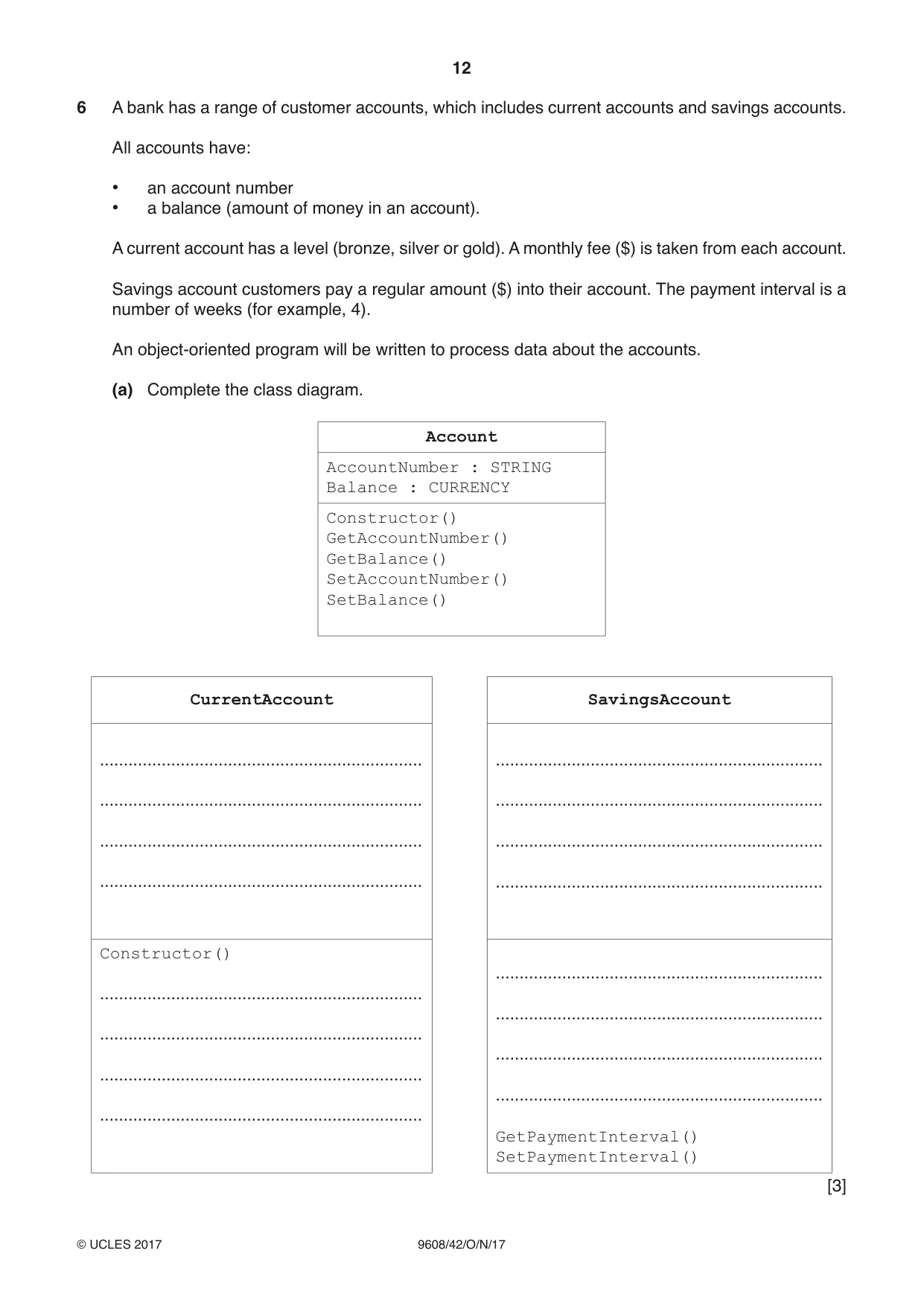
12 9608/42/O/N/17 © UCLES 2017 6 A bank has a range of customer accounts, which includes current accounts and savings accounts. All accounts have: • an account number • a balance (amount of money in an account). A current account has a level (bronze, silver or gold). A monthly fee ($) is taken from each account. Savings account customers pay a regular amount ($) into their account. The payment interval is a number of weeks (for example, 4). An object-oriented program will be written to process data about the accounts. (a) Complete the class diagram. Account AccountNumber : STRING Balance : CURRENCY Constructor() GetAccountNumber() GetBalance() SetAccountNumber() SetBalance() CurrentAccount SavingsAccount … … … … … … … … Constructor() … … … … … … … … GetPaymentInterval() SetPaymentInterval() [3]
Question paper, page 13
13 9608/42/O/N/17 © UCLES 2017 [Turn over (b) Write program code to declare the Account class. Programming language … Program code … … … … … … … … … … … … … … … … … … … … … … … … … … …[5]
Question paper, page 14
14 9608/42/O/N/17 © UCLES 2017 (c) Write program code to declare the SavingsAccount class. Do not write any get or set methods. Programming language … Program code … … … … … … … … … … … … … … … … … … … … … … … … … … …[5]
Question paper, page 15
15 9608/42/O/N/17 © UCLES 2017 BLANK PAGE
Question paper, page 16
16 9608/42/O/N/17 © UCLES 2017 Permission to reproduce items where third-party owned material protected by copyright is included has been sought and cleared where possible. Every reasonable effort has been made by the publisher (UCLES) to trace copyright holders, but if any items requiring clearance have unwittingly been included, the publisher will be pleased to make amends at the earliest possible opportunity. To avoid the issue of disclosure of answer-related information to candidates, all copyright acknowledgements are reproduced online in the Cambridge International Examinations Copyright Acknowledgements Booklet. This is produced for each series of examinations and is freely available to download at www.cie.org.uk after the live examination series. Cambridge International Examinations is part of the Cambridge Assessment Group. Cambridge Assessment is the brand name of University of Cambridge Local Examinations Syndicate (UCLES), which is itself a department of the University of Cambridge. BLANK PAGE
Mark scheme, page 1
® IGCSE is a registered trademark. This document consists of 16 printed pages. © UCLES 2017 [Turn over Cambridge Assessment International Education Cambridge International Advanced Subsidiary and Advanced Level COMPUTER SCIENCE 9608/42 Paper 4 Written Paper October/November 2017 MARK SCHEME Maximum Mark: 75 Published This mark scheme is published as an aid to teachers and candidates, to indicate the requirements of the examination. It shows the basis on which Examiners were instructed to award marks. It does not indicate the details of the discussions that took place at an Examiners’ meeting before marking began, which would have considered the acceptability of alternative answers. Mark schemes should be read in conjunction with the question paper and the Principal Examiner Report for Teachers. Cambridge International will not enter into discussions about these mark schemes. Cambridge International is publishing the mark schemes for the October/November 2017 series for most Cambridge IGCSE®, Cambridge International A and AS Level components and some Cambridge O Level components.
Mark scheme, page 2
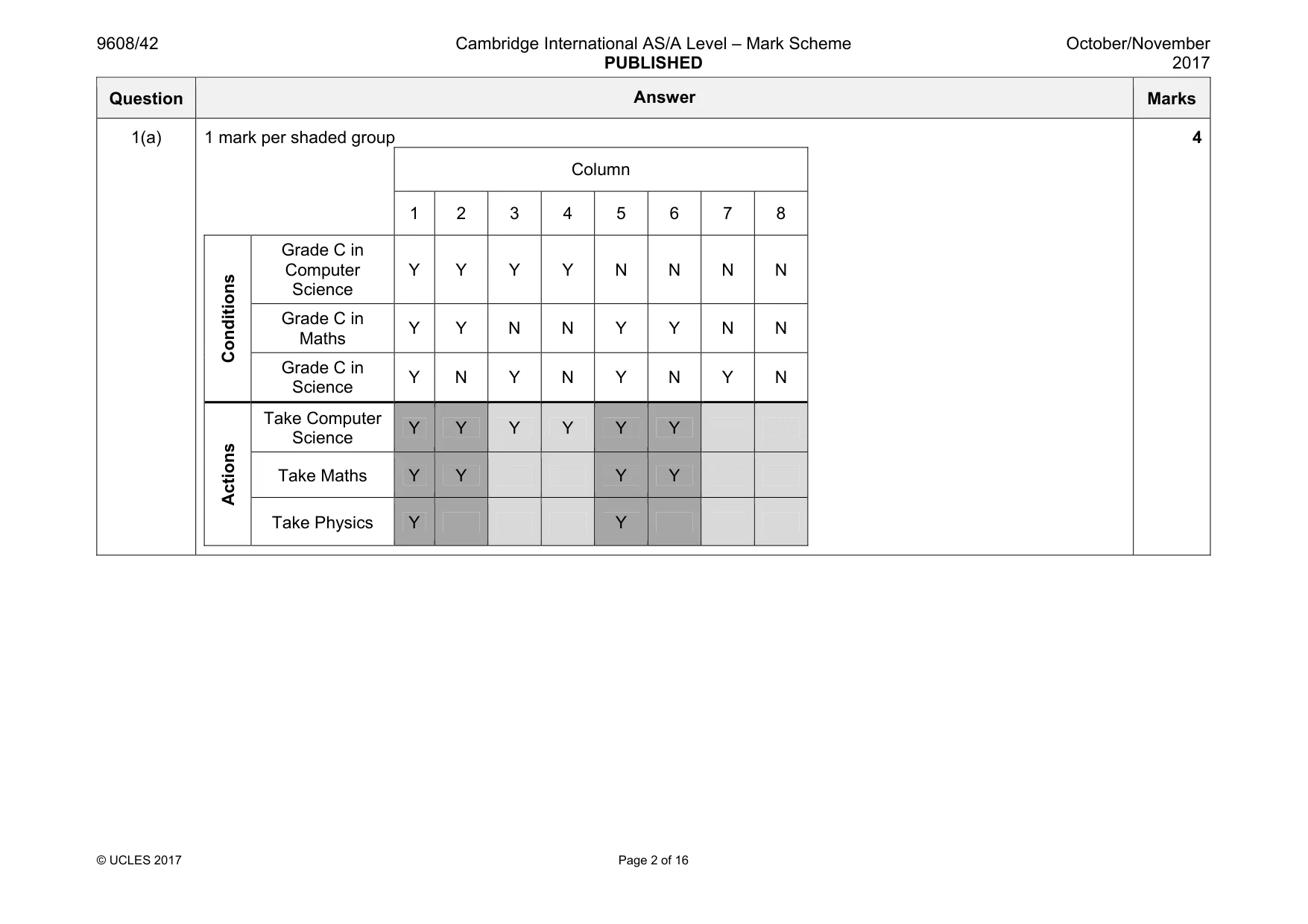
9608/42 Cambridge International AS/A Level – Mark Scheme PUBLISHED October/November 2017 © UCLES 2017 Page 2 of 16 Question Answer Marks 1(a) 1 mark per shaded group Column 1 2 3 4 5 6 7 8 Conditions Grade C in Computer Science Y Y Y Y N N N N Grade C in Maths Y Y N N Y Y N N Grade C in Science Y N Y N Y N Y N Actions Take Computer Science Y Y Y Y Y Y Take Maths Y Y Y Y Take Physics Y Y 4
Mark scheme, page 3
9608/42 Cambridge International AS/A Level – Mark Scheme PUBLISHED October/November 2017 © UCLES 2017 Page 3 of 16 Question Answer Marks 1(b) 1 mark per column Column S T U V W X Y Z Conditions Grade C in Computer Science Y – – Grade C in Maths – Y Y Grade C in Science – – Y Actions Take Computer Science Y Y Take Maths Y Take Physics Y 3 1(c) For example: • (Column S) combining 1,2,3,4« • « because they only need CS to take CS // Maths and Science do not matter • (Column T) combining 1,2,5,6« • « because CS does not matter if it is Y/N • (Column U) combining 1,5« • «because CS does not matter if it is Y/N 3
Mark scheme, page 4
960 © U Q 08/42 CLES 2017 Question 2(a) 1 ma 2(b) • ark for each corr Dummy activity Ca rect line, duratio ambridge Interna on and activity. ational AS/A Lev PUBLISHED Page 4 of 16 Answer vel – Mark Scheme October/Novem 2 Mark mber 017 ks 7 1
Mark scheme, page 5
9608/42 Cambridge International AS/A Level – Mark Scheme PUBLISHED October/November 2017 © UCLES 2017 Page 5 of 16 Question Answer Marks 3(a) 1 mark per clause • room(corridor). • furniture(table). • furniture(lamp). • located(table, corridor). • located(lamp, corridor). 5 3(b) • master_bedroom • spare_bedroom 2 3(c)(i) 1 mark per bullet to max 2 • The first clause only says the nursery is next to the master bedroom • « but not that the master bedroom is next to the nursery • The second clause only says the master bedroom is next to the nursery • « but not that the nursery is next to the master bedroom • Goal to find rooms adjacent to master bedroom would not return nursery • « Example. FindNextTo(X, master_bedroom) • It is a two-way relationship 2 3(c)(ii) 1 mark per bullet • room(main_bathroom). • nextTo(corridor, main_bathroom). • nextTo(main_bathroom, corridor). 3
Mark scheme, page 6
9608/42 Cambridge International AS/A Level – Mark Scheme PUBLISHED October/November 2017 © UCLES 2017 Page 6 of 16 Question Answer Marks 3(d) 1 mark per bullet • canBeMovedTo(B,A) • Furniture(B) • Room(A) • AND / , • AND NOT / , NOT • Located(B,A) Example: canBeMovedTo(B,A) IF furniture(B) AND room(A) AND NOT(located(B,A)). 6
Mark scheme, page 7
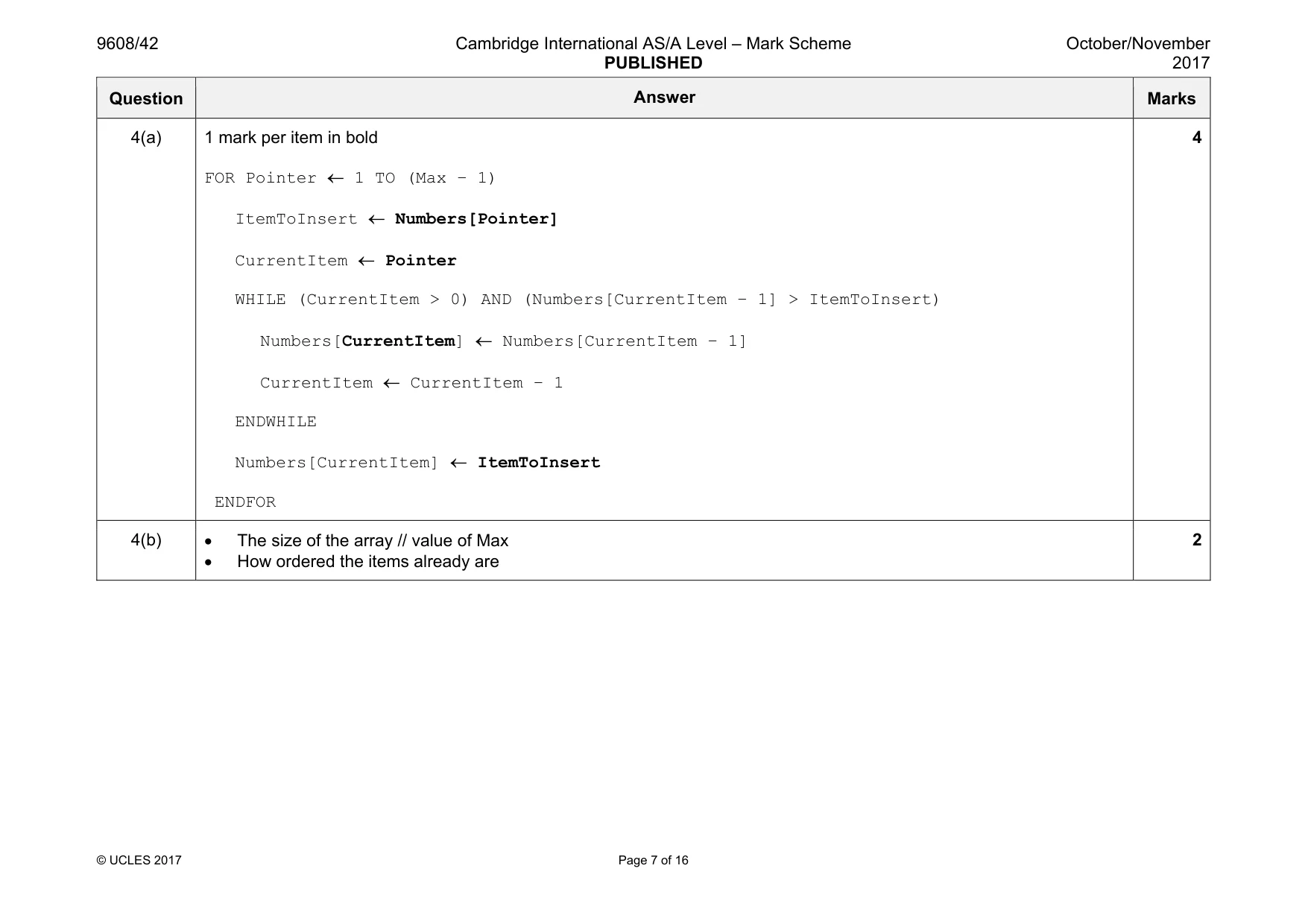
9608/42 Cambridge International AS/A Level – Mark Scheme PUBLISHED October/November 2017 © UCLES 2017 Page 7 of 16 Question Answer Marks 4(a) 1 mark per item in bold FOR Pointer ← 1 TO (Max − 1) ItemToInsert ← Numbers[Pointer] CurrentItem ← Pointer WHILE (CurrentItem > 0) AND (Numbers[CurrentItem − 1] > ItemToInsert) Numbers[CurrentItem] ← Numbers[CurrentItem − 1] CurrentItem ← CurrentItem – 1 ENDWHILE Numbers[CurrentItem] ← ItemToInsert ENDFOR 4 4(b) • The size of the array // value of Max • How ordered the items already are 2
Mark scheme, page 8
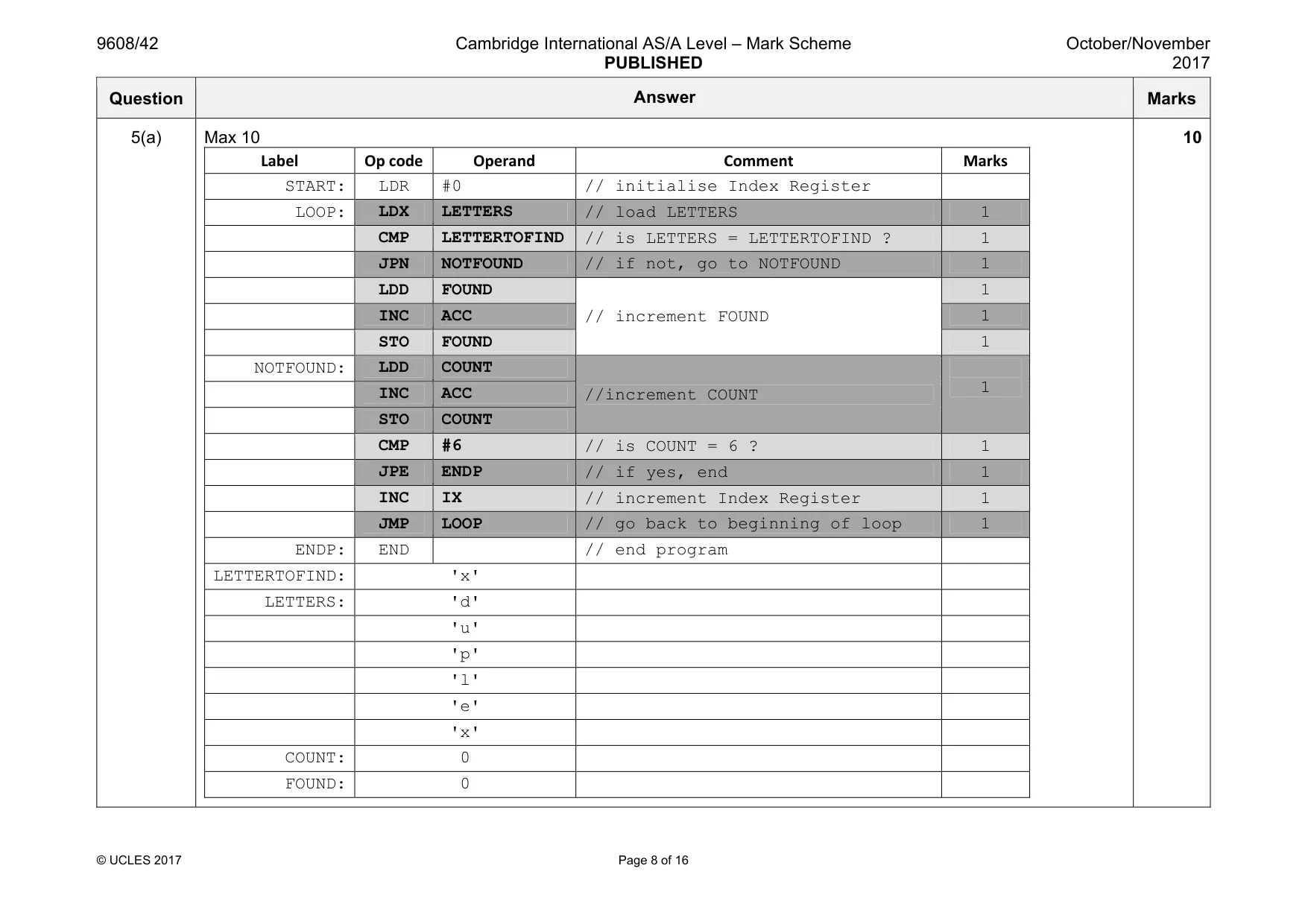
9608/42 Cambridge International AS/A Level – Mark Scheme PUBLISHED October/November 2017 © UCLES 2017 Page 8 of 16 Question Answer Marks 5(a) Max 10 Label Op code Operand Comment Marks START: LDR #0 // initialise Index Register LOOP: LDX LETTERS // load LETTERS 1 CMP LETTERTOFIND // is LETTERS = LETTERTOFIND ? 1 JPN NOTFOUND // if not, go to NOTFOUND 1 LDD FOUND // increment FOUND 1 INC ACC 1 STO FOUND 1 NOTFOUND: LDD COUNT //increment COUNT 1 INC ACC STO COUNT CMP #6 // is COUNT = 6 ? 1 JPE ENDP // if yes, end 1 INC IX // increment Index Register 1 JMP LOOP // go back to beginning of loop 1 ENDP: END // end program LETTERTOFIND: 'x' LETTERS: 'd' 'u' 'p' 'l' 'e' 'x' COUNT: 0 FOUND: 0 10
Mark scheme, page 9
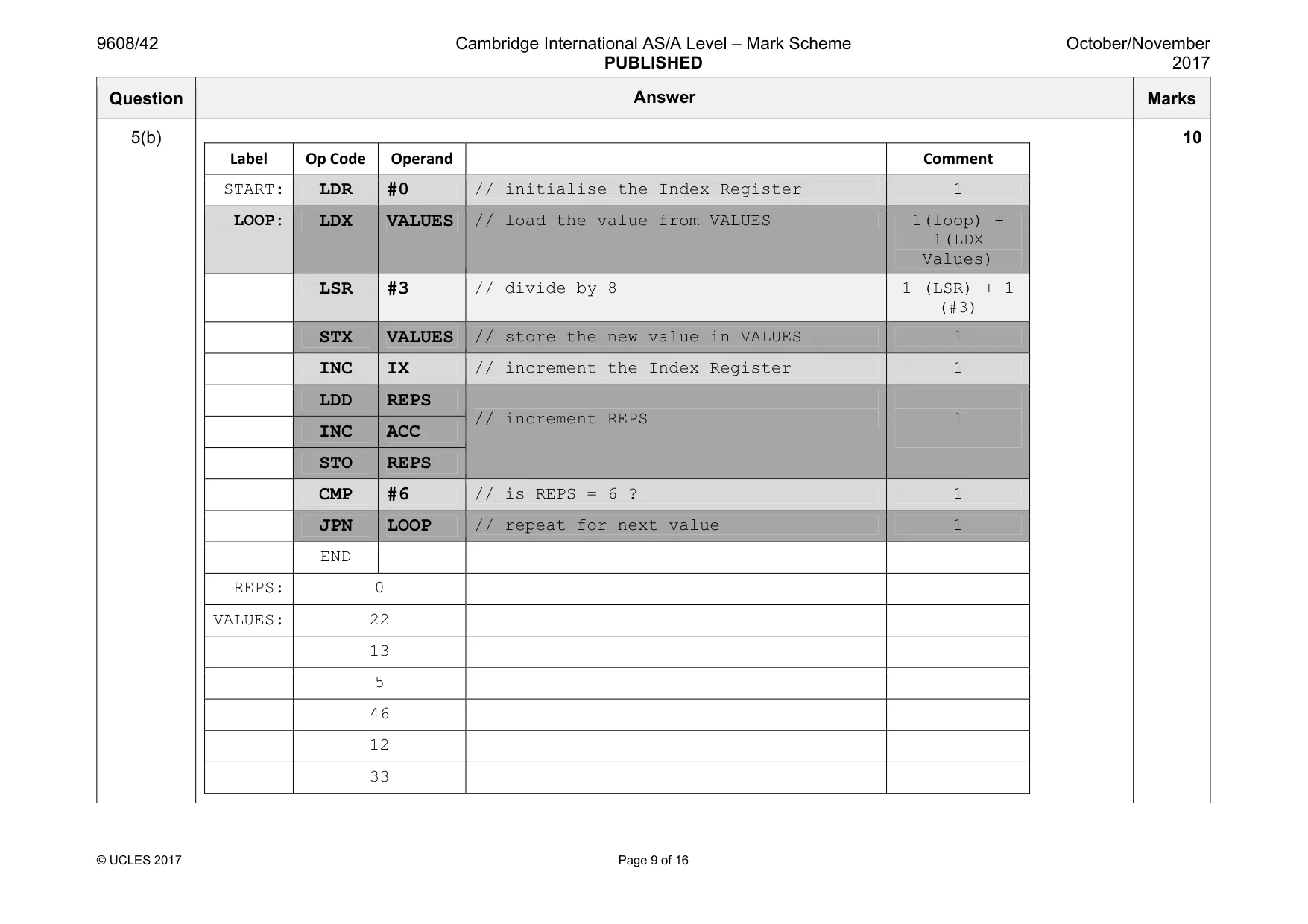
9608/42 Cambridge International AS/A Level – Mark Scheme PUBLISHED October/November 2017 © UCLES 2017 Page 9 of 16 Question Answer Marks 5(b) Label Op Code Operand Comment START: LDR #0 // initialise the Index Register 1 LOOP: LDX VALUES // load the value from VALUES 1(loop) + 1(LDX Values) LSR #3 // divide by 8 1 (LSR) + 1 (#3) STX VALUES // store the new value in VALUES 1 INC IX // increment the Index Register 1 LDD REPS // increment REPS 1 INC ACC STO REPS CMP #6 // is REPS = 6 ? 1 JPN LOOP // repeat for next value 1 END REPS: 0 VALUES: 22 13 5 46 12 33 10
Mark scheme, page 10
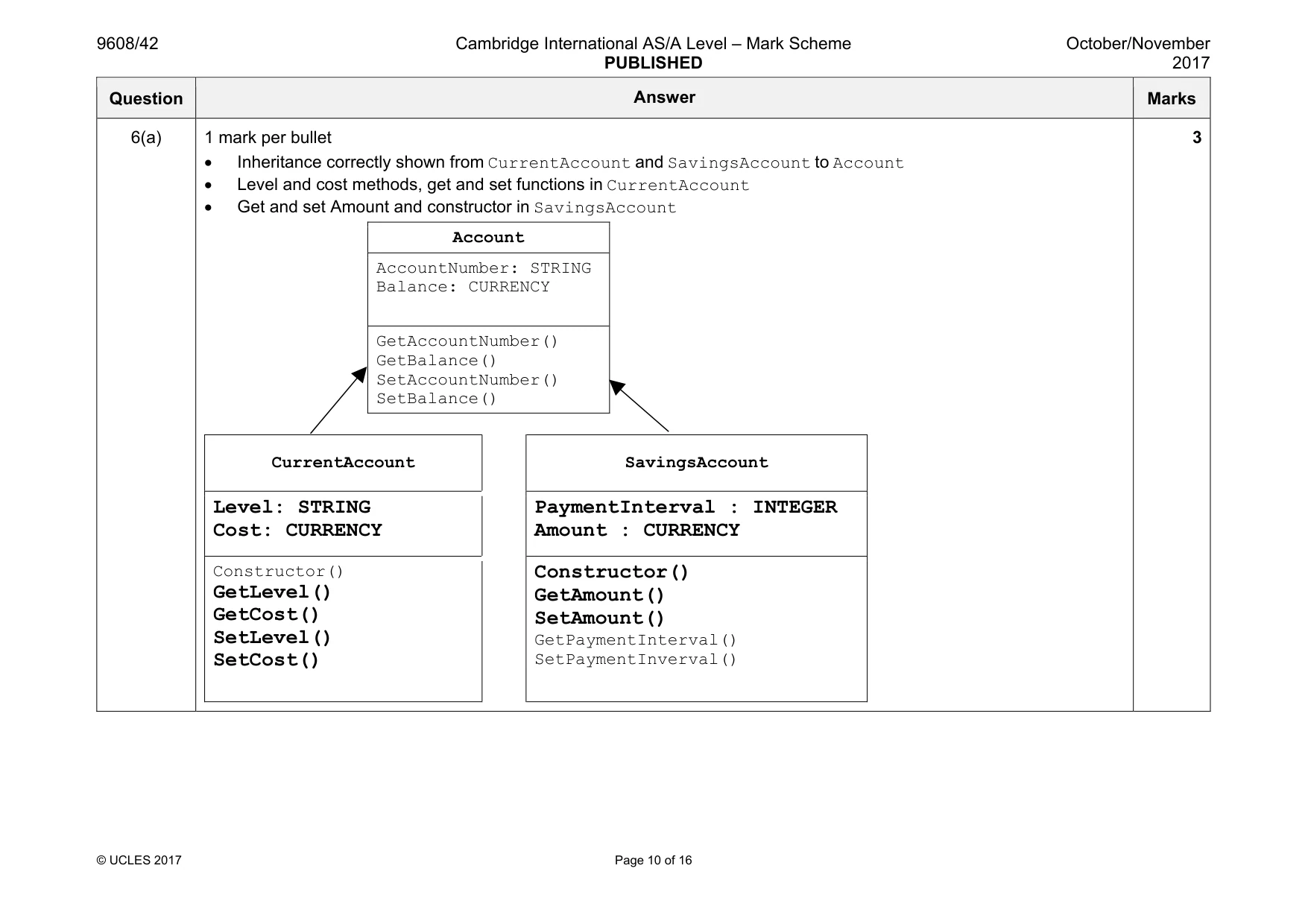
9608/42 Cambridge International AS/A Level – Mark Scheme PUBLISHED October/November 2017 © UCLES 2017 Page 10 of 16 Question Answer Marks 6(a) 1 mark per bullet • Inheritance correctly shown from CurrentAccount and SavingsAccount to Account • Level and cost methods, get and set functions in CurrentAccount • Get and set Amount and constructor in SavingsAccount CurrentAccount SavingsAccount Level: STRING Cost: CURRENCY PaymentInterval : INTEGER Amount : CURRENCY Constructor() GetLevel() GetCost() SetLevel() SetCost() Constructor() GetAmount() SetAmount() GetPaymentInterval() SetPaymentInverval() Account AccountNumber: STRING Balance: CURRENCY GetAccountNumber() GetBalance() SetAccountNumber() SetBalance() 3
Mark scheme, page 11
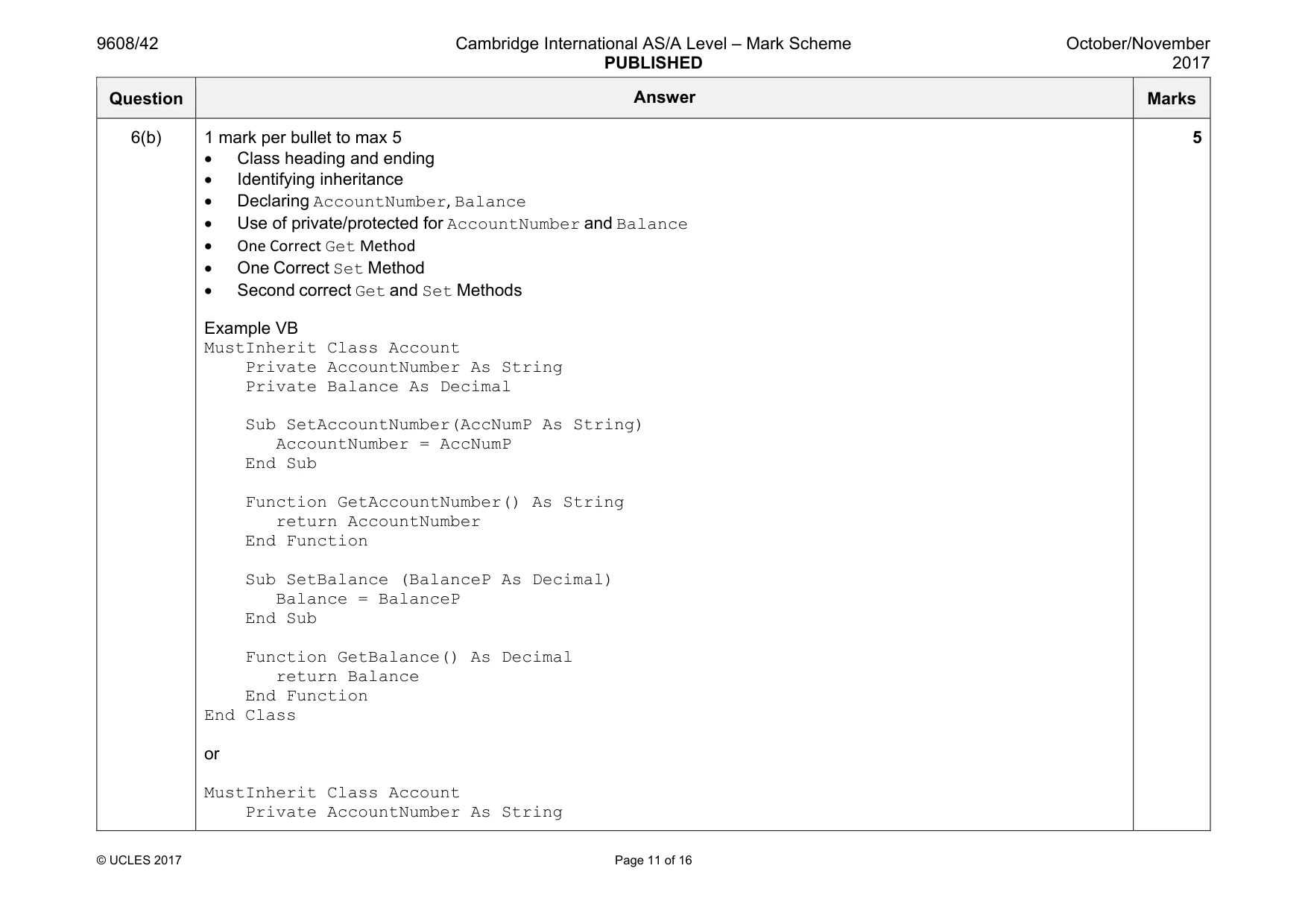
9608/42 Cambridge International AS/A Level – Mark Scheme PUBLISHED October/November 2017 © UCLES 2017 Page 11 of 16 Question Answer Marks 6(b) 1 mark per bullet to max 5 • Class heading and ending • Identifying inheritance • Declaring AccountNumber, Balance • Use of private/protected for AccountNumber and Balance • One Correct Get Method • One Correct Set Method • Second correct Get and Set Methods Example VB MustInherit Class Account Private AccountNumber As String Private Balance As Decimal Sub SetAccountNumber(AccNumP As String) AccountNumber = AccNumP End Sub Function GetAccountNumber() As String return AccountNumber End Function Sub SetBalance (BalanceP As Decimal) Balance = BalanceP End Sub Function GetBalance() As Decimal return Balance End Function End Class or MustInherit Class Account Private AccountNumber As String 5
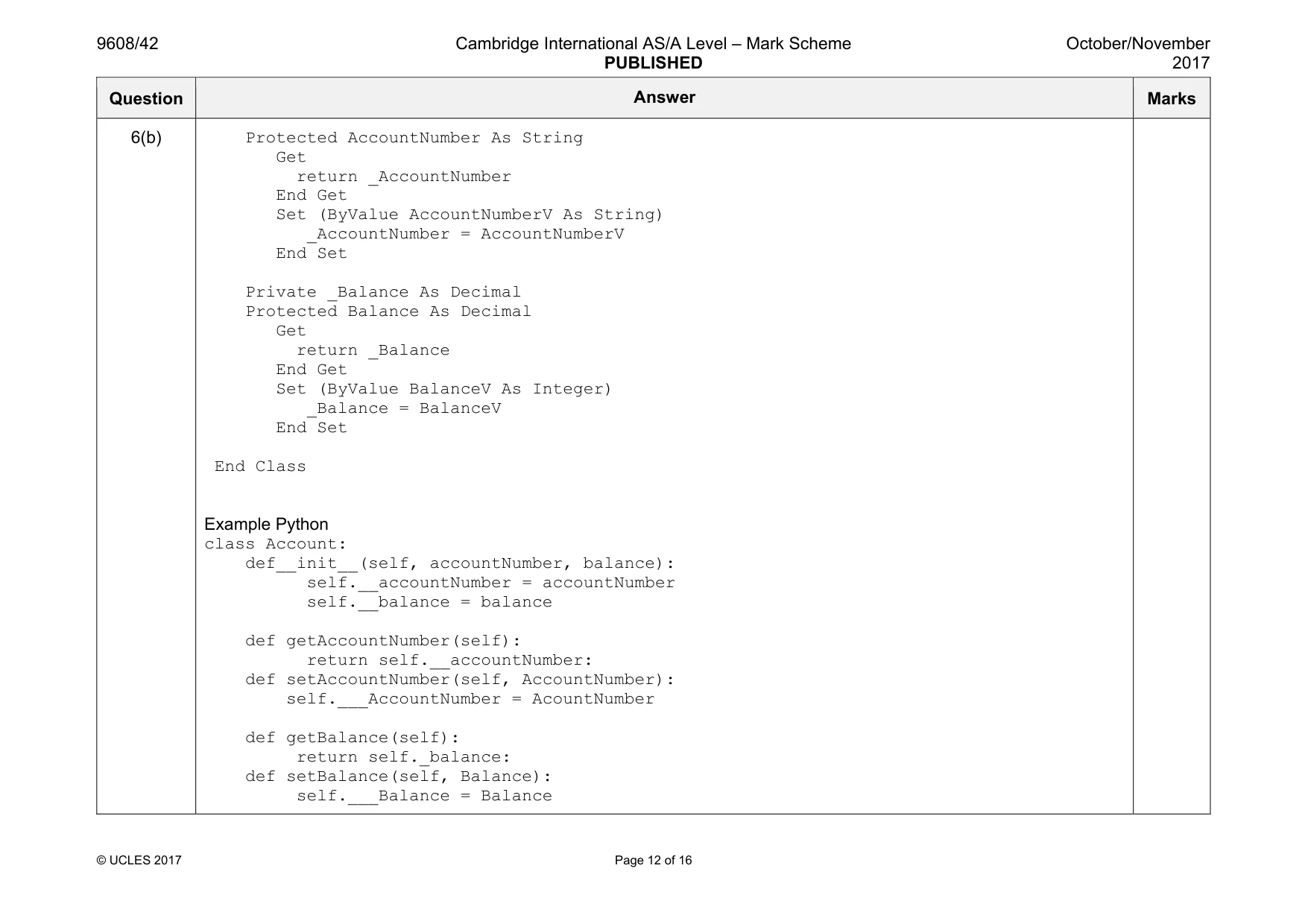
Mark scheme, page 12
9608/42 Cambridge International AS/A Level – Mark Scheme PUBLISHED October/November 2017 © UCLES 2017 Page 12 of 16 Question Answer Marks 6(b) Protected AccountNumber As String Get return _AccountNumber End Get Set (ByValue AccountNumberV As String) _AccountNumber = AccountNumberV End Set Private _Balance As Decimal Protected Balance As Decimal Get return _Balance End Get Set (ByValue BalanceV As Integer) _Balance = BalanceV End Set End Class Example Python class Account: def__init__(self, accountNumber, balance): self.__accountNumber = accountNumber self.__balance = balance def getAccountNumber(self): return self.__accountNumber: def setAccountNumber(self, AccountNumber): self.___AccountNumber = AcountNumber def getBalance(self): return self._balance: def setBalance(self, Balance): self.___Balance = Balance
Mark scheme, page 13
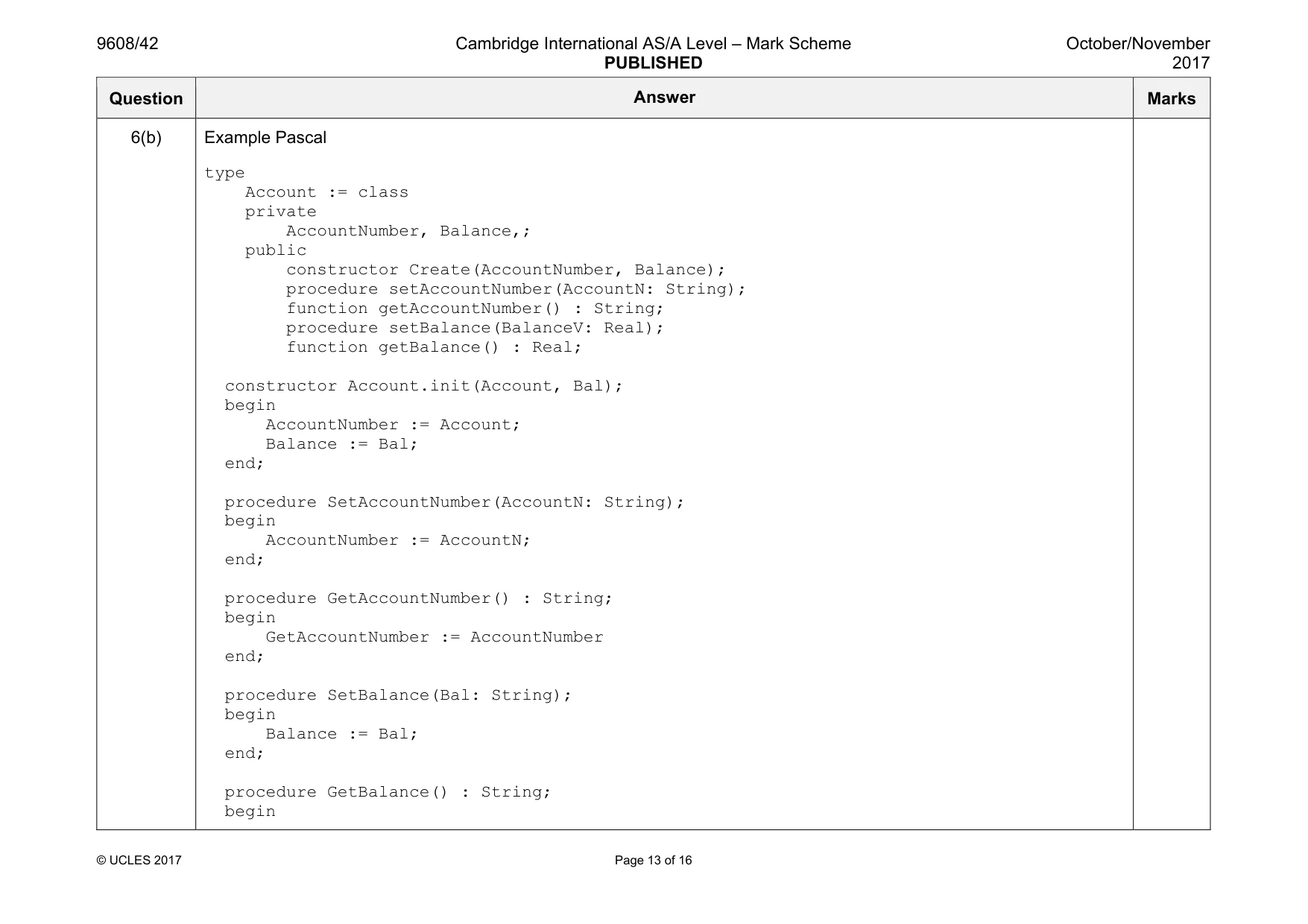
9608/42 Cambridge International AS/A Level – Mark Scheme PUBLISHED October/November 2017 © UCLES 2017 Page 13 of 16 Question Answer Marks 6(b) Example Pascal type Account := class private AccountNumber, Balance,; public constructor Create(AccountNumber, Balance); procedure setAccountNumber(AccountN: String); function getAccountNumber() : String; procedure setBalance(BalanceV: Real); function getBalance() : Real; constructor Account.init(Account, Bal); begin AccountNumber := Account; Balance := Bal; end; procedure SetAccountNumber(AccountN: String); begin AccountNumber := AccountN; end; procedure GetAccountNumber() : String; begin GetAccountNumber := AccountNumber end; procedure SetBalance(Bal: String); begin Balance := Bal; end; procedure GetBalance() : String; begin
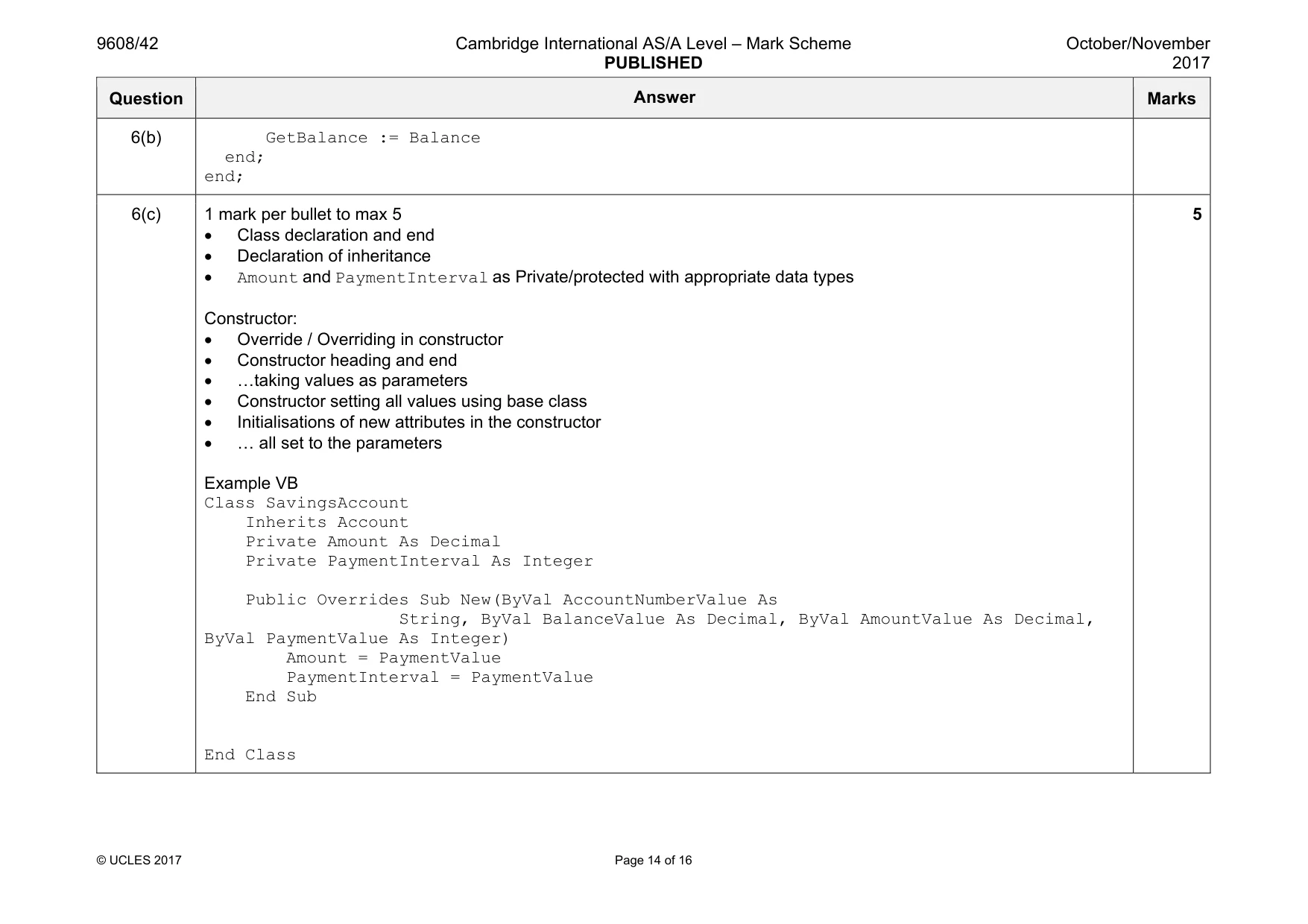
Mark scheme, page 14
9608/42 Cambridge International AS/A Level – Mark Scheme PUBLISHED October/November 2017 © UCLES 2017 Page 14 of 16 Question Answer Marks 6(b) GetBalance := Balance end; end; 6(c) 1 mark per bullet to max 5 • Class declaration and end • Declaration of inheritance • Amount and PaymentInterval as Private/protected with appropriate data types Constructor: • Override / Overriding in constructor • Constructor heading and end • «taking values as parameters • Constructor setting all values using base class • Initialisations of new attributes in the constructor • « all set to the parameters Example VB Class SavingsAccount Inherits Account Private Amount As Decimal Private PaymentInterval As Integer Public Overrides Sub New(ByVal AccountNumberValue As String, ByVal BalanceValue As Decimal, ByVal AmountValue As Decimal, ByVal PaymentValue As Integer) Amount = PaymentValue PaymentInterval = PaymentValue End Sub End Class 5
Mark scheme, page 15
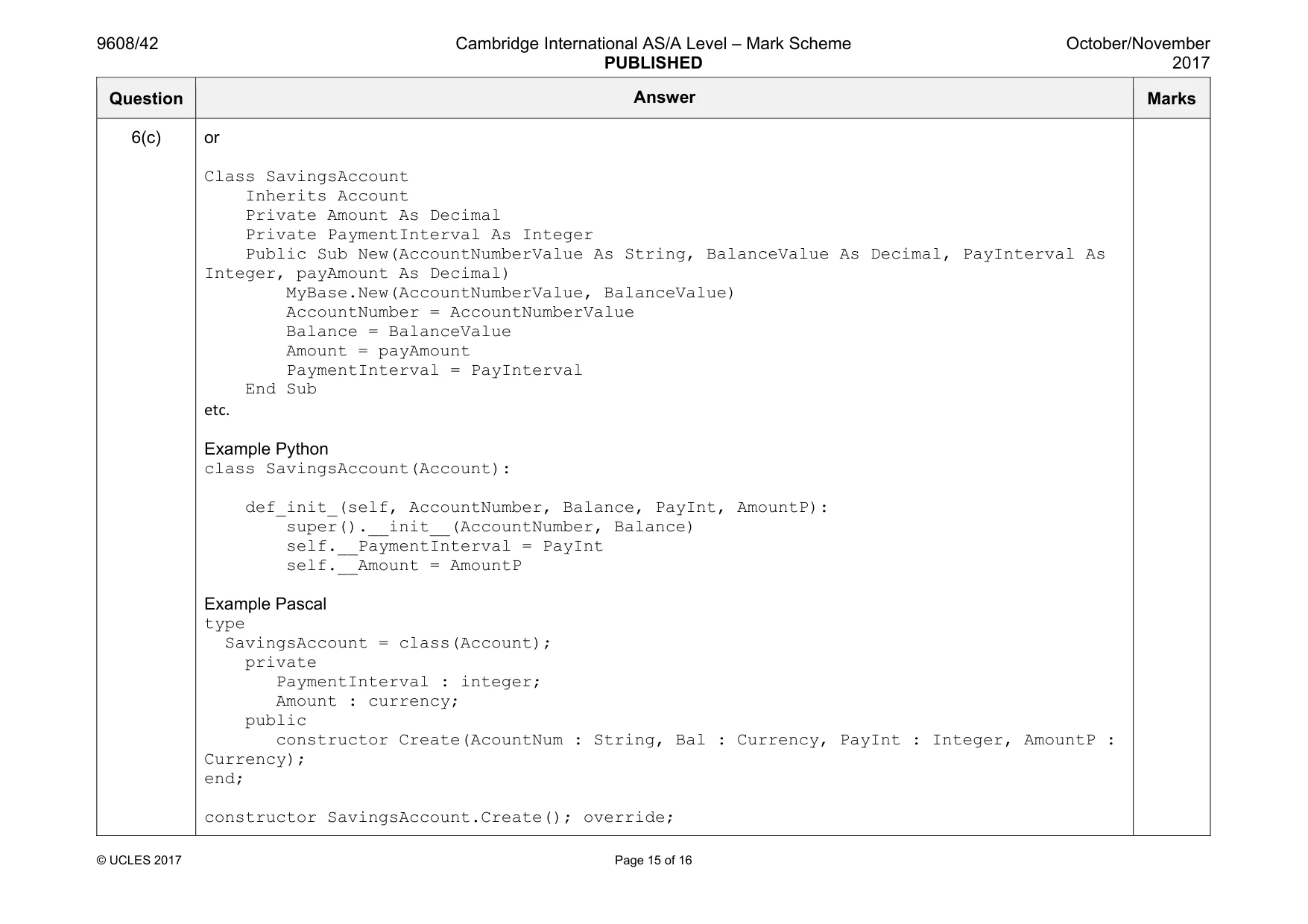
9608/42 Cambridge International AS/A Level – Mark Scheme PUBLISHED October/November 2017 © UCLES 2017 Page 15 of 16 Question Answer Marks 6(c) or Class SavingsAccount Inherits Account Private Amount As Decimal Private PaymentInterval As Integer Public Sub New(AccountNumberValue As String, BalanceValue As Decimal, PayInterval As Integer, payAmount As Decimal) MyBase.New(AccountNumberValue, BalanceValue) AccountNumber = AccountNumberValue Balance = BalanceValue Amount = payAmount PaymentInterval = PayInterval End Sub etc. Example Python class SavingsAccount(Account): def_init_(self, AccountNumber, Balance, PayInt, AmountP): super().__init__(AccountNumber, Balance) self.__PaymentInterval = PayInt self.__Amount = AmountP Example Pascal type SavingsAccount = class(Account); private PaymentInterval : integer; Amount : currency; public constructor Create(AcountNum : String, Bal : Currency, PayInt : Integer, AmountP : Currency); end; constructor SavingsAccount.Create(); override;
Mark scheme, page 16
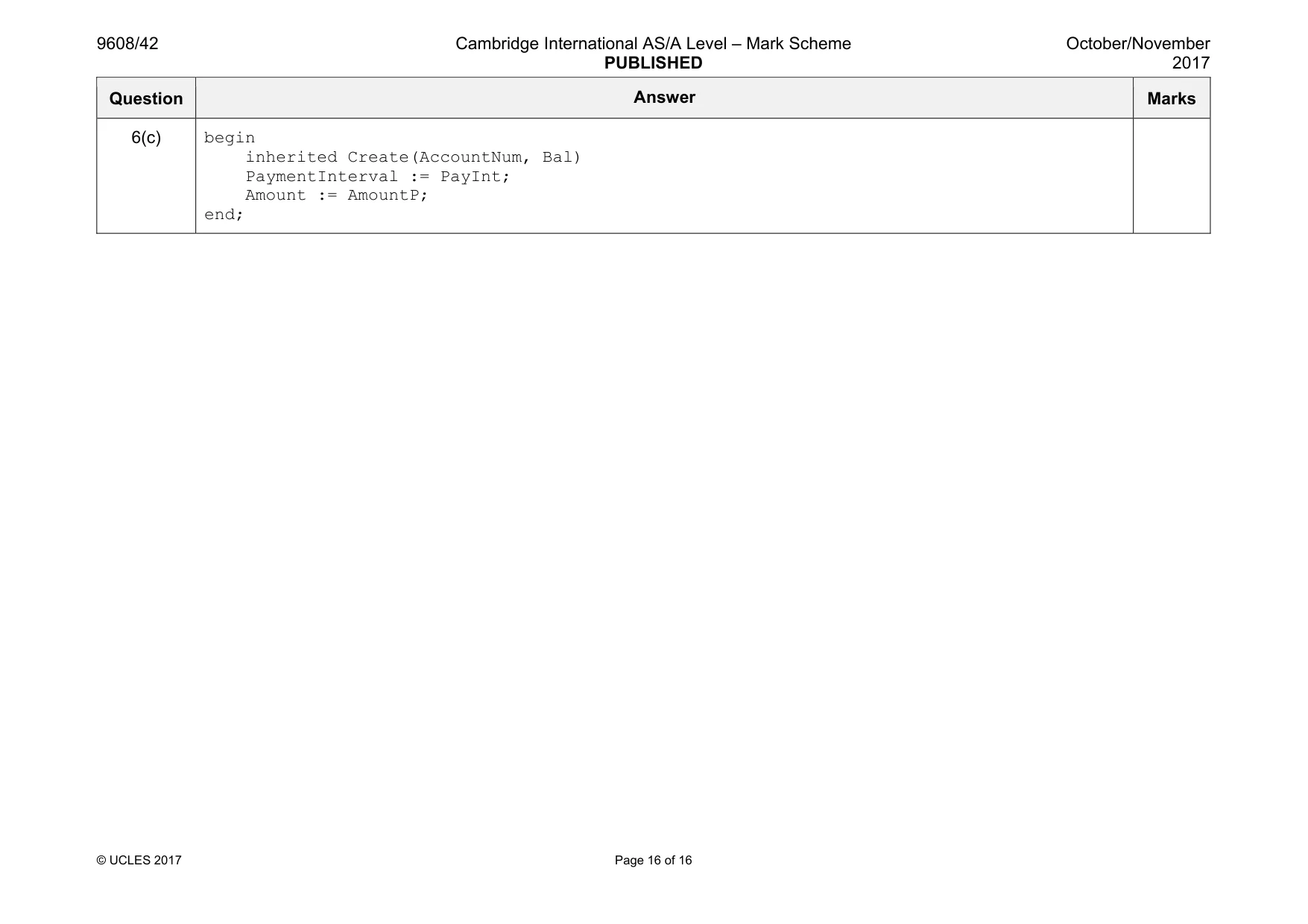
9608/42 Cambridge International AS/A Level – Mark Scheme PUBLISHED October/November 2017 © UCLES 2017 Page 16 of 16 Question Answer Marks 6(c) begin inherited Create(AccountNum, Bal) PaymentInterval := PayInt; Amount := AmountP; end;
What you needed in this session
Cambridge’s own grade thresholds for 2017 Oct/Nov, Paper 4 · Variant 2. A higher threshold means an easier paper — the bar moves with how the cohort did.