Cambridge A Level Computer Science 9608 — 2017 May/June Paper 2 · Variant 3
9608/23/M/J/17 · 75 marks · ≈84 min
The question paper and its mark scheme, free to read here and free to download. This is Cambridge’s own paper, exactly as it was sat.
Question paper16 pages

Mark scheme13 pages
Answers below. Sit the paper first if you are practising.
Paper as text
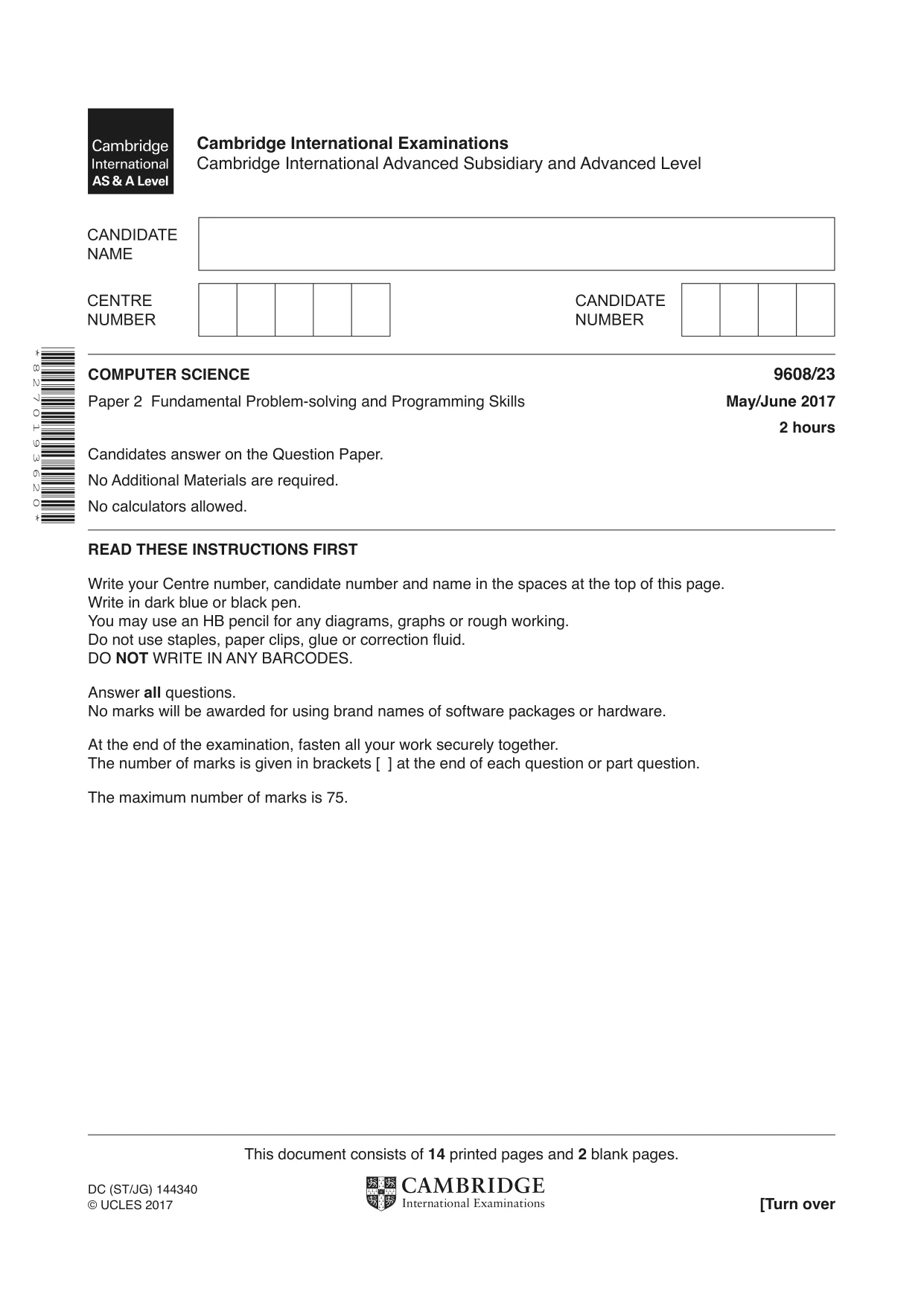
Question paper, page 1
This document consists of 14 printed pages and 2 blank pages. DC (ST/JG) 144340 © UCLES 2017 [Turn over Cambridge International Examinations Cambridge International Advanced Subsidiary and Advanced Level * 8 2 7 0 1 9 3 6 2 0 * COMPUTER SCIENCE 9608/23 Paper 2 Fundamental Problem-solving and Programming Skills May/June 2017 2 hours Candidates answer on the Question Paper. No Additional Materials are required. No calculators allowed. READ THESE INSTRUCTIONS FIRST Write your Centre number, candidate number and name in the spaces at the top of this page. Write in dark blue or black pen. You may use an HB pencil for any diagrams, graphs or rough working. Do not use staples, paper clips, glue or correction fluid. DO NOT WRITE IN ANY BARCODES. Answer all questions. No marks will be awarded for using brand names of software packages or hardware. At the end of the examination, fasten all your work securely together. The number of marks is given in brackets [ ] at the end of each question or part question. The maximum number of marks is 75.
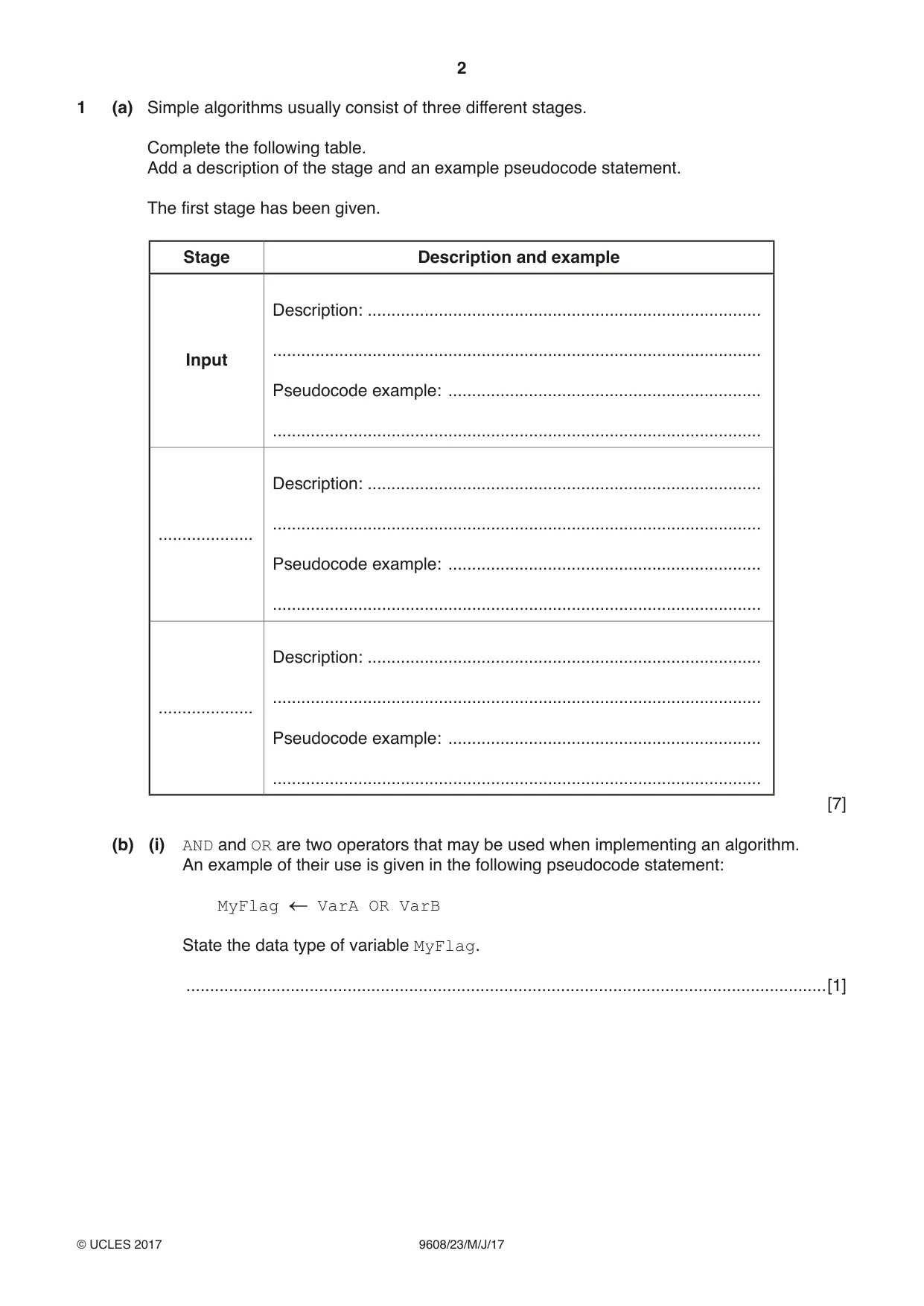
Question paper, page 2
2 9608/23/M/J/17 © UCLES 2017 1 (a) Simple algorithms usually consist of three different stages. Complete the following table. Add a description of the stage and an example pseudocode statement. The first stage has been given. Stage Description and example Input Description: … … Pseudocode example: … … … Description: … … Pseudocode example: … … … Description: … … Pseudocode example: … … [7] (b) (i) AND and OR are two operators that may be used when implementing an algorithm. An example of their use is given in the following pseudocode statement: MyFlag VarA OR VarB State the data type of variable MyFlag. …[1]
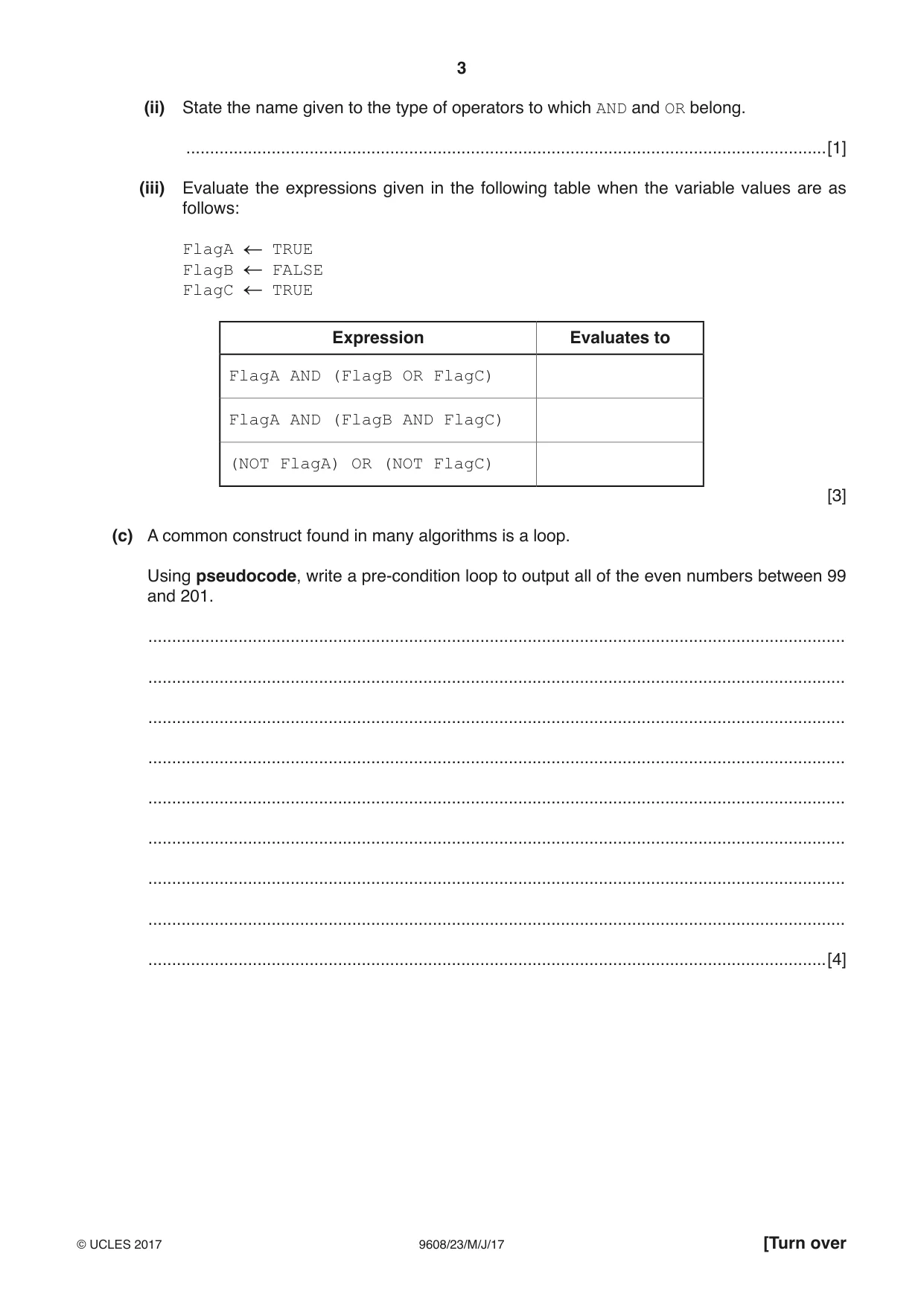
Question paper, page 3
3 9608/23/M/J/17 © UCLES 2017 [Turn over (ii) State the name given to the type of operators to which AND and OR belong. …[1] (iii) Evaluate the expressions given in the following table when the variable values are as follows: FlagA TRUE FlagB FALSE FlagC TRUE Expression Evaluates to FlagA AND (FlagB OR FlagC) FlagA AND (FlagB AND FlagC) (NOT FlagA) OR (NOT FlagC) [3] (c) A common construct found in many algorithms is a loop. Using pseudocode, write a pre-condition loop to output all of the even numbers between 99 and 201. … … … … … … … … …[4]
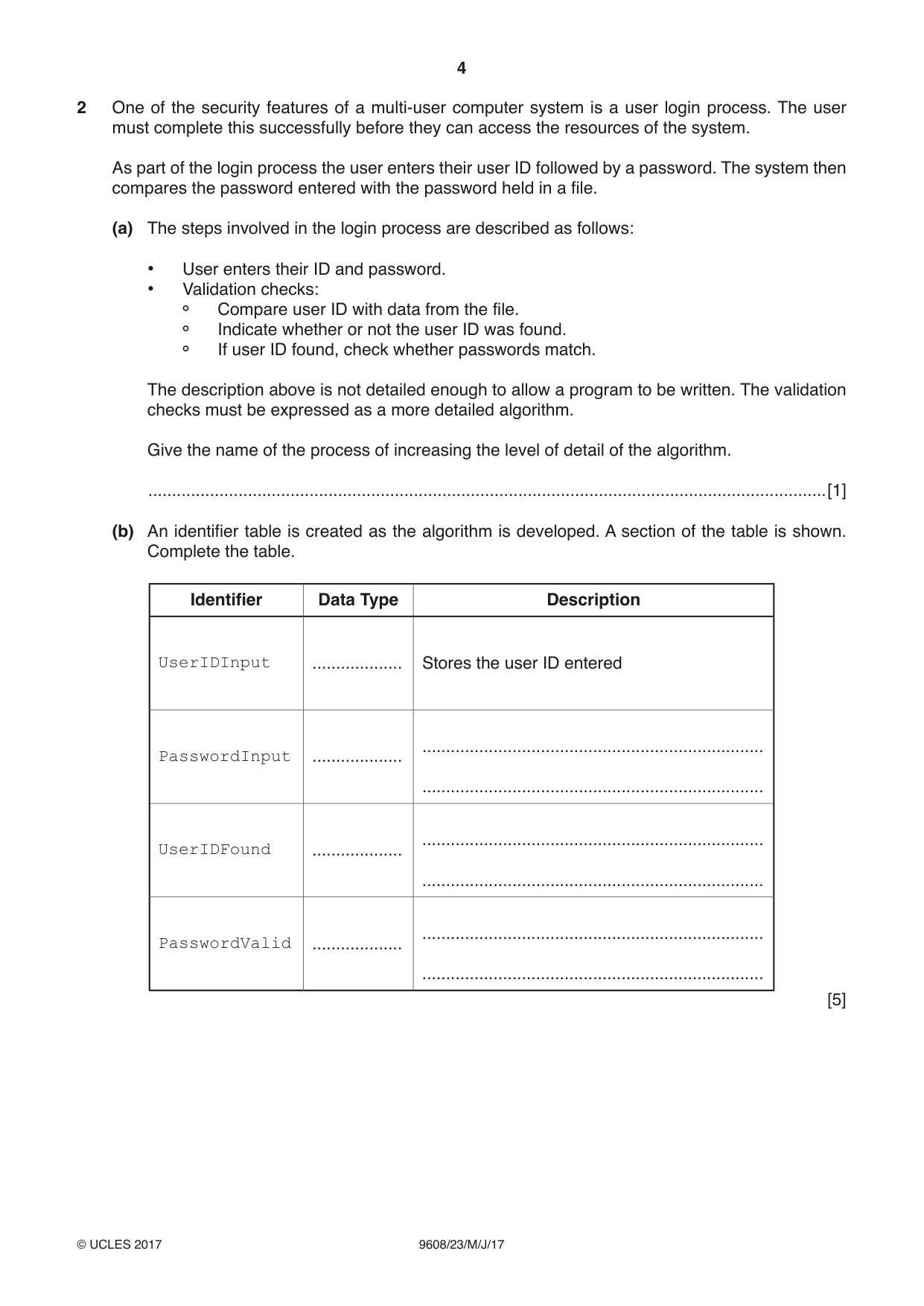
Question paper, page 4
4 9608/23/M/J/17 © UCLES 2017 2 One of the security features of a multi-user computer system is a user login process. The user must complete this successfully before they can access the resources of the system. As part of the login process the user enters their user ID followed by a password. The system then compares the password entered with the password held in a file. (a) The steps involved in the login process are described as follows: • User enters their ID and password. • Validation checks: Compare user ID with data from the file. Indicate whether or not the user ID was found. If user ID found, check whether passwords match. The description above is not detailed enough to allow a program to be written. The validation checks must be expressed as a more detailed algorithm. Give the name of the process of increasing the level of detail of the algorithm. …[1] (b) An identifier table is created as the algorithm is developed. A section of the table is shown. Complete the table. Identifier Data Type Description UserIDInput … Stores the user ID entered PasswordInput … … … UserIDFound … … … PasswordValid … … … [5]
Question paper, page 5
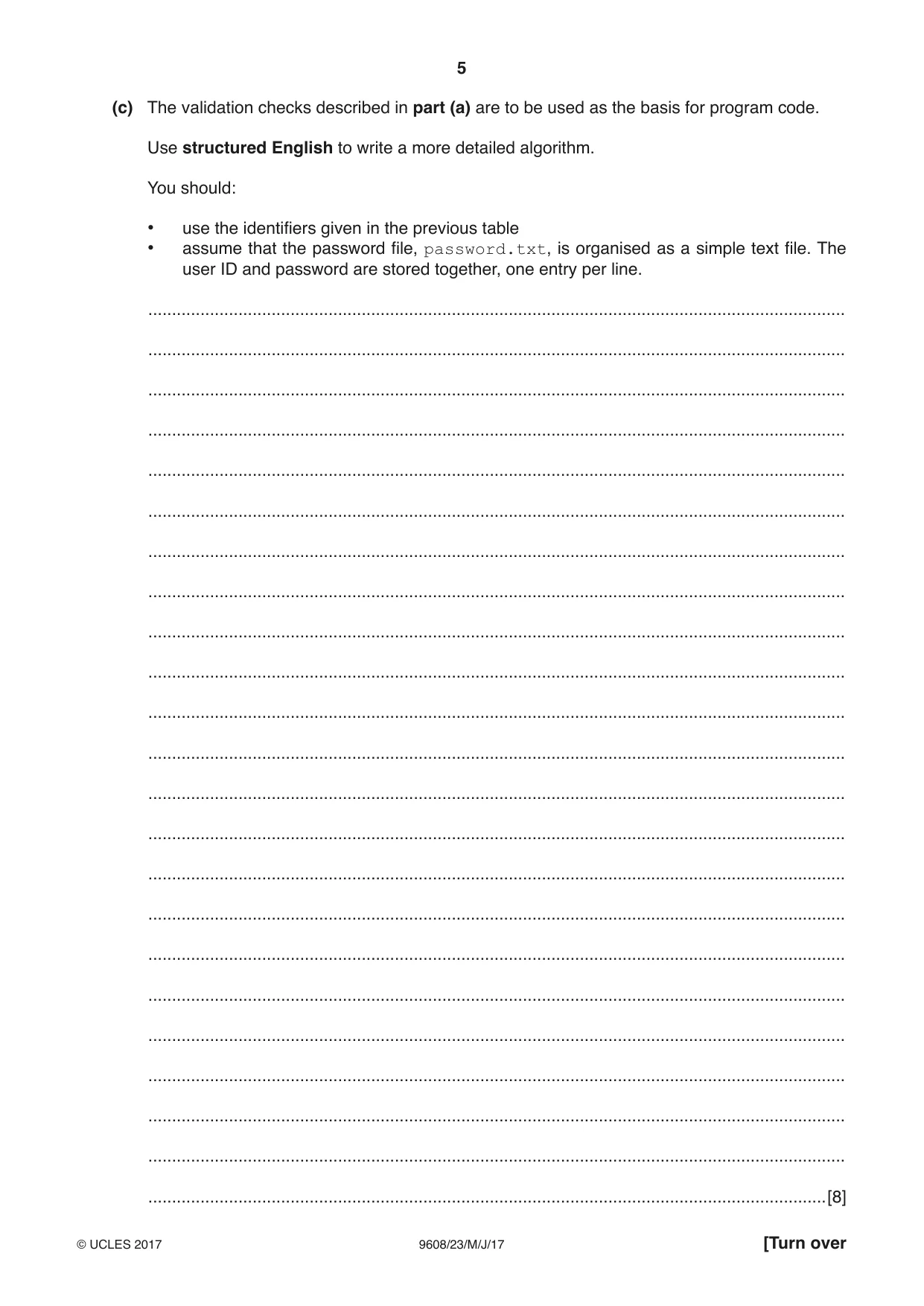
5 9608/23/M/J/17 © UCLES 2017 [Turn over (c) The validation checks described in part (a) are to be used as the basis for program code. Use structured English to write a more detailed algorithm. You should: • use the identifiers given in the previous table • assume that the password file, password.txt, is organised as a simple text file. The user ID and password are stored together, one entry per line. … … … … … … … … … … … … … … … … … … … … … … …[8]
Question paper, page 6
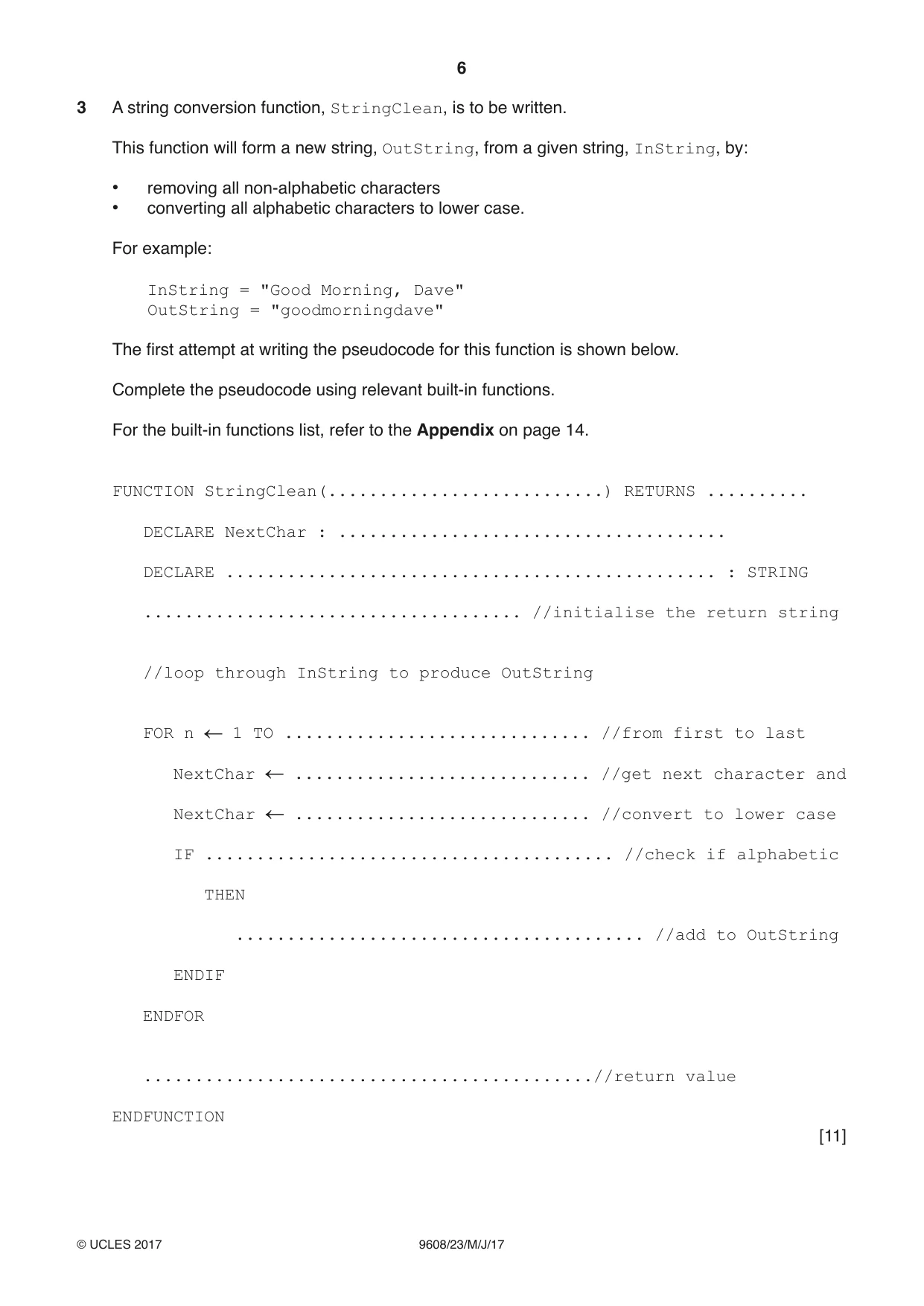
6 9608/23/M/J/17 © UCLES 2017 3 A string conversion function, StringClean, is to be written. This function will form a new string, OutString, from a given string, InString, by: • removing all non-alphabetic characters • converting all alphabetic characters to lower case. For example: InString = "Good Morning, Dave" OutString = "goodmorningdave" The first attempt at writing the pseudocode for this function is shown below. Complete the pseudocode using relevant built-in functions. For the built-in functions list, refer to the Appendix on page 14. FUNCTION StringClean(…) RETURNS … DECLARE NextChar : … DECLARE … : STRING … //initialise the return string //loop through InString to produce OutString FOR n 1 TO … //from first to last NextChar … //get next character and NextChar … //convert to lower case IF … //check if alphabetic THEN … //add to OutString ENDIF ENDFOR …//return value ENDFUNCTION [11]
Question paper, page 7
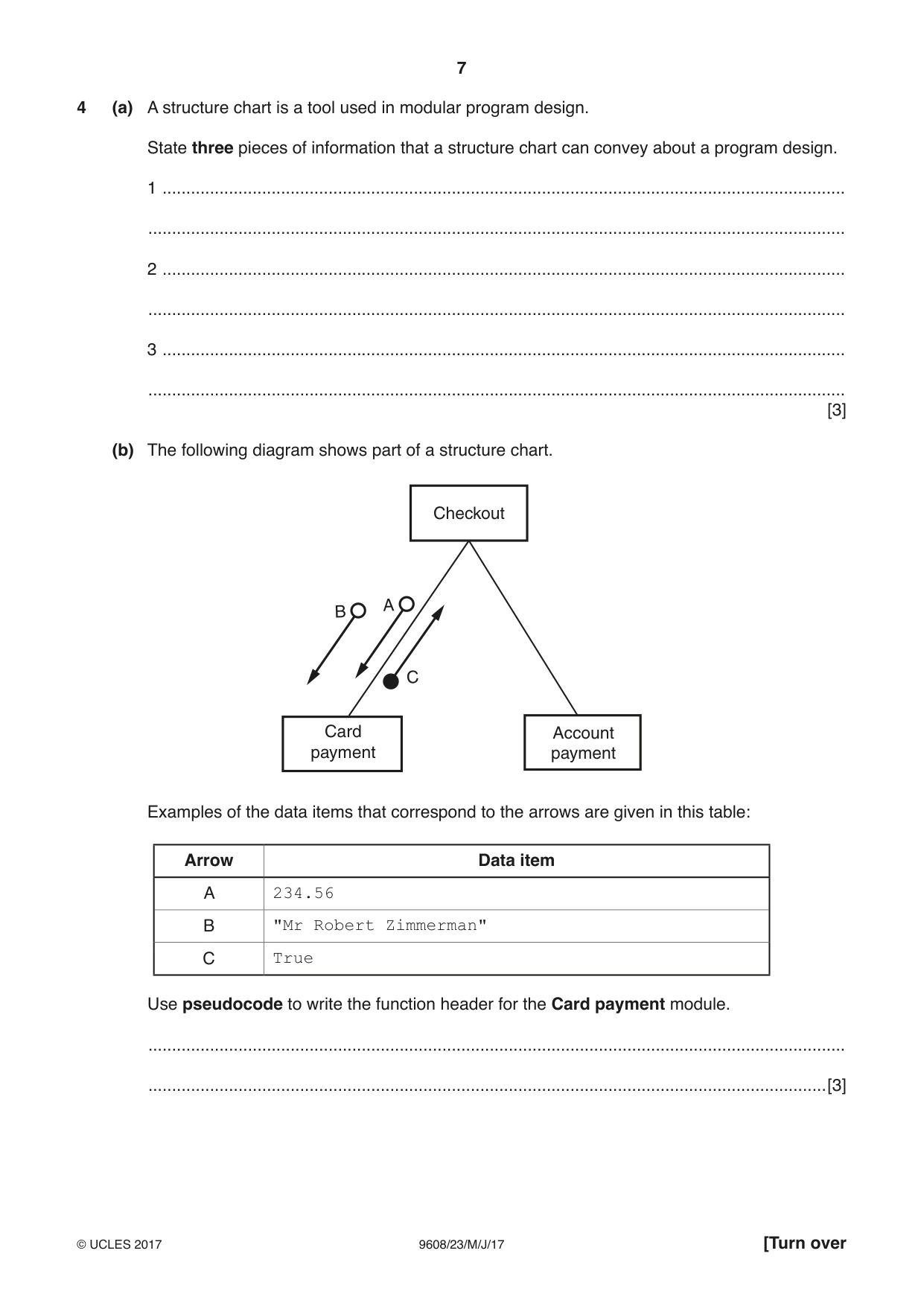
7 9608/23/M/J/17 © UCLES 2017 [Turn over 4 (a) A structure chart is a tool used in modular program design. State three pieces of information that a structure chart can convey about a program design. 1 … … 2 … … 3 … … [3] (b) The following diagram shows part of a structure chart. C A B Checkout Card payment Account payment Examples of the data items that correspond to the arrows are given in this table: Arrow Data item A 234.56 B "Mr Robert Zimmerman" C True Use pseudocode to write the function header for the Card payment module. … …[3]
Question paper, page 8
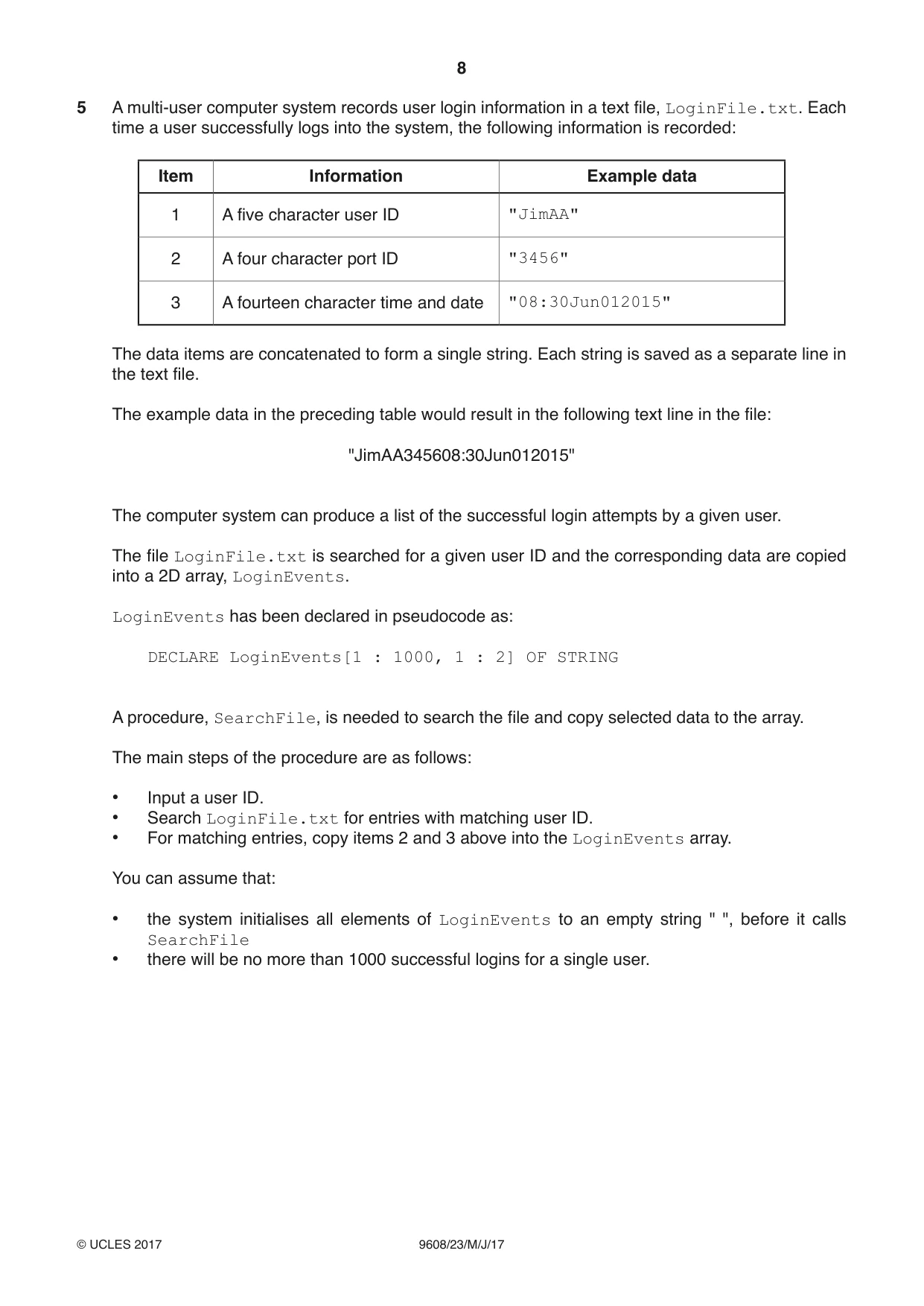
8 9608/23/M/J/17 © UCLES 2017 5 A multi-user computer system records user login information in a text file, LoginFile.txt. Each time a user successfully logs into the system, the following information is recorded: Item Information Example data 1 A five character user ID "JimAA" 2 A four character port ID "3456" 3 A fourteen character time and date "08:30Jun012015" The data items are concatenated to form a single string. Each string is saved as a separate line in the text file. The example data in the preceding table would result in the following text line in the file: "JimAA345608:30Jun012015" The computer system can produce a list of the successful login attempts by a given user. The file LoginFile.txt is searched for a given user ID and the corresponding data are copied into a 2D array, LoginEvents. LoginEvents has been declared in pseudocode as: DECLARE LoginEvents[1 : 1000, 1 : 2] OF STRING A procedure, SearchFile, is needed to search the file and copy selected data to the array. The main steps of the procedure are as follows: • Input a user ID. • Search LoginFile.txt for entries with matching user ID. • For matching entries, copy items 2 and 3 above into the LoginEvents array. You can assume that: • the system initialises all elements of LoginEvents to an empty string " ", before it calls SearchFile • there will be no more than 1000 successful logins for a single user.
Question paper, page 9
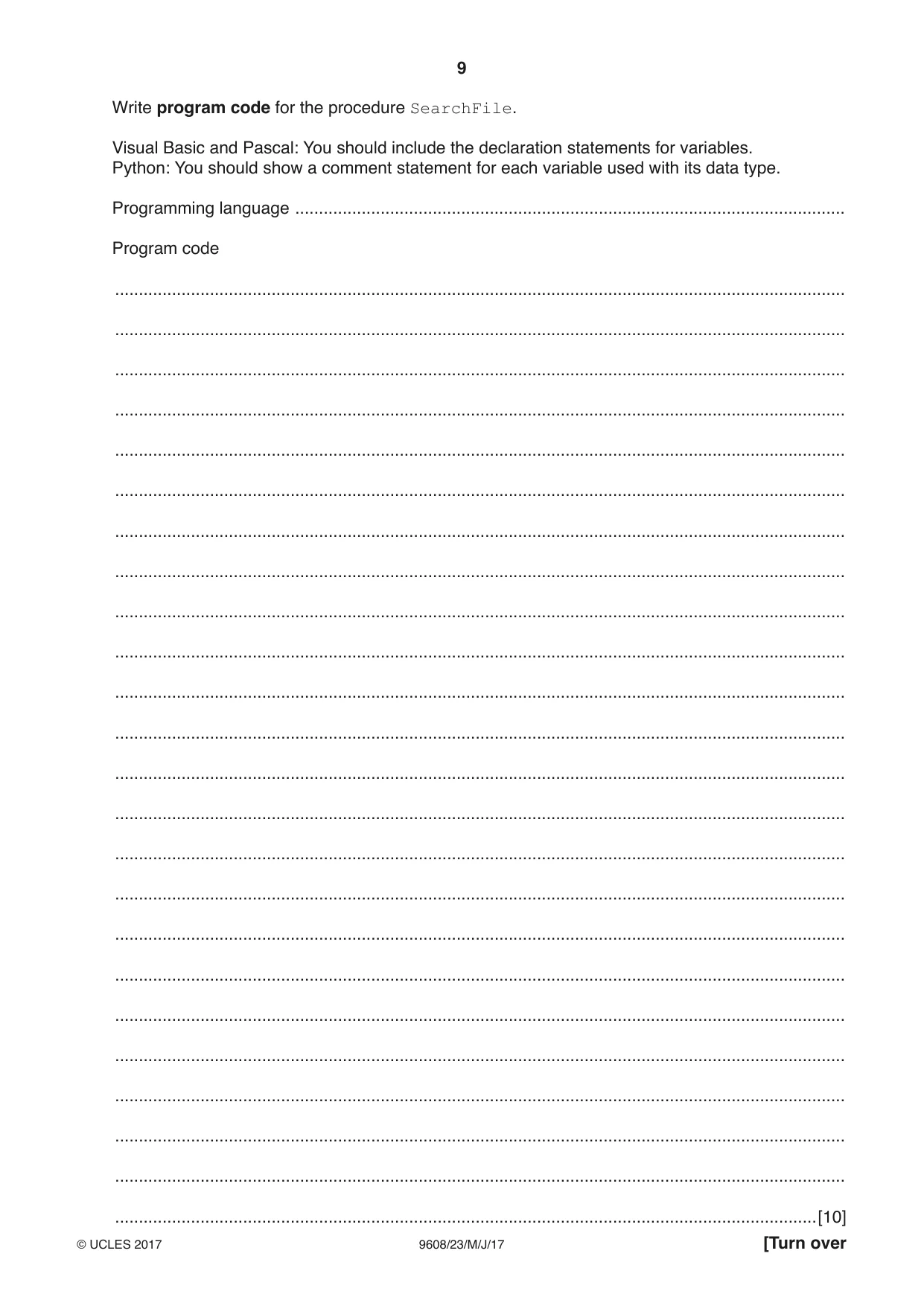
9 9608/23/M/J/17 © UCLES 2017 [Turn over Write program code for the procedure SearchFile. Visual Basic and Pascal: You should include the declaration statements for variables. Python: You should show a comment statement for each variable used with its data type. Programming language … Program code … … … … … … … … … … … … … … … … … … … … … … … …[10]
Question paper, page 10
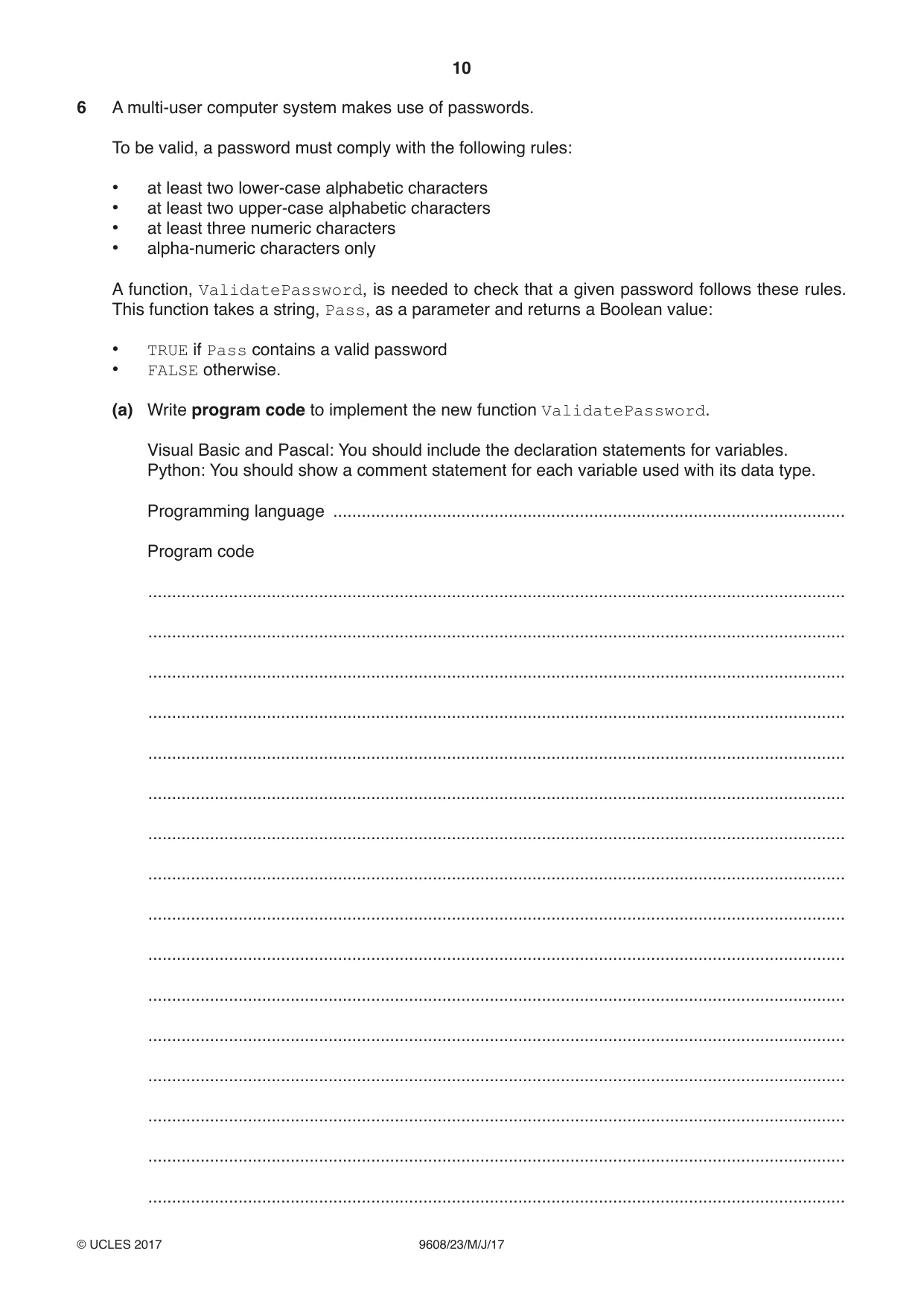
10 9608/23/M/J/17 © UCLES 2017 6 A multi-user computer system makes use of passwords. To be valid, a password must comply with the following rules: • at least two lower-case alphabetic characters • at least two upper-case alphabetic characters • at least three numeric characters • alpha-numeric characters only A function, ValidatePassword, is needed to check that a given password follows these rules. This function takes a string, Pass, as a parameter and returns a Boolean value: • TRUE if Pass contains a valid password • FALSE otherwise. (a) Write program code to implement the new function ValidatePassword. Visual Basic and Pascal: You should include the declaration statements for variables. Python: You should show a comment statement for each variable used with its data type. Programming language … Program code … … … … … … … … … … … … … … … …
Question paper, page 11
11 9608/23/M/J/17 © UCLES 2017 [Turn over … … … … … … … … … … … … … … … … … … … … …[10]
Question paper, page 12
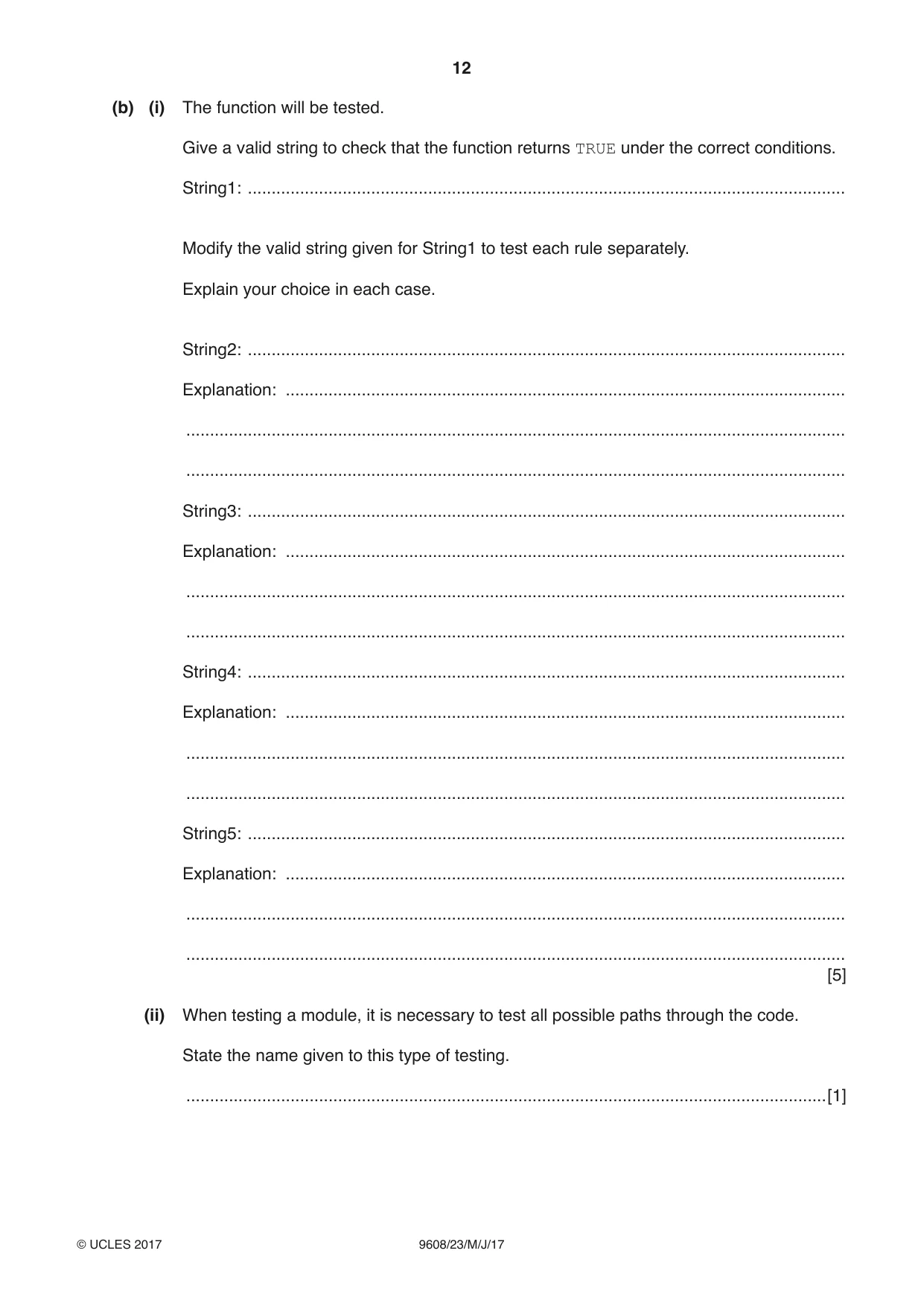
12 9608/23/M/J/17 © UCLES 2017 (b) (i) The function will be tested. Give a valid string to check that the function returns TRUE under the correct conditions. String1: … Modify the valid string given for String1 to test each rule separately. Explain your choice in each case. String2: … Explanation: … … … String3: … Explanation: … … … String4: … Explanation: … … … String5: … Explanation: … … … [5] (ii) When testing a module, it is necessary to test all possible paths through the code. State the name given to this type of testing. …[1]
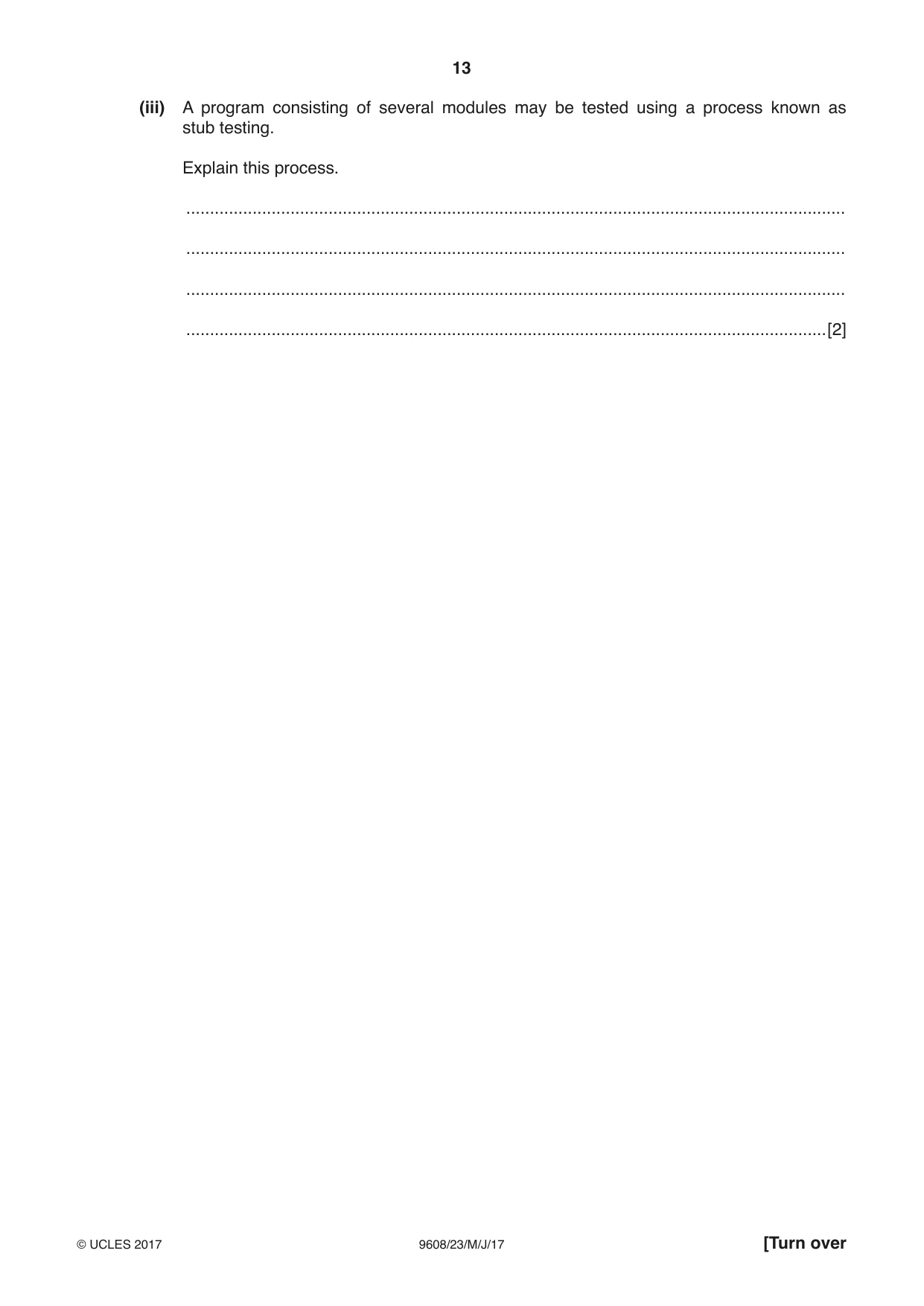
Question paper, page 13
13 9608/23/M/J/17 © UCLES 2017 [Turn over (iii) A program consisting of several modules may be tested using a process known as stub testing. Explain this process. … … … …[2]
Question paper, page 14
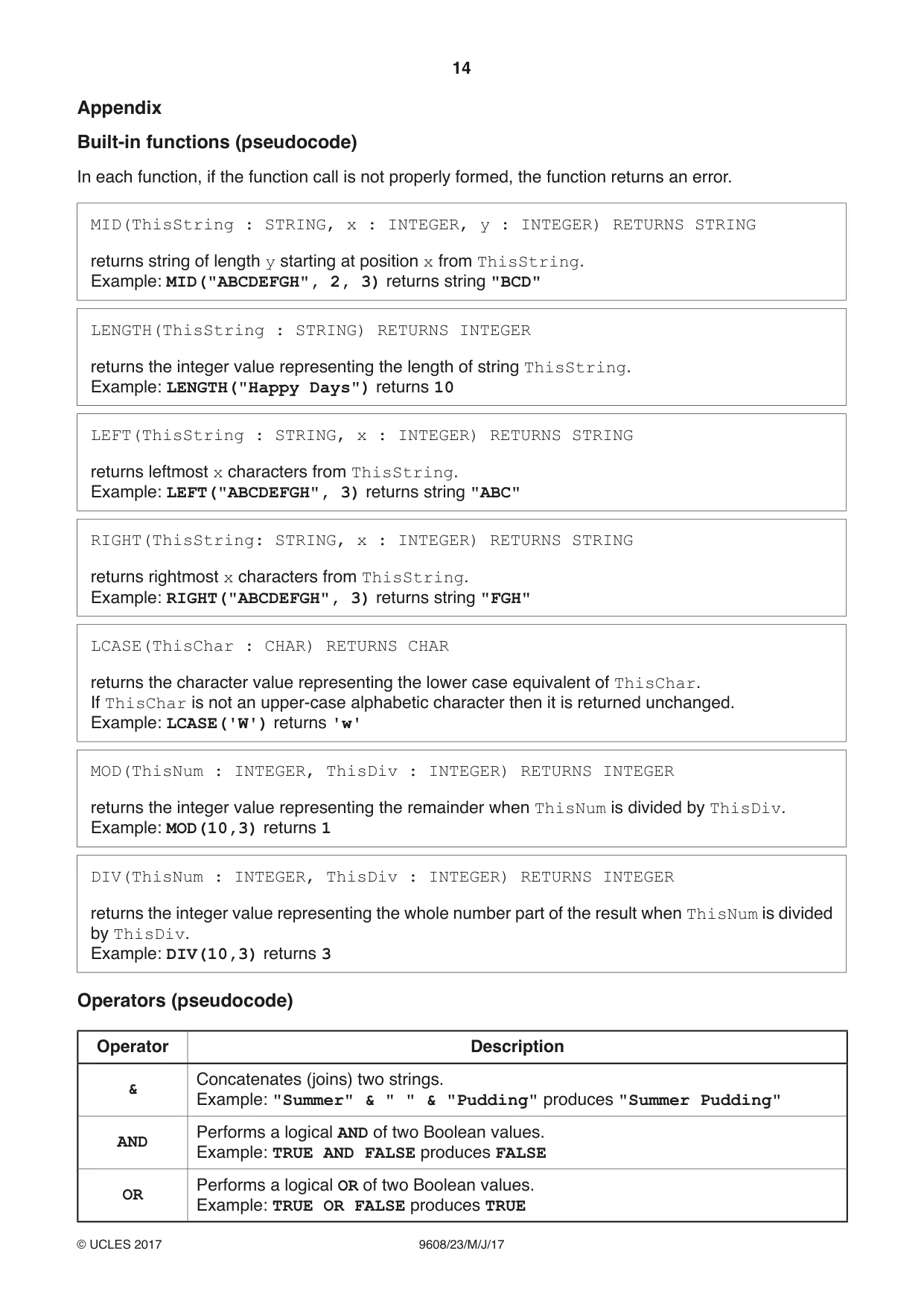
14 9608/23/M/J/17 © UCLES 2017 Appendix Built-in functions (pseudocode) In each function, if the function call is not properly formed, the function returns an error. MID(ThisString : STRING, x : INTEGER, y : INTEGER) RETURNS STRING returns string of length y starting at position x from ThisString. Example: MID("ABCDEFGH", 2, 3) returns string "BCD" LENGTH(ThisString : STRING) RETURNS INTEGER returns the integer value representing the length of string ThisString. Example: LENGTH("Happy Days") returns 10 LEFT(ThisString : STRING, x : INTEGER) RETURNS STRING returns leftmost x characters from ThisString. Example: LEFT("ABCDEFGH", 3) returns string "ABC" RIGHT(ThisString: STRING, x : INTEGER) RETURNS STRING returns rightmost x characters from ThisString. Example: RIGHT("ABCDEFGH", 3) returns string "FGH" LCASE(ThisChar : CHAR) RETURNS CHAR returns the character value representing the lower case equivalent of ThisChar. If ThisChar is not an upper-case alphabetic character then it is returned unchanged. Example: LCASE('W') returns 'w' MOD(ThisNum : INTEGER, ThisDiv : INTEGER) RETURNS INTEGER returns the integer value representing the remainder when ThisNum is divided by ThisDiv. Example: MOD(10,3) returns 1 DIV(ThisNum : INTEGER, ThisDiv : INTEGER) RETURNS INTEGER returns the integer value representing the whole number part of the result when ThisNum is divided by ThisDiv. Example: DIV(10,3) returns 3 Operators (pseudocode) Operator Description & Concatenates (joins) two strings. Example: "Summer" & " " & "Pudding" produces "Summer Pudding" AND Performs a logical AND of two Boolean values. Example: TRUE AND FALSE produces FALSE OR Performs a logical OR of two Boolean values. Example: TRUE OR FALSE produces TRUE
Question paper, page 15
15 9608/23/M/J/17 © UCLES 2017 BLANK PAGE
Question paper, page 16
16 9608/23/M/J/17 © UCLES 2017 Permission to reproduce items where third-party owned material protected by copyright is included has been sought and cleared where possible. Every reasonable effort has been made by the publisher (UCLES) to trace copyright holders, but if any items requiring clearance have unwittingly been included, the publisher will be pleased to make amends at the earliest possible opportunity. To avoid the issue of disclosure of answer-related information to candidates, all copyright acknowledgements are reproduced online in the Cambridge International Examinations Copyright Acknowledgements Booklet. This is produced for each series of examinations and is freely available to download at www.cie.org.uk after the live examination series. Cambridge International Examinations is part of the Cambridge Assessment Group. Cambridge Assessment is the brand name of University of Cambridge Local Examinations Syndicate (UCLES), which is itself a department of the University of Cambridge. BLANK PAGE
Mark scheme, page 1
® IGCSE is a registered trademark. This document consists of 13 printed pages. © UCLES 2017 [Turn over Cambridge International Examinations Cambridge International Advanced Subsidiary and Advanced Level COMPUTER SCIENCE 9608/23 Paper 2 May/June 2017 MARK SCHEME Maximum Mark: 75 Published This mark scheme is published as an aid to teachers and candidates, to indicate the requirements of the examination. It shows the basis on which Examiners were instructed to award marks. It does not indicate the details of the discussions that took place at an Examiners’ meeting before marking began, which would have considered the acceptability of alternative answers. Mark schemes should be read in conjunction with the question paper and the Principal Examiner Report for Teachers. Cambridge will not enter into discussions about these mark schemes. Cambridge is publishing the mark schemes for the May/June 2017 series for most Cambridge IGCSE®, Cambridge International A and AS Level and Cambridge Pre-U components, and some Cambridge O Level components.
Mark scheme, page 2
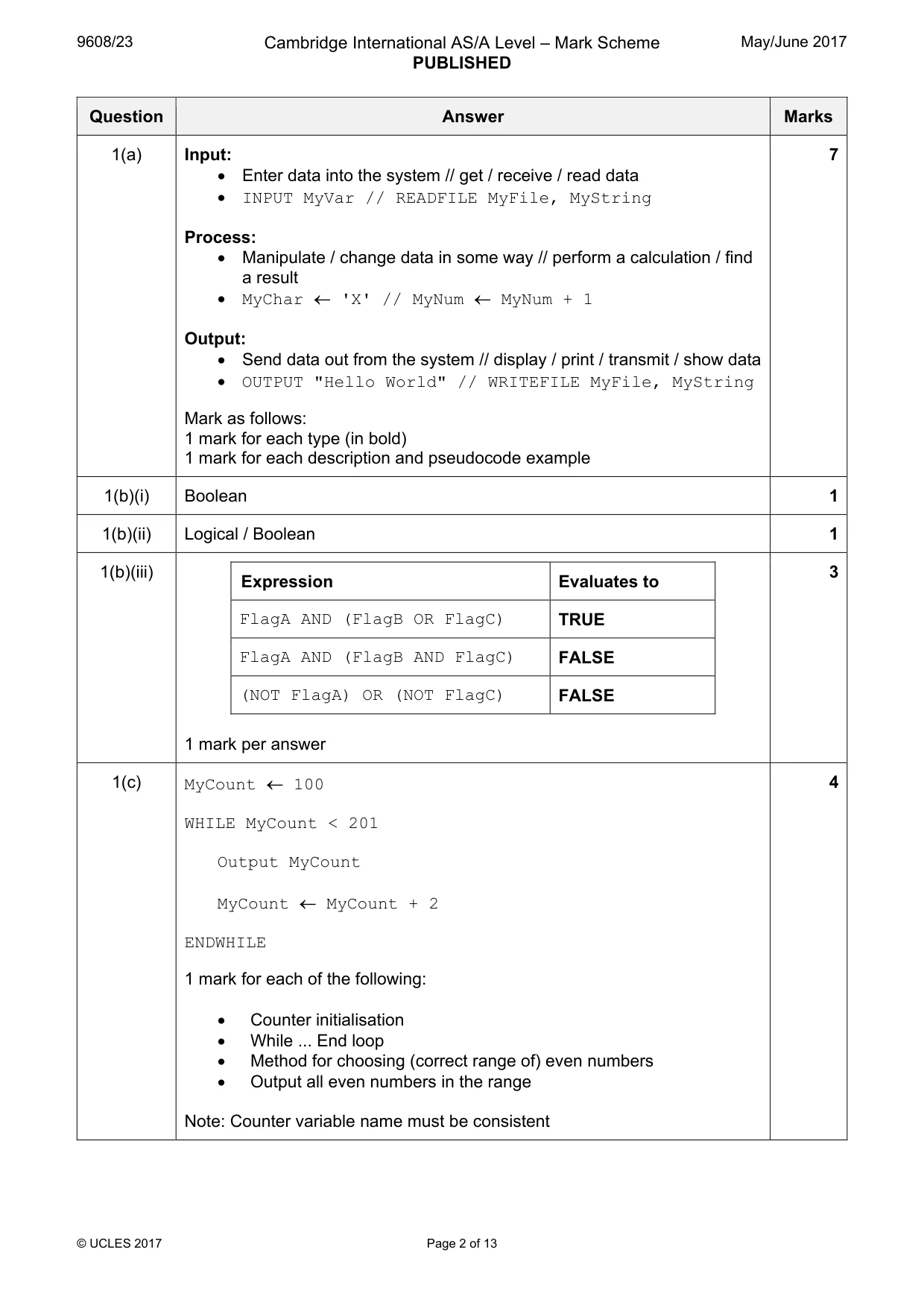
9608/23 Cambridge International AS/A Level – Mark Scheme PUBLISHED May/June 2017 © UCLES 2017 Page 2 of 13 Question Answer Marks 1(a) Input: • Enter data into the system // get / receive / read data • INPUT MyVar // READFILE MyFile, MyString Process: • Manipulate / change data in some way // perform a calculation / find a result • MyChar ← 'X' // MyNum ← MyNum + 1 Output: • Send data out from the system // display / print / transmit / show data • OUTPUT "Hello World" // WRITEFILE MyFile, MyString Mark as follows: 1 mark for each type (in bold) 1 mark for each description and pseudocode example 7 1(b)(i) Boolean 1 1(b)(ii) Logical / Boolean 1 1(b)(iii) Expression Evaluates to FlagA AND (FlagB OR FlagC) TRUE FlagA AND (FlagB AND FlagC) FALSE (NOT FlagA) OR (NOT FlagC) FALSE 1 mark per answer 3 1(c) MyCount ← 100 WHILE MyCount < 201 Output MyCount MyCount ← MyCount + 2 ENDWHILE 1 mark for each of the following: • Counter initialisation • While ... End loop • Method for choosing (correct range of) even numbers • Output all even numbers in the range Note: Counter variable name must be consistent 4
Mark scheme, page 3
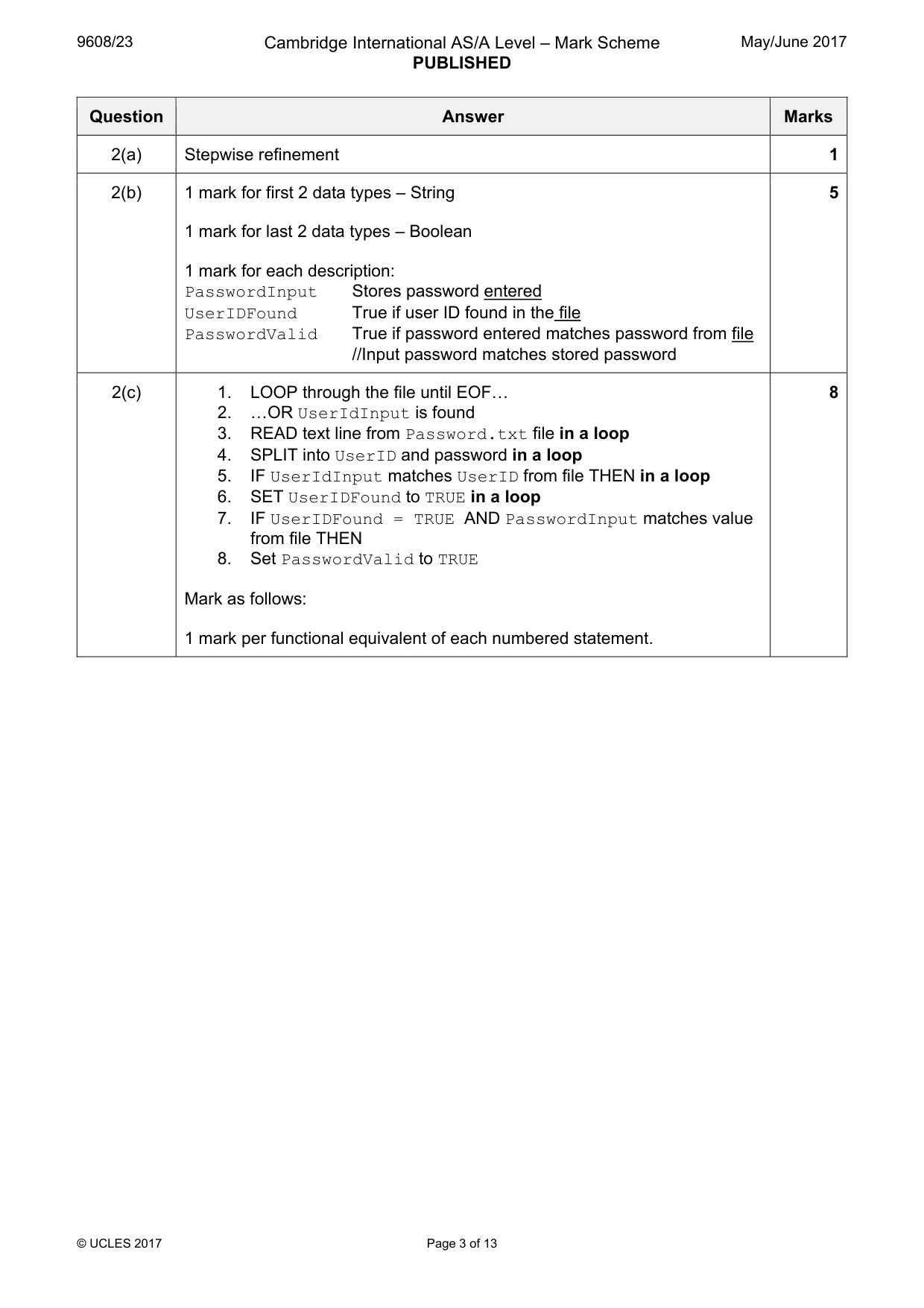
9608/23 Cambridge International AS/A Level – Mark Scheme PUBLISHED May/June 2017 © UCLES 2017 Page 3 of 13 Question Answer Marks 2(a) Stepwise refinement 1 2(b) 1 mark for first 2 data types – String 1 mark for last 2 data types – Boolean 1 mark for each description: PasswordInput Stores password entered UserIDFound True if user ID found in the file PasswordValid True if password entered matches password from file //Input password matches stored password 5 2(c) 1. LOOP through the file until EOF« 2. «OR UserIdInput is found 3. READ text line from Password.txt file in a loop 4. SPLIT into UserID and password in a loop 5. IF UserIdInput matches UserID from file THEN in a loop 6. SET UserIDFound to TRUE in a loop 7. IF UserIDFound = TRUE AND PasswordInput matches value from file THEN 8. Set PasswordValid to TRUE Mark as follows: 1 mark per functional equivalent of each numbered statement. 8
Mark scheme, page 4
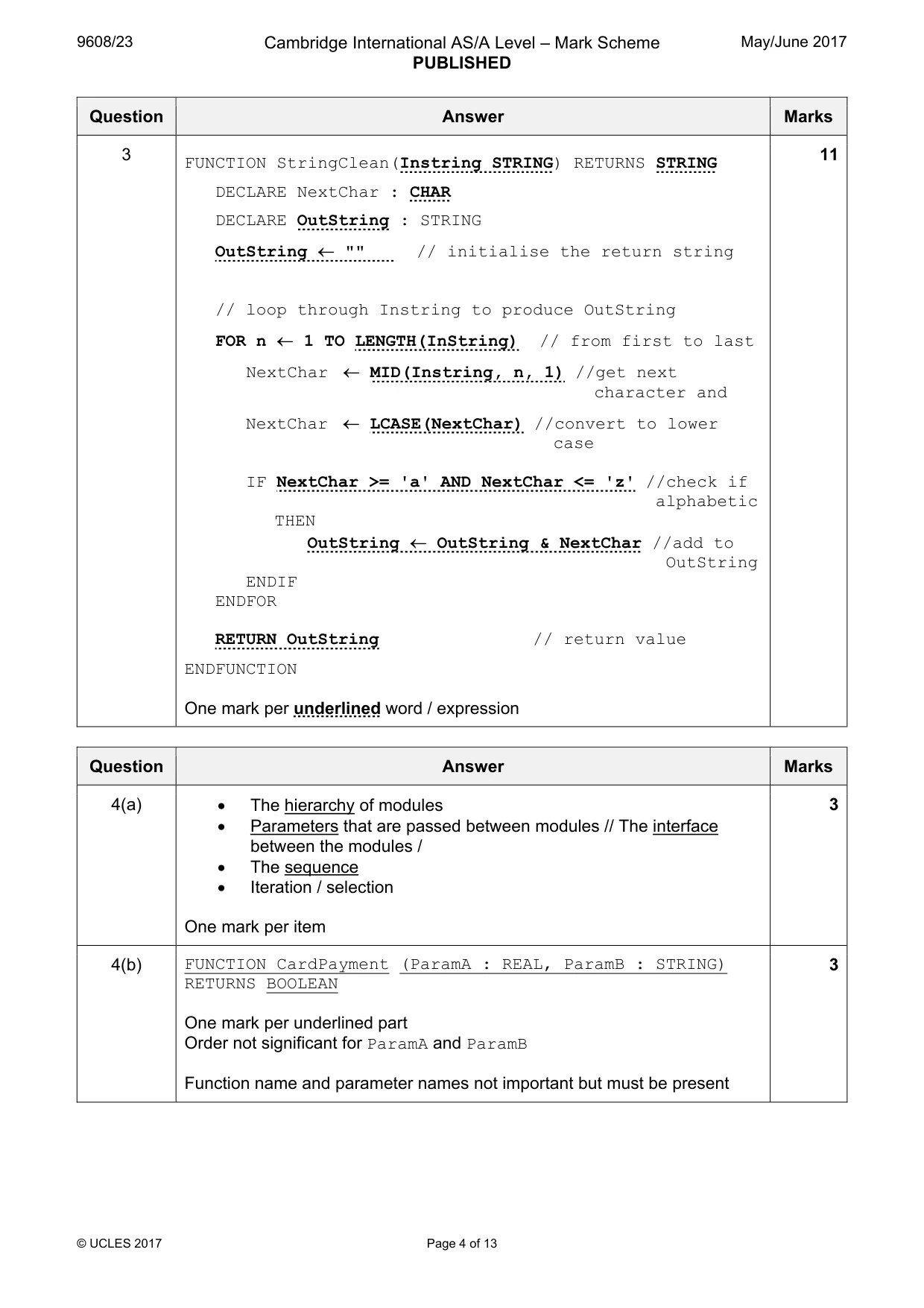
9608/23 Cambridge International AS/A Level – Mark Scheme PUBLISHED May/June 2017 © UCLES 2017 Page 4 of 13 Question Answer Marks 3 FUNCTION StringClean(Instring STRING) RETURNS STRING DECLARE NextChar : CHAR DECLARE OutString : STRING OutString ← "" // initialise the return string // loop through Instring to produce OutString FOR n ← 1 TO LENGTH(InString) // from first to last NextChar ← MID(Instring, n, 1) //get next character and NextChar ← LCASE(NextChar) //convert to lower case IF NextChar >= 'a' AND NextChar <= 'z' //check if alphabetic THEN OutString ← OutString & NextChar //add to OutString ENDIF ENDFOR RETURN OutString // return value ENDFUNCTION One mark per underlined word / expression 11 Question Answer Marks 4(a) • The hierarchy of modules • Parameters that are passed between modules // The interface between the modules / • The sequence • Iteration / selection One mark per item 3 4(b) FUNCTION CardPayment (ParamA : REAL, ParamB : STRING) RETURNS BOOLEAN One mark per underlined part Order not significant for ParamA and ParamB Function name and parameter names not important but must be present 3
Mark scheme, page 5
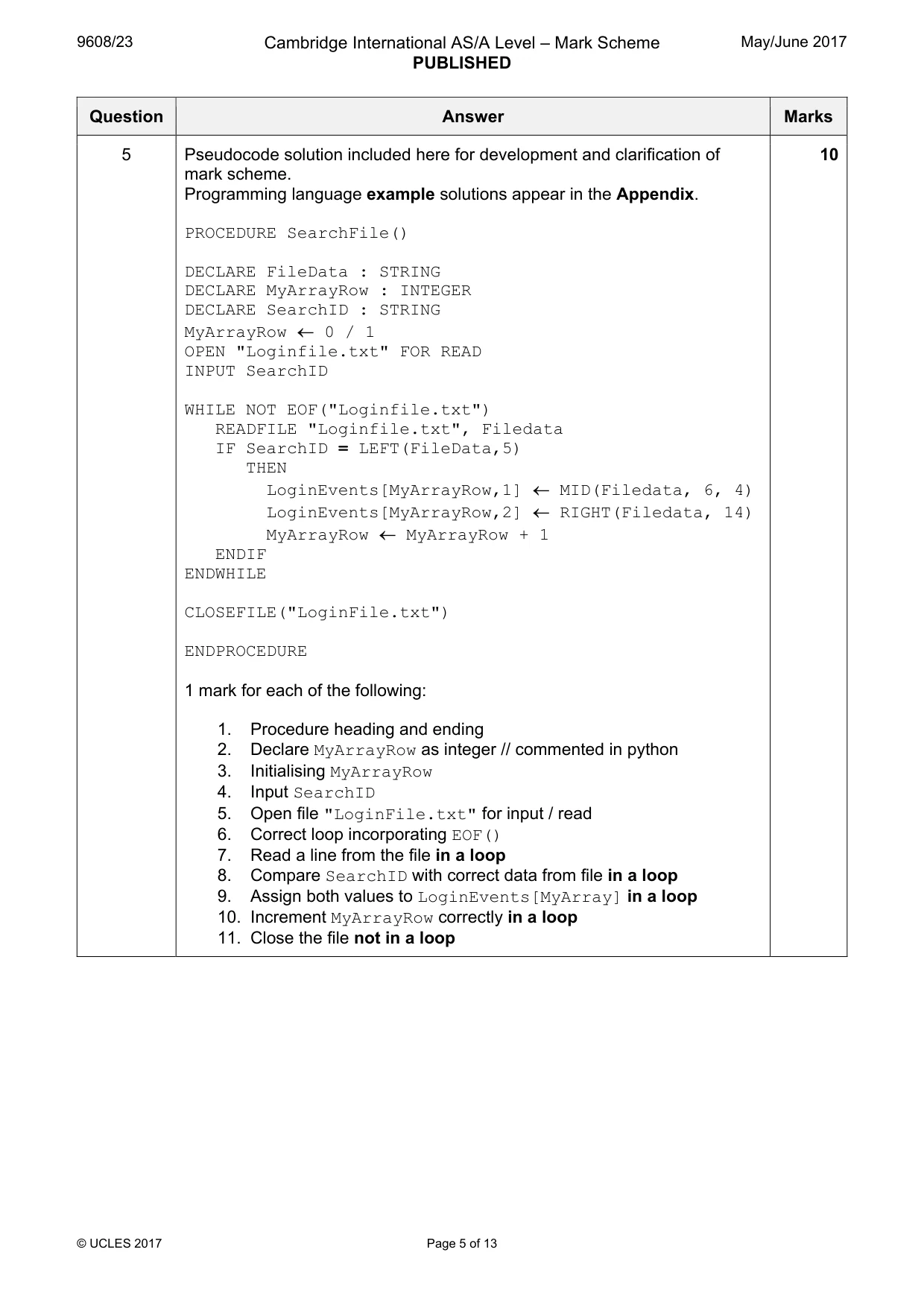
9608/23 Cambridge International AS/A Level – Mark Scheme PUBLISHED May/June 2017 © UCLES 2017 Page 5 of 13 Question Answer Marks 5 Pseudocode solution included here for development and clarification of mark scheme. Programming language example solutions appear in the Appendix. PROCEDURE SearchFile() DECLARE FileData : STRING DECLARE MyArrayRow : INTEGER DECLARE SearchID : STRING MyArrayRow ← 0 / 1 OPEN "Loginfile.txt" FOR READ INPUT SearchID WHILE NOT EOF("Loginfile.txt") READFILE "Loginfile.txt", Filedata IF SearchID = LEFT(FileData,5) THEN LoginEvents[MyArrayRow,1] ← MID(Filedata, 6, 4) LoginEvents[MyArrayRow,2] ← RIGHT(Filedata, 14) MyArrayRow ← MyArrayRow + 1 ENDIF ENDWHILE CLOSEFILE("LoginFile.txt") ENDPROCEDURE 1 mark for each of the following: 1. Procedure heading and ending 2. Declare MyArrayRow as integer // commented in python 3. Initialising MyArrayRow 4. Input SearchID 5. Open file "LoginFile.txt" for input / read 6. Correct loop incorporating EOF() 7. Read a line from the file in a loop 8. Compare SearchID with correct data from file in a loop 9. Assign both values to LoginEvents[MyArray] in a loop 10. Increment MyArrayRow correctly in a loop 11. Close the file not in a loop 10
Mark scheme, page 6
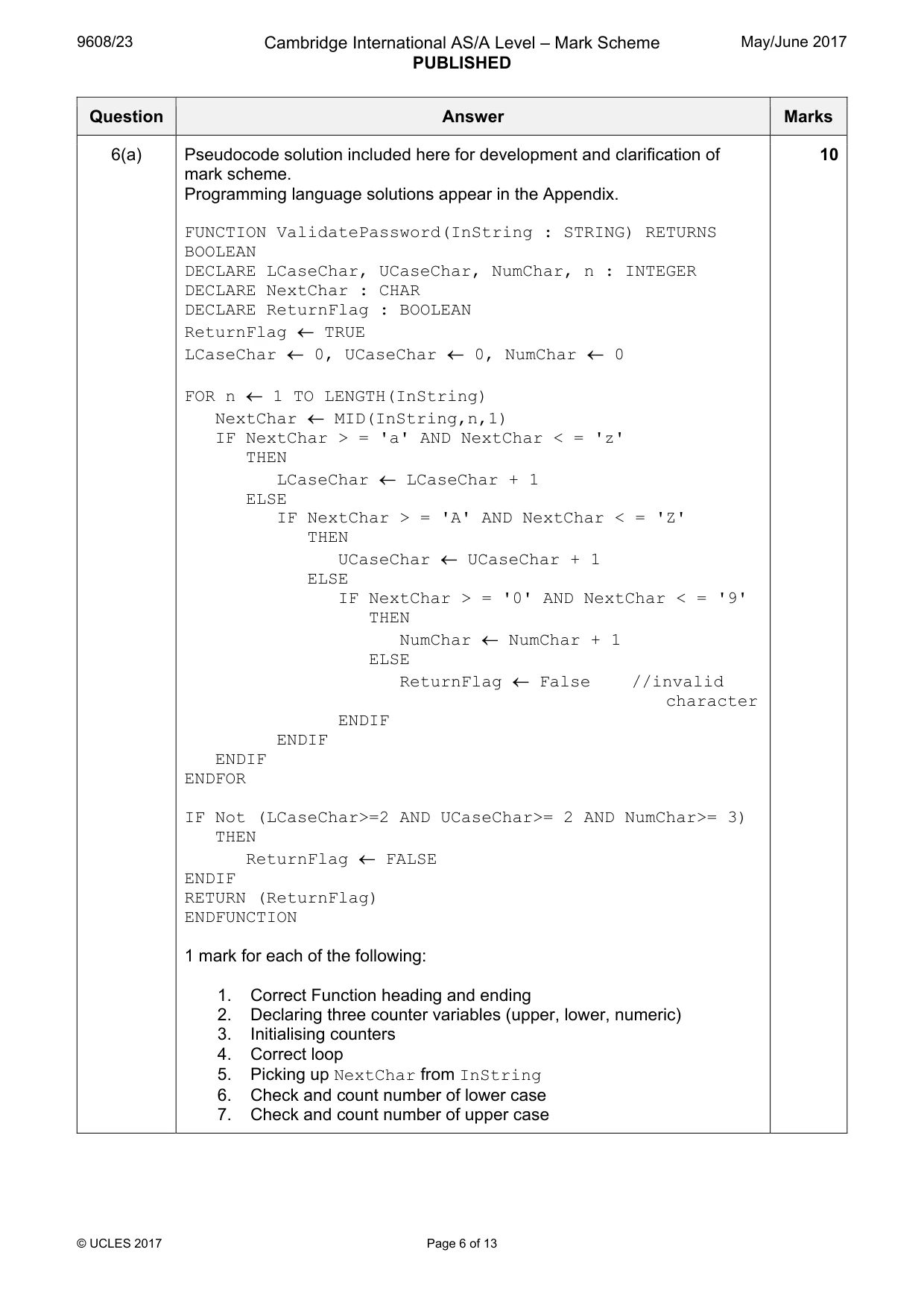
9608/23 Cambridge International AS/A Level – Mark Scheme PUBLISHED May/June 2017 © UCLES 2017 Page 6 of 13 Question Answer Marks 6(a) Pseudocode solution included here for development and clarification of mark scheme. Programming language solutions appear in the Appendix. FUNCTION ValidatePassword(InString : STRING) RETURNS BOOLEAN DECLARE LCaseChar, UCaseChar, NumChar, n : INTEGER DECLARE NextChar : CHAR DECLARE ReturnFlag : BOOLEAN ReturnFlag ← TRUE LCaseChar ← 0, UCaseChar ← 0, NumChar ← 0 FOR n ← 1 TO LENGTH(InString) NextChar ← MID(InString,n,1) IF NextChar > = 'a' AND NextChar < = 'z' THEN LCaseChar ← LCaseChar + 1 ELSE IF NextChar > = 'A' AND NextChar < = 'Z' THEN UCaseChar ← UCaseChar + 1 ELSE IF NextChar > = '0' AND NextChar < = '9' THEN NumChar ← NumChar + 1 ELSE ReturnFlag ← False //invalid character ENDIF ENDIF ENDIF ENDFOR IF Not (LCaseChar>=2 AND UCaseChar>= 2 AND NumChar>= 3) THEN ReturnFlag ← FALSE ENDIF RETURN (ReturnFlag) ENDFUNCTION 1 mark for each of the following: 1. Correct Function heading and ending 2. Declaring three counter variables (upper, lower, numeric) 3. Initialising counters 4. Correct loop 5. Picking up NextChar from InString 6. Check and count number of lower case 7. Check and count number of upper case 10
Mark scheme, page 7
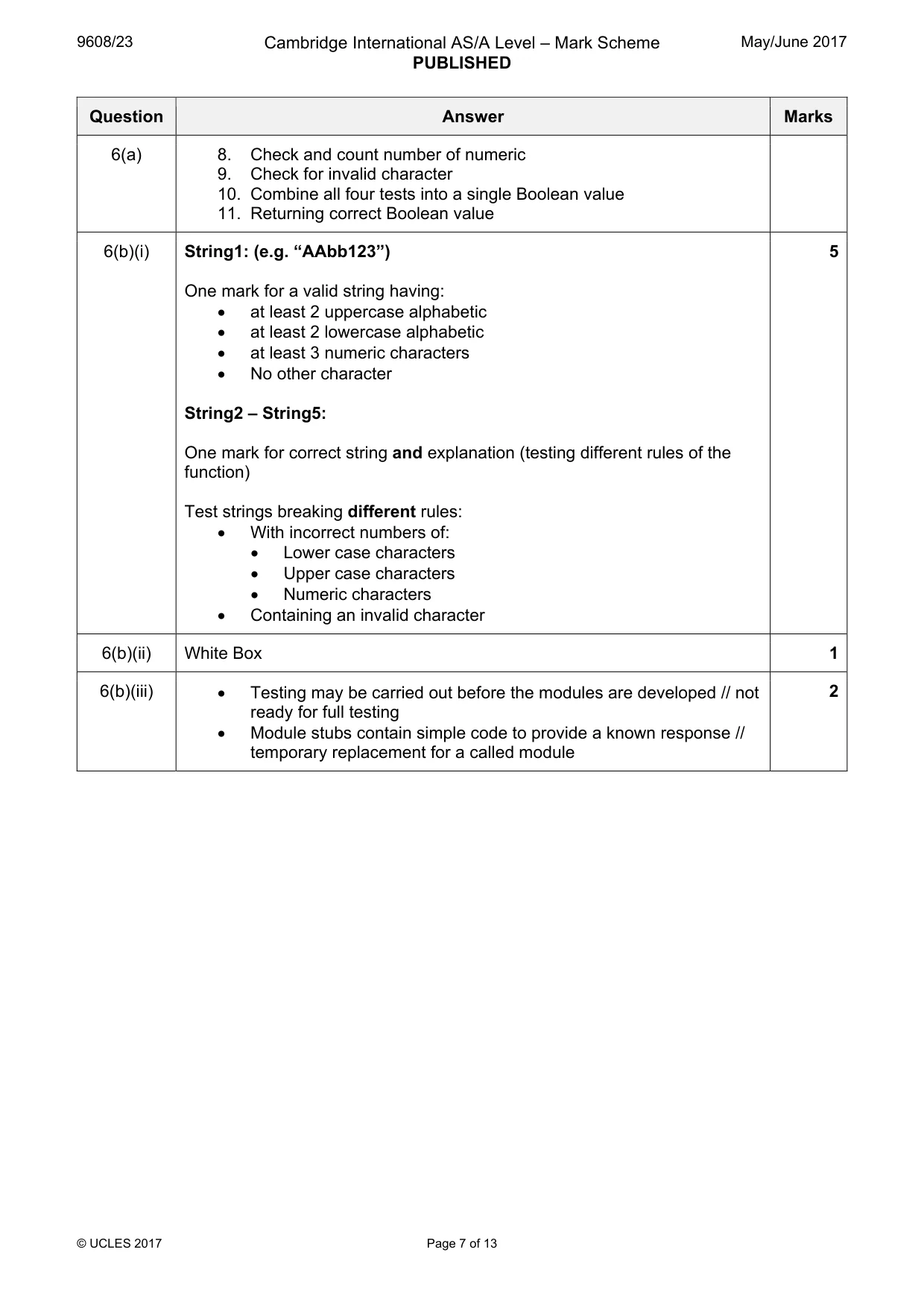
9608/23 Cambridge International AS/A Level – Mark Scheme PUBLISHED May/June 2017 © UCLES 2017 Page 7 of 13 Question Answer Marks 6(a) 8. Check and count number of numeric 9. Check for invalid character 10. Combine all four tests into a single Boolean value 11. Returning correct Boolean value 6(b)(i) String1: (e.g. “AAbb123”) One mark for a valid string having: • at least 2 uppercase alphabetic • at least 2 lowercase alphabetic • at least 3 numeric characters • No other character String2 – String5: One mark for correct string and explanation (testing different rules of the function) Test strings breaking different rules: • With incorrect numbers of: • Lower case characters • Upper case characters • Numeric characters • Containing an invalid character 5 6(b)(ii) White Box 1 6(b)(iii) • Testing may be carried out before the modules are developed // not ready for full testing • Module stubs contain simple code to provide a known response // temporary replacement for a called module 2
Mark scheme, page 8
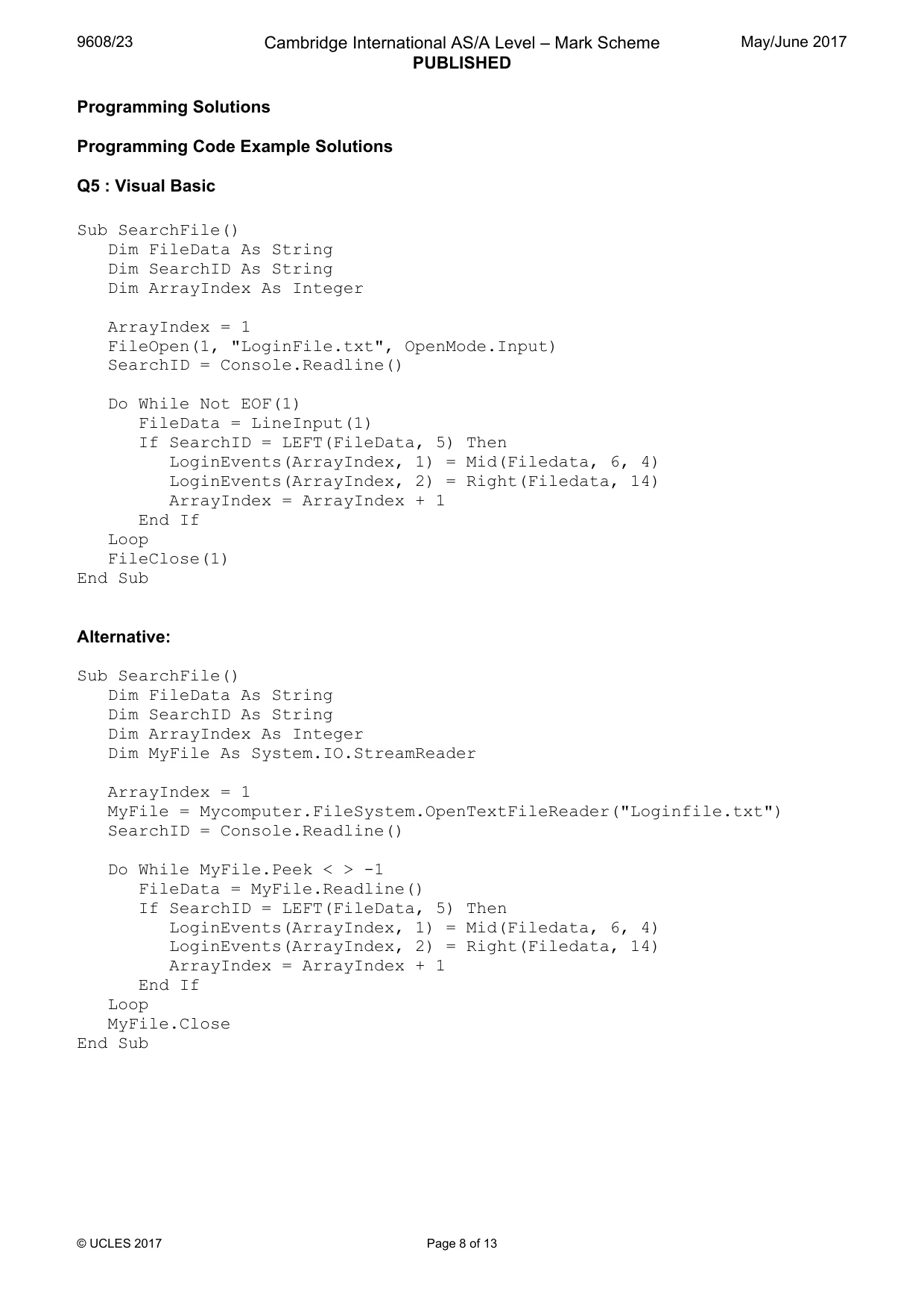
9608/23 Cambridge International AS/A Level – Mark Scheme PUBLISHED May/June 2017 © UCLES 2017 Page 8 of 13 Programming Solutions Programming Code Example Solutions Q5 : Visual Basic Sub SearchFile() Dim FileData As String Dim SearchID As String Dim ArrayIndex As Integer ArrayIndex = 1 FileOpen(1, "LoginFile.txt", OpenMode.Input) SearchID = Console.Readline() Do While Not EOF(1) FileData = LineInput(1) If SearchID = LEFT(FileData, 5) Then LoginEvents(ArrayIndex, 1) = Mid(Filedata, 6, 4) LoginEvents(ArrayIndex, 2) = Right(Filedata, 14) ArrayIndex = ArrayIndex + 1 End If Loop FileClose(1) End Sub Alternative: Sub SearchFile() Dim FileData As String Dim SearchID As String Dim ArrayIndex As Integer Dim MyFile As System.IO.StreamReader ArrayIndex = 1 MyFile = Mycomputer.FileSystem.OpenTextFileReader("Loginfile.txt") SearchID = Console.Readline() Do While MyFile.Peek < > -1 FileData = MyFile.Readline() If SearchID = LEFT(FileData, 5) Then LoginEvents(ArrayIndex, 1) = Mid(Filedata, 6, 4) LoginEvents(ArrayIndex, 2) = Right(Filedata, 14) ArrayIndex = ArrayIndex + 1 End If Loop MyFile.Close End Sub
Mark scheme, page 9
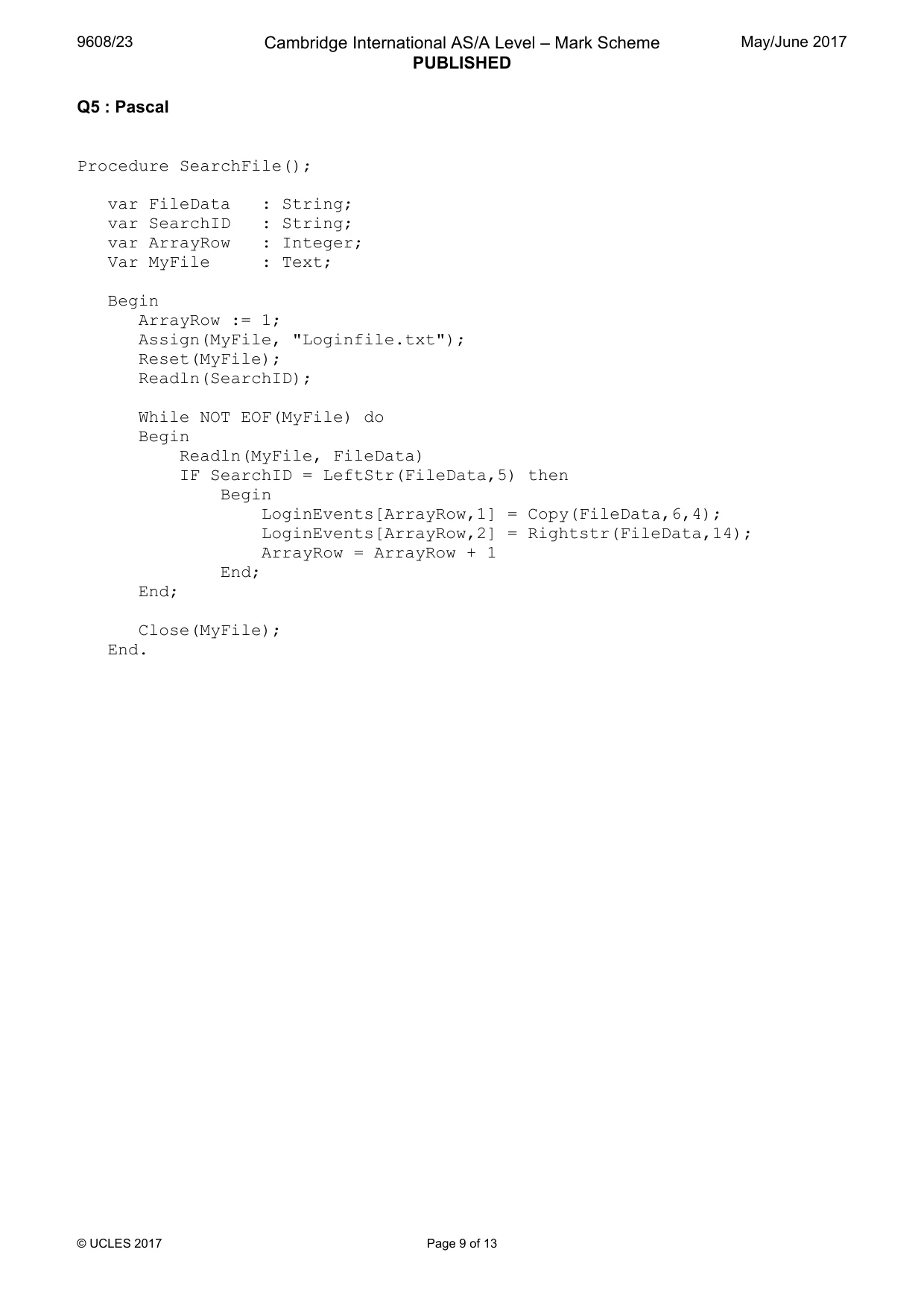
9608/23 Cambridge International AS/A Level – Mark Scheme PUBLISHED May/June 2017 © UCLES 2017 Page 9 of 13 Q5 : Pascal Procedure SearchFile(); var FileData : String; var SearchID : String; var ArrayRow : Integer; Var MyFile : Text; Begin ArrayRow := 1; Assign(MyFile, "Loginfile.txt"); Reset(MyFile); Readln(SearchID); While NOT EOF(MyFile) do Begin Readln(MyFile, FileData) IF SearchID = LeftStr(FileData,5) then Begin LoginEvents[ArrayRow,1] = Copy(FileData,6,4); LoginEvents[ArrayRow,2] = Rightstr(FileData,14); ArrayRow = ArrayRow + 1 End; End; Close(MyFile); End.
Mark scheme, page 10
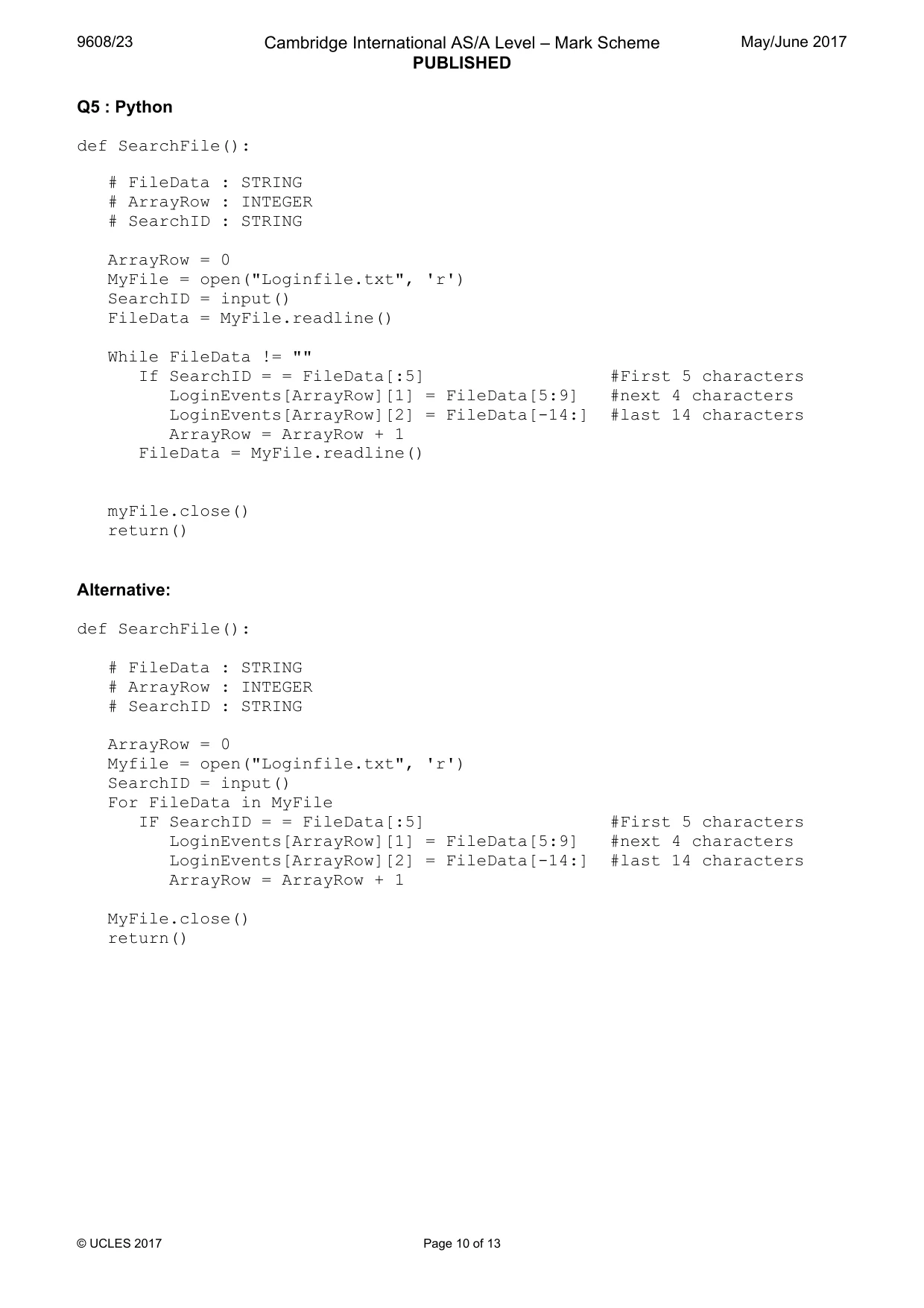
9608/23 Cambridge International AS/A Level – Mark Scheme PUBLISHED May/June 2017 © UCLES 2017 Page 10 of 13 Q5 : Python def SearchFile(): # FileData : STRING # ArrayRow : INTEGER # SearchID : STRING ArrayRow = 0 MyFile = open("Loginfile.txt", 'r') SearchID = input() FileData = MyFile.readline() While FileData != "" If SearchID = = FileData[:5] #First 5 characters LoginEvents[ArrayRow][1] = FileData[5:9] #next 4 characters LoginEvents[ArrayRow][2] = FileData[-14:] #last 14 characters ArrayRow = ArrayRow + 1 FileData = MyFile.readline() myFile.close() return() Alternative: def SearchFile(): # FileData : STRING # ArrayRow : INTEGER # SearchID : STRING ArrayRow = 0 Myfile = open("Loginfile.txt", 'r') SearchID = input() For FileData in MyFile IF SearchID = = FileData[:5] #First 5 characters LoginEvents[ArrayRow][1] = FileData[5:9] #next 4 characters LoginEvents[ArrayRow][2] = FileData[-14:] #last 14 characters ArrayRow = ArrayRow + 1 MyFile.close() return()
Mark scheme, page 11
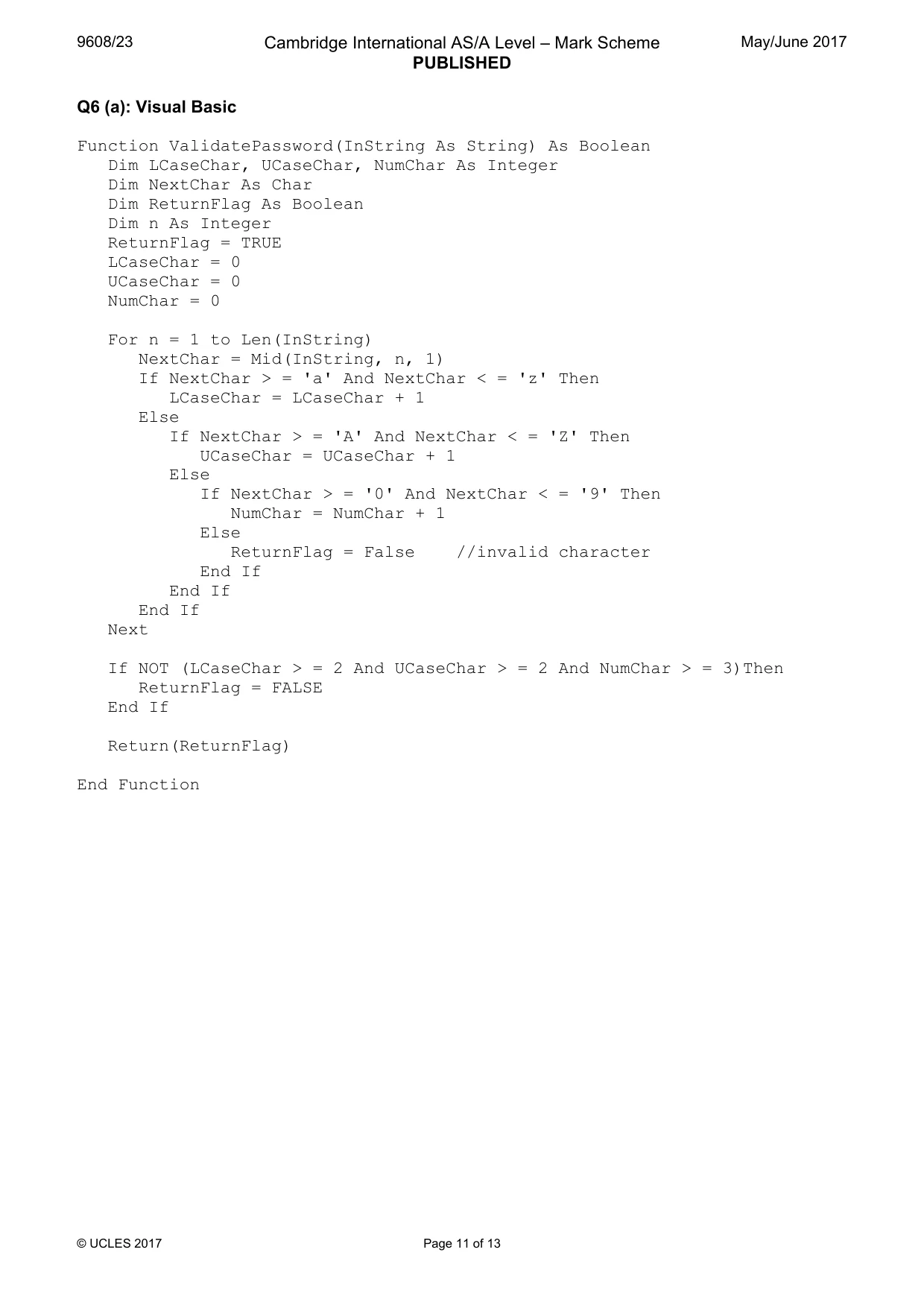
9608/23 Cambridge International AS/A Level – Mark Scheme PUBLISHED May/June 2017 © UCLES 2017 Page 11 of 13 Q6 (a): Visual Basic Function ValidatePassword(InString As String) As Boolean Dim LCaseChar, UCaseChar, NumChar As Integer Dim NextChar As Char Dim ReturnFlag As Boolean Dim n As Integer ReturnFlag = TRUE LCaseChar = 0 UCaseChar = 0 NumChar = 0 For n = 1 to Len(InString) NextChar = Mid(InString, n, 1) If NextChar > = 'a' And NextChar < = 'z' Then LCaseChar = LCaseChar + 1 Else If NextChar > = 'A' And NextChar < = 'Z' Then UCaseChar = UCaseChar + 1 Else If NextChar > = '0' And NextChar < = '9' Then NumChar = NumChar + 1 Else ReturnFlag = False //invalid character End If End If End If Next If NOT (LCaseChar > = 2 And UCaseChar > = 2 And NumChar > = 3)Then ReturnFlag = FALSE End If Return(ReturnFlag) End Function
Mark scheme, page 12
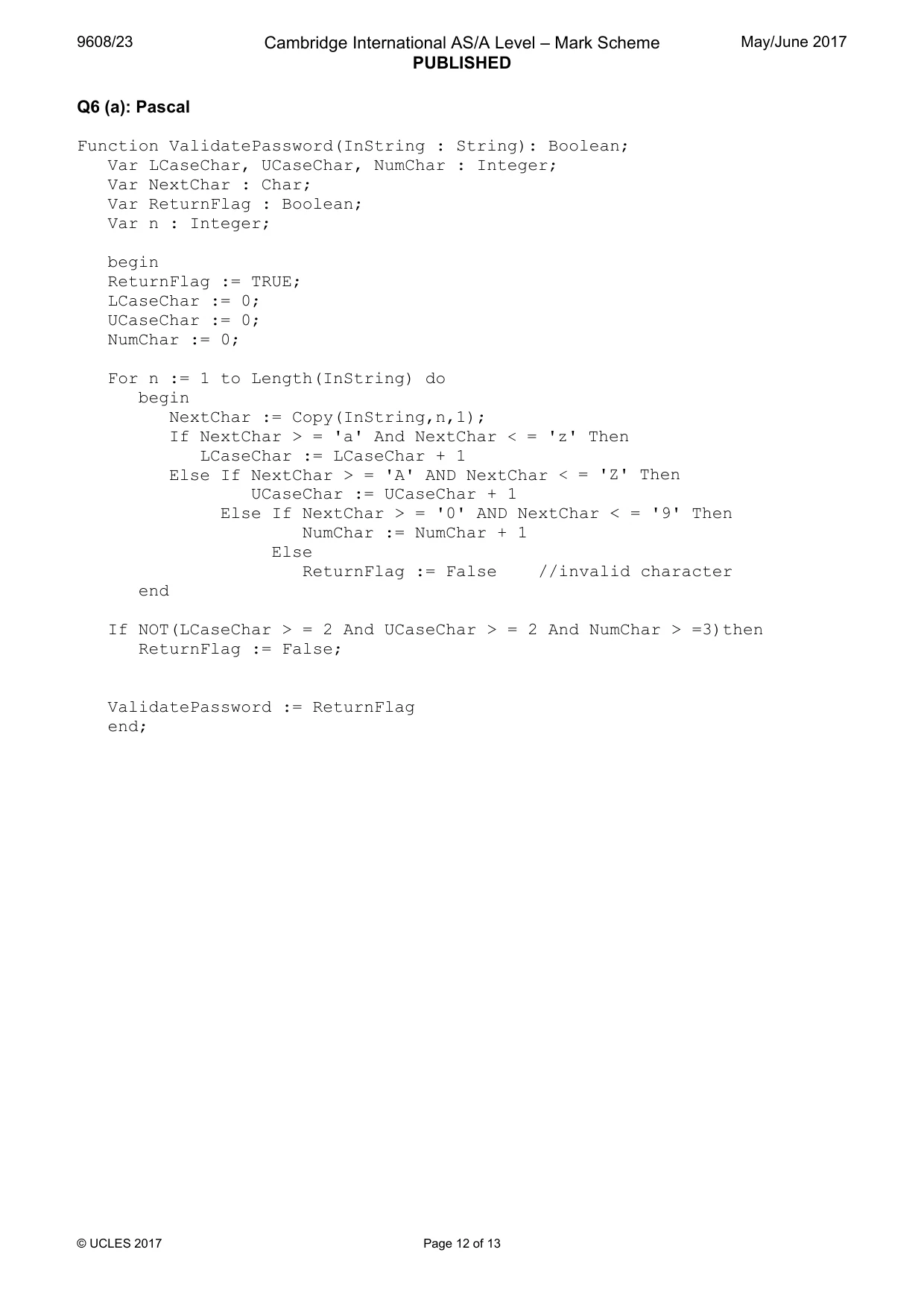
9608/23 Cambridge International AS/A Level – Mark Scheme PUBLISHED May/June 2017 © UCLES 2017 Page 12 of 13 Q6 (a): Pascal Function ValidatePassword(InString : String): Boolean; Var LCaseChar, UCaseChar, NumChar : Integer; Var NextChar : Char; Var ReturnFlag : Boolean; Var n : Integer; begin ReturnFlag := TRUE; LCaseChar := 0; UCaseChar := 0; NumChar := 0; For n := 1 to Length(InString) do begin NextChar := Copy(InString,n,1); If NextChar > = 'a' And NextChar < = 'z' Then LCaseChar := LCaseChar + 1 Else If NextChar > = 'A' AND NextChar < = 'Z' Then UCaseChar := UCaseChar + 1 Else If NextChar > = '0' AND NextChar < = '9' Then NumChar := NumChar + 1 Else ReturnFlag := False //invalid character end If NOT(LCaseChar > = 2 And UCaseChar > = 2 And NumChar > =3)then ReturnFlag := False; ValidatePassword := ReturnFlag end;
Mark scheme, page 13
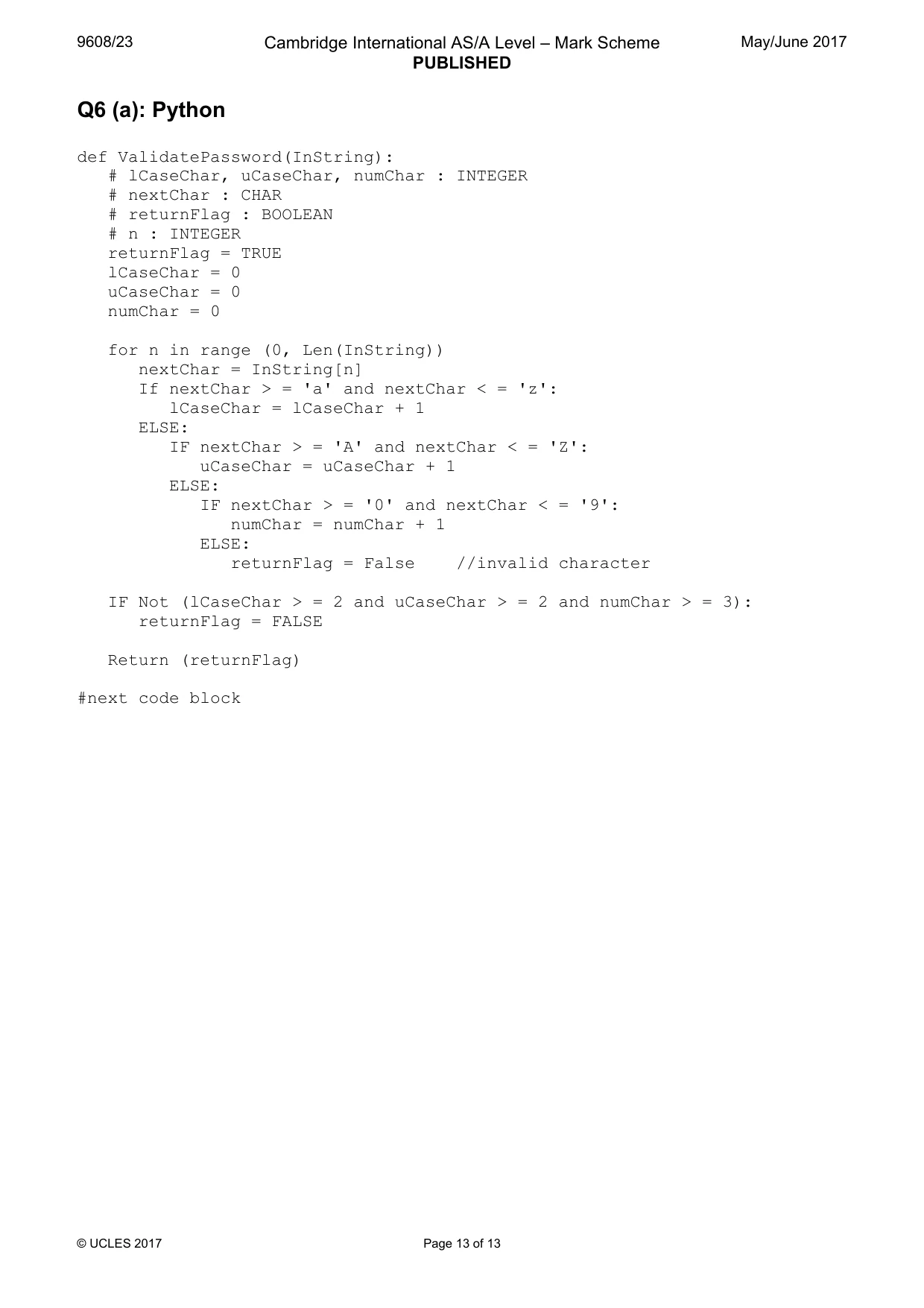
9608/23 Cambridge International AS/A Level – Mark Scheme PUBLISHED May/June 2017 © UCLES 2017 Page 13 of 13 Q6 (a): Python def ValidatePassword(InString): # lCaseChar, uCaseChar, numChar : INTEGER # nextChar : CHAR # returnFlag : BOOLEAN # n : INTEGER returnFlag = TRUE lCaseChar = 0 uCaseChar = 0 numChar = 0 for n in range (0, Len(InString)) nextChar = InString[n] If nextChar > = 'a' and nextChar < = 'z': lCaseChar = lCaseChar + 1 ELSE: IF nextChar > = 'A' and nextChar < = 'Z': uCaseChar = uCaseChar + 1 ELSE: IF nextChar > = '0' and nextChar < = '9': numChar = numChar + 1 ELSE: returnFlag = False //invalid character IF Not (lCaseChar > = 2 and uCaseChar > = 2 and numChar > = 3): returnFlag = FALSE Return (returnFlag) #next code block
What you needed in this session
Cambridge’s own grade thresholds for 2017 May/June, Paper 2 · Variant 3. A higher threshold means an easier paper — the bar moves with how the cohort did.